









Jim Scharf
General Manager, DynamoDB
Time : 10:10 – 10:50
Getting Started with Amazon
DynamoDB
Getting Started with Amazon DynamoDB
AGENDA
• Brief history of data processing
• Relational (SQL) vs. Non-relational (NoSQL)
• DynamoDB tables & indexes
• Scaling
• Integration and Search Capabilities
• Pricing and Free Tier
• Customer Use Cases
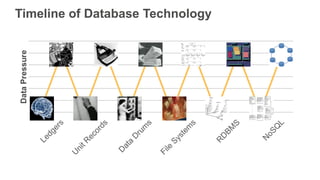
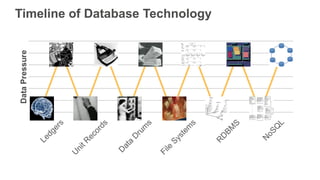
Timeline of Database Technology
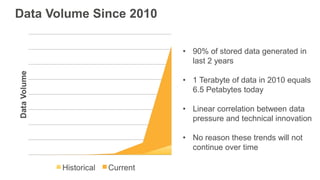
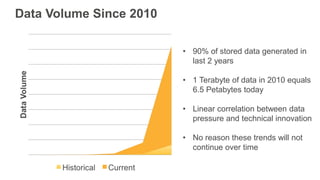
Data Volume Since 2010
• 90% of stored data generated in
last 2 years
• 1 Terabyte of data in 2010 equals
6.5 Petabytes today
• Linear correlation between data
pressure and technical innovation
• No reason these trends will not
continue over time
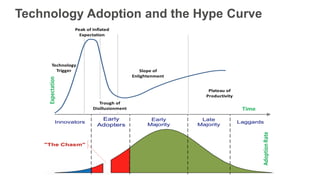
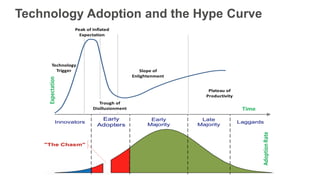
Technology Adoption and the Hype Curve
Relational (SQL) vs.
Non-relational (NoSQL)
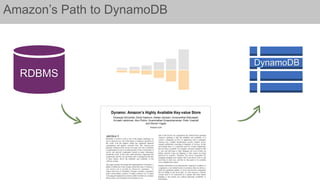
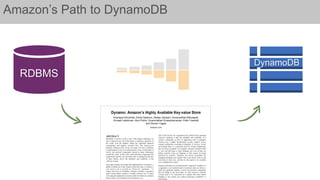
Amazon’s Path to DynamoDB
RDBMS
DynamoDB
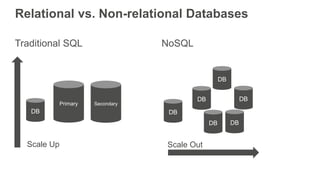
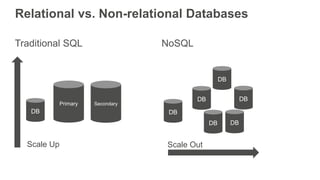
Relational vs. Non-relational Databases
Traditional SQL NoSQL
DB
Primary Secondary
Scale Up
DB
DB
DBDB
DB DB
Scale Out
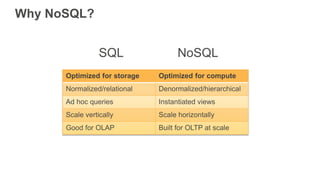
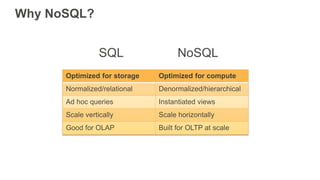
Why NoSQL?
Optimized for storage Optimized for compute
Normalized/relational Denormalized/hierarchical
Ad hoc queries Instantiated views
Scale vertically Scale horizontally
Good for OLAP Built for OLTP at scale
SQL NoSQL
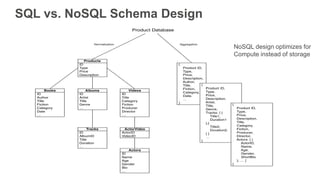
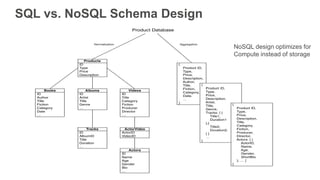
SQL vs. NoSQL Schema Design
NoSQL design optimizes for
Compute instead of storage
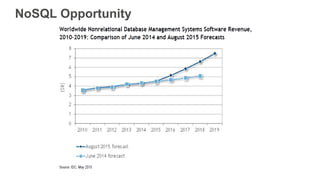
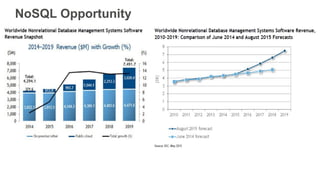
NoSQL Opportunity
SQL NoSQL
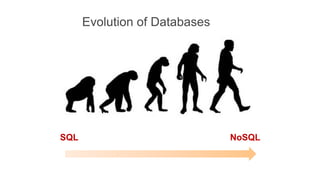
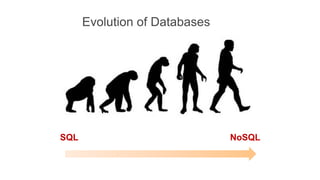
Evolution of Databases
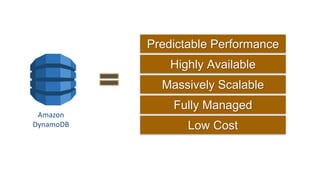
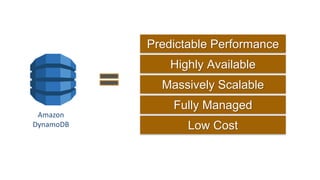
Amazon
DynamoDB
Fully Managed
Low Cost
Predictable Performance
Massively Scalable
Highly Available
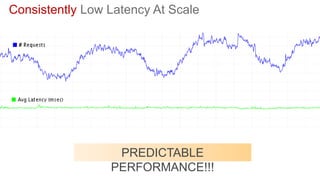
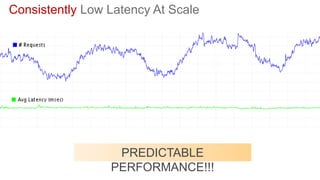
Consistently Low Latency At Scale
PREDICTABLE
PERFORMANCE!!!
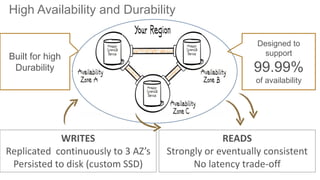
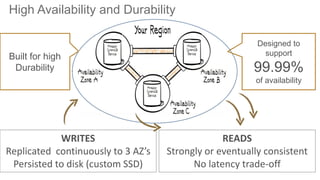
High Availability and Durability
WRITES
Replicated continuously to 3 AZ’s
Persisted to disk (custom SSD)
READS
Strongly or eventually consistent
No latency trade-off
Designed to
support
99.99%
of availability
Built for high
Durability
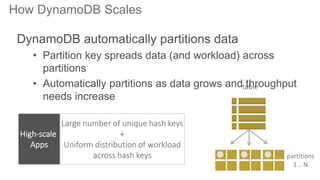
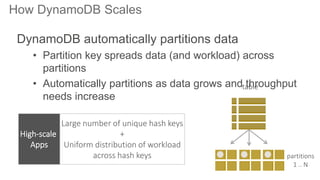
How DynamoDB Scales
partitions
1 .. N
table
DynamoDB automatically partitions data
• Partition key spreads data (and workload) across
partitions
• Automatically partitions as data grows and throughput
needs increase
Large number of unique hash keys
+
Uniform distribution of workload
across hash keys
High-scale
Apps
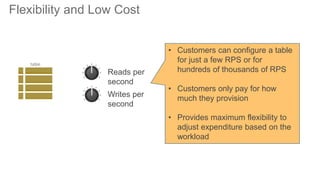
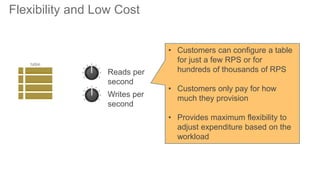
Flexibility and Low Cost
Reads per
second
Writes per
second
table
• Customers can configure a table
for just a few RPS or for
hundreds of thousands of RPS
• Customers only pay for how
much they provision
• Provides maximum flexibility to
adjust expenditure based on the
workload
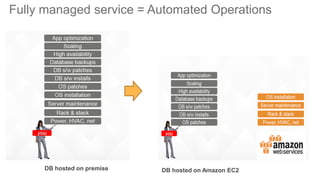
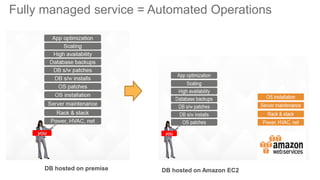
Fully managed service = Automated Operations
DB hosted on premise DB hosted on Amazon EC2
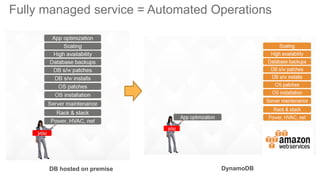
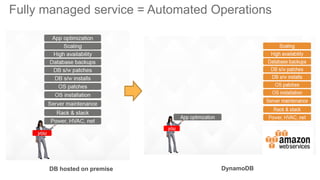
Fully managed service = Automated Operations
DB hosted on premise DynamoDB
DynamoDB Tables & Indexes
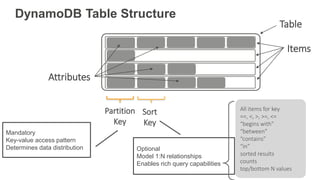
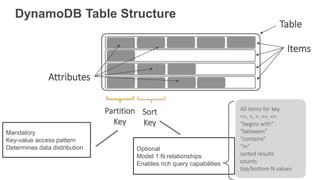
DynamoDB Table Structure
Table
Items
Attributes
Partition
Key
Sort
Key
Mandatory
Key-value access pattern
Determines data distribution Optional
Model 1:N relationships
Enables rich query capabilities
All items for key
==, <, >, >=, <=
“begins with”
“between”
“contains”
“in”
sorted results
counts
top/bottom N values
00 55 A954 FFAA
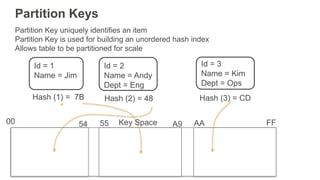
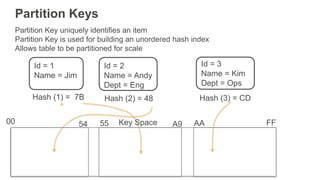
Partition Keys
Partition Key uniquely identifies an item
Partition Key is used for building an unordered hash index
Allows table to be partitioned for scale
Id = 1
Name = Jim
Hash (1) = 7B
Id = 2
Name = Andy
Dept = Eng
Hash (2) = 48
Id = 3
Name = Kim
Dept = Ops
Hash (3) = CD
Key Space
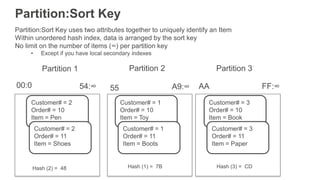
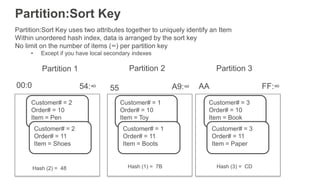
Partition:Sort Key
Partition:Sort Key uses two attributes together to uniquely identify an Item
Within unordered hash index, data is arranged by the sort key
No limit on the number of items (∞) per partition key
• Except if you have local secondary indexes
00:0 FF:∞
Hash (2) = 48
Customer# = 2
Order# = 10
Item = Pen
Customer# = 2
Order# = 11
Item = Shoes
Customer# = 1
Order# = 10
Item = Toy
Customer# = 1
Order# = 11
Item = Boots
Hash (1) = 7B
Customer# = 3
Order# = 10
Item = Book
Customer# = 3
Order# = 11
Item = Paper
Hash (3) = CD
55 A9:∞54:∞ AA
Partition 1 Partition 2 Partition 3
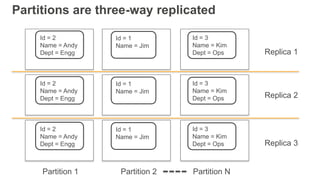
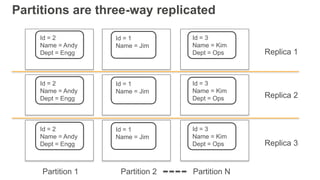
Partitions are three-way replicated
Id = 2
Name = Andy
Dept = Engg
Id = 3
Name = Kim
Dept = Ops
Id = 1
Name = Jim
Id = 2
Name = Andy
Dept = Engg
Id = 3
Name = Kim
Dept = Ops
Id = 1
Name = Jim
Id = 2
Name = Andy
Dept = Engg
Id = 3
Name = Kim
Dept = Ops
Id = 1
Name = Jim
Replica 1
Replica 2
Replica 3
Partition 1 Partition 2 Partition N
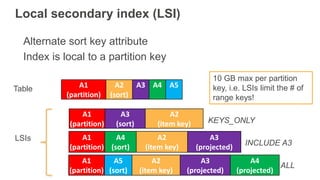
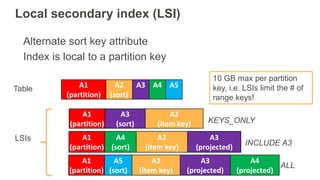
Local secondary index (LSI)
Alternate sort key attribute
Index is local to a partition key
A1
(partition)
A3
(sort)
A2
(item key)
A1
(partition)
A2
(sort)
A3 A4 A5
LSIs A1
(partition)
A4
(sort)
A2
(item key)
A3
(projected)
Table
KEYS_ONLY
INCLUDE A3
A1
(partition)
A5
(sort)
A2
(item key)
A3
(projected)
A4
(projected)
ALL
10 GB max per partition
key, i.e. LSIs limit the # of
range keys!
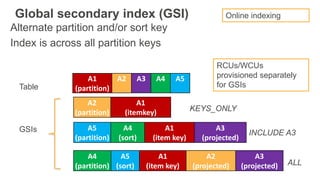
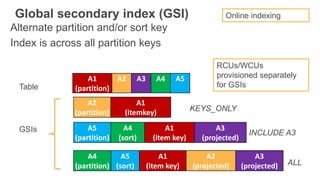
Global secondary index (GSI)
Alternate partition and/or sort key
Index is across all partition keys
A1
(partition)
A2 A3 A4 A5
GSIs A5
(partition)
A4
(sort)
A1
(item key)
A3
(projected)
Table
INCLUDE A3
A4
(partition)
A5
(sort)
A1
(item key)
A2
(projected)
A3
(projected) ALL
A2
(partition)
A1
(itemkey) KEYS_ONLY
RCUs/WCUs
provisioned separately
for GSIs
Online indexing
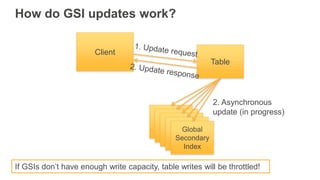
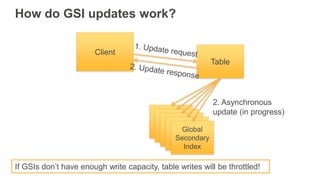
How do GSI updates work?
Table
Primary
table
Primary
table
Primary
table
Primary
table
Global
Secondary
Index
Client
2. Asynchronous
update (in progress)
If GSIs don’t have enough write capacity, table writes will be throttled!
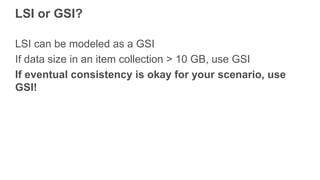
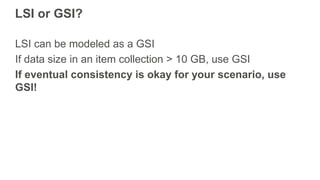
LSI or GSI?
LSI can be modeled as a GSI
If data size in an item collection > 10 GB, use GSI
If eventual consistency is okay for your scenario, use
GSI!
Scaling
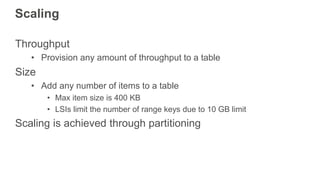
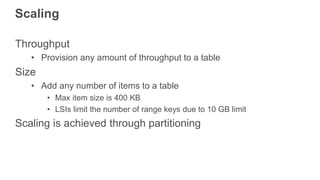
Scaling
Throughput
• Provision any amount of throughput to a table
Size
• Add any number of items to a table
• Max item size is 400 KB
• LSIs limit the number of range keys due to 10 GB limit
Scaling is achieved through partitioning
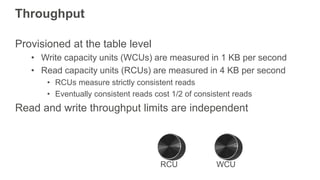
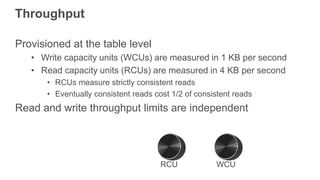
Throughput
Provisioned at the table level
• Write capacity units (WCUs) are measured in 1 KB per second
• Read capacity units (RCUs) are measured in 4 KB per second
• RCUs measure strictly consistent reads
• Eventually consistent reads cost 1/2 of consistent reads
Read and write throughput limits are independent
WCURCU
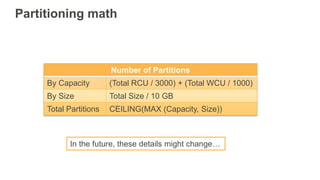
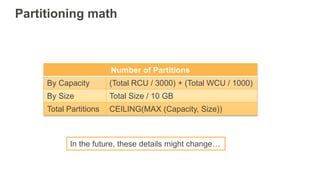
Partitioning math
In the future, these details might change…
Number of Partitions
By Capacity (Total RCU / 3000) + (Total WCU / 1000)
By Size Total Size / 10 GB
Total Partitions CEILING(MAX (Capacity, Size))
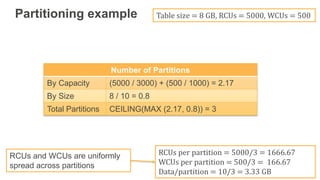
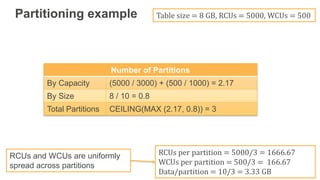
Partitioning example Table size = 8 GB, RCUs = 5000, WCUs = 500
RCUs per partition = 5000/3 = 1666.67
WCUs per partition = 500/3 = 166.67
Data/partition = 10/3 = 3.33 GB
RCUs and WCUs are uniformly
spread across partitions
Number of Partitions
By Capacity (5000 / 3000) + (500 / 1000) = 2.17
By Size 8 / 10 = 0.8
Total Partitions CEILING(MAX (2.17, 0.8)) = 3
To learn more, please attend:
Deep Dive on DynamoDB
Room E450a, 11:45am-12:45pm
Rick Houlihan, Principal Solutions Architect
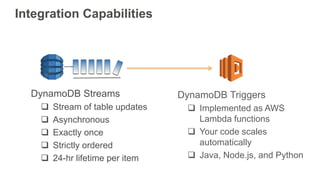
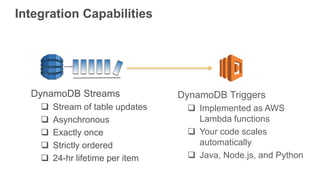
Integration Capabilities
DynamoDB Triggers
 Implemented as AWS
Lambda functions
 Your code scales
automatically
 Java, Node.js, and Python
DynamoDB Streams
 Stream of table updates
 Asynchronous
 Exactly once
 Strictly ordered
 24-hr lifetime per item
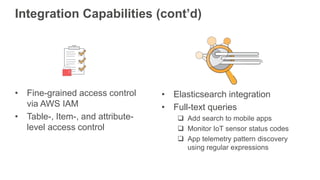
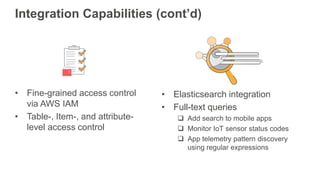
Integration Capabilities (cont’d)
• Elasticsearch integration
• Full-text queries
 Add search to mobile apps
 Monitor IoT sensor status codes
 App telemetry pattern discovery
using regular expressions
• Fine-grained access control
via AWS IAM
• Table-, Item-, and attribute-
level access control
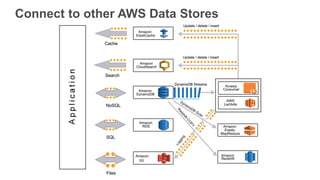
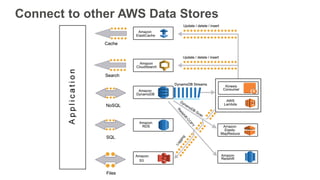
Connect to other AWS Data Stores
Customer Use Cases
Over 200 million usersOver 4 billion items stored
Millions of ads per month
Cross-device ad solutions
130+ million new users in 1 year
150+ million messages per month
Process requests in milliseconds High-performance ads
Statcast uses burst scalability
for many games on a single day
Flexibility for fast growth
Web clickstream insights
Specialty online & retail stores
Over 5 billion items
processed daily
About 200 million messages
processed daily
Cognitive training
Job-matching platform
5+ million registered users
Mobile game analytics
10M global users
Home security
Wearable and IoT
solutions
170,000 concurrent players
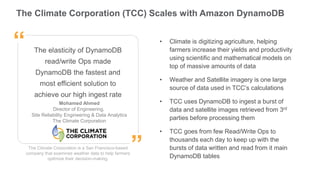
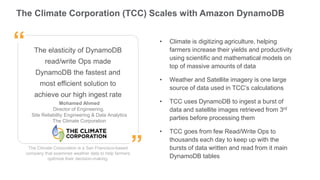
The Climate Corporation (TCC) Scales with Amazon DynamoDB
The Climate Corporation is a San Francisco-based
company that examines weather data to help farmers
optimize their decision-making.
The elasticity of DynamoDB
read/write Ops made
DynamoDB the fastest and
most efficient solution to
achieve our high ingest rate
Mohamed Ahmed
Director of Engineering,
Site Reliability Engineering & Data Analytics
The Climate Corporation
”
“ • Climate is digitizing agriculture, helping
farmers increase their yields and productivity
using scientific and mathematical models on
top of massive amounts of data
• Weather and Satellite imagery is one large
source of data used in TCC’s calculations
• TCC uses DynamoDB to ingest a burst of
data and satellite images retrieved from 3rd
parties before processing them
• TCC goes from few Read/Write Ops to
thousands each day to keep up with the
bursts of data written and read from it main
DynamoDB tables
Thank you!
Agenda
• Brief history of data processing
• Relational (SQL) vs. Non-relational (NoSQL)
• DynamoDB tables & indexes
• Scaling
• Int and Search Capabilities
• Pricing and Free Tier
• Customer Use Cases
Timeline of Database Technology
Data Volume Since 2010
• 90% of stored data generated in
last 2 years
• 1 Terabyte of data in 2010 equals
6.5 Petabytes today
• Linear correlation between data
pressure and technical innovation
• No reason these trends will not
continue over time
Technology Adoption and the Hype Curve
Relational (SQL) vs.
Non-relational (NoSQL)
Amazon’s Path to DynamoDB
RDBMS
DynamoDB
Relational vs. Non-relational Databases
Traditional SQL NoSQL
DB
Primary Secondary
Scale Up
DB
DB
DBDB
DB DB
Scale Out
Why NoSQL?
Optimized for storage Optimized for compute
Normalized/relational Denormalized/hierarchical
Ad hoc queries Instantiated views
Scale vertically Scale horizontally
Good for OLAP Built for OLTP at scale
SQL NoSQL
SQL vs. NoSQL Schema Design
NoSQL design optimizes for
Compute instead of storage
NoSQL Opportunity
SQL NoSQL
Evolution of Databases
The Year of the Monkey
DynamoDB!
Amazon
DynamoDB
Fully Managed
Low Cost
Predictable Performance
Massively Scalable
Highly Available
Consistently Low Latency At Scale
PREDICTABLE
PERFORMANCE!!!
High Availability and Durability
WRITES
Replicated continuously to 3 AZ’s
Persisted to disk (custom SSD)
READS
Strongly or eventually consistent
No latency trade-off
Designed to
support
99.99%
of availability
Built for high
Durability
How DynamoDB Scales
partitions
1 .. N
table
DynamoDB automatically partitions data
• Partition key spreads data (and workload) across
partitions
• Automatically partitions as data grows and throughput
needs increase
Large number of unique hash keys
+
Uniform distribution of workload
across hash keys
High-scale
Apps
Flexibility and Low Cost
Reads per
second
Writes per
second
table
• Customers can configure a table
for just a few RPS or for
hundreds of thousands of RPS
• Customers only pay for how
much they provision
• Provides maximum flexibility to
adjust expenditure based on the
workload
Fully managed service = Automated Operations
DB hosted on premise DB hosted on Amazon EC2
Fully managed service = Automated Operations
DB hosted on premise DynamoDB
DynamoDB Tables & Indexes
DynamoDB Table Structure
Table
Items
Attributes
Partition
Key
Sort
Key
Mandatory
Key-value access pattern
Determines data distribution Optional
Model 1:N relationships
Enables rich query capabilities
All items for key
==, <, >, >=, <=
“begins with”
“between”
“contains”
“in”
sorted results
counts
top/bottom N values
00 55 A954 FFAA
Partition Keys
Partition Key uniquely identifies an item
Partition Key is used for building an unordered hash index
Allows table to be partitioned for scale
Id = 1
Name = Jim
Hash (1) = 7B
Id = 2
Name = Andy
Dept = Eng
Hash (2) = 48
Id = 3
Name = Kim
Dept = Ops
Hash (3) = CD
Key Space
Partition:Sort Key
Partition:Sort Key uses two attributes together to uniquely identify an Item
Within unordered hash index, data is arranged by the sort key
No limit on the number of items (∞) per partition key
• Except if you have local secondary indexes
00:0 FF:∞
Hash (2) = 48
Customer# = 2
Order# = 10
Item = Pen
Customer# = 2
Order# = 11
Item = Shoes
Customer# = 1
Order# = 10
Item = Toy
Customer# = 1
Order# = 11
Item = Boots
Hash (1) = 7B
Customer# = 3
Order# = 10
Item = Book
Customer# = 3
Order# = 11
Item = Paper
Hash (3) = CD
55 A9:∞54:∞ AA
Partition 1 Partition 2 Partition 3
Partitions are three-way replicated
Id = 2
Name = Andy
Dept = Engg
Id = 3
Name = Kim
Dept = Ops
Id = 1
Name = Jim
Id = 2
Name = Andy
Dept = Engg
Id = 3
Name = Kim
Dept = Ops
Id = 1
Name = Jim
Id = 2
Name = Andy
Dept = Engg
Id = 3
Name = Kim
Dept = Ops
Id = 1
Name = Jim
Replica 1
Replica 2
Replica 3
Partition 1 Partition 2 Partition N
Local secondary index (LSI)
Alternate sort key attribute
Index is local to a partition key
A1
(partition)
A3
(sort)
A2
(item key)
A1
(partition)
A2
(sort)
A3 A4 A5
LSIs A1
(partition)
A4
(sort)
A2
(item key)
A3
(projected)
Table
KEYS_ONLY
INCLUDE A3
A1
(partition)
A5
(sort)
A2
(item key)
A3
(projected)
A4
(projected)
ALL
10 GB max per partition
key, i.e. LSIs limit the # of
range keys!
Global secondary index (GSI)
Alternate partition and/or sort key
Index is across all partition keys
A1
(partition)
A2 A3 A4 A5
GSIs A5
(partition)
A4
(sort)
A1
(item key)
A3
(projected)
Table
INCLUDE A3
A4
(partition)
A5
(sort)
A1
(item key)
A2
(projected)
A3
(projected) ALL
A2
(partition)
A1
(itemkey) KEYS_ONLY
RCUs/WCUs
provisioned separately
for GSIs
Online indexing
How do GSI updates work?
Table
Primary
table
Primary
table
Primary
table
Primary
table
Global
Secondary
Index
Client
2. Asynchronous
update (in progress)
If GSIs don’t have enough write capacity, table writes will be throttled!
LSI or GSI?
LSI can be modeled as a GSI
If data size in an item collection > 10 GB, use GSI
If eventual consistency is okay for your scenario, use
GSI!
Scaling
Scaling
Throughput
• Provision any amount of throughput to a table
Size
• Add any number of items to a table
• Max item size is 400 KB
• LSIs limit the number of range keys due to 10 GB limit
Scaling is achieved through partitioning
Throughput
Provisioned at the table level
• Write capacity units (WCUs) are measured in 1 KB per second
• Read capacity units (RCUs) are measured in 4 KB per second
• RCUs measure strictly consistent reads
• Eventually consistent reads cost 1/2 of consistent reads
Read and write throughput limits are independent
WCURCU
Partitioning math
In the future, these details might change…
Number of Partitions
By Capacity (Total RCU / 3000) + (Total WCU / 1000)
By Size Total Size / 10 GB
Total Partitions CEILING(MAX (Capacity, Size))
Partitioning example Table size = 8 GB, RCUs = 5000, WCUs = 500
RCUs per partition = 5000/3 = 1666.67
WCUs per partition = 500/3 = 166.67
Data/partition = 10/3 = 3.33 GB
RCUs and WCUs are uniformly
spread across partitions
Number of Partitions
By Capacity (5000 / 3000) + (500 / 1000) = 2.17
By Size 8 / 10 = 0.8
Total Partitions CEILING(MAX (2.17, 0.8)) = 3
To learn more, please attend:
Deep Dive on DynamoDB
Room E450a, 11:45am-12:45pm
Rick Houlihan, Principal Solutions Architect
Integration Capabilities
DynamoDB Triggers
 Implemented as AWS
Lambda functions
 Your code scales
automatically
 Java, Node.js, and Python
DynamoDB Streams
 Stream of table updates
 Asynchronous
 Exactly once
 Strictly ordered
 24-hr lifetime per item
Integration Capabilities (cont’d)
• Elasticsearch integration
• Full-text queries
 Add search to mobile apps
 Monitor IoT sensor status codes
 App telemetry pattern discovery
using regular expressions
• Fine-grained access control
via AWS IAM
• Table-, Item-, and attribute-
level access control
Connect to other AWS Data Stores
Customer Use Cases
Over 200 million usersOver 4 billion items stored
Millions of ads per month
Cross-device ad solutions
130+ million new users in 1 year
150+ million messages per month
Process requests in milliseconds High-performance ads
Statcast uses burst scalability
for many games on a single day
Flexibility for fast growth
Web clickstream insights
Specialty online & retail stores
Over 5 billion items
processed daily
About 200 million messages
processed daily
Cognitive training
Job-matching platform
5+ million registered users
Mobile game analytics
10M global users
Home security
Wearable and IoT
solutions
170,000 concurrent players
The Climate Corporation (TCC) Scales with Amazon DynamoDB
The Climate Corporation is a San Francisco-based
company that examines weather data to help farmers
optimize their decision-making.
The elasticity of DynamoDB
read/write Ops made
DynamoDB the fastest and
most efficient solution to
achieve our high ingest rate
Mohamed Ahmed
Director of Engineering,
Site Reliability Engineering & Data Analytics
The Climate Corporation
”
“ • Climate is digitizing agriculture, helping
farmers increase their yields and productivity
using scientific and mathematical models on
top of massive amounts of data
• Weather and Satellite imagery is one large
source of data used in TCC’s calculations
• TCC uses DynamoDB to ingest a burst of
data and satellite images retrieved from 3rd
parties before processing them
• TCC goes from few Read/Write Ops to
thousands each day to keep up with the
bursts of data written and read from it main
DynamoDB tables
Thank you!

Getting Strated with Amazon Dynamo DB (Jim Scharf) - AWS DB Day

  • 1.
    Jim Scharf General Manager,DynamoDB Time : 10:10 – 10:50 Getting Started with Amazon DynamoDB
  • 2.
    Getting Started withAmazon DynamoDB AGENDA • Brief history of data processing • Relational (SQL) vs. Non-relational (NoSQL) • DynamoDB tables & indexes • Scaling • Integration and Search Capabilities • Pricing and Free Tier • Customer Use Cases
  • 3.
  • 4.
    Data Volume Since2010 • 90% of stored data generated in last 2 years • 1 Terabyte of data in 2010 equals 6.5 Petabytes today • Linear correlation between data pressure and technical innovation • No reason these trends will not continue over time
  • 5.
  • 6.
  • 7.
    Amazon’s Path toDynamoDB RDBMS DynamoDB
  • 8.
    Relational vs. Non-relationalDatabases Traditional SQL NoSQL DB Primary Secondary Scale Up DB DB DBDB DB DB Scale Out
  • 9.
    Why NoSQL? Optimized forstorage Optimized for compute Normalized/relational Denormalized/hierarchical Ad hoc queries Instantiated views Scale vertically Scale horizontally Good for OLAP Built for OLTP at scale SQL NoSQL
  • 10.
    SQL vs. NoSQLSchema Design NoSQL design optimizes for Compute instead of storage
  • 11.
  • 12.
  • 13.
    Amazon DynamoDB Fully Managed Low Cost PredictablePerformance Massively Scalable Highly Available
  • 14.
    Consistently Low LatencyAt Scale PREDICTABLE PERFORMANCE!!!
  • 15.
    High Availability andDurability WRITES Replicated continuously to 3 AZ’s Persisted to disk (custom SSD) READS Strongly or eventually consistent No latency trade-off Designed to support 99.99% of availability Built for high Durability
  • 16.
    How DynamoDB Scales partitions 1.. N table DynamoDB automatically partitions data • Partition key spreads data (and workload) across partitions • Automatically partitions as data grows and throughput needs increase Large number of unique hash keys + Uniform distribution of workload across hash keys High-scale Apps
  • 17.
    Flexibility and LowCost Reads per second Writes per second table • Customers can configure a table for just a few RPS or for hundreds of thousands of RPS • Customers only pay for how much they provision • Provides maximum flexibility to adjust expenditure based on the workload
  • 18.
    Fully managed service= Automated Operations DB hosted on premise DB hosted on Amazon EC2
  • 19.
    Fully managed service= Automated Operations DB hosted on premise DynamoDB
  • 20.
  • 21.
    DynamoDB Table Structure Table Items Attributes Partition Key Sort Key Mandatory Key-valueaccess pattern Determines data distribution Optional Model 1:N relationships Enables rich query capabilities All items for key ==, <, >, >=, <= “begins with” “between” “contains” “in” sorted results counts top/bottom N values
  • 22.
    00 55 A954FFAA Partition Keys Partition Key uniquely identifies an item Partition Key is used for building an unordered hash index Allows table to be partitioned for scale Id = 1 Name = Jim Hash (1) = 7B Id = 2 Name = Andy Dept = Eng Hash (2) = 48 Id = 3 Name = Kim Dept = Ops Hash (3) = CD Key Space
  • 23.
    Partition:Sort Key Partition:Sort Keyuses two attributes together to uniquely identify an Item Within unordered hash index, data is arranged by the sort key No limit on the number of items (∞) per partition key • Except if you have local secondary indexes 00:0 FF:∞ Hash (2) = 48 Customer# = 2 Order# = 10 Item = Pen Customer# = 2 Order# = 11 Item = Shoes Customer# = 1 Order# = 10 Item = Toy Customer# = 1 Order# = 11 Item = Boots Hash (1) = 7B Customer# = 3 Order# = 10 Item = Book Customer# = 3 Order# = 11 Item = Paper Hash (3) = CD 55 A9:∞54:∞ AA Partition 1 Partition 2 Partition 3
  • 24.
    Partitions are three-wayreplicated Id = 2 Name = Andy Dept = Engg Id = 3 Name = Kim Dept = Ops Id = 1 Name = Jim Id = 2 Name = Andy Dept = Engg Id = 3 Name = Kim Dept = Ops Id = 1 Name = Jim Id = 2 Name = Andy Dept = Engg Id = 3 Name = Kim Dept = Ops Id = 1 Name = Jim Replica 1 Replica 2 Replica 3 Partition 1 Partition 2 Partition N
  • 25.
    Local secondary index(LSI) Alternate sort key attribute Index is local to a partition key A1 (partition) A3 (sort) A2 (item key) A1 (partition) A2 (sort) A3 A4 A5 LSIs A1 (partition) A4 (sort) A2 (item key) A3 (projected) Table KEYS_ONLY INCLUDE A3 A1 (partition) A5 (sort) A2 (item key) A3 (projected) A4 (projected) ALL 10 GB max per partition key, i.e. LSIs limit the # of range keys!
  • 26.
    Global secondary index(GSI) Alternate partition and/or sort key Index is across all partition keys A1 (partition) A2 A3 A4 A5 GSIs A5 (partition) A4 (sort) A1 (item key) A3 (projected) Table INCLUDE A3 A4 (partition) A5 (sort) A1 (item key) A2 (projected) A3 (projected) ALL A2 (partition) A1 (itemkey) KEYS_ONLY RCUs/WCUs provisioned separately for GSIs Online indexing
  • 27.
    How do GSIupdates work? Table Primary table Primary table Primary table Primary table Global Secondary Index Client 2. Asynchronous update (in progress) If GSIs don’t have enough write capacity, table writes will be throttled!
  • 28.
    LSI or GSI? LSIcan be modeled as a GSI If data size in an item collection > 10 GB, use GSI If eventual consistency is okay for your scenario, use GSI!
  • 29.
  • 30.
    Scaling Throughput • Provision anyamount of throughput to a table Size • Add any number of items to a table • Max item size is 400 KB • LSIs limit the number of range keys due to 10 GB limit Scaling is achieved through partitioning
  • 31.
    Throughput Provisioned at thetable level • Write capacity units (WCUs) are measured in 1 KB per second • Read capacity units (RCUs) are measured in 4 KB per second • RCUs measure strictly consistent reads • Eventually consistent reads cost 1/2 of consistent reads Read and write throughput limits are independent WCURCU
  • 32.
    Partitioning math In thefuture, these details might change… Number of Partitions By Capacity (Total RCU / 3000) + (Total WCU / 1000) By Size Total Size / 10 GB Total Partitions CEILING(MAX (Capacity, Size))
  • 33.
    Partitioning example Tablesize = 8 GB, RCUs = 5000, WCUs = 500 RCUs per partition = 5000/3 = 1666.67 WCUs per partition = 500/3 = 166.67 Data/partition = 10/3 = 3.33 GB RCUs and WCUs are uniformly spread across partitions Number of Partitions By Capacity (5000 / 3000) + (500 / 1000) = 2.17 By Size 8 / 10 = 0.8 Total Partitions CEILING(MAX (2.17, 0.8)) = 3
  • 34.
    To learn more,please attend: Deep Dive on DynamoDB Room E450a, 11:45am-12:45pm Rick Houlihan, Principal Solutions Architect
  • 35.
    Integration Capabilities DynamoDB Triggers Implemented as AWS Lambda functions  Your code scales automatically  Java, Node.js, and Python DynamoDB Streams  Stream of table updates  Asynchronous  Exactly once  Strictly ordered  24-hr lifetime per item
  • 36.
    Integration Capabilities (cont’d) •Elasticsearch integration • Full-text queries  Add search to mobile apps  Monitor IoT sensor status codes  App telemetry pattern discovery using regular expressions • Fine-grained access control via AWS IAM • Table-, Item-, and attribute- level access control
  • 37.
    Connect to otherAWS Data Stores
  • 38.
  • 39.
    Over 200 millionusersOver 4 billion items stored Millions of ads per month Cross-device ad solutions 130+ million new users in 1 year 150+ million messages per month Process requests in milliseconds High-performance ads Statcast uses burst scalability for many games on a single day Flexibility for fast growth Web clickstream insights Specialty online & retail stores Over 5 billion items processed daily About 200 million messages processed daily Cognitive training Job-matching platform 5+ million registered users Mobile game analytics 10M global users Home security Wearable and IoT solutions 170,000 concurrent players
  • 40.
    The Climate Corporation(TCC) Scales with Amazon DynamoDB The Climate Corporation is a San Francisco-based company that examines weather data to help farmers optimize their decision-making. The elasticity of DynamoDB read/write Ops made DynamoDB the fastest and most efficient solution to achieve our high ingest rate Mohamed Ahmed Director of Engineering, Site Reliability Engineering & Data Analytics The Climate Corporation ” “ • Climate is digitizing agriculture, helping farmers increase their yields and productivity using scientific and mathematical models on top of massive amounts of data • Weather and Satellite imagery is one large source of data used in TCC’s calculations • TCC uses DynamoDB to ingest a burst of data and satellite images retrieved from 3rd parties before processing them • TCC goes from few Read/Write Ops to thousands each day to keep up with the bursts of data written and read from it main DynamoDB tables
  • 41.
  • 42.
    Agenda • Brief historyof data processing • Relational (SQL) vs. Non-relational (NoSQL) • DynamoDB tables & indexes • Scaling • Int and Search Capabilities • Pricing and Free Tier • Customer Use Cases
  • 43.
  • 44.
    Data Volume Since2010 • 90% of stored data generated in last 2 years • 1 Terabyte of data in 2010 equals 6.5 Petabytes today • Linear correlation between data pressure and technical innovation • No reason these trends will not continue over time
  • 45.
  • 46.
  • 47.
    Amazon’s Path toDynamoDB RDBMS DynamoDB
  • 48.
    Relational vs. Non-relationalDatabases Traditional SQL NoSQL DB Primary Secondary Scale Up DB DB DBDB DB DB Scale Out
  • 49.
    Why NoSQL? Optimized forstorage Optimized for compute Normalized/relational Denormalized/hierarchical Ad hoc queries Instantiated views Scale vertically Scale horizontally Good for OLAP Built for OLTP at scale SQL NoSQL
  • 50.
    SQL vs. NoSQLSchema Design NoSQL design optimizes for Compute instead of storage
  • 51.
  • 52.
  • 53.
    The Year ofthe Monkey DynamoDB!
  • 54.
    Amazon DynamoDB Fully Managed Low Cost PredictablePerformance Massively Scalable Highly Available
  • 55.
    Consistently Low LatencyAt Scale PREDICTABLE PERFORMANCE!!!
  • 56.
    High Availability andDurability WRITES Replicated continuously to 3 AZ’s Persisted to disk (custom SSD) READS Strongly or eventually consistent No latency trade-off Designed to support 99.99% of availability Built for high Durability
  • 57.
    How DynamoDB Scales partitions 1.. N table DynamoDB automatically partitions data • Partition key spreads data (and workload) across partitions • Automatically partitions as data grows and throughput needs increase Large number of unique hash keys + Uniform distribution of workload across hash keys High-scale Apps
  • 58.
    Flexibility and LowCost Reads per second Writes per second table • Customers can configure a table for just a few RPS or for hundreds of thousands of RPS • Customers only pay for how much they provision • Provides maximum flexibility to adjust expenditure based on the workload
  • 59.
    Fully managed service= Automated Operations DB hosted on premise DB hosted on Amazon EC2
  • 60.
    Fully managed service= Automated Operations DB hosted on premise DynamoDB
  • 61.
  • 62.
    DynamoDB Table Structure Table Items Attributes Partition Key Sort Key Mandatory Key-valueaccess pattern Determines data distribution Optional Model 1:N relationships Enables rich query capabilities All items for key ==, <, >, >=, <= “begins with” “between” “contains” “in” sorted results counts top/bottom N values
  • 63.
    00 55 A954FFAA Partition Keys Partition Key uniquely identifies an item Partition Key is used for building an unordered hash index Allows table to be partitioned for scale Id = 1 Name = Jim Hash (1) = 7B Id = 2 Name = Andy Dept = Eng Hash (2) = 48 Id = 3 Name = Kim Dept = Ops Hash (3) = CD Key Space
  • 64.
    Partition:Sort Key Partition:Sort Keyuses two attributes together to uniquely identify an Item Within unordered hash index, data is arranged by the sort key No limit on the number of items (∞) per partition key • Except if you have local secondary indexes 00:0 FF:∞ Hash (2) = 48 Customer# = 2 Order# = 10 Item = Pen Customer# = 2 Order# = 11 Item = Shoes Customer# = 1 Order# = 10 Item = Toy Customer# = 1 Order# = 11 Item = Boots Hash (1) = 7B Customer# = 3 Order# = 10 Item = Book Customer# = 3 Order# = 11 Item = Paper Hash (3) = CD 55 A9:∞54:∞ AA Partition 1 Partition 2 Partition 3
  • 65.
    Partitions are three-wayreplicated Id = 2 Name = Andy Dept = Engg Id = 3 Name = Kim Dept = Ops Id = 1 Name = Jim Id = 2 Name = Andy Dept = Engg Id = 3 Name = Kim Dept = Ops Id = 1 Name = Jim Id = 2 Name = Andy Dept = Engg Id = 3 Name = Kim Dept = Ops Id = 1 Name = Jim Replica 1 Replica 2 Replica 3 Partition 1 Partition 2 Partition N
  • 66.
    Local secondary index(LSI) Alternate sort key attribute Index is local to a partition key A1 (partition) A3 (sort) A2 (item key) A1 (partition) A2 (sort) A3 A4 A5 LSIs A1 (partition) A4 (sort) A2 (item key) A3 (projected) Table KEYS_ONLY INCLUDE A3 A1 (partition) A5 (sort) A2 (item key) A3 (projected) A4 (projected) ALL 10 GB max per partition key, i.e. LSIs limit the # of range keys!
  • 67.
    Global secondary index(GSI) Alternate partition and/or sort key Index is across all partition keys A1 (partition) A2 A3 A4 A5 GSIs A5 (partition) A4 (sort) A1 (item key) A3 (projected) Table INCLUDE A3 A4 (partition) A5 (sort) A1 (item key) A2 (projected) A3 (projected) ALL A2 (partition) A1 (itemkey) KEYS_ONLY RCUs/WCUs provisioned separately for GSIs Online indexing
  • 68.
    How do GSIupdates work? Table Primary table Primary table Primary table Primary table Global Secondary Index Client 2. Asynchronous update (in progress) If GSIs don’t have enough write capacity, table writes will be throttled!
  • 69.
    LSI or GSI? LSIcan be modeled as a GSI If data size in an item collection > 10 GB, use GSI If eventual consistency is okay for your scenario, use GSI!
  • 70.
  • 71.
    Scaling Throughput • Provision anyamount of throughput to a table Size • Add any number of items to a table • Max item size is 400 KB • LSIs limit the number of range keys due to 10 GB limit Scaling is achieved through partitioning
  • 72.
    Throughput Provisioned at thetable level • Write capacity units (WCUs) are measured in 1 KB per second • Read capacity units (RCUs) are measured in 4 KB per second • RCUs measure strictly consistent reads • Eventually consistent reads cost 1/2 of consistent reads Read and write throughput limits are independent WCURCU
  • 73.
    Partitioning math In thefuture, these details might change… Number of Partitions By Capacity (Total RCU / 3000) + (Total WCU / 1000) By Size Total Size / 10 GB Total Partitions CEILING(MAX (Capacity, Size))
  • 74.
    Partitioning example Tablesize = 8 GB, RCUs = 5000, WCUs = 500 RCUs per partition = 5000/3 = 1666.67 WCUs per partition = 500/3 = 166.67 Data/partition = 10/3 = 3.33 GB RCUs and WCUs are uniformly spread across partitions Number of Partitions By Capacity (5000 / 3000) + (500 / 1000) = 2.17 By Size 8 / 10 = 0.8 Total Partitions CEILING(MAX (2.17, 0.8)) = 3
  • 75.
    To learn more,please attend: Deep Dive on DynamoDB Room E450a, 11:45am-12:45pm Rick Houlihan, Principal Solutions Architect
  • 76.
    Integration Capabilities DynamoDB Triggers Implemented as AWS Lambda functions  Your code scales automatically  Java, Node.js, and Python DynamoDB Streams  Stream of table updates  Asynchronous  Exactly once  Strictly ordered  24-hr lifetime per item
  • 77.
    Integration Capabilities (cont’d) •Elasticsearch integration • Full-text queries  Add search to mobile apps  Monitor IoT sensor status codes  App telemetry pattern discovery using regular expressions • Fine-grained access control via AWS IAM • Table-, Item-, and attribute- level access control
  • 78.
    Connect to otherAWS Data Stores
  • 79.
  • 80.
    Over 200 millionusersOver 4 billion items stored Millions of ads per month Cross-device ad solutions 130+ million new users in 1 year 150+ million messages per month Process requests in milliseconds High-performance ads Statcast uses burst scalability for many games on a single day Flexibility for fast growth Web clickstream insights Specialty online & retail stores Over 5 billion items processed daily About 200 million messages processed daily Cognitive training Job-matching platform 5+ million registered users Mobile game analytics 10M global users Home security Wearable and IoT solutions 170,000 concurrent players
  • 81.
    The Climate Corporation(TCC) Scales with Amazon DynamoDB The Climate Corporation is a San Francisco-based company that examines weather data to help farmers optimize their decision-making. The elasticity of DynamoDB read/write Ops made DynamoDB the fastest and most efficient solution to achieve our high ingest rate Mohamed Ahmed Director of Engineering, Site Reliability Engineering & Data Analytics The Climate Corporation ” “ • Climate is digitizing agriculture, helping farmers increase their yields and productivity using scientific and mathematical models on top of massive amounts of data • Weather and Satellite imagery is one large source of data used in TCC’s calculations • TCC uses DynamoDB to ingest a burst of data and satellite images retrieved from 3rd parties before processing them • TCC goes from few Read/Write Ops to thousands each day to keep up with the bursts of data written and read from it main DynamoDB tables
  • 82.