UNIT II - JAVA DATA STRUCTURES
Lists
Linear Structures
Arrays
Stack
Queue
Linked List
Ordered & Unordered Structures
Order Structure
Un Ordered Structure
Sorting
Trees
Binary Tree
Example of a binary tree
Operations
Implementations
Binary Search Tree (BST)
.
Lists
Collections API Revisit?
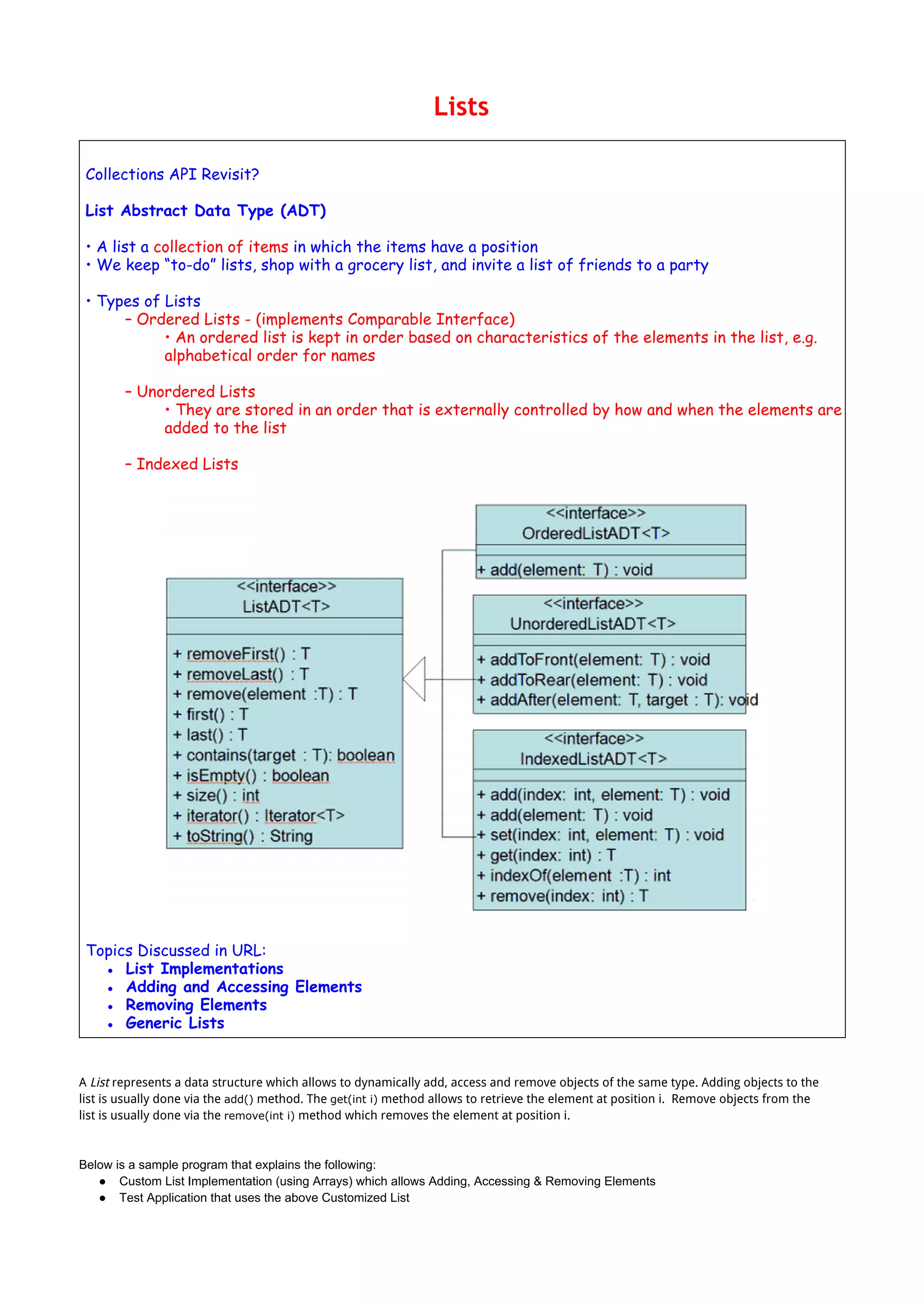
List Abstract Data Type (ADT)
• A list a collection of items in which the items have a position
• We keep “to-do” lists, shop with a grocery list, and invite a list of friends to a party
• Types of Lists
– Ordered Lists - (implements Comparable Interface)
• An ordered list is kept in order based on characteristics of the elements in the list, e.g.
alphabetical order for names
– Unordered Lists
• They are stored in an order that is externally controlled by how and when the elements are
added to the list
– Indexed Lists
Topics Discussed in URL:
● List Implementations
● Adding and Accessing Elements
● Removing Elements
● Generic Lists
A List represents a data structure which allows to dynamically add, access and remove objects of the same type. Adding objects to the
list is usually done via the add() method. The get(int i) method allows to retrieve the element at position i. Remove objects from the
list is usually done via the remove(int i) method which removes the element at position i.
Below is a sample program that explains the following:
● Custom List Implementation (using Arrays) which allows Adding, Accessing & Removing Elements
● Test Application that uses the above Customized List
MyList.java
package list;
import java.util.Arrays;
import java.util.Iterator;
/**
* Created by user on 2/15/14.
*/
public class MyList<E> {
private int size = 0;
private static final int DEFAULT_CAPACITY = 10;
private Object elements[];
public MyList() {
elements = new Object[DEFAULT_CAPACITY];
}
public void add(E e) {
if (size == elements.length) {
ensureCapa();
}
elements[size++] = e;
}
private void ensureCapa() {
int newSize = elements.length * 2;
elements = Arrays.copyOf(elements, newSize);
}
@SuppressWarnings("unchecked")
public E get(int i) {
if (i >= size || i < 0) {
throw new IndexOutOfBoundsException("Index: " + i + ", Size " + i);
}
return (E) elements[i];
}
public E remove(int i) {
if (i >= size || i < 0) {
throw new IndexOutOfBoundsException("Index: " + i + ", Size " + i);
}
size++;
E oldValue = (E) elements[i];
int numMoved = size - i - 1;
if (numMoved > 0)
System.arraycopy(elements, i + 1, elements, i, numMoved);
elements[--size] = null;
return oldValue;
}
@Override
public String toString() {
String temp = new String();
temp = "[";
for (int i = 0; i < elements.length; i++) {
if (elements[i] != null)
temp = temp + " "+ (E) elements[i] ;
}
temp = temp + "]";
return temp;
}
}
The following show contains a small test for the data structure. I use in the first test the MyList implementation and in the second test
the standard Java List implementation.
MyMainListTest.java
package list;
import com.sun.org.apache.xpath.internal.SourceTree;
import java.util.ArrayList;
import java.util.List;
/**
* Created by user on 2/15/14.
*/
public class MyMainListTest {
public static void main(String[] args) {
MyMainListTest myMainListTest = new MyMainListTest();
System.out.println("Testing MyList");
try {
myMainListTest.testMyList();
} catch (Exception e) {
System.out.println("MyList " + e);
}
System.out.println("Testing StandardList");
try {
myMainListTest.testStandardList();
} catch (Exception e) {
System.out.println("StandardList " + e);
}
}
public void testMyList() {
MyList<Integer> list = new MyList<Integer>();
list.add(1);
list.add(2);
list.add(3);
list.add(3);
list.add(4);
list.add(2);
list.add(3);
list.add(3);
list.add(4);
list.add(2);
list.add(3);
list.add(3);
list.add(4);
System.out.println(list);
//Remove element on 4th Index.
list.remove(4);
System.out.println(list);
System.out.println(list.get(1));
System.out.println(list.get(6));
System.out.println(list.get(20));//Throws IndexOutOfBoundsException
System.out.println(list.get(-1));//Throws IndexOutOfBoundsException
}
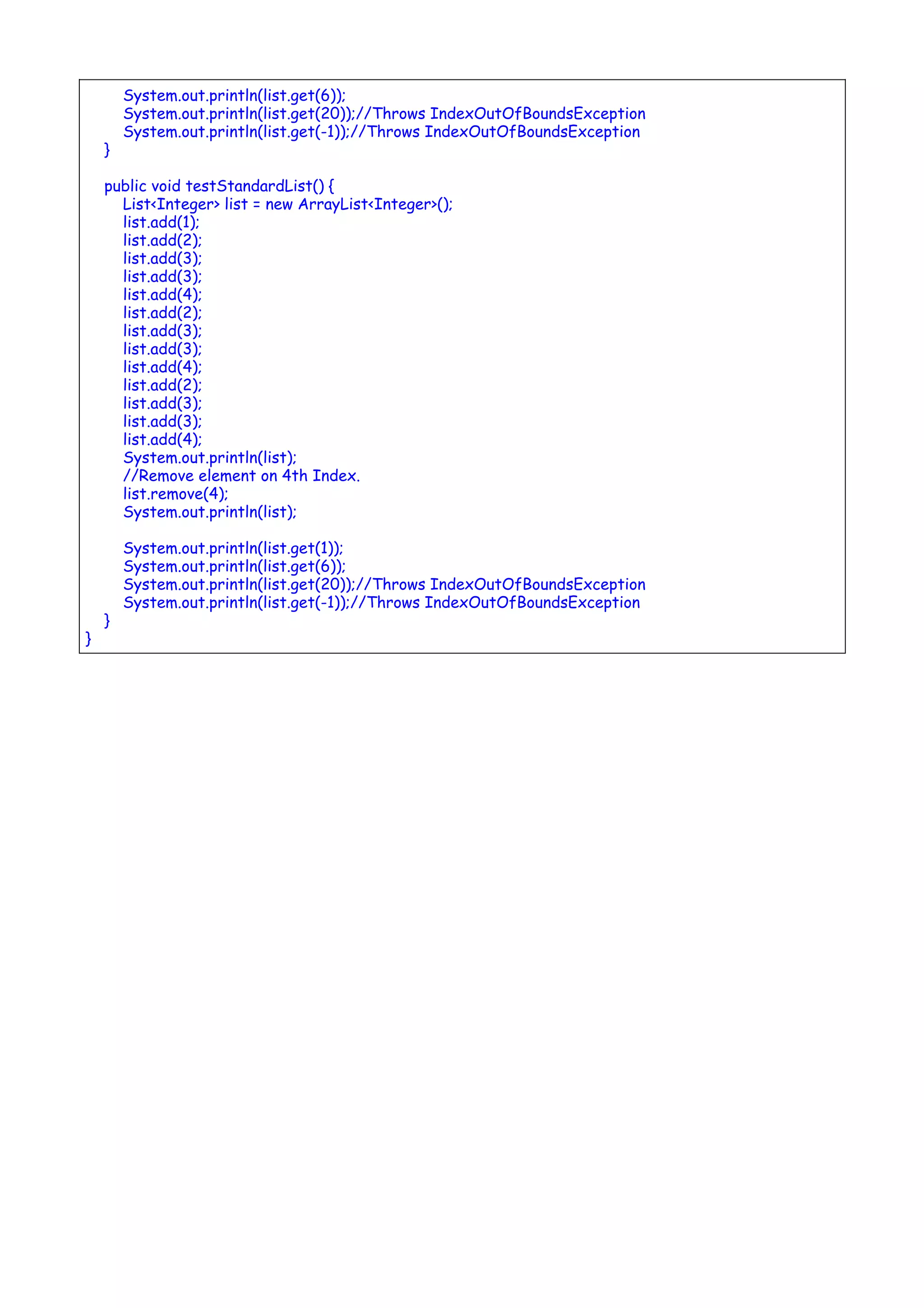
public void testStandardList() {
List<Integer> list = new ArrayList<Integer>();
list.add(1);
list.add(2);
list.add(3);
list.add(3);
list.add(4);
list.add(2);
list.add(3);
list.add(3);
list.add(4);
list.add(2);
list.add(3);
list.add(3);
list.add(4);
System.out.println(list);
//Remove element on 4th Index.
list.remove(4);
System.out.println(list);
System.out.println(list.get(1));
System.out.println(list.get(6));
System.out.println(list.get(20));//Throws IndexOutOfBoundsException
System.out.println(list.get(-1));//Throws IndexOutOfBoundsException
}
}
Linear Structures
Arrays
Arrays are special data types that let us store specified number of variables from the same type using one variable
name.
An array is a sequence of data item of homogeneous value(same type).
Why Arrays?
Imagine the situation that you need to store 20 names of students as strings and 20 integers as marks, then you need to
define 40 variables, and this is clearly very hard and not practical, in such case you need to use arrays.
Arrays are indexed data types.
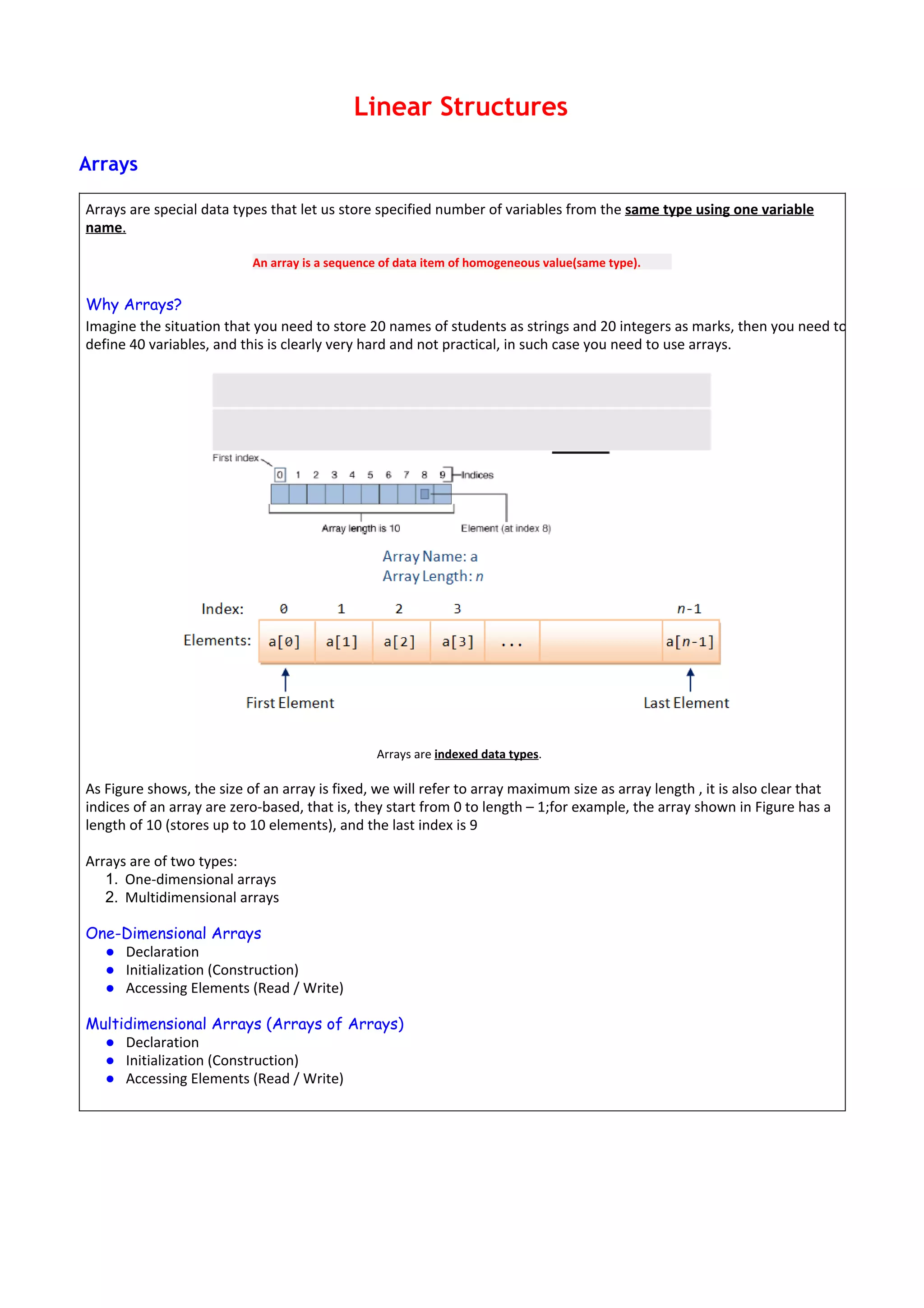
As Figure shows, the size of an array is fixed, we will refer to array maximum size as array length , it is also clear that
indices of an array are zero-based, that is, they start from 0 to length – 1;for example, the array shown in Figure has a
length of 10 (stores up to 10 elements), and the last index is 9
Arrays are of two types:
1. One-dimensional arrays
2. Multidimensional arrays
One-Dimensional Arrays
● Declaration
● Initialization (Construction)
● Accessing Elements (Read / Write)
Multidimensional Arrays (Arrays of Arrays)
● Declaration
● Initialization (Construction)
● Accessing Elements (Read / Write)
http://www.tutorialspoint.com/java/util/arraylist_get.htm
Employee.java
public class Employee implements Comparable {
int EmpID;
String Ename;
double Sal;
static int i;
public Employee() {
EmpID = i++;
Ename = "dont know";
Sal = 0.0;
}
public Employee(String ename, double sal) {
EmpID = i++;
Ename = ename;
Sal = sal;
}
public String toString() {
return "EmpID " + EmpID + "n" + "Ename " + Ename + "n" + "Sal" + Sal;
}
public int compareTo(Object o1) {
if (this.Sal == ((Employee) o1).Sal)
return 0;
else if ((this.Sal) > ((Employee) o1).Sal)
return 1;
else
return -1;
}
}
ComparableDemo.java
import java.util.*;
public class ComparableDemo{
public static void main(String[] args) {
List ts1 = new ArrayList();
ts1.add(new Employee ("Tom",40000.00));
ts1.add(new Employee ("Harry",20000.00));
ts1.add(new Employee ("Maggie",50000.00));
ts1.add(new Employee ("Chris",70000.00));
Collections.sort(ts1);
Iterator itr = ts1.iterator();
while(itr.hasNext()){
Object element = itr.next();
System.out.println(element + "n");
}
}
}
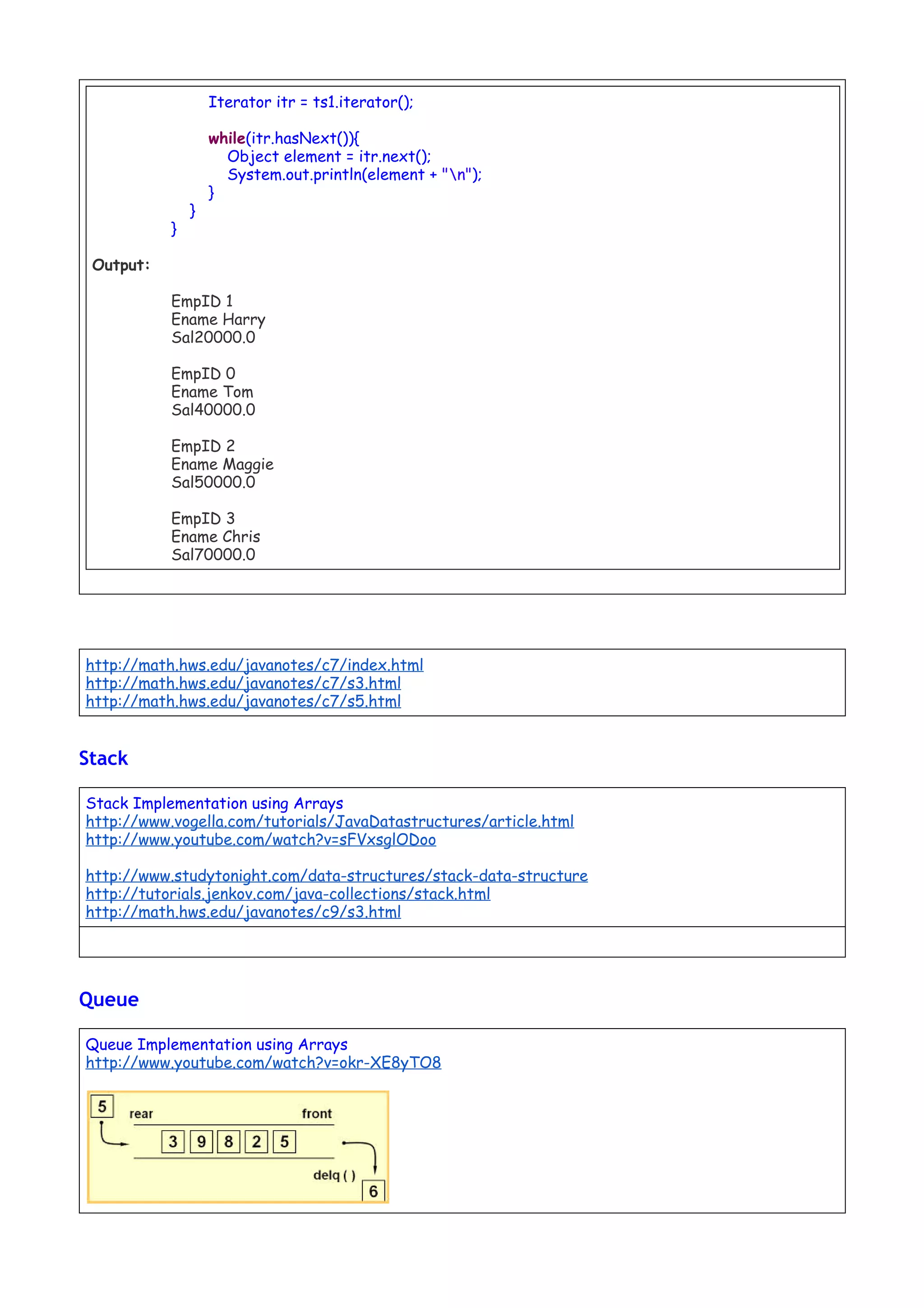
Output:
EmpID 1
Ename Harry
Sal20000.0
EmpID 0
Ename Tom
Sal40000.0
EmpID 2
Ename Maggie
Sal50000.0
EmpID 3
Ename Chris
Sal70000.0
http://math.hws.edu/javanotes/c7/index.html
http://math.hws.edu/javanotes/c7/s3.html
http://math.hws.edu/javanotes/c7/s5.html
Stack
Stack Implementation using Arrays
http://www.vogella.com/tutorials/JavaDatastructures/article.html
http://www.youtube.com/watch?v=sFVxsglODoo
http://www.studytonight.com/data-structures/stack-data-structure
http://tutorials.jenkov.com/java-collections/stack.html
http://math.hws.edu/javanotes/c9/s3.html
Queue
Queue Implementation using Arrays
http://www.youtube.com/watch?v=okr-XE8yTO8
http://www.studytonight.com/data-structures/queue-data-structure
http://tutorials.jenkov.com/java-collections/queue.html
http://math.hws.edu/javanotes/c9/s3.html
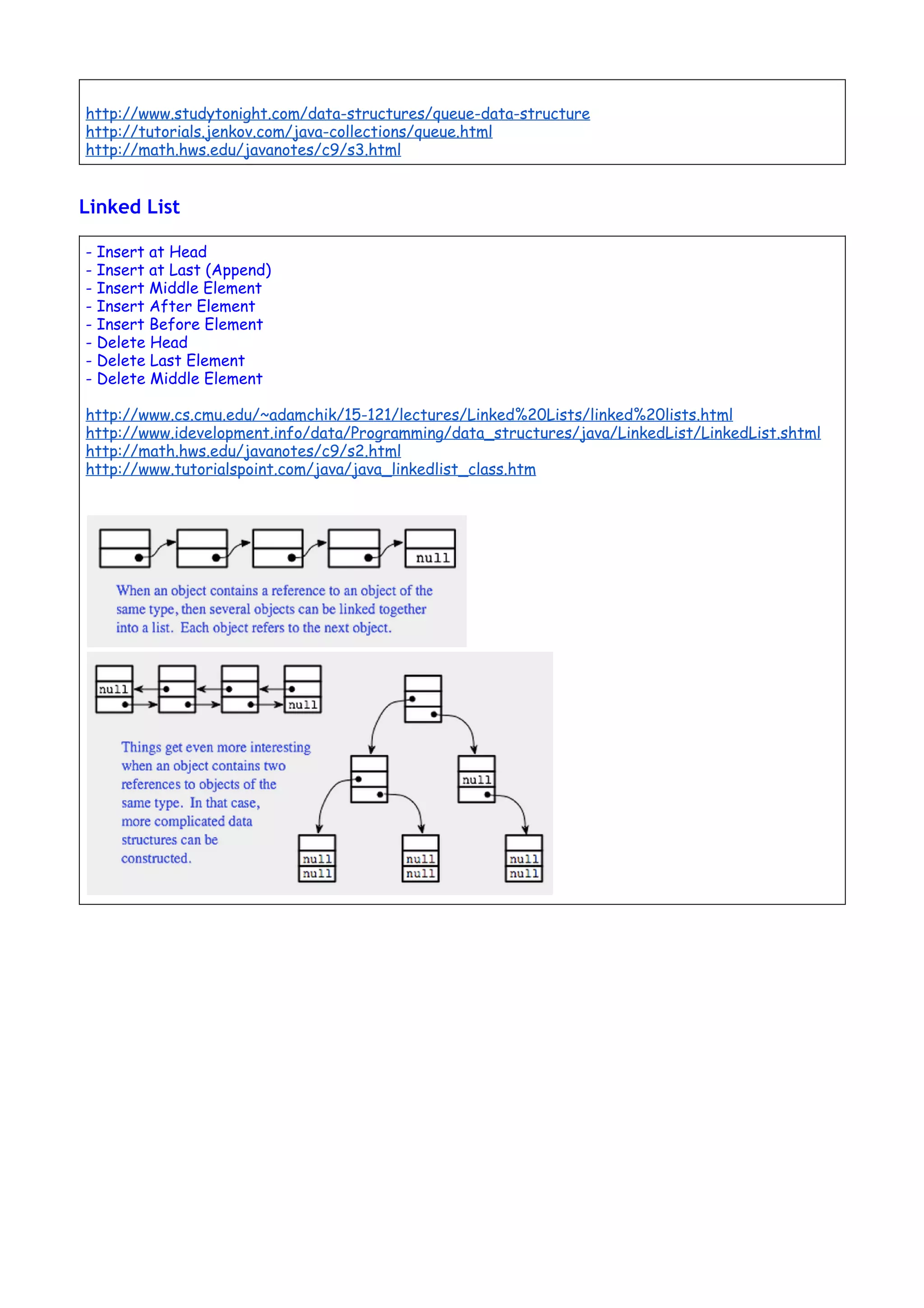
Linked List
- Insert at Head
- Insert at Last (Append)
- Insert Middle Element
- Insert After Element
- Insert Before Element
- Delete Head
- Delete Last Element
- Delete Middle Element
http://www.cs.cmu.edu/~adamchik/15-121/lectures/Linked%20Lists/linked%20lists.html
http://www.idevelopment.info/data/Programming/data_structures/java/LinkedList/LinkedList.shtml
http://math.hws.edu/javanotes/c9/s2.html
http://www.tutorialspoint.com/java/java_linkedlist_class.htm
Ordered & Unordered Structures
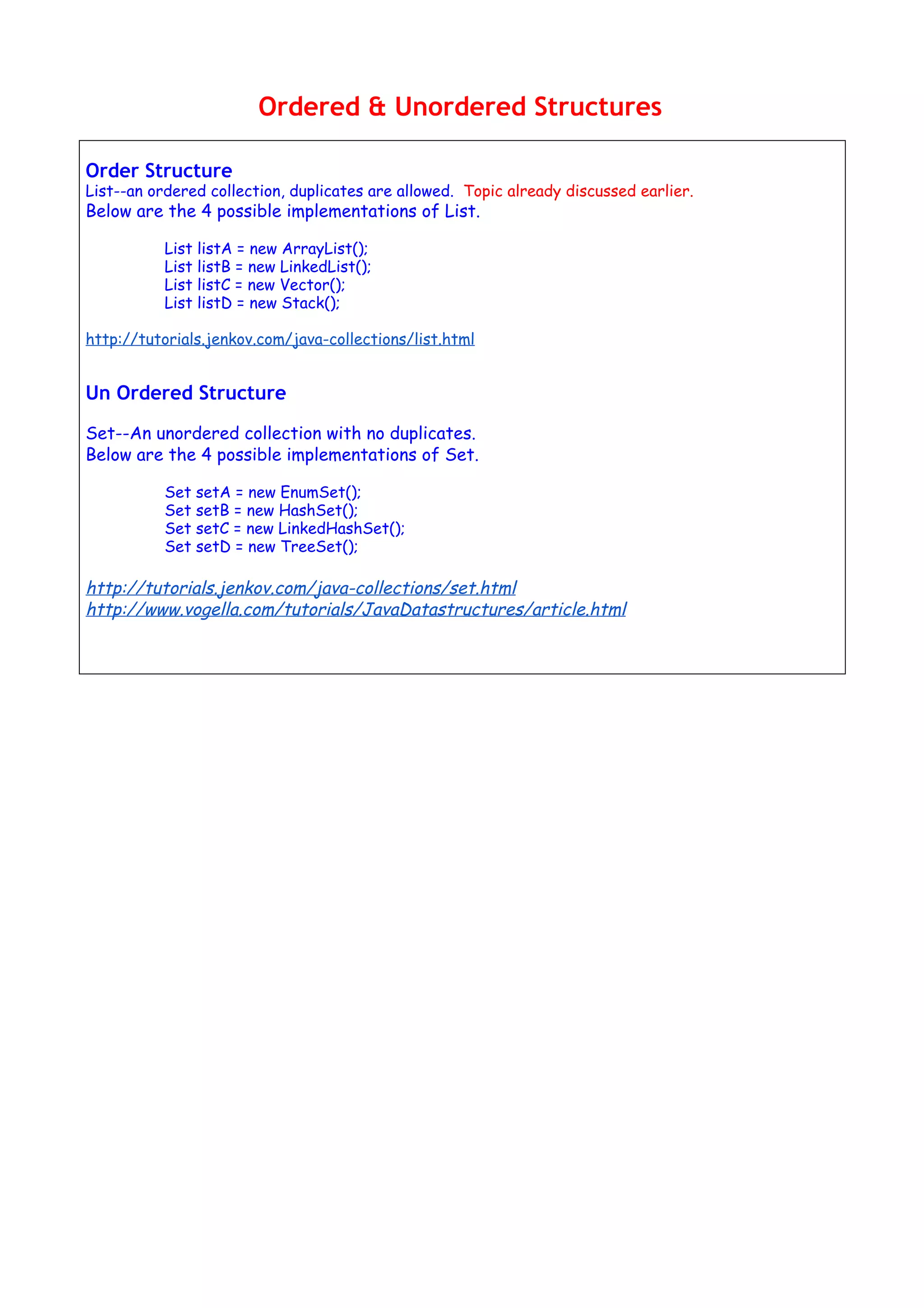
Order Structure
List--an ordered collection, duplicates are allowed. Topic already discussed earlier.
Below are the 4 possible implementations of List.
List listA = new ArrayList();
List listB = new LinkedList();
List listC = new Vector();
List listD = new Stack();
http://tutorials.jenkov.com/java-collections/list.html
Un Ordered Structure
Set--An unordered collection with no duplicates.
Below are the 4 possible implementations of Set.
Set setA = new EnumSet();
Set setB = new HashSet();
Set setC = new LinkedHashSet();
Set setD = new TreeSet();
http://tutorials.jenkov.com/java-collections/set.html
http://www.vogella.com/tutorials/JavaDatastructures/article.html
Sorting
General Explanation for Various Sorting Algorithms:
Bubble Sort
http://www.youtube.com/watch?v=8Kp-8OGwphY
Selection Sort:
http://www.youtube.com/watch?v=f8hXR_Hvybo
Insertion Sort:
http://www.youtube.com/watch?v=DFG-XuyPYUQ
Merge Sort:
http://www.youtube.com/watch?v=EeQ8pwjQxTM
Student Assignment: Lab programs on various Sorting Algorithms (Thursday Lab HR)
Unit 2 question bNk 16 mark notes submission (Friday by EOD)
Source Code for Sorting Algorithms
Bubble Sort
http://www.algolist.net/Algorithms/Sorting/Bubble_sort
http://www.sorting-algorithms.com/bubble-sort
Selection Sort:
http://www.youtube.com/watch?v=f8hXR_Hvybo
http://www.algolist.net/Algorithms/Sorting/Selection_sort
http://www.sorting-algorithms.com/selection-sort
Merge Sort:
http://www.youtube.com/watch?v=EeQ8pwjQxTM
http://www.algolist.net/Algorithms/Merge/Sorted_arrays
http://www.sorting-algorithms.com/merge-sort
Insertion Sort:
http://www.youtube.com/watch?v=DFG-XuyPYUQ
http://www.algolist.net/Algorithms/Sorting/Insertion_sort
http://www.sorting-algorithms.com/insertion-sort
Trees
Binary Tree
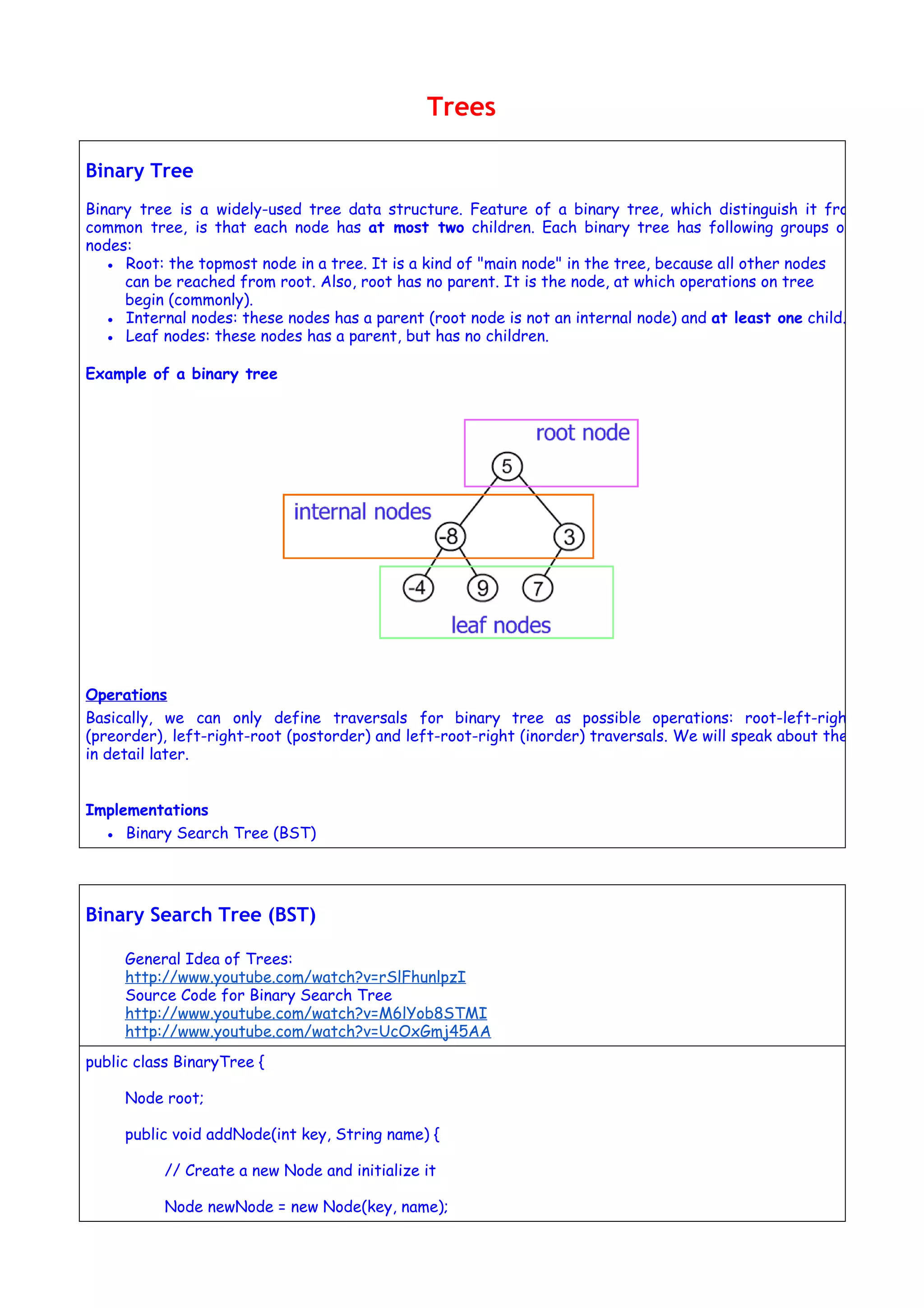
Binary tree is a widely-used tree data structure. Feature of a binary tree, which distinguish it from
common tree, is that each node has at most two children. Each binary tree has following groups of
nodes:
● Root: the topmost node in a tree. It is a kind of "main node" in the tree, because all other nodes
can be reached from root. Also, root has no parent. It is the node, at which operations on tree
begin (commonly).
● Internal nodes: these nodes has a parent (root node is not an internal node) and at least one child.
● Leaf nodes: these nodes has a parent, but has no children.
Example of a binary tree
Operations
Basically, we can only define traversals for binary tree as possible operations: root-left-right
(preorder), left-right-root (postorder) and left-root-right (inorder) traversals. We will speak about them
in detail later.
Implementations
● Binary Search Tree (BST)
Binary Search Tree (BST)
General Idea of Trees:
http://www.youtube.com/watch?v=rSlFhunlpzI
Source Code for Binary Search Tree
http://www.youtube.com/watch?v=M6lYob8STMI
http://www.youtube.com/watch?v=UcOxGmj45AA
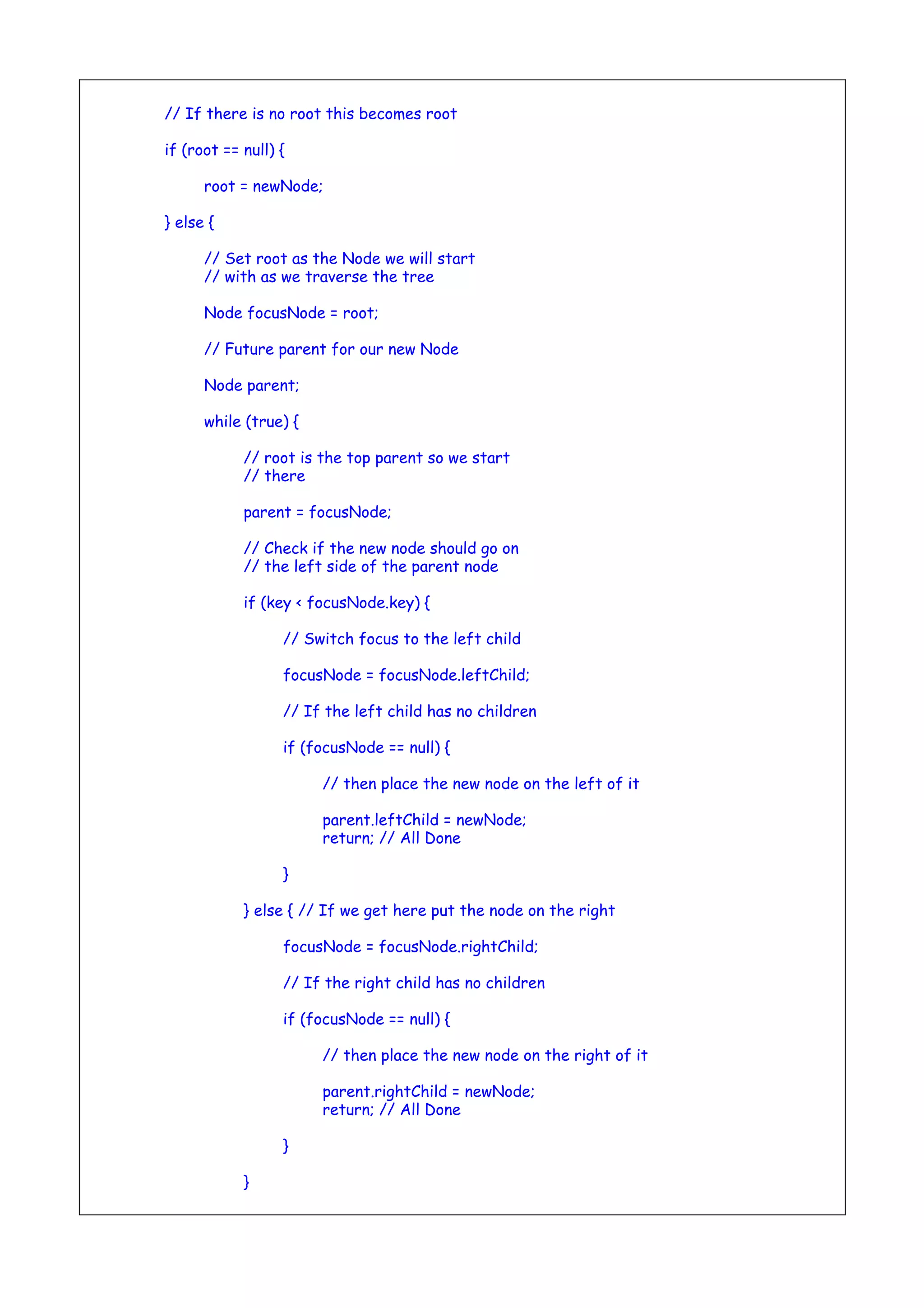
public class BinaryTree {
Node root;
public void addNode(int key, String name) {
// Create a new Node and initialize it
Node newNode = new Node(key, name);
// If there is no root this becomes root
if (root == null) {
root = newNode;
} else {
// Set root as the Node we will start
// with as we traverse the tree
Node focusNode = root;
// Future parent for our new Node
Node parent;
while (true) {
// root is the top parent so we start
// there
parent = focusNode;
// Check if the new node should go on
// the left side of the parent node
if (key < focusNode.key) {
// Switch focus to the left child
focusNode = focusNode.leftChild;
// If the left child has no children
if (focusNode == null) {
// then place the new node on the left of it
parent.leftChild = newNode;
return; // All Done
}
} else { // If we get here put the node on the right
focusNode = focusNode.rightChild;
// If the right child has no children
if (focusNode == null) {
// then place the new node on the right of it
parent.rightChild = newNode;
return; // All Done
}
}
}
}
}
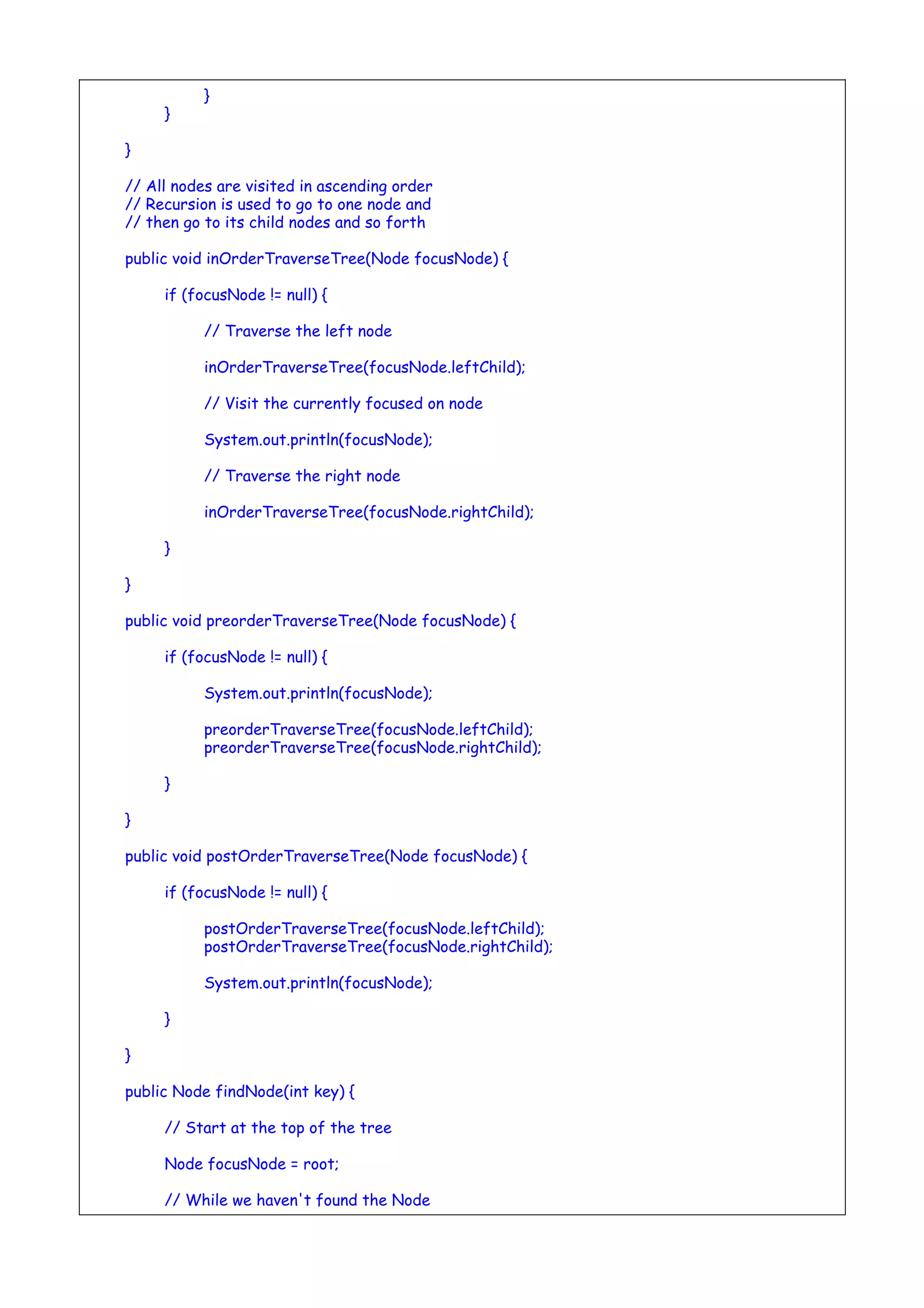
// All nodes are visited in ascending order
// Recursion is used to go to one node and
// then go to its child nodes and so forth
public void inOrderTraverseTree(Node focusNode) {
if (focusNode != null) {
// Traverse the left node
inOrderTraverseTree(focusNode.leftChild);
// Visit the currently focused on node
System.out.println(focusNode);
// Traverse the right node
inOrderTraverseTree(focusNode.rightChild);
}
}
public void preorderTraverseTree(Node focusNode) {
if (focusNode != null) {
System.out.println(focusNode);
preorderTraverseTree(focusNode.leftChild);
preorderTraverseTree(focusNode.rightChild);
}
}
public void postOrderTraverseTree(Node focusNode) {
if (focusNode != null) {
postOrderTraverseTree(focusNode.leftChild);
postOrderTraverseTree(focusNode.rightChild);
System.out.println(focusNode);
}
}
public Node findNode(int key) {
// Start at the top of the tree
Node focusNode = root;
// While we haven't found the Node
// keep looking
while (focusNode.key != key) {
// If we should search to the left
if (key < focusNode.key) {
// Shift the focus Node to the left child
focusNode = focusNode.leftChild;
} else {
// Shift the focus Node to the right child
focusNode = focusNode.rightChild;
}
// The node wasn't found
if (focusNode == null)
return null;
}
return focusNode;
}
public static void main(String[] args) {
BinaryTree theTree = new BinaryTree();
theTree.addNode(50, "Boss");
theTree.addNode(25, "Vice President");
theTree.addNode(15, "Office Manager");
theTree.addNode(30, "Secretary");
theTree.addNode(75, "Sales Manager");
theTree.addNode(85, "Salesman 1");
// Different ways to traverse binary trees
// theTree.inOrderTraverseTree(theTree.root);
// theTree.preorderTraverseTree(theTree.root);
// theTree.postOrderTraverseTree(theTree.root);
// Find the node with key 75
System.out.println("nNode with the key 75");
System.out.println(theTree.findNode(75));
}
}
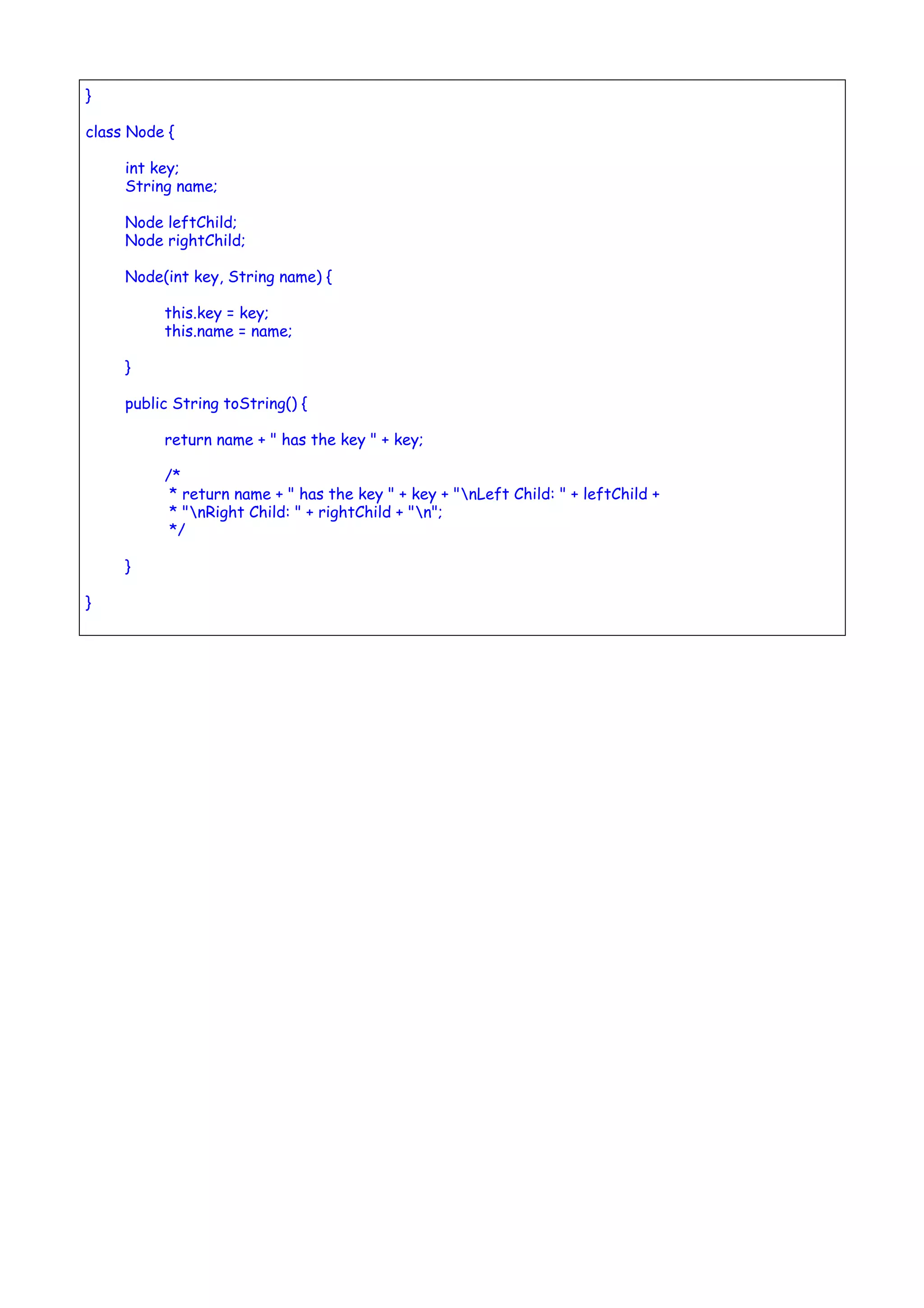
class Node {
int key;
String name;
Node leftChild;
Node rightChild;
Node(int key, String name) {
this.key = key;
this.name = name;
}
public String toString() {
return name + " has the key " + key;
/*
* return name + " has the key " + key + "nLeft Child: " + leftChild +
* "nRight Child: " + rightChild + "n";
*/
}
}

Aj unit2 notesjavadatastructures

  • 1.
    UNIT II -JAVA DATA STRUCTURES Lists Linear Structures Arrays Stack Queue Linked List Ordered & Unordered Structures Order Structure Un Ordered Structure Sorting Trees Binary Tree Example of a binary tree Operations Implementations Binary Search Tree (BST) .
  • 2.
    Lists Collections API Revisit? ListAbstract Data Type (ADT) • A list a collection of items in which the items have a position • We keep “to-do” lists, shop with a grocery list, and invite a list of friends to a party • Types of Lists – Ordered Lists - (implements Comparable Interface) • An ordered list is kept in order based on characteristics of the elements in the list, e.g. alphabetical order for names – Unordered Lists • They are stored in an order that is externally controlled by how and when the elements are added to the list – Indexed Lists Topics Discussed in URL: ● List Implementations ● Adding and Accessing Elements ● Removing Elements ● Generic Lists A List represents a data structure which allows to dynamically add, access and remove objects of the same type. Adding objects to the list is usually done via the add() method. The get(int i) method allows to retrieve the element at position i. Remove objects from the list is usually done via the remove(int i) method which removes the element at position i. Below is a sample program that explains the following: ● Custom List Implementation (using Arrays) which allows Adding, Accessing & Removing Elements ● Test Application that uses the above Customized List
  • 3.
    MyList.java package list; import java.util.Arrays; importjava.util.Iterator; /** * Created by user on 2/15/14. */ public class MyList<E> { private int size = 0; private static final int DEFAULT_CAPACITY = 10; private Object elements[]; public MyList() { elements = new Object[DEFAULT_CAPACITY]; } public void add(E e) { if (size == elements.length) { ensureCapa(); } elements[size++] = e; } private void ensureCapa() { int newSize = elements.length * 2; elements = Arrays.copyOf(elements, newSize); } @SuppressWarnings("unchecked") public E get(int i) { if (i >= size || i < 0) { throw new IndexOutOfBoundsException("Index: " + i + ", Size " + i); } return (E) elements[i]; } public E remove(int i) { if (i >= size || i < 0) { throw new IndexOutOfBoundsException("Index: " + i + ", Size " + i); } size++; E oldValue = (E) elements[i]; int numMoved = size - i - 1; if (numMoved > 0) System.arraycopy(elements, i + 1, elements, i, numMoved); elements[--size] = null; return oldValue; } @Override public String toString() { String temp = new String(); temp = "["; for (int i = 0; i < elements.length; i++) { if (elements[i] != null) temp = temp + " "+ (E) elements[i] ; }
  • 4.
    temp = temp+ "]"; return temp; } } The following show contains a small test for the data structure. I use in the first test the MyList implementation and in the second test the standard Java List implementation. MyMainListTest.java package list; import com.sun.org.apache.xpath.internal.SourceTree; import java.util.ArrayList; import java.util.List; /** * Created by user on 2/15/14. */ public class MyMainListTest { public static void main(String[] args) { MyMainListTest myMainListTest = new MyMainListTest(); System.out.println("Testing MyList"); try { myMainListTest.testMyList(); } catch (Exception e) { System.out.println("MyList " + e); } System.out.println("Testing StandardList"); try { myMainListTest.testStandardList(); } catch (Exception e) { System.out.println("StandardList " + e); } } public void testMyList() { MyList<Integer> list = new MyList<Integer>(); list.add(1); list.add(2); list.add(3); list.add(3); list.add(4); list.add(2); list.add(3); list.add(3); list.add(4); list.add(2); list.add(3); list.add(3); list.add(4); System.out.println(list); //Remove element on 4th Index. list.remove(4); System.out.println(list); System.out.println(list.get(1));
  • 5.
    System.out.println(list.get(6)); System.out.println(list.get(20));//Throws IndexOutOfBoundsException System.out.println(list.get(-1));//Throws IndexOutOfBoundsException } publicvoid testStandardList() { List<Integer> list = new ArrayList<Integer>(); list.add(1); list.add(2); list.add(3); list.add(3); list.add(4); list.add(2); list.add(3); list.add(3); list.add(4); list.add(2); list.add(3); list.add(3); list.add(4); System.out.println(list); //Remove element on 4th Index. list.remove(4); System.out.println(list); System.out.println(list.get(1)); System.out.println(list.get(6)); System.out.println(list.get(20));//Throws IndexOutOfBoundsException System.out.println(list.get(-1));//Throws IndexOutOfBoundsException } }
  • 6.
    Linear Structures Arrays Arrays arespecial data types that let us store specified number of variables from the same type using one variable name. An array is a sequence of data item of homogeneous value(same type). Why Arrays? Imagine the situation that you need to store 20 names of students as strings and 20 integers as marks, then you need to define 40 variables, and this is clearly very hard and not practical, in such case you need to use arrays. Arrays are indexed data types. As Figure shows, the size of an array is fixed, we will refer to array maximum size as array length , it is also clear that indices of an array are zero-based, that is, they start from 0 to length – 1;for example, the array shown in Figure has a length of 10 (stores up to 10 elements), and the last index is 9 Arrays are of two types: 1. One-dimensional arrays 2. Multidimensional arrays One-Dimensional Arrays ● Declaration ● Initialization (Construction) ● Accessing Elements (Read / Write) Multidimensional Arrays (Arrays of Arrays) ● Declaration ● Initialization (Construction) ● Accessing Elements (Read / Write)
  • 7.
    http://www.tutorialspoint.com/java/util/arraylist_get.htm Employee.java public class Employeeimplements Comparable { int EmpID; String Ename; double Sal; static int i; public Employee() { EmpID = i++; Ename = "dont know"; Sal = 0.0; } public Employee(String ename, double sal) { EmpID = i++; Ename = ename; Sal = sal; } public String toString() { return "EmpID " + EmpID + "n" + "Ename " + Ename + "n" + "Sal" + Sal; } public int compareTo(Object o1) { if (this.Sal == ((Employee) o1).Sal) return 0; else if ((this.Sal) > ((Employee) o1).Sal) return 1; else return -1; } } ComparableDemo.java import java.util.*; public class ComparableDemo{ public static void main(String[] args) { List ts1 = new ArrayList(); ts1.add(new Employee ("Tom",40000.00)); ts1.add(new Employee ("Harry",20000.00)); ts1.add(new Employee ("Maggie",50000.00)); ts1.add(new Employee ("Chris",70000.00)); Collections.sort(ts1);
  • 8.
    Iterator itr =ts1.iterator(); while(itr.hasNext()){ Object element = itr.next(); System.out.println(element + "n"); } } } Output: EmpID 1 Ename Harry Sal20000.0 EmpID 0 Ename Tom Sal40000.0 EmpID 2 Ename Maggie Sal50000.0 EmpID 3 Ename Chris Sal70000.0 http://math.hws.edu/javanotes/c7/index.html http://math.hws.edu/javanotes/c7/s3.html http://math.hws.edu/javanotes/c7/s5.html Stack Stack Implementation using Arrays http://www.vogella.com/tutorials/JavaDatastructures/article.html http://www.youtube.com/watch?v=sFVxsglODoo http://www.studytonight.com/data-structures/stack-data-structure http://tutorials.jenkov.com/java-collections/stack.html http://math.hws.edu/javanotes/c9/s3.html Queue Queue Implementation using Arrays http://www.youtube.com/watch?v=okr-XE8yTO8
  • 9.
    http://www.studytonight.com/data-structures/queue-data-structure http://tutorials.jenkov.com/java-collections/queue.html http://math.hws.edu/javanotes/c9/s3.html Linked List - Insertat Head - Insert at Last (Append) - Insert Middle Element - Insert After Element - Insert Before Element - Delete Head - Delete Last Element - Delete Middle Element http://www.cs.cmu.edu/~adamchik/15-121/lectures/Linked%20Lists/linked%20lists.html http://www.idevelopment.info/data/Programming/data_structures/java/LinkedList/LinkedList.shtml http://math.hws.edu/javanotes/c9/s2.html http://www.tutorialspoint.com/java/java_linkedlist_class.htm
  • 10.
    Ordered & UnorderedStructures Order Structure List--an ordered collection, duplicates are allowed. Topic already discussed earlier. Below are the 4 possible implementations of List. List listA = new ArrayList(); List listB = new LinkedList(); List listC = new Vector(); List listD = new Stack(); http://tutorials.jenkov.com/java-collections/list.html Un Ordered Structure Set--An unordered collection with no duplicates. Below are the 4 possible implementations of Set. Set setA = new EnumSet(); Set setB = new HashSet(); Set setC = new LinkedHashSet(); Set setD = new TreeSet(); http://tutorials.jenkov.com/java-collections/set.html http://www.vogella.com/tutorials/JavaDatastructures/article.html
  • 11.
    Sorting General Explanation forVarious Sorting Algorithms: Bubble Sort http://www.youtube.com/watch?v=8Kp-8OGwphY Selection Sort: http://www.youtube.com/watch?v=f8hXR_Hvybo Insertion Sort: http://www.youtube.com/watch?v=DFG-XuyPYUQ Merge Sort: http://www.youtube.com/watch?v=EeQ8pwjQxTM Student Assignment: Lab programs on various Sorting Algorithms (Thursday Lab HR) Unit 2 question bNk 16 mark notes submission (Friday by EOD) Source Code for Sorting Algorithms Bubble Sort http://www.algolist.net/Algorithms/Sorting/Bubble_sort http://www.sorting-algorithms.com/bubble-sort Selection Sort: http://www.youtube.com/watch?v=f8hXR_Hvybo http://www.algolist.net/Algorithms/Sorting/Selection_sort http://www.sorting-algorithms.com/selection-sort Merge Sort: http://www.youtube.com/watch?v=EeQ8pwjQxTM http://www.algolist.net/Algorithms/Merge/Sorted_arrays http://www.sorting-algorithms.com/merge-sort Insertion Sort: http://www.youtube.com/watch?v=DFG-XuyPYUQ http://www.algolist.net/Algorithms/Sorting/Insertion_sort http://www.sorting-algorithms.com/insertion-sort
  • 12.
    Trees Binary Tree Binary treeis a widely-used tree data structure. Feature of a binary tree, which distinguish it from common tree, is that each node has at most two children. Each binary tree has following groups of nodes: ● Root: the topmost node in a tree. It is a kind of "main node" in the tree, because all other nodes can be reached from root. Also, root has no parent. It is the node, at which operations on tree begin (commonly). ● Internal nodes: these nodes has a parent (root node is not an internal node) and at least one child. ● Leaf nodes: these nodes has a parent, but has no children. Example of a binary tree Operations Basically, we can only define traversals for binary tree as possible operations: root-left-right (preorder), left-right-root (postorder) and left-root-right (inorder) traversals. We will speak about them in detail later. Implementations ● Binary Search Tree (BST) Binary Search Tree (BST) General Idea of Trees: http://www.youtube.com/watch?v=rSlFhunlpzI Source Code for Binary Search Tree http://www.youtube.com/watch?v=M6lYob8STMI http://www.youtube.com/watch?v=UcOxGmj45AA public class BinaryTree { Node root; public void addNode(int key, String name) { // Create a new Node and initialize it Node newNode = new Node(key, name);
  • 13.
    // If thereis no root this becomes root if (root == null) { root = newNode; } else { // Set root as the Node we will start // with as we traverse the tree Node focusNode = root; // Future parent for our new Node Node parent; while (true) { // root is the top parent so we start // there parent = focusNode; // Check if the new node should go on // the left side of the parent node if (key < focusNode.key) { // Switch focus to the left child focusNode = focusNode.leftChild; // If the left child has no children if (focusNode == null) { // then place the new node on the left of it parent.leftChild = newNode; return; // All Done } } else { // If we get here put the node on the right focusNode = focusNode.rightChild; // If the right child has no children if (focusNode == null) { // then place the new node on the right of it parent.rightChild = newNode; return; // All Done } }
  • 14.
    } } } // All nodesare visited in ascending order // Recursion is used to go to one node and // then go to its child nodes and so forth public void inOrderTraverseTree(Node focusNode) { if (focusNode != null) { // Traverse the left node inOrderTraverseTree(focusNode.leftChild); // Visit the currently focused on node System.out.println(focusNode); // Traverse the right node inOrderTraverseTree(focusNode.rightChild); } } public void preorderTraverseTree(Node focusNode) { if (focusNode != null) { System.out.println(focusNode); preorderTraverseTree(focusNode.leftChild); preorderTraverseTree(focusNode.rightChild); } } public void postOrderTraverseTree(Node focusNode) { if (focusNode != null) { postOrderTraverseTree(focusNode.leftChild); postOrderTraverseTree(focusNode.rightChild); System.out.println(focusNode); } } public Node findNode(int key) { // Start at the top of the tree Node focusNode = root; // While we haven't found the Node
  • 15.
    // keep looking while(focusNode.key != key) { // If we should search to the left if (key < focusNode.key) { // Shift the focus Node to the left child focusNode = focusNode.leftChild; } else { // Shift the focus Node to the right child focusNode = focusNode.rightChild; } // The node wasn't found if (focusNode == null) return null; } return focusNode; } public static void main(String[] args) { BinaryTree theTree = new BinaryTree(); theTree.addNode(50, "Boss"); theTree.addNode(25, "Vice President"); theTree.addNode(15, "Office Manager"); theTree.addNode(30, "Secretary"); theTree.addNode(75, "Sales Manager"); theTree.addNode(85, "Salesman 1"); // Different ways to traverse binary trees // theTree.inOrderTraverseTree(theTree.root); // theTree.preorderTraverseTree(theTree.root); // theTree.postOrderTraverseTree(theTree.root); // Find the node with key 75 System.out.println("nNode with the key 75"); System.out.println(theTree.findNode(75)); }
  • 16.
    } class Node { intkey; String name; Node leftChild; Node rightChild; Node(int key, String name) { this.key = key; this.name = name; } public String toString() { return name + " has the key " + key; /* * return name + " has the key " + key + "nLeft Child: " + leftChild + * "nRight Child: " + rightChild + "n"; */ } }