요즘 유행하는 AI 나도 해보자
(feat. CoreML)
곰튀김
요즘 유행하는 AI
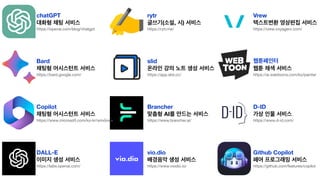
chatGPT
대화형 채팅 서비스
https://openai.com/blog/chatgpt
Bard
채팅형 어시스턴트 서비스
https://bard.google.com/
Copilot
채팅형 어시스턴트 서비스
https://www.microsoft.com/ko-kr/windows
DALL-E
이미지 생성 서비스
https://labs.openai.com/
rytr
글쓰기(소설, 시) 서비스
https://rytr.me/
slid
온라인 강의 노트 생성 서비스
https://app.slid.cc/
Brancher
맞춤형 AI를 만드는 서비스
https://www.brancher.ai/
vio.dio
배경음악 생성 서비스
https://www.viodio.io/
Vrew
텍스트변환 영상편집 서비스
https://vrew.voyagerx.com/
웹툰페인터
웹툰 채색 서비스
https://ai.webtoons.com/ko/painter
D-ID
가상 인물 서비스
https://www.d-id.com/
Github Copilot
페어 프로그래밍 서비스
https://github.com/features/copilot
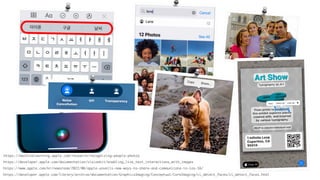
https://machinelearning.apple.com/research/recognizing-people-photos
https://www.apple.com/kr/newsroom/2022/06/apple-unveils-new-ways-to-share-and-communicate-in-ios-16/
https://developer.apple.com/library/archive/documentation/GraphicsImaging/Conceptual/CoreImaging/ci_detect_faces/ci_detect_faces.html
https://developer.apple.com/documentation/visionkit/enabling_live_text_interactions_with_images
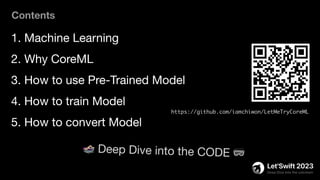
1. Machine Learning
2. Why CoreML
3. How to use Pre-Trained Model
4. How to train Model
5. How to convert Model
Contents
https://github.com/iamchiwon/LetMeTryCoreML
🏊 Deep Dive into the CODE 🥽
Machine Learning
이해하기
(빠르게)
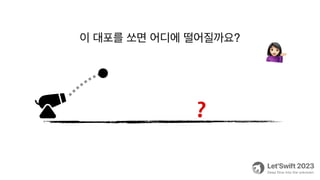
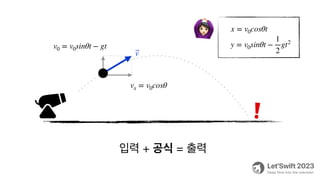
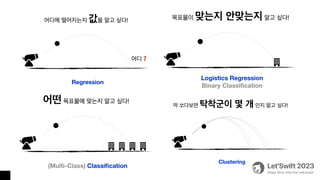
이 대포를 쏘면 어디에 떨어질까요?
💁
❓
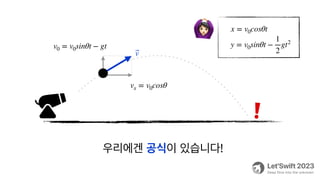
우리에겐 공식이 있습니다!
❗
v0 = v0sinθt − gt
⃗
v
vx = v0cosθ
x = v0cosθt
y = v0sinθt −
1
2
gt2
🙆
입력 + 공식 = 출력
❗
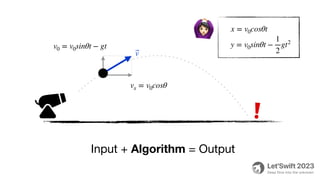
v0 = v0sinθt − gt
⃗
v
vx = v0cosθ
x = v0cosθt
y = v0sinθt −
1
2
gt2
🙆
Input + Algorithm = Output
❗
v0 = v0sinθt − gt
⃗
v
vx = v0cosθ
x = v0cosθt
y = v0sinθt −
1
2
gt2
🙆
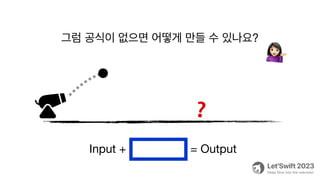
그럼 공식이 없으면 어떻게 만들 수 있나요?
💁
❓
Input + A lgorithm = Output
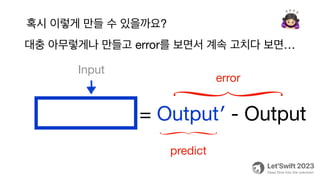
대충 아무렇게나 만들고 error를 보면서 계속 고치다 보면…
🙇
Algorithm = Output′ - Output
predict
error
Input
혹시 이렇게 만들 수 있을까요?
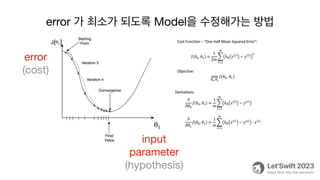
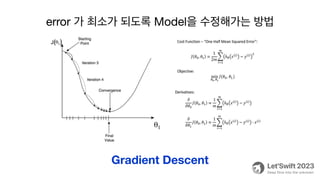
error 가 최소가 되도록 Model을 수정해가는 방법
error
(cost)
input
parameter
(hypothesis)
error 가 최소가 되도록 Model을 수정해가는 방법
Gradient Descent
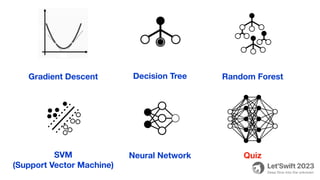
Gradient Descent Decision Tree Random Forest
SVM
(Support Vector Machine)
Neural Network Quiz
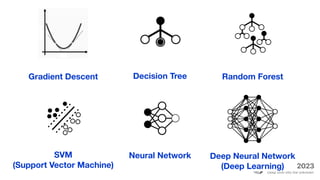
Gradient Descent Decision Tree Random Forest
SVM
(Support Vector Machine)
Neural Network Deep Neural Network
(Deep Learning)
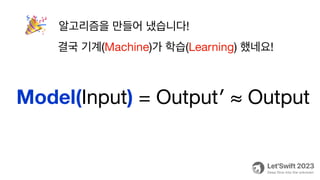
알고리즘을 만들어 냈습니다!
🎉
Model(Input) = Output′ ≈ Output
결국 기계(Machine)가 학습(Learning) 했네요!
App에서 AI를 사용하는 방법
Why CoreML
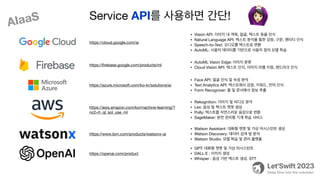
https://cloud.google.com/ai
• Vision API: 이미지 내 객체, 얼굴, 텍스트 등을 인식
• Natural Language API: 텍스트 분석을 통한 감정, 구문, 엔터티 인식
• Speech-to-Text: 오디오를 텍스트로 변환
• AutoML: 사용자 데이터를 기반으로 사용자 정의 모델 학습
https://
fi
rebase.google.com/products/ml
• AutoML Vision Edge: 이미지 분류
• Cloud Vision API: 텍스트 인식, 이미지 라벨 지정, 랜드마크 인식
https://azure.microsoft.com/ko-kr/solutions/ai
• Face API: 얼굴 인식 및 속성 분석
• Text Analytics API: 텍스트에서 감정, 키워드, 언어 인식
• Form Recognizer: 폼 및 문서에서 정보 추출
https://aws.amazon.com/ko/machine-learning/?
nc2=h_ql_sol_use_ml
• Rekognition: 이미지 및 비디오 분석
• Lex: 음성 및 텍스트 챗봇 생성
• Polly: 텍스트를 자연스러운 음성으로 변환
• SageMaker: 완전 관리형 기계 학습 서비스
https://www.ibm.com/products/watsonx-ai
• Watson Assistant: 대화형 챗봇 및 가상 어시스턴트 생성
• Watson Discovery: 데이터 검색 및 분석
• Watson Studio: 모델 학습 및 관리 플랫폼
https://openai.com/product
• GPT: 대화형 챗봇 및 가상 어시스턴트
• DALL·E : 이미지 생성
• Whisper : 음성 기반 텍스트 생성. STT
Service API를 사용하면 간단! 🙆
AIaaS
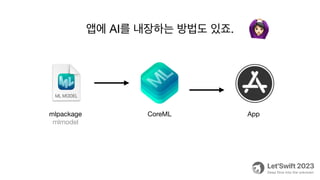
앱에 AI를 내장하는 방법도 있죠.
CoreML App
mlpackage
mlmodel
🙆
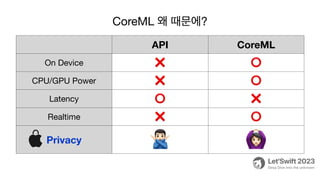
API CoreML
On Device ❌ ⭕
CPU/GPU Power ❌ ⭕
Latency ⭕ ❌
Realtime ❌ ⭕
Privacy 🙅 🙆
CoreML 왜 때문에?
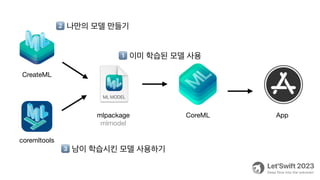
CoreML App
mlpackage
mlmodel
CreateML
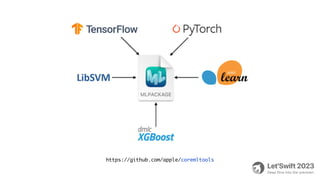
coremltools
1⃣ 이미 학습된 모델 사용
2⃣ 나만의 모델 만들기
3⃣ 남이 학습시킨 모델 사용하기
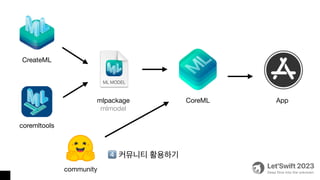
CoreML App
mlpackage
mlmodel
CreateML
coremltools
community
4⃣ 커뮤니티 활용하기
1⃣ 이미 학습된 모델 사용하기
Pre-Trained
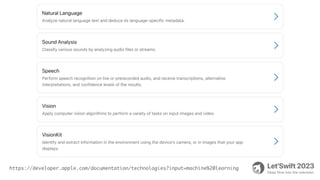
https://developer.apple.com/documentation/technologies?input=machine%20learning
🏊 Deep Dive into the CODE 🥽
#1
🏊 Deep Dive into the CODE 🥽
#2
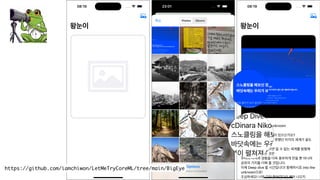
https://github.com/iamchiwon/LetMeTryCoreML/tree/main/BigEye
import Vision
import VisionKit
func recognaizeText(image: UIImage) {
let Image = image.cgImage!
let request = VNRecognizeTextRequest { request, error in
let result = request.results as! [VNRecognizedTextObservation]
let text = result.compactMap { $0.topCandidates(1).first?.string }
.joined(separator: "n")
}
request.revision = VNRecognizeTextRequestRevision3
request.recognitionLanguages = ["ko-KR"]
request.recognitionLevel = .accurate
request.usesLanguageCorrection = true
try! VNImageRequestHandler(cgImage: Image, options: [:]).perform([request])
}
import Vision
import VisionKit
func recognaizeText(image: UIImage) {
let Image = image.cgImage!
let request = VNRecognizeTextRequest { request, error in
let result = request.results as! [VNRecognizedTextObservation]
let text = result.compactMap { $0.topCandidates(1).first?.string }
.joined(separator: "n")
}
request.revision = VNRecognizeTextRequestRevision3
request.recognitionLanguages = ["ko-KR"]
request.recognitionLevel = .accurate
request.usesLanguageCorrection = true
try! VNImageRequestHandler(cgImage: Image, options: [:]).perform([request])
}
🏊 Deep Dive into the CODE 🥽
#3
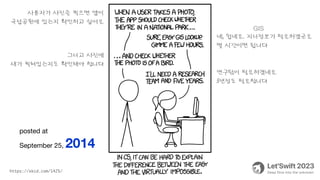
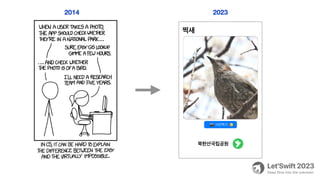
https://xkcd.com/1425/
사용자가 사진을 찍으면 앱이
국립공원에 있는지 확인하고 싶어요
네, 쉽네요. 지리정보가 필요하겠군요
몇 시간이면 됩니다
그리고 사진에
새가 찍혀있는지도 확인해야 합니다
연구팀이 필요하겠네요
5년정도 필요합니다
posted at
September 25, 2014
GIS
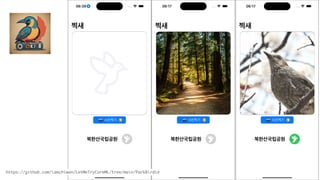
https://github.com/iamchiwon/LetMeTryCoreML/tree/main/ParkBirdie
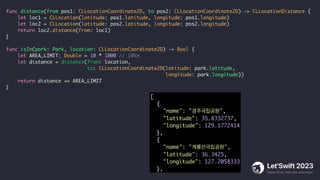
[
{
"name": "경주국립공원",
"latitude": 35.8332737,
"longitude": 129.1772414
},
{
"name": "계룡산국립공원",
"latitude": 36.3425,
"longitude": 127.2058333
},
func distance(from pos1: CLLocationCoordinate2D, to pos2: CLLocationCoordinate2D) -> CLLocationDistance {
let loc1 = CLLocation(latitude: pos1.latitude, longitude: pos1.longitude)
let loc2 = CLLocation(latitude: pos2.latitude, longitude: pos2.longitude)
return loc2.distance(from: loc1)
}
func isIn(park: Park, location: CLLocationCoordinate2D) -> Bool {
let AREA_LIMIT: Double = 10 * 1000 // 10km
let distance = distance(from: location,
to: CLLocationCoordinate2D(latitude: park.latitude,
longitude: park.longitude))
return distance <= AREA_LIMIT
}
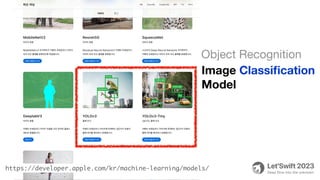
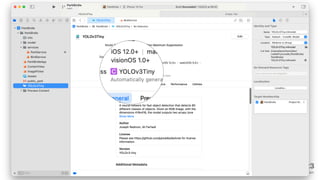
https://developer.apple.com/kr/machine-learning/models/
Image Classi
fi
cation
Model
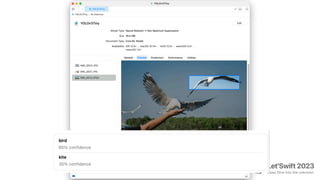
Object Recognition
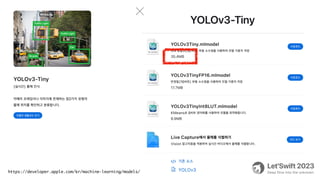
https://developer.apple.com/kr/machine-learning/models/
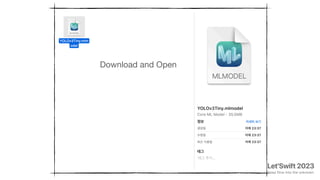
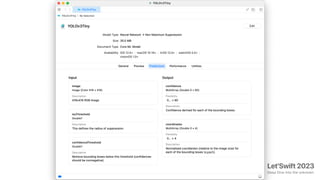
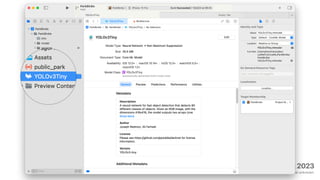
Download and Open
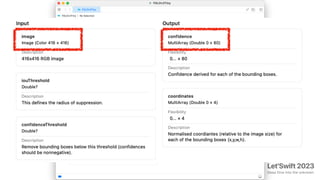
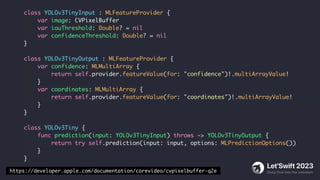
class YOLOv3TinyInput : MLFeatureProvider {
var image: CVPixelBuffer
var iouThreshold: Double? = nil
var confidenceThreshold: Double? = nil
}
class YOLOv3TinyOutput : MLFeatureProvider {
var confidence: MLMultiArray {
return self.provider.featureValue(for: "confidence")!.multiArrayValue!
}
var coordinates: MLMultiArray {
return self.provider.featureValue(for: "coordinates")!.multiArrayValue!
}
}
class YOLOv3Tiny {
func prediction(input: YOLOv3TinyInput) throws -> YOLOv3TinyOutput {
return try self.prediction(input: input, options: MLPredictionOptions())
}
}
https://developer.apple.com/documentation/corevideo/cvpixelbuffer-q2e
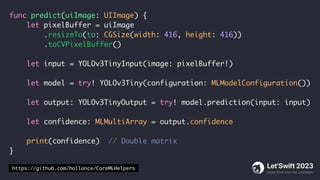
func predict(uiImage: UIImage) {
let pixelBuffer = uiImage
.resizeTo(to: CGSize(width: 416, height: 416))
.toCVPixelBuffer()
let input = YOLOv3TinyInput(image: pixelBuffer!)
let model = try! YOLOv3Tiny(configuration: MLModelConfiguration())
let output: YOLOv3TinyOutput = try! model.prediction(input: input)
let confidence: MLMultiArray = output.confidence
print(confidence) // Double matrix
}
https://github.com/hollance/CoreMLHelpers
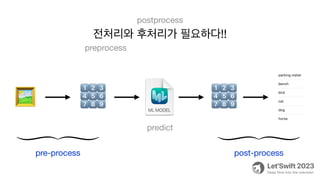
1⃣2⃣3⃣
4⃣5⃣6⃣
7⃣8⃣9⃣
1⃣2⃣3⃣
4⃣5⃣6⃣
7⃣8⃣9⃣
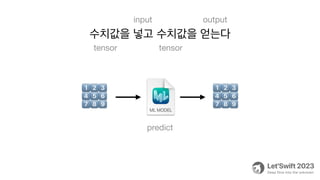
수치값을 넣고 수치값을 얻는다
tensor tensor
input output
predict
1⃣2⃣3⃣
4⃣5⃣6⃣
7⃣8⃣9⃣
1⃣2⃣3⃣
4⃣5⃣6⃣
7⃣8⃣9⃣
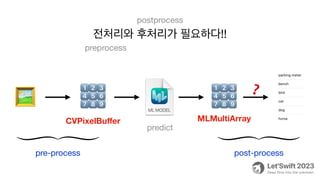
전처리와 후처리가 필요하다!!
preprocess
postprocess
🖼
pre-process post-process
predict
1⃣2⃣3⃣
4⃣5⃣6⃣
7⃣8⃣9⃣
1⃣2⃣3⃣
4⃣5⃣6⃣
7⃣8⃣9⃣
전처리와 후처리가 필요하다!!
preprocess
postprocess
🖼
pre-process post-process
predict
CVPixelBu
ff
er MLMultiArray
❓
import Vision
func predict(uiImage: UIImage) {
let model = try! YOLOv3Tiny(configuration: MLModelConfiguration())
let coreMLModel = try! VNCoreMLModel(for: model.model)
let request = VNCoreMLRequest(model: coreMLModel) { request, _ in
let results = request.results as! [VNRecognizedObjectObservation]
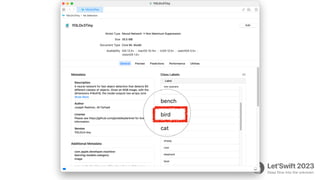
let hasBird = results
.map { $0.labels.first!.identifier }
.contains { $0 == "bird" }
// found bird !!
}
let pixelBuffer = uiImage.toCVPixelBuffer()
try! VNImageRequestHandler(cvPixelBuffer: pixelBuffer!).perform([request])
}
2014 2023
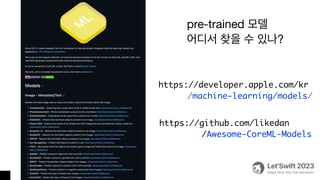
https://github.com/likedan
/Awesome-CoreML-Models
pre-trained 모델
어디서 찾을 수 있나?
https://developer.apple.com/kr
/machine-learning/models/
2⃣ 나만의 모델 만들기
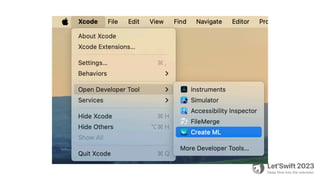
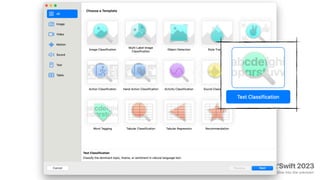
CreateML
Image
Video
Motion
Sound
Text
Table
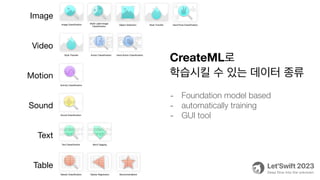
CreateML로
학습시킬 수 있는 데이터 종류
- Foundation model based
- automatically training
- GUI tool
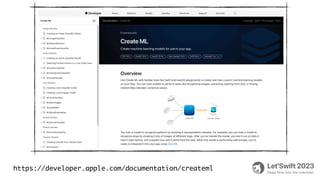
https://developer.apple.com/documentation/createml
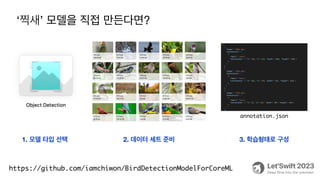
‘찍새’ 모델을 직접 만든다면?
https://github.com/iamchiwon/BirdDetectionModelForCoreML
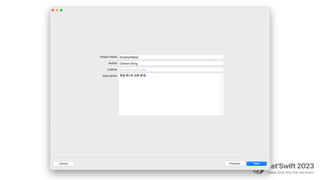
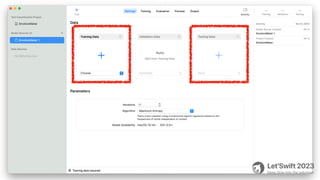
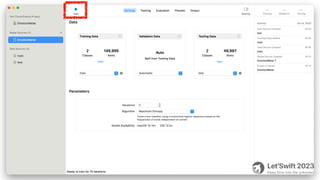
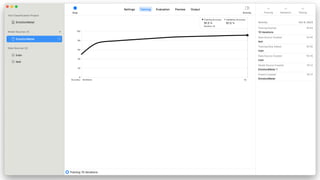
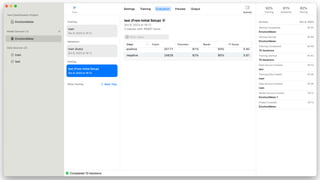
1. 모델 타입 선택 2. 데이터 세트 준비 3. 학습형태로 구성
annotation.json
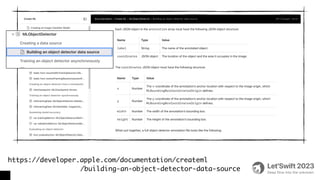
https://developer.apple.com/documentation/createml
/building-an-object-detector-data-source
🏊 Deep Dive into the CODE 🥽
#4
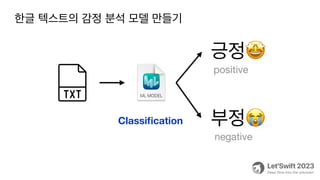
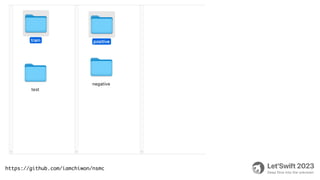
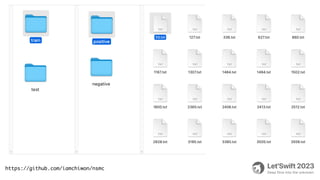
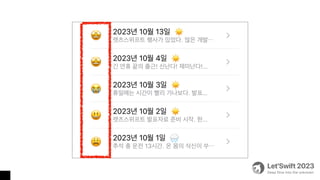
긍정🤩
부정😭
positive
negative
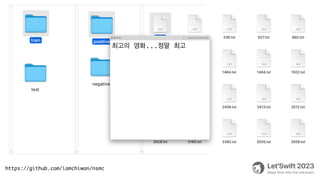
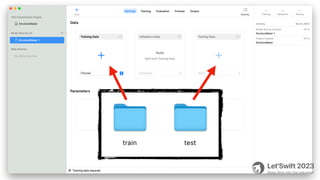
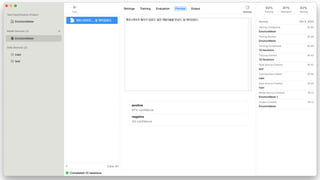
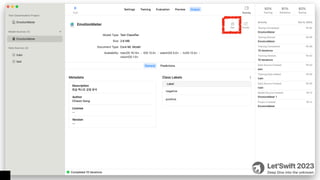
한글 텍스트의 감정 분석 모델 만들기
Classi
fi
cation
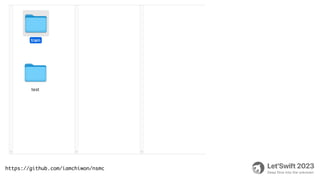
https://github.com/iamchiwon/nsmc
최고의 영화...정말 최고
🏊 Deep Dive into the CODE 🥽
#5
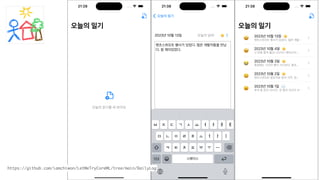
https://github.com/iamchiwon/LetMeTryCoreML/tree/main/DailyLog
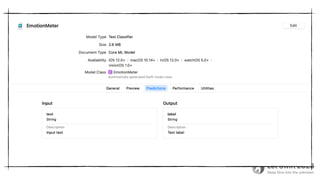
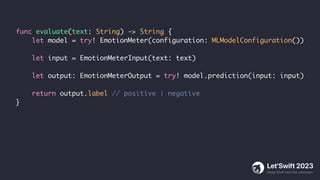
func evaluate(text: String) -> String {
let model = try! EmotionMeter(configuration: MLModelConfiguration())
let input = EmotionMeterInput(text: text)
let output: EmotionMeterOutput = try! model.prediction(input: input)
return output.label // positive | negative
}
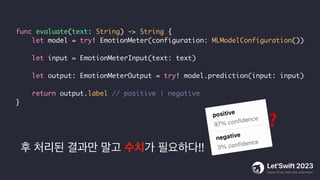
후 처리된 결과만 말고 수치가 필요하다!!
func evaluate(text: String) -> String {
let model = try! EmotionMeter(configuration: MLModelConfiguration())
let input = EmotionMeterInput(text: text)
let output: EmotionMeterOutput = try! model.prediction(input: input)
return output.label // positive | negative
}
❓
import NaturalLanguage
func evaluate(text: String) -> Emotion {
let model = try! EmotionMeter(configuration: MLModelConfiguration())
let predictor = try! NLModel(mlModel: model.model)
let label = predictor.predictedLabel(for: text)!
let result = predictor.predictedLabelHypotheses(for: text, maximumCount: 2)
let value = result[label] ?? 0.5
if label == "positive" {
if value > 0.8 { return .happy } else { return .good }
}
if label == "negative" {
if value > 0.8 { return .sad } else { return .bad }
}
return .normal
}
3⃣ 남이 학습시킨 모델 사용하기
Convert to mlmodel
https://github.com/apple/coremltools
🏊 Deep Dive into the CODE 🥽
#5
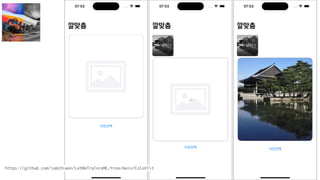
https://github.com/iamchiwon/LetMeTryCoreML/tree/main/ColotFit
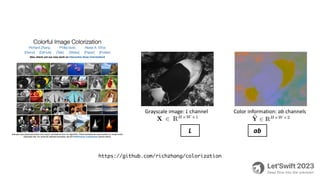
https://github.com/richzhang/colorization
from colorizers import *
import coremltools as ct
import torch
#torch_model = eccv16(pretrained=True).eval()
torch_model = siggraph17(pretrained=True).eval()
example_input = torch.rand(1, 1, 256, 256)
traced_model = torch.jit.trace(torch_model, example_input)
coreml_model = ct.convert(
traced_model,
inputs=[ct.TensorType(name="input1", shape=(1, 1, 256, 256))]
)
coreml_model.save("Colorizer.mlpackage")
coremltools 는 python 라이브러리
https://github.com/iamchiwon/colorization
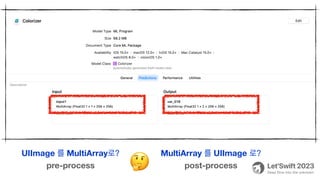
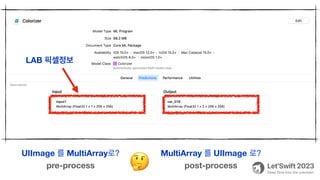
UIImage 를 MultiArray로? MultiArray 를 UIImage 로?
pre-process post-process
🤔
UIImage 를 MultiArray로? MultiArray 를 UIImage 로?
pre-process post-process
🤔
LAB 픽셀정보
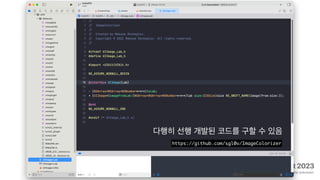
https://github.com/sgl0v/ImageColorizer
다행히 선행 개발된 코드를 구할 수 있음
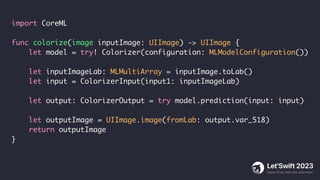
import CoreML
func colorize(image inputImage: UIImage) -> UIImage {
let model = try! Colorizer(configuration: MLModelConfiguration())
let inputImageLab: MLMultiArray = inputImage.toLab()
let input = ColorizerInput(input1: inputImageLab)
let output: ColorizerOutput = try model.prediction(input: input)
let outputImage = UIImage.image(fromLab: output.var_518)
return outputImage
}
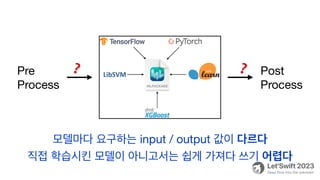
Pre
Process
Post
Process
❓
❓
모델마다 요구하는 input / output 값이 다르다
직접 학습시킨 모델이 아니고서는 쉽게 가져다 쓰기 어렵다
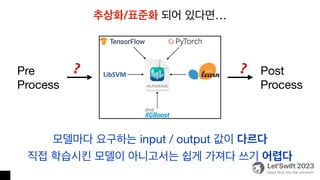
Pre
Process
Post
Process
❓
❓
모델마다 요구하는 input / output 값이 다르다
직접 학습시킨 모델이 아니고서는 쉽게 가져다 쓰기 어렵다
추상화/표준화 되어 있다면…
4⃣ 커뮤니티 활용하기
Not ready to use yet
여러 AI 개발자들이 새로운 모델들을 만들고 있다
매번 새로 만들지 말고 쉽게 가져다 쓸 수 있다면?
여러 AI 개발자들이 새로운 모델들을 만들고 있다
매번 새로 만들지 말고 쉽게 가져다 쓸 수 있다면?
기존 모델을 기반으로 추가학습해서 새로운 모델을 만든다면?
여러 AI 개발자들이 새로운 모델들을 만들고 있다
매번 새로 만들지 말고 쉽게 가져다 쓸 수 있다면?
기존 모델을 기반으로 추가학습해서 새로운 모델을 만든다면?
그럼 모델을 서로 공유할 수 있는 커뮤니티가 필요하겠네~
여러 AI 개발자들이 새로운 모델들을 만들고 있다
매번 새로 만들지 말고 쉽게 가져다 쓸 수 있다면?
기존 모델을 기반으로 추가학습해서 새로운 모델을 만든다면?
그럼 모델을 서로 공유할 수 있는 커뮤니티가 필요하겠네~
github 처럼 AI 모델 공유 플랫폼을 만들자!
여러 AI 개발자들이 새로운 모델들을 만들고 있다
매번 새로 만들지 말고 쉽게 가져다 쓸 수 있다면?
기존 모델을 기반으로 추가학습해서 새로운 모델을 만든다면?
그럼 모델을 서로 공유할 수 있는 커뮤니티가 필요하겠네~
github 처럼 AI 모델 공유 플랫폼을 만들자!
그리고 쉽게 활용할 수 있게 추상화해서 제공하자!
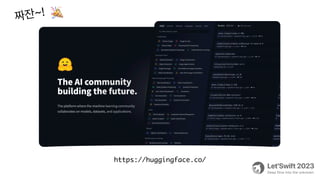
https://huggingface.co/
짜잔~!
🎉
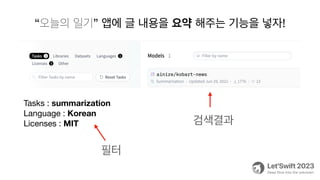
“오늘의 일기” 앱에 글 내용을 요약 해주는 기능을 넣자!
Tasks : summarization
Language : Korean
Licenses : MIT
필터
검색결과
from transformers import pipeline
text = '스노클링을 해보신 경험이 있으신가요? 바닷속에는 우리가 보지 못했던 미지의 세계가 끝도 없이 펼
쳐져 있습니다. 직접 들어가 보지 않으면 알 수 없는 세계를 탐험해 봤던 경험을 나누는 것은 우리의 지식과
경험을 더욱 풍부하게 만들 뿐 아니라 공유의 가치를 더해 줄 것입니다. 이제 Deep dive 할 시간입니다! 함
께하시죠 into the unknown으로! 조심하세요! 너무 깊이 들어갔다간 헤어 나오지 못할지도 모릅니다
Let’Swift 2023에서는 이전보다 더 깊은 기술적인 내용을 다루고자 합니다. 작년, Let’Swift 2022는 엔데
믹을 맞이하며 모두가 즐길 수 있는 자리를 마련한 바 있습니다. 오랜 기간 커뮤니티를 지켜온 시니어, 기여하
고 싶지만 선뜻 용기를 내지 못했던 주니어, 이제 막 첫발을 때고자 하는 학생들 모두가 모여 즐거운 대화를
나누는 축제의 장이었습니다.'
pipe = pipeline("summarization", model="ainize/kobart-news")
summary = pipe(text)
print(summary)
#print(summary[0]['summary_text'])
from transformers import pipeline
text = '스노클링을 해보신 경험이 있으신가요? 바닷속에는 우리가 보지 못했던 미지의 세계가 끝도 없이 펼
쳐져 있습니다. 직접 들어가 보지 않으면 알 수 없는 세계를 탐험해 봤던 경험을 나누는 것은 우리의 지식과
경험을 더욱 풍부하게 만들 뿐 아니라 공유의 가치를 더해 줄 것입니다. 이제 Deep dive 할 시간입니다! 함
께하시죠 into the unknown으로! 조심하세요! 너무 깊이 들어갔다간 헤어 나오지 못할지도 모릅니다
Let’Swift 2023에서는 이전보다 더 깊은 기술적인 내용을 다루고자 합니다. 작년, Let’Swift 2022는 엔데
믹을 맞이하며 모두가 즐길 수 있는 자리를 마련한 바 있습니다. 오랜 기간 커뮤니티를 지켜온 시니어, 기여하
고 싶지만 선뜻 용기를 내지 못했던 주니어, 이제 막 첫발을 때고자 하는 학생들 모두가 모여 즐거운 대화를
나누는 축제의 장이었습니다.'
pipe = pipeline("summarization", model="ainize/kobart-news")
summary = pipe(text)
print(summary)
#print(summary[0]['summary_text'])
[{
‘summary_text': '작년, Let’Swift 2022는 엔데
믹을 맞이하며 모두가 즐길 수 있는 자리를 마련하여 오랜 기
간 커뮤니티를 지켜온 시니어, 기여하고 싶지만 선뜻 용기를
내지 못했던 주니어, 이제 막 첫발을 때고자 하는 학생들 모
두가 모여 즐거운 대화를 나누는 축제의 장이었다’
}]
대충 쓸만 하네~
from transformers import AutoTokenizer, AutoModelForSeq2SeqLM
text = '스노클링을 해보신 경험이 있으신가요? 바닷속에는 우리가 보지 못했던 미지의 세계가 끝도 없이 펼쳐져
있습니다. 직접 들어가 보지 않으면 알 수 없는 세계를 탐험해 봤던 경험을 나누는 것은 우리의 지식과 경험을 더욱
풍부하게 만들 뿐 아니라 공유의 가치를 더해 줄 것입니다. 이제 Deep dive 할 시간입니다! 함께하시죠 into
the unknown으로! 조심하세요! 너무 깊이 들어갔다간 헤어 나오지 못할지도 모릅니다 Let’Swift 2023에서는
이전보다 더 깊은 기술적인 내용을 다루고자 합니다. 작년, Let’Swift 2022는 엔데믹을 맞이하며 모두가 즐길
수 있는 자리를 마련한 바 있습니다. 오랜 기간 커뮤니티를 지켜온 시니어, 기여하고 싶지만 선뜻 용기를 내지 못했
던 주니어, 이제 막 첫발을 때고자 하는 학생들 모두가 모여 즐거운 대화를 나누는 축제의 장이었습니다.'
tokenizer = AutoTokenizer.from_pretrained("ainize/kobart-news")
model = AutoModelForSeq2SeqLM.from_pretrained("ainize/kobart-news")
input_ids = tokenizer.encode(text, return_tensors="pt")
summary_ids = model.generate(input_ids)
summary = tokenizer.decode(summary_ids[0], skip_special_tokens=True)
print(summary)
텍스트->숫자
숫자 -> 텍스트
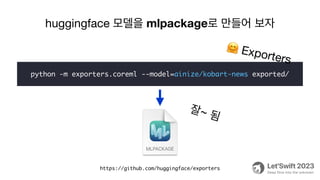
huggingface 모델을 mlpackage로 만들어 보자
https://github.com/huggingface/exporters
python -m exporters.coreml --model=ainize/kobart-news exported/
🤗 Exporters
잘~ 됨
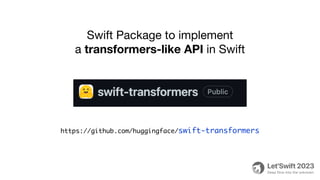
Swift Package to implement
a transformers-like API in Swift
https://github.com/huggingface/swift-transformers
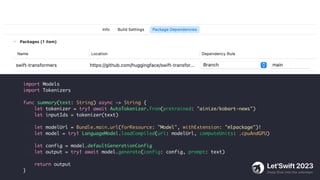
import Models
import Tokenizers
func summary(text: String) async -> String {
let tokenizer = try! await AutoTokenizer.from(pretrained: "ainize/kobart-news")
let inputIds = tokenizer(text)
let modelUrl = Bundle.main.url(forResource: "Model", withExtension: "mlpackage")!
let model = try! LanguageModel.loadCompiled(url: modelUrl, computeUnits: .cpuAndGPU)
let config = model.defaultGenerationConfig
let output = try! await model.generate(config: config, prompt: text)
return output
}
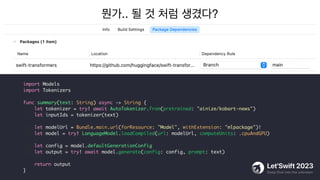
뭔가.. 될 것 처럼 생겼다?
import Models
import Tokenizers
func summary(text: String) async -> String {
let tokenizer = try! await AutoTokenizer.from(pretrained: "ainize/kobart-news")
let inputIds = tokenizer(text)
let modelUrl = Bundle.main.url(forResource: "Model", withExtension: "mlpackage")!
let model = try! LanguageModel.loadCompiled(url: modelUrl, computeUnits: .cpuAndGPU)
let config = model.defaultGenerationConfig
let output = try! await model.generate(config: config, prompt: text)
return output
}
뭔가.. 될것 처럼 생겼다?
import Models
import Tokenizers
func summary(text: String) async -> String {
let tokenizer = try! await AutoTokenizer.from(pretrained: "ainize/kobart-news")
let inputIds = tokenizer(text)
let modelUrl = Bundle.main.url(forResource: "Model", withExtension: "mlpackage")!
let model = try! LanguageModel.loadCompiled(url: modelUrl, computeUnits: .cpuAndGPU)
let config = model.defaultGenerationConfig
let output = try! await model.generate(config: config, prompt: text)
return output
}
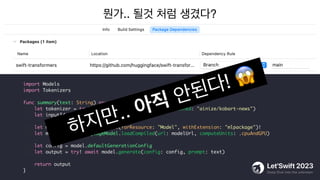
하지만.. 아직 안된다! 😱
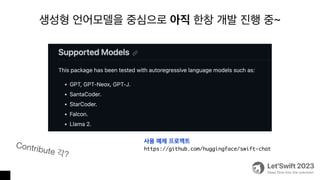
생성형 언어모델을 중심으로 아직 한창 개발 진행 중~
Contribute 각?
사용 예제 프로젝트
https://github.com/huggingface/swift-chat
Summary
1. mlmodel + iOS Framework으로 동작하는 앱을 만들어 봤습니다.
그리고 매우 잘 동작했습니다.
2. CreateML 을 활용하면 매우 쉽게 나만의 모델을 학습시킬 수 있습니다
3. coremltools 를 활용하면 이미 완성된 모델을 활용해서
앱에 적용할 수 있었습니다
4. huggingface 화이팅!
5. 이제 여러분의 앱에도 CoreML과 함께 AI기능을 적용해 보세요
Q&A
https://github.com/iamchiwon/LetMeTryCoreML

요즘 유행하는 AI 나도 해보자 (feat. CoreML)

  • 1.
    요즘 유행하는 AI나도 해보자 (feat. CoreML) 곰튀김
  • 2.
  • 3.
    chatGPT 대화형 채팅 서비스 https://openai.com/blog/chatgpt Bard 채팅형어시스턴트 서비스 https://bard.google.com/ Copilot 채팅형 어시스턴트 서비스 https://www.microsoft.com/ko-kr/windows DALL-E 이미지 생성 서비스 https://labs.openai.com/ rytr 글쓰기(소설, 시) 서비스 https://rytr.me/ slid 온라인 강의 노트 생성 서비스 https://app.slid.cc/ Brancher 맞춤형 AI를 만드는 서비스 https://www.brancher.ai/ vio.dio 배경음악 생성 서비스 https://www.viodio.io/ Vrew 텍스트변환 영상편집 서비스 https://vrew.voyagerx.com/ 웹툰페인터 웹툰 채색 서비스 https://ai.webtoons.com/ko/painter D-ID 가상 인물 서비스 https://www.d-id.com/ Github Copilot 페어 프로그래밍 서비스 https://github.com/features/copilot
  • 4.
  • 5.
    1. Machine Learning 2.Why CoreML 3. How to use Pre-Trained Model 4. How to train Model 5. How to convert Model Contents https://github.com/iamchiwon/LetMeTryCoreML 🏊 Deep Dive into the CODE 🥽
  • 6.
  • 7.
    이 대포를 쏘면어디에 떨어질까요? 💁 ❓
  • 8.
    우리에겐 공식이 있습니다! ❗ v0= v0sinθt − gt ⃗ v vx = v0cosθ x = v0cosθt y = v0sinθt − 1 2 gt2 🙆
  • 9.
    입력 + 공식= 출력 ❗ v0 = v0sinθt − gt ⃗ v vx = v0cosθ x = v0cosθt y = v0sinθt − 1 2 gt2 🙆
  • 10.
    Input + Algorithm= Output ❗ v0 = v0sinθt − gt ⃗ v vx = v0cosθ x = v0cosθt y = v0sinθt − 1 2 gt2 🙆
  • 11.
    그럼 공식이 없으면어떻게 만들 수 있나요? 💁 ❓ Input + A lgorithm = Output
  • 12.
    대충 아무렇게나 만들고error를 보면서 계속 고치다 보면… 🙇 Algorithm = Output′ - Output predict error Input 혹시 이렇게 만들 수 있을까요?
  • 13.
    error 가 최소가되도록 Model을 수정해가는 방법 error (cost) input parameter (hypothesis)
  • 14.
    error 가 최소가되도록 Model을 수정해가는 방법 Gradient Descent
  • 15.
    Gradient Descent DecisionTree Random Forest SVM (Support Vector Machine) Neural Network Quiz
  • 16.
    Gradient Descent DecisionTree Random Forest SVM (Support Vector Machine) Neural Network Deep Neural Network (Deep Learning)
  • 17.
    알고리즘을 만들어 냈습니다! 🎉 Model(Input)= Output′ ≈ Output 결국 기계(Machine)가 학습(Learning) 했네요!
  • 19.
  • 20.
    https://cloud.google.com/ai • Vision API:이미지 내 객체, 얼굴, 텍스트 등을 인식 • Natural Language API: 텍스트 분석을 통한 감정, 구문, 엔터티 인식 • Speech-to-Text: 오디오를 텍스트로 변환 • AutoML: 사용자 데이터를 기반으로 사용자 정의 모델 학습 https:// fi rebase.google.com/products/ml • AutoML Vision Edge: 이미지 분류 • Cloud Vision API: 텍스트 인식, 이미지 라벨 지정, 랜드마크 인식 https://azure.microsoft.com/ko-kr/solutions/ai • Face API: 얼굴 인식 및 속성 분석 • Text Analytics API: 텍스트에서 감정, 키워드, 언어 인식 • Form Recognizer: 폼 및 문서에서 정보 추출 https://aws.amazon.com/ko/machine-learning/? nc2=h_ql_sol_use_ml • Rekognition: 이미지 및 비디오 분석 • Lex: 음성 및 텍스트 챗봇 생성 • Polly: 텍스트를 자연스러운 음성으로 변환 • SageMaker: 완전 관리형 기계 학습 서비스 https://www.ibm.com/products/watsonx-ai • Watson Assistant: 대화형 챗봇 및 가상 어시스턴트 생성 • Watson Discovery: 데이터 검색 및 분석 • Watson Studio: 모델 학습 및 관리 플랫폼 https://openai.com/product • GPT: 대화형 챗봇 및 가상 어시스턴트 • DALL·E : 이미지 생성 • Whisper : 음성 기반 텍스트 생성. STT Service API를 사용하면 간단! 🙆 AIaaS
  • 21.
    앱에 AI를 내장하는방법도 있죠. CoreML App mlpackage mlmodel 🙆
  • 22.
    API CoreML On Device❌ ⭕ CPU/GPU Power ❌ ⭕ Latency ⭕ ❌ Realtime ❌ ⭕ Privacy 🙅 🙆 CoreML 왜 때문에?
  • 23.
    CoreML App mlpackage mlmodel CreateML coremltools 1⃣ 이미학습된 모델 사용 2⃣ 나만의 모델 만들기 3⃣ 남이 학습시킨 모델 사용하기
  • 24.
  • 25.
    1⃣ 이미 학습된모델 사용하기 Pre-Trained
  • 26.
  • 27.
    🏊 Deep Diveinto the CODE 🥽 #1
  • 31.
    🏊 Deep Diveinto the CODE 🥽 #2
  • 32.
  • 33.
    import Vision import VisionKit funcrecognaizeText(image: UIImage) { let Image = image.cgImage! let request = VNRecognizeTextRequest { request, error in let result = request.results as! [VNRecognizedTextObservation] let text = result.compactMap { $0.topCandidates(1).first?.string } .joined(separator: "n") } request.revision = VNRecognizeTextRequestRevision3 request.recognitionLanguages = ["ko-KR"] request.recognitionLevel = .accurate request.usesLanguageCorrection = true try! VNImageRequestHandler(cgImage: Image, options: [:]).perform([request]) }
  • 34.
    import Vision import VisionKit funcrecognaizeText(image: UIImage) { let Image = image.cgImage! let request = VNRecognizeTextRequest { request, error in let result = request.results as! [VNRecognizedTextObservation] let text = result.compactMap { $0.topCandidates(1).first?.string } .joined(separator: "n") } request.revision = VNRecognizeTextRequestRevision3 request.recognitionLanguages = ["ko-KR"] request.recognitionLevel = .accurate request.usesLanguageCorrection = true try! VNImageRequestHandler(cgImage: Image, options: [:]).perform([request]) }
  • 35.
    🏊 Deep Diveinto the CODE 🥽 #3
  • 36.
    https://xkcd.com/1425/ 사용자가 사진을 찍으면앱이 국립공원에 있는지 확인하고 싶어요 네, 쉽네요. 지리정보가 필요하겠군요 몇 시간이면 됩니다 그리고 사진에 새가 찍혀있는지도 확인해야 합니다 연구팀이 필요하겠네요 5년정도 필요합니다 posted at September 25, 2014 GIS
  • 37.
  • 38.
    [ { "name": "경주국립공원", "latitude": 35.8332737, "longitude":129.1772414 }, { "name": "계룡산국립공원", "latitude": 36.3425, "longitude": 127.2058333 }, func distance(from pos1: CLLocationCoordinate2D, to pos2: CLLocationCoordinate2D) -> CLLocationDistance { let loc1 = CLLocation(latitude: pos1.latitude, longitude: pos1.longitude) let loc2 = CLLocation(latitude: pos2.latitude, longitude: pos2.longitude) return loc2.distance(from: loc1) } func isIn(park: Park, location: CLLocationCoordinate2D) -> Bool { let AREA_LIMIT: Double = 10 * 1000 // 10km let distance = distance(from: location, to: CLLocationCoordinate2D(latitude: park.latitude, longitude: park.longitude)) return distance <= AREA_LIMIT }
  • 39.
  • 40.
  • 41.
  • 48.
    class YOLOv3TinyInput :MLFeatureProvider { var image: CVPixelBuffer var iouThreshold: Double? = nil var confidenceThreshold: Double? = nil } class YOLOv3TinyOutput : MLFeatureProvider { var confidence: MLMultiArray { return self.provider.featureValue(for: "confidence")!.multiArrayValue! } var coordinates: MLMultiArray { return self.provider.featureValue(for: "coordinates")!.multiArrayValue! } } class YOLOv3Tiny { func prediction(input: YOLOv3TinyInput) throws -> YOLOv3TinyOutput { return try self.prediction(input: input, options: MLPredictionOptions()) } } https://developer.apple.com/documentation/corevideo/cvpixelbuffer-q2e
  • 49.
    func predict(uiImage: UIImage){ let pixelBuffer = uiImage .resizeTo(to: CGSize(width: 416, height: 416)) .toCVPixelBuffer() let input = YOLOv3TinyInput(image: pixelBuffer!) let model = try! YOLOv3Tiny(configuration: MLModelConfiguration()) let output: YOLOv3TinyOutput = try! model.prediction(input: input) let confidence: MLMultiArray = output.confidence print(confidence) // Double matrix } https://github.com/hollance/CoreMLHelpers
  • 50.
  • 51.
  • 52.
  • 53.
    import Vision func predict(uiImage:UIImage) { let model = try! YOLOv3Tiny(configuration: MLModelConfiguration()) let coreMLModel = try! VNCoreMLModel(for: model.model) let request = VNCoreMLRequest(model: coreMLModel) { request, _ in let results = request.results as! [VNRecognizedObjectObservation] let hasBird = results .map { $0.labels.first!.identifier } .contains { $0 == "bird" } // found bird !! } let pixelBuffer = uiImage.toCVPixelBuffer() try! VNImageRequestHandler(cvPixelBuffer: pixelBuffer!).perform([request]) }
  • 54.
  • 55.
    https://github.com/likedan /Awesome-CoreML-Models pre-trained 모델 어디서 찾을수 있나? https://developer.apple.com/kr /machine-learning/models/
  • 56.
    2⃣ 나만의 모델만들기 CreateML
  • 58.
    Image Video Motion Sound Text Table CreateML로 학습시킬 수 있는데이터 종류 - Foundation model based - automatically training - GUI tool
  • 59.
  • 60.
    ‘찍새’ 모델을 직접만든다면? https://github.com/iamchiwon/BirdDetectionModelForCoreML 1. 모델 타입 선택 2. 데이터 세트 준비 3. 학습형태로 구성 annotation.json
  • 61.
  • 62.
    🏊 Deep Diveinto the CODE 🥽 #4
  • 63.
  • 67.
  • 68.
  • 69.
  • 70.
  • 77.
    🏊 Deep Diveinto the CODE 🥽 #5
  • 78.
  • 80.
    func evaluate(text: String)-> String { let model = try! EmotionMeter(configuration: MLModelConfiguration()) let input = EmotionMeterInput(text: text) let output: EmotionMeterOutput = try! model.prediction(input: input) return output.label // positive | negative }
  • 81.
    후 처리된 결과만말고 수치가 필요하다!! func evaluate(text: String) -> String { let model = try! EmotionMeter(configuration: MLModelConfiguration()) let input = EmotionMeterInput(text: text) let output: EmotionMeterOutput = try! model.prediction(input: input) return output.label // positive | negative } ❓
  • 82.
    import NaturalLanguage func evaluate(text:String) -> Emotion { let model = try! EmotionMeter(configuration: MLModelConfiguration()) let predictor = try! NLModel(mlModel: model.model) let label = predictor.predictedLabel(for: text)! let result = predictor.predictedLabelHypotheses(for: text, maximumCount: 2) let value = result[label] ?? 0.5 if label == "positive" { if value > 0.8 { return .happy } else { return .good } } if label == "negative" { if value > 0.8 { return .sad } else { return .bad } } return .normal }
  • 84.
    3⃣ 남이 학습시킨모델 사용하기 Convert to mlmodel
  • 85.
  • 86.
    🏊 Deep Diveinto the CODE 🥽 #5
  • 87.
  • 88.
  • 89.
    from colorizers import* import coremltools as ct import torch #torch_model = eccv16(pretrained=True).eval() torch_model = siggraph17(pretrained=True).eval() example_input = torch.rand(1, 1, 256, 256) traced_model = torch.jit.trace(torch_model, example_input) coreml_model = ct.convert( traced_model, inputs=[ct.TensorType(name="input1", shape=(1, 1, 256, 256))] ) coreml_model.save("Colorizer.mlpackage") coremltools 는 python 라이브러리 https://github.com/iamchiwon/colorization
  • 90.
    UIImage 를 MultiArray로?MultiArray 를 UIImage 로? pre-process post-process 🤔
  • 91.
    UIImage 를 MultiArray로?MultiArray 를 UIImage 로? pre-process post-process 🤔 LAB 픽셀정보
  • 92.
  • 93.
    import CoreML func colorize(imageinputImage: UIImage) -> UIImage { let model = try! Colorizer(configuration: MLModelConfiguration()) let inputImageLab: MLMultiArray = inputImage.toLab() let input = ColorizerInput(input1: inputImageLab) let output: ColorizerOutput = try model.prediction(input: input) let outputImage = UIImage.image(fromLab: output.var_518) return outputImage }
  • 94.
    Pre Process Post Process ❓ ❓ 모델마다 요구하는 input/ output 값이 다르다 직접 학습시킨 모델이 아니고서는 쉽게 가져다 쓰기 어렵다
  • 95.
    Pre Process Post Process ❓ ❓ 모델마다 요구하는 input/ output 값이 다르다 직접 학습시킨 모델이 아니고서는 쉽게 가져다 쓰기 어렵다 추상화/표준화 되어 있다면…
  • 96.
  • 97.
    여러 AI 개발자들이새로운 모델들을 만들고 있다
  • 98.
    여러 AI 개발자들이새로운 모델들을 만들고 있다 매번 새로 만들지 말고 쉽게 가져다 쓸 수 있다면?
  • 99.
    여러 AI 개발자들이새로운 모델들을 만들고 있다 매번 새로 만들지 말고 쉽게 가져다 쓸 수 있다면? 기존 모델을 기반으로 추가학습해서 새로운 모델을 만든다면?
  • 100.
    여러 AI 개발자들이새로운 모델들을 만들고 있다 매번 새로 만들지 말고 쉽게 가져다 쓸 수 있다면? 기존 모델을 기반으로 추가학습해서 새로운 모델을 만든다면? 그럼 모델을 서로 공유할 수 있는 커뮤니티가 필요하겠네~
  • 101.
    여러 AI 개발자들이새로운 모델들을 만들고 있다 매번 새로 만들지 말고 쉽게 가져다 쓸 수 있다면? 기존 모델을 기반으로 추가학습해서 새로운 모델을 만든다면? 그럼 모델을 서로 공유할 수 있는 커뮤니티가 필요하겠네~ github 처럼 AI 모델 공유 플랫폼을 만들자!
  • 102.
    여러 AI 개발자들이새로운 모델들을 만들고 있다 매번 새로 만들지 말고 쉽게 가져다 쓸 수 있다면? 기존 모델을 기반으로 추가학습해서 새로운 모델을 만든다면? 그럼 모델을 서로 공유할 수 있는 커뮤니티가 필요하겠네~ github 처럼 AI 모델 공유 플랫폼을 만들자! 그리고 쉽게 활용할 수 있게 추상화해서 제공하자!
  • 103.
  • 104.
    “오늘의 일기” 앱에글 내용을 요약 해주는 기능을 넣자! Tasks : summarization Language : Korean Licenses : MIT 필터 검색결과
  • 105.
    from transformers importpipeline text = '스노클링을 해보신 경험이 있으신가요? 바닷속에는 우리가 보지 못했던 미지의 세계가 끝도 없이 펼 쳐져 있습니다. 직접 들어가 보지 않으면 알 수 없는 세계를 탐험해 봤던 경험을 나누는 것은 우리의 지식과 경험을 더욱 풍부하게 만들 뿐 아니라 공유의 가치를 더해 줄 것입니다. 이제 Deep dive 할 시간입니다! 함 께하시죠 into the unknown으로! 조심하세요! 너무 깊이 들어갔다간 헤어 나오지 못할지도 모릅니다 Let’Swift 2023에서는 이전보다 더 깊은 기술적인 내용을 다루고자 합니다. 작년, Let’Swift 2022는 엔데 믹을 맞이하며 모두가 즐길 수 있는 자리를 마련한 바 있습니다. 오랜 기간 커뮤니티를 지켜온 시니어, 기여하 고 싶지만 선뜻 용기를 내지 못했던 주니어, 이제 막 첫발을 때고자 하는 학생들 모두가 모여 즐거운 대화를 나누는 축제의 장이었습니다.' pipe = pipeline("summarization", model="ainize/kobart-news") summary = pipe(text) print(summary) #print(summary[0]['summary_text'])
  • 106.
    from transformers importpipeline text = '스노클링을 해보신 경험이 있으신가요? 바닷속에는 우리가 보지 못했던 미지의 세계가 끝도 없이 펼 쳐져 있습니다. 직접 들어가 보지 않으면 알 수 없는 세계를 탐험해 봤던 경험을 나누는 것은 우리의 지식과 경험을 더욱 풍부하게 만들 뿐 아니라 공유의 가치를 더해 줄 것입니다. 이제 Deep dive 할 시간입니다! 함 께하시죠 into the unknown으로! 조심하세요! 너무 깊이 들어갔다간 헤어 나오지 못할지도 모릅니다 Let’Swift 2023에서는 이전보다 더 깊은 기술적인 내용을 다루고자 합니다. 작년, Let’Swift 2022는 엔데 믹을 맞이하며 모두가 즐길 수 있는 자리를 마련한 바 있습니다. 오랜 기간 커뮤니티를 지켜온 시니어, 기여하 고 싶지만 선뜻 용기를 내지 못했던 주니어, 이제 막 첫발을 때고자 하는 학생들 모두가 모여 즐거운 대화를 나누는 축제의 장이었습니다.' pipe = pipeline("summarization", model="ainize/kobart-news") summary = pipe(text) print(summary) #print(summary[0]['summary_text']) [{ ‘summary_text': '작년, Let’Swift 2022는 엔데 믹을 맞이하며 모두가 즐길 수 있는 자리를 마련하여 오랜 기 간 커뮤니티를 지켜온 시니어, 기여하고 싶지만 선뜻 용기를 내지 못했던 주니어, 이제 막 첫발을 때고자 하는 학생들 모 두가 모여 즐거운 대화를 나누는 축제의 장이었다’ }] 대충 쓸만 하네~
  • 107.
    from transformers importAutoTokenizer, AutoModelForSeq2SeqLM text = '스노클링을 해보신 경험이 있으신가요? 바닷속에는 우리가 보지 못했던 미지의 세계가 끝도 없이 펼쳐져 있습니다. 직접 들어가 보지 않으면 알 수 없는 세계를 탐험해 봤던 경험을 나누는 것은 우리의 지식과 경험을 더욱 풍부하게 만들 뿐 아니라 공유의 가치를 더해 줄 것입니다. 이제 Deep dive 할 시간입니다! 함께하시죠 into the unknown으로! 조심하세요! 너무 깊이 들어갔다간 헤어 나오지 못할지도 모릅니다 Let’Swift 2023에서는 이전보다 더 깊은 기술적인 내용을 다루고자 합니다. 작년, Let’Swift 2022는 엔데믹을 맞이하며 모두가 즐길 수 있는 자리를 마련한 바 있습니다. 오랜 기간 커뮤니티를 지켜온 시니어, 기여하고 싶지만 선뜻 용기를 내지 못했 던 주니어, 이제 막 첫발을 때고자 하는 학생들 모두가 모여 즐거운 대화를 나누는 축제의 장이었습니다.' tokenizer = AutoTokenizer.from_pretrained("ainize/kobart-news") model = AutoModelForSeq2SeqLM.from_pretrained("ainize/kobart-news") input_ids = tokenizer.encode(text, return_tensors="pt") summary_ids = model.generate(input_ids) summary = tokenizer.decode(summary_ids[0], skip_special_tokens=True) print(summary) 텍스트->숫자 숫자 -> 텍스트
  • 108.
    huggingface 모델을 mlpackage로만들어 보자 https://github.com/huggingface/exporters python -m exporters.coreml --model=ainize/kobart-news exported/ 🤗 Exporters 잘~ 됨
  • 109.
    Swift Package toimplement a transformers-like API in Swift https://github.com/huggingface/swift-transformers
  • 110.
    import Models import Tokenizers funcsummary(text: String) async -> String { let tokenizer = try! await AutoTokenizer.from(pretrained: "ainize/kobart-news") let inputIds = tokenizer(text) let modelUrl = Bundle.main.url(forResource: "Model", withExtension: "mlpackage")! let model = try! LanguageModel.loadCompiled(url: modelUrl, computeUnits: .cpuAndGPU) let config = model.defaultGenerationConfig let output = try! await model.generate(config: config, prompt: text) return output }
  • 111.
    뭔가.. 될 것처럼 생겼다? import Models import Tokenizers func summary(text: String) async -> String { let tokenizer = try! await AutoTokenizer.from(pretrained: "ainize/kobart-news") let inputIds = tokenizer(text) let modelUrl = Bundle.main.url(forResource: "Model", withExtension: "mlpackage")! let model = try! LanguageModel.loadCompiled(url: modelUrl, computeUnits: .cpuAndGPU) let config = model.defaultGenerationConfig let output = try! await model.generate(config: config, prompt: text) return output }
  • 112.
    뭔가.. 될것 처럼생겼다? import Models import Tokenizers func summary(text: String) async -> String { let tokenizer = try! await AutoTokenizer.from(pretrained: "ainize/kobart-news") let inputIds = tokenizer(text) let modelUrl = Bundle.main.url(forResource: "Model", withExtension: "mlpackage")! let model = try! LanguageModel.loadCompiled(url: modelUrl, computeUnits: .cpuAndGPU) let config = model.defaultGenerationConfig let output = try! await model.generate(config: config, prompt: text) return output } 하지만.. 아직 안된다! 😱
  • 113.
    생성형 언어모델을 중심으로아직 한창 개발 진행 중~ Contribute 각? 사용 예제 프로젝트 https://github.com/huggingface/swift-chat
  • 114.
    Summary 1. mlmodel +iOS Framework으로 동작하는 앱을 만들어 봤습니다. 그리고 매우 잘 동작했습니다. 2. CreateML 을 활용하면 매우 쉽게 나만의 모델을 학습시킬 수 있습니다 3. coremltools 를 활용하면 이미 완성된 모델을 활용해서 앱에 적용할 수 있었습니다 4. huggingface 화이팅! 5. 이제 여러분의 앱에도 CoreML과 함께 AI기능을 적용해 보세요
  • 115.