ADVANCED ROBOTICS & EMBEDDED C (AREC)
LEARN HOW TO:

      Control robots using mobile phones
      Control robots using RF
      Control robots using Acceleration sensor
      Interface your TV remote control with your robot
      Wireless data communication using IR
      Inter robot communication using RF
      Control robots using PC
      Coding matrix LED display
      Interfacing Analog and Digital sensors
      Interface Touch screen
      Control speed of DC motor using PWM
      Control servo motor
      Ball follower robot using Image Processing
      Sensor-less Line follower Robot using Image Processing
      Color detection robot using Image Processing
      Wireless multi robot coordination using Image Processing
      Interfacing SD/MMC card with microcontroller
      PCB design

PROTOCOLS TO BE MASTERED:

      UART
      SPI
      I2C
      RC-5

HANDS-ON LIVE PROJECTS:

      Mobile controlled robot based on frequency synthesizing
      PC controlled Robot wired and wireless
      RF wireless controlled Robot
      IR wireless controlled Robot
      Hand gesture based robotic control using Acceleration sensor
      Remote Data Acquisition System using IR/RF
      Inter robot Coordination using RF/ IR
      Programmable keypad using Touch screen
      Digital Writing pad for PC
      and many more...
COURSE OVERVIEW: AVR Family of Microcontrollers

      Why AVR?
      Design space and considerations
      AVR internals and functioning
      Embedded C Programming
      Basics of programming
      Use of the Win AVR compiler
      Head start to various programs on WINAVR

Interfacing Peripherals

      LEDs and LCD
      Key pad
      DC motor
      Servo motor
      Analog and digital sensors
      PC
      Wireless RF modules
      Touch screen
      DTMF modules
      Infra-Red
      Matrix LED display

Sensors

      Bump sensor
      Line sensor
      Light sensor using LDR, photo transistor and photo diode.
      Infrared sensor using IR diode, and IR detectors
      Obstacle detectors
      Temperature sensor
      Shaft Encoder

Actuators

      Types of actuators used in robotics
      DC motors
      Stepper Motor
      Servo motors
      Linear Actuators

Motor Drivers

      Motor driver using relay
      Motor driver using transistor
   Solid-state drivers: H-bridge, IC drivers

Wireless Technology

      Techniques and Applications
      Concept of data management and processing
      RF Transmission and Reception concepts
      Interfacing CC2500 RF Trans- receiver Modules
      IR transmission and reception concept
      Interfacing 38Khz IR Transmitter and receiver

Acceleration Sensor: Concepts and Activities

      What is an acceleration sensor?
      Working principle of an acceleration sensor
      Types of acceleration sensors available in market
      Different interfacing technologies used with acceleration sensor
      Hardwire interfacing circuitry of a 3 axis acceleration sensor
      Register configuration of an acceleration sensor
      Reading x, y, z and tilt parameters
      Configuring the acceleration sensor for shake detection
      Configuring the acceleration sensor for tap detection
      Configuring the Acceleration sensor for orientation detection
      Mapping the hand gesture through acceleration sensor and controlling a robotic vehicle
      Interfacing acceleration sensor with PC for computer graphics manipulation

Software Support

      Necessity and Applications
      AVR Development IDE Win AVR and AVR Studio
      Tech flash
      HID Boot flash
      Tech draw
      Tech terminal

Introduction to Machine vision

      Sensors & its classification
      Sensors used in machine vision
      Camera vision
      Different types of cameras used in robotics
      Basic construction and working principle of a camera
      Different types of interface used for camera
      Advantage of camera vision

Exploring MATLAB
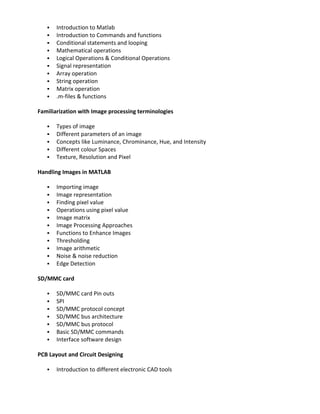
   Introduction to Matlab
      Introduction to Commands and functions
      Conditional statements and looping
      Mathematical operations
      Logical Operations & Conditional Operations
      Signal representation
      Array operation
      String operation
      Matrix operation
      .m-files & functions

Familiarization with Image processing terminologies

      Types of image
      Different parameters of an image
      Concepts like Luminance, Chrominance, Hue, and Intensity
      Different colour Spaces
      Texture, Resolution and Pixel

Handling Images in MATLAB

      Importing image
      Image representation
      Finding pixel value
      Operations using pixel value
      Image matrix
      Image Processing Approaches
      Functions to Enhance Images
      Thresholding
      Image arithmetic
      Noise & noise reduction
      Edge Detection

SD/MMC card

      SD/MMC card Pin outs
      SPI
      SD/MMC protocol concept
      SD/MMC bus architecture
      SD/MMC bus protocol
      Basic SD/MMC commands
      Interface software design

PCB Layout and Circuit Designing

      Introduction to different electronic CAD tools
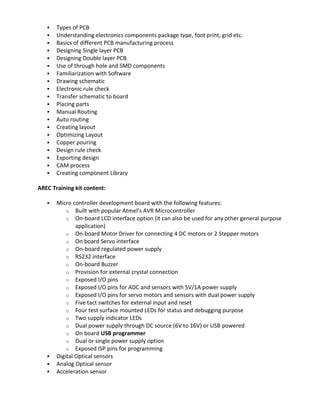
   Types of PCB
      Understanding electronics components package type, foot print, grid etc.
      Basics of different PCB manufacturing process
      Designing Single layer PCB
      Designing Double layer PCB
      Use of through hole and SMD components
      Familiarization with Software
      Drawing schematic
      Electronic rule check
      Transfer schematic to board
      Placing parts
      Manual Routing
      Auto routing
      Creating layout
      Optimizing Layout
      Copper pouring
      Design rule check
      Exporting design
      CAM process
      Creating component Library

AREC Training kit content:

      Micro controller development board with the following features:
           o Built with popular Atmel’s AVR Microcontroller
           o On-board LCD interface option (it can also be used for any other general purpose
               application)
           o On-board Motor Driver for connecting 4 DC motors or 2 Stepper motors
           o On board Servo interface
           o On-board regulated power supply
           o RS232 interface
           o On-board Buzzer
           o Provision for external crystal connection
           o Exposed I/O pins
           o Exposed I/O pins for ADC and sensors with 5V/1A power supply
           o Exposed I/O pins for servo motors and sensors with dual power supply
           o Five tact switches for external input and reset
           o Four test surface mounted LEDs for status and debugging purpose
           o Two supply indicator LEDs
           o Dual power supply through DC source (6V to 16V) or USB powered
           o On board USB programmer
           o Dual or single power supply option
           o Exposed ISP pins for programming
      Digital Optical sensors
      Analog Optical sensor
      Acceleration sensor
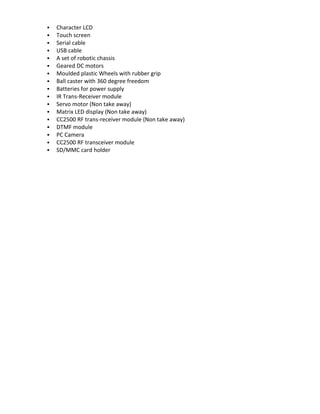
   Character LCD
   Touch screen
   Serial cable
   USB cable
   A set of robotic chassis
   Geared DC motors
   Moulded plastic Wheels with rubber grip
   Ball caster with 360 degree freedom
   Batteries for power supply
   IR Trans-Receiver module
   Servo motor (Non take away)
   Matrix LED display (Non take away)
   CC2500 RF trans-receiver module (Non take away)
   DTMF module
   PC Camera
   CC2500 RF transceiver module
   SD/MMC card holder

Advanced robotics

  • 1.
    ADVANCED ROBOTICS &EMBEDDED C (AREC) LEARN HOW TO:  Control robots using mobile phones  Control robots using RF  Control robots using Acceleration sensor  Interface your TV remote control with your robot  Wireless data communication using IR  Inter robot communication using RF  Control robots using PC  Coding matrix LED display  Interfacing Analog and Digital sensors  Interface Touch screen  Control speed of DC motor using PWM  Control servo motor  Ball follower robot using Image Processing  Sensor-less Line follower Robot using Image Processing  Color detection robot using Image Processing  Wireless multi robot coordination using Image Processing  Interfacing SD/MMC card with microcontroller  PCB design PROTOCOLS TO BE MASTERED:  UART  SPI  I2C  RC-5 HANDS-ON LIVE PROJECTS:  Mobile controlled robot based on frequency synthesizing  PC controlled Robot wired and wireless  RF wireless controlled Robot  IR wireless controlled Robot  Hand gesture based robotic control using Acceleration sensor  Remote Data Acquisition System using IR/RF  Inter robot Coordination using RF/ IR  Programmable keypad using Touch screen  Digital Writing pad for PC  and many more...
  • 2.
    COURSE OVERVIEW: AVRFamily of Microcontrollers  Why AVR?  Design space and considerations  AVR internals and functioning  Embedded C Programming  Basics of programming  Use of the Win AVR compiler  Head start to various programs on WINAVR Interfacing Peripherals  LEDs and LCD  Key pad  DC motor  Servo motor  Analog and digital sensors  PC  Wireless RF modules  Touch screen  DTMF modules  Infra-Red  Matrix LED display Sensors  Bump sensor  Line sensor  Light sensor using LDR, photo transistor and photo diode.  Infrared sensor using IR diode, and IR detectors  Obstacle detectors  Temperature sensor  Shaft Encoder Actuators  Types of actuators used in robotics  DC motors  Stepper Motor  Servo motors  Linear Actuators Motor Drivers  Motor driver using relay  Motor driver using transistor
  • 3.
    Solid-state drivers: H-bridge, IC drivers Wireless Technology  Techniques and Applications  Concept of data management and processing  RF Transmission and Reception concepts  Interfacing CC2500 RF Trans- receiver Modules  IR transmission and reception concept  Interfacing 38Khz IR Transmitter and receiver Acceleration Sensor: Concepts and Activities  What is an acceleration sensor?  Working principle of an acceleration sensor  Types of acceleration sensors available in market  Different interfacing technologies used with acceleration sensor  Hardwire interfacing circuitry of a 3 axis acceleration sensor  Register configuration of an acceleration sensor  Reading x, y, z and tilt parameters  Configuring the acceleration sensor for shake detection  Configuring the acceleration sensor for tap detection  Configuring the Acceleration sensor for orientation detection  Mapping the hand gesture through acceleration sensor and controlling a robotic vehicle  Interfacing acceleration sensor with PC for computer graphics manipulation Software Support  Necessity and Applications  AVR Development IDE Win AVR and AVR Studio  Tech flash  HID Boot flash  Tech draw  Tech terminal Introduction to Machine vision  Sensors & its classification  Sensors used in machine vision  Camera vision  Different types of cameras used in robotics  Basic construction and working principle of a camera  Different types of interface used for camera  Advantage of camera vision Exploring MATLAB
  • 4.
    Introduction to Matlab  Introduction to Commands and functions  Conditional statements and looping  Mathematical operations  Logical Operations & Conditional Operations  Signal representation  Array operation  String operation  Matrix operation  .m-files & functions Familiarization with Image processing terminologies  Types of image  Different parameters of an image  Concepts like Luminance, Chrominance, Hue, and Intensity  Different colour Spaces  Texture, Resolution and Pixel Handling Images in MATLAB  Importing image  Image representation  Finding pixel value  Operations using pixel value  Image matrix  Image Processing Approaches  Functions to Enhance Images  Thresholding  Image arithmetic  Noise & noise reduction  Edge Detection SD/MMC card  SD/MMC card Pin outs  SPI  SD/MMC protocol concept  SD/MMC bus architecture  SD/MMC bus protocol  Basic SD/MMC commands  Interface software design PCB Layout and Circuit Designing  Introduction to different electronic CAD tools
  • 5.
    Types of PCB  Understanding electronics components package type, foot print, grid etc.  Basics of different PCB manufacturing process  Designing Single layer PCB  Designing Double layer PCB  Use of through hole and SMD components  Familiarization with Software  Drawing schematic  Electronic rule check  Transfer schematic to board  Placing parts  Manual Routing  Auto routing  Creating layout  Optimizing Layout  Copper pouring  Design rule check  Exporting design  CAM process  Creating component Library AREC Training kit content:  Micro controller development board with the following features: o Built with popular Atmel’s AVR Microcontroller o On-board LCD interface option (it can also be used for any other general purpose application) o On-board Motor Driver for connecting 4 DC motors or 2 Stepper motors o On board Servo interface o On-board regulated power supply o RS232 interface o On-board Buzzer o Provision for external crystal connection o Exposed I/O pins o Exposed I/O pins for ADC and sensors with 5V/1A power supply o Exposed I/O pins for servo motors and sensors with dual power supply o Five tact switches for external input and reset o Four test surface mounted LEDs for status and debugging purpose o Two supply indicator LEDs o Dual power supply through DC source (6V to 16V) or USB powered o On board USB programmer o Dual or single power supply option o Exposed ISP pins for programming  Digital Optical sensors  Analog Optical sensor  Acceleration sensor
  • 6.
    Character LCD  Touch screen  Serial cable  USB cable  A set of robotic chassis  Geared DC motors  Moulded plastic Wheels with rubber grip  Ball caster with 360 degree freedom  Batteries for power supply  IR Trans-Receiver module  Servo motor (Non take away)  Matrix LED display (Non take away)  CC2500 RF trans-receiver module (Non take away)  DTMF module  PC Camera  CC2500 RF transceiver module  SD/MMC card holder