Advanced File System
concepts
Module 1
Copyright (C) 2008 Hewlett-Packard
Development Company, L.P.
Copyright (C) 2008 Hewlett-Packard Development Company, L.P.
Objectives
• Define the terms: file domains, filesets, and volumes
• Describe extent-based storage
• Describe logging and the benefits of transactions
• Describe at a high level: clones, file striping, trashcan
directories
• Describe the AdvFS architecture and on-disk format at
a high level
Copyright (C) 2008 Hewlett-Packard Development Company, L.P.
File domains and filesets
• An AdvFS ‘volume’ represents the actual storage entity
within a domain
• A file domain is a named set of one or more volumes
that provide a shared pool of physical storage
• A volume is any mechanism that behaves like a UNIX
block device
– an entire disk
– a disk partition
– a logical volume configured with the Logical Storage Manager
(LSM)
• A fileset represents a portion of the directory hierarchy
– follows the logical structure of a traditional UNIX file system
– hierarchy of directory names and file names. It's what you
mount
Copyright (C) 2008 Hewlett-Packard Development Company, L.P.
AdvFS characteristics
• Within AdvFS, ‘pools of storage’ called ‘domains’ are
characteristics that make AdvFS an ‘advanced’ file
system
• Most other file systems lack the ability to draw storage
from a pool shared among multiple filesets
• AdvFS goes beyond UFS, by allowing you to create
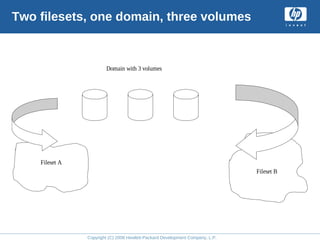
multiple filesets that share a common pool of storage
within a defined file domain
• A fileset is similar to a file system in the following
ways:
– you can mount filesets like you can mount file systems
– filesets can have quotas enabled
– filesets can be backed up.
• AdvFS separates the directory layer from the storage
Copyright (C) 2008 Hewlett-Packard Development Company, L.P.
AdvFS capabilities
• Filesets offer features not provided by file systems:
– you can clone a fileset and back it up while users are still
accessing the original
– a fileset can span several disks (volumes) in a file domain
Copyright (C) 2008 Hewlett-Packard Development Company, L.P.
Two filesets, one domain, three volumes
Domain with 3 volumes
Fileset A
Fileset B
Copyright (C) 2008 Hewlett-Packard Development Company, L.P.
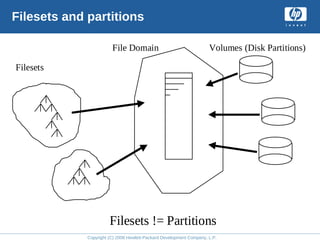
Filesets and partitions
Filesets
File Domain Volumes (Disk Partitions)
Filesets != Partitions
Copyright (C) 2008 Hewlett-Packard Development Company, L.P.
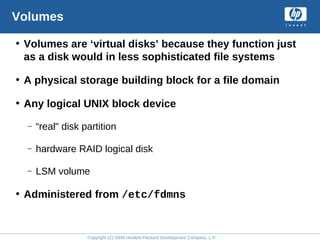
Volumes
• Volumes are ‘virtual disks’ because they function just
as a disk would in less sophisticated file systems
• A physical storage building block for a file domain
• Any logical UNIX block device
– “real" disk partition
– hardware RAID logical disk
– LSM volume
• Administered from /etc/fdmns
Copyright (C) 2008 Hewlett-Packard Development Company, L.P.
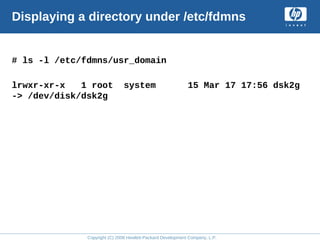
Displaying a directory under /etc/fdmns
# ls -l /etc/fdmns/usr_domain
lrwxr-xr-x 1 root system 15 Mar 17 17:56 dsk2g
-> /dev/disk/dsk2g
Copyright (C) 2008 Hewlett-Packard Development Company, L.P.
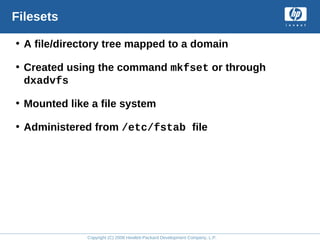
Filesets
• A file/directory tree mapped to a domain
• Created using the command mkfset or through
dxadvfs
• Mounted like a file system
• Administered from /etc/fstab file
Copyright (C) 2008 Hewlett-Packard Development Company, L.P.
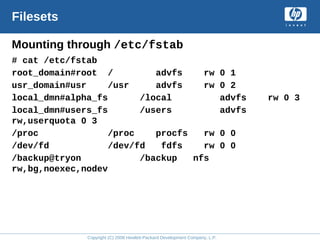
Filesets
Mounting through /etc/fstab
# cat /etc/fstab
root_domain#root / advfs rw 0 1
usr_domain#usr /usr advfs rw 0 2
local_dmn#alpha_fs /local advfs rw 0 3
local_dmn#users_fs /users advfs
rw,userquota 0 3
/proc /proc procfs rw 0 0
/dev/fd /dev/fd fdfs rw 0 0
/backup@tryon /backup nfs
rw,bg,noexec,nodev
Copyright (C) 2008 Hewlett-Packard Development Company, L.P.
Extent concepts
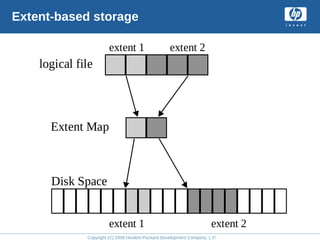
• AdvFS attempts to write each file to disk as a set of
contiguous pages
• This set of contiguous pages is called an extent
• An extent map translates the bitfiles to disk blocks
• Pages are added to a file by preallocating one fourth of
the file size up to 16 pages each time data is appended
to the file
• When a file uses only part of the last page, a file
fragment is created
Copyright (C) 2008 Hewlett-Packard Development Company, L.P.
Extent-based storage
logical file
extent 1 extent 2
Extent Map
Disk Space
extent 1 extent 2
Copyright (C) 2008 Hewlett-Packard Development Company, L.P.
Displaying extents using
the showfile command
• Use showfile to view AdvFS details pertaining to an
individual file
– showfile displays the extent map of each file
• Simple files have one extent map
• Striped files have an extent map for every stripe
segment
• The showfile command cannot display attributes for
symbolic links or non-AdvFS files
• Simple file has one extent map, striped file has more
than one extent map
Copyright (C) 2008 Hewlett-Packard Development Company, L.P.
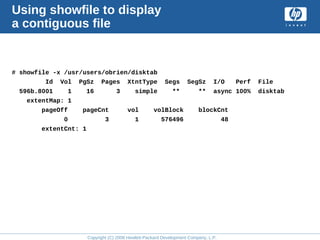
Using showfile to display
a contiguous file
# showfile -x /usr/users/obrien/disktab
Id Vol PgSz Pages XtntType Segs SegSz I/O Perf File
596b.8001 1 16 3 simple ** ** async 100% disktab
extentMap: 1
pageOff pageCnt vol volBlock blockCnt
0 3 1 576496 48
extentCnt: 1
Copyright (C) 2008 Hewlett-Packard Development Company, L.P.
An extent map displays
the following information
• pageOff is the starting page number of the extent
• pageCnt is the number of 8K pages in the extent
• vol is a number indicating which volume within the
domain contains this file
• volBlock is the starting block number of the extent
• blockCnt is the number of blocks in the extent
• extentCnt is the number of extents
Copyright (C) 2008 Hewlett-Packard Development Company, L.P.
Why logging
• Many file system operations involve several widely
separated writes to disk
– a transaction usually consists of more than one write
– crash in between the writes leaves the on-disk file system
inconsistent
• Fast crash recovery
• Improved performance for metadata-intensive
operations
Copyright (C) 2008 Hewlett-Packard Development Company, L.P.
Logging a transaction
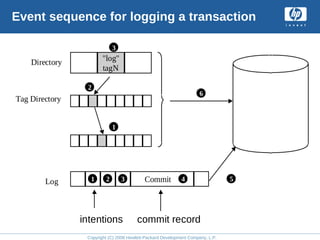
• Storage is allocated in the bitfile metadata table (BMT)
(log record 1)
• Bitfile tag slot is allocated (log record 2)
• Directory entry is changed (log record 3)
• Transaction is committed (log record 4)
• Buffered log records are written to disk
• Buffered bitfile pages are written to disk and the log
pages are removed
Copyright (C) 2008 Hewlett-Packard Development Company, L.P.
Event sequence for logging a transaction
Tag Directory
"log"
tagN
Directory
1 2 3 Commit 4 5
6
1
2
3
Log
intentions commit record
Copyright (C) 2008 Hewlett-Packard Development Company, L.P.
AdvFS logging (1 of 2)
• AdvFS transaction
– modifications to its own metadata (internal structures)
– not user file data (unless atomic write data logging has been
enabled using chfile -L).
• For each transaction, AdvFS:
– writes a series of log records describing all changes for an
operation to disk
and then
– performs changes (writes changed blocks to disk)
Copyright (C) 2008 Hewlett-Packard Development Company, L.P.
AdvFS logging (2 of 2)
• In case of crash
– on reboot
– on-disk log indicates which transactions are complete
• File directory to insert a new file name
• Fileset tag directory to allocate the new file's tag
• Bitfile table to allocate an entry for the new file
Copyright (C) 2008 Hewlett-Packard Development Company, L.P.
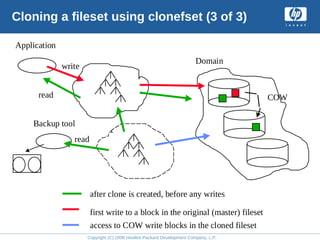
Cloning a fileset using clonefset (1 of 3)
• Lock the master (original) fileset
• Create the clone fileset
• Copy the tag directory of the master to the clone
• Increment the clone count in the master fileset
• Set the clone’s cloneID = clone count in the master
Copyright (C) 2008 Hewlett-Packard Development Company, L.P.
Cloning a fileset using clonefset (2 of 3)
Handling a write to the master involves these steps:
• If the cloned bitfile does not already exist in the clone
fileset, create a bitfile for the file in the clone fileset
• Modify the clone fileset tag dir to reference the new file
• Allocate an extent in the new file for the portion being
written
• Copy the original data to the new extent
• Let the write occur to the file in the master
Copyright (C) 2008 Hewlett-Packard Development Company, L.P.
Cloning a fileset using clonefset (3 of 3)
Domain
Application
write
Backup tool
read
COW
read
after clone is created, before any writes
first write to a block in the original (master) fileset
access to COW write blocks in the cloned fileset
Copyright (C) 2008 Hewlett-Packard Development Company, L.P.
Cloning issues
• Applications should not be writing to the master when
the clone is created
– fortunately cloning time is very fast (seconds) due to Copy-
On-Write (COW)
• A clone is not a backup
• A clone is a tool for minimizing down time for a fileset
due to backups
– make clone of fileset
– back up from clone
– delete clone
Copyright (C) 2008 Hewlett-Packard Development Company, L.P.
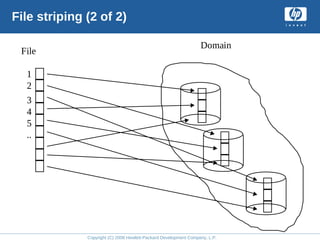
File striping (1 of 2)
• The stripe utility directs a zero-length file (a file with
no data written to it yet) to be spread evenly across
several volumes within a file domain
• Existing, nonzero-length files cannot be striped using
the stripe utility
Copyright (C) 2008 Hewlett-Packard Development Company, L.P.
File striping (2 of 2)
Domain
File
1
2
3
4
5
..
Copyright (C) 2008 Hewlett-Packard Development Company, L.P.
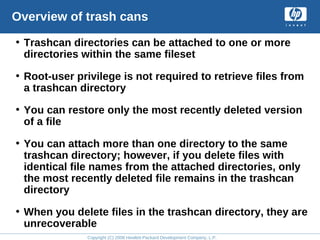
Overview of trash cans
• Trashcan directories can be attached to one or more
directories within the same fileset
• Root-user privilege is not required to retrieve files from
a trashcan directory
• You can restore only the most recently deleted version
of a file
• You can attach more than one directory to the same
trashcan directory; however, if you delete files with
identical file names from the attached directories, only
the most recently deleted file remains in the trashcan
directory
• When you delete files in the trashcan directory, they are
unrecoverable
Copyright (C) 2008 Hewlett-Packard Development Company, L.P.
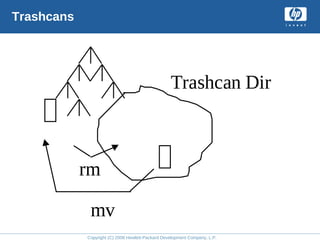
Trashcans
Trashcan Dir
rm
mv
Copyright (C) 2008 Hewlett-Packard Development Company, L.P.
File domain commands
•mkfdmn - Make a file domain
•addvol - Add a new volume to the domain
•rmvol - Remove a volume from the domain
•balance - Distribute storage over the volumes evenly
•defragment - Make files contiguous if possible
•vfast - Background defragmentation
and file balancing (V5.1B)
Copyright (C) 2008 Hewlett-Packard Development Company, L.P.
Fileset commands
•mkfset - Make a fileset
•chfsets - Change fileset characteristics
•clonefset - Make a fileset clone
Copyright (C) 2008 Hewlett-Packard Development Company, L.P.
File commands
•migrate - Move a file from one volume
to another
•stripe - Make an empty striped file
•mktrashcan - Make a trashcan directory
•chfile - Change file attributes
Copyright (C) 2008 Hewlett-Packard Development Company, L.P.
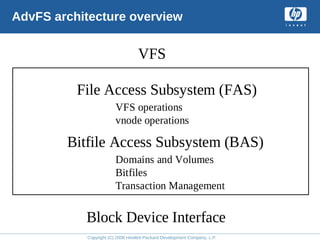
AdvFS architecture (1 of 2)
File access subsystem (FAS)
• Emulates UFS and POSIX file and directory semantics
• Uses bitfiles to implement files and directories
Copyright (C) 2008 Hewlett-Packard Development Company, L.P.
AdvFS architecture (2 of 2)
Bitfile access subsystem (BAS)
• Manipulates bitfiles: create, open, read, write, add and
remove storage
• Bitfile: array of 8K pages named via a tag. A tag is a
unique identifier within a domain similar to an inode
number
• Interfaces with buffer cache, VM interface, I/O
scheduling
• Provides transaction and log management
• Provides storage placement and management
• Provides domain and fileset management
Copyright (C) 2008 Hewlett-Packard Development Company, L.P.
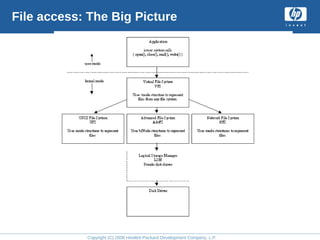
File access: The Big Picture
Copyright (C) 2008 Hewlett-Packard Development Company, L.P.
AdvFS architecture overview
VFS
Block Device Interface
File Access Subsystem (FAS)
Bitfile Access Subsystem (BAS)
VFS operations
vnode operations
Domains and Volumes
Bitfiles
Transaction Management
Copyright (C) 2008 Hewlett-Packard Development Company, L.P.
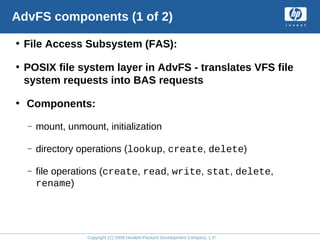
AdvFS components (1 of 2)
• File Access Subsystem (FAS):
• POSIX file system layer in AdvFS - translates VFS file
system requests into BAS requests
• Components:
– mount, unmount, initialization
– directory operations (lookup, create, delete)
– file operations (create, read, write, stat, delete,
rename)
Copyright (C) 2008 Hewlett-Packard Development Company, L.P.
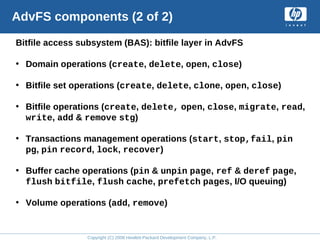
AdvFS components (2 of 2)
Bitfile access subsystem (BAS): bitfile layer in AdvFS
• Domain operations (create, delete, open, close)
• Bitfile set operations (create, delete, clone, open, close)
• Bitfile operations (create, delete, open, close, migrate, read,
write, add & remove stg)
• Transactions management operations (start, stop,fail, pin
pg, pin record, lock, recover)
• Buffer cache operations (pin & unpin page, ref & deref page,
flush bitfile, flush cache, prefetch pages, I/O queuing)
• Volume operations (add, remove)
Copyright (C) 2008 Hewlett-Packard Development Company, L.P.
AdvFS in Tru64 UNIX V5 (1 of 2)
• Version 5 of Tru64 UNIX has a new version of the on-
disk structure of AdvFS
• The previous version of the AdvFS on-disk structure
was V3; in Tru64 UNIX V5.0, the AdvFS on-disk
structure is version 4
Copyright (C) 2008 Hewlett-Packard Development Company, L.P.
AdvFS in Tru64 UNIX V5 (2 of 2)
Additional Features:
• Faster directory searches for directories larger than 8K
• Quota limits now held in 8-byte fields yielding higher
limits
• Removal of metadata limitations (such as BMT page 0
restrictions)
• Direct I/O allowing I/O direct to the application’s
address space (no UBC buffering)
• Smooth sync() operations to eliminate the update
daemon 30-second system I/O bursts
• SMP improvements
Learning
check
Lab 1
AdvFS/Advanced File System Ccncepts

AdvFS/Advanced File System Ccncepts

  • 1.
    Advanced File System concepts Module1 Copyright (C) 2008 Hewlett-Packard Development Company, L.P.
  • 2.
    Copyright (C) 2008Hewlett-Packard Development Company, L.P. Objectives • Define the terms: file domains, filesets, and volumes • Describe extent-based storage • Describe logging and the benefits of transactions • Describe at a high level: clones, file striping, trashcan directories • Describe the AdvFS architecture and on-disk format at a high level
  • 3.
    Copyright (C) 2008Hewlett-Packard Development Company, L.P. File domains and filesets • An AdvFS ‘volume’ represents the actual storage entity within a domain • A file domain is a named set of one or more volumes that provide a shared pool of physical storage • A volume is any mechanism that behaves like a UNIX block device – an entire disk – a disk partition – a logical volume configured with the Logical Storage Manager (LSM) • A fileset represents a portion of the directory hierarchy – follows the logical structure of a traditional UNIX file system – hierarchy of directory names and file names. It's what you mount
  • 4.
    Copyright (C) 2008Hewlett-Packard Development Company, L.P. AdvFS characteristics • Within AdvFS, ‘pools of storage’ called ‘domains’ are characteristics that make AdvFS an ‘advanced’ file system • Most other file systems lack the ability to draw storage from a pool shared among multiple filesets • AdvFS goes beyond UFS, by allowing you to create multiple filesets that share a common pool of storage within a defined file domain • A fileset is similar to a file system in the following ways: – you can mount filesets like you can mount file systems – filesets can have quotas enabled – filesets can be backed up. • AdvFS separates the directory layer from the storage
  • 5.
    Copyright (C) 2008Hewlett-Packard Development Company, L.P. AdvFS capabilities • Filesets offer features not provided by file systems: – you can clone a fileset and back it up while users are still accessing the original – a fileset can span several disks (volumes) in a file domain
  • 6.
    Copyright (C) 2008Hewlett-Packard Development Company, L.P. Two filesets, one domain, three volumes Domain with 3 volumes Fileset A Fileset B
  • 7.
    Copyright (C) 2008Hewlett-Packard Development Company, L.P. Filesets and partitions Filesets File Domain Volumes (Disk Partitions) Filesets != Partitions
  • 8.
    Copyright (C) 2008Hewlett-Packard Development Company, L.P. Volumes • Volumes are ‘virtual disks’ because they function just as a disk would in less sophisticated file systems • A physical storage building block for a file domain • Any logical UNIX block device – “real" disk partition – hardware RAID logical disk – LSM volume • Administered from /etc/fdmns
  • 9.
    Copyright (C) 2008Hewlett-Packard Development Company, L.P. Displaying a directory under /etc/fdmns # ls -l /etc/fdmns/usr_domain lrwxr-xr-x 1 root system 15 Mar 17 17:56 dsk2g -> /dev/disk/dsk2g
  • 10.
    Copyright (C) 2008Hewlett-Packard Development Company, L.P. Filesets • A file/directory tree mapped to a domain • Created using the command mkfset or through dxadvfs • Mounted like a file system • Administered from /etc/fstab file
  • 11.
    Copyright (C) 2008Hewlett-Packard Development Company, L.P. Filesets Mounting through /etc/fstab # cat /etc/fstab root_domain#root / advfs rw 0 1 usr_domain#usr /usr advfs rw 0 2 local_dmn#alpha_fs /local advfs rw 0 3 local_dmn#users_fs /users advfs rw,userquota 0 3 /proc /proc procfs rw 0 0 /dev/fd /dev/fd fdfs rw 0 0 /backup@tryon /backup nfs rw,bg,noexec,nodev
  • 12.
    Copyright (C) 2008Hewlett-Packard Development Company, L.P. Extent concepts • AdvFS attempts to write each file to disk as a set of contiguous pages • This set of contiguous pages is called an extent • An extent map translates the bitfiles to disk blocks • Pages are added to a file by preallocating one fourth of the file size up to 16 pages each time data is appended to the file • When a file uses only part of the last page, a file fragment is created
  • 13.
    Copyright (C) 2008Hewlett-Packard Development Company, L.P. Extent-based storage logical file extent 1 extent 2 Extent Map Disk Space extent 1 extent 2
  • 14.
    Copyright (C) 2008Hewlett-Packard Development Company, L.P. Displaying extents using the showfile command • Use showfile to view AdvFS details pertaining to an individual file – showfile displays the extent map of each file • Simple files have one extent map • Striped files have an extent map for every stripe segment • The showfile command cannot display attributes for symbolic links or non-AdvFS files • Simple file has one extent map, striped file has more than one extent map
  • 15.
    Copyright (C) 2008Hewlett-Packard Development Company, L.P. Using showfile to display a contiguous file # showfile -x /usr/users/obrien/disktab Id Vol PgSz Pages XtntType Segs SegSz I/O Perf File 596b.8001 1 16 3 simple ** ** async 100% disktab extentMap: 1 pageOff pageCnt vol volBlock blockCnt 0 3 1 576496 48 extentCnt: 1
  • 16.
    Copyright (C) 2008Hewlett-Packard Development Company, L.P. An extent map displays the following information • pageOff is the starting page number of the extent • pageCnt is the number of 8K pages in the extent • vol is a number indicating which volume within the domain contains this file • volBlock is the starting block number of the extent • blockCnt is the number of blocks in the extent • extentCnt is the number of extents
  • 17.
    Copyright (C) 2008Hewlett-Packard Development Company, L.P. Why logging • Many file system operations involve several widely separated writes to disk – a transaction usually consists of more than one write – crash in between the writes leaves the on-disk file system inconsistent • Fast crash recovery • Improved performance for metadata-intensive operations
  • 18.
    Copyright (C) 2008Hewlett-Packard Development Company, L.P. Logging a transaction • Storage is allocated in the bitfile metadata table (BMT) (log record 1) • Bitfile tag slot is allocated (log record 2) • Directory entry is changed (log record 3) • Transaction is committed (log record 4) • Buffered log records are written to disk • Buffered bitfile pages are written to disk and the log pages are removed
  • 19.
    Copyright (C) 2008Hewlett-Packard Development Company, L.P. Event sequence for logging a transaction Tag Directory "log" tagN Directory 1 2 3 Commit 4 5 6 1 2 3 Log intentions commit record
  • 20.
    Copyright (C) 2008Hewlett-Packard Development Company, L.P. AdvFS logging (1 of 2) • AdvFS transaction – modifications to its own metadata (internal structures) – not user file data (unless atomic write data logging has been enabled using chfile -L). • For each transaction, AdvFS: – writes a series of log records describing all changes for an operation to disk and then – performs changes (writes changed blocks to disk)
  • 21.
    Copyright (C) 2008Hewlett-Packard Development Company, L.P. AdvFS logging (2 of 2) • In case of crash – on reboot – on-disk log indicates which transactions are complete • File directory to insert a new file name • Fileset tag directory to allocate the new file's tag • Bitfile table to allocate an entry for the new file
  • 22.
    Copyright (C) 2008Hewlett-Packard Development Company, L.P. Cloning a fileset using clonefset (1 of 3) • Lock the master (original) fileset • Create the clone fileset • Copy the tag directory of the master to the clone • Increment the clone count in the master fileset • Set the clone’s cloneID = clone count in the master
  • 23.
    Copyright (C) 2008Hewlett-Packard Development Company, L.P. Cloning a fileset using clonefset (2 of 3) Handling a write to the master involves these steps: • If the cloned bitfile does not already exist in the clone fileset, create a bitfile for the file in the clone fileset • Modify the clone fileset tag dir to reference the new file • Allocate an extent in the new file for the portion being written • Copy the original data to the new extent • Let the write occur to the file in the master
  • 24.
    Copyright (C) 2008Hewlett-Packard Development Company, L.P. Cloning a fileset using clonefset (3 of 3) Domain Application write Backup tool read COW read after clone is created, before any writes first write to a block in the original (master) fileset access to COW write blocks in the cloned fileset
  • 25.
    Copyright (C) 2008Hewlett-Packard Development Company, L.P. Cloning issues • Applications should not be writing to the master when the clone is created – fortunately cloning time is very fast (seconds) due to Copy- On-Write (COW) • A clone is not a backup • A clone is a tool for minimizing down time for a fileset due to backups – make clone of fileset – back up from clone – delete clone
  • 26.
    Copyright (C) 2008Hewlett-Packard Development Company, L.P. File striping (1 of 2) • The stripe utility directs a zero-length file (a file with no data written to it yet) to be spread evenly across several volumes within a file domain • Existing, nonzero-length files cannot be striped using the stripe utility
  • 27.
    Copyright (C) 2008Hewlett-Packard Development Company, L.P. File striping (2 of 2) Domain File 1 2 3 4 5 ..
  • 28.
    Copyright (C) 2008Hewlett-Packard Development Company, L.P. Overview of trash cans • Trashcan directories can be attached to one or more directories within the same fileset • Root-user privilege is not required to retrieve files from a trashcan directory • You can restore only the most recently deleted version of a file • You can attach more than one directory to the same trashcan directory; however, if you delete files with identical file names from the attached directories, only the most recently deleted file remains in the trashcan directory • When you delete files in the trashcan directory, they are unrecoverable
  • 29.
    Copyright (C) 2008Hewlett-Packard Development Company, L.P. Trashcans Trashcan Dir rm mv
  • 30.
    Copyright (C) 2008Hewlett-Packard Development Company, L.P. File domain commands •mkfdmn - Make a file domain •addvol - Add a new volume to the domain •rmvol - Remove a volume from the domain •balance - Distribute storage over the volumes evenly •defragment - Make files contiguous if possible •vfast - Background defragmentation and file balancing (V5.1B)
  • 31.
    Copyright (C) 2008Hewlett-Packard Development Company, L.P. Fileset commands •mkfset - Make a fileset •chfsets - Change fileset characteristics •clonefset - Make a fileset clone
  • 32.
    Copyright (C) 2008Hewlett-Packard Development Company, L.P. File commands •migrate - Move a file from one volume to another •stripe - Make an empty striped file •mktrashcan - Make a trashcan directory •chfile - Change file attributes
  • 33.
    Copyright (C) 2008Hewlett-Packard Development Company, L.P. AdvFS architecture (1 of 2) File access subsystem (FAS) • Emulates UFS and POSIX file and directory semantics • Uses bitfiles to implement files and directories
  • 34.
    Copyright (C) 2008Hewlett-Packard Development Company, L.P. AdvFS architecture (2 of 2) Bitfile access subsystem (BAS) • Manipulates bitfiles: create, open, read, write, add and remove storage • Bitfile: array of 8K pages named via a tag. A tag is a unique identifier within a domain similar to an inode number • Interfaces with buffer cache, VM interface, I/O scheduling • Provides transaction and log management • Provides storage placement and management • Provides domain and fileset management
  • 35.
    Copyright (C) 2008Hewlett-Packard Development Company, L.P. File access: The Big Picture
  • 36.
    Copyright (C) 2008Hewlett-Packard Development Company, L.P. AdvFS architecture overview VFS Block Device Interface File Access Subsystem (FAS) Bitfile Access Subsystem (BAS) VFS operations vnode operations Domains and Volumes Bitfiles Transaction Management
  • 37.
    Copyright (C) 2008Hewlett-Packard Development Company, L.P. AdvFS components (1 of 2) • File Access Subsystem (FAS): • POSIX file system layer in AdvFS - translates VFS file system requests into BAS requests • Components: – mount, unmount, initialization – directory operations (lookup, create, delete) – file operations (create, read, write, stat, delete, rename)
  • 38.
    Copyright (C) 2008Hewlett-Packard Development Company, L.P. AdvFS components (2 of 2) Bitfile access subsystem (BAS): bitfile layer in AdvFS • Domain operations (create, delete, open, close) • Bitfile set operations (create, delete, clone, open, close) • Bitfile operations (create, delete, open, close, migrate, read, write, add & remove stg) • Transactions management operations (start, stop,fail, pin pg, pin record, lock, recover) • Buffer cache operations (pin & unpin page, ref & deref page, flush bitfile, flush cache, prefetch pages, I/O queuing) • Volume operations (add, remove)
  • 39.
    Copyright (C) 2008Hewlett-Packard Development Company, L.P. AdvFS in Tru64 UNIX V5 (1 of 2) • Version 5 of Tru64 UNIX has a new version of the on- disk structure of AdvFS • The previous version of the AdvFS on-disk structure was V3; in Tru64 UNIX V5.0, the AdvFS on-disk structure is version 4
  • 40.
    Copyright (C) 2008Hewlett-Packard Development Company, L.P. AdvFS in Tru64 UNIX V5 (2 of 2) Additional Features: • Faster directory searches for directories larger than 8K • Quota limits now held in 8-byte fields yielding higher limits • Removal of metadata limitations (such as BMT page 0 restrictions) • Direct I/O allowing I/O direct to the application’s address space (no UBC buffering) • Smooth sync() operations to eliminate the update daemon 30-second system I/O bursts • SMP improvements
  • 41.
  • 42.