CHAPTER 1
REVIEW OF ESSENTIAL
DATABASE CONCEPTS
ADVANCED DATABASE SYSTEMS
Assist. Prof. Dr. Volkan TUNALI
Topics
 Database Management System (DBMS)
 Evolution of Major Data Models
 Relational Data Model
 Tables
 Keys
 Relationships
 Indexes
 Normalization
 SQL – Structured Query Language
 Data Definition Commands
 Data Manipulation & Retrieval Commands
 Joins
 Relational Set Operators
 Subqueries
2
Advanced Database Systems © Volkan TUNALI
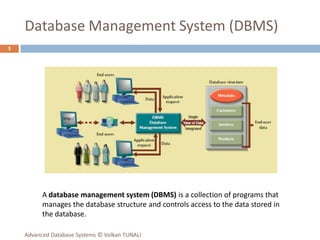
Database Management System (DBMS)
3
A database management system (DBMS) is a collection of programs that
manages the database structure and controls access to the data stored in
the database.
Advanced Database Systems © Volkan TUNALI
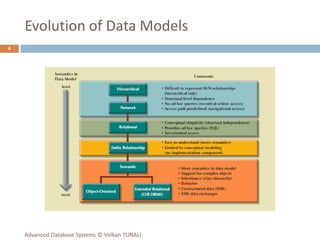
Evolution of Data Models
4
Advanced Database Systems © Volkan TUNALI
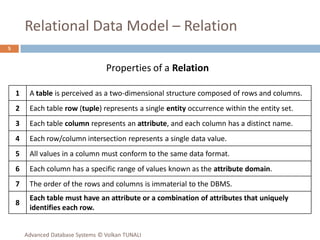
Relational Data Model – Relation
5
1 A table is perceived as a two-dimensional structure composed of rows and columns.
2 Each table row (tuple) represents a single entity occurrence within the entity set.
3 Each table column represents an attribute, and each column has a distinct name.
4 Each row/column intersection represents a single data value.
5 All values in a column must conform to the same data format.
6 Each column has a specific range of values known as the attribute domain.
7 The order of the rows and columns is immaterial to the DBMS.
8
Each table must have an attribute or a combination of attributes that uniquely
identifies each row.
Properties of a Relation
Advanced Database Systems © Volkan TUNALI
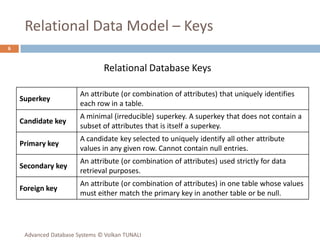
Relational Data Model – Keys
6
Superkey
An attribute (or combination of attributes) that uniquely identifies
each row in a table.
Candidate key
A minimal (irreducible) superkey. A superkey that does not contain a
subset of attributes that is itself a superkey.
Primary key
A candidate key selected to uniquely identify all other attribute
values in any given row. Cannot contain null entries.
Secondary key
An attribute (or combination of attributes) used strictly for data
retrieval purposes.
Foreign key
An attribute (or combination of attributes) in one table whose values
must either match the primary key in another table or be null.
Relational Database Keys
Advanced Database Systems © Volkan TUNALI
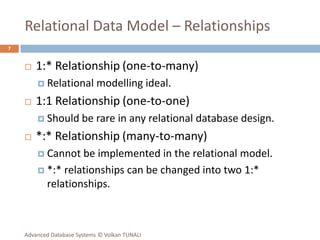
Relational Data Model – Relationships
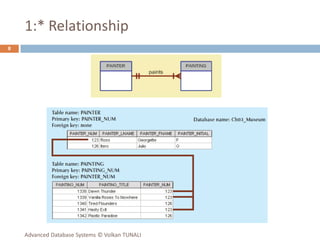
 1:* Relationship (one-to-many)
 Relational modelling ideal.
 1:1 Relationship (one-to-one)
 Should be rare in any relational database design.
 *:* Relationship (many-to-many)
 Cannot be implemented in the relational model.
 *:* relationships can be changed into two 1:*
relationships.
7
Advanced Database Systems © Volkan TUNALI
1:* Relationship
8
Advanced Database Systems © Volkan TUNALI
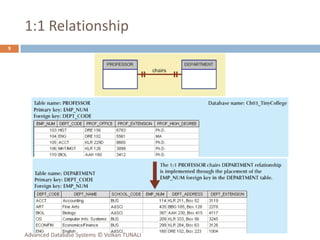
1:1 Relationship
9
Advanced Database Systems © Volkan TUNALI
*:* Relationship
10
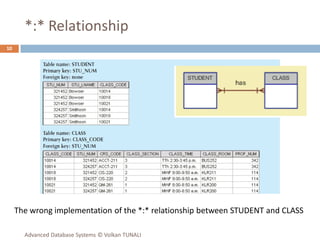
The wrong implementation of the *:* relationship between STUDENT and CLASS
Advanced Database Systems © Volkan TUNALI
*:* Relationship
11
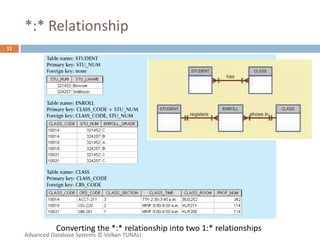
Converting the *:* relationship into two 1:* relationships
Advanced Database Systems © Volkan TUNALI
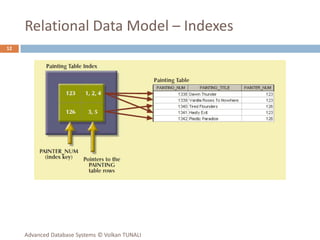
Relational Data Model – Indexes
12
Advanced Database Systems © Volkan TUNALI
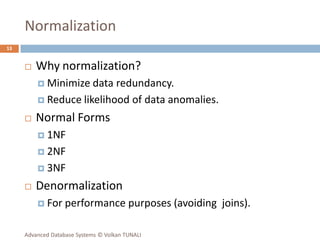
Normalization
 Why normalization?
 Minimize data redundancy.
 Reduce likelihood of data anomalies.
 Normal Forms
 1NF
 2NF
 3NF
 Denormalization
 For performance purposes (avoiding joins).
13
Advanced Database Systems © Volkan TUNALI
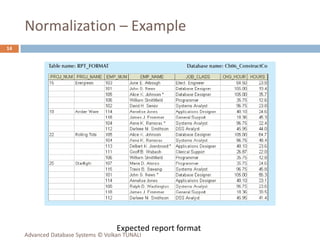
Normalization – Example
14
Expected report format
Advanced Database Systems © Volkan TUNALI
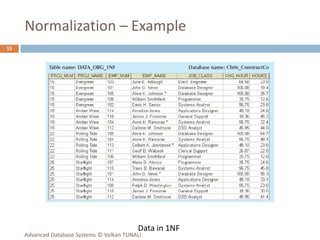
Normalization – Example
15
Data in 1NF
Advanced Database Systems © Volkan TUNALI
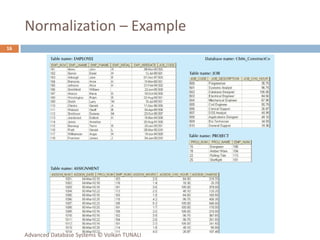
Normalization – Example
16
Advanced Database Systems © Volkan TUNALI
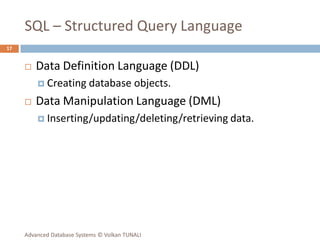
SQL – Structured Query Language
 Data Definition Language (DDL)
 Creating database objects.
 Data Manipulation Language (DML)
 Inserting/updating/deleting/retrieving data.
17
Advanced Database Systems © Volkan TUNALI
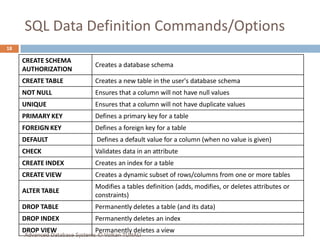
SQL Data Definition Commands/Options
18
CREATE SCHEMA
AUTHORIZATION
Creates a database schema
CREATE TABLE Creates a new table in the user's database schema
NOT NULL Ensures that a column will not have null values
UNIQUE Ensures that a column will not have duplicate values
PRIMARY KEY Defines a primary key for a table
FOREIGN KEY Defines a foreign key for a table
DEFAULT Defines a default value for a column (when no value is given)
CHECK Validates data in an attribute
CREATE INDEX Creates an index for a table
CREATE VIEW Creates a dynamic subset of rows/columns from one or more tables
ALTER TABLE
Modifies a tables definition (adds, modifies, or deletes attributes or
constraints)
DROP TABLE Permanently deletes a table (and its data)
DROP INDEX Permanently deletes an index
DROP VIEW Permanently deletes a view
Advanced Database Systems © Volkan TUNALI
SQL Data Manipulation Commands/Opt.
19
INSERT Inserts row(s) into a table
SELECT Selects attributes from rows in one or more tables or views
WHERE Restricts the selection of rows based on a conditional expression
GROUP BY Groups the selected rows based on one or more attributes
HAVING Restricts the selection of grouped rows based on a condition
ORDER BY Orders the selected rows based on one or more attributes
UPDATE Modifies an attribute’s values in one or more table’s rows
DELETE Deletes one or more rows from a table
COMMIT Permanently saves data changes
ROLLBACK Restores data to their original values
Advanced Database Systems © Volkan TUNALI
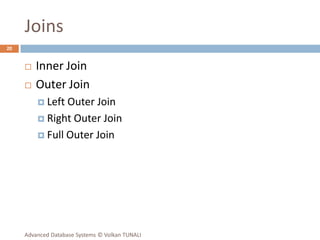
Joins
 Inner Join
 Outer Join
 Left Outer Join
 Right Outer Join
 Full Outer Join
20
Advanced Database Systems © Volkan TUNALI
Relational Set Operators
 UNION
 UNION ALL
 INTERSECT (IN / EXISTS)
 MINUS (NOT IN / NOT EXISTS)
21
Advanced Database Systems © Volkan TUNALI
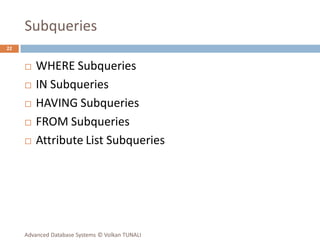
Subqueries
 WHERE Subqueries
 IN Subqueries
 HAVING Subqueries
 FROM Subqueries
 Attribute List Subqueries
22
Advanced Database Systems © Volkan TUNALI

Advanced Database Systems Ch 1 - Review.pdf

  • 1.
    CHAPTER 1 REVIEW OFESSENTIAL DATABASE CONCEPTS ADVANCED DATABASE SYSTEMS Assist. Prof. Dr. Volkan TUNALI
  • 2.
    Topics  Database ManagementSystem (DBMS)  Evolution of Major Data Models  Relational Data Model  Tables  Keys  Relationships  Indexes  Normalization  SQL – Structured Query Language  Data Definition Commands  Data Manipulation & Retrieval Commands  Joins  Relational Set Operators  Subqueries 2 Advanced Database Systems © Volkan TUNALI
  • 3.
    Database Management System(DBMS) 3 A database management system (DBMS) is a collection of programs that manages the database structure and controls access to the data stored in the database. Advanced Database Systems © Volkan TUNALI
  • 4.
    Evolution of DataModels 4 Advanced Database Systems © Volkan TUNALI
  • 5.
    Relational Data Model– Relation 5 1 A table is perceived as a two-dimensional structure composed of rows and columns. 2 Each table row (tuple) represents a single entity occurrence within the entity set. 3 Each table column represents an attribute, and each column has a distinct name. 4 Each row/column intersection represents a single data value. 5 All values in a column must conform to the same data format. 6 Each column has a specific range of values known as the attribute domain. 7 The order of the rows and columns is immaterial to the DBMS. 8 Each table must have an attribute or a combination of attributes that uniquely identifies each row. Properties of a Relation Advanced Database Systems © Volkan TUNALI
  • 6.
    Relational Data Model– Keys 6 Superkey An attribute (or combination of attributes) that uniquely identifies each row in a table. Candidate key A minimal (irreducible) superkey. A superkey that does not contain a subset of attributes that is itself a superkey. Primary key A candidate key selected to uniquely identify all other attribute values in any given row. Cannot contain null entries. Secondary key An attribute (or combination of attributes) used strictly for data retrieval purposes. Foreign key An attribute (or combination of attributes) in one table whose values must either match the primary key in another table or be null. Relational Database Keys Advanced Database Systems © Volkan TUNALI
  • 7.
    Relational Data Model– Relationships  1:* Relationship (one-to-many)  Relational modelling ideal.  1:1 Relationship (one-to-one)  Should be rare in any relational database design.  *:* Relationship (many-to-many)  Cannot be implemented in the relational model.  *:* relationships can be changed into two 1:* relationships. 7 Advanced Database Systems © Volkan TUNALI
  • 8.
    1:* Relationship 8 Advanced DatabaseSystems © Volkan TUNALI
  • 9.
    1:1 Relationship 9 Advanced DatabaseSystems © Volkan TUNALI
  • 10.
    *:* Relationship 10 The wrongimplementation of the *:* relationship between STUDENT and CLASS Advanced Database Systems © Volkan TUNALI
  • 11.
    *:* Relationship 11 Converting the*:* relationship into two 1:* relationships Advanced Database Systems © Volkan TUNALI
  • 12.
    Relational Data Model– Indexes 12 Advanced Database Systems © Volkan TUNALI
  • 13.
    Normalization  Why normalization? Minimize data redundancy.  Reduce likelihood of data anomalies.  Normal Forms  1NF  2NF  3NF  Denormalization  For performance purposes (avoiding joins). 13 Advanced Database Systems © Volkan TUNALI
  • 14.
    Normalization – Example 14 Expectedreport format Advanced Database Systems © Volkan TUNALI
  • 15.
    Normalization – Example 15 Datain 1NF Advanced Database Systems © Volkan TUNALI
  • 16.
    Normalization – Example 16 AdvancedDatabase Systems © Volkan TUNALI
  • 17.
    SQL – StructuredQuery Language  Data Definition Language (DDL)  Creating database objects.  Data Manipulation Language (DML)  Inserting/updating/deleting/retrieving data. 17 Advanced Database Systems © Volkan TUNALI
  • 18.
    SQL Data DefinitionCommands/Options 18 CREATE SCHEMA AUTHORIZATION Creates a database schema CREATE TABLE Creates a new table in the user's database schema NOT NULL Ensures that a column will not have null values UNIQUE Ensures that a column will not have duplicate values PRIMARY KEY Defines a primary key for a table FOREIGN KEY Defines a foreign key for a table DEFAULT Defines a default value for a column (when no value is given) CHECK Validates data in an attribute CREATE INDEX Creates an index for a table CREATE VIEW Creates a dynamic subset of rows/columns from one or more tables ALTER TABLE Modifies a tables definition (adds, modifies, or deletes attributes or constraints) DROP TABLE Permanently deletes a table (and its data) DROP INDEX Permanently deletes an index DROP VIEW Permanently deletes a view Advanced Database Systems © Volkan TUNALI
  • 19.
    SQL Data ManipulationCommands/Opt. 19 INSERT Inserts row(s) into a table SELECT Selects attributes from rows in one or more tables or views WHERE Restricts the selection of rows based on a conditional expression GROUP BY Groups the selected rows based on one or more attributes HAVING Restricts the selection of grouped rows based on a condition ORDER BY Orders the selected rows based on one or more attributes UPDATE Modifies an attribute’s values in one or more table’s rows DELETE Deletes one or more rows from a table COMMIT Permanently saves data changes ROLLBACK Restores data to their original values Advanced Database Systems © Volkan TUNALI
  • 20.
    Joins  Inner Join Outer Join  Left Outer Join  Right Outer Join  Full Outer Join 20 Advanced Database Systems © Volkan TUNALI
  • 21.
    Relational Set Operators UNION  UNION ALL  INTERSECT (IN / EXISTS)  MINUS (NOT IN / NOT EXISTS) 21 Advanced Database Systems © Volkan TUNALI
  • 22.
    Subqueries  WHERE Subqueries IN Subqueries  HAVING Subqueries  FROM Subqueries  Attribute List Subqueries 22 Advanced Database Systems © Volkan TUNALI