Microsoft Active Directory

        An Overview
What is Active Directory?

   Microsoft‘s new Directory Service
   Called: ADS, NTDS
   Successor to LAN Manager Domains
   Goals
    •   Open Standards
    •   High Scalability
    •   Simplified Administration
    •   Compatibility to existing Windows NT
        systems and applications
Open Standards
   LDAP
    • Low-Level API to Active Directory
   X.500
    • Active Directory Structure
    • Not fully standard-compliant
   DNS
    • Resource Location
    • Extensions, e. G. „Dynamic DNS“
   Kerberos
    • Authentication
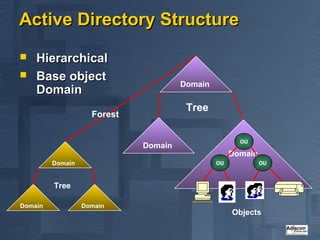
Active Directory Structure
   Hierarchical
   Base object
                                      Domain
    Domain
                                       Tree
                    Forest

                                                      OU
                             Domain
                                                    Domain
         Domain                                OU            OU


         Tree

Domain            Domain
                                                    Objects
Which objects does Active
Directory contain?
   „old Friends “
    • User
    • Group
    • Computer
   New Elements
    • Distribution Lists
    • System Policies
   Application defined custom objects
   Described in the Schema
What is the Schema?

   Definition of all AD
    • Object-Types (Classes)
    • Attributes
    • Data-Types (Syntaxes)
   Can be compared to a Database
    Schema
   ONE consistent Schema inside a
    single Forest
   Extensible
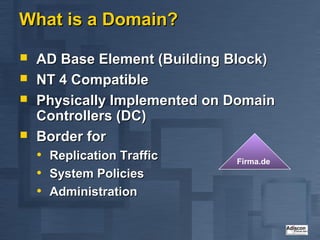
What is a Domain?

   AD Base Element (Building Block)
   NT 4 Compatible
   Physically Implemented on Domain
    Controllers (DC)
   Border for
    •   Replication Traffic   Firma.de
    •   System Policies
    •   Administration
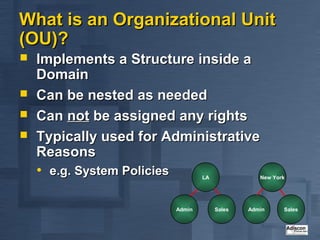
What is an Organizational Unit
(OU)?
   Implements a Structure inside a
    Domain
   Can be nested as needed
   Can not be assigned any rights
   Typically used for Administrative
    Reasons
    • e.g. System Policies           LA              New York


                             Admin        Sales   Admin     Sales
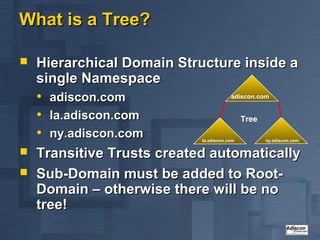
What is a Tree?

   Hierarchical Domain Structure inside a
    single Namespace
    • adiscon.com                adiscon.com


    • la.adiscon.com                Tree
    • ny.adiscon.com         la.adiscon.com   ny.adiscon.com

   Transitive Trusts created automatically
   Sub-Domain must be added to Root-
    Domain – otherwise there will be no
    tree!
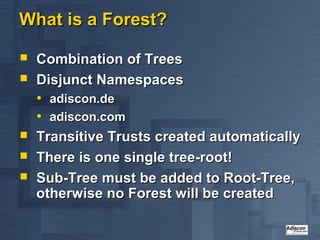
What is a Forest?

   Combination of Trees
   Disjunct Namespaces
    • adiscon.de
    • adiscon.com
   Transitive Trusts created automatically
   There is one single tree-root!
   Sub-Tree must be added to Root-Tree,
    otherwise no Forest will be created
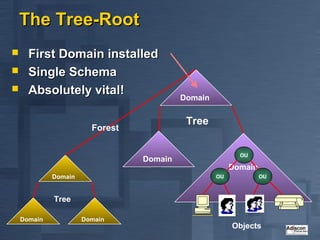
The Tree-Root
     First Domain installed
     Single Schema
     Absolutely vital!
                                          Domain


                                           Tree
                        Forest

                                                          OU
                                 Domain
                                                        Domain
             Domain                                OU            OU


             Tree

    Domain            Domain
                                                        Objects
Modeling the physical Structure

   Not related to logical Structure
   Modeled via „Sites“
   A site is well connected via fast
    Network Links
   One Site can home multiple Domains
   One Domain can spread across many
    Sites
   Domain Database is stored on Domain
    Controllers
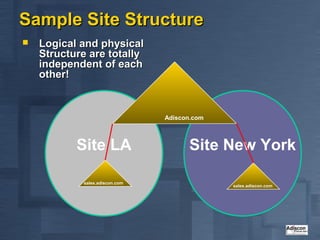
Sample Site Structure
   Logical and physical
    Structure are totally
    independent of each
    other!


                                Adiscon.com


           Site LA                    Site New York

            sales.adiscon.com
                                              sales.adiscon.com
Which Role can a Server have?

   Member Server
   Domain Controller
   Global Catalog
   FSMO
    • Special Roles carried out by only a limited
        set of Servers
    •   e.g. PDC Emulator
    •   e.g. Schema Master
What is a Domain-Controller?
   Stores a physical Copy of the Active
    Directory Database
    • Currently a single Domain per DC
      supported!
    • ESE95 Database (MS Exchange)
   Logon Services
    • Kerberos
    • LAN Manager Authentication
   Recommendation: always have at least
    2 Domain Controllers!
What is a Global Catalog Server?

   Answers AD Search Queries
   Must be present to successfully logon
   Holds a copy of all Objects of the
    whole Forest…
   ...but holds only a subset of the
    Attributes
    • User definable
   Recommendation: at least one GC per
    (larger) Site
Multi Master Replication

   Updates can be applied to ANY
    Domain Controller
   Will be Replicated to each other
    Domain Controls (inside that Domain)
    within 15 Minutes
   Optimized Algorithm reduces
    Replication Traffic
   Not time based (triggered on demand,
    only)!
Intra-Sites Replication

   All Domain Databases involved
   Changes are transmitted compressed
   via IP (RPC) or SMTP
    • SMTP not within a single domain!
   Time Replication occurs can be
    configured
   Volume of Replication Traffic can not
    be restricted!
   Have an Eye on GCs!
Mixed vs. Native Mode?
   Mixed Mode supports Coexistence with NT4
    • Default
    • NT 4 BDCs continue to work
    • Enables “Fallback Scenario” during Migration
   Only Native Mode supports all AD Features
    • More than 40 MB Domain Database Size
    • Mostly problem-free „MoveTree“
    • Universal Groups, Group nesting
   Once you have switched to Native Mode,
    there is no way back to Mixed Mode!
Are there still Trusts available?
   Old fashioned NT 4 Trusts can still be
    used
    • Work like always
    • No additional functionality
   Most be used to connect different
    Forests
    • Be careful – no common Global Catalog!
   Shortcut-Trusts
    • Connect frequently used Domains to each
      other (Performance Optimization)
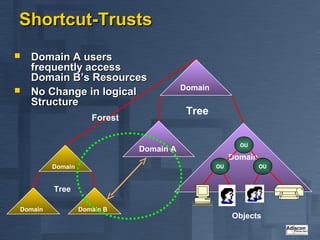
Shortcut-Trusts
   Domain A users
    frequently access
    Domain B’s Resources
                                         Domain
   No Change in logical
    Structure
                                          Tree
                     Forest

                                                         OU
                              Domain A
                                                       Domain
         Domain                                   OU            OU


         Tree

Domain            Domain B
                                                       Objects
Vital for AD: DNS!
   DNS is Active Directory’s Locator Service
   Without correctly configured DNS no
    working Active Directory!
    • Currently TOP 1 Trouble spot
   Can be hosted on non MS-DNS
    • Minimum BIND Version 8.1.2
    • No special Characters in Computer Names
    • Not really an option
    • Recommendation: delegate a separate “AD-
      Zone” on non-MS DNS and use MS-DNS for that
      zone – saves lots of Trouble!
Who is using Active Directory?

   Windows 2000
    • Authentication
    • System Policies
   Directory Enabled Applications
    • Please do not overlook them when
      planning your AD!
What are Directory-Enabled
Applications?
   Applications directly using and
    accessing the Active Directory
    • e.g. Exchange 2000
    • Many more expected!
   Typically extend the Schema
   May dramatically change usage
    pattern for Active Directory Resources
    • Replication Traffic
        (new Objects, Attributes)
    •   AD Queries (GCs!)
Active Directory Security

   Improved Authentication
   Permissions applied via ACLs
    • To Objects as whole
    • To specific Attributes
   Fine-Tuning of Access Permissions
    possible
   Tool-Support to visualize Security
    Settings currently weak (try Visio!)
What is Kerberos?

   „age-old“ Internet-Standard - mature
   Commonly used under Unix
   Secure Authentication thanks to
    Encryption
   Standard-Authentication Model under
    Windows 2000
   Microsoft Kerberos not fully
    compatible to other Kerberos
    Implementations
Delegation of Administration
   Admin rights can be delegated to Users or
    Groups
    • NOT to OUs!
   Delegation via Wizards
   Currently “Admin Nightmare” – very hard to
    detect who has rights
    • All objects must be viewed separately and
        manually
    •   Currently no good tools – but expected to be
        available in the future
    •   Microsoft itself also plans to provide additional
        tools
Inheritance in Active Directory

   From Top to Bottom
   Inheritance can only be blocked
    completely
    • No IRF like Novell
Groups
   Basically, like under NT 4
    • Local Groups are assigned Permissions
    • Global Groups contain Users
           From a single Domain
           Global Groups are members in Local Groups
            for Permission assignment
   New: Universal Groups
    • Can be used everywhere in every Domain
        (Permissions, Members)
    •   Implemented via GC
         Replication traffic limits usability
Active Directory Problem Spots
   DNS Dependency
   No „Merge-Tree“
   No Partitioning (only a single Domain per
    Domain Controller)
   Limited Tool-Support
   Forest Global Schema
   Schema-Modifications can not be undone
   Issues will be addressed over time by
    Microsoft (keep in mind AD is Version 1.0!)
Importance of AD for Microsoft’s
Strategy
   Most important Product
   All new Microsoft Products need or at
    least work better with Active Directory
    • Exchange 2000
    • SQL Server 2000
    • ...
   Bill Gates: „We have bet Microsoft on
    Active Directory.“
Questions?

   rgerhards@adiscon.com
   www.windows-expert.net

Ads overview-en

  • 1.
  • 2.
    What is ActiveDirectory?  Microsoft‘s new Directory Service  Called: ADS, NTDS  Successor to LAN Manager Domains  Goals • Open Standards • High Scalability • Simplified Administration • Compatibility to existing Windows NT systems and applications
  • 3.
    Open Standards  LDAP • Low-Level API to Active Directory  X.500 • Active Directory Structure • Not fully standard-compliant  DNS • Resource Location • Extensions, e. G. „Dynamic DNS“  Kerberos • Authentication
  • 4.
    Active Directory Structure  Hierarchical  Base object Domain Domain Tree Forest OU Domain Domain Domain OU OU Tree Domain Domain Objects
  • 5.
    Which objects doesActive Directory contain?  „old Friends “ • User • Group • Computer  New Elements • Distribution Lists • System Policies  Application defined custom objects  Described in the Schema
  • 6.
    What is theSchema?  Definition of all AD • Object-Types (Classes) • Attributes • Data-Types (Syntaxes)  Can be compared to a Database Schema  ONE consistent Schema inside a single Forest  Extensible
  • 7.
    What is aDomain?  AD Base Element (Building Block)  NT 4 Compatible  Physically Implemented on Domain Controllers (DC)  Border for • Replication Traffic Firma.de • System Policies • Administration
  • 8.
    What is anOrganizational Unit (OU)?  Implements a Structure inside a Domain  Can be nested as needed  Can not be assigned any rights  Typically used for Administrative Reasons • e.g. System Policies LA New York Admin Sales Admin Sales
  • 9.
    What is aTree?  Hierarchical Domain Structure inside a single Namespace • adiscon.com adiscon.com • la.adiscon.com Tree • ny.adiscon.com la.adiscon.com ny.adiscon.com  Transitive Trusts created automatically  Sub-Domain must be added to Root- Domain – otherwise there will be no tree!
  • 10.
    What is aForest?  Combination of Trees  Disjunct Namespaces • adiscon.de • adiscon.com  Transitive Trusts created automatically  There is one single tree-root!  Sub-Tree must be added to Root-Tree, otherwise no Forest will be created
  • 11.
    The Tree-Root  First Domain installed  Single Schema  Absolutely vital! Domain Tree Forest OU Domain Domain Domain OU OU Tree Domain Domain Objects
  • 12.
    Modeling the physicalStructure  Not related to logical Structure  Modeled via „Sites“  A site is well connected via fast Network Links  One Site can home multiple Domains  One Domain can spread across many Sites  Domain Database is stored on Domain Controllers
  • 13.
    Sample Site Structure  Logical and physical Structure are totally independent of each other! Adiscon.com Site LA Site New York sales.adiscon.com sales.adiscon.com
  • 14.
    Which Role cana Server have?  Member Server  Domain Controller  Global Catalog  FSMO • Special Roles carried out by only a limited set of Servers • e.g. PDC Emulator • e.g. Schema Master
  • 15.
    What is aDomain-Controller?  Stores a physical Copy of the Active Directory Database • Currently a single Domain per DC supported! • ESE95 Database (MS Exchange)  Logon Services • Kerberos • LAN Manager Authentication  Recommendation: always have at least 2 Domain Controllers!
  • 16.
    What is aGlobal Catalog Server?  Answers AD Search Queries  Must be present to successfully logon  Holds a copy of all Objects of the whole Forest…  ...but holds only a subset of the Attributes • User definable  Recommendation: at least one GC per (larger) Site
  • 17.
    Multi Master Replication  Updates can be applied to ANY Domain Controller  Will be Replicated to each other Domain Controls (inside that Domain) within 15 Minutes  Optimized Algorithm reduces Replication Traffic  Not time based (triggered on demand, only)!
  • 18.
    Intra-Sites Replication  All Domain Databases involved  Changes are transmitted compressed  via IP (RPC) or SMTP • SMTP not within a single domain!  Time Replication occurs can be configured  Volume of Replication Traffic can not be restricted!  Have an Eye on GCs!
  • 19.
    Mixed vs. NativeMode?  Mixed Mode supports Coexistence with NT4 • Default • NT 4 BDCs continue to work • Enables “Fallback Scenario” during Migration  Only Native Mode supports all AD Features • More than 40 MB Domain Database Size • Mostly problem-free „MoveTree“ • Universal Groups, Group nesting  Once you have switched to Native Mode, there is no way back to Mixed Mode!
  • 20.
    Are there stillTrusts available?  Old fashioned NT 4 Trusts can still be used • Work like always • No additional functionality  Most be used to connect different Forests • Be careful – no common Global Catalog!  Shortcut-Trusts • Connect frequently used Domains to each other (Performance Optimization)
  • 21.
    Shortcut-Trusts  Domain A users frequently access Domain B’s Resources Domain  No Change in logical Structure Tree Forest OU Domain A Domain Domain OU OU Tree Domain Domain B Objects
  • 22.
    Vital for AD:DNS!  DNS is Active Directory’s Locator Service  Without correctly configured DNS no working Active Directory! • Currently TOP 1 Trouble spot  Can be hosted on non MS-DNS • Minimum BIND Version 8.1.2 • No special Characters in Computer Names • Not really an option • Recommendation: delegate a separate “AD- Zone” on non-MS DNS and use MS-DNS for that zone – saves lots of Trouble!
  • 23.
    Who is usingActive Directory?  Windows 2000 • Authentication • System Policies  Directory Enabled Applications • Please do not overlook them when planning your AD!
  • 24.
    What are Directory-Enabled Applications?  Applications directly using and accessing the Active Directory • e.g. Exchange 2000 • Many more expected!  Typically extend the Schema  May dramatically change usage pattern for Active Directory Resources • Replication Traffic (new Objects, Attributes) • AD Queries (GCs!)
  • 25.
    Active Directory Security  Improved Authentication  Permissions applied via ACLs • To Objects as whole • To specific Attributes  Fine-Tuning of Access Permissions possible  Tool-Support to visualize Security Settings currently weak (try Visio!)
  • 26.
    What is Kerberos?  „age-old“ Internet-Standard - mature  Commonly used under Unix  Secure Authentication thanks to Encryption  Standard-Authentication Model under Windows 2000  Microsoft Kerberos not fully compatible to other Kerberos Implementations
  • 27.
    Delegation of Administration  Admin rights can be delegated to Users or Groups • NOT to OUs!  Delegation via Wizards  Currently “Admin Nightmare” – very hard to detect who has rights • All objects must be viewed separately and manually • Currently no good tools – but expected to be available in the future • Microsoft itself also plans to provide additional tools
  • 28.
    Inheritance in ActiveDirectory  From Top to Bottom  Inheritance can only be blocked completely • No IRF like Novell
  • 29.
    Groups  Basically, like under NT 4 • Local Groups are assigned Permissions • Global Groups contain Users  From a single Domain  Global Groups are members in Local Groups for Permission assignment  New: Universal Groups • Can be used everywhere in every Domain (Permissions, Members) • Implemented via GC  Replication traffic limits usability
  • 30.
    Active Directory ProblemSpots  DNS Dependency  No „Merge-Tree“  No Partitioning (only a single Domain per Domain Controller)  Limited Tool-Support  Forest Global Schema  Schema-Modifications can not be undone  Issues will be addressed over time by Microsoft (keep in mind AD is Version 1.0!)
  • 31.
    Importance of ADfor Microsoft’s Strategy  Most important Product  All new Microsoft Products need or at least work better with Active Directory • Exchange 2000 • SQL Server 2000 • ...  Bill Gates: „We have bet Microsoft on Active Directory.“
  • 32.
    Questions?  rgerhards@adiscon.com  www.windows-expert.net