INSTALLING ANG
CONFIGURING ACTIVE
DIRECTORY DOMAIN
SERVICES
Prepared by :BLT
Let's Play!!
Let's expand the acronym
words!
AD DS
Active Directory Domain Services
LDAP
Lightweight Directory Access Protocol
SSO
Single sign-
on
DISCUSSION
WHAT IS ACTIVE
DIRECTORY ?
Active Directory Domain Services (AD DS) are the core
functions in Active Directory that manage users and
computers and allow sysadmins to organize the data
into logical hierarchies.
 Active Directory Domain Services (AD DS), provides the
methods for storing directory data and making this
data available to network users and administrators.
AD DS stores information about user accounts, such as
names, passwords, phone numbers, and so on, and
enables other authorized users on the same network to
access this information.
Active Directory uses a structured data store as the
basis for a logical, hierarchical organization of directory
information.
Active Directory provides the structure to centralize the
network and store information about network
resources across the entire domain. It uses Domain
Controllers to keep this centralized storage available to
network users.
Active Directory stores information about objects on
the network and makes this information easy for
administrators and users to find and use. It’s a kind of
database use to store the information of User, Groups
and Computers and centralize Database of Object and
WHAT IS THE
PURPOSE OF
ACTIVE
DIRECTORY ?
 A server running Active Directory Domain
Services (AD DS) is called Domain Controller.
It authentication and authorizes all users and
computers in Windows type network.
A single sign-on environment Use in a large

network environment
Centralized group policy
Active Directory
Domain Services
Terms to Know
In order to understand
AD DS, there are some
key terms to define.
Schema: The set of user configured
rules that govern objects and
attributes in AD DS.
 Global Catalog: The container of all
objects in AD DS. If you need to find
the name of a user, that name is
stored in the Global Catalog.
Query and Index Mechanism: This
system allows users to find each
other in AD. A good example would
be when you start typing a name in
your mail client, and the mail client
shows you possible matches.
 Replication Service: The replication
service makes sure that every DC on
the network has the same Global
Catalog and Schema
Sites: Sites are representations of the
network topology, so AD DS knows
what objects go together to optimize
replication and indexing.
 Lightweight Directory Access
Protocol: LDAP is a protocol that allows
AD to communicate with other LDAP
enabled directory services across
platforms.
Benefits of Active
Directory Domain
Services
1.You can customize how your
data is organized to meet
your companies needs.
2. You can manage AD DS
from any computer on the
network, if necessary
3. AD DS provides built in
replication and redundancy: if one
Domain Controller (DC) fails,
another DC picks up the load
4. All access to network resources
goes through AD DS, which keeps
network access rights management
centralized
What Services
are Provided in
Active Directory
Domain
Services?
1.Domain Services: Stores data and
manages communications between
the users and the DC. This is the
primary functionality of AD DS.
2. Certificate Services: Allows your
DC to serve digital certificates,
signatures, and public key
cryptography.
3. Lightweight Directory Services:
Supports LDAP for cross platform
domain services, like any Linux
computers in your network.
4. Directory Federation Services:
Provides SSO authentication for multiple
applications in the same session, so
users don’t have to keep providing the
same credentials.
5. Rights Management: Controls
information rights and data access policies.
For example, Rights Management
determines if you can access a folder or
send an email.
STEPS TO ADD ACTIVE
DIRECTORY DOMAIN
SERVICES ROLE TO A
WINDOWS SERVER 2008
R2.
1. Select Start > Administrative Tools > Server
Manager.
2. Server Manager appears. Select Roles on the left and click
Add Roles.
3. The Add Roles Wizard appears. By default, then Before
You Begin information screen is shown. Click Next.
4. The Select Server Roles screen appears
5. Select Active Directory Domain Services and click
Next.
6. The Active Directory Domain Services informational screen
appears. Read it and click Next.
7. The Confirm Installation Selections screen appears.
Confirm your selections and click Install.
8. The installation runs, and the Installation Progress screen
appears.
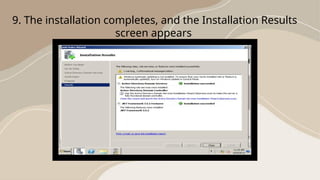
9. The installation completes, and the Installation Results
screen appears
10. Click Close to complete the wizard. You return to Server
Manager.
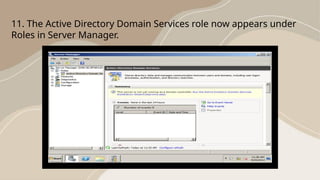
11. The Active Directory Domain Services role now appears under
Roles in Server Manager.
Let's Have A Short Quiz!
IDENTIFICATION: Identify the following. Write your answer on the
space provided.
__________________1. It is a hierarchical structure that stores
information about objects on the network.
__________________ 2. provides the methods for storing directory data
and making this data available to network users and administrators.
__________________3. typically include shared resources such as servers,
volumes, printers, and the network user and computer accounts.
__________________ 4.this users can access resources anywhere on the
network.
__________________ 5. can manage directory data and organization
throughout their network.
Let's see if you really understand the lesson!!
Performance Task!!
Instruction: Perform in your computers how to add
ACTIVE DIRECTORY DOMAIN SERVICES ROLE to
a WINDOWS SERVER 2008 R2. After you perform,
you please call your teacher for them to check your
output or performance.
Installing And configuring active directory .pptx

Installing And configuring active directory .pptx

  • 1.
    INSTALLING ANG CONFIGURING ACTIVE DIRECTORYDOMAIN SERVICES Prepared by :BLT
  • 2.
    Let's Play!! Let's expandthe acronym words!
  • 3.
    AD DS Active DirectoryDomain Services
  • 4.
  • 5.
  • 6.
  • 7.
  • 8.
    Active Directory DomainServices (AD DS) are the core functions in Active Directory that manage users and computers and allow sysadmins to organize the data into logical hierarchies.  Active Directory Domain Services (AD DS), provides the methods for storing directory data and making this data available to network users and administrators. AD DS stores information about user accounts, such as names, passwords, phone numbers, and so on, and enables other authorized users on the same network to access this information.
  • 9.
    Active Directory usesa structured data store as the basis for a logical, hierarchical organization of directory information. Active Directory provides the structure to centralize the network and store information about network resources across the entire domain. It uses Domain Controllers to keep this centralized storage available to network users. Active Directory stores information about objects on the network and makes this information easy for administrators and users to find and use. It’s a kind of database use to store the information of User, Groups and Computers and centralize Database of Object and
  • 10.

    WHAT IS THE PURPOSEOF ACTIVE DIRECTORY ?
  • 11.
     A serverrunning Active Directory Domain Services (AD DS) is called Domain Controller. It authentication and authorizes all users and computers in Windows type network. A single sign-on environment Use in a large  network environment Centralized group policy
  • 12.
  • 13.
    In order tounderstand AD DS, there are some key terms to define.
  • 14.
    Schema: The setof user configured rules that govern objects and attributes in AD DS.  Global Catalog: The container of all objects in AD DS. If you need to find the name of a user, that name is stored in the Global Catalog.
  • 15.
    Query and IndexMechanism: This system allows users to find each other in AD. A good example would be when you start typing a name in your mail client, and the mail client shows you possible matches.  Replication Service: The replication service makes sure that every DC on the network has the same Global Catalog and Schema
  • 16.
    Sites: Sites arerepresentations of the network topology, so AD DS knows what objects go together to optimize replication and indexing.  Lightweight Directory Access Protocol: LDAP is a protocol that allows AD to communicate with other LDAP enabled directory services across platforms.
  • 17.
  • 18.
    1.You can customizehow your data is organized to meet your companies needs. 2. You can manage AD DS from any computer on the network, if necessary
  • 19.
    3. AD DSprovides built in replication and redundancy: if one Domain Controller (DC) fails, another DC picks up the load 4. All access to network resources goes through AD DS, which keeps network access rights management centralized
  • 20.
    What Services are Providedin Active Directory Domain Services?
  • 21.
    1.Domain Services: Storesdata and manages communications between the users and the DC. This is the primary functionality of AD DS. 2. Certificate Services: Allows your DC to serve digital certificates, signatures, and public key cryptography.
  • 22.
    3. Lightweight DirectoryServices: Supports LDAP for cross platform domain services, like any Linux computers in your network. 4. Directory Federation Services: Provides SSO authentication for multiple applications in the same session, so users don’t have to keep providing the same credentials.
  • 23.
    5. Rights Management:Controls information rights and data access policies. For example, Rights Management determines if you can access a folder or send an email.
  • 24.
    STEPS TO ADDACTIVE DIRECTORY DOMAIN SERVICES ROLE TO A WINDOWS SERVER 2008 R2.
  • 25.
    1. Select Start> Administrative Tools > Server Manager.
  • 26.
    2. Server Managerappears. Select Roles on the left and click Add Roles.
  • 27.
    3. The AddRoles Wizard appears. By default, then Before You Begin information screen is shown. Click Next.
  • 28.
    4. The SelectServer Roles screen appears
  • 29.
    5. Select ActiveDirectory Domain Services and click Next.
  • 30.
    6. The ActiveDirectory Domain Services informational screen appears. Read it and click Next.
  • 31.
    7. The ConfirmInstallation Selections screen appears. Confirm your selections and click Install.
  • 32.
    8. The installationruns, and the Installation Progress screen appears.
  • 33.
    9. The installationcompletes, and the Installation Results screen appears
  • 34.
    10. Click Closeto complete the wizard. You return to Server Manager.
  • 35.
    11. The ActiveDirectory Domain Services role now appears under Roles in Server Manager.
  • 36.
    Let's Have AShort Quiz!
  • 37.
    IDENTIFICATION: Identify thefollowing. Write your answer on the space provided. __________________1. It is a hierarchical structure that stores information about objects on the network. __________________ 2. provides the methods for storing directory data and making this data available to network users and administrators. __________________3. typically include shared resources such as servers, volumes, printers, and the network user and computer accounts. __________________ 4.this users can access resources anywhere on the network. __________________ 5. can manage directory data and organization throughout their network.
  • 38.
    Let's see ifyou really understand the lesson!!
  • 39.
    Performance Task!! Instruction: Performin your computers how to add ACTIVE DIRECTORY DOMAIN SERVICES ROLE to a WINDOWS SERVER 2008 R2. After you perform, you please call your teacher for them to check your output or performance.