.


What’s New
An Introduction to What’s New in Acronis Backup & Recovery 11.5
01 Agenda

    1. What’s New in ABR11.5
    2. ABR11.5 for Microsoft Exchange
    3. Other New Features
    4. Contact Us


Authorized Use Only – Acronis Academy   2
Features of Acronis Backup & Recovery 11.5
          1. WHAT’S NEW IN ABR11.5


Authorized Use Only – Acronis Academy                  3
01 ABR11.5 Advanced Platform

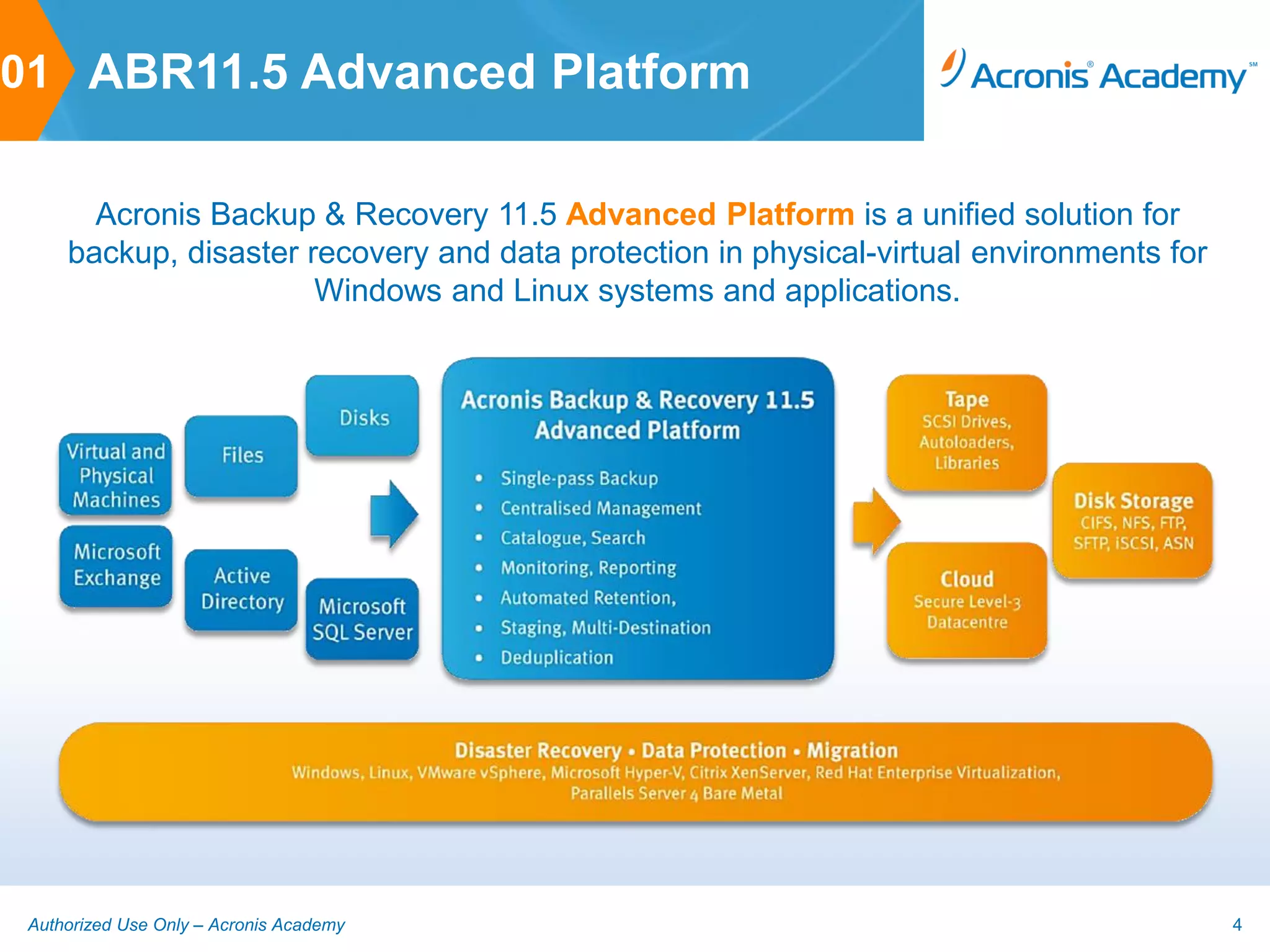
       Acronis Backup & Recovery 11.5 Advanced Platform is a unified solution for
     backup, disaster recovery and data protection in physical-virtual environments for
                       Windows and Linux systems and applications.


 Authorized Use Only – Acronis Academy                                                    4
01 ABR11.5 Features

      Disk image-based backup for fast backup of entire Windows or
       Linux systems or files/folders on physical and virtual machines
      Centralized management capabilities to manage, monitor and report
       on backups of multiple servers and workstations
      Catalog and search functionality to quickly locate user files for easy
       recovery from backups
      Acronis Universal Restore for recovery to dissimilar hardware or
       VM for reliable recovery and P2P, P2V, V2V and V2P migration
      Deduplication of backups to save on network utilization and storage
       space
      Acronis Cloud Backup enables backup to the cloud for secure off-
       site storage of critical data


 Authorized Use Only – Acronis Academy                                          5
01 What’s New in ABR11.5

      Integrated Microsoft Exchange backup
              Enables granular recovery of Exchange application items such as emails
               from database level backups

              Support for Microsoft Exchange 2003, 2007 and 2010

              Support for Exchange clusters – SCC, CCR and DAG

              New Express Full backup type for faster backups

              New CDP backup scheme for recoverability up to point of failure

              New recovery destinations to disk and .pst for more flexibility


 Authorized Use Only – Acronis Academy                                                  6
01 What’s New in ABR11.5

      Support for RHEV virtualization platform
      Remote installation of ABR11.5 Agent for Linux
      Support for Linux kernel 3.x
      Staging to Acronis Online for D2D2C backups
      File recovery from disk image backups stored on tape
      Support for UEFI-based VMs (vSphere 5)
      Support for CBT for faster backups of VMware VMs
      Bare Metal Recovery for Microsoft Hyper-V


 Authorized Use Only – Acronis Academy                        7
01 What’s New in ABR11.5

      Change in positioning to better reflect capabilities:
              Advanced Edition and Virtual Edition is now collectively referred to as the
               ABR11.5 Advanced Platform

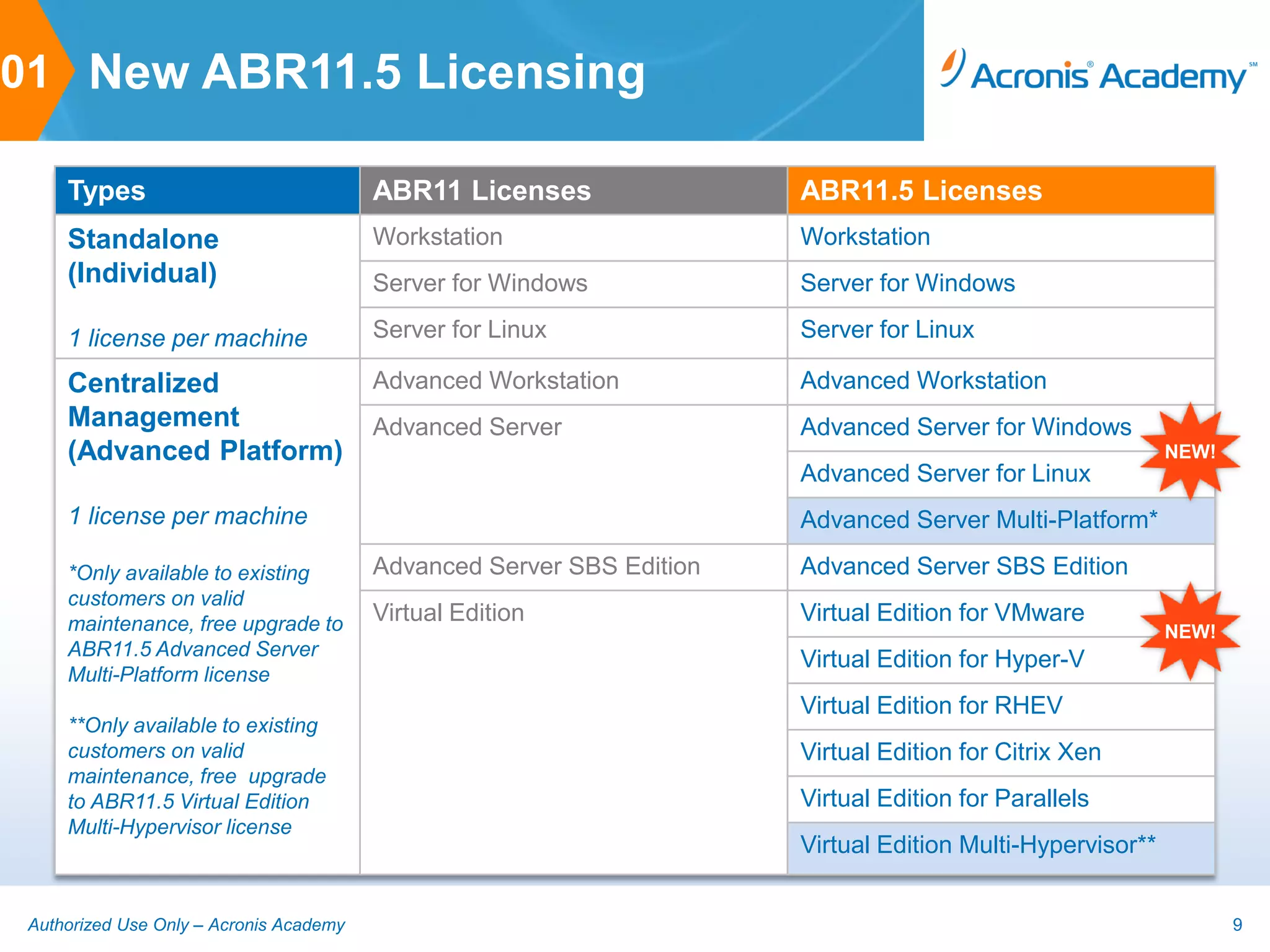
      New platform and hypervisor specific per machine licensing


 Authorized Use Only – Acronis Academy                                                       8
01 New ABR11.5 Licensing

     Types                               ABR11 Licenses                ABR11.5 Licenses
     Standalone                          Workstation                   Workstation
     (Individual)                        Server for Windows            Server for Windows

     1 license per machine               Server for Linux              Server for Linux

     Centralized                         Advanced Workstation          Advanced Workstation
     Management                          Advanced Server               Advanced Server for Windows
     (Advanced Platform)                                                                                    NEW!
                                                                       Advanced Server for Linux
     1 license per machine                                             Advanced Server Multi-Platform*

     *Only available to existing         Advanced Server SBS Edition   Advanced Server SBS Edition
     customers on valid
     maintenance, free upgrade to        Virtual Edition               Virtual Edition for VMware
                                                                                                            NEW!
     ABR11.5 Advanced Server
                                                                       Virtual Edition for Hyper-V
     Multi-Platform license
                                                                       Virtual Edition for RHEV
     **Only available to existing
     customers on valid                                                Virtual Edition for Citrix Xen
     maintenance, free upgrade
     to ABR11.5 Virtual Edition                                        Virtual Edition for Parallels
     Multi-Hypervisor license
                                                                       Virtual Edition Multi-Hypervisor**


 Authorized Use Only – Acronis Academy                                                                             9
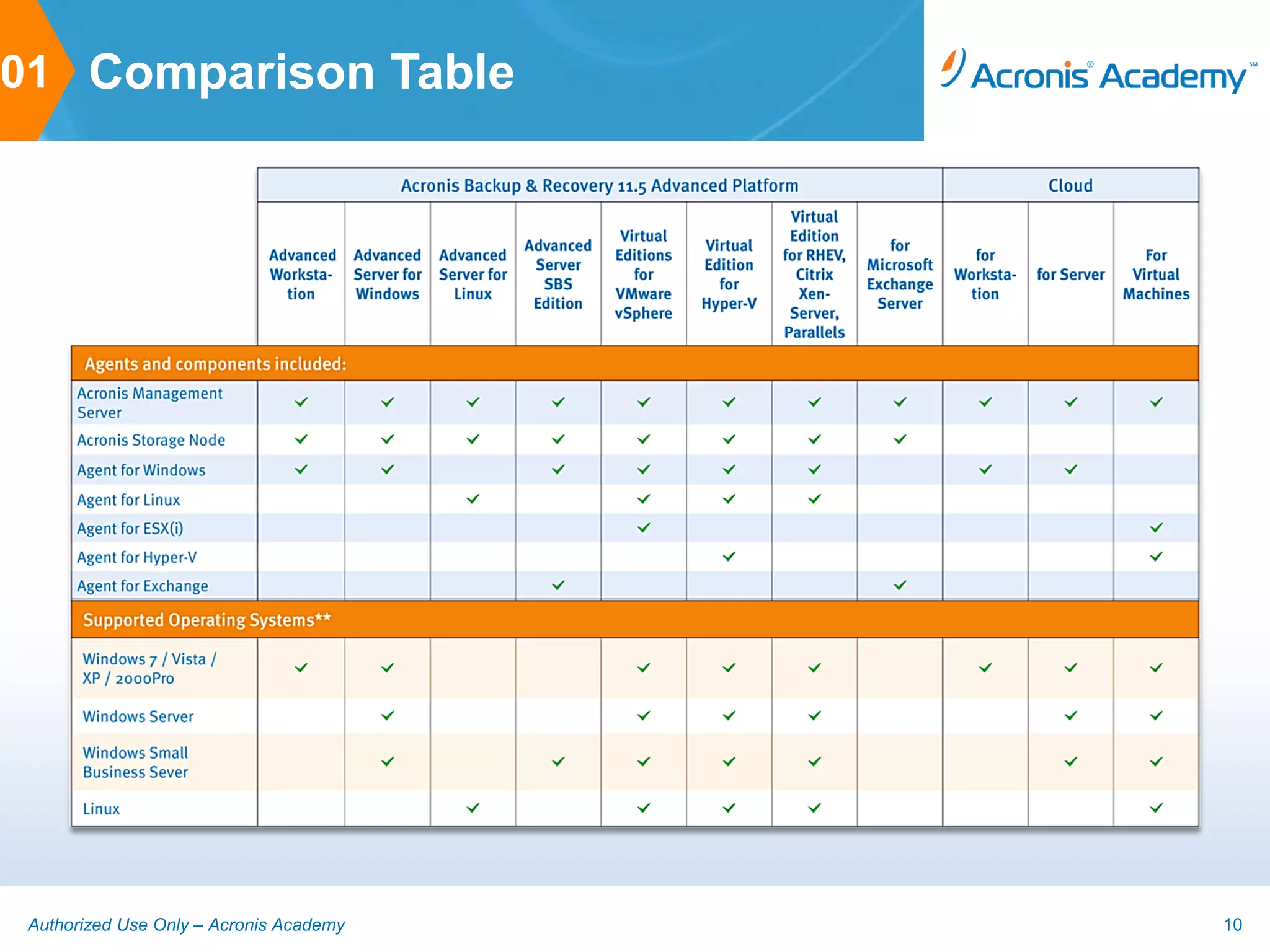
01 Comparison Table


 Authorized Use Only – Acronis Academy   10
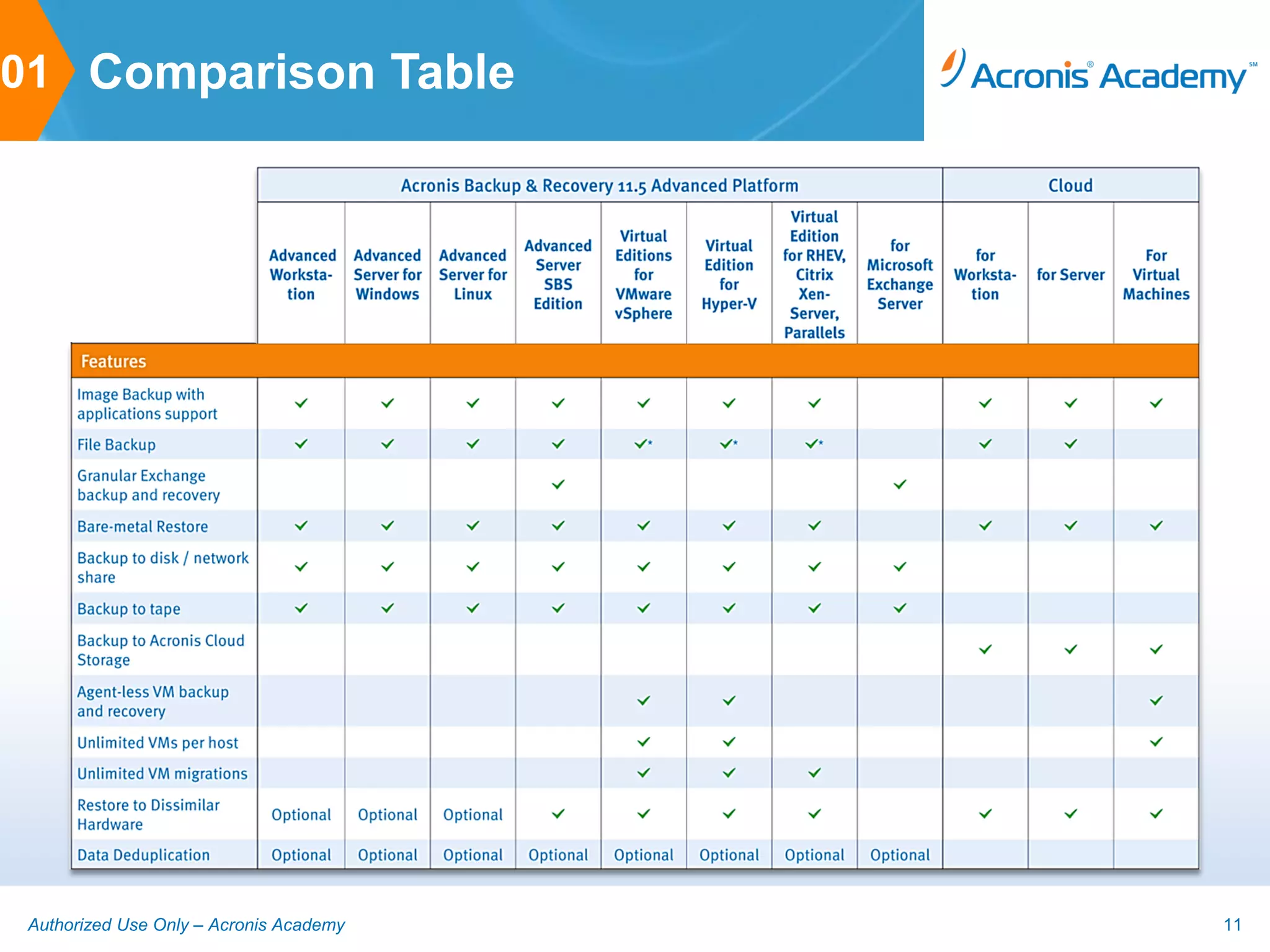
01 Comparison Table


 Authorized Use Only – Acronis Academy   11
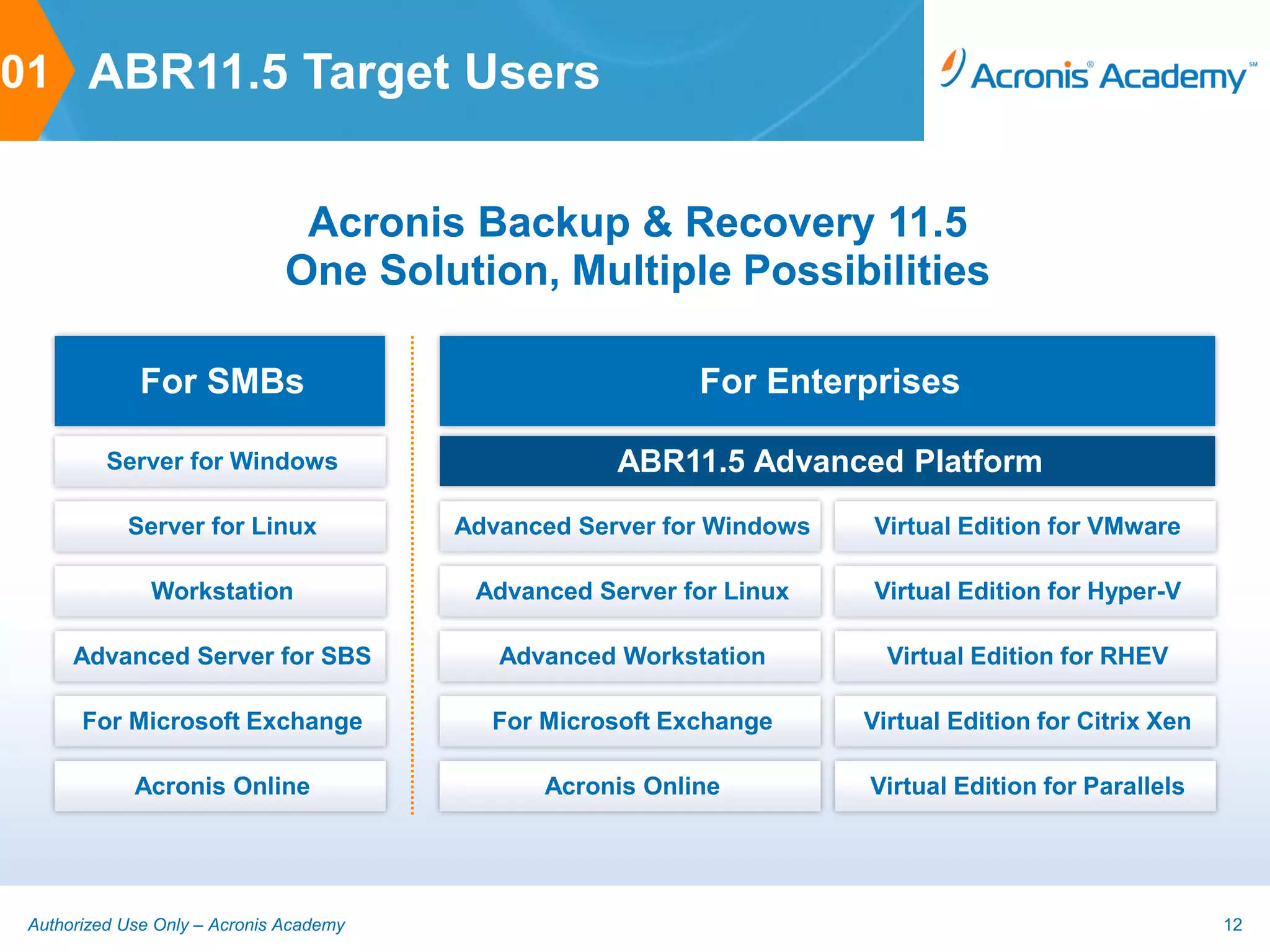
01 ABR11.5 Target Users


                                Acronis Backup & Recovery 11.5
                               One Solution, Multiple Possibilities

              For SMBs                                     For Enterprises

          Server for Windows                         ABR11.5 Advanced Platform
            Server for Linux             Advanced Server for Windows   Virtual Edition for VMware

               Workstation                Advanced Server for Linux    Virtual Edition for Hyper-V

      Advanced Server for SBS               Advanced Workstation         Virtual Edition for RHEV

       For Microsoft Exchange              For Microsoft Exchange      Virtual Edition for Citrix Xen

             Acronis Online                    Acronis Online          Virtual Edition for Parallels


 Authorized Use Only – Acronis Academy                                                                  12
How ABR11.5 for Microsoft Exchange works
          2. ABR11.5
             FOR MICROSOFT EXCHANGE


Authorized Use Only – Acronis Academy                13
02 ABR11.5 Application Backup

     ABR11.5 supports backup and restore of various applications such as MS Active
     Directory, MS SQL Server, MS Sharepoint and MS Exchange as part of a disk or
     volume backup

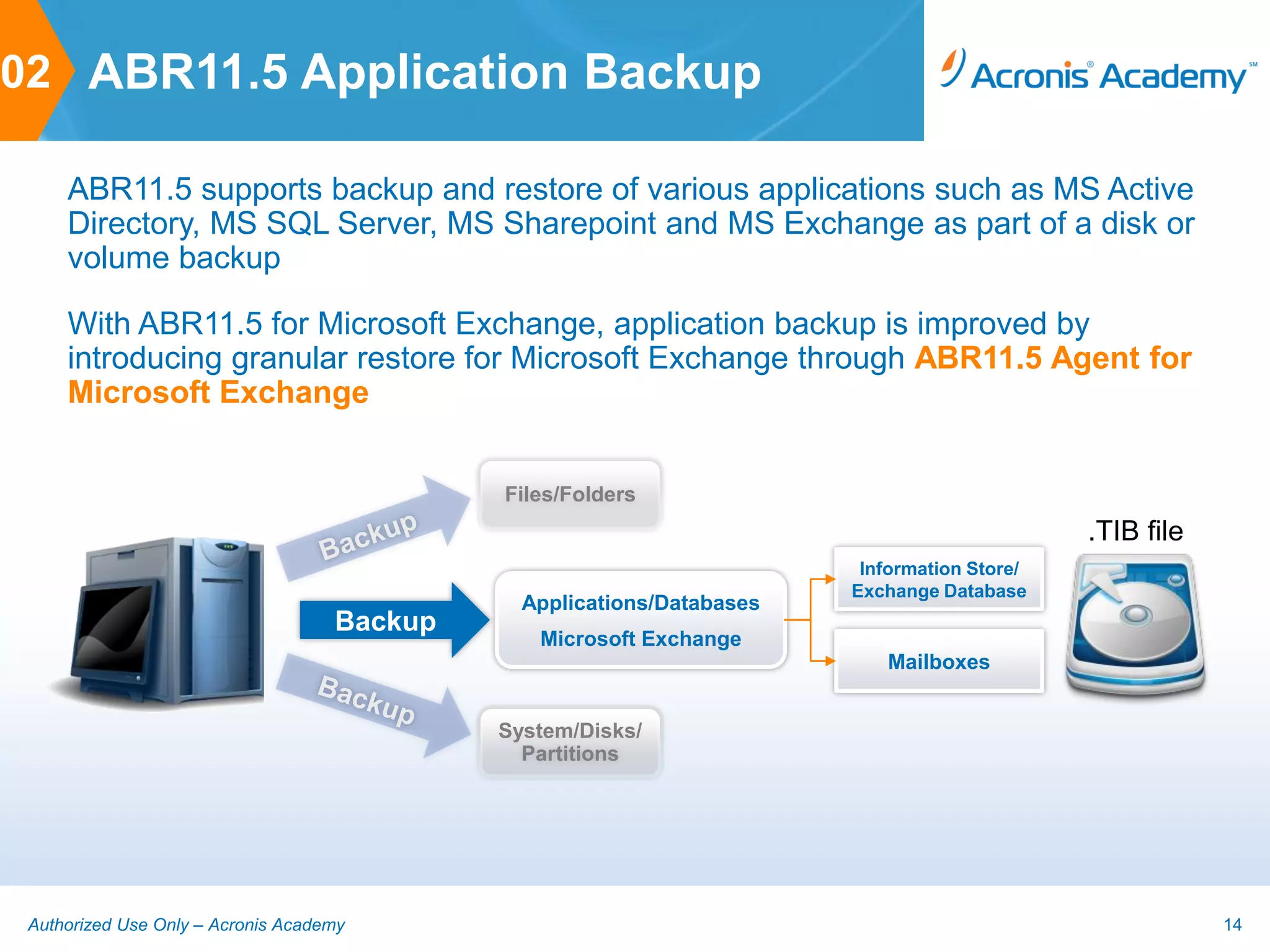
     With ABR11.5 for Microsoft Exchange, application backup is improved by
     introducing granular restore for Microsoft Exchange through ABR11.5 Agent for
     Microsoft Exchange


                                             Files/Folders
                                                                                              .TIB file
                                                                         Information Store/
                                                                        Exchange Database
                                               Applications/Databases
                                    Backup
                                                Microsoft Exchange
                                                                           Mailboxes


                                             System/Disks/
                                               Partitions


 Authorized Use Only – Acronis Academy                                                                    14
02 Integration with ABR11.5

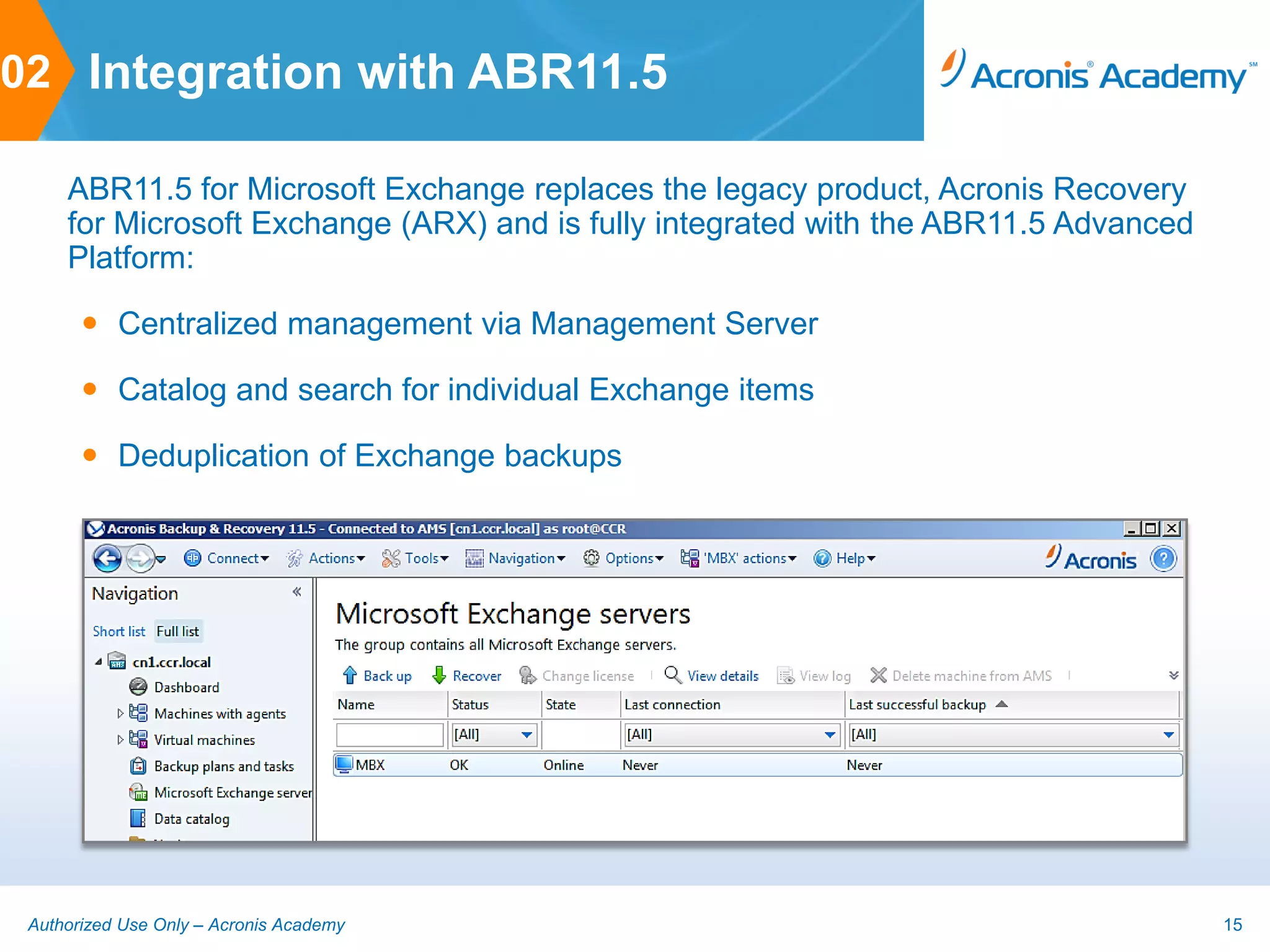
     ABR11.5 for Microsoft Exchange replaces the legacy product, Acronis Recovery
     for Microsoft Exchange (ARX) and is fully integrated with the ABR11.5 Advanced
     Platform:

        Centralized management via Management Server

        Catalog and search for individual Exchange items

        Deduplication of Exchange backups


 Authorized Use Only – Acronis Academy                                                15
02 Licensing

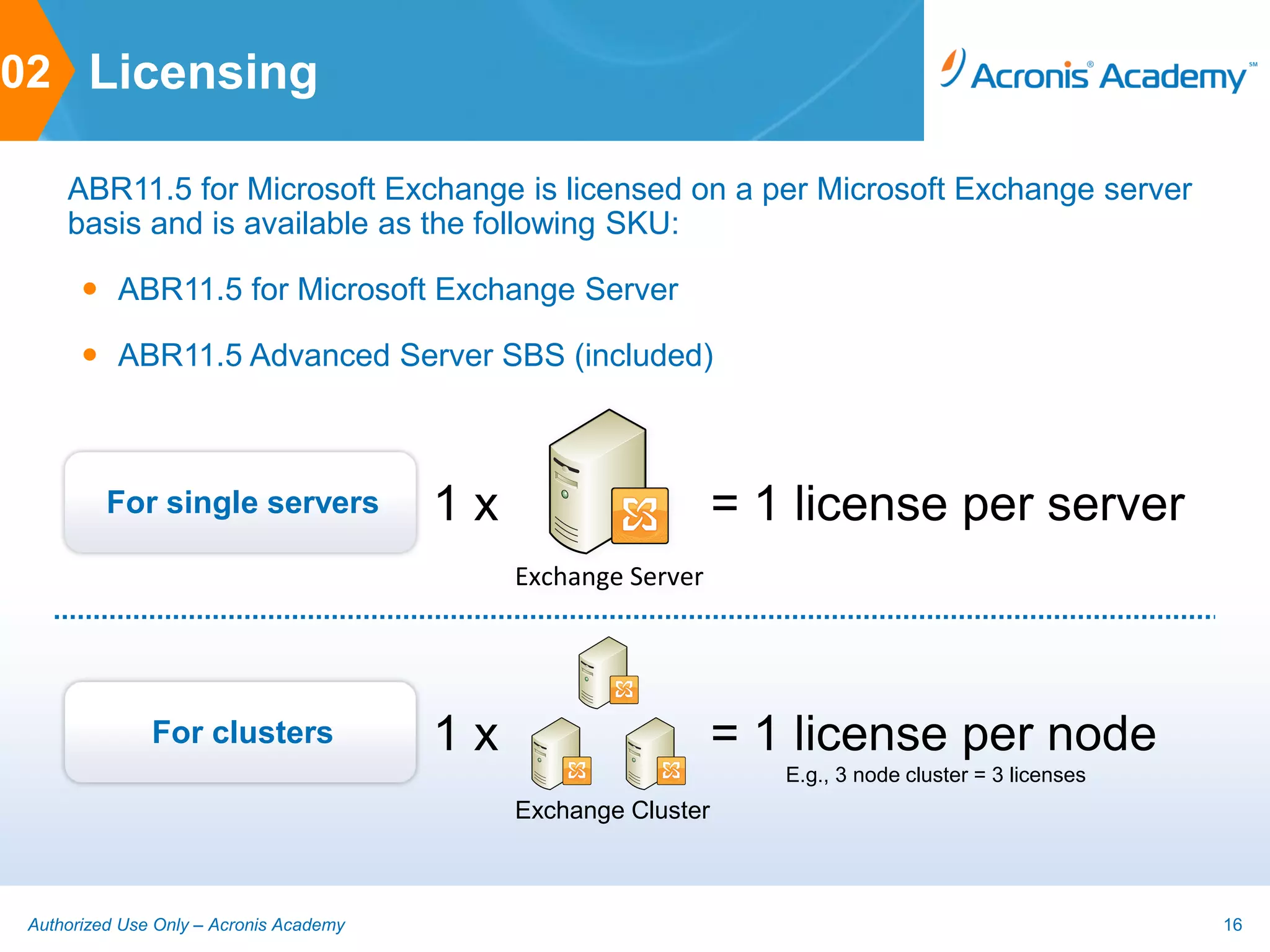
     ABR11.5 for Microsoft Exchange is licensed on a per Microsoft Exchange server
     basis and is available as the following SKU:

        ABR11.5 for Microsoft Exchange Server

        ABR11.5 Advanced Server SBS (included)


          For single servers             1x                                    = 1 license per server
                                              Exchange Server


                                                     Exchange Server
               For clusters              1x                                    = 1 license per node
                                                                                  E.g., 3 node cluster = 3 licenses
                                              Exchange ServerExchange Server
                                              Exchange Cluster


 Authorized Use Only – Acronis Academy                                                                                16
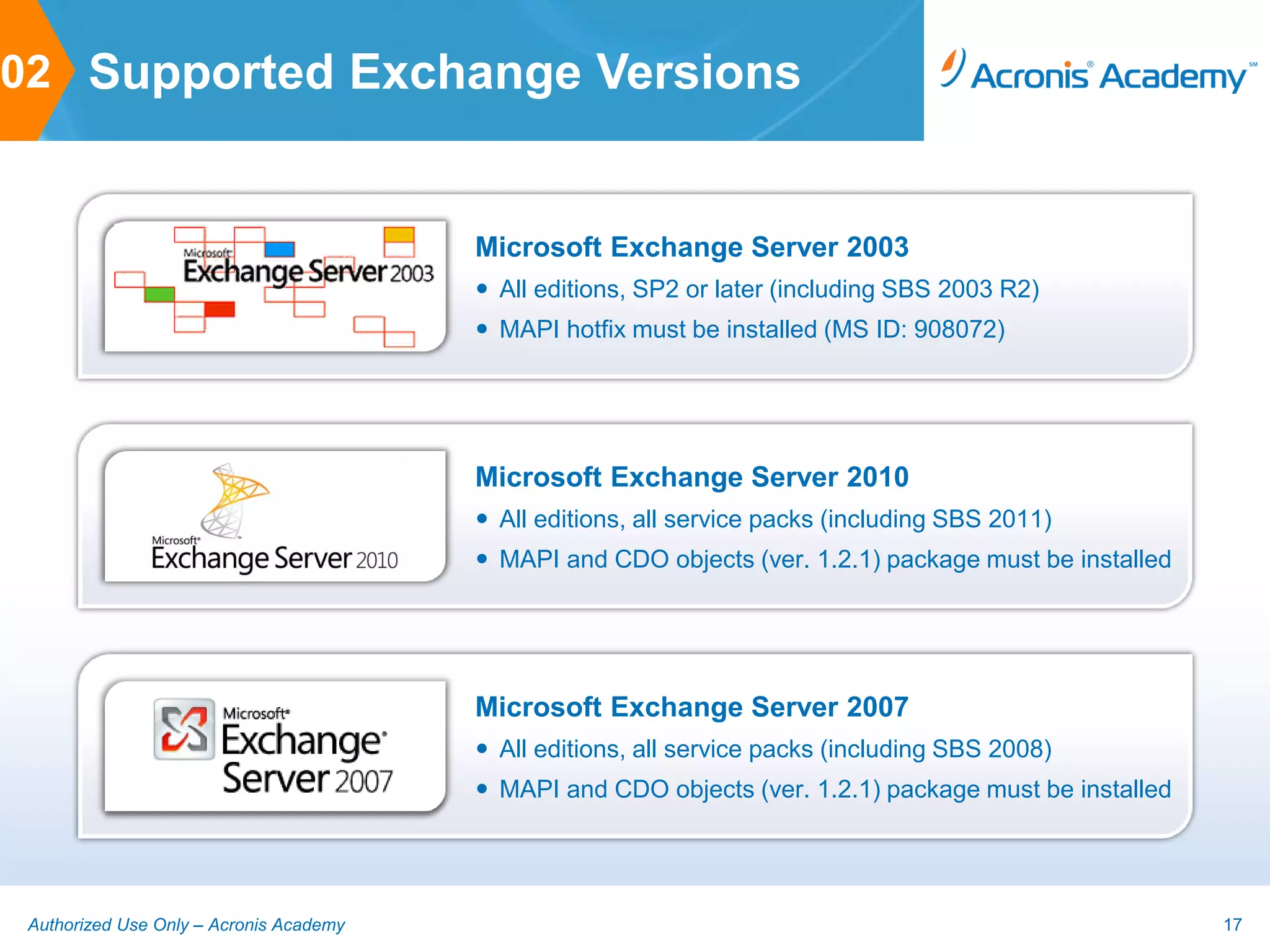
02 Supported Exchange Versions


                                         Microsoft Exchange Server 2003
                                          All editions, SP2 or later (including SBS 2003 R2)
                                          MAPI hotfix must be installed (MS ID: 908072)


                                         Microsoft Exchange Server 2010
                                          All editions, all service packs (including SBS 2011)
                                          MAPI and CDO objects (ver. 1.2.1) package must be installed


                                         Microsoft Exchange Server 2007
                                          All editions, all service packs (including SBS 2008)
                                          MAPI and CDO objects (ver. 1.2.1) package must be installed


 Authorized Use Only – Acronis Academy                                                                   17
02 Supported Exchange Clusters

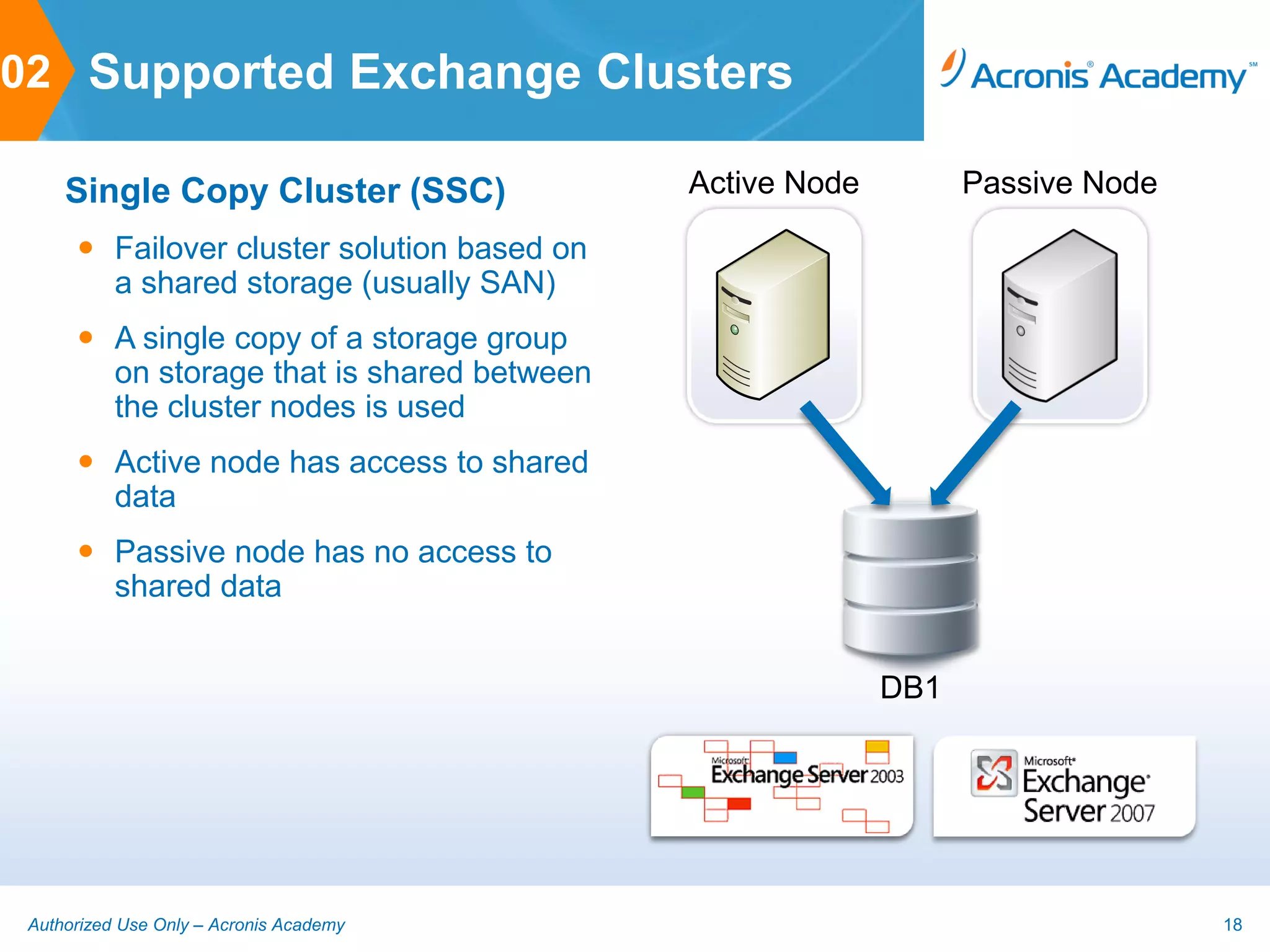
     Single Copy Cluster (SSC)               Active Node         Passive Node

       Failover cluster solution based on
        a shared storage (usually SAN)
       A single copy of a storage group
        on storage that is shared between
        the cluster nodes is used
       Active node has access to shared
        data
       Passive node has no access to
        shared data


                                                           DB1


 Authorized Use Only – Acronis Academy                                          18
02 Supported Exchange Clusters

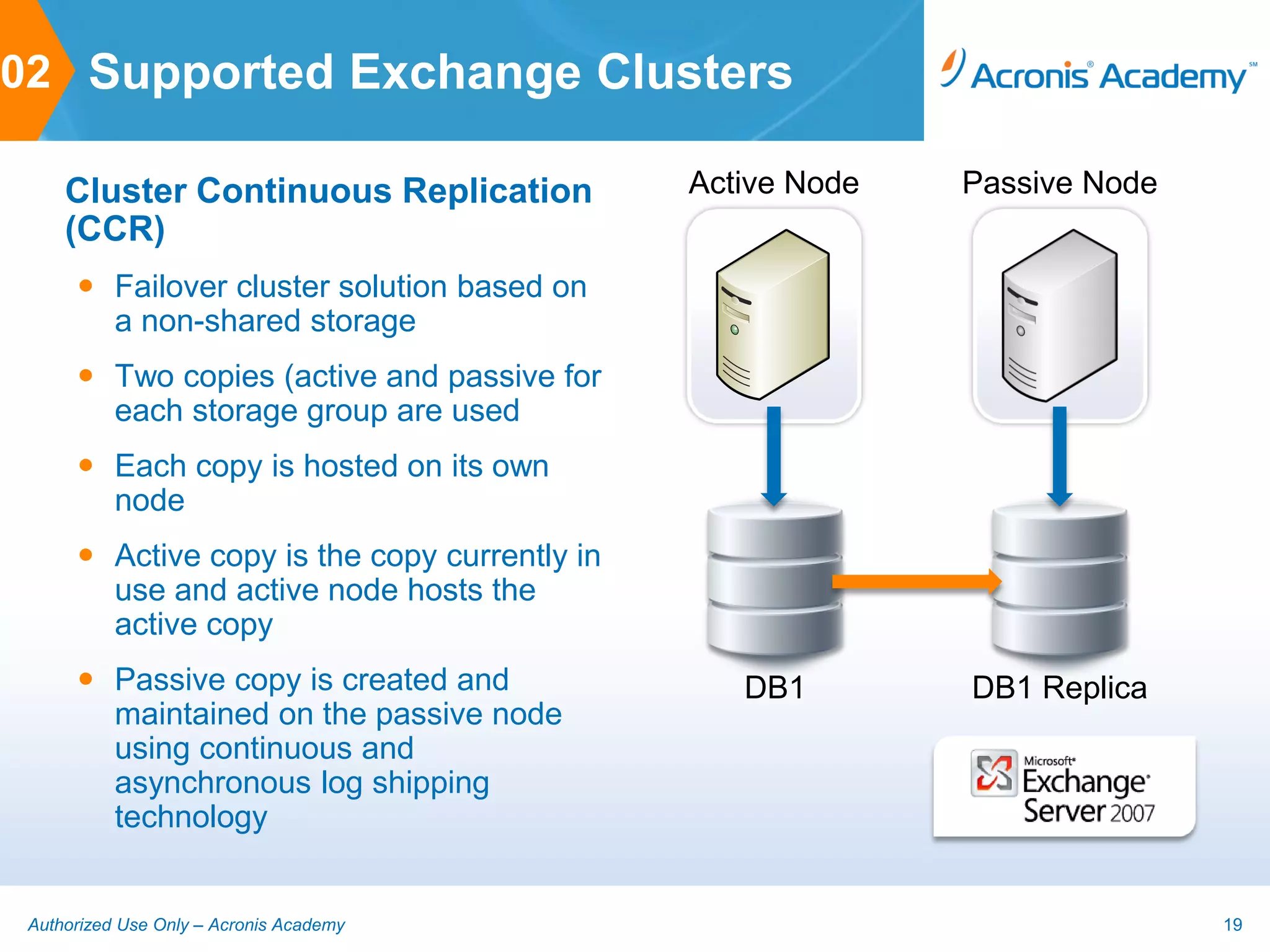
     Cluster Continuous Replication            Active Node   Passive Node
     (CCR)
       Failover cluster solution based on
        a non-shared storage
       Two copies (active and passive for
        each storage group are used
       Each copy is hosted on its own
        node
       Active copy is the copy currently in
        use and active node hosts the
        active copy
       Passive copy is created and               DB1        DB1 Replica
        maintained on the passive node
        using continuous and
        asynchronous log shipping
        technology


 Authorized Use Only – Acronis Academy                                      19
02 Supported Exchange Clusters

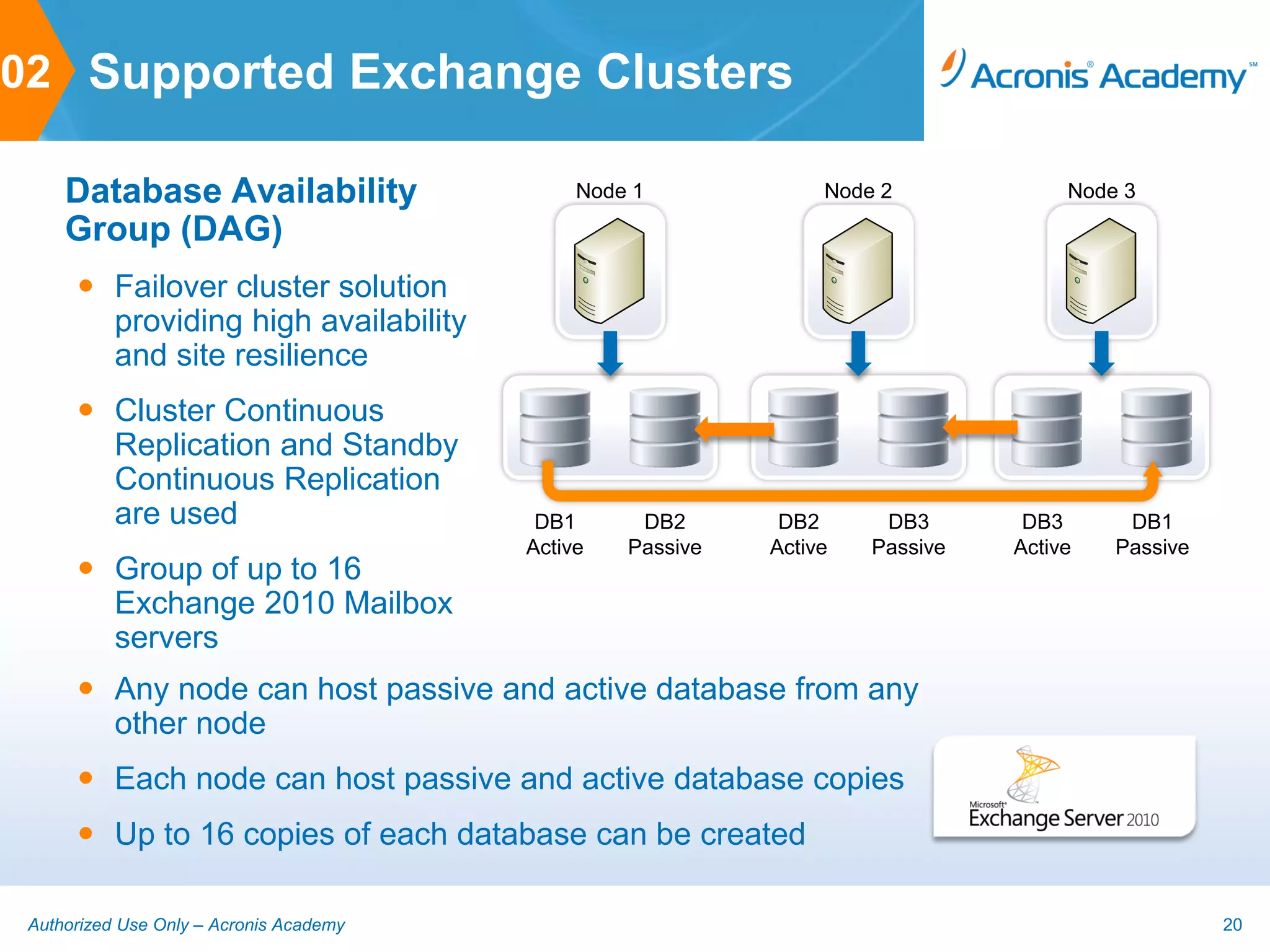
     Database Availability                    Node 1             Node 2             Node 3

     Group (DAG)
       Failover cluster solution
        providing high availability
        and site resilience
       Cluster Continuous
        Replication and Standby
        Continuous Replication
        are used                          DB1      DB2       DB2      DB3       DB3      DB1
                                         Active   Passive   Active   Passive   Active   Passive
       Group of up to 16
        Exchange 2010 Mailbox
        servers
       Any node can host passive and active database from any
        other node
       Each node can host passive and active database copies
       Up to 16 copies of each database can be created

 Authorized Use Only – Acronis Academy                                                            20
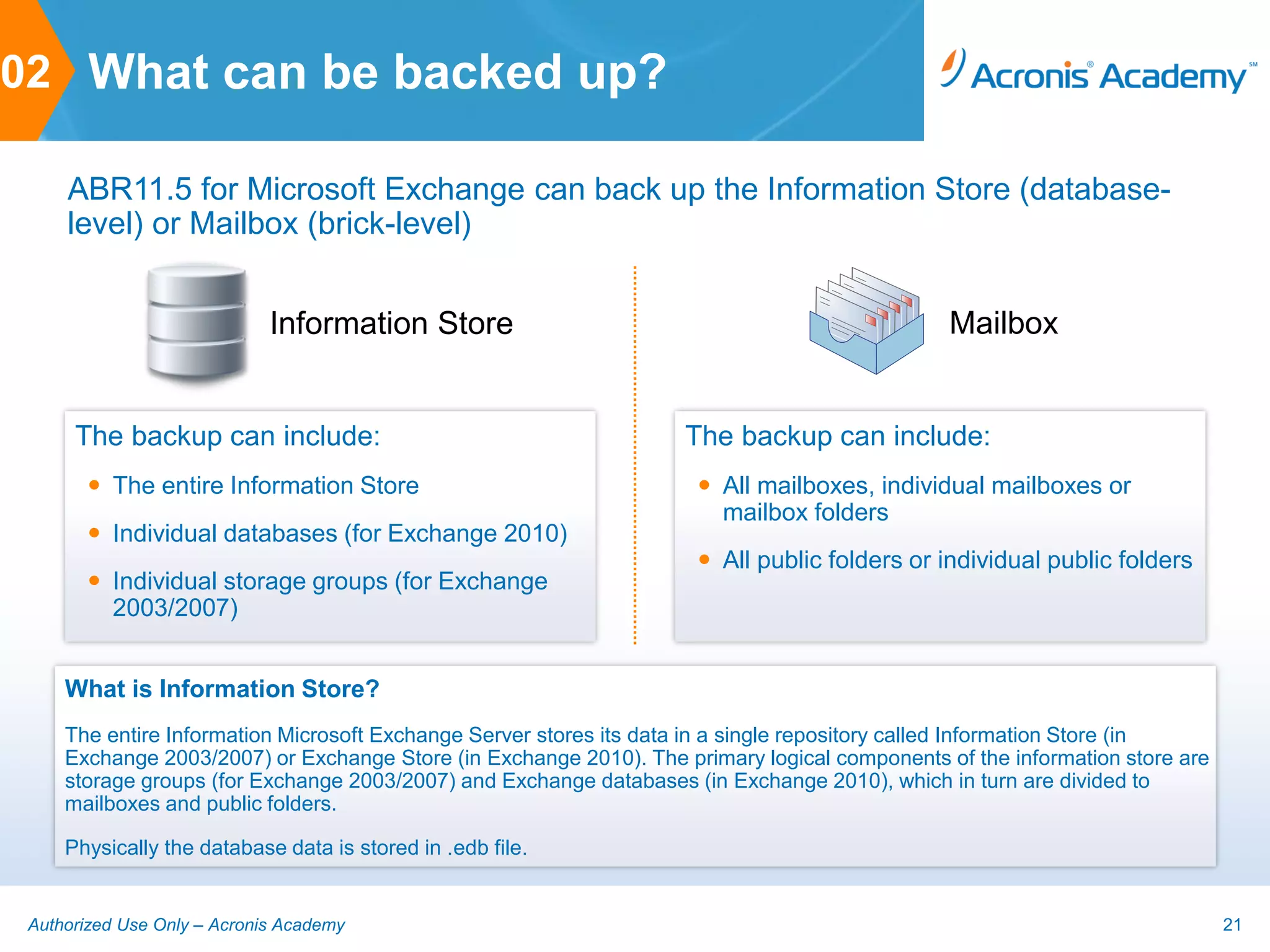
02 What can be backed up?

     ABR11.5 for Microsoft Exchange can back up the Information Store (database-
     level) or Mailbox (brick-level)


                             Information Store                                                 Mailbox


      The backup can include:                                       The backup can include:
        The entire Information Store                                 All mailboxes, individual mailboxes or
                                                                       mailbox folders
        Individual databases (for Exchange 2010)
                                                                      All public folders or individual public folders
        Individual storage groups (for Exchange
         2003/2007)


     What is Information Store?
     The entire Information Microsoft Exchange Server stores its data in a single repository called Information Store (in
     Exchange 2003/2007) or Exchange Store (in Exchange 2010). The primary logical components of the information store are
     storage groups (for Exchange 2003/2007) and Exchange databases (in Exchange 2010), which in turn are divided to
     mailboxes and public folders.

     Physically the database data is stored in .edb file.


 Authorized Use Only – Acronis Academy                                                                                       21
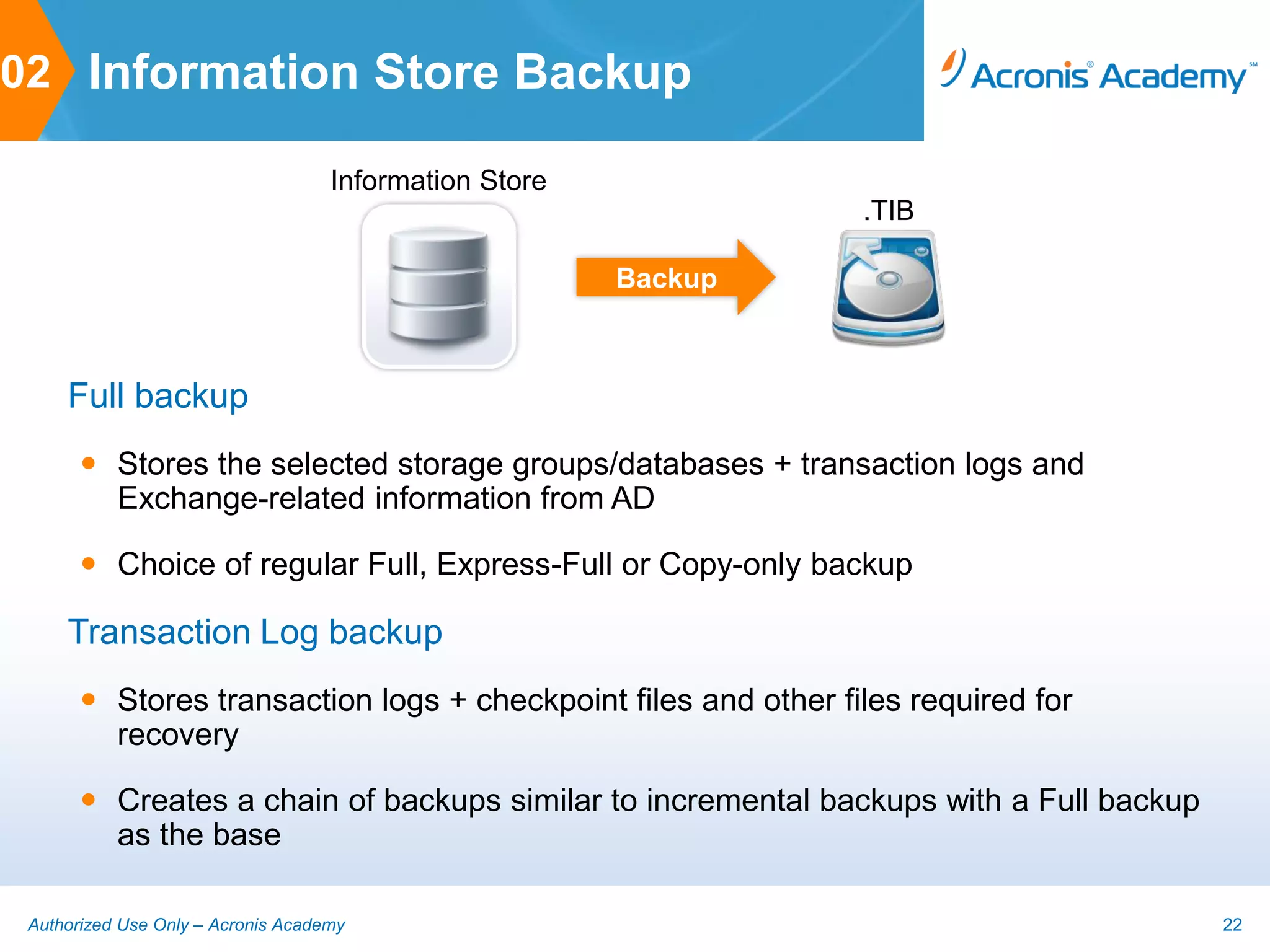
02 Information Store Backup

                                    Information Store
                                                                 .TIB

                                                        Backup


     Full backup
        Stores the selected storage groups/databases + transaction logs and
         Exchange-related information from AD

        Choice of regular Full, Express-Full or Copy-only backup

     Transaction Log backup
        Stores transaction logs + checkpoint files and other files required for
         recovery

        Creates a chain of backups similar to incremental backups with a Full backup
         as the base

 Authorized Use Only – Acronis Academy                                                  22
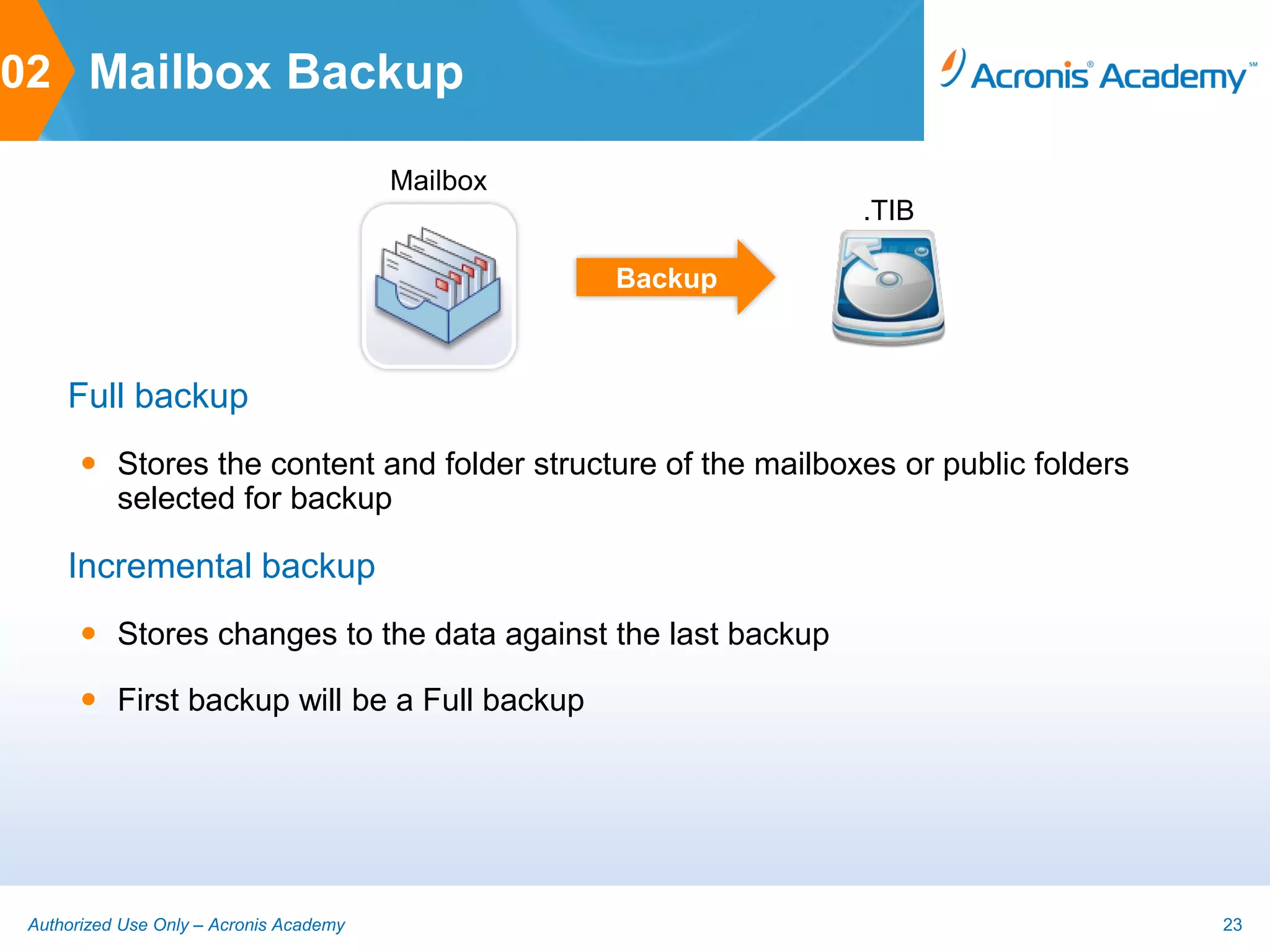
02 Mailbox Backup

                                         Mailbox
                                                               .TIB

                                                   Backup


     Full backup
        Stores the content and folder structure of the mailboxes or public folders
         selected for backup

     Incremental backup
        Stores changes to the data against the last backup

        First backup will be a Full backup


 Authorized Use Only – Acronis Academy                                                23
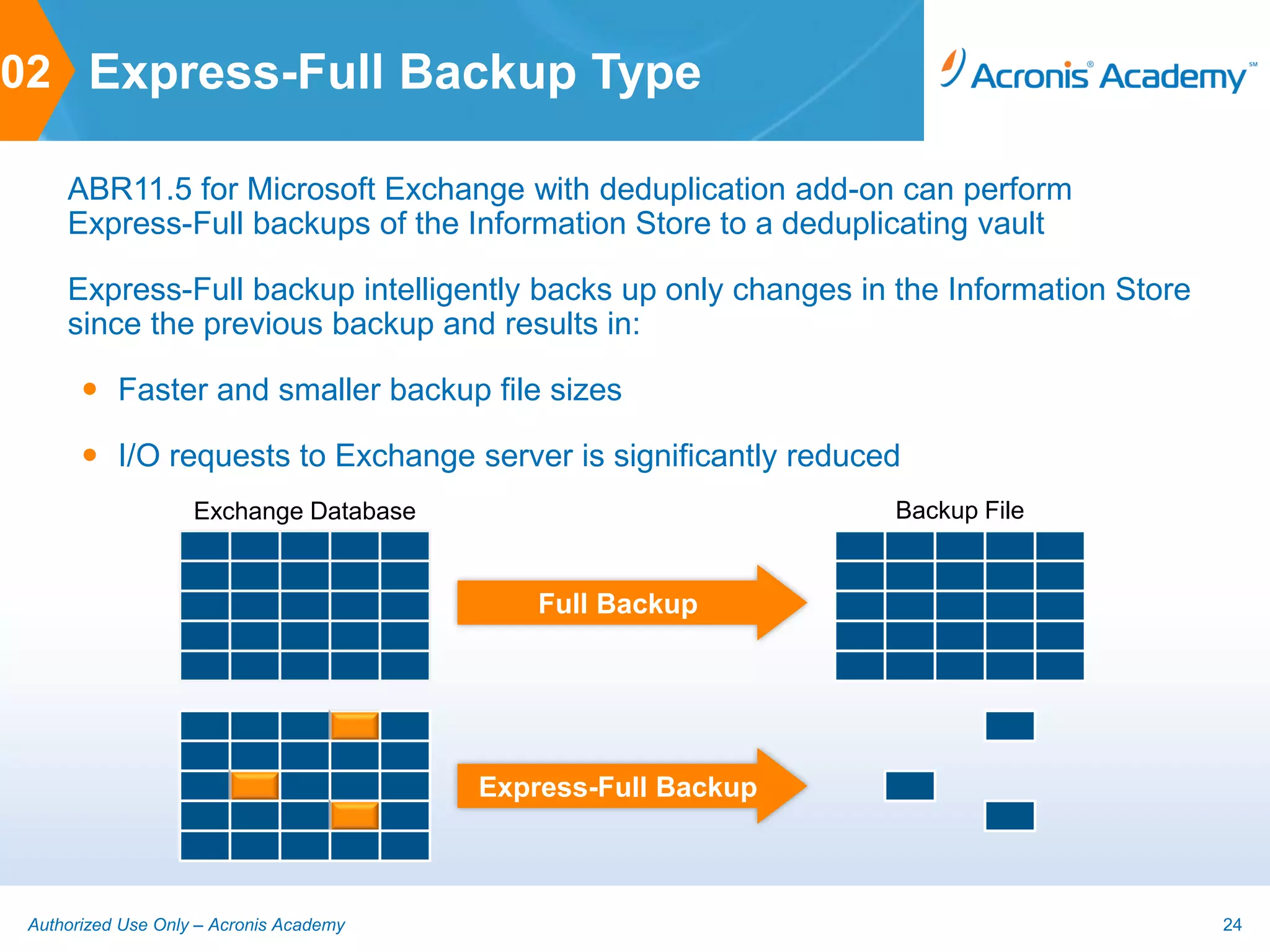
02 Express-Full Backup Type

     ABR11.5 for Microsoft Exchange with deduplication add-on can perform
     Express-Full backups of the Information Store to a deduplicating vault

     Express-Full backup intelligently backs up only changes in the Information Store
     since the previous backup and results in:

        Faster and smaller backup file sizes

        I/O requests to Exchange server is significantly reduced
                    Exchange Database                           Backup File


                                             Full Backup


                                         Express-Full Backup


 Authorized Use Only – Acronis Academy                                                  24
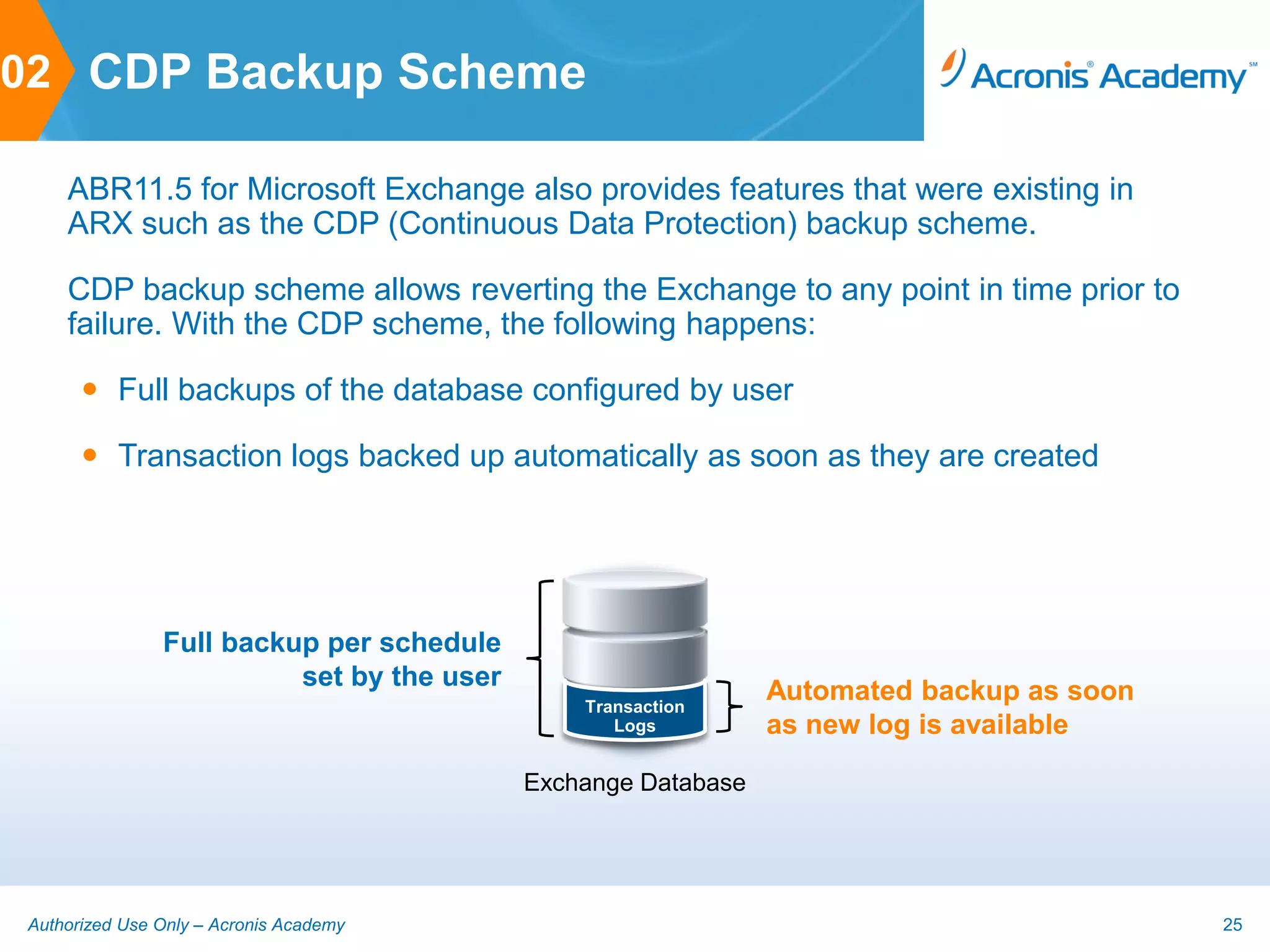
02 CDP Backup Scheme

    ABR11.5 for Microsoft Exchange also provides features that were existing in
    ARX such as the CDP (Continuous Data Protection) backup scheme.

    CDP backup scheme allows reverting the Exchange to any point in time prior to
    failure. With the CDP scheme, the following happens:

       Full backups of the database configured by user

       Transaction logs backed up automatically as soon as they are created


               Full backup per schedule
                         set by the user
                                               Transaction
                                                               Automated backup as soon
                                                  Logs         as new log is available

                                           Exchange Database


Authorized Use Only – Acronis Academy                                                     25
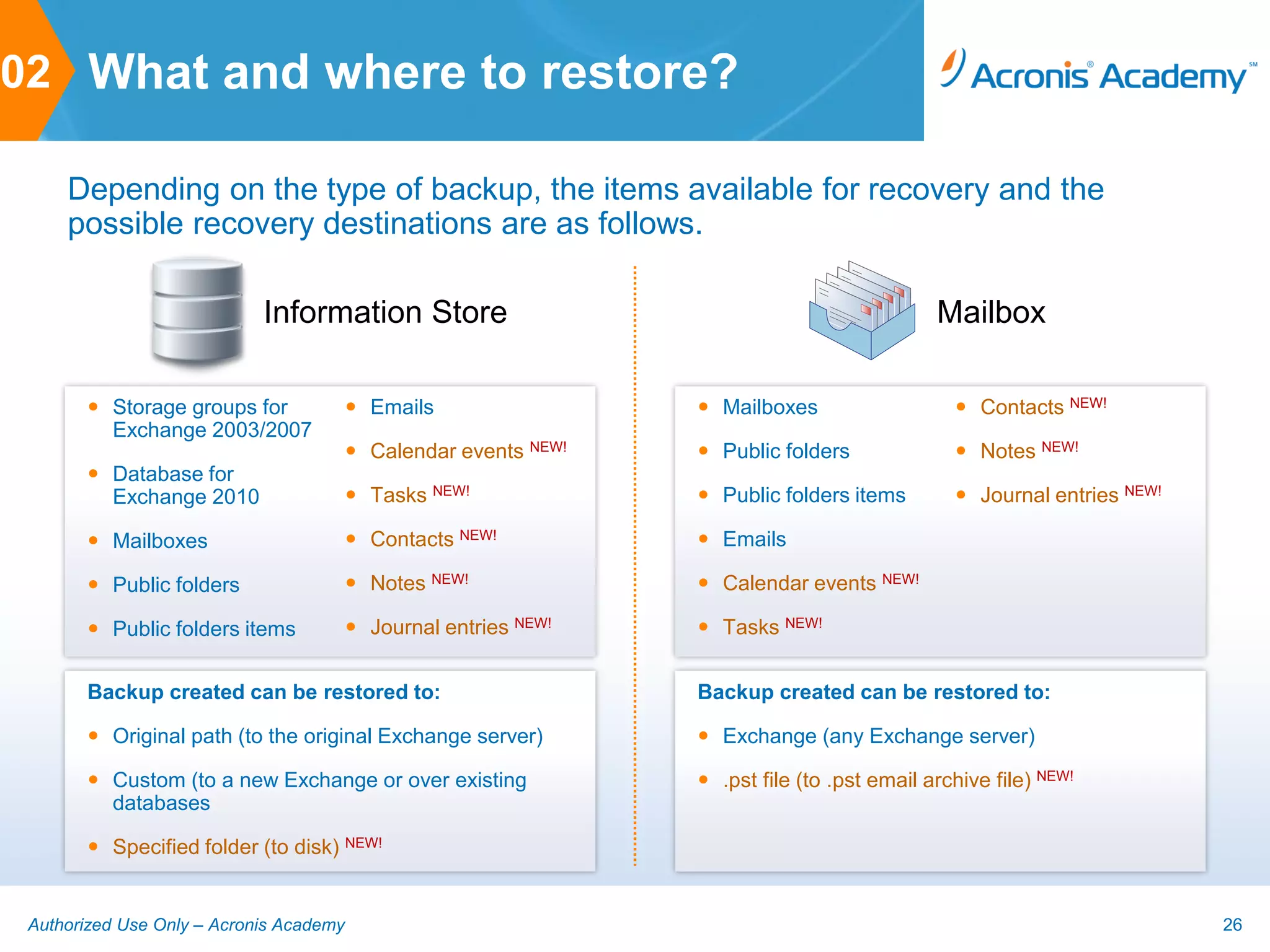
02 What and where to restore?

     Depending on the type of backup, the items available for recovery and the
     possible recovery destinations are as follows.

                            Information Store                                                 Mailbox

        Storage groups for               Emails                  Mailboxes                    Contacts NEW!
         Exchange 2003/2007
                                          Calendar events NEW!    Public folders               Notes NEW!
        Database for
         Exchange 2010                    Tasks NEW!              Public folders items         Journal entries NEW!

        Mailboxes                        Contacts NEW!           Emails

        Public folders                   Notes NEW!              Calendar events NEW!

        Public folders items             Journal entries NEW!    Tasks NEW!


       Backup created can be restored to:                         Backup created can be restored to:

        Original path (to the original Exchange server)           Exchange (any Exchange server)

        Custom (to a new Exchange or over existing                .pst file (to .pst email archive file) NEW!
         databases

        Specified folder (to disk) NEW!


 Authorized Use Only – Acronis Academy                                                                                   26
Other new features and enhancements of ABR11.5
          3. OTHER NEW FEATURES


Authorized Use Only – Acronis Academy                      27
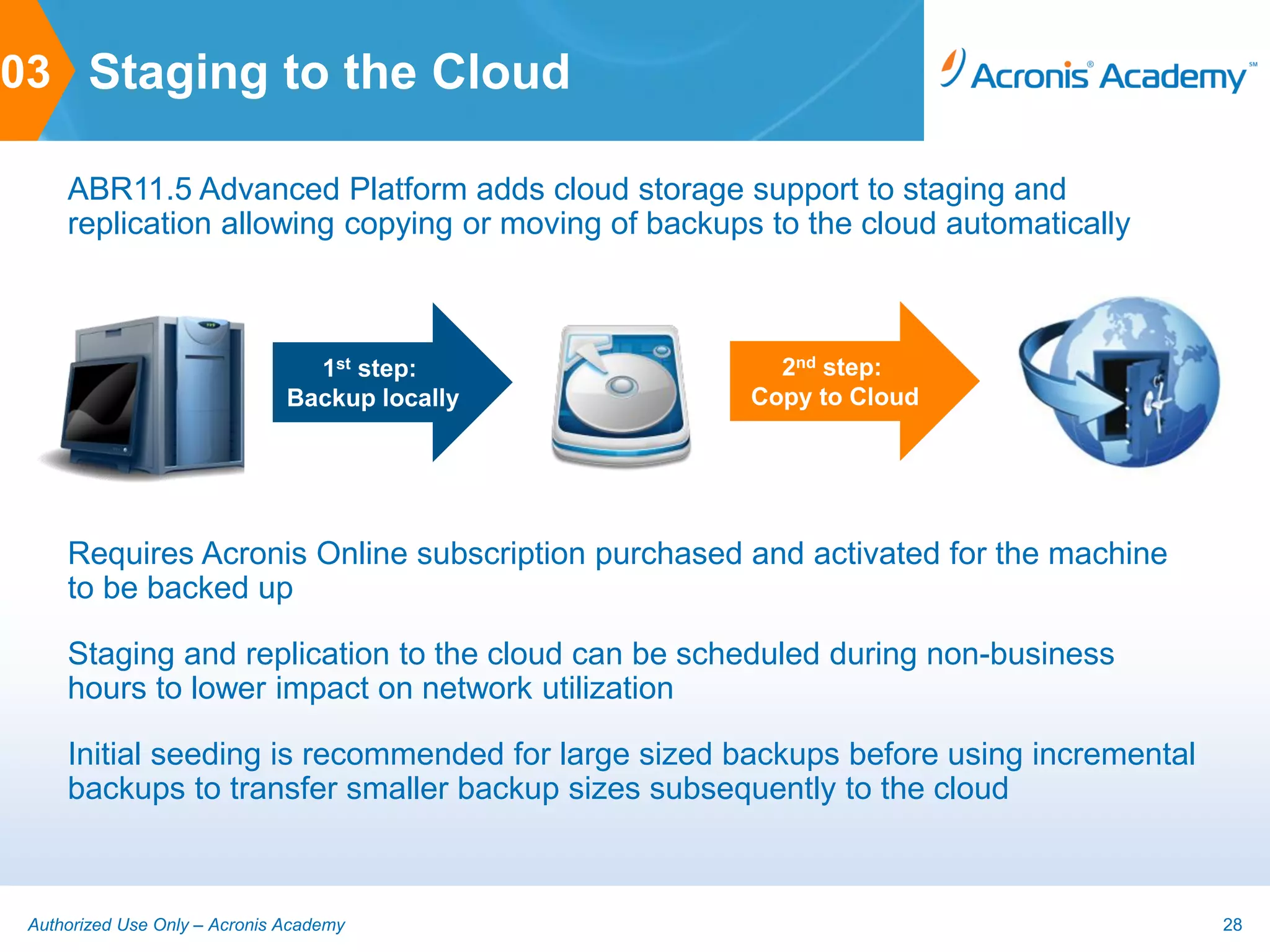
03 Staging to the Cloud

     ABR11.5 Advanced Platform adds cloud storage support to staging and
     replication allowing copying or moving of backups to the cloud automatically


                                 1st step:             2nd step:
                               Backup locally        Copy to Cloud


     Requires Acronis Online subscription purchased and activated for the machine
     to be backed up

     Staging and replication to the cloud can be scheduled during non-business
     hours to lower impact on network utilization

     Initial seeding is recommended for large sized backups before using incremental
     backups to transfer smaller backup sizes subsequently to the cloud


 Authorized Use Only – Acronis Academy                                                 28
03 File Restore From Tape

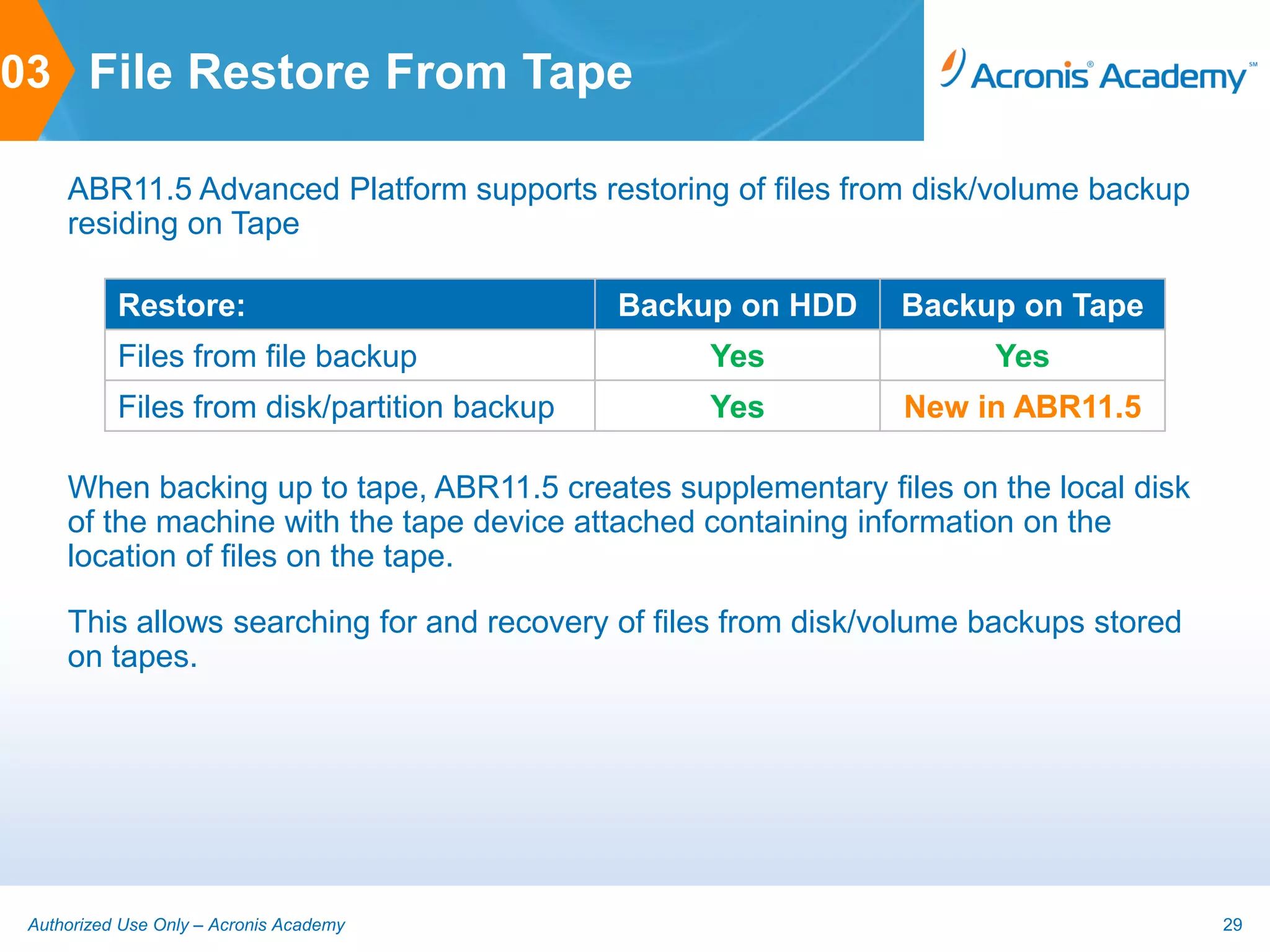
     ABR11.5 Advanced Platform supports restoring of files from disk/volume backup
     residing on Tape

           Restore:                           Backup on HDD     Backup on Tape
           Files from file backup                  Yes                Yes
           Files from disk/partition backup        Yes          New in ABR11.5

     When backing up to tape, ABR11.5 creates supplementary files on the local disk
     of the machine with the tape device attached containing information on the
     location of files on the tape.

     This allows searching for and recovery of files from disk/volume backups stored
     on tapes.


 Authorized Use Only – Acronis Academy                                                 29
03 Support for RHEV

     ABR11 RHEV branch functionality was merged back into ABR11.5 Advanced
     Platform with the following key features now available:

        Auto-discover and display RHEV VMs through integration with RHEV
         Manager

        Backup entire system including RedHat Enterprise Linux together with
         applications and data

        Recover an entire VM or just selected files and folders using the search
         functionality of ABR11.5

        Remotely deploy ABR11.5 Agents for Linux to Linux VMs

        Unlimited P2V, V2V and V2P migrations for moving production workloads to
         RHEV


 Authorized Use Only – Acronis Academy                                              30
03 CBT for VMware

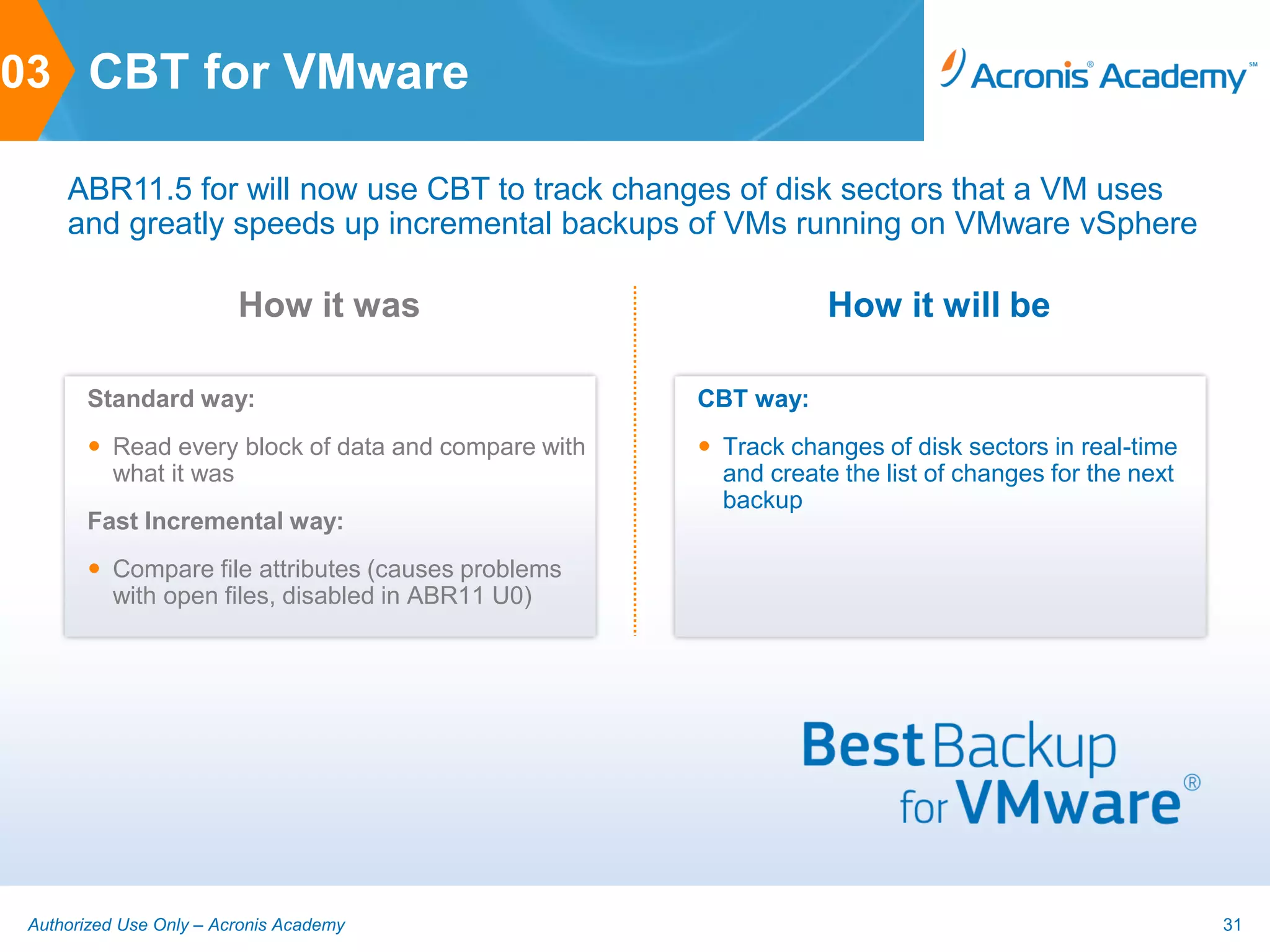
     ABR11.5 for will now use CBT to track changes of disk sectors that a VM uses
     and greatly speeds up incremental backups of VMs running on VMware vSphere

                         How it was                              How it will be

       Standard way:                                 CBT way:
        Read every block of data and compare with    Track changes of disk sectors in real-time
         what it was                                   and create the list of changes for the next
                                                       backup
       Fast Incremental way:
        Compare file attributes (causes problems
         with open files, disabled in ABR11 U0)


 Authorized Use Only – Acronis Academy                                                               31
03 Bare Metal Recovery of Hyper-V

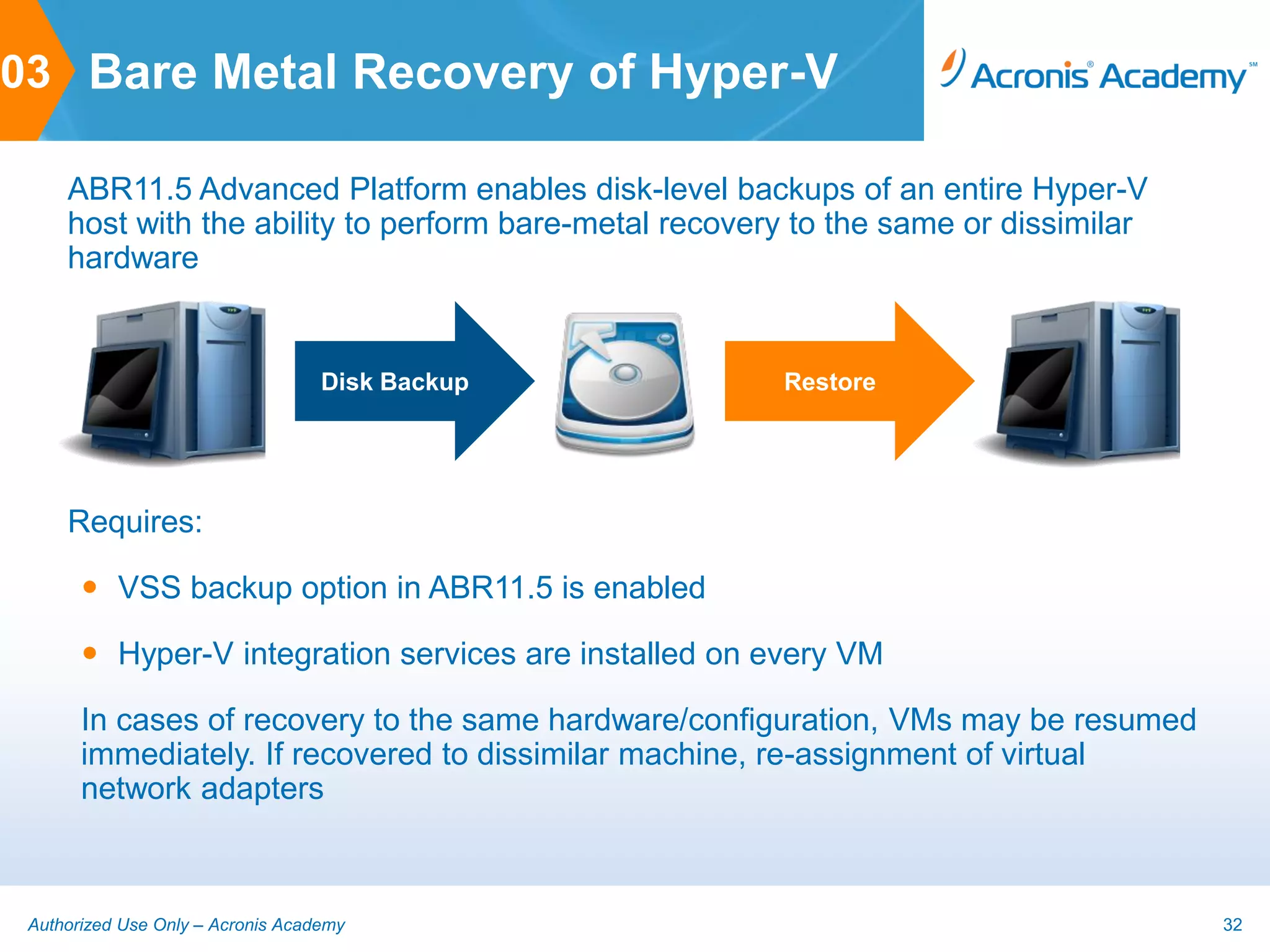
     ABR11.5 Advanced Platform enables disk-level backups of an entire Hyper-V
     host with the ability to perform bare-metal recovery to the same or dissimilar
     hardware


                                   Disk Backup          Restore


     Requires:

        VSS backup option in ABR11.5 is enabled

        Hyper-V integration services are installed on every VM

       In cases of recovery to the same hardware/configuration, VMs may be resumed
       immediately. If recovered to dissimilar machine, re-assignment of virtual
       network adapters


 Authorized Use Only – Acronis Academy                                                32
Acronis Backup & Recovery® 11.5


One Solution, Multiple Possibilities
The best backup, disaster recovery and data protection
for physical, virtual and cloud. One solution is all you
need to access data anytime, anywhere.
Sales contact information for APAC countries
          4. CONTACT US


Authorized Use Only – Acronis Academy                    34
04 Contact Us

     Australia                           India, Thailand, Vietnam, Philippines,
     Simon Bills                         Indonesia
     Sales and Alliance Manager (ANZ)    Gary Gee
     Simon.Bills@acronis.com             Business Development Manager (Asia
     +61 2 8458 0844                     South)
                                         Gary.Gee@acronis.com
     Singapore                           +65 6496 9212
     Eunice Yeo
     Channel Manager (Singapore)         Hong Kong, China
     Eunice.Yeo@acronis.com              Rita Wong |黃慧儀
     +65 6496 9216                       Country Sales Manager (China) |業務總監
                                         (中國大陸及港澳地區)
     Malaysia                            Rita.Wong@acronis.com
     Lee Kok Koon                        +852 3153 4333
     Country Sales Manager (Malaysia)
     KokKoon.Lee@acronis.com
     +60 3 2096 9779


 Authorized Use Only – Acronis Academy                                            35
04 Contact Us

     China
     Angela Liu | 刘欣
     Channel Sales Manager (China) | 业务展经理
     (中国大陆地区)
     Angela.Liu@acronis.com
     +86 136-0139-5163
     Taiwan
     Ken Yang
     Country Sales Manager (Taiwan)
     Ken.Yang@acronis.com
     +886 2 2764 3355
     South Korea
     Charles Cho
     Channel Manager
     Charles.Cho@acronis.com
     +82 2 501 1882


 Authorized Use Only – Acronis Academy       36

Abr11.5 what's new technical fa_qs

  • 1.
    . What’s New An Introductionto What’s New in Acronis Backup & Recovery 11.5
  • 2.
    01 Agenda 1. What’s New in ABR11.5 2. ABR11.5 for Microsoft Exchange 3. Other New Features 4. Contact Us Authorized Use Only – Acronis Academy 2
  • 3.
    Features of AcronisBackup & Recovery 11.5 1. WHAT’S NEW IN ABR11.5 Authorized Use Only – Acronis Academy 3
  • 4.
    01 ABR11.5 AdvancedPlatform Acronis Backup & Recovery 11.5 Advanced Platform is a unified solution for backup, disaster recovery and data protection in physical-virtual environments for Windows and Linux systems and applications. Authorized Use Only – Acronis Academy 4
  • 5.
    01 ABR11.5 Features  Disk image-based backup for fast backup of entire Windows or Linux systems or files/folders on physical and virtual machines  Centralized management capabilities to manage, monitor and report on backups of multiple servers and workstations  Catalog and search functionality to quickly locate user files for easy recovery from backups  Acronis Universal Restore for recovery to dissimilar hardware or VM for reliable recovery and P2P, P2V, V2V and V2P migration  Deduplication of backups to save on network utilization and storage space  Acronis Cloud Backup enables backup to the cloud for secure off- site storage of critical data Authorized Use Only – Acronis Academy 5
  • 6.
    01 What’s Newin ABR11.5  Integrated Microsoft Exchange backup  Enables granular recovery of Exchange application items such as emails from database level backups  Support for Microsoft Exchange 2003, 2007 and 2010  Support for Exchange clusters – SCC, CCR and DAG  New Express Full backup type for faster backups  New CDP backup scheme for recoverability up to point of failure  New recovery destinations to disk and .pst for more flexibility Authorized Use Only – Acronis Academy 6
  • 7.
    01 What’s Newin ABR11.5  Support for RHEV virtualization platform  Remote installation of ABR11.5 Agent for Linux  Support for Linux kernel 3.x  Staging to Acronis Online for D2D2C backups  File recovery from disk image backups stored on tape  Support for UEFI-based VMs (vSphere 5)  Support for CBT for faster backups of VMware VMs  Bare Metal Recovery for Microsoft Hyper-V Authorized Use Only – Acronis Academy 7
  • 8.
    01 What’s Newin ABR11.5  Change in positioning to better reflect capabilities:  Advanced Edition and Virtual Edition is now collectively referred to as the ABR11.5 Advanced Platform  New platform and hypervisor specific per machine licensing Authorized Use Only – Acronis Academy 8
  • 9.
    01 New ABR11.5Licensing Types ABR11 Licenses ABR11.5 Licenses Standalone Workstation Workstation (Individual) Server for Windows Server for Windows 1 license per machine Server for Linux Server for Linux Centralized Advanced Workstation Advanced Workstation Management Advanced Server Advanced Server for Windows (Advanced Platform) NEW! Advanced Server for Linux 1 license per machine Advanced Server Multi-Platform* *Only available to existing Advanced Server SBS Edition Advanced Server SBS Edition customers on valid maintenance, free upgrade to Virtual Edition Virtual Edition for VMware NEW! ABR11.5 Advanced Server Virtual Edition for Hyper-V Multi-Platform license Virtual Edition for RHEV **Only available to existing customers on valid Virtual Edition for Citrix Xen maintenance, free upgrade to ABR11.5 Virtual Edition Virtual Edition for Parallels Multi-Hypervisor license Virtual Edition Multi-Hypervisor** Authorized Use Only – Acronis Academy 9
  • 10.
    01 Comparison Table Authorized Use Only – Acronis Academy 10
  • 11.
    01 Comparison Table Authorized Use Only – Acronis Academy 11
  • 12.
    01 ABR11.5 TargetUsers Acronis Backup & Recovery 11.5 One Solution, Multiple Possibilities For SMBs For Enterprises Server for Windows ABR11.5 Advanced Platform Server for Linux Advanced Server for Windows Virtual Edition for VMware Workstation Advanced Server for Linux Virtual Edition for Hyper-V Advanced Server for SBS Advanced Workstation Virtual Edition for RHEV For Microsoft Exchange For Microsoft Exchange Virtual Edition for Citrix Xen Acronis Online Acronis Online Virtual Edition for Parallels Authorized Use Only – Acronis Academy 12
  • 13.
    How ABR11.5 forMicrosoft Exchange works 2. ABR11.5 FOR MICROSOFT EXCHANGE Authorized Use Only – Acronis Academy 13
  • 14.
    02 ABR11.5 ApplicationBackup ABR11.5 supports backup and restore of various applications such as MS Active Directory, MS SQL Server, MS Sharepoint and MS Exchange as part of a disk or volume backup With ABR11.5 for Microsoft Exchange, application backup is improved by introducing granular restore for Microsoft Exchange through ABR11.5 Agent for Microsoft Exchange Files/Folders .TIB file Information Store/ Exchange Database Applications/Databases Backup Microsoft Exchange Mailboxes System/Disks/ Partitions Authorized Use Only – Acronis Academy 14
  • 15.
    02 Integration withABR11.5 ABR11.5 for Microsoft Exchange replaces the legacy product, Acronis Recovery for Microsoft Exchange (ARX) and is fully integrated with the ABR11.5 Advanced Platform:  Centralized management via Management Server  Catalog and search for individual Exchange items  Deduplication of Exchange backups Authorized Use Only – Acronis Academy 15
  • 16.
    02 Licensing ABR11.5 for Microsoft Exchange is licensed on a per Microsoft Exchange server basis and is available as the following SKU:  ABR11.5 for Microsoft Exchange Server  ABR11.5 Advanced Server SBS (included) For single servers 1x = 1 license per server Exchange Server Exchange Server For clusters 1x = 1 license per node E.g., 3 node cluster = 3 licenses Exchange ServerExchange Server Exchange Cluster Authorized Use Only – Acronis Academy 16
  • 17.
    02 Supported ExchangeVersions Microsoft Exchange Server 2003  All editions, SP2 or later (including SBS 2003 R2)  MAPI hotfix must be installed (MS ID: 908072) Microsoft Exchange Server 2010  All editions, all service packs (including SBS 2011)  MAPI and CDO objects (ver. 1.2.1) package must be installed Microsoft Exchange Server 2007  All editions, all service packs (including SBS 2008)  MAPI and CDO objects (ver. 1.2.1) package must be installed Authorized Use Only – Acronis Academy 17
  • 18.
    02 Supported ExchangeClusters Single Copy Cluster (SSC) Active Node Passive Node  Failover cluster solution based on a shared storage (usually SAN)  A single copy of a storage group on storage that is shared between the cluster nodes is used  Active node has access to shared data  Passive node has no access to shared data DB1 Authorized Use Only – Acronis Academy 18
  • 19.
    02 Supported ExchangeClusters Cluster Continuous Replication Active Node Passive Node (CCR)  Failover cluster solution based on a non-shared storage  Two copies (active and passive for each storage group are used  Each copy is hosted on its own node  Active copy is the copy currently in use and active node hosts the active copy  Passive copy is created and DB1 DB1 Replica maintained on the passive node using continuous and asynchronous log shipping technology Authorized Use Only – Acronis Academy 19
  • 20.
    02 Supported ExchangeClusters Database Availability Node 1 Node 2 Node 3 Group (DAG)  Failover cluster solution providing high availability and site resilience  Cluster Continuous Replication and Standby Continuous Replication are used DB1 DB2 DB2 DB3 DB3 DB1 Active Passive Active Passive Active Passive  Group of up to 16 Exchange 2010 Mailbox servers  Any node can host passive and active database from any other node  Each node can host passive and active database copies  Up to 16 copies of each database can be created Authorized Use Only – Acronis Academy 20
  • 21.
    02 What canbe backed up? ABR11.5 for Microsoft Exchange can back up the Information Store (database- level) or Mailbox (brick-level) Information Store Mailbox The backup can include: The backup can include:  The entire Information Store  All mailboxes, individual mailboxes or mailbox folders  Individual databases (for Exchange 2010)  All public folders or individual public folders  Individual storage groups (for Exchange 2003/2007) What is Information Store? The entire Information Microsoft Exchange Server stores its data in a single repository called Information Store (in Exchange 2003/2007) or Exchange Store (in Exchange 2010). The primary logical components of the information store are storage groups (for Exchange 2003/2007) and Exchange databases (in Exchange 2010), which in turn are divided to mailboxes and public folders. Physically the database data is stored in .edb file. Authorized Use Only – Acronis Academy 21
  • 22.
    02 Information StoreBackup Information Store .TIB Backup Full backup  Stores the selected storage groups/databases + transaction logs and Exchange-related information from AD  Choice of regular Full, Express-Full or Copy-only backup Transaction Log backup  Stores transaction logs + checkpoint files and other files required for recovery  Creates a chain of backups similar to incremental backups with a Full backup as the base Authorized Use Only – Acronis Academy 22
  • 23.
    02 Mailbox Backup Mailbox .TIB Backup Full backup  Stores the content and folder structure of the mailboxes or public folders selected for backup Incremental backup  Stores changes to the data against the last backup  First backup will be a Full backup Authorized Use Only – Acronis Academy 23
  • 24.
    02 Express-Full BackupType ABR11.5 for Microsoft Exchange with deduplication add-on can perform Express-Full backups of the Information Store to a deduplicating vault Express-Full backup intelligently backs up only changes in the Information Store since the previous backup and results in:  Faster and smaller backup file sizes  I/O requests to Exchange server is significantly reduced Exchange Database Backup File Full Backup Express-Full Backup Authorized Use Only – Acronis Academy 24
  • 25.
    02 CDP BackupScheme ABR11.5 for Microsoft Exchange also provides features that were existing in ARX such as the CDP (Continuous Data Protection) backup scheme. CDP backup scheme allows reverting the Exchange to any point in time prior to failure. With the CDP scheme, the following happens:  Full backups of the database configured by user  Transaction logs backed up automatically as soon as they are created Full backup per schedule set by the user Transaction Automated backup as soon Logs as new log is available Exchange Database Authorized Use Only – Acronis Academy 25
  • 26.
    02 What andwhere to restore? Depending on the type of backup, the items available for recovery and the possible recovery destinations are as follows. Information Store Mailbox  Storage groups for  Emails  Mailboxes  Contacts NEW! Exchange 2003/2007  Calendar events NEW!  Public folders  Notes NEW!  Database for Exchange 2010  Tasks NEW!  Public folders items  Journal entries NEW!  Mailboxes  Contacts NEW!  Emails  Public folders  Notes NEW!  Calendar events NEW!  Public folders items  Journal entries NEW!  Tasks NEW! Backup created can be restored to: Backup created can be restored to:  Original path (to the original Exchange server)  Exchange (any Exchange server)  Custom (to a new Exchange or over existing  .pst file (to .pst email archive file) NEW! databases  Specified folder (to disk) NEW! Authorized Use Only – Acronis Academy 26
  • 27.
    Other new featuresand enhancements of ABR11.5 3. OTHER NEW FEATURES Authorized Use Only – Acronis Academy 27
  • 28.
    03 Staging tothe Cloud ABR11.5 Advanced Platform adds cloud storage support to staging and replication allowing copying or moving of backups to the cloud automatically 1st step: 2nd step: Backup locally Copy to Cloud Requires Acronis Online subscription purchased and activated for the machine to be backed up Staging and replication to the cloud can be scheduled during non-business hours to lower impact on network utilization Initial seeding is recommended for large sized backups before using incremental backups to transfer smaller backup sizes subsequently to the cloud Authorized Use Only – Acronis Academy 28
  • 29.
    03 File RestoreFrom Tape ABR11.5 Advanced Platform supports restoring of files from disk/volume backup residing on Tape Restore: Backup on HDD Backup on Tape Files from file backup Yes Yes Files from disk/partition backup Yes New in ABR11.5 When backing up to tape, ABR11.5 creates supplementary files on the local disk of the machine with the tape device attached containing information on the location of files on the tape. This allows searching for and recovery of files from disk/volume backups stored on tapes. Authorized Use Only – Acronis Academy 29
  • 30.
    03 Support forRHEV ABR11 RHEV branch functionality was merged back into ABR11.5 Advanced Platform with the following key features now available:  Auto-discover and display RHEV VMs through integration with RHEV Manager  Backup entire system including RedHat Enterprise Linux together with applications and data  Recover an entire VM or just selected files and folders using the search functionality of ABR11.5  Remotely deploy ABR11.5 Agents for Linux to Linux VMs  Unlimited P2V, V2V and V2P migrations for moving production workloads to RHEV Authorized Use Only – Acronis Academy 30
  • 31.
    03 CBT forVMware ABR11.5 for will now use CBT to track changes of disk sectors that a VM uses and greatly speeds up incremental backups of VMs running on VMware vSphere How it was How it will be Standard way: CBT way:  Read every block of data and compare with  Track changes of disk sectors in real-time what it was and create the list of changes for the next backup Fast Incremental way:  Compare file attributes (causes problems with open files, disabled in ABR11 U0) Authorized Use Only – Acronis Academy 31
  • 32.
    03 Bare MetalRecovery of Hyper-V ABR11.5 Advanced Platform enables disk-level backups of an entire Hyper-V host with the ability to perform bare-metal recovery to the same or dissimilar hardware Disk Backup Restore Requires:  VSS backup option in ABR11.5 is enabled  Hyper-V integration services are installed on every VM In cases of recovery to the same hardware/configuration, VMs may be resumed immediately. If recovered to dissimilar machine, re-assignment of virtual network adapters Authorized Use Only – Acronis Academy 32
  • 33.
    Acronis Backup &Recovery® 11.5 One Solution, Multiple Possibilities The best backup, disaster recovery and data protection for physical, virtual and cloud. One solution is all you need to access data anytime, anywhere.
  • 34.
    Sales contact informationfor APAC countries 4. CONTACT US Authorized Use Only – Acronis Academy 34
  • 35.
    04 Contact Us Australia India, Thailand, Vietnam, Philippines, Simon Bills Indonesia Sales and Alliance Manager (ANZ) Gary Gee Simon.Bills@acronis.com Business Development Manager (Asia +61 2 8458 0844 South) Gary.Gee@acronis.com Singapore +65 6496 9212 Eunice Yeo Channel Manager (Singapore) Hong Kong, China Eunice.Yeo@acronis.com Rita Wong |黃慧儀 +65 6496 9216 Country Sales Manager (China) |業務總監 (中國大陸及港澳地區) Malaysia Rita.Wong@acronis.com Lee Kok Koon +852 3153 4333 Country Sales Manager (Malaysia) KokKoon.Lee@acronis.com +60 3 2096 9779 Authorized Use Only – Acronis Academy 35
  • 36.
    04 Contact Us China Angela Liu | 刘欣 Channel Sales Manager (China) | 业务展经理 (中国大陆地区) Angela.Liu@acronis.com +86 136-0139-5163 Taiwan Ken Yang Country Sales Manager (Taiwan) Ken.Yang@acronis.com +886 2 2764 3355 South Korea Charles Cho Channel Manager Charles.Cho@acronis.com +82 2 501 1882 Authorized Use Only – Acronis Academy 36