AAT LOD Microthesauri 
Create Linked Open Data (LOD) Microthesauri 
using Art & Architecture Thesaurus (AAT) LOD 
Marcia Lei Zeng 
AAT International Terminology Working Group (ITWG) meeting 
September 5-7, 2014 
Dresden, Germany
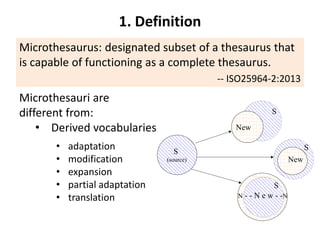
1. Definition 
Microthesaurus: designated subset of a thesaurus that 
is capable of functioning as a complete thesaurus. 
-- ISO25964-2:2013 
Microthesauri are 
different from: 
• Derived vocabularies 
S 
(source) 
S 
S 
S 
New 
New 
N - - N e w - -N 
Derivation/Modeling 
• adaptation 
• modification 
• expansion 
• partial adaptation 
• translation
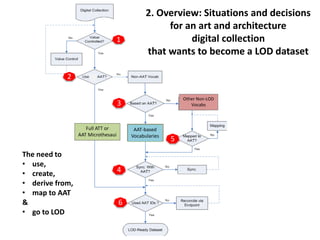
1 
2 
33 
4 
AAT-based 
Vocabularies 5 
6 
Full ATT or 
AAT Microthesaui 
Other Non-LOD 
Vocabs 
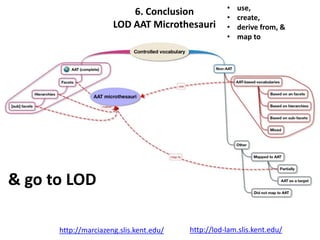
The need to 
• use, 
• create, 
• derive from, 
• map to AAT 
& 
• go to LOD 
2. Overview: Situations and decisions 
for an art and architecture 
digital collection 
that wants to become a LOD dataset
3. Can a microthesaurus be made 
from an existing thesaurus? 
Structure Example 
YES Classificatory 
structure 
• EUROVOC 
• Chinese Classified Thesaurus 
• [English Heritage Thesauri] 
YES Faceted structure • AAT 
• FAST (Faceted Application of Subject 
Terminology) 
YES/May 
be 
Deep hierarchies 
(family trees) 
• AAT 
• NASA Thesaurus 
• INSPEC Thesaurus 
NO/ 
Not-directly 
flat structure 
[alphabetically 
organized] 
• LCSH 
• many thesauri 
Microthesaurus: designated subset of a thesaurus that is capable 
of functioning as a complete thesaurus. -- ISO25964-2:2013
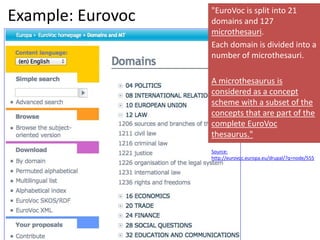
Example: Eurovoc "EuroVoc is split into 21 
domains and 127 
microthesauri. 
Each domain is divided into a 
number of microthesauri. 
A microthesaurus is 
considered as a concept 
scheme with a subset of the 
concepts that are part of the 
complete EuroVoc 
thesaurus." 
Source: 
http://eurovoc.europa.eu/drupal/?q=node/555
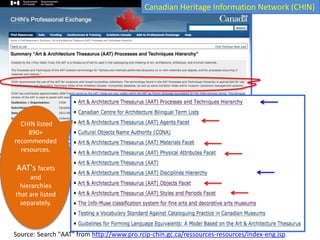
CHIN listed 
890+ 
recommended 
resources. 
AAT's facets 
and 
hierarchies 
that are listed 
separately. 
Canadian Heritage Information Network (CHIN) 
Source: Search "AAT" from http://www.pro.rcip-chin.gc.ca/ressources-resources/index-eng.jsp
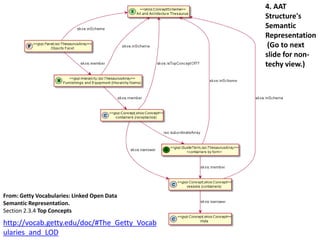
From: Getty Vocabularies: Linked Open Data 
Semantic Representation. 
Section 2.3.4 Top Concepts 
http://vocab.getty.edu/doc/#The_Getty_Vocab 
ularies_and_LOD 
4. AAT 
Structure's 
Semantic 
Representation 
(Go to next 
slide for non-techy 
view.)
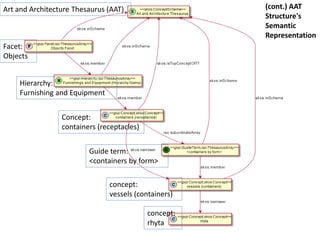
Art and Architecture Thesaurus (AAT) 
Facet: 
Objects 
Hierarchy: 
Furnishing and Equipment 
Concept: 
containers (receptacles) 
Guide term: 
<containers by form> 
concept: 
vessels (containers) 
concept: 
rhyta 
(cont.) AAT 
Structure's 
Semantic 
Representation
Facet: 
Objects 
Hierarchy: 
Furnishing and Equipment 
Concept: 
containers (receptacles) 
Guide term: 
<containers by form> 
concept: 
vessels (containers) 
concept: 
rhyta 
What are special in 
AAT 
Facets 
Sub-facets 
(Indicated by 
node labels) 
Art and Architecture Thesaurus (AAT) 
[large] Hierarchies 
(full coverage, deep layer) 
The units were 
recommended to use 
by projects such as 
The Canadian 
Heritage Information 
Network (CHIN)
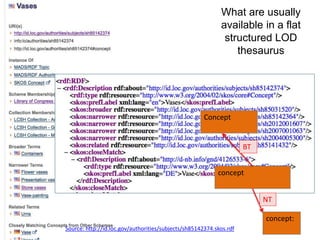
What are usually 
available in a flat 
structured LOD 
concept 
concept: 
Concept 
BT 
NT 
Source: http://id.loc.gov/authorities/subjects/sh85142374.skos.rdf 
thesaurus
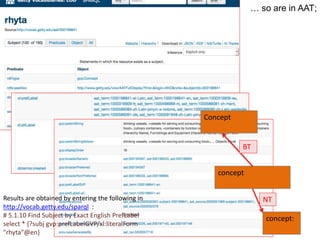
… so are in AAT; 
concept 
concept: 
Concept 
BT 
Results are obtained by entering the following in NT 
http://vocab.getty.edu/sparql : 
# 5.1.10 Find Subject by Exact English PrefLabel 
select * {?subj gvp:prefLabelGVP/xl:literalForm 
"rhyta"@en}
Facet: 
Objects 
Hierarchy: 
Furnishing and Equipment 
Concept: 
containers (receptacles) 
Guide term: 
<containers by form> 
concept: 
vessels (containers) 
concept: 
rhyta 
… but AAT LOD has more: 
Facets 
Art and Architecture Thesaurus (AAT) 
[large] Hierarchies 
(full coverage, deep layer) 
Sub-facets 
(Indicated by 
node labels)
5. An example 
-- Use a <Guide Term> to obtain 
all concept URIs 
in a facet or hierarchy 
Part 1. Get Data
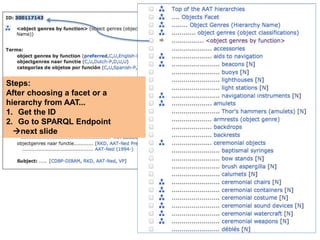
Steps: 
After choosing a facet or a 
hierarchy from AAT... 
1. Get the ID 
2. Go to SPARQL Endpoint 
next slide
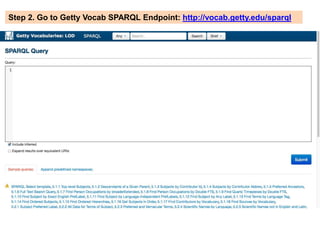
Step 2. Go to Getty Vocab SPARQL Endpoint: http://vocab.getty.edu/sparql
http://vocab.getty.edu/sparql 
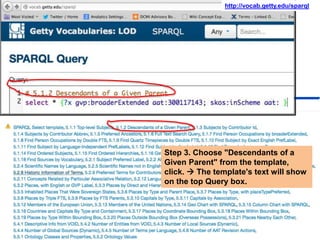
Step 3. Choose "Descendants of a 
Given Parent" from the template, 
click.  The template's text will show 
on the top Query box.
Steps 
4. Replace the ID (e.g., 300117143) in the 
Query template 
[you may modify to add more requests] 
5. Submit 
6. Get all URIs and labels under this guide 
term. 
Note: I replaced the aat ID, also inserted a line to get the 
labels, and sort by label. Here is the text of the query: 
select * {?x gvp:broaderExtended aat:300117143. 
?x gvp:prefLabelGVP [xl:literalForm ?l]; skos:inScheme aat: 
} order by ?l
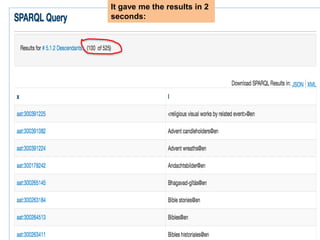
It gave me the results in 2 
seconds:
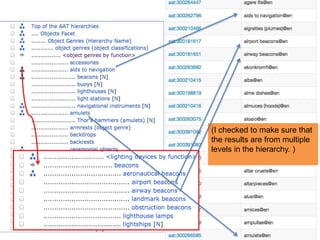
(I checked to make sure that 
the results are from multiple 
levels in the hierarchy. )
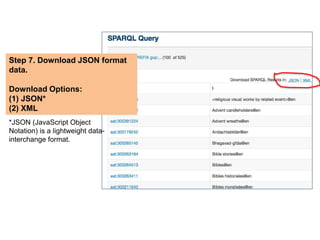
Step 7. Download JSON format 
data. 
Download Options: 
(1) JSON* 
(2) XML 
*JSON (JavaScript Object 
Notation) is a lightweight data-interchange 
format.
select * {?x gvp:broaderExtended 
aat:300117143. 
?x gvp:prefLabelGVP [xl:literalForm ?l]; 
skos:inScheme aat: 
} order by ?l 
Results of the JSON file. 
Descendants of a Given Parent:
(cont.) 5. An example 
-- Use a <Guide Term> to obtain all 
concept URIs 
in a facet or hierarchy 
Part 2. Viewing the dataset by 
a non-techy person 
Acknowledgement: Thanks to a 
Visiting Scholar En-bo Jiang for 
helping the testing.
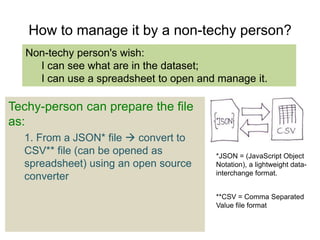
How to manage it by a non-techy person? 
Non-techy person's wish: 
I can see what are in the dataset; 
I can use a spreadsheet to open and manage it. 
Techy-person can prepare the file 
as: 
1. From a JSON* file  convert to 
CSV** file (can be opened as 
spreadsheet) using an open source 
converter 
*JSON = (JavaScript Object 
Notation), a lightweight data-interchange 
format. 
**CSV = Comma Separated 
Value file format
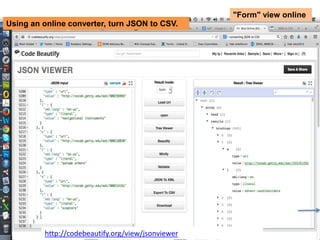
"Form" view online 
Using an online converter, turn JSON to CSV. 
http://codebeautify.org/view/jsonviewer
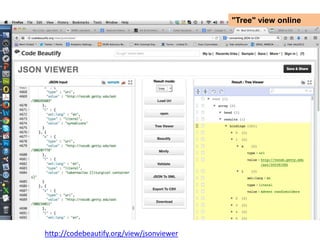
"Tree" view online 
http://codebeautify.org/view/jsonviewer
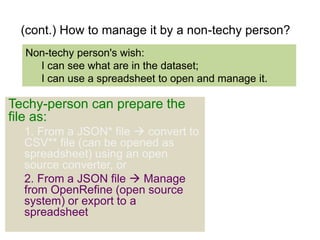
(cont.) How to manage it by a non-techy person? 
Non-techy person's wish: 
I can see what are in the dataset; 
I can use a spreadsheet to open and manage it. 
Techy-person can prepare the 
file as: 
1. From a JSON* file  convert to 
CSV** file (can be opened as 
spreadsheet) using an open 
source converter, or 
2. From a JSON file  Manage 
from OpenRefine (open source 
system) or export to a 
spreadsheet
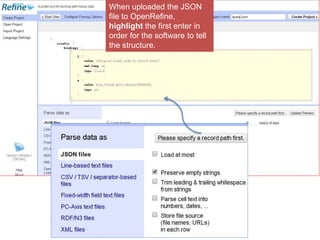
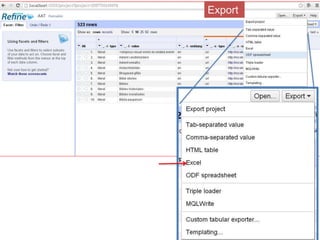
When uploaded the JSON 
file to OpenRefine, 
highlight the first enter in 
order for the software to tell 
the structure.
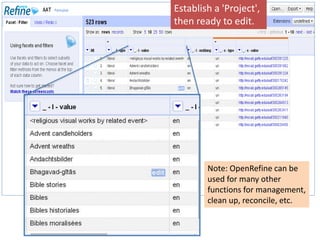
Establish a 'Project', 
then ready to edit. 
Note: OpenRefine can be 
used for many other 
functions for management, 
clean up, reconcile, etc.
Export
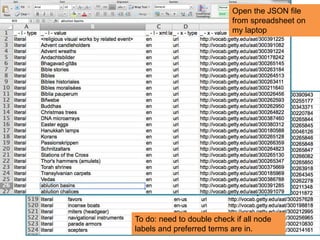
Open the JSON file 
from spreadsheet on 
my laptop 
To do: need to double check if all node 
labels and preferred terms are in.
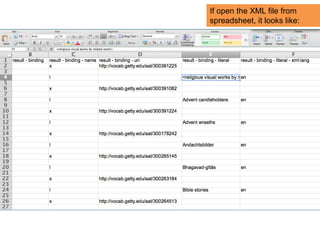
If open the XML file from 
spreadsheet, it looks like:
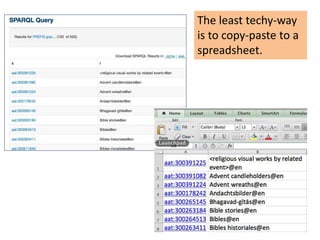
The least techy-way 
is to copy-paste to a 
spreadsheet.
Summary of the processes 
1. Choose the facet or hierarchy you like to start; 
2. Find the ID of that concept. 
3. Use this template to get the URIs and labels: 
• Replace the ID in the Query 
template 
• Submit 
• Get the URIs and labels in 
under this guide term. 
• Sort by order (column x) 
# 5.1.2 Descendants of a Given Parent 
select * {?x gvp:broaderExtended 
aat:300117143. 
?x gvp:prefLabelGVP [xl:literalForm ?l]; 
skos:inScheme aat: 
} order by ?l 
4. Use a tool that can treat JSON to view and 
manage. 
5. Additional ideas: Use other templates to obtain needed data for 
your microthesauri. (See next slide.) 
6. Additional ideas: Using RelFinder to Visualize 
http://www.visualdataweb.org/relfinder.php
More examples 
Use other templates to obtain needed data for your microthesauri. 
• Find AAT URIs and labels according to a 
Contributor: 
#5.1.3 Subjects by Contributor Id 
select * { 
?x a gvp:Subject; dct:contributor 
aat_contrib:10000178. 
?x gvp:prefLabelGVP [xl:literalForm ?l] 
} 
• Find, within this set of data, only those 
involving a particular contributor, e.g., 
by CDBP-DIBAM (Dirección de 
Bibliotecas, Archivos y Museos; 
Santiago, Chile), id:300117143.) 
select ?x ?l ?contrib { 
?x gvp:broaderExtended aat:300117143. 
?x gvp:prefLabelGVP [xl:literalForm ?l]. 
?x dcterms:contributor aat_contrib:10000131. 
} 
• Click to view and get all 
data related to an URI
& go to LOD 
6. Conclusion 
LOD AAT Microthesauri 
• use, 
• create, 
• derive from, & 
• map to 
http://marciazeng.slis.kent.edu/ http://lod-lam.slis.kent.edu/

AAT LOD Microthesauri

  • 1.
    AAT LOD Microthesauri Create Linked Open Data (LOD) Microthesauri using Art & Architecture Thesaurus (AAT) LOD Marcia Lei Zeng AAT International Terminology Working Group (ITWG) meeting September 5-7, 2014 Dresden, Germany
  • 2.
    1. Definition Microthesaurus:designated subset of a thesaurus that is capable of functioning as a complete thesaurus. -- ISO25964-2:2013 Microthesauri are different from: • Derived vocabularies S (source) S S S New New N - - N e w - -N Derivation/Modeling • adaptation • modification • expansion • partial adaptation • translation
  • 3.
    1 2 33 4 AAT-based Vocabularies 5 6 Full ATT or AAT Microthesaui Other Non-LOD Vocabs The need to • use, • create, • derive from, • map to AAT & • go to LOD 2. Overview: Situations and decisions for an art and architecture digital collection that wants to become a LOD dataset
  • 4.
    3. Can amicrothesaurus be made from an existing thesaurus? Structure Example YES Classificatory structure • EUROVOC • Chinese Classified Thesaurus • [English Heritage Thesauri] YES Faceted structure • AAT • FAST (Faceted Application of Subject Terminology) YES/May be Deep hierarchies (family trees) • AAT • NASA Thesaurus • INSPEC Thesaurus NO/ Not-directly flat structure [alphabetically organized] • LCSH • many thesauri Microthesaurus: designated subset of a thesaurus that is capable of functioning as a complete thesaurus. -- ISO25964-2:2013
  • 5.
    Example: Eurovoc "EuroVocis split into 21 domains and 127 microthesauri. Each domain is divided into a number of microthesauri. A microthesaurus is considered as a concept scheme with a subset of the concepts that are part of the complete EuroVoc thesaurus." Source: http://eurovoc.europa.eu/drupal/?q=node/555
  • 6.
    CHIN listed 890+ recommended resources. AAT's facets and hierarchies that are listed separately. Canadian Heritage Information Network (CHIN) Source: Search "AAT" from http://www.pro.rcip-chin.gc.ca/ressources-resources/index-eng.jsp
  • 7.
    From: Getty Vocabularies:Linked Open Data Semantic Representation. Section 2.3.4 Top Concepts http://vocab.getty.edu/doc/#The_Getty_Vocab ularies_and_LOD 4. AAT Structure's Semantic Representation (Go to next slide for non-techy view.)
  • 8.
    Art and ArchitectureThesaurus (AAT) Facet: Objects Hierarchy: Furnishing and Equipment Concept: containers (receptacles) Guide term: <containers by form> concept: vessels (containers) concept: rhyta (cont.) AAT Structure's Semantic Representation
  • 9.
    Facet: Objects Hierarchy: Furnishing and Equipment Concept: containers (receptacles) Guide term: <containers by form> concept: vessels (containers) concept: rhyta What are special in AAT Facets Sub-facets (Indicated by node labels) Art and Architecture Thesaurus (AAT) [large] Hierarchies (full coverage, deep layer) The units were recommended to use by projects such as The Canadian Heritage Information Network (CHIN)
  • 10.
    What are usually available in a flat structured LOD concept concept: Concept BT NT Source: http://id.loc.gov/authorities/subjects/sh85142374.skos.rdf thesaurus
  • 11.
    … so arein AAT; concept concept: Concept BT Results are obtained by entering the following in NT http://vocab.getty.edu/sparql : # 5.1.10 Find Subject by Exact English PrefLabel select * {?subj gvp:prefLabelGVP/xl:literalForm "rhyta"@en}
  • 12.
    Facet: Objects Hierarchy: Furnishing and Equipment Concept: containers (receptacles) Guide term: <containers by form> concept: vessels (containers) concept: rhyta … but AAT LOD has more: Facets Art and Architecture Thesaurus (AAT) [large] Hierarchies (full coverage, deep layer) Sub-facets (Indicated by node labels)
  • 13.
    5. An example -- Use a <Guide Term> to obtain all concept URIs in a facet or hierarchy Part 1. Get Data
  • 14.
    Steps: After choosinga facet or a hierarchy from AAT... 1. Get the ID 2. Go to SPARQL Endpoint next slide
  • 15.
    Step 2. Goto Getty Vocab SPARQL Endpoint: http://vocab.getty.edu/sparql
  • 16.
    http://vocab.getty.edu/sparql Step 3.Choose "Descendants of a Given Parent" from the template, click.  The template's text will show on the top Query box.
  • 17.
    Steps 4. Replacethe ID (e.g., 300117143) in the Query template [you may modify to add more requests] 5. Submit 6. Get all URIs and labels under this guide term. Note: I replaced the aat ID, also inserted a line to get the labels, and sort by label. Here is the text of the query: select * {?x gvp:broaderExtended aat:300117143. ?x gvp:prefLabelGVP [xl:literalForm ?l]; skos:inScheme aat: } order by ?l
  • 18.
    It gave methe results in 2 seconds:
  • 19.
    (I checked tomake sure that the results are from multiple levels in the hierarchy. )
  • 20.
    Step 7. DownloadJSON format data. Download Options: (1) JSON* (2) XML *JSON (JavaScript Object Notation) is a lightweight data-interchange format.
  • 21.
    select * {?xgvp:broaderExtended aat:300117143. ?x gvp:prefLabelGVP [xl:literalForm ?l]; skos:inScheme aat: } order by ?l Results of the JSON file. Descendants of a Given Parent:
  • 22.
    (cont.) 5. Anexample -- Use a <Guide Term> to obtain all concept URIs in a facet or hierarchy Part 2. Viewing the dataset by a non-techy person Acknowledgement: Thanks to a Visiting Scholar En-bo Jiang for helping the testing.
  • 23.
    How to manageit by a non-techy person? Non-techy person's wish: I can see what are in the dataset; I can use a spreadsheet to open and manage it. Techy-person can prepare the file as: 1. From a JSON* file  convert to CSV** file (can be opened as spreadsheet) using an open source converter *JSON = (JavaScript Object Notation), a lightweight data-interchange format. **CSV = Comma Separated Value file format
  • 24.
    "Form" view online Using an online converter, turn JSON to CSV. http://codebeautify.org/view/jsonviewer
  • 25.
    "Tree" view online http://codebeautify.org/view/jsonviewer
  • 26.
    (cont.) How tomanage it by a non-techy person? Non-techy person's wish: I can see what are in the dataset; I can use a spreadsheet to open and manage it. Techy-person can prepare the file as: 1. From a JSON* file  convert to CSV** file (can be opened as spreadsheet) using an open source converter, or 2. From a JSON file  Manage from OpenRefine (open source system) or export to a spreadsheet
  • 27.
    When uploaded theJSON file to OpenRefine, highlight the first enter in order for the software to tell the structure.
  • 28.
    Establish a 'Project', then ready to edit. Note: OpenRefine can be used for many other functions for management, clean up, reconcile, etc.
  • 29.
  • 30.
    Open the JSONfile from spreadsheet on my laptop To do: need to double check if all node labels and preferred terms are in.
  • 31.
    If open theXML file from spreadsheet, it looks like:
  • 32.
    The least techy-way is to copy-paste to a spreadsheet.
  • 33.
    Summary of theprocesses 1. Choose the facet or hierarchy you like to start; 2. Find the ID of that concept. 3. Use this template to get the URIs and labels: • Replace the ID in the Query template • Submit • Get the URIs and labels in under this guide term. • Sort by order (column x) # 5.1.2 Descendants of a Given Parent select * {?x gvp:broaderExtended aat:300117143. ?x gvp:prefLabelGVP [xl:literalForm ?l]; skos:inScheme aat: } order by ?l 4. Use a tool that can treat JSON to view and manage. 5. Additional ideas: Use other templates to obtain needed data for your microthesauri. (See next slide.) 6. Additional ideas: Using RelFinder to Visualize http://www.visualdataweb.org/relfinder.php
  • 34.
    More examples Useother templates to obtain needed data for your microthesauri. • Find AAT URIs and labels according to a Contributor: #5.1.3 Subjects by Contributor Id select * { ?x a gvp:Subject; dct:contributor aat_contrib:10000178. ?x gvp:prefLabelGVP [xl:literalForm ?l] } • Find, within this set of data, only those involving a particular contributor, e.g., by CDBP-DIBAM (Dirección de Bibliotecas, Archivos y Museos; Santiago, Chile), id:300117143.) select ?x ?l ?contrib { ?x gvp:broaderExtended aat:300117143. ?x gvp:prefLabelGVP [xl:literalForm ?l]. ?x dcterms:contributor aat_contrib:10000131. } • Click to view and get all data related to an URI
  • 35.
    & go toLOD 6. Conclusion LOD AAT Microthesauri • use, • create, • derive from, & • map to http://marciazeng.slis.kent.edu/ http://lod-lam.slis.kent.edu/

Editor's Notes

  • #5 FAST retains the LCSH vocabulary in eight facets: (1) Personal names, (2) Corporate names, (3) Events, (4) Titles, (5) Chronologicals, (6) Topicals, (7) Geographics, and (8) Form/Genre.
  • #22 select * { ?x a gvp:Subject; dct:contributor aat_contrib:10000178.
  • #35 select * { ?x a gvp:Subject; dct:contributor aat_contrib:10000178.