February 1st – 4th ,2007
Image Acquisition and Real Time Processing Techniques
Why Real-time Image Processing? Image processing is an important tool in many applications. Problem is that one needs to acquire images and pre-process them before doing actual IP. Sometimes it may be required that offline image processing is not possible i.e. one needs to proceed with real-time IP or even more, processing of the video itself.
Real-Time Image Processing Such Real-Time Image processing can be done on standalone hardware like DSP or ASIC. Another approach being using a personal computer.
Image Acquisition Image acquisition from the video capture devices connected to the computer, is an important task in Real Time Image Processing applications. Few approaches  being, developing custom standalone applications or  using software like MATLAB (image and video processing toolbox) etc.
Problems with MATLAB Even though MATLAB is simple and robust ,it doesn’t have features for real-time image processing (Even the latest image and video processing tool box doesn’t provide this feature), which renders it useless in this problem
Another approach being developing custom applications in languages like C, C++, VC++, VB, Java etc. This languages don’t have capability to handle Images and they require different libraries to achieve these tasks.
Different Libraries for image acquisition on Windows Platform DirectShow (part of the DirectX API) OpenCV Vision SDK Java Media Framework
Comparison of the Various approaches OpenCV and Vision SDK comprise of the High Level Functions. Where as the DirectX is a set of Low Level API, which directly interact with the hardware. OpenCV and Vision SDK encapsulate the  DirectX API.
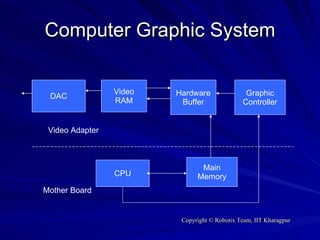
Computer Graphic System DAC Video RAM Hardware Buffer Graphic Controller CPU Main Memory Mother Board Video Adapter
Filter A filter is a software component which does a particular task. They have to comply with the COM specification.  They form the backbone of the DirectX library.
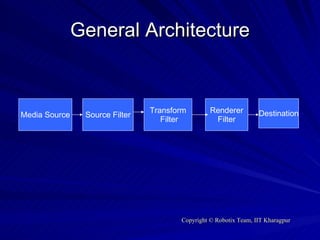
General Architecture Media Source Source Filter Transform Filter Renderer Filter Destination
Tools Required Windows (2000 or later) Visual Studio (6.0 or later) DirectX SDK (9.0 or later) OpenCV (4.0 or later)
OpenCV OpenCV is an opensource project supported by Intel. It is a collection of C structures, functions and C++ classes that contain implementation of algorithms of image processing and computer vision
Some basic C Structures IplImage : Every Image in OpenCV is an instantiation of a structure called  IplImage . This structure consists of Image data in a 1-D array format. Others fields of this structure consist of data like width, height, no of channels etc.
Some basic Structures (cont..) Some other commonly  used structures are  1)CvPoint { int x,int y} 2)CvSize  {int width, int height } 3)CvRect  {int x,y,width,height } 4)CvScalar { double val[4] } 5)CvMat
Some basic Structures (cont..) CvArr  - > IplImage , CvMat CvCapture
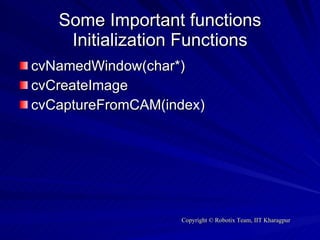
Some Important functions Initialization Functions cvNamedWindow(char*) cvCreateImage cvCaptureFromCAM(index)
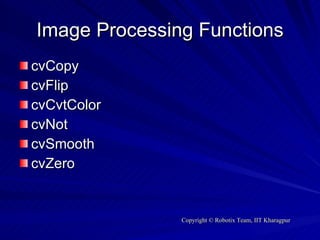
Image Processing Functions cvCopy cvFlip cvCvtColor cvNot cvSmooth cvZero
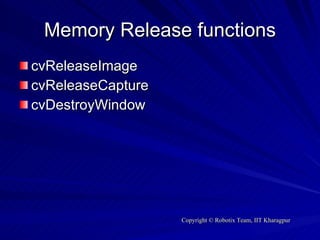
Memory Release functions cvReleaseImage cvReleaseCapture cvDestroyWindow
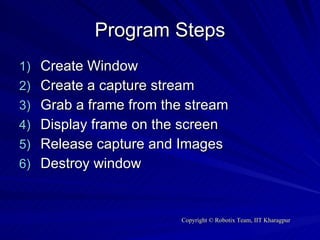
Program Steps Create Window Create a capture stream Grab a frame from the stream Display frame on the screen Release capture and Images Destroy window
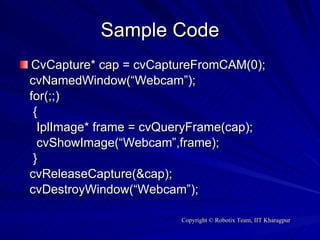
Sample Code CvCapture* cap = cvCaptureFromCAM(0); cvNamedWindow(“Webcam”); for(;;) { IplImage* frame = cvQueryFrame(cap); cvShowImage(“Webcam”,frame); } cvReleaseCapture(&cap); cvDestroyWindow(“Webcam”);
THANK YOU

A Tutorial On Ip 2

  • 1.
  • 2.
    Image Acquisition andReal Time Processing Techniques
  • 3.
    Why Real-time ImageProcessing? Image processing is an important tool in many applications. Problem is that one needs to acquire images and pre-process them before doing actual IP. Sometimes it may be required that offline image processing is not possible i.e. one needs to proceed with real-time IP or even more, processing of the video itself.
  • 4.
    Real-Time Image ProcessingSuch Real-Time Image processing can be done on standalone hardware like DSP or ASIC. Another approach being using a personal computer.
  • 5.
    Image Acquisition Imageacquisition from the video capture devices connected to the computer, is an important task in Real Time Image Processing applications. Few approaches being, developing custom standalone applications or using software like MATLAB (image and video processing toolbox) etc.
  • 6.
    Problems with MATLABEven though MATLAB is simple and robust ,it doesn’t have features for real-time image processing (Even the latest image and video processing tool box doesn’t provide this feature), which renders it useless in this problem
  • 7.
    Another approach beingdeveloping custom applications in languages like C, C++, VC++, VB, Java etc. This languages don’t have capability to handle Images and they require different libraries to achieve these tasks.
  • 8.
    Different Libraries forimage acquisition on Windows Platform DirectShow (part of the DirectX API) OpenCV Vision SDK Java Media Framework
  • 9.
    Comparison of theVarious approaches OpenCV and Vision SDK comprise of the High Level Functions. Where as the DirectX is a set of Low Level API, which directly interact with the hardware. OpenCV and Vision SDK encapsulate the DirectX API.
  • 10.
    Computer Graphic SystemDAC Video RAM Hardware Buffer Graphic Controller CPU Main Memory Mother Board Video Adapter
  • 11.
    Filter A filteris a software component which does a particular task. They have to comply with the COM specification. They form the backbone of the DirectX library.
  • 12.
    General Architecture MediaSource Source Filter Transform Filter Renderer Filter Destination
  • 13.
    Tools Required Windows(2000 or later) Visual Studio (6.0 or later) DirectX SDK (9.0 or later) OpenCV (4.0 or later)
  • 14.
    OpenCV OpenCV isan opensource project supported by Intel. It is a collection of C structures, functions and C++ classes that contain implementation of algorithms of image processing and computer vision
  • 15.
    Some basic CStructures IplImage : Every Image in OpenCV is an instantiation of a structure called IplImage . This structure consists of Image data in a 1-D array format. Others fields of this structure consist of data like width, height, no of channels etc.
  • 16.
    Some basic Structures(cont..) Some other commonly used structures are 1)CvPoint { int x,int y} 2)CvSize {int width, int height } 3)CvRect {int x,y,width,height } 4)CvScalar { double val[4] } 5)CvMat
  • 17.
    Some basic Structures(cont..) CvArr - > IplImage , CvMat CvCapture
  • 18.
    Some Important functionsInitialization Functions cvNamedWindow(char*) cvCreateImage cvCaptureFromCAM(index)
  • 19.
    Image Processing FunctionscvCopy cvFlip cvCvtColor cvNot cvSmooth cvZero
  • 20.
    Memory Release functionscvReleaseImage cvReleaseCapture cvDestroyWindow
  • 21.
    Program Steps CreateWindow Create a capture stream Grab a frame from the stream Display frame on the screen Release capture and Images Destroy window
  • 22.
    Sample Code CvCapture*cap = cvCaptureFromCAM(0); cvNamedWindow(“Webcam”); for(;;) { IplImage* frame = cvQueryFrame(cap); cvShowImage(“Webcam”,frame); } cvReleaseCapture(&cap); cvDestroyWindow(“Webcam”);
  • 23.