 To create a simple HTTP server in Java
 To use the implementation to illustrate a
number of advanced Java features:
› TCP/IP Sockets and Server Sockets
› Interfaces
› Software components (more from John later)
› Multithreading
 To show how to create executable
server objects (using Sun’s Servlets API)
 Java Network Programming, Elliotte
Rusty Harold, O’Reilly and Associates,
1997, ISBN 1-56592-227-1
 TCP/IP Network Administration, Second
Edition, Craig Hunt, O’Reilly and
Associates, 1997, ISBN 1-56592-322-7
 The Java Developer’s connection:
http://www.javasoft.com/jdc
 The Javadoc documentation
 Server must be able to process HTTP/1.0
file transfer requests and deliver files
 Connections are to be made via TCP/IP
 Must be efficient and prompt
 Must be simple to understand and
elegant in design
 Developed by Tim Berners-Lee at CERN
 Like most Internet protocols it is
described in an RFC (Request for
Comment document): RFC1945
 May be downloaded from the Internet
Engineering Task Force’s web site:
http://www.ietf.org
 Some of you may have covered this in
the introductory Java course
 Servers have a listener loop
› Loop until the server is shutdown
 Wait for a client to request a connection
 Read the details of the client’s request
 Provide the requested information to the client
 Here’s the listener loop from our
example:
ServerSocket socket = new ServerSocket(80, 5);
public void listen()
throws IllegalAccessException,
InstantiationException,
IOException
{
for (;;) {
System.err.println("HttpServer: waiting...");
Socket s = socket.accept();
FileServer f = createFileServer();
f.dispatch(s);
}
}
2037 80
2037 1583
2037 1583
Client (sid) Server (fred)
ServerSocket ss.
s = ss.accept()
s = new Socket
(“fred”, 80)
Socket s
s.getInputStream()
s.getOuputStream()
s.getInputStream()
s.getOuputStream()
 Good software is designed in a modular
fashion avoiding stovepipe designs!
 This is a form of software components
 Java has strong support for components
 Components hide their implementation
behind interfaces
 An interface defines a contract between
the supplier/server and the user/client.
ServerSocket socket = new ServerSocket(80, 5);
public void listen()
throws IllegalAccessException,
InstantiationException,
IOException
{
for (;;) {
System.err.println("HttpServer: waiting...");
Socket s = socket.accept();
FileServer f = createFileServer();
f.dispatch(s);
}
}
 Simplifies client implementation
 Clients do not need to worry about the
implementation details
 Interfaces encapsulate state of different
subsystems ⇒ side effects reduced
 Define clear boundaries between different
teams of programmers
 Clients can substitute alternative
implementations: polymorphism
 Clients can purchase off the shelf solutions:
software components
Software Component
Client Program
Interface /ublic class HttpServer
{
/**
Listens indefinitely for transfer requests and creates a server
instance for each request.
*/
public void listen()
throws IllegalAccessException, InstantiationException, IOException
{
for (;;) {
/*
Block, waiting for a request to occur then spawns a new
(anonymous) socket with which to deal with the request.
*/
System.err.println("HttpServer: waiting...");
Socket s = socket.accept();
/*
Create a file server to deal with the new socket.
*/
FileServer f = createFileServer();
f.dispatch(s);
}
}
public static void main(String[] args)
{
try {
HttpServer htts = new HttpServer("sea.server.ThreadedFileServer");
htts.listen();
}
catch (Exception e) {
System.err.println("HttpServer: failed due to exception:n" + e);
}
}
public interface FileServer
{
/**
This method allows an incoming HTTP request to initiate a
file dispatch. The socket will provide an input stream (which
is at the beginning) from which an HTTP/1.0 header request may
be read.<p>
It also provides an output stream on which the request should be
delivered. The delivery should have an HTTP/1.0 header
prepended.
@param s The socket on which a request is being made.
Once this method has returned the socket will have
been closed by the dispatcher.
*/
public void dispatch(Socket s);
}
 Each interface is a contract between
two parties
 The contract should be made as strict
and precise as possible
 Avoid unnecessary ambiguity
 Document the contract within the
interface’s source file using Javadoc
 Two flavours of FileServer have been
provided using deferred instantiation
› A simple one but with low performance:
sea.server.SimpleFileServer
› A server that uses multiple threads to
increase performance:
sea.server.ThreadedFileServer
› A server which uses a pool of threads to
achieve the maximum possible
performance: sea.server.ThreadedServer2
 Must implement the FileServer interface
so that it can plug in to the HttpServer
 Reads the HTTP request from the Socket’s
input stream
 Decides which file is required
 Reads the file and spools to the Socket’s
output stream.
public class SimpleFileServer implements FileServer
{
protected Socket s = null;
public void dispatch(Socket s)
{
this.s = s;
respond();
}
. . . .
}
 Must get an input stream so that we
can analyse the request
 Socket provides the method
› InputStream getInputStream();
Socket s;
InputStream inStream = s.getInputStream();
InputStreamReader reader = new InputStreamReader(inStream);
BufferedReader input = new BufferedReader(reader);
 Request consists of a number of lines of
text separated by “rn”
 First line is all this server is interested in
 A typical request might be of the form:
GET /path/to/file.html HTTP/1.0
Accept: text/html
Accept: image/gif
User-Agent: Lynx/2.4
 Cuts out the file name
 Looks for the file relative to the current
working directory (not portable!!)
 If the file is a directory look for the file
“index.html” in the directory
 If the file does not exist then respond with
an error (code 404)
 Must construct a header for the response
 Code 200 means success
 Simple header takes the following form:
HTTP/1.0 200 OK
Server: SEA/1.0
MIME-version: 1.0
Content-type: text/html
Data starts after blank line. . .
More data, etc. . .
 Get the output stream from the Socket
› OutputStream getOutputStream()
 Spool (copy) the file contents into the
socket
 If the MIME type is textual then we must
make sure the lines are delimited by
“rn”.
 Otherwise we pass the file unmodified
 The SimpleFileServer is completely
sequential.
› It handles one request at a time.
 Reading a file from disk takes a long time
(around 10ms)
 The server will be sitting idle while it waits
for the file to load (wasting up to 106
instruction cycles)
 Other web browsers will be kept waiting
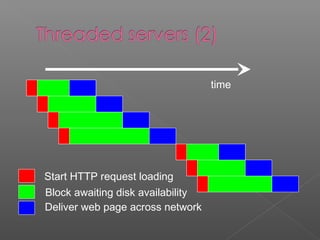
Start HTTP request loading
Block awaiting disk availability
Deliver web page across network
time
 Threaded servers can process several
requests at once. Each request is
handled by a separate thread.
 This doesn’t increase the overall amount
of work done (unless using SMP)
 . . . but it does reduce the wastage!
 Threaded operation is worthwhile when
threads are expected to block, awaiting
I/O operations
Start HTTP request loading
Block awaiting disk availability
Deliver web page across network
time
 Java provides very convenient
multithreading to programmers
 We can add threads using inheritance
› We can supplement the existing capabilities
of the SimpleFileServer class
› We create a class ThreadedFileServer which
extends the existing SimpleFileServer
 You may have covered threads in the
Introductory Java Course
public class ThreadedFileServer extends SimpleFileServer
implements FileServer, Runnable
{
private static int index = 0;
public void dispatch(Socket s) {
super.s = s;
Thread thread =
new Thread(this, ”Server-" + (index++));
thread.start();
}
public void run() {
super.respond();
}
}
 Creates new threads within the virtual
machine
 Classes which start threads must
implement interface java.lang.Runnable
interface Runnable
{
/**
This is the method that will be run when the
new thread is started.
*/
public void run();
}
 Must create a Thread object associated
with each new thread using the
constructor
› Thread(Runnable run, String threadName)
 Start a thread with the method
› void start()
 Other useful methods can be used to set
priorities and interrupt a running thread
 Our threads do not share any common
memory locations (except for index)
 When threads read/write a shared
memory area access must be
synchronized
 Otherwise it is impossible to predict how
the system will behave
 Java has mechanisms for achieving this
 Starting a thread can be relatively
expensive when performance is critical
 Our threaded server creates a new Thread
for each file to be transferred
 A better approach is to create a pool of
threads and recycle them
› Create a pool of threads which are ready to
work when needed
› Have threads wait until work is available
 Better, but more complex so look at the
class sea.server.ThreadedFileServer2
 Our example web server performs a very
simple task
› Accept a request from a client
› Retrieve the appropriate document from disk
› Return the document to the client
 This is too limiting
› How do we implement searches?
 We need to be able to run programs within
the server to process user requests
› Accept a client request including arguments
› Run a program on the arguments
› Return results in the form of a document
 When we run small Java programs within a
browser these are referred to as Applets. . .
 so we run small Java programs within a
server these are “Servlets”
 A servlet is a program designed to process
a client request (which requires
interactivity).
› It processes arguments and formats its results as
a short lived document.
 HTML servlets are becoming a popular
mechanism for creating interactive servers.
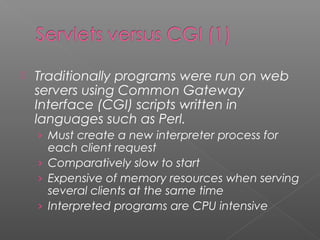
 Traditionally programs were run on web
servers using Common Gateway
Interface (CGI) scripts written in
languages such as Perl.
› Must create a new interpreter process for
each client request
› Comparatively slow to start
› Expensive of memory resources when serving
several clients at the same time
› Interpreted programs are CPU intensive
 Servlets use Java objects which persist
between requests to the server
› Low latency since requests run in threads
› Offer performance advantages since programs
are compiled and can take advantage of JITs
and/or Hotspot JVMs.
› Servlet groups can share a JVM leading to
smaller memory footprints.
› Servlets run in a Sandbox offering protection
from malicious (or accidental) damage
› Programs are future proofed since WORA offers
better scope for server upgrades.
 Servlets are written in a similar fashion to
applets
› Write a new servlet class which extends
javax.servlet.http.HttpServlet (or just
implements javax.servlet.Servlet)
› Override certain methods to deal with requests
› Get your methods to create an HTML document
to return information to the client’s browser
› Load the servlet byte codes onto your web
server (for example apache/jserv)
 When the servlet is first loaded it makes a
single call to the method
› public void init(ServletConfig config)
 This may optionally be overridden to initialise
the state of the servlet (for example loading
state information from a file).
 When a servlet is finally unloaded it
makes a single call to the method
› public void destroy()
 If you wish to save to servlet state to a file (or
using JDBC) this is the method to override
 To handle an HTTP GET request implement
› protected void doGet(HttpServletRequest request,
HttpServletResponse response)
 If a browser visits your servlet this is where you get
to create a document for it to display
 To handle an HTTP POST request provide
› protected void doPost(HttpServletRequest request,
HttpServletResponse response)
 If your document contains an HTML form and the
user posts the results this is where you can extract
and process them
 Also methods for HTTP OPTIONS, TRACE and
DELETE (more exotic options)
 Two objects are passed as parameters to all
these handler methods:
 javax.servlet.http.HttpServletRequest
› Represents the formation that was passed to the
server when the user submitted the request by
visiting/posting to the servlets URL.
 javax.servlet.http.HttpServletResponse
› Used to construct a reponse document that is
returned to the user
 Each has a raft of methods so check the
Javadoc for details
 An web based chat room server
 A number of users can connect to the
servlet using browsers
 Read a list of the previous messages
 Optionally append new messages to the list
 Messages are attributed to a specific
author and are time stamped
 Messages do not persist after the chat
server is stopped (easy enough to rectify)
public class ChatServlet extends HttpServlet
{
Vector messages = new Vector();
public void init(ServletConfig config)
throws ServletException
{
super.init(config);
}
public void destroy()
{
// Currently does nothing
}
. . . .
}
protected void doGet(HttpServletRequest request,
HttpServletResponse response)
throws ServletException, IOException {
createDocument(response);
}
protected void createDocument(HttpServletResponse response)
throws IOException {
response.setContentType("text/html");
response.setHeader("pragma", "no-cache");
PrintWriter writer = response.getWriter();
writer.println("<HTML>");
writer.println("<HEAD><TITLE>Chat Servlet</TITLE></HEAD>");
writer.println("<BODY>");
Date now = new Date();
writer.println("Current server time is " + now + "<P>");
. . . .
writer.println("</BODY></HTML>");
writer.close();
}
for (int i = 0; i < messages.size(); i++) {
writer.println("<HR>");
String messageString = (String) messages.elementAt(i);
writer.println(messageString);
}
writer.println("<HR><FORM METHOD=POST>");
writer.println("Enter your name: “ +
“<INPUT TYPE=TEXT SIZE=25 NAME=name><BR>");
writer.println("Enter your message:<BR>” +
“<TEXTAREA ROWS=5 COLS=40 NAME=message>” +
“Type your message here</TEXTAREA><BR>");
writer.println(
"<INPUT TYPE=SUBMIT NAME=action VALUE=Submit>");
writer.println("<HR></FORM>");
protected synchronized void doPost(
HttpServletRequest request,
HttpServletResponse response)
throws ServletException, IOException
{
String name = request.getParameter("name");
String message = request.getParameter("message");
if (name != null && message != null) {
Date timeStamp = new Date();
String messageString = "<B>Message " + messages.size() +
" from " + name + " at " + timeStamp +
":</B><BR>" + message + "<P>";
messages.add(messageString);
}
createDocument(response);
}
 Servlets offer better performance than most
of the previous CGI like technologies
 But CGI/Servlets concentrate the load on
the server
 When designing high throughput servers
only use servlets where you really need
interactivity
› Searches/Shopping carts
› Data that is very short lived (stock quotes)
 This also applies to low throughput servers
that might need to scale later
 Consider using periodic programs to
generate static documents on disk
› The cost of serving fixed documents will always
be less than the cost of server side execution
› Disk space is cheap!
 Consider using applets when possible
› This places the load on the client machines
rather than the server
 Finally consider using SMP and/or server
farms
› Complex and very expensive
 How can a chat reader find out when a
new message has been posted by another
author?
› Only by repeatedly hitting the Reload button!
 HTTP (& TCP/IP services in general) transfer
documents on the user’s request
 To push updates automatically from the
server you will need to:
› Start a reverse server within each client
› Use a multicast group
› Use a remote procedure call system such as RMI
or CORBA
 Java Server Pages is an extension to the
servlets API.
 With conventional servlets you embed the
HTML that you need inside a Java program.
 With JSP you embed your Java program
within a HTML document (by using special
tags).
 Works rather like JavaScript but the JSP
script runs on the server before the page is
dispatched to the user’s browser.
 For information about HTML try
http://www.w3schools.com
 You can download Sun’s servlet
development kit from their web site at
the http://java.sun.com/products/servlet
 You can download apache’s Tomcat
server from http://jakarta.apache.org
 For other information about Servlet
development try
http://www.servlets.com
 Read through the sample code to
convince yourself you understand what’s
going on
 Sample code can be downloaded from
http://ciips.ee.uwa.edu.au/~gareth
 Read the code documentation
 If you can, run the examples to check
they work
A java servers

A java servers

  • 3.
     To createa simple HTTP server in Java  To use the implementation to illustrate a number of advanced Java features: › TCP/IP Sockets and Server Sockets › Interfaces › Software components (more from John later) › Multithreading  To show how to create executable server objects (using Sun’s Servlets API)
  • 4.
     Java NetworkProgramming, Elliotte Rusty Harold, O’Reilly and Associates, 1997, ISBN 1-56592-227-1  TCP/IP Network Administration, Second Edition, Craig Hunt, O’Reilly and Associates, 1997, ISBN 1-56592-322-7  The Java Developer’s connection: http://www.javasoft.com/jdc  The Javadoc documentation
  • 5.
     Server mustbe able to process HTTP/1.0 file transfer requests and deliver files  Connections are to be made via TCP/IP  Must be efficient and prompt  Must be simple to understand and elegant in design
  • 6.
     Developed byTim Berners-Lee at CERN  Like most Internet protocols it is described in an RFC (Request for Comment document): RFC1945  May be downloaded from the Internet Engineering Task Force’s web site: http://www.ietf.org
  • 7.
     Some ofyou may have covered this in the introductory Java course  Servers have a listener loop › Loop until the server is shutdown  Wait for a client to request a connection  Read the details of the client’s request  Provide the requested information to the client  Here’s the listener loop from our example:
  • 8.
    ServerSocket socket =new ServerSocket(80, 5); public void listen() throws IllegalAccessException, InstantiationException, IOException { for (;;) { System.err.println("HttpServer: waiting..."); Socket s = socket.accept(); FileServer f = createFileServer(); f.dispatch(s); } }
  • 9.
    2037 80 2037 1583 20371583 Client (sid) Server (fred) ServerSocket ss. s = ss.accept() s = new Socket (“fred”, 80) Socket s s.getInputStream() s.getOuputStream() s.getInputStream() s.getOuputStream()
  • 10.
     Good softwareis designed in a modular fashion avoiding stovepipe designs!  This is a form of software components  Java has strong support for components  Components hide their implementation behind interfaces  An interface defines a contract between the supplier/server and the user/client.
  • 11.
    ServerSocket socket =new ServerSocket(80, 5); public void listen() throws IllegalAccessException, InstantiationException, IOException { for (;;) { System.err.println("HttpServer: waiting..."); Socket s = socket.accept(); FileServer f = createFileServer(); f.dispatch(s); } }
  • 12.
     Simplifies clientimplementation  Clients do not need to worry about the implementation details  Interfaces encapsulate state of different subsystems ⇒ side effects reduced  Define clear boundaries between different teams of programmers  Clients can substitute alternative implementations: polymorphism  Clients can purchase off the shelf solutions: software components
  • 13.
    Software Component Client Program Interface/ublic class HttpServer { /** Listens indefinitely for transfer requests and creates a server instance for each request. */ public void listen() throws IllegalAccessException, InstantiationException, IOException { for (;;) { /* Block, waiting for a request to occur then spawns a new (anonymous) socket with which to deal with the request. */ System.err.println("HttpServer: waiting..."); Socket s = socket.accept(); /* Create a file server to deal with the new socket. */ FileServer f = createFileServer(); f.dispatch(s); } } public static void main(String[] args) { try { HttpServer htts = new HttpServer("sea.server.ThreadedFileServer"); htts.listen(); } catch (Exception e) { System.err.println("HttpServer: failed due to exception:n" + e); } }
  • 14.
    public interface FileServer { /** Thismethod allows an incoming HTTP request to initiate a file dispatch. The socket will provide an input stream (which is at the beginning) from which an HTTP/1.0 header request may be read.<p> It also provides an output stream on which the request should be delivered. The delivery should have an HTTP/1.0 header prepended. @param s The socket on which a request is being made. Once this method has returned the socket will have been closed by the dispatcher. */ public void dispatch(Socket s); }
  • 15.
     Each interfaceis a contract between two parties  The contract should be made as strict and precise as possible  Avoid unnecessary ambiguity  Document the contract within the interface’s source file using Javadoc
  • 16.
     Two flavoursof FileServer have been provided using deferred instantiation › A simple one but with low performance: sea.server.SimpleFileServer › A server that uses multiple threads to increase performance: sea.server.ThreadedFileServer › A server which uses a pool of threads to achieve the maximum possible performance: sea.server.ThreadedServer2
  • 17.
     Must implementthe FileServer interface so that it can plug in to the HttpServer  Reads the HTTP request from the Socket’s input stream  Decides which file is required  Reads the file and spools to the Socket’s output stream.
  • 18.
    public class SimpleFileServerimplements FileServer { protected Socket s = null; public void dispatch(Socket s) { this.s = s; respond(); } . . . . }
  • 19.
     Must getan input stream so that we can analyse the request  Socket provides the method › InputStream getInputStream(); Socket s; InputStream inStream = s.getInputStream(); InputStreamReader reader = new InputStreamReader(inStream); BufferedReader input = new BufferedReader(reader);
  • 20.
     Request consistsof a number of lines of text separated by “rn”  First line is all this server is interested in  A typical request might be of the form: GET /path/to/file.html HTTP/1.0 Accept: text/html Accept: image/gif User-Agent: Lynx/2.4
  • 21.
     Cuts outthe file name  Looks for the file relative to the current working directory (not portable!!)  If the file is a directory look for the file “index.html” in the directory  If the file does not exist then respond with an error (code 404)
  • 22.
     Must constructa header for the response  Code 200 means success  Simple header takes the following form: HTTP/1.0 200 OK Server: SEA/1.0 MIME-version: 1.0 Content-type: text/html Data starts after blank line. . . More data, etc. . .
  • 23.
     Get theoutput stream from the Socket › OutputStream getOutputStream()  Spool (copy) the file contents into the socket  If the MIME type is textual then we must make sure the lines are delimited by “rn”.  Otherwise we pass the file unmodified
  • 24.
     The SimpleFileServeris completely sequential. › It handles one request at a time.  Reading a file from disk takes a long time (around 10ms)  The server will be sitting idle while it waits for the file to load (wasting up to 106 instruction cycles)  Other web browsers will be kept waiting
  • 25.
    Start HTTP requestloading Block awaiting disk availability Deliver web page across network time
  • 26.
     Threaded serverscan process several requests at once. Each request is handled by a separate thread.  This doesn’t increase the overall amount of work done (unless using SMP)  . . . but it does reduce the wastage!  Threaded operation is worthwhile when threads are expected to block, awaiting I/O operations
  • 27.
    Start HTTP requestloading Block awaiting disk availability Deliver web page across network time
  • 28.
     Java providesvery convenient multithreading to programmers  We can add threads using inheritance › We can supplement the existing capabilities of the SimpleFileServer class › We create a class ThreadedFileServer which extends the existing SimpleFileServer  You may have covered threads in the Introductory Java Course
  • 29.
    public class ThreadedFileServerextends SimpleFileServer implements FileServer, Runnable { private static int index = 0; public void dispatch(Socket s) { super.s = s; Thread thread = new Thread(this, ”Server-" + (index++)); thread.start(); } public void run() { super.respond(); } }
  • 30.
     Creates newthreads within the virtual machine  Classes which start threads must implement interface java.lang.Runnable interface Runnable { /** This is the method that will be run when the new thread is started. */ public void run(); }
  • 31.
     Must createa Thread object associated with each new thread using the constructor › Thread(Runnable run, String threadName)  Start a thread with the method › void start()  Other useful methods can be used to set priorities and interrupt a running thread
  • 32.
     Our threadsdo not share any common memory locations (except for index)  When threads read/write a shared memory area access must be synchronized  Otherwise it is impossible to predict how the system will behave  Java has mechanisms for achieving this
  • 33.
     Starting athread can be relatively expensive when performance is critical  Our threaded server creates a new Thread for each file to be transferred  A better approach is to create a pool of threads and recycle them › Create a pool of threads which are ready to work when needed › Have threads wait until work is available  Better, but more complex so look at the class sea.server.ThreadedFileServer2
  • 34.
     Our exampleweb server performs a very simple task › Accept a request from a client › Retrieve the appropriate document from disk › Return the document to the client  This is too limiting › How do we implement searches?  We need to be able to run programs within the server to process user requests › Accept a client request including arguments › Run a program on the arguments › Return results in the form of a document
  • 35.
     When werun small Java programs within a browser these are referred to as Applets. . .  so we run small Java programs within a server these are “Servlets”  A servlet is a program designed to process a client request (which requires interactivity). › It processes arguments and formats its results as a short lived document.  HTML servlets are becoming a popular mechanism for creating interactive servers.
  • 36.
     Traditionally programswere run on web servers using Common Gateway Interface (CGI) scripts written in languages such as Perl. › Must create a new interpreter process for each client request › Comparatively slow to start › Expensive of memory resources when serving several clients at the same time › Interpreted programs are CPU intensive
  • 37.
     Servlets useJava objects which persist between requests to the server › Low latency since requests run in threads › Offer performance advantages since programs are compiled and can take advantage of JITs and/or Hotspot JVMs. › Servlet groups can share a JVM leading to smaller memory footprints. › Servlets run in a Sandbox offering protection from malicious (or accidental) damage › Programs are future proofed since WORA offers better scope for server upgrades.
  • 38.
     Servlets arewritten in a similar fashion to applets › Write a new servlet class which extends javax.servlet.http.HttpServlet (or just implements javax.servlet.Servlet) › Override certain methods to deal with requests › Get your methods to create an HTML document to return information to the client’s browser › Load the servlet byte codes onto your web server (for example apache/jserv)
  • 39.
     When theservlet is first loaded it makes a single call to the method › public void init(ServletConfig config)  This may optionally be overridden to initialise the state of the servlet (for example loading state information from a file).  When a servlet is finally unloaded it makes a single call to the method › public void destroy()  If you wish to save to servlet state to a file (or using JDBC) this is the method to override
  • 40.
     To handlean HTTP GET request implement › protected void doGet(HttpServletRequest request, HttpServletResponse response)  If a browser visits your servlet this is where you get to create a document for it to display  To handle an HTTP POST request provide › protected void doPost(HttpServletRequest request, HttpServletResponse response)  If your document contains an HTML form and the user posts the results this is where you can extract and process them  Also methods for HTTP OPTIONS, TRACE and DELETE (more exotic options)
  • 41.
     Two objectsare passed as parameters to all these handler methods:  javax.servlet.http.HttpServletRequest › Represents the formation that was passed to the server when the user submitted the request by visiting/posting to the servlets URL.  javax.servlet.http.HttpServletResponse › Used to construct a reponse document that is returned to the user  Each has a raft of methods so check the Javadoc for details
  • 42.
     An webbased chat room server  A number of users can connect to the servlet using browsers  Read a list of the previous messages  Optionally append new messages to the list  Messages are attributed to a specific author and are time stamped  Messages do not persist after the chat server is stopped (easy enough to rectify)
  • 43.
    public class ChatServletextends HttpServlet { Vector messages = new Vector(); public void init(ServletConfig config) throws ServletException { super.init(config); } public void destroy() { // Currently does nothing } . . . . }
  • 44.
    protected void doGet(HttpServletRequestrequest, HttpServletResponse response) throws ServletException, IOException { createDocument(response); } protected void createDocument(HttpServletResponse response) throws IOException { response.setContentType("text/html"); response.setHeader("pragma", "no-cache"); PrintWriter writer = response.getWriter(); writer.println("<HTML>"); writer.println("<HEAD><TITLE>Chat Servlet</TITLE></HEAD>"); writer.println("<BODY>"); Date now = new Date(); writer.println("Current server time is " + now + "<P>"); . . . . writer.println("</BODY></HTML>"); writer.close(); }
  • 45.
    for (int i= 0; i < messages.size(); i++) { writer.println("<HR>"); String messageString = (String) messages.elementAt(i); writer.println(messageString); } writer.println("<HR><FORM METHOD=POST>"); writer.println("Enter your name: “ + “<INPUT TYPE=TEXT SIZE=25 NAME=name><BR>"); writer.println("Enter your message:<BR>” + “<TEXTAREA ROWS=5 COLS=40 NAME=message>” + “Type your message here</TEXTAREA><BR>"); writer.println( "<INPUT TYPE=SUBMIT NAME=action VALUE=Submit>"); writer.println("<HR></FORM>");
  • 46.
    protected synchronized voiddoPost( HttpServletRequest request, HttpServletResponse response) throws ServletException, IOException { String name = request.getParameter("name"); String message = request.getParameter("message"); if (name != null && message != null) { Date timeStamp = new Date(); String messageString = "<B>Message " + messages.size() + " from " + name + " at " + timeStamp + ":</B><BR>" + message + "<P>"; messages.add(messageString); } createDocument(response); }
  • 47.
     Servlets offerbetter performance than most of the previous CGI like technologies  But CGI/Servlets concentrate the load on the server  When designing high throughput servers only use servlets where you really need interactivity › Searches/Shopping carts › Data that is very short lived (stock quotes)  This also applies to low throughput servers that might need to scale later
  • 48.
     Consider usingperiodic programs to generate static documents on disk › The cost of serving fixed documents will always be less than the cost of server side execution › Disk space is cheap!  Consider using applets when possible › This places the load on the client machines rather than the server  Finally consider using SMP and/or server farms › Complex and very expensive
  • 49.
     How cana chat reader find out when a new message has been posted by another author? › Only by repeatedly hitting the Reload button!  HTTP (& TCP/IP services in general) transfer documents on the user’s request  To push updates automatically from the server you will need to: › Start a reverse server within each client › Use a multicast group › Use a remote procedure call system such as RMI or CORBA
  • 50.
     Java ServerPages is an extension to the servlets API.  With conventional servlets you embed the HTML that you need inside a Java program.  With JSP you embed your Java program within a HTML document (by using special tags).  Works rather like JavaScript but the JSP script runs on the server before the page is dispatched to the user’s browser.
  • 51.
     For informationabout HTML try http://www.w3schools.com  You can download Sun’s servlet development kit from their web site at the http://java.sun.com/products/servlet  You can download apache’s Tomcat server from http://jakarta.apache.org  For other information about Servlet development try http://www.servlets.com
  • 52.
     Read throughthe sample code to convince yourself you understand what’s going on  Sample code can be downloaded from http://ciips.ee.uwa.edu.au/~gareth  Read the code documentation  If you can, run the examples to check they work