


SCOPIA V5.7 The Core of Video Enabled Unified Communications RADVISION 11/21/08
The New Communications Environment SCOPIA at the Core of Video Enabled UC Feature Highlights SCOPIA V5.7 Enhancements Our Competitive Edge Agenda
The Global Market Outsourcing Tele-working Global customers and suppliers Green initiatives Drives a need for a new way to communicate
Today’s Changing Work Environment Informal and Spontaneous Communications  92% of interactions are informal 52% of interactions are unintended Collaborative Teams Becoming More Widespread 7 out of 10 people work virtually 1 out of every 3 managers are in a different location than at least some members of their team Close to a hundred million U.S. workers are expected to telework by 2010  Workers get 50%-70% of their information from other people, but now work with more people in more locations Sources: Gartner, R.E. Kraut, R.S. Fish, R. W. Root and B.L. Chalfonte: Informal Communication in organizations, S. Whittaker, D.Frohlich, and O.Dany-Jones: Informal workplace communication, Frost and Sullivan
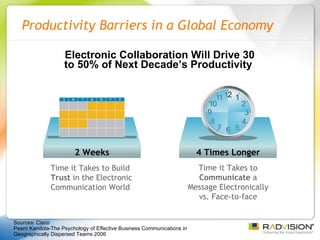
Productivity Barriers in a Global Economy Time it Takes to Build  Trust  in the Electronic Communication World Electronic Collaboration Will Drive 30 to 50% of Next Decade’s Productivity  Time it Takes to  Communicate  a Message Electronically vs. Face-to-face Sources: Cisco Pearn Kandola-The Psychology of Effective Business Communications in Geographically Dispersed Teams 2006 4 Times Longer 2 Weeks
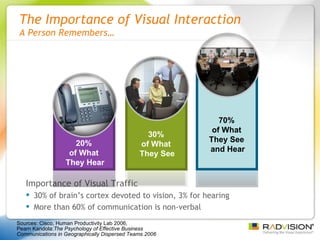
The Importance of Visual Interaction A Person Remembers… Importance of Visual Traffic   30% of brain’s cortex devoted to vision, 3% for hearing More than 60% of communication is non-verbal Sources: Cisco, Human Productivity Lab 2006,  Pearn Kandola: The Psychology of Effective Business Communications in Geographically Dispersed Teams 2006   30%  of What  They See 70%  of What  They See  and Hear 20%  of What  They Hear
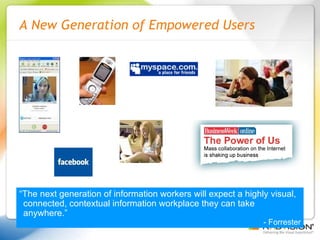
A New Generation of Empowered Users “ The next generation of information workers will expect a highly visual, connected, contextual information workplace they can take anywhere.” - Forrester
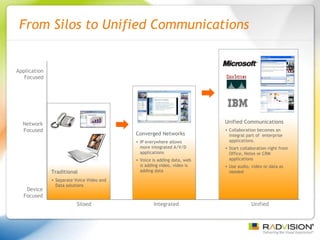
From Silos to Unified Communications Device Focused Network Focused Application Focused Traditional Separate Voice Video and Data solutions Siloed Integrated Unified Converged Networks IP everywhere allows  more integrated A/V/D applications Voice is adding data, web is adding video, video is adding data Unified Communications Collaboration becomes an integral part of  enterprise applications. Start collaboration right from Office, Notes or CRM  applications Use audio, video or data as needed
Market Drivers for Unified Communications IP Telephony Vendors They own the enterprise voice communication system. Want to expand IP Voice into IP video & desktop collaboration Enterprise Software Vendors They own the enterprise desktop applications Collaboration sessions begin with IM that can then include voice & video
RADVISION Powers Unified Communications RADVISION’s award winning video infrastructure products and solutions provide advanced video capabilities powering and interconnecting voice, video and data communications across all platforms, devices and networks.
The New Communications Environment SCOPIA at the Core of Video Enabled UC Feature Highlights SCOPIA V5.7 Enhancements Our Competitive Edge Agenda
SCOPIA at the Core of  Video Enabled Unified Communications SCOPIA® MCU  - Powerful Hardware for Transcoding Mixed Environments  SCOPIA Desktop  - Client Server Software Architecture for Remote Connectivity and Desktop Scale iVIEW  - Architected for Large, Distributed Deployments Integrated & Interoperable Unified Communications Solution IBM, Microsoft, Cisco, Alcatel-Lucent, Avistar, Aethra, LifeSize High Quality Including HD at the Desktop
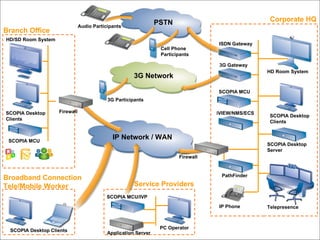
Corporate HQ Branch Office Broadband Connection Tele/Mobile Worker Service Providers PSTN 3G Network IP Network / WAN Telepresence iVIEW/NMS/ECS  SCOPIA Desktop Server SCOPIA MCU HD Room System IP Phone Firewall PathFinder 3G Gateway ISDN Gateway SCOPIA MCU/IVP Application Server PC Operator Firewall HD/SD Room System SCOPIA Desktop Clients 3G Participants Audio Participants SCOPIA Desktop Clients SCOPIA Desktop Clients SCOPIA MCU Cell Phone Participants
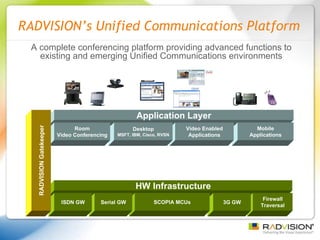
RADVISION’s Unified Communications Platform Application Layer Mobile Applications Video Enabled Applications Desktop MSFT, IBM, Cisco, RVSN Room Video Conferencing SW Management Recording Playback Streaming Server SCOPIA Desktop Scheduling Management Control HW Infrastructure Firewall Traversal 3G GW SCOPIA MCUs A complete conferencing platform providing advanced functions to existing and emerging Unified Communications environments Serial GW ISDN GW RADVISION Gatekeeper
The New Communications Environment SCOPIA at the Core of Video Enabled UC Feature Highlights SCOPIA V5.7 Enhancements Our Competitive Edge Agenda
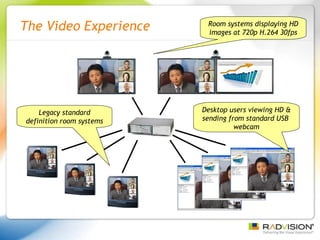
The Video Experience Desktop users viewing HD & sending from standard USB  webcam Legacy standard definition room systems Room systems displaying HD images at 720p H.264 30fps
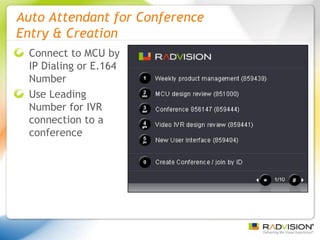
Auto Attendant for Conference  Entry & Creation Connect to MCU by IP Dialing or E.164 Number Use Leading Number for IVR connection to a conference
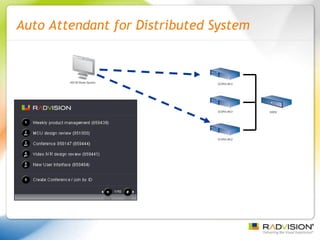
Auto Attendant for Distributed System
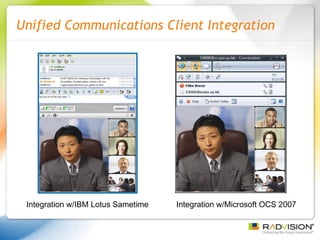
Unified Communications Client Integration Integration w/IBM Lotus Sametime Integration w/Microsoft OCS 2007
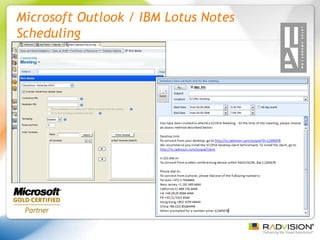
Microsoft Outlook / IBM Lotus Notes Scheduling
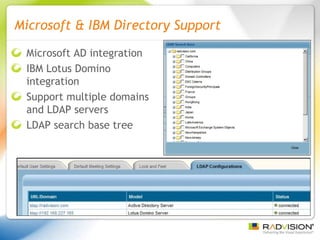
Microsoft & IBM Directory Support Microsoft AD integration IBM Lotus Domino integration Support multiple domains and LDAP servers LDAP search base tree
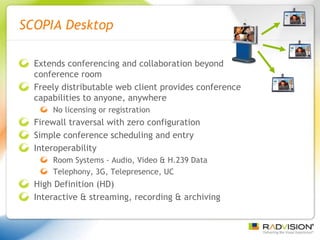
SCOPIA Desktop Extends conferencing and collaboration beyond conference room Freely distributable web client provides conference capabilities to anyone, anywhere No licensing or registration Firewall traversal with zero configuration Simple conference scheduling and entry Interoperability Room Systems - Audio, Video & H.239 Data Telephony, 3G, Telepresence, UC High Definition (HD) Interactive & streaming, recording & archiving
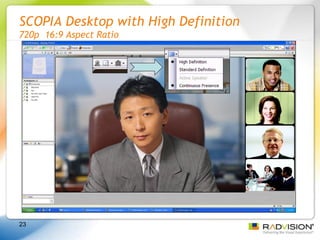
SCOPIA Desktop with High Definition 720p  16:9 Aspect Ratio
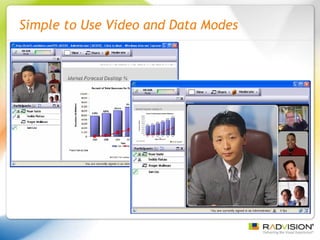
Simple to Use Video and Data Modes
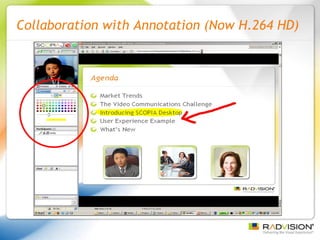
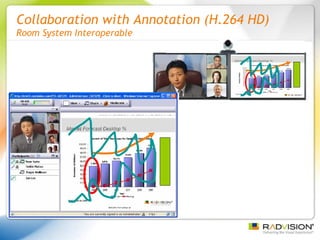
Collaboration with Annotation (Now H.264 HD)
Collaboration with Annotation (H.264 HD) Room System Interoperable
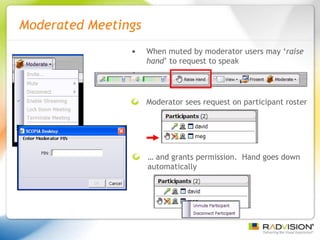
Moderated Meetings When muted by moderator users may ‘ raise hand ’ to request to speak Moderator sees request on participant roster …  and grants permission.  Hand goes down automatically
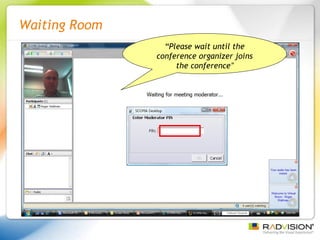
Waiting Room “ Please wait until the conference organizer joins the conference ”
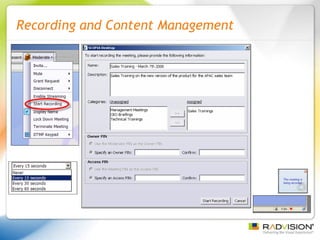
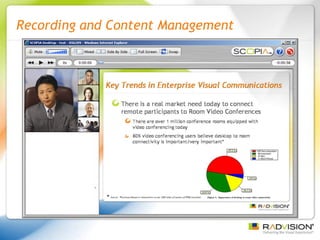
Recording and Content Management 666204
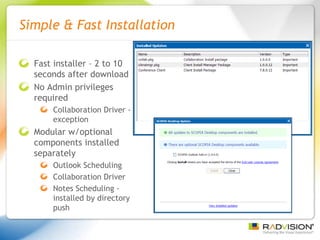
Simple & Fast Installation Fast installer – 2 to 10 seconds after download No Admin privileges required Collaboration Driver - exception Modular w/optional components installed separately Outlook Scheduling Collaboration Driver Notes Scheduling - installed by directory push
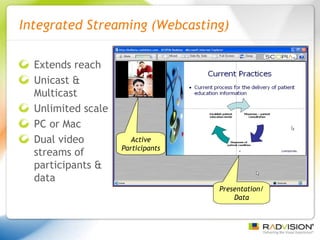
Integrated Streaming (Webcasting) Extends reach Unicast & Multicast Unlimited scale PC or Mac Dual video streams of participants & data Active Participants Presentation/ Data
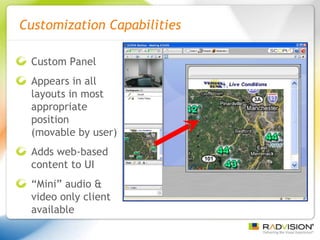
Customization Capabilities Custom Panel Appears in all layouts in most appropriate position  (movable by user) Adds web-based content to UI “ Mini” audio & video only client available
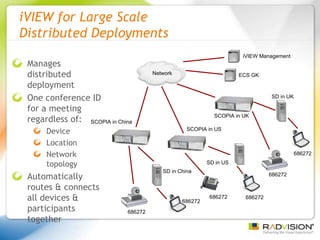
iVIEW for Large Scale  Distributed Deployments Manages distributed deployment One conference ID for a meeting regardless of:  Device Location Network topology Automatically routes & connects all devices & participants together ECS GK iVIEW Management SD in UK SCOPIA in UK SD in US SCOPIA in US SD in China SCOPIA in China 686272 686272 686272 686272 686272 686272 Network
The New Communications Environment SCOPIA at the Core of Video Enabled UC Feature Highlights SCOPIA V5.7 Enhancements Our Competitive Edge Agenda
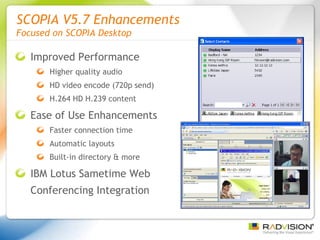
SCOPIA V5.7 Enhancements  Focused on SCOPIA Desktop Improved Performance Higher quality audio HD video encode (720p send) H.264 HD H.239 content Ease of Use Enhancements Faster connection time Automatic layouts Built-in directory & more IBM Lotus Sametime Web Conferencing Integration
SCOPIA V5.7 Enhancements Enhanced Audio and Video New video subsystem Desktop optimized H.263, H.263+, H.264 codec HD 720p (15 fps) send with standard USB webcam HD 720p (30 fps) receive Lower noise reduces filtering = better quality Lower latency on capture Color/clarity improvements  Highly optimized for Intel Multi-core/multi-processor New audio subsystem Improved echo cancellation Improved resiliency for network errors (up to 30% packet loss) Improved background noise cancellation Latency dramatically improved (reduced ≈ 250ms) Better detection of active audio devices
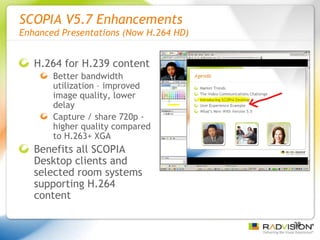
SCOPIA V5.7 Enhancements Enhanced Presentations (Now H.264 HD) H.264 for H.239 content Better bandwidth utilization – improved image quality, lower delay  Capture / share 720p - higher quality compared to H.263+ XGA Benefits all SCOPIA Desktop clients and selected room systems supporting H.264 content
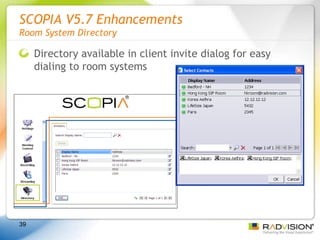
SCOPIA V5.7 Enhancements Room System Directory Directory available in client invite dialog for easy dialing to room systems
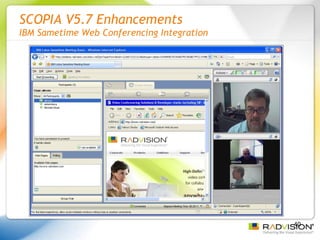
SCOPIA V5.7 Enhancements IBM Sametime Web Conferencing Integration
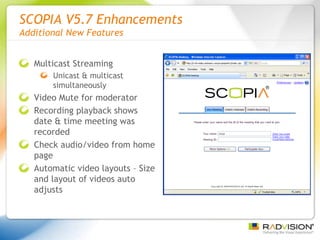
SCOPIA V5.7 Enhancements Additional New Features Multicast Streaming Unicast & multicast simultaneously Video Mute for moderator Recording playback shows date & time meeting was recorded Check audio/video from home page Automatic video layouts – Size and layout of videos auto adjusts
The New Communications Environment SCOPIA at the Core of Video Enabled UC Feature Highlights SCOPIA V5.7 Enhancements Our Competitive Edge Agenda
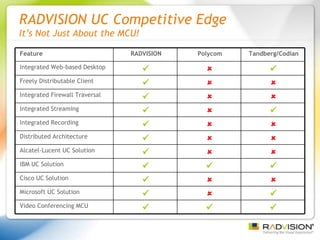
RADVISION UC Competitive Edge It’s Not Just About the MCU! Tandberg/Codian Polycom RADVISION Feature    Integrated Web-based Desktop    Freely Distributable Client    Integrated Firewall Traversal    Integrated Streaming    Integrated Recording    Distributed Architecture    Alcatel-Lucent UC Solution    IBM UC Solution    Cisco UC Solution    Microsoft UC Solution    Video Conferencing MCU
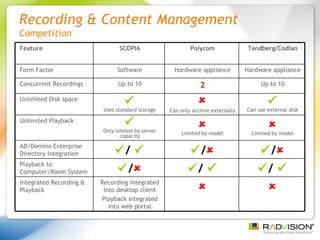
Recording & Content Management  Competition Tandberg/Codian Polycom SCOPIA Feature Hardware appliance Hardware appliance Software Form Factor Up to 10 2 Up to 10 Concurrent Recordings   Can use external disk  Can only archive externally  Uses standard storage Unlimited Disk space  Limited by model  Limited by model  Only limited by server capacity Unlimited Playback  /   /   /   AD/Domino Enterprise Directory Integration  /    /    /  Playback to Computer/Room System   Recording integrated into desktop client Playback integrated into web portal Integrated Recording & Playback
Thank You!

Scopia V5.7 Solution

  • 1.
    SCOPIA V5.7 TheCore of Video Enabled Unified Communications RADVISION 11/21/08
  • 2.
    The New CommunicationsEnvironment SCOPIA at the Core of Video Enabled UC Feature Highlights SCOPIA V5.7 Enhancements Our Competitive Edge Agenda
  • 3.
    The Global MarketOutsourcing Tele-working Global customers and suppliers Green initiatives Drives a need for a new way to communicate
  • 4.
    Today’s Changing WorkEnvironment Informal and Spontaneous Communications 92% of interactions are informal 52% of interactions are unintended Collaborative Teams Becoming More Widespread 7 out of 10 people work virtually 1 out of every 3 managers are in a different location than at least some members of their team Close to a hundred million U.S. workers are expected to telework by 2010 Workers get 50%-70% of their information from other people, but now work with more people in more locations Sources: Gartner, R.E. Kraut, R.S. Fish, R. W. Root and B.L. Chalfonte: Informal Communication in organizations, S. Whittaker, D.Frohlich, and O.Dany-Jones: Informal workplace communication, Frost and Sullivan
  • 5.
    Productivity Barriers ina Global Economy Time it Takes to Build Trust in the Electronic Communication World Electronic Collaboration Will Drive 30 to 50% of Next Decade’s Productivity Time it Takes to Communicate a Message Electronically vs. Face-to-face Sources: Cisco Pearn Kandola-The Psychology of Effective Business Communications in Geographically Dispersed Teams 2006 4 Times Longer 2 Weeks
  • 6.
    The Importance ofVisual Interaction A Person Remembers… Importance of Visual Traffic 30% of brain’s cortex devoted to vision, 3% for hearing More than 60% of communication is non-verbal Sources: Cisco, Human Productivity Lab 2006, Pearn Kandola: The Psychology of Effective Business Communications in Geographically Dispersed Teams 2006 30% of What They See 70% of What They See and Hear 20% of What They Hear
  • 7.
    A New Generationof Empowered Users “ The next generation of information workers will expect a highly visual, connected, contextual information workplace they can take anywhere.” - Forrester
  • 8.
    From Silos toUnified Communications Device Focused Network Focused Application Focused Traditional Separate Voice Video and Data solutions Siloed Integrated Unified Converged Networks IP everywhere allows more integrated A/V/D applications Voice is adding data, web is adding video, video is adding data Unified Communications Collaboration becomes an integral part of enterprise applications. Start collaboration right from Office, Notes or CRM applications Use audio, video or data as needed
  • 9.
    Market Drivers forUnified Communications IP Telephony Vendors They own the enterprise voice communication system. Want to expand IP Voice into IP video & desktop collaboration Enterprise Software Vendors They own the enterprise desktop applications Collaboration sessions begin with IM that can then include voice & video
  • 10.
    RADVISION Powers UnifiedCommunications RADVISION’s award winning video infrastructure products and solutions provide advanced video capabilities powering and interconnecting voice, video and data communications across all platforms, devices and networks.
  • 11.
    The New CommunicationsEnvironment SCOPIA at the Core of Video Enabled UC Feature Highlights SCOPIA V5.7 Enhancements Our Competitive Edge Agenda
  • 12.
    SCOPIA at theCore of Video Enabled Unified Communications SCOPIA® MCU - Powerful Hardware for Transcoding Mixed Environments SCOPIA Desktop - Client Server Software Architecture for Remote Connectivity and Desktop Scale iVIEW - Architected for Large, Distributed Deployments Integrated & Interoperable Unified Communications Solution IBM, Microsoft, Cisco, Alcatel-Lucent, Avistar, Aethra, LifeSize High Quality Including HD at the Desktop
  • 13.
    Corporate HQ BranchOffice Broadband Connection Tele/Mobile Worker Service Providers PSTN 3G Network IP Network / WAN Telepresence iVIEW/NMS/ECS SCOPIA Desktop Server SCOPIA MCU HD Room System IP Phone Firewall PathFinder 3G Gateway ISDN Gateway SCOPIA MCU/IVP Application Server PC Operator Firewall HD/SD Room System SCOPIA Desktop Clients 3G Participants Audio Participants SCOPIA Desktop Clients SCOPIA Desktop Clients SCOPIA MCU Cell Phone Participants
  • 14.
    RADVISION’s Unified CommunicationsPlatform Application Layer Mobile Applications Video Enabled Applications Desktop MSFT, IBM, Cisco, RVSN Room Video Conferencing SW Management Recording Playback Streaming Server SCOPIA Desktop Scheduling Management Control HW Infrastructure Firewall Traversal 3G GW SCOPIA MCUs A complete conferencing platform providing advanced functions to existing and emerging Unified Communications environments Serial GW ISDN GW RADVISION Gatekeeper
  • 15.
    The New CommunicationsEnvironment SCOPIA at the Core of Video Enabled UC Feature Highlights SCOPIA V5.7 Enhancements Our Competitive Edge Agenda
  • 16.
    The Video ExperienceDesktop users viewing HD & sending from standard USB webcam Legacy standard definition room systems Room systems displaying HD images at 720p H.264 30fps
  • 17.
    Auto Attendant forConference Entry & Creation Connect to MCU by IP Dialing or E.164 Number Use Leading Number for IVR connection to a conference
  • 18.
    Auto Attendant forDistributed System
  • 19.
    Unified Communications ClientIntegration Integration w/IBM Lotus Sametime Integration w/Microsoft OCS 2007
  • 20.
    Microsoft Outlook /IBM Lotus Notes Scheduling
  • 21.
    Microsoft & IBMDirectory Support Microsoft AD integration IBM Lotus Domino integration Support multiple domains and LDAP servers LDAP search base tree
  • 22.
    SCOPIA Desktop Extendsconferencing and collaboration beyond conference room Freely distributable web client provides conference capabilities to anyone, anywhere No licensing or registration Firewall traversal with zero configuration Simple conference scheduling and entry Interoperability Room Systems - Audio, Video & H.239 Data Telephony, 3G, Telepresence, UC High Definition (HD) Interactive & streaming, recording & archiving
  • 23.
    SCOPIA Desktop withHigh Definition 720p 16:9 Aspect Ratio
  • 24.
    Simple to UseVideo and Data Modes
  • 25.
  • 26.
    Collaboration with Annotation(H.264 HD) Room System Interoperable
  • 27.
    Moderated Meetings Whenmuted by moderator users may ‘ raise hand ’ to request to speak Moderator sees request on participant roster … and grants permission. Hand goes down automatically
  • 28.
    Waiting Room “Please wait until the conference organizer joins the conference ”
  • 29.
    Recording and ContentManagement 666204
  • 30.
    Recording and ContentManagement 666204
  • 31.
    Simple & FastInstallation Fast installer – 2 to 10 seconds after download No Admin privileges required Collaboration Driver - exception Modular w/optional components installed separately Outlook Scheduling Collaboration Driver Notes Scheduling - installed by directory push
  • 32.
    Integrated Streaming (Webcasting)Extends reach Unicast & Multicast Unlimited scale PC or Mac Dual video streams of participants & data Active Participants Presentation/ Data
  • 33.
    Customization Capabilities CustomPanel Appears in all layouts in most appropriate position (movable by user) Adds web-based content to UI “ Mini” audio & video only client available
  • 34.
    iVIEW for LargeScale Distributed Deployments Manages distributed deployment One conference ID for a meeting regardless of: Device Location Network topology Automatically routes & connects all devices & participants together ECS GK iVIEW Management SD in UK SCOPIA in UK SD in US SCOPIA in US SD in China SCOPIA in China 686272 686272 686272 686272 686272 686272 Network
  • 35.
    The New CommunicationsEnvironment SCOPIA at the Core of Video Enabled UC Feature Highlights SCOPIA V5.7 Enhancements Our Competitive Edge Agenda
  • 36.
    SCOPIA V5.7 Enhancements Focused on SCOPIA Desktop Improved Performance Higher quality audio HD video encode (720p send) H.264 HD H.239 content Ease of Use Enhancements Faster connection time Automatic layouts Built-in directory & more IBM Lotus Sametime Web Conferencing Integration
  • 37.
    SCOPIA V5.7 EnhancementsEnhanced Audio and Video New video subsystem Desktop optimized H.263, H.263+, H.264 codec HD 720p (15 fps) send with standard USB webcam HD 720p (30 fps) receive Lower noise reduces filtering = better quality Lower latency on capture Color/clarity improvements Highly optimized for Intel Multi-core/multi-processor New audio subsystem Improved echo cancellation Improved resiliency for network errors (up to 30% packet loss) Improved background noise cancellation Latency dramatically improved (reduced ≈ 250ms) Better detection of active audio devices
  • 38.
    SCOPIA V5.7 EnhancementsEnhanced Presentations (Now H.264 HD) H.264 for H.239 content Better bandwidth utilization – improved image quality, lower delay Capture / share 720p - higher quality compared to H.263+ XGA Benefits all SCOPIA Desktop clients and selected room systems supporting H.264 content
  • 39.
    SCOPIA V5.7 EnhancementsRoom System Directory Directory available in client invite dialog for easy dialing to room systems
  • 40.
    SCOPIA V5.7 EnhancementsIBM Sametime Web Conferencing Integration
  • 41.
    SCOPIA V5.7 EnhancementsAdditional New Features Multicast Streaming Unicast & multicast simultaneously Video Mute for moderator Recording playback shows date & time meeting was recorded Check audio/video from home page Automatic video layouts – Size and layout of videos auto adjusts
  • 42.
    The New CommunicationsEnvironment SCOPIA at the Core of Video Enabled UC Feature Highlights SCOPIA V5.7 Enhancements Our Competitive Edge Agenda
  • 43.
    RADVISION UC CompetitiveEdge It’s Not Just About the MCU! Tandberg/Codian Polycom RADVISION Feature    Integrated Web-based Desktop    Freely Distributable Client    Integrated Firewall Traversal    Integrated Streaming    Integrated Recording    Distributed Architecture    Alcatel-Lucent UC Solution    IBM UC Solution    Cisco UC Solution    Microsoft UC Solution    Video Conferencing MCU
  • 44.
    Recording & ContentManagement Competition Tandberg/Codian Polycom SCOPIA Feature Hardware appliance Hardware appliance Software Form Factor Up to 10 2 Up to 10 Concurrent Recordings  Can use external disk  Can only archive externally  Uses standard storage Unlimited Disk space  Limited by model  Limited by model  Only limited by server capacity Unlimited Playback  /   /   /  AD/Domino Enterprise Directory Integration  /   /   /  Playback to Computer/Room System   Recording integrated into desktop client Playback integrated into web portal Integrated Recording & Playback
  • 45.