THE ROAD TO  PERSONAL TELEPRESENCE Video Conferencing that Works  in the Real World December 22, 2009 Vidyo Proprietary Confidential & Patent Pending Information
WHY IS NOW THE TIME FOR VIDEO CONFERENCING? Organizations Are Changing Organizations want to improve productivity dramatically Collaboration that enables the cycle time to decrease at lower cost Green initiatives have focused attention on travel options Telework options are part of most organizations plans  Technology Has Changed High quality video at much lower cost HD under $10,000 Network bandwidth available at reasonable costs Remote locations including homes Public Awareness is Already There Cisco telepresence initiative has awakened CEO desire From YouTube to iChat, consumers are using video
INTRODUCING PERSONAL TELEPRESENCE An Immersive, Addictive and Natural Experience Best mix of Highest  Resolution , Highest  Frame Rate  and Lowest  Latency Anyone Not just executives, but everyone with access to a personal computer and broadband access to the Internet Anywhere HQ, Regional office, Home office, Hotel room, Starbuck’s, 3G+… anywhere Telepresence rooms, Conference rooms, Desktops, Laptops, ultra-laptops Anytime No reservations & not limited to room availability, but instantly available at anytime Vidyo significantly improves price/performance while enabling the integration of all  these applications into a single experience.
WHAT’S WRONG WITH IP VIDEO CONFERENCING? Unsolved technical barriers  High sensitivity to network conditions Packet loss degrades quality Too much latency Performance and price are not in-line with user expectations High quality enterprise-wide solutions are cost prohibitive Dedicated devices and networks No acceptable solutions for desktop users  No ‘universal connectivity’ limits value of videoconferencing systems Between enterprises Systems within the enterprise
VIDYOCONFERENCING™ DELIVERS The first solution truly designed for converged IP networks Based on a New Standard:  H.264/SVC Key Advantages Overall much better user experience Superior error resilience Always provides the best mix of Frame Rate/Lowest Latency/ Resolution Much lower delay in rate-matched multipoint up to 60 fps Result    Natural image Single, unified video solution from Telepresence to Desktop Reaches any desktop or laptop over LAN, WAN, Internet, 3G – wired or wireless HD Rooms and Desktops are connected over converged IP networks Scalable solution  (technically and financially)  that fits key requirements of a large deployment toward the desktop  (Internet model)
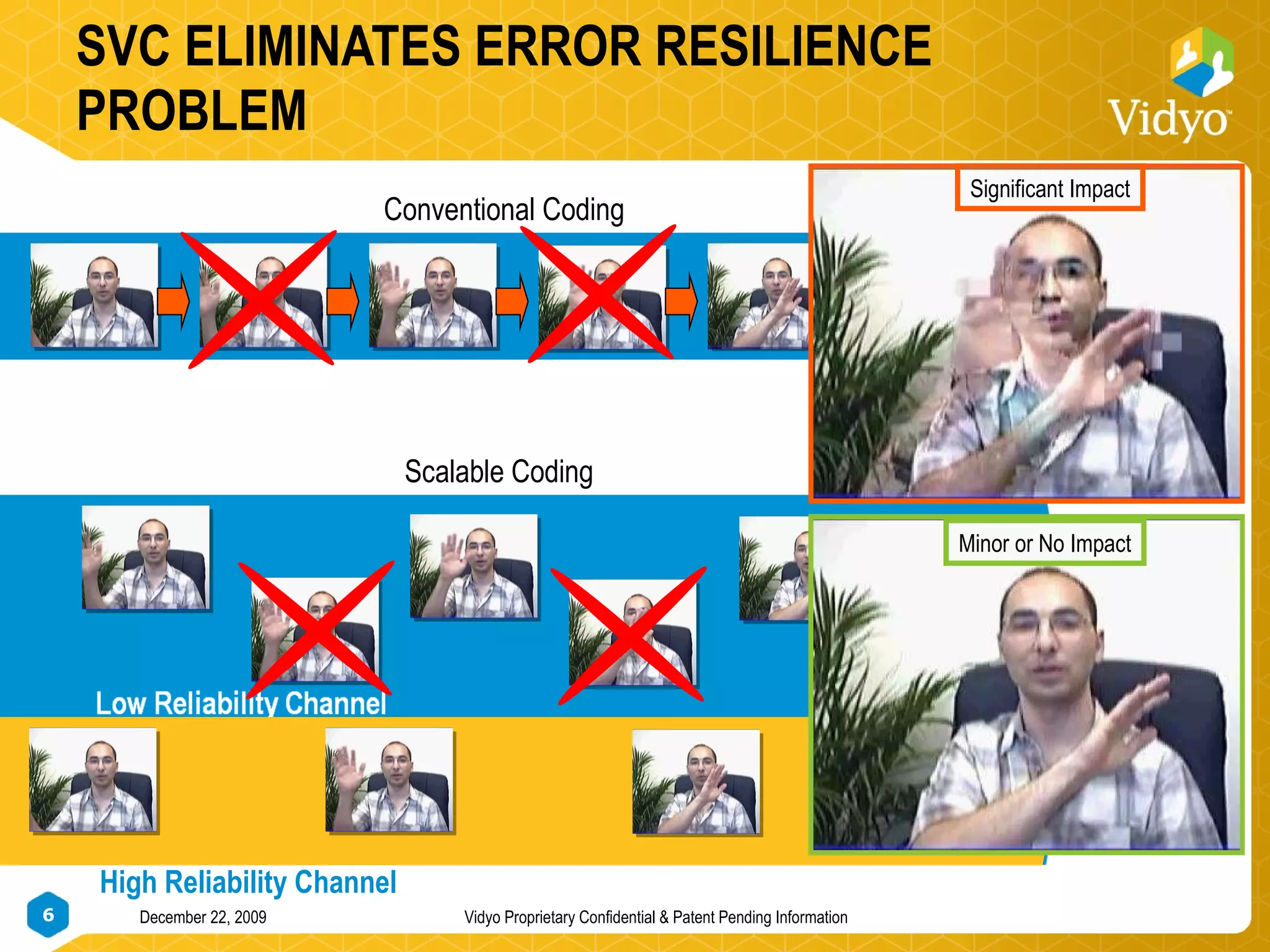
SVC ELIMINATES ERROR RESILIENCE PROBLEM Conventional Coding Scalable Coding High Reliability Channel Significant Impact Minor or No Impact
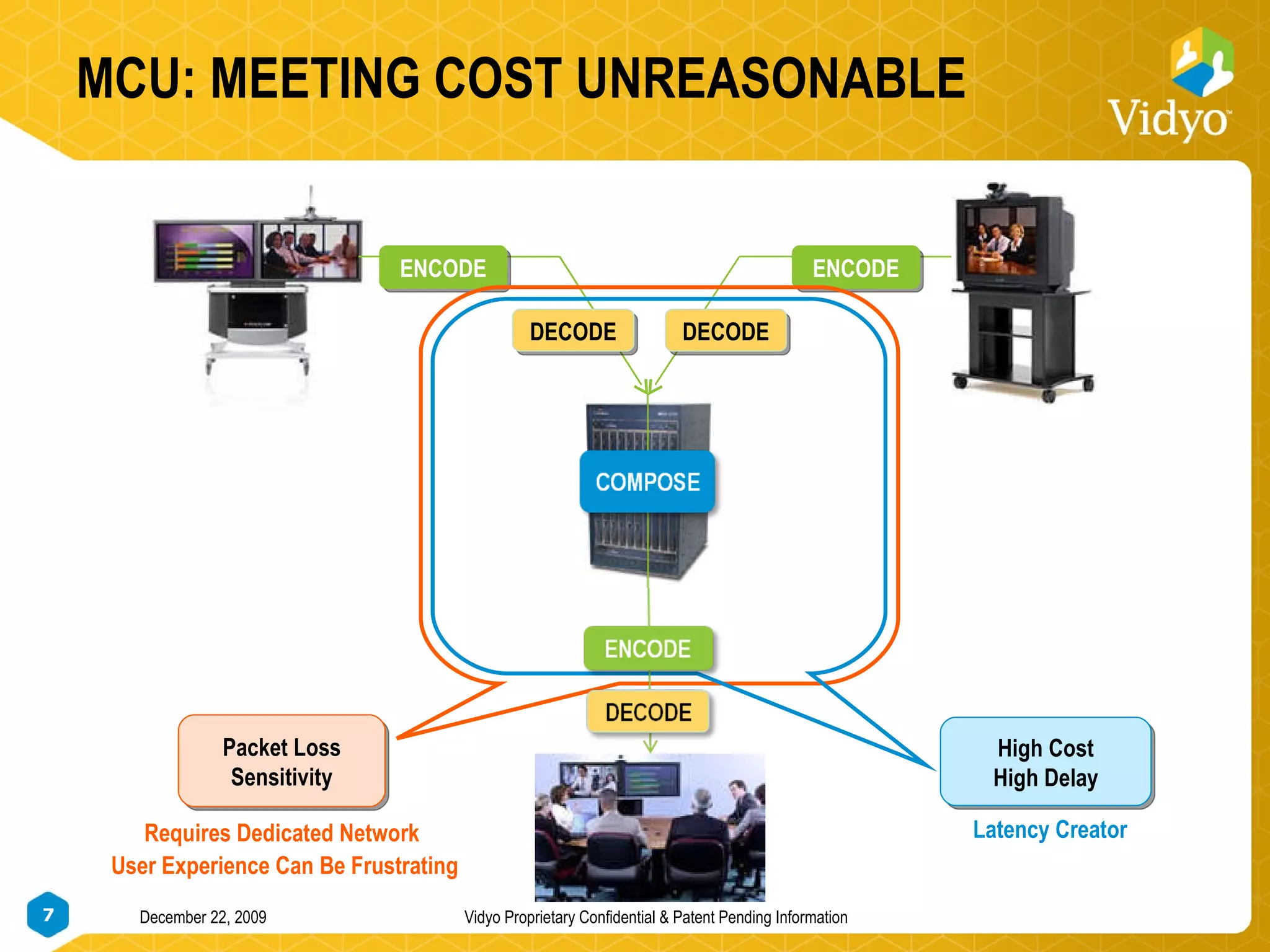
MCU: MEETING COST UNREASONABLE ENCODE DECODE ENCODE DECODE Latency Creator Packet Loss Sensitivity High Cost High Delay Requires Dedicated Network User Experience Can Be Frustrating
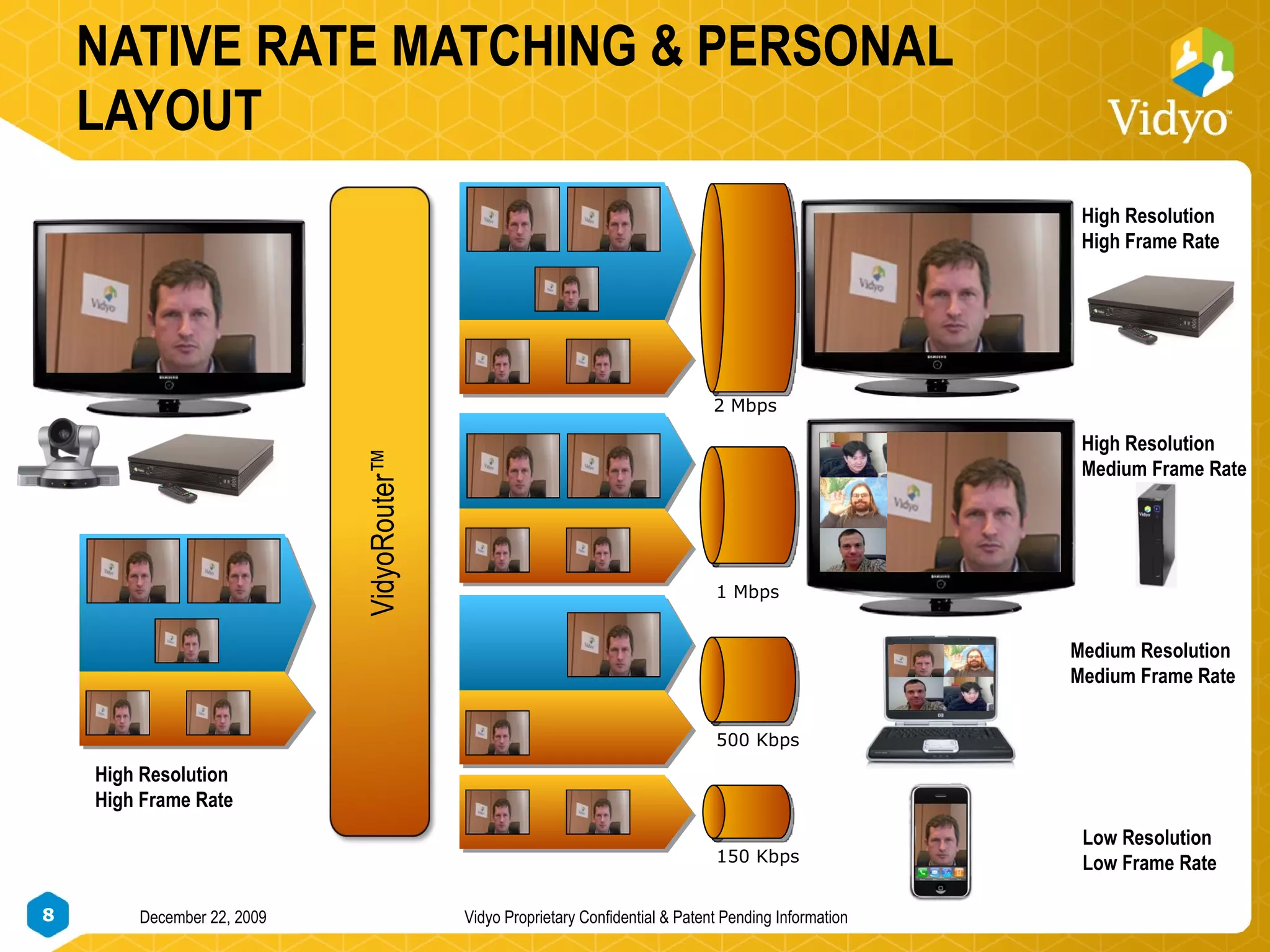
NATIVE RATE MATCHING & PERSONAL LAYOUT 1 Mbps 500 Kbps 150 Kbps VidyoRouter™ High Resolution High Frame Rate Low Resolution Low Frame Rate 2 Mbps High Resolution High Frame Rate High Resolution Medium Frame Rate Medium Resolution Medium Frame Rate
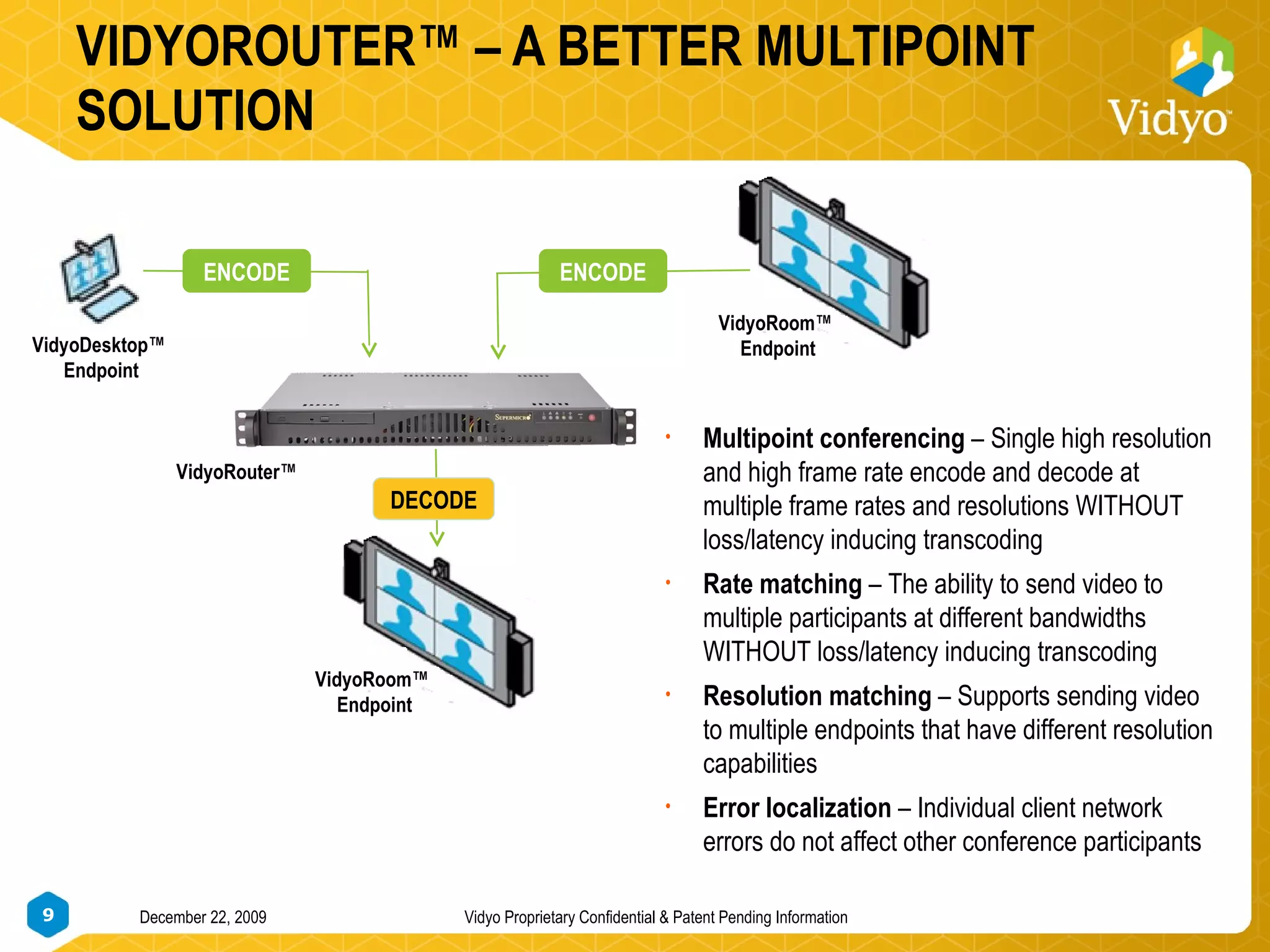
VIDYOROUTER™ – A BETTER MULTIPOINT SOLUTION VidyoRoom™  Endpoint VidyoDesktop™  Endpoint VidyoRoom™  Endpoint ENCODE DECODE ENCODE VidyoRouter™  Multipoint conferencing  – Single high resolution and high frame rate encode and decode at multiple frame rates and resolutions WITHOUT loss/latency inducing transcoding Rate matching  – The ability to send video to multiple participants at different bandwidths WITHOUT loss/latency inducing transcoding Resolution matching  – Supports sending video to multiple endpoints that have different resolution capabilities Error localization  – Individual client network errors do not affect other conference participants
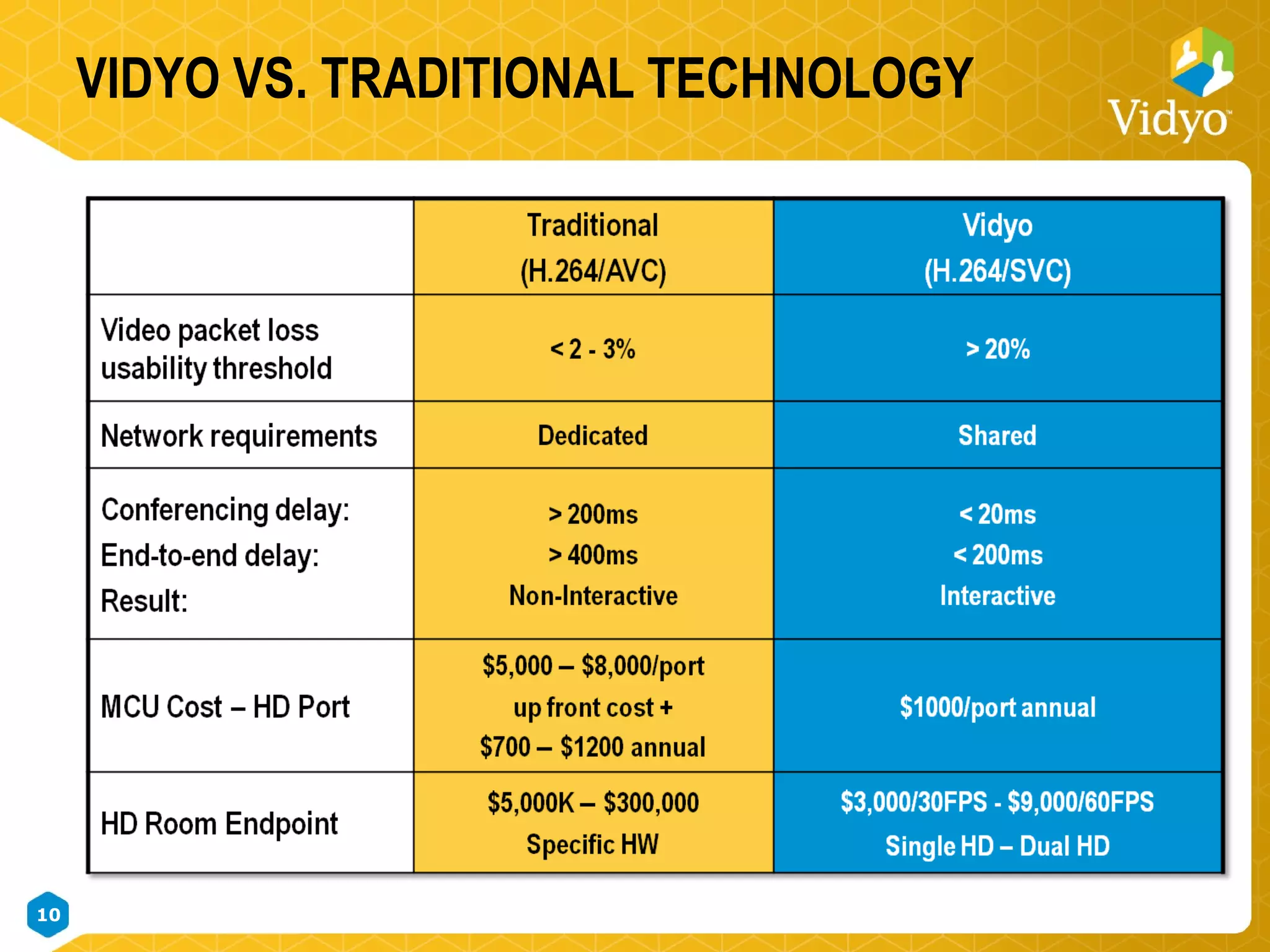
VIDYO VS. TRADITIONAL TECHNOLOGY
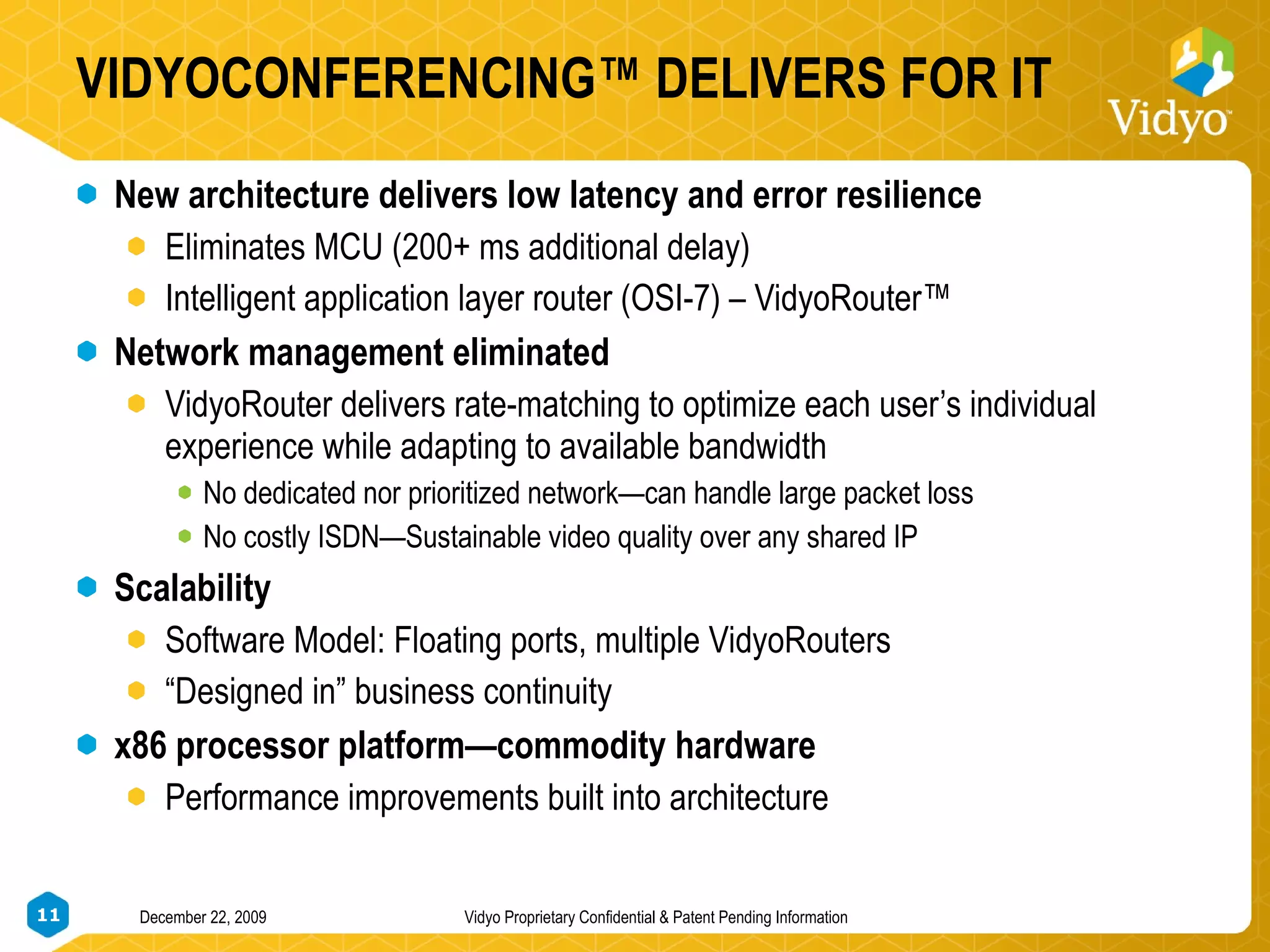
VIDYOCONFERENCING™ DELIVERS FOR IT New architecture delivers low latency and error resilience Eliminates MCU (200+ ms additional delay) Intelligent application layer router (OSI-7) – VidyoRouter™ Network management eliminated VidyoRouter delivers rate-matching to optimize each user’s individual experience while adapting to available bandwidth No dedicated nor prioritized network—can handle large packet loss No costly ISDN—Sustainable video quality over any shared IP Scalability  Software Model: Floating ports, multiple VidyoRouters “ Designed in” business continuity x86 processor platform—commodity hardware Performance improvements built into architecture
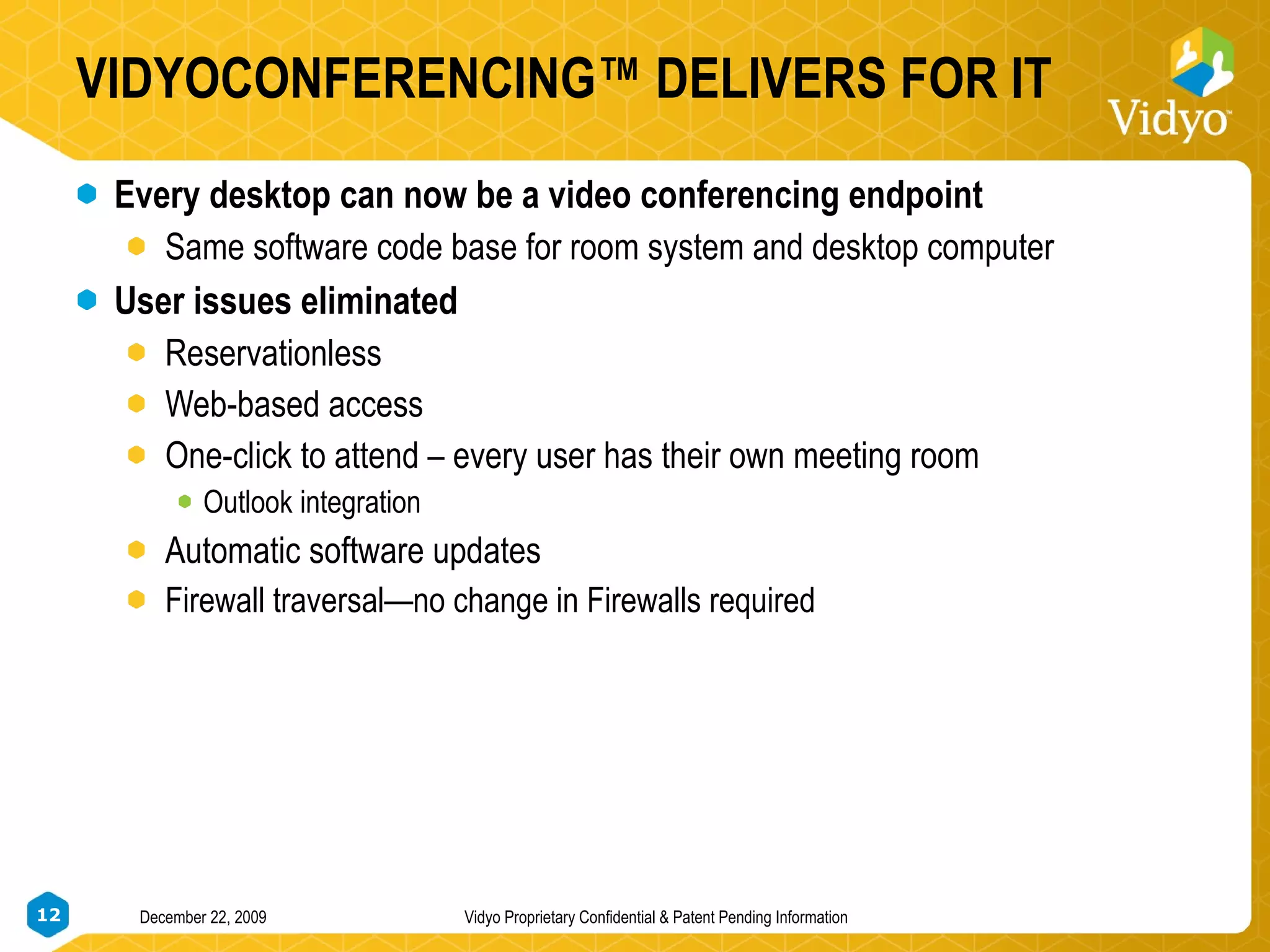
VIDYOCONFERENCING™ DELIVERS FOR IT Every desktop can now be a video conferencing endpoint Same software code base for room system and desktop computer User issues eliminated Reservationless  Web-based access One-click to attend – every user has their own meeting room Outlook integration Automatic software updates Firewall traversal—no change in Firewalls required
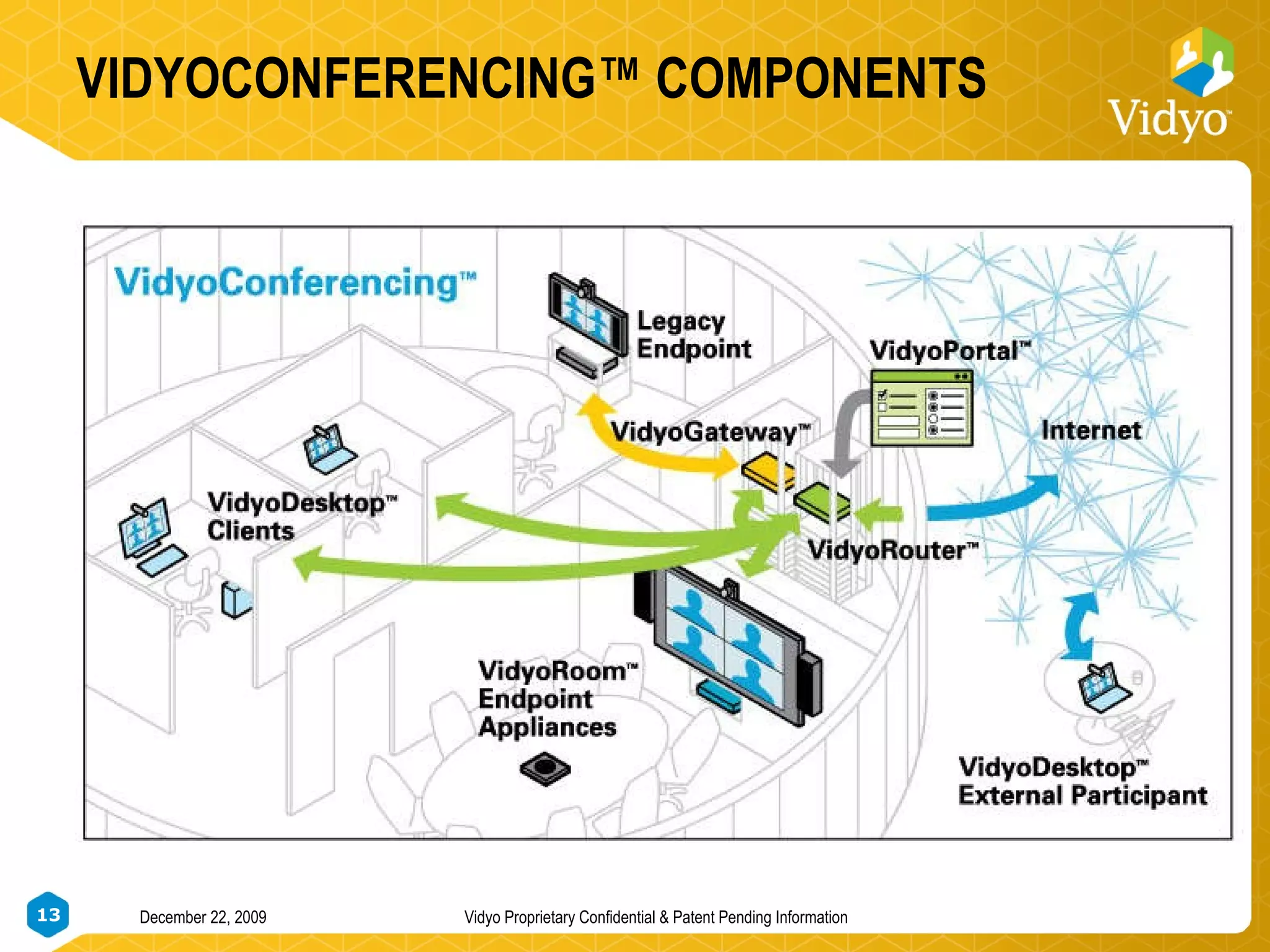
VIDYOCONFERENCING™ COMPONENTS December 22, 2009 Vidyo Proprietary Confidential & Patent Pending Information
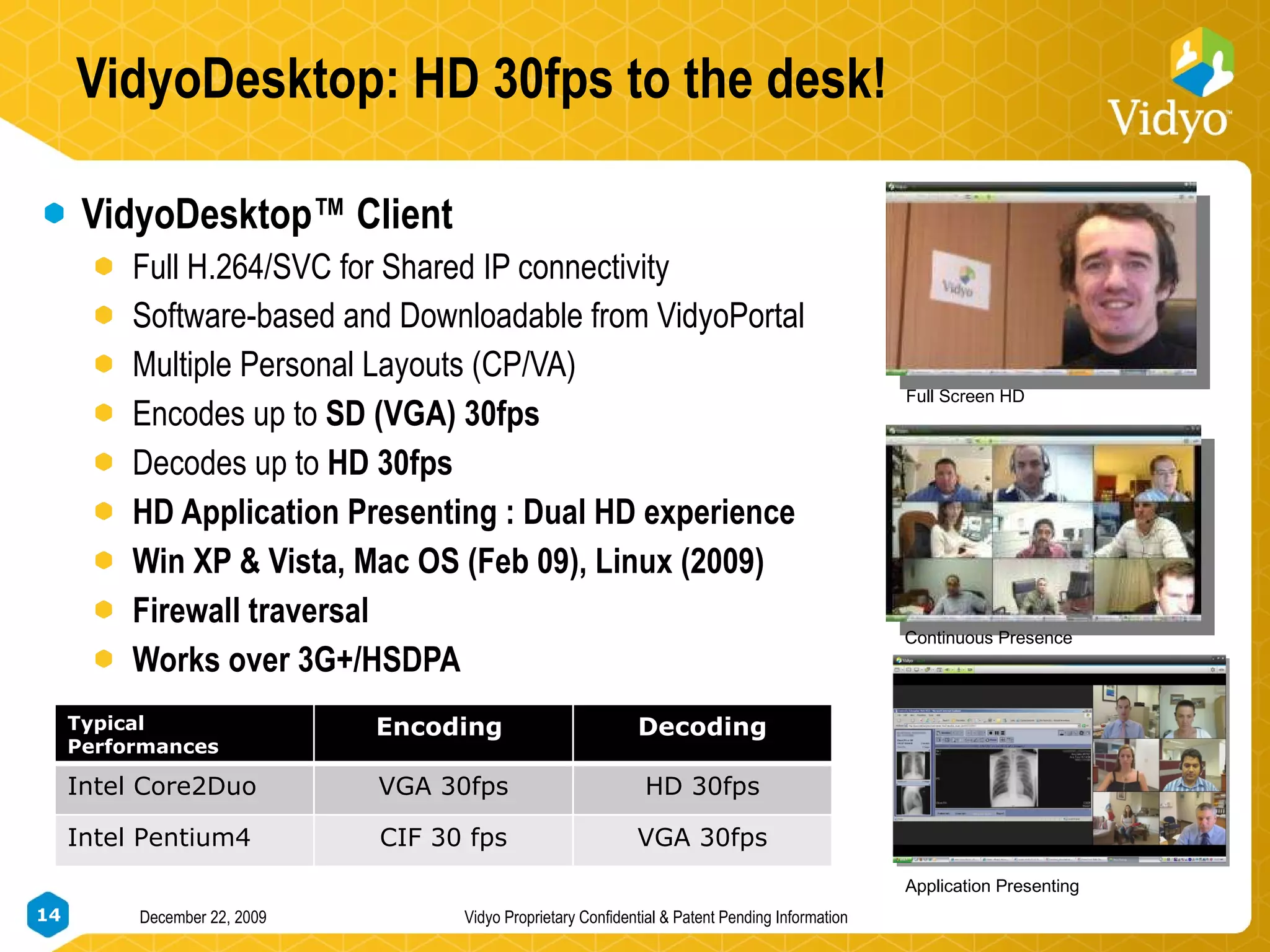
VidyoDesktop: HD 30fps to the desk! VidyoDesktop™ Client Full H.264/SVC for Shared IP connectivity Software-based and Downloadable from VidyoPortal Multiple Personal Layouts (CP/VA) Encodes up to  SD (VGA) 30fps Decodes up to  HD 30fps HD Application Presenting : Dual HD experience Win XP & Vista, Mac OS (Feb 09), Linux (2009) Firewall traversal Works over 3G+/HSDPA Full Screen HD Continuous Presence Application Presenting Typical Performances Encoding  Decoding Intel Core2Duo VGA 30fps HD 30fps Intel Pentium4 CIF 30 fps VGA 30fps
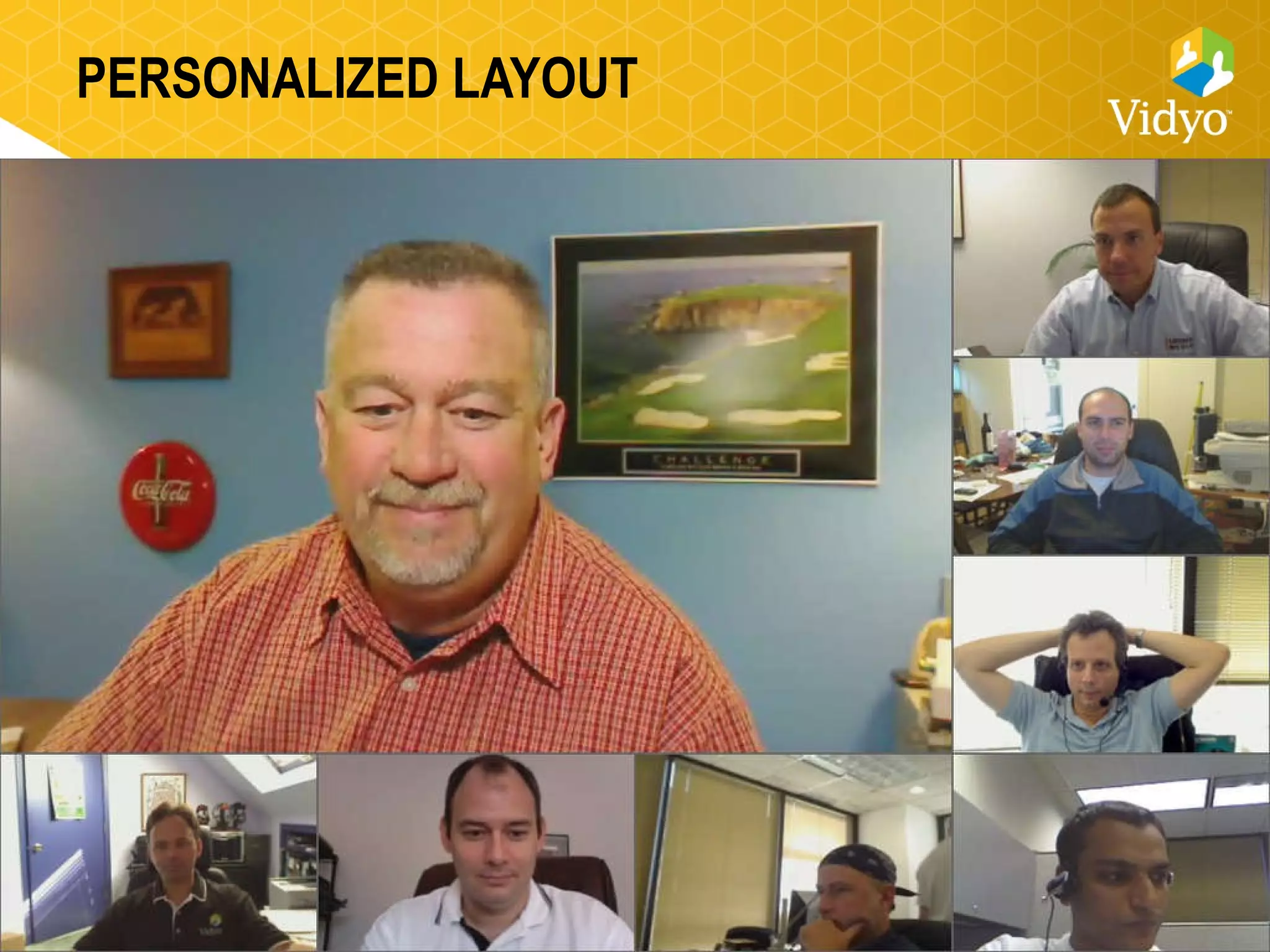
PERSONALIZED LAYOUT
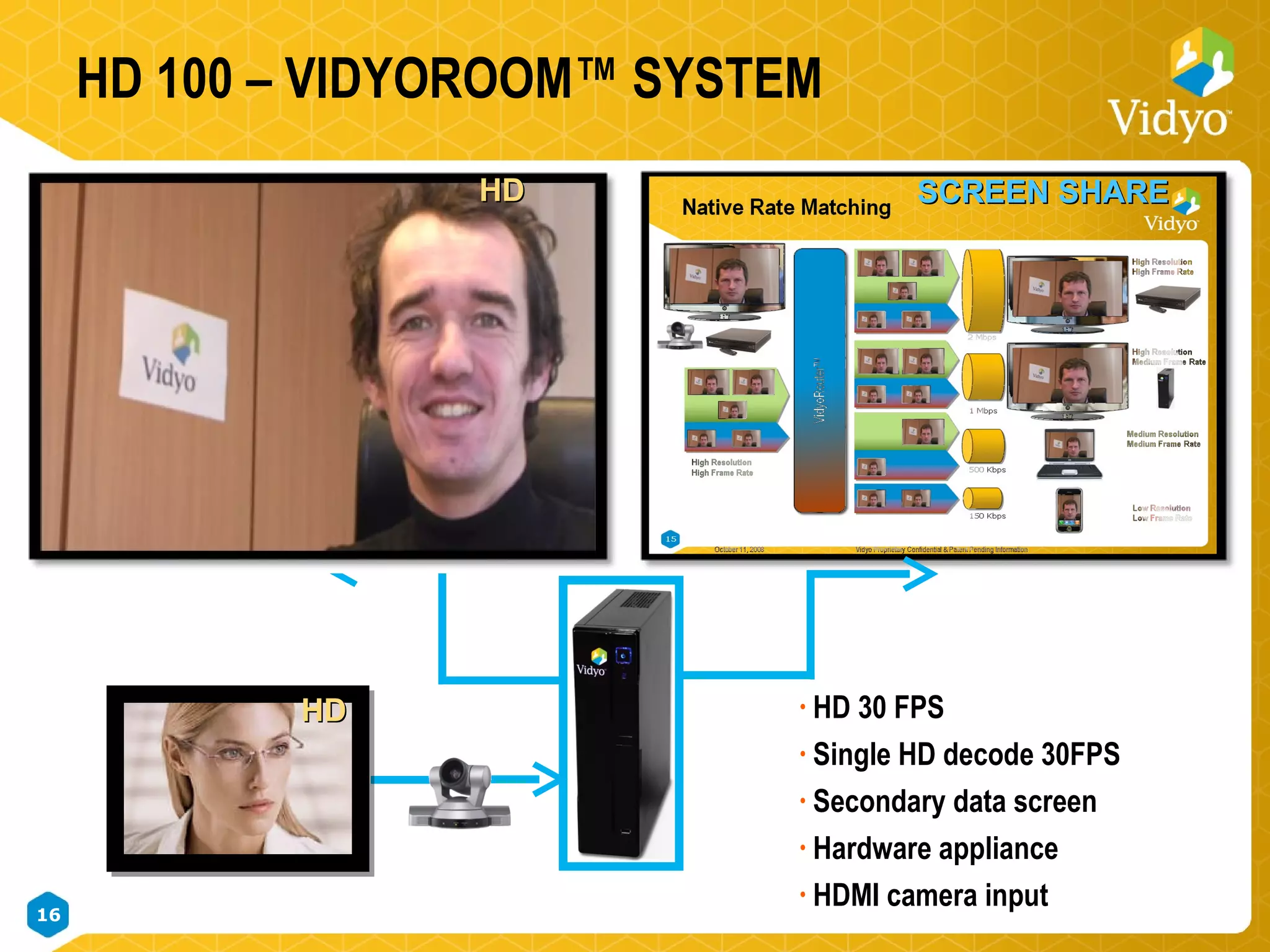
HD 100 – VIDYOROOM™ SYSTEM HD 30 FPS Single HD decode 30FPS Secondary data screen Hardware appliance HDMI camera input SCREEN SHARE HD  HD
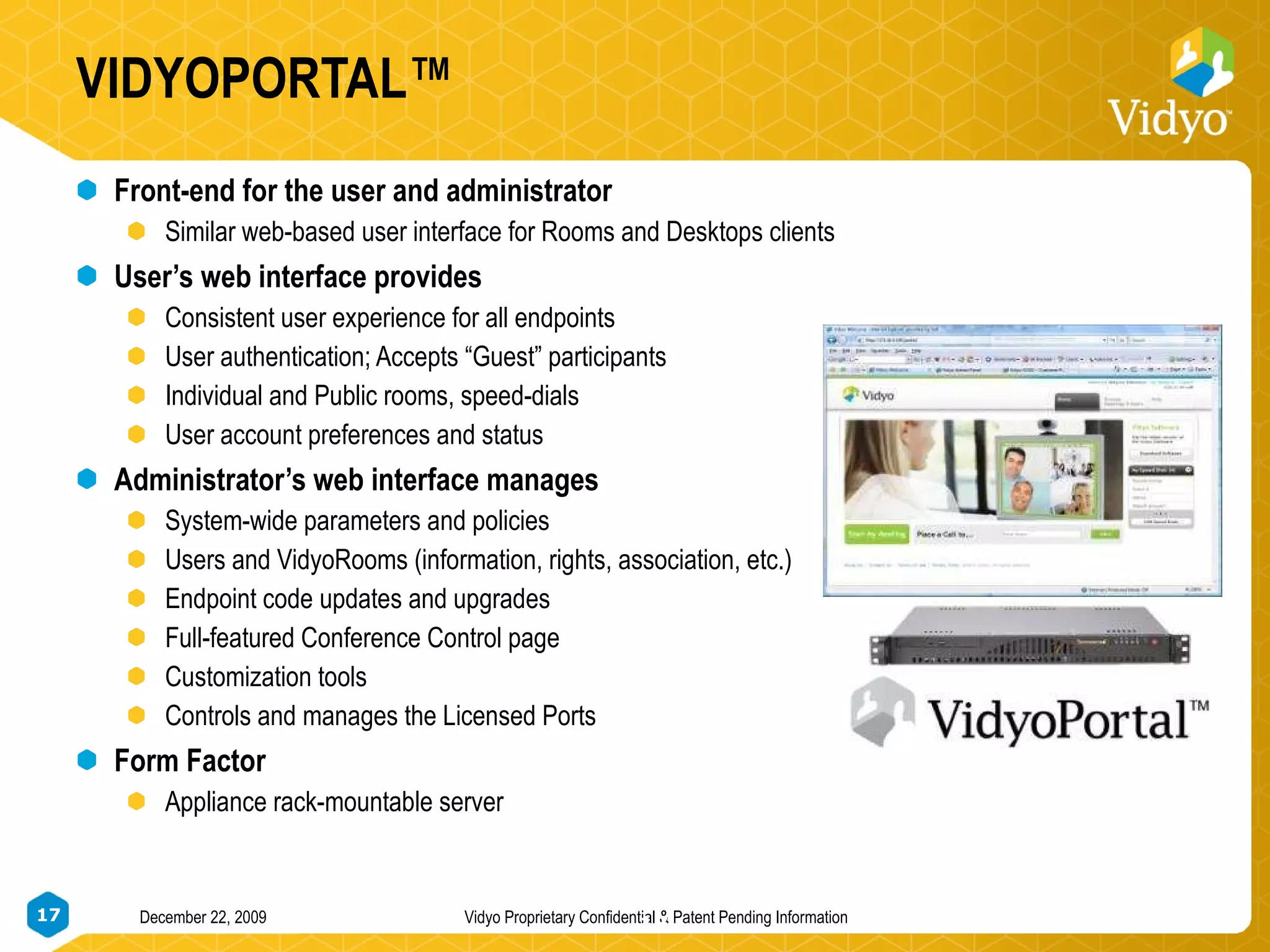
VIDYOPORTAL™ Front-end for the user and administrator Similar web-based user interface for Rooms and Desktops clients User’s web interface provides Consistent user experience for all endpoints User authentication; Accepts “Guest” participants  Individual and Public rooms, speed-dials User account preferences and status Administrator’s web interface manages System-wide parameters and policies Users and VidyoRooms (information, rights, association, etc.) Endpoint code updates and upgrades Full-featured Conference Control page Customization tools Controls and manages the Licensed Ports Form Factor Appliance rack-mountable server
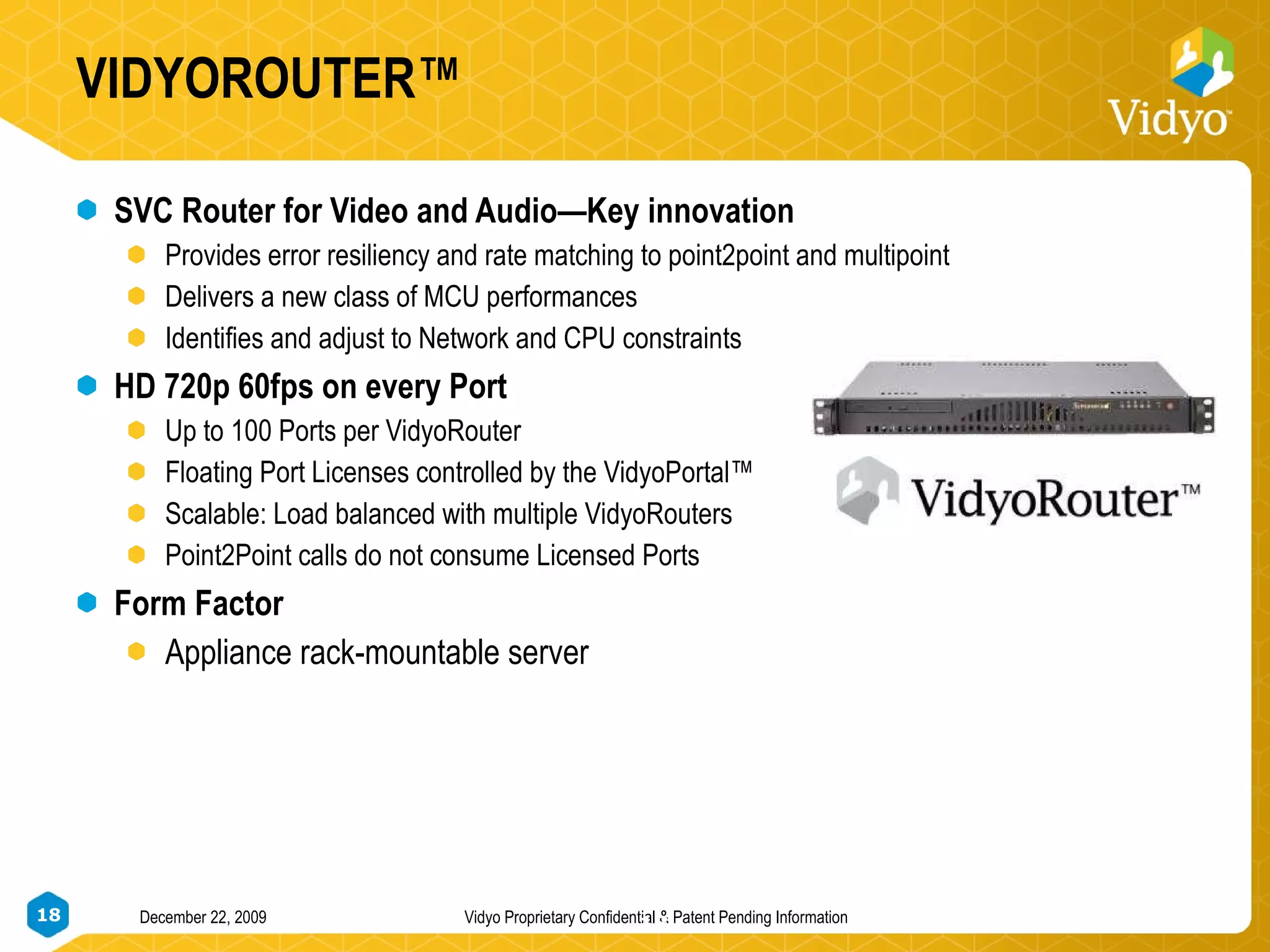
VIDYOROUTER™ SVC Router for Video and Audio—Key innovation Provides error resiliency and rate matching to point2point and multipoint Delivers a new class of MCU performances Identifies and adjust to Network and CPU constraints HD 720p 60fps on every Port Up to 100 Ports per VidyoRouter  Floating Port Licenses controlled by the VidyoPortal™ Scalable: Load balanced with multiple VidyoRouters Point2Point calls do not consume Licensed Ports Form Factor Appliance rack-mountable server
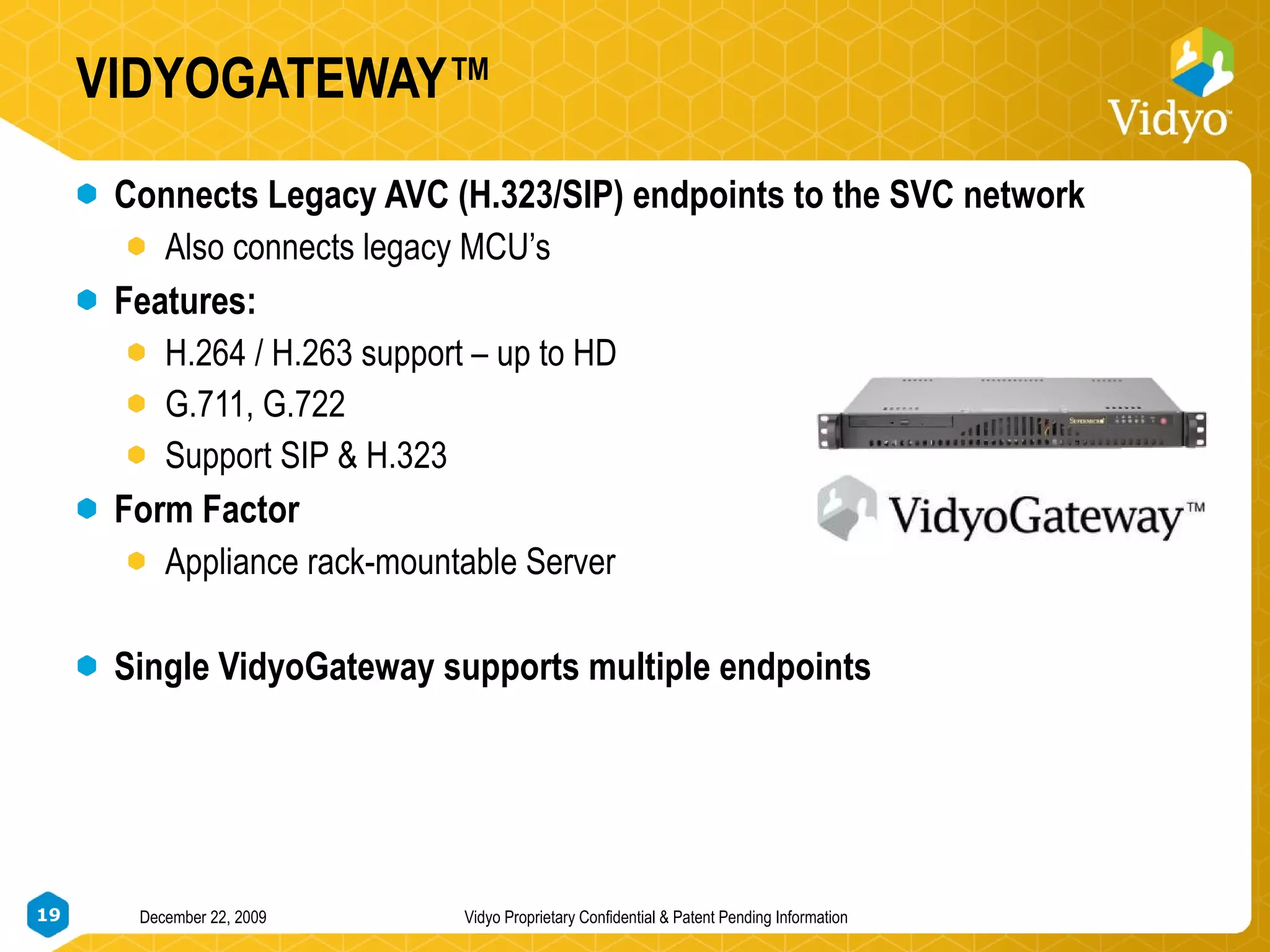
VIDYOGATEWAY™ Connects Legacy AVC (H.323/SIP) endpoints to the SVC network Also connects legacy MCU’s Features: H.264 / H.263 support – up to HD G.711, G.722 Support SIP & H.323 Form Factor Appliance rack-mountable Server Single VidyoGateway supports multiple endpoints
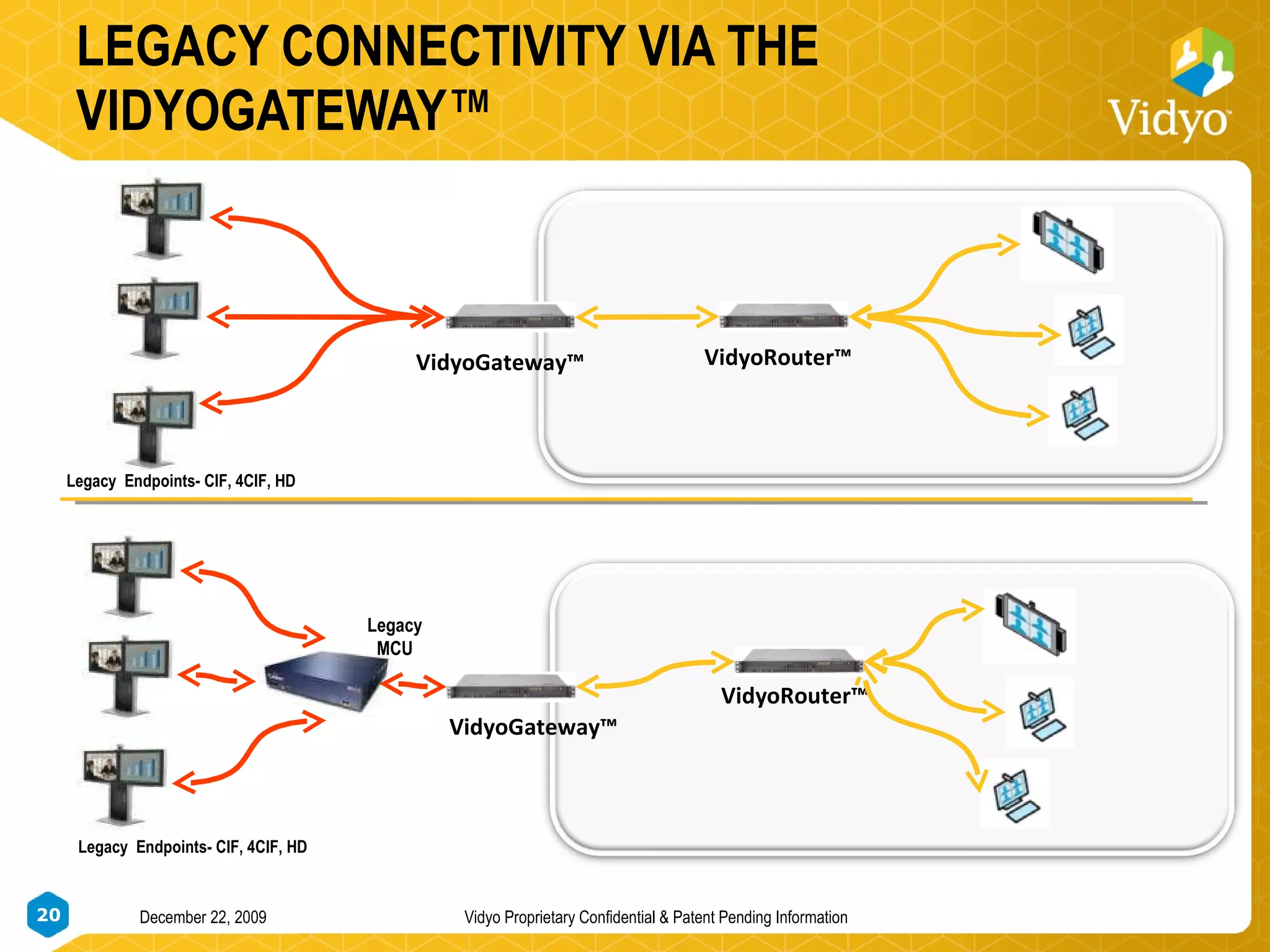
LEGACY CONNECTIVITY VIA THE VIDYOGATEWAY™ VidyoGateway™ Legacy  Endpoints- CIF, 4CIF, HD VidyoRouter™ Legacy MCU VidyoGateway™ VidyoRouter™ Legacy  Endpoints- CIF, 4CIF, HD
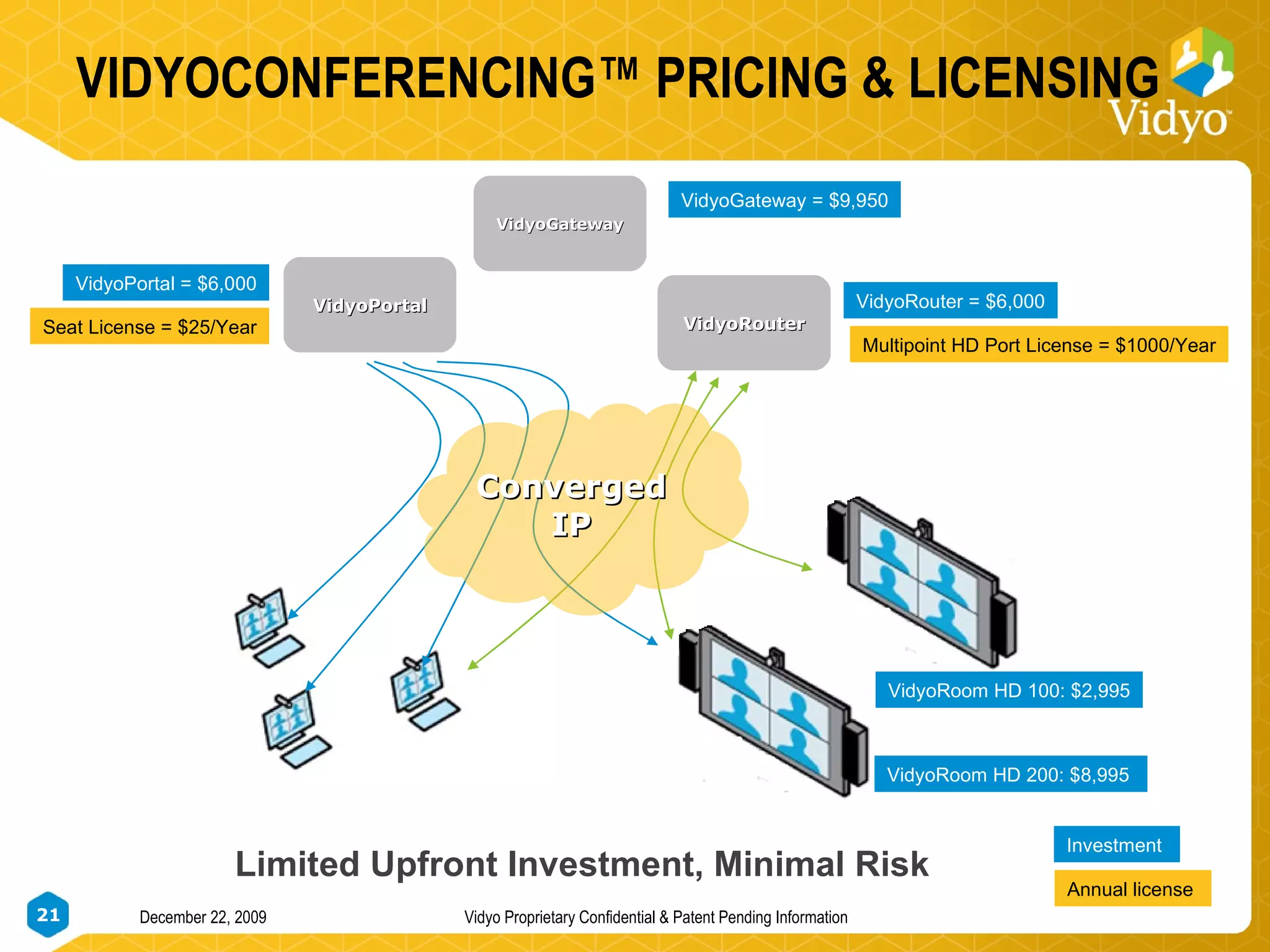
VIDYOCONFERENCING™ PRICING & LICENSING VidyoRouter = $6,000 VidyoPortal VidyoRouter VidyoRoom HD 200: $8,995  VidyoGateway Multipoint HD Port License = $1000/Year VidyoPortal = $6,000 Seat License = $25/Year Limited Upfront Investment, Minimal Risk Investment  Annual license  Converged IP VidyoGateway = $9,950 VidyoRoom HD 100: $2,995
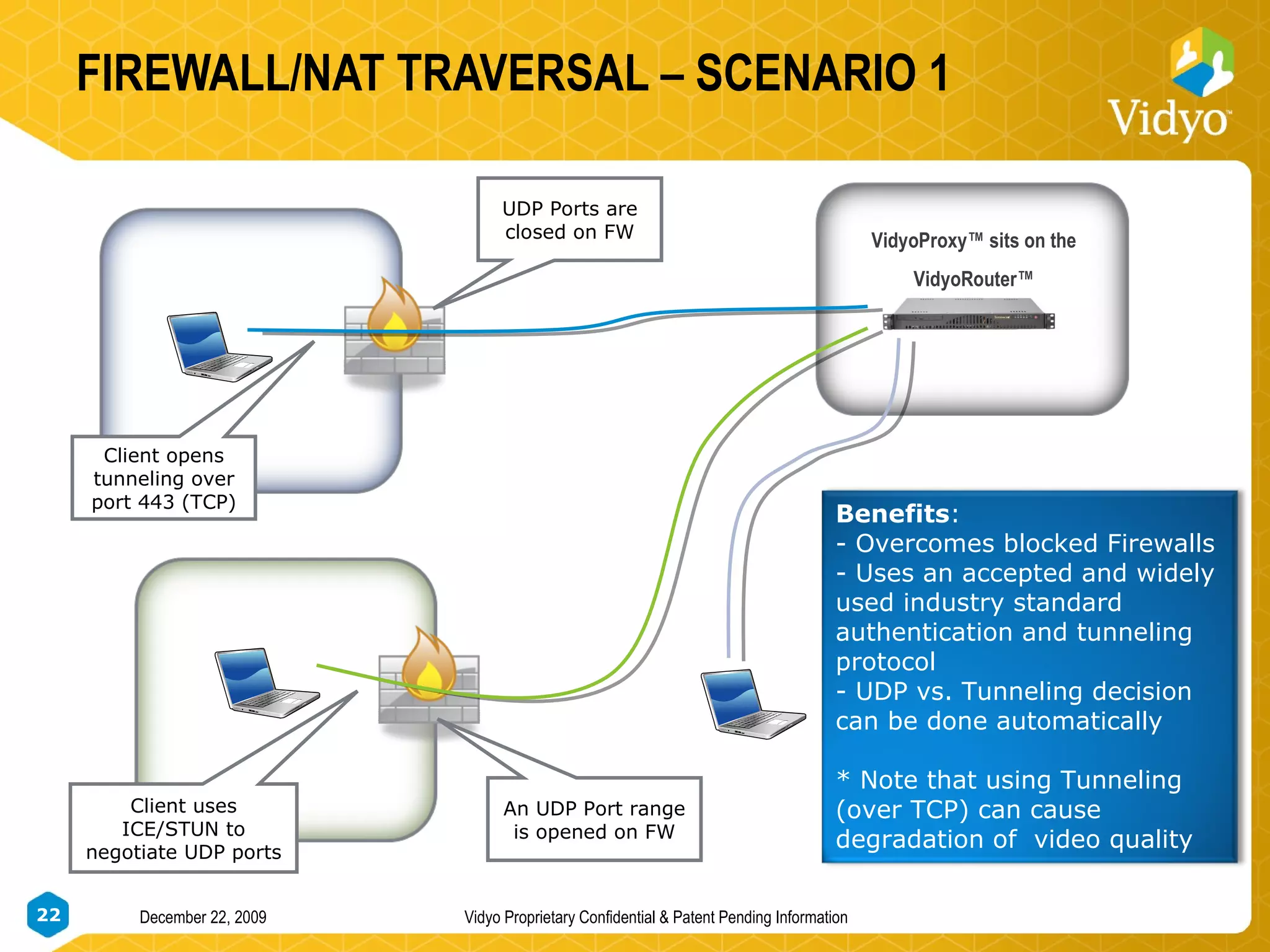
FIREWALL/NAT TRAVERSAL – SCENARIO 1 VidyoProxy™ sits on the  VidyoRouter™ UDP Ports are closed on FW Client opens tunneling over port 443 (TCP) An UDP Port range is opened on FW Client uses ICE/STUN to negotiate UDP ports Benefits : Overcomes blocked Firewalls Uses an accepted and widely used industry standard authentication and tunneling protocol UDP vs. Tunneling decision can be done automatically * Note that using Tunneling (over TCP) can cause degradation of  video quality
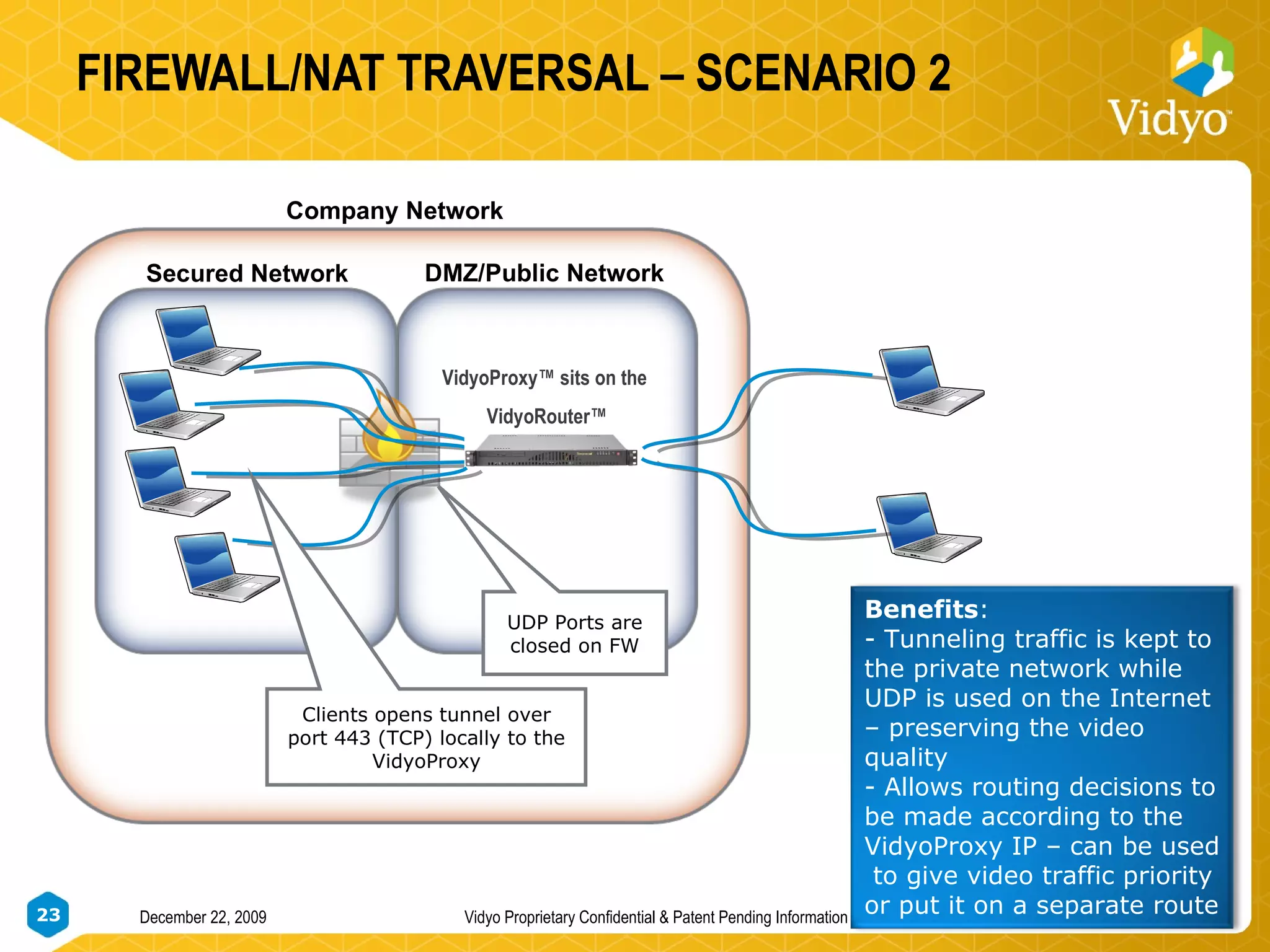
FIREWALL/NAT TRAVERSAL – SCENARIO 2 UDP Ports are closed on FW VidyoProxy™ sits on the  VidyoRouter™ Clients opens tunnel over port 443 (TCP) locally to the VidyoProxy Secured Network DMZ/Public Network Company Network Benefits : Tunneling traffic is kept to the private network while UDP is used on the Internet – preserving the video quality Allows routing decisions to be made according to the VidyoProxy IP – can be used  to give video traffic priority or put it on a separate route
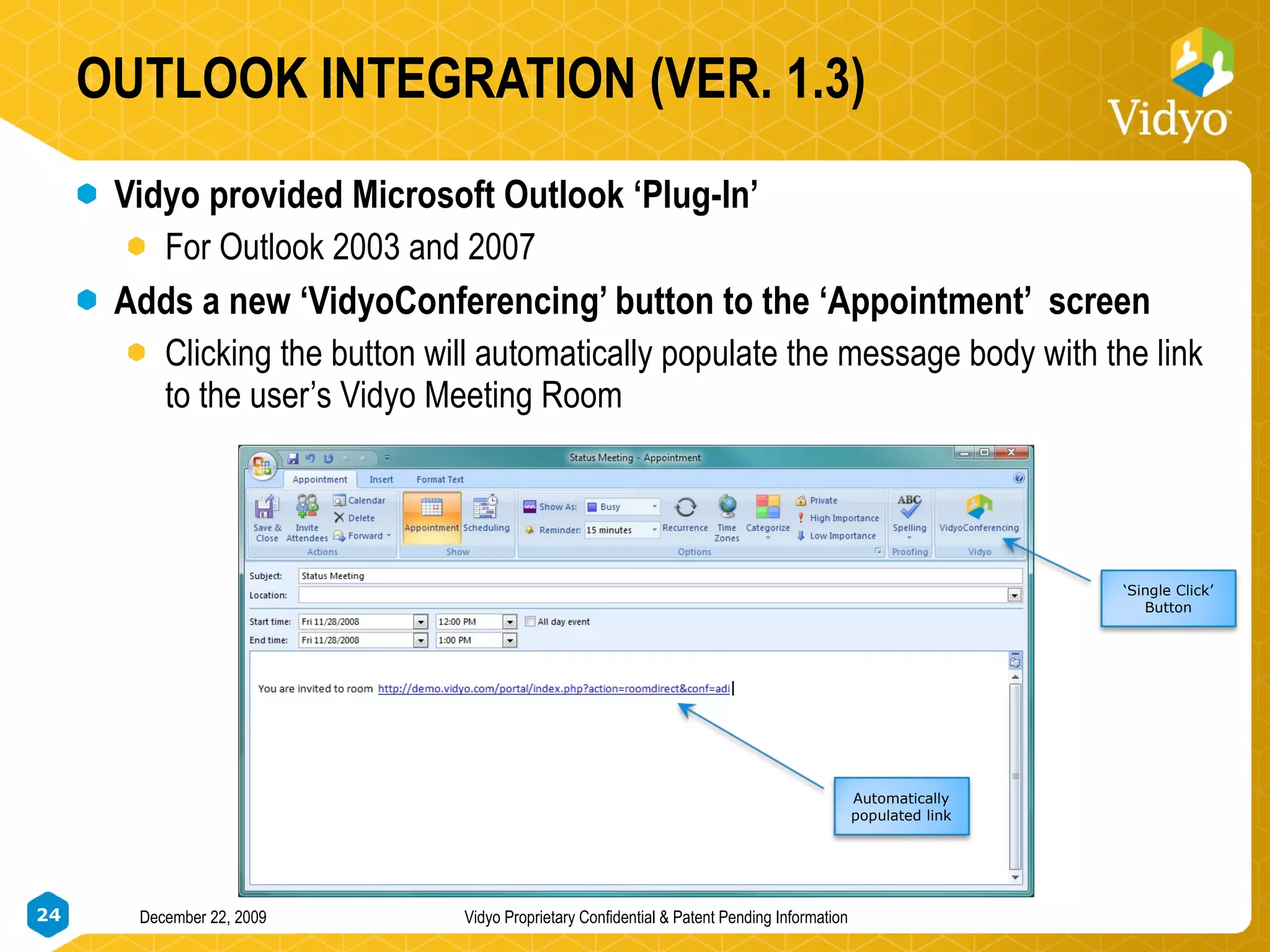
OUTLOOK INTEGRATION (VER. 1.3) Vidyo provided Microsoft Outlook ‘Plug-In’ For Outlook 2003 and 2007 Adds a new ‘VidyoConferencing’ button to the ‘Appointment’  screen Clicking the button will automatically populate the message body with the link to the user’s Vidyo Meeting Room  Automatically populated link ‘ Single Click’ Button

New Enterprise Video System

  • 1.
    THE ROAD TO PERSONAL TELEPRESENCE Video Conferencing that Works in the Real World December 22, 2009 Vidyo Proprietary Confidential & Patent Pending Information
  • 2.
    WHY IS NOWTHE TIME FOR VIDEO CONFERENCING? Organizations Are Changing Organizations want to improve productivity dramatically Collaboration that enables the cycle time to decrease at lower cost Green initiatives have focused attention on travel options Telework options are part of most organizations plans Technology Has Changed High quality video at much lower cost HD under $10,000 Network bandwidth available at reasonable costs Remote locations including homes Public Awareness is Already There Cisco telepresence initiative has awakened CEO desire From YouTube to iChat, consumers are using video
  • 3.
    INTRODUCING PERSONAL TELEPRESENCEAn Immersive, Addictive and Natural Experience Best mix of Highest Resolution , Highest Frame Rate and Lowest Latency Anyone Not just executives, but everyone with access to a personal computer and broadband access to the Internet Anywhere HQ, Regional office, Home office, Hotel room, Starbuck’s, 3G+… anywhere Telepresence rooms, Conference rooms, Desktops, Laptops, ultra-laptops Anytime No reservations & not limited to room availability, but instantly available at anytime Vidyo significantly improves price/performance while enabling the integration of all these applications into a single experience.
  • 4.
    WHAT’S WRONG WITHIP VIDEO CONFERENCING? Unsolved technical barriers High sensitivity to network conditions Packet loss degrades quality Too much latency Performance and price are not in-line with user expectations High quality enterprise-wide solutions are cost prohibitive Dedicated devices and networks No acceptable solutions for desktop users No ‘universal connectivity’ limits value of videoconferencing systems Between enterprises Systems within the enterprise
  • 5.
    VIDYOCONFERENCING™ DELIVERS Thefirst solution truly designed for converged IP networks Based on a New Standard: H.264/SVC Key Advantages Overall much better user experience Superior error resilience Always provides the best mix of Frame Rate/Lowest Latency/ Resolution Much lower delay in rate-matched multipoint up to 60 fps Result  Natural image Single, unified video solution from Telepresence to Desktop Reaches any desktop or laptop over LAN, WAN, Internet, 3G – wired or wireless HD Rooms and Desktops are connected over converged IP networks Scalable solution (technically and financially) that fits key requirements of a large deployment toward the desktop (Internet model)
  • 6.
    SVC ELIMINATES ERRORRESILIENCE PROBLEM Conventional Coding Scalable Coding High Reliability Channel Significant Impact Minor or No Impact
  • 7.
    MCU: MEETING COSTUNREASONABLE ENCODE DECODE ENCODE DECODE Latency Creator Packet Loss Sensitivity High Cost High Delay Requires Dedicated Network User Experience Can Be Frustrating
  • 8.
    NATIVE RATE MATCHING& PERSONAL LAYOUT 1 Mbps 500 Kbps 150 Kbps VidyoRouter™ High Resolution High Frame Rate Low Resolution Low Frame Rate 2 Mbps High Resolution High Frame Rate High Resolution Medium Frame Rate Medium Resolution Medium Frame Rate
  • 9.
    VIDYOROUTER™ – ABETTER MULTIPOINT SOLUTION VidyoRoom™ Endpoint VidyoDesktop™ Endpoint VidyoRoom™ Endpoint ENCODE DECODE ENCODE VidyoRouter™ Multipoint conferencing – Single high resolution and high frame rate encode and decode at multiple frame rates and resolutions WITHOUT loss/latency inducing transcoding Rate matching – The ability to send video to multiple participants at different bandwidths WITHOUT loss/latency inducing transcoding Resolution matching – Supports sending video to multiple endpoints that have different resolution capabilities Error localization – Individual client network errors do not affect other conference participants
  • 10.
  • 11.
    VIDYOCONFERENCING™ DELIVERS FORIT New architecture delivers low latency and error resilience Eliminates MCU (200+ ms additional delay) Intelligent application layer router (OSI-7) – VidyoRouter™ Network management eliminated VidyoRouter delivers rate-matching to optimize each user’s individual experience while adapting to available bandwidth No dedicated nor prioritized network—can handle large packet loss No costly ISDN—Sustainable video quality over any shared IP Scalability Software Model: Floating ports, multiple VidyoRouters “ Designed in” business continuity x86 processor platform—commodity hardware Performance improvements built into architecture
  • 12.
    VIDYOCONFERENCING™ DELIVERS FORIT Every desktop can now be a video conferencing endpoint Same software code base for room system and desktop computer User issues eliminated Reservationless Web-based access One-click to attend – every user has their own meeting room Outlook integration Automatic software updates Firewall traversal—no change in Firewalls required
  • 13.
    VIDYOCONFERENCING™ COMPONENTS December22, 2009 Vidyo Proprietary Confidential & Patent Pending Information
  • 14.
    VidyoDesktop: HD 30fpsto the desk! VidyoDesktop™ Client Full H.264/SVC for Shared IP connectivity Software-based and Downloadable from VidyoPortal Multiple Personal Layouts (CP/VA) Encodes up to SD (VGA) 30fps Decodes up to HD 30fps HD Application Presenting : Dual HD experience Win XP & Vista, Mac OS (Feb 09), Linux (2009) Firewall traversal Works over 3G+/HSDPA Full Screen HD Continuous Presence Application Presenting Typical Performances Encoding Decoding Intel Core2Duo VGA 30fps HD 30fps Intel Pentium4 CIF 30 fps VGA 30fps
  • 15.
  • 16.
    HD 100 –VIDYOROOM™ SYSTEM HD 30 FPS Single HD decode 30FPS Secondary data screen Hardware appliance HDMI camera input SCREEN SHARE HD HD
  • 17.
    VIDYOPORTAL™ Front-end forthe user and administrator Similar web-based user interface for Rooms and Desktops clients User’s web interface provides Consistent user experience for all endpoints User authentication; Accepts “Guest” participants Individual and Public rooms, speed-dials User account preferences and status Administrator’s web interface manages System-wide parameters and policies Users and VidyoRooms (information, rights, association, etc.) Endpoint code updates and upgrades Full-featured Conference Control page Customization tools Controls and manages the Licensed Ports Form Factor Appliance rack-mountable server
  • 18.
    VIDYOROUTER™ SVC Routerfor Video and Audio—Key innovation Provides error resiliency and rate matching to point2point and multipoint Delivers a new class of MCU performances Identifies and adjust to Network and CPU constraints HD 720p 60fps on every Port Up to 100 Ports per VidyoRouter Floating Port Licenses controlled by the VidyoPortal™ Scalable: Load balanced with multiple VidyoRouters Point2Point calls do not consume Licensed Ports Form Factor Appliance rack-mountable server
  • 19.
    VIDYOGATEWAY™ Connects LegacyAVC (H.323/SIP) endpoints to the SVC network Also connects legacy MCU’s Features: H.264 / H.263 support – up to HD G.711, G.722 Support SIP & H.323 Form Factor Appliance rack-mountable Server Single VidyoGateway supports multiple endpoints
  • 20.
    LEGACY CONNECTIVITY VIATHE VIDYOGATEWAY™ VidyoGateway™ Legacy Endpoints- CIF, 4CIF, HD VidyoRouter™ Legacy MCU VidyoGateway™ VidyoRouter™ Legacy Endpoints- CIF, 4CIF, HD
  • 21.
    VIDYOCONFERENCING™ PRICING &LICENSING VidyoRouter = $6,000 VidyoPortal VidyoRouter VidyoRoom HD 200: $8,995 VidyoGateway Multipoint HD Port License = $1000/Year VidyoPortal = $6,000 Seat License = $25/Year Limited Upfront Investment, Minimal Risk Investment Annual license Converged IP VidyoGateway = $9,950 VidyoRoom HD 100: $2,995
  • 22.
    FIREWALL/NAT TRAVERSAL –SCENARIO 1 VidyoProxy™ sits on the VidyoRouter™ UDP Ports are closed on FW Client opens tunneling over port 443 (TCP) An UDP Port range is opened on FW Client uses ICE/STUN to negotiate UDP ports Benefits : Overcomes blocked Firewalls Uses an accepted and widely used industry standard authentication and tunneling protocol UDP vs. Tunneling decision can be done automatically * Note that using Tunneling (over TCP) can cause degradation of video quality
  • 23.
    FIREWALL/NAT TRAVERSAL –SCENARIO 2 UDP Ports are closed on FW VidyoProxy™ sits on the VidyoRouter™ Clients opens tunnel over port 443 (TCP) locally to the VidyoProxy Secured Network DMZ/Public Network Company Network Benefits : Tunneling traffic is kept to the private network while UDP is used on the Internet – preserving the video quality Allows routing decisions to be made according to the VidyoProxy IP – can be used to give video traffic priority or put it on a separate route
  • 24.
    OUTLOOK INTEGRATION (VER.1.3) Vidyo provided Microsoft Outlook ‘Plug-In’ For Outlook 2003 and 2007 Adds a new ‘VidyoConferencing’ button to the ‘Appointment’ screen Clicking the button will automatically populate the message body with the link to the user’s Vidyo Meeting Room Automatically populated link ‘ Single Click’ Button