Introduction to Luminis CMS Presented by:  Roger Johnson ,  SunGard Higher Education Luminis CMS Organizational Consultant April 14, 2008 Course ID  0136
Session Description – Introduction to Luminis CMS Find out how  Luminis Content Management Suite  (CMS) empowers those outside of IT to create and edit Web content easily while reducing the IT department's need to maintain web pages.  Also learn how institutional  web design standards  can be balanced with varied departmental website needs.
Introduction Hi, my name is  Roger Johnson I will be your Avatar* for this session * Avatar-representation of a human in a virtual environment   Please ignore the narrator behind the monitor and please pay attention to me, up here. I’m the one who will be taking you through this tour of Luminis CMS
Introduction This session is meant for a non-technical audience and will show the value and benefits of using the   Luminis Content Management Suite (Luminis CMS)   in higher education This session will explain how Luminis CMS: Empowers  those outside of the IT department and lowers the IT burden of creating and maintaining Web content Helps departments  add and update content   easily  on the institution’s external and internal Websites Establishes  consistent look-and-feel , navigation, and branding throughout the institution’s internal and external websites Balances  cross-institutional needs with support for individual departmental character on the web
Agenda Problems  Faced by Higher Education Solutions  Provided by Web Content Management Overview   of   Web Content Management  Benefits  of the  Luminis Content Management Suite Overview by Role   of   Luminis Content Management Suite
Problems  Faced by Higher Education
The Content Management Problem Meet Peter, Webmaster at Wasatch University Peter has problems Don’t we all?
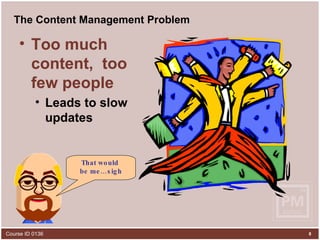
The Content Management Problem Too much content,  too few people Leads to slow updates That would  be me…sigh
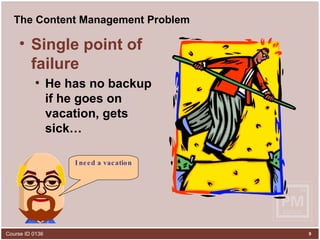
The Content Management Problem Single point of failure He has no backup if he goes on vacation, gets sick… I need a vacation
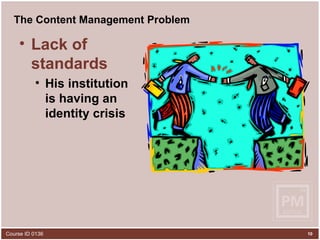
The Content Management Problem Lack of standards His institution  is having an  identity crisis
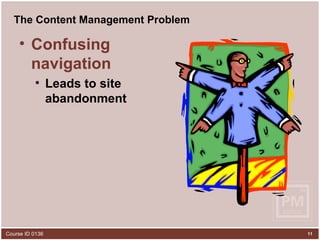
The Content Management Problem Confusing navigation Leads to site abandonment
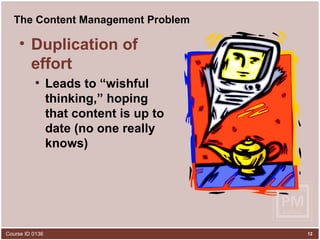
The Content Management Problem Duplication of effort Leads to “wishful thinking,” hoping that content is up to date (no one really knows)
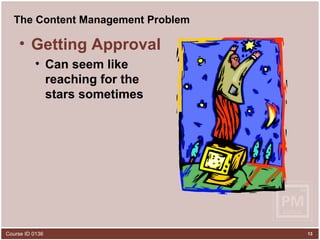
The Content Management Problem Getting Approval Can seem like reaching for the stars sometimes
Solutions  Provided by Web Content Management
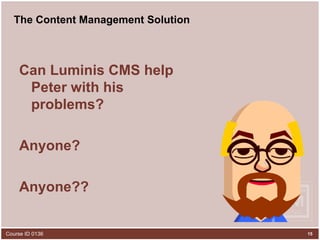
The Content Management Solution Can Luminis CMS help Peter with his problems? Anyone? Anyone??
The LCMS Solution Y  E  S!
The LCMS Solution Too much content,  too few people is solved by… Distributed authorship Subject Matter Expert (SME)  ownership  of content Woo hoo!
The LCMS Solution Single point of failure is solved by… Multiple   authorship coverage for illness coverage for vacation coverage for attrition
The LCMS Solution Lack of standards is solved by… Centralized control   Standards set by professionals enforced by templates implemented by layouts applied to pages Me Likey
The LCMS Solution Confusing navigation is solved by… Standardized navigation  scheme template based easily configurable consistent user experience
The LCMS Solution Duplication of effort is solved by… Content re-use componentization create once, use many places
The Content Management Solution Getting approval is solved by… Automated workflows Ad-hoc quickflows Portal inbox to access approval tasks
Overview  of Web Content Management
Definition A Web content management  system is a software application that manages content in  all  stages of its lifecycle Please explain
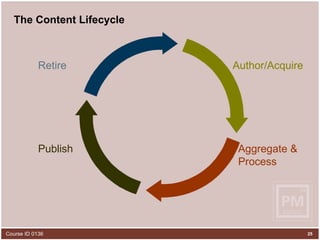
The Content Lifecycle Author/Acquire Retire Publish Aggregate & Process
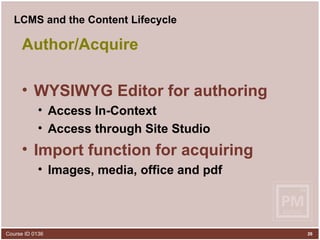
LCMS and the Content Lifecycle Author/Acquire WYSIWYG Editor for authoring Access In-Context Access through Site Studio Import function for acquiring Images, media, office and pdf
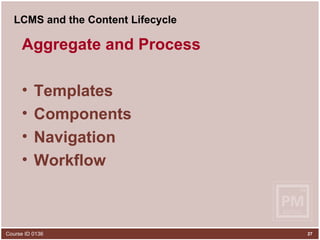
LCMS and the Content Lifecycle Aggregate and Process Templates  Components Navigation Workflow
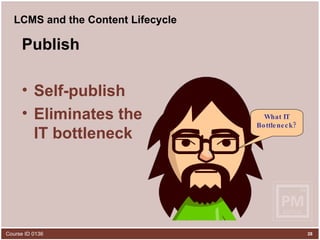
LCMS and the Content Lifecycle Publish Self-publish  Eliminates the  IT bottleneck What IT Bottleneck?
LCMS and the Content Lifecycle Retire Publish date Expiration date Did somebody say retire?
Benefits   of the Luminis Content Management Suite
Benefits of the Luminis Content Management Suite Web Content Management solution leveraging Documentum   Enterprise-class software Tailored for the needs of   Higher Education . Simplified  content creation   and editing Straightforward  workflow   management Delegated ,  non-technical web site   administration Customizable  page templating
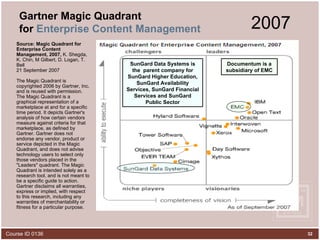
Gartner Magic Quadrant for  Enterprise Content Management Source: Magic Quadrant for Enterprise Content Management, 2007,  K. Shegda, K. Chin, M Gilbert, D. Logan, T. Bell 21 September 2007 The Magic Quadrant is copyrighted 2006 by Gartner, Inc. and is reused with permission. The Magic Quadrant is a graphical representation of a marketplace at and for a specific time period. It depicts Gartner's analysis of how certain vendors measure against criteria for that marketplace, as defined by Gartner. Gartner does not endorse any vendor, product or service depicted in the Magic Quadrant, and does not advise technology users to select only those vendors placed in the "Leaders" quadrant. The Magic Quadrant is intended solely as a research tool, and is not meant to be a specific guide to action. Gartner disclaims all warranties, express or implied, with respect to this research, including any warranties of merchantability or fitness for a particular purpose.  Documentum is a subsidiary of EMC 2007 SunGard Data Systems is the  parent company for SunGard Higher Education, SunGard Availability Services, SunGard Financial Services and SunGard Public Sector
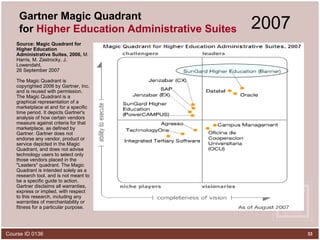
Gartner Magic Quadrant for  Higher Education Administrative Suites Source: Magic Quadrant for Higher Education Administrative Suites, 2006,  M. Harris, M. Zastrocky, J. Lowendahl, 26 September 2007 The Magic Quadrant is copyrighted 2006 by Gartner, Inc. and is reused with permission. The Magic Quadrant is a graphical representation of a marketplace at and for a specific time period. It depicts Gartner's analysis of how certain vendors measure against criteria for that marketplace, as defined by Gartner. Gartner does not endorse any vendor, product or service depicted in the Magic Quadrant, and does not advise technology users to select only those vendors placed in the "Leaders" quadrant. The Magic Quadrant is intended solely as a research tool, and is not meant to be a specific guide to action. Gartner disclaims all warranties, express or implied, with respect to this research, including any warranties of merchantability or fitness for a particular purpose.  2007
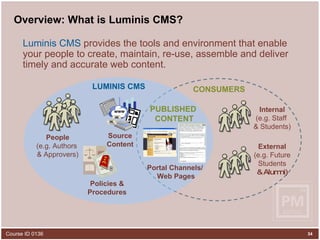
Overview: What is Luminis CMS? Luminis CMS  provides the tools and environment that enable your people to create, maintain, re-use, assemble and deliver timely and accurate web content. Source Content www Policies & Procedures People (e.g. Authors  & Approvers) Internal (e.g. Staff  & Students) Portal Channels/  Web Pages LUMINIS CMS CONSUMERS External (e.g. Future Students & Alumni) PUBLISHED  CONTENT
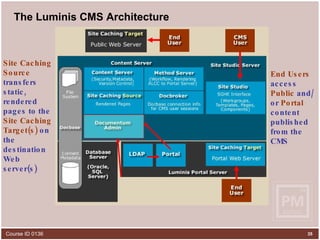
The Luminis CMS Architecture Site Studio ,  the application created by SunGard Higher Education that sits on top of Documentum Easy to use   interface One location   for workgroups, templates, components and some system management Documentum - Core application, provides  management services  for repository objects - version control  - access control - rendition management  - workflow Docbase  – Comprised of Proprietary File Store and Relational Database Content Server  houses the directories Database  holds metadata tables & indices Documentum Admin  configures LDAP Import CMS users from  Luminis Portal  LDAP CMS users  authenticate via LDAP  at login End Users  access  Public  and/or  Portal  content  published from the CMS   Site Caching   Source  transfers static, rendered pages to the  Site Caching   Target(s)  on the destination Web server(s)
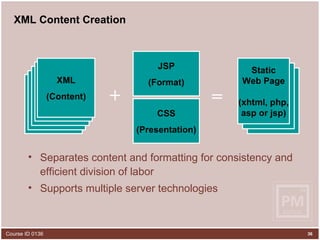
XML Content Creation Separates content and formatting for consistency and efficient division of labor Supports multiple server technologies JSP (Format) XML XML XML XML XML (Content) XHTML XHTML Static Web Page (xhtml, php, asp or jsp) = + CSS (Presentation)
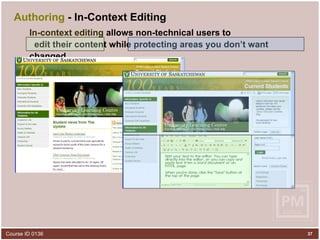
Authoring  - In-Context Editing In-context editing   allows non-technical users to  edit their content while protecting areas you don’t want changed
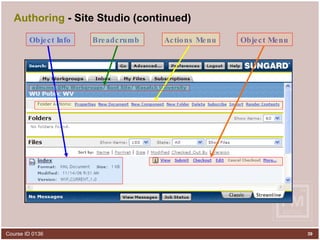
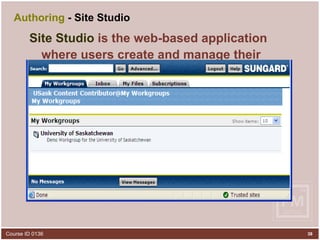
Authoring   - Site Studio  Site Studio  is the web-based application where users create and manage their content from a browser
Authoring  - Site Studio (continued) Actions Menu Object Info Object Menu Breadcrumb
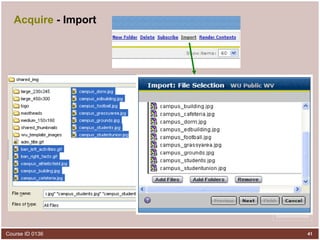
Acquire  - Import Imported items are added Images Media (audio, video) Office and PDF docs Other formats
Acquire  - Import
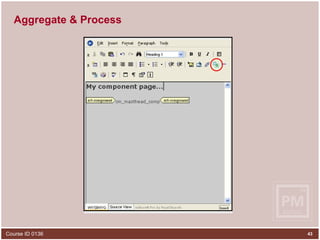
Aggregate & Process Components are added Re-usable text content Inserted into a page Often created by someone else  Cool beans!
Aggregate & Process
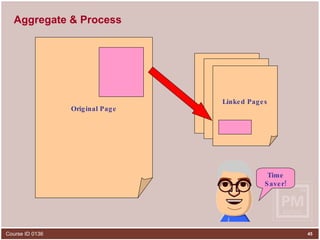
Aggregate & Process Page content can be linked Content flows into another page Update in one place  Page linking allows multiple views of the same content. Template developers can create templates that allow the content to be displayed in very different ways, but the content all comes from one source. Editing of content in one view affects all views of that content.
Aggregate & Process Original Page Original Page Linked Pages Original Page Time Saver!
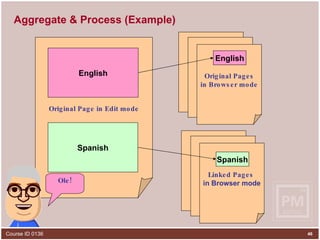
Aggregate & Process (Example) Original Page in Edit mode English English Spanish Spanish Original Page Original Page Original Pages in Browser mode Original Page Original Page Linked Pages  in Browser mode Ole!
Aggregate & Process Dynamic Navigation Links Navigation scheme coded in the  template Set links for a whole site from  one place No more  hand-coding links
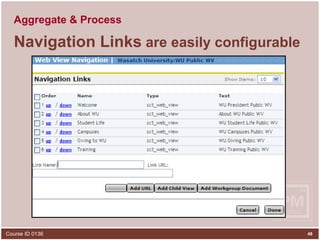
Aggregate & Process Navigation Links  are easily configurable
Publish Workflow Dept heads can  require approval Automates the  lifecycle Access  to approval tasks in Luminis portal
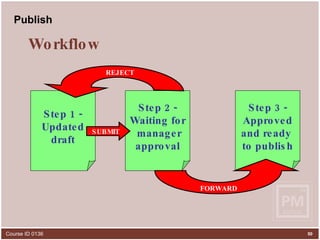
Publish Step 1 - Updated draft Step 2 - Waiting for manager approval Step 3 - Approved and ready  to publish SUBMIT REJECT FORWARD Workflow
Publish One-to-many Create content once, publish to Public  - Internet Portal  - Luminis Channels Private  - Intranet
Publish Schedule your pages Set a  start date Set an  end date Set a  publishing schedule Hmmm…no more outdated pages…
Retire Pages retire on schedule Can be  re-published Automatic  notification Did somebody say retire?
LCMS Helps Launch the Vision Manages the content for the most  public face of the institution Public  - Internet Portal  - Luminis Channels
LCMS Helps Launch the Vision Makes it possible to standardize institutional branding Templates Layouts Components
LCMS Helps Launch the Vision Created for non-technical users Depts  own  their content again Low  learning curve Familiar  browser-based  tools I like it Cool I’m perky I hate change
LCMS Helps Launch the Vision Efficient use of time Content  re-use Template-based  navigation Distributed  authorship
LCMS Helps Launch the Vision Accurate and up-to-date content Components Automatic  expiration Automatic  page retirement Did somebody say retirement?
Overview by Role  of   Luminis Content Management Suite
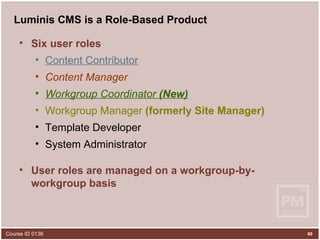
Luminis CMS is a Role-Based Product Six user roles Content Contributor Content Manager Workgroup Coordinator  (New) Workgroup Manager  (formerly Site Manager) Template Developer System Administrator User roles are managed on a workgroup-by-workgroup basis
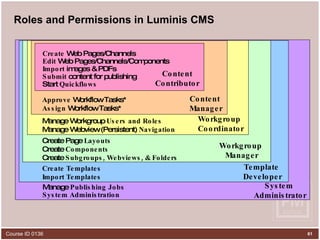
Roles and Permissions in Luminis CMS Create  Web Pages/Channels Edit  Web Pages/Channels/Components Import  images & PDFs Submit  content for publishing Start  Quickflows Content Contributor Content  Manager Workgroup Coordinator Workgroup  Manager Template  Developer System  Administrator Approve  Workflow Tasks* Assign  Workflow Tasks* Manage Workgroup  Users and Roles Manage Webview (Persistent)  Navigation Create Page  Layouts Create  Components Create  Subgroups, Webviews, & Folders Create Templates Import Templates Manage  Publishing Jobs System Administration
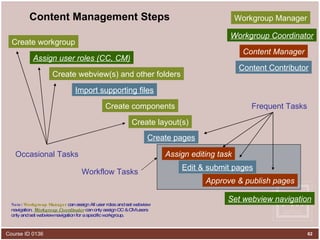
Content Management Steps Create workgroup Create webview(s) and other folders Assign user roles (CC, CM) Create layout(s) Create components Create pages Edit & submit pages Approve & publish pages Set webview navigation Import supporting files Occasional Tasks Frequent Tasks Workgroup Manager Content Manager Content Contributor Assign editing task Workgroup Coordinator Note :  Workgroup Manager  can assign All user roles and set webview navigation.  Workgroup Coordinator  can only assign CC & CM users only and set webview navigation for a specific workgroup. Workflow Tasks
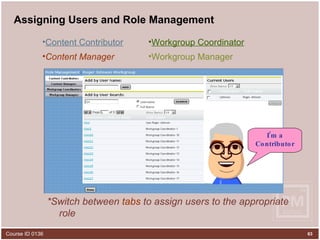
Assigning Users and Role Management  *Switch between  tabs  to assign users to the appropriate role Workgroup Manager Content Manager Workgroup Coordinator Content Contributor I’m a Contributor
Summary Increased Productivity :  Luminis CMS empowers those outside of the IT department while  lowering the IT department’s burden  of creating and maintaining Web content Increased Usage :  Luminis CMS allows departments to  easily add and update content  on the institution’s external and internal Websites; thus decreasing information rot and increasing Website usage Enhanced Reputation :  Luminis CMS allows the IT department to establish a  consistent look-and-feel , navigation, and branding throughout the institution’s internal and external Websites

Introduction To Luminis Cms

  • 1.
    Introduction to LuminisCMS Presented by: Roger Johnson , SunGard Higher Education Luminis CMS Organizational Consultant April 14, 2008 Course ID 0136
  • 2.
    Session Description –Introduction to Luminis CMS Find out how Luminis Content Management Suite (CMS) empowers those outside of IT to create and edit Web content easily while reducing the IT department's need to maintain web pages. Also learn how institutional web design standards can be balanced with varied departmental website needs.
  • 3.
    Introduction Hi, myname is Roger Johnson I will be your Avatar* for this session * Avatar-representation of a human in a virtual environment Please ignore the narrator behind the monitor and please pay attention to me, up here. I’m the one who will be taking you through this tour of Luminis CMS
  • 4.
    Introduction This sessionis meant for a non-technical audience and will show the value and benefits of using the Luminis Content Management Suite (Luminis CMS) in higher education This session will explain how Luminis CMS: Empowers those outside of the IT department and lowers the IT burden of creating and maintaining Web content Helps departments add and update content easily on the institution’s external and internal Websites Establishes consistent look-and-feel , navigation, and branding throughout the institution’s internal and external websites Balances cross-institutional needs with support for individual departmental character on the web
  • 5.
    Agenda Problems Faced by Higher Education Solutions Provided by Web Content Management Overview of Web Content Management Benefits of the Luminis Content Management Suite Overview by Role of Luminis Content Management Suite
  • 6.
    Problems Facedby Higher Education
  • 7.
    The Content ManagementProblem Meet Peter, Webmaster at Wasatch University Peter has problems Don’t we all?
  • 8.
    The Content ManagementProblem Too much content, too few people Leads to slow updates That would be me…sigh
  • 9.
    The Content ManagementProblem Single point of failure He has no backup if he goes on vacation, gets sick… I need a vacation
  • 10.
    The Content ManagementProblem Lack of standards His institution is having an identity crisis
  • 11.
    The Content ManagementProblem Confusing navigation Leads to site abandonment
  • 12.
    The Content ManagementProblem Duplication of effort Leads to “wishful thinking,” hoping that content is up to date (no one really knows)
  • 13.
    The Content ManagementProblem Getting Approval Can seem like reaching for the stars sometimes
  • 14.
    Solutions Providedby Web Content Management
  • 15.
    The Content ManagementSolution Can Luminis CMS help Peter with his problems? Anyone? Anyone??
  • 16.
  • 17.
    The LCMS SolutionToo much content, too few people is solved by… Distributed authorship Subject Matter Expert (SME) ownership of content Woo hoo!
  • 18.
    The LCMS SolutionSingle point of failure is solved by… Multiple authorship coverage for illness coverage for vacation coverage for attrition
  • 19.
    The LCMS SolutionLack of standards is solved by… Centralized control Standards set by professionals enforced by templates implemented by layouts applied to pages Me Likey
  • 20.
    The LCMS SolutionConfusing navigation is solved by… Standardized navigation scheme template based easily configurable consistent user experience
  • 21.
    The LCMS SolutionDuplication of effort is solved by… Content re-use componentization create once, use many places
  • 22.
    The Content ManagementSolution Getting approval is solved by… Automated workflows Ad-hoc quickflows Portal inbox to access approval tasks
  • 23.
    Overview ofWeb Content Management
  • 24.
    Definition A Webcontent management system is a software application that manages content in all stages of its lifecycle Please explain
  • 25.
    The Content LifecycleAuthor/Acquire Retire Publish Aggregate & Process
  • 26.
    LCMS and theContent Lifecycle Author/Acquire WYSIWYG Editor for authoring Access In-Context Access through Site Studio Import function for acquiring Images, media, office and pdf
  • 27.
    LCMS and theContent Lifecycle Aggregate and Process Templates Components Navigation Workflow
  • 28.
    LCMS and theContent Lifecycle Publish Self-publish Eliminates the IT bottleneck What IT Bottleneck?
  • 29.
    LCMS and theContent Lifecycle Retire Publish date Expiration date Did somebody say retire?
  • 30.
    Benefits of the Luminis Content Management Suite
  • 31.
    Benefits of theLuminis Content Management Suite Web Content Management solution leveraging Documentum Enterprise-class software Tailored for the needs of Higher Education . Simplified content creation and editing Straightforward workflow management Delegated , non-technical web site administration Customizable page templating
  • 32.
    Gartner Magic Quadrantfor Enterprise Content Management Source: Magic Quadrant for Enterprise Content Management, 2007, K. Shegda, K. Chin, M Gilbert, D. Logan, T. Bell 21 September 2007 The Magic Quadrant is copyrighted 2006 by Gartner, Inc. and is reused with permission. The Magic Quadrant is a graphical representation of a marketplace at and for a specific time period. It depicts Gartner's analysis of how certain vendors measure against criteria for that marketplace, as defined by Gartner. Gartner does not endorse any vendor, product or service depicted in the Magic Quadrant, and does not advise technology users to select only those vendors placed in the "Leaders" quadrant. The Magic Quadrant is intended solely as a research tool, and is not meant to be a specific guide to action. Gartner disclaims all warranties, express or implied, with respect to this research, including any warranties of merchantability or fitness for a particular purpose. Documentum is a subsidiary of EMC 2007 SunGard Data Systems is the parent company for SunGard Higher Education, SunGard Availability Services, SunGard Financial Services and SunGard Public Sector
  • 33.
    Gartner Magic Quadrantfor Higher Education Administrative Suites Source: Magic Quadrant for Higher Education Administrative Suites, 2006, M. Harris, M. Zastrocky, J. Lowendahl, 26 September 2007 The Magic Quadrant is copyrighted 2006 by Gartner, Inc. and is reused with permission. The Magic Quadrant is a graphical representation of a marketplace at and for a specific time period. It depicts Gartner's analysis of how certain vendors measure against criteria for that marketplace, as defined by Gartner. Gartner does not endorse any vendor, product or service depicted in the Magic Quadrant, and does not advise technology users to select only those vendors placed in the "Leaders" quadrant. The Magic Quadrant is intended solely as a research tool, and is not meant to be a specific guide to action. Gartner disclaims all warranties, express or implied, with respect to this research, including any warranties of merchantability or fitness for a particular purpose. 2007
  • 34.
    Overview: What isLuminis CMS? Luminis CMS provides the tools and environment that enable your people to create, maintain, re-use, assemble and deliver timely and accurate web content. Source Content www Policies & Procedures People (e.g. Authors & Approvers) Internal (e.g. Staff & Students) Portal Channels/ Web Pages LUMINIS CMS CONSUMERS External (e.g. Future Students & Alumni) PUBLISHED CONTENT
  • 35.
    The Luminis CMSArchitecture Site Studio , the application created by SunGard Higher Education that sits on top of Documentum Easy to use interface One location for workgroups, templates, components and some system management Documentum - Core application, provides management services for repository objects - version control - access control - rendition management - workflow Docbase – Comprised of Proprietary File Store and Relational Database Content Server houses the directories Database holds metadata tables & indices Documentum Admin configures LDAP Import CMS users from Luminis Portal LDAP CMS users authenticate via LDAP at login End Users access Public and/or Portal content published from the CMS Site Caching Source transfers static, rendered pages to the Site Caching Target(s) on the destination Web server(s)
  • 36.
    XML Content CreationSeparates content and formatting for consistency and efficient division of labor Supports multiple server technologies JSP (Format) XML XML XML XML XML (Content) XHTML XHTML Static Web Page (xhtml, php, asp or jsp) = + CSS (Presentation)
  • 37.
    Authoring -In-Context Editing In-context editing allows non-technical users to edit their content while protecting areas you don’t want changed
  • 38.
    Authoring - Site Studio Site Studio is the web-based application where users create and manage their content from a browser
  • 39.
    Authoring -Site Studio (continued) Actions Menu Object Info Object Menu Breadcrumb
  • 40.
    Acquire -Import Imported items are added Images Media (audio, video) Office and PDF docs Other formats
  • 41.
    Acquire -Import
  • 42.
    Aggregate & ProcessComponents are added Re-usable text content Inserted into a page Often created by someone else Cool beans!
  • 43.
  • 44.
    Aggregate & ProcessPage content can be linked Content flows into another page Update in one place Page linking allows multiple views of the same content. Template developers can create templates that allow the content to be displayed in very different ways, but the content all comes from one source. Editing of content in one view affects all views of that content.
  • 45.
    Aggregate & ProcessOriginal Page Original Page Linked Pages Original Page Time Saver!
  • 46.
    Aggregate & Process(Example) Original Page in Edit mode English English Spanish Spanish Original Page Original Page Original Pages in Browser mode Original Page Original Page Linked Pages in Browser mode Ole!
  • 47.
    Aggregate & ProcessDynamic Navigation Links Navigation scheme coded in the template Set links for a whole site from one place No more hand-coding links
  • 48.
    Aggregate & ProcessNavigation Links are easily configurable
  • 49.
    Publish Workflow Deptheads can require approval Automates the lifecycle Access to approval tasks in Luminis portal
  • 50.
    Publish Step 1- Updated draft Step 2 - Waiting for manager approval Step 3 - Approved and ready to publish SUBMIT REJECT FORWARD Workflow
  • 51.
    Publish One-to-many Createcontent once, publish to Public - Internet Portal - Luminis Channels Private - Intranet
  • 52.
    Publish Schedule yourpages Set a start date Set an end date Set a publishing schedule Hmmm…no more outdated pages…
  • 53.
    Retire Pages retireon schedule Can be re-published Automatic notification Did somebody say retire?
  • 54.
    LCMS Helps Launchthe Vision Manages the content for the most public face of the institution Public - Internet Portal - Luminis Channels
  • 55.
    LCMS Helps Launchthe Vision Makes it possible to standardize institutional branding Templates Layouts Components
  • 56.
    LCMS Helps Launchthe Vision Created for non-technical users Depts own their content again Low learning curve Familiar browser-based tools I like it Cool I’m perky I hate change
  • 57.
    LCMS Helps Launchthe Vision Efficient use of time Content re-use Template-based navigation Distributed authorship
  • 58.
    LCMS Helps Launchthe Vision Accurate and up-to-date content Components Automatic expiration Automatic page retirement Did somebody say retirement?
  • 59.
    Overview by Role of Luminis Content Management Suite
  • 60.
    Luminis CMS isa Role-Based Product Six user roles Content Contributor Content Manager Workgroup Coordinator (New) Workgroup Manager (formerly Site Manager) Template Developer System Administrator User roles are managed on a workgroup-by-workgroup basis
  • 61.
    Roles and Permissionsin Luminis CMS Create Web Pages/Channels Edit Web Pages/Channels/Components Import images & PDFs Submit content for publishing Start Quickflows Content Contributor Content Manager Workgroup Coordinator Workgroup Manager Template Developer System Administrator Approve Workflow Tasks* Assign Workflow Tasks* Manage Workgroup Users and Roles Manage Webview (Persistent) Navigation Create Page Layouts Create Components Create Subgroups, Webviews, & Folders Create Templates Import Templates Manage Publishing Jobs System Administration
  • 62.
    Content Management StepsCreate workgroup Create webview(s) and other folders Assign user roles (CC, CM) Create layout(s) Create components Create pages Edit & submit pages Approve & publish pages Set webview navigation Import supporting files Occasional Tasks Frequent Tasks Workgroup Manager Content Manager Content Contributor Assign editing task Workgroup Coordinator Note : Workgroup Manager can assign All user roles and set webview navigation. Workgroup Coordinator can only assign CC & CM users only and set webview navigation for a specific workgroup. Workflow Tasks
  • 63.
    Assigning Users andRole Management *Switch between tabs to assign users to the appropriate role Workgroup Manager Content Manager Workgroup Coordinator Content Contributor I’m a Contributor
  • 64.
    Summary Increased Productivity: Luminis CMS empowers those outside of the IT department while lowering the IT department’s burden of creating and maintaining Web content Increased Usage : Luminis CMS allows departments to easily add and update content on the institution’s external and internal Websites; thus decreasing information rot and increasing Website usage Enhanced Reputation : Luminis CMS allows the IT department to establish a consistent look-and-feel , navigation, and branding throughout the institution’s internal and external Websites