LCMS: Content Artery to the Portal Presented by:  Roger Johnson ,  SunGard Higher Education April 16, 2008 Course ID  0137
Ever needed to push portal content through a workflow for approval?  Ever needed to separate who updates sections of content within a channel between two rival groups of editors?  Discover the latest touch points between the   Luminis Content Management Suite (CMS)   and the   Luminis Platform (Portal).   This session is open to all and will help you understand how the powerful Luminis CMS functions of Automated Luminis Channel Creation ( ALCC ), Luminis Targeted Content Channels ( LTCC ),  WYSIWYG Channel Editing , Approval  Workflows  and Role-based  Access Control  can make managing selected portal content  easier and more efficient. Introduction
Presenter Roger Johnson Principal Organizational Consultant Luminis CMS Services SunGard Higher Education [email_address]
Agenda Luminis Content Management Suite Overview Luminis Platform/Portal Overview Luminis Platform/Luminis CMS Touch Points LTCC - Luminis Targeted Content Channel ALCC  - Automated Luminis Channel Creation LCBC  - LCMS Channel Browser Channel LCP   - LCMS Channel Previewer LIC   - LCMS Inbox Channel
Luminis Content Management Suite Overview
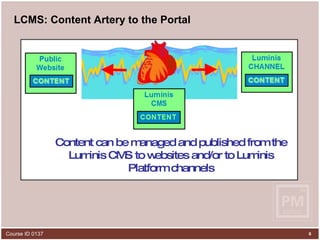
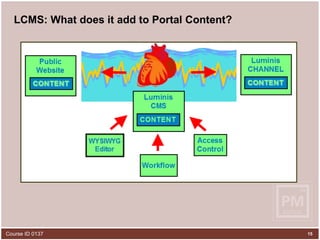
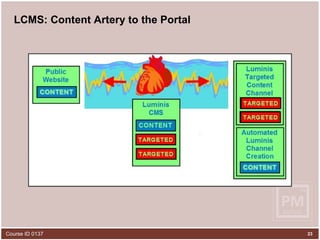
LCMS: Content Artery to the Portal Content can be managed and published from the Luminis CMS to websites and/or to Luminis Platform channels
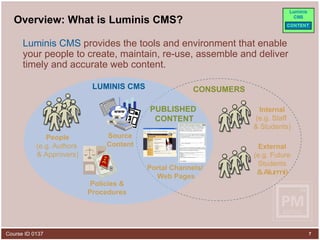
Overview: What is Luminis CMS? Luminis CMS  provides the tools and environment that enable your people to create, maintain, re-use, assemble and deliver timely and accurate web content. Source Content www Policies & Procedures People (e.g. Authors  & Approvers) Internal (e.g. Staff  & Students) Portal Channels/  Web Pages LUMINIS CMS CONSUMERS External (e.g. Future Students & Alumni) PUBLISHED  CONTENT
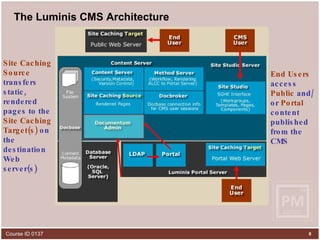
The Luminis CMS Architecture Site Studio ,  the application created by SunGard Higher Education that sits on top of Documentum Easy to use   interface One location   for workgroups, templates, components and some system management Documentum - Core application, provides  management services  for repository objects - version control  - access control - rendition management  - workflow Docbase  – Comprised of Proprietary File Store and Relational Database Content Server  houses the directories Database  holds metadata tables & indices Documentum Admin  configures LDAP Import CMS users from  Luminis Portal  LDAP CMS users  authenticate via LDAP  at login End Users  access  Public  and/or  Portal  content  published from the CMS   Site Caching   Source  transfers static, rendered pages to the  Site Caching   Target(s)  on the destination Web server(s)
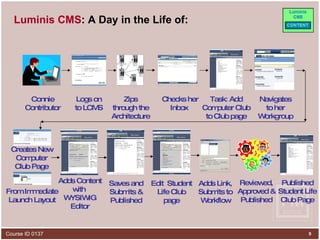
Luminis CMS : A Day in the Life of: Connie Contributor Logs on to LCMS Zips through the Architecture  Checks her Inbox  Task: Add Computer Club to Club page Navigates to her Workgroup Creates New Computer Club Page From Immediate Launch Layout Saves and Submits & Published Adds Content with  WYSIWIG Editor Reviewed, Approved & Published Edit  Student Life Club page Adds Link, Submits to Workflow Published Student Life Club Page
Luminis Platform/Portal Overview
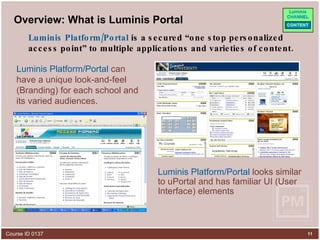
Overview: What is Luminis Portal Luminis Platform/Portal  can have a unique look-and-feel (Branding) for each school and its varied audiences. Luminis Platform/Portal  looks similar to uPortal and has familiar UI (User Interface) elements Luminis Platform/Portal  is a secured “one stop personalized access point” to multiple applications and varieties of content.
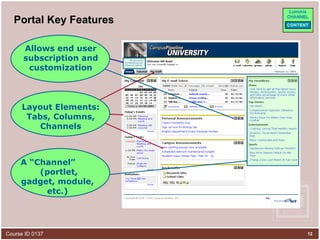
Portal Key Features A “Channel”  (portlet, gadget, module, etc.) Allows end user subscription and customization Layout Elements: Tabs, Columns, Channels
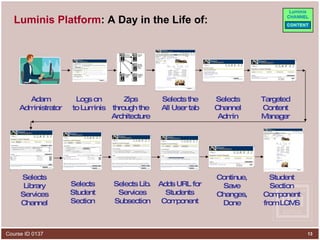
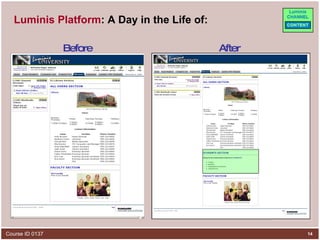
Luminis Platform : A Day in the Life of: Adam Administrator Logs on to Luminis Zips through the Architecture  Selects the All User tab Selects Channel Admin Targeted Content Manager Selects Library Services Channel Selects Lib. Services Subsection Selects Student Section Adds URL for Students Component Continue,  Save Changes, Done Student Section Component from LCMS
Luminis Platform : A Day in the Life of: Before After
LCMS: What does it add to Portal Content?
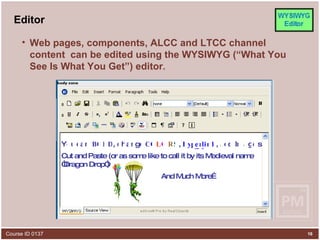
Editor Web pages, components, ALCC and LTCC channel content  can be edited using the WYSIWYG (“What You See Is What You Get”) editor .  Y o u c a n B O h g e , n C O I a d m d k D L l a i c a n R O L , S y H p e r Cut and Paste (or as some like to call it by its Medieval name “Dragon Drop”) g e s And Much More… ,
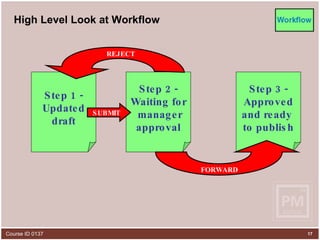
High Level Look at Workflow Step 1 - Updated draft Step 2 - Waiting for manager approval Step 3 - Approved and ready  to publish SUBMIT REJECT FORWARD
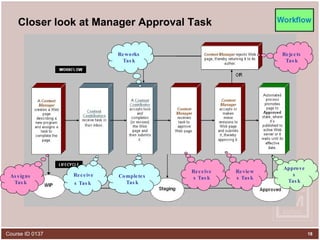
Closer look at Manager Approval Task Assigns Task Completes Task Receives Task Receives Task   Reviews Task Rejects Task Reworks Task Approves Task
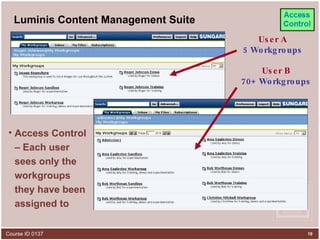
Luminis Content Management Suite Access Control – Each user sees only the workgroups they have been assigned to User A 5 Workgroups User B 70+ Workgroups
Luminis Platform/Luminis CMS  Touch Points
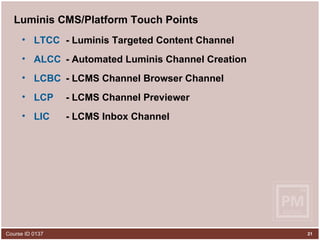
Luminis CMS/Platform Touch Points LTCC   - Luminis Targeted Content Channel ALCC   - Automated Luminis Channel Creation LCBC   - LCMS Channel Browser Channel LCP   - LCMS Channel Previewer LIC   - LCMS Inbox Channel
Luminis Platform/Luminis CMS  Touch Points LTCC
LCMS: Content Artery to the Portal
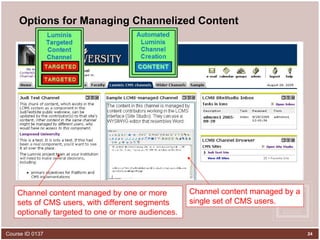
Options for Managing Channelized Content Channel content managed by a single set of CMS users. Channel content managed by one or more sets of CMS users, with different segments optionally targeted to one or more audiences.
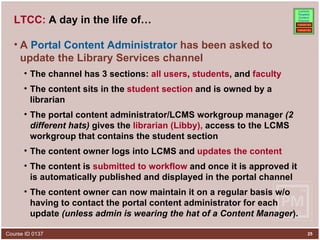
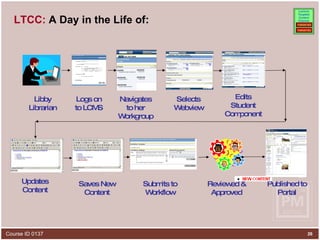
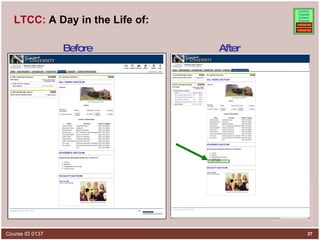
LTCC:  A day in the life of… A  Portal Content Administrator  has been asked to update the Library Services channel The channel has 3 sections:  all users ,  students , and  faculty The content sits in the  student section  and is owned by a librarian The portal content administrator/LCMS workgroup manager  (2 different hats)  gives the  librarian (Libby),  access to the LCMS workgroup that contains the student section  The content owner logs into LCMS and  updates the content The content is  submitted to workflow  and once it is approved it is automatically published and displayed in the portal channel The content owner can now maintain it on a regular basis w/o having to contact the portal content administrator for each update  (unless admin is wearing the hat of a Content Manager ).
LTCC:  A Day in the Life of: Libby Librarian Logs on to LCMS Navigates to her Workgroup Updates Content Submits to Workflow Saves New Content Reviewed & Approved Published to Portal Selects Webview Edits Student Component
LTCC:  A Day in the Life of: Before After
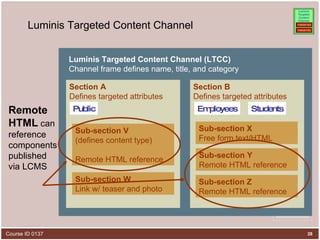
Luminis Targeted Content Channel Section B Defines targeted attributes Section A  Defines targeted attributes Sub-section X Free form text/HTML Luminis Targeted Content Channel (LTCC) Channel frame defines name, title, and category Public Students Employees Sub-section W Link w/ teaser and photo Sub-section V (defines content type)  Remote HTML reference Sub-section Y Remote HTML reference Sub-section Z Remote HTML reference Remote HTML  can reference components published via LCMS
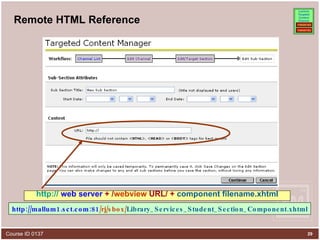
Remote HTML Reference http://  web server  + / webview  URL/ +  component filename.xhtml http://mallum1.sct.com:81 /rj/sbox/ Library_Services_Student_Section_Component.xhtml
LTCC Advantages LTCC’s can be divided into sections   LTCC sections can: be targeted to users with  different roles .  contain one or more  Luminis CMS components . Each Luminis CMS Component can: be maintained by a different set of users (thus providing extreme  flexibility/granularity  of authorship). utilize  automated workflow  for review and approval, as needed. reduce duplication  of creation effort (Re-usable Content) increase accuracy  – Create once (WYSIWYG editor), use in multiple publishing configurations (Internet, Intranet, Portal, etc.)
LTCC Disadvantages Require Portal Content Administrator to Create LTCC’s with Remote HTML Reference Subsections Coordinate with Luminis CMS users who create and maintain each Luminis CMS component provide the URL needed for the Remote HTML Reference subsections
LTCC Recommended Uses Use LTCCs when: content needs to go through an approval process (automated workflow). you have different content contributors or content managers for a single channel  AND  you don’t want them to be able to touch each other’s content.
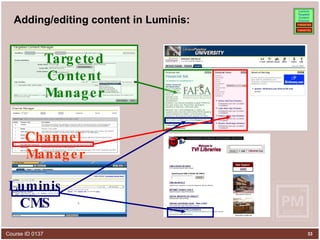
Adding/editing content in Luminis: Targeted Content Manager Channel Manager Luminis CMS
Luminis Platform/Luminis CMS  Touch Points ALCC
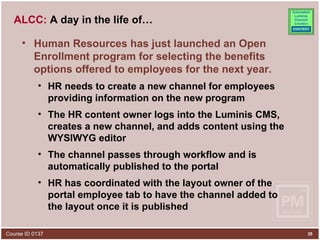
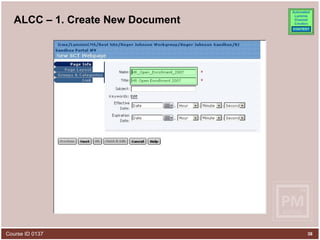
ALCC:  A day in the life of… Human Resources has just launched an Open Enrollment program for selecting the benefits options offered to employees for the next year. HR needs to create a new channel for employees providing information on the new program The HR content owner logs into the Luminis CMS, creates a new channel, and adds content using the WYSIWYG editor The channel passes through workflow and is automatically published to the portal HR has coordinated with the layout owner of the portal employee tab to have the channel added to the layout once it is published
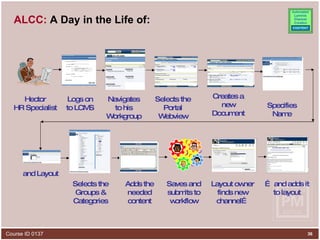
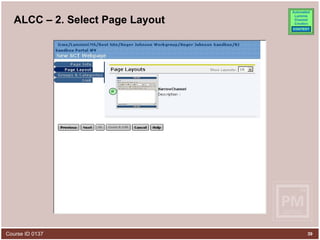
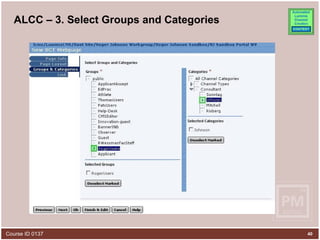
ALCC:  A Day in the Life of: Hector HR Specialist Logs on to LCMS Navigates to his Workgroup Selects the Portal Webview Creates a new Document and Layout Adds the needed content Selects the Groups & Categories Saves and submits to workflow Layout owner finds new channel… …  and adds it to layout Specifies Name
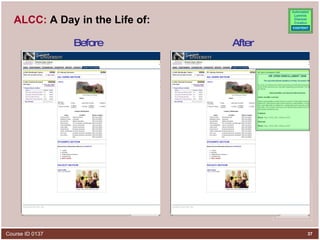
ALCC:  A Day in the Life of: Before After
ALCC – 1. Create New Document
ALCC – 2. Select Page Layout
ALCC – 3. Select Groups and Categories X X
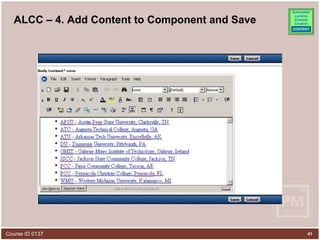
ALCC – 4. Add Content to Component and Save
ALCC Advantages ALCC’s are created and managed within Luminis CMS using WYSIWYG Editor ALCC’s don’t require Luminis Platform Content Administrator intervention. ALCC may use automated workflows for approval processes, as needed. ALCC are automatically published to the Luminis Portal Re-usable CMS content (components) may be used in ALCCs
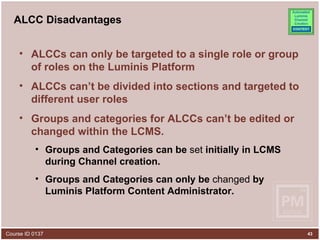
ALCC Disadvantages ALCCs can only be targeted to a single role or group of roles on the Luminis Platform ALCCs can’t be divided into sections and targeted to different user roles Groups and categories for ALCCs can’t be edited or changed within the LCMS.  Groups and Categories can be  set  initially in LCMS during Channel creation. Groups and Categories can only be  changed  by Luminis Platform Content Administrator.
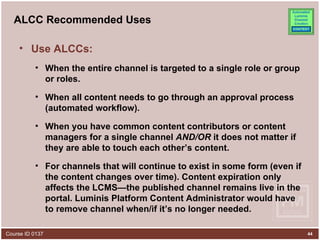
ALCC Recommended Uses Use ALCCs: When the entire channel is targeted to a single role or group or roles. When all content needs to go through an approval process (automated workflow). When you have common content contributors or content managers for a single channel  AND/OR  it does not matter if they are able to touch each other’s content.  For channels that will continue to exist in some form (even if the content changes over time). Content expiration only affects the LCMS—the published channel remains live in the portal. Luminis Platform Content Administrator would have to remove channel when/if it’s no longer needed.
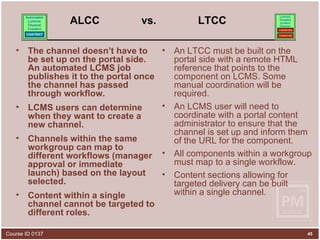
ALCC  vs.  LTCC The channel doesn’t have to be set up on the portal side. An automated LCMS job publishes it to the portal once the channel has passed through workflow.  LCMS users can determine when they want to create a new channel. Channels within the same workgroup can map to different workflows (manager approval or immediate launch) based on the layout selected.  Content within a single channel cannot be targeted to different roles. An LTCC must be built on the portal side with a remote HTML reference that points to the component on LCMS. Some manual coordination will be required.  An LCMS user will need to coordinate with a portal content administrator to ensure that the channel is set up and inform them of the URL for the component.  All components within a workgroup must map to a single workflow.  Content sections allowing for targeted delivery can be built within a single channel.
Luminis Platform/Luminis CMS  Touch Points LCBC
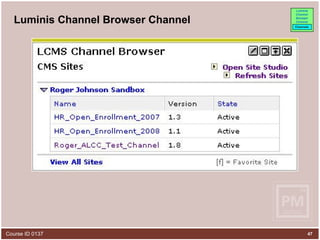
Luminis Channel Browser Channel
Luminis Platform/Luminis CMS  Touch Points LCP
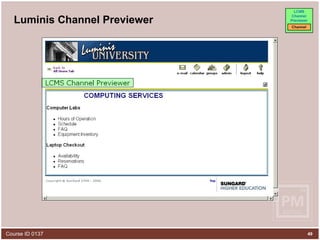
Luminis Channel Previewer
Luminis Platform/Luminis CMS  Touch Points LIC
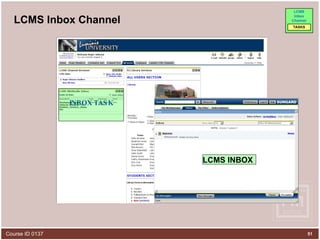
LCMS Inbox Channel INBOX TASK LCMS INBOX
Summary Luminis Content Management Suite Overview create, maintain, reuse, assemble and deliver timely and accurate content Luminis Platform/Portal Overview one stop personalized access point multiple applications and content Luminis Platform/Luminis CMS Touch Points LTCC - Luminis Targeted Content Channel –  Separate Authors ALCC   - Automated Luminis Channel Creation –  Same Authors LCBC   - LCMS Channel Browser Channel –  List Channels LCP   - LCMS Channel Previewer –  See a Channel LIC   - LCMS Inbox Channel –  Access Tasks

LCMS - Content Artery To The Portal

  • 1.
    LCMS: Content Arteryto the Portal Presented by: Roger Johnson , SunGard Higher Education April 16, 2008 Course ID 0137
  • 2.
    Ever needed topush portal content through a workflow for approval? Ever needed to separate who updates sections of content within a channel between two rival groups of editors? Discover the latest touch points between the Luminis Content Management Suite (CMS) and the Luminis Platform (Portal). This session is open to all and will help you understand how the powerful Luminis CMS functions of Automated Luminis Channel Creation ( ALCC ), Luminis Targeted Content Channels ( LTCC ), WYSIWYG Channel Editing , Approval Workflows and Role-based Access Control can make managing selected portal content easier and more efficient. Introduction
  • 3.
    Presenter Roger JohnsonPrincipal Organizational Consultant Luminis CMS Services SunGard Higher Education [email_address]
  • 4.
    Agenda Luminis ContentManagement Suite Overview Luminis Platform/Portal Overview Luminis Platform/Luminis CMS Touch Points LTCC - Luminis Targeted Content Channel ALCC - Automated Luminis Channel Creation LCBC - LCMS Channel Browser Channel LCP - LCMS Channel Previewer LIC - LCMS Inbox Channel
  • 5.
  • 6.
    LCMS: Content Arteryto the Portal Content can be managed and published from the Luminis CMS to websites and/or to Luminis Platform channels
  • 7.
    Overview: What isLuminis CMS? Luminis CMS provides the tools and environment that enable your people to create, maintain, re-use, assemble and deliver timely and accurate web content. Source Content www Policies & Procedures People (e.g. Authors & Approvers) Internal (e.g. Staff & Students) Portal Channels/ Web Pages LUMINIS CMS CONSUMERS External (e.g. Future Students & Alumni) PUBLISHED CONTENT
  • 8.
    The Luminis CMSArchitecture Site Studio , the application created by SunGard Higher Education that sits on top of Documentum Easy to use interface One location for workgroups, templates, components and some system management Documentum - Core application, provides management services for repository objects - version control - access control - rendition management - workflow Docbase – Comprised of Proprietary File Store and Relational Database Content Server houses the directories Database holds metadata tables & indices Documentum Admin configures LDAP Import CMS users from Luminis Portal LDAP CMS users authenticate via LDAP at login End Users access Public and/or Portal content published from the CMS Site Caching Source transfers static, rendered pages to the Site Caching Target(s) on the destination Web server(s)
  • 9.
    Luminis CMS :A Day in the Life of: Connie Contributor Logs on to LCMS Zips through the Architecture Checks her Inbox Task: Add Computer Club to Club page Navigates to her Workgroup Creates New Computer Club Page From Immediate Launch Layout Saves and Submits & Published Adds Content with WYSIWIG Editor Reviewed, Approved & Published Edit Student Life Club page Adds Link, Submits to Workflow Published Student Life Club Page
  • 10.
  • 11.
    Overview: What isLuminis Portal Luminis Platform/Portal can have a unique look-and-feel (Branding) for each school and its varied audiences. Luminis Platform/Portal looks similar to uPortal and has familiar UI (User Interface) elements Luminis Platform/Portal is a secured “one stop personalized access point” to multiple applications and varieties of content.
  • 12.
    Portal Key FeaturesA “Channel” (portlet, gadget, module, etc.) Allows end user subscription and customization Layout Elements: Tabs, Columns, Channels
  • 13.
    Luminis Platform :A Day in the Life of: Adam Administrator Logs on to Luminis Zips through the Architecture Selects the All User tab Selects Channel Admin Targeted Content Manager Selects Library Services Channel Selects Lib. Services Subsection Selects Student Section Adds URL for Students Component Continue, Save Changes, Done Student Section Component from LCMS
  • 14.
    Luminis Platform :A Day in the Life of: Before After
  • 15.
    LCMS: What doesit add to Portal Content?
  • 16.
    Editor Web pages,components, ALCC and LTCC channel content can be edited using the WYSIWYG (“What You See Is What You Get”) editor . Y o u c a n B O h g e , n C O I a d m d k D L l a i c a n R O L , S y H p e r Cut and Paste (or as some like to call it by its Medieval name “Dragon Drop”) g e s And Much More… ,
  • 17.
    High Level Lookat Workflow Step 1 - Updated draft Step 2 - Waiting for manager approval Step 3 - Approved and ready to publish SUBMIT REJECT FORWARD
  • 18.
    Closer look atManager Approval Task Assigns Task Completes Task Receives Task Receives Task Reviews Task Rejects Task Reworks Task Approves Task
  • 19.
    Luminis Content ManagementSuite Access Control – Each user sees only the workgroups they have been assigned to User A 5 Workgroups User B 70+ Workgroups
  • 20.
  • 21.
    Luminis CMS/Platform TouchPoints LTCC - Luminis Targeted Content Channel ALCC - Automated Luminis Channel Creation LCBC - LCMS Channel Browser Channel LCP - LCMS Channel Previewer LIC - LCMS Inbox Channel
  • 22.
    Luminis Platform/Luminis CMS Touch Points LTCC
  • 23.
    LCMS: Content Arteryto the Portal
  • 24.
    Options for ManagingChannelized Content Channel content managed by a single set of CMS users. Channel content managed by one or more sets of CMS users, with different segments optionally targeted to one or more audiences.
  • 25.
    LTCC: Aday in the life of… A Portal Content Administrator has been asked to update the Library Services channel The channel has 3 sections: all users , students , and faculty The content sits in the student section and is owned by a librarian The portal content administrator/LCMS workgroup manager (2 different hats) gives the librarian (Libby), access to the LCMS workgroup that contains the student section The content owner logs into LCMS and updates the content The content is submitted to workflow and once it is approved it is automatically published and displayed in the portal channel The content owner can now maintain it on a regular basis w/o having to contact the portal content administrator for each update (unless admin is wearing the hat of a Content Manager ).
  • 26.
    LTCC: ADay in the Life of: Libby Librarian Logs on to LCMS Navigates to her Workgroup Updates Content Submits to Workflow Saves New Content Reviewed & Approved Published to Portal Selects Webview Edits Student Component
  • 27.
    LTCC: ADay in the Life of: Before After
  • 28.
    Luminis Targeted ContentChannel Section B Defines targeted attributes Section A Defines targeted attributes Sub-section X Free form text/HTML Luminis Targeted Content Channel (LTCC) Channel frame defines name, title, and category Public Students Employees Sub-section W Link w/ teaser and photo Sub-section V (defines content type) Remote HTML reference Sub-section Y Remote HTML reference Sub-section Z Remote HTML reference Remote HTML can reference components published via LCMS
  • 29.
    Remote HTML Referencehttp:// web server + / webview URL/ + component filename.xhtml http://mallum1.sct.com:81 /rj/sbox/ Library_Services_Student_Section_Component.xhtml
  • 30.
    LTCC Advantages LTCC’scan be divided into sections LTCC sections can: be targeted to users with different roles . contain one or more Luminis CMS components . Each Luminis CMS Component can: be maintained by a different set of users (thus providing extreme flexibility/granularity of authorship). utilize automated workflow for review and approval, as needed. reduce duplication of creation effort (Re-usable Content) increase accuracy – Create once (WYSIWYG editor), use in multiple publishing configurations (Internet, Intranet, Portal, etc.)
  • 31.
    LTCC Disadvantages RequirePortal Content Administrator to Create LTCC’s with Remote HTML Reference Subsections Coordinate with Luminis CMS users who create and maintain each Luminis CMS component provide the URL needed for the Remote HTML Reference subsections
  • 32.
    LTCC Recommended UsesUse LTCCs when: content needs to go through an approval process (automated workflow). you have different content contributors or content managers for a single channel AND you don’t want them to be able to touch each other’s content.
  • 33.
    Adding/editing content inLuminis: Targeted Content Manager Channel Manager Luminis CMS
  • 34.
    Luminis Platform/Luminis CMS Touch Points ALCC
  • 35.
    ALCC: Aday in the life of… Human Resources has just launched an Open Enrollment program for selecting the benefits options offered to employees for the next year. HR needs to create a new channel for employees providing information on the new program The HR content owner logs into the Luminis CMS, creates a new channel, and adds content using the WYSIWYG editor The channel passes through workflow and is automatically published to the portal HR has coordinated with the layout owner of the portal employee tab to have the channel added to the layout once it is published
  • 36.
    ALCC: ADay in the Life of: Hector HR Specialist Logs on to LCMS Navigates to his Workgroup Selects the Portal Webview Creates a new Document and Layout Adds the needed content Selects the Groups & Categories Saves and submits to workflow Layout owner finds new channel… … and adds it to layout Specifies Name
  • 37.
    ALCC: ADay in the Life of: Before After
  • 38.
    ALCC – 1.Create New Document
  • 39.
    ALCC – 2.Select Page Layout
  • 40.
    ALCC – 3.Select Groups and Categories X X
  • 41.
    ALCC – 4.Add Content to Component and Save
  • 42.
    ALCC Advantages ALCC’sare created and managed within Luminis CMS using WYSIWYG Editor ALCC’s don’t require Luminis Platform Content Administrator intervention. ALCC may use automated workflows for approval processes, as needed. ALCC are automatically published to the Luminis Portal Re-usable CMS content (components) may be used in ALCCs
  • 43.
    ALCC Disadvantages ALCCscan only be targeted to a single role or group of roles on the Luminis Platform ALCCs can’t be divided into sections and targeted to different user roles Groups and categories for ALCCs can’t be edited or changed within the LCMS. Groups and Categories can be set initially in LCMS during Channel creation. Groups and Categories can only be changed by Luminis Platform Content Administrator.
  • 44.
    ALCC Recommended UsesUse ALCCs: When the entire channel is targeted to a single role or group or roles. When all content needs to go through an approval process (automated workflow). When you have common content contributors or content managers for a single channel AND/OR it does not matter if they are able to touch each other’s content. For channels that will continue to exist in some form (even if the content changes over time). Content expiration only affects the LCMS—the published channel remains live in the portal. Luminis Platform Content Administrator would have to remove channel when/if it’s no longer needed.
  • 45.
    ALCC vs. LTCC The channel doesn’t have to be set up on the portal side. An automated LCMS job publishes it to the portal once the channel has passed through workflow. LCMS users can determine when they want to create a new channel. Channels within the same workgroup can map to different workflows (manager approval or immediate launch) based on the layout selected. Content within a single channel cannot be targeted to different roles. An LTCC must be built on the portal side with a remote HTML reference that points to the component on LCMS. Some manual coordination will be required. An LCMS user will need to coordinate with a portal content administrator to ensure that the channel is set up and inform them of the URL for the component. All components within a workgroup must map to a single workflow. Content sections allowing for targeted delivery can be built within a single channel.
  • 46.
    Luminis Platform/Luminis CMS Touch Points LCBC
  • 47.
  • 48.
  • 49.
  • 50.
  • 51.
    LCMS Inbox ChannelINBOX TASK LCMS INBOX
  • 52.
    Summary Luminis ContentManagement Suite Overview create, maintain, reuse, assemble and deliver timely and accurate content Luminis Platform/Portal Overview one stop personalized access point multiple applications and content Luminis Platform/Luminis CMS Touch Points LTCC - Luminis Targeted Content Channel – Separate Authors ALCC - Automated Luminis Channel Creation – Same Authors LCBC - LCMS Channel Browser Channel – List Channels LCP - LCMS Channel Previewer – See a Channel LIC - LCMS Inbox Channel – Access Tasks