Electronic Commerce Eighth Edition Chapter 10 Electronic Commerce Security
Learning Objectives In this chapter, you will learn about: Online security issues Security for client computers Security for the communication channels between computers Security for server computers Organizations that promote computer, network, and Internet security Electronic Commerce, Eighth Edition Electronic Commerce, Eighth Edition
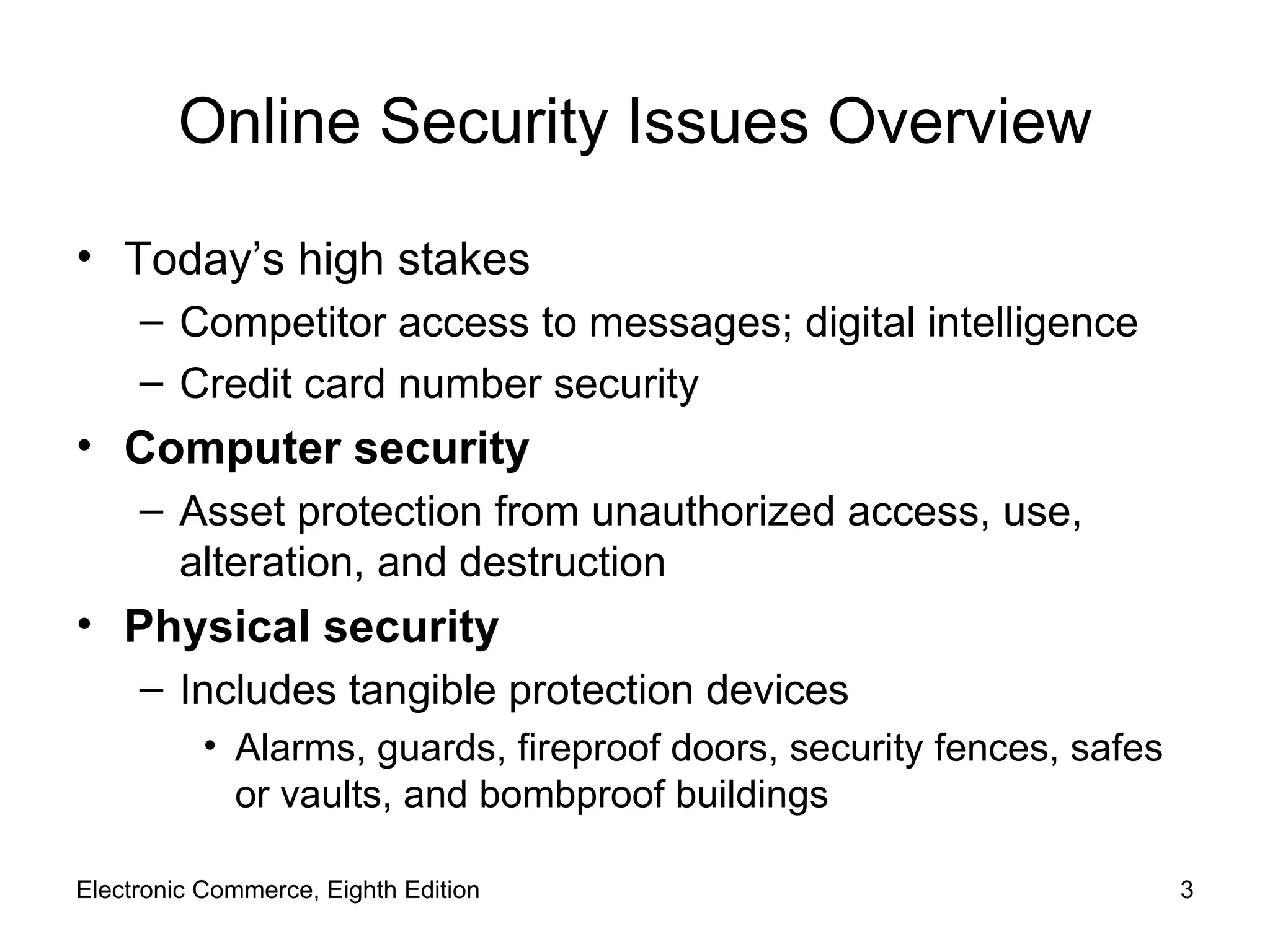
Online Security Issues Overview Today’s high stakes Competitor access to messages; digital intelligence Credit card number security Computer security Asset protection from unauthorized access, use, alteration, and destruction Physical security Includes tangible protection devices Alarms, guards, fireproof doors, security fences, safes or vaults, and bombproof buildings Electronic Commerce, Eighth Edition
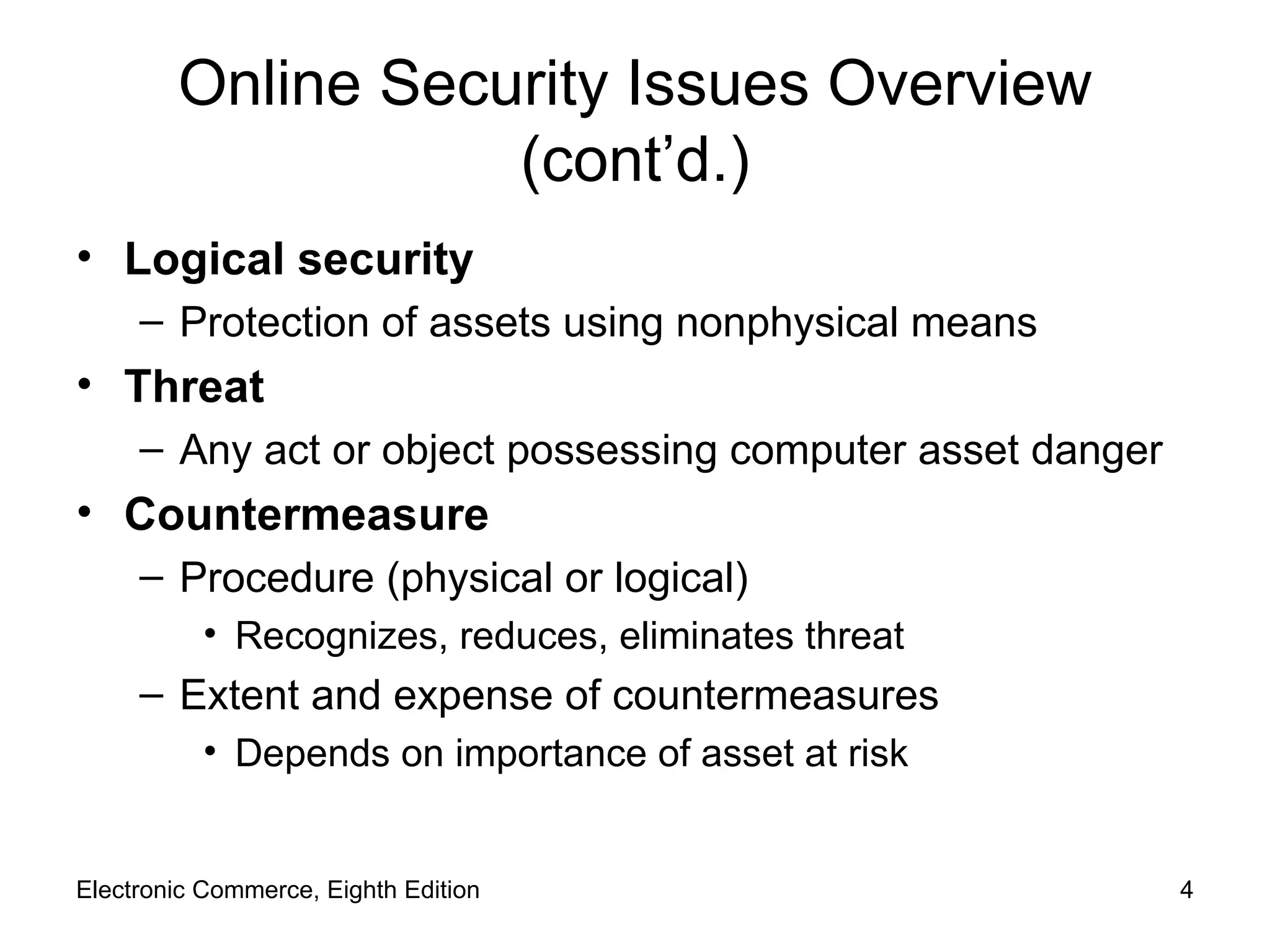
Online Security Issues Overview (cont’d.) Logical security Protection of assets using nonphysical means Threat Any act or object possessing computer asset danger Countermeasure Procedure (physical or logical) Recognizes, reduces, eliminates threat Extent and expense of countermeasures Depends on importance of asset at risk Electronic Commerce, Eighth Edition
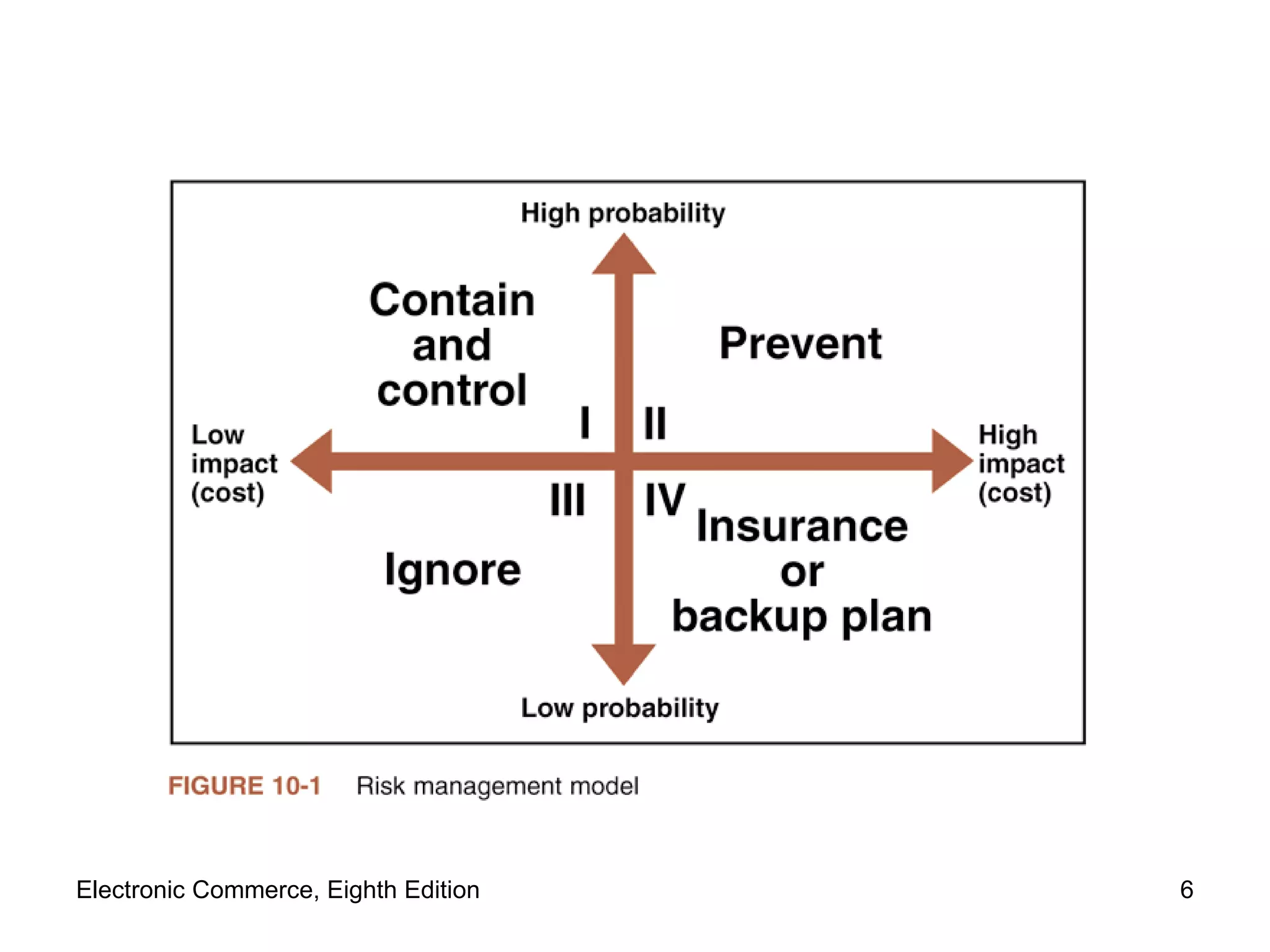
Managing Risk Risk management model (Figure 10-1) Four general organizational actions Impact (cost) and probability of physical threat Also applicable for protecting Internet and electronic commerce assets from physical and electronic threats  Examples of electronic threats Impostors, eavesdroppers, thieves Eavesdropper  (person or device) Listen in on and copy Internet transmissions Electronic Commerce, Eighth Edition
Electronic Commerce, Eighth Edition
Managing Risk (cont’d.) Crackers  or  hackers  (people) Write programs; manipulate technologies Obtain access to unauthorized computers and networks White hat hacker  and  black hat hacker Distinguish between good hackers and bad hackers Good security scheme implementation Identify risks Determine how to protect threatened assets Calculate costs to protect assets Electronic Commerce, Eighth Edition
Elements of Computer Security Secrecy  Protecting against unauthorized data disclosure Ensuring data source authenticity Integrity Preventing unauthorized data modification Man-in-the-middle exploit E-mail message intercepted; contents changed before forwarded to original destination Necessity Preventing data delays or denials (removal) Delaying message or completely destroying it Electronic Commerce, Eighth Edition
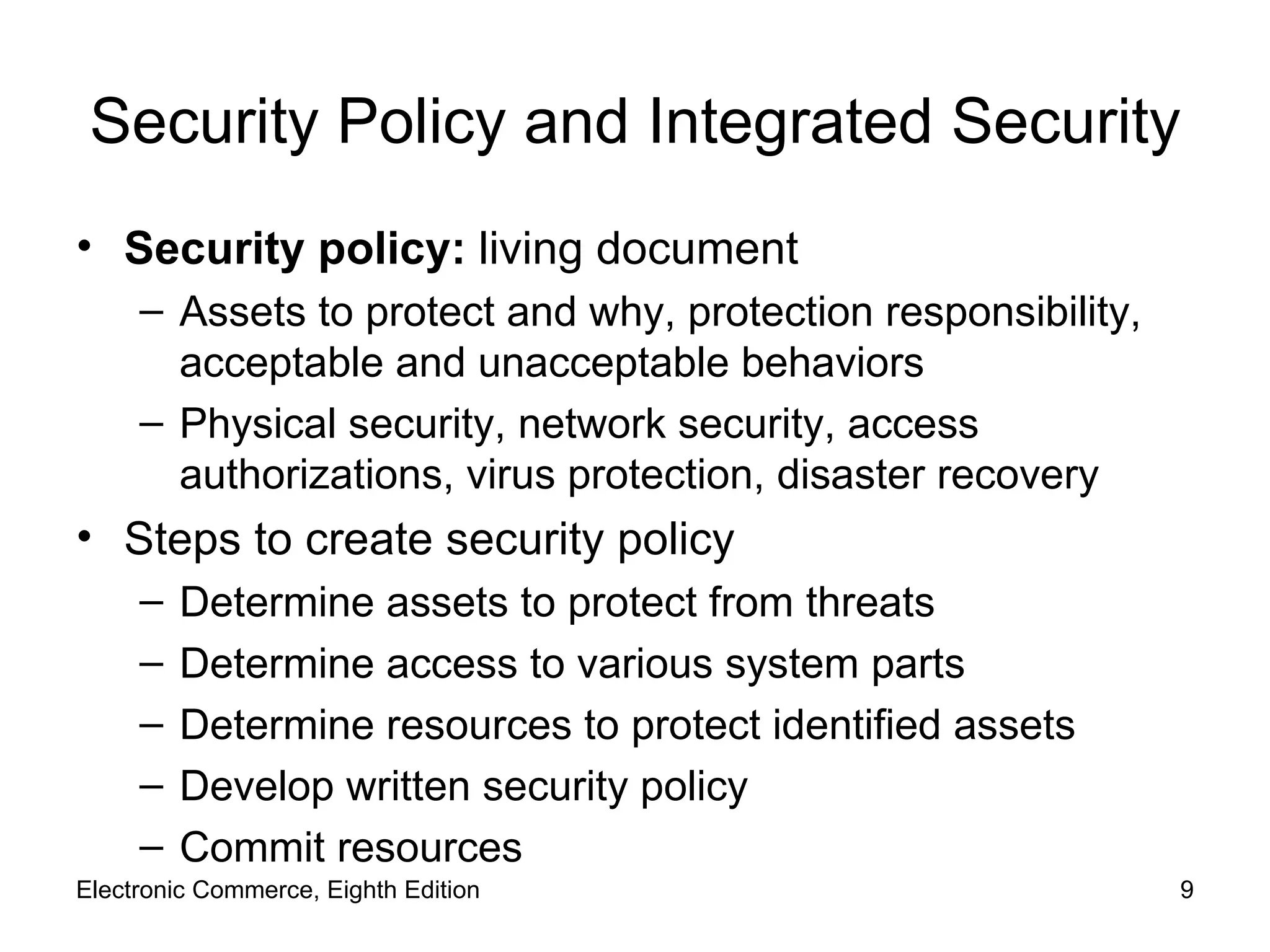
Security Policy and Integrated Security Security policy:  living document  Assets to protect and why, protection responsibility, acceptable and unacceptable behaviors Physical security, network security, access authorizations, virus protection, disaster recovery Steps to create security policy Determine assets to protect from threats Determine access to various system parts Determine resources to protect identified assets Develop written security policy Commit resources Electronic Commerce, Eighth Edition
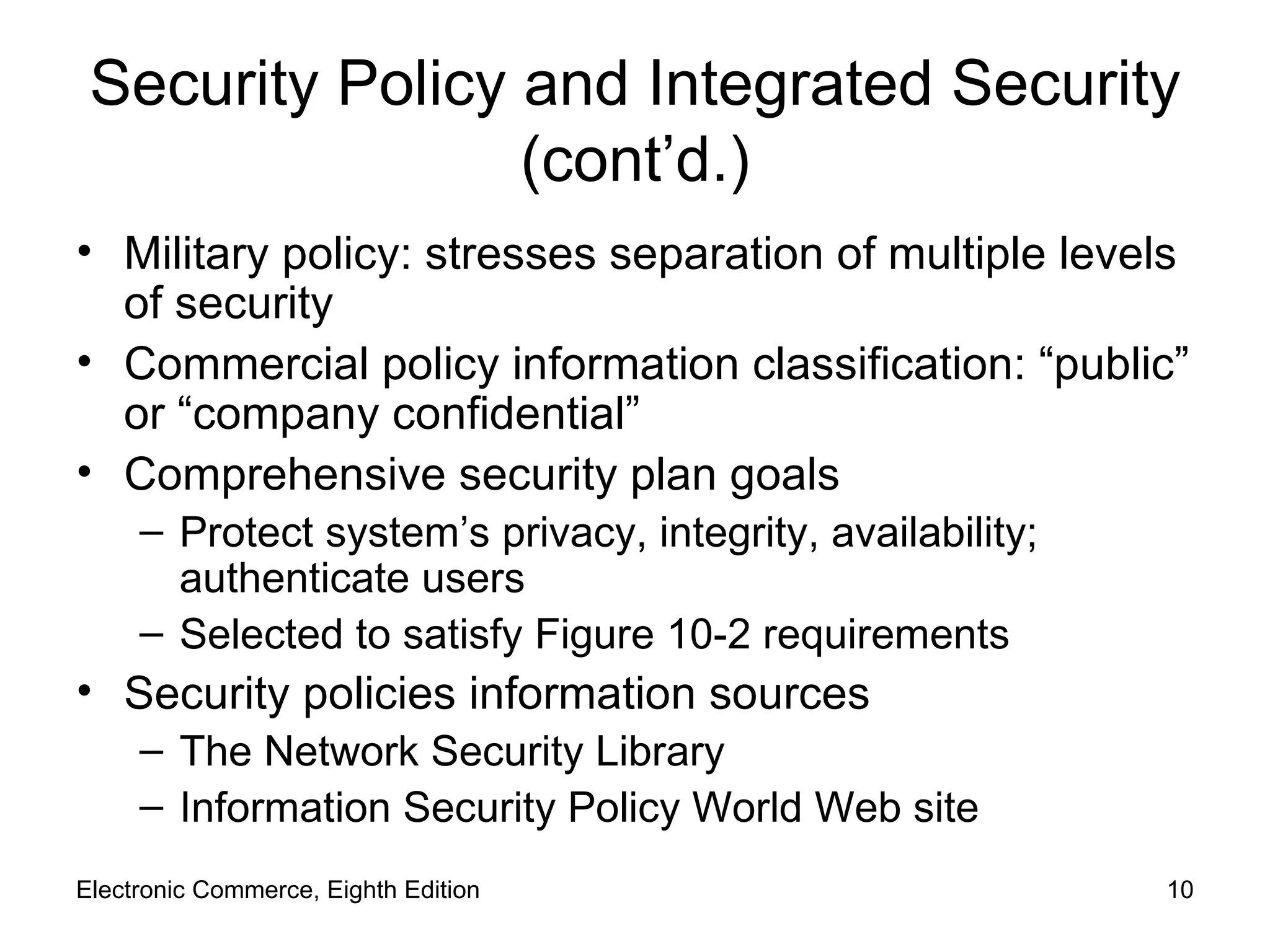
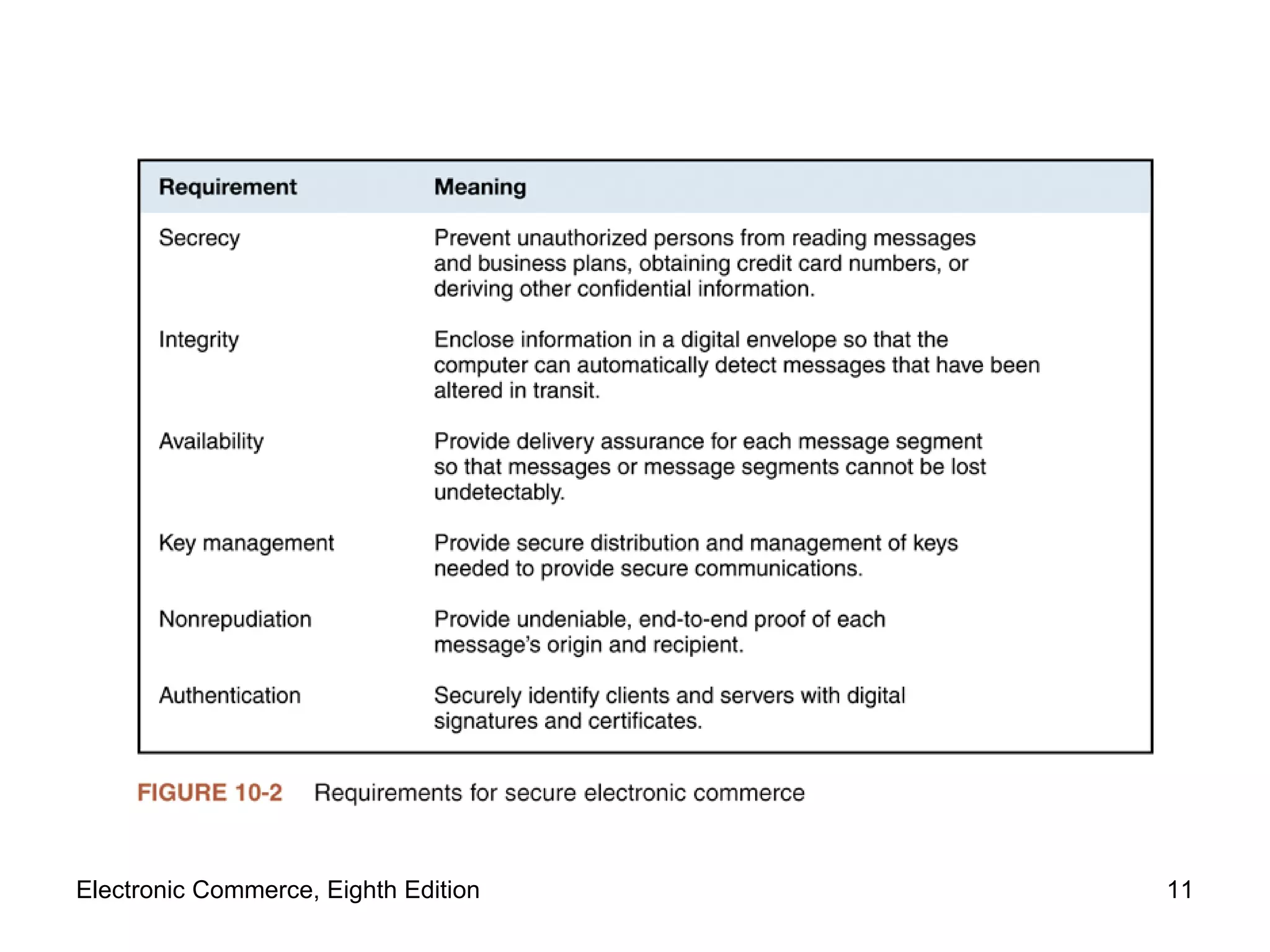
Security Policy and Integrated Security (cont’d.) Military policy: stresses separation of multiple levels of security Commercial policy information classification: “public” or “company confidential” Comprehensive security plan goals Protect system’s privacy, integrity, availability; authenticate users Selected to satisfy Figure 10-2 requirements Security policies information sources The Network Security Library Information Security Policy World   Web site Electronic Commerce, Eighth Edition
Electronic Commerce, Eighth Edition
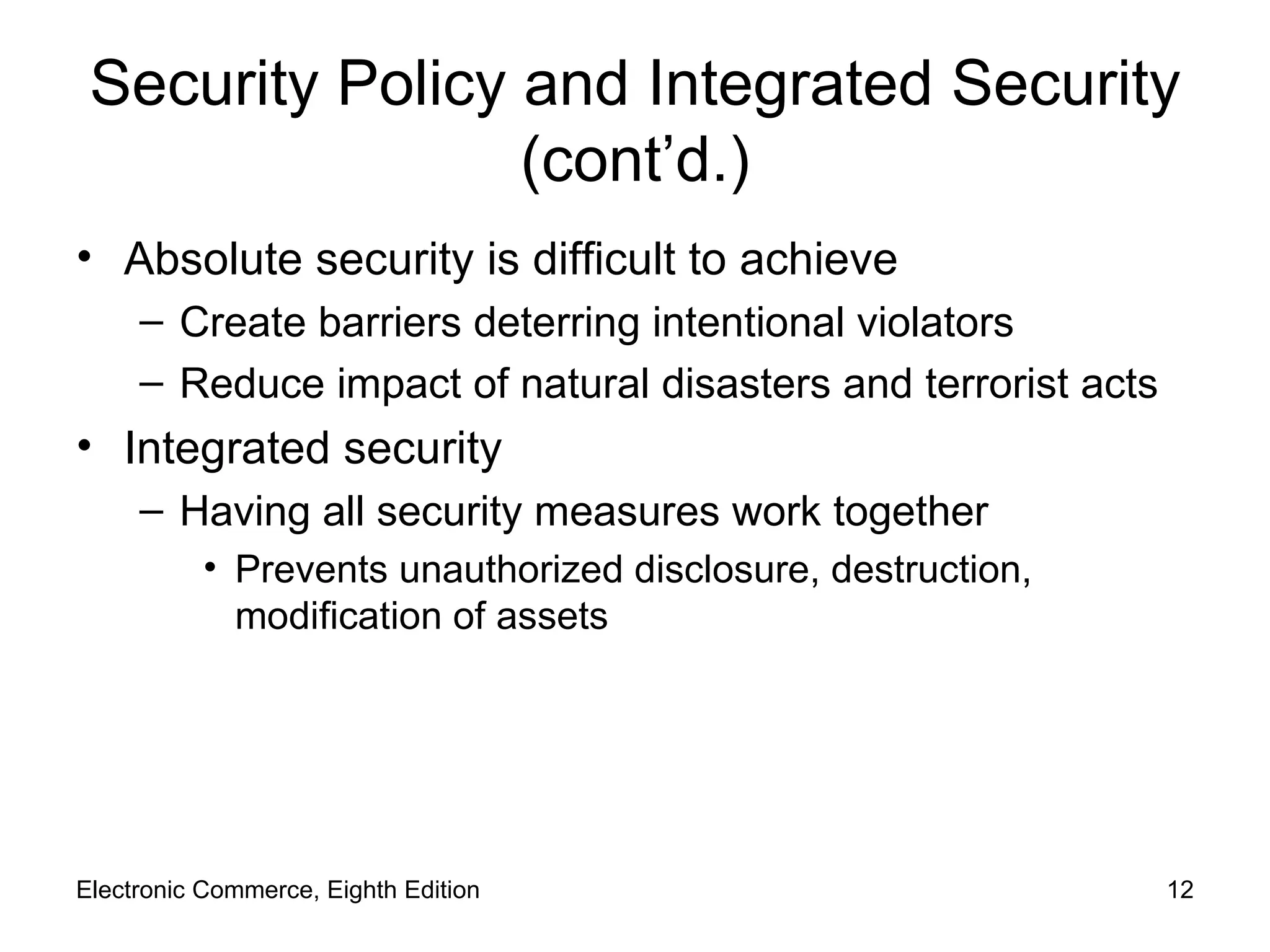
Security Policy and Integrated Security (cont’d.) Absolute security is difficult to achieve Create barriers deterring intentional violators Reduce impact of natural disasters and terrorist acts Integrated security  Having all security measures work together Prevents unauthorized disclosure, destruction, modification of assets Electronic Commerce, Eighth Edition
Security Policy and Integrated Security (cont’d.) E-commerce site security policy points Authentication: Who is trying to access site? Access control: Who is allowed to log on to and access site? Secrecy: Who is permitted to view selected information? Data integrity: Who is allowed to change data? Audit: Who or what causes specific events to occur, and when? Electronic Commerce, Eighth Edition
Security for Client Computers Client computers Must be protected from threats Threats Originate in software and downloaded data Malevolent server site masquerades as legitimate Web site Users and their client computers are duped into revealing information Electronic Commerce, Eighth Edition
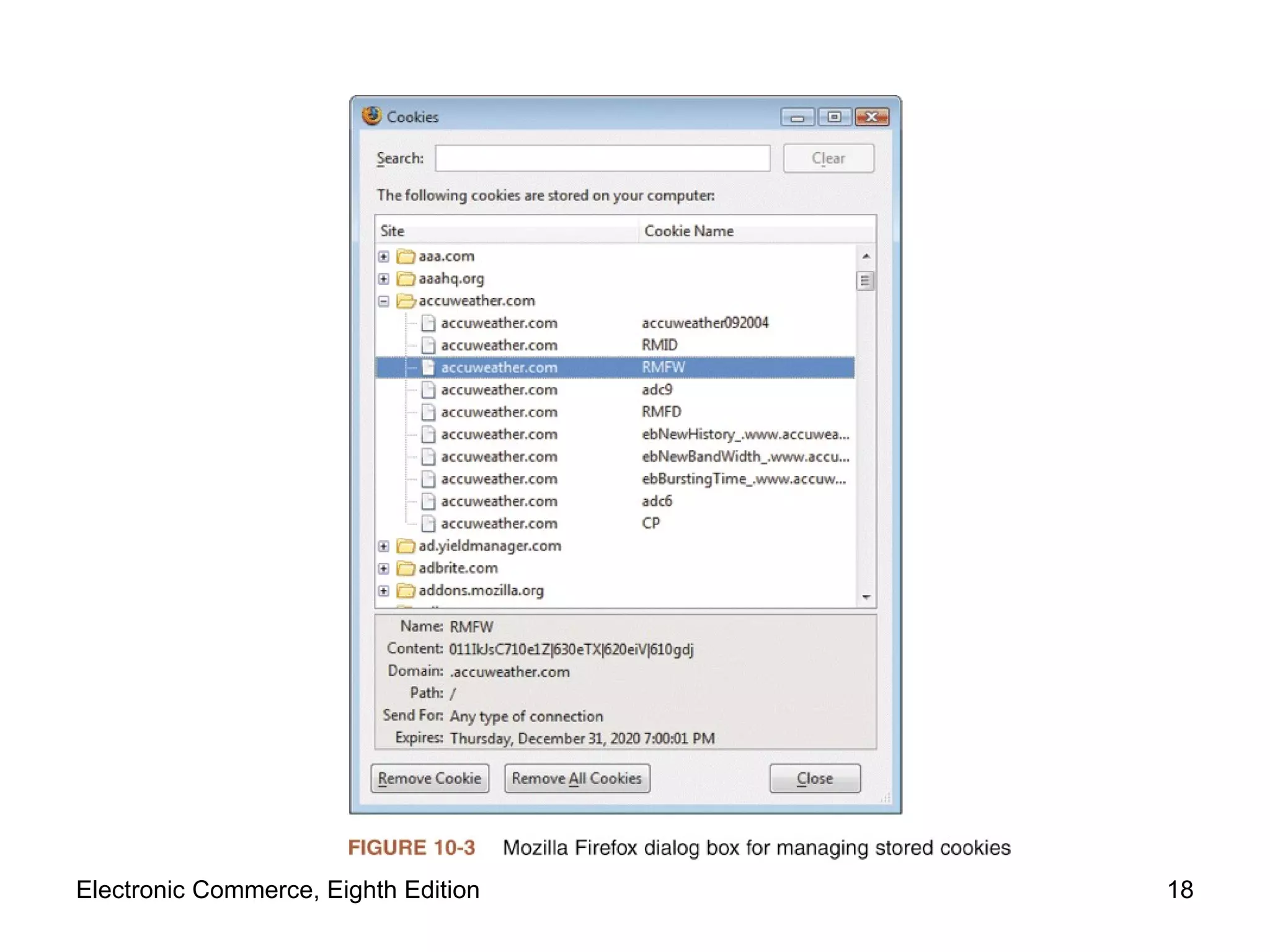
Cookies Internet connection between Web clients and servers Stateless connection Independent information transmission No continuous connection ( open session ) maintained between any client and server Cookies Small text files Web servers place on Web client Identify returning visitors Allow continuing open session Example: shopping cart and payment processing  Electronic Commerce, Eighth Edition
Cookies (cont’d.) Time duration cookie category Session cookies:  exist until client connection ends Persistent cookies:  remain indefinitely Electronic commerce sites use both Source cookie category First-party cookies Web server site places them on client computer Third-party cookies Different Web site places them on client computer Electronic Commerce, Eighth Edition
Cookies (cont’d.) Disable cookies entirely Complete protection from revealing private information Problem Useful cookies blocked (along with others) Full site resources are not available Web browser cookie management functions Refuse only third-party cookies Review each cookie before accepted Provided by Microsoft Internet Explorer, Mozilla Firefox, Mozilla SeaMonkey, Opera Electronic Commerce, Eighth Edition
Electronic Commerce, Eighth Edition
Web Bugs Web bug Tiny graphic that a third-party Web site places on another site’s Web page Purpose Site visitor loads Web page Web bug delivered by third-party site Cookie placed on visitor’s computer Internet advertising community Calls Web bugs “clear GIFs” or “1-by-1 GIFs”  Graphics created in GIF format Color value of “transparent,” small as 1 pixel by 1 pixel Electronic Commerce, Eighth Edition
Active Content Active content Programs embedded transparently in Web pages Cause action to occur E-commerce example Place items into shopping cart; compute tax and costs Advantages Extends HTML functionality; moves data processing chores to client computer Disadvantages Can damage client computer Poses threat to client computer Electronic Commerce, Eighth Edition
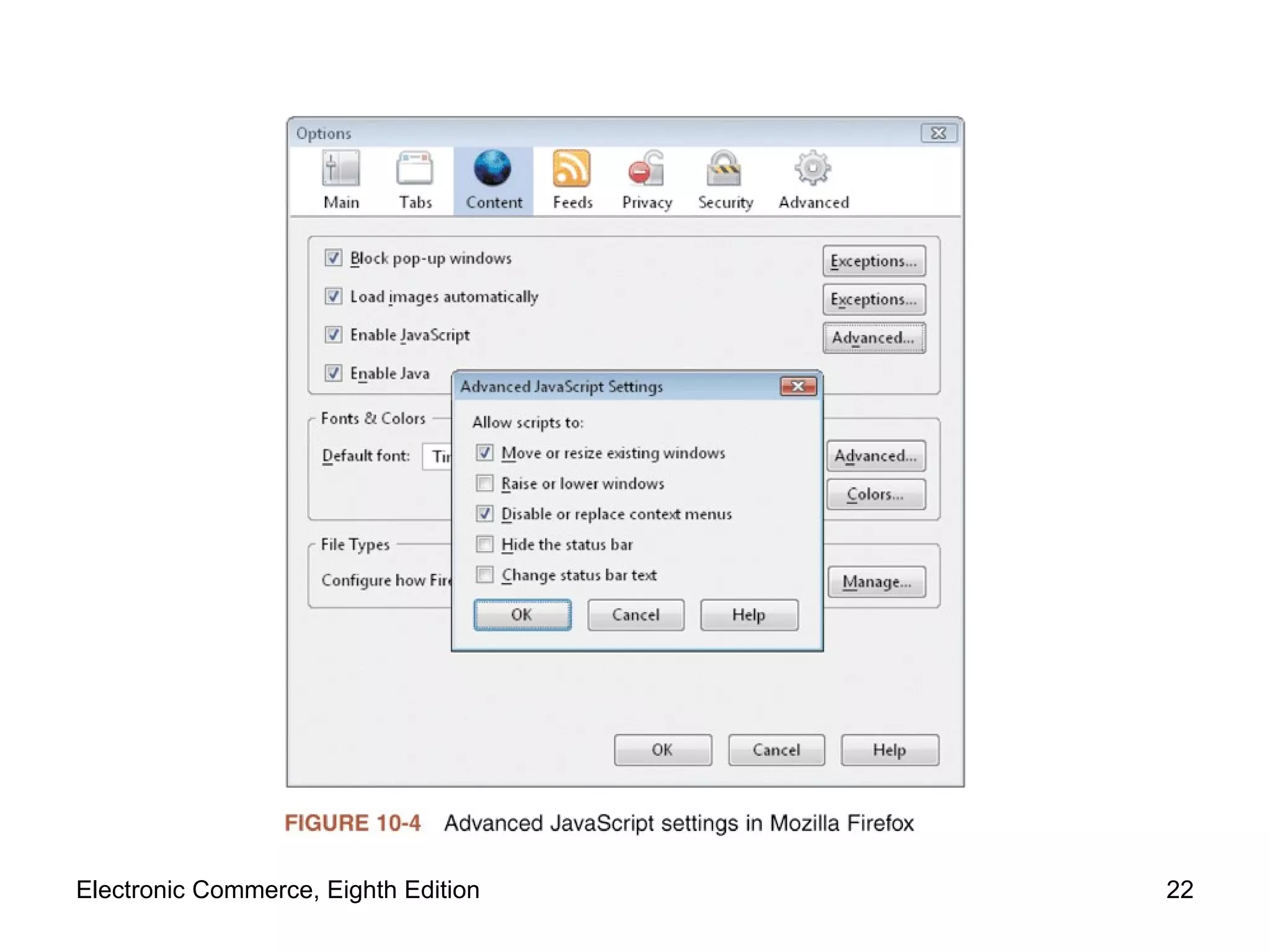
Active Content (cont’d.) Cookies, Java applets, JavaScript, VBScript, ActiveX controls, graphics, Web browser plug-ins, e-mail attachments Scripting languages:  provide executable script Examples: JavaScript and VBScript Applet:  small application program Typically runs within Web browser Browsers include tools limiting applets’ actions Electronic Commerce, Eighth Edition
Electronic Commerce, Eighth Edition
Active Content (cont’d.) Active content modules Embedded in Web pages (transparent) Crackers can embed malicious active content Trojan horse Program hidden inside another program (Web page) Masking true purpose Zombie  (Trojan horse) Secretly takes over another computer Launches attacks on other computers Electronic Commerce, Eighth Edition
Java Applets Java: platform-independent programming language Provides Web page active content Server sends applets with client-requested pages  Most cases: operation visible to visitor Possibility: functions not noticed by visitor Advantages Adds functionality to business application’s functionality; relieves server-side programs Disadvantage Possible security violations Electronic Commerce, Eighth Edition
Java Applets (cont’d.) Java sandbox Confines Java applet actions to set of rules defined by security model Rules apply to all  untrusted Java applets Not established as secure Java applets running within sandbox constraints No full client system access Java applet security information Java Security Page Maintained by Center for Education and Research in Information Assurance and Security (CERIAS) Electronic Commerce, Eighth Edition
JavaScript JavaScript Scripting language developed by Netscape Enables Web page designers to build active content Based loosely on Sun’s Java programming language Can be used for attacks Cannot commence execution on its own User must start ill-intentioned JavaScript program Electronic Commerce, Eighth Edition
ActiveX Controls Objects that contain programs and properties Web designers place on Web pages Perform particular tasks Run on Windows operating systems computers Component construction Many different programming languages Common: C++ and Visual Basic Executed on client computer After downloading Web page containing embedded ActiveX control Electronic Commerce, Eighth Edition
ActiveX Controls (cont’d.) Comprehensive ActiveX controls list Download.com ActiveX   page Security danger Execute like other client computer programs Have access to full system resources Cause secrecy, integrity, and necessity violations Actions cannot be halted once started Web browsers Provide notice of Active-X download or install Electronic Commerce, Eighth Edition
Graphics and Plug-Ins Graphics, browser plug-ins, and e-mail attachments can harbor executable content Code embedded in graphic might harm client computer Plug-ins  (programs) Enhance browser capabilities (normally beneficial) Handle Web content that browser cannot handle Can pose security threats 1999 RealPlayer plug-in Plug-ins executing commands buried within media Electronic Commerce, Eighth Edition
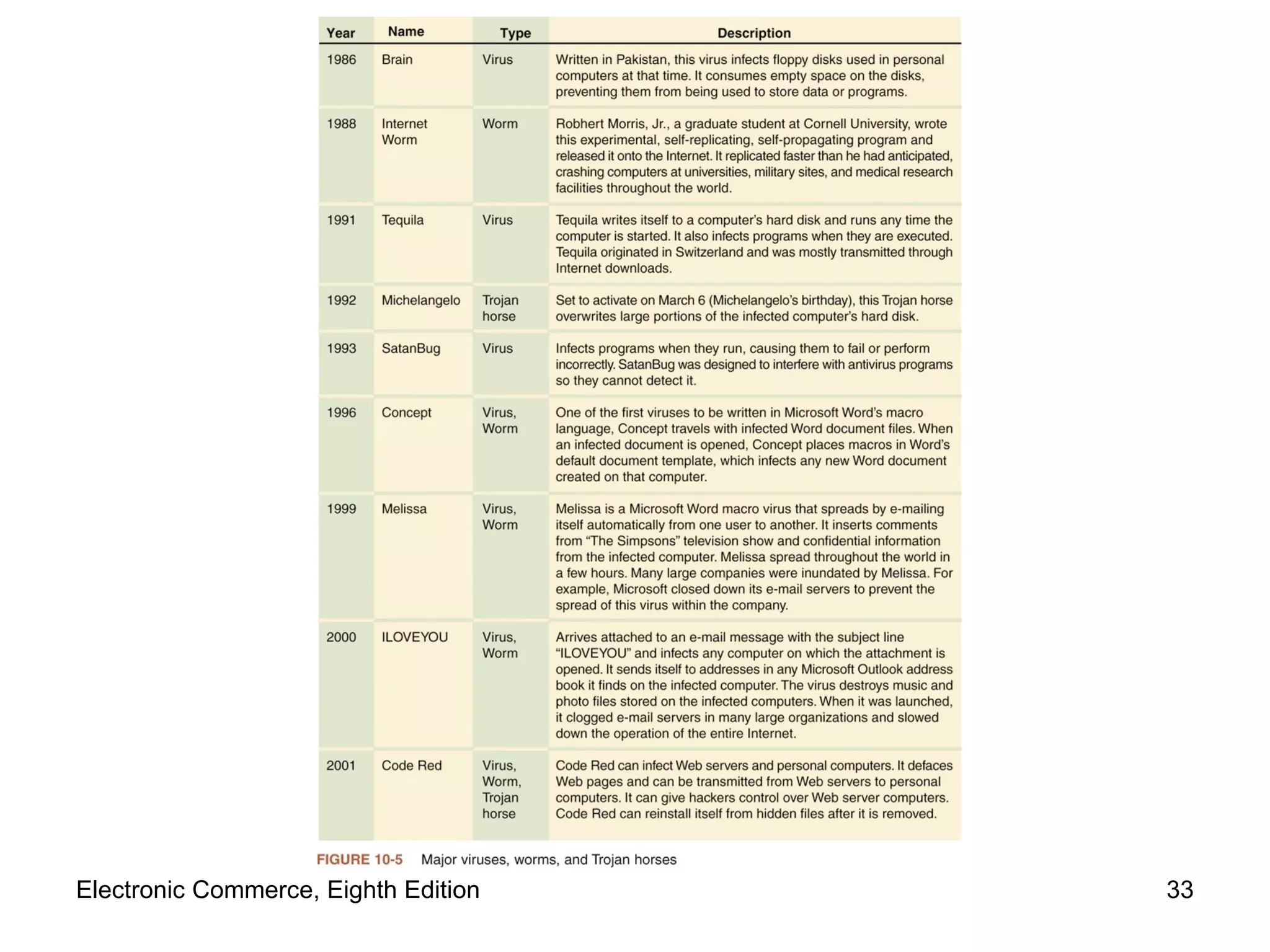
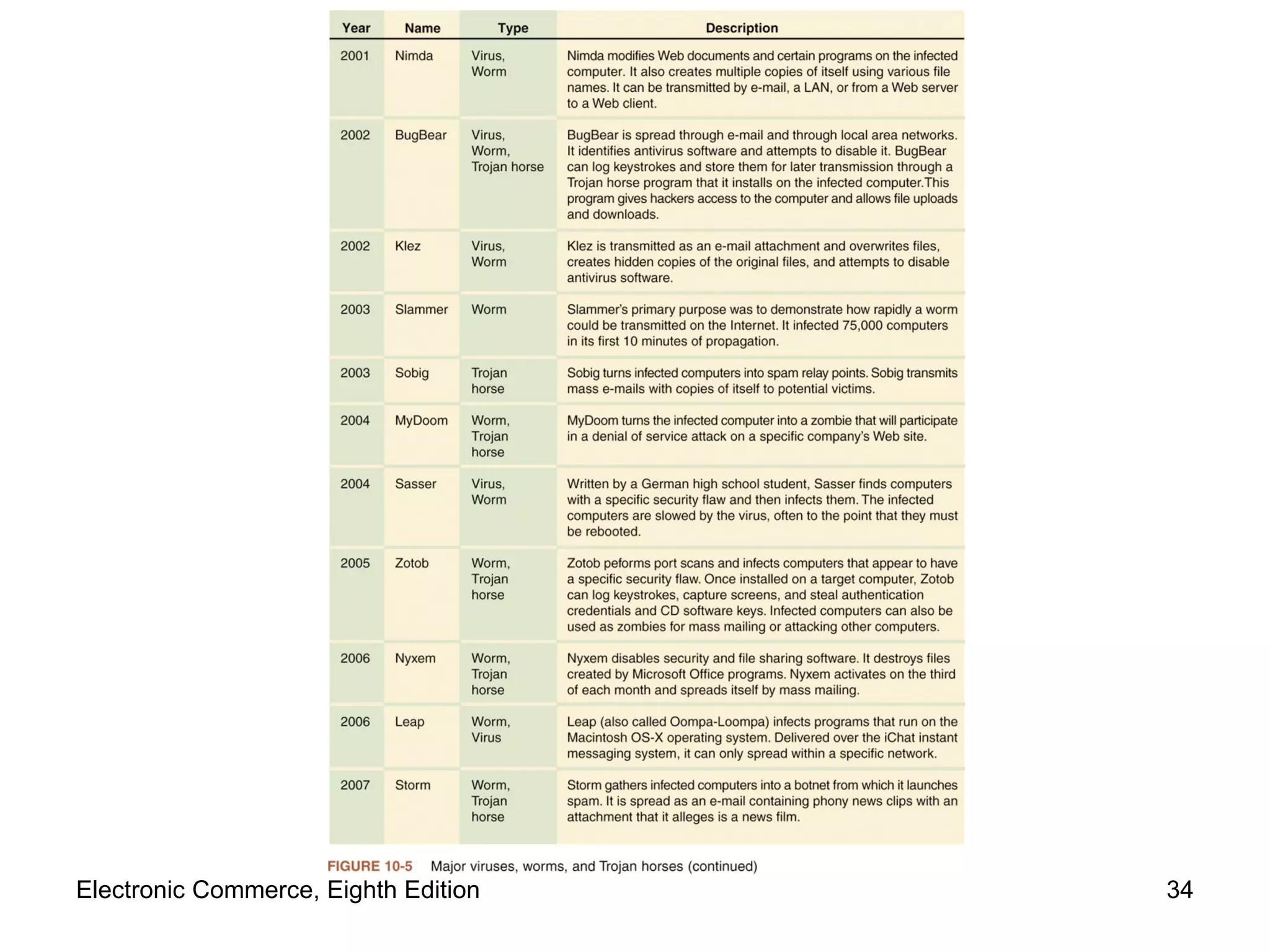
Viruses, Worms, and Antivirus Software Programs display e-mail attachments by automatically executing associated programs Word and Excel macro viruses can cause damage  Virus: software Attaches itself to another program Causes damage when host program activated Worm:  virus Replicates itself on computers it infects Spreads quickly through the Internet Macro virus  Small program (macro) embedded in file Electronic Commerce, Eighth Edition
Viruses, Worms, and Antivirus Software (cont’d.) ILOVEYOU virus (“love bug”) Spread with amazing speed Infected computers Clogged e-mail systems Replicated itself explosively through Outlook e-mail Caused other harm 2001 Code Red and Nimda Multivector virus:  entered computer system in several different ways (vectors) 2002 and 2003 Bugbear New virus-worm combination Electronic Commerce, Eighth Edition
Viruses, Worms, and Antivirus Software (cont’d.) 2005 and 2006 Zotob New breed of Trojan horse-worm combination Antivirus software Detects viruses and worms Ether deletes or isolates them on client computer Symantec  and  McAfee Keep track of viruses, sell antivirus software Only effective if antivirus data files kept current Electronic Commerce, Eighth Edition
Electronic Commerce, Eighth Edition
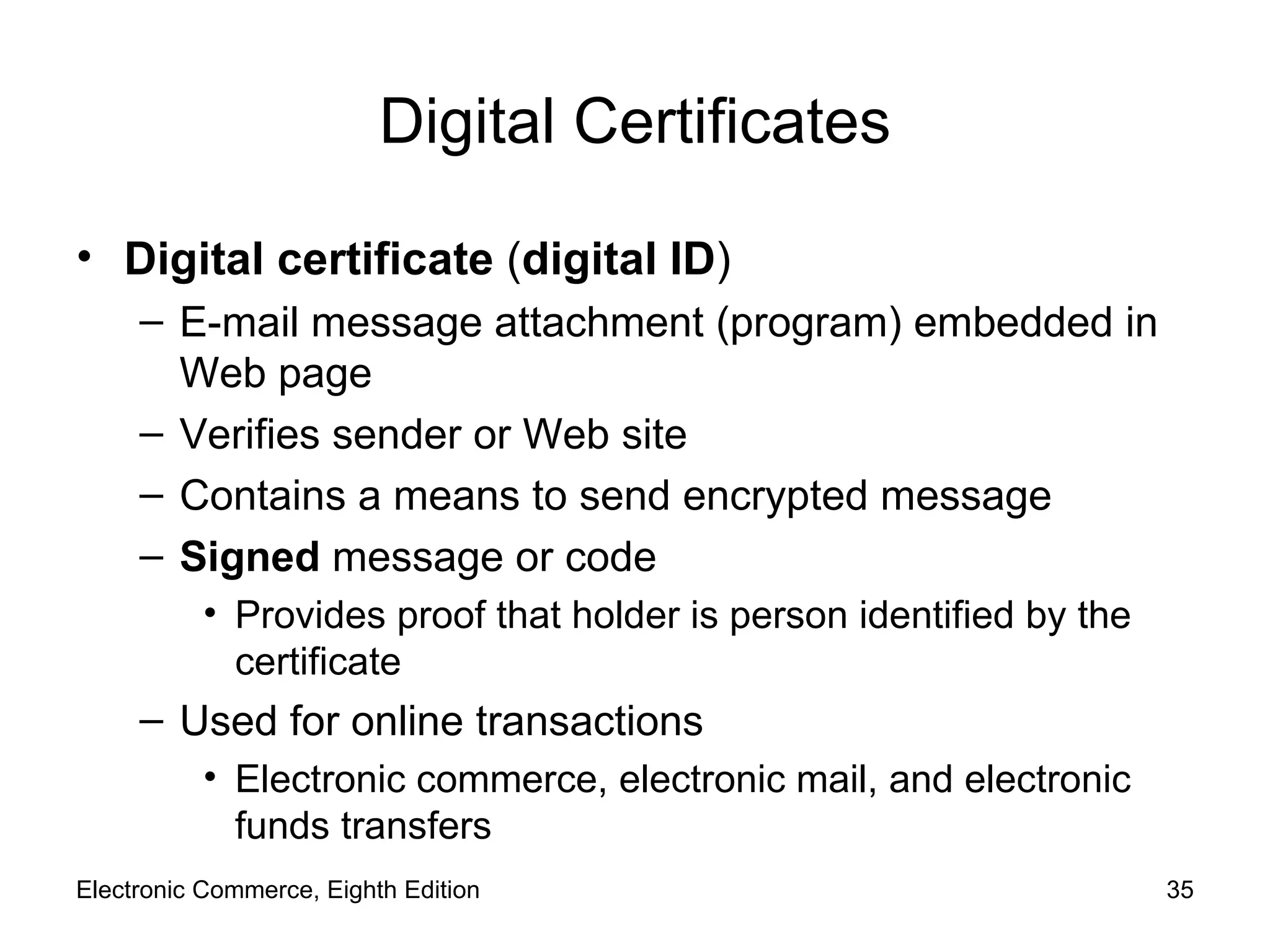
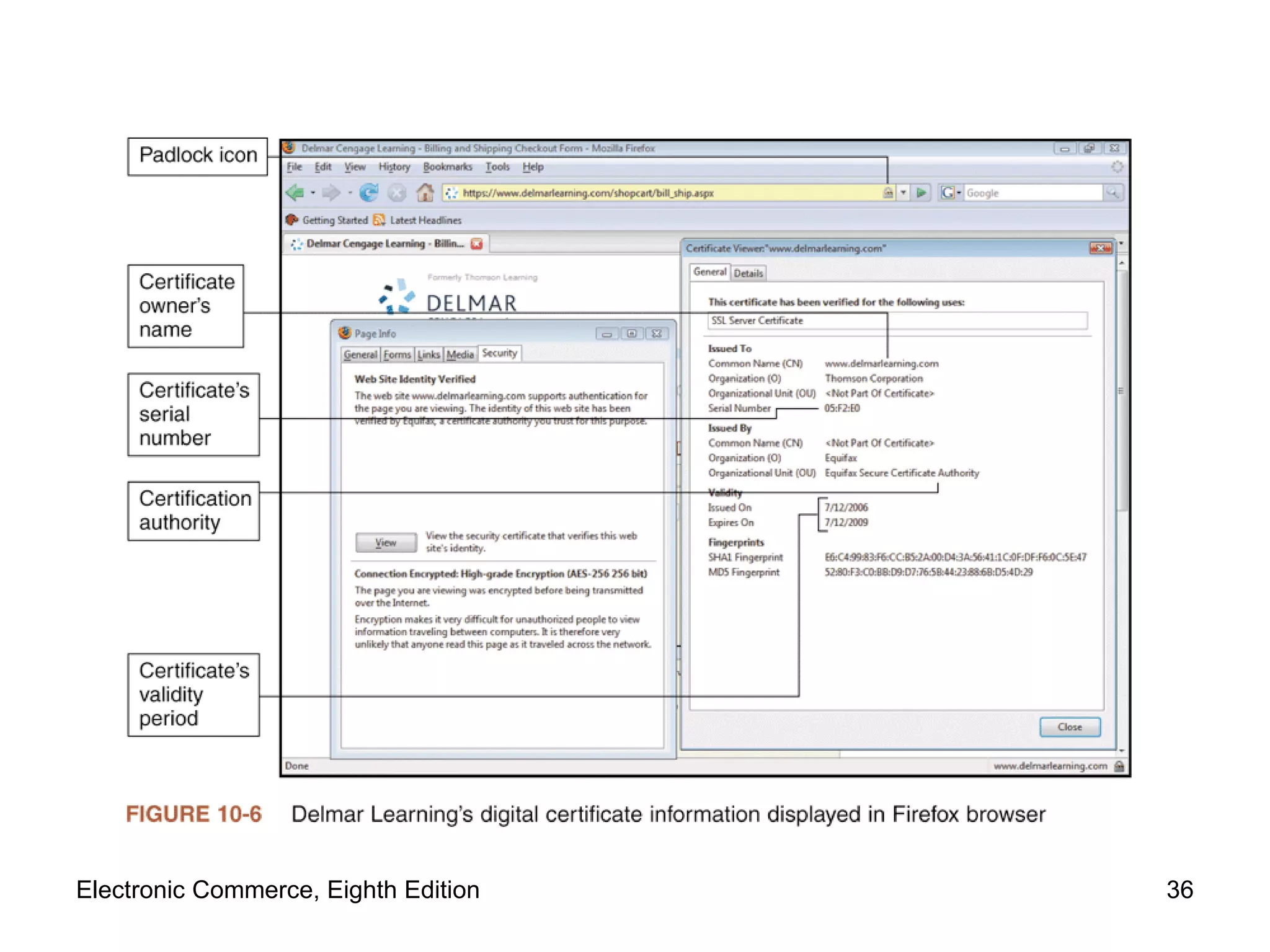
Digital Certificates Digital certificate  ( digital ID ) E-mail message attachment (program) embedded in Web page Verifies sender or Web site Contains a means to send encrypted message Signed  message or code Provides proof that holder is person identified by the certificate Used for online transactions Electronic commerce, electronic mail, and electronic funds transfers Electronic Commerce, Eighth Edition
Electronic Commerce, Eighth Edition
Digital Certificates (cont’d.) Certification authority (CA) Issues digital certificates to organizations, individuals Digital certificates cannot be forged easily Six main elements Certificate owner’s identifying information Certificate owner’s public key Dates certificate is valid Certificate serial number Certificate issuer name Certificate issuer digital signature Electronic Commerce, Eighth Edition
Digital Certificates (cont’d.) Key  Number: usually long binary number Used with encryption algorithm “ Lock” message characters being protected (undecipherable without key) Longer keys provide significantly better protection Identification requirements vary Driver’s license, notarized form, fingerprints Companies offering CA services Thawte, VeriSign, Entrust, Equifax Secure Electronic Commerce, Eighth Edition
Digital Certificates (cont’d.) Classification Low, medium, high assurance Based largely on identification requirements Determine CA service fee charged Digital certificates expire after period of time Provides protection (users and businesses) Must submit credentials for reevaluation periodically Electronic Commerce, Eighth Edition
Steganography Process of hiding information within another piece of information Can be used for malicious purposes Hiding encrypted file within another file  Casual observer cannot detect anything of importance in container file  Two-step process Encrypting file protects it from being read Steganography makes it invisible Al Qaeda used steganography to hide attack orders Electronic Commerce, Eighth Edition
Physical Security for Clients Client computers Control important business functions Same physical security as early systems New physical security technologies Fingerprint readers (less than $100) Stronger protection than password approaches Biometric security devices Identification using element of person’s biological makeup Writing pads, eye scanners, palm reading scanners, reading back of hand vein pattern Electronic Commerce, Eighth Edition
Communication Channel Security Internet is not designed to be secure Designed to provide redundancy Remains unchanged from original state Message traveling on the Internet Subject to secrecy, integrity, and necessity threats Electronic Commerce, Eighth Edition
Secrecy Threats Secrecy Prevention of disclosure of unauthorized information  Technical issue Requiring sophisticated physical and logical mechanisms Privacy Protection of individual rights to nondisclosure Legal matter Electronic Commerce, Eighth Edition
Secrecy Threats (cont’d.) E-mail message Secrecy violations protected using encryption Protects outgoing messages Privacy issues address whether supervisors permitted to read employees’ messages randomly Electronic commerce threat Sensitive or personal information theft Sniffer programs Record information passing through computer or router  Read e-mail messages and unencrypted Web client–server message traffic Electronic Commerce, Eighth Edition
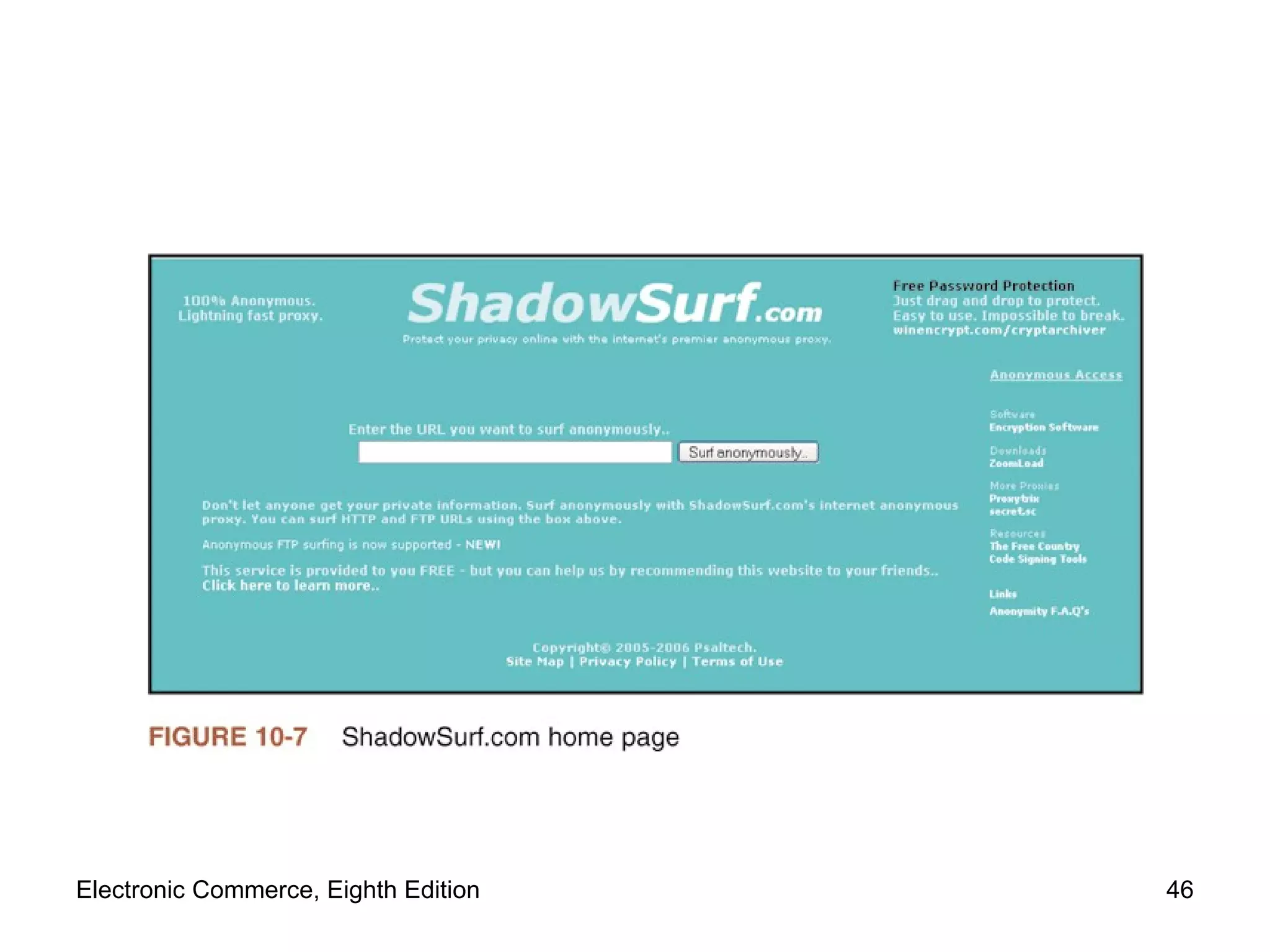
Secrecy Threats (cont’d.) Electronic commerce threat (cont’d.) Backdoors:  electronic holes Left open accidentally or intentionally Content exposed to secrecy threats Example: Cart32 shopping cart program backdoor Stolen corporate information Eavesdropper example Web users continually reveal information Secrecy breach Possible solution: anonymous Web surfing Electronic Commerce, Eighth Edition
Electronic Commerce, Eighth Edition
Integrity Threats Also known as  active wiretapping Unauthorized party alters message information stream Integrity violation example Cybervandalism Web site’s page electronic defacing Masquerading (spoofing) Pretending to be someone else Fake Web site representing itself as original Electronic Commerce, Eighth Edition
Integrity Threats (cont’d.) Domain name servers (DNSs)  Internet computers maintaining directories Linking domain names to IP addresses Perpetrators use software security hole  Substitute their Web site address in place of real one  Spoofs Web site visitors Phishing expeditions Capture confidential customer information Common victims Online banking, payment system users Electronic Commerce, Eighth Edition
Necessity Threats Also known as  delay ,  denial ,  denial-of-service (DoS) threats Disrupt normal computer processing Deny processing entirely Intolerably slow-speed computer processing Renders service unusable or unattractive DoS attacks Remove information altogether Delete transmission or file information Electronic Commerce, Eighth Edition
Necessity Threats (cont’d.) Documented denial attacks Quicken accounting program diverted money to perpetrator’s bank account Denied money from its rightful owners Zombie computers sent flood of data packets to high-profile electronic commerce sites Overwhelmed sites’ servers Choked off legitimate customers’ access 1988 Internet Worm attack Disabled thousands of computers Electronic Commerce, Eighth Edition
Threats to the Physical Security of Internet Communications Channels Internet’s packet-based network design Precludes it from being shut down By attack on single communications link Individual user’s Internet service can be interrupted  User’s Internet link destruction Larger companies, organizations More than one link to main Internet backbone Electronic Commerce, Eighth Edition
Threats to Wireless Networks Wardrivers   Attackers drive around in cars Use wireless-equipped computers searching for accessible networks Warchalking Place chalk mark on building Identifies easily entered wireless network nearby Web sites include wireless access locations maps Avoid being targeted Turn on WEP in access points Change default settings Electronic Commerce, Eighth Edition
Threats to Wireless Networks (cont’d.) Example 2002: Best Buy wireless point-of-sale (POS) Failed to enable WEP Customer launched sniffer program Intercepted data from POS terminals Electronic Commerce, Eighth Edition
Encryption Solutions Encryption:  coding information using mathematically based program, secret key Produces unintelligible string of characters Cryptography:  science studying encryption Science of creating messages only sender and receiver can read Steganography Makes text undetectable to naked eye Cryptography converts text to other visible text  The random text appears to have no meaning Electronic Commerce, Eighth Edition
Encryption Solutions (cont’d.) Encryption algorithms Encryption   program Transforms normal text ( plain text ) into  cipher text  (unintelligible characters string) Encryption algorithm Logic behind encryption program  Includes mathematics to do transformation  Messages encrypted just before being sent  Upon arrival, message is decoded (decrypted) Decryption program:  encryption-reversing procedure Electronic Commerce, Eighth Edition
Encryption Solutions (cont’d.) Encryption algorithms (cont’d.) National Security Agency controls dissemination U.S. government banned publication of details Illegal for U.S. companies to export Property May know algorithm details Not able to decipher encrypted message without knowing key encrypting the message Key type subdivides encryption into three functions Hash coding, asymmetric encryption, symmetric encryption Electronic Commerce, Eighth Edition
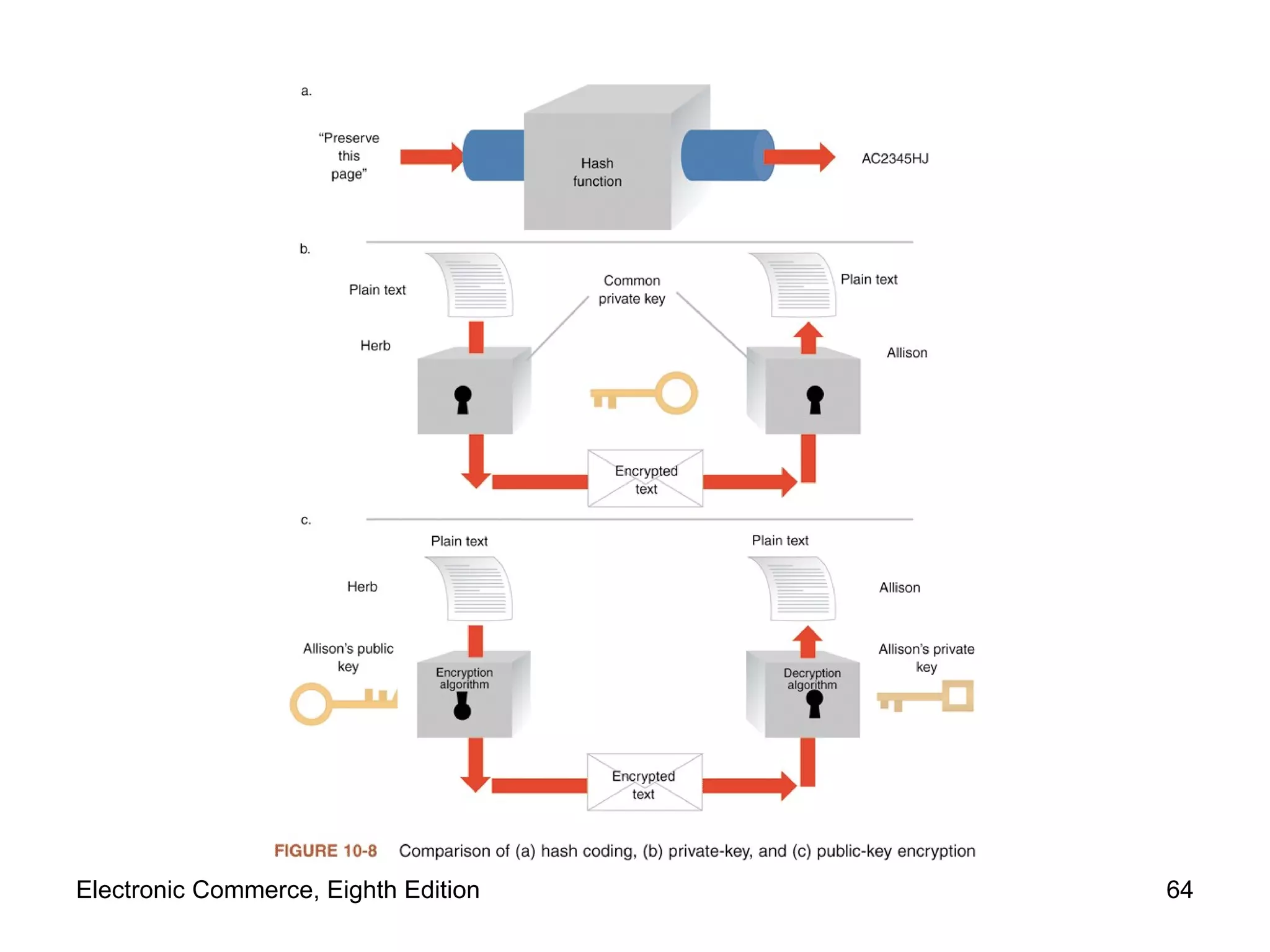
Encryption Solutions (cont’d.) Hash coding Hash algorithm  calculates number ( hash value) From any length message Unique message fingerprint Design of good hash algorithms Probability of  collision  is extremely small (two different messages resulting in same hash value) Determine whether message has been altered during transit  No match with original hash value and receiver computed value Electronic Commerce, Eighth Edition
Encryption Solutions (cont’d.) Asymmetric encryption  ( public-key encryption ) Encodes messages using two mathematically related numeric keys Public key:  one key freely distributed to public  Encrypt messages using encryption algorithm Private key:  second key belongs to key owner Kept secret Decrypt all messages received Electronic Commerce, Eighth Edition
Encryption Solutions (cont’d.) Asymmetric encryption (cont’d.) Pretty Good Privacy (PGP) Software tools using different encryption algorithms Perform public key encryption Individuals download free versions  PGP Corporation site, PGP International site Encrypt e-mail messages Sells business site licenses Electronic Commerce, Eighth Edition
Encryption Solutions (cont’d.) Symmetric encryption (private-key encryption) Encodes message with one of several available algorithms Single numeric key to encode and decode data Message receiver must know the key Very fast and efficient encoding and decoding Guard key Electronic Commerce, Eighth Edition
Encryption Solutions (cont’d.) Symmetric encryption (cont’d.) Problems Difficult to distribute new keys to authorized parties while maintaining security, control over keys Private keys do not scale well in large environments Data Encryption Standard (DES) Encryption algorithms adopted by U.S. government  Most widely used private-key encryption system Fast computers break messages encoded with smaller keys Electronic Commerce, Eighth Edition
Encryption Solutions (cont’d.) Symmetric encryption (cont’d.) Triple Data Encryption Standard (Triple DES,  3DES) Stronger version of Data Encryption Standard  Advanced Encryption Standard (AES) NIST-developed encryption standard  Designed to keep government information secure Longer bit lengths dramatically increase difficulty of cracking encryption protection Electronic Commerce, Eighth Edition
Encryption Solutions (cont’d.) Comparing asymmetric and symmetric encryption systems Advantages of public-key (asymmetric) systems Small combination of keys required No problem in key distribution Implementation of digital signatures possible Disadvantages of public-key systems  Significantly slower than private-key systems Do not replace private-key systems (complement them) Electronic Commerce, Eighth Edition
Electronic Commerce, Eighth Edition
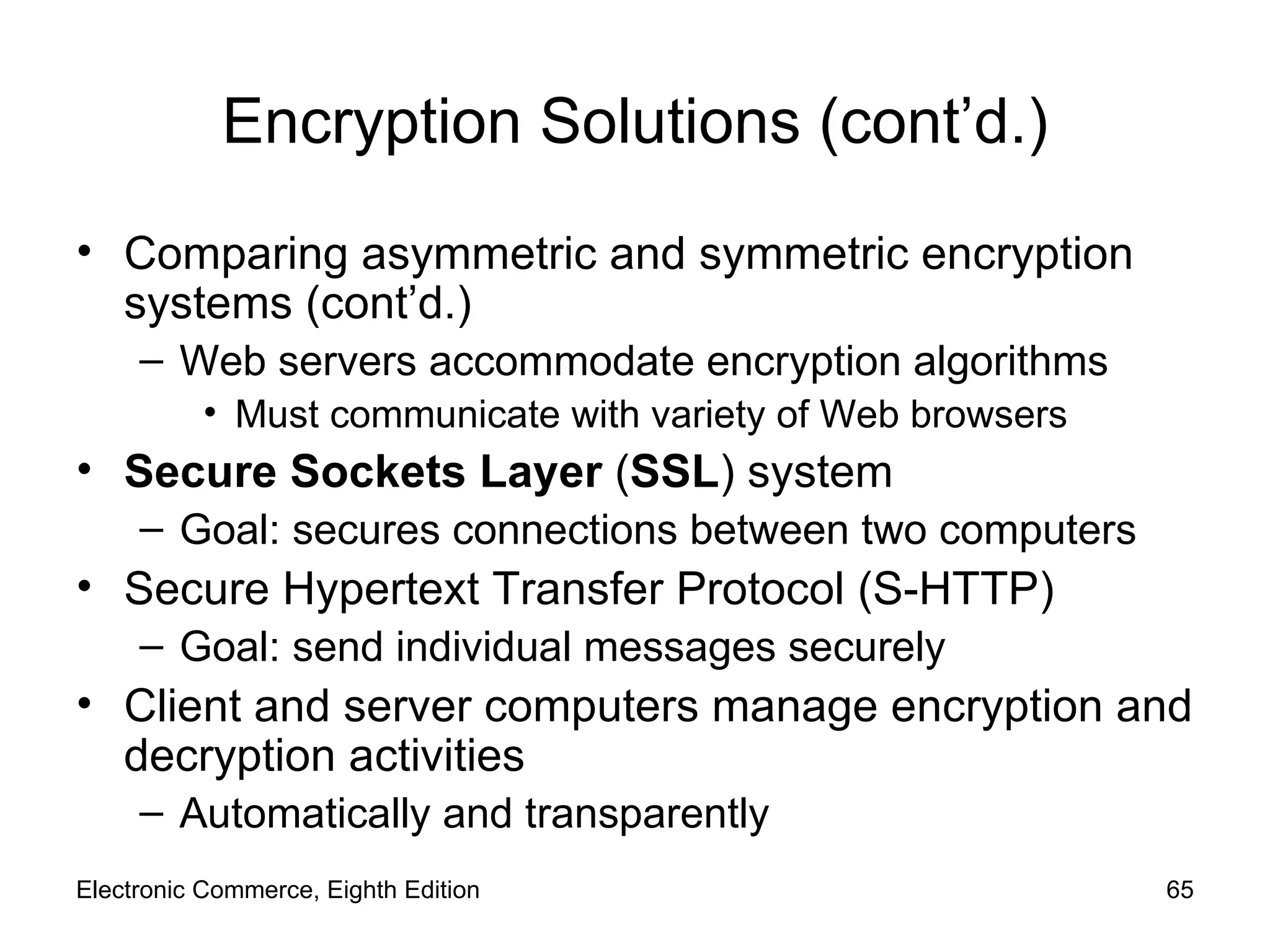
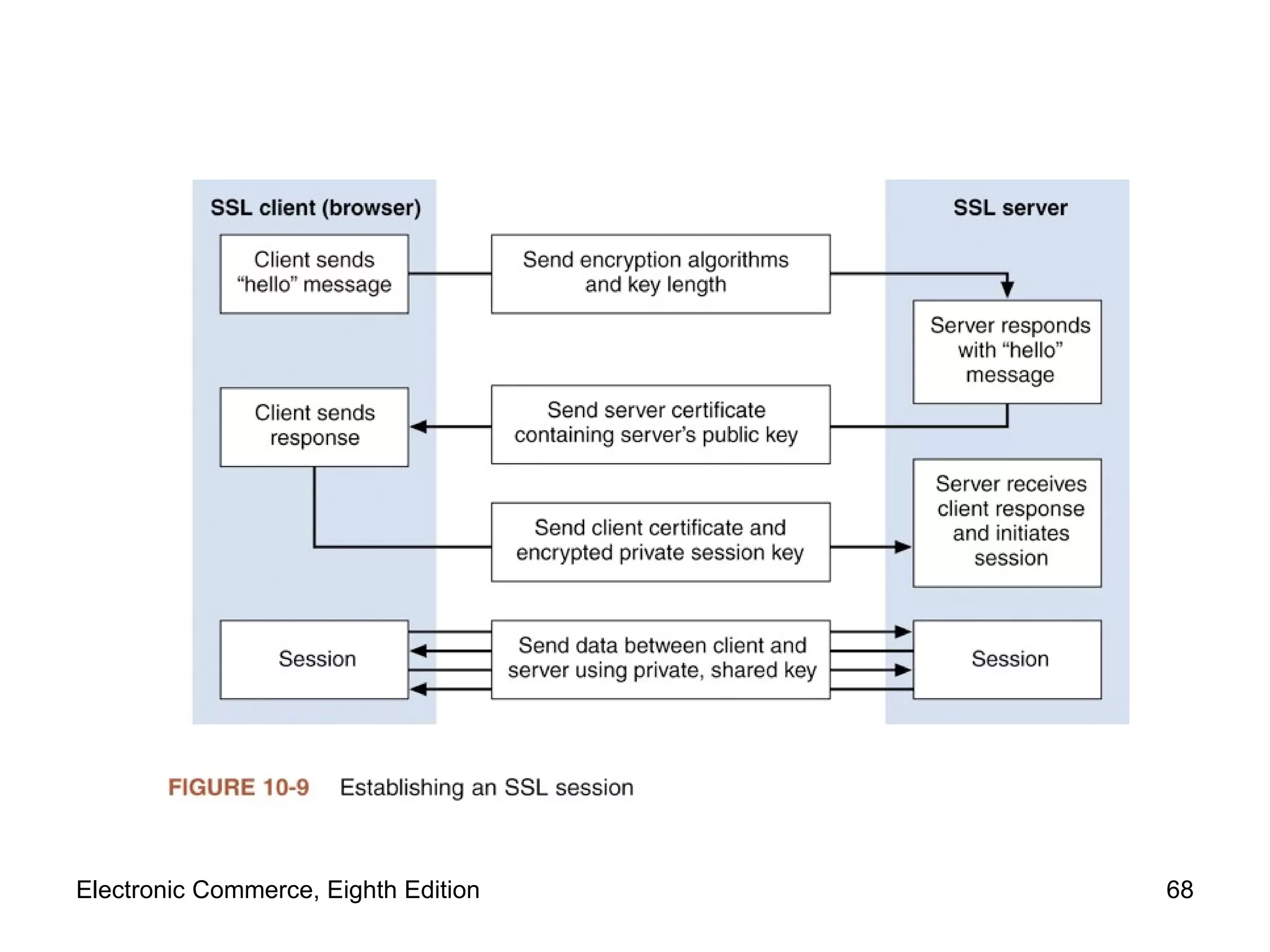
Encryption Solutions (cont’d.) Comparing asymmetric and symmetric encryption systems (cont’d.) Web servers accommodate encryption algorithms Must communicate with variety of Web browsers Secure Sockets Layer  ( SSL )   system  Goal: secures connections between two computers Secure Hypertext Transfer Protocol (S-HTTP) Goal: send individual messages securely Client and server computers manage encryption and decryption activities Automatically and transparently Electronic Commerce, Eighth Edition
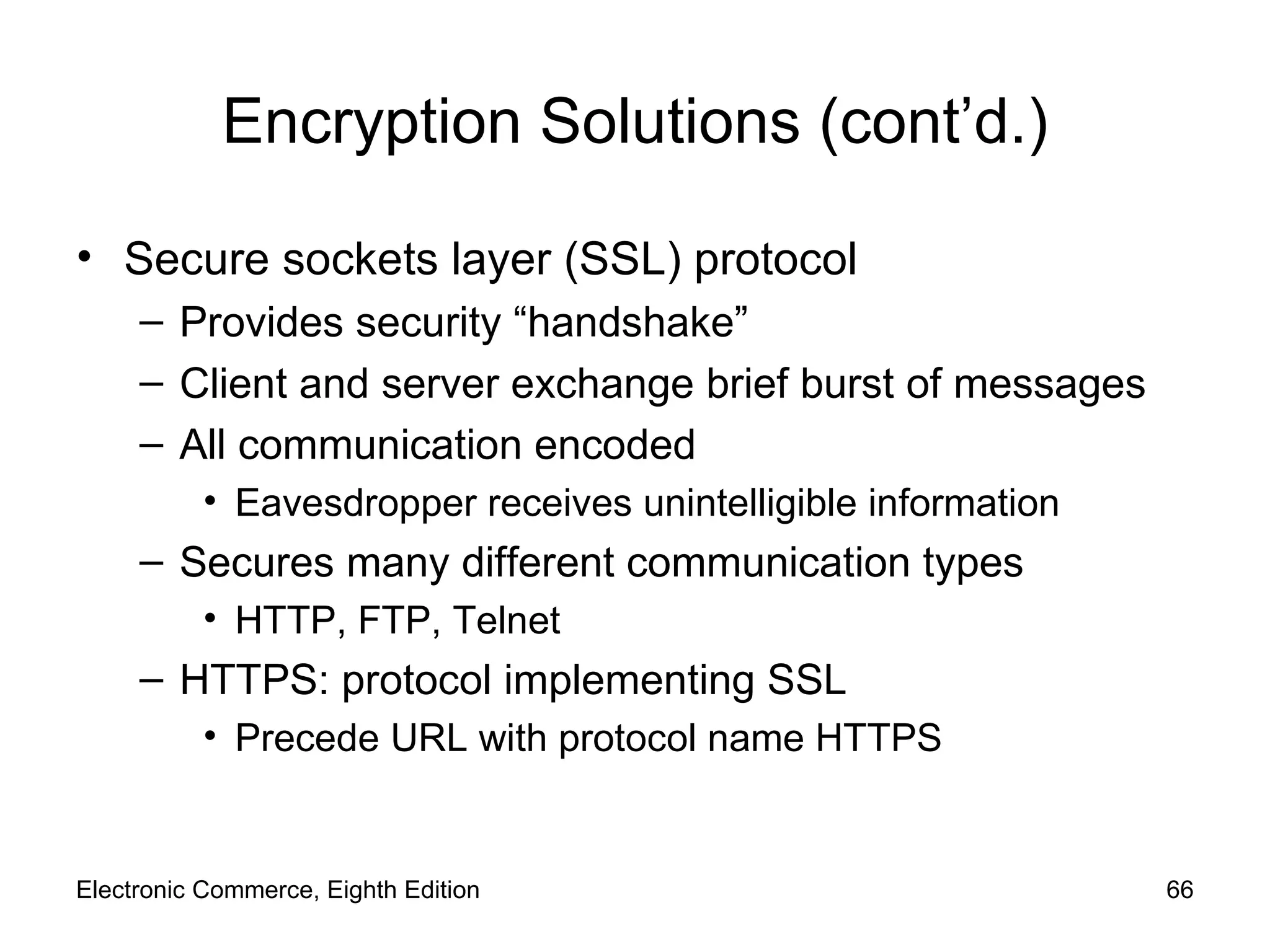
Encryption Solutions (cont’d.) Secure sockets layer (SSL) protocol Provides security “handshake” Client and server exchange brief burst of messages All communication encoded Eavesdropper receives unintelligible information Secures many different communication types HTTP, FTP, Telnet HTTPS: protocol implementing SSL Precede URL with protocol name HTTPS Electronic Commerce, Eighth Edition
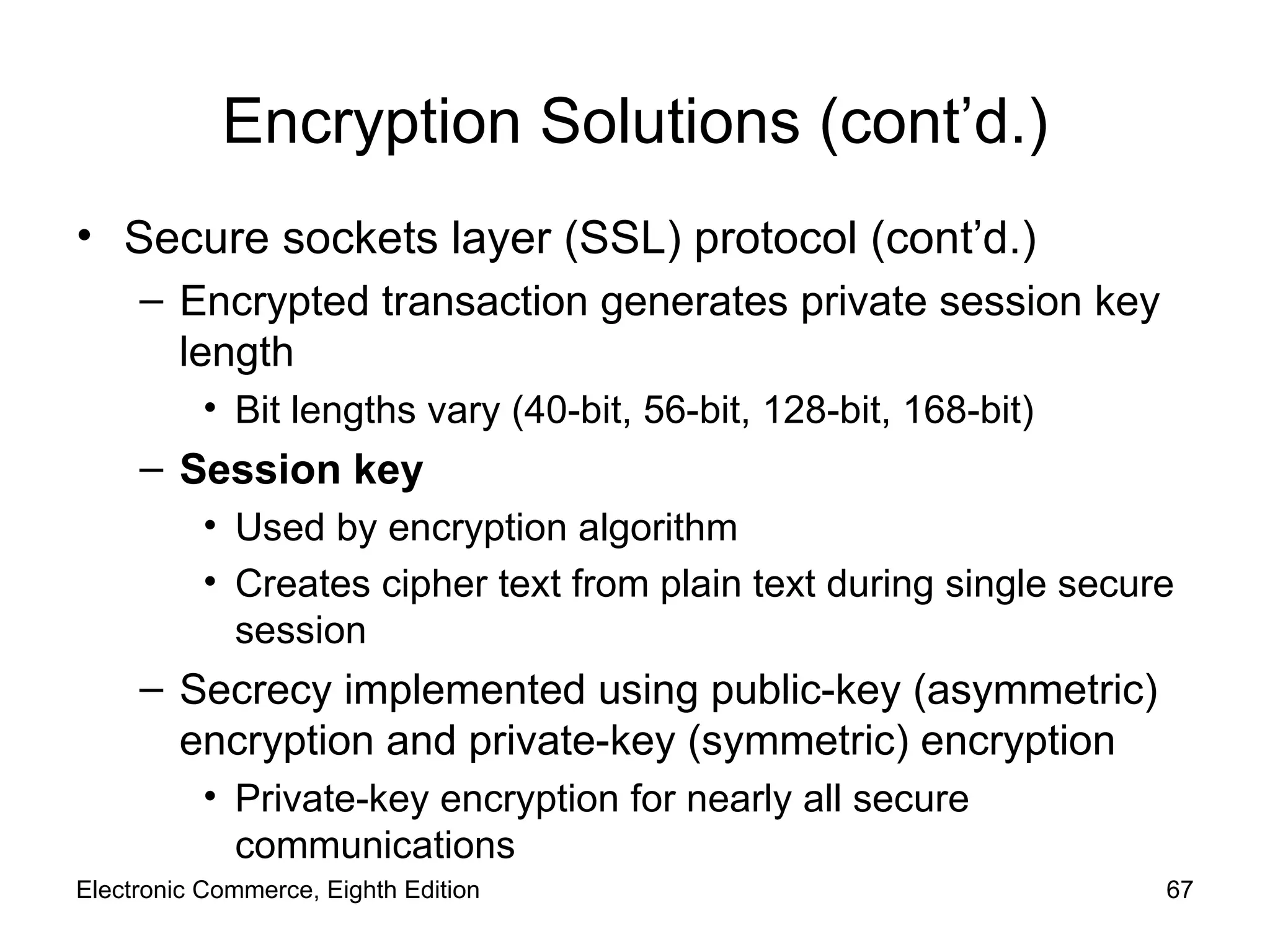
Encryption Solutions (cont’d.) Secure sockets layer (SSL) protocol (cont’d.) Encrypted transaction generates private session key length  Bit lengths vary (40-bit, 56-bit, 128-bit, 168-bit) Session key Used by encryption algorithm Creates cipher text from plain text during single secure session Secrecy implemented using public-key (asymmetric) encryption and private-key (symmetric) encryption  Private-key encryption for nearly all secure communications Electronic Commerce, Eighth Edition
Electronic Commerce, Eighth Edition
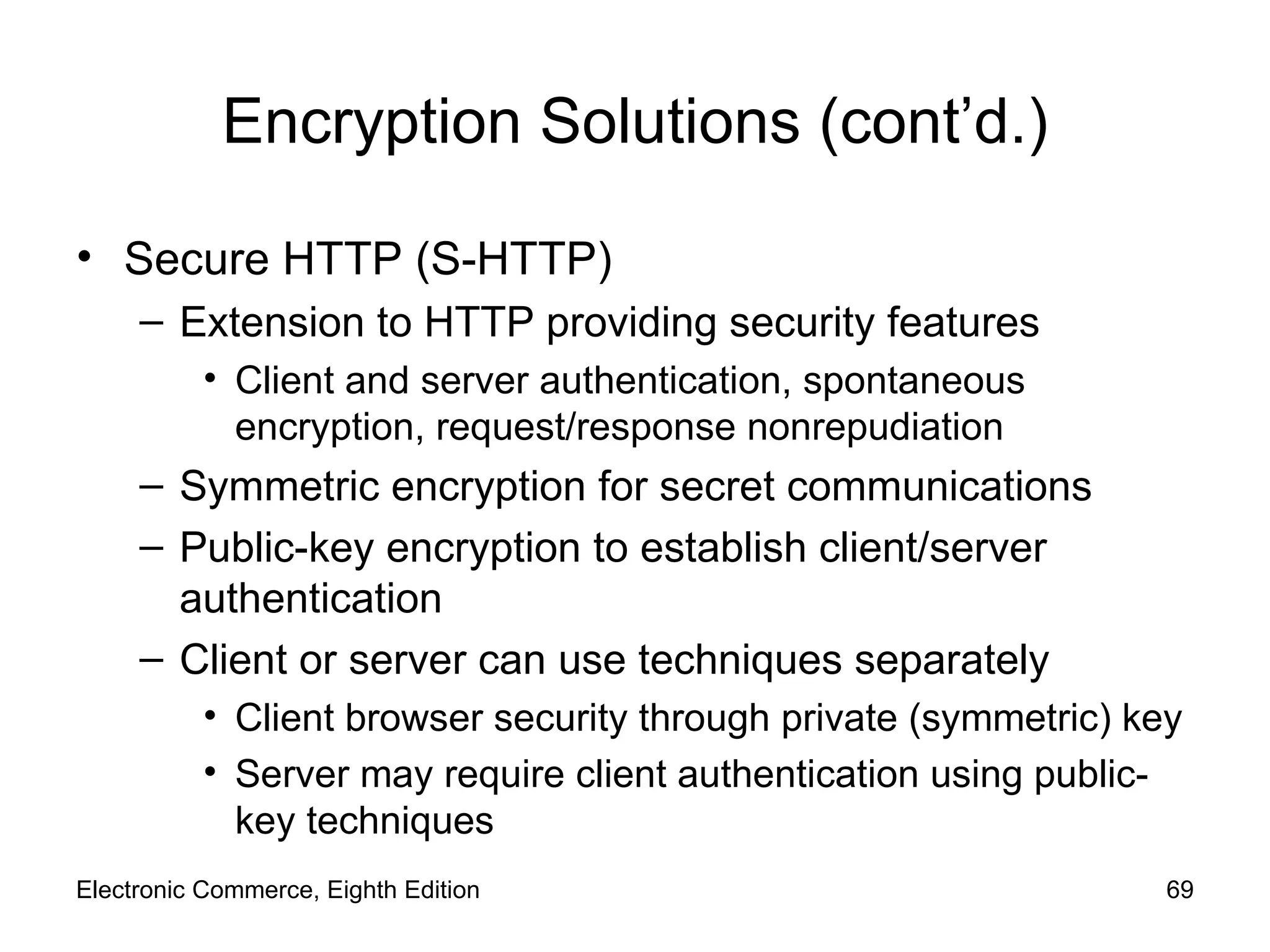
Encryption Solutions (cont’d.) Secure HTTP (S-HTTP) Extension to HTTP providing security features Client and server authentication, spontaneous encryption, request/response nonrepudiation Symmetric encryption for secret communications Public-key encryption to establish client/server authentication Client or server can use techniques separately Client browser security through private (symmetric) key Server may require client authentication using public-key techniques Electronic Commerce, Eighth Edition
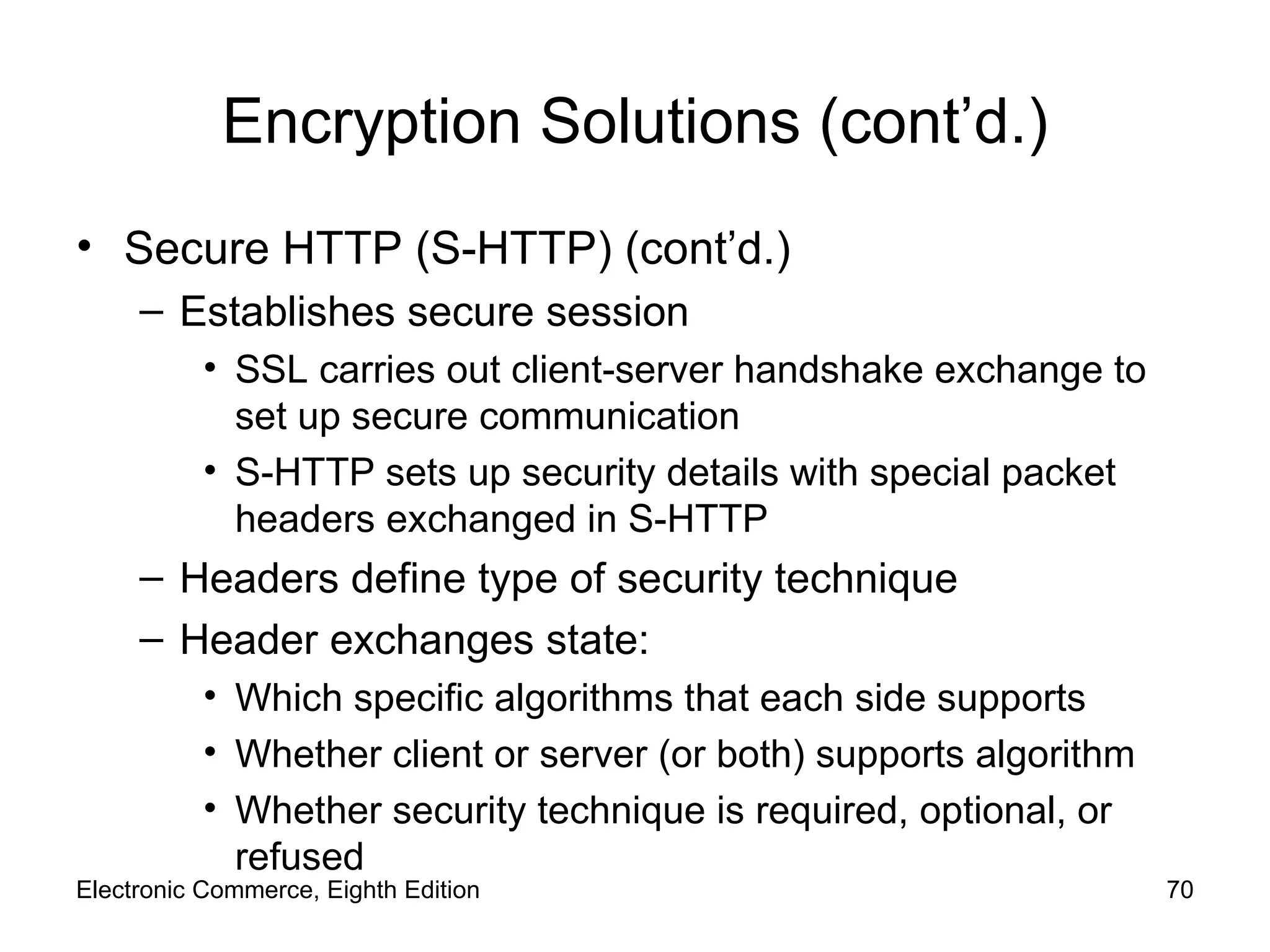
Encryption Solutions (cont’d.) Secure HTTP (S-HTTP) (cont’d.) Establishes secure session SSL carries out client-server handshake exchange to set up secure communication S-HTTP sets up security details with special packet headers exchanged in S-HTTP Headers define type of security technique  Header exchanges state: Which specific algorithms that each side supports Whether client or server (or both) supports algorithm Whether security technique is required, optional, or refused Electronic Commerce, Eighth Edition
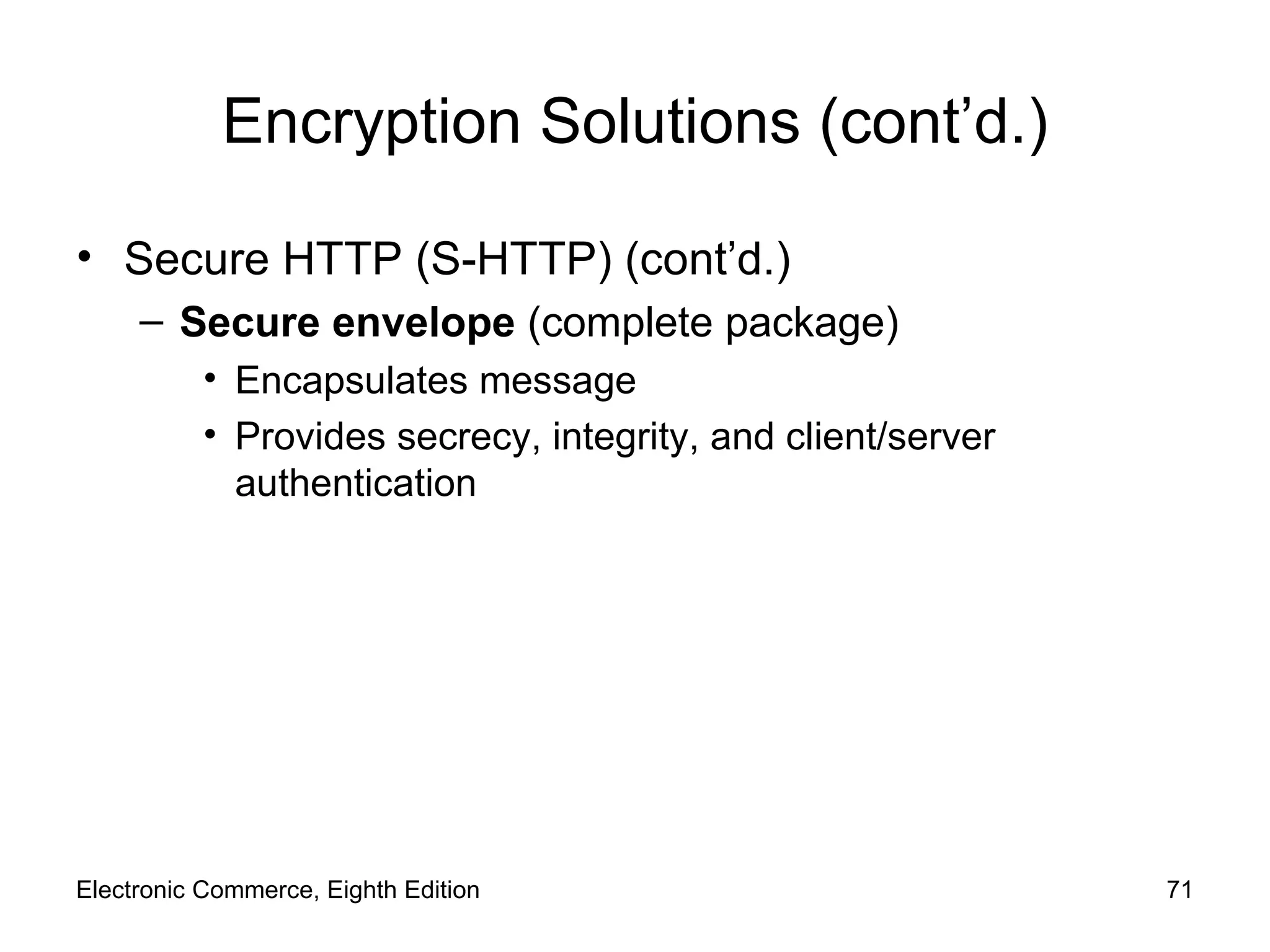
Encryption Solutions (cont’d.) Secure HTTP (S-HTTP) (cont’d.) Secure envelope  (complete package) Encapsulates message Provides secrecy, integrity, and client/server authentication Electronic Commerce, Eighth Edition
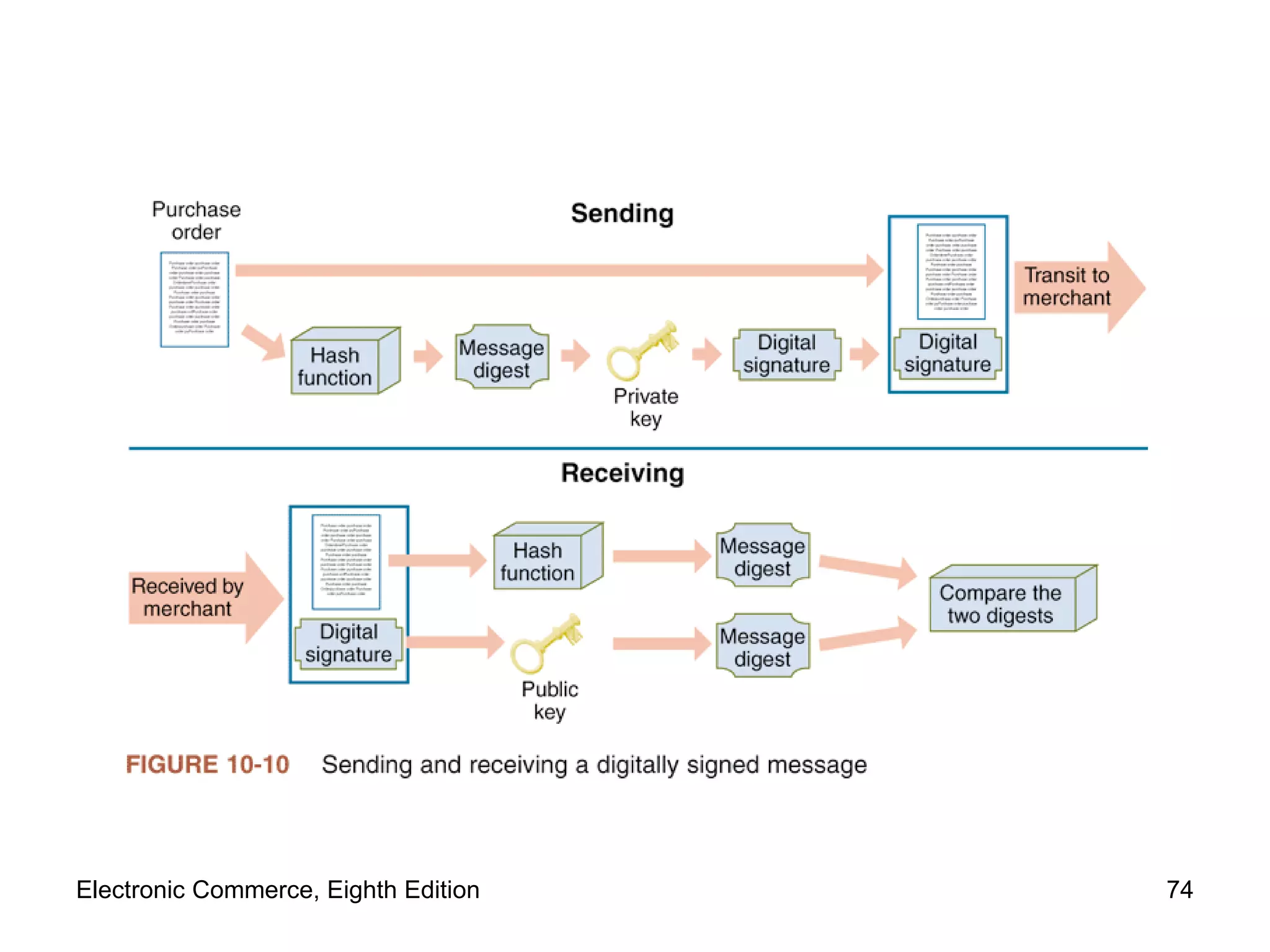
Ensuring Transaction Integrity with Hash Functions Integrity violation Message altered while in transit between sender and receiver Difficult and expensive to prevent Security techniques to detect Harm: unauthorized message changes undetected Apply two algorithms to eliminate fraud and abuse: Hash algorithms:  one-way functions No way to transform hash value back Message digest Small integer summarizing encrypted information Electronic Commerce, Eighth Edition
Ensuring Transaction Integrity with Digital Signatures Hash functions: potential for fraud Solution: sender encrypts message digest using private key Digital signature Encrypted message digest (message hash value) Digital signature provides: Integrity, nonrepudiation, authentication Provide transaction secrecy Encrypt entire string (digital signature, message) Digital signatures: same legal status as traditional signatures Electronic Commerce, Eighth Edition
Electronic Commerce, Eighth Edition
Guaranteeing Transaction Delivery Denial or delay-of-service attacks Remove or absorb resources Encryption and digital signature No information packet protection from theft, slowdown Transmission Control Protocol (TCP) Responsible for end-to-end packet control Request that client resend when packets do not appear No special protocol beyond TCP/IP is required as countermeasure against denial attacks TCP/IP builds in checks determining alteration Electronic Commerce, Eighth Edition
Security for Server Computers Server vulnerabilities Exploited by anyone determined to cause destruction or acquire information illegally Entry points Web server and its software Any back-end programs containing data  No system is completely safe Web server administrator Ensures security policies documented; considered in every electronic commerce operation Electronic Commerce, Eighth Edition
Web Server Threats Compromise of secrecy Allowing automatic directory listings Solution: turn off folder name display feature Compromise of security Requiring users to enter username and password Subsequently revealed upon repeated information requirement Solution Use cookie to store user’s confidential information  Encrypt cookie for transmission Electronic Commerce, Eighth Edition
Web Server Threats (cont’d.) Sensitive file on Web server  Holds Web server username-password pairs Solution: store authentication information in encrypted form Passwords that users select Easily guessable Dictionary attack programs  cycle through electronic dictionary, trying every word as password Solution: use password assignment software to check user password against dictionary Electronic Commerce, Eighth Edition
Database Threats Usernames and passwords Stored in unencrypted table Database fails to enforce security altogether Relies on Web server to enforce security Unauthorized users Masquerade as legitimate database users Trojan horse programs hide within database system Reveal information Remove all access controls within database Electronic Commerce, Eighth Edition
Other Programming Threats Java or C++ programs executed by server Passed to Web servers by client Reside on server Use a  buffer Memory area set aside holding data read from file or database Buffer overrun (buffer overflow error ) Programs filling buffers malfunction and overfill buffer Excess data spilled outside designated buffer memory Cause: error in program or intentional 1998 Internet worm Electronic Commerce, Eighth Edition
Other Programming Threats (cont’d.) Insidious version of buffer overflow attack Writes instructions into critical memory locations Web server resumes execution by loading internal registers with address of attacking program’s code Reducing potential buffer overflow damage Good programming practices Some hardware functionality Mail bomb  attack Hundreds (thousands) send message to particular address Electronic Commerce, Eighth Edition
Threats to the Physical Security of Web Servers Protecting Web servers Put computers in CSP facility Security on CSP physical premise is maintained better Maintain server content’s backup copies at remote location Rely on service providers Offer managed services including Web server security Hire smaller, specialized security service providers Electronic Commerce, Eighth Edition
Access Control and Authentication Controlling who and what has access to Web server Authentication Identity verification of entity requesting computer access Server user authentication Server must successfully decrypt user’s digital  signature-contained certificate Server checks certificate timestamp Server uses callback system Certificates provide attribution (irrefutable evidence of identity) in a security breach Electronic Commerce, Eighth Edition
Access Control and Authentication (cont’d.) Usernames and passwords provide some protection element Maintain usernames in plain text  Encrypt passwords with one-way encryption algorithm Problem when site visitor saves username and password as a cookie Might be stored on client computer in plain text Use  access control list  security to restrict file access to selected users List (database of files), usernames of people allowed access to files, other resources Electronic Commerce, Eighth Edition
Firewalls Software, hardware-software combination Installed in a network Control packet traffic Placed at Internet entry point of network Defense between network and the Internet Between network and any other network Characteristics All traffic must pass through it Only authorized traffic allowed to pass  Immune to penetration Electronic Commerce, Eighth Edition
Firewalls (cont’d.) Trusted:  networks inside firewall Untrusted:  networks outside firewall Filter permits selected messages though network Separate corporate networks from one another Coarse need-to-know filter Firewalls segment corporate network into secure zones Organizations with large multiple sites  Install firewall at each location All locations follow same security policy Electronic Commerce, Eighth Edition
Firewalls (cont’d.) Should be stripped of unnecessary software Packet-filter firewalls Examine all data flowing back and forth between trusted network (within firewall) and the Internet Gateway servers Filter traffic based on requested application Limit access to specific applications Telnet, FTP, HTTP Proxy server firewalls Communicate with the Internet on private network’s behalf Electronic Commerce, Eighth Edition
Firewalls (cont’d.) Perimeter expansion  problem Computers outside traditional physical site boundary Servers under almost constant attack Install  intrusion detection systems Monitor server login attempts Analyze for patterns indicating cracker attack Block further attempts originating from same IP address Personal firewalls Software-only firewalls on individual client computers Gibson Research Shields Up!   Web site Electronic Commerce, Eighth Edition
Organizations that Promote Computer Security After Internet Worm of 1988 Organizations formed to share computer system threat information Devoting principle Sharing information about attacks and attack defenses helps everyone create better computer security Some began at universities Others launched by government agencies Electronic Commerce, Eighth Edition
CERT Housed at Carnegie Mellon University Software Engineering Institute Maintains effective, quick communications infrastructure among security experts Security incidents avoided, handled quickly Provides security risk information Posts security events alerts  Primary authoritative source for viruses, worms, and other types of attack information Electronic Commerce, Eighth Edition
Other Organizations 1989: SANS Institute Education and research efforts Research reports, security alerts, and white papers SANS Internet Storm Center  Web site Current information on location, intensity of computer attacks worldwide CERIAS  Multidisciplinary information security research and education CERIAS Web site Computer, network, communications security resources Electronic Commerce, Eighth Edition
Other Organizations (cont’d.) Center for Internet Security Not-for-profit cooperative organization Helps electronic commerce companies Microsoft Security Research Group Privately sponsored site CSO Online Articles from  CSO Magazine  Computer security-related news items U.S. Department of Justice’s Cybercrime   site Computer crimes; intellectual property violations  Electronic Commerce, Eighth Edition
Computer Forensics and Ethical Hacking Computer forensics experts  ( ethical hackers ) Computer sleuths hired to probe PCs Locate information usable in legal proceedings Job of breaking into client computers Computer forensics field Responsible for collection, preservation, and computer-related evidence analysis Companies hire ethical hackers to test computer security safeguards Electronic Commerce, Eighth Edition
Summary E-commerce attacks disclose and manipulate proprietary information Link secrecy, integrity, available service Client threats and solutions Virus threats, active content threats, cookies Communication channels’ threats and solutions Internet vulnerable to attacks Web Server threats and solutions Threats from programs, backdoors Security organizations and forensics Electronic Commerce, Eighth Edition

9781423903055 ppt ch10

  • 1.
    Electronic Commerce EighthEdition Chapter 10 Electronic Commerce Security
  • 2.
    Learning Objectives Inthis chapter, you will learn about: Online security issues Security for client computers Security for the communication channels between computers Security for server computers Organizations that promote computer, network, and Internet security Electronic Commerce, Eighth Edition Electronic Commerce, Eighth Edition
  • 3.
    Online Security IssuesOverview Today’s high stakes Competitor access to messages; digital intelligence Credit card number security Computer security Asset protection from unauthorized access, use, alteration, and destruction Physical security Includes tangible protection devices Alarms, guards, fireproof doors, security fences, safes or vaults, and bombproof buildings Electronic Commerce, Eighth Edition
  • 4.
    Online Security IssuesOverview (cont’d.) Logical security Protection of assets using nonphysical means Threat Any act or object possessing computer asset danger Countermeasure Procedure (physical or logical) Recognizes, reduces, eliminates threat Extent and expense of countermeasures Depends on importance of asset at risk Electronic Commerce, Eighth Edition
  • 5.
    Managing Risk Riskmanagement model (Figure 10-1) Four general organizational actions Impact (cost) and probability of physical threat Also applicable for protecting Internet and electronic commerce assets from physical and electronic threats Examples of electronic threats Impostors, eavesdroppers, thieves Eavesdropper (person or device) Listen in on and copy Internet transmissions Electronic Commerce, Eighth Edition
  • 6.
  • 7.
    Managing Risk (cont’d.)Crackers or hackers (people) Write programs; manipulate technologies Obtain access to unauthorized computers and networks White hat hacker and black hat hacker Distinguish between good hackers and bad hackers Good security scheme implementation Identify risks Determine how to protect threatened assets Calculate costs to protect assets Electronic Commerce, Eighth Edition
  • 8.
    Elements of ComputerSecurity Secrecy Protecting against unauthorized data disclosure Ensuring data source authenticity Integrity Preventing unauthorized data modification Man-in-the-middle exploit E-mail message intercepted; contents changed before forwarded to original destination Necessity Preventing data delays or denials (removal) Delaying message or completely destroying it Electronic Commerce, Eighth Edition
  • 9.
    Security Policy andIntegrated Security Security policy: living document Assets to protect and why, protection responsibility, acceptable and unacceptable behaviors Physical security, network security, access authorizations, virus protection, disaster recovery Steps to create security policy Determine assets to protect from threats Determine access to various system parts Determine resources to protect identified assets Develop written security policy Commit resources Electronic Commerce, Eighth Edition
  • 10.
    Security Policy andIntegrated Security (cont’d.) Military policy: stresses separation of multiple levels of security Commercial policy information classification: “public” or “company confidential” Comprehensive security plan goals Protect system’s privacy, integrity, availability; authenticate users Selected to satisfy Figure 10-2 requirements Security policies information sources The Network Security Library Information Security Policy World Web site Electronic Commerce, Eighth Edition
  • 11.
  • 12.
    Security Policy andIntegrated Security (cont’d.) Absolute security is difficult to achieve Create barriers deterring intentional violators Reduce impact of natural disasters and terrorist acts Integrated security Having all security measures work together Prevents unauthorized disclosure, destruction, modification of assets Electronic Commerce, Eighth Edition
  • 13.
    Security Policy andIntegrated Security (cont’d.) E-commerce site security policy points Authentication: Who is trying to access site? Access control: Who is allowed to log on to and access site? Secrecy: Who is permitted to view selected information? Data integrity: Who is allowed to change data? Audit: Who or what causes specific events to occur, and when? Electronic Commerce, Eighth Edition
  • 14.
    Security for ClientComputers Client computers Must be protected from threats Threats Originate in software and downloaded data Malevolent server site masquerades as legitimate Web site Users and their client computers are duped into revealing information Electronic Commerce, Eighth Edition
  • 15.
    Cookies Internet connectionbetween Web clients and servers Stateless connection Independent information transmission No continuous connection ( open session ) maintained between any client and server Cookies Small text files Web servers place on Web client Identify returning visitors Allow continuing open session Example: shopping cart and payment processing Electronic Commerce, Eighth Edition
  • 16.
    Cookies (cont’d.) Timeduration cookie category Session cookies: exist until client connection ends Persistent cookies: remain indefinitely Electronic commerce sites use both Source cookie category First-party cookies Web server site places them on client computer Third-party cookies Different Web site places them on client computer Electronic Commerce, Eighth Edition
  • 17.
    Cookies (cont’d.) Disablecookies entirely Complete protection from revealing private information Problem Useful cookies blocked (along with others) Full site resources are not available Web browser cookie management functions Refuse only third-party cookies Review each cookie before accepted Provided by Microsoft Internet Explorer, Mozilla Firefox, Mozilla SeaMonkey, Opera Electronic Commerce, Eighth Edition
  • 18.
  • 19.
    Web Bugs Webbug Tiny graphic that a third-party Web site places on another site’s Web page Purpose Site visitor loads Web page Web bug delivered by third-party site Cookie placed on visitor’s computer Internet advertising community Calls Web bugs “clear GIFs” or “1-by-1 GIFs” Graphics created in GIF format Color value of “transparent,” small as 1 pixel by 1 pixel Electronic Commerce, Eighth Edition
  • 20.
    Active Content Activecontent Programs embedded transparently in Web pages Cause action to occur E-commerce example Place items into shopping cart; compute tax and costs Advantages Extends HTML functionality; moves data processing chores to client computer Disadvantages Can damage client computer Poses threat to client computer Electronic Commerce, Eighth Edition
  • 21.
    Active Content (cont’d.)Cookies, Java applets, JavaScript, VBScript, ActiveX controls, graphics, Web browser plug-ins, e-mail attachments Scripting languages: provide executable script Examples: JavaScript and VBScript Applet: small application program Typically runs within Web browser Browsers include tools limiting applets’ actions Electronic Commerce, Eighth Edition
  • 22.
  • 23.
    Active Content (cont’d.)Active content modules Embedded in Web pages (transparent) Crackers can embed malicious active content Trojan horse Program hidden inside another program (Web page) Masking true purpose Zombie (Trojan horse) Secretly takes over another computer Launches attacks on other computers Electronic Commerce, Eighth Edition
  • 24.
    Java Applets Java:platform-independent programming language Provides Web page active content Server sends applets with client-requested pages Most cases: operation visible to visitor Possibility: functions not noticed by visitor Advantages Adds functionality to business application’s functionality; relieves server-side programs Disadvantage Possible security violations Electronic Commerce, Eighth Edition
  • 25.
    Java Applets (cont’d.)Java sandbox Confines Java applet actions to set of rules defined by security model Rules apply to all untrusted Java applets Not established as secure Java applets running within sandbox constraints No full client system access Java applet security information Java Security Page Maintained by Center for Education and Research in Information Assurance and Security (CERIAS) Electronic Commerce, Eighth Edition
  • 26.
    JavaScript JavaScript Scriptinglanguage developed by Netscape Enables Web page designers to build active content Based loosely on Sun’s Java programming language Can be used for attacks Cannot commence execution on its own User must start ill-intentioned JavaScript program Electronic Commerce, Eighth Edition
  • 27.
    ActiveX Controls Objectsthat contain programs and properties Web designers place on Web pages Perform particular tasks Run on Windows operating systems computers Component construction Many different programming languages Common: C++ and Visual Basic Executed on client computer After downloading Web page containing embedded ActiveX control Electronic Commerce, Eighth Edition
  • 28.
    ActiveX Controls (cont’d.)Comprehensive ActiveX controls list Download.com ActiveX page Security danger Execute like other client computer programs Have access to full system resources Cause secrecy, integrity, and necessity violations Actions cannot be halted once started Web browsers Provide notice of Active-X download or install Electronic Commerce, Eighth Edition
  • 29.
    Graphics and Plug-InsGraphics, browser plug-ins, and e-mail attachments can harbor executable content Code embedded in graphic might harm client computer Plug-ins (programs) Enhance browser capabilities (normally beneficial) Handle Web content that browser cannot handle Can pose security threats 1999 RealPlayer plug-in Plug-ins executing commands buried within media Electronic Commerce, Eighth Edition
  • 30.
    Viruses, Worms, andAntivirus Software Programs display e-mail attachments by automatically executing associated programs Word and Excel macro viruses can cause damage Virus: software Attaches itself to another program Causes damage when host program activated Worm: virus Replicates itself on computers it infects Spreads quickly through the Internet Macro virus Small program (macro) embedded in file Electronic Commerce, Eighth Edition
  • 31.
    Viruses, Worms, andAntivirus Software (cont’d.) ILOVEYOU virus (“love bug”) Spread with amazing speed Infected computers Clogged e-mail systems Replicated itself explosively through Outlook e-mail Caused other harm 2001 Code Red and Nimda Multivector virus: entered computer system in several different ways (vectors) 2002 and 2003 Bugbear New virus-worm combination Electronic Commerce, Eighth Edition
  • 32.
    Viruses, Worms, andAntivirus Software (cont’d.) 2005 and 2006 Zotob New breed of Trojan horse-worm combination Antivirus software Detects viruses and worms Ether deletes or isolates them on client computer Symantec and McAfee Keep track of viruses, sell antivirus software Only effective if antivirus data files kept current Electronic Commerce, Eighth Edition
  • 33.
  • 34.
  • 35.
    Digital Certificates Digitalcertificate ( digital ID ) E-mail message attachment (program) embedded in Web page Verifies sender or Web site Contains a means to send encrypted message Signed message or code Provides proof that holder is person identified by the certificate Used for online transactions Electronic commerce, electronic mail, and electronic funds transfers Electronic Commerce, Eighth Edition
  • 36.
  • 37.
    Digital Certificates (cont’d.)Certification authority (CA) Issues digital certificates to organizations, individuals Digital certificates cannot be forged easily Six main elements Certificate owner’s identifying information Certificate owner’s public key Dates certificate is valid Certificate serial number Certificate issuer name Certificate issuer digital signature Electronic Commerce, Eighth Edition
  • 38.
    Digital Certificates (cont’d.)Key Number: usually long binary number Used with encryption algorithm “ Lock” message characters being protected (undecipherable without key) Longer keys provide significantly better protection Identification requirements vary Driver’s license, notarized form, fingerprints Companies offering CA services Thawte, VeriSign, Entrust, Equifax Secure Electronic Commerce, Eighth Edition
  • 39.
    Digital Certificates (cont’d.)Classification Low, medium, high assurance Based largely on identification requirements Determine CA service fee charged Digital certificates expire after period of time Provides protection (users and businesses) Must submit credentials for reevaluation periodically Electronic Commerce, Eighth Edition
  • 40.
    Steganography Process ofhiding information within another piece of information Can be used for malicious purposes Hiding encrypted file within another file Casual observer cannot detect anything of importance in container file Two-step process Encrypting file protects it from being read Steganography makes it invisible Al Qaeda used steganography to hide attack orders Electronic Commerce, Eighth Edition
  • 41.
    Physical Security forClients Client computers Control important business functions Same physical security as early systems New physical security technologies Fingerprint readers (less than $100) Stronger protection than password approaches Biometric security devices Identification using element of person’s biological makeup Writing pads, eye scanners, palm reading scanners, reading back of hand vein pattern Electronic Commerce, Eighth Edition
  • 42.
    Communication Channel SecurityInternet is not designed to be secure Designed to provide redundancy Remains unchanged from original state Message traveling on the Internet Subject to secrecy, integrity, and necessity threats Electronic Commerce, Eighth Edition
  • 43.
    Secrecy Threats SecrecyPrevention of disclosure of unauthorized information Technical issue Requiring sophisticated physical and logical mechanisms Privacy Protection of individual rights to nondisclosure Legal matter Electronic Commerce, Eighth Edition
  • 44.
    Secrecy Threats (cont’d.)E-mail message Secrecy violations protected using encryption Protects outgoing messages Privacy issues address whether supervisors permitted to read employees’ messages randomly Electronic commerce threat Sensitive or personal information theft Sniffer programs Record information passing through computer or router Read e-mail messages and unencrypted Web client–server message traffic Electronic Commerce, Eighth Edition
  • 45.
    Secrecy Threats (cont’d.)Electronic commerce threat (cont’d.) Backdoors: electronic holes Left open accidentally or intentionally Content exposed to secrecy threats Example: Cart32 shopping cart program backdoor Stolen corporate information Eavesdropper example Web users continually reveal information Secrecy breach Possible solution: anonymous Web surfing Electronic Commerce, Eighth Edition
  • 46.
  • 47.
    Integrity Threats Alsoknown as active wiretapping Unauthorized party alters message information stream Integrity violation example Cybervandalism Web site’s page electronic defacing Masquerading (spoofing) Pretending to be someone else Fake Web site representing itself as original Electronic Commerce, Eighth Edition
  • 48.
    Integrity Threats (cont’d.)Domain name servers (DNSs) Internet computers maintaining directories Linking domain names to IP addresses Perpetrators use software security hole Substitute their Web site address in place of real one Spoofs Web site visitors Phishing expeditions Capture confidential customer information Common victims Online banking, payment system users Electronic Commerce, Eighth Edition
  • 49.
    Necessity Threats Alsoknown as delay , denial , denial-of-service (DoS) threats Disrupt normal computer processing Deny processing entirely Intolerably slow-speed computer processing Renders service unusable or unattractive DoS attacks Remove information altogether Delete transmission or file information Electronic Commerce, Eighth Edition
  • 50.
    Necessity Threats (cont’d.)Documented denial attacks Quicken accounting program diverted money to perpetrator’s bank account Denied money from its rightful owners Zombie computers sent flood of data packets to high-profile electronic commerce sites Overwhelmed sites’ servers Choked off legitimate customers’ access 1988 Internet Worm attack Disabled thousands of computers Electronic Commerce, Eighth Edition
  • 51.
    Threats to thePhysical Security of Internet Communications Channels Internet’s packet-based network design Precludes it from being shut down By attack on single communications link Individual user’s Internet service can be interrupted User’s Internet link destruction Larger companies, organizations More than one link to main Internet backbone Electronic Commerce, Eighth Edition
  • 52.
    Threats to WirelessNetworks Wardrivers Attackers drive around in cars Use wireless-equipped computers searching for accessible networks Warchalking Place chalk mark on building Identifies easily entered wireless network nearby Web sites include wireless access locations maps Avoid being targeted Turn on WEP in access points Change default settings Electronic Commerce, Eighth Edition
  • 53.
    Threats to WirelessNetworks (cont’d.) Example 2002: Best Buy wireless point-of-sale (POS) Failed to enable WEP Customer launched sniffer program Intercepted data from POS terminals Electronic Commerce, Eighth Edition
  • 54.
    Encryption Solutions Encryption: coding information using mathematically based program, secret key Produces unintelligible string of characters Cryptography: science studying encryption Science of creating messages only sender and receiver can read Steganography Makes text undetectable to naked eye Cryptography converts text to other visible text The random text appears to have no meaning Electronic Commerce, Eighth Edition
  • 55.
    Encryption Solutions (cont’d.)Encryption algorithms Encryption program Transforms normal text ( plain text ) into cipher text (unintelligible characters string) Encryption algorithm Logic behind encryption program Includes mathematics to do transformation Messages encrypted just before being sent Upon arrival, message is decoded (decrypted) Decryption program: encryption-reversing procedure Electronic Commerce, Eighth Edition
  • 56.
    Encryption Solutions (cont’d.)Encryption algorithms (cont’d.) National Security Agency controls dissemination U.S. government banned publication of details Illegal for U.S. companies to export Property May know algorithm details Not able to decipher encrypted message without knowing key encrypting the message Key type subdivides encryption into three functions Hash coding, asymmetric encryption, symmetric encryption Electronic Commerce, Eighth Edition
  • 57.
    Encryption Solutions (cont’d.)Hash coding Hash algorithm calculates number ( hash value) From any length message Unique message fingerprint Design of good hash algorithms Probability of collision is extremely small (two different messages resulting in same hash value) Determine whether message has been altered during transit No match with original hash value and receiver computed value Electronic Commerce, Eighth Edition
  • 58.
    Encryption Solutions (cont’d.)Asymmetric encryption ( public-key encryption ) Encodes messages using two mathematically related numeric keys Public key: one key freely distributed to public Encrypt messages using encryption algorithm Private key: second key belongs to key owner Kept secret Decrypt all messages received Electronic Commerce, Eighth Edition
  • 59.
    Encryption Solutions (cont’d.)Asymmetric encryption (cont’d.) Pretty Good Privacy (PGP) Software tools using different encryption algorithms Perform public key encryption Individuals download free versions PGP Corporation site, PGP International site Encrypt e-mail messages Sells business site licenses Electronic Commerce, Eighth Edition
  • 60.
    Encryption Solutions (cont’d.)Symmetric encryption (private-key encryption) Encodes message with one of several available algorithms Single numeric key to encode and decode data Message receiver must know the key Very fast and efficient encoding and decoding Guard key Electronic Commerce, Eighth Edition
  • 61.
    Encryption Solutions (cont’d.)Symmetric encryption (cont’d.) Problems Difficult to distribute new keys to authorized parties while maintaining security, control over keys Private keys do not scale well in large environments Data Encryption Standard (DES) Encryption algorithms adopted by U.S. government Most widely used private-key encryption system Fast computers break messages encoded with smaller keys Electronic Commerce, Eighth Edition
  • 62.
    Encryption Solutions (cont’d.)Symmetric encryption (cont’d.) Triple Data Encryption Standard (Triple DES, 3DES) Stronger version of Data Encryption Standard Advanced Encryption Standard (AES) NIST-developed encryption standard Designed to keep government information secure Longer bit lengths dramatically increase difficulty of cracking encryption protection Electronic Commerce, Eighth Edition
  • 63.
    Encryption Solutions (cont’d.)Comparing asymmetric and symmetric encryption systems Advantages of public-key (asymmetric) systems Small combination of keys required No problem in key distribution Implementation of digital signatures possible Disadvantages of public-key systems Significantly slower than private-key systems Do not replace private-key systems (complement them) Electronic Commerce, Eighth Edition
  • 64.
  • 65.
    Encryption Solutions (cont’d.)Comparing asymmetric and symmetric encryption systems (cont’d.) Web servers accommodate encryption algorithms Must communicate with variety of Web browsers Secure Sockets Layer ( SSL ) system Goal: secures connections between two computers Secure Hypertext Transfer Protocol (S-HTTP) Goal: send individual messages securely Client and server computers manage encryption and decryption activities Automatically and transparently Electronic Commerce, Eighth Edition
  • 66.
    Encryption Solutions (cont’d.)Secure sockets layer (SSL) protocol Provides security “handshake” Client and server exchange brief burst of messages All communication encoded Eavesdropper receives unintelligible information Secures many different communication types HTTP, FTP, Telnet HTTPS: protocol implementing SSL Precede URL with protocol name HTTPS Electronic Commerce, Eighth Edition
  • 67.
    Encryption Solutions (cont’d.)Secure sockets layer (SSL) protocol (cont’d.) Encrypted transaction generates private session key length Bit lengths vary (40-bit, 56-bit, 128-bit, 168-bit) Session key Used by encryption algorithm Creates cipher text from plain text during single secure session Secrecy implemented using public-key (asymmetric) encryption and private-key (symmetric) encryption Private-key encryption for nearly all secure communications Electronic Commerce, Eighth Edition
  • 68.
  • 69.
    Encryption Solutions (cont’d.)Secure HTTP (S-HTTP) Extension to HTTP providing security features Client and server authentication, spontaneous encryption, request/response nonrepudiation Symmetric encryption for secret communications Public-key encryption to establish client/server authentication Client or server can use techniques separately Client browser security through private (symmetric) key Server may require client authentication using public-key techniques Electronic Commerce, Eighth Edition
  • 70.
    Encryption Solutions (cont’d.)Secure HTTP (S-HTTP) (cont’d.) Establishes secure session SSL carries out client-server handshake exchange to set up secure communication S-HTTP sets up security details with special packet headers exchanged in S-HTTP Headers define type of security technique Header exchanges state: Which specific algorithms that each side supports Whether client or server (or both) supports algorithm Whether security technique is required, optional, or refused Electronic Commerce, Eighth Edition
  • 71.
    Encryption Solutions (cont’d.)Secure HTTP (S-HTTP) (cont’d.) Secure envelope (complete package) Encapsulates message Provides secrecy, integrity, and client/server authentication Electronic Commerce, Eighth Edition
  • 72.
    Ensuring Transaction Integritywith Hash Functions Integrity violation Message altered while in transit between sender and receiver Difficult and expensive to prevent Security techniques to detect Harm: unauthorized message changes undetected Apply two algorithms to eliminate fraud and abuse: Hash algorithms: one-way functions No way to transform hash value back Message digest Small integer summarizing encrypted information Electronic Commerce, Eighth Edition
  • 73.
    Ensuring Transaction Integritywith Digital Signatures Hash functions: potential for fraud Solution: sender encrypts message digest using private key Digital signature Encrypted message digest (message hash value) Digital signature provides: Integrity, nonrepudiation, authentication Provide transaction secrecy Encrypt entire string (digital signature, message) Digital signatures: same legal status as traditional signatures Electronic Commerce, Eighth Edition
  • 74.
  • 75.
    Guaranteeing Transaction DeliveryDenial or delay-of-service attacks Remove or absorb resources Encryption and digital signature No information packet protection from theft, slowdown Transmission Control Protocol (TCP) Responsible for end-to-end packet control Request that client resend when packets do not appear No special protocol beyond TCP/IP is required as countermeasure against denial attacks TCP/IP builds in checks determining alteration Electronic Commerce, Eighth Edition
  • 76.
    Security for ServerComputers Server vulnerabilities Exploited by anyone determined to cause destruction or acquire information illegally Entry points Web server and its software Any back-end programs containing data No system is completely safe Web server administrator Ensures security policies documented; considered in every electronic commerce operation Electronic Commerce, Eighth Edition
  • 77.
    Web Server ThreatsCompromise of secrecy Allowing automatic directory listings Solution: turn off folder name display feature Compromise of security Requiring users to enter username and password Subsequently revealed upon repeated information requirement Solution Use cookie to store user’s confidential information Encrypt cookie for transmission Electronic Commerce, Eighth Edition
  • 78.
    Web Server Threats(cont’d.) Sensitive file on Web server Holds Web server username-password pairs Solution: store authentication information in encrypted form Passwords that users select Easily guessable Dictionary attack programs cycle through electronic dictionary, trying every word as password Solution: use password assignment software to check user password against dictionary Electronic Commerce, Eighth Edition
  • 79.
    Database Threats Usernamesand passwords Stored in unencrypted table Database fails to enforce security altogether Relies on Web server to enforce security Unauthorized users Masquerade as legitimate database users Trojan horse programs hide within database system Reveal information Remove all access controls within database Electronic Commerce, Eighth Edition
  • 80.
    Other Programming ThreatsJava or C++ programs executed by server Passed to Web servers by client Reside on server Use a buffer Memory area set aside holding data read from file or database Buffer overrun (buffer overflow error ) Programs filling buffers malfunction and overfill buffer Excess data spilled outside designated buffer memory Cause: error in program or intentional 1998 Internet worm Electronic Commerce, Eighth Edition
  • 81.
    Other Programming Threats(cont’d.) Insidious version of buffer overflow attack Writes instructions into critical memory locations Web server resumes execution by loading internal registers with address of attacking program’s code Reducing potential buffer overflow damage Good programming practices Some hardware functionality Mail bomb attack Hundreds (thousands) send message to particular address Electronic Commerce, Eighth Edition
  • 82.
    Threats to thePhysical Security of Web Servers Protecting Web servers Put computers in CSP facility Security on CSP physical premise is maintained better Maintain server content’s backup copies at remote location Rely on service providers Offer managed services including Web server security Hire smaller, specialized security service providers Electronic Commerce, Eighth Edition
  • 83.
    Access Control andAuthentication Controlling who and what has access to Web server Authentication Identity verification of entity requesting computer access Server user authentication Server must successfully decrypt user’s digital signature-contained certificate Server checks certificate timestamp Server uses callback system Certificates provide attribution (irrefutable evidence of identity) in a security breach Electronic Commerce, Eighth Edition
  • 84.
    Access Control andAuthentication (cont’d.) Usernames and passwords provide some protection element Maintain usernames in plain text Encrypt passwords with one-way encryption algorithm Problem when site visitor saves username and password as a cookie Might be stored on client computer in plain text Use access control list security to restrict file access to selected users List (database of files), usernames of people allowed access to files, other resources Electronic Commerce, Eighth Edition
  • 85.
    Firewalls Software, hardware-softwarecombination Installed in a network Control packet traffic Placed at Internet entry point of network Defense between network and the Internet Between network and any other network Characteristics All traffic must pass through it Only authorized traffic allowed to pass Immune to penetration Electronic Commerce, Eighth Edition
  • 86.
    Firewalls (cont’d.) Trusted: networks inside firewall Untrusted: networks outside firewall Filter permits selected messages though network Separate corporate networks from one another Coarse need-to-know filter Firewalls segment corporate network into secure zones Organizations with large multiple sites Install firewall at each location All locations follow same security policy Electronic Commerce, Eighth Edition
  • 87.
    Firewalls (cont’d.) Shouldbe stripped of unnecessary software Packet-filter firewalls Examine all data flowing back and forth between trusted network (within firewall) and the Internet Gateway servers Filter traffic based on requested application Limit access to specific applications Telnet, FTP, HTTP Proxy server firewalls Communicate with the Internet on private network’s behalf Electronic Commerce, Eighth Edition
  • 88.
    Firewalls (cont’d.) Perimeterexpansion problem Computers outside traditional physical site boundary Servers under almost constant attack Install intrusion detection systems Monitor server login attempts Analyze for patterns indicating cracker attack Block further attempts originating from same IP address Personal firewalls Software-only firewalls on individual client computers Gibson Research Shields Up! Web site Electronic Commerce, Eighth Edition
  • 89.
    Organizations that PromoteComputer Security After Internet Worm of 1988 Organizations formed to share computer system threat information Devoting principle Sharing information about attacks and attack defenses helps everyone create better computer security Some began at universities Others launched by government agencies Electronic Commerce, Eighth Edition
  • 90.
    CERT Housed atCarnegie Mellon University Software Engineering Institute Maintains effective, quick communications infrastructure among security experts Security incidents avoided, handled quickly Provides security risk information Posts security events alerts Primary authoritative source for viruses, worms, and other types of attack information Electronic Commerce, Eighth Edition
  • 91.
    Other Organizations 1989:SANS Institute Education and research efforts Research reports, security alerts, and white papers SANS Internet Storm Center Web site Current information on location, intensity of computer attacks worldwide CERIAS Multidisciplinary information security research and education CERIAS Web site Computer, network, communications security resources Electronic Commerce, Eighth Edition
  • 92.
    Other Organizations (cont’d.)Center for Internet Security Not-for-profit cooperative organization Helps electronic commerce companies Microsoft Security Research Group Privately sponsored site CSO Online Articles from CSO Magazine Computer security-related news items U.S. Department of Justice’s Cybercrime site Computer crimes; intellectual property violations Electronic Commerce, Eighth Edition
  • 93.
    Computer Forensics andEthical Hacking Computer forensics experts ( ethical hackers ) Computer sleuths hired to probe PCs Locate information usable in legal proceedings Job of breaking into client computers Computer forensics field Responsible for collection, preservation, and computer-related evidence analysis Companies hire ethical hackers to test computer security safeguards Electronic Commerce, Eighth Edition
  • 94.
    Summary E-commerce attacksdisclose and manipulate proprietary information Link secrecy, integrity, available service Client threats and solutions Virus threats, active content threats, cookies Communication channels’ threats and solutions Internet vulnerable to attacks Web Server threats and solutions Threats from programs, backdoors Security organizations and forensics Electronic Commerce, Eighth Edition