First Edition
Tools and
Techniques
to Promote
Student
Learning
4
Collaborative
Learning By Emtinan Alqurashi
Section1. Introduction
Section2. Benefits of collaboration
Section3. Online learning tools
Section4. Creates a successful collaborative
learning environment
Section5. References
CHAPTER SECTIONS
Collaborative learning refers to a broad spectrum of
instructional activities for getting students to work
together to achieve common educational goals.
2
Collaborative learning environments can range from a one-
minute writing exercise shared with a partner during a lecture to
a semester-long group project culminating in a final team pres-
entation to the entire class.
Collaborative Learning in online envi-
ronment
It is believed that online learning has moved learning beyond
text, and it can provide students a unique motivating and engag-
ing learning experience. Online learning is considered as inter-
active for the reason that it encourages students and allows
them to collaborate with other learners and tutors. A study that
was made on online learning in higher education has revealed
that “online students had more peer contact, enjoyed the learn-
ing more, spent more time on class work, understood the materi-
als better and performed better than students taught in a tradi-
tional classroom” (Pollard and Hillage, 2001:26).
Instructors usually create student teams or groups that can
share and discuss information easily within the online environ-
ment. Online learning tools can facilitate both asynchronous
and synchronous meetings between group members, and, if
managed properly, help to eliminate the possibility of logistical
problems when working within teams.
Section 1
Introduction
3
Interest in collaboration is a natural outgrowth of the trend in education toward active learning, where students become
involved in constructing their own knowledge through discovery, discussion and expert guidance. Collaboration affords
students the opportunity to share thoughts and interact with peers, facilitators and experts in a field. Effective collabora-
tive learning environments…
• Promote critical thinking skills.
• Promote creative thinking through social stimulation and
sharing of ideas.
• Require active student involvement in the learning proc-
ess.
• Increase preparation and practice for working with others.
• Provide a safe place for questions.
• Create a more personal environment in large classes.
• Provide a social support system for students.
• Build diversity understanding among students.
Section 2
Benifits of Collaboration
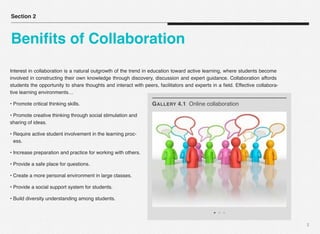
GALLERY 4.1 Online collaboration
4
Online collaborative tools are designed to support group
collaboration, which is the discourse that is the means to
their learning.
These tools are relatively easy to use and help build a
sense of community in the online classroom. They’re
also another way to get students to buy into group work
activities and using them makes the students more
marketable upon graduation.
Here are some easy ways to use free Web 2.0
applications for collaborative learning in your classroom:
1. Use Google Docs for collaborative writing
In Google Docs, everyone can see and make changes
to the document in real-time in a web browser. A
provided chat room and the ability to comment either on
the document as a whole or on specific passages
facilitate collaboration.
Discussions and comments
can be marked “resolved” to
indicate group consensus.
Google Docs is ideal for
most collaborative writing
and editing assignments.
2. Use YouTube as a platform for group video
projects
Many colleges let students
check out equipment like
microphones and video
cameras. Take advantage of these resources and the
easy upload process to assign an engaging group
YouTube video project.
3. Compile course information with a wiki
Wikis are available from a
variety of sources. Each
student can create new and
edit existing pages on the
wiki. You can verify the
Section 3
Online
Collaboration Tools
5
editors on each page and what changes they have
made using the page history.
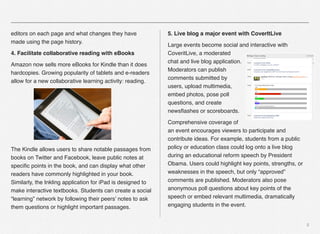
4. Facilitate collaborative reading with eBooks
Amazon now sells more eBooks for Kindle than it does
hardcopies. Growing popularity of tablets and e-readers
allow for a new collaborative learning activity: reading.
The Kindle allows users to share notable passages from
books on Twitter and Facebook, leave public notes at
specific points in the book, and can display what other
readers have commonly highlighted in your book.
Similarly, the Inkling application for iPad is designed to
make interactive textbooks. Students can create a social
“learning” network by following their peers’ notes to ask
them questions or highlight important passages.
5. Live blog a major event with CoverItLive
Large events become social and interactive with
CoveritLive, a moderated
chat and live blog application.
Moderators can publish
comments submitted by
users, upload multimedia,
embed photos, pose poll
questions, and create
newsflashes or scoreboards.
Comprehensive coverage of
an event encourages viewers to participate and
contribute ideas. For example, students from a public
policy or education class could log onto a live blog
during an educational reform speech by President
Obama. Users could highlight key points, strengths, or
weaknesses in the speech, but only “approved”
comments are published. Moderators also pose
anonymous poll questions about key points of the
speech or embed relevant multimedia, dramatically
engaging students in the event.
6
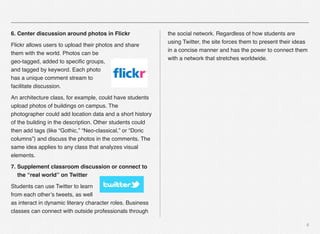
6. Center discussion around photos in Flickr
Flickr allows users to upload their photos and share
them with the world. Photos can be
geo-tagged, added to specific groups,
and tagged by keyword. Each photo
has a unique comment stream to
facilitate discussion.
An architecture class, for example, could have students
upload photos of buildings on campus. The
photographer could add location data and a short history
of the building in the description. Other students could
then add tags (like “Gothic,” “Neo-classical,” or “Doric
columns”) and discuss the photos in the comments. The
same idea applies to any class that analyzes visual
elements.
7. Supplement classroom discussion or connect to
the “real world” on Twitter
Students can use Twitter to learn
from each other’s tweets, as well
as interact in dynamic literary character roles. Business
classes can connect with outside professionals through
the social network. Regardless of how students are
using Twitter, the site forces them to present their ideas
in a concise manner and has the power to connect them
with a network that stretches worldwide.
7
The following is checklist for creating and
implementing a successful online group projects:
Preparation
• Students understand the value of both the process and prod-
uct of the collaboration.
• Students have guidance concerning how to work in an asyn-
chronous team.
• Group size is small enough to allow for full participation of all
members.
• Course provides numerous opportunities for community build-
ing prior to group projects.
Assignment
• Assignment is an authentic measure of student learning.
• Assignment will benefit from collaborative work.
• Students have clear guidelines of the expected outcome of the
collaborative assignment.
• Assignment creates a structure of positive interdependence in
which individuals perceive that

they will succeed when the group succeeds.
Section 4
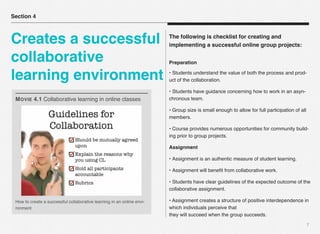
Creates a successful
collaborative
learning environment
How to create a successful collaborative learning in an online envi-
ronment
MOVIE 4.1 Collaborative learning in online classes
• Assignment is scheduled to allow adequate time for prepara-
tion and communication.
• Assignment is designed in a manner to allow students a level
of personal control.
Technology
• Students are provided with tools and instructions to facilitate
online communication.
• Each group has a collaborative workspace within the online
course.
• Students have technology skills relevant for asynchronous
communication.
• Back-up procedures are in place to deal with technology fail-
ure.
Evaluation
• Grading and/or evaluation strategies differentiate between the
process and the product.
• Strategies are in place to monitor interaction processes.
• Clear grading rubrics are provided at the start of the assign-
ment to guide student work.
• Self and peer evaluations are included in the process to moni-
tor individual involvement and

accountability.
8
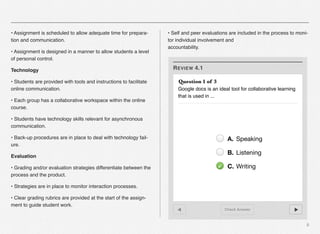
REVIEW 4.1
Check Answer
Question 1 of 3
Google docs is an ideal tool for collaborative learning
that is used in ...
A. Speaking
B. Listening
C. Writing
1. Pollard, E. and Hillage, J. (2001). Exploring e-learning. Report 376, Institute of Employment Studies.
2. Machiels, C. (2011). 7 ways to use technology for collaborative learning in your classroom. The lecture
tool blog. http://www.lecturetools.com
3. Online learning insight blog. (2012). 5 tools and strategies that support group collaboration online. http://
onlinelearninginsights.wordpress.com
4. Bart, M. (2010). How to design effective online group work activity. Faculty focus. http://
www.facultyfocus.com
5. Collaborative learning. Rochester Institute of Technology. http://wallacecenter.rit.edu
6. David, C. [DrChristopherDavid’s channel]. (2011, 09, 21). Collaborative learning in online classes. [Video
file]. Retrieved from https://www.youtube.com/watch?v=pHdiP0y0WWA
9
Section 5
References

703 alqurashi i_book chapter

  • 1.
    First Edition Tools and Techniques toPromote Student Learning
  • 2.
    4 Collaborative Learning By EmtinanAlqurashi Section1. Introduction Section2. Benefits of collaboration Section3. Online learning tools Section4. Creates a successful collaborative learning environment Section5. References CHAPTER SECTIONS
  • 3.
    Collaborative learning refersto a broad spectrum of instructional activities for getting students to work together to achieve common educational goals. 2 Collaborative learning environments can range from a one- minute writing exercise shared with a partner during a lecture to a semester-long group project culminating in a final team pres- entation to the entire class. Collaborative Learning in online envi- ronment It is believed that online learning has moved learning beyond text, and it can provide students a unique motivating and engag- ing learning experience. Online learning is considered as inter- active for the reason that it encourages students and allows them to collaborate with other learners and tutors. A study that was made on online learning in higher education has revealed that “online students had more peer contact, enjoyed the learn- ing more, spent more time on class work, understood the materi- als better and performed better than students taught in a tradi- tional classroom” (Pollard and Hillage, 2001:26). Instructors usually create student teams or groups that can share and discuss information easily within the online environ- ment. Online learning tools can facilitate both asynchronous and synchronous meetings between group members, and, if managed properly, help to eliminate the possibility of logistical problems when working within teams. Section 1 Introduction
  • 4.
    3 Interest in collaborationis a natural outgrowth of the trend in education toward active learning, where students become involved in constructing their own knowledge through discovery, discussion and expert guidance. Collaboration affords students the opportunity to share thoughts and interact with peers, facilitators and experts in a field. Effective collabora- tive learning environments… • Promote critical thinking skills. • Promote creative thinking through social stimulation and sharing of ideas. • Require active student involvement in the learning proc- ess. • Increase preparation and practice for working with others. • Provide a safe place for questions. • Create a more personal environment in large classes. • Provide a social support system for students. • Build diversity understanding among students. Section 2 Benifits of Collaboration GALLERY 4.1 Online collaboration
  • 5.
    4 Online collaborative toolsare designed to support group collaboration, which is the discourse that is the means to their learning. These tools are relatively easy to use and help build a sense of community in the online classroom. They’re also another way to get students to buy into group work activities and using them makes the students more marketable upon graduation. Here are some easy ways to use free Web 2.0 applications for collaborative learning in your classroom: 1. Use Google Docs for collaborative writing In Google Docs, everyone can see and make changes to the document in real-time in a web browser. A provided chat room and the ability to comment either on the document as a whole or on specific passages facilitate collaboration. Discussions and comments can be marked “resolved” to indicate group consensus. Google Docs is ideal for most collaborative writing and editing assignments. 2. Use YouTube as a platform for group video projects Many colleges let students check out equipment like microphones and video cameras. Take advantage of these resources and the easy upload process to assign an engaging group YouTube video project. 3. Compile course information with a wiki Wikis are available from a variety of sources. Each student can create new and edit existing pages on the wiki. You can verify the Section 3 Online Collaboration Tools
  • 6.
    5 editors on eachpage and what changes they have made using the page history. 4. Facilitate collaborative reading with eBooks Amazon now sells more eBooks for Kindle than it does hardcopies. Growing popularity of tablets and e-readers allow for a new collaborative learning activity: reading. The Kindle allows users to share notable passages from books on Twitter and Facebook, leave public notes at specific points in the book, and can display what other readers have commonly highlighted in your book. Similarly, the Inkling application for iPad is designed to make interactive textbooks. Students can create a social “learning” network by following their peers’ notes to ask them questions or highlight important passages. 5. Live blog a major event with CoverItLive Large events become social and interactive with CoveritLive, a moderated chat and live blog application. Moderators can publish comments submitted by users, upload multimedia, embed photos, pose poll questions, and create newsflashes or scoreboards. Comprehensive coverage of an event encourages viewers to participate and contribute ideas. For example, students from a public policy or education class could log onto a live blog during an educational reform speech by President Obama. Users could highlight key points, strengths, or weaknesses in the speech, but only “approved” comments are published. Moderators also pose anonymous poll questions about key points of the speech or embed relevant multimedia, dramatically engaging students in the event.
  • 7.
    6 6. Center discussionaround photos in Flickr Flickr allows users to upload their photos and share them with the world. Photos can be geo-tagged, added to specific groups, and tagged by keyword. Each photo has a unique comment stream to facilitate discussion. An architecture class, for example, could have students upload photos of buildings on campus. The photographer could add location data and a short history of the building in the description. Other students could then add tags (like “Gothic,” “Neo-classical,” or “Doric columns”) and discuss the photos in the comments. The same idea applies to any class that analyzes visual elements. 7. Supplement classroom discussion or connect to the “real world” on Twitter Students can use Twitter to learn from each other’s tweets, as well as interact in dynamic literary character roles. Business classes can connect with outside professionals through the social network. Regardless of how students are using Twitter, the site forces them to present their ideas in a concise manner and has the power to connect them with a network that stretches worldwide.
  • 8.
    7 The following ischecklist for creating and implementing a successful online group projects: Preparation • Students understand the value of both the process and prod- uct of the collaboration. • Students have guidance concerning how to work in an asyn- chronous team. • Group size is small enough to allow for full participation of all members. • Course provides numerous opportunities for community build- ing prior to group projects. Assignment • Assignment is an authentic measure of student learning. • Assignment will benefit from collaborative work. • Students have clear guidelines of the expected outcome of the collaborative assignment. • Assignment creates a structure of positive interdependence in which individuals perceive that
 they will succeed when the group succeeds. Section 4 Creates a successful collaborative learning environment How to create a successful collaborative learning in an online envi- ronment MOVIE 4.1 Collaborative learning in online classes
  • 9.
    • Assignment isscheduled to allow adequate time for prepara- tion and communication. • Assignment is designed in a manner to allow students a level of personal control. Technology • Students are provided with tools and instructions to facilitate online communication. • Each group has a collaborative workspace within the online course. • Students have technology skills relevant for asynchronous communication. • Back-up procedures are in place to deal with technology fail- ure. Evaluation • Grading and/or evaluation strategies differentiate between the process and the product. • Strategies are in place to monitor interaction processes. • Clear grading rubrics are provided at the start of the assign- ment to guide student work. • Self and peer evaluations are included in the process to moni- tor individual involvement and
 accountability. 8 REVIEW 4.1 Check Answer Question 1 of 3 Google docs is an ideal tool for collaborative learning that is used in ... A. Speaking B. Listening C. Writing
  • 10.
    1. Pollard, E.and Hillage, J. (2001). Exploring e-learning. Report 376, Institute of Employment Studies. 2. Machiels, C. (2011). 7 ways to use technology for collaborative learning in your classroom. The lecture tool blog. http://www.lecturetools.com 3. Online learning insight blog. (2012). 5 tools and strategies that support group collaboration online. http:// onlinelearninginsights.wordpress.com 4. Bart, M. (2010). How to design effective online group work activity. Faculty focus. http:// www.facultyfocus.com 5. Collaborative learning. Rochester Institute of Technology. http://wallacecenter.rit.edu 6. David, C. [DrChristopherDavid’s channel]. (2011, 09, 21). Collaborative learning in online classes. [Video file]. Retrieved from https://www.youtube.com/watch?v=pHdiP0y0WWA 9 Section 5 References