
This presentation is available under the Creative Commons
Attribution-ShareAlike 3.0 Unported License. Please refer to
http://www.bits.vib.be/ if you use this presentation or parts
hereof.
Introduction to Linux
for Bioinformatics
Productivity
Joachim Jacob
5 and 12 May 2014
2 of 17
Multiple commands
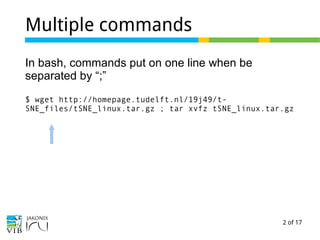
In bash, commands put on one line when be
separated by “;”
$ wget http://homepage.tudelft.nl/19j49/t-
SNE_files/tSNE_linux.tar.gz ; tar xvfz tSNE_linux.tar.gz
3 of 17
Multiple commands
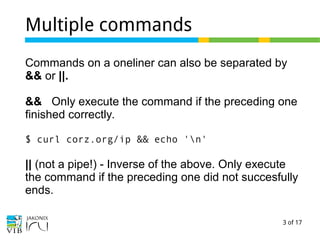
Commands on a oneliner can also be separated by
&& or ||.
&& Only execute the command if the preceding one
finished correctly.
$ curl corz.org/ip && echo 'n'
|| (not a pipe!) - Inverse of the above. Only execute
the command if the preceding one did not succesfully
ends.
4 of 17
Piping a list of files with xargs
A pipe reads the output of a command.
Some commands requires the file name to be
passed, instead of the content of the file. E.g. this
doesn't work:
$ ls | less
$ ls | file
Usage: file [-bchikLlNnprsvz0] [--apple] [--mime-
encoding] [--mime-type]
[-e testname] [-F separator] [-f
namefile] [-m magicfiles] file ...
file -C [-m magicfiles]
file [--help]
5 of 17
Piping a list of files with xargs
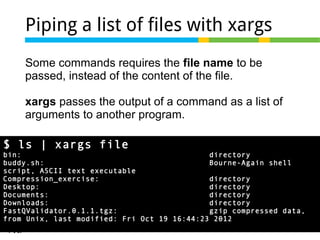
Some commands requires the file name to be
passed, instead of the content of the file.
xargs passes the output of a command as a list of
arguments to another program.
$ ls | xargs file
bin: directory
buddy.sh: Bourne-Again shell
script, ASCII text executable
Compression_exercise: directory
Desktop: directory
Documents: directory
Downloads: directory
FastQValidator.0.1.1.tgz: gzip compressed data,
from Unix, last modified: Fri Oct 19 16:44:23 2012
6 of 17
.bashrc
~/.bashrc is a hidden configuration file for bash in
your home.
It configures the prompt in your terminal.
It contains aliases to commands.
7 of 17
alias example
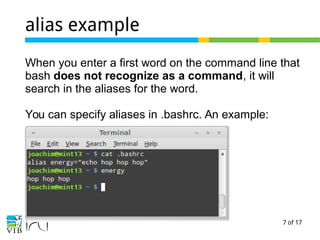
When you enter a first word on the command line that
bash does not recognize as a command, it will
search in the aliases for the word.
You can specify aliases in .bashrc. An example:
8 of 17
Alias example
Some interesting aliases
alias ll='ls -lh'
alias dirsize="du -sh */"
alias uncom='grep -v -E "^#|^$"'
alias hosts="cat /etc/hosts"
alias dedup="awk '! x[$0]++' "
Aliases are perfectly suited for storing one-liners: find
some at
https://wikis.utexas.edu/display/bioiteam/Scott%27s+li
st+of+linux+one-liners
9 of 17
Alias exercise
→ exercise link
10 of 17
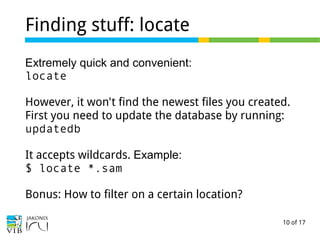
Finding stuff: locate
Extremely quick and convenient:
locate
However, it won't find the newest files you created.
First you need to update the database by running:
updatedb
It accepts wildcards. Example:
$ locate *.sam
Bonus: How to filter on a certain location?
11 of 17
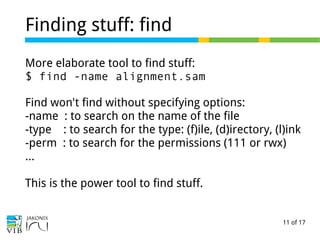
Finding stuff: find
More elaborate tool to find stuff:
$ find -name alignment.sam
Find won't find without specifying options:
-name : to search on the name of the file
-type : to search for the type: (f)ile, (d)irectory, (l)ink
-perm : to search for the permissions (111 or rwx)
…
This is the power tool to find stuff.
12 of 17
Finding stuff: find
The most powerful option of find:
-exec Execute a command on the found entities.
13 of 17
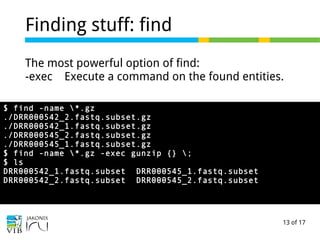
Finding stuff: find
The most powerful option of find:
-exec Execute a command on the found entities.
$ find -name *.gz
./DRR000542_2.fastq.subset.gz
./DRR000542_1.fastq.subset.gz
./DRR000545_2.fastq.subset.gz
./DRR000545_1.fastq.subset.gz
$ find -name *.gz -exec gunzip {} ;
$ ls
DRR000542_1.fastq.subset DRR000545_1.fastq.subset
DRR000542_2.fastq.subset DRR000545_2.fastq.subset
14 of 17
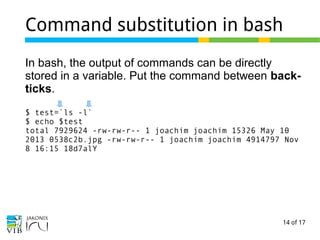
Command substitution in bash
In bash, the output of commands can be directly
stored in a variable. Put the command between back-
ticks.
$ test=`ls -l`
$ echo $test
total 7929624 -rw-rw-r-- 1 joachim joachim 15326 May 10
2013 0538c2b.jpg -rw-rw-r-- 1 joachim joachim 4914797 Nov
8 16:15 18d7alY
15 of 17
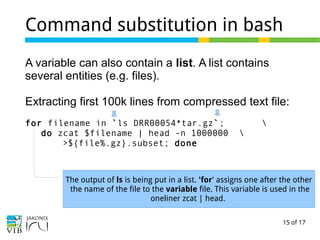
Command substitution in bash
A variable can also contain a list. A list contains
several entities (e.g. files).
Extracting first 100k lines from compressed text file:
for filename in `ls DRR00054*tar.gz`; 
do zcat $filename | head -n 1000000 
>${file%.gz}.subset; done
The output of ls is being put in a list. 'for' assigns one after the other
the name of the file to the variable file. This variable is used in the
oneliner zcat | head.
16 of 17
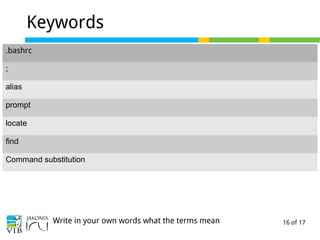
Keywords
.bashrc
;
alias
prompt
locate
find
Command substitution
Write in your own words what the terms mean
17 of 17
Exercises
→ Concatenate the contents of fastq files

Part 6 of "Introduction to linux for bioinformatics": Productivity tips

  • 1.
    This presentation isavailable under the Creative Commons Attribution-ShareAlike 3.0 Unported License. Please refer to http://www.bits.vib.be/ if you use this presentation or parts hereof. Introduction to Linux for Bioinformatics Productivity Joachim Jacob 5 and 12 May 2014
  • 2.
    2 of 17 Multiplecommands In bash, commands put on one line when be separated by “;” $ wget http://homepage.tudelft.nl/19j49/t- SNE_files/tSNE_linux.tar.gz ; tar xvfz tSNE_linux.tar.gz
  • 3.
    3 of 17 Multiplecommands Commands on a oneliner can also be separated by && or ||. && Only execute the command if the preceding one finished correctly. $ curl corz.org/ip && echo 'n' || (not a pipe!) - Inverse of the above. Only execute the command if the preceding one did not succesfully ends.
  • 4.
    4 of 17 Pipinga list of files with xargs A pipe reads the output of a command. Some commands requires the file name to be passed, instead of the content of the file. E.g. this doesn't work: $ ls | less $ ls | file Usage: file [-bchikLlNnprsvz0] [--apple] [--mime- encoding] [--mime-type] [-e testname] [-F separator] [-f namefile] [-m magicfiles] file ... file -C [-m magicfiles] file [--help]
  • 5.
    5 of 17 Pipinga list of files with xargs Some commands requires the file name to be passed, instead of the content of the file. xargs passes the output of a command as a list of arguments to another program. $ ls | xargs file bin: directory buddy.sh: Bourne-Again shell script, ASCII text executable Compression_exercise: directory Desktop: directory Documents: directory Downloads: directory FastQValidator.0.1.1.tgz: gzip compressed data, from Unix, last modified: Fri Oct 19 16:44:23 2012
  • 6.
    6 of 17 .bashrc ~/.bashrcis a hidden configuration file for bash in your home. It configures the prompt in your terminal. It contains aliases to commands.
  • 7.
    7 of 17 aliasexample When you enter a first word on the command line that bash does not recognize as a command, it will search in the aliases for the word. You can specify aliases in .bashrc. An example:
  • 8.
    8 of 17 Aliasexample Some interesting aliases alias ll='ls -lh' alias dirsize="du -sh */" alias uncom='grep -v -E "^#|^$"' alias hosts="cat /etc/hosts" alias dedup="awk '! x[$0]++' " Aliases are perfectly suited for storing one-liners: find some at https://wikis.utexas.edu/display/bioiteam/Scott%27s+li st+of+linux+one-liners
  • 9.
    9 of 17 Aliasexercise → exercise link
  • 10.
    10 of 17 Findingstuff: locate Extremely quick and convenient: locate However, it won't find the newest files you created. First you need to update the database by running: updatedb It accepts wildcards. Example: $ locate *.sam Bonus: How to filter on a certain location?
  • 11.
    11 of 17 Findingstuff: find More elaborate tool to find stuff: $ find -name alignment.sam Find won't find without specifying options: -name : to search on the name of the file -type : to search for the type: (f)ile, (d)irectory, (l)ink -perm : to search for the permissions (111 or rwx) … This is the power tool to find stuff.
  • 12.
    12 of 17 Findingstuff: find The most powerful option of find: -exec Execute a command on the found entities.
  • 13.
    13 of 17 Findingstuff: find The most powerful option of find: -exec Execute a command on the found entities. $ find -name *.gz ./DRR000542_2.fastq.subset.gz ./DRR000542_1.fastq.subset.gz ./DRR000545_2.fastq.subset.gz ./DRR000545_1.fastq.subset.gz $ find -name *.gz -exec gunzip {} ; $ ls DRR000542_1.fastq.subset DRR000545_1.fastq.subset DRR000542_2.fastq.subset DRR000545_2.fastq.subset
  • 14.
    14 of 17 Commandsubstitution in bash In bash, the output of commands can be directly stored in a variable. Put the command between back- ticks. $ test=`ls -l` $ echo $test total 7929624 -rw-rw-r-- 1 joachim joachim 15326 May 10 2013 0538c2b.jpg -rw-rw-r-- 1 joachim joachim 4914797 Nov 8 16:15 18d7alY
  • 15.
    15 of 17 Commandsubstitution in bash A variable can also contain a list. A list contains several entities (e.g. files). Extracting first 100k lines from compressed text file: for filename in `ls DRR00054*tar.gz`; do zcat $filename | head -n 1000000 >${file%.gz}.subset; done The output of ls is being put in a list. 'for' assigns one after the other the name of the file to the variable file. This variable is used in the oneliner zcat | head.
  • 16.
    16 of 17 Keywords .bashrc ; alias prompt locate find Commandsubstitution Write in your own words what the terms mean
  • 17.
    17 of 17 Exercises →Concatenate the contents of fastq files