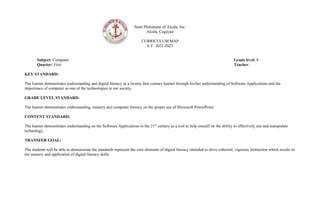
Saint Philomene of Alcala, Inc.
Alcala, Cagayan
CURRICULUM MAP
S.Y. 2022-2023
Subject: Computer Grade level: 8
Quarter: First Teacher:
KEY STANDARD:
The learner demonstrates understanding and digital literacy as a twenty first century learner through his/her understanding of Software Applications and the
importance of computer as one of the technologies in our society.
GRADE LEVEL STANDARD:
The learner demonstrates understanding, mastery and computer literacy on the proper use of Microsoft PowerPoint.
CONTENT STANDARD:
The learner demonstrates understanding on the Software Applications in the 21st
century as a tool to help oneself on the ability to effectively use and manipulate
technology.
TRANSFER GOAL:
The students will be able to demonstrate the standards represent the core elements of digital literacy intended to drive coherent, vigorous instruction which results in
the mastery and application of digital literacy skills.
Prepared by: Checked by:
TERM/N
O. OF
MONTH
CONTENT CONTENT
STANDAR
D
PERFORMA
NCE
STANDARD
COMPETENCIES/SKILLS ASSESSME
NT
ACTIVITIE
S
RESOURCES INSTITUTION
AL CORE
VALUES/SUBJ
ECT
INTEGRATION
Q1
1.1 System
Software
-Utility software
-Device drivers
1.2 Application
Software
-Desktop
publishing software
-Word processing
software
-Spreadsheet
Applications
-Database
Management
Applications
-Programming
languages
1.3 Software
Licenses and piracy
-Software licenses
-Software piracy
The learner
demonstrate
s
understandi
ng of the
computer
system and
the
introduction
of computer
as
technology
and its value
and role in
our
community.
The learners
shall be able to
create a video
presentation on
the proper use
of software
licenses and
ways to
alleviate
software
piracy.
 Identify the different types of
system software used by
computers
 Explain how the different
types of system software
work
Situational
analysis
Starting up a
computer
IT Essentials
Computer
Fundamentals
Word
Processing by
V. Satuito
Pg. 49-55
Computer
No Subject
Integration
Understanding
Conviviality
 Classify different kinds of
application software
according to use
 Explain how the different
kinds of application software
are used
Quiz K-W-L
 Explain the use of legitimate
software and licenses
Situational
analysis IT Essentials
Computer
Fundamentals
Word
Processing by
V. Satuito
Pg. 56-60
Gadget for
creating video
Respect
Responsible
Understanding
 Explain what software piracy
is and its different types
 Explain the impact of
software piracy
Reflective
Sharing
Think-Pair-
Share
 Create a video presentation
on the proper use of software
licenses and ways to alleviate
software piracy
Performance
task; video
making
Video shoot
Saint Philomene of Alcala, Inc.
Alcala, Cagayan
CURRICULUM MAP
S.Y. 2022-2023
Subject: Computer Grade level: 8
Quarter: Second Teacher:
KEY STANDARD:
The learner demonstrates understanding and computer literacy as a twenty first century learner through his/her understanding of MS PowerPoint Basics
and the Importance of computer as one of the technologies in our society.
GRADE LEVEL STANDARD:
The learner demonstrates understanding and computer literacy as a twenty first century learner through his/her understanding of MS PowerPoint Basics
and the Importance of computer as a tool for learning about ICT and its value and role in our community.
CONTENT STANDARD:
The learner demonstrates understanding of MS PowerPoint Basics and computer system as technology that help them enhance their skills upon using MS
PowerPoint by being computer literate
TRANSFER GOAL:
The students will be able to demonstrate knowledge and skills to create MS PowerPoint presentations so that in the long run they can use properly and
effectively for their studies and any other computer related tasks and value respect and love using new technologies.
Prepared by: Checked by:
TERM
/NO.
OF
MONT
H
CONTENT CONTENT
STANDARD
PERFORMAN
CE
STANDARD
COMPETENCIES/SKILLS ASSESSMENT ACTIVITIES RESOURC
ES
INSTITUTION
AL CORE
VALUES/SUBJ
ECT
INTEGRATION
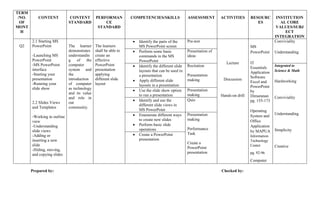
Q2
2.1 Starting MS
PowerPoint
-Launching MS
PowerPoint
-MS PowerPoint
interface
-Starting your
presentation
-Running your
slide show
2.2 Slides Views
and Templates
-Working in outline
view
-Understanding
slide views
-Adding or
inserting a new
slide
-Hiding, moving,
and copying slides
The learner
demonstrates
understandin
g of the
computer
system and
the
introduction
of computer
as technology
and its value
and role in
our
community.
The learners
shall be able to
create an
effective
PowerPoint
presentation
applying
different slide
layout
 Identify the parts of the
MS PowerPoint screen
Pre-test
Lecture
Discussion
Hands-on drill
MS
PowerPoint
IT
Essentials
Application
Software
Excel and
PowerPoint
by
Dimaranan
pg. 155-173
Operating
System and
Office
Application
by MAPUA
Information
Technology
Center
pg. 92-96
Computer
Conviviality
Understanding
 Perform some basic
commands in the MS
PowerPoint
Presentation of
ideas
 Identify the different slide
layouts that can be used in
a presentation
 Apply different slide
layouts in a presentation
Recitation
Presentation
making
Integrated to
Science & Math
Hardworking
Conviviality
Understanding
Simplicity
Creative
 Use the slide show option
to run a presentation
Presentation
making
 Identify and use the
different slide views in
MS PowerPoint
Quiz
 Enumerate different ways
to create new slides
 Perform basic slide
operations
Presentation
making
Performance
Task
Create a
PowerPoint
presentation
 Create a PowerPoint
presentation
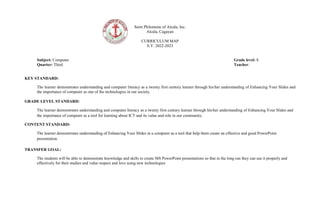
Saint Philomene of Alcala, Inc.
Alcala, Cagayan
CURRICULUM MAP
S.Y. 2022-2023
Subject: Computer Grade level: 8
Quarter: Third Teacher:
KEY STANDARD:
The learner demonstrates understanding and computer literacy as a twenty first century learner through his/her understanding of Enhancing Your Slides and
the importance of computer as one of the technologies in our society.
GRADE LEVEL STANDARD:
The learner demonstrates understanding and computer literacy as a twenty first century learner through his/her understanding of Enhancing Your Slides and
the importance of computer as a tool for learning about ICT and its value and role in our community.
CONTENT STANDARD:
The learner demonstrates understanding of Enhancing Your Slides in a computer as a tool that help them create an effective and good PowerPoint
presentation.
TRANSFER GOAL:
The students will be able to demonstrate knowledge and skills to create MS PowerPoint presentations so that in the long run they can use it properly and
effectively for their studies and value respect and love using new technologies
TERM/
NO. OF
MONT
H
CONTENT CONTENT
STANDAR
D
PERFORMAN
CE
STANDARD
COMPETENCIES/SKILLS ASSESSMENT ACTIVITIE
S
RESOURCES INSTITUTION
AL CORE
VALUES/SUBJ
ECT
INTEGRATION
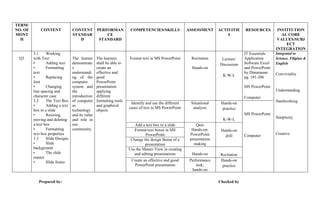
Q3
3.1 Working
with Text
• Adding text
• Formatting
text
• Replacing
font
• Changing
line spacing and
character case
3.2 The Text Box
• Adding a text
box to a slide
• Resizing,
moving and deleting
a text box
• Formatting
text box properties
3.3 Slide Designs
• Slide
background
• The slide
master
• Slide footer
The learner
demonstrate
s
understandi
ng of the
computer
system and
the
introduction
of computer
as
technology
and its value
and role in
our
community.
The learners
shall be able to
create an
effective and
good
PowerPoint
presentation
applying
different
formatting tools
and graphical
objects
Format text in MS PowerPoint Recitation
Hands-on
Lecture/
Discussion
K-W-L
IT Essentials
Application
Software Excel
and PowerPoint
by Dimaranan
pg. 181-206
MS PowerPoint
Computer
Integrated to
Science, Filipino &
English
Conviviality
Understanding
Hardworking
Simplicity
Creative
Identify and use the different
cases of text in MS PowerPoint
Situational
analysis
Hands-on
practice
K-W-L
MS PowerPoint
Computer
Add a text box to a slide Quiz
Hands-on:
PowerPoint
presentation
making
Hands-on
drill
Format text boxes in MS
PowerPoint
Change the design theme of a
presentation
Use the Master View in creating
and editing presentations Hands-on Recitation
Create an effective and good
PowerPoint presentation
Performance
task;
hands-on
Hands-on
practice
Prepared by: Checked by
Saint Philomene of Alcala, Inc.
Alcala, Cagayan
CURRICULUM MAP
S.Y. 2022-2023
Subject: Computer Grade level: 8
Quarter: Fourth Teacher:
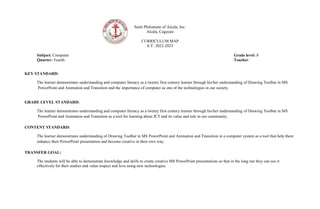
KEY STANDARD:
The learner demonstrates understanding and computer literacy as a twenty first century learner through his/her understanding of Drawing Toolbar in MS
PowerPoint and Animation and Transition and the importance of computer as one of the technologies in our society.
GRADE LEVEL STANDARD:
The learner demonstrates understanding and computer literacy as a twenty first century learner through his/her understanding of Drawing Toolbar in MS
PowerPoint and Animation and Transition as a tool for learning about ICT and its value and role in our community.
CONTENT STANDARD:
The learner demonstrates understanding of Drawing Toolbar in MS PowerPoint and Animation and Transition in a computer system as a tool that help them
enhance their PowerPoint presentation and become creative in their own way.
TRANSFER GOAL:
The students will be able to demonstrate knowledge and skills to create creative MS PowerPoint presentations so that in the long run they can use it
effectively for their studies and value respect and love using new technologies.
Prepared by: Checked by:
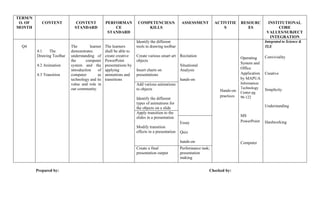
TERM/N
O. OF
MONTH
CONTENT CONTENT
STANDARD
PERFORMAN
CE
STANDARD
COMPETENCIES/S
KILLS
ASSESSMENT ACTIVITIE
S
RESOURC
ES
INSTITUTIONAL
CORE
VALUES/SUBJECT
INTEGRATION
Q4
4.1 The
Drawing Toolbar
4.2 Animation
4.3 Transition
The learner
demonstrates
understanding of
the computer
system and the
introduction of
computer as
technology and its
value and role in
our community.
The learners
shall be able to
create creative
PowerPoint
presentations by
applying
animations and
transitions
Identify the different
tools in drawing toolbar
Create various smart art
objects
Insert charts on
presentations
Recitation
Situational
Analysis
hands-on
Hands-on
practices
Operating
System and
Office
Application
by MAPUA
Information
Technology
Center pg.
96-122
MS
PowerPoint
Computer
Integrated to Science &
TLE
Conviviality
Creative
Simplicity
Understanding
Hardworking
Add various animations
to objects
Identify the different
types of animations for
the objects on a slide
Apply transition to the
slides in a presentation
Modify transition
effects in a presentation
Essay
Quiz
hands-on
Create a final
presentation output
Performance task;
presentation
making

650954075-Curriculum-Map-8-1st-4thad.docx

  • 1.
    Saint Philomene ofAlcala, Inc. Alcala, Cagayan CURRICULUM MAP S.Y. 2022-2023 Subject: Computer Grade level: 8 Quarter: First Teacher: KEY STANDARD: The learner demonstrates understanding and digital literacy as a twenty first century learner through his/her understanding of Software Applications and the importance of computer as one of the technologies in our society. GRADE LEVEL STANDARD: The learner demonstrates understanding, mastery and computer literacy on the proper use of Microsoft PowerPoint. CONTENT STANDARD: The learner demonstrates understanding on the Software Applications in the 21st century as a tool to help oneself on the ability to effectively use and manipulate technology. TRANSFER GOAL: The students will be able to demonstrate the standards represent the core elements of digital literacy intended to drive coherent, vigorous instruction which results in the mastery and application of digital literacy skills.
  • 2.
    Prepared by: Checkedby: TERM/N O. OF MONTH CONTENT CONTENT STANDAR D PERFORMA NCE STANDARD COMPETENCIES/SKILLS ASSESSME NT ACTIVITIE S RESOURCES INSTITUTION AL CORE VALUES/SUBJ ECT INTEGRATION Q1 1.1 System Software -Utility software -Device drivers 1.2 Application Software -Desktop publishing software -Word processing software -Spreadsheet Applications -Database Management Applications -Programming languages 1.3 Software Licenses and piracy -Software licenses -Software piracy The learner demonstrate s understandi ng of the computer system and the introduction of computer as technology and its value and role in our community. The learners shall be able to create a video presentation on the proper use of software licenses and ways to alleviate software piracy.  Identify the different types of system software used by computers  Explain how the different types of system software work Situational analysis Starting up a computer IT Essentials Computer Fundamentals Word Processing by V. Satuito Pg. 49-55 Computer No Subject Integration Understanding Conviviality  Classify different kinds of application software according to use  Explain how the different kinds of application software are used Quiz K-W-L  Explain the use of legitimate software and licenses Situational analysis IT Essentials Computer Fundamentals Word Processing by V. Satuito Pg. 56-60 Gadget for creating video Respect Responsible Understanding  Explain what software piracy is and its different types  Explain the impact of software piracy Reflective Sharing Think-Pair- Share  Create a video presentation on the proper use of software licenses and ways to alleviate software piracy Performance task; video making Video shoot
  • 3.
    Saint Philomene ofAlcala, Inc. Alcala, Cagayan CURRICULUM MAP S.Y. 2022-2023 Subject: Computer Grade level: 8 Quarter: Second Teacher: KEY STANDARD: The learner demonstrates understanding and computer literacy as a twenty first century learner through his/her understanding of MS PowerPoint Basics and the Importance of computer as one of the technologies in our society. GRADE LEVEL STANDARD: The learner demonstrates understanding and computer literacy as a twenty first century learner through his/her understanding of MS PowerPoint Basics and the Importance of computer as a tool for learning about ICT and its value and role in our community. CONTENT STANDARD: The learner demonstrates understanding of MS PowerPoint Basics and computer system as technology that help them enhance their skills upon using MS PowerPoint by being computer literate TRANSFER GOAL: The students will be able to demonstrate knowledge and skills to create MS PowerPoint presentations so that in the long run they can use properly and effectively for their studies and any other computer related tasks and value respect and love using new technologies.
  • 4.
    Prepared by: Checkedby: TERM /NO. OF MONT H CONTENT CONTENT STANDARD PERFORMAN CE STANDARD COMPETENCIES/SKILLS ASSESSMENT ACTIVITIES RESOURC ES INSTITUTION AL CORE VALUES/SUBJ ECT INTEGRATION Q2 2.1 Starting MS PowerPoint -Launching MS PowerPoint -MS PowerPoint interface -Starting your presentation -Running your slide show 2.2 Slides Views and Templates -Working in outline view -Understanding slide views -Adding or inserting a new slide -Hiding, moving, and copying slides The learner demonstrates understandin g of the computer system and the introduction of computer as technology and its value and role in our community. The learners shall be able to create an effective PowerPoint presentation applying different slide layout  Identify the parts of the MS PowerPoint screen Pre-test Lecture Discussion Hands-on drill MS PowerPoint IT Essentials Application Software Excel and PowerPoint by Dimaranan pg. 155-173 Operating System and Office Application by MAPUA Information Technology Center pg. 92-96 Computer Conviviality Understanding  Perform some basic commands in the MS PowerPoint Presentation of ideas  Identify the different slide layouts that can be used in a presentation  Apply different slide layouts in a presentation Recitation Presentation making Integrated to Science & Math Hardworking Conviviality Understanding Simplicity Creative  Use the slide show option to run a presentation Presentation making  Identify and use the different slide views in MS PowerPoint Quiz  Enumerate different ways to create new slides  Perform basic slide operations Presentation making Performance Task Create a PowerPoint presentation  Create a PowerPoint presentation
  • 5.
    Saint Philomene ofAlcala, Inc. Alcala, Cagayan CURRICULUM MAP S.Y. 2022-2023 Subject: Computer Grade level: 8 Quarter: Third Teacher: KEY STANDARD: The learner demonstrates understanding and computer literacy as a twenty first century learner through his/her understanding of Enhancing Your Slides and the importance of computer as one of the technologies in our society. GRADE LEVEL STANDARD: The learner demonstrates understanding and computer literacy as a twenty first century learner through his/her understanding of Enhancing Your Slides and the importance of computer as a tool for learning about ICT and its value and role in our community. CONTENT STANDARD: The learner demonstrates understanding of Enhancing Your Slides in a computer as a tool that help them create an effective and good PowerPoint presentation. TRANSFER GOAL: The students will be able to demonstrate knowledge and skills to create MS PowerPoint presentations so that in the long run they can use it properly and effectively for their studies and value respect and love using new technologies
  • 6.
    TERM/ NO. OF MONT H CONTENT CONTENT STANDAR D PERFORMAN CE STANDARD COMPETENCIES/SKILLSASSESSMENT ACTIVITIE S RESOURCES INSTITUTION AL CORE VALUES/SUBJ ECT INTEGRATION Q3 3.1 Working with Text • Adding text • Formatting text • Replacing font • Changing line spacing and character case 3.2 The Text Box • Adding a text box to a slide • Resizing, moving and deleting a text box • Formatting text box properties 3.3 Slide Designs • Slide background • The slide master • Slide footer The learner demonstrate s understandi ng of the computer system and the introduction of computer as technology and its value and role in our community. The learners shall be able to create an effective and good PowerPoint presentation applying different formatting tools and graphical objects Format text in MS PowerPoint Recitation Hands-on Lecture/ Discussion K-W-L IT Essentials Application Software Excel and PowerPoint by Dimaranan pg. 181-206 MS PowerPoint Computer Integrated to Science, Filipino & English Conviviality Understanding Hardworking Simplicity Creative Identify and use the different cases of text in MS PowerPoint Situational analysis Hands-on practice K-W-L MS PowerPoint Computer Add a text box to a slide Quiz Hands-on: PowerPoint presentation making Hands-on drill Format text boxes in MS PowerPoint Change the design theme of a presentation Use the Master View in creating and editing presentations Hands-on Recitation Create an effective and good PowerPoint presentation Performance task; hands-on Hands-on practice Prepared by: Checked by
  • 7.
    Saint Philomene ofAlcala, Inc. Alcala, Cagayan CURRICULUM MAP S.Y. 2022-2023 Subject: Computer Grade level: 8 Quarter: Fourth Teacher: KEY STANDARD: The learner demonstrates understanding and computer literacy as a twenty first century learner through his/her understanding of Drawing Toolbar in MS PowerPoint and Animation and Transition and the importance of computer as one of the technologies in our society. GRADE LEVEL STANDARD: The learner demonstrates understanding and computer literacy as a twenty first century learner through his/her understanding of Drawing Toolbar in MS PowerPoint and Animation and Transition as a tool for learning about ICT and its value and role in our community. CONTENT STANDARD: The learner demonstrates understanding of Drawing Toolbar in MS PowerPoint and Animation and Transition in a computer system as a tool that help them enhance their PowerPoint presentation and become creative in their own way. TRANSFER GOAL: The students will be able to demonstrate knowledge and skills to create creative MS PowerPoint presentations so that in the long run they can use it effectively for their studies and value respect and love using new technologies.
  • 8.
    Prepared by: Checkedby: TERM/N O. OF MONTH CONTENT CONTENT STANDARD PERFORMAN CE STANDARD COMPETENCIES/S KILLS ASSESSMENT ACTIVITIE S RESOURC ES INSTITUTIONAL CORE VALUES/SUBJECT INTEGRATION Q4 4.1 The Drawing Toolbar 4.2 Animation 4.3 Transition The learner demonstrates understanding of the computer system and the introduction of computer as technology and its value and role in our community. The learners shall be able to create creative PowerPoint presentations by applying animations and transitions Identify the different tools in drawing toolbar Create various smart art objects Insert charts on presentations Recitation Situational Analysis hands-on Hands-on practices Operating System and Office Application by MAPUA Information Technology Center pg. 96-122 MS PowerPoint Computer Integrated to Science & TLE Conviviality Creative Simplicity Understanding Hardworking Add various animations to objects Identify the different types of animations for the objects on a slide Apply transition to the slides in a presentation Modify transition effects in a presentation Essay Quiz hands-on Create a final presentation output Performance task; presentation making