CARMENA. MUTIA
Masterand
What is Software?
The term Software refers to a set of
Computer programs, procedures and
associated documents describing the
programs , and how they are to be used.
*Software consists of programs and enables a
computer to perform specific tasks, as opposed to its physical
components (hardware) which can only do the tasks they are
mechanically designed for.
*It is loaded into a computer's storage (such as
a hard drive, a memory, or RAM). Once the
software is loaded, the computer is able to
execute the software in the Central Processing
Unit (CPU).
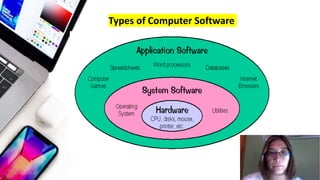
Types of Computer Software
System Software
• The operating system and all the tools
that make the computer work are
considered system software. Any
computer program that maintains and
controls the hardware so that
application software can carry out a
task is known as system software.
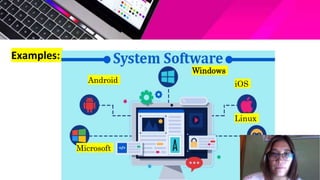
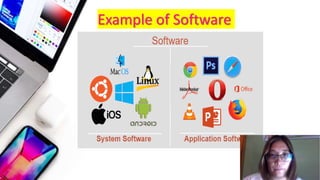
Examples:
Microsoft
Android iOS
Linux
Windows
Some common system
software examples are:
• Operating System:
It is the most well-known instance of system
software. It is a group of programs that manages
resources and gives all the other apps that use
them general services. Even though each
Operating System is unique, most of them offer a
Graphical User Interface that enables users to
manage files and directories as well as carry out
other operations. An operating system is
necessary for every device, whether it is a
desktop, laptop, or mobile phone, in order to give
it the necessary functionality.
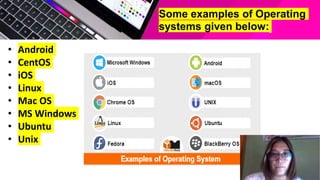
• Android
• CentOS
• iOS
• Linux
• Mac OS
• MS Windows
• Ubuntu
• Unix
Some examples of Operating
systems given below:
Application
Software
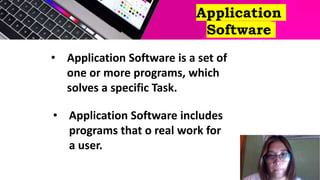
• Application Software is a set of
one or more programs, which
solves a specific Task.
• Application Software includes
programs that o real work for
a user.
• Software that assists the user in doing tasks
like conducting online research, taking
notes, setting an alarm, creating images,
maintaining an account log, performing
computations, or even playing games are
known as end-user programs or
productivity applications.
• A browser, for instance, is a program created
just for browsing the internet, whereas MS
Powerpoint is a program used only for
creating presentations. Application software,
often known as apps, is also referred to as
non-essential software because its necessity
is highly debatable, and its removal has no
negative effects on the system's operation.
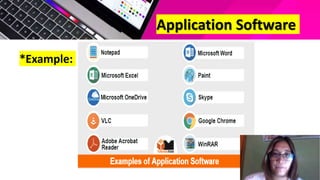
Application Software
*Example:
Example of Software
• By automating tasks, the software lessens
workload. Additionally, it helps to eliminate
human mistake, which enhances efficacy and
consistency. Different kinds of business
software are frequently utilized by businesses.
Software is in charge of carrying out various
duties. The software we use every day The
software contributes to a more pleasant living.
For instance, computer software has made it
simpler than ever to browse for any desired
information or items and to connect with
individuals around the world.
Conclusion
Although there are different types of
Computer Software. These software use in
different sectors. Their operating process is
also different. Some types of Software works
Graphically, some works on Database
Management System, some on Word
Processors etc. Day by day software's are
upgrading.
References:
• https://mysweetindulgence.com/
• https://www.scribd.com/software
• https://Quick Learn Computer.com
• https://www.slideshare.net/ssuserfed8c1/typ
es-of-system-software-250950679
• https://www.slideshare.net/Nirnay1996/prese
ntation-on-computer-
software?subscription_success_banner=show

513-COMPUTER.pptx

  • 1.
  • 2.
    What is Software? Theterm Software refers to a set of Computer programs, procedures and associated documents describing the programs , and how they are to be used.
  • 3.
    *Software consists ofprograms and enables a computer to perform specific tasks, as opposed to its physical components (hardware) which can only do the tasks they are mechanically designed for. *It is loaded into a computer's storage (such as a hard drive, a memory, or RAM). Once the software is loaded, the computer is able to execute the software in the Central Processing Unit (CPU).
  • 4.
  • 5.
    System Software • Theoperating system and all the tools that make the computer work are considered system software. Any computer program that maintains and controls the hardware so that application software can carry out a task is known as system software.
  • 6.
  • 7.
    Some common system softwareexamples are: • Operating System: It is the most well-known instance of system software. It is a group of programs that manages resources and gives all the other apps that use them general services. Even though each Operating System is unique, most of them offer a Graphical User Interface that enables users to manage files and directories as well as carry out other operations. An operating system is necessary for every device, whether it is a desktop, laptop, or mobile phone, in order to give it the necessary functionality.
  • 8.
    • Android • CentOS •iOS • Linux • Mac OS • MS Windows • Ubuntu • Unix Some examples of Operating systems given below:
  • 9.
    Application Software • Application Softwareis a set of one or more programs, which solves a specific Task. • Application Software includes programs that o real work for a user.
  • 10.
    • Software thatassists the user in doing tasks like conducting online research, taking notes, setting an alarm, creating images, maintaining an account log, performing computations, or even playing games are known as end-user programs or productivity applications.
  • 11.
    • A browser,for instance, is a program created just for browsing the internet, whereas MS Powerpoint is a program used only for creating presentations. Application software, often known as apps, is also referred to as non-essential software because its necessity is highly debatable, and its removal has no negative effects on the system's operation.
  • 12.
  • 13.
  • 14.
    • By automatingtasks, the software lessens workload. Additionally, it helps to eliminate human mistake, which enhances efficacy and consistency. Different kinds of business software are frequently utilized by businesses. Software is in charge of carrying out various duties. The software we use every day The software contributes to a more pleasant living. For instance, computer software has made it simpler than ever to browse for any desired information or items and to connect with individuals around the world.
  • 15.
    Conclusion Although there aredifferent types of Computer Software. These software use in different sectors. Their operating process is also different. Some types of Software works Graphically, some works on Database Management System, some on Word Processors etc. Day by day software's are upgrading.
  • 18.
    References: • https://mysweetindulgence.com/ • https://www.scribd.com/software •https://Quick Learn Computer.com • https://www.slideshare.net/ssuserfed8c1/typ es-of-system-software-250950679 • https://www.slideshare.net/Nirnay1996/prese ntation-on-computer- software?subscription_success_banner=show