5 Ways to Stay
#CyberSecure
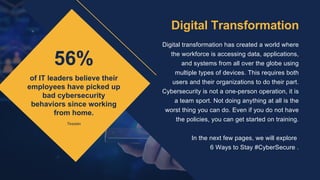
56%
of IT leaders believe their
employees have picked up
bad cybersecurity
behaviors since working
from home.
Digital transformation has created a world where
the workforce is accessing data, applications,
and systems from all over the globe using
multiple types of devices. This requires both
users and their organizations to do their part.
Cybersecurity is not a one-person operation, it is
a team sport. Not doing anything at all is the
worst thing you can do. Even if you do not have
the policies, you can get started on training.


In the next few pages, we will explore
6 Ways to Stay #CyberSecure .
Digital Transformation
Tessian
1. Enable
Multi-Factor
Authentification
MFA adds a second check to verify your
identity and further protects your account
from compromise - even if your password
is stolen. Requiring multiple methods of
authentication creates an extra hurdle for
cyber criminals and makes it more
difficult for password cracking tools to
enable attackers to break into accounts.
Whenever possible, MFA should be used
to protect access to all critical systems
and applications, including VPNs.
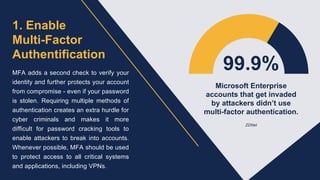
99.9%
Microsoft Enterprise
accounts that get invaded
by attackers didn’t use
multi-factor authentication.
ZDNet
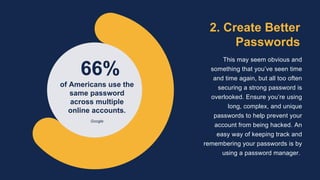
2. Create Better
Passwords
This may seem obvious and
something that you’ve seen time
and time again, but all too often
securing a strong password is
overlooked. Ensure you’re using
long, complex, and unique
passwords to help prevent your
account from being hacked. An
easy way of keeping track and
remembering your passwords is by
using a password manager.
66%
of Americans use the
same password
across multiple
online accounts.
Google
3. Don't Wait,
Update!
When you get that pesky popup on
your device that says it’s time to
update the software, it may be
tempting to simply click postpone and
ignore it. However, there’s a reason
why these updates happen. Having
the latest security software, web
browser, and operating system on
devices is one of the best defenses
against online threats.
4. Research Before
Downloading
Doing research before
downloading anything new to
your device, such as apps, is
imperative to staying safe online.
Check who created the app,
what the user reviews say, and if
there are any articles published
online about the app’s privacy
and security features.
5. Take Care of
Company Information
Put in place a system that makes electronic
copies of vital business information on a regular
basis. At home, make regular backups of all
your important docs, files and photos. Double
check your privacy and security settings, and
know who can access your documents and
information (Google docs, Zoom calls, etc).
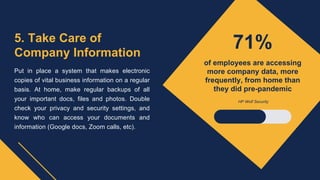
71%
of employees are accessing
more company data, more
frequently, from home than
they did pre-pandemic
HP Wolf Security
Organizations that have employees who are committed to
maintaining online hygiene are better able to protect
themselves and others from cyber attacks. Staying safe
online requires ongoing oversight at each touchpoint - from
buying and setting up new devices, to ensuring day-to-day
activities are not putting anyone at risk.
#BeCyberSmart

5 Ways to Stay #CyberSecure

  • 1.
    5 Ways toStay #CyberSecure
  • 2.
    56% of IT leadersbelieve their employees have picked up bad cybersecurity behaviors since working from home. Digital transformation has created a world where the workforce is accessing data, applications, and systems from all over the globe using multiple types of devices. This requires both users and their organizations to do their part. Cybersecurity is not a one-person operation, it is a team sport. Not doing anything at all is the worst thing you can do. Even if you do not have the policies, you can get started on training. In the next few pages, we will explore 6 Ways to Stay #CyberSecure . Digital Transformation Tessian
  • 3.
    1. Enable Multi-Factor Authentification MFA addsa second check to verify your identity and further protects your account from compromise - even if your password is stolen. Requiring multiple methods of authentication creates an extra hurdle for cyber criminals and makes it more difficult for password cracking tools to enable attackers to break into accounts. Whenever possible, MFA should be used to protect access to all critical systems and applications, including VPNs. 99.9% Microsoft Enterprise accounts that get invaded by attackers didn’t use multi-factor authentication. ZDNet
  • 4.
    2. Create Better Passwords Thismay seem obvious and something that you’ve seen time and time again, but all too often securing a strong password is overlooked. Ensure you’re using long, complex, and unique passwords to help prevent your account from being hacked. An easy way of keeping track and remembering your passwords is by using a password manager. 66% of Americans use the same password across multiple online accounts. Google
  • 5.
    3. Don't Wait, Update! Whenyou get that pesky popup on your device that says it’s time to update the software, it may be tempting to simply click postpone and ignore it. However, there’s a reason why these updates happen. Having the latest security software, web browser, and operating system on devices is one of the best defenses against online threats. 4. Research Before Downloading Doing research before downloading anything new to your device, such as apps, is imperative to staying safe online. Check who created the app, what the user reviews say, and if there are any articles published online about the app’s privacy and security features.
  • 6.
    5. Take Careof Company Information Put in place a system that makes electronic copies of vital business information on a regular basis. At home, make regular backups of all your important docs, files and photos. Double check your privacy and security settings, and know who can access your documents and information (Google docs, Zoom calls, etc). 71% of employees are accessing more company data, more frequently, from home than they did pre-pandemic HP Wolf Security
  • 7.
    Organizations that haveemployees who are committed to maintaining online hygiene are better able to protect themselves and others from cyber attacks. Staying safe online requires ongoing oversight at each touchpoint - from buying and setting up new devices, to ensuring day-to-day activities are not putting anyone at risk. #BeCyberSmart