Pre-Production
Jake Jarvis
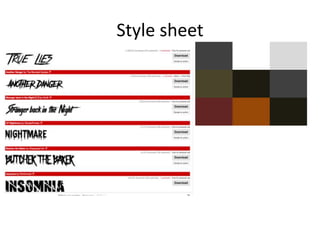
Style sheet
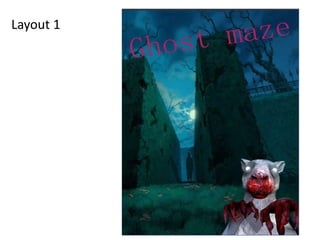
Layout 1
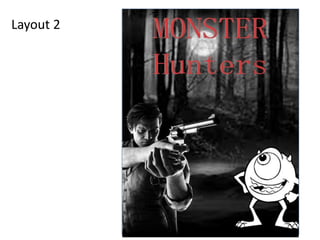
Layout 2
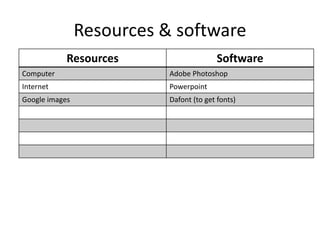
Resources & software
Resources Software
Computer Adobe Photoshop
Internet Powerpoint
Google images Dafont (to get fonts)
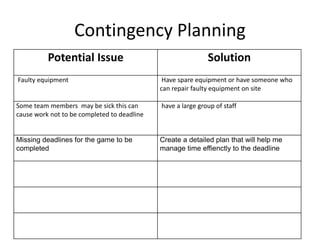
Contingency Planning
Potential Issue Solution
Faulty equipment Have spare equipment or have someone who
can repair faulty equipment on site
Some team members may be sick this can
cause work not to be completed to deadline
have a large group of staff
Missing deadlines for the game to be
completed
Create a detailed plan that will help me
manage time effienctly to the deadline
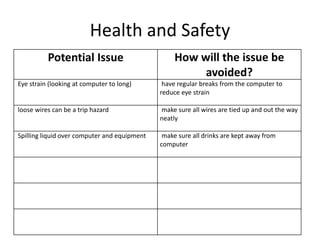
Health and Safety
Potential Issue How will the issue be
avoided?
Eye strain (looking at computer to long) have regular breaks from the computer to
reduce eye strain
loose wires can be a trip hazard make sure all wires are tied up and out the way
neatly
Spilling liquid over computer and equipment make sure all drinks are kept away from
computer
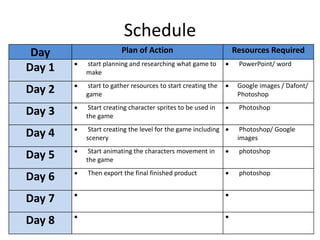
Schedule
Day Plan of Action Resources Required
Day 1  start planning and researching what game to
make
 PowerPoint/ word
Day 2  start to gather resources to start creating the
game
 Google images / Dafont/
Photoshop
Day 3  Start creating character sprites to be used in
the game
 Photoshop
Day 4  Start creating the level for the game including
scenery
 Photoshop/ Google
images
Day 5  Start animating the characters movement in
the game
 photoshop
Day 6  Then export the final finished product  photoshop
Day 7  
Day 8  

5. pre production(2) (1)

  • 1.
  • 2.
  • 3.
  • 4.
  • 5.
    Resources & software ResourcesSoftware Computer Adobe Photoshop Internet Powerpoint Google images Dafont (to get fonts)
  • 6.
    Contingency Planning Potential IssueSolution Faulty equipment Have spare equipment or have someone who can repair faulty equipment on site Some team members may be sick this can cause work not to be completed to deadline have a large group of staff Missing deadlines for the game to be completed Create a detailed plan that will help me manage time effienctly to the deadline
  • 7.
    Health and Safety PotentialIssue How will the issue be avoided? Eye strain (looking at computer to long) have regular breaks from the computer to reduce eye strain loose wires can be a trip hazard make sure all wires are tied up and out the way neatly Spilling liquid over computer and equipment make sure all drinks are kept away from computer
  • 8.
    Schedule Day Plan ofAction Resources Required Day 1  start planning and researching what game to make  PowerPoint/ word Day 2  start to gather resources to start creating the game  Google images / Dafont/ Photoshop Day 3  Start creating character sprites to be used in the game  Photoshop Day 4  Start creating the level for the game including scenery  Photoshop/ Google images Day 5  Start animating the characters movement in the game  photoshop Day 6  Then export the final finished product  photoshop Day 7   Day 8  

Editor's Notes

  • #3 Explore colours, fonts and image styles similar to what you want to produce. Discuss all three elements in relation to why you chose them and where you may use them in your project. Go over as many pages as you need to
  • #4 Mock up of a potential design using the colours and fonts established in your style sheet and sourced images
  • #5 Mock up of a potential design using the colours and fonts established in your style sheet and sourced images