2011 International Transaction Journal of Engineering, Management, & Applied Sciences & Technologies.
            2011 International Transaction Journal of Engineering, Management, & Applied Sciences & Technologies.


                   International Transaction Journal of Engineering,
                   Management, & Applied Sciences & Technologies
                             http://www.TuEngr.com,               http://go.to/Research


                       Developing Web-based Interactive Teaching System
                       for Core Network Technology Courses
                                             a*
                       Chengcheng Li

a
    Department of Technology Systems, East Carolina University, USA


ARTICLEINFO                          ABSTRACT
Article history:                              This paper presents an in-house created software
Accepted 26 August 2011
Available online                     application that emulates and virtualizes computer networking
01 November 2011                     laboratory hardware and proprietary equipment on PCs and
Keywords:                            servers. A user friendly remote laboratory manage system is
Virtual Technology,                  developed using .NET technology. Through the presented lab
Software Simulation,                 management system, the students are able to conduct more than
Networking,                          200 lab assignments covering 10 courses from both lower level
Information Assurance                routing and switching classes to upper level network management
                                     and security classes that demand a large amount of physical
                                     equipment and a great number of student lab contact hours prior
                                     to the emulated lab. This emulation solution eliminates our
                                     dependencies on expensive proprietary networking equipment.
                                     It also reduces the burden of system administration. This remote
                                     lab has been used and tested in three networking courses. The
                                     feedbacks show that the lab delivers similar or better lab
                                     experiences for the DE students while the lab construction and
                                     maintenance cost is reduced to the minimum.

                                        2011 International Transaction Journal of Engineering, Management, &
                                     Applied Sciences & Technologies.


1 Background 

1.1 Education Based on VT 
       Virtual Technology (VT) allows multiple operating systems running on the same platform
as virtual machines. It has been widely adopted by the modern industry. High end servers
*Corresponding author (C. Li). Tel/Fax: +1-252-3289671 E-mail addresses: liche@ecu.edu
   2011 International Transaction Journal of Engineering, Management, & Applied
Sciences & Technologies. Volume 2 No.5. (Special Issue). ISSN 2228-9860. eISSN 1906-9642.
                                                                                                              483
Online Available at http://TuEngr.com/V02/483-492.pdf
and networking equipment are used to construct a consolidated system that improves
manageability, enhances security, and greatly reduces cost.

    The Information and Computer Technology (ICT) program of the East Carolina University
has been pioneering in adopting VT for teaching computer networking, security, and system
administration courses both in the undergraduate and postgraduate levels. During the past
years, a state-of-the-art student remote computer lab was built on VT technology. Student can
access to the lab 24/7 via the Internet. A tailored operating system image with software
applications demanded by the student is automatically created during each lab use. One
student reservation can have access to multiple operating systems through the use of
VT-inside-of-VT technology. This feature is very important for computer networking and
security major students who need a network of multiple operating systems to complete a lab
assignment. The current remote-access computer lab can accommodate dozens of concurrent
users.

    This paper is an extended version of the author’s conference presentation [1]. The
creation of our lab using blade servers, VCL (Virtual Computing Lab), VMware, and Virtual
Box was also well documented and published [2-6]. This paper will not significantly address
the deployment of VT in education. Instead, it will focus on the development of a software
application that employs VT and is tailored for a number of networking courses in the ICT
program.

1.2 Emulating Proprietary Appliances 
    Most security, networking, and system administration courses highly rely on networking
appliances for teaching the hands-on labs.        Although the department has acquired IDS,
firewalls, VPN appliances, IPphones, routers, and switches from various vendors in the past,
the preference has been shifted to Cisco products. It is because first, Cisco is the industry leader
for manufacturing networking and security hardware and software. Second, the ICT program
has six courses that are tied to two Cisco certification programs – CCNA (Cisco Certified
Network Associate) and CCNP (Cisco Certified Network Professional). Third, East Carolina
University is a regional Cisco Networking Academy that oversees 14 local academies and
trains their IT instructors. Most of these local academies are colleges and high schools.

    To maintain a Cisco networking lab can be a challenge considering the rapid advancement
of networking technology that requires constant software updates and hardware upgrades. The
stagnant budget further limits our capacity to keep the lab equipment to a state-of-the-art level.

    Software simulation has been a successful means in teaching Cisco networking courses.


    484          Chengcheng Li
Several simulators were tested by the ICT faculty including PacketTracer, LabSim, Boson, and
Semsim. They are excellent substitutes of real Cisco equipment for teaching lower-level
networking courses such as the two CCNA courses. However, the simulation software only
builds a simplified abstract version of the operating system hosted by the appliances. It cannot
be employed to teach higher level networking courses due to its limited functionalities.

     VT makes emulation of Cisco appliances on PCs possible. The advantage of software
emulation over simulation is that emulation allows the system memory to host the real and
complete Cisco IOS (Internetwork Operating System) instead of trying to recreate a portion of
it. It, therefore, provides the full functionalities of a real Cisco router, switch, VPN, and
firewall. A small tool, named Dynamips [7], was identified for migrating Cisco IOS into
computer memory. Once the IOS is loaded, the hosting computer is virtually transformed into
a real Cisco appliance. VT further allows multiple instances of IOS’s to be hosted within the
same piece of physical memory. Along with the other operating systems, such as Linux and
Windows hosted on the same physical memory through VMware or Virtualbox, a complex
networking topology consisting of multiple hosts and networking devices can be emulated on
one single PC. These operating systems communicate with each other through UDP/TCP
ports on the hosting machine, emulating the physical Ethernet, token ring, and serial port
connections.

     Emulating proprietary Cisco appliances significantly reduced the cost and our dependency
of real Cisco devices. The labs of our networking courses are taught by using the VT
environment that is incorporated into our existing student remote-lab infrastructure where no
physical Cisco equipment is required.


2 Software Development 

2.1 Needs from Networking Courses 
     It is inconvenient to create a lab topology every time a lab is performed. The Dynamips
software does not have a graphic interface and setting up the parameters for a specific lab can be
confusing. Although some tools are developed to expedite the lab setup, none of them are
designed for class teaching. Students still need to learn how to use these tools which are
irrelevant to the contents of the actual labs.

     To accommodate the lab needs of ten networking courses, the author developed a software
application that is incorporated into a VCL image, named “ECU Cisco Lab”. Students can
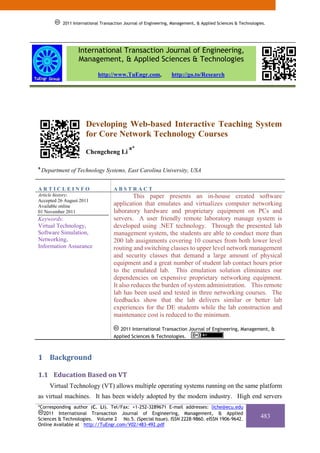
access to this image through ECU VCL system as shown in Figure 1.
*Corresponding author (C. Li). Tel/Fax: +1-252-3289671 E-mail addresses: liche@ecu.edu
   2011 International Transaction Journal of Engineering, Management, & Applied
Sciences & Technologies. Volume 2 No.5. (Special Issue). ISSN 2228-9860. eISSN 1906-9642.
                                                                                            485
Online Available at http://TuEngr.com/V02/483-492.pdf
Figure 1: “ECU Cisco Lab” Image Reservation.

    The ECU VCL system can allow a maximum of 40 concurrent accesses to the ECU Cisco
Lab image. That means 40 students can reserve the lab by clicking the “Now” button at the
same time and have the lab ready within one minute. If all the resources are taken and no
image can be accessed at the moment, a student can reserve the lab for a future time, which
rarely happens. Each reservation can be made up to 6 hours which is sufficient for the students
to complete a lab exercise.

    When the reserved image becomes ready, student can connect to this virtual machine
through Windows RDP (Remote Desktop) connection.             The IP address, username, and
password of this virtual machine is displayed on a webpage and also sent to the student through
email.

    The “ECU Cisco Lab” is a Windows 2003 operating system virtual machine with all the
software applications installed for teaching the networking courses including the “Dr. Li’s
Networking Studio”, which is the major component of the networking lab. It is programmed by
the author in C# language using MS Visual Studio. It is copyrighted in 2009 by ECU.

2.2 Interface Design 
    The interface design was based on the concept of clarity and functionality. The graphics
and buttons provide visual guidance that leads students directly to the lab exercises. The main
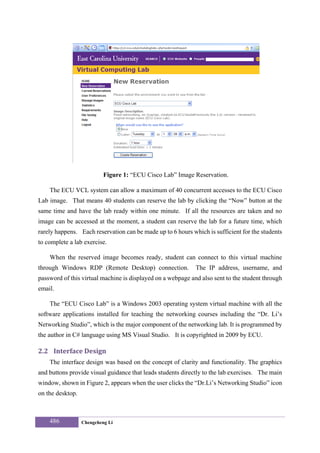
window, shown in Figure 2, appears when the user clicks the “Dr.Li’s Networking Studio” icon
on the desktop.


    486           Chengcheng Li
Figure 2: The Main Window for 10 courses.


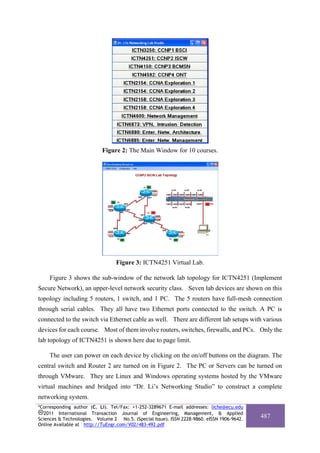
                                 Figure 3: ICTN4251 Virtual Lab.

     Figure 3 shows the sub-window of the network lab topology for ICTN4251 (Implement
Secure Network), an upper-level network security class. Seven lab devices are shown on this
topology including 5 routers, 1 switch, and 1 PC. The 5 routers have full-mesh connection
through serial cables. They all have two Ethernet ports connected to the switch. A PC is
connected to the switch via Ethernet cable as well. There are different lab setups with various
devices for each course. Most of them involve routers, switches, firewalls, and PCs. Only the
lab topology of ICTN4251 is shown here due to page limit.

     The user can power on each device by clicking on the on/off buttons on the diagram. The
central switch and Router 2 are turned on in Figure 2. The PC or Servers can be turned on
through VMware. They are Linux and Windows operating systems hosted by the VMware
virtual machines and bridged into “Dr. Li’s Networking Studio” to construct a complete
networking system.
*Corresponding author (C. Li). Tel/Fax: +1-252-3289671 E-mail addresses: liche@ecu.edu
   2011 International Transaction Journal of Engineering, Management, & Applied
Sciences & Technologies. Volume 2 No.5. (Special Issue). ISSN 2228-9860. eISSN 1906-9642.
                                                                                            487
Online Available at http://TuEngr.com/V02/483-492.pdf
2.3 Operation 
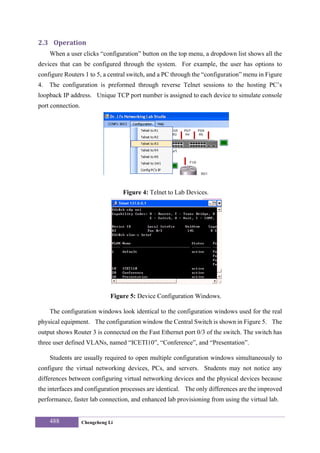
     When a user clicks “configuration” button on the top menu, a dropdown list shows all the
devices that can be configured through the system. For example, the user has options to
configure Routers 1 to 5, a central switch, and a PC through the “configuration” menu in Figure
4.   The configuration is preformed through reverse Telnet sessions to the hosting PC’s
loopback IP address. Unique TCP port number is assigned to each device to simulate console
port connection.


                                   Figure 4: Telnet to Lab Devices.


                               Figure 5: Device Configuration Windows.

     The configuration windows look identical to the configuration windows used for the real
physical equipment. The configuration window the Central Switch is shown in Figure 5. The
output shows Router 3 is connected on the Fast Ethernet port 0/3 of the switch. The switch has
three user defined VLANs, named “ICETI10”, “Conference”, and “Presentation”.

     Students are usually required to open multiple configuration windows simultaneously to
configure the virtual networking devices, PCs, and servers. Students may not notice any
differences between configuring virtual networking devices and the physical devices because
the interfaces and configuration processes are identical. The only differences are the improved
performance, faster lab connection, and enhanced lab provisioning from using the virtual lab.


     488           Chengcheng Li
What is noteworthy is that all the presented devices are hosted virtually on one PC or a
single server. No additional cost is needed if the “Cisco Network Lab” image is hosted on our
existing VCL remote-lab infrastructure. The counterpart physical lab solution costs over
$30,000 per pod.


                          Figure 6: The PDF Version of the Lab Manual.


                        Figure 7: The Video Lecture and Lab Instruction.
*Corresponding author (C. Li). Tel/Fax: +1-252-3289671 E-mail addresses: liche@ecu.edu
   2011 International Transaction Journal of Engineering, Management, & Applied
Sciences & Technologies. Volume 2 No.5. (Special Issue). ISSN 2228-9860. eISSN 1906-9642.
                                                                                            489
Online Available at http://TuEngr.com/V02/483-492.pdf
2.4 Teaching Tools 
    As stated above, “Dr.Li’s Network Studio” is closely tied to 10 networking courses. It not
only provides the virtual lab equipment for the students to conduct lab exercises, but
incorporates lab manuals and recorded videos of course lectures and lab demonstration into the
package. Therefore, it is a complete DE teaching environment with both class lectures and lab
exercises.

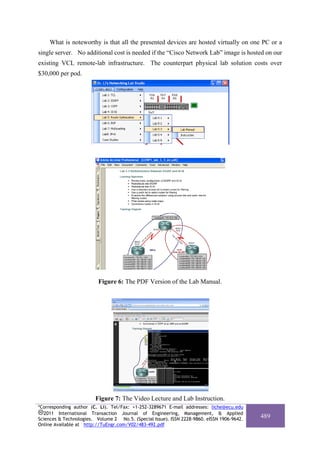
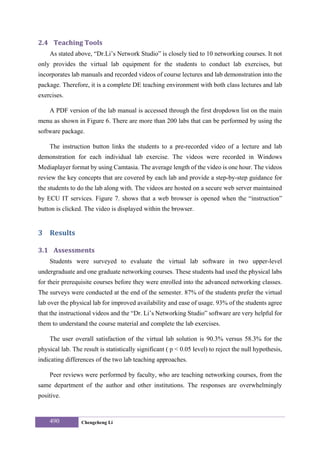
    A PDF version of the lab manual is accessed through the first dropdown list on the main
menu as shown in Figure 6. There are more than 200 labs that can be performed by using the
software package.

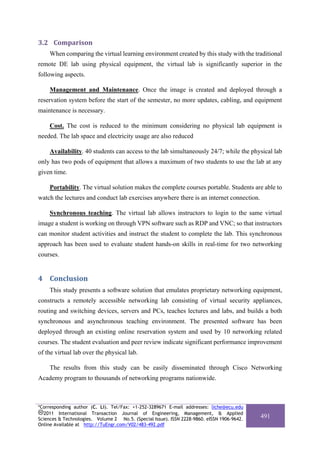
    The instruction button links the students to a pre-recorded video of a lecture and lab
demonstration for each individual lab exercise. The videos were recorded in Windows
Mediaplayer format by using Camtasia. The average length of the video is one hour. The videos
review the key concepts that are covered by each lab and provide a step-by-step guidance for
the students to do the lab along with. The videos are hosted on a secure web server maintained
by ECU IT services. Figure 7. shows that a web browser is opened when the “instruction”
button is clicked. The video is displayed within the browser.


3 Results 

3.1 Assessments 
    Students were surveyed to evaluate the virtual lab software in two upper-level
undergraduate and one graduate networking courses. These students had used the physical labs
for their prerequisite courses before they were enrolled into the advanced networking classes.
The surveys were conducted at the end of the semester. 87% of the students prefer the virtual
lab over the physical lab for improved availability and ease of usage. 93% of the students agree
that the instructional videos and the “Dr. Li’s Networking Studio” software are very helpful for
them to understand the course material and complete the lab exercises.

    The user overall satisfaction of the virtual lab solution is 90.3% versus 58.3% for the
physical lab. The result is statistically significant ( p < 0.05 level) to reject the null hypothesis,
indicating differences of the two lab teaching approaches.

    Peer reviews were performed by faculty, who are teaching networking courses, from the
same department of the author and other institutions. The responses are overwhelmingly
positive.


    490           Chengcheng Li
3.2 Comparison 
     When comparing the virtual learning environment created by this study with the traditional
remote DE lab using physical equipment, the virtual lab is significantly superior in the
following aspects.

     Management and Maintenance. Once the image is created and deployed through a
reservation system before the start of the semester, no more updates, cabling, and equipment
maintenance is necessary.

     Cost. The cost is reduced to the minimum considering no physical lab equipment is
needed. The lab space and electricity usage are also reduced

     Availability. 40 students can access to the lab simultaneously 24/7; while the physical lab
only has two pods of equipment that allows a maximum of two students to use the lab at any
given time.

     Portability. The virtual solution makes the complete courses portable. Students are able to
watch the lectures and conduct lab exercises anywhere there is an internet connection.

     Synchronous teaching. The virtual lab allows instructors to login to the same virtual
image a student is working on through VPN software such as RDP and VNC; so that instructors
can monitor student activities and instruct the student to complete the lab. This synchronous
approach has been used to evaluate student hands-on skills in real-time for two networking
courses.


4 Conclusion 
     This study presents a software solution that emulates proprietary networking equipment,
constructs a remotely accessible networking lab consisting of virtual security appliances,
routing and switching devices, servers and PCs, teaches lectures and labs, and builds a both
synchronous and asynchronous teaching environment. The presented software has been
deployed through an existing online reservation system and used by 10 networking related
courses. The student evaluation and peer review indicate significant performance improvement
of the virtual lab over the physical lab.

     The results from this study can be easily disseminated through Cisco Networking
Academy program to thousands of networking programs nationwide.


*Corresponding author (C. Li). Tel/Fax: +1-252-3289671 E-mail addresses: liche@ecu.edu
   2011 International Transaction Journal of Engineering, Management, & Applied
Sciences & Technologies. Volume 2 No.5. (Special Issue). ISSN 2228-9860. eISSN 1906-9642.
                                                                                            491
Online Available at http://TuEngr.com/V02/483-492.pdf
5 Acknowledgement 
    This research is supported National Science Foundation. (Grant No. 0837722).


6 References   
[1] Li, C. (2010). Developing an Innovative Online Teaching System. International
       Conference on Education, Training and Informatics (ICETI2010), Vol 2, 365-370,
       April 2010, Orlando, Florida.

[2] Li, P., Li, C., & Mohammed, T. (2009). Building a Repository of Network Traffic Captures
         for Information Assurance Education. Journal of Computing Sciences in Colleges, 24
         (3), 99-105.

[3] Li, C. (2009). Blur the Boundary between the Virtual and the Real. Journal of Computing
        Sciences in Colleges, 24 (3), 39-45.

[4] Li, C., Li, P., Mohammed, T., Yang, B., & Pickard, J. (2008). A Practical Study on
        Networking Equipment Emulation. Journal of Computing Sciences in Colleges, 24 (2),
        137-143.

[5] Li, C., Li, P., Toderick, L., & Mohammed, T. (2008). Networking Lab Simulation using
        Virtual Technologies. 115th ASEE Annual Conference and Exposition.

[6] Li, C., Toderick, L., Li, P., Lunsford, P., & Mohammed, T. (2008). Building a Portable
         Virtual Network Security Lab. 115th ASEE Annual Conference and Exposition.

[7] Dynamips, the Cisco 7200 Simulator, http://www.ipflow.utc.fr/blog/?p=31


             Dr. Chengcheng Li is an Assistant Professor of the Department of Technology Systems at East Carolina
             University. He received both his M.S. and Ph.D. degrees in computer science from Texas Tech University.
             He also obtained an MBA degree from University of Monaco. Dr. Li is the PI of an NSF grant that leads to
             the development of the teaching technologies in this paper. He has been actively involved in US federal,
             industry, and ECU internal research projects. His research interests are in Technology Education, Computer
             Networking, Network Security, Cloud Computing, Artificial Intelligence, Reinforcement Learning, and
             Image Processing. He can be reached at liche@ecu.edu.


Peer Review: This article has been internationally peer-reviewed and accepted for publication
              according to the guidelines given at the journal’s website. Note: This article
              was accepted and presented at IAJC-ASEE International Joint Conference on
              Engineering and Related Technologies sponsored by IAJC, ASEE, IEEE, venue
              at University of Hartford, USA during April 29-30, 2011.


    492          Chengcheng Li

Developing Web-based Interactive Teaching System for Core Network Technology Courses

  • 1.
    2011 International TransactionJournal of Engineering, Management, & Applied Sciences & Technologies. 2011 International Transaction Journal of Engineering, Management, & Applied Sciences & Technologies. International Transaction Journal of Engineering, Management, & Applied Sciences & Technologies http://www.TuEngr.com, http://go.to/Research Developing Web-based Interactive Teaching System for Core Network Technology Courses a* Chengcheng Li a Department of Technology Systems, East Carolina University, USA ARTICLEINFO ABSTRACT Article history: This paper presents an in-house created software Accepted 26 August 2011 Available online application that emulates and virtualizes computer networking 01 November 2011 laboratory hardware and proprietary equipment on PCs and Keywords: servers. A user friendly remote laboratory manage system is Virtual Technology, developed using .NET technology. Through the presented lab Software Simulation, management system, the students are able to conduct more than Networking, 200 lab assignments covering 10 courses from both lower level Information Assurance routing and switching classes to upper level network management and security classes that demand a large amount of physical equipment and a great number of student lab contact hours prior to the emulated lab. This emulation solution eliminates our dependencies on expensive proprietary networking equipment. It also reduces the burden of system administration. This remote lab has been used and tested in three networking courses. The feedbacks show that the lab delivers similar or better lab experiences for the DE students while the lab construction and maintenance cost is reduced to the minimum. 2011 International Transaction Journal of Engineering, Management, & Applied Sciences & Technologies. 1 Background  1.1 Education Based on VT  Virtual Technology (VT) allows multiple operating systems running on the same platform as virtual machines. It has been widely adopted by the modern industry. High end servers *Corresponding author (C. Li). Tel/Fax: +1-252-3289671 E-mail addresses: liche@ecu.edu 2011 International Transaction Journal of Engineering, Management, & Applied Sciences & Technologies. Volume 2 No.5. (Special Issue). ISSN 2228-9860. eISSN 1906-9642. 483 Online Available at http://TuEngr.com/V02/483-492.pdf
  • 2.
    and networking equipmentare used to construct a consolidated system that improves manageability, enhances security, and greatly reduces cost. The Information and Computer Technology (ICT) program of the East Carolina University has been pioneering in adopting VT for teaching computer networking, security, and system administration courses both in the undergraduate and postgraduate levels. During the past years, a state-of-the-art student remote computer lab was built on VT technology. Student can access to the lab 24/7 via the Internet. A tailored operating system image with software applications demanded by the student is automatically created during each lab use. One student reservation can have access to multiple operating systems through the use of VT-inside-of-VT technology. This feature is very important for computer networking and security major students who need a network of multiple operating systems to complete a lab assignment. The current remote-access computer lab can accommodate dozens of concurrent users. This paper is an extended version of the author’s conference presentation [1]. The creation of our lab using blade servers, VCL (Virtual Computing Lab), VMware, and Virtual Box was also well documented and published [2-6]. This paper will not significantly address the deployment of VT in education. Instead, it will focus on the development of a software application that employs VT and is tailored for a number of networking courses in the ICT program. 1.2 Emulating Proprietary Appliances  Most security, networking, and system administration courses highly rely on networking appliances for teaching the hands-on labs. Although the department has acquired IDS, firewalls, VPN appliances, IPphones, routers, and switches from various vendors in the past, the preference has been shifted to Cisco products. It is because first, Cisco is the industry leader for manufacturing networking and security hardware and software. Second, the ICT program has six courses that are tied to two Cisco certification programs – CCNA (Cisco Certified Network Associate) and CCNP (Cisco Certified Network Professional). Third, East Carolina University is a regional Cisco Networking Academy that oversees 14 local academies and trains their IT instructors. Most of these local academies are colleges and high schools. To maintain a Cisco networking lab can be a challenge considering the rapid advancement of networking technology that requires constant software updates and hardware upgrades. The stagnant budget further limits our capacity to keep the lab equipment to a state-of-the-art level. Software simulation has been a successful means in teaching Cisco networking courses. 484 Chengcheng Li
  • 3.
    Several simulators weretested by the ICT faculty including PacketTracer, LabSim, Boson, and Semsim. They are excellent substitutes of real Cisco equipment for teaching lower-level networking courses such as the two CCNA courses. However, the simulation software only builds a simplified abstract version of the operating system hosted by the appliances. It cannot be employed to teach higher level networking courses due to its limited functionalities. VT makes emulation of Cisco appliances on PCs possible. The advantage of software emulation over simulation is that emulation allows the system memory to host the real and complete Cisco IOS (Internetwork Operating System) instead of trying to recreate a portion of it. It, therefore, provides the full functionalities of a real Cisco router, switch, VPN, and firewall. A small tool, named Dynamips [7], was identified for migrating Cisco IOS into computer memory. Once the IOS is loaded, the hosting computer is virtually transformed into a real Cisco appliance. VT further allows multiple instances of IOS’s to be hosted within the same piece of physical memory. Along with the other operating systems, such as Linux and Windows hosted on the same physical memory through VMware or Virtualbox, a complex networking topology consisting of multiple hosts and networking devices can be emulated on one single PC. These operating systems communicate with each other through UDP/TCP ports on the hosting machine, emulating the physical Ethernet, token ring, and serial port connections. Emulating proprietary Cisco appliances significantly reduced the cost and our dependency of real Cisco devices. The labs of our networking courses are taught by using the VT environment that is incorporated into our existing student remote-lab infrastructure where no physical Cisco equipment is required. 2 Software Development  2.1 Needs from Networking Courses  It is inconvenient to create a lab topology every time a lab is performed. The Dynamips software does not have a graphic interface and setting up the parameters for a specific lab can be confusing. Although some tools are developed to expedite the lab setup, none of them are designed for class teaching. Students still need to learn how to use these tools which are irrelevant to the contents of the actual labs. To accommodate the lab needs of ten networking courses, the author developed a software application that is incorporated into a VCL image, named “ECU Cisco Lab”. Students can access to this image through ECU VCL system as shown in Figure 1. *Corresponding author (C. Li). Tel/Fax: +1-252-3289671 E-mail addresses: liche@ecu.edu 2011 International Transaction Journal of Engineering, Management, & Applied Sciences & Technologies. Volume 2 No.5. (Special Issue). ISSN 2228-9860. eISSN 1906-9642. 485 Online Available at http://TuEngr.com/V02/483-492.pdf
  • 4.
    Figure 1: “ECUCisco Lab” Image Reservation. The ECU VCL system can allow a maximum of 40 concurrent accesses to the ECU Cisco Lab image. That means 40 students can reserve the lab by clicking the “Now” button at the same time and have the lab ready within one minute. If all the resources are taken and no image can be accessed at the moment, a student can reserve the lab for a future time, which rarely happens. Each reservation can be made up to 6 hours which is sufficient for the students to complete a lab exercise. When the reserved image becomes ready, student can connect to this virtual machine through Windows RDP (Remote Desktop) connection. The IP address, username, and password of this virtual machine is displayed on a webpage and also sent to the student through email. The “ECU Cisco Lab” is a Windows 2003 operating system virtual machine with all the software applications installed for teaching the networking courses including the “Dr. Li’s Networking Studio”, which is the major component of the networking lab. It is programmed by the author in C# language using MS Visual Studio. It is copyrighted in 2009 by ECU. 2.2 Interface Design  The interface design was based on the concept of clarity and functionality. The graphics and buttons provide visual guidance that leads students directly to the lab exercises. The main window, shown in Figure 2, appears when the user clicks the “Dr.Li’s Networking Studio” icon on the desktop. 486 Chengcheng Li
  • 5.
    Figure 2: TheMain Window for 10 courses. Figure 3: ICTN4251 Virtual Lab. Figure 3 shows the sub-window of the network lab topology for ICTN4251 (Implement Secure Network), an upper-level network security class. Seven lab devices are shown on this topology including 5 routers, 1 switch, and 1 PC. The 5 routers have full-mesh connection through serial cables. They all have two Ethernet ports connected to the switch. A PC is connected to the switch via Ethernet cable as well. There are different lab setups with various devices for each course. Most of them involve routers, switches, firewalls, and PCs. Only the lab topology of ICTN4251 is shown here due to page limit. The user can power on each device by clicking on the on/off buttons on the diagram. The central switch and Router 2 are turned on in Figure 2. The PC or Servers can be turned on through VMware. They are Linux and Windows operating systems hosted by the VMware virtual machines and bridged into “Dr. Li’s Networking Studio” to construct a complete networking system. *Corresponding author (C. Li). Tel/Fax: +1-252-3289671 E-mail addresses: liche@ecu.edu 2011 International Transaction Journal of Engineering, Management, & Applied Sciences & Technologies. Volume 2 No.5. (Special Issue). ISSN 2228-9860. eISSN 1906-9642. 487 Online Available at http://TuEngr.com/V02/483-492.pdf
  • 6.
    2.3 Operation  When a user clicks “configuration” button on the top menu, a dropdown list shows all the devices that can be configured through the system. For example, the user has options to configure Routers 1 to 5, a central switch, and a PC through the “configuration” menu in Figure 4. The configuration is preformed through reverse Telnet sessions to the hosting PC’s loopback IP address. Unique TCP port number is assigned to each device to simulate console port connection. Figure 4: Telnet to Lab Devices. Figure 5: Device Configuration Windows. The configuration windows look identical to the configuration windows used for the real physical equipment. The configuration window the Central Switch is shown in Figure 5. The output shows Router 3 is connected on the Fast Ethernet port 0/3 of the switch. The switch has three user defined VLANs, named “ICETI10”, “Conference”, and “Presentation”. Students are usually required to open multiple configuration windows simultaneously to configure the virtual networking devices, PCs, and servers. Students may not notice any differences between configuring virtual networking devices and the physical devices because the interfaces and configuration processes are identical. The only differences are the improved performance, faster lab connection, and enhanced lab provisioning from using the virtual lab. 488 Chengcheng Li
  • 7.
    What is noteworthyis that all the presented devices are hosted virtually on one PC or a single server. No additional cost is needed if the “Cisco Network Lab” image is hosted on our existing VCL remote-lab infrastructure. The counterpart physical lab solution costs over $30,000 per pod. Figure 6: The PDF Version of the Lab Manual. Figure 7: The Video Lecture and Lab Instruction. *Corresponding author (C. Li). Tel/Fax: +1-252-3289671 E-mail addresses: liche@ecu.edu 2011 International Transaction Journal of Engineering, Management, & Applied Sciences & Technologies. Volume 2 No.5. (Special Issue). ISSN 2228-9860. eISSN 1906-9642. 489 Online Available at http://TuEngr.com/V02/483-492.pdf
  • 8.
    2.4 Teaching Tools  As stated above, “Dr.Li’s Network Studio” is closely tied to 10 networking courses. It not only provides the virtual lab equipment for the students to conduct lab exercises, but incorporates lab manuals and recorded videos of course lectures and lab demonstration into the package. Therefore, it is a complete DE teaching environment with both class lectures and lab exercises. A PDF version of the lab manual is accessed through the first dropdown list on the main menu as shown in Figure 6. There are more than 200 labs that can be performed by using the software package. The instruction button links the students to a pre-recorded video of a lecture and lab demonstration for each individual lab exercise. The videos were recorded in Windows Mediaplayer format by using Camtasia. The average length of the video is one hour. The videos review the key concepts that are covered by each lab and provide a step-by-step guidance for the students to do the lab along with. The videos are hosted on a secure web server maintained by ECU IT services. Figure 7. shows that a web browser is opened when the “instruction” button is clicked. The video is displayed within the browser. 3 Results  3.1 Assessments  Students were surveyed to evaluate the virtual lab software in two upper-level undergraduate and one graduate networking courses. These students had used the physical labs for their prerequisite courses before they were enrolled into the advanced networking classes. The surveys were conducted at the end of the semester. 87% of the students prefer the virtual lab over the physical lab for improved availability and ease of usage. 93% of the students agree that the instructional videos and the “Dr. Li’s Networking Studio” software are very helpful for them to understand the course material and complete the lab exercises. The user overall satisfaction of the virtual lab solution is 90.3% versus 58.3% for the physical lab. The result is statistically significant ( p < 0.05 level) to reject the null hypothesis, indicating differences of the two lab teaching approaches. Peer reviews were performed by faculty, who are teaching networking courses, from the same department of the author and other institutions. The responses are overwhelmingly positive. 490 Chengcheng Li
  • 9.
    3.2 Comparison  When comparing the virtual learning environment created by this study with the traditional remote DE lab using physical equipment, the virtual lab is significantly superior in the following aspects. Management and Maintenance. Once the image is created and deployed through a reservation system before the start of the semester, no more updates, cabling, and equipment maintenance is necessary. Cost. The cost is reduced to the minimum considering no physical lab equipment is needed. The lab space and electricity usage are also reduced Availability. 40 students can access to the lab simultaneously 24/7; while the physical lab only has two pods of equipment that allows a maximum of two students to use the lab at any given time. Portability. The virtual solution makes the complete courses portable. Students are able to watch the lectures and conduct lab exercises anywhere there is an internet connection. Synchronous teaching. The virtual lab allows instructors to login to the same virtual image a student is working on through VPN software such as RDP and VNC; so that instructors can monitor student activities and instruct the student to complete the lab. This synchronous approach has been used to evaluate student hands-on skills in real-time for two networking courses. 4 Conclusion  This study presents a software solution that emulates proprietary networking equipment, constructs a remotely accessible networking lab consisting of virtual security appliances, routing and switching devices, servers and PCs, teaches lectures and labs, and builds a both synchronous and asynchronous teaching environment. The presented software has been deployed through an existing online reservation system and used by 10 networking related courses. The student evaluation and peer review indicate significant performance improvement of the virtual lab over the physical lab. The results from this study can be easily disseminated through Cisco Networking Academy program to thousands of networking programs nationwide. *Corresponding author (C. Li). Tel/Fax: +1-252-3289671 E-mail addresses: liche@ecu.edu 2011 International Transaction Journal of Engineering, Management, & Applied Sciences & Technologies. Volume 2 No.5. (Special Issue). ISSN 2228-9860. eISSN 1906-9642. 491 Online Available at http://TuEngr.com/V02/483-492.pdf
  • 10.
    5 Acknowledgement  This research is supported National Science Foundation. (Grant No. 0837722). 6 References    [1] Li, C. (2010). Developing an Innovative Online Teaching System. International Conference on Education, Training and Informatics (ICETI2010), Vol 2, 365-370, April 2010, Orlando, Florida. [2] Li, P., Li, C., & Mohammed, T. (2009). Building a Repository of Network Traffic Captures for Information Assurance Education. Journal of Computing Sciences in Colleges, 24 (3), 99-105. [3] Li, C. (2009). Blur the Boundary between the Virtual and the Real. Journal of Computing Sciences in Colleges, 24 (3), 39-45. [4] Li, C., Li, P., Mohammed, T., Yang, B., & Pickard, J. (2008). A Practical Study on Networking Equipment Emulation. Journal of Computing Sciences in Colleges, 24 (2), 137-143. [5] Li, C., Li, P., Toderick, L., & Mohammed, T. (2008). Networking Lab Simulation using Virtual Technologies. 115th ASEE Annual Conference and Exposition. [6] Li, C., Toderick, L., Li, P., Lunsford, P., & Mohammed, T. (2008). Building a Portable Virtual Network Security Lab. 115th ASEE Annual Conference and Exposition. [7] Dynamips, the Cisco 7200 Simulator, http://www.ipflow.utc.fr/blog/?p=31 Dr. Chengcheng Li is an Assistant Professor of the Department of Technology Systems at East Carolina University. He received both his M.S. and Ph.D. degrees in computer science from Texas Tech University. He also obtained an MBA degree from University of Monaco. Dr. Li is the PI of an NSF grant that leads to the development of the teaching technologies in this paper. He has been actively involved in US federal, industry, and ECU internal research projects. His research interests are in Technology Education, Computer Networking, Network Security, Cloud Computing, Artificial Intelligence, Reinforcement Learning, and Image Processing. He can be reached at liche@ecu.edu. Peer Review: This article has been internationally peer-reviewed and accepted for publication according to the guidelines given at the journal’s website. Note: This article was accepted and presented at IAJC-ASEE International Joint Conference on Engineering and Related Technologies sponsored by IAJC, ASEE, IEEE, venue at University of Hartford, USA during April 29-30, 2011. 492 Chengcheng Li