DISTRIBUTED CONTROL SYSTEMS
(DCS)
‫الرابعة‬ ‫المحاضرة‬
.‫د‬.‫م‬.‫أ‬
‫مجيد‬ ‫ابراهيم‬ ‫عمار‬
‫الموزعة‬ ‫السيطرة‬ ‫منظومات‬
Supervisory Control and Data Acquisition (SCADA)
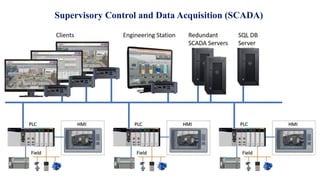
Supervisory Control And Data Acquisition (SCADA) is a system that uses computers,
networks, and specialized hardware to monitor and control the physical equipment of an
industrial process.
It coordinates various pieces of equipment to achieve desired goals, such as
improving production or more efficiently managing resources. SCADA uses data from
those pieces of equipment to make decisions about how those resources should be
managed in real-time. SCADA systems are often found in power plants, oil refineries,
chemical plants, water treatment facilities, and other places with large machinery where
control is essential for safety and efficiency.
The utilization of Supervisory Control and Data Acquisition (SCADA) can be traced way
back to the 1960s or 1970s. Though the exact date is not known, it may be thought that
SCADA systems were initially used during the period when Programmable Logic Controllers
(PLC) are gaining popularity and started to modernize conventional control systems.
Supervisory Control and Data Acquisition (SCADA)
But what really is a SCADA system?
Supervisory Control and Data Acquisition (SCADA)
SCADA, which stands for Supervisory Control and Data Acquisition, is a combination of
hardware and software used for industrial automation. SCADA systems help monitor and control
processes, both locally and remotely, by collecting, recording and analyzing data in real time.
SCADA systems work by connecting the sensors that monitor equipment like motors, pumps
and valves to an onsite or remote server. Once collected, that sensor data can either be acted upon
directly through the use of SCADA software, or saved for later review.
In addition to remote data access, users can interact with the SCADA system on-site through
operator workstations, Human Machine Interfaces, HMIs, or directly on the SCADA server itself.
SCADA helps users make smarter decisions, improve efficiency, and minimize downtime
from anywhere.
It's used in a huge range of industries, including manufacturing facilities, oil and gas
operations and utilities projects, like wastewater treatment and power grid management.
Supervisory Control and Data Acquisition (SCADA)
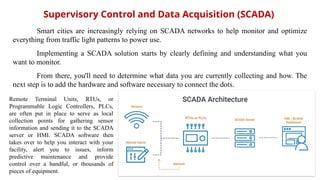
Remote Terminal Units, RTUs, or
Programmable Logic Controllers, PLCs,
are often put in place to serve as local
collection points for gathering sensor
information and sending it to the SCADA
server or HMI. SCADA software then
takes over to help you interact with your
facility, alert you to issues, inform
predictive maintenance and provide
control over a handful, or thousands of
pieces of equipment.
Smart cities are increasingly relying on SCADA networks to help monitor and optimize
everything from traffic light patterns to power use.
Implementing a SCADA solution starts by clearly defining and understanding what you
want to monitor.
From there, you'll need to determine what data you are currently collecting and how. The
next step is to add the hardware and software necessary to connect the dots.
In simple terms, a SCADA is partly an application software. This software is
installed on a computer which is called a workstation or node. The software is comprised of
several components such as a development and runtime environment as well as an I/O
server and license. Together, these software components are configured to work
seamlessly, forming a fully functional SCADA system.
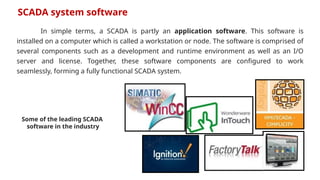
SCADA system software
Some of the leading SCADA
software in the industry
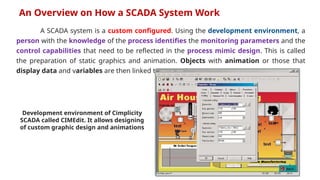
A SCADA system is a custom configured. Using the development environment, a
person with the knowledge of the process identifies the monitoring parameters and the
control capabilities that need to be reflected in the process mimic design. This is called
the preparation of static graphics and animation. Objects with animation or those that
display data and variables are then linked to a Tag.
An Overview on How a SCADA System Work
Development environment of Cimplicity
SCADA called CIMEdit. It allows designing
of custom graphic design and animations
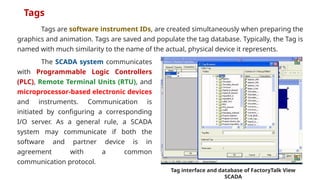
Tags are software instrument IDs, are created simultaneously when preparing the
graphics and animation. Tags are saved and populate the tag database. Typically, the Tag is
named with much similarity to the name of the actual, physical device it represents.
Tags
Tag interface and database of FactoryTalk View
SCADA
The SCADA system communicates
with Programmable Logic Controllers
(PLC), Remote Terminal Units (RTU), and
microprocessor-based electronic devices
and instruments. Communication is
initiated by configuring a corresponding
I/O server. As a general rule, a SCADA
system may communicate if both the
software and partner device is in
agreement with a common
communication protocol.
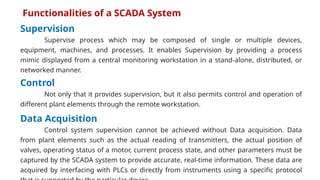
Supervision
Supervise process which may be composed of single or multiple devices,
equipment, machines, and processes. It enables Supervision by providing a process
mimic displayed from a central monitoring workstation in a stand-alone, distributed, or
networked manner.
Data Acquisition
Control system supervision cannot be achieved without Data acquisition. Data
from plant elements such as the actual reading of transmitters, the actual position of
valves, operating status of a motor, current process state, and other parameters must be
captured by the SCADA system to provide accurate, real-time information. These data are
acquired by interfacing with PLCs or directly from instruments using a specific protocol
Functionalities of a SCADA System
Control
Not only that it provides supervision, but it also permits control and operation of
different plant elements through the remote workstation.
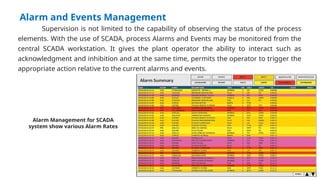
Alarm and Events Management
Supervision is not limited to the capability of observing the status of the process
elements. With the use of SCADA, process Alarms and Events may be monitored from the
central SCADA workstation. It gives the plant operator the ability to interact such as
acknowledgment and inhibition and at the same time, permits the operator to trigger the
appropriate action relative to the current alarms and events.
Alarm Management for SCADA
system show various Alarm Rates
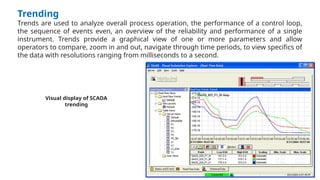
Trending
Trends are used to analyze overall process operation, the performance of a control loop,
the sequence of events even, an overview of the reliability and performance of a single
instrument. Trends provide a graphical view of one or more parameters and allow
operators to compare, zoom in and out, navigate through time periods, to view specifics of
the data with resolutions ranging from milliseconds to a second.
Visual display of SCADA
trending
Security
SCADA system security varies according to the size of the SCADA system however,
any SCADA utilization is capable of implementing simple security. Security settings are
primarily designed to prevent unwanted access to the SCADA system’s monitoring, control
and modification capabilities. Every personnel involved with the operation is given privileges
that define the different levels of access.
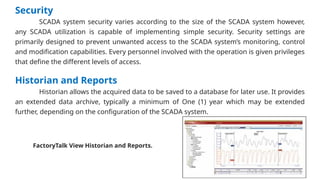
Historian and Reports
Historian allows the acquired data to be saved to a database for later use. It provides
an extended data archive, typically a minimum of One (1) year which may be extended
further, depending on the configuration of the SCADA system.
FactoryTalk View Historian and Reports.
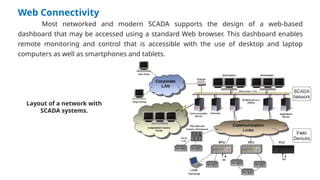
Web Connectivity
Most networked and modern SCADA supports the design of a web-based
dashboard that may be accessed using a standard Web browser. This dashboard enables
remote monitoring and control that is accessible with the use of desktop and laptop
computers as well as smartphones and tablets.
Layout of a network with
SCADA systems.
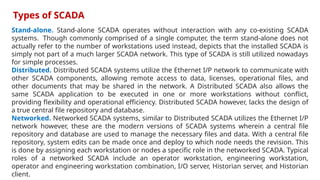
Stand-alone. Stand-alone SCADA operates without interaction with any co-existing SCADA
systems. Though commonly comprised of a single computer, the term stand-alone does not
actually refer to the number of workstations used instead, depicts that the installed SCADA is
simply not part of a much larger SCADA network. This type of SCADA is still utilized nowadays
for simple processes.
Distributed. Distributed SCADA systems utilize the Ethernet I/P network to communicate with
other SCADA components, allowing remote access to data, licenses, operational files, and
other documents that may be shared in the network. A Distributed SCADA also allows the
same SCADA application to be executed in one or more workstations without conflict,
providing flexibility and operational efficiency. Distributed SCADA however, lacks the design of
a true central file repository and database.
Networked. Networked SCADA systems, similar to Distributed SCADA utilizes the Ethernet I/P
network however, these are the modern versions of SCADA systems wherein a central file
repository and database are used to manage the necessary files and data. With a central file
repository, system edits can be made once and deploy to which node needs the revision. This
is done by assigning each workstation or nodes a specific role in the networked SCADA. Typical
roles of a networked SCADA include an operator workstation, engineering workstation,
operator and engineering workstation combination, I/O server, Historian server, and Historian
client.
Types of SCADA
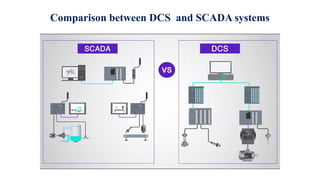
Comparison between DCS and SCADA systems
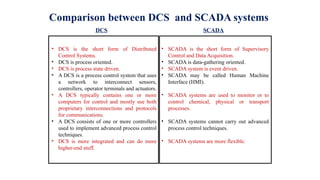
• DCS is the short form of Distributed
Control Systems.
• DCS is process oriented.
• DCS is process state driven.
• A DCS is a process control system that uses
a network to interconnect sensors,
controllers, operator terminals and actuators.
• A DCS typically contains one or more
computers for control and mostly use both
proprietary interconnections and protocols
for communications.
• A DCS consists of one or more controllers
used to implement advanced process control
techniques.
• DCS is more integrated and can do more
higher-end stuff.
• SCADA is the short form of Supervisory
Control and Data Acquisition.
• SCADA is data-gathering oriented.
• SCADA system is event driven.
• SCADA may be called Human Machine
Interface (HMI).
• SCADA systems are used to monitor or to
control chemical, physical or transport
processes.
• SCADA systems cannot carry out advanced
process control techniques.
• SCADA systems are more flexible.
Comparison between DCS and SCADA systems
DCS SCADA
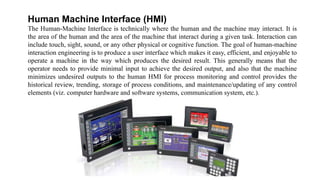
Human Machine Interface (HMI)
The Human-Machine Interface is technically where the human and the machine may interact. It is
the area of the human and the area of the machine that interact during a given task. Interaction can
include touch, sight, sound, or any other physical or cognitive function. The goal of human-machine
interaction engineering is to produce a user interface which makes it easy, efficient, and enjoyable to
operate a machine in the way which produces the desired result. This generally means that the
operator needs to provide minimal input to achieve the desired output, and also that the machine
minimizes undesired outputs to the human HMI for process monitoring and control provides the
historical review, trending, storage of process conditions, and maintenance/updating of any control
elements (viz. computer hardware and software systems, communication system, etc.).
The standard software packages may have the following display features:
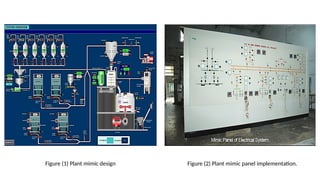
• Plant mimic diagram of plant/process overview. (Figure 1, 2 below)
• Alarm overview presenting information on the alarm status of large areas of the plant
• Multiple area displays presenting information on the control system
• Loop displays giving extensive information on the details of a particular control loop of group of
control loops
HMI devices consist mainly of the following components
• Display unit (CRT, LCD, LED)
• Keyboard
• Input unit
• Printing unit
• Control Panel/desks, mimic board/panel
• Recorders
Figure (1) Plant mimic design Figure (2) Plant mimic panel implementation.
‫المحاضرة‬ ‫نهاية‬
‫الرابعة‬
‫الصغاءكم‬ ‫شكرا‬

4-DCSBBVVB BMNBMNBNMV BMNBMNBMNVBMNVBVMN .pptx

  • 1.
    DISTRIBUTED CONTROL SYSTEMS (DCS) ‫الرابعة‬‫المحاضرة‬ .‫د‬.‫م‬.‫أ‬ ‫مجيد‬ ‫ابراهيم‬ ‫عمار‬ ‫الموزعة‬ ‫السيطرة‬ ‫منظومات‬
  • 2.
    Supervisory Control andData Acquisition (SCADA)
  • 3.
    Supervisory Control AndData Acquisition (SCADA) is a system that uses computers, networks, and specialized hardware to monitor and control the physical equipment of an industrial process. It coordinates various pieces of equipment to achieve desired goals, such as improving production or more efficiently managing resources. SCADA uses data from those pieces of equipment to make decisions about how those resources should be managed in real-time. SCADA systems are often found in power plants, oil refineries, chemical plants, water treatment facilities, and other places with large machinery where control is essential for safety and efficiency. The utilization of Supervisory Control and Data Acquisition (SCADA) can be traced way back to the 1960s or 1970s. Though the exact date is not known, it may be thought that SCADA systems were initially used during the period when Programmable Logic Controllers (PLC) are gaining popularity and started to modernize conventional control systems. Supervisory Control and Data Acquisition (SCADA) But what really is a SCADA system?
  • 4.
    Supervisory Control andData Acquisition (SCADA) SCADA, which stands for Supervisory Control and Data Acquisition, is a combination of hardware and software used for industrial automation. SCADA systems help monitor and control processes, both locally and remotely, by collecting, recording and analyzing data in real time. SCADA systems work by connecting the sensors that monitor equipment like motors, pumps and valves to an onsite or remote server. Once collected, that sensor data can either be acted upon directly through the use of SCADA software, or saved for later review. In addition to remote data access, users can interact with the SCADA system on-site through operator workstations, Human Machine Interfaces, HMIs, or directly on the SCADA server itself. SCADA helps users make smarter decisions, improve efficiency, and minimize downtime from anywhere. It's used in a huge range of industries, including manufacturing facilities, oil and gas operations and utilities projects, like wastewater treatment and power grid management.
  • 5.
    Supervisory Control andData Acquisition (SCADA) Remote Terminal Units, RTUs, or Programmable Logic Controllers, PLCs, are often put in place to serve as local collection points for gathering sensor information and sending it to the SCADA server or HMI. SCADA software then takes over to help you interact with your facility, alert you to issues, inform predictive maintenance and provide control over a handful, or thousands of pieces of equipment. Smart cities are increasingly relying on SCADA networks to help monitor and optimize everything from traffic light patterns to power use. Implementing a SCADA solution starts by clearly defining and understanding what you want to monitor. From there, you'll need to determine what data you are currently collecting and how. The next step is to add the hardware and software necessary to connect the dots.
  • 6.
    In simple terms,a SCADA is partly an application software. This software is installed on a computer which is called a workstation or node. The software is comprised of several components such as a development and runtime environment as well as an I/O server and license. Together, these software components are configured to work seamlessly, forming a fully functional SCADA system. SCADA system software Some of the leading SCADA software in the industry
  • 7.
    A SCADA systemis a custom configured. Using the development environment, a person with the knowledge of the process identifies the monitoring parameters and the control capabilities that need to be reflected in the process mimic design. This is called the preparation of static graphics and animation. Objects with animation or those that display data and variables are then linked to a Tag. An Overview on How a SCADA System Work Development environment of Cimplicity SCADA called CIMEdit. It allows designing of custom graphic design and animations
  • 8.
    Tags are softwareinstrument IDs, are created simultaneously when preparing the graphics and animation. Tags are saved and populate the tag database. Typically, the Tag is named with much similarity to the name of the actual, physical device it represents. Tags Tag interface and database of FactoryTalk View SCADA The SCADA system communicates with Programmable Logic Controllers (PLC), Remote Terminal Units (RTU), and microprocessor-based electronic devices and instruments. Communication is initiated by configuring a corresponding I/O server. As a general rule, a SCADA system may communicate if both the software and partner device is in agreement with a common communication protocol.
  • 9.
    Supervision Supervise process whichmay be composed of single or multiple devices, equipment, machines, and processes. It enables Supervision by providing a process mimic displayed from a central monitoring workstation in a stand-alone, distributed, or networked manner. Data Acquisition Control system supervision cannot be achieved without Data acquisition. Data from plant elements such as the actual reading of transmitters, the actual position of valves, operating status of a motor, current process state, and other parameters must be captured by the SCADA system to provide accurate, real-time information. These data are acquired by interfacing with PLCs or directly from instruments using a specific protocol Functionalities of a SCADA System Control Not only that it provides supervision, but it also permits control and operation of different plant elements through the remote workstation.
  • 10.
    Alarm and EventsManagement Supervision is not limited to the capability of observing the status of the process elements. With the use of SCADA, process Alarms and Events may be monitored from the central SCADA workstation. It gives the plant operator the ability to interact such as acknowledgment and inhibition and at the same time, permits the operator to trigger the appropriate action relative to the current alarms and events. Alarm Management for SCADA system show various Alarm Rates
  • 11.
    Trending Trends are usedto analyze overall process operation, the performance of a control loop, the sequence of events even, an overview of the reliability and performance of a single instrument. Trends provide a graphical view of one or more parameters and allow operators to compare, zoom in and out, navigate through time periods, to view specifics of the data with resolutions ranging from milliseconds to a second. Visual display of SCADA trending
  • 12.
    Security SCADA system securityvaries according to the size of the SCADA system however, any SCADA utilization is capable of implementing simple security. Security settings are primarily designed to prevent unwanted access to the SCADA system’s monitoring, control and modification capabilities. Every personnel involved with the operation is given privileges that define the different levels of access. Historian and Reports Historian allows the acquired data to be saved to a database for later use. It provides an extended data archive, typically a minimum of One (1) year which may be extended further, depending on the configuration of the SCADA system. FactoryTalk View Historian and Reports.
  • 13.
    Web Connectivity Most networkedand modern SCADA supports the design of a web-based dashboard that may be accessed using a standard Web browser. This dashboard enables remote monitoring and control that is accessible with the use of desktop and laptop computers as well as smartphones and tablets. Layout of a network with SCADA systems.
  • 14.
    Stand-alone. Stand-alone SCADAoperates without interaction with any co-existing SCADA systems. Though commonly comprised of a single computer, the term stand-alone does not actually refer to the number of workstations used instead, depicts that the installed SCADA is simply not part of a much larger SCADA network. This type of SCADA is still utilized nowadays for simple processes. Distributed. Distributed SCADA systems utilize the Ethernet I/P network to communicate with other SCADA components, allowing remote access to data, licenses, operational files, and other documents that may be shared in the network. A Distributed SCADA also allows the same SCADA application to be executed in one or more workstations without conflict, providing flexibility and operational efficiency. Distributed SCADA however, lacks the design of a true central file repository and database. Networked. Networked SCADA systems, similar to Distributed SCADA utilizes the Ethernet I/P network however, these are the modern versions of SCADA systems wherein a central file repository and database are used to manage the necessary files and data. With a central file repository, system edits can be made once and deploy to which node needs the revision. This is done by assigning each workstation or nodes a specific role in the networked SCADA. Typical roles of a networked SCADA include an operator workstation, engineering workstation, operator and engineering workstation combination, I/O server, Historian server, and Historian client. Types of SCADA
  • 15.
    Comparison between DCSand SCADA systems
  • 16.
    • DCS isthe short form of Distributed Control Systems. • DCS is process oriented. • DCS is process state driven. • A DCS is a process control system that uses a network to interconnect sensors, controllers, operator terminals and actuators. • A DCS typically contains one or more computers for control and mostly use both proprietary interconnections and protocols for communications. • A DCS consists of one or more controllers used to implement advanced process control techniques. • DCS is more integrated and can do more higher-end stuff. • SCADA is the short form of Supervisory Control and Data Acquisition. • SCADA is data-gathering oriented. • SCADA system is event driven. • SCADA may be called Human Machine Interface (HMI). • SCADA systems are used to monitor or to control chemical, physical or transport processes. • SCADA systems cannot carry out advanced process control techniques. • SCADA systems are more flexible. Comparison between DCS and SCADA systems DCS SCADA
  • 17.
    Human Machine Interface(HMI) The Human-Machine Interface is technically where the human and the machine may interact. It is the area of the human and the area of the machine that interact during a given task. Interaction can include touch, sight, sound, or any other physical or cognitive function. The goal of human-machine interaction engineering is to produce a user interface which makes it easy, efficient, and enjoyable to operate a machine in the way which produces the desired result. This generally means that the operator needs to provide minimal input to achieve the desired output, and also that the machine minimizes undesired outputs to the human HMI for process monitoring and control provides the historical review, trending, storage of process conditions, and maintenance/updating of any control elements (viz. computer hardware and software systems, communication system, etc.).
  • 18.
    The standard softwarepackages may have the following display features: • Plant mimic diagram of plant/process overview. (Figure 1, 2 below) • Alarm overview presenting information on the alarm status of large areas of the plant • Multiple area displays presenting information on the control system • Loop displays giving extensive information on the details of a particular control loop of group of control loops HMI devices consist mainly of the following components • Display unit (CRT, LCD, LED) • Keyboard • Input unit • Printing unit • Control Panel/desks, mimic board/panel • Recorders
  • 19.
    Figure (1) Plantmimic design Figure (2) Plant mimic panel implementation.
  • 20.