Copyright © University of Illinois CS 241 Staff 1
Introduction to Networking
and the Internet
Announcements
  Brighten’s office hours cancelled for
today
  extra hours next week
  Wade Fagen lecturing on Friday
Copyright © University of Illinois CS 241 Staff 2
Where are we?
  Function calls, system calls, threads and
processes
Copyright © University of Illinois CS 241 Staff 3
What’s next?
  Networked communication and distributed
applications
Copyright © University of Illinois CS 241 Staff 4
Introduction
  What is the Internet?
  Network edge
  What is a protocol?
  Protocol layers, service models
Copyright © University of Illinois CS 241 Staff 5
What is the Internet?
  Communication
infrastructure
  Enables distributed
applications
  Web, VoIP, email, games,
e-commerce, file sharing
  Communication services
  Provided to applications
  Reliable data delivery from
source to destination
  “best effort” (unreliable)
data delivery
Copyright © University of Illinois CS 241 Staff 6
Home network
Institutional network
Mobile network
Global ISP
Regional ISP
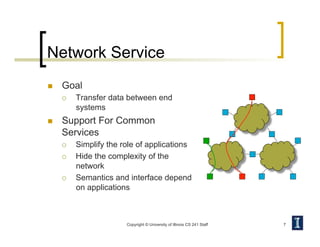
Network Service
  Goal
  Transfer data between end
systems
  Support For Common
Services
  Simplify the role of applications
  Hide the complexity of the
network
  Semantics and interface depend
on applications
Copyright © University of Illinois CS 241 Staff 7
Example: Sending a Letter
Copyright © University of Illinois CS 241 Staff
Bob
Postman
Logical flow of information
Bob’s
mailbox
Alice
Alice’s
mailbox
8
Services
  Unconfirmed service
  Acknowledged service
Copyright © University of Illinois CS 241 Staff 9
US Mail
Request Indicate
Indicate
Confirm
US Mail
Request Indicate
Copyright © University of Illinois CS 241 Staff 10
Host
Host Host
Host
Host
Channel
Channels
  Channel
  The abstraction for application-level communication
  Idea
  Turn host-to-host connectivity into process-to-process
communication
Proc
Proc
Looks like IPC!
Networked Communication
Challenges
  Networked communication ≠ IPC
  Problems typically masked by communication channel
abstractions
  Bit errors (electrical interference)
  Packet errors (congestion)
  Link/node failures
  Message delays
  Out-of-order delivery
  Eavesdropping
  Goal
  Fill the gap between what applications expect and what the
underlying technology provides
Copyright © University of Illinois CS 241 Staff 11
Network Architecture
  Networks are
complex!
  Many “pieces”
  Hosts
  Routers
  Links of various
media
  Applications
  Protocols
  Hardware, software
  Question
  Is there any hope
of organizing
structure of
network?
Copyright © University of Illinois CS 241 Staff 12
Copyright © University of Illinois CS 241 Staff 13
Abstraction through Layering
  Abstract system into layers:
  Decompose the problem of building a network into manageable
components
  Each layer provides some functionality
  Modular design provides flexibility
  Modify layer independently
  Allows alternative abstractions
Application programs
Hardware
Host-to-host connectivity
Acknowledged service
Unconfirmed service
Layering Example: Air Travel
  Layers
  Each layer implements a service
  Via its own internal-layer actions
  Relying on services provided by layer below
Copyright © University of Illinois CS 241 Staff 14
Why layering?
  Complexity
  Explicit structure allows identification, relationship of
complex system’s pieces
  Modularity
  Eases maintenance, updating of system
  Change of implementation of layer’s service transparent to
rest of system
  e.g., change in gate procedure doesn’t affect rest of system
Copyright © University of Illinois CS 241 Staff 15
Protocol: Language of
communication across hosts
  Defines structure of
communication
between two instances
of a layer (on two
hosts)
  Protocols are defined
by
  Specific msgs sent
  Specific actions
taken when msgs
received, or other
events
  Protocols define
  Format
  Order of msgs sent
and received
among network
entities
  Actions taken on
msg transmission,
receipt
Copyright © University of Illinois CS 241 Staff 16
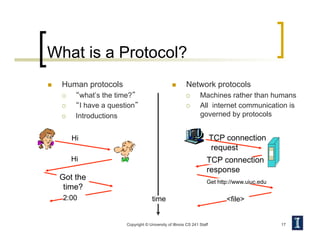
What is a Protocol?
  Human protocols
  “what’s the time?”
  “I have a question”
  Introductions
  Network protocols
  Machines rather than humans
  All internet communication is
governed by protocols
Copyright © University of Illinois CS 241 Staff 17
Hi
Hi
Got the
time?
2:00
TCP connection
request
TCP connection
response
Get http://www.uiuc.edu
<file>
time
Network Protocols
  A protocol implements a communication service
that higher-layer objects use to exchange
messages
  Service interface
  To objects on the same computer that want to use its
communication services
  Peer interface
  To its counterpart on a different machine
  Peers communicate using the services of lower-level
protocols
Copyright © University of Illinois CS 241 Staff 18
Interfaces
Copyright © University of Illinois CS 241 Staff 19
baggage (claim)
gates/bags (unload)
runway landing
airplane routing
airplane routing
departing
airport
arriving
airport
intermediate air
traffic sites
airplane routing airplane routing
baggage (check)
gates/bags (load)
runway takeoff
airplane routing
Copyright © University of Illinois CS 241 Staff 20
Interfaces
Host 1 Host 2
Service interface
Higher-
level
protocol
(TCP)
Higher-
level
protocol
(TCP)
Peer-to-peer
interface
Lower-level
Protocol
(IP)
Lower-level
Protocol
(IP)
Peer-to-peer
interface
Copyright © University of Illinois CS 241 Staff 21
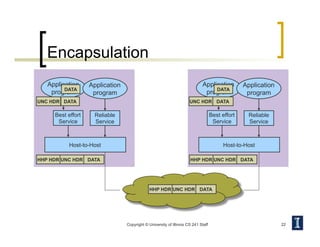
Layering Concepts
  Encapsulation
  Higher layer protocols create messages and
send them via the lower layer protocols
  These messages are treated as data by the
lower-level protocol
  Higher-layer protocol adds its own control
information in the form of headers or trailers
  Multiplexing and Demultiplexing
  Use protocol keys in the header to determine
correct upper-layer protocol
Application
program
Application
program
Copyright © University of Illinois CS 241 Staff 22
Encapsulation
Application
program
Reliable
Service
Host-to-Host
DATA
UNC HDR DATA
Application
program
Reliable
Service
Host-to-Host
DATA
UNC HDR DATA
HHP HDR UNC HDR DATA
Best effort
Service
Best effort
Service
HHP HDR UNC HDR DATA HHP HDR UNC HDR DATA
Copyright © University of Illinois CS 241 Staff 23
Internet Protocol Stack
Application
Physical
Transport
Data Link
Network
  Application: Application specific protocols
  Transport: Process-to-process channel
  Network: Host-to-host packet delivery
  Data Link: Framing of data bits
  Physical: Transmission of raw bits
Transport Layer
  Provide logical communication
between application processes
running on different hosts
  Transport protocols run in end
systems
  Send side
  Break application messages into segments
  Pass to network layer
  Receive side
  Reassemble segments into messages
  Pass to application layer
  More than one transport protocol
available to applications
  Internet: TCP and UDP
Copyright © University of Illinois CS 241 Staff 24
application
transport
network
data link
physical
application
transport
network
data link
physical
Transport vs. Network Layer
  Transport layer
  Logical
communication
between
processes
  Relies on,
enhances,
network layer
services
  Network layer
  Logical
communication
between hosts
Copyright © University of Illinois CS 241 Staff 25
Bob
Postman
Logical flow of information
Bob’s
mailbox
Alice
Alice’s
mailbox
Copyright © University of Illinois CS 241 Staff 26
Internet Architecture
  Features
  No strict layering
Application
Network
IP
UDP
TCP
Internet Architecture –
Hourglass Design
  Features
  Hourglass shape – IP is the focal point
Copyright © University of Illinois CS 241 Staff 27
FTP
TCP
Modem
MPLS
3G wireless
Ethernet
IP
UDP
TFTP
NV
HTTP
Copyright © University of Illinois CS 241 Staff 28
Network Applications
Creating a Network Application
  Write programs that
  Run on (different) end systems
  Communicate over network
  e.g., web server software communicates with browser
software
  No need to write software for network-core
devices
  Network-core devices do not run user
applications
Copyright © University of Illinois CS 241 Staff 29
Client-server Architecture
  Server
  Always-on host
  Well-known IP address
  Clients
  Communicate with server
  May be intermittently
connected
  May have dynamic IP
addresses
  Do not communicate
directly with each other
Copyright © University of Illinois CS 241 Staff 30
client/server
P2P Architecture
  No always-on server
  Arbitrary end systems
directly communicate
  Peers are intermittently
connected and change
IP addresses
  Highly scalable but
difficult to manage
Copyright © University of Illinois CS 241 Staff 31
peer-peer
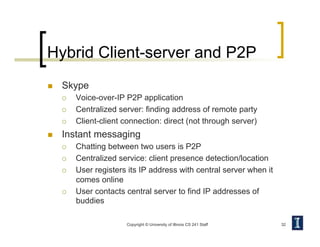
Hybrid Client-server and P2P
  Skype
  Voice-over-IP P2P application
  Centralized server: finding address of remote party
  Client-client connection: direct (not through server)
  Instant messaging
  Chatting between two users is P2P
  Centralized service: client presence detection/location
  User registers its IP address with central server when it
comes online
  User contacts central server to find IP addresses of
buddies
Copyright © University of Illinois CS 241 Staff 32
Addressing Processes
  Receiving messages
  Process must have
identifier
  Host device has unique
32-bit IP address
  Question
  Does the IP address of
host suffice for
identifying the process?
  Answer: No, many
processes can be
running on same host
  Process Identifier
  Include both IP address
and port number
associated with
process on host
  Example port numbers
  HTTP server: 80
  Mail server: 25
Copyright © University of Illinois CS 241 Staff 34
Sockets
  Process sends/receives
messages to/from its
socket
  Analogous to a door
  Sending process shoves
messages out the door
  Transport infrastructure
on other side of door
brings message to
socket at receiving
process
Copyright © University of Illinois CS 241 Staff 35
process
TCP with
buffers,
variables
socket
host or
server
process
TCP with
buffers,
variables
socket
host or
server
Internet
Sockets
  API
  Choice of transport
protocol
  Ability to set a few
parameters
Copyright © University of Illinois CS 241 Staff 36
process
TCP with
buffers,
variables
socket
host or
server
process
TCP with
buffers,
variables
socket
host or
server
Internet
Transport Services
  Data loss
  Some applications
(e.g., audio) can
tolerate some loss
  Other apps (e.g., file
transfer, telnet) require
100% reliability
  Timing
  Some applications
(e.g., IP phones,
interactive games)
require low delay to be
“effective”
  Throughput
  Some applications
(e.g., multimedia) have
a minimum throughput
to be “effective”
  other applications
(“elastic apps”) make
use of whatever
throughput they get
  Security
  Encryption, data
integrity, …
Copyright © University of Illinois CS 241 Staff 37
Internet Transport Protocols
TCP
  Connection-oriented
  setup required between
client and server
  Reliable transport
  Flow control
  Won’t overwhelm receiver
  Congestion control
  Won’t overwhelm network
  Does not provide
  Timing, throughput
guarantees, security
UDP
  Unreliable data transfer
  Does not provide
  Connection setup,
reliability, flow control,
congestion control, timing,
throughput guarantee, or
security
  Question
  Why bother? Why is
there a UDP?
Copyright © University of Illinois CS 241 Staff 38

33-network-intro.pdf

  • 1.
    Copyright © Universityof Illinois CS 241 Staff 1 Introduction to Networking and the Internet
  • 2.
    Announcements   Brighten’s officehours cancelled for today   extra hours next week   Wade Fagen lecturing on Friday Copyright © University of Illinois CS 241 Staff 2
  • 3.
    Where are we?  Function calls, system calls, threads and processes Copyright © University of Illinois CS 241 Staff 3
  • 4.
    What’s next?   Networkedcommunication and distributed applications Copyright © University of Illinois CS 241 Staff 4
  • 5.
    Introduction   What isthe Internet?   Network edge   What is a protocol?   Protocol layers, service models Copyright © University of Illinois CS 241 Staff 5
  • 6.
    What is theInternet?   Communication infrastructure   Enables distributed applications   Web, VoIP, email, games, e-commerce, file sharing   Communication services   Provided to applications   Reliable data delivery from source to destination   “best effort” (unreliable) data delivery Copyright © University of Illinois CS 241 Staff 6 Home network Institutional network Mobile network Global ISP Regional ISP
  • 7.
    Network Service   Goal  Transfer data between end systems   Support For Common Services   Simplify the role of applications   Hide the complexity of the network   Semantics and interface depend on applications Copyright © University of Illinois CS 241 Staff 7
  • 8.
    Example: Sending aLetter Copyright © University of Illinois CS 241 Staff Bob Postman Logical flow of information Bob’s mailbox Alice Alice’s mailbox 8
  • 9.
    Services   Unconfirmed service  Acknowledged service Copyright © University of Illinois CS 241 Staff 9 US Mail Request Indicate Indicate Confirm US Mail Request Indicate
  • 10.
    Copyright © Universityof Illinois CS 241 Staff 10 Host Host Host Host Host Channel Channels   Channel   The abstraction for application-level communication   Idea   Turn host-to-host connectivity into process-to-process communication Proc Proc Looks like IPC!
  • 11.
    Networked Communication Challenges   Networkedcommunication ≠ IPC   Problems typically masked by communication channel abstractions   Bit errors (electrical interference)   Packet errors (congestion)   Link/node failures   Message delays   Out-of-order delivery   Eavesdropping   Goal   Fill the gap between what applications expect and what the underlying technology provides Copyright © University of Illinois CS 241 Staff 11
  • 12.
    Network Architecture   Networksare complex!   Many “pieces”   Hosts   Routers   Links of various media   Applications   Protocols   Hardware, software   Question   Is there any hope of organizing structure of network? Copyright © University of Illinois CS 241 Staff 12
  • 13.
    Copyright © Universityof Illinois CS 241 Staff 13 Abstraction through Layering   Abstract system into layers:   Decompose the problem of building a network into manageable components   Each layer provides some functionality   Modular design provides flexibility   Modify layer independently   Allows alternative abstractions Application programs Hardware Host-to-host connectivity Acknowledged service Unconfirmed service
  • 14.
    Layering Example: AirTravel   Layers   Each layer implements a service   Via its own internal-layer actions   Relying on services provided by layer below Copyright © University of Illinois CS 241 Staff 14
  • 15.
    Why layering?   Complexity  Explicit structure allows identification, relationship of complex system’s pieces   Modularity   Eases maintenance, updating of system   Change of implementation of layer’s service transparent to rest of system   e.g., change in gate procedure doesn’t affect rest of system Copyright © University of Illinois CS 241 Staff 15
  • 16.
    Protocol: Language of communicationacross hosts   Defines structure of communication between two instances of a layer (on two hosts)   Protocols are defined by   Specific msgs sent   Specific actions taken when msgs received, or other events   Protocols define   Format   Order of msgs sent and received among network entities   Actions taken on msg transmission, receipt Copyright © University of Illinois CS 241 Staff 16
  • 17.
    What is aProtocol?   Human protocols   “what’s the time?”   “I have a question”   Introductions   Network protocols   Machines rather than humans   All internet communication is governed by protocols Copyright © University of Illinois CS 241 Staff 17 Hi Hi Got the time? 2:00 TCP connection request TCP connection response Get http://www.uiuc.edu <file> time
  • 18.
    Network Protocols   Aprotocol implements a communication service that higher-layer objects use to exchange messages   Service interface   To objects on the same computer that want to use its communication services   Peer interface   To its counterpart on a different machine   Peers communicate using the services of lower-level protocols Copyright © University of Illinois CS 241 Staff 18
  • 19.
    Interfaces Copyright © Universityof Illinois CS 241 Staff 19 baggage (claim) gates/bags (unload) runway landing airplane routing airplane routing departing airport arriving airport intermediate air traffic sites airplane routing airplane routing baggage (check) gates/bags (load) runway takeoff airplane routing
  • 20.
    Copyright © Universityof Illinois CS 241 Staff 20 Interfaces Host 1 Host 2 Service interface Higher- level protocol (TCP) Higher- level protocol (TCP) Peer-to-peer interface Lower-level Protocol (IP) Lower-level Protocol (IP) Peer-to-peer interface
  • 21.
    Copyright © Universityof Illinois CS 241 Staff 21 Layering Concepts   Encapsulation   Higher layer protocols create messages and send them via the lower layer protocols   These messages are treated as data by the lower-level protocol   Higher-layer protocol adds its own control information in the form of headers or trailers   Multiplexing and Demultiplexing   Use protocol keys in the header to determine correct upper-layer protocol
  • 22.
    Application program Application program Copyright © Universityof Illinois CS 241 Staff 22 Encapsulation Application program Reliable Service Host-to-Host DATA UNC HDR DATA Application program Reliable Service Host-to-Host DATA UNC HDR DATA HHP HDR UNC HDR DATA Best effort Service Best effort Service HHP HDR UNC HDR DATA HHP HDR UNC HDR DATA
  • 23.
    Copyright © Universityof Illinois CS 241 Staff 23 Internet Protocol Stack Application Physical Transport Data Link Network   Application: Application specific protocols   Transport: Process-to-process channel   Network: Host-to-host packet delivery   Data Link: Framing of data bits   Physical: Transmission of raw bits
  • 24.
    Transport Layer   Providelogical communication between application processes running on different hosts   Transport protocols run in end systems   Send side   Break application messages into segments   Pass to network layer   Receive side   Reassemble segments into messages   Pass to application layer   More than one transport protocol available to applications   Internet: TCP and UDP Copyright © University of Illinois CS 241 Staff 24 application transport network data link physical application transport network data link physical
  • 25.
    Transport vs. NetworkLayer   Transport layer   Logical communication between processes   Relies on, enhances, network layer services   Network layer   Logical communication between hosts Copyright © University of Illinois CS 241 Staff 25 Bob Postman Logical flow of information Bob’s mailbox Alice Alice’s mailbox
  • 26.
    Copyright © Universityof Illinois CS 241 Staff 26 Internet Architecture   Features   No strict layering Application Network IP UDP TCP
  • 27.
    Internet Architecture – HourglassDesign   Features   Hourglass shape – IP is the focal point Copyright © University of Illinois CS 241 Staff 27 FTP TCP Modem MPLS 3G wireless Ethernet IP UDP TFTP NV HTTP
  • 28.
    Copyright © Universityof Illinois CS 241 Staff 28 Network Applications
  • 29.
    Creating a NetworkApplication   Write programs that   Run on (different) end systems   Communicate over network   e.g., web server software communicates with browser software   No need to write software for network-core devices   Network-core devices do not run user applications Copyright © University of Illinois CS 241 Staff 29
  • 30.
    Client-server Architecture   Server  Always-on host   Well-known IP address   Clients   Communicate with server   May be intermittently connected   May have dynamic IP addresses   Do not communicate directly with each other Copyright © University of Illinois CS 241 Staff 30 client/server
  • 31.
    P2P Architecture   Noalways-on server   Arbitrary end systems directly communicate   Peers are intermittently connected and change IP addresses   Highly scalable but difficult to manage Copyright © University of Illinois CS 241 Staff 31 peer-peer
  • 32.
    Hybrid Client-server andP2P   Skype   Voice-over-IP P2P application   Centralized server: finding address of remote party   Client-client connection: direct (not through server)   Instant messaging   Chatting between two users is P2P   Centralized service: client presence detection/location   User registers its IP address with central server when it comes online   User contacts central server to find IP addresses of buddies Copyright © University of Illinois CS 241 Staff 32
  • 33.
    Addressing Processes   Receivingmessages   Process must have identifier   Host device has unique 32-bit IP address   Question   Does the IP address of host suffice for identifying the process?   Answer: No, many processes can be running on same host   Process Identifier   Include both IP address and port number associated with process on host   Example port numbers   HTTP server: 80   Mail server: 25 Copyright © University of Illinois CS 241 Staff 34
  • 34.
    Sockets   Process sends/receives messagesto/from its socket   Analogous to a door   Sending process shoves messages out the door   Transport infrastructure on other side of door brings message to socket at receiving process Copyright © University of Illinois CS 241 Staff 35 process TCP with buffers, variables socket host or server process TCP with buffers, variables socket host or server Internet
  • 35.
    Sockets   API   Choiceof transport protocol   Ability to set a few parameters Copyright © University of Illinois CS 241 Staff 36 process TCP with buffers, variables socket host or server process TCP with buffers, variables socket host or server Internet
  • 36.
    Transport Services   Dataloss   Some applications (e.g., audio) can tolerate some loss   Other apps (e.g., file transfer, telnet) require 100% reliability   Timing   Some applications (e.g., IP phones, interactive games) require low delay to be “effective”   Throughput   Some applications (e.g., multimedia) have a minimum throughput to be “effective”   other applications (“elastic apps”) make use of whatever throughput they get   Security   Encryption, data integrity, … Copyright © University of Illinois CS 241 Staff 37
  • 37.
    Internet Transport Protocols TCP  Connection-oriented   setup required between client and server   Reliable transport   Flow control   Won’t overwhelm receiver   Congestion control   Won’t overwhelm network   Does not provide   Timing, throughput guarantees, security UDP   Unreliable data transfer   Does not provide   Connection setup, reliability, flow control, congestion control, timing, throughput guarantee, or security   Question   Why bother? Why is there a UDP? Copyright © University of Illinois CS 241 Staff 38