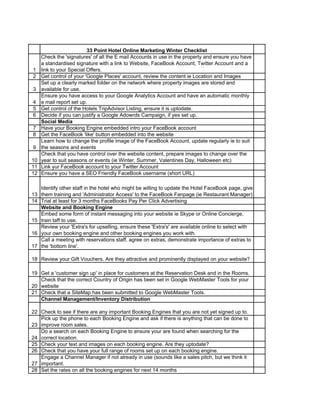
33 Point Hotel Online Marketing Winter Checklist
1
Check the 'signatures' of all the E mail Accounts in use in the property and ensure you have
a standardised signature with a link to Website, FaceBook Account, Twitter Account and a
link to your Special Offers.
2 Get control of your 'Google Places' account, review the content ie Location and Images
3
Set up a clearly marked folder on the network where property images are stored and
available for use.
4
Ensure you have access to your Google Analytics Account and have an automatic monthly
e mail report set up.
5 Get control of the Hotels TripAdvisor Listing, ensure it is uptodate.
6 Decide if you can justify a Google Adowrds Campaign, if yes set up.
Social Media
7 Have your Booking Engine embedded intro your FaceBook account
8 Get the FaceBook 'like' button embedded into the website
9
Learn how to change the profile image of the FaceBook Account, update regularly ie to suit
the seasons and events
10
Check that you have control over the website content, prepare images to change over the
year to suit seasons or events (ie Winter, Summer, Valentines Day, Halloween etc)
11 Link yur FaceBook account to your Twitter Account
12 Ensure you have a SEO Friendly FaceBook username (short URL)
13
Identify other staff in the hotel who might be willing to update the Hotel FaceBook page, give
them training and 'Administrator Access' to the FaceBook Fanpage (ie Restaurant Manager)
14 Trial at least for 3 months FaceBooks Pay Per Click Advertising
Website and Booking Engine
15
Embed some form of instant messaging into your website ie Skype or Online Concierge,
train taff to use.
16
Review your 'Extra's for upselling, ensure these 'Extra's' are available online to select with
your own booking engine and other booking engines you work with.
17
Call a meeting with reservations staff, agree on extras, demonstrate importance of extras to
the 'bottom line'.
18 Review your Gift Vouchers. Are they attractive and prominently displayed on your website?
19 Get a 'customer sign up' in place for customers at the Reservation Desk and in the Rooms.
20
Check that the correct Country of Origin has been set in Google WebMaster Tools for your
website
21 Check that a SiteMap has been submitted to Google WebMaster Tools.
Channel Management/Inventory Distribution
22 Check to see if there are any important Booking Engines that you are not yet signed up to.
23
Pick up the phone to each Booking Engine and ask if there is anything that can be done to
improve room sales.
24
Do a search on each Booking Engine to ensure your are found when searching for the
correct location.
25 Check your text and images on each booking engine. Are they uptodate?
26 Check that you have your full range of rooms set up on each booking engine.
27
Engage a Channel Manager if not already in use (sounds like a sales pitch, but we think it
important.
28 Set the rates on all the booking engines for next 14 months
29
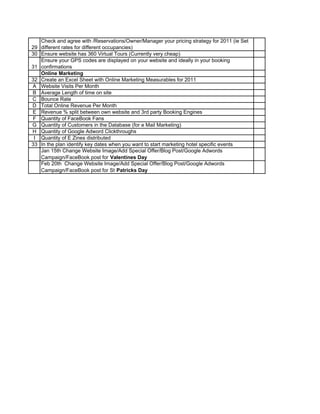
Check and agree with /Reservations/Owner/Manager your pricing strategy for 2011 (ie Set
different rates for different occupancies)
30 Ensure website has 360 Virtual Tours (Currently very cheap)
31
Ensure your GPS codes are displayed on your website and ideally in your booking
confirmations
Online Marketing
32 Create an Excel Sheet with Online Marketing Measurables for 2011
A Website Visits Per Month
B Average Length of time on site
C Bounce Rate
D Total Online Revenue Per Month
E Revenue % split between own website and 3rd party Booking Engines
F Quantity of FaceBook Fans
G Quantity of Customers in the Database (for e Mail Marketing)
H Quantity of Google Adword Clickthroughs
I Quantity of E Zines distributed
33 In the plan identify key dates when you want to start marketing hotel specific events
Jan 15th Change Website Image/Add Special Offer/Blog Post/Google Adwords
Campaign/FaceBook post for Valentines Day
Feb 20th Change Website Image/Add Special Offer/Blog Post/Google Adwords
Campaign/FaceBook post for St Patricks Day

33 point winter checklist

  • 1.
    33 Point HotelOnline Marketing Winter Checklist 1 Check the 'signatures' of all the E mail Accounts in use in the property and ensure you have a standardised signature with a link to Website, FaceBook Account, Twitter Account and a link to your Special Offers. 2 Get control of your 'Google Places' account, review the content ie Location and Images 3 Set up a clearly marked folder on the network where property images are stored and available for use. 4 Ensure you have access to your Google Analytics Account and have an automatic monthly e mail report set up. 5 Get control of the Hotels TripAdvisor Listing, ensure it is uptodate. 6 Decide if you can justify a Google Adowrds Campaign, if yes set up. Social Media 7 Have your Booking Engine embedded intro your FaceBook account 8 Get the FaceBook 'like' button embedded into the website 9 Learn how to change the profile image of the FaceBook Account, update regularly ie to suit the seasons and events 10 Check that you have control over the website content, prepare images to change over the year to suit seasons or events (ie Winter, Summer, Valentines Day, Halloween etc) 11 Link yur FaceBook account to your Twitter Account 12 Ensure you have a SEO Friendly FaceBook username (short URL) 13 Identify other staff in the hotel who might be willing to update the Hotel FaceBook page, give them training and 'Administrator Access' to the FaceBook Fanpage (ie Restaurant Manager) 14 Trial at least for 3 months FaceBooks Pay Per Click Advertising Website and Booking Engine 15 Embed some form of instant messaging into your website ie Skype or Online Concierge, train taff to use. 16 Review your 'Extra's for upselling, ensure these 'Extra's' are available online to select with your own booking engine and other booking engines you work with. 17 Call a meeting with reservations staff, agree on extras, demonstrate importance of extras to the 'bottom line'. 18 Review your Gift Vouchers. Are they attractive and prominently displayed on your website? 19 Get a 'customer sign up' in place for customers at the Reservation Desk and in the Rooms. 20 Check that the correct Country of Origin has been set in Google WebMaster Tools for your website 21 Check that a SiteMap has been submitted to Google WebMaster Tools. Channel Management/Inventory Distribution 22 Check to see if there are any important Booking Engines that you are not yet signed up to. 23 Pick up the phone to each Booking Engine and ask if there is anything that can be done to improve room sales. 24 Do a search on each Booking Engine to ensure your are found when searching for the correct location. 25 Check your text and images on each booking engine. Are they uptodate? 26 Check that you have your full range of rooms set up on each booking engine. 27 Engage a Channel Manager if not already in use (sounds like a sales pitch, but we think it important. 28 Set the rates on all the booking engines for next 14 months
  • 2.
    29 Check and agreewith /Reservations/Owner/Manager your pricing strategy for 2011 (ie Set different rates for different occupancies) 30 Ensure website has 360 Virtual Tours (Currently very cheap) 31 Ensure your GPS codes are displayed on your website and ideally in your booking confirmations Online Marketing 32 Create an Excel Sheet with Online Marketing Measurables for 2011 A Website Visits Per Month B Average Length of time on site C Bounce Rate D Total Online Revenue Per Month E Revenue % split between own website and 3rd party Booking Engines F Quantity of FaceBook Fans G Quantity of Customers in the Database (for e Mail Marketing) H Quantity of Google Adword Clickthroughs I Quantity of E Zines distributed 33 In the plan identify key dates when you want to start marketing hotel specific events Jan 15th Change Website Image/Add Special Offer/Blog Post/Google Adwords Campaign/FaceBook post for Valentines Day Feb 20th Change Website Image/Add Special Offer/Blog Post/Google Adwords Campaign/FaceBook post for St Patricks Day