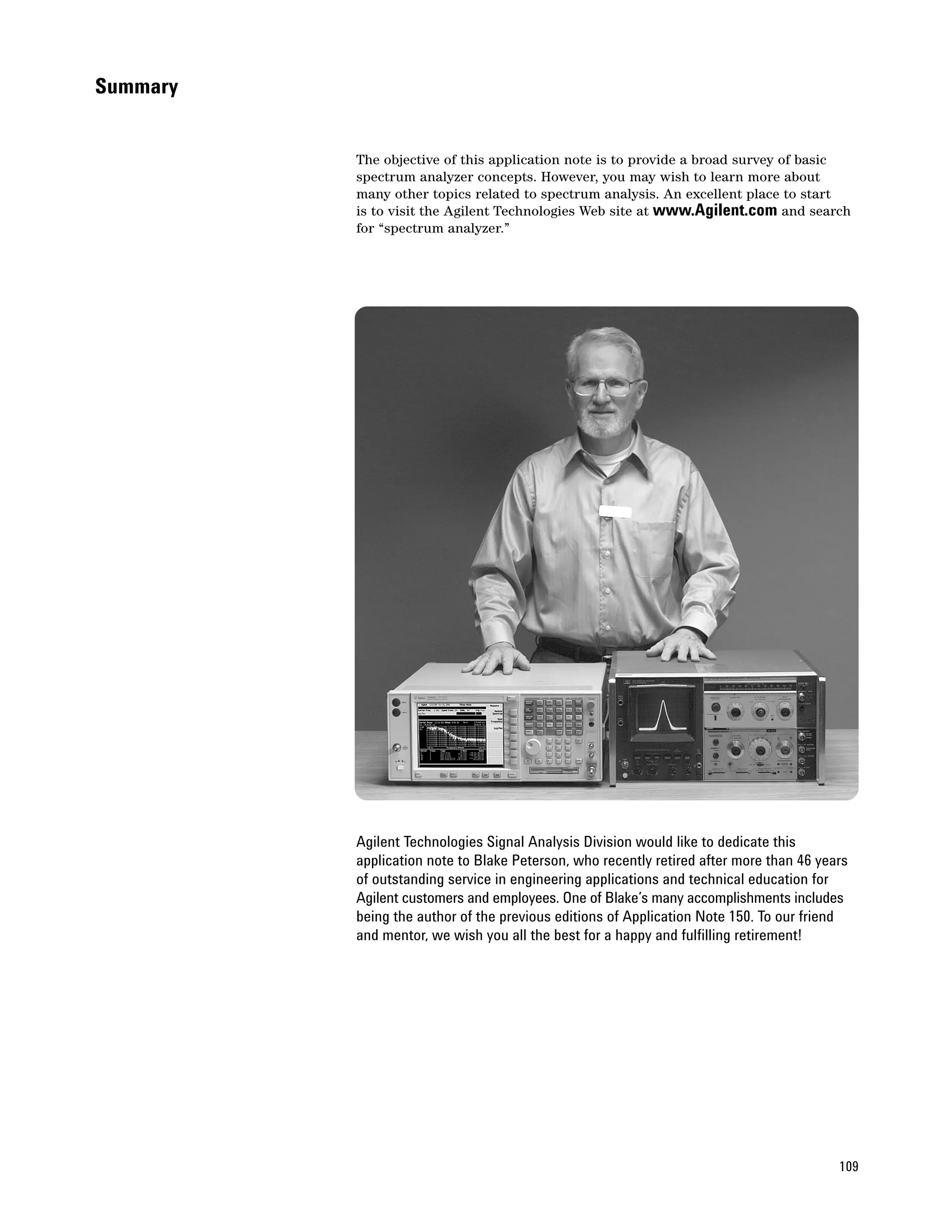
Agilent
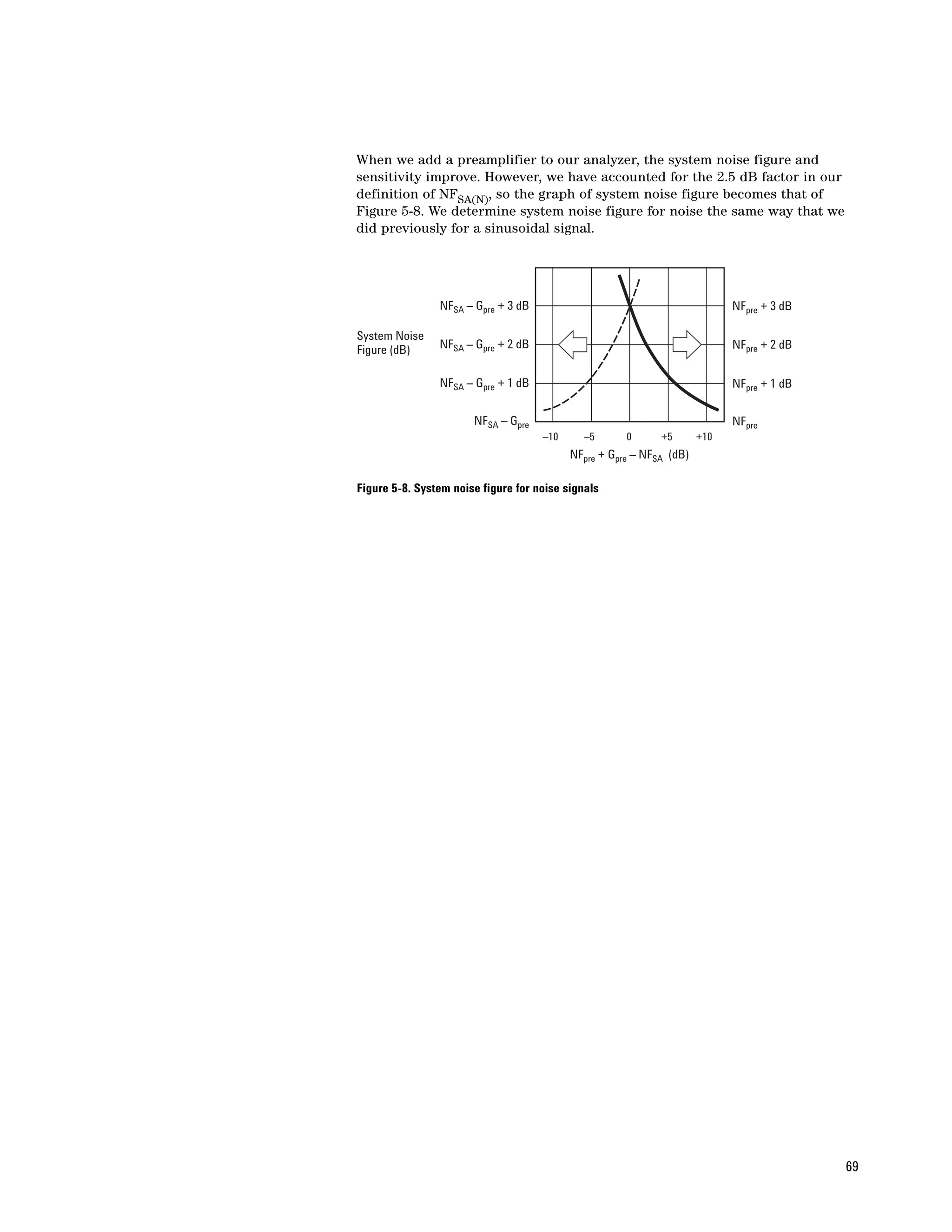
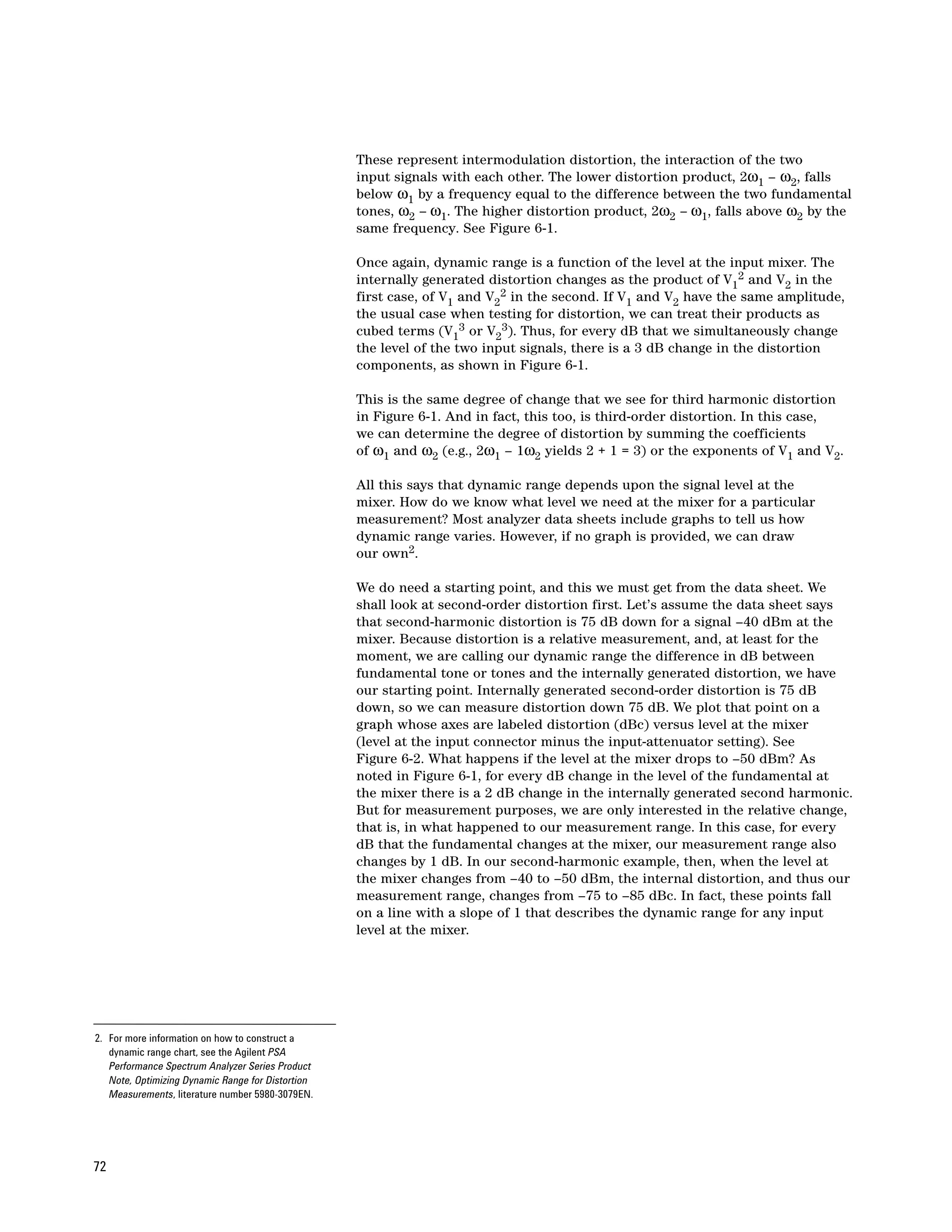
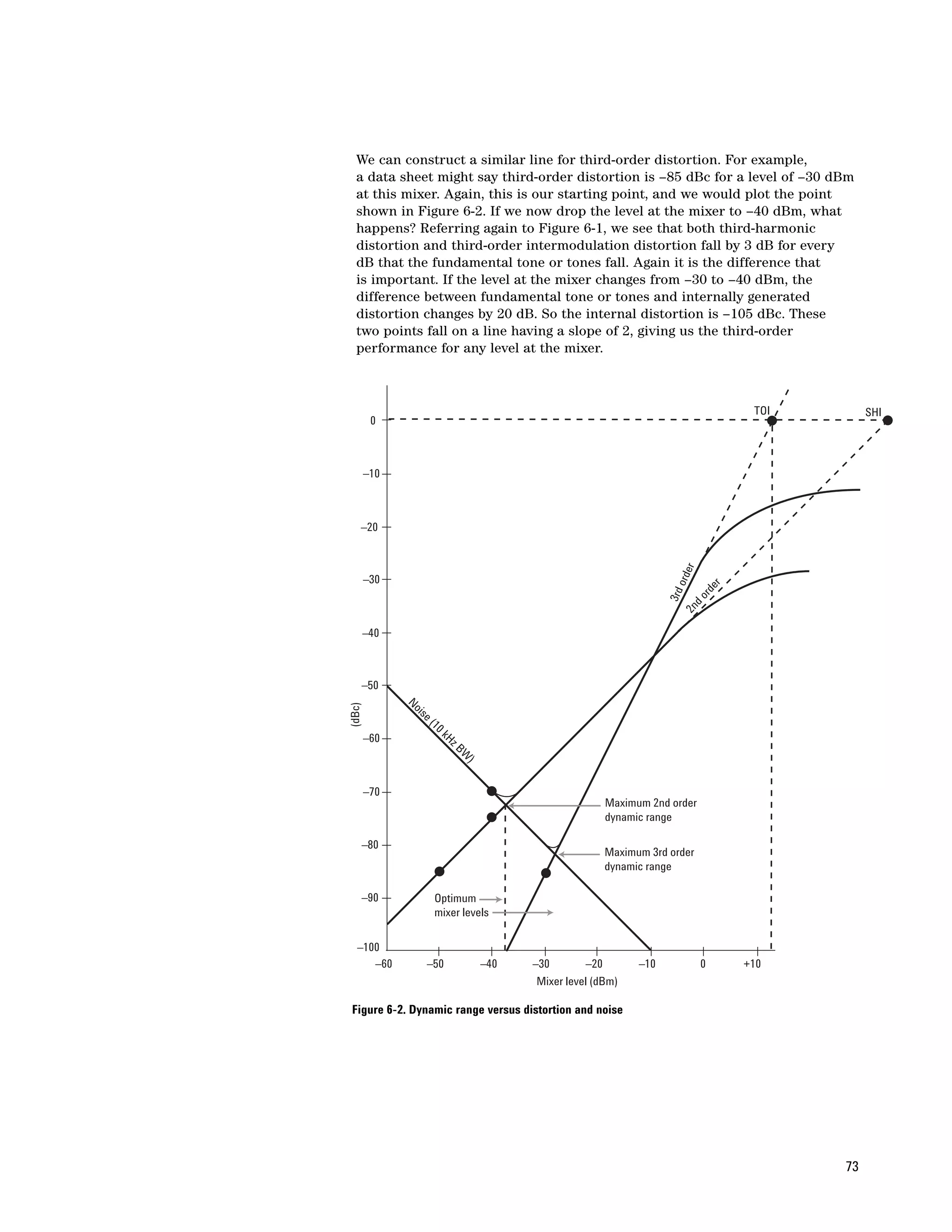
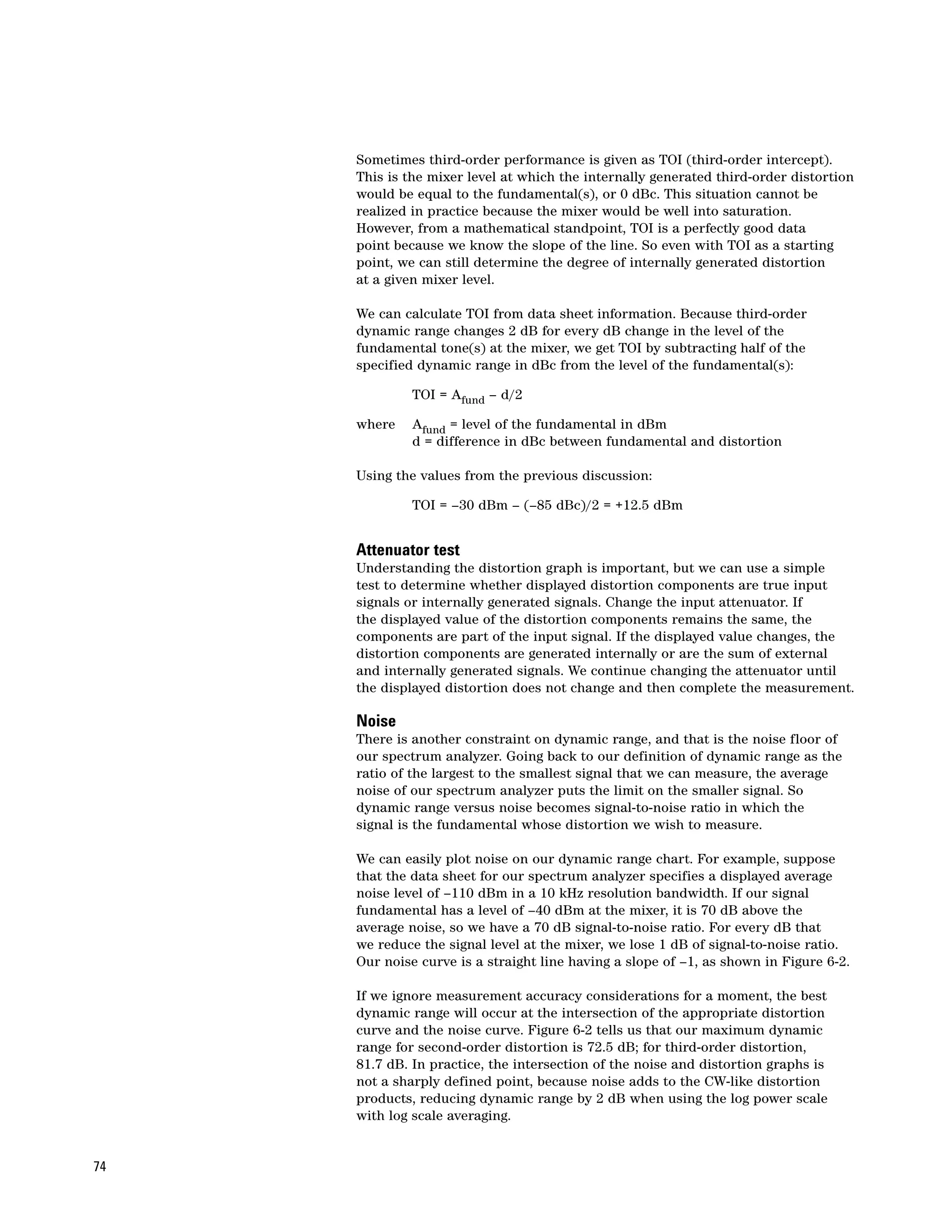
Spectrum Analysis Basics

Application Note 150
Table of Contents


                    Chapter 1 – Introduction . . . . . . . . . . . . . . . . . . . . . . . . . . . . . . . . . . . . . . . . . . . . . . . . . . . . . . .4

                           Frequency domain versus time domain . . . . . . . . . . . . . . . . . . . . . . . . . . . . . . . . . . . . . . .4
                           What is a spectrum? . . . . . . . . . . . . . . . . . . . . . . . . . . . . . . . . . . . . . . . . . . . . . . . . . . . . . .5
                           Why measure spectra? . . . . . . . . . . . . . . . . . . . . . . . . . . . . . . . . . . . . . . . . . . . . . . . . . . . .6
                           Types of measurements . . . . . . . . . . . . . . . . . . . . . . . . . . . . . . . . . . . . . . . . . . . . . . . . . . .8
                           Types of signal analyzers . . . . . . . . . . . . . . . . . . . . . . . . . . . . . . . . . . . . . . . . . . . . . . . . . .8

                    Chapter 2 – Spectrum Analyzer Fundamentals . . . . . . . . . . . . . . . . . . . . . . . . . . . . . . . . . . . .10

                           RF attenuator . . . . . . . . . . . . . . . . . . . . . . . . . . . . . . . . . . . . . . . . . . . . . . . . . . . . . . . . . . .12
                           Low-pass filter or preselector . . . . . . . . . . . . . . . . . . . . . . . . . . . . . . . . . . . . . . . . . . . . . .12
                           Tuning the analyzer . . . . . . . . . . . . . . . . . . . . . . . . . . . . . . . . . . . . . . . . . . . . . . . . . . . . . .12
                           IF gain . . . . . . . . . . . . . . . . . . . . . . . . . . . . . . . . . . . . . . . . . . . . . . . . . . . . . . . . . . . . . . . . .16
                           Resolving signals . . . . . . . . . . . . . . . . . . . . . . . . . . . . . . . . . . . . . . . . . . . . . . . . . . . . . . . .16
                           Residual FM . . . . . . . . . . . . . . . . . . . . . . . . . . . . . . . . . . . . . . . . . . . . . . . . . . . . . . . . . . . .19
                           Phase noise . . . . . . . . . . . . . . . . . . . . . . . . . . . . . . . . . . . . . . . . . . . . . . . . . . . . . . . . . . . .20
                           Sweep time . . . . . . . . . . . . . . . . . . . . . . . . . . . . . . . . . . . . . . . . . . . . . . . . . . . . . . . . . . . . .22
                           Envelope detector . . . . . . . . . . . . . . . . . . . . . . . . . . . . . . . . . . . . . . . . . . . . . . . . . . . . . . .24
                           Displays . . . . . . . . . . . . . . . . . . . . . . . . . . . . . . . . . . . . . . . . . . . . . . . . . . . . . . . . . . . . . . .25
                           Detector types . . . . . . . . . . . . . . . . . . . . . . . . . . . . . . . . . . . . . . . . . . . . . . . . . . . . . . . . . .26
                           Sample detection . . . . . . . . . . . . . . . . . . . . . . . . . . . . . . . . . . . . . . . . . . . . . . . . . . . . . . . .27
                           Peak (positive) detection . . . . . . . . . . . . . . . . . . . . . . . . . . . . . . . . . . . . . . . . . . . . . . . . .29
                           Negative peak detection . . . . . . . . . . . . . . . . . . . . . . . . . . . . . . . . . . . . . . . . . . . . . . . . . .29
                           Normal detection . . . . . . . . . . . . . . . . . . . . . . . . . . . . . . . . . . . . . . . . . . . . . . . . . . . . . . . .29
                           Average detection . . . . . . . . . . . . . . . . . . . . . . . . . . . . . . . . . . . . . . . . . . . . . . . . . . . . . . .32
                           EMI detectors: average and quasi-peak detection . . . . . . . . . . . . . . . . . . . . . . . . . . . . .33
                           Averaging processes . . . . . . . . . . . . . . . . . . . . . . . . . . . . . . . . . . . . . . . . . . . . . . . . . . . . .33
                           Time gating . . . . . . . . . . . . . . . . . . . . . . . . . . . . . . . . . . . . . . . . . . . . . . . . . . . . . . . . . . . . .38

                    Chapter 3 – Digital IF Overview . . . . . . . . . . . . . . . . . . . . . . . . . . . . . . . . . . . . . . . . . . . . . . . .44

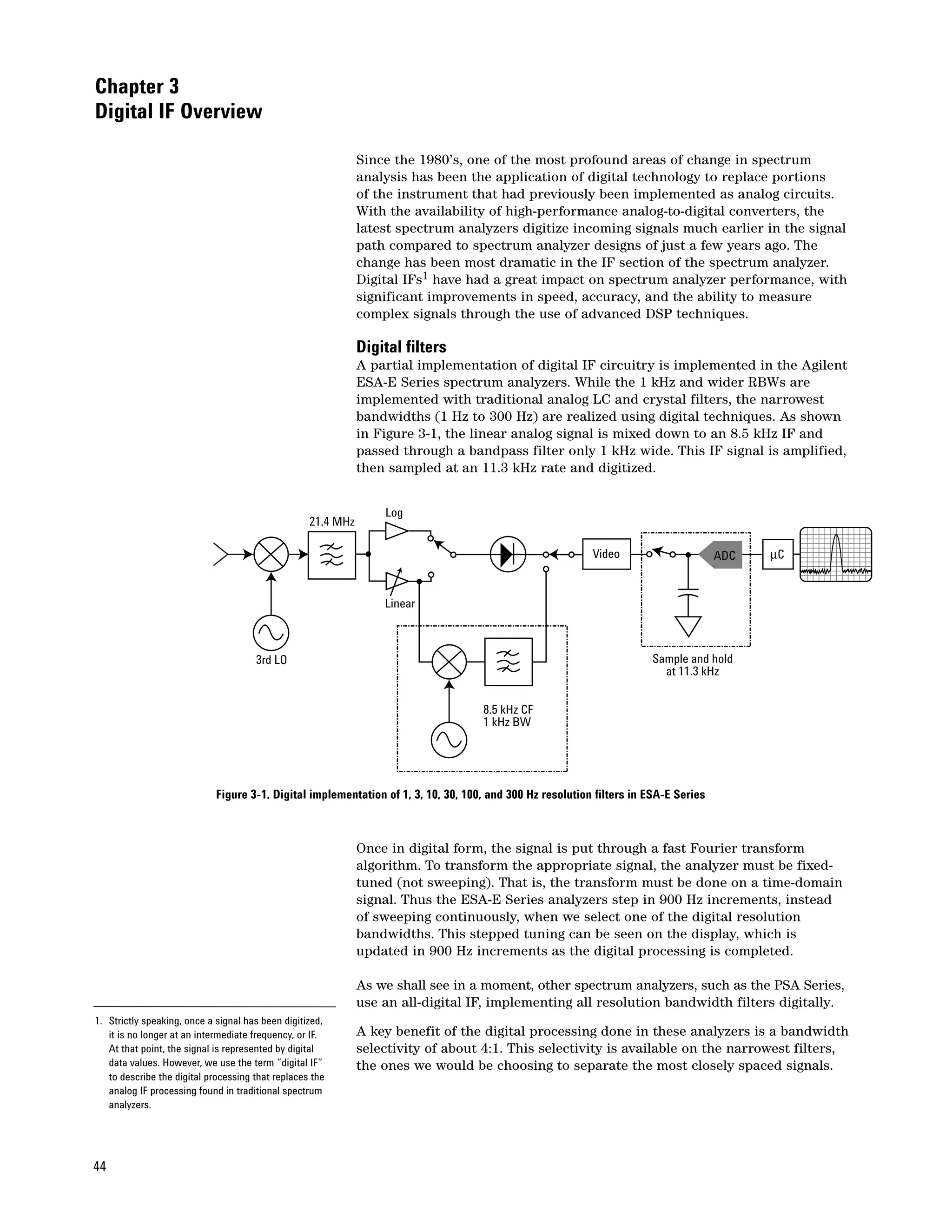
                           Digital filters . . . . . . . . . . . . . . . . . . . . . . . . . . . . . . . . . . . . . . . . . . . . . . . . . . . . . . . . . . . .44
                           The all-digital IF . . . . . . . . . . . . . . . . . . . . . . . . . . . . . . . . . . . . . . . . . . . . . . . . . . . . . . . . .45
                           Custom signal processing IC . . . . . . . . . . . . . . . . . . . . . . . . . . . . . . . . . . . . . . . . . . . . . .47
                           Additional video processing features . . . . . . . . . . . . . . . . . . . . . . . . . . . . . . . . . . . . . . . .47
                           Frequency counting . . . . . . . . . . . . . . . . . . . . . . . . . . . . . . . . . . . . . . . . . . . . . . . . . . . . . .47
                           More advantages of the all-digital IF . . . . . . . . . . . . . . . . . . . . . . . . . . . . . . . . . . . . . . . .48

                    Chapter 4 – Amplitude and Frequency Accuracy . . . . . . . . . . . . . . . . . . . . . . . . . . . . . . . . . .49

                           Relative uncertainty . . . . . . . . . . . . . . . . . . . . . . . . . . . . . . . . . . . . . . . . . . . . . . . . . . . . . .52
                           Absolute amplitude accuracy . . . . . . . . . . . . . . . . . . . . . . . . . . . . . . . . . . . . . . . . . . . . . .52
                           Improving overall uncertainty . . . . . . . . . . . . . . . . . . . . . . . . . . . . . . . . . . . . . . . . . . . . . .53
                           Specifications, typical performance, and nominal values . . . . . . . . . . . . . . . . . . . . . . .53
                           The digital IF section . . . . . . . . . . . . . . . . . . . . . . . . . . . . . . . . . . . . . . . . . . . . . . . . . . . . .54
                           Frequency accuracy . . . . . . . . . . . . . . . . . . . . . . . . . . . . . . . . . . . . . . . . . . . . . . . . . . . . . .56


2
Table of Contents
— continued

                    Chapter 5 – Sensitivity and Noise . . . . . . . . . . . . . . . . . . . . . . . . . . . . . . . . . . . . . . . . . . . . . .58

                           Sensitivity . . . . . . . . . . . . . . . . . . . . . . . . . . . . . . . . . . . . . . . . . . . . . . . . . . . . . . . . . . . . . .58
                           Noise figure . . . . . . . . . . . . . . . . . . . . . . . . . . . . . . . . . . . . . . . . . . . . . . . . . . . . . . . . . . . .61
                           Preamplifiers . . . . . . . . . . . . . . . . . . . . . . . . . . . . . . . . . . . . . . . . . . . . . . . . . . . . . . . . . . .62
                           Noise as a signal . . . . . . . . . . . . . . . . . . . . . . . . . . . . . . . . . . . . . . . . . . . . . . . . . . . . . . . .65
                           Preamplifier for noise measurements . . . . . . . . . . . . . . . . . . . . . . . . . . . . . . . . . . . . . . .68

                    Chapter 6 – Dynamic Range . . . . . . . . . . . . . . . . . . . . . . . . . . . . . . . . . . . . . . . . . . . . . . . . . . .69

                           Definition . . . . . . . . . . . . . . . . . . . . . . . . . . . . . . . . . . . . . . . . . . . . . . . . . . . . . . . . . . . . . .70
                           Dynamic range versus internal distortion . . . . . . . . . . . . . . . . . . . . . . . . . . . . . . . . . . . .70
                           Attenuator test . . . . . . . . . . . . . . . . . . . . . . . . . . . . . . . . . . . . . . . . . . . . . . . . . . . . . . . . . .74
                           Noise . . . . . . . . . . . . . . . . . . . . . . . . . . . . . . . . . . . . . . . . . . . . . . . . . . . . . . . . . . . . . . . . . .74
                           Dynamic range versus measurement uncertainty . . . . . . . . . . . . . . . . . . . . . . . . . . . . .77
                           Gain compression . . . . . . . . . . . . . . . . . . . . . . . . . . . . . . . . . . . . . . . . . . . . . . . . . . . . . . .80
                           Display range and measurement range . . . . . . . . . . . . . . . . . . . . . . . . . . . . . . . . . . . . . .80
                           Adjacent channel power measurements . . . . . . . . . . . . . . . . . . . . . . . . . . . . . . . . . . . . .82

                    Chapter 7 – Extending the Frequency Range . . . . . . . . . . . . . . . . . . . . . . . . . . . . . . . . . . . . .83

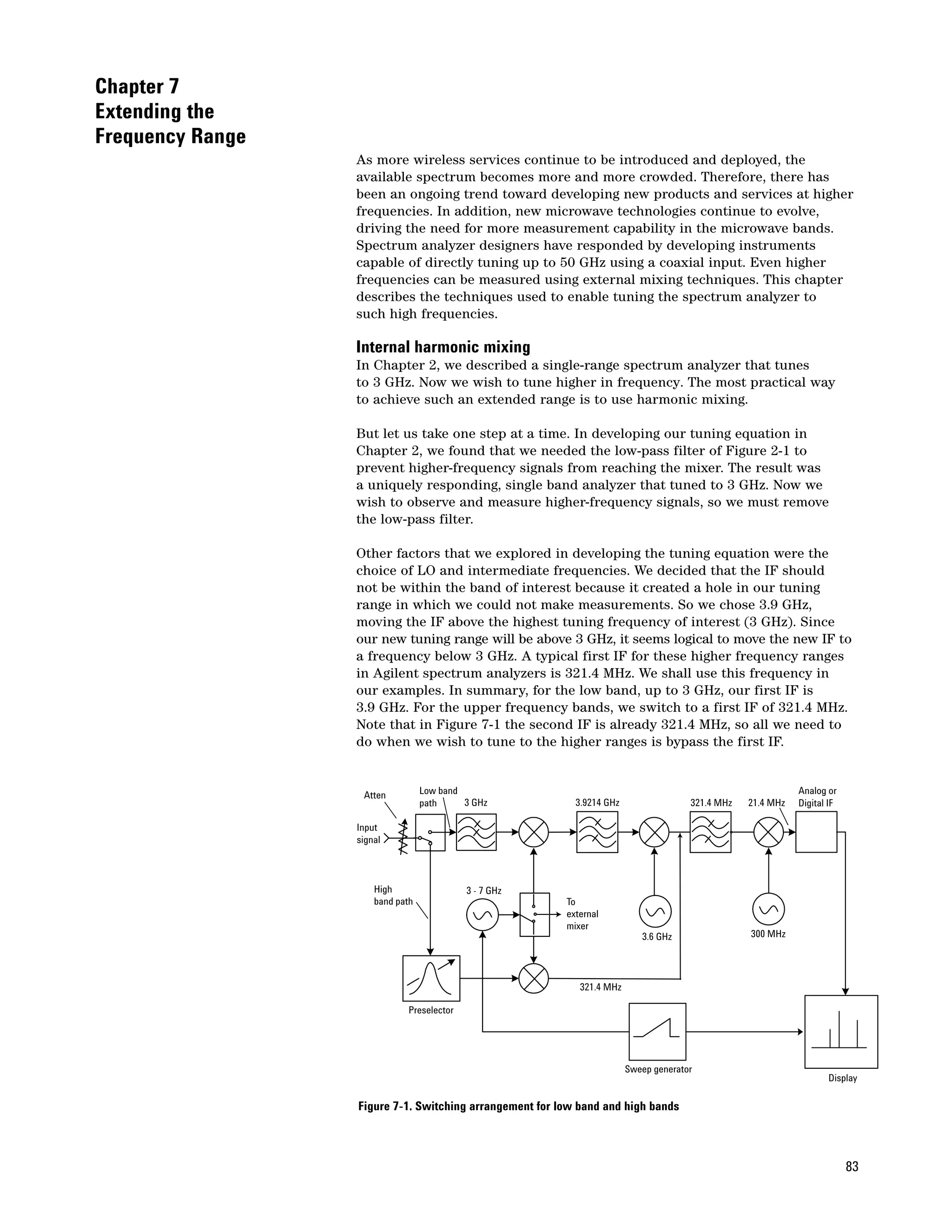
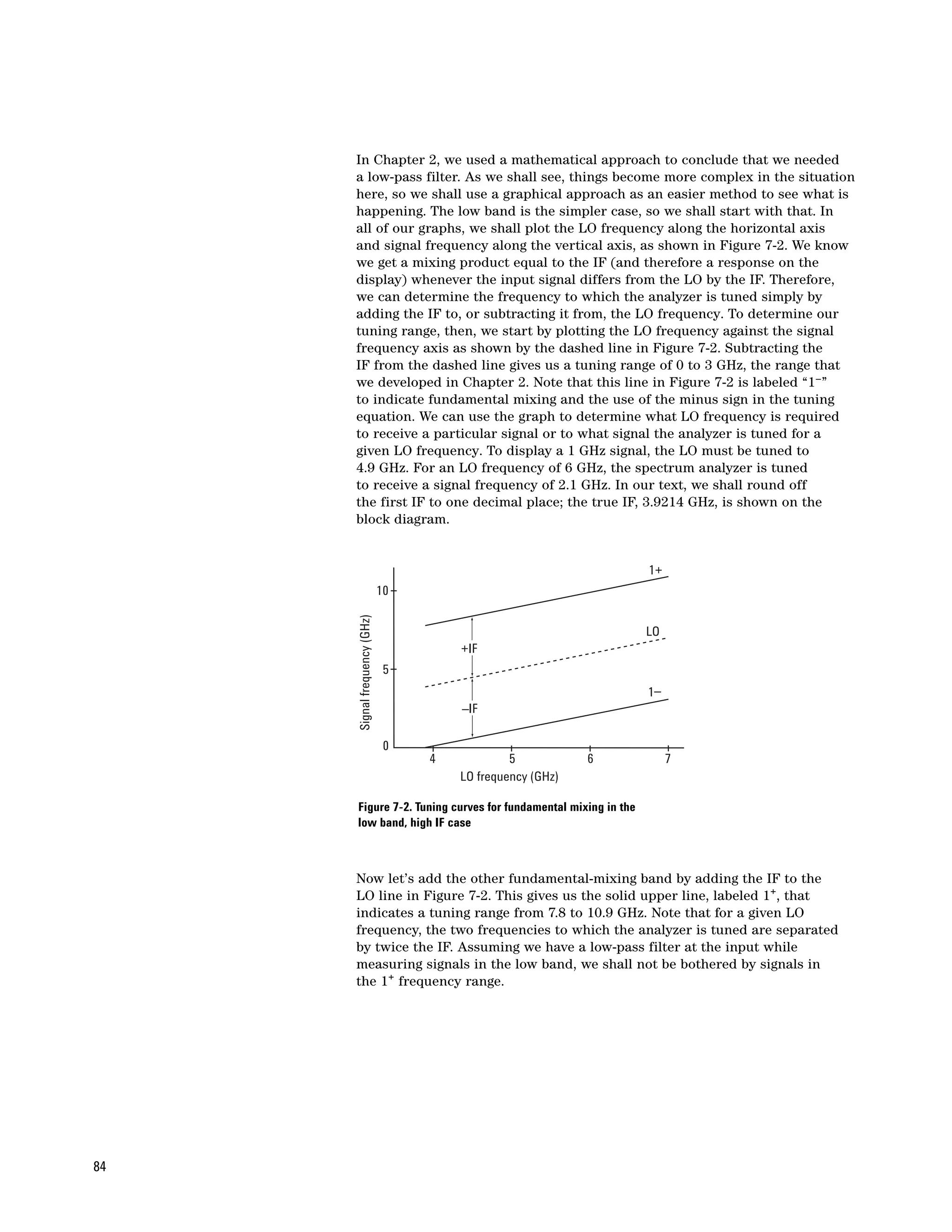
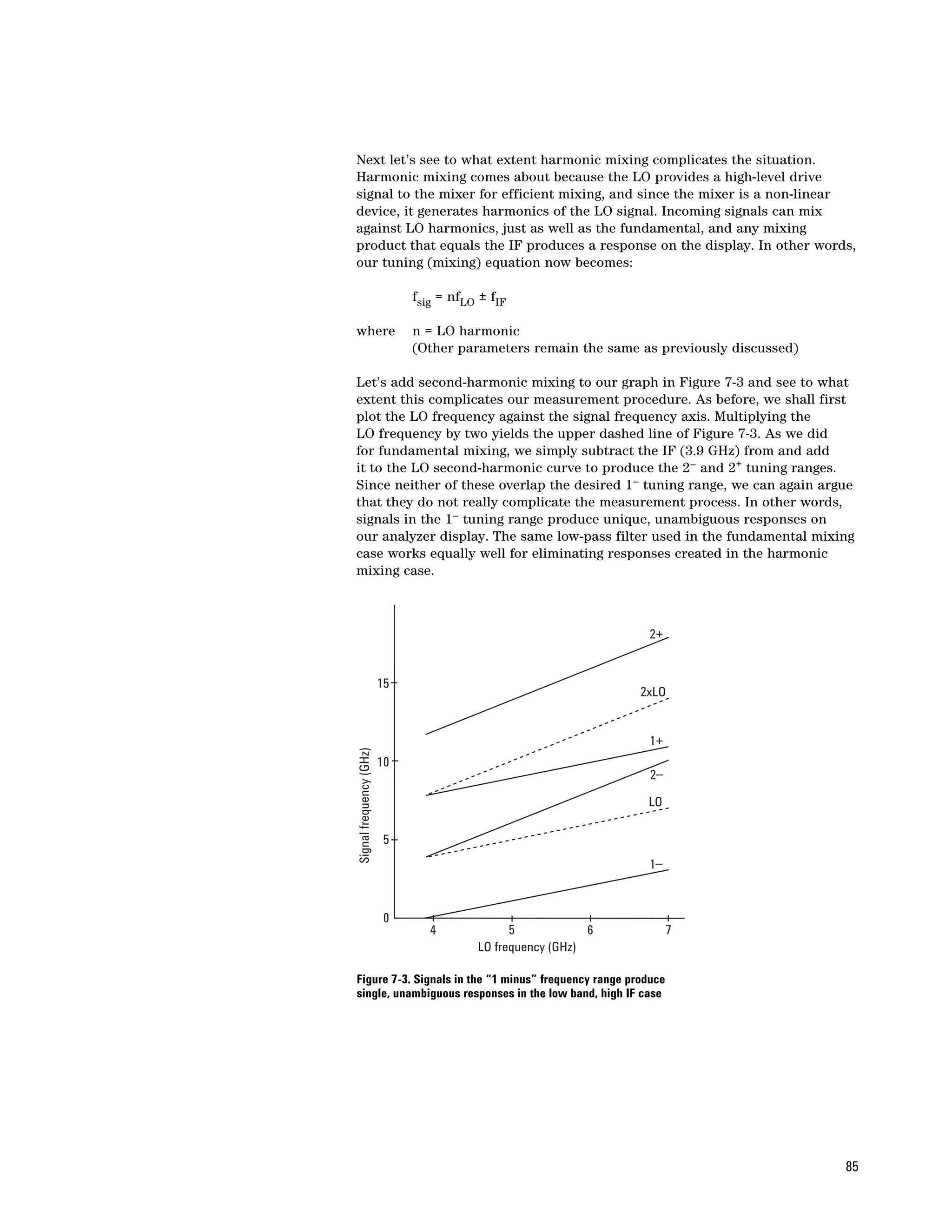
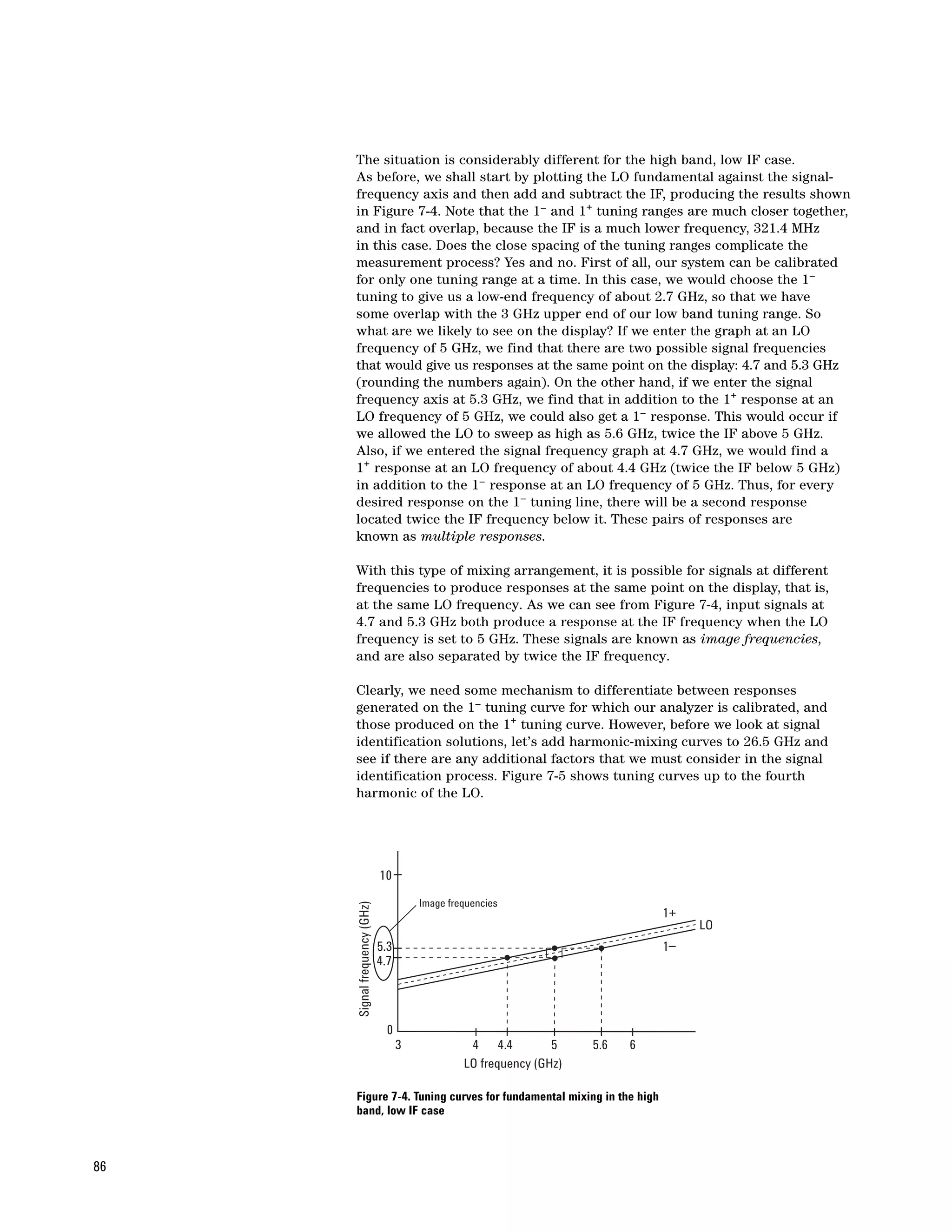
                           Internal harmonic mixing . . . . . . . . . . . . . . . . . . . . . . . . . . . . . . . . . . . . . . . . . . . . . . . . .83
                           Preselection . . . . . . . . . . . . . . . . . . . . . . . . . . . . . . . . . . . . . . . . . . . . . . . . . . . . . . . . . . . .89
                           Amplitude calibration . . . . . . . . . . . . . . . . . . . . . . . . . . . . . . . . . . . . . . . . . . . . . . . . . . . .91
                           Phase noise . . . . . . . . . . . . . . . . . . . . . . . . . . . . . . . . . . . . . . . . . . . . . . . . . . . . . . . . . . . .91
                           Improved dynamic range . . . . . . . . . . . . . . . . . . . . . . . . . . . . . . . . . . . . . . . . . . . . . . . . . .92
                           Pluses and minuses of preselection . . . . . . . . . . . . . . . . . . . . . . . . . . . . . . . . . . . . . . . .95
                           External harmonic mixing . . . . . . . . . . . . . . . . . . . . . . . . . . . . . . . . . . . . . . . . . . . . . . . . .96
                           Signal identification . . . . . . . . . . . . . . . . . . . . . . . . . . . . . . . . . . . . . . . . . . . . . . . . . . . . . .98

                    Chapter 8 – Modern Spectrum Analyzers . . . . . . . . . . . . . . . . . . . . . . . . . . . . . . . . . . . . . . .102

                           Application-specific measurements . . . . . . . . . . . . . . . . . . . . . . . . . . . . . . . . . . . . . . . .102
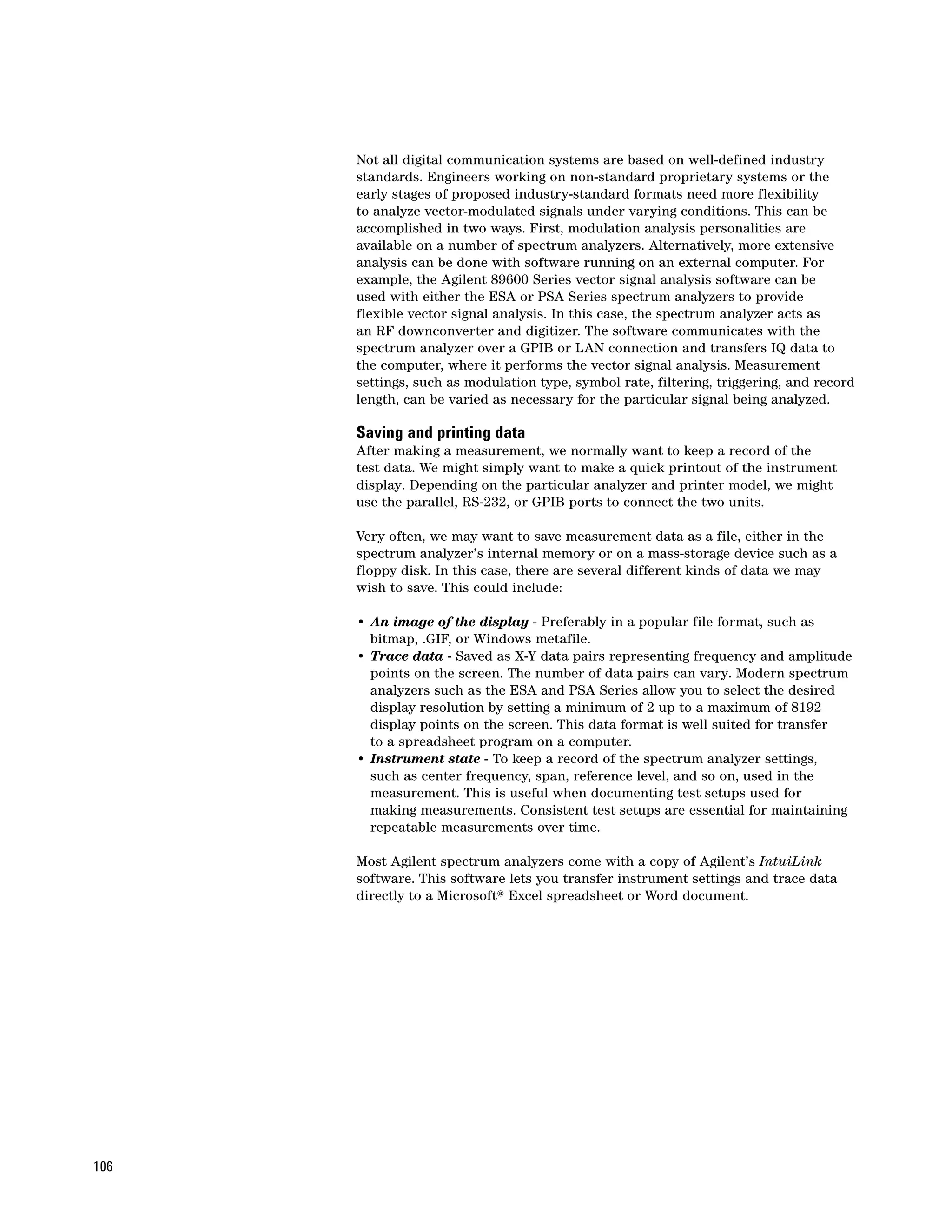
                           Digital modulation analysis . . . . . . . . . . . . . . . . . . . . . . . . . . . . . . . . . . . . . . . . . . . . . . .105
                           Saving and printing data . . . . . . . . . . . . . . . . . . . . . . . . . . . . . . . . . . . . . . . . . . . . . . . . .106
                           Data transfer and remote instrument control . . . . . . . . . . . . . . . . . . . . . . . . . . . . . . . .107
                           Firmware updates . . . . . . . . . . . . . . . . . . . . . . . . . . . . . . . . . . . . . . . . . . . . . . . . . . . . . .108
                           Calibration, troubleshooting, diagnostics, and repair . . . . . . . . . . . . . . . . . . . . . . . . . .108

                    Summary . . . . . . . . . . . . . . . . . . . . . . . . . . . . . . . . . . . . . . . . . . . . . . . . . . . . . . . . . . . . . . . . .109

                    Glossary of Terms . . . . . . . . . . . . . . . . . . . . . . . . . . . . . . . . . . . . . . . . . . . . . . . . . . . . . . . . . .110


                                                                                                                                                                         3
Chapter 1
Introduction

                                                              This application note is intended to explain the fundamentals of swept-tuned,
                                                              superheterodyne spectrum analyzers and discuss the latest advances in
                                                              spectrum analyzer capabilities.

                                                              At the most basic level, the spectrum analyzer can be described as a
                                                              frequency-selective, peak-responding voltmeter calibrated to display the
                                                              rms value of a sine wave. It is important to understand that the spectrum
                                                              analyzer is not a power meter, even though it can be used to display power
                                                              directly. As long as we know some value of a sine wave (for example, peak
                                                              or average) and know the resistance across which we measure this value,
                                                              we can calibrate our voltmeter to indicate power. With the advent of digital
                                                              technology, modern spectrum analyzers have been given many more
                                                              capabilities. In this note, we shall describe the basic spectrum analyzer
                                                              as well as the many additional capabilities made possible using digital
                                                              technology and digital signal processing.

                                                              Frequency domain versus time domain
                                                              Before we get into the details of describing a spectrum analyzer, we might
                                                              first ask ourselves: “Just what is a spectrum and why would we want to
                                                              analyze it?” Our normal frame of reference is time. We note when certain
                                                              events occur. This includes electrical events. We can use an oscilloscope to
                                                              view the instantaneous value of a particular electrical event (or some other
                                                              event converted to volts through an appropriate transducer) as a function
                                                              of time. In other words, we use the oscilloscope to view the waveform of a
                                                              signal in the time domain.

                                                              Fourier1 theory tells us any time-domain electrical phenomenon is made
                                                              up of one or more sine waves of appropriate frequency, amplitude, and phase.
                                                              In other words, we can transform a time-domain signal into its frequency-
                                                              domain equivalent. Measurements in the frequency domain tell us how
                                                              much energy is present at each particular frequency. With proper filtering,
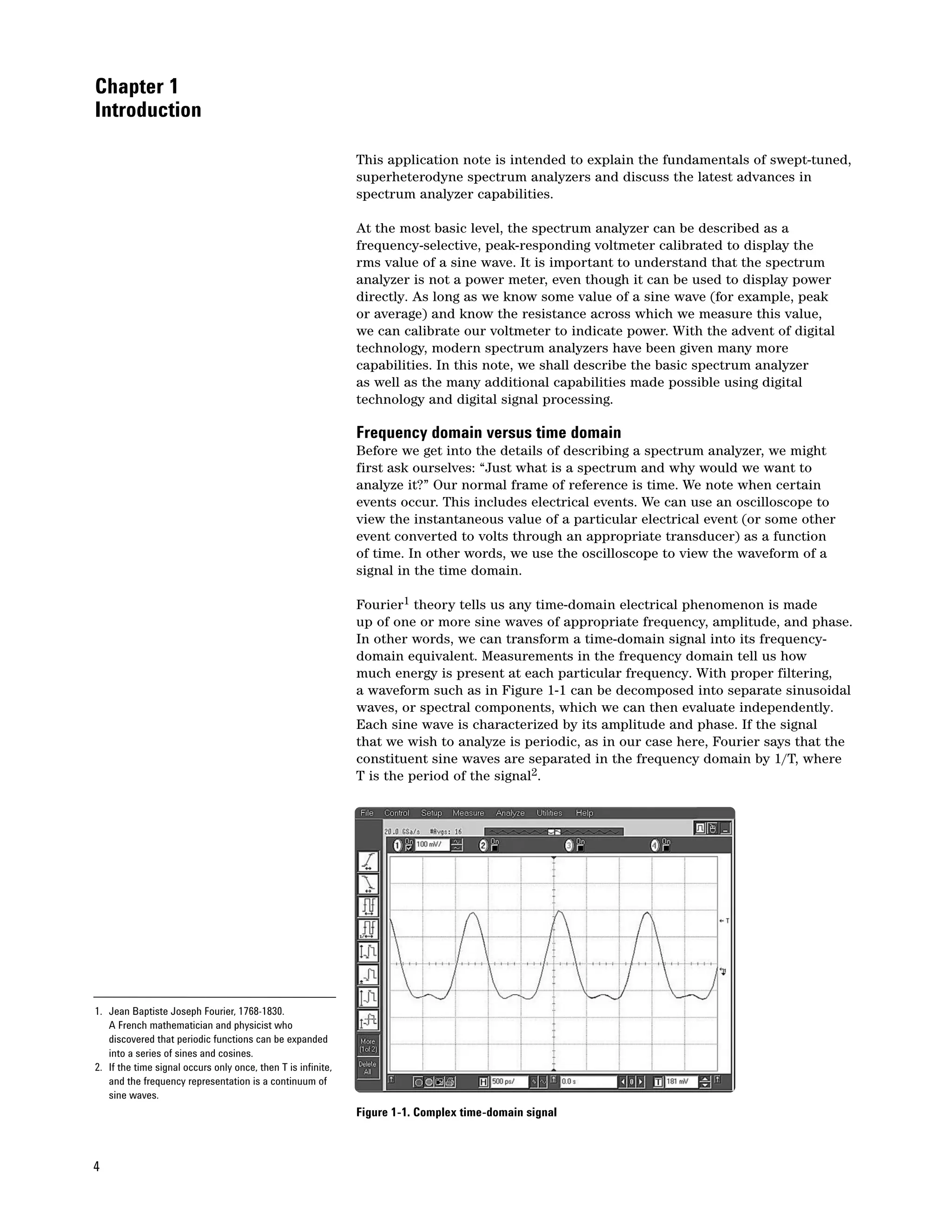
                                                              a waveform such as in Figure 1-1 can be decomposed into separate sinusoidal
                                                              waves, or spectral components, which we can then evaluate independently.
                                                              Each sine wave is characterized by its amplitude and phase. If the signal
                                                              that we wish to analyze is periodic, as in our case here, Fourier says that the
                                                              constituent sine waves are separated in the frequency domain by 1/T, where
                                                              T is the period of the signal2.


1. Jean Baptiste Joseph Fourier, 1768-1830.
   A French mathematician and physicist who
   discovered that periodic functions can be expanded
   into a series of sines and cosines.
2. If the time signal occurs only once, then T is infinite,
   and the frequency representation is a continuum of
   sine waves.
                                                              Figure 1-1. Complex time-domain signal


4
Some measurements require that we preserve complete information about the
signal - frequency, amplitude and phase. This type of signal analysis is called
vector signal analysis, which is discussed in Application Note 150-15, Vector
Signal Analysis Basics. Modern spectrum analyzers are capable of performing
a wide variety of vector signal measurements. However, another large group of
measurements can be made without knowing the phase relationships among
the sinusoidal components. This type of signal analysis is called spectrum
analysis. Because spectrum analysis is simpler to understand, yet extremely
useful, we will begin this application note by looking first at how spectrum
analyzers perform spectrum analysis measurements, starting in Chapter 2.

Theoretically, to make the transformation from the time domain to the frequency
domain, the signal must be evaluated over all time, that is, over ± infinity.
However, in practice, we always use a finite time period when making a
measurement. Fourier transformations can also be made from the frequency
to the time domain. This case also theoretically requires the evaluation of
all spectral components over frequencies to ± infinity. In reality, making
measurements in a finite bandwidth that captures most of the signal energy
produces acceptable results. When performing a Fourier transformation on
frequency domain data, the phase of the individual components is indeed
critical. For example, a square wave transformed to the frequency domain
and back again could turn into a sawtooth wave if phase were not preserved.

What is a spectrum?
So what is a spectrum in the context of this discussion? A spectrum is a
collection of sine waves that, when combined properly, produce the
time-domain signal under examination. Figure 1-1 shows the waveform of a
complex signal. Suppose that we were hoping to see a sine wave. Although
the waveform certainly shows us that the signal is not a pure sinusoid, it
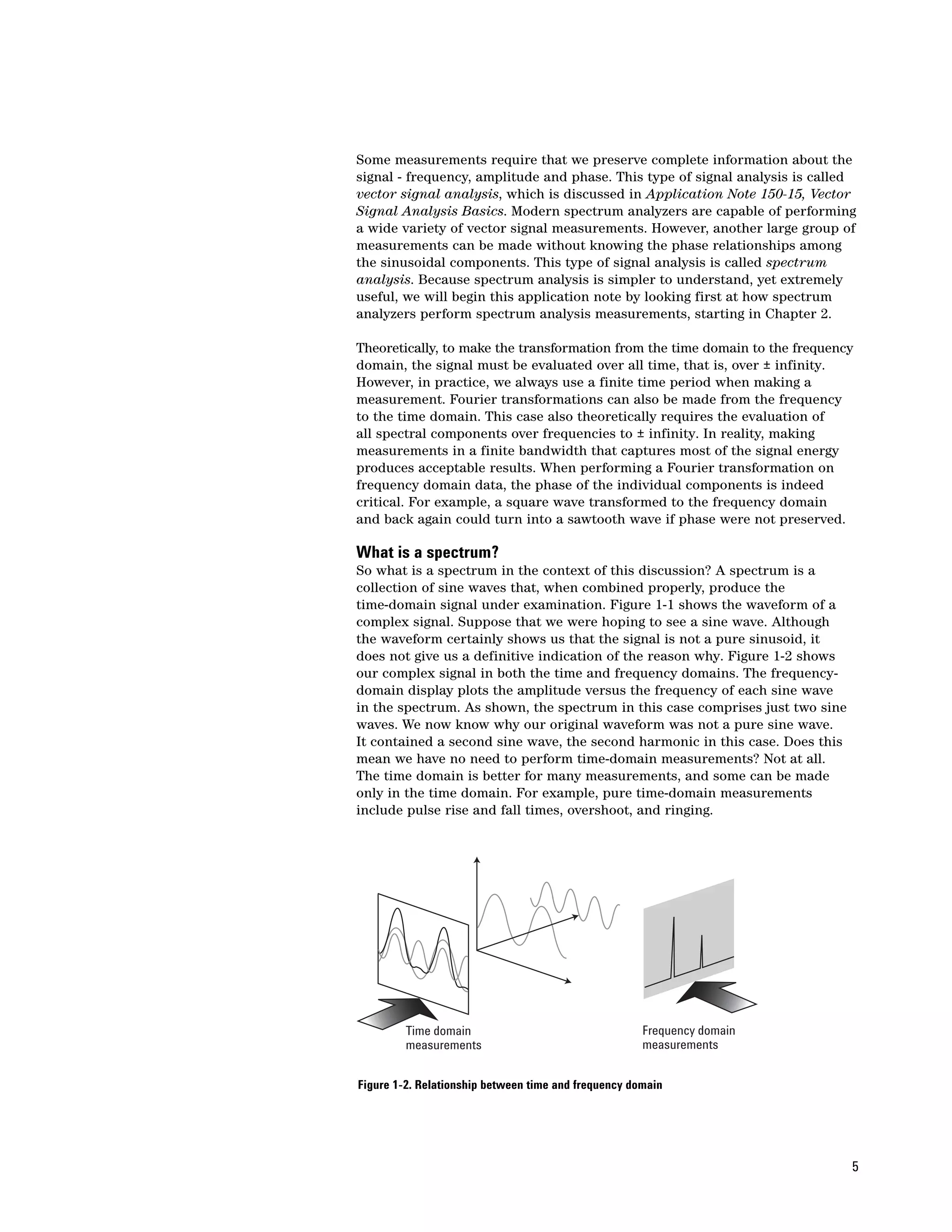
does not give us a definitive indication of the reason why. Figure 1-2 shows
our complex signal in both the time and frequency domains. The frequency-
domain display plots the amplitude versus the frequency of each sine wave
in the spectrum. As shown, the spectrum in this case comprises just two sine
waves. We now know why our original waveform was not a pure sine wave.
It contained a second sine wave, the second harmonic in this case. Does this
mean we have no need to perform time-domain measurements? Not at all.
The time domain is better for many measurements, and some can be made
only in the time domain. For example, pure time-domain measurements
include pulse rise and fall times, overshoot, and ringing.


         Time domain                                  Frequency domain
         measurements                                 measurements


Figure 1-2. Relationship between time and frequency domain


                                                                               5
Why measure spectra?
    The frequency domain also has its measurement strengths. We have
    already seen in Figures 1-1 and 1-2 that the frequency domain is better
    for determining the harmonic content of a signal. People involved in wireless
    communications are extremely interested in out-of-band and spurious
    emissions. For example, cellular radio systems must be checked for harmonics
    of the carrier signal that might interfere with other systems operating at the
    same frequencies as the harmonics. Engineers and technicians are also very
    concerned about distortion of the message modulated onto a carrier.
    Third-order intermodulation (two tones of a complex signal modulating each
    other) can be particularly troublesome because the distortion components
    can fall within the band of interest and so will not be filtered away.

    Spectrum monitoring is another important frequency-domain measurement
    activity. Government regulatory agencies allocate different frequencies for
    various radio services, such as broadcast television and radio, mobile
    phone systems, police and emergency communications, and a host of other
    applications. It is critical that each of these services operates at the assigned
    frequency and stays within the allocated channel bandwidth. Transmitters
    and other intentional radiators can often be required to operate at closely
    spaced adjacent frequencies. A key performance measure for the power
    amplifiers and other components used in these systems is the amount of
    signal energy that spills over into adjacent channels and causes interference.

    Electromagnetic interference (EMI) is a term applied to unwanted emissions
    from both intentional and unintentional radiators. Here, the concern is that
    these unwanted emissions, either radiated or conducted (through the power
    lines or other interconnecting wires), might impair the operation of other
    systems. Almost anyone designing or manufacturing electrical or electronic
    products must test for emission levels versus frequency according to
    regulations set by various government agencies or industry-standard bodies.
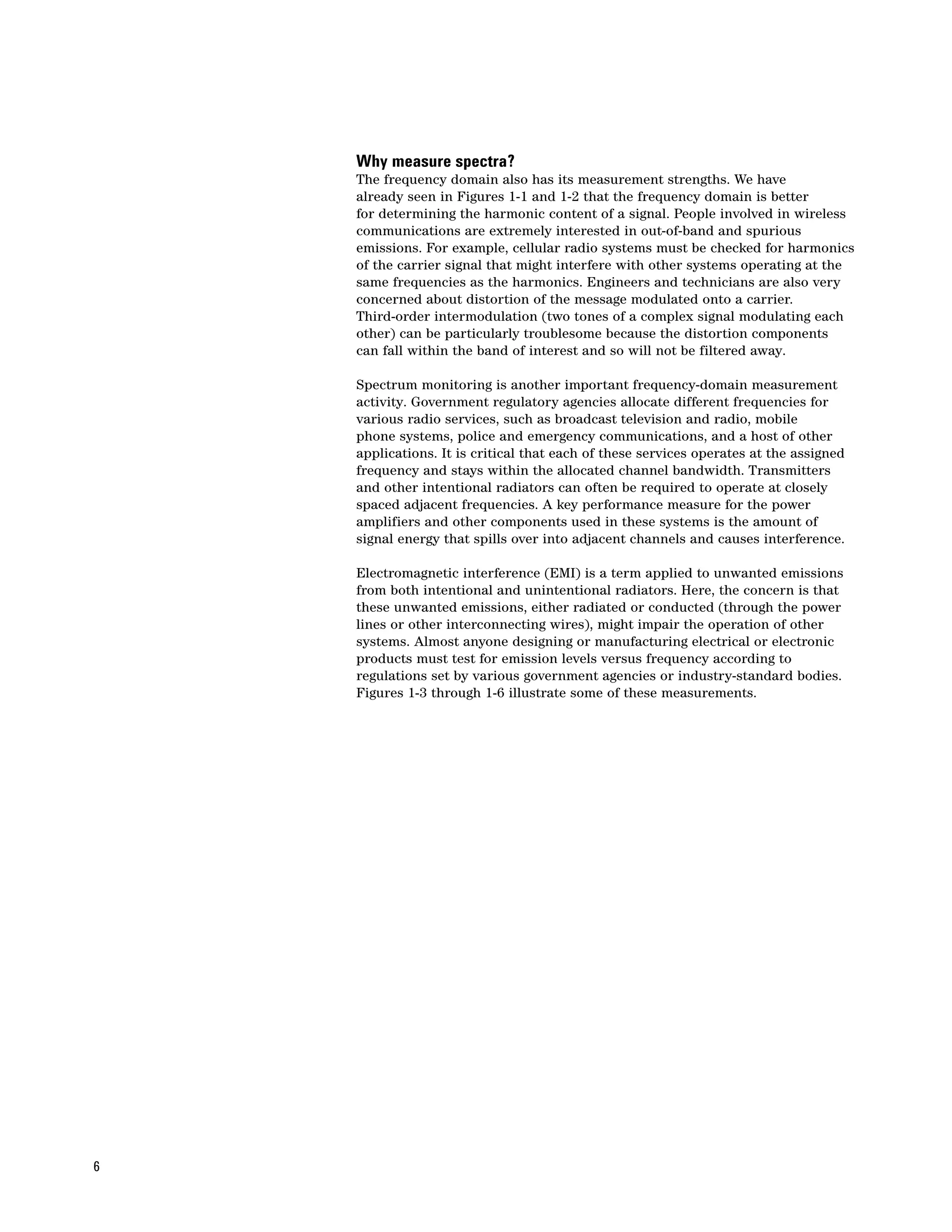
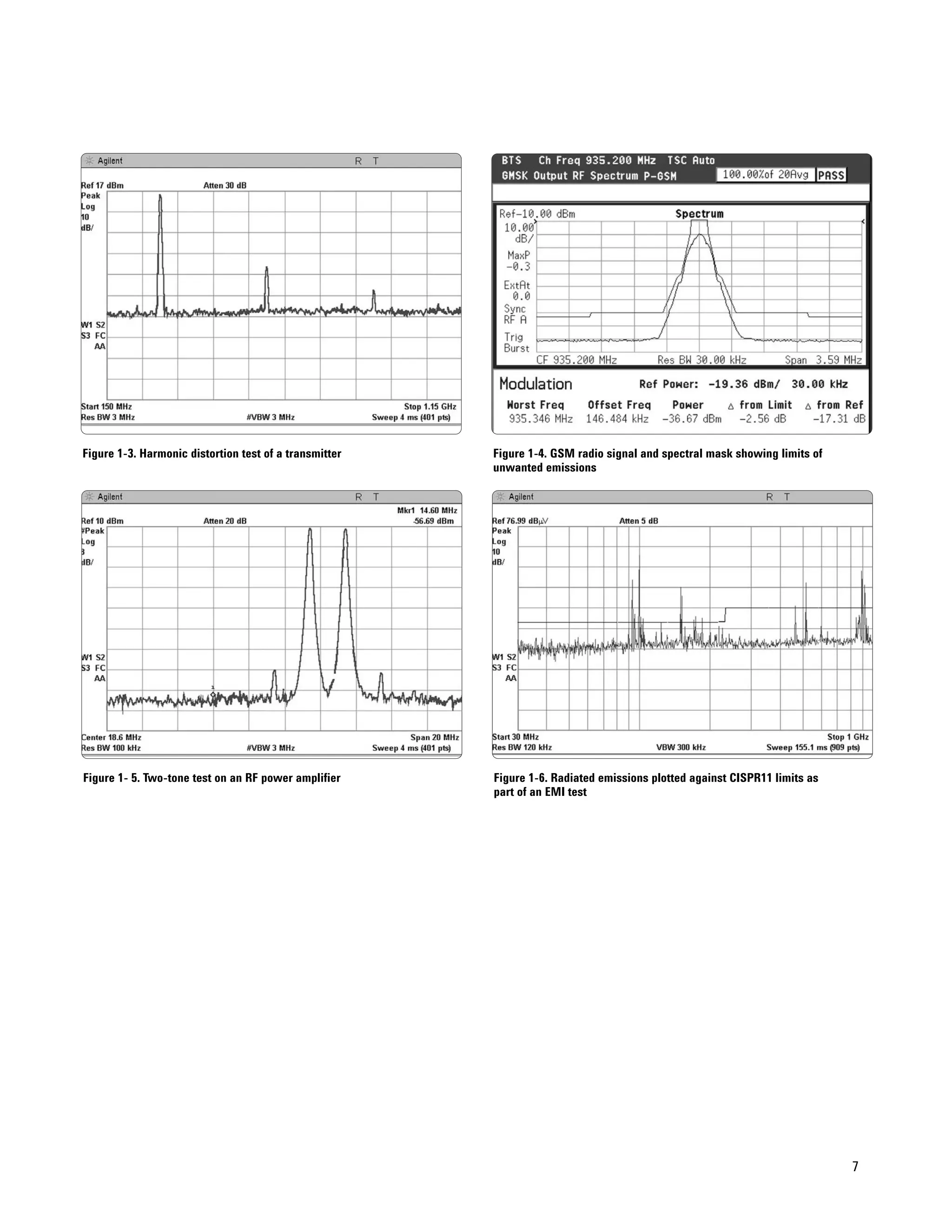
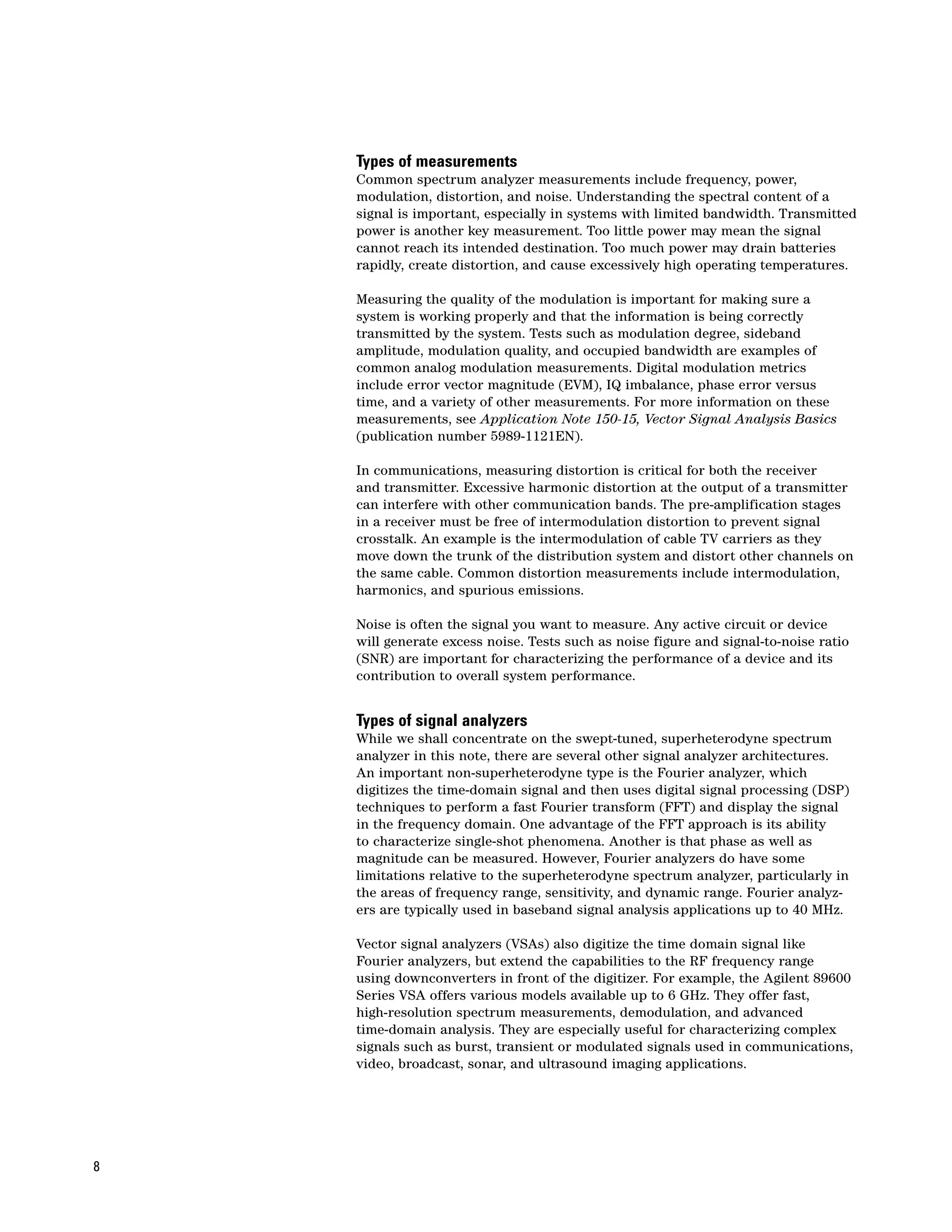
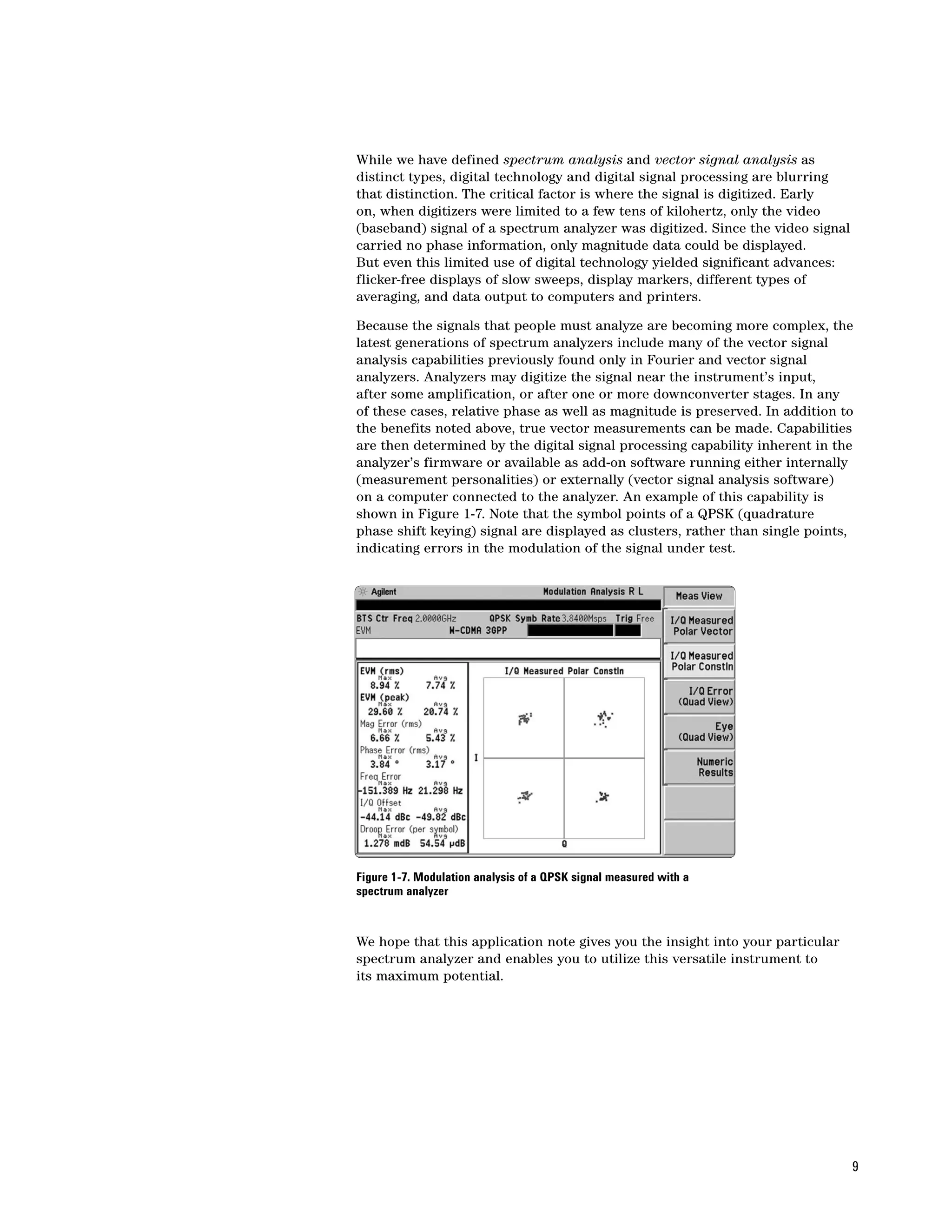
    Figures 1-3 through 1-6 illustrate some of these measurements.


6
Figure 1-3. Harmonic distortion test of a transmitter   Figure 1-4. GSM radio signal and spectral mask showing limits of
                                                        unwanted emissions


Figure 1- 5. Two-tone test on an RF power amplifier     Figure 1-6. Radiated emissions plotted against CISPR11 limits as
                                                        part of an EMI test


                                                                                                                           7
Types of measurements
    Common spectrum analyzer measurements include frequency, power,
    modulation, distortion, and noise. Understanding the spectral content of a
    signal is important, especially in systems with limited bandwidth. Transmitted
    power is another key measurement. Too little power may mean the signal
    cannot reach its intended destination. Too much power may drain batteries
    rapidly, create distortion, and cause excessively high operating temperatures.

    Measuring the quality of the modulation is important for making sure a
    system is working properly and that the information is being correctly
    transmitted by the system. Tests such as modulation degree, sideband
    amplitude, modulation quality, and occupied bandwidth are examples of
    common analog modulation measurements. Digital modulation metrics
    include error vector magnitude (EVM), IQ imbalance, phase error versus
    time, and a variety of other measurements. For more information on these
    measurements, see Application Note 150-15, Vector Signal Analysis Basics
    (publication number 5989-1121EN).

    In communications, measuring distortion is critical for both the receiver
    and transmitter. Excessive harmonic distortion at the output of a transmitter
    can interfere with other communication bands. The pre-amplification stages
    in a receiver must be free of intermodulation distortion to prevent signal
    crosstalk. An example is the intermodulation of cable TV carriers as they
    move down the trunk of the distribution system and distort other channels on
    the same cable. Common distortion measurements include intermodulation,
    harmonics, and spurious emissions.

    Noise is often the signal you want to measure. Any active circuit or device
    will generate excess noise. Tests such as noise figure and signal-to-noise ratio
    (SNR) are important for characterizing the performance of a device and its
    contribution to overall system performance.


    Types of signal analyzers
    While we shall concentrate on the swept-tuned, superheterodyne spectrum
    analyzer in this note, there are several other signal analyzer architectures.
    An important non-superheterodyne type is the Fourier analyzer, which
    digitizes the time-domain signal and then uses digital signal processing (DSP)
    techniques to perform a fast Fourier transform (FFT) and display the signal
    in the frequency domain. One advantage of the FFT approach is its ability
    to characterize single-shot phenomena. Another is that phase as well as
    magnitude can be measured. However, Fourier analyzers do have some
    limitations relative to the superheterodyne spectrum analyzer, particularly in
    the areas of frequency range, sensitivity, and dynamic range. Fourier analyz-
    ers are typically used in baseband signal analysis applications up to 40 MHz.

    Vector signal analyzers (VSAs) also digitize the time domain signal like
    Fourier analyzers, but extend the capabilities to the RF frequency range
    using downconverters in front of the digitizer. For example, the Agilent 89600
    Series VSA offers various models available up to 6 GHz. They offer fast,
    high-resolution spectrum measurements, demodulation, and advanced
    time-domain analysis. They are especially useful for characterizing complex
    signals such as burst, transient or modulated signals used in communications,
    video, broadcast, sonar, and ultrasound imaging applications.


8
While we have defined spectrum analysis and vector signal analysis as
distinct types, digital technology and digital signal processing are blurring
that distinction. The critical factor is where the signal is digitized. Early
on, when digitizers were limited to a few tens of kilohertz, only the video
(baseband) signal of a spectrum analyzer was digitized. Since the video signal
carried no phase information, only magnitude data could be displayed.
But even this limited use of digital technology yielded significant advances:
flicker-free displays of slow sweeps, display markers, different types of
averaging, and data output to computers and printers.

Because the signals that people must analyze are becoming more complex, the
latest generations of spectrum analyzers include many of the vector signal
analysis capabilities previously found only in Fourier and vector signal
analyzers. Analyzers may digitize the signal near the instrument’s input,
after some amplification, or after one or more downconverter stages. In any
of these cases, relative phase as well as magnitude is preserved. In addition to
the benefits noted above, true vector measurements can be made. Capabilities
are then determined by the digital signal processing capability inherent in the
analyzer’s firmware or available as add-on software running either internally
(measurement personalities) or externally (vector signal analysis software)
on a computer connected to the analyzer. An example of this capability is
shown in Figure 1-7. Note that the symbol points of a QPSK (quadrature
phase shift keying) signal are displayed as clusters, rather than single points,
indicating errors in the modulation of the signal under test.


Figure 1-7. Modulation analysis of a QPSK signal measured with a
spectrum analyzer


We hope that this application note gives you the insight into your particular
spectrum analyzer and enables you to utilize this versatile instrument to
its maximum potential.


                                                                                 9
Chapter 2
Spectrum Analyzer
Fundamentals
                                               This chapter will focus on the fundamental theory of how a spectrum analyzer
                                               works. While today’s technology makes it possible to replace many analog
                                               circuits with modern digital implementations, it is very useful to understand
                                               classic spectrum analyzer architecture as a starting point in our discussion.
                                               In later chapters, we will look at the capabilities and advantages that
                                               digital circuitry brings to spectrum analysis. Chapter 3 will discuss digital
                                               architectures used in modern spectrum analyzers.


                   RF input                                                                       Log        Envelope
                   attenuator                   Mixer            IF gain           IF filter      amp        detector

      Input
      signal

                            Pre-selector, or                                                                                      Video
                            low-pass filter                                                                                       filter
                                                        Local
                                                        oscillator


                                                        Reference
                                                        oscillator


                                Sweep
                                generator                                                                               Display

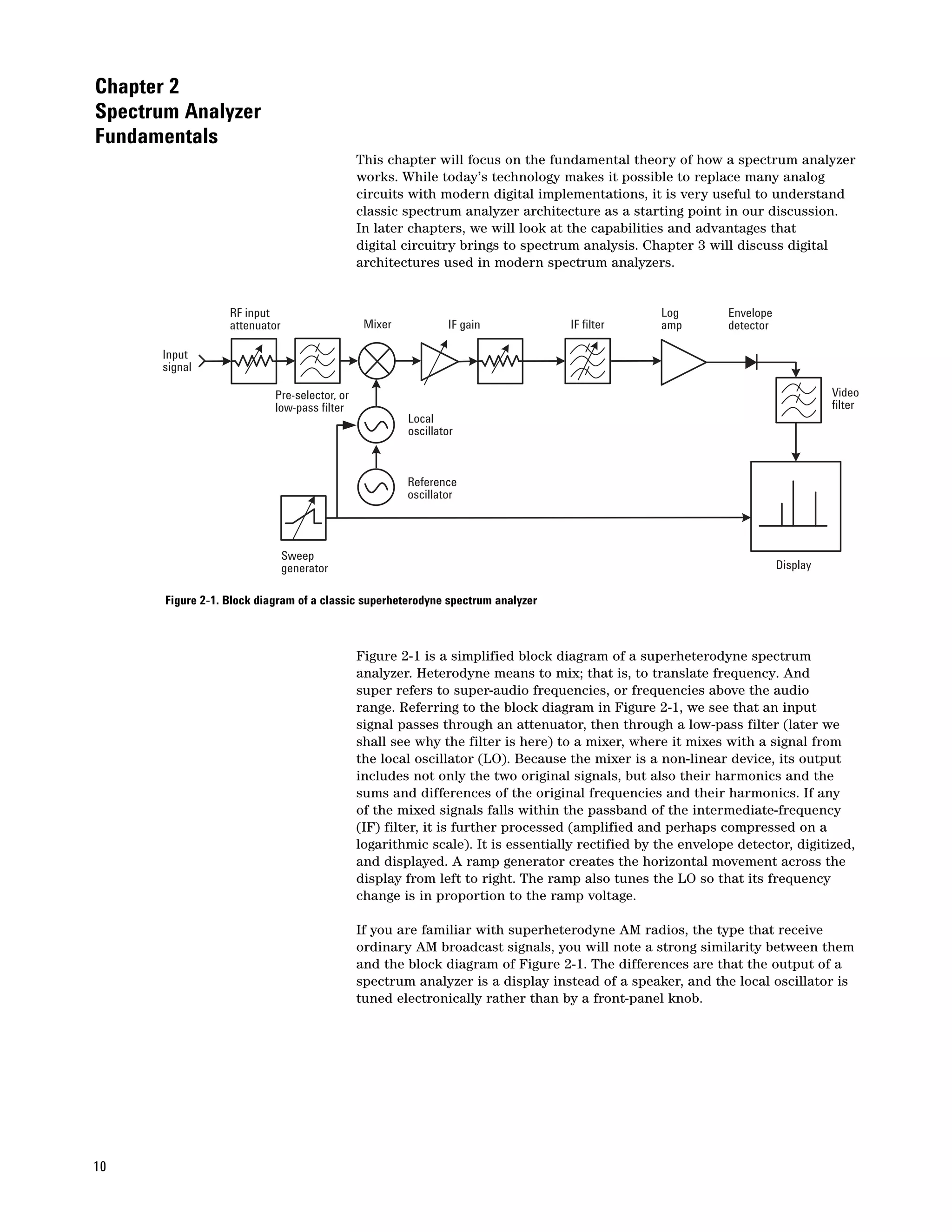
       Figure 2-1. Block diagram of a classic superheterodyne spectrum analyzer


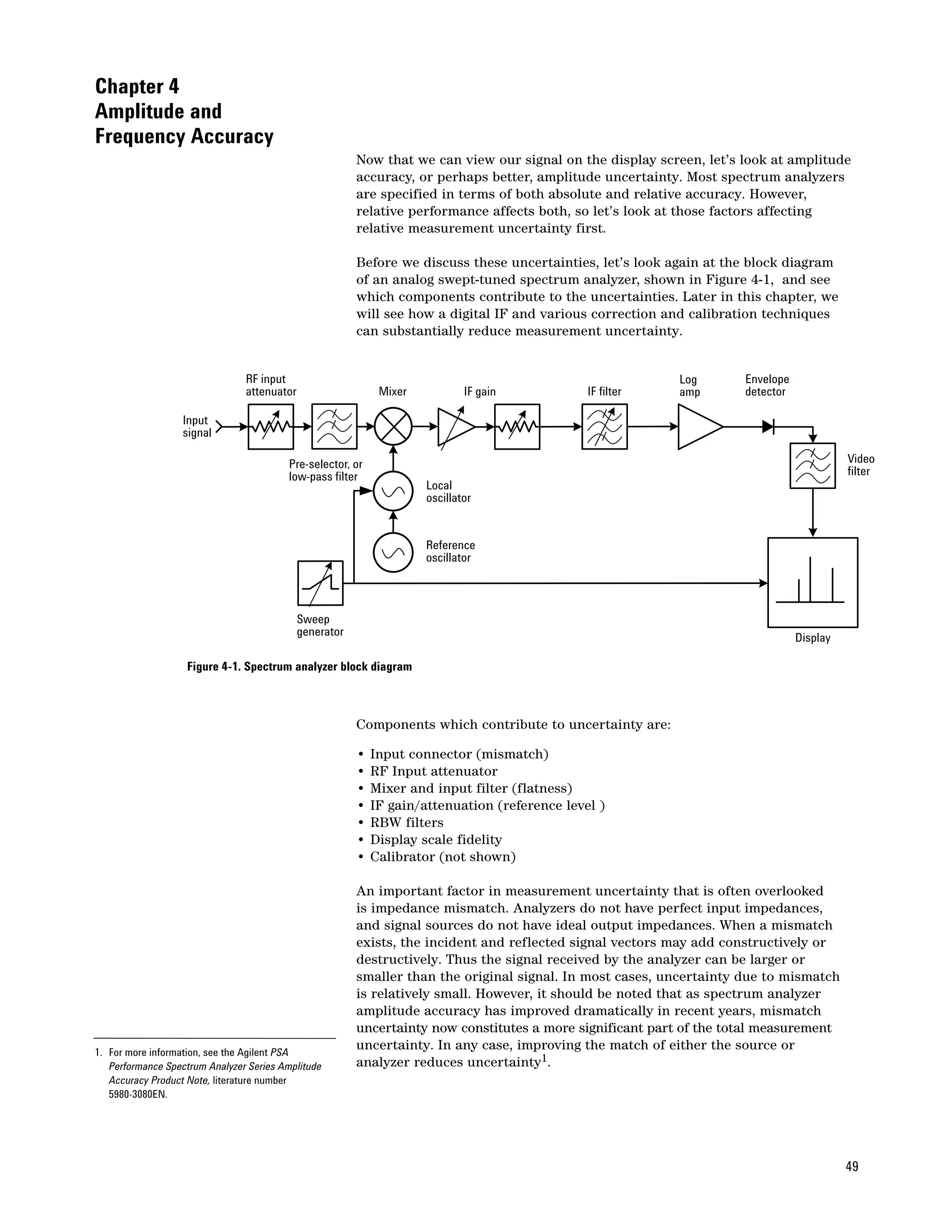
                                               Figure 2-1 is a simplified block diagram of a superheterodyne spectrum
                                               analyzer. Heterodyne means to mix; that is, to translate frequency. And
                                               super refers to super-audio frequencies, or frequencies above the audio
                                               range. Referring to the block diagram in Figure 2-1, we see that an input
                                               signal passes through an attenuator, then through a low-pass filter (later we
                                               shall see why the filter is here) to a mixer, where it mixes with a signal from
                                               the local oscillator (LO). Because the mixer is a non-linear device, its output
                                               includes not only the two original signals, but also their harmonics and the
                                               sums and differences of the original frequencies and their harmonics. If any
                                               of the mixed signals falls within the passband of the intermediate-frequency
                                               (IF) filter, it is further processed (amplified and perhaps compressed on a
                                               logarithmic scale). It is essentially rectified by the envelope detector, digitized,
                                               and displayed. A ramp generator creates the horizontal movement across the
                                               display from left to right. The ramp also tunes the LO so that its frequency
                                               change is in proportion to the ramp voltage.

                                               If you are familiar with superheterodyne AM radios, the type that receive
                                               ordinary AM broadcast signals, you will note a strong similarity between them
                                               and the block diagram of Figure 2-1. The differences are that the output of a
                                               spectrum analyzer is a display instead of a speaker, and the local oscillator is
                                               tuned electronically rather than by a front-panel knob.


10
Since the output of a spectrum analyzer is an X-Y trace on a display, let’s see
                                             what information we get from it. The display is mapped on a grid (graticule)
                                             with ten major horizontal divisions and generally ten major vertical divisions.
                                             The horizontal axis is linearly calibrated in frequency that increases from
                                             left to right. Setting the frequency is a two-step process. First we adjust the
                                             frequency at the centerline of the graticule with the center frequency control.
                                             Then we adjust the frequency range (span) across the full ten divisions with
                                             the Frequency Span control. These controls are independent, so if we change
                                             the center frequency, we do not alter the frequency span. Alternatively, we
                                             can set the start and stop frequencies instead of setting center frequency and
                                             span. In either case, we can determine the absolute frequency of any signal
                                             displayed and the relative frequency difference between any two signals.

                                             The vertical axis is calibrated in amplitude. We have the choice of a linear
                                             scale calibrated in volts or a logarithmic scale calibrated in dB. The log scale
                                             is used far more often than the linear scale because it has a much wider
                                             usable range. The log scale allows signals as far apart in amplitude as 70 to
                                             100 dB (voltage ratios of 3200 to 100,000 and power ratios of 10,000,000 to
                                             10,000,000,000) to be displayed simultaneously. On the other hand, the linear
                                             scale is usable for signals differing by no more than 20 to 30 dB (voltage ratios
                                             of 10 to 32). In either case, we give the top line of the graticule, the reference
                                             level, an absolute value through calibration techniques1 and use the scaling
                                             per division to assign values to other locations on the graticule. Therefore,
                                             we can measure either the absolute value of a signal or the relative amplitude
                                             difference between any two signals.

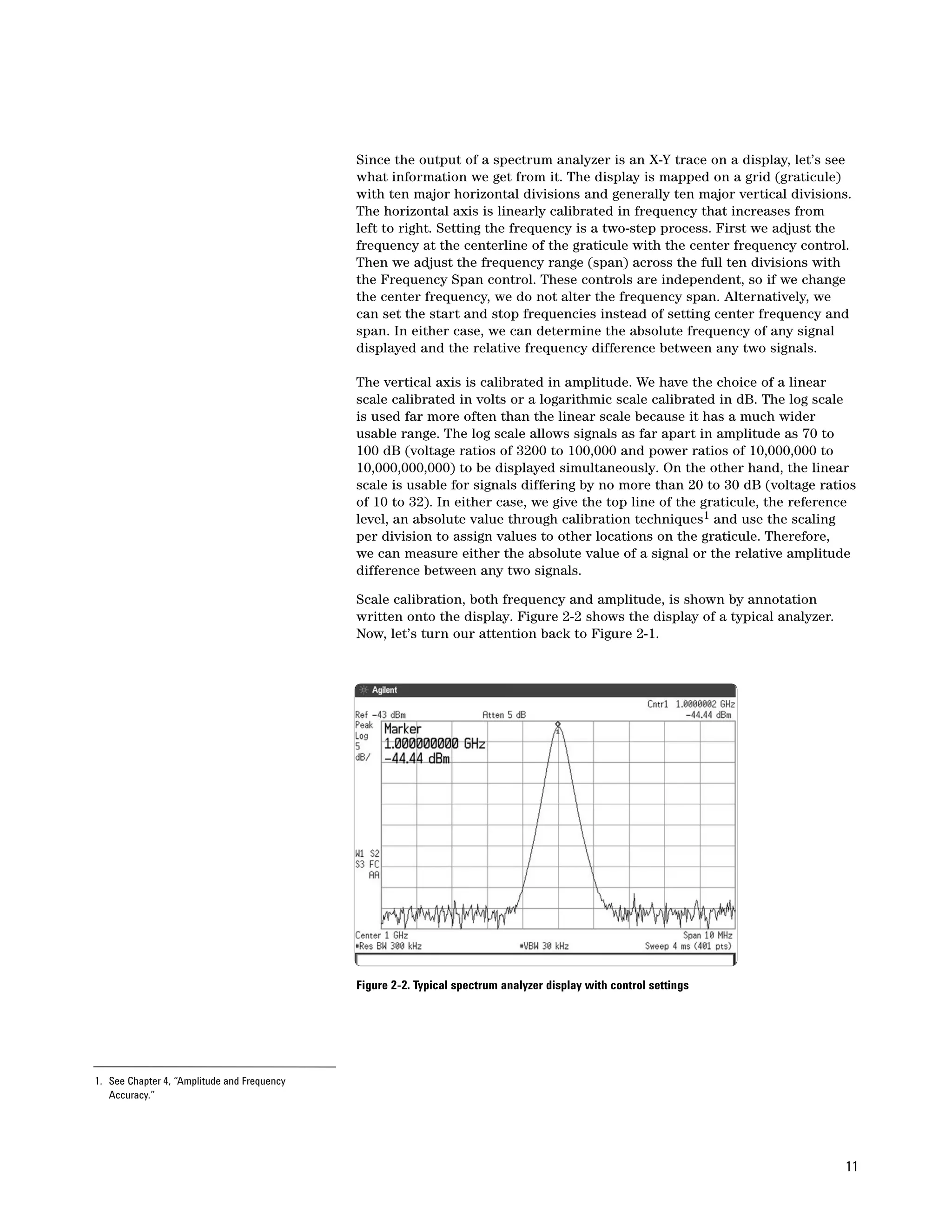
                                             Scale calibration, both frequency and amplitude, is shown by annotation
                                             written onto the display. Figure 2-2 shows the display of a typical analyzer.
                                             Now, let’s turn our attention back to Figure 2-1.


                                             Figure 2-2. Typical spectrum analyzer display with control settings


1. See Chapter 4, “Amplitude and Frequency
   Accuracy.”


                                                                                                                             11
RF attenuator
     The first part of our analyzer is the RF input attenuator. Its purpose is to
     ensure the signal enters the mixer at the optimum level to prevent overload,
     gain compression, and distortion. Because attenuation is a protective circuit
     for the analyzer, it is usually set automatically, based on the reference level.
     However, manual selection of attenuation is also available in steps of 10, 5, 2,
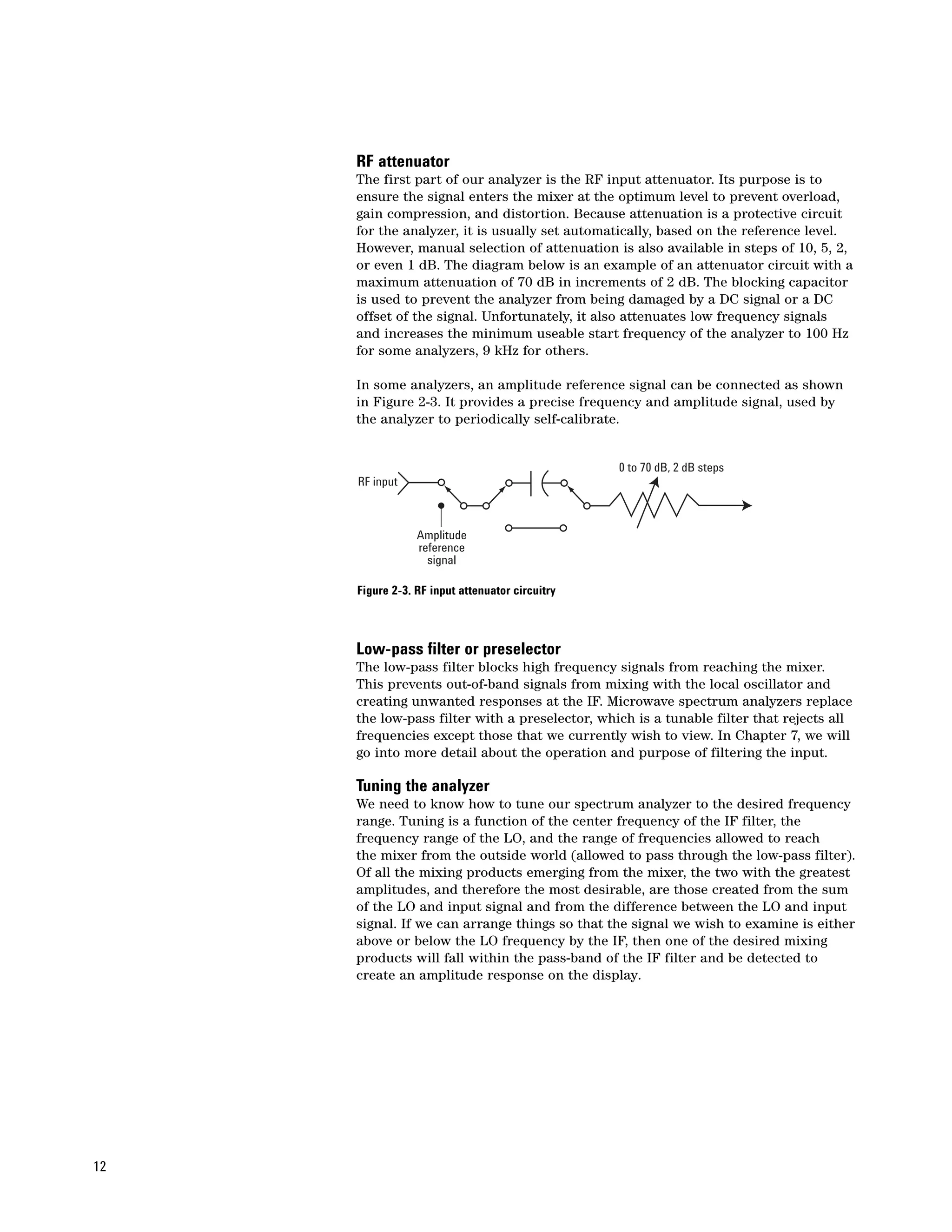
     or even 1 dB. The diagram below is an example of an attenuator circuit with a
     maximum attenuation of 70 dB in increments of 2 dB. The blocking capacitor
     is used to prevent the analyzer from being damaged by a DC signal or a DC
     offset of the signal. Unfortunately, it also attenuates low frequency signals
     and increases the minimum useable start frequency of the analyzer to 100 Hz
     for some analyzers, 9 kHz for others.

     In some analyzers, an amplitude reference signal can be connected as shown
     in Figure 2-3. It provides a precise frequency and amplitude signal, used by
     the analyzer to periodically self-calibrate.


                                                 0 to 70 dB, 2 dB steps
     RF input


                 Amplitude
                 reference
                   signal

     Figure 2-3. RF input attenuator circuitry


     Low-pass filter or preselector
     The low-pass filter blocks high frequency signals from reaching the mixer.
     This prevents out-of-band signals from mixing with the local oscillator and
     creating unwanted responses at the IF. Microwave spectrum analyzers replace
     the low-pass filter with a preselector, which is a tunable filter that rejects all
     frequencies except those that we currently wish to view. In Chapter 7, we will
     go into more detail about the operation and purpose of filtering the input.

     Tuning the analyzer
     We need to know how to tune our spectrum analyzer to the desired frequency
     range. Tuning is a function of the center frequency of the IF filter, the
     frequency range of the LO, and the range of frequencies allowed to reach
     the mixer from the outside world (allowed to pass through the low-pass filter).
     Of all the mixing products emerging from the mixer, the two with the greatest
     amplitudes, and therefore the most desirable, are those created from the sum
     of the LO and input signal and from the difference between the LO and input
     signal. If we can arrange things so that the signal we wish to examine is either
     above or below the LO frequency by the IF, then one of the desired mixing
     products will fall within the pass-band of the IF filter and be detected to
     create an amplitude response on the display.


12
We need to pick an LO frequency and an IF that will create an analyzer with
                                                           the desired tuning range. Let’s assume that we want a tuning range from
                                                           0 to 3 GHz. We then need to choose the IF frequency. Let’s try a 1 GHz IF.
                                                           Since this frequency is within our desired tuning range, we could have an
                                                           input signal at 1 GHz. Since the output of a mixer also includes the original
                                                           input signals, an input signal at 1 GHz would give us a constant output from
                                                           the mixer at the IF. The 1 GHz signal would thus pass through the system and
                                                           give us a constant amplitude response on the display regardless of the tuning
                                                           of the LO. The result would be a hole in the frequency range at which we
                                                           could not properly examine signals because the amplitude response would
                                                           be independent of the LO frequency. Therefore, a 1 GHz IF will not work.

                                                           So we shall choose, instead, an IF that is above the highest frequency to
                                                           which we wish to tune. In Agilent spectrum analyzers that can tune to 3 GHz,
                                                           the IF chosen is about 3.9 GHz. Remember that we want to tune from 0 Hz to
                                                           3 GHz. (Actually from some low frequency because we cannot view a 0 Hz
                                                           signal with this architecture.) If we start the LO at the IF (LO minus IF = 0 Hz)
                                                           and tune it upward from there to 3 GHz above the IF, then we can cover the
                                                           tuning range with the LO minus IF mixing product. Using this information,
                                                           we can generate a tuning equation:

                                                                    fsig = fLO – fIF

                                                           where    fsig = signal frequency
                                                                    fLO = local oscillator frequency, and
                                                                    fIF = intermediate frequency (IF)

                                                           If we wanted to determine the LO frequency needed to tune the analyzer to
                                                           a low-, mid-, or high-frequency signal (say, 1 kHz, 1.5 GHz, or 3 GHz), we
                                                           would first restate the tuning equation in terms of fLO:

                                                                    fLO = fsig + fIF

                                                           Then we would plug in the numbers for the signal and IF in the tuning
                                                           equation2:

                                                                    fLO = 1 kHz + 3.9 GHz = 3.900001 GHz,
                                                                    fLO = 1.5 GHz + 3.9 GHz = 5.4 GHz, or
                                                                    fLO = 3 GHz; + 3.9 GHz = 6.9 GHz.


2. In the text, we shall round off some of the frequency
   values for simplicity, although the exact values are
   shown in the figures.


                                                                                                                                           13
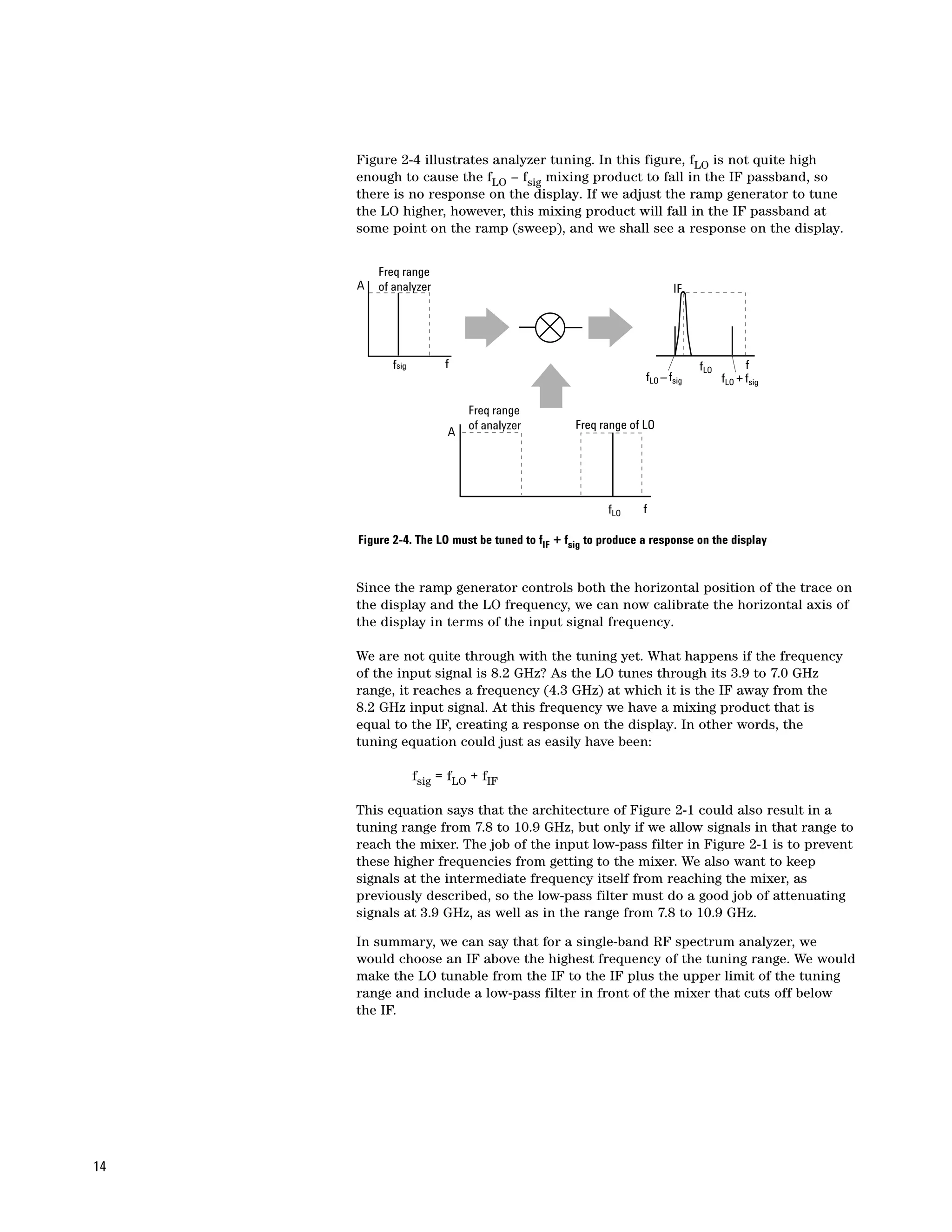
Figure 2-4 illustrates analyzer tuning. In this figure, fLO is not quite high
     enough to cause the fLO – fsig mixing product to fall in the IF passband, so
     there is no response on the display. If we adjust the ramp generator to tune
     the LO higher, however, this mixing product will fall in the IF passband at
     some point on the ramp (sweep), and we shall see a response on the display.


         Freq range
     A   of analyzer                                                  IF


            fsig         f                                                  fLO         f
                                                               fLO – fsig         fLO + fsig

                             Freq range
                             of analyzer         Freq range of LO
                         A


                                                       fLO    f

     Figure 2-4. The LO must be tuned to fIF + fsig to produce a response on the display


     Since the ramp generator controls both the horizontal position of the trace on
     the display and the LO frequency, we can now calibrate the horizontal axis of
     the display in terms of the input signal frequency.

     We are not quite through with the tuning yet. What happens if the frequency
     of the input signal is 8.2 GHz? As the LO tunes through its 3.9 to 7.0 GHz
     range, it reaches a frequency (4.3 GHz) at which it is the IF away from the
     8.2 GHz input signal. At this frequency we have a mixing product that is
     equal to the IF, creating a response on the display. In other words, the
     tuning equation could just as easily have been:

                   fsig = fLO + fIF

     This equation says that the architecture of Figure 2-1 could also result in a
     tuning range from 7.8 to 10.9 GHz, but only if we allow signals in that range to
     reach the mixer. The job of the input low-pass filter in Figure 2-1 is to prevent
     these higher frequencies from getting to the mixer. We also want to keep
     signals at the intermediate frequency itself from reaching the mixer, as
     previously described, so the low-pass filter must do a good job of attenuating
     signals at 3.9 GHz, as well as in the range from 7.8 to 10.9 GHz.

     In summary, we can say that for a single-band RF spectrum analyzer, we
     would choose an IF above the highest frequency of the tuning range. We would
     make the LO tunable from the IF to the IF plus the upper limit of the tuning
     range and include a low-pass filter in front of the mixer that cuts off below
     the IF.


14
To separate closely spaced signals (see “Resolving signals” later in this
                           chapter), some spectrum analyzers have IF bandwidths as narrow as 1 kHz;
                           others, 10 Hz; still others, 1 Hz. Such narrow filters are difficult to achieve
                           at a center frequency of 3.9 GHz. So we must add additional mixing stages,
                           typically two to four stages, to down-convert from the first to the final IF.
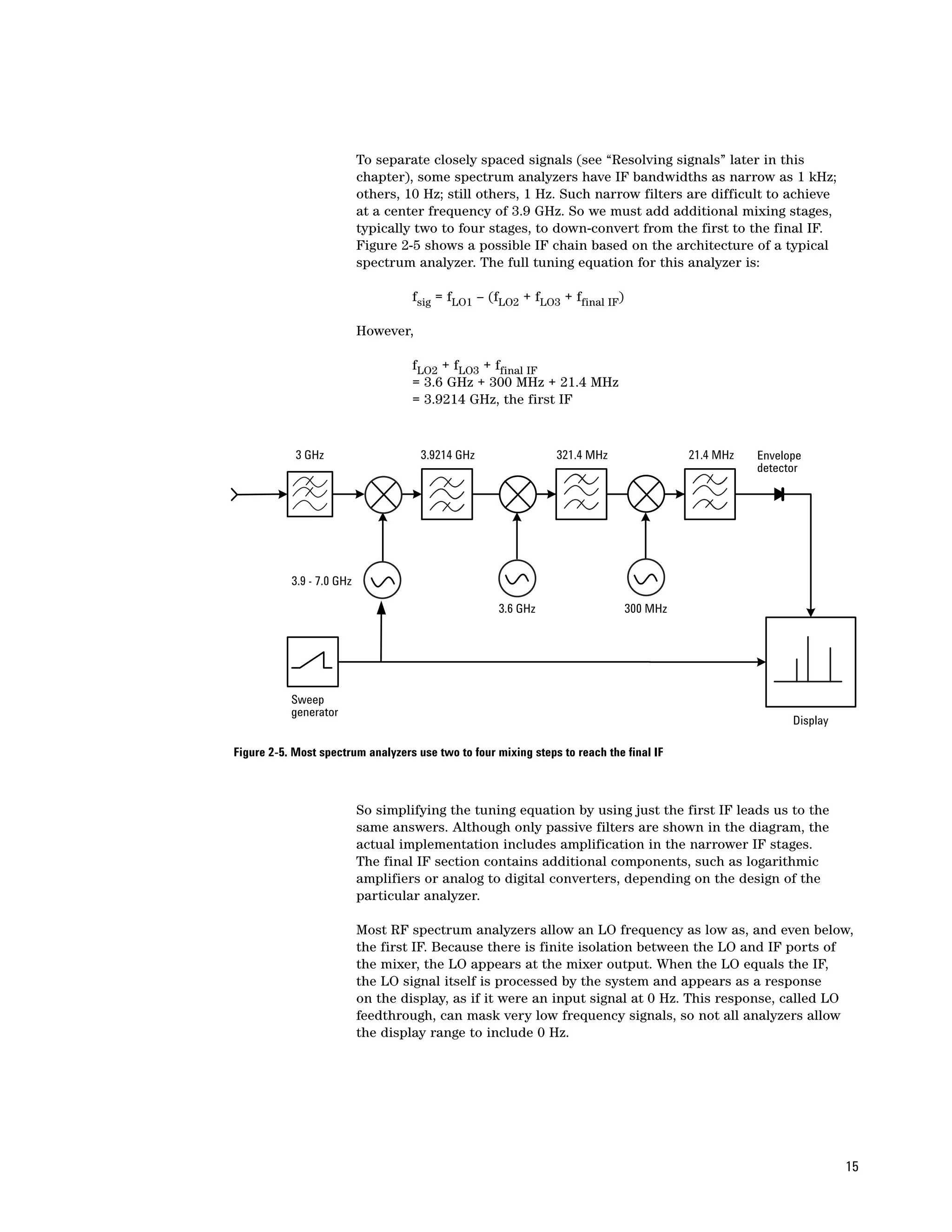
                           Figure 2-5 shows a possible IF chain based on the architecture of a typical
                           spectrum analyzer. The full tuning equation for this analyzer is:

                                    fsig = fLO1 – (fLO2 + fLO3 + ffinal IF)

                           However,

                                    fLO2 + fLO3 + ffinal IF
                                    = 3.6 GHz + 300 MHz + 21.4 MHz
                                    = 3.9214 GHz, the first IF


            3 GHz                     3.9214 GHz                321.4 MHz                21.4 MHz   Envelope
                                                                                                    detector


           3.9 - 7.0 GHz

                                                     3.6 GHz                  300 MHz


           Sweep
           generator
                                                                                                          Display

Figure 2-5. Most spectrum analyzers use two to four mixing steps to reach the final IF


                           So simplifying the tuning equation by using just the first IF leads us to the
                           same answers. Although only passive filters are shown in the diagram, the
                           actual implementation includes amplification in the narrower IF stages.
                           The final IF section contains additional components, such as logarithmic
                           amplifiers or analog to digital converters, depending on the design of the
                           particular analyzer.

                           Most RF spectrum analyzers allow an LO frequency as low as, and even below,
                           the first IF. Because there is finite isolation between the LO and IF ports of
                           the mixer, the LO appears at the mixer output. When the LO equals the IF,
                           the LO signal itself is processed by the system and appears as a response
                           on the display, as if it were an input signal at 0 Hz. This response, called LO
                           feedthrough, can mask very low frequency signals, so not all analyzers allow
                           the display range to include 0 Hz.


                                                                                                                    15
•                                               IF gain
                                                Referring back to Figure 2-1, we see the next component of the block diagram
                                                is a variable gain amplifier. It is used to adjust the vertical position of signals
                                                on the display without affecting the signal level at the input mixer. When the
                                                IF gain is changed, the value of the reference level is changed accordingly to
                                                retain the correct indicated value for the displayed signals. Generally, we do
                                                not want the reference level to change when we change the input attenuator,
                                                so the settings of the input attenuator and the IF gain are coupled together.
                                                A change in input attenuation will automatically change the IF gain to offset
                                                the effect of the change in input attenuation, thereby keeping the signal at a
                                                constant position on the display.

                                                Resolving signals
                                                After the IF gain amplifier, we find the IF section which consists of the
                                                analog and/or digital resolution bandwidth (RBW) filters.

                                                Analog filters
                                                Frequency resolution is the ability of a spectrum analyzer to separate two
                                                input sinusoids into distinct responses. Fourier tells us that a sine wave
                                                signal only has energy at one frequency, so we shouldn’t have any resolution
                                                problems. Two signals, no matter how close in frequency, should appear as
                                                two lines on the display. But a closer look at our superheterodyne receiver
                                                shows why signal responses have a definite width on the display. The output
                                                of a mixer includes the sum and difference products plus the two original
                                                signals (input and LO). A bandpass filter determines the intermediate
                                                frequency, and this filter selects the desired mixing product and rejects
                                                all other signals. Because the input signal is fixed and the local oscillator
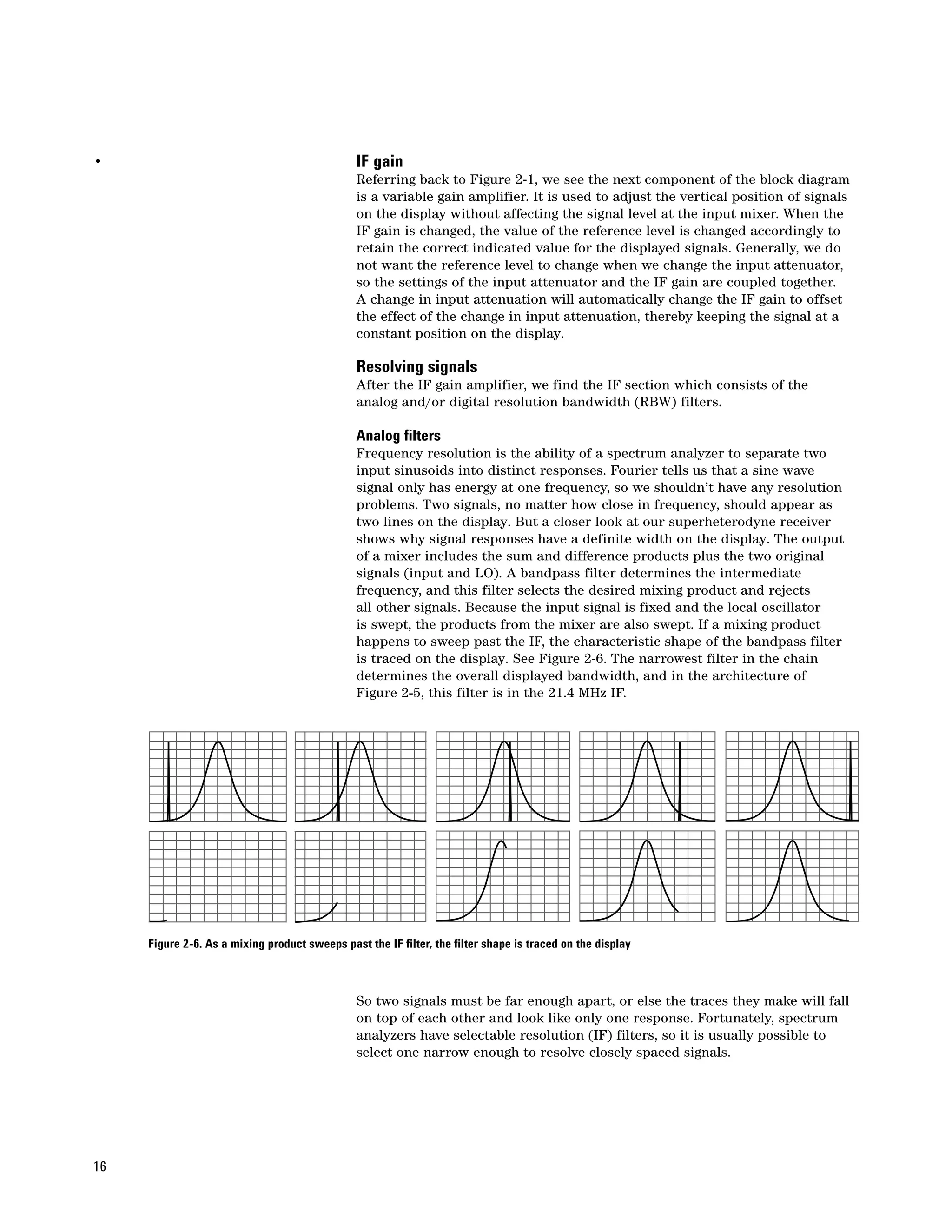
                                                is swept, the products from the mixer are also swept. If a mixing product
                                                happens to sweep past the IF, the characteristic shape of the bandpass filter
                                                is traced on the display. See Figure 2-6. The narrowest filter in the chain
                                                determines the overall displayed bandwidth, and in the architecture of
                                                Figure 2-5, this filter is in the 21.4 MHz IF.


     Figure 2-6. As a mixing product sweeps past the IF filter, the filter shape is traced on the display


                                                So two signals must be far enough apart, or else the traces they make will fall
                                                on top of each other and look like only one response. Fortunately, spectrum
                                                analyzers have selectable resolution (IF) filters, so it is usually possible to
                                                select one narrow enough to resolve closely spaced signals.


16
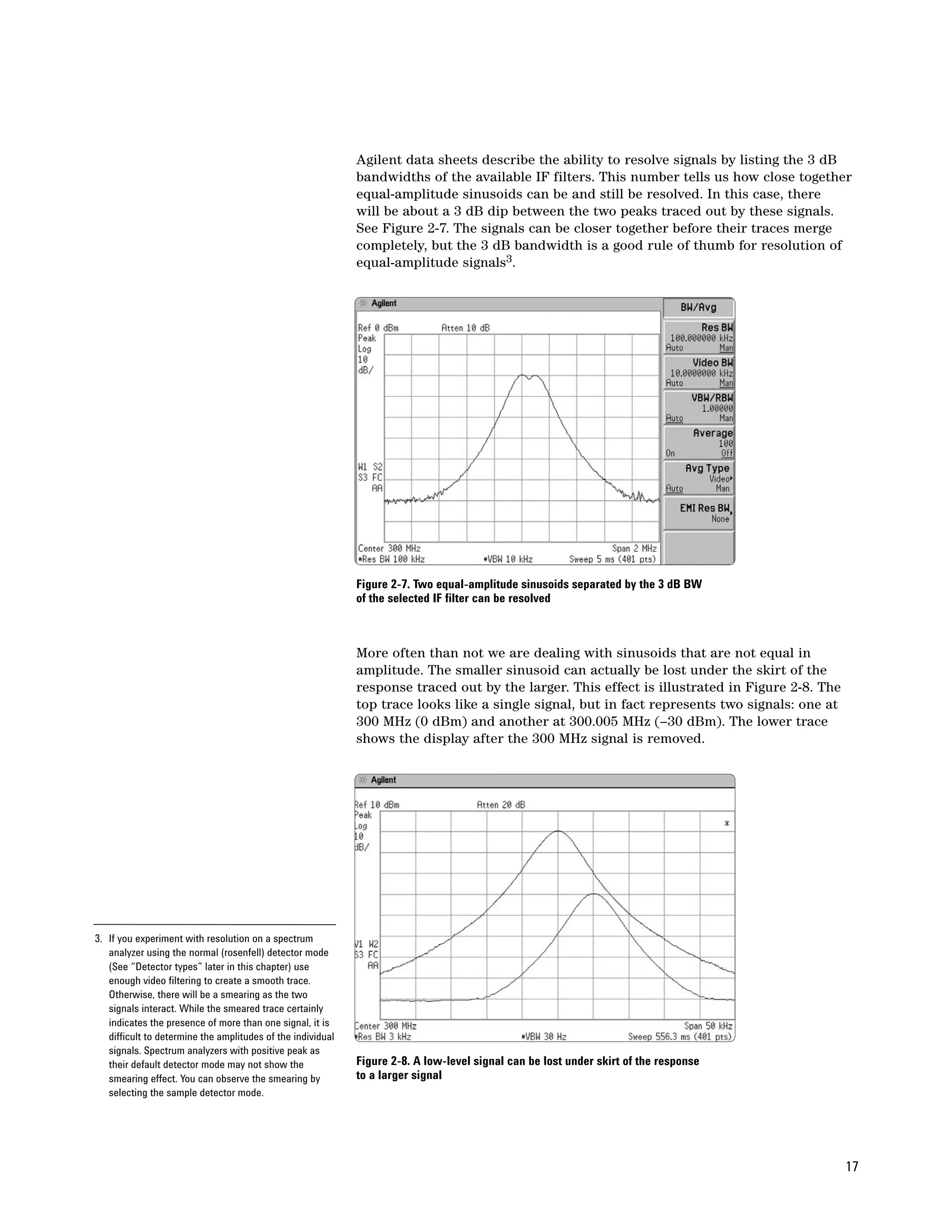
Agilent data sheets describe the ability to resolve signals by listing the 3 dB
                                                             bandwidths of the available IF filters. This number tells us how close together
                                                             equal-amplitude sinusoids can be and still be resolved. In this case, there
                                                             will be about a 3 dB dip between the two peaks traced out by these signals.
                                                             See Figure 2-7. The signals can be closer together before their traces merge
                                                             completely, but the 3 dB bandwidth is a good rule of thumb for resolution of
                                                             equal-amplitude signals3.


                                                             Figure 2-7. Two equal-amplitude sinusoids separated by the 3 dB BW
                                                             of the selected IF filter can be resolved


                                                             More often than not we are dealing with sinusoids that are not equal in
                                                             amplitude. The smaller sinusoid can actually be lost under the skirt of the
                                                             response traced out by the larger. This effect is illustrated in Figure 2-8. The
                                                             top trace looks like a single signal, but in fact represents two signals: one at
                                                             300 MHz (0 dBm) and another at 300.005 MHz (–30 dBm). The lower trace
                                                             shows the display after the 300 MHz signal is removed.


3. If you experiment with resolution on a spectrum
   analyzer using the normal (rosenfell) detector mode
   (See “Detector types” later in this chapter) use
   enough video filtering to create a smooth trace.
   Otherwise, there will be a smearing as the two
   signals interact. While the smeared trace certainly
   indicates the presence of more than one signal, it is
   difficult to determine the amplitudes of the individual
   signals. Spectrum analyzers with positive peak as
   their default detector mode may not show the              Figure 2-8. A low-level signal can be lost under skirt of the response
   smearing effect. You can observe the smearing by          to a larger signal
   selecting the sample detector mode.


                                                                                                                                                17
Another specification is listed for the resolution filters: bandwidth selectivity
                                                        (or selectivity or shape factor). Bandwidth selectivity helps determine the
                                                        resolving power for unequal sinusoids. For Agilent analyzers, bandwidth
                                                        selectivity is generally specified as the ratio of the 60 dB bandwidth to the
                                                        3 dB bandwidth, as shown in Figure 2-9. The analog filters in Agilent analyzers
                                                        are a four-pole, synchronously-tuned design, with a nearly Gaussian shape4.
                                                        This type of filter exhibits a bandwidth selectivity of about 12.7:1.


                                                                                                          3 dB


                                                                                                                   60 dB


                                                        Figure 2-9. Bandwidth selectivity, ratio of 60 dB to 3 dB bandwidths


                                                        For example, what resolution bandwidth must we choose to resolve signals
                                                        that differ by 4 kHz and 30 dB, assuming 12.7:1 bandwidth selectivity? Since
                                                        we are concerned with rejection of the larger signal when the analyzer is
                                                        tuned to the smaller signal, we need to consider not the full bandwidth, but
                                                        the frequency difference from the filter center frequency to the skirt. To
                                                        determine how far down the filter skirt is at a given offset, we use the
                                                        following equation:

                                                                   H(∆f) = –10(N) log10 [(∆f/f0)2 + 1]

                                                        Where      H(∆f) is the filter skirt rejection in dB
                                                                   N is the number of filter poles
                                                                   ∆f is the frequency offset from the center in Hz, and
                                                                                     RBW
                                                                   f0 is given by
                                                                                  2 √ 21/N –1
                                                        For our example, N=4 and ∆f = 4000. Let’s begin by trying the 3 kHz RBW
                                                        filter. First, we compute f0:
                                                                          3000
                                                                   f0 =             = 3448.44
                                                                        2 √ 21/4 –1
                                                        Now we can determine the filter rejection at a 4 kHz offset:

4. Some older spectrum analyzer models used five-pole              H(4000) = –10(4) log10 [(4000/3448.44)2 + 1]
   filters for the narrowest resolution bandwidths to              = –14.8 dB
   provide improved selectivity of about 10:1. Modern
   designs achieve even better bandwidth selectivity    This is not enough to allow us to see the smaller signal. Let’s determine H(∆f)
   using digital IF filters.
                                                        again using a 1 kHz filter:
                                                                        1000
                                                                 f0 =             = 1149.48
                                                                      2 √ 21/4 –1
18
This allows us to calculate the filter rejection:

           H(4000) = –10(4) log10[(4000/1149.48)2 + 1]
           = –44.7 dB

Thus, the 1 kHz resolution bandwidth filter does resolve the smaller signal.
This is illustrated in Figure 2-10.


Figure 2-10. The 3 kHz filter (top trace) does not resolve smaller signal;
reducing the resolution bandwidth to 1 kHz (bottom trace) does


Digital filters
Some spectrum analyzers use digital techniques to realize their resolution
bandwidth filters. Digital filters can provide important benefits, such
as dramatically improved bandwidth selectivity. The Agilent PSA Series
spectrum analyzers implement all resolution bandwidths digitally. Other
analyzers, such as the Agilent ESA-E Series, take a hybrid approach, using
analog filters for the wider bandwidths and digital filters for bandwidths of
300 Hz and below. Refer to Chapter 3 for more information on digital filters.

Residual FM
Filter bandwidth is not the only factor that affects the resolution of a
spectrum analyzer. The stability of the LOs in the analyzer, particularly the
first LO, also affects resolution. The first LO is typically a YIG-tuned oscillator
(tuning somewhere in the 3 to 7 GHz range). In early spectrum analyzer
designs, these oscillators had residual FM of 1 kHz or more. This instability
was transferred to any mixing products resulting from the LO and incoming
signals, and it was not possible to determine whether the input signal or the
LO was the source of this instability.

The minimum resolution bandwidth is determined, at least in part, by the
stability of the first LO. Analyzers where no steps are taken to improve upon
the inherent residual FM of the YIG oscillators typically have a minimum
bandwidth of 1 kHz. However, modern analyzers have dramatically improved
residual FM. For example, Agilent PSA Series analyzers have residual FM of
1 to 4 Hz and ESA Series analyzers have 2 to 8 Hz residual FM. This allows
bandwidths as low as 1 Hz. So any instability we see on a spectrum analyzer
today is due to the incoming signal.


                                                                                 19
Phase noise
                                                          Even though we may not be able to see the actual frequency jitter of a
                                                          spectrum analyzer LO system, there is still a manifestation of the LO
                                                          frequency or phase instability that can be observed. This is known as phase
                                                          noise (sometimes called sideband noise). No oscillator is perfectly stable.
                                                          All are frequency or phase modulated by random noise to some extent. As
                                                          previously noted, any instability in the LO is transferred to any mixing
                                                          products resulting from the LO and input signals. So the LO phase-noise
                                                          modulation sidebands appear around any spectral component on the display
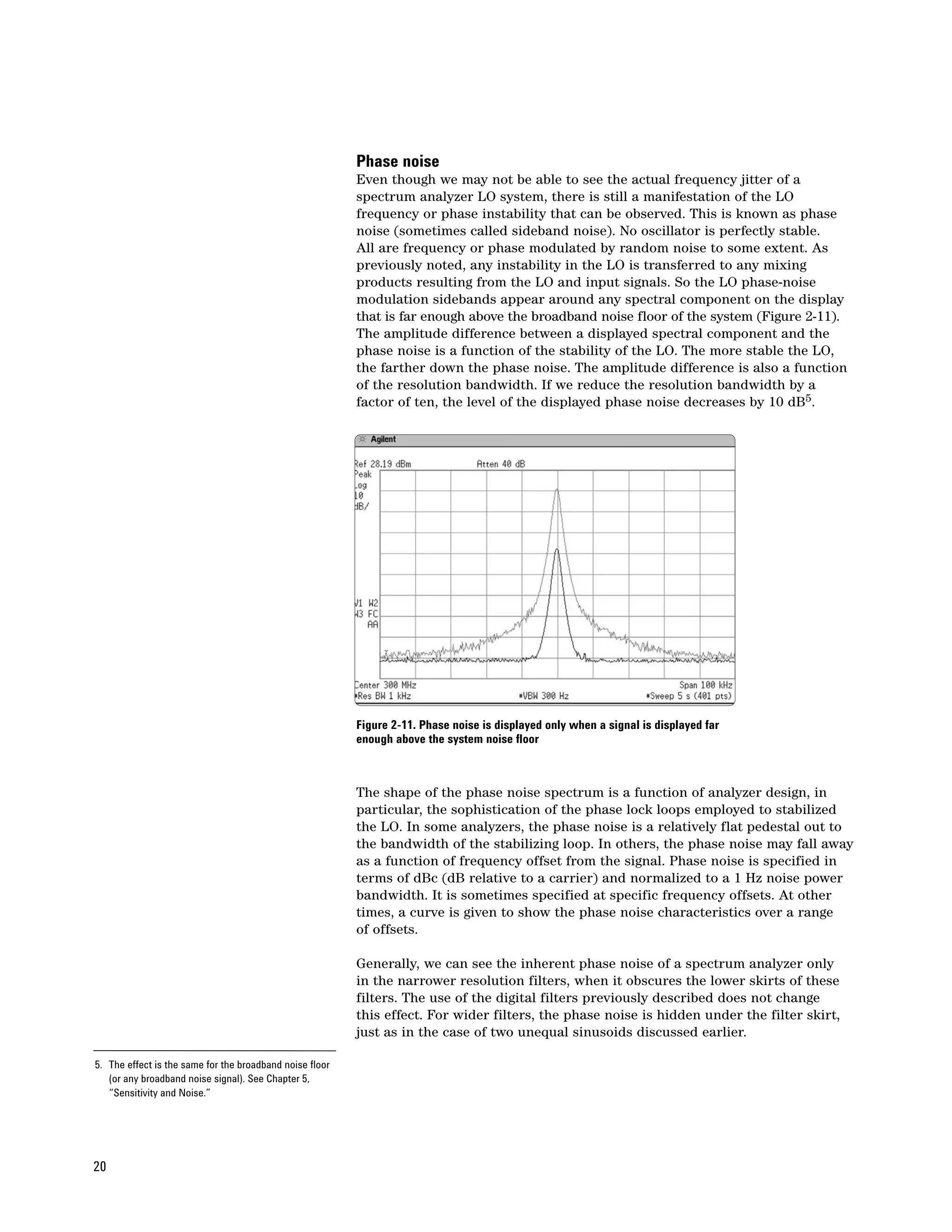
                                                          that is far enough above the broadband noise floor of the system (Figure 2-11).
                                                          The amplitude difference between a displayed spectral component and the
                                                          phase noise is a function of the stability of the LO. The more stable the LO,
                                                          the farther down the phase noise. The amplitude difference is also a function
                                                          of the resolution bandwidth. If we reduce the resolution bandwidth by a
                                                          factor of ten, the level of the displayed phase noise decreases by 10 dB5.


                                                          Figure 2-11. Phase noise is displayed only when a signal is displayed far
                                                          enough above the system noise floor


                                                          The shape of the phase noise spectrum is a function of analyzer design, in
                                                          particular, the sophistication of the phase lock loops employed to stabilized
                                                          the LO. In some analyzers, the phase noise is a relatively flat pedestal out to
                                                          the bandwidth of the stabilizing loop. In others, the phase noise may fall away
                                                          as a function of frequency offset from the signal. Phase noise is specified in
                                                          terms of dBc (dB relative to a carrier) and normalized to a 1 Hz noise power
                                                          bandwidth. It is sometimes specified at specific frequency offsets. At other
                                                          times, a curve is given to show the phase noise characteristics over a range
                                                          of offsets.

                                                          Generally, we can see the inherent phase noise of a spectrum analyzer only
                                                          in the narrower resolution filters, when it obscures the lower skirts of these
                                                          filters. The use of the digital filters previously described does not change
                                                          this effect. For wider filters, the phase noise is hidden under the filter skirt,
                                                          just as in the case of two unequal sinusoids discussed earlier.

5. The effect is the same for the broadband noise floor
   (or any broadband noise signal). See Chapter 5,
   “Sensitivity and Noise.”


20
Some modern spectrum analyzers allow the user to select different LO
                                                     stabilization modes to optimize the phase noise for different measurement
                                                     conditions. For example, the PSA Series spectrum analyzers offer three
                                                     different modes:

                                                     • Optimize phase noise for frequency offsets < 50 kHz from the carrier
                                                       In this mode, the LO phase noise is optimized for the area close in to the
                                                       carrier at the expense of phase noise beyond 50 kHz offset.
                                                     • Optimize phase noise for frequency offsets > 50 kHz from the carrier
                                                       This mode optimizes phase noise for offsets above 50 kHz away from the
                                                       carrier, especially those from 70 kHz to 300 kHz. Closer offsets are
                                                       compromised and the throughput of measurements is reduced.
                                                     • Optimize LO for fast tuning
                                                       When this mode is selected, LO behavior compromises phase noise at
                                                       all offsets from the carrier below approximately 2 MHz. This minimizes
                                                       measurement time and allows the maximum measurement throughput
                                                       when changing the center frequency or span.

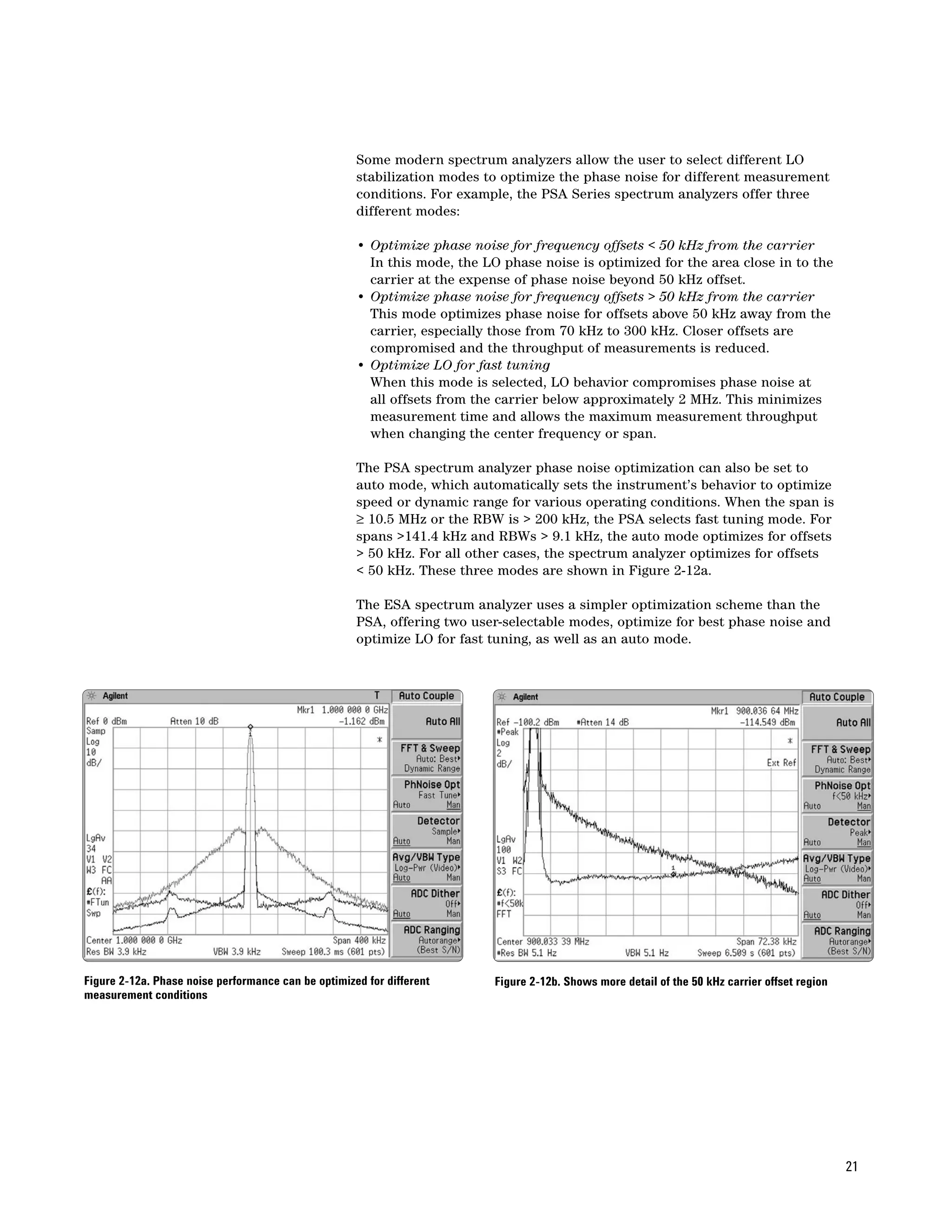
                                                     The PSA spectrum analyzer phase noise optimization can also be set to
                                                     auto mode, which automatically sets the instrument’s behavior to optimize
                                                     speed or dynamic range for various operating conditions. When the span is
                                                     ≥ 10.5 MHz or the RBW is > 200 kHz, the PSA selects fast tuning mode. For
                                                     spans >141.4 kHz and RBWs > 9.1 kHz, the auto mode optimizes for offsets
                                                     > 50 kHz. For all other cases, the spectrum analyzer optimizes for offsets
                                                     < 50 kHz. These three modes are shown in Figure 2-12a.

                                                     The ESA spectrum analyzer uses a simpler optimization scheme than the
                                                     PSA, offering two user-selectable modes, optimize for best phase noise and
                                                     optimize LO for fast tuning, as well as an auto mode.


Figure 2-12a. Phase noise performance can be optimized for different       Figure 2-12b. Shows more detail of the 50 kHz carrier offset region
measurement conditions


                                                                                                                                                 21
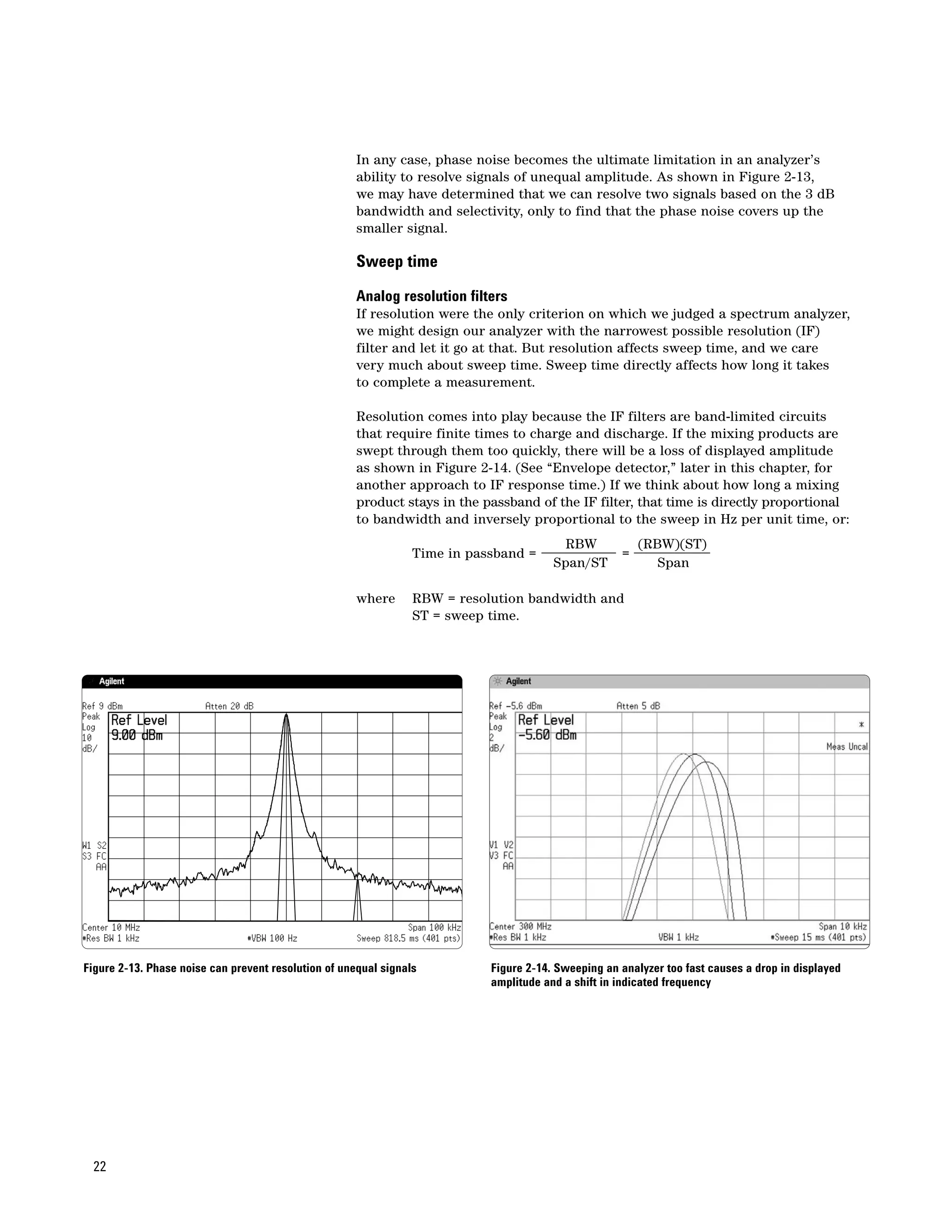
In any case, phase noise becomes the ultimate limitation in an analyzer’s
                                                      ability to resolve signals of unequal amplitude. As shown in Figure 2-13,
                                                      we may have determined that we can resolve two signals based on the 3 dB
                                                      bandwidth and selectivity, only to find that the phase noise covers up the
                                                      smaller signal.

                                                      Sweep time

                                                      Analog resolution filters
                                                      If resolution were the only criterion on which we judged a spectrum analyzer,
                                                      we might design our analyzer with the narrowest possible resolution (IF)
                                                      filter and let it go at that. But resolution affects sweep time, and we care
                                                      very much about sweep time. Sweep time directly affects how long it takes
                                                      to complete a measurement.

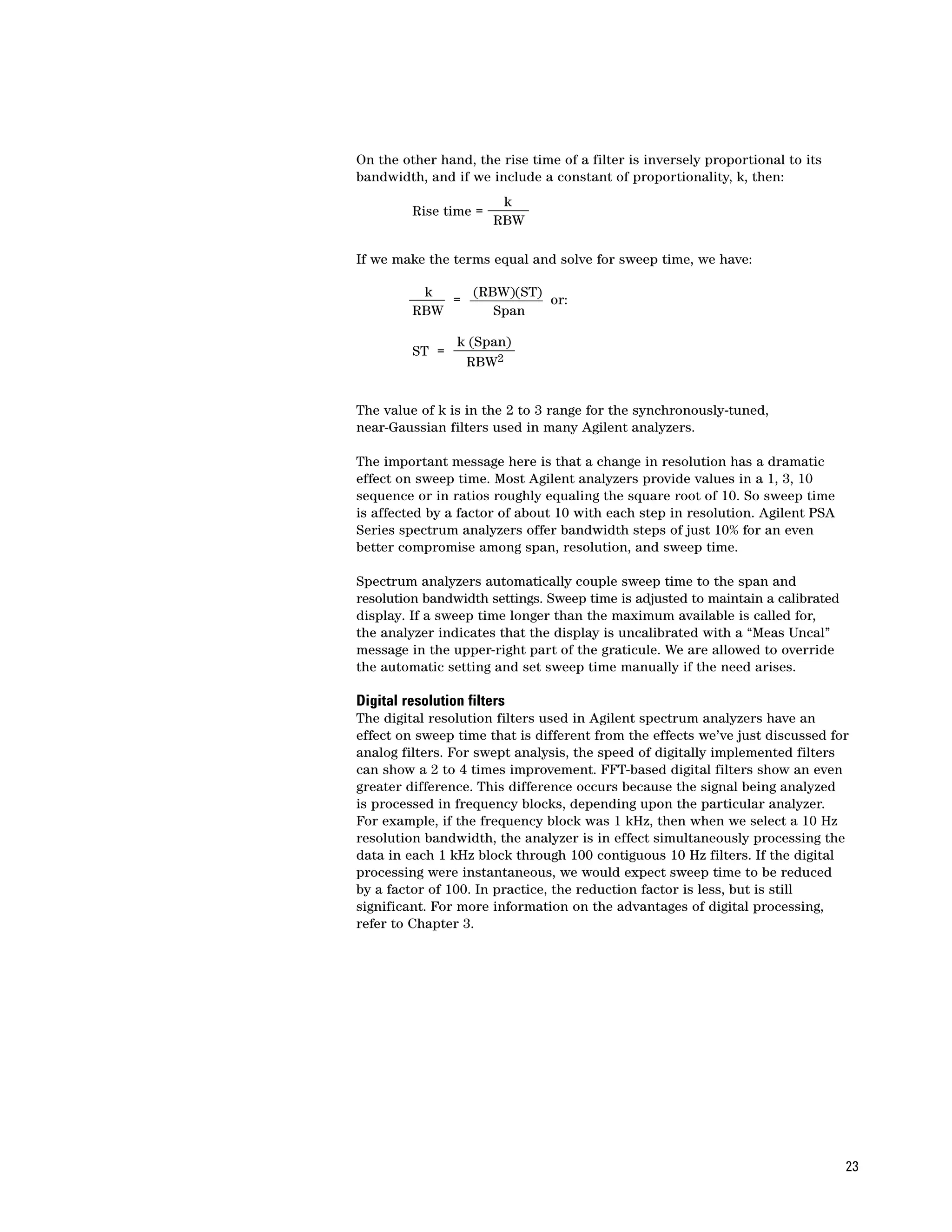
                                                      Resolution comes into play because the IF filters are band-limited circuits
                                                      that require finite times to charge and discharge. If the mixing products are
                                                      swept through them too quickly, there will be a loss of displayed amplitude
                                                      as shown in Figure 2-14. (See “Envelope detector,” later in this chapter, for
                                                      another approach to IF response time.) If we think about how long a mixing
                                                      product stays in the passband of the IF filter, that time is directly proportional
                                                      to bandwidth and inversely proportional to the sweep in Hz per unit time, or:
                                                                                          RBW            (RBW)(ST)
                                                                 Time in passband =                  =
                                                                                        Span/ST             Span

                                                      where      RBW = resolution bandwidth and
                                                                 ST = sweep time.


Figure 2-13. Phase noise can prevent resolution of unequal signals          Figure 2-14. Sweeping an analyzer too fast causes a drop in displayed
                                                                            amplitude and a shift in indicated frequency


 22
On the other hand, the rise time of a filter is inversely proportional to its
bandwidth, and if we include a constant of proportionality, k, then:
                        k
         Rise time =
                       RBW

If we make the terms equal and solve for sweep time, we have:

          k    (RBW)(ST)
             =           or:
         RBW      Span

                 k (Span)
         ST =
                  RBW2


The value of k is in the 2 to 3 range for the synchronously-tuned,
near-Gaussian filters used in many Agilent analyzers.

The important message here is that a change in resolution has a dramatic
effect on sweep time. Most Agilent analyzers provide values in a 1, 3, 10
sequence or in ratios roughly equaling the square root of 10. So sweep time
is affected by a factor of about 10 with each step in resolution. Agilent PSA
Series spectrum analyzers offer bandwidth steps of just 10% for an even
better compromise among span, resolution, and sweep time.

Spectrum analyzers automatically couple sweep time to the span and
resolution bandwidth settings. Sweep time is adjusted to maintain a calibrated
display. If a sweep time longer than the maximum available is called for,
the analyzer indicates that the display is uncalibrated with a “Meas Uncal”
message in the upper-right part of the graticule. We are allowed to override
the automatic setting and set sweep time manually if the need arises.

Digital resolution filters
The digital resolution filters used in Agilent spectrum analyzers have an
effect on sweep time that is different from the effects we’ve just discussed for
analog filters. For swept analysis, the speed of digitally implemented filters
can show a 2 to 4 times improvement. FFT-based digital filters show an even
greater difference. This difference occurs because the signal being analyzed
is processed in frequency blocks, depending upon the particular analyzer.
For example, if the frequency block was 1 kHz, then when we select a 10 Hz
resolution bandwidth, the analyzer is in effect simultaneously processing the
data in each 1 kHz block through 100 contiguous 10 Hz filters. If the digital
processing were instantaneous, we would expect sweep time to be reduced
by a factor of 100. In practice, the reduction factor is less, but is still
significant. For more information on the advantages of digital processing,
refer to Chapter 3.


                                                                                 23
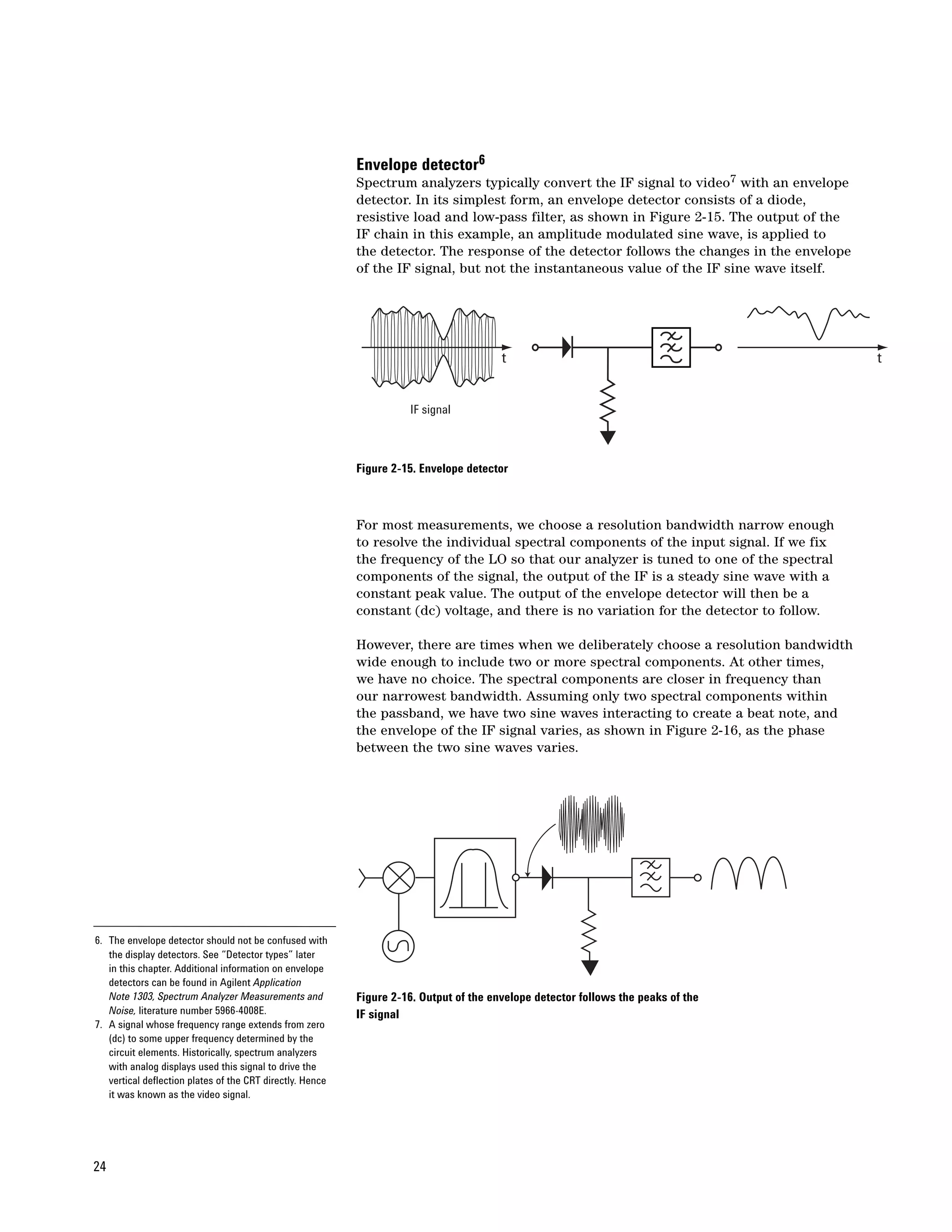
Envelope detector6
                                                           Spectrum analyzers typically convert the IF signal to video7 with an envelope
                                                           detector. In its simplest form, an envelope detector consists of a diode,
                                                           resistive load and low-pass filter, as shown in Figure 2-15. The output of the
                                                           IF chain in this example, an amplitude modulated sine wave, is applied to
                                                           the detector. The response of the detector follows the changes in the envelope
                                                           of the IF signal, but not the instantaneous value of the IF sine wave itself.


                                                                                        t                                                   t


                                                                     IF signal


                                                           Figure 2-15. Envelope detector


                                                           For most measurements, we choose a resolution bandwidth narrow enough
                                                           to resolve the individual spectral components of the input signal. If we fix
                                                           the frequency of the LO so that our analyzer is tuned to one of the spectral
                                                           components of the signal, the output of the IF is a steady sine wave with a
                                                           constant peak value. The output of the envelope detector will then be a
                                                           constant (dc) voltage, and there is no variation for the detector to follow.

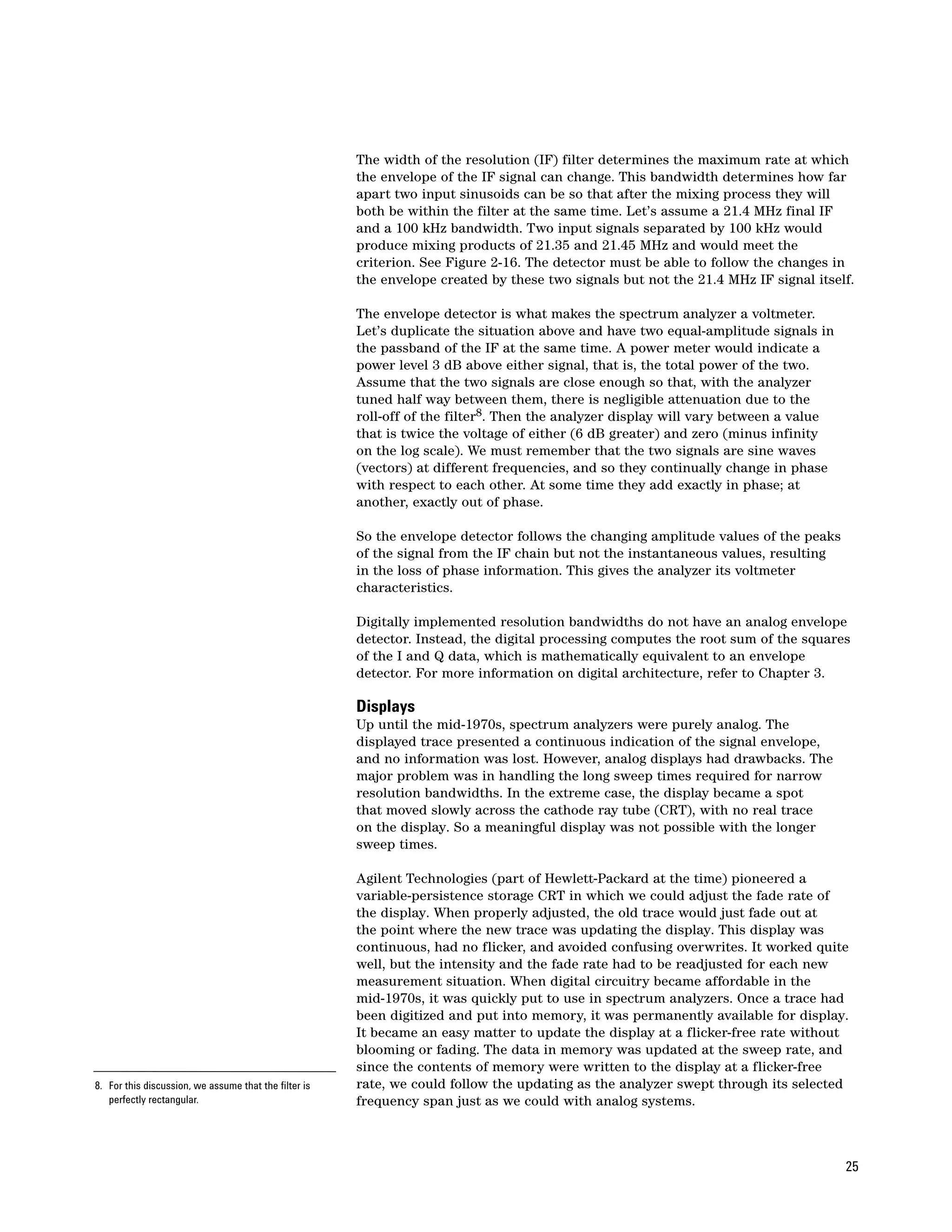
                                                           However, there are times when we deliberately choose a resolution bandwidth
                                                           wide enough to include two or more spectral components. At other times,
                                                           we have no choice. The spectral components are closer in frequency than
                                                           our narrowest bandwidth. Assuming only two spectral components within
                                                           the passband, we have two sine waves interacting to create a beat note, and
                                                           the envelope of the IF signal varies, as shown in Figure 2-16, as the phase
                                                           between the two sine waves varies.


6. The envelope detector should not be confused with
   the display detectors. See “Detector types” later
   in this chapter. Additional information on envelope
   detectors can be found in Agilent Application
   Note 1303, Spectrum Analyzer Measurements and           Figure 2-16. Output of the envelope detector follows the peaks of the
   Noise, literature number 5966-4008E.                    IF signal
7. A signal whose frequency range extends from zero
   (dc) to some upper frequency determined by the
   circuit elements. Historically, spectrum analyzers
   with analog displays used this signal to drive the
   vertical deflection plates of the CRT directly. Hence
   it was known as the video signal.


24
The width of the resolution (IF) filter determines the maximum rate at which
                                                       the envelope of the IF signal can change. This bandwidth determines how far
                                                       apart two input sinusoids can be so that after the mixing process they will
                                                       both be within the filter at the same time. Let’s assume a 21.4 MHz final IF
                                                       and a 100 kHz bandwidth. Two input signals separated by 100 kHz would
                                                       produce mixing products of 21.35 and 21.45 MHz and would meet the
                                                       criterion. See Figure 2-16. The detector must be able to follow the changes in
                                                       the envelope created by these two signals but not the 21.4 MHz IF signal itself.

                                                       The envelope detector is what makes the spectrum analyzer a voltmeter.
                                                       Let’s duplicate the situation above and have two equal-amplitude signals in
                                                       the passband of the IF at the same time. A power meter would indicate a
                                                       power level 3 dB above either signal, that is, the total power of the two.
                                                       Assume that the two signals are close enough so that, with the analyzer
                                                       tuned half way between them, there is negligible attenuation due to the
                                                       roll-off of the filter8. Then the analyzer display will vary between a value
                                                       that is twice the voltage of either (6 dB greater) and zero (minus infinity
                                                       on the log scale). We must remember that the two signals are sine waves
                                                       (vectors) at different frequencies, and so they continually change in phase
                                                       with respect to each other. At some time they add exactly in phase; at
                                                       another, exactly out of phase.

                                                       So the envelope detector follows the changing amplitude values of the peaks
                                                       of the signal from the IF chain but not the instantaneous values, resulting
                                                       in the loss of phase information. This gives the analyzer its voltmeter
                                                       characteristics.

                                                       Digitally implemented resolution bandwidths do not have an analog envelope
                                                       detector. Instead, the digital processing computes the root sum of the squares
                                                       of the I and Q data, which is mathematically equivalent to an envelope
                                                       detector. For more information on digital architecture, refer to Chapter 3.

                                                       Displays
                                                       Up until the mid-1970s, spectrum analyzers were purely analog. The
                                                       displayed trace presented a continuous indication of the signal envelope,
                                                       and no information was lost. However, analog displays had drawbacks. The
                                                       major problem was in handling the long sweep times required for narrow
                                                       resolution bandwidths. In the extreme case, the display became a spot
                                                       that moved slowly across the cathode ray tube (CRT), with no real trace
                                                       on the display. So a meaningful display was not possible with the longer
                                                       sweep times.

                                                       Agilent Technologies (part of Hewlett-Packard at the time) pioneered a
                                                       variable-persistence storage CRT in which we could adjust the fade rate of
                                                       the display. When properly adjusted, the old trace would just fade out at
                                                       the point where the new trace was updating the display. This display was
                                                       continuous, had no flicker, and avoided confusing overwrites. It worked quite
                                                       well, but the intensity and the fade rate had to be readjusted for each new
                                                       measurement situation. When digital circuitry became affordable in the
                                                       mid-1970s, it was quickly put to use in spectrum analyzers. Once a trace had
                                                       been digitized and put into memory, it was permanently available for display.
                                                       It became an easy matter to update the display at a flicker-free rate without
                                                       blooming or fading. The data in memory was updated at the sweep rate, and
                                                       since the contents of memory were written to the display at a flicker-free
8. For this discussion, we assume that the filter is   rate, we could follow the updating as the analyzer swept through its selected
   perfectly rectangular.                              frequency span just as we could with analog systems.


                                                                                                                                      25
Detector types
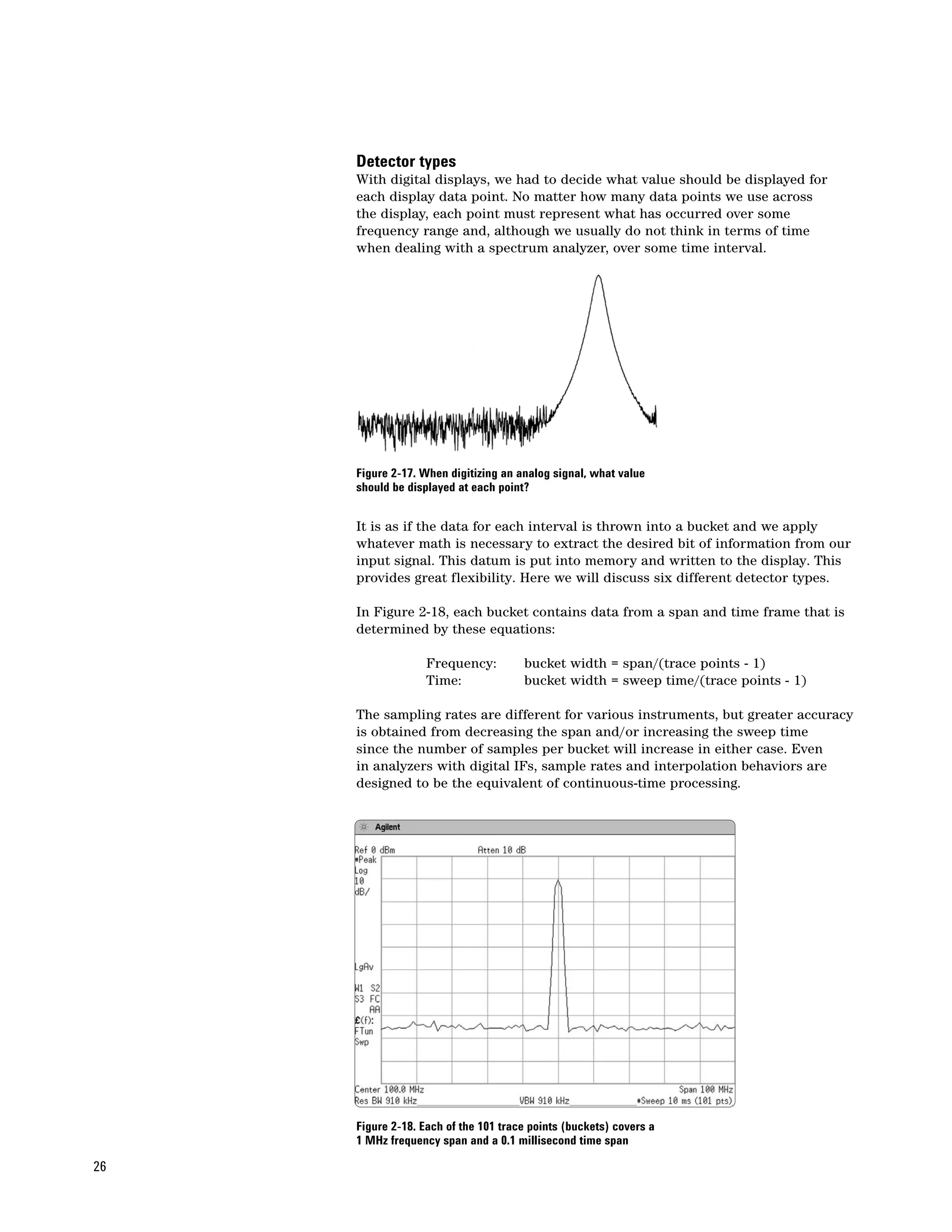
     With digital displays, we had to decide what value should be displayed for
     each display data point. No matter how many data points we use across
     the display, each point must represent what has occurred over some
     frequency range and, although we usually do not think in terms of time
     when dealing with a spectrum analyzer, over some time interval.


     Figure 2-17. When digitizing an analog signal, what value
     should be displayed at each point?


     It is as if the data for each interval is thrown into a bucket and we apply
     whatever math is necessary to extract the desired bit of information from our
     input signal. This datum is put into memory and written to the display. This
     provides great flexibility. Here we will discuss six different detector types.

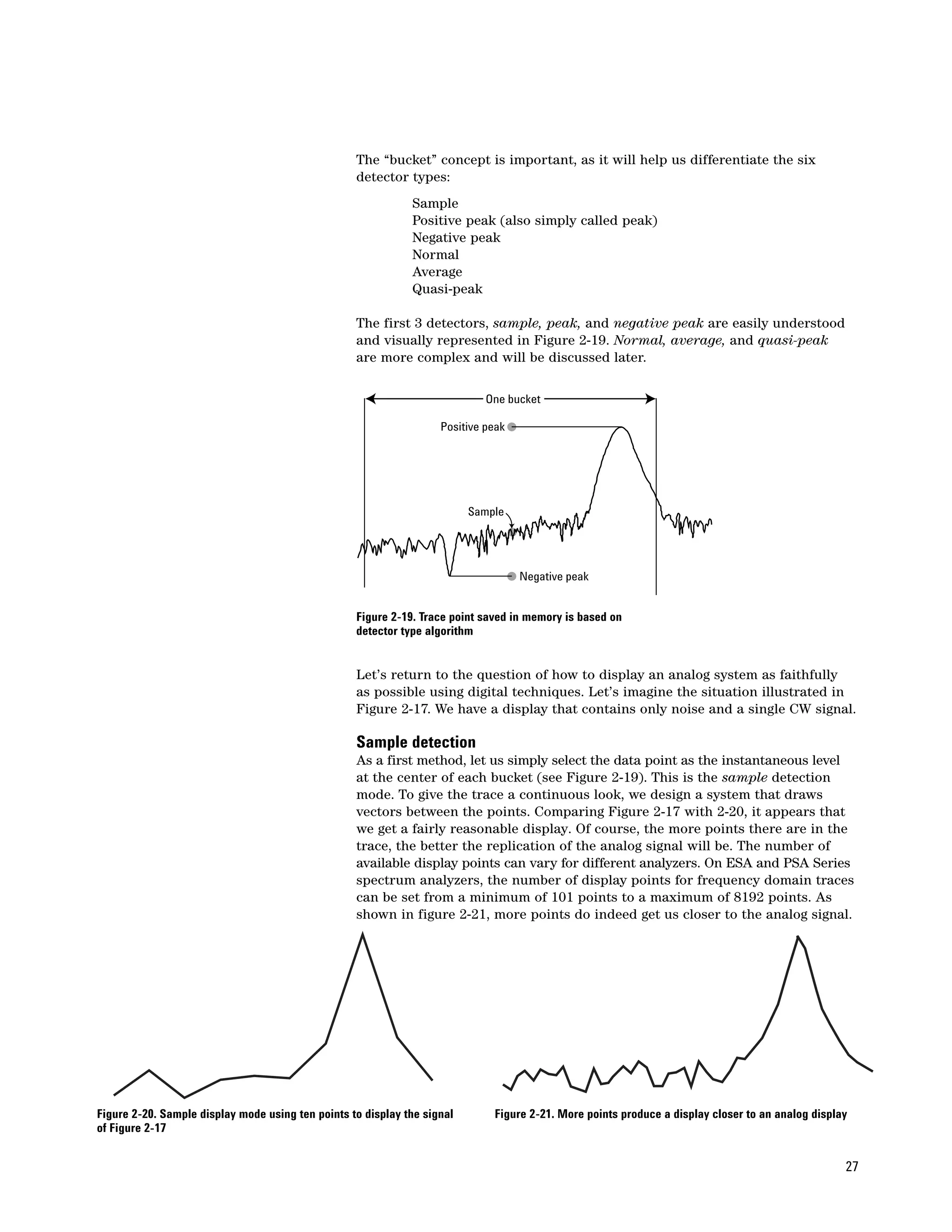
     In Figure 2-18, each bucket contains data from a span and time frame that is
     determined by these equations:

                   Frequency:         bucket width = span/(trace points - 1)
                   Time:              bucket width = sweep time/(trace points - 1)

     The sampling rates are different for various instruments, but greater accuracy
     is obtained from decreasing the span and/or increasing the sweep time
     since the number of samples per bucket will increase in either case. Even
     in analyzers with digital IFs, sample rates and interpolation behaviors are
     designed to be the equivalent of continuous-time processing.


     Figure 2-18. Each of the 101 trace points (buckets) covers a
     1 MHz frequency span and a 0.1 millisecond time span

26
The “bucket” concept is important, as it will help us differentiate the six
                                                   detector types:
                                                              Sample
                                                              Positive peak (also simply called peak)
                                                              Negative peak
                                                              Normal
                                                              Average
                                                              Quasi-peak

                                                   The first 3 detectors, sample, peak, and negative peak are easily understood
                                                   and visually represented in Figure 2-19. Normal, average, and quasi-peak
                                                   are more complex and will be discussed later.

                                                                             One bucket

                                                                    Positive peak


                                                                          Sample


                                                                                    Negative peak


                                                   Figure 2-19. Trace point saved in memory is based on
                                                   detector type algorithm


                                                   Let’s return to the question of how to display an analog system as faithfully
                                                   as possible using digital techniques. Let’s imagine the situation illustrated in
                                                   Figure 2-17. We have a display that contains only noise and a single CW signal.

                                                   Sample detection
                                                   As a first method, let us simply select the data point as the instantaneous level
                                                   at the center of each bucket (see Figure 2-19). This is the sample detection
                                                   mode. To give the trace a continuous look, we design a system that draws
                                                   vectors between the points. Comparing Figure 2-17 with 2-20, it appears that
                                                   we get a fairly reasonable display. Of course, the more points there are in the
                                                   trace, the better the replication of the analog signal will be. The number of
                                                   available display points can vary for different analyzers. On ESA and PSA Series
                                                   spectrum analyzers, the number of display points for frequency domain traces
                                                   can be set from a minimum of 101 points to a maximum of 8192 points. As
                                                   shown in figure 2-21, more points do indeed get us closer to the analog signal.


Figure 2-20. Sample display mode using ten points to display the signal       Figure 2-21. More points produce a display closer to an analog display
of Figure 2-17


                                                                                                                                                   27
While the sample detection mode does a good job of indicating the randomness
     of noise, it is not a good mode for analyzing sinusoidal signals. If we were
     to look at a 100 MHz comb on an Agilent ESA E4407B, we might set it to
     span from 0 to 26.5 GHz. Even with 1,001 display points, each display point
     represents a span (bucket) of 26.5 MHz. This is far wider than the maximum
     5 MHz resolution bandwidth.

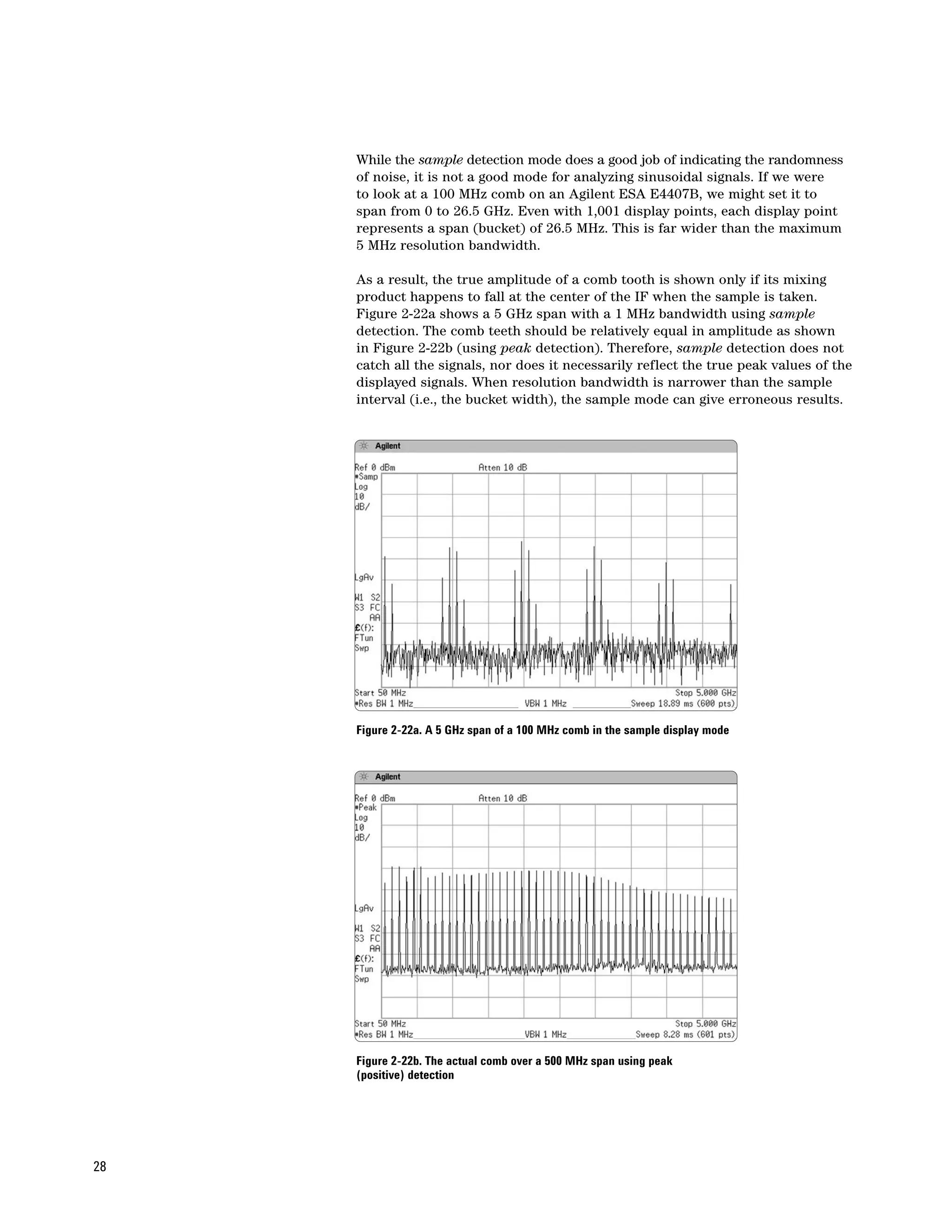
     As a result, the true amplitude of a comb tooth is shown only if its mixing
     product happens to fall at the center of the IF when the sample is taken.
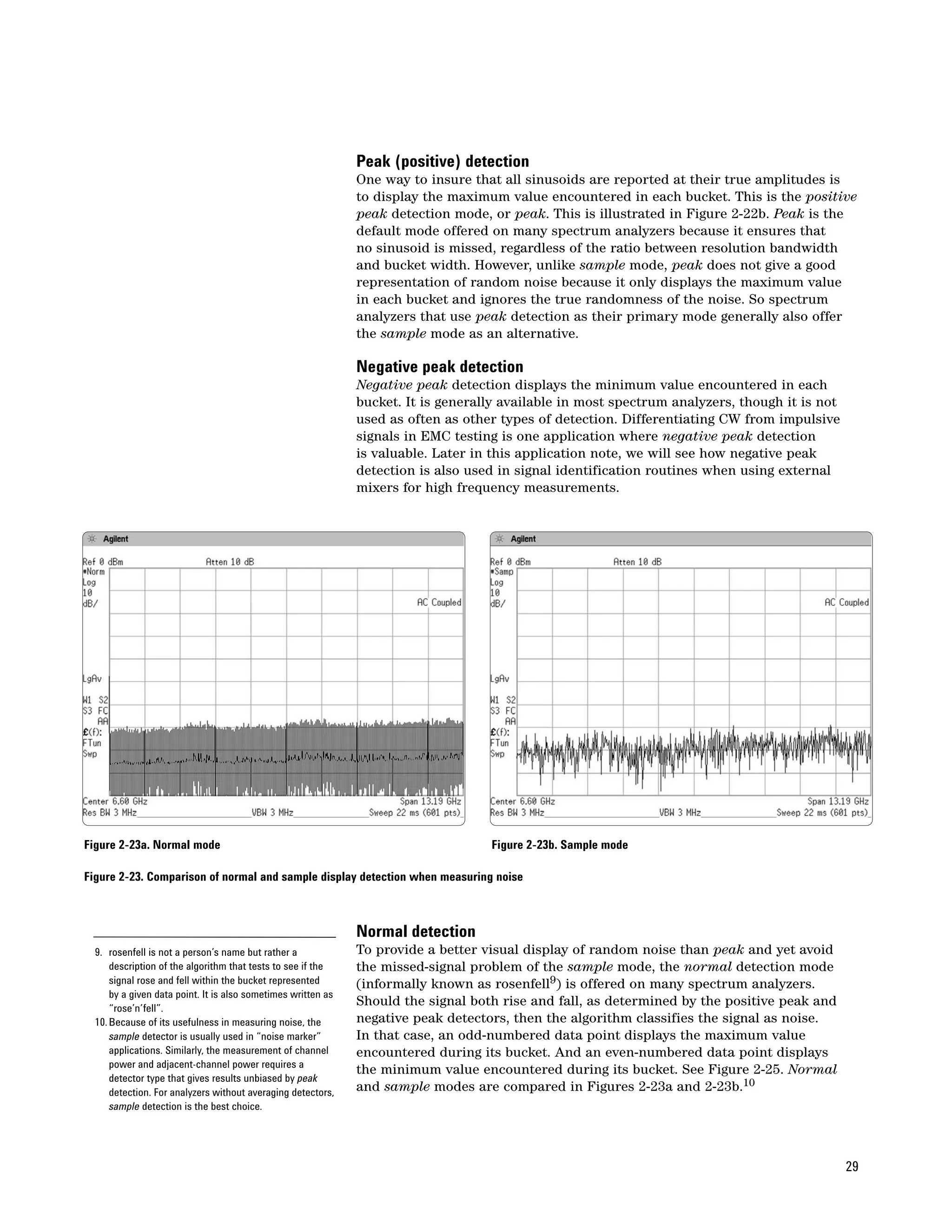
     Figure 2-22a shows a 5 GHz span with a 1 MHz bandwidth using sample
     detection. The comb teeth should be relatively equal in amplitude as shown
     in Figure 2-22b (using peak detection). Therefore, sample detection does not
     catch all the signals, nor does it necessarily reflect the true peak values of the
     displayed signals. When resolution bandwidth is narrower than the sample
     interval (i.e., the bucket width), the sample mode can give erroneous results.


     Figure 2-22a. A 5 GHz span of a 100 MHz comb in the sample display mode


     Figure 2-22b. The actual comb over a 500 MHz span using peak
     (positive) detection


28
Peak (positive) detection
                                                               One way to insure that all sinusoids are reported at their true amplitudes is
                                                               to display the maximum value encountered in each bucket. This is the positive
                                                               peak detection mode, or peak. This is illustrated in Figure 2-22b. Peak is the
                                                               default mode offered on many spectrum analyzers because it ensures that
                                                               no sinusoid is missed, regardless of the ratio between resolution bandwidth
                                                               and bucket width. However, unlike sample mode, peak does not give a good
                                                               representation of random noise because it only displays the maximum value
                                                               in each bucket and ignores the true randomness of the noise. So spectrum
                                                               analyzers that use peak detection as their primary mode generally also offer
                                                               the sample mode as an alternative.

                                                               Negative peak detection
                                                               Negative peak detection displays the minimum value encountered in each
                                                               bucket. It is generally available in most spectrum analyzers, though it is not
                                                               used as often as other types of detection. Differentiating CW from impulsive
                                                               signals in EMC testing is one application where negative peak detection
                                                               is valuable. Later in this application note, we will see how negative peak
                                                               detection is also used in signal identification routines when using external
                                                               mixers for high frequency measurements.


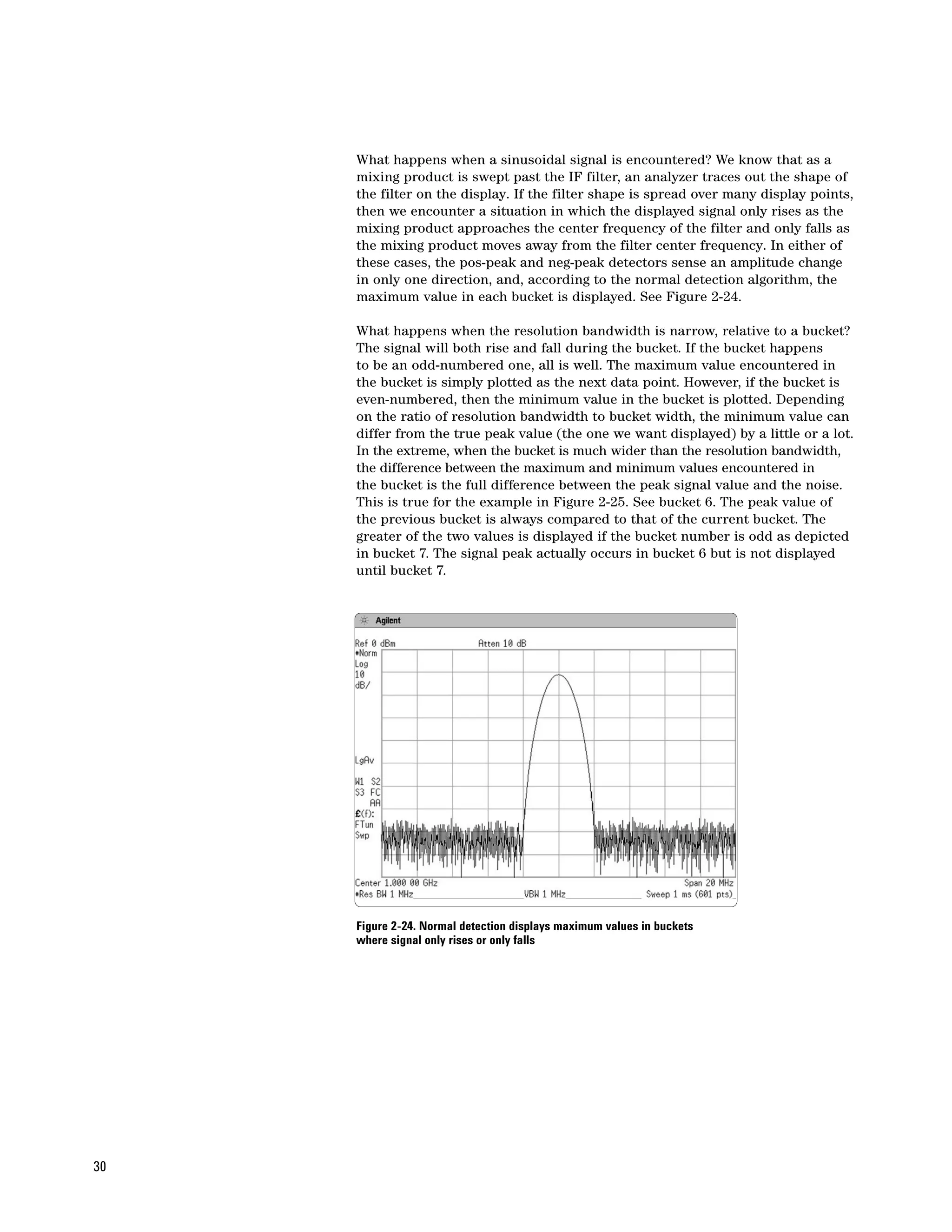
Figure 2-23a. Normal mode                                                           Figure 2-23b. Sample mode

Figure 2-23. Comparison of normal and sample display detection when measuring noise


                                                               Normal detection
  9. rosenfell is not a person’s name but rather a             To provide a better visual display of random noise than peak and yet avoid
      description of the algorithm that tests to see if the    the missed-signal problem of the sample mode, the normal detection mode
      signal rose and fell within the bucket represented       (informally known as rosenfell9) is offered on many spectrum analyzers.
      by a given data point. It is also sometimes written as
      “rose’n’fell”.
                                                               Should the signal both rise and fall, as determined by the positive peak and
  10. Because of its usefulness in measuring noise, the        negative peak detectors, then the algorithm classifies the signal as noise.
      sample detector is usually used in “noise marker”        In that case, an odd-numbered data point displays the maximum value
      applications. Similarly, the measurement of channel      encountered during its bucket. And an even-numbered data point displays
      power and adjacent-channel power requires a
                                                               the minimum value encountered during its bucket. See Figure 2-25. Normal
      detector type that gives results unbiased by peak
      detection. For analyzers without averaging detectors,    and sample modes are compared in Figures 2-23a and 2-23b.10
      sample detection is the best choice.


                                                                                                                                                29
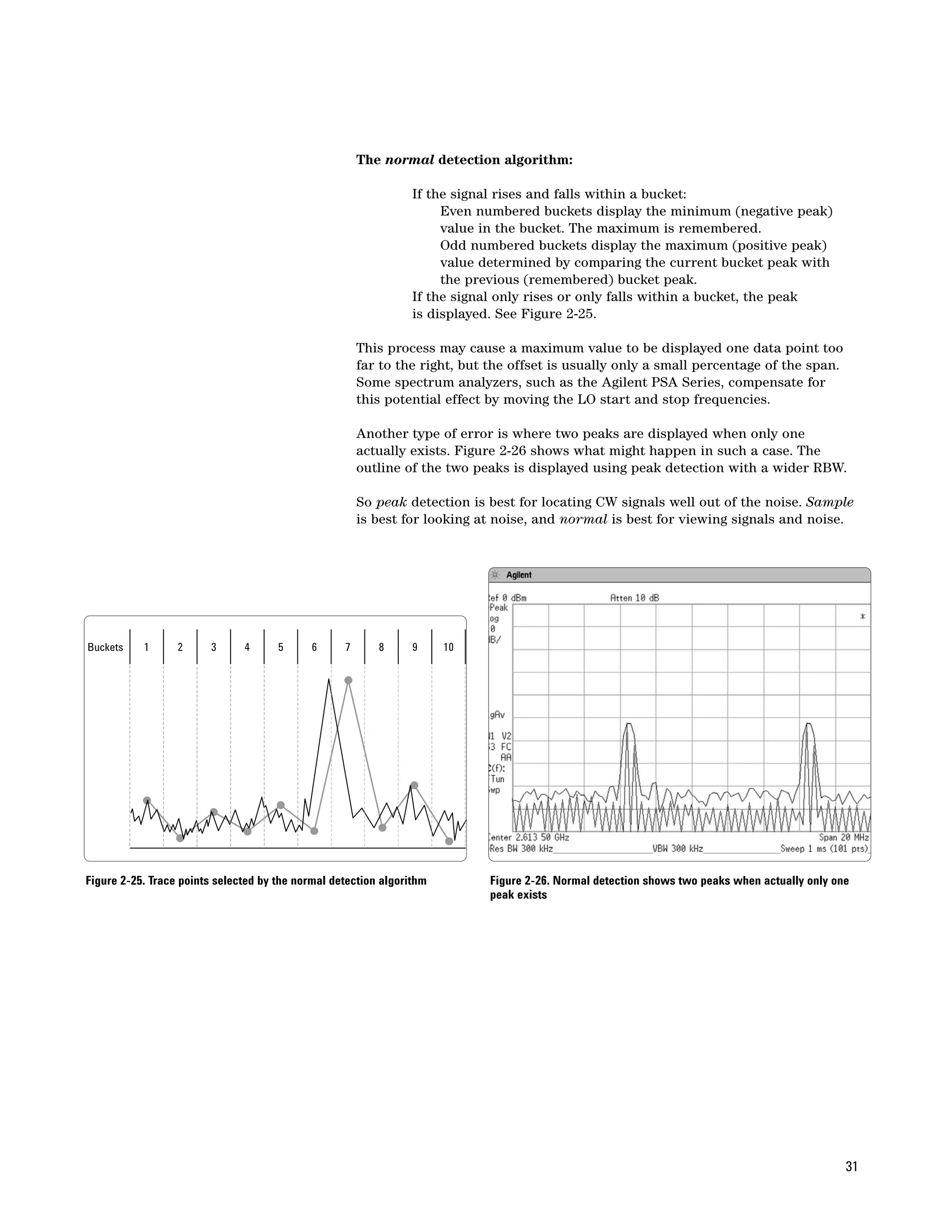
What happens when a sinusoidal signal is encountered? We know that as a
     mixing product is swept past the IF filter, an analyzer traces out the shape of
     the filter on the display. If the filter shape is spread over many display points,
     then we encounter a situation in which the displayed signal only rises as the
     mixing product approaches the center frequency of the filter and only falls as
     the mixing product moves away from the filter center frequency. In either of
     these cases, the pos-peak and neg-peak detectors sense an amplitude change
     in only one direction, and, according to the normal detection algorithm, the
     maximum value in each bucket is displayed. See Figure 2-24.

     What happens when the resolution bandwidth is narrow, relative to a bucket?
     The signal will both rise and fall during the bucket. If the bucket happens
     to be an odd-numbered one, all is well. The maximum value encountered in
     the bucket is simply plotted as the next data point. However, if the bucket is
     even-numbered, then the minimum value in the bucket is plotted. Depending
     on the ratio of resolution bandwidth to bucket width, the minimum value can
     differ from the true peak value (the one we want displayed) by a little or a lot.
     In the extreme, when the bucket is much wider than the resolution bandwidth,
     the difference between the maximum and minimum values encountered in
     the bucket is the full difference between the peak signal value and the noise.
     This is true for the example in Figure 2-25. See bucket 6. The peak value of
     the previous bucket is always compared to that of the current bucket. The
     greater of the two values is displayed if the bucket number is odd as depicted
     in bucket 7. The signal peak actually occurs in bucket 6 but is not displayed
     until bucket 7.


     Figure 2-24. Normal detection displays maximum values in buckets
     where signal only rises or only falls


30
The normal detection algorithm:

                                                                 If the signal rises and falls within a bucket:
                                                                      Even numbered buckets display the minimum (negative peak)
                                                                      value in the bucket. The maximum is remembered.
                                                                      Odd numbered buckets display the maximum (positive peak)
                                                                      value determined by comparing the current bucket peak with
                                                                      the previous (remembered) bucket peak.
                                                                 If the signal only rises or only falls within a bucket, the peak
                                                                 is displayed. See Figure 2-25.

                                                       This process may cause a maximum value to be displayed one data point too
                                                       far to the right, but the offset is usually only a small percentage of the span.
                                                       Some spectrum analyzers, such as the Agilent PSA Series, compensate for
                                                       this potential effect by moving the LO start and stop frequencies.

                                                       Another type of error is where two peaks are displayed when only one
                                                       actually exists. Figure 2-26 shows what might happen in such a case. The
                                                       outline of the two peaks is displayed using peak detection with a wider RBW.

                                                       So peak detection is best for locating CW signals well out of the noise. Sample
                                                       is best for looking at noise, and normal is best for viewing signals and noise.


Buckets    1      2      3     4      5      6     7      8      9     10


Figure 2-25. Trace points selected by the normal detection algorithm        Figure 2-26. Normal detection shows two peaks when actually only one
                                                                            peak exists


                                                                                                                                               31
Average detection
                                                         Although modern digital modulation schemes have noise-like characteristics,
                                                         sample detection does not always provide us with the information we need.
                                                         For instance, when taking a channel power measurement on a W-CDMA
                                                         signal, integration of the rms values is required. This measurement involves
                                                         summing power across a range of analyzer frequency buckets. Sample
                                                         detection does not provide this.

                                                         While spectrum analyzers typically collect amplitude data many times in
                                                         each bucket, sample detection keeps only one of those values and throws
                                                         away the rest. On the other hand, an averaging detector uses all the data
                                                         values collected within the time (and frequency) interval of a bucket. Once
                                                         we have digitized the data, and knowing the circumstances under which
                                                         they were digitized, we can manipulate the data in a variety of ways to
                                                         achieve the desired results.

                                                         Some spectrum analyzers refer to the averaging detector as an rms detector
                                                         when it averages power (based on the root mean square of voltage). Agilent
                                                         PSA and ESA Series analyzers have an average detector that can average
                                                         the power, voltage, or log of the signal by including a separate control to
                                                         select the averaging type:

                                                         Power (rms) averaging averages rms levels, by taking the square root of the
                                                         sum of the squares of the voltage data measured during the bucket interval,
                                                         divided by the characteristic input impedance of the spectrum analyzer,
                                                         normally 50 ohms. Power averaging calculates the true average power, and
                                                         is best for measuring the power of complex signals.

                                                         Voltage averaging averages the linear voltage data of the envelope signal
                                                         measured during the bucket interval. It is often used in EMI testing for
                                                         measuring narrowband signals (this will be discussed further in the next
                                                         section). Voltage averaging is also useful for observing rise and fall behavior
                                                         of AM or pulse-modulated signals such as radar and TDMA transmitters.

                                                         Log-power (video) averaging averages the logarithmic amplitude values (dB)
                                                         of the envelope signal measured during the bucket interval. Log power
                                                         averaging is best for observing sinusoidal signals, especially those near
                                                         noise.11

                                                         Thus, using the average detector with the averaging type set to power provides
                                                         true average power based upon rms voltage, while the average detector with
                                                         the averaging type set to voltage acts as a general-purpose average detector.
                                                         The average detector with the averaging type set to log has no other equivalent.

                                                         Average detection is an improvement over using sample detection for the
                                                         determination of power. Sample detection requires multiple sweeps to collect
                                                         enough data points to give us accurate average power information. Average
                                                         detection changes channel power measurements from being a summation
                                                         over a range of buckets into integration over the time interval representing
                                                         a range of frequencies in a swept analyzer. In a fast Fourier transfer (FFT)
                                                         analyzer12, the summation used for channel power measurements changes
11. See Chapter 5, “Sensitivity and Noise.”              from being a summation over display buckets to being a summation over
12. Refer to Chapter 3 for more information on the FFT   FFT bins. In both swept and FFT cases, the integration captures all the power
    analyzers. They perform math computations on         information available, rather than just that which is sampled by the sample
    many buckets simultaneously, which improves the
    measurement speed.
                                                         detector. As a result, the average detector has a lower variance result for the
                                                         same measurement time. In swept analysis, it also allows the convenience of
                                                         reducing variance simply by extending the sweep time.


32
EMI detectors: average and quasi-peak detection
                                                       An important application of average detection is for characterizing devices
                                                       for electromagnetic interference (EMI). In this case, voltage averaging, as
                                                       described in the previous section, is used for measurement of narrowband
                                                       signals that might be masked by the presence of broadband impulsive noise.
                                                       The average detection used in EMI instruments takes an envelope-detected
                                                       signal and passes it through a low-pass filter with a bandwidth much less than
                                                       the RBW. The filter integrates (averages) the higher frequency components
                                                       such as noise. To perform this type of detection in an older spectrum analyzer
                                                       that doesn’t have a built-in voltage averaging detector function, set the
                                                       analyzer in linear mode and select a video filter with a cut-off frequency
                                                       below the lowest PRF of the measured signal.

                                                       Quasi-peak detectors (QPD) are also used in EMI testing. QPD is a weighted
                                                       form of peak detection. The measured value of the QPD drops as the repetition
                                                       rate of the measured signal decreases. Thus, an impulsive signal with a given
                                                       peak amplitude and a 10 Hz pulse repetition rate will have a lower quasi-peak
                                                       value than a signal with the same peak amplitude but having a 1 kHz repetition
                                                       rate. This signal weighting is accomplished by circuitry with specific charge,
                                                       discharge, and display time constants defined by CISPR13.

                                                       QPD is a way of measuring and quantifying the “annoyance factor” of a signal.
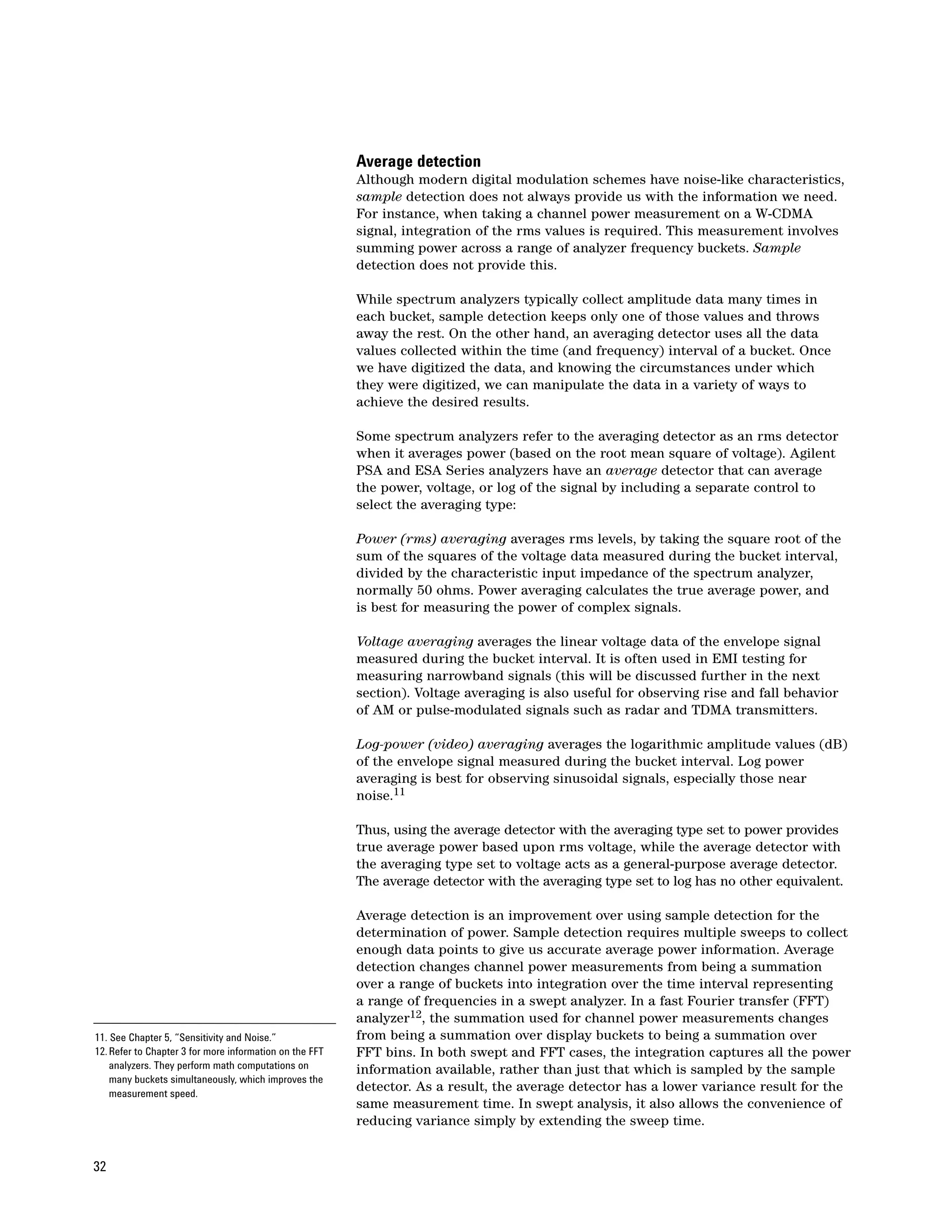
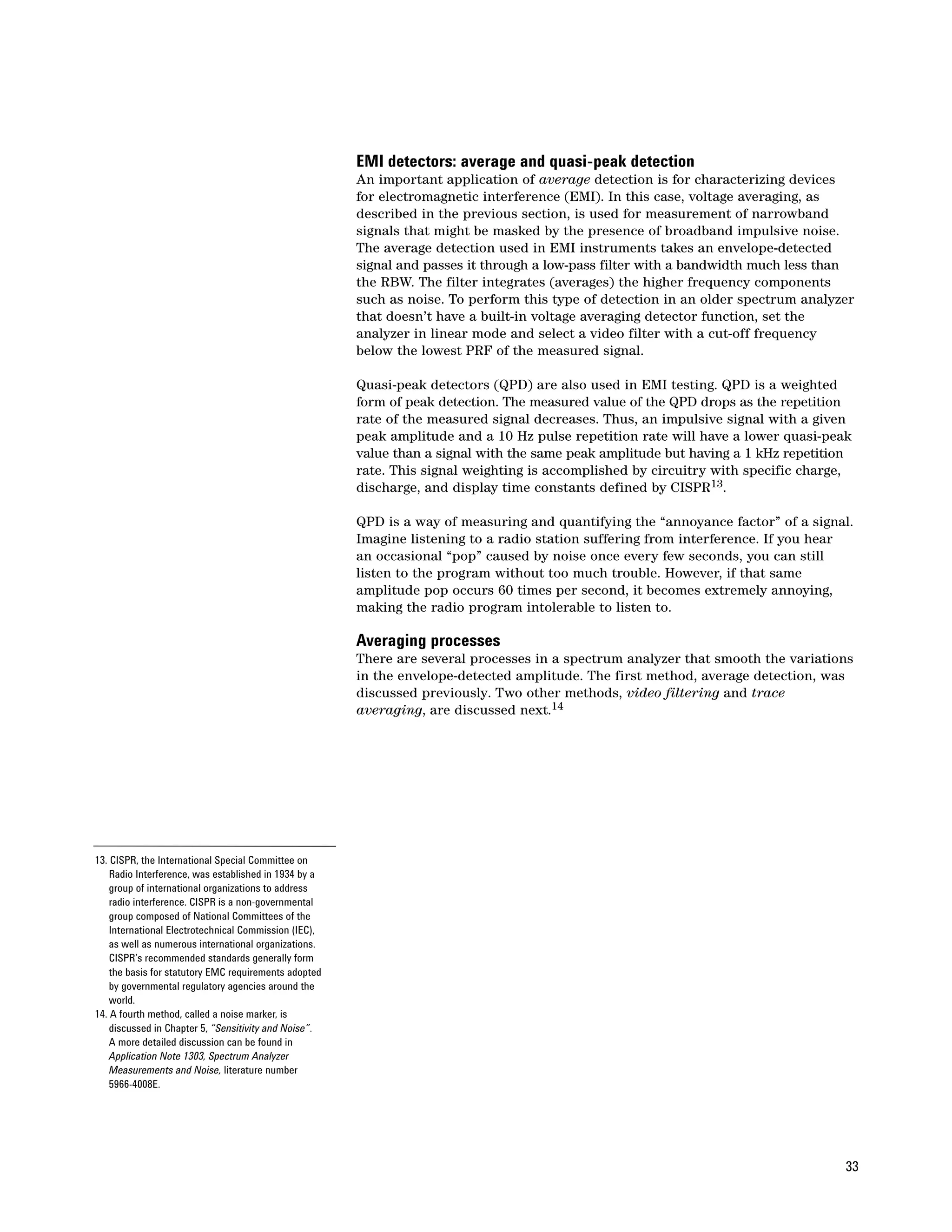
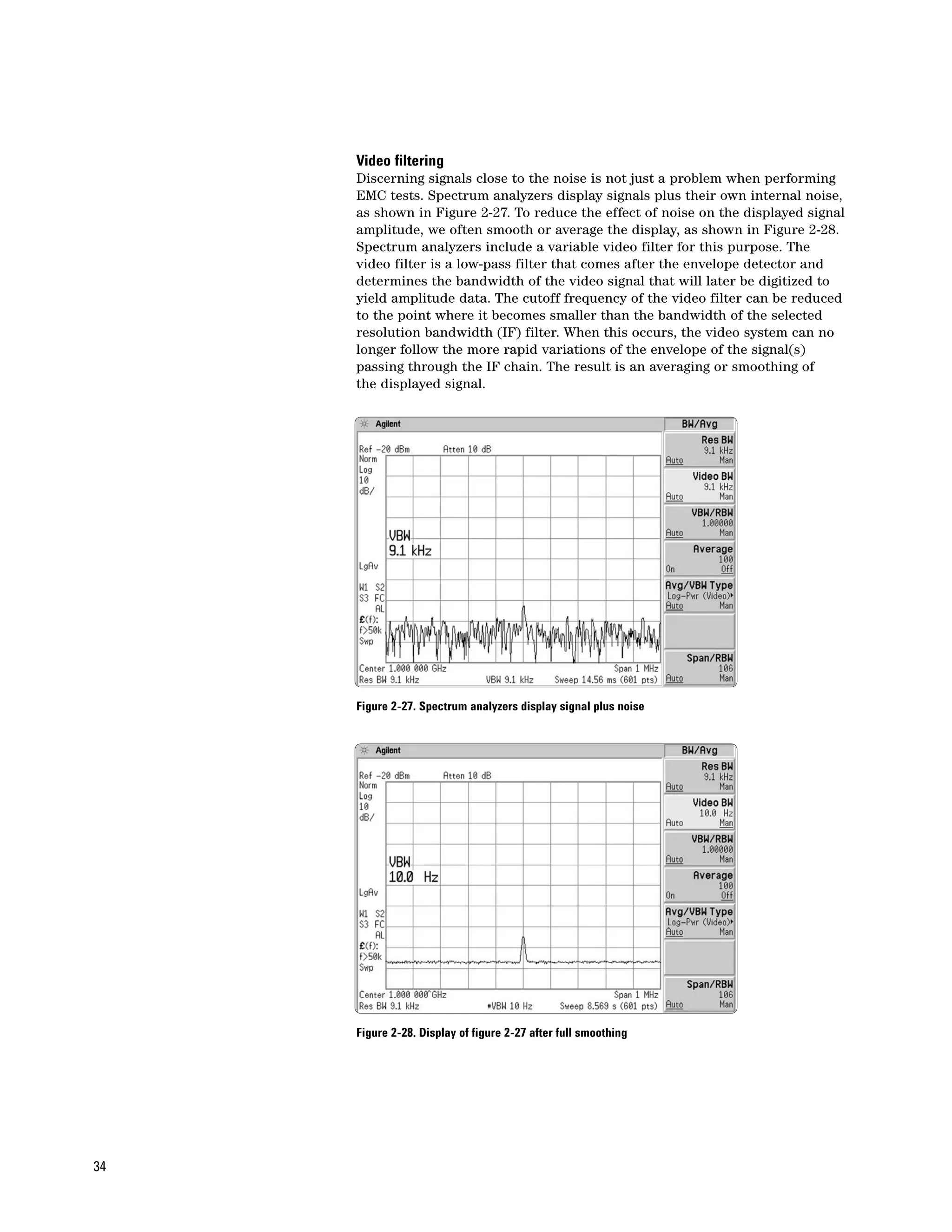
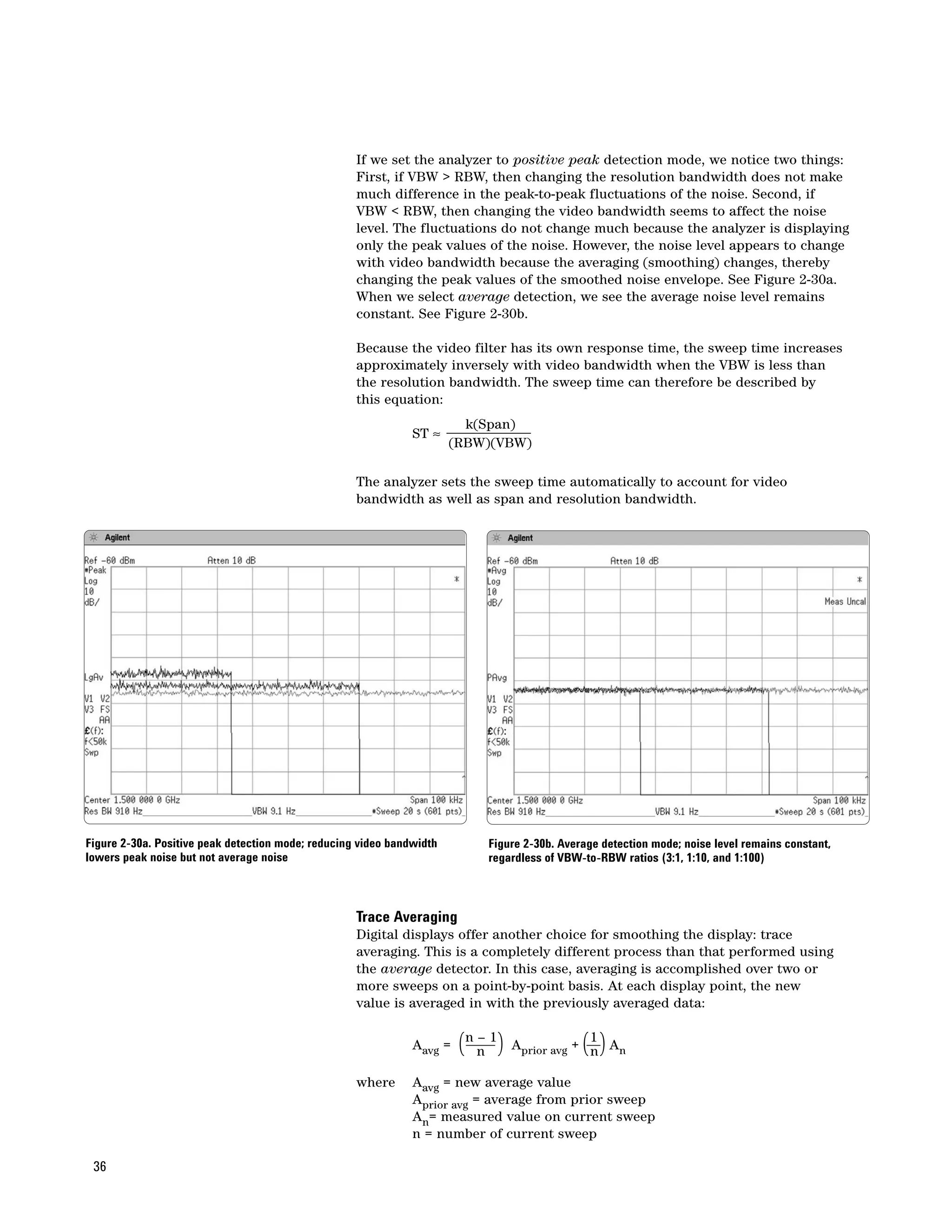
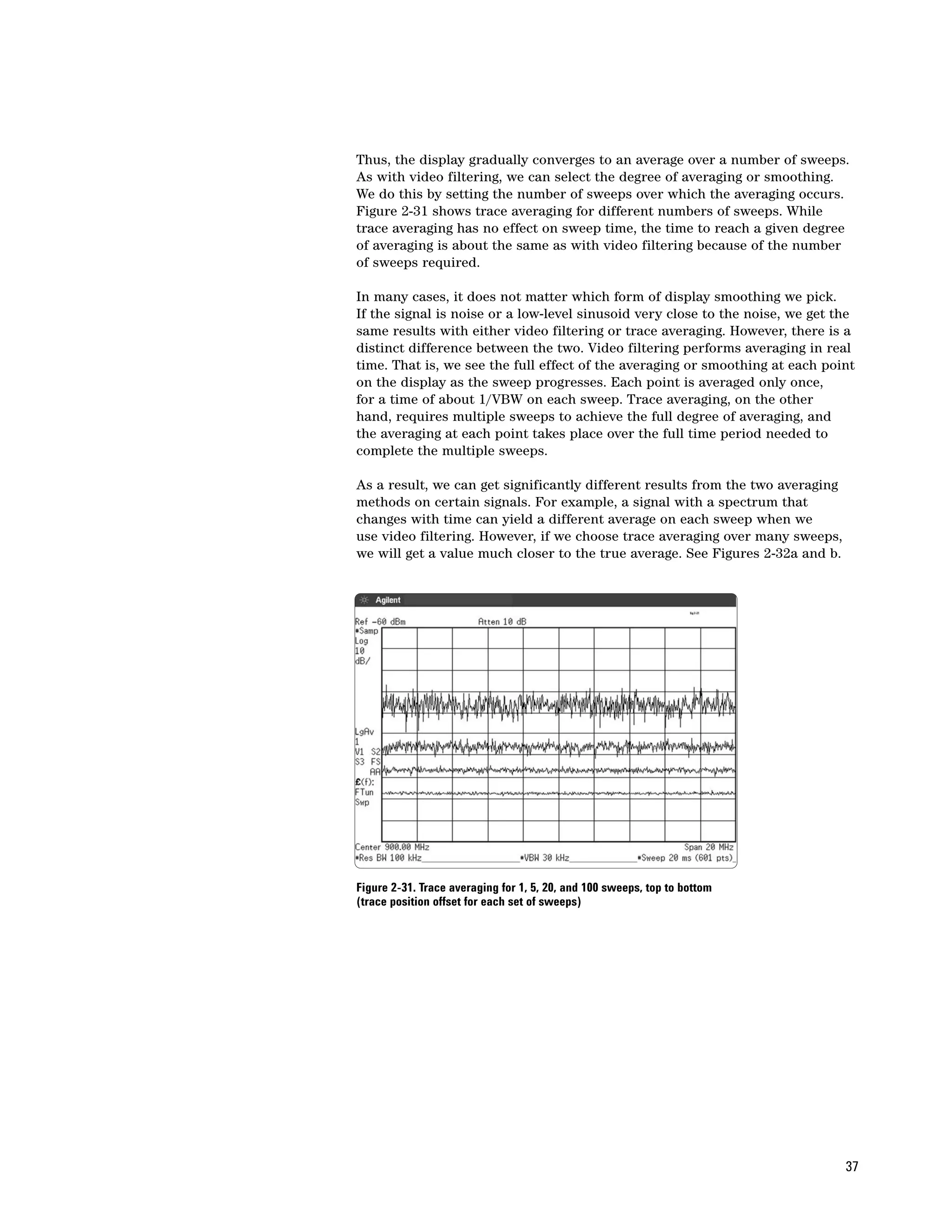
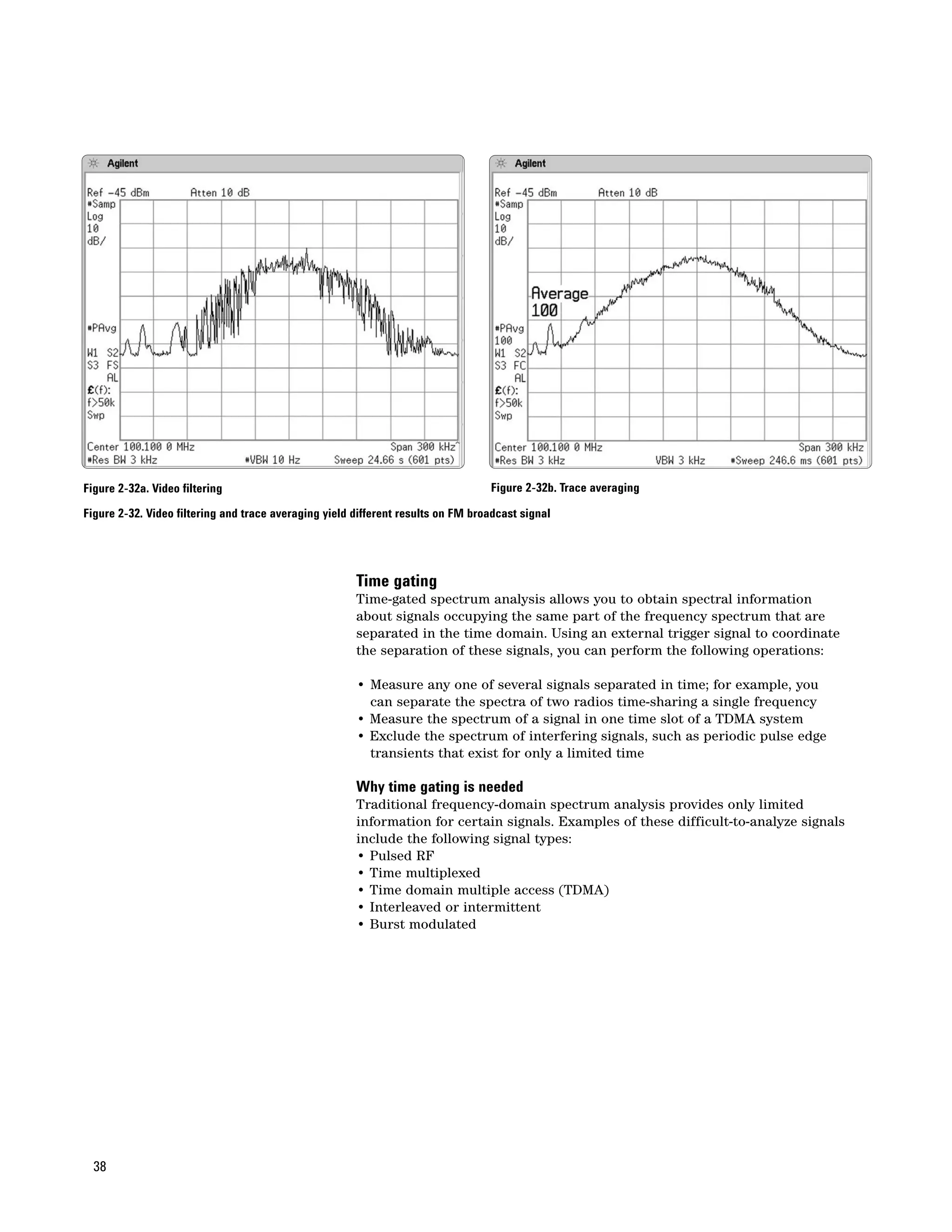
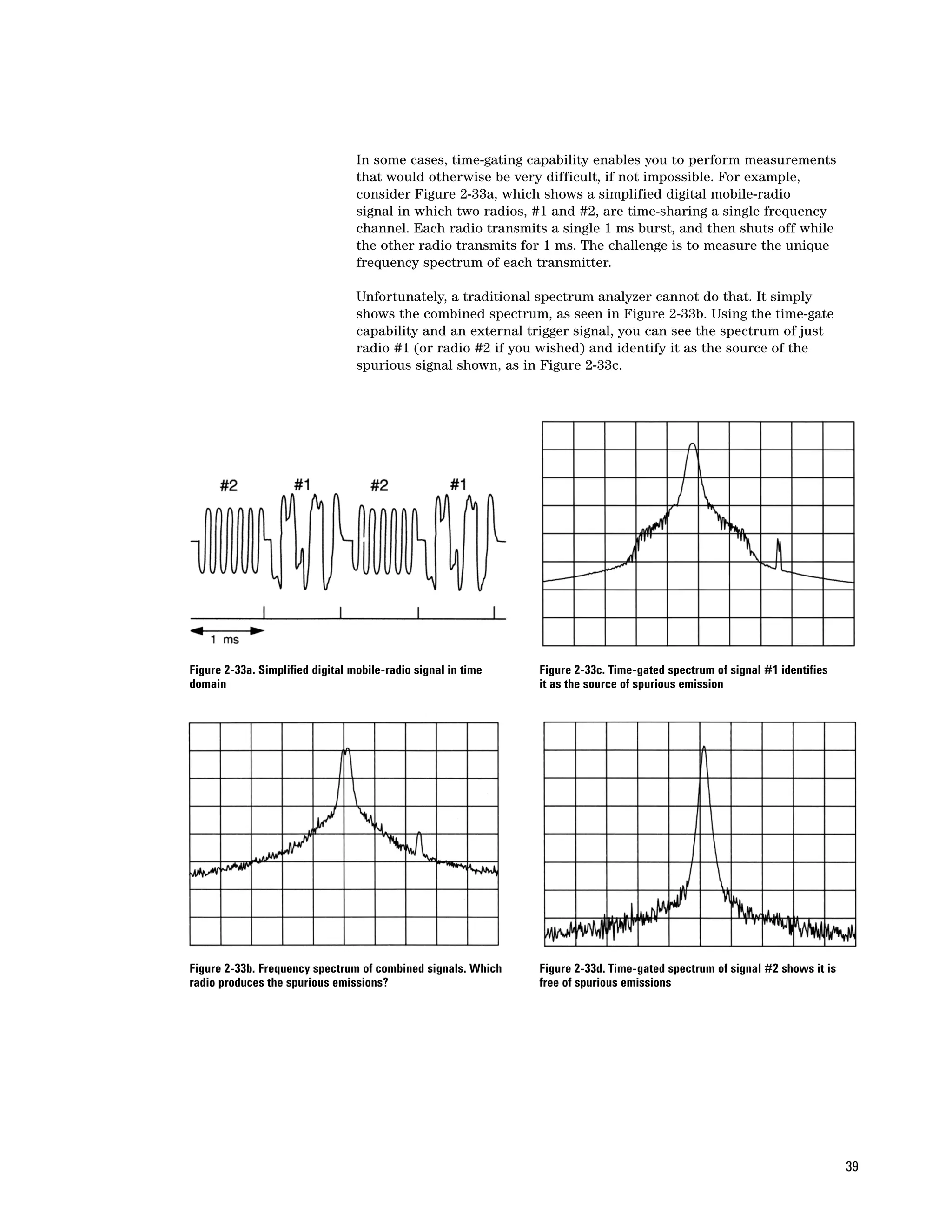
                                                       Imagine listening to a radio station suffering from interference. If you hear
                                                       an occasional “pop” caused by noise once every few seconds, you can still
                                                       listen to the program without too much trouble. However, if that same
                                                       amplitude pop occurs 60 times per second, it becomes extremely annoying,
                                                       making the radio program intolerable to listen to.

                                                       Averaging processes
                                                       There are several processes in a spectrum analyzer that smooth the variations
                                                       in the envelope-detected amplitude. The first method, average detection, was
                                                       discussed previously. Two other methods, video filtering and trace
                                                       averaging, are discussed next.14


13. CISPR, the International Special Committee on
    Radio Interference, was established in 1934 by a
    group of international organizations to address
    radio interference. CISPR is a non-governmental
    group composed of National Committees of the
    International Electrotechnical Commission (IEC),
    as well as numerous international organizations.
    CISPR’s recommended standards generally form
    the basis for statutory EMC requirements adopted
    by governmental regulatory agencies around the
    world.
14. A fourth method, called a noise marker, is
    discussed in Chapter 5, “Sensitivity and Noise”.
    A more detailed discussion can be found in
    Application Note 1303, Spectrum Analyzer
    Measurements and Noise, literature number
    5966-4008E.


                                                                                                                                    33
Video filtering
     Discerning signals close to the noise is not just a problem when performing
     EMC tests. Spectrum analyzers display signals plus their own internal noise,
     as shown in Figure 2-27. To reduce the effect of noise on the displayed signal
     amplitude, we often smooth or average the display, as shown in Figure 2-28.
     Spectrum analyzers include a variable video filter for this purpose. The
     video filter is a low-pass filter that comes after the envelope detector and
     determines the bandwidth of the video signal that will later be digitized to
     yield amplitude data. The cutoff frequency of the video filter can be reduced
     to the point where it becomes smaller than the bandwidth of the selected
     resolution bandwidth (IF) filter. When this occurs, the video system can no
     longer follow the more rapid variations of the envelope of the signal(s)
     passing through the IF chain. The result is an averaging or smoothing of
     the displayed signal.


     Figure 2-27. Spectrum analyzers display signal plus noise


     Figure 2-28. Display of figure 2-27 after full smoothing


34
The effect is most noticeable in measuring noise, particularly when a wide
resolution bandwidth is used. As we reduce the video bandwidth, the peak-
to-peak variations of the noise are reduced. As Figure 2-29 shows, the degree
of reduction (degree of averaging or smoothing) is a function of the ratio of
the video to resolution bandwidths. At ratios of 0.01 or less, the smoothing
is very good. At higher ratios, the smoothing is not so good. The video filter
does not affect any part of the trace that is already smooth (for example,
a sinusoid displayed well out of the noise).


Figure 2-29. Smoothing effect of VBW-to-RBW ratios of 3:1, 1:10, and 1:100


                                                                             35
If we set the analyzer to positive peak detection mode, we notice two things:
                                                    First, if VBW > RBW, then changing the resolution bandwidth does not make
                                                    much difference in the peak-to-peak fluctuations of the noise. Second, if
                                                    VBW < RBW, then changing the video bandwidth seems to affect the noise
                                                    level. The fluctuations do not change much because the analyzer is displaying
                                                    only the peak values of the noise. However, the noise level appears to change
                                                    with video bandwidth because the averaging (smoothing) changes, thereby
                                                    changing the peak values of the smoothed noise envelope. See Figure 2-30a.
                                                    When we select average detection, we see the average noise level remains
                                                    constant. See Figure 2-30b.

                                                    Because the video filter has its own response time, the sweep time increases
                                                    approximately inversely with video bandwidth when the VBW is less than
                                                    the resolution bandwidth. The sweep time can therefore be described by
                                                    this equation:
                                                                         k(Span)
                                                               ST ≈
                                                                       (RBW)(VBW)

                                                    The analyzer sets the sweep time automatically to account for video
                                                    bandwidth as well as span and resolution bandwidth.


Figure 2-30a. Positive peak detection mode; reducing video bandwidth        Figure 2-30b. Average detection mode; noise level remains constant,
lowers peak noise but not average noise                                     regardless of VBW-to-RBW ratios (3:1, 1:10, and 1:100)


                                                    Trace Averaging
                                                    Digital displays offer another choice for smoothing the display: trace
                                                    averaging. This is a completely different process than that performed using
                                                    the average detector. In this case, averaging is accomplished over two or
                                                    more sweeps on a point-by-point basis. At each display point, the new
                                                    value is averaged in with the previously averaged data:


                                                               Aavg =   (n n 1) A
                                                                           –
                                                                                  prior avg    ( )
                                                                                                1
                                                                                              + n An

                                                    where      Aavg = new average value
                                                               Aprior avg = average from prior sweep
                                                               An= measured value on current sweep
                                                               n = number of current sweep

 36
Thus, the display gradually converges to an average over a number of sweeps.
As with video filtering, we can select the degree of averaging or smoothing.
We do this by setting the number of sweeps over which the averaging occurs.
Figure 2-31 shows trace averaging for different numbers of sweeps. While
trace averaging has no effect on sweep time, the time to reach a given degree
of averaging is about the same as with video filtering because of the number
of sweeps required.

In many cases, it does not matter which form of display smoothing we pick.
If the signal is noise or a low-level sinusoid very close to the noise, we get the
same results with either video filtering or trace averaging. However, there is a
distinct difference between the two. Video filtering performs averaging in real
time. That is, we see the full effect of the averaging or smoothing at each point
on the display as the sweep progresses. Each point is averaged only once,
for a time of about 1/VBW on each sweep. Trace averaging, on the other
hand, requires multiple sweeps to achieve the full degree of averaging, and
the averaging at each point takes place over the full time period needed to
complete the multiple sweeps.

As a result, we can get significantly different results from the two averaging
methods on certain signals. For example, a signal with a spectrum that
changes with time can yield a different average on each sweep when we
use video filtering. However, if we choose trace averaging over many sweeps,
we will get a value much closer to the true average. See Figures 2-32a and b.


Figure 2-31. Trace averaging for 1, 5, 20, and 100 sweeps, top to bottom
(trace position offset for each set of sweeps)


                                                                                 37
Figure 2-32a. Video filtering                                                     Figure 2-32b. Trace averaging

Figure 2-32. Video filtering and trace averaging yield different results on FM broadcast signal


                                                       Time gating
                                                       Time-gated spectrum analysis allows you to obtain spectral information
                                                       about signals occupying the same part of the frequency spectrum that are
                                                       separated in the time domain. Using an external trigger signal to coordinate
                                                       the separation of these signals, you can perform the following operations:

                                                       • Measure any one of several signals separated in time; for example, you
                                                         can separate the spectra of two radios time-sharing a single frequency
                                                       • Measure the spectrum of a signal in one time slot of a TDMA system
                                                       • Exclude the spectrum of interfering signals, such as periodic pulse edge
                                                         transients that exist for only a limited time

                                                       Why time gating is needed
                                                       Traditional frequency-domain spectrum analysis provides only limited
                                                       information for certain signals. Examples of these difficult-to-analyze signals
                                                       include the following signal types:
                                                       • Pulsed RF
                                                       • Time multiplexed
                                                       • Time domain multiple access (TDMA)
                                                       • Interleaved or intermittent
                                                       • Burst modulated


  38
In some cases, time-gating capability enables you to perform measurements
                                  that would otherwise be very difficult, if not impossible. For example,
                                  consider Figure 2-33a, which shows a simplified digital mobile-radio
                                  signal in which two radios, #1 and #2, are time-sharing a single frequency
                                  channel. Each radio transmits a single 1 ms burst, and then shuts off while
                                  the other radio transmits for 1 ms. The challenge is to measure the unique
                                  frequency spectrum of each transmitter.

                                  Unfortunately, a traditional spectrum analyzer cannot do that. It simply
                                  shows the combined spectrum, as seen in Figure 2-33b. Using the time-gate
                                  capability and an external trigger signal, you can see the spectrum of just
                                  radio #1 (or radio #2 if you wished) and identify it as the source of the
                                  spurious signal shown, as in Figure 2-33c.


Figure 2-33a. Simplified digital mobile-radio signal in time   Figure 2-33c. Time-gated spectrum of signal #1 identifies
domain                                                         it as the source of spurious emission


Figure 2-33b. Frequency spectrum of combined signals. Which    Figure 2-33d. Time-gated spectrum of signal #2 shows it is
radio produces the spurious emissions?                         free of spurious emissions


                                                                                                                            39
Time gating can be achieved using three different methods that will be
     discussed below. However, there are certain basic concepts of time gating
     that apply to any implementation. In particular, you must have, or be able to
     set, the following four items:

     • An externally supplied gate trigger signal
     • The gate control, or trigger mode (edge, or level)
     • The gate delay setting, which determines how long after the trigger
       signal the gate actually becomes active and the signal is observed
     • The gate length setting, which determines how long the gate is on and
       the signal is observed

     Controlling these parameters will allow us to look at the spectrum of the
     signal during a desired portion of the time. If you are fortunate enough to
     have a gating signal that is only true during the period of interest, then you
     can use level gating as shown in Figure 2-34. However, in many cases the
     gating signal will not perfectly coincide with the time we want to measure
     the spectrum. Therefore, a more flexible approach is to use edge triggering
     in conjunction with a specified gate delay and gate length to precisely define
     the time period in which to measure the signal.

                                             RF signal


                                             Gate signal

     Figure 2-34. Level triggering: the spectrum analyzer only measures the frequency spectrum
     when gate trigger signal is above a certain level


     Consider the GSM signal with eight time slots in Figure 2-35. Each burst is
     0.577 ms and the full frame is 4.615 ms. We may be interested in the spectrum
     of the signal during a specific time slot. For the purposes of this example,
     let’s assume that we are using only two of the eight available time slots, as
     shown in Figure 2-36. When we look at this signal in the frequency domain in
     Figure 2-37, we observe an unwanted spurious signal present in the spectrum.
     In order to troubleshoot the problem and find the source of this interfering
     signal, we need to determine the time slot in which it is occurring. If we wish
     to look at time slot 2, we set up the gate to trigger on the rising edge of burst
     0, then specify a gate delay of 1.3 ms and a gate length of 0.3 ms, as shown
     in Figure 2-38. The gate delay assures that we only measure the spectrum
     of time slot 2 while the burst is fully on. Note that the gate delay value is
     carefully selected to avoid the rising edge of the burst, since we want to allow
     time for the RBW filtered signal to settle out before we make a measurement.
     Similarly, the gate length is chosen to avoid the falling edges of the burst.
     Figure 2-39 shows the spectrum of time slot 2, which reveals that the spurious
     signal is NOT caused by this burst.


40
Timeslots             0   1   2     3   4     5   6   7

                                  Timeslots


Figure 2-35. A TDMA format signal (in this case, GSM) with eight time slots   Figure 2-37. The signal in the frequency domain


Figure 2-36. A zero span (time domain) view of the two time slots             Figure 2-38. Time gating is used to look at the spectrum of time slot 2


                                                                              Figure 2-39. Spectrum of the pulse in time slot 2


                                                                                                                                                        41
There are three common methods used to perform time gating:
                                          • Gated FFT
                                          • Gated video
                                          • Gated sweep

                                          Gated FFT
                                          Some spectrum analyzers, such as the Agilent PSA Series, have built-in FFT
                                          capabilities. In this mode, the data is acquired for an FFT starting at a chosen
                                          delay following a trigger. The IF signal is digitized and captured for a time
                                          period of 1.83 divided by resolution bandwidth. An FFT is computed based
                                          on this data acquisition and the results are displayed as the spectrum. Thus,
                                          the spectrum is that which existed at a particular time of known duration.
                                          This is the fastest gating technique whenever the span is not wider than the
                                          FFT maximum width, which for PSA is 10 MHz.

                                          To get the maximum possible frequency resolution, choose the narrowest
                                          available RBW whose capture time fits within the time period of interest.
                                          That may not always be needed, however, and you could choose a wider RBW
                                          with a corresponding narrower gate length. The minimum usable RBW in
                                          gated FFT applications is always lower than the minimum usable RBW in
                                          other gating techniques, because the IF must fully settle during the burst in
                                          other techniques, which takes longer than 1.83 divided by RBW.

                                          Gated video
                                          Gated video is the analysis technique used in a number of spectrum
                                          analyzers, including the Agilent 8560, 8590 and ESA Series. In this case,
                                          the video voltage is switched off, or to “negative infinity decibels” during the
                                          time the gate is supposed to be in its “blocked” mode. The detector is set to
                                          peak detection. The sweep time must be set so that the gates occur at least
                                          once per display point, or bucket, so that the peak detector is able to see
                                          real data during that time interval. Otherwise, there will be trace points
                                          with no data, resulting in an incomplete spectrum. Therefore, the minimum
                                          sweep time is N display buckets times burst cycle time. For example, in GSM
                                          measurements, the full frame lasts 4.615 ms. For an ESA spectrum analyzer
                                          set to its default value of 401 display points, the minimum sweep time for
                                          GSM gated video measurements would be 401 times 4.615 ms or 1.85 s. Some
                                          TDMA formats have cycle times as large as 90 ms, resulting in long sweep
                                          times using the gated video technique.


             RF                        IF resolution             Envelope                Video
             step                      bandwidth IF log          detector                bandwidth   Peak/sample          Analog-digital
             attenuator   Mixer        filter        amplifier   (IF to video)           filter      detector             converter

     RF
     input
                                                                          -$ dB
                                                                                                         Reset
                                                                          Gate control

                                                                                                          Display logic

                          Local                                     Scan generator
                          oscillator


                                                                                                             Display

     Figure 2-40. Block diagram of a spectrum analyzer with gated video


42
Gated sweep
                                     Gated sweep, sometimes referred to as gated LO, is the final technique.
                                     In gated sweep mode, we control the voltage ramp produced by the scan
                                     generator to sweep the LO. This is shown in figure 2-41. When the gate is
                                     active, the LO ramps up in frequency like any spectrum analyzer. When the
                                     gate is blocked, the voltage out of the scan generator is frozen, and the LO
                                     stops rising in frequency. This technique can be much faster than gated video
                                     because multiple buckets can be measured during each burst. As an example,
                                     let’s use the same GSM signal described in the gated video discussion earlier
                                     in this chapter. Using a PSA Series spectrum analyzer, a standard, non-gated,
                                     spectrum sweep over a 1 MHz span takes 14.6 ms, as shown in Figure 2-42.
                                     With a gate length of 0.3 ms, the spectrum analyzer sweep must be built up
                                     in 49 gate intervals (14.6 divided by 0.3), or. If the full frame of the GSM
                                     signal is 4.615 ms, then the total measurement time is 49 intervals times
                                     4.615 ms = 226 ms. This represents a significant improvement in speed
                                     compared to the gated video technique which required 1.85 s for 401 data
                                     points. Gated sweep is available on the PSA Series spectrum analyzers.


        RF                        IF resolution                Envelope        Video
        step                      bandwidth IF log             detector        bandwidth   Peak/sample       Analog-digital
        attenuator   Mixer        filter        amplifier      (IF to video)   filter      detector          converter
RF
input


                                                                                                Display logic

                     Local                                  Scan generator
                     oscillator
                                                     Gate
                                                     control
                                                                                                   Display

Figure 2-41. In gated sweep mode, the LO sweeps only during gate interval


                                     Figure 2-42. Spectrum of the GSM signal


                                                                                                                          43
Chapter 3
Digital IF Overview

                                                              Since the 1980’s, one of the most profound areas of change in spectrum
                                                              analysis has been the application of digital technology to replace portions
                                                              of the instrument that had previously been implemented as analog circuits.
                                                              With the availability of high-performance analog-to-digital converters, the
                                                              latest spectrum analyzers digitize incoming signals much earlier in the signal
                                                              path compared to spectrum analyzer designs of just a few years ago. The
                                                              change has been most dramatic in the IF section of the spectrum analyzer.
                                                              Digital IFs1 have had a great impact on spectrum analyzer performance, with
                                                              significant improvements in speed, accuracy, and the ability to measure
                                                              complex signals through the use of advanced DSP techniques.

                                                              Digital filters
                                                              A partial implementation of digital IF circuitry is implemented in the Agilent
                                                              ESA-E Series spectrum analyzers. While the 1 kHz and wider RBWs are
                                                              implemented with traditional analog LC and crystal filters, the narrowest
                                                              bandwidths (1 Hz to 300 Hz) are realized using digital techniques. As shown
                                                              in Figure 3-1, the linear analog signal is mixed down to an 8.5 kHz IF and
                                                              passed through a bandpass filter only 1 kHz wide. This IF signal is amplified,
                                                              then sampled at an 11.3 kHz rate and digitized.


                                                                  Log
                                                   21.4 MHz

                                                                                                          Video                      ADC   µC


                                                                  Linear


                                      3rd LO                                                                           Sample and hold
                                                                                                                         at 11.3 kHz


                                                                                   8.5 kHz CF
                                                                                   1 kHz BW


                            Figure 3-1. Digital implementation of 1, 3, 10, 30, 100, and 300 Hz resolution filters in ESA-E Series


                                                              Once in digital form, the signal is put through a fast Fourier transform
                                                              algorithm. To transform the appropriate signal, the analyzer must be fixed-
                                                              tuned (not sweeping). That is, the transform must be done on a time-domain
                                                              signal. Thus the ESA-E Series analyzers step in 900 Hz increments, instead
                                                              of sweeping continuously, when we select one of the digital resolution
                                                              bandwidths. This stepped tuning can be seen on the display, which is
                                                              updated in 900 Hz increments as the digital processing is completed.

                                                              As we shall see in a moment, other spectrum analyzers, such as the PSA Series,
                                                              use an all-digital IF, implementing all resolution bandwidth filters digitally.
1. Strictly speaking, once a signal has been digitized,
   it is no longer at an intermediate frequency, or IF.       A key benefit of the digital processing done in these analyzers is a bandwidth
   At that point, the signal is represented by digital        selectivity of about 4:1. This selectivity is available on the narrowest filters,
   data values. However, we use the term “digital IF”         the ones we would be choosing to separate the most closely spaced signals.
   to describe the digital processing that replaces the
   analog IF processing found in traditional spectrum
   analyzers.


44
In Chapter 2, we did a filter skirt selectivity calculation for two signals
                                      spaced 4 kHz apart, using a 3 kHz analog filter. Let’s repeat that calculation
                                      using digital filters. A good model of the selectivity of digital filters is a
                                      near-Gaussian model:
                                                                       ∆f α
                                               H(∆f) = –3.01 dB x
                                                                     RBW/2  [             ]
                                      where     H(∆f) is the filter skirt rejection in dB
                                                ∆f is the frequency offset from the center in Hz, and
                                                α is a parameter that controls selectivity. α = 2 for an ideal
                                                Gaussian filter. The swept RBW filters used in Agilent
                                                spectrum analyzers are based on a near-Gaussian model with an α
                                                value equal to 2.12, resulting in a selectivity ratio of 4.1:1.

                                      Entering the values from our example into the equation, we get:
                                                                                   4000        2.12
                                                H(4 kHz) = –3.01 dB x           [ 3000/2 ]
                                                             = –24.1 dB

                                      At an offset of 4 kHz, the 3 kHz digital filter is down –24.1 dB compared
                                      to the analog filter which was only down –14.8 dB. Because of its superior
                                      selectivity, the digital filter can resolve more closely spaced signals.

                                      The all-digital IF
                                      The Agilent PSA Series spectrum analyzers have, for the first time, combined
                                      several digital techniques to achieve the all-digital IF. The all-digital IF brings
                                      a wealth of advantages to the user. The combination of FFT analysis for
                                      narrow spans and swept analysis for wider spans optimizes sweeps for the
                                      fastest possible measurements. Architecturally, the ADC is moved closer
                                      to the input port, a move made possible by improvements to the A-to-D
                                      converters and other digital hardware. Let’s begin by taking a look at the
                                      block diagram of the all-digital IF in the PSA spectrum analyzer, as shown
                                      in Figure 3-2.

                                                                   Custom IC


                        Anti-alias                                                                             Counter
                                                                                I
                          filter
                                                                                                  I, Q                                       Display
                                                 ADC                                                                       VBW                 det
                                                                                Q                          log (r)
                                                                                                  r,
                                                                                                                 log     pwr       pwr      log
                                                                       Hilbert                                   log     v            v     log
                            Ranging              -1                  transform
       Prefilter             rules                                                                               log     log        log     log

                          Autoranging ADC system


                                                                   RISC processor

                                                                                                Display
                                                                                    FFT       Processing
                                                                                                                         log/lin          dB/div       Display


Figure 3-2. Block diagram of the all-digital IF in the Agilent PSA Series


                                                                                                                                                        45
In this case, all 160 resolution bandwidths are digitally implemented.
         However, there is some analog circuitry prior to the ADC, starting with
         several stages of down conversion, followed by a pair of single-pole prefilters
         (one an LC filter, the other crystal-based). A prefilter helps prevent succeeding
         stages from contributing third-order distortion in the same way a prefilter
         would in an analog IF. In addition, it enables dynamic range extension via
         autoranging. The output of the single-pole prefilter is routed to the autorange
         detector and the anti-alias filter.

         As with any FFT-based IF architecture, the anti-alias filter is required to
         prevent aliasing (the folding of out-of-band signals into the ADC sampled
         data). This filter has many poles, and thus has substantial group delay.
         Even a very fast rising RF burst, downconverted to the IF frequency, will
         experience a delay of more than three cycles of the ADC clock (30 MHz)
         through the anti-alias filter. The delay allows time for an impending large
         signal to be recognized before it overloads the ADC. The logic circuitry
         controlling the autorange detector will decrease the gain in front of the ADC
         before a large signal reaches it, thus preventing clipping. If the signal envelope
         remains small for a long time, the autoranging circuit increases the gain,
         reducing the effective noise at the input. The digital gain after the ADC is
         also changed to compensate for the analog gain in front of it. The result is a
         “floating point” ADC with very wide dynamic range when autoranging is
         enabled in swept mode.


     Amplitude
       (log)


                                                                           ADC
                                                                           clipping threshold
                                                                           Prefilter gain
                         Typical
                       analog IF                          Digital IF RBW response
                       response                               Noise floor after autoranging
                                                                   Typical LO phase noise


                                                                                   Frequency or time


         Figure 3-3. Autoranging keeps ADC noise close to carrier and lower than LO noise
          or RBW filter response


         Figure 3-3 illustrates the sweeping behavior of the PSA analyzer. The
         single-pole prefilter allows the gain to be turned up high when the analyzer
         is tuned far from the carrier. As the carrier gets closer, the gain falls and the
         ADC quantization noise rises. The noise level will depend on the signal level
         frequency separation from the carrier, so it looks like a step-shaped phase
         noise. However, phase noise is different from this autoranging noise. Phase
         noise cannot be avoided in a spectrum analyzer. However, reducing the
         prefilter width can reduce autoranging noise at most frequency offsets from
         the carrier. Since the prefilter width is approximately 2.5 times the RBW,
         reducing the RBW reduces the autoranging noise.


46
Custom signal processing IC
Turning back to the block diagram of the digital IF (Figure 3-2), after the
ADC gain has been set with analog gain and corrected with digital gain, a
custom IC begins processing the samples. First, it splits the 30 MHz IF samples
into I and Q pairs at half the rate (15 Mpairs/s). The I and Q pairs are given
a high-frequency boost with a single-stage digital filter that has gain and
phase approximately opposite to that of the single pole analog prefilter. Next,
I and Q signals are low-pass filtered with a linear-phase filter with nearly
ideal Gaussian response. Gaussian filters have always been used for swept
spectrum analysis, because of their optimum compromise between frequency
domain performance (shape factor) and time-domain performance (response
to rapid sweeps). With the signal bandwidth now reduced, the I and Q pairs may
be decimated and sent to the processor for FFT processing or demodulation.
Although FFTs can be performed to cover a segment of frequency span up to
the 10 MHz bandwidth of the anti-alias filter, even a narrower FFT span, such
as 1 kHz, with a narrow RBW, such as 1 Hz, would require FFTs with 20 million
data points. Using decimation for narrower spans, the number of data points
needed to compute the FFT is greatly reduced, speeding up computations.

For swept analysis, the filtered I and Q pairs are converted to magnitude
and phase pairs. For traditional swept analysis, the magnitude signal is
video-bandwidth (VBW) filtered and samples are taken through the display
detector circuit. The log/linear display selection and dB/division scaling
occur in the processor, so that a trace may be displayed on any scale
without remeasuring.

Additional video processing features
The VBW filter normally smoothes the log of the magnitude of the signal,
but it has many additional features. It can convert the log magnitude to a
voltage envelope before filtering, and convert it back for consistent behavior
before display detection.

Filtering the magnitude on a linear voltage scale is desirable for observing
pulsed-RF envelope shapes in zero span. The log-magnitude signal can also
be converted to a power (magnitude squared) signal before filtering, and
then converted back. Filtering the power allows the analyzer to give the
same average response to signals with noise-like characteristics, such as
digital communications signals, as to CW signals with the same rms voltage.
An increasingly common measurement need is total power in a channel or
across a frequency range. In such a measurement, the display points might
represent the average power during the time the LO sweeps through that
point. The VBW filter can be reconfigured into an accumulator to perform
averaging on either a log, voltage or power scale.

Frequency counting
Swept spectrum analyzers usually have a frequency counter. This counter
counts the zero crossings in the IF signal and offsets that count by the known
frequency offsets from LOs in the rest of the conversion chain. If the count
is allowed to run for a second, a resolution of 1 Hz is achievable.

Because of its digitally synthesized LOs and all-digital RBWs, the native
frequency accuracy of the PSA Series analyzer is very good (0.1% of span).
In addition, the PSA analyzer includes a frequency counter that observes
not just zero crossings, but also the change in phase. Thus, it can resolve
frequency to the tens of millihertz level in 0.1 second. With this design, the
ability to resolve frequency changes is not limited by the spectrum analyzer,
but rather is determined by the noisiness of the signal being counted.


                                                                                 47
More advantages of the all-digital IF
     We have already discussed a number of features in the PSA Series: power/
     voltage/log video filtering, high-resolution frequency counting, log/linear
     switching of stored traces, excellent shape factors, an average-across-the
     display-point detector mode, 160 RBWs, and of course, FFT or swept
     processing. In spectrum analysis, the filtering action of RBW filters causes
     errors in frequency and amplitude measurements that are a function of the
     sweep rate. For a fixed level of these errors, the all-digital IF’s linear phase
     RBW filters allow faster sweep rates than do analog filters. The digital
     implementation also allows well-known compensations to frequency and
     amplitude readout, permitting sweep rates typically twice as fast as older
     analyzers, and excellent performance at even four times the sweep speed.

     The digitally implemented logarithmic amplification is very accurate.
     Typical errors of the entire analyzer are much smaller than the measurement
     uncertainty with which the manufacturer proves the log fidelity. The log
     fidelity is specified at ±0.07 dB for any level up to –20 dBm at the input mixer
     of the analyzer. The range of the log amp does not limit the log fidelity at low
     levels, as it would be in an analog IF; the range is only limited by noise around
     –155 dBm at the input mixer. Because of single-tone compression in upstream
     circuits at higher powers, the fidelity specification degrades to ±0.13 dB for
     signal levels up to –10 dBm at the input mixer. By comparison, analog log
     amps are usually specified with tolerances in the ±1 dB region.

     Other IF-related accuracies are improved as well. The IF prefilter is analog
     and must be aligned like an analog filter, so it is subject to alignment errors.
     But it is much better than most analog filters. With only one stage to
     manufacture, that stage can be made much more stable than the 4- and
     5-stage filters of analog IF-based spectrum analyzers. As a result, the gain
     variations between RBW filters is held to a specification of ±0.03 dB, ten
     times better than all-analog designs.

     The accuracy of the IF bandwidth is determined by settability limitations in
     the digital part of the filtering and calibration uncertainties in the analog
     prefilter. Again, the prefilter is highly stable and contributes only 20 percent
     of the error that would exist with an RBW made of five such stages. As a
     result, most RBWs are within 2 percent of their stated bandwidth, compared
     to 10 to 20 percent specifications in analog-IF analyzers.

     The most important purpose of bandwidth accuracy is minimizing the
     inaccuracy of channel power and similar measurements. The noise bandwidth
     of the RBW filters is known to much better specifications than the 2 percent
     setting tolerance, and noise markers and channel-power measurements are
     corrected to a tolerance of ±0.5 percent. Therefore, bandwidth uncertainties
     contribute only ±0.022 dB to the amplitude error of noise density and
     channel-power measurements.

     Finally, with no analog reference-level-dependent gain stages, there is no
     “IF gain” error at all. The sum of all these improvements means that the
     all-digital IF makes a quantum improvement in spectrum analyzer accuracy.
     It also allows you to change analyzer settings without significantly impacting
     measurement uncertainty. We will cover this topic in more detail in the
     next chapter.


48
Chapter 4
Amplitude and
Frequency Accuracy
                                                         Now that we can view our signal on the display screen, let’s look at amplitude
                                                         accuracy, or perhaps better, amplitude uncertainty. Most spectrum analyzers
                                                         are specified in terms of both absolute and relative accuracy. However,
                                                         relative performance affects both, so let’s look at those factors affecting
                                                         relative measurement uncertainty first.

                                                         Before we discuss these uncertainties, let’s look again at the block diagram
                                                         of an analog swept-tuned spectrum analyzer, shown in Figure 4-1, and see
                                                         which components contribute to the uncertainties. Later in this chapter, we
                                                         will see how a digital IF and various correction and calibration techniques
                                                         can substantially reduce measurement uncertainty.


                                RF input                                                                    Log       Envelope
                                attenuator                    Mixer           IF gain           IF filter   amp       detector

                  Input
                  signal

                                         Pre-selector, or                                                                                  Video
                                         low-pass filter                                                                                   filter
                                                                      Local
                                                                      oscillator


                                                                      Reference
                                                                      oscillator


                                             Sweep
                                             generator                                                                           Display

                   Figure 4-1. Spectrum analyzer block diagram


                                                         Components which contribute to uncertainty are:

                                                         •   Input connector (mismatch)
                                                         •   RF Input attenuator
                                                         •   Mixer and input filter (flatness)
                                                         •   IF gain/attenuation (reference level )
                                                         •   RBW filters
                                                         •   Display scale fidelity
                                                         •   Calibrator (not shown)

                                                         An important factor in measurement uncertainty that is often overlooked
                                                         is impedance mismatch. Analyzers do not have perfect input impedances,
                                                         and signal sources do not have ideal output impedances. When a mismatch
                                                         exists, the incident and reflected signal vectors may add constructively or
                                                         destructively. Thus the signal received by the analyzer can be larger or
                                                         smaller than the original signal. In most cases, uncertainty due to mismatch
                                                         is relatively small. However, it should be noted that as spectrum analyzer
                                                         amplitude accuracy has improved dramatically in recent years, mismatch
                                                         uncertainty now constitutes a more significant part of the total measurement
1. For more information, see the Agilent PSA
                                                         uncertainty. In any case, improving the match of either the source or
   Performance Spectrum Analyzer Series Amplitude        analyzer reduces uncertainty1.
   Accuracy Product Note, literature number
   5980-3080EN.


                                                                                                                                           49
The general expression used to calculate the maximum mismatch error
     in dB is:

              Error (dB) = –20 log[1 ± |(ρanalyzer)(ρsource)|]

     where ρ is the reflection coefficient

     Spectrum analyzer data sheets typically specify the input voltage standing
     wave ratio (VSWR). Knowing the VSWR, we can calculate ρ with the following
     equation:
                 (VSWR–1)
            ρ=
                 (VSWR+1)

     As an example, consider a spectrum analyzer with an input VSWR of 1.2 and
     a device under test (DUT) with a VSWR of 1.4 at its output port. The resulting
     mismatch error would be ±0.13 dB.

     Since the analyzer’s worst-case match occurs when its input attenuator is
     set to 0 dB, we should avoid the 0 dB setting if we can. Alternatively, we can
     attach a well-matched pad (attenuator) to the analyzer input and greatly
     reduce mismatch as a factor. Adding attenuation is a technique that works
     well to reduce measurement uncertainty when the signal we wish to measure
     is well above the noise. However, in cases where the signal-to-noise ratio is
     small (typically ≤7 dB), adding attenuation will increase measurement error
     because the noise power adds to the signal power, resulting in an erroneously
     high reading.


     Let’s turn our attention to the input attenuator. Some relative measurements
     are made with different attenuator settings. In these cases, we must consider
     the input attenuation switching uncertainty. Because an RF input
     attenuator must operate over the entire frequency range of the analyzer,
     its step accuracy varies with frequency. The attenuator also contributes
     to the overall frequency response. At 1 GHz, we expect the attenuator
     performance to be quite good; at 26 GHz, not as good.

     The next component in the signal path is the input filter. Spectrum analyzers
     use a fixed low-pass filter in the low band and a tunable band pass filter
     called a preselector (we will discuss the preselector in more detail in
     Chapter 7) in the higher frequency bands. The low-pass filter has a better
     frequency response than the preselector and adds a small amount of
     uncertainty to the frequency response error. A preselector, usually a
     YIG-tuned filter, has a larger frequency response variation, ranging from
     1.5 dB to 3 dB at millimeter-wave frequencies.


50
Following the input filter are the mixer and the local oscillator, both of
which add to the frequency response uncertainty. Figure 4-2 illustrates what
the frequency response might look like in one frequency band. Frequency
response is usually specified as ± x dB relative to the midpoint between the
extremes. The frequency response of a spectrum analyzer represents the
overall system performance resulting from the flatness characteristics and
interactions of individual components in the signal path up to and including
the first mixer. Microwave spectrum analyzers use more than one frequency
band to go above 3 GHz. This is done by using a higher harmonic of the local
oscillator, which will be discussed in detail in Chapter 7. When making
relative measurements between signals in different frequency bands, you
must add the frequency response of each band to determine the overall
frequency response uncertainty. In addition, some spectrum analyzers
have a band switching uncertainty which must be added to the overall
measurement uncertainty.


                         Frequency response
                    Signals in the same harmonic band
+0.5 dB


      0


- 0.5 dB
                                  BAND 1
                            Specification: ±0.5 dB

Figure 4-2. Relative frequency response in a single band


After the input signal is converted to an IF, it passes through the IF gain
amplifier and IF attenuator which are adjusted to compensate for changes in
the RF attenuator setting and mixer conversion loss. Input signal amplitudes
are thus referenced to the top line of the graticule on the display, known as the
reference level. The IF amplifier and attenuator only work at one frequency
and, therefore, do not contribute to frequency response. However, there is
always some amplitude uncertainty introduced by how accurately they can be
set to a desired value. This uncertainty is known as reference level accuracy.

Another parameter that we might change during the course of a measurement
is resolution bandwidth. Different filters have different insertion losses.
Generally, we see the greatest difference when switching between LC filters
(typically used for the wider resolution bandwidths) and crystal filters
(used for narrow bandwidths). This results in resolution bandwidth
switching uncertainty.

The most common way to display signals on a spectrum analyzer is to use a
logarithmic amplitude scale, such as 10 dB per div or 1 dB per div. Therefore,
the IF signal usually passes through a log amplifier. The gain characteristic
of the log amplifier approximates a logarithmic curve. So any deviation from
a perfect logarithmic response adds to the amplitude uncertainty. Similarly,
when the spectrum analyzer is in linear mode, the linear amplifiers do not
have a perfect linear response. This type of uncertainty is called display
scale fidelity.


                                                                                51
Relative uncertainty
     When we make relative measurements on an incoming signal, we use either some
     part of the same signal or a different signal as a reference. For example, when we
     make second harmonic distortion measurements, we use the fundamental of the
     signal as our reference. Absolute values do not come into play; we are interested
     only in how the second harmonic differs in amplitude from the fundamental.

     In a worst-case relative measurement scenario, the fundamental of the
     signal may occur at a point where the frequency response is highest, while
     the harmonic we wish to measure occurs at the point where the frequency
     response is the lowest. The opposite scenario is equally likely. Therefore,
     if our relative frequency response specification is ±0.5 dB as shown in
     Figure 4-2, then the total uncertainty would be twice that value, or ±1.0 dB.

     Perhaps the two signals under test might be in different frequency bands of the
     spectrum analyzer. In that case, a rigorous analysis of the overall uncertainty
     must include the sum of the flatness uncertainties of the two frequency bands.

     Other uncertainties might be irrelevant in a relative measurement, like
     the RBW switching uncertainty or reference level accuracy, which apply
     to both signals at the same time.

     Absolute amplitude accuracy
     Nearly all spectrum analyzers have a built-in calibration source which
     provides a known reference signal of specified amplitude and frequency.
     We then rely on the relative accuracy of the analyzer to translate the absolute
     calibration of the reference to other frequencies and amplitudes. Spectrum
     analyzers often have an absolute frequency response specification, where
     the zero point on the flatness curve is referenced to this calibration signal.
     Many Agilent spectrum analyzers use a 50 MHz reference signal. At this
     frequency, the specified absolute amplitude accuracy is extremely good:
     ±0.34 dB for the ESA-E Series and ±0.24 dB for the PSA Series analyzers.

     It is best to consider all known uncertainties and then determine which
     ones can be ignored when doing a certain type of measurement. The range
     of values shown in Table 4-1 represents the specifications of a variety of
     different spectrum analyzers.

     Some of the specifications, such as frequency response, are frequency-range
     dependent. A 3 GHz RF analyzer might have a frequency response of ±0.38 dB,
     while a microwave spectrum analyzer tuning in the 26 GHz range could have
     a frequency response of ±2.5 dB or higher. On the other hand, other sources
     of uncertainty, such as changing resolution bandwidths, apply equally to
     all frequencies.


     Table 4-1. Representative values of amplitude uncertainty for common spectrum analyzers

                                       Amplitude uncertainties (±dB)
         Relative
                RF attenuator switching uncertainty                           0.18 to 0.7
                Frequency response                                            0.38 to 2.5
                Reference level accuracy (IF attenuator/gain change)          0.0 to 0.7
                Resolution bandwidth switching uncertainty                    0.03 to 1.0
                Display scale fidelity                                        0.07 to 1.15
         Absolute
                Calibrator accuracy                                           0.24 to 0.34


52
Improving overall uncertainty
                                                 When we look at total measurement uncertainty for the first time, we may
                                                 well be concerned as we add up the uncertainty figures. The worst case view
                                                 assumes that each source of uncertainty for your spectrum analyzer is at the
                                                 maximum specified value, and that all are biased in the same direction at the
                                                 same time. Since the sources of uncertainty can be considered independent
                                                 variables, it is likely that some errors will be positive while others will be
                                                 negative. Therefore, a common practice is to calculate the root sum of
                                                 squares (RSS) error.

                                                 Regardless of whether we calculate the worst-case or RSS error, there are
                                                 some things that we can do to improve the situation. First of all, we should
                                                 know the specifications for our particular spectrum analyzer. These
                                                 specifications may be good enough over the range in which we are making
                                                 our measurement. If not, Table 4-1 suggests some opportunities to improve
                                                 accuracy.

                                                 Before taking any data, we can step through a measurement to see if any
                                                 controls can be left unchanged. We might find that the measurement can be
                                                 made without changing the RF attenuator setting, resolution bandwidth, or
                                                 reference level. If so, all uncertainties associated with changing these controls
                                                 drop out. We may be able to trade off reference level accuracy against display
                                                 fidelity, using whichever is more accurate and eliminating the other as an
                                                 uncertainty factor. We can even get around frequency response if we are
                                                 willing to go to the trouble of characterizing our particular analyzer2. This
                                                 can be accomplished by using a power meter and comparing the reading of
                                                 the spectrum analyzer at the desired frequencies with the reading of the
                                                 power meter.

                                                 The same applies to the calibrator. If we have a more accurate calibrator, or
                                                 one closer to the frequency of interest, we may wish to use that in lieu of the
                                                 built-in calibrator. Finally, many analyzers available today have self-calibration
                                                 routines. These routines generate error coefficients (for example, amplitude
                                                 changes versus resolution bandwidth), that the analyzer later uses to correct
                                                 measured data. As a result, these self-calibration routines allow us to make
                                                 good amplitude measurements with a spectrum analyzer and give us more
                                                 freedom to change controls during the course of a measurement.

                                                 Specifications, typical performance, and nominal values
                                                 When evaluating spectrum analyzer accuracy, it is very important to have a
                                                 clear understanding of the many different values found on an analyzer data
                                                 sheet. Agilent Technologies defines three classes of instrument performance
                                                 data:

                                                 Specifications describe the performance of parameters covered by the prod-
                                                 uct warranty over a temperature range of 0 to 55 °C (unless otherwise noted).
                                                 Each instrument is tested to verify that it meets the specification, and takes
                                                 into account the measurement uncertainty of the equipment used to test the
                                                 instrument. 100% of the units tested will meet the specification.

                                                 Some test equipment manufacturers use a “2 sigma” or 95% confidence
                                                 value for certain instrument specifications. When evaluating data sheet
                                                 specifications for instruments from different manufacturers, it is important
                                                 to make sure you are comparing like numbers in order to make an accurate
2. Should we do so, then mismatch may become a
   more significant error.
                                                 comparison.


                                                                                                                                 53
Typical performance describes additional product performance information
     that is not covered by the product warranty. It is performance beyond
     specification that 80% of the units exhibit with a 95% confidence level over
     the temperature range 20 to 30 °C. Typical performance does not include
     measurement uncertainty. During manufacture, all instruments are tested
     for typical performance parameters.

     Nominal values indicate expected performance, or describe product
     performance that is useful in the application of the product, but is not
     covered by the product warranty. Nominal parameters generally are not
     tested during the manufacturing process.

     The digital IF section
     As described in the previous chapter, a digital IF architecture eliminates
     or minimizes many of the uncertainties experienced in analog spectrum
     analyzers. These include:

     Reference level accuracy (IF gain uncertainty)
     Spectrum analyzers with an all digital IF, such as the Agilent PSA Series,
     do not have IF gain that changes with reference level. Therefore, there is no
     IF gain uncertainty.

     Display scale fidelity
     A digital IF architecture does not include a log amplifier. Instead, the log
     function is performed mathematically, and traditional log fidelity uncertainty
     does not exist. However, other factors, such as RF compression (especially for
     input signals above –20 dBm), ADC range gain alignment accuracy, and ADC
     linearity (or quantization error) contribute to display scale uncertainty. The
     quantization error can be improved by the addition of noise which smoothes
     the average of the ADC transfer function. This added noise is called dither.
     While the dither improves linearity, it does slightly degrade the displayed
     average noise level. In the PSA Series, it is generally recommended that
     dither be used when the measured signal has a signal-to-noise ratio of greater
     than or equal to 10 dB. When the signal-to-noise ratio is under 10 dB, the
     degradations to accuracy of any single measurement (in other words, without
     averaging) that come from a higher noise floor are worse than the linearity
     problems solved by adding dither, so dither is best turned off.

     RBW switching uncertainty
     The digital IF in the PSA Series includes an analog prefilter set to 2.5 times
     the desired resolution bandwidth. This prefilter has some uncertainty in
     bandwidth, gain, and center frequency as a function of the RBW setting. The
     rest of the RBW filtering is done digitally in an ASIC in the digital IF section.
     Though the digital filters are not perfect, they are very repeatable, and some
     compensation is applied to minimize the error. This results in a tremendous
     overall improvement to the RBW switching uncertainty compared to analog
     implementations.


54
Examples
Let’s look at some amplitude uncertainty examples for various measurements.
Suppose we wish to measure a 1 GHz RF signal with an amplitude of –20
dBm. If we use an Agilent E4402B ESA-E Series spectrum analyzer with Atten
= 10 dB, RBW = 1 kHz, VBW = 1 kHz, Span = 20 kHz, Ref level = –20 dBm, log
scale, and coupled sweep time, and an ambient temperature of 20 to 30 °C, the
specifications tell us that the absolute uncertainty equals ±0.54 dB plus the
absolute frequency response. An E4440A PSA Series spectrum analyzer
measuring the same signal using the same settings would have a specified
uncertainty of ±0.24 dB plus the absolute frequency response. These values
are summarized in Table 4-2.


Table 4-2. Amplitude uncertainties when measuring a 1 GHz signal

  Source of uncertainty               Absolute uncertainty of
                                      1 GHz, –20 dBm signal
                                      E4402B             E4440A
  Absolute amplitude accuracy         ±0.54 dB           ±0.24 dB
  Frequency response                  ±0.46 dB           ±0.38 dB

  Total worst case uncertainty        ±1.00 dB           ±0.62 dB
  Total RSS uncertainty               ±0.69 dB           ±0.44 dB
  Typical uncertainty                 ±0.25 dB           ±0.17 dB


At higher frequencies, the uncertainties get larger. In this example, we wish
to measure a 10 GHz signal with an amplitude of –10 dBm. In addition, we
also want to measure its second harmonic at 20 GHz. Assume the following
measurement conditions: 0 to 55 °C, RBW = 300 kHz, Atten = 10 dB, Ref
level = –10 dBm. In Table 4-3, we compare the absolute and relative amplitude
uncertainty of two different Agilent spectrum analyzers, an 8563EC (analog
IF) and an E4440A PSA (digital IF).


Table 4-3. Absolute and relative amplitude accuracy comparison (8563EC and E4440A PSA)

                                 Measurement of a 10 GHz signal at -10dBm
 Source of uncertainty           Absolute uncertainty of        Relative uncertainty of second
                                 fundamental at 10 GHz          harmonic at 20 GHz
                                 8563EC          E4440A         8563EC           E4440A
 Calibrator                      ±0.3 dB         N/A            N/A              N/A
 Absolute amplitude acc.         N/A             ±0.24 dB       N/A              N/A
 Attenuator                      N/A             N/A            N/A              N/A
 Frequency response              ±2.9 dB         ±2.0 dB        ±(2.2 + 2.5) dB ±(2.0 + 2.0) dB
 Band switching uncertainty      N/A             N/A            ±1.0 dB          N/A
 IF gain                         N/A             N/A            N/A              N/A
 RBW switching                   N/A             N/A            N/A              N/A
 Display scale fidelity          N/A             N/A            ±0.85 dB         ±0.13 dB
 Total worst case uncertainty    ±3.20 dB        ±2.24 dB       ±6.55 dB         ±4.13 dB
 Total RSS uncertainty           ±2.91 dB        ±2.01 dB       ±3.17 dB         ±2.62 dB
 Typical uncertainty             ±2.30 dB        ±1.06 dB       ±4.85 dB         ±2.26 dB


                                                                                              55
Frequency accuracy
     So far, we have focused almost exclusively on amplitude measurements.
     What about frequency measurements? Again, we can classify two broad
     categories, absolute and relative frequency measurements. Absolute
     measurements are used to measure the frequencies of specific signals.
     For example, we might want to measure a radio broadcast signal to verify
     that it is operating at its assigned frequency. Absolute measurements are also
     used to analyze undesired signals, such as when doing a spur search. Relative
     measurements, on the other hand, are useful to know how far apart spectral
     components are, or what the modulation frequency is.

     Up until the late 1970s, absolute frequency uncertainty was measured in
     megahertz because the first LO was a high-frequency oscillator operating
     above the RF range of the analyzer, and there was no attempt to tie the LO to
     a more accurate reference oscillator. Today’s LOs are synthesized to provide
     better accuracy. Absolute frequency uncertainty is often described under
     the frequency readout accuracy specification and refers to center frequency,
     start, stop, and marker frequencies.

     With the introduction of the Agilent 8568A in 1977, counter-like frequency
     accuracy became available in a general-purpose spectrum analyzer and
     ovenized oscillators were used to reduce drift. Over the years, crystal
     reference oscillators with various forms of indirect synthesis have been
     added to analyzers in all cost ranges. The broadest definition of indirect
     synthesis is that the frequency of the oscillator in question is in some way
     determined by a reference oscillator. This includes techniques such as phase
     lock, frequency discrimination, and counter lock.

     What we really care about is the effect these changes have had on frequency
     accuracy (and drift). A typical readout accuracy might be stated as follows:

             ±[(freq readout x freq ref error) + A% of span + B% of RBW + C Hz]


     Note that we cannot determine an exact frequency error unless we know
     something about the frequency reference. In most cases we are given an
     annual aging rate, such as ±1 x 10⁻⁷ per year, though sometimes aging is
     given over a shorter period (for example, ±5 x 10⁻¹⁰ per day). In addition,
     we need to know when the oscillator was last adjusted and how close it was
     set to its nominal frequency (usually 10 MHz). Other factors that we often
     overlook when we think about frequency accuracy include how long the
     reference oscillator has been operating. Many oscillators take 24 to 72 hours
     to reach their specified drift rate. To minimize this effect, some spectrum
     analyzers continue to provide power to the reference oscillator as long as the
     instrument is plugged into the AC power line. In this case, the instrument is
     not really turned “off,” but more properly is on “standby.” We also need to
     consider the temperature stability, as it can be worse than the drift rate.
     In short, there are a number of factors to consider before we can determine
     frequency uncertainty.


56
In a factory setting, there is often an in-house frequency standard available
that is traceable to a national standard. Most analyzers with internal
reference oscillators allow you to use an external reference. The frequency
reference error in the foregoing expression then becomes the error of the
in-house standard.

When making relative measurements, span accuracy comes into play.
For Agilent analyzers, span accuracy generally means the uncertainty in
the indicated separation of any two spectral components on the display.
For example, suppose span accuracy is 0.5% of span and we have two signals
separated by two divisions in a 1 MHz span (100 kHz per division). The
uncertainty of the signal separation would be 5 kHz. The uncertainty would
be the same if we used delta markers and the delta reading would be 200 kHz.
So we would measure 200 kHz ±5 kHz.

When making measurements in the field, we typically want to turn our
analyzer on, complete our task, and move on as quickly as possible. It is
helpful to know how the reference in our analyzer behaves under short warm
up conditions. For example, the Agilent ESA-E Series of portable spectrum
analyzers will meet published specifications after a five-minute warm up time.

Most analyzers include markers that can be put on a signal to give us
absolute frequency, as well as amplitude. However, the indicated frequency
of the marker is a function of the frequency calibration of the display, the
location of the marker on the display, and the number of display points
selected. Also, to get the best frequency accuracy we must be careful to
place the marker exactly at the peak of the response to a spectral component.
If we place the marker at some other point on the response, we will get a
different frequency reading. For the best accuracy, we may narrow the span
and resolution bandwidth to minimize their effects and to make it easier to
place the marker at the peak of the response.

Many analyzers have marker modes that include internal counter schemes
to eliminate the effects of span and resolution bandwidth on frequency
accuracy. The counter does not count the input signal directly, but instead
counts the IF signal and perhaps one or more of the LOs, and the processor
computes the frequency of the input signal. A minimum signal-to-noise ratio
is required to eliminate noise as a factor in the count. Counting the signal
in the IF also eliminates the need to place the marker at the exact peak of
the signal response on the display. If you are using this marker counter
function, placement anywhere sufficiently out of the noise will do. Marker
count accuracy might be stated as:

         ±[(marker freq x freq ref error) + counter resolution]

We must still deal with the frequency reference error as previously discussed.
Counter resolution refers to the least significant digit in the counter readout,
a factor here just as with any simple digital counter. Some analyzers allow
the counter mode to be used with delta markers. In that case, the effects of
counter resolution and the fixed frequency would be doubled.


                                                                                57
Chapter 5
Sensitivity and Noise

                                                           Sensitivity
                                                           One of the primary uses of a spectrum analyzer is to search out and measure
                                                           low-level signals. The limitation in these measurements is the noise generated
                                                           within the spectrum analyzer itself. This noise, generated by the random
                                                           electron motion in various circuit elements, is amplified by multiple gain
                                                           stages in the analyzer and appears on the display as a noise signal. On a
                                                           spectrum analyzer, this noise is commonly referred to as the Displayed
                                                           Average Noise Level, or DANL1. While there are techniques to measure
                                                           signals slightly below the DANL, this noise power ultimately limits our ability
                                                           to make measurements of low-level signals.

                                                           Let’s assume that a 50 ohm termination is attached to the spectrum analyzer
                                                           input to prevent any unwanted signals from entering the analyzer. This passive
                                                           termination generates a small amount of noise energy equal to kTB, where:

                                                                    k = Boltzmann’s constant (1.38 x 10⁻²³ joule/°K)
                                                                    T = temperature, in degrees Kelvin
                                                                    B = bandwidth in which the noise is measured, in Hertz

                                                           Since the total noise power is a function of measurement bandwidth, the value is
                                                           typically normalized to a 1 Hz bandwidth. Therefore, at room temperature, the
                                                           noise power density is –174 dBm/Hz. When this noise reaches the first
                                                           gain stage in the analyzer, the amplifier boosts the noise, plus adds some of
                                                           its own. As the noise signal passes on through the system, it is typically high
                                                           enough in amplitude that the noise generated in subsequent gain stages adds
                                                           only a small amount to the total noise power. Note that the input attenuator
                                                           and one or more mixers may be between the input connector of a spectrum
                                                           analyzer and the first stage of gain, and all of these components generate
                                                           noise. However, the noise that they generate is at or near the absolute
                                                           minimum of –174 dBm/Hz, so they do not significantly affect the noise level
                                                           input to, and amplified by, the first gain stage.

                                                           While the input attenuator, mixer, and other circuit elements between the
                                                           input connector and first gain stage have little effect on the actual system
                                                           noise, they do have a marked effect on the ability of an analyzer to display
                                                           low-level signals because they attenuate the input signal. That is, they reduce
                                                           the signal-to-noise ratio and so degrade sensitivity.

                                                           We can determine the DANL simply by noting the noise level indicated on
                                                           the display when the spectrum analyzer input is terminated with a 50 ohm
                                                           load. This level is the spectrum analyzer’s own noise floor. Signals below this
                                                           level are masked by the noise and cannot be seen. However, the DANL is not
                                                           the actual noise level at the input, but rather the effective noise level. An
                                                           analyzer display is calibrated to reflect the level of a signal at the analyzer
                                                           input, so the displayed noise floor represents a fictitious, or effective noise
                                                           floor at the input.

                                                           The actual noise level at the input is a function of the input signal. Indeed,
                                                           noise is sometimes the signal of interest. Like any discrete signal, a noise
1. Displayed average noise level is sometimes              signal is much easier to measure when it is well above the effective (displayed)
   confused with the term “Sensitivity”. While related,
   these terms have different meanings. Sensitivity is
                                                           noise floor. The effective input noise floor includes the losses caused by the
   a measure of the minimum signal level that yields a     input attenuator, mixer conversion loss, and other circuit elements prior to
   defined signal-to-noise ratio (SNR) or bit error rate   the first gain stage. We cannot do anything about the conversion loss of the
   (BER). It is a common metric of radio receiver          mixers, but we can change the RF input attenuator. This enables us to control
   performance. Spectrum analyzer specifications are
                                                           the input signal power to the first mixer and thus change the displayed
   always given in terms of the DANL.
                                                           signal-to-noise floor ratio. Clearly, we get the lowest DANL by selecting
                                                           minimum (zero) RF attenuation.


58
Because the input attenuator has no effect on the actual noise generated in
the system, some early spectrum analyzers simply left the displayed noise
at the same position on the display regardless of the input attenuator
setting. That is, the IF gain remained constant. This being the case, the input
attenuator affected the location of a true input signal on the display. As input
attenuation was increased, further attenuating the input signal, the location
of the signal on the display went down while the noise remained stationary.

Beginning in the late 1970s, spectrum analyzer designers took a different
approach. In newer analyzers, an internal microprocessor changes the IF
gain to offset changes in the input attenuator. Thus, signals present at the
analyzer’s input remain stationary on the display as we change the input
attenuator, while the displayed noise moves up and down. In this case, the
reference level remains unchanged. This is shown in Figure 5-1. As the
attenuation increases from 5 to 15 to 25 dB, the displayed noise rises
while the –30 dBm signal remains constant. In either case, we get the best
signal-to-noise ratio by selecting minimum input attenuation.


Figure 5-1. Reference level remains constant when changing input attenuation


Resolution bandwidth also affects signal-to-noise ratio, or sensitivity. The
noise generated in the analyzer is random and has a constant amplitude over
a wide frequency range. Since the resolution, or IF, bandwidth filters come
after the first gain stage, the total noise power that passes through the filters
is determined by the width of the filters. This noise signal is detected and
ultimately reaches the display. The random nature of the noise signal causes
the displayed level to vary as:

          10 log (BW2/BW1)

where     BW1 = starting resolution bandwidth
          BW2 = ending resolution bandwidth


                                                                                59
So if we change the resolution bandwidth by a factor of 10, the displayed
                                                          noise level changes by 10 dB, as shown in Figure 5-2. For continuous wave
                                                          (CW) signals, we get best signal-to-noise ratio, or best sensitivity, using the
                                                          minimum resolution bandwidth available in our spectrum analyzer2.


                                                          Figure 5-2. Displayed noise level changes as 10 log(BW2/BW1)


                                                          A spectrum analyzer displays signal plus noise, and a low signal-to-noise ratio
                                                          makes the signal difficult to distinguish. We noted previously that the video
                                                          filter can be used to reduce the amplitude fluctuations of noisy signals while
                                                          at the same time having no effect on constant signals. Figure 5-3 shows how
                                                          the video filter can improve our ability to discern low-level signals. It should
                                                          be noted that the video filter does not affect the average noise level and so
                                                          does not, by this definition, affect the sensitivity of an analyzer.

  2. Broadband, pulsed signals can exhibit the opposite   In summary, we get best sensitivity for narrowband signals by selecting the
     behavior, where the SNR increases as the bandwidth
                                                          minimum resolution bandwidth and minimum input attenuation. These settings
     gets larger.
  3. For the effect of noise on accuracy, see “Dynamic    give us best signal-to-noise ratio. We can also select minimum video bandwidth
     range versus measurement uncertainty” in             to help us see a signal at or close to the noise level3. Of course, selecting
     Chapter 6.                                           narrow resolution and video bandwidths does lengthen the sweep time.


Figure 5-3. Video filtering makes low-level signals more discernable


 60
Noise figure
                                                               Many receiver manufacturers specify the performance of their receivers in
                                                               terms of noise figure, rather than sensitivity. As we shall see, the two can
                                                               be equated. A spectrum analyzer is a receiver, and we shall examine noise
                                                               figure on the basis of a sinusoidal input.

                                                               Noise figure can be defined as the degradation of signal-to-noise ratio as a
                                                               signal passes through a device, a spectrum analyzer in our case. We can
                                                               express noise figure as:
                                                                             Si/Ni
                                                                        F=
                                                                             So/No

                                                               where    F= noise figure as power ratio (also known as noise factor)
                                                                        Si = input signal power
                                                                        Ni = true input noise power
                                                                        So = output signal power
                                                                        No = output noise power

                                                               If we examine this expression, we can simplify it for our spectrum analyzer.
                                                               First of all, the output signal is the input signal times the gain of the analyzer.
                                                               Second, the gain of our analyzer is unity because the signal level at the
                                                               output (indicated on the display) is the same as the level at the input
                                                               (input connector). So our expression, after substitution, cancellation,
                                                               and rearrangement, becomes:

                                                                        F = No/Ni

                                                               This expression tells us that all we need to do to determine the noise figure
                                                               is compare the noise level as read on the display to the true (not the effective)
                                                               noise level at the input connector. Noise figure is usually expressed in terms
                                                               of dB, or:

                                                                        NF = 10 log(F) = 10 log(No) – 10 log(Ni).

                                                               We use the true noise level at the input, rather than the effective noise level,
                                                               because our input signal-to-noise ratio was based on the true noise. As we
                                                               saw earlier, when the input is terminated in 50 ohms, the kTB noise level at
                                                               room temperature in a 1 Hz bandwidth is –174 dBm.

                                                               We know that the displayed level of noise on the analyzer changes with
                                                               bandwidth. So all we need to do to determine the noise figure of our
                                                               spectrum analyzer is to measure the noise power in some bandwidth,
                                                               calculate the noise power that we would have measured in a 1 Hz bandwidth
                                                               using 10 log(BW2/BW1), and compare that to –174 dBm.

                                                               For example, if we measured –110 dBm in a 10 kHz resolution bandwidth,
                                                               we would get:

                                                                   NF = [measured noise in dBm] – 10 log(RBW/1) – kTBB=1 Hz
                                                                        –110 dBm –10 log(10,000/1) – (–174 dBm)
                                                                        –110 – 40 + 174
                                                                        24 dB

4. This may not always be precisely true for a given           Noise figure is independent of bandwidth4. Had we selected a different
   analyzer because of the way resolution bandwidth            resolution bandwidth, our results would have been exactly the same.
   filter sections and gain are distributed in the IF chain.
                                                               For example, had we chosen a 1 kHz resolution bandwidth, the measured
                                                               noise would have been –120 dBm and 10 log(RBW/1) would have been 30.
                                                               Combining all terms would have given –120 – 30 + 174 = 24 dB, the same
                                                               noise figure as above.
                                                                                                                                                  61
The 24 dB noise figure in our example tells us that a sinusoidal signal must
                                                         be 24 dB above kTB to be equal to the displayed average noise level on this
                                                         particular analyzer. Thus we can use noise figure to determine the DANL for
                                                         a given bandwidth or to compare DANLs of different analyzers on the same
                                                         bandwidth.5

                                                         Preamplifiers
                                                         One reason for introducing noise figure is that it helps us determine how much
                                                         benefit we can derive from the use of a preamplifier. A 24 dB noise figure,
                                                         while good for a spectrum analyzer, is not so good for a dedicated receiver.
                                                         However, by placing an appropriate preamplifier in front of the spectrum
                                                         analyzer, we can obtain a system (preamplifier/spectrum analyzer) noise
                                                         figure that is lower than that of the spectrum analyzer alone. To the extent
                                                         that we lower the noise figure, we also improve the system sensitivity.

                                                         When we introduced noise figure in the previous discussion, we did so on
                                                         the basis of a sinusoidal input signal. We can examine the benefits of a
                                                         preamplifier on the same basis. However, a preamplifier also amplifies noise,
                                                         and this output noise can be higher than the effective input noise of the
                                                         analyzer. As we shall see in the “Noise as a signal” section later in this chapter,
                                                         a spectrum analyzer using log power averaging displays a random noise
                                                         signal 2.5 dB below its actual value. As we explore preamplifiers, we shall
                                                         account for this 2.5 dB factor where appropriate.

                                                         Rather than develop a lot of formulas to see what benefit we get from a
                                                         preamplifier, let us look at two extreme cases and see when each might apply.
                                                         First, if the noise power out of the preamplifier (in a bandwidth equal to
                                                         that of the spectrum analyzer) is at least 15 dB higher than the DANL of the
                                                         spectrum analyzer, then the noise figure of the system is approximately that
                                                         of the preamplifier less 2.5 dB. How can we tell if this is the case? Simply
                                                         connect the preamplifier to the analyzer and note what happens to the noise
                                                         on the display. If it goes up 15 dB or more, we have fulfilled this requirement.

                                                         On the other hand, if the noise power out of the preamplifier (again, in the
                                                         same bandwidth as that of the spectrum analyzer) is 10 dB or more lower
                                                         than the displayed average noise level on the analyzer, then the noise figure
                                                         of the system is that of the spectrum analyzer less the gain of the preamplifier.
                                                         Again we can test by inspection. Connect the preamplifier to the analyzer;
                                                         if the displayed noise does not change, we have fulfilled the requirement.

                                                         But testing by experiment means that we have the equipment at hand.
                                                         We do not need to worry about numbers. We simply connect the preamplifier
                                                         to the analyzer, note the average displayed noise level, and subtract the gain
                                                         of the preamplifier. Then we have the sensitivity of the system.

                                                         What we really want is to know ahead of time what a preamplifier will do
                                                         for us. We can state the two cases above as follows:

                                                                  If   NFpre + Gpre       ≥    NFsa + 15 dB,
                                                                  Then NFsys              =    NFpre – 2.5 dB

                                                                  And
5. The noise figure computed in this manner cannot be
   directly compared to that of a receiver because the            If   NFpre + Gpre       ≤    NFsa – 10 dB,
   “measured noise” term in the equation understates              Then NFsys              =    NFsa – Gpre
   the actual noise by 2.5 dB. See the section titled
   “Noise as a signal” later in this chapter.


62
Using these expressions, we’ll see how a preamplifier affects our sensitivity.
                                                   Assume that our spectrum analyzer has a noise figure of 24 dB and the
                                                   preamplifier has a gain of 36 dB and a noise figure of 8 dB. All we need to
                                                   do is to compare the gain plus noise figure of the preamplifier to the noise
                                                   figure of the spectrum analyzer. The gain plus noise figure of the preamplifier
                                                   is 44 dB, more than 15 dB higher than the noise figure of the spectrum
                                                   analyzer, so the noise figure of the preamplifier/spectrum-analyzer
                                                   combination is that of the preamplifier less 2.5 dB, or 5.5 dB. In a 10 kHz
                                                   resolution bandwidth, our preamplifier/analyzer system has a sensitivity of:

                                                              kTBB=1 + 10 log(RBW/1) + NFsys             = –174 + 40 + 5.5
                                                                                                         = –128.5 dBm

                                                   This is an improvement of 18.5 dB over the –110 dBm noise floor without the
                                                   preamplifier.

                                                   There might, however, be a drawback to using this preamplifier, depending
                                                   upon our ultimate measurement objective. If we want the best sensitivity but
                                                   no loss of measurement range, then this preamplifier is not the right choice.
                                                   Figure 5-4 illustrates this point. A spectrum analyzer with a 24 dB noise
                                                   figure will have an average displayed noise level of –110 dBm in a 10 kHz
                                                   resolution bandwidth. If the 1 dB compression point6 for that analyzer is
                                                   0 dBm, the measurement range is 110 dB. When we connect the preamplifier,
                                                   we must reduce the maximum input to the system by the gain of the
                                                   preamplifier to –36 dBm. However, when we connect the preamplifier,
                                                   the displayed average noise level will rise by about 17.5 dB because the
                                                   noise power out of the preamplifier is that much higher than the analyzer’s
                                                   own noise floor, even after accounting for the 2.5 dB factor. It is from this
                                                   higher noise level that we now subtract the gain of the preamplifier. With
                                                   the preamplifier in place, our measurement range is 92.5 dB, 17.5 dB less
                                                   than without the preamplifier. The loss in measurement range equals the
                                                   change in the displayed noise when the preamplifier is connected.


                                                              Spectrum analyzer                 Spectrum analyzer and preamplifier


                                                                  1 dB compression
                                                    0 dBm
                                                                                                                                       Gpre
                                                                                                        System 1 dB compression
                                                                                                                                      –36 dBm
                                                   110 dB
                                                   spectrum
                                                   analyzer
                                                   range                                    92.5 dB
                                                                                            system
                                                                                            range         DANL
                                                                                                                                     –92.5 dBm
                                                                    DANL
                                                   –110 dBm                                                                            Gpre
                                                                                                         System sensitivity
                                                                                                                                    –128.5 dBm

                                                   Figure 5-4. If displayed noise goes up when a preamplifier is connected, measurement range is
                                                   diminished by the amount the noise changes

6. See the section titled “Mixer compression” in
   Chapter 6.


                                                                                                                                                   63
Finding a preamplifier that will give us better sensitivity without costing
     us measurement range dictates that we must meet the second of the above
     criteria; that is, the sum of its gain and noise figure must be at least 10 dB
     less than the noise figure of the spectrum analyzer. In this case the displayed
     noise floor will not change noticeably when we connect the preamplifier,
     so although we shift the whole measurement range down by the gain of the
     preamplifier, we end up with the same overall range that we started with.

     To choose the correct preamplifier, we must look at our measurement needs.
     If we want absolutely the best sensitivity and are not concerned about
     measurement range, we would choose a high-gain, low-noise-figure
     preamplifier so that our system would take on the noise figure of the
     preamplifier, less 2.5 dB. If we want better sensitivity but cannot afford to
     give up any measurement range, we must choose a lower-gain preamplifier.

     Interestingly enough, we can use the input attenuator of the spectrum analyzer
     to effectively degrade the noise figure (or reduce the gain of the preamplifier,
     if you prefer). For example, if we need slightly better sensitivity but cannot
     afford to give up any measurement range, we can use the above preamplifier
     with 30 dB of RF input attenuation on the spectrum analyzer. This attenuation
     increases the noise figure of the analyzer from 24 to 54 dB. Now the gain plus
     noise figure of the preamplifier (36 + 8) is 10 dB less than the noise figure of
     the analyzer, and we have met the conditions of the second criterion above.
     The noise figure of the system is now:

                 NFsys        = NFSA – GPRE
                              = 54 dB – 36 dB
                              = 18 dB

     This represents a 6 dB improvement over the noise figure of the analyzer
     alone with 0 dB of input attenuation. So we have improved sensitivity by 6 dB
     and given up virtually no measurement range.

     Of course, there are preamplifiers that fall in between the extremes.
     Figure 5-5 enables us to determine system noise figure from a knowledge
     of the noise figures of the spectrum analyzer and preamplifier and the
     gain of the amplifier. We enter the graph of Figure 5-5 by determining
     NFPRE + GPRE – NFSA. If the value is less than zero, we find the corresponding
     point on the dashed curve and read system noise figure as the left ordinate
     in terms of dB above NFSA – GPRE. If NFPRE + GPRE – NFSA is a positive value,
     we find the corresponding point on the solid curve and read system noise
     figure as the right ordinate in terms of dB above NFPRE.


                     NFSA – Gpre + 3 dB                                      NFpre + 3 dB

                     NFSA – Gpre + 2 dB                                      NFpre + 2 dB

      System Noise
                     NFSA – Gpre + 1 dB                                      NFpre + 1 dB
      Figure (dB)

                           NFSA – Gpre                                       NFpre

                                                                             NFpre – 1 dB

                                                                             NFpre – 2 dB
                                                                             NFpre – 2.5 dB
                                          –10      –5      0     +5    +10
                                                NFpre + Gpre – NFSA (dB)

     Figure 5-5. System noise figure for sinusoidal signals

64
Let’s first test the two previous extreme cases.
                                                     As NFPRE + GPRE – NFSA becomes less than –10 dB, we find that system noise
                                                     figure asymptotically approaches NFSA – GPRE. As the value becomes greater
                                                     than +15 dB, system noise figure asymptotically approaches NFPRE less 2.5
                                                     dB. Next, let’s try two numerical examples. Above, we determined that the
                                                     noise figure of our analyzer is 24 dB. What would the system noise figure be
                                                     if we add an Agilent 8447D, a preamplifier with a noise figure of about 8 dB
                                                     and a gain of 26 dB? First, NFPRE + GPRE – NFSA is +10 dB. From the graph
                                                     of Figure 5-5 we find a system noise figure of about NFPRE – 1.8 dB, or about
                                                     8 – 1.8 = 6.2 dB. The graph accounts for the 2.5 dB factor. On the other
                                                     hand, if the gain of the preamplifier is just 10 dB, then NFPRE + GPRE – NFSA
                                                     is –6 dB. This time the graph indicates a system noise figure of
                                                     NFSA – GPRE + 0.6 dB, or 24 – 10 + 0.6 = 14.6 dB7. (We did not introduce
                                                     the 2.5 dB factor previously when we determined the noise figure of the
                                                     analyzer alone because we read the measured noise directly from the display.
                                                     The displayed noise included the 2.5 dB factor.)

                                                     Many modern spectrum analyzers have optional built-in preamplifiers
                                                     available. Compared to external preamplifiers, built-in preamplifiers simplify
                                                     measurement setups and eliminate the need for additional cabling. Measuring
                                                     signal amplitude is much more convenient with a built-in preamplifier,
                                                     because the preamplifier/spectrum analyzer combination is calibrated as a
                                                     system, and amplitude values displayed on screen are already corrected for
                                                     proper readout. With an external preamplifier, you must correct the spectrum
                                                     analyzer reading with a reference level offset equal to the preamp gain. Most
                                                     modern spectrum analyzers allow you to enter the gain value of the external
                                                     preamplifier from the front panel. The analyzer then applies this gain offset
                                                     to the displayed reference level value, so that you can directly view corrected
                                                     measurements on the display.

                                                     Noise as a signal
                                                     So far, we have focused on the noise generated within the measurement
                                                     system (analyzer or analyzer/preamplifier). We described how the measurement
                                                     system’s displayed average noise level limits the overall sensitivity. However,
                                                     random noise is sometimes the signal that we want to measure. Because of
                                                     the nature of noise, the superheterodyne spectrum analyzer indicates a value
                                                     that is lower than the actual value of the noise. Let’s see why this is so and
                                                     how we can correct for it.

                                                     By random noise, we mean a signal whose instantaneous amplitude has
                                                     a Gaussian distribution versus time, as shown in Figure 5-6. For example,
                                                     thermal or Johnson noise has this characteristic. Such a signal has no discrete
                                                     spectral components, so we cannot select some particular component and
                                                     measure it to get an indication of signal strength. In fact, we must define
                                                     what we mean by signal strength. If we sample the signal at an arbitrary
                                                     instant, we could theoretically get any amplitude value. We need some
                                                     measure that expresses the noise level averaged over time. Power, which
                                                     is of course proportionate to rms voltage, satisfies that requirement.


7. For more details on noise figure, see Agilent
   Application Note 57-1, Fundamentals of RF and
   Microwave Noise Figure Measurements, literature
   number 5952-8255E.


                                                                                                                                   65
We have already seen that both video filtering and video averaging reduce
                                                          the peak-to-peak fluctuations of a signal and can give us a steady value.
                                                          We must equate this value to either power or rms voltage. The rms value
                                                          of a Gaussian distribution equals its standard deviation, σ.


                                                          Figure 5-6. Random noise has a Gaussian amplitude distribution


                                                          Let’s start with our analyzer in the linear display mode. The Gaussian noise
                                                          at the input is band limited as it passes through the IF chain, and its envelope
                                                          takes on a Rayleigh distribution (Figure 5-7). The noise that we see on
                                                          our analyzer display, the output of the envelope detector, is the Rayleigh
                                                          distributed envelope of the input noise signal. To get a steady value, the
                                                          mean value, we use video filtering or averaging. The mean value of a Rayleigh
                                                          distribution is 1.253 σ.

                                                          But our analyzer is a peak-responding voltmeter calibrated to indicate the
                                                          rms value of a sine wave. To convert from peak to rms, our analyzer scales
                                                          its readout by 0.707 (–3 dB). The mean value of the Rayleigh-distributed
                                                          noise is scaled by the same factor, giving us a reading that is 0.886 σ (l.05 dB
                                                          below σ). To equate the mean value displayed by the analyzer to the rms
                                                          voltage of the input noise signal, then, we must account for the error in the
                                                          displayed value. Note, however, that the error is not an ambiguity; it is a
                                                          constant error that we can correct for by adding 1.05 dB to the displayed
                                                          value.

                                                          In most spectrum analyzers, the display scale (log or linear in voltage)
                                                          controls the scale on which the noise distribution is averaged with either
                                                          the VBW filter or with trace averaging. Normally, we use our analyzer in the
                                                          log display mode, and this mode adds to the error in our noise measurement.
                                                          The gain of a log amplifier is a function of signal amplitude, so the higher
                                                          noise values are not amplified as much as the lower values. As a result, the
                                                          output of the envelope detector is a skewed Rayleigh distribution, and the
                                                          mean value that we get from video filtering or averaging is another 1.45 dB
                                                          lower. In the log mode, then, the mean or average noise is displayed 2.5 dB
                                                          too low. Again, this error is not an ambiguity, and we can correct for it8.


8. In the ESA and PSA Series, the averaging can be
   set to video, voltage, or power (rms), independent
   of display scale. When using power averaging, no
   correction is needed, since the average rms level is
   determined by the square of the magnitude of the
   signal, not by the log or envelope of the voltage.


66
This is the 2.5 dB factor that we accounted for in the previous preamplifier
                                                      discussion, whenever the noise power out of the preamplifier was
                                                      approximately equal to or greater than the analyzer’s own noise.


                                                      Figure 5-7. The envelope of band-limited Gaussian noise has a Rayleigh distribution


                                                      Another factor that affects noise measurements is the bandwidth in which
                                                      the measurement is made. We have seen how changing resolution bandwidth
                                                      affects the displayed level of the analyzer’s internally generated noise.
                                                      Bandwidth affects external noise signals in the same way. To compare
                                                      measurements made on different analyzers, we must know the bandwidths
                                                      used in each case.

                                                      Not only does the 3 dB (or 6 dB) bandwidth of the analyzer affect the
                                                      measured noise level, the shape of the resolution filter also plays a role.
                                                      To make comparisons possible, we define a standard noise-power bandwidth:
                                                      the width of a rectangular filter that passes the same noise power as our
                                                      analyzer’s filter. For the near-Gaussian filters in Agilent analyzers, the
                                                      equivalent noise-power bandwidth is about 1.05 to 1.13 times the 3 dB
                                                      bandwidth, depending on bandwidth selectivity. For example, a 10 kHz
                                                      resolution bandwidth filter has a noise-power bandwidth in the range of
                                                      10.5 to 11.3 kHz.

                                                      If we use 10 log(BW2/BW1) to adjust the displayed noise level to what we
                                                      would have measured in a noise-power bandwidth of the same numeric value
                                                      as our 3 dB bandwidth, we find that the adjustment varies from:

                                                                 10 log(10,000/10,500) = –0.21 dB
                                                                 to
                                                                 10 log(10,000/11,300) = –0.53 dB

                                                      In other words, if we subtract something between 0.21 and 0.53 dB from the
                                                      indicated noise level, we shall have the noise level in a noise-power bandwidth
                                                      that is convenient for computations. For the following examples below, we
                                                      will use 0.5 dB as a reasonable compromise for the bandwidth correction9.


9. ESA Series analyzers calibrate each RBW during
   the IF alignment routine to determine the noise
   power bandwidth. The PSA Series analyzers
   specify noise power bandwidth accuracy to within
   1% (±0.044 dB).


                                                                                                                                            67
Let’s consider the various correction factors to calculate the total correction
                                                          for each averaging mode:

                                                          Linear (voltage) averaging:
                                                          Rayleigh distribution (linear mode):         1.05 dB
                                                          3 dB/noise power bandwidths:                 –.50 dB
                                                          Total correction:                            0.55 dB

                                                          Log averaging:
                                                          Logged Rayleigh distribution:                2.50 dB
                                                          3 dB/noise power bandwidths:                 –.50 dB
                                                          Total correction:                            2.00 dB

                                                          Power (rms voltage) averaging:
                                                          Power distribution:                          0.00 dB
                                                          3 dB/noise power bandwidths:                 –.50 dB
                                                          Total correction:                            –.50 dB

                                                          Many of today’s microprocessor-controlled analyzers allow us to activate a
                                                          noise marker. When we do so, the microprocessor switches the analyzer into
                                                          the power (rms) averaging mode, computes the mean value of a number of
                                                          display points about the marker10, normalizes and corrects the value to a
                                                          1 Hz noise-power bandwidth, and displays the normalized value.

                                                          The analyzer does the hard part. It is easy to convert the noise-marker value
                                                          to other bandwidths. For example, if we want to know the total noise in a
                                                          4 MHz communication channel, we add 10 log(4,000,000/1), or 66 dB to the
                                                          noise-marker value11.

                                                          Preamplifier for noise measurements
                                                          Since noise signals are typically low-level signals, we often need a preamplifier
                                                          to have sufficient sensitivity to measure them. However, we must recalculate
                                                          sensitivity of our analyzer first. We previously defined sensitivity as the
                                                          level of a sinusoidal signal that is equal to the displayed average noise floor.
                                                          Since the analyzer is calibrated to show the proper amplitude of a sinusoid,
                                                          no correction for the signal was needed. But noise is displayed 2.5 dB too low,
                                                          so an input noise signal must be 2.5 dB above the analyzer’s displayed noise
                                                          floor to be at the same level by the time it reaches the display. The input and
                                                          internal noise signals add to raise the displayed noise by 3 dB, a factor of
                                                          two in power. So we can define the noise figure of our analyzer for a noise
                                                          signal as:

                                                                   NFSA(N) = (noise floor)dBm/RBW – 10 log(RBW/1) – kTBB=1 + 2.5 dB

                                                          If we use the same noise floor that we used previously, –110 dBm in a
                                                          10 kHz resolution bandwidth, we get:

                                                                   NFSA(N) = –110 dBm – 10 log(10,000/1) – (–174 dBm) + 2.5 dB = 26.5 dB

10. For example, the ESA and PSA Series compute the       As was the case for a sinusoidal signal, NFSA(N) is independent of resolution
    mean over half a division, regardless of the number
    of display points.
                                                          bandwidth and tells us how far above kTB a noise signal must be to be equal
11. Most modern spectrum analyzers make this              to the noise floor of our analyzer.
    calculation even easier with the Channel Power
    function. The user enters the integration bandwidth
    of the channel and centers the signal on the
    analyzer display. The Channel Power function then
    calculates the total signal power in the channel.


68
When we add a preamplifier to our analyzer, the system noise figure and
sensitivity improve. However, we have accounted for the 2.5 dB factor in our
definition of NFSA(N), so the graph of system noise figure becomes that of
Figure 5-8. We determine system noise figure for noise the same way that we
did previously for a sinusoidal signal.


                NFSA – Gpre + 3 dB                                          NFpre + 3 dB

System Noise
Figure (dB)     NFSA – Gpre + 2 dB                                          NFpre + 2 dB


                NFSA – Gpre + 1 dB                                          NFpre + 1 dB

                       NFSA – Gpre                                          NFpre
                                     –10      –5      0      +5       +10
                                           NFpre + Gpre – NFSA (dB)

Figure 5-8. System noise figure for noise signals


                                                                                           69
Chapter 6
Dynamic Range

                                                     Definition
                                                     Dynamic range is generally thought of as the ability of an analyzer to measure
                                                     harmonically related signals and the interaction of two or more signals; for
                                                     example, to measure second- or third-harmonic distortion or third-order
                                                     intermodulation. In dealing with such measurements, remember that the
                                                     input mixer of a spectrum analyzer is a non-linear device, so it always
                                                     generates distortion of its own. The mixer is non-linear for a reason. It must
                                                     be nonlinear to translate an input signal to the desired IF. But the unwanted
                                                     distortion products generated in the mixer fall at the same frequencies as
                                                     the distortion products we wish to measure on the input signal.

                                                     So we might define dynamic range in this way: it is the ratio, expressed in dB,
                                                     of the largest to the smallest signals simultaneously present at the input of
                                                     the spectrum analyzer that allows measurement of the smaller signal to a
                                                     given degree of uncertainty.

                                                     Notice that accuracy of the measurement is part of the definition. We shall
                                                     see how both internally generated noise and distortion affect accuracy in the
                                                     following examples.

                                                     Dynamic range versus internal distortion
                                                     To determine dynamic range versus distortion, we must first determine just
                                                     how our input mixer behaves. Most analyzers, particularly those utilizing
                                                     harmonic mixing to extend their tuning range1, use diode mixers. (Other
                                                     types of mixers would behave similarly.) The current through an ideal diode
                                                     can be expressed as:

                                                              i = Is(eqv/kT–1)

                                                     where    IS = the diode’s saturation current
                                                              q = electron charge (1.60 x 10⁻¹⁹ C)
                                                              v = instantaneous voltage
                                                              k = Boltzmann’s constant (1.38 x 10⁻²³ joule/°K)
                                                              T= temperature in degrees Kelvin

                                                     We can expand this expression into a power series:

                                                              i = Is(k1v + k2v2 + k3v3 +...)

                                                     where    k1 = q/kT
                                                              k2 = k12/2!
                                                              k3 = k13/3!, etc.

                                                     Let’s now apply two signals to the mixer. One will be the input signal that
                                                     we wish to analyze; the other, the local oscillator signal necessary to create
                                                     the IF:

                                                              v = VLO sin(ωLOt) + V1 sin(ω1t)

                                                     If we go through the mathematics, we arrive at the desired mixing product
                                                     that, with the correct LO frequency, equals the IF:

                                                              k2VLOV1 cos[(ωLO – ω1)t]

                                                     A k2VLOV1 cos[(ωLO + ω1)t] term is also generated, but in our discussion
                                                     of the tuning equation, we found that we want the LO to be above the IF, so
1. See Chapter 7, “Extending the Frequency Range.”   (ωLO + ω1) is also always above the IF.


70
With a constant LO level, the mixer output is linearly related to the input
signal level. For all practical purposes, this is true as long as the input signal
is more than 15 to 20 dB below the level of the LO. There are also terms
involving harmonics of the input signal:

            (3k3/4)VLOV12 sin(ωLO – 2 ω1)t,
            (k4 /8)VLOV13 sin(ωLO – 3ω1)t, etc.

These terms tell us that dynamic range due to internal distortion is a
function of the input signal level at the input mixer. Let’s see how this works,
using as our definition of dynamic range, the difference in dB between the
fundamental tone and the internally generated distortion.

The argument of the sine in the first term includes 2ω1, so it represents
the second harmonic of the input signal. The level of this second harmonic
is a function of the square of the voltage of the fundamental, V12. This fact
tells us that for every dB that we drop the level of the fundamental at the
input mixer, the internally generated second harmonic drops by 2 dB.
See Figure 6-1. The second term includes 3ω1, the third harmonic, and the
cube of the input-signal voltage, V13. So a 1 dB change in the fundamental
at the input mixer changes the internally generated third harmonic by 3 dB.

Distortion is often described by its order. The order can be determined by
noting the coefficient associated with the signal frequency or the exponent
associated with the signal amplitude. Thus second-harmonic distortion is
second order and third harmonic distortion is third order. The order also
indicates the change in internally generated distortion relative to the change
in the fundamental tone that created it.

Now let us add a second input signal:

            v = VLO sin(ωLO t) + V1 sin(ω1t) + V2 sin(ω2t)

This time when we go through the math to find internally generated distortion,
in addition to harmonic distortion, we get:

            (k4/8)VLOV12V2 cos[ωLO – (2 ω1 – ω2)]t,
            (k4/8)VLOV1V22 cos[ωLO – (2 ω2 – ω1)]t, etc.


    D dB                               D dB            D dB

            2D dB
                     3D dB
                             3D dB                                 3D dB


w          2w       3w            2w1 – w2 w1        w2     2w2 – w1

Figure 6-1. Changing the level of fundamental tones at the mixer


                                                                                     71
These represent intermodulation distortion, the interaction of the two
                                                   input signals with each other. The lower distortion product, 2ω1 – ω2, falls
                                                   below ω1 by a frequency equal to the difference between the two fundamental
                                                   tones, ω2 – ω1. The higher distortion product, 2ω2 – ω1, falls above ω2 by the
                                                   same frequency. See Figure 6-1.

                                                   Once again, dynamic range is a function of the level at the input mixer. The
                                                   internally generated distortion changes as the product of V12 and V2 in the
                                                   first case, of V1 and V22 in the second. If V1 and V2 have the same amplitude,
                                                   the usual case when testing for distortion, we can treat their products as
                                                   cubed terms (V13 or V23). Thus, for every dB that we simultaneously change
                                                   the level of the two input signals, there is a 3 dB change in the distortion
                                                   components, as shown in Figure 6-1.

                                                   This is the same degree of change that we see for third harmonic distortion
                                                   in Figure 6-1. And in fact, this too, is third-order distortion. In this case,
                                                   we can determine the degree of distortion by summing the coefficients
                                                   of ω1 and ω2 (e.g., 2ω1 – 1ω2 yields 2 + 1 = 3) or the exponents of V1 and V2.

                                                   All this says that dynamic range depends upon the signal level at the
                                                   mixer. How do we know what level we need at the mixer for a particular
                                                   measurement? Most analyzer data sheets include graphs to tell us how
                                                   dynamic range varies. However, if no graph is provided, we can draw
                                                   our own2.

                                                   We do need a starting point, and this we must get from the data sheet. We
                                                   shall look at second-order distortion first. Let’s assume the data sheet says
                                                   that second-harmonic distortion is 75 dB down for a signal –40 dBm at the
                                                   mixer. Because distortion is a relative measurement, and, at least for the
                                                   moment, we are calling our dynamic range the difference in dB between
                                                   fundamental tone or tones and the internally generated distortion, we have
                                                   our starting point. Internally generated second-order distortion is 75 dB
                                                   down, so we can measure distortion down 75 dB. We plot that point on a
                                                   graph whose axes are labeled distortion (dBc) versus level at the mixer
                                                   (level at the input connector minus the input-attenuator setting). See
                                                   Figure 6-2. What happens if the level at the mixer drops to –50 dBm? As
                                                   noted in Figure 6-1, for every dB change in the level of the fundamental at
                                                   the mixer there is a 2 dB change in the internally generated second harmonic.
                                                   But for measurement purposes, we are only interested in the relative change,
                                                   that is, in what happened to our measurement range. In this case, for every
                                                   dB that the fundamental changes at the mixer, our measurement range also
                                                   changes by 1 dB. In our second-harmonic example, then, when the level at
                                                   the mixer changes from –40 to –50 dBm, the internal distortion, and thus our
                                                   measurement range, changes from –75 to –85 dBc. In fact, these points fall
                                                   on a line with a slope of 1 that describes the dynamic range for any input
                                                   level at the mixer.


2. For more information on how to construct a
   dynamic range chart, see the Agilent PSA
   Performance Spectrum Analyzer Series Product
   Note, Optimizing Dynamic Range for Distortion
   Measurements, literature number 5980-3079EN.


72
We can construct a similar line for third-order distortion. For example,
  a data sheet might say third-order distortion is –85 dBc for a level of –30 dBm
  at this mixer. Again, this is our starting point, and we would plot the point
  shown in Figure 6-2. If we now drop the level at the mixer to –40 dBm, what
  happens? Referring again to Figure 6-1, we see that both third-harmonic
  distortion and third-order intermodulation distortion fall by 3 dB for every
  dB that the fundamental tone or tones fall. Again it is the difference that
  is important. If the level at the mixer changes from –30 to –40 dBm, the
  difference between fundamental tone or tones and internally generated
  distortion changes by 20 dB. So the internal distortion is –105 dBc. These
  two points fall on a line having a slope of 2, giving us the third-order
  performance for any level at the mixer.


                                                                                      TOI        SHI
         0


        –10


    –20


                                                                      er
                                                                     ord
        –30


                                                                                er
                                                                            rd
                                                                    3rd
                                                                          do
                                                                      2n
        –40


    –50
              No
(dBc)


                ise
                      (1
                        0k
        –60               Hz
                             BW
                               )

        –70
                                                        Maximum 2nd order
                                                        dynamic range

    –80
                                                        Maximum 3rd order
                                                        dynamic range

    –90                Optimum
                       mixer levels

  –100
     –60          –50              –40   –30         –20      –10           0        +10
                                          Mixer level (dBm)

Figure 6-2. Dynamic range versus distortion and noise


                                                                                            73
Sometimes third-order performance is given as TOI (third-order intercept).
     This is the mixer level at which the internally generated third-order distortion
     would be equal to the fundamental(s), or 0 dBc. This situation cannot be
     realized in practice because the mixer would be well into saturation.
     However, from a mathematical standpoint, TOI is a perfectly good data
     point because we know the slope of the line. So even with TOI as a starting
     point, we can still determine the degree of internally generated distortion
     at a given mixer level.

     We can calculate TOI from data sheet information. Because third-order
     dynamic range changes 2 dB for every dB change in the level of the
     fundamental tone(s) at the mixer, we get TOI by subtracting half of the
     specified dynamic range in dBc from the level of the fundamental(s):

              TOI = Afund – d/2

     where    Afund = level of the fundamental in dBm
              d = difference in dBc between fundamental and distortion

     Using the values from the previous discussion:

              TOI = –30 dBm – (–85 dBc)/2 = +12.5 dBm


     Attenuator test
     Understanding the distortion graph is important, but we can use a simple
     test to determine whether displayed distortion components are true input
     signals or internally generated signals. Change the input attenuator. If
     the displayed value of the distortion components remains the same, the
     components are part of the input signal. If the displayed value changes, the
     distortion components are generated internally or are the sum of external
     and internally generated signals. We continue changing the attenuator until
     the displayed distortion does not change and then complete the measurement.

     Noise
     There is another constraint on dynamic range, and that is the noise floor of
     our spectrum analyzer. Going back to our definition of dynamic range as the
     ratio of the largest to the smallest signal that we can measure, the average
     noise of our spectrum analyzer puts the limit on the smaller signal. So
     dynamic range versus noise becomes signal-to-noise ratio in which the
     signal is the fundamental whose distortion we wish to measure.

     We can easily plot noise on our dynamic range chart. For example, suppose
     that the data sheet for our spectrum analyzer specifies a displayed average
     noise level of –110 dBm in a 10 kHz resolution bandwidth. If our signal
     fundamental has a level of –40 dBm at the mixer, it is 70 dB above the
     average noise, so we have a 70 dB signal-to-noise ratio. For every dB that
     we reduce the signal level at the mixer, we lose 1 dB of signal-to-noise ratio.
     Our noise curve is a straight line having a slope of –1, as shown in Figure 6-2.

     If we ignore measurement accuracy considerations for a moment, the best
     dynamic range will occur at the intersection of the appropriate distortion
     curve and the noise curve. Figure 6-2 tells us that our maximum dynamic
     range for second-order distortion is 72.5 dB; for third-order distortion,
     81.7 dB. In practice, the intersection of the noise and distortion graphs is
     not a sharply defined point, because noise adds to the CW-like distortion
     products, reducing dynamic range by 2 dB when using the log power scale
     with log scale averaging.


74
Figure 6-2 shows the dynamic range for one resolution bandwidth. We
    certainly can improve dynamic range by narrowing the resolution bandwidth,
    but there is not a one-to-one correspondence between the lowered noise
    floor and the improvement in dynamic range. For second-order distortion,
    the improvement is one half the change in the noise floor; for third-order
    distortion, two-thirds the change in the noise floor. See Figure 6-3.


                                                                                    TOI        SHI
         0


        –10


    –20


                                                                       er
                                                                      ord
        –30


                                                                              er
                                                                    3rd

                                                                              rd
                                                                          do
                                                                       2n
        –40


    –50          No
                   ise
                   (1
(dBc)


                     0k
                        Hz
            No             BW
        –60   ise             )
                  (1
                     kH
                       zB
                          W
        –70                 )

                                                             2nd order
                                                             dynamic range improvement
    –80
                                                             3rd order
                                                             dynamic range improvement
    –90


           –60           –50      –40   –30         –20      –10          0        +10
                                         Mixer level (dBm)

   Figure 6-3. Reducing resolution bandwidth improves dynamic range


                                                                                          75
The final factor in dynamic range is the phase noise on our spectrum analyzer
        LO, and this affects only third-order distortion measurements. For example,
        suppose we are making a two-tone, third-order distortion measurement on
        an amplifier, and our test tones are separated by 10 kHz. The third-order
        distortion components will also be separated from the test tones by 10 kHz.
        For this measurement we might find ourselves using a 1 kHz resolution
        bandwidth. Referring to Figure 6-3 and allowing for a 10 dB decrease in
        the noise curve, we would find a maximum dynamic range of about 88 dB.
        Suppose however, that our phase noise at a 10 kHz offset is only –80 dBc.
        Then 80 dB becomes the ultimate limit of dynamic range for this measurement,
        as shown in Figure 6-4.


             –10


             –20


             –30


             –40


             –50


             –60
     (dBc)


             –70


                                                     Phase noise
             –80
                   Dynamic range                     (10 kHz offset)
                   reduction due
                   to phase noise
             –90


       –100


       –110
          –60          –50          –40   –30         –20       –10          0   +10
                                           Mixer level (dBm)

       Figure 6-4. Phase noise can limit third-order intermodulation tests


        In summary, the dynamic range of a spectrum analyzer is limited by three
        factors: the distortion performance of the input mixer, the broadband noise
        floor (sensitivity) of the system, and the phase noise of the local oscillator.


76
Dynamic range versus measurement uncertainty
In our previous discussion of amplitude accuracy, we included only those
items listed in Table 4-1, plus mismatch. We did not cover the possibility
of an internally generated distortion product (a sinusoid) being at the
same frequency as an external signal that we wished to measure. However,
internally generated distortion components fall at exactly the same
frequencies as the distortion components we wish to measure on external
signals. The problem is that we have no way of knowing the phase
relationship between the external and internal signals. So we can only
determine a potential range of uncertainty:

          Uncertainty (in dB) = 20 log(l ± 10d/20)

where d = difference in dB between the larger and smaller sinusoid
(a negative number)

See Figure 6-5. For example, if we set up conditions such that the internally
generated distortion is equal in amplitude to the distortion on the incoming
signal, the error in the measurement could range from +6 dB (the two signals
exactly in phase) to -infinity (the two signals exactly out of phase and so
canceling). Such uncertainty is unacceptable in most cases. If we put a limit
of ±1 dB on the measurement uncertainty, Figure 6-5 shows us that the
internally generated distortion product must be about 18 dB below the
distortion product that we wish to measure. To draw dynamic range curves
for second- and third-order measurements with no more than 1 dB of
measurement error, we must then offset the curves of Figure 6-2 by 18 dB
as shown in Figure 6-6.


                                                                                      6

                                                                                      5

                                                                                      4

                                                                                      3

                                                                                      2

                                                                                      1
                                                                                           Maximum
                                                                                      0
                                                                                           error (dB)
–30           –25             –20            –15            –10             –5
                                                                                      –1

                                                                                      –2

                                                                                      –3

                                                                                      –4

                                                                                      –5

                                                                                      –6

                                                                                      –7

                                                                                      –8
                                        Delta (dBc)

Figure 6-5. Uncertainty versus difference in amplitude between two sinusoids at the
same frequency


                                                                                             77
Next, let’s look at uncertainty due to low signal-to-noise ratio. The distortion
             components we wish to measure are, we hope, low-level signals, and often
             they are at or very close to the noise level of our spectrum analyzer. In such
             cases, we often use the video filter to make these low-level signals more
             discernable. Figure 6-7 shows the error in displayed signal level as a function
             of displayed signal-to-noise for a typical spectrum analyzer. Note that the
             error is only in one direction, so we could correct for it. However, we usually
             do not. So for our dynamic range measurement, let’s accept a 0.3 dB error
             due to noise and offset the noise curve in our dynamic range chart by 5 dB
             as shown in Figure 6-6. Where the distortion and noise curves intersect, the
             maximum error possible would be less than 1.3 dB.


              0


             –10


         –20


             –30

                                                             er
                                                         ord
                                                     2nd          er
                                                               ord
             –40
                                                         3rd
                     No
                       ise


         –50
     (dBc)


                         5 dB

             –60


             –70


                         18 dB
         –80


         –90                         18 dB


         –100
               –60           –50   –40       –30         –20           –10   0   +10
                                              Mixer level (dBm)

         Figure 6-6. Dynamic range for 1.3 dB maximum error


78
Let’s see what happened to our dynamic range as a result of our concern
with measurement error. As Figure 6-6 shows, second-order-distortion
dynamic range changes from 72.5 to 61 dB, a change of 11.5 dB. This is one
half the total offsets for the two curves (18 dB for distortion; 5 dB for noise).
Third-order distortion changes from 81.7 dB to about 72.7 dB for a change
of about 9 dB. In this case, the change is one third of the 18 dB offset for the
distortion curve plus two thirds of the 5 dB offset for the noise curve.


                                       7


Error in displayed signal level (dB)   6


                                       5


                                       4


                                       3


                                       2


                                       1


                                       0
                                           0   1   2   3      4        5    6   7   8
                                                       Displayed S/N (dB)

Figure 6-7. Error in displayed signal amplitude due to noise


                                                                                        79
Gain compression
                                                          In our discussion of dynamic range, we did not concern ourselves with how
                                                          accurately the larger tone is displayed, even on a relative basis. As we raise
                                                          the level of a sinusoidal input signal, eventually the level at the input mixer
                                                          becomes so high that the desired output mixing product no longer changes
                                                          linearly with respect to the input signal. The mixer is in saturation, and the
                                                          displayed signal amplitude is too low. Saturation is gradual rather than
                                                          sudden. To help us stay away from the saturation condition, the 1-dB
                                                          compression point is normally specified. Typically, this gain compression
                                                          occurs at a mixer level in the range of –5 to +5 dBm. Thus we can determine
                                                          what input attenuator setting to use for accurate measurement of high-level
                                                          signals3. Spectrum analyzers with a digital IF will display an “IF Overload”
                                                          message when the ADC is over-ranged.

                                                          Actually, there are three different methods of evaluating compression. A
                                                          traditional method, called CW compression, measures the change in gain of
                                                          a device (amplifier or mixer or system) as the input signal power is swept
                                                          upward. This method is the one just described. Note that the CW compression
                                                          point is considerably higher than the levels for the fundamentals indicated
                                                          previously for even moderate dynamic range. So we were correct in not
                                                          concerning ourselves with the possibility of compression of the larger
                                                          signal(s).

                                                          A second method, called two-tone compression, measures the change in
                                                          system gain for a small signal while the power of a larger signal is swept
                                                          upward. Two-tone compression applies to the measurement of multiple
                                                          CW signals, such as sidebands and independent signals. The threshold of
                                                          compression of this method is usually a few dB lower than that of the CW
                                                          method. This is the method used by Agilent Technologies to specify spectrum
                                                          analyzer gain compression.

                                                          A final method, called pulse compression, measures the change in system
                                                          gain to a narrow (broadband) RF pulse while the power of the pulse is swept
                                                          upward. When measuring pulses, we often use a resolution bandwidth much
                                                          narrower than the bandwidth of the pulse, so our analyzer displays the signal
                                                          level well below the peak pulse power. As a result, we could be unaware of
                                                          the fact that the total signal power is above the mixer compression threshold.
                                                          A high threshold improves signal-to-noise ratio for high-power, ultra-narrow
                                                          or widely chirped pulses. The threshold is about 12 dB higher than for
                                                          two-tone compression in the Agilent 8560EC Series spectrum analyzers.
                                                          Nevertheless, because different compression mechanisms affect CW, two-tone,
                                                          and pulse compression differently, any of the compression thresholds can
                                                          be lower than any other.

                                                          Display range and measurement range
                                                          There are two additional ranges that are often confused with dynamic range:
                                                          display range and measurement range. Display range, often called display
                                                          dynamic range, refers to the calibrated amplitude range of the spectrum
                                                          analyzer display. For example, a display with ten divisions would seem
                                                          to have a 100 dB display range when we select 10 dB per division. This is
3. Many analyzers internally control the combined
                                                          certainly true for modern analyzers with digital IF circuitry, such as the
   settings of the input attenuator and IF gain so that   Agilent PSA Series. It is also true for the Agilent ESA-E Series when using
   a CW signal as high as the compression level at        the narrow (10 to 300 Hz) digital resolution bandwidths. However, spectrum
   the input mixer creates a deflection above the top     analyzers with analog IF sections typically are only calibrated for the first
   line of the graticule. Thus we cannot make incorrect
                                                          85 or 90 dB below the reference level. In this case, the bottom line of the
   measurements on CW signals inadvertently.
                                                          graticule represents signal amplitudes of zero, so the bottom portion of
                                                          the display covers the range from –85 or –90 dB to infinity, relative to the
                                                          reference level.

80
The range of the log amplifier can be another limitation for spectrum
                                                   analyzers with analog IF circuitry. For example, ESA-L Series spectrum
                                                   analyzers use an 85 dB log amplifier. Thus, only measurements that are within
                                                   85 dB below the reference level are calibrated.

                                                   The question is, can the full display range be used? From the previous
                                                   discussion of dynamic range, we know that the answer is generally yes. In fact,
                                                   dynamic range often exceeds display range or log amplifier range. To bring
                                                   the smaller signals into the calibrated area of the display, we must increase
                                                   IF gain. But in so doing, we may move the larger signals off the top of the
                                                   display, above the reference level. Some Agilent analyzers, such as the
                                                   PSA Series, allow measurements of signals above the reference level without
                                                   affecting the accuracy with which the smaller signals are displayed. This is
                                                   shown in Figure 6-8. So we can indeed take advantage of the full dynamic
                                                   range of an analyzer even when the dynamic range exceeds the display range.
                                                   In Figure 6-8, even though the reference level has changed from –8 dBm
                                                   to –53 dBm, driving the signal far above the top of the screen, the marker
                                                   readout remains unchanged.


Figure 6-8. Display range and measurement range on the PSA Series


                                                   Measurement range is the ratio of the largest to the smallest signal that
                                                   can be measured under any circumstances. The maximum safe input level,
                                                   typically +30 dBm (1 watt) for most analyzers, determines the upper limit.
                                                   These analyzers have input attenuators settable to 60 or 70 dB, so we can
                                                   reduce +30 dBm signals to levels well below the compression point of the
                                                   input mixer and measure them accurately. The displayed average noise
                                                   level sets the other end of the range. Depending on the minimum resolution
                                                   bandwidth of the particular analyzer and whether or not a preamplifier is
                                                   being used, DANL typically ranges from –115 to –170 dBm. Measurement
                                                   range, then, can vary from 145 to 200 dB. Of course, we cannot view a
                                                   –170 dBm signal while a +30 dBm signal is also present at the input.


                                                                                                                                 81
Adjacent channel power measurements
     TOI, SOI, 1 dB gain compression, and DANL are all classic measures of
     spectrum analyzer performance. However, with the tremendous growth of
     digital communication systems, other measures of dynamic range have
     become increasingly important. For example, adjacent channel power (ACP)
     measurements are often done in CDMA-based communication systems to
     determine how much signal energy leaks or “spills over” into adjacent or
     alternate channels located above and below a carrier. An example ACP
     measurement is shown in Figure 6-9.


     Figure 6-9. Adjacent channel power measurement using PSA Series


     Note the relative amplitude difference between the carrier power and the
     adjacent and alternate channels. Up to six channels on either side of the
     carrier can be measured at a time.

     Typically, we are most interested in the relative difference between the
     signal power in the main channel and the signal power in the adjacent or
     alternate channel. Depending on the particular communication standard,
     these measurements are often described as “adjacent channel power ratio”
     (ACPR) or “adjacent channel leakage ratio” (ACLR) tests. Because digitally
     modulated signals, as well as the distortion they generate, are very noise-like
     in nature, the industry standards typically define a channel bandwidth
     over which the signal power is integrated.

     In order to accurately measure ACP performance of a device under test
     (DUT), such as a power amplifier, the spectrum analyzer must have better
     ACP performance than the device being tested. Therefore, spectrum analyzer
     ACPR dynamic range has become a key performance measure for digital
     communication systems.


82
Chapter 7
Extending the
Frequency Range
                  As more wireless services continue to be introduced and deployed, the
                  available spectrum becomes more and more crowded. Therefore, there has
                  been an ongoing trend toward developing new products and services at higher
                  frequencies. In addition, new microwave technologies continue to evolve,
                  driving the need for more measurement capability in the microwave bands.
                  Spectrum analyzer designers have responded by developing instruments
                  capable of directly tuning up to 50 GHz using a coaxial input. Even higher
                  frequencies can be measured using external mixing techniques. This chapter
                  describes the techniques used to enable tuning the spectrum analyzer to
                  such high frequencies.

                  Internal harmonic mixing
                  In Chapter 2, we described a single-range spectrum analyzer that tunes
                  to 3 GHz. Now we wish to tune higher in frequency. The most practical way
                  to achieve such an extended range is to use harmonic mixing.

                  But let us take one step at a time. In developing our tuning equation in
                  Chapter 2, we found that we needed the low-pass filter of Figure 2-1 to
                  prevent higher-frequency signals from reaching the mixer. The result was
                  a uniquely responding, single band analyzer that tuned to 3 GHz. Now we
                  wish to observe and measure higher-frequency signals, so we must remove
                  the low-pass filter.

                  Other factors that we explored in developing the tuning equation were the
                  choice of LO and intermediate frequencies. We decided that the IF should
                  not be within the band of interest because it created a hole in our tuning
                  range in which we could not make measurements. So we chose 3.9 GHz,
                  moving the IF above the highest tuning frequency of interest (3 GHz). Since
                  our new tuning range will be above 3 GHz, it seems logical to move the new IF to
                  a frequency below 3 GHz. A typical first IF for these higher frequency ranges
                  in Agilent spectrum analyzers is 321.4 MHz. We shall use this frequency in
                  our examples. In summary, for the low band, up to 3 GHz, our first IF is
                  3.9 GHz. For the upper frequency bands, we switch to a first IF of 321.4 MHz.
                  Note that in Figure 7-1 the second IF is already 321.4 MHz, so all we need to
                  do when we wish to tune to the higher ranges is bypass the first IF.


                   Atten          Low band                                                                   Analog or
                                  path     3 GHz           3.9214 GHz                 321.4 MHz   21.4 MHz   Digital IF

                  Input
                  signal


                      High                 3 - 7 GHz
                      band path                          To
                                                         external
                                                         mixer
                                                                           3.6 GHz                300 MHz


                                                            321.4 MHz

                             Preselector


                                                                        Sweep generator
                                                                                                                    Display

                  Figure 7-1. Switching arrangement for low band and high bands


                                                                                                                          83
In Chapter 2, we used a mathematical approach to conclude that we needed
     a low-pass filter. As we shall see, things become more complex in the situation
     here, so we shall use a graphical approach as an easier method to see what is
     happening. The low band is the simpler case, so we shall start with that. In
     all of our graphs, we shall plot the LO frequency along the horizontal axis
     and signal frequency along the vertical axis, as shown in Figure 7-2. We know
     we get a mixing product equal to the IF (and therefore a response on the
     display) whenever the input signal differs from the LO by the IF. Therefore,
     we can determine the frequency to which the analyzer is tuned simply by
     adding the IF to, or subtracting it from, the LO frequency. To determine our
     tuning range, then, we start by plotting the LO frequency against the signal
     frequency axis as shown by the dashed line in Figure 7-2. Subtracting the
     IF from the dashed line gives us a tuning range of 0 to 3 GHz, the range that
     we developed in Chapter 2. Note that this line in Figure 7-2 is labeled “1–”
     to indicate fundamental mixing and the use of the minus sign in the tuning
     equation. We can use the graph to determine what LO frequency is required
     to receive a particular signal or to what signal the analyzer is tuned for a
     given LO frequency. To display a 1 GHz signal, the LO must be tuned to
     4.9 GHz. For an LO frequency of 6 GHz, the spectrum analyzer is tuned
     to receive a signal frequency of 2.1 GHz. In our text, we shall round off
     the first IF to one decimal place; the true IF, 3.9214 GHz, is shown on the
     block diagram.


                                                                1+
                              10
     Signal frequency (GHz)


                                                                LO
                                       +IF
                               5
                                                                1–
                                       –IF

                               0
                                   4            5           6        7
                                       LO frequency (GHz)

     Figure 7-2. Tuning curves for fundamental mixing in the
     low band, high IF case


     Now let’s add the other fundamental-mixing band by adding the IF to the
     LO line in Figure 7-2. This gives us the solid upper line, labeled 1+, that
     indicates a tuning range from 7.8 to 10.9 GHz. Note that for a given LO
     frequency, the two frequencies to which the analyzer is tuned are separated
     by twice the IF. Assuming we have a low-pass filter at the input while
     measuring signals in the low band, we shall not be bothered by signals in
     the 1+ frequency range.


84
Next let’s see to what extent harmonic mixing complicates the situation.
Harmonic mixing comes about because the LO provides a high-level drive
signal to the mixer for efficient mixing, and since the mixer is a non-linear
device, it generates harmonics of the LO signal. Incoming signals can mix
against LO harmonics, just as well as the fundamental, and any mixing
product that equals the IF produces a response on the display. In other words,
our tuning (mixing) equation now becomes:

                              fsig = nfLO ± fIF

where                         n = LO harmonic
                              (Other parameters remain the same as previously discussed)

Let’s add second-harmonic mixing to our graph in Figure 7-3 and see to what
extent this complicates our measurement procedure. As before, we shall first
plot the LO frequency against the signal frequency axis. Multiplying the
LO frequency by two yields the upper dashed line of Figure 7-3. As we did
for fundamental mixing, we simply subtract the IF (3.9 GHz) from and add
it to the LO second-harmonic curve to produce the 2– and 2+ tuning ranges.
Since neither of these overlap the desired 1– tuning range, we can again argue
that they do not really complicate the measurement process. In other words,
signals in the 1– tuning range produce unique, unambiguous responses on
our analyzer display. The same low-pass filter used in the fundamental mixing
case works equally well for eliminating responses created in the harmonic
mixing case.


                                                                 2+


                         15
                                                                2xLO


                                                                 1+
Signal frequency (GHz)


                         10
                                                                 2–

                                                                 LO

                          5
                                                                 1–


                          0
                                 4             5            6         7
                                         LO frequency (GHz)

Figure 7-3. Signals in the “1 minus” frequency range produce
single, unambiguous responses in the low band, high IF case


                                                                                           85
The situation is considerably different for the high band, low IF case.
     As before, we shall start by plotting the LO fundamental against the signal-
     frequency axis and then add and subtract the IF, producing the results shown
     in Figure 7-4. Note that the 1– and 1+ tuning ranges are much closer together,
     and in fact overlap, because the IF is a much lower frequency, 321.4 MHz
     in this case. Does the close spacing of the tuning ranges complicate the
     measurement process? Yes and no. First of all, our system can be calibrated
     for only one tuning range at a time. In this case, we would choose the 1–
     tuning to give us a low-end frequency of about 2.7 GHz, so that we have
     some overlap with the 3 GHz upper end of our low band tuning range. So
     what are we likely to see on the display? If we enter the graph at an LO
     frequency of 5 GHz, we find that there are two possible signal frequencies
     that would give us responses at the same point on the display: 4.7 and 5.3 GHz
     (rounding the numbers again). On the other hand, if we enter the signal
     frequency axis at 5.3 GHz, we find that in addition to the 1+ response at an
     LO frequency of 5 GHz, we could also get a 1– response. This would occur if
     we allowed the LO to sweep as high as 5.6 GHz, twice the IF above 5 GHz.
     Also, if we entered the signal frequency graph at 4.7 GHz, we would find a
     1+ response at an LO frequency of about 4.4 GHz (twice the IF below 5 GHz)
     in addition to the 1– response at an LO frequency of 5 GHz. Thus, for every
     desired response on the 1– tuning line, there will be a second response
     located twice the IF frequency below it. These pairs of responses are
     known as multiple responses.

     With this type of mixing arrangement, it is possible for signals at different
     frequencies to produce responses at the same point on the display, that is,
     at the same LO frequency. As we can see from Figure 7-4, input signals at
     4.7 and 5.3 GHz both produce a response at the IF frequency when the LO
     frequency is set to 5 GHz. These signals are known as image frequencies,
     and are also separated by twice the IF frequency.

     Clearly, we need some mechanism to differentiate between responses
     generated on the 1– tuning curve for which our analyzer is calibrated, and
     those produced on the 1+ tuning curve. However, before we look at signal
     identification solutions, let’s add harmonic-mixing curves to 26.5 GHz and
     see if there are any additional factors that we must consider in the signal
     identification process. Figure 7-5 shows tuning curves up to the fourth
     harmonic of the LO.


                              10

                                        Image frequencies
     Signal frequency (GHz)


                                                                                1+
                                                                                     LO
                              5.3                                               1–
                              4.7


                               0
                                    3             4 4.4          5    5.6   6
                                                 LO frequency (GHz)

     Figure 7-4. Tuning curves for fundamental mixing in the high
     band, low IF case


86
In examining Figure 7-5, we find some additional complications. The
             spectrum analyzer is set up to operate in several tuning bands. Depending
             on the frequency to which the analyzer is tuned, the analyzer display is
             frequency calibrated for a specific LO harmonic. For example, in the 6.2
             to 13.2 GHz input frequency range, the spectrum analyzer is calibrated for
             the 2– tuning curve. Suppose we have an 11 GHz signal present at the input.
             As the LO sweeps, the signal will produce IF responses with the 3+, 3–, 2+
             and 2– tuning curves. The desired response of the 2– tuning curve occurs
             when the LO frequency satisfies the tuning equation:

                          11 GHz = 2 fLO – 0.3
                          fLO = 5.65 GHz

             Similarly, we can calculate that the response from the 2+ tuning curve
             occurs when fLO = 5.35 GHz, resulting in a displayed signal that appears
             to be at 10.4 GHz.

             The displayed signals created by the responses to the 3+ and 3– tuning curves
             are known as in-band multiple responses. Because they occur when the LO is
             tuned to 3.57 GHz and 3.77 GHz, they will produce false responses on the
             display that appear to be genuine signals at 6.84 GHz and 7.24 GHz.


                                                        30
                                                                                                                4+

                                                                                                                4–
                                                        25

                                                                                                                         Band 4
                               Signal frequency (GHz)


                                                                                                                3+
                                                        20
                                                                                                                3–


                                                                                                                         Band 3
                                                        15                                                      2+
                         In-band
                         multiple                                                                               2–
                         responses
Apparent location of an            11
                                   10.4
input signal resulting from        10
the response to the 2 +                                                                                                  Band 2
tuning curve
                                                                                                                1+
Apparent locations of                                   7.24
                                                        6.84
in-band multiples of an
11 GHz input signal                                                                                             1–
                                                         5
                                                                                                                         Band 1


                                                                                                                         Band 0
                                                                                                                         (lowband)
                                                         0         3.57 3.77                  5.35   5.65
                                                               3               4          5                 6        7
                                                                                   LO frequency (GHz)

             Figure 7-5. Tuning curves up to 4th harmonic of LO showing in-band multiple responses
             to an 11 GHz input signal.


                                                                                                                                  87
Other situations can create out-of-band multiple responses. For example,
                                                       suppose we are looking at a 5 GHz signal in band 1 that has a significant third
                                                       harmonic at 15 GHz (band 3). In addition to the expected multiple pair caused
                                                       by the 5 GHz signal on the 1+ and 1– tuning curves, we also get responses
                                                       generated by the 15 GHz signal on the 4+, 4–, 3+,and 3– tuning curves. Since
                                                       these responses occur when the LO is tuned to 3.675, 3.825, 4.9, and 5.1 GHz
                                                       respectively, the display will show signals that appear to be located at 3.375,
                                                       3.525, 4.6, and 4.8 GHz. This is shown in Figure 7-6.


                                                                                  30
                                                                                                                                         4+

                                                                                                                                         4–
                                                                                  25

                                                                                                                                                  Band 4
                                                                                                                                         3+
                                                                                  20
                                                                                                                                         3–
                                                         Signal frequency (GHz)


                                                                                           Out-of-band
                                                                                           multiple responses
                                                                                                                                                  Band 3
                                                                                  15                                                     2+

                                                                                                                                         2–


                                                                                  10                                                              Band 2

                                                                                                                                         1+

                                                                                                                                         1–
                                                                                  5
                                                                                                                                                  Band 1


                                                                                                                                                  Band 0
                                                                                                                                                  (lowband)
                                                                                  0              3.675 3.825       4.7 4.9 5.1 5.3
                                                                                       3                   4           5             6        7
                                                                                                                LO frequency (GHz)

                                                            Figure 7-6. Out-of-band multiple responses in band 1 as a result of a signal in band 3


                                                       Multiple responses generally always come in pairs1, with a “plus” mixing
                                                       product and a “minus” mixing product. When we use the correct harmonic
                                                       mixing number for a given tuning band, the responses will be separated
                                                       by 2 times fIF. Because the slope of each pair of tuning curves increases
                                                       linearly with the harmonic number N, the multiple pairs caused by any
                                                       other harmonic mixing number appear to be separated by:

                                                                                           2fIF (Nc/NA)
1. Often referred to as an “image pair.” This is
   inaccurate terminology, since images are actually   where                               Nc = the correct harmonic number for the desired tuning band
   two or more real signals present at the spectrum                                        NA = the actual harmonic number generating the multiple pair
   analyzer input that produce an IF response at the
   same LO frequency.


88
Can we conclude from this discussion that a harmonic mixing spectrum
analyzer is not practical? Not necessarily. In cases where the signal frequency
is known, we can tune to the signal directly, knowing that the analyzer will
select the appropriate mixing mode for which it is calibrated. In controlled
environments with only one or two signals, it is usually easy to distinguish
the real signal from the image and multiple responses. However, there are
many cases in which we have no idea how many signals are involved or
what their frequencies might be. For example, we could be searching for
unknown spurious signals, conducting site surveillance tests as part of a
frequency-monitoring program, or performing EMI tests to measure
unwanted device emissions. In all these cases, we could be looking for
totally unknown signals in a potentially crowded spectral environment.
Having to perform some form of identification routine on each and every
response would make measurement time intolerably long.

Fortunately, there is a way to essentially eliminate image and multiple
responses through a process of prefiltering the signal. This technique is
called preselection.

Preselection
What form must our preselection take? Referring back to Figure 7-4, assume
that we have two signals at 4.7 and 5.3 GHz present at the input of our
analyzer. If we were particularly interested in one, we could use a band-pass
filter to allow that signal into the analyzer and reject the other. However,
the fixed filter does not eliminate multiple responses; so if the spectrum is
crowded, there is still potential for confusion. More important, perhaps, is
the restriction that a fixed filter puts on the flexibility of the analyzer. If we
are doing broadband testing, we certainly do not want to be continually
forced to change band-pass filters.

The solution is a tunable filter configured in such a way that it automatically
tracks the frequency of the appropriate mixing mode. Figure 7-7 shows the
effect of such a preselector. Here we take advantage of the fact that our
superheterodyne spectrum analyzer is not a real-time analyzer; that is, it
tunes to only one frequency at a time. The dashed lines in Figure 7-7 represent
the bandwidth of the tracking preselector. Signals beyond the dashed lines
are rejected. Let’s continue with our previous example of 4.7 and 5.3 GHz
signals present at the analyzer input. If we set a center frequency of 5 GHz
and a span of 2 GHz, let’s see what happens as the analyzer tunes across this
range. As the LO sweeps past 4.4 GHz (the frequency at which it could mix
with the 4.7 GHz input signal on its 1+ mixing mode), the preselector is tuned
to 4.1 GHz and therefore rejects the 4.7 GHz signal. Since the input signal
does not reach the mixer, no mixing occurs, and no response appears on the
display. As the LO sweeps past 5 GHz, the preselector allows the 4.7 GHz
signal to reach the mixer, and we see the appropriate response on the display.
The 5.3 GHz image signal is rejected, so it creates no mixing product to
interact with the mixing product from the 4.7 GHz signal and cause a false
display. Finally, as the LO sweeps past 5.6 GHz, the preselector allows the
5.3 GHz signal to reach the mixer, and we see it properly displayed. Note in
Figure 7-7 that nowhere do the various mixing modes intersect. So as long
as the preselector bandwidth is narrow enough (it typically varies from
about 35 MHz at low frequencies to 80 MHz at high frequencies) it will
greatly attenuate all image and multiple responses.


                                                                                     89
1+
                                                       6


                           Signal frequency (GHz)
                                                     5.3
                                                                                                    1–
                                                     4.7

                                                       4

                                                       3        Preselector
                                                                bandwidth
                                                       2
                                                           3       4    4.4      5           5.6     6
                                                                   LO frequency (GHz)

                           Figure 7-7. Preselection; dashed lines represent bandwidth
                           of tracking preselector


                           The word eliminate may be a little strong. Preselectors do not have infinite
                           rejection. Something in the 70 to 80 dB range is more likely. So if we are
                           looking for very low-level signals in the presence of very high-level signals,
                           we might see low-level images or multiples of the high-level signals. What
                           about the low band? Most tracking preselectors use YIG technology, and
                           YIG filters do not operate well at low frequencies. Fortunately, there is a
                           simple solution. Figure 7-3 shows that no other mixing mode overlaps the
                           1– mixing mode in the low frequency, high IF case. So a simple low-pass filter
                           attenuates both image and multiple responses. Figure 7-8 shows the input
                           architecture of a typical microwave spectrum analyzer.


      Atten          Low band                                                                                                   Analog or
                     path     3 GHz                                      3.9214 GHz                      321.4 MHz   21.4 MHz   Digital IF

     Input
     signal


         High
                                                    3 - 7 GHz
         band path                                                     To
                                                                       external
                                                                       mixer
                                                                                          3.6 GHz                    300 MHz


                                                                              321.4 MHz

                 Preselector


                                                                                      Sweep generator
                                                                                                                                       Display

     Figure 7-8. Front-end architecture of a typical preselected spectrum analyzer


90
Amplitude calibration
So far, we have looked at how a harmonic mixing spectrum analyzer responds
to various input frequencies. What about amplitude?

The conversion loss of a mixer is a function of harmonic number, and the
loss goes up as the harmonic number goes up. This means that signals of
equal amplitude would appear at different levels on the display if they
involved different mixing modes. To preserve amplitude calibration, then,
something must be done. In Agilent spectrum analyzers, the IF gain is
changed. The increased conversion loss at higher LO harmonics causes a
loss of sensitivity just as if we had increased the input attenuator. And since
the IF gain change occurs after the conversion loss, the gain change is
reflected by a corresponding change in the displayed noise level. So we
can determine analyzer sensitivity on the harmonic-mixing ranges by noting
the average displayed noise level just as we did on fundamental mixing.

In older spectrum analyzers, the increase in displayed average noise level
with each harmonic band was very noticeable. More recent models of Agilent
spectrum analyzers use a double-balanced, image-enhanced harmonic mixer
to minimize the increased conversion loss when using higher harmonics.
Thus, the “stair step” effect on DANL has been replaced by a gentle sloping
increase with higher frequencies. This can be seen in Figure 7-9.


Figure 7-9. Rise in noise floor indicates changes in sensitivity with
changes in LO harmonic used


Phase noise
In Chapter 2, we noted that instability of an analyzer LO appears as phase
noise around signals that are displayed far enough above the noise floor.
We also noted that this phase noise can impose a limit on our ability to
measure closely spaced signals that differ in amplitude. The level of the phase
noise indicates the angular, or frequency, deviation of the LO. What happens
to phase noise when a harmonic of the LO is used in the mixing process?
Relative to fundamental mixing, phase noise (in decibels) increases by:

           20 log(N),
where      N = harmonic of the LO


                                                                                  91
For example, suppose that the LO fundamental has a peak-to-peak deviation
     of 10 Hz. The second harmonic then has a 20 Hz peak-to-peak deviation; the
     third harmonic, 30 Hz; and so on. Since the phase noise indicates the signal
     (noise in this case) producing the modulation, the level of the phase noise
     must be higher to produce greater deviation. When the degree of modulation
     is very small, as in the situation here, the amplitude of the modulation side
     bands is directly proportional to the deviation of the carrier (LO). If the
     deviation doubles, the level of the side bands must also double in voltage;
     that is, increase by 6 dB or 20 log(2). As a result, the ability of our analyzer
     to measure closely spaced signals that are unequal in amplitude decreases
     as higher harmonics of the LO are used for mixing. Figure 7-10 shows the
     difference in phase noise between fundamental mixing of a 5 GHz signal and
     fourth-harmonic mixing of a 20 GHz signal.


     Figure 7-10. Phase noise levels for fundamental and 4th harmonic mixing


     Improved dynamic range
     A preselector improves dynamic range if the signals in question have
     sufficient frequency separation. The discussion of dynamic range in Chapter 6
     assumed that both the large and small signals were always present at the
     mixer and that their amplitudes did not change during the course of the
     measurement. But as we have seen, if signals are far enough apart, a
     preselector allows one to reach the mixer while rejecting the others. For
     example, if we were to test a microwave oscillator for harmonics, a
     preselector would reject the fundamental when we tuned the analyzer
     to one of the harmonics.

     Let’s look at the dynamic range of a second-harmonic test of a 3 GHz
     oscillator. Using the example from Chapter 6, suppose that a –40 dBm signal
     at the mixer produces a second harmonic product of –75 dBc. We also know,
     from our discussion, that for every dB the level of the fundamental changes
     at the mixer, measurement range also changes by 1 dB. The second-harmonic
     distortion curve is shown in Figure 7-11. For this example, we shall assume
     plenty of power from the oscillator and set the input attenuator so that when
     we measure the oscillator fundamental, the level at the mixer is –10 dBm,
     below the 1 dB compression point.


92
From the graph, we see that a –10 dBm signal at the mixer produces a
second-harmonic distortion component of –45 dBc. Now we tune the analyzer
to the 6 GHz second harmonic. If the preselector has 70 dB rejection, the
fundamental at the mixer has dropped to –80 dBm. Figure 7-11 indicates
that for a signal of –80 dBm at the mixer, the internally generated distortion
is –115 dBc, meaning 115 dB below the new fundamental level of –80 dBm.
This puts the absolute level of the harmonic at –195 dBm. So the difference
between the fundamental we tuned to and the internally generated second
harmonic we tuned to is 185 dB! Clearly, for harmonic distortion, dynamic
range is limited on the low-level (harmonic) end only by the noise floor
(sensitivity) of the analyzer.


                             –45
                             –50


                             –60
Internal distortion (dBc)


                             –70

                             –80


                             –90

                            –100


                            –110
                            –115
                            –120
                                    –90   –80   –70   –60   –50    –40      –30   –20   –10   0
                                                        Mixed level (dBm)

Figure 7-11. Second-order distortion graph

What about the upper, high-level end? When measuring the oscillator
fundamental, we must limit power at the mixer to get an accurate reading
of the level. We can use either internal or external attenuation to limit
the level of the fundamental at the mixer to something less than the 1 dB
compression point. However, since the preselector highly attenuates the
fundamental when we are tuned to the second harmonic, we can remove
some attenuation if we need better sensitivity to measure the harmonic.
A fundamental level of +20 dBm at the preselector should not affect our
ability to measure the harmonic.

Any improvement in dynamic range for third-order intermodulation
measurements depends upon separation of the test tones versus preselector
bandwidth. As we noted, typical preselector bandwidth is about 35 MHz at
the low end and 80 MHz at the high end. As a conservative figure, we might
use 18 dB per octave of bandwidth roll off of a typical YIG preselector filter
beyond the 3 dB point. So to determine the improvement in dynamic range,
we must determine to what extent each of the fundamental tones is
attenuated and how that affects internally generated distortion. From
the expressions in Chapter 6 for third-order intermodulation, we have:

                                   (k4/8)VLOV12V2 cos[ωLO – (2ω1 – ω2)]t
                                   and
                                   (k4/8)VLOV1V22 cos[ωLO – (2ω2 – ω1)]t


                                                                                                  93
Looking at these expressions, we see that the amplitude of the lower
     distortion component (2ω1 – ω2) varies as the square of V1 and linearly
     with V2. On the other side, the amplitude of the upper distortion component
     (2ω2 – ω1) varies linearly with V1 and as the square of V2. However,
     depending on the signal frequencies and separation, the preselector may
     not attenuate the two fundamental tones equally.

     Consider the situation shown in Figure 7-12 in which we are tuned to the
     lower distortion component and the two fundamental tones are separated
     by half the preselector bandwidth. In this case, the lower-frequency test tone
     lies at the edge of the preselector pass band and is attenuated 3 dB. The
     upper test tone lies above the lower distortion component by an amount
     equal to the full preselector bandwidth. It is attenuated approximately
     21 dB. Since we are tuned to the lower distortion component, internally
     generated distortion at this frequency drops by a factor of two relative to the
     attenuation of V1 (2 times 3 dB = 6 dB) and equally as fast as the attenuation
     of V2 (21 dB). The improvement in dynamic range is the sum of 6 dB + 21 dB,
     or 27 dB. As in the case of second harmonic distortion, the noise floor of
     the analyzer must be considered, too. For very closely spaced test tones,
     the preselector provides no improvement, and we determine dynamic range
     as if the preselector was not there.


                                                    3 dB
                                                           21 dB


                                      27 dB


     Figure 7-12. Improved third-order intermodulation distortion; test tone
     separation is significant, relative to preselector bandwidth


     The discussion of dynamic range in Chapter 6 applies to the low-pass-filtered
     low band. The only exceptions occur when a particular harmonic of a low
     band signal falls within the preselected range. For example, if we measure
     the second harmonic of a 2.5 GHz fundamental, we get the benefit of the
     preselector when we tune to the 5 GHz harmonic.


94
Pluses and minuses of preselection
We have seen the pluses of preselection: simpler analyzer operation,
uncluttered displays, improved dynamic range, and wide spans. But there
are some minuses, relative to an unpreselected analyzer, as well.

First of all, the preselector has insertion loss, typically 6 to 8 dB. This loss
comes prior to the first stage of gain, so system sensitivity is degraded by the
full loss. In addition, when a preselector is connected directly to a mixer, the
interaction of the mismatch of the preselector with that of the input mixer
can cause a degradation of frequency response. Proper calibration techniques
must be used to compensate for this ripple. Another approach to minimize
this interaction would be to insert a matching pad (fixed attenuator) or
isolator between the preselector and mixer. In this case, sensitivity would
be degraded by the full value of the pad or isolator.

Some spectrum analyzer architectures eliminate the need for the matching
pad or isolator. As the electrical length between the preselector and mixer
increases, the rate of change of phase of the reflected and re-reflected signals
becomes more rapid for a given change in input frequency. The result is a
more exaggerated ripple effect on flatness. Architectures such as those used
in the ESA Series and PSA Series include the mixer diodes as an integral
part of the preselector/mixer assembly. In such an assembly, there is minimal
electrical length between the preselector and mixer. This architecture thus
removes the ripple effect on frequency response and improves sensitivity by
eliminating the matching pad or isolator.

Even aside from its interaction with the mixer, a preselector causes some
degradation of frequency response. The preselector filter pass band is
never perfectly flat, but rather exhibits a certain amount of ripple. In most
configurations, the tuning ramp for the preselector and local oscillator come
from the same source, but there is no feedback mechanism to ensure that
the preselector exactly tracks the tuning of the analyzer. Another source
of post-tuning drift is the self-heating caused by current flowing in the
preselector circuitry. The center of the preselector passband will depend
on its temperature and temperature gradients. These will depend on the
history of the preselector tuning. As a result, the best flatness is obtained
by centering the preselector at each signal. The centering function is typically
built into the spectrum analyzer firmware and selected either by a front panel
key in manual measurement applications, or programmatically in automated
test systems. When activated, the centering function adjusts the preselector
tuning DAC to center the preselector pass band on the signal. The frequency
response specification for most microwave analyzers only applies after
centering the preselector, and it is generally a best practice to perform this
function (to mitigate the effects of post-tuning drift) before making amplitude
measurements of microwave signals.


                                                                               95
External harmonic mixing
                                                         We have discussed tuning to higher frequencies within the spectrum analyzer.
                                                         For internal harmonic mixing, the ESA and PSA spectrum analyzers use the
                                                         second harmonic (N=2–) to tune to 13.2 GHz, and the fourth harmonic (N=4–)
                                                         to tune to 26.5 GHz. However, what if you want to test outside the upper
                                                         frequency range of the spectrum analyzer? Some spectrum analyzers provide
                                                         the ability to bypass the internal first mixer and preselector and use an
                                                         external mixer to enable the spectrum analyzer to make high frequency
                                                         measurements2. For external mixing we can use higher harmonics of the
                                                         1st LO. Typically, a spectrum analyzer that supports external mixing has two
                                                         additional connectors on the front panel. An LO OUT port routes the internal
                                                         first LO signal to the external mixer, which uses the higher harmonics to mix
                                                         with the high frequency signals. The external mixer’s IF output connects to
                                                         the analyzer’s IF IN port. As long as the external mixer uses the same
                                                         IF frequency as the spectrum analyzer, the signal can be processed and
                                                         displayed internally, just like any signal that came from the internal first
                                                         mixer. Figure 7-13 illustrates the block diagram of an external mixer used
                                                         in conjunction with a spectrum analyzer.


                                                       External harmonic mixer


                        Input
                        signal


                                                                                                                         Analog or
              Atten                        3 GHz                      3.9214 GHz                321.4 MHz     21.4 MHz   digital IF

            Input
            signal


                                           3 - 7 GHz


                                                                                   3.6 GHz                     300 MHz


                                                       321.4 MHz
                           Preselector


                                                                                   Sweep
                                                                                   generator                                      Display

           Figure 7-13. Spectrum analyzer and external mixer block diagram


2. For more information on external mixing, see
   Agilent Application Note 1485, External Waveguide
   Mixing and Millimeter Wave Measurements with
   Agilent PSA Spectrum Analyzers, literature number
   5988-9414EN.


96
Table 7-1 shows the harmonic mixing modes used by the ESA and PSA at
various millimeter wave bands. You choose the mixer depending on the
frequency range you need. Typically, these are standard waveguide bands.
There are two kinds of external harmonic mixers; those with preselection
and those without. Agilent offers unpreselected mixers in six frequency bands:
18 to 26.5 GHz, 26.5 to 40 GHz, 33 to 50 GHz, 40 to 60 GHz, 50 to 75 GHz,
and 75 to 110 GHz. Agilent also offers four preselected mixers up to 75 GHz.
Above 110 GHz, mixers are available from other commercial manufacturers
for operation up to 325 GHz.

Some external mixers from other manufacturers require a bias current to set
the mixer diodes to the proper operating point. The ESA and PSA spectrum
analyzers can provide up to ±10 mA of DC current through the IF OUT port
to provide this bias and keep the measurement setup as simple as possible.


Table 7-1. Harmonic mixing modes used by ESA-E and PSA Series with external mixers

             Band                                 Harmonic mixing mode (Na)
                                       Preselected                       Unpreselected
      K (18.0 to 26.5 GHz)                 n/a                                 6–
      A (26.5 to 40.0 GHz)                  8+                                 8–
      Q (33.0 to 50.0 GHz)                 10 +                               10–
      U (40.0 to 60.0 GHz)                 10+                                10–
      V (50.0 to 75.0 GHz)                 14+                                14–
      E (60.0 to 90.0 GHz)                 n/a                                16–
     W (75.0 to 110.0 GHz)                 n/a                                18–
      F (90.0 to 140.0 GHz)                n/a                                20–
     D (110.0 to 170.0 GHz)                n/a                                24–
     G (140.0 to 220.0 GHz)                n/a                                32–
     Y (170.0 to 260.0 GHz)                n/a                                38–
     J (220.0 to 325.0 GHz)                n/a                                46–


Whether performing harmonic mixing with an internal or an external mixer,
the issues are similar. The LO and its harmonics mix not only with the RF
input signal, but any other signal that may be present at the input as well.
This produces mixing products that can be processed through the IF just
like any other valid signals. There are two ways to deal with these unwanted
signals. A preselector designed into the external mixer will offer you the same
type of tunable filter, as in the spectrum analyzer, for the frequency band of
interest. Figure 7-14 shows a spectrum analyzer and an external mixer with
internal preselection. The benefits and drawbacks of a preselected external
mixer are very similar to those for the preselector inside the spectrum
analyzer. The most significant drawback of preselected mixers is the
increased insertion loss due to the filter, resulting in lower sensitivity for
the measurement. Preselected mixers are also significantly more expensive
than unpreselected mixers. For these reasons, another way to deal with
these unwanted signals has been designed into the spectrum analyzer. This
function is called “signal identification.”


                                                                                         97
External harmonic mixer


               Input
               signal


                                                                                                                      Analog or
       Atten                    3 GHz                      3.9214 GHz                          321.4 MHz   21.4 MHz   digital IF

     Input
     signal


                                3 - 7 GHz


                                                                          3.6 GHz                          300 MHz


                                            321.4 MHz
                  Preselector


                                                                           Sweep
                                                                           generator                                           Display

     Figure 7-14. Block diagram of spectrum analyzer and external mixer with built-in preselector


                                              Signal identification
                                              Even when using an unpreselected mixer in a controlled situation, there
                                              are times when we must contend with unknown signals. In such cases, it is
                                              quite possible that the particular response we have tuned onto the display
                                              has been generated on an LO harmonic or mixing mode other than the one
                                              for which the display is calibrated. So our analyzer must have some way
                                              to tell us whether or not the display is calibrated for the signal response in
                                              question. For the purposes of this example, assume that we are using an
                                              Agilent 11970V 50 to 75 GHz unpreselected mixer, which uses the 14– mixing
                                              mode. A portion of this millimeter band can be seen in Figure 7-15.

                                              The Agilent E4407B ESA-E spectrum analyzer offers two different
                                              identification methods: Image shift and Image suppress. We shall first
                                              consider the image shift method. Looking at Figure 7-16, let’s assume that
                                              we have tuned the analyzer to a frequency of 58.5 GHz. The 14th harmonic
                                              of the LO produces a pair of responses, where the 14– mixing product appears
                                              on screen at the correct frequency of 58.5 GHz, while the 14+ mixing product
                                              produces a response with an indicated frequency of 57.8572 GHz, which is
                                              2 times fIF below the real response. Since the ESA has an IF frequency of
                                              321.4 MHz, the pair of responses is separated by 642.8 MHz.


98
Figure 7-15. Which ones are the real signals?


                                        75                    16+ 16– 14+ 14–       12+
                                                                                          12–

                                        70
                                                    18+ 18–
                                                                                          10+
Apparent                                65
location of
image pair                                                                                10–
                                        60
                                         58.5
                                      57.8572
                                        55
              Input frequency (GHz)


                                                                                          8+
                                        50
                                                                                          8–

                                        45

                                        40
                                                                                          6+
                                        35
                                                                                          6–

                                        30

                                        25
                                                3       4              5             6          7
                                                               LO frequency (GHz)

Figure 7-16. Harmonic tuning lines for the E4407B ESA-E spectrum analyzer


                                                                                                    99
Let’s assume that we have some idea of the characteristics of our signal,
                                                     but we do not know its exact frequency. How do we determine which is the
                                                     real signal? The image-shift process retunes the LO fundamental frequency
                                                     by an amount equal to 2fIF/N. This causes the Nth harmonic to shift by 2fIF.
                                                     If we are tuned to a real signal, its corresponding pair will now appear at the
                                                     same position on screen that the real signal occupied in the first sweep. If we
                                                     are tuned to another multiple pair created by some other incorrect harmonic,
                                                     the signal will appear to shift in frequency on the display. The ESA spectrum
                                                     analyzer shifts the LO on alternate sweeps, creating the two displays shown
                                                     in Figures 7-17a and 7-17b. In Figure 7-17a, the real signal (the 14– mixing
                                                     product) is tuned to the center of the screen. Figure 7-17b shows how the
                                                     image shift function moves the corresponding pair (the 14+ mixing product)
                                                     to the center of the screen.


Figure 7-17a. 14 – centered                                                Figure 7-17b. 14+ centered

Figure 7-17. Alternate sweeps taken with the image shift function


                                                     Let’s examine the second method of signal identification, called image
                                                     suppression. In this mode, two sweeps are taken using the MIN HOLD
                                                     function, which saves the smaller value of each display point, or bucket,
                                                     from the two sweeps. The first sweep is done using normal LO tuning values.
                                                     The second sweep offsets the LO fundamental frequency by 2fIF/N. As we
                                                     saw in the first signal ID method, the image product generated by the correct
                                                     harmonic will land at the same point on the display as the real signal did
                                                     on the first sweep. Therefore, the trace retains a high amplitude value. Any
                                                     false response that shifts in frequency will have its trace data replaced by
                                                     a lower value. Thus, all image and incorrect multiple responses will appear
                                                     as noise. This is shown in Figure 7-18.


 100
Figure 7-18. The image suppress function displays only real signals


Note that both signal identification methods are used for identifying correct
frequencies only. You should not attempt to make amplitude measurements
while the signal identification function is turned on. Note that in both
Figures 7-17 and 7-18, an on-screen message alerts the user to this fact.
Once we have identified the real signal of interest, we turn off the signal
ID function and zoom in on it by reducing the span. We can then measure
the signal’s amplitude and frequency. See Figure 7-19.

To make an accurate amplitude measurement, it is very important that you
first enter the calibration data for your external mixer. This data is normally
supplied by the mixer manufacturer, and is typically a table of mixer conversion
loss, in dB, at a number of frequency points across the band. This data is
entered into the ESA’s amplitude correction table. This table is accessed by
pressing the [AMPLITUDE] key, then pressing the {More}, {Corrections},
{Other} and {Edit} softkeys. After entering the conversion loss values, apply
the corrections with the {Correction On} softkey. The spectrum analyzer
reference level is now calibrated for signals at the input to the external mixer.
If you have other loss or gain elements between the signal source and the
mixer, such as antennas, cables, or preamplifiers, the frequency responses of
these elements should be entered into the amplitude correction table as well.


Figure 7-19. Measurement of positively identified signal

                                                                              101
Chapter 8
Modern Spectrum Analyzers

                            In previous chapters of this application note, we have looked at the
                            fundamental architecture of spectrum analyzers and basic considerations
                            for making frequency-domain measurements. On a practical level, modern
                            spectrum analyzers must also handle many other tasks to help you accomplish
                            your measurement requirements. These tasks include:

                            • Providing application-specific measurements, such as adjacent channel
                              power (ACP), noise figure, and phase noise
                            • Providing digital modulation analysis measurements defined by industry
                              or regulatory standards, such as GSM, cdma2000, 802.11, or Bluetooth
                            • Performing vector signal analysis
                            • Saving data
                            • Printing data
                            • Transferring data, via an I/O bus, to a computer
                            • Offering remote control and operation over GPIB, LAN, or the Internet
                            • Allowing you to update instrument firmware to add new features and
                              capabilities, as well as to repair defects
                            • Making provisions for self-calibration, troubleshooting, diagnostics,
                              and repair
                            • Recognizing and operating with optional hardware and/or firmware to
                              add new capabilities

                            Application-specific measurements
                            In addition to measuring general signal characteristics like frequency and
                            amplitude, you often need to make specific measurements of certain signal
                            parameters. Examples include channel power measurements and adjacent
                            channel power (ACP) measurements, which were previously described in
                            Chapter 6. Many spectrum analyzers now have these built-in functions
                            available. You simply specify the channel bandwidth and spacing, then press
                            a button to activate the automatic measurement.

                            The complementary cumulative distribution function (CCDF), showing
                            power statistics, is another measurement capability increasingly found in
                            modern spectrum analyzers. This is shown in Figure 8-1. CCDF measurements
                            provide statistical information showing the percent of time the instantaneous
                            power of the signal exceeds the average power by a certain number of dB.
                            This information is important in power amplifier design, for example,
                            where it is important to handle instantaneous signal peaks with minimum
                            distortion while minimizing cost, weight, and power consumption of
                            the device.


102
Other examples of built-in measurement functions include occupied
bandwidth, TOI and harmonic distortion, and spurious emissions
measurements. The instrument settings, such as center frequency, span,
and resolution bandwidth, for these measurements depend on the specific
radio standard to which the device is being tested. Most modern spectrum
analyzers have these instrument settings stored in memory so that you
can select the desired radio standard (GSM/EDGE, cdma2000, W-CDMA,
802.11a/b/g, and so on) to properly make the measurements.


Figure 8-1. CCDF measurement


                                                                           103
RF designers are often concerned with the noise figure of their devices,
      as this directly affects the sensitivity of receivers and other systems. Some
      spectrum analyzers, such as the PSA Series and ESA-E Series models, have
      optional noise figure measurement capabilities available. This option provides
      control for the noise source needed to drive the input of the device under
      test (DUT), as well as firmware to automate the measurement process and
      display the results. Figure 8-2 shows a typical measurement result, showing
      DUT noise figure (upper trace) and gain (lower trace) as a function of
      frequency. For more information on noise figure measurements using a
      spectrum analyzer, see Agilent Application Note 1439, Measuring Noise
      Figure with a Spectrum Analyzer, literature number 5988-8571EN.


      Figure 8-2. Noise figure measurement


      Similarly, phase noise is a common measure of oscillator performance.
      In digitally modulated communication systems, phase noise can negatively
      impact bit error rates. Phase noise can also degrade the ability of Doppler
      radar systems to capture the return pulses from targets. Many Agilent
      spectrum analyzers, including the ESA, PSA, and 8560 Series offer optional
      phase noise measurement capabilities. These options provide firmware
      to control the measurement and display the phase noise as a function of
      frequency offset from the carrier, as shown in Figure 8-3.


      Figure 8-3. Phase Noise measurement
104
Digital modulation analysis
The common wireless communication systems used throughout the world
today all have prescribed measurement techniques defined by standards-
development organizations and governmental regulatory bodies. Optional
measurement personalities are commonly available on spectrum analyzers
to perform the key tests defined for a particular communication format.
For example, if we need to test a transmitter to the Bluetooth wireless
communication standard, we must measure parameters such as:
•   Average/peak output power
•   Modulation characteristics
•   Initial carrier frequency tolerance
•   Carrier frequency drift
•   Monitor band/channel
•   Modulation overview
•   Output spectrum
•   20 dB bandwidth
•   Adjacent channel power

These measurements are available on the Agilent ESA-E Series spectrum
analyzer with appropriate options. For more information on Bluetooth
measurements, please refer to Agilent Application Note 1333, Performing
Bluetooth RF Measurements Today, literature number 5968-7746E. Other
communication standards-based measurement personalities available on
the ESA-E Series include cdmaOne and GSM/GPRS/EDGE.

Measurement capabilities for a wide variety of wireless communications
standards are also available for the PSA Series spectrum analyzers.
Optional measurement personalities include:
•   GSM/EDGE
•   W-CDMA
•   HSDPA
•   cdma2000
•   1xEV-DO
•   1xEV-DV
•   cdmaOne
•   NADC and PDC
•   TD-SCDMA

Figure 8-4 illustrates an error vector magnitude (EVM) measurement
performed on a GSM/EDGE signal. This test helps diagnose modulation
or amplification distortions that lead to bit errors in the receiver.


Figure 8-4. EVM measurement results and constellation display             105
Not all digital communication systems are based on well-defined industry
      standards. Engineers working on non-standard proprietary systems or the
      early stages of proposed industry-standard formats need more flexibility
      to analyze vector-modulated signals under varying conditions. This can be
      accomplished in two ways. First, modulation analysis personalities are
      available on a number of spectrum analyzers. Alternatively, more extensive
      analysis can be done with software running on an external computer. For
      example, the Agilent 89600 Series vector signal analysis software can be
      used with either the ESA or PSA Series spectrum analyzers to provide
      flexible vector signal analysis. In this case, the spectrum analyzer acts as
      an RF downconverter and digitizer. The software communicates with the
      spectrum analyzer over a GPIB or LAN connection and transfers IQ data to
      the computer, where it performs the vector signal analysis. Measurement
      settings, such as modulation type, symbol rate, filtering, triggering, and record
      length, can be varied as necessary for the particular signal being analyzed.

      Saving and printing data
      After making a measurement, we normally want to keep a record of the
      test data. We might simply want to make a quick printout of the instrument
      display. Depending on the particular analyzer and printer model, we might
      use the parallel, RS-232, or GPIB ports to connect the two units.

      Very often, we may want to save measurement data as a file, either in the
      spectrum analyzer’s internal memory or on a mass-storage device such as a
      floppy disk. In this case, there are several different kinds of data we may
      wish to save. This could include:

      • An image of the display - Preferably in a popular file format, such as
        bitmap, .GIF, or Windows metafile.
      • Trace data - Saved as X-Y data pairs representing frequency and amplitude
        points on the screen. The number of data pairs can vary. Modern spectrum
        analyzers such as the ESA and PSA Series allow you to select the desired
        display resolution by setting a minimum of 2 up to a maximum of 8192
        display points on the screen. This data format is well suited for transfer
        to a spreadsheet program on a computer.
      • Instrument state - To keep a record of the spectrum analyzer settings,
        such as center frequency, span, reference level, and so on, used in the
        measurement. This is useful when documenting test setups used for
        making measurements. Consistent test setups are essential for maintaining
        repeatable measurements over time.

      Most Agilent spectrum analyzers come with a copy of Agilent’s IntuiLink
      software. This software lets you transfer instrument settings and trace data
      directly to a Microsoft® Excel spreadsheet or Word document.


106
Data transfer and remote instrument control
In 1977, Agilent Technologies (part of Hewlett-Packard at that time)
introduced the world’s first GPIB-controllable spectrum analyzer, the 8568A.
The GPIB interface (also known as HP-IB or IEEE-488) made it possible to
control all major functions of the analyzer and transfer trace data to an
external computer. This innovation paved the way for a wide variety of
automated spectrum analyzer measurements that were faster and more
repeatable than manual measurements. By transferring the raw data to a
computer, it could be saved on disk, analyzed, corrected, and operated on
in a variety of ways.

Today, automated test and measurement equipment has become the norm,
and nearly all modern spectrum analyzers come with a variety of standard
interfaces. The most common one remains GPIB, but in recent years,
Ethernet LAN connectivity has become increasingly popular, as it can
provide high data transfer rates over long distances and integrates easily
into networked environments such as a factory floor. Other standard
interfaces used widely in the computer industry are likely to become
available on spectrum analyzers in the future to simplify connectivity
between instrument and computer.

A variety of commercial software products are available to control spectrum
analyzers remotely over an I/O bus. You can also write your own software
to control spectrum analyzers in a number of different ways. One method is
to directly send programming commands to the instrument. Older spectrum
analyzers typically used proprietary command sets, but newer instruments,
such as Agilent’s ESA and PSA spectrum analyzers, use industry-standard
SCPI (standard commands for programmable instrumentation) commands.
A more common method is to use standard software drivers, such as
VXIplug&play drivers, which enable higher-level functional commands to the
instrument without the need for detailed knowledge of the SCPI commands.
Most recently, a new generation of language-independent instrument drivers,
known as “interchangeable virtual instrument,” or IVI-COM drivers, has
become available for the ESA and PSA families. The IVI-COM drivers are
based on the Microsoft Component Object Model standard and work in a
variety of PC application development environments, such as the Agilent
T&M Programmers Toolkit and Microsoft’s Visual Studio .NET.

Some applications require that you control the spectrum analyzer and
collect measurement data from a very long distance. For example, you may
want to monitor satellite signals from a central control room, collecting
data from remote tracking stations located hundreds or even thousands
of kilometers away from the central site. The ESA and PSA Series spectrum
analyzers have software options available to control these units, capture
screen images, and transfer trace data over the Internet using a standard
Web browser.


                                                                             107
Firmware updates
      Modern spectrum analyzers have much more software inside them than
      do instruments from just a few years ago. As new features are added to the
      software and defects repaired, it becomes highly desirable to update the
      spectrum analyzer’s firmware to take advantage of the improved performance.

      The latest revisions of spectrum analyzer firmware can be found on the
      Agilent Technologies website. This firmware can be downloaded to a file
      on a local computer. A common method to transfer new firmware into the
      spectrum analyzer is to copy the firmware onto several floppy disks that are
      then inserted into the spectrum analyzer’s floppy disk drive. Some models,
      such as the PSA Series, allow you to transfer the new firmware directly into
      the spectrum analyzer using the Ethernet LAN port.

      It is a good practice to periodically check your spectrum analyzer model’s
      Web page to see if updated firmware is available.

      Calibration, troubleshooting, diagnostics, and repair
      Spectrum analyzers must be periodically calibrated to insure that the
      instrument performance meets all published specifications. Typically, this
      is done once a year. However, in between these annual calibrations, the
      spectrum analyzer must be aligned periodically to compensate for thermal
      drift and aging effects. Modern spectrum analyzers such as the ESA and
      PSA Series have built-in alignment routines that operate when the instrument
      is first turned on, and during retrace at predetermined intervals, or if the
      internal temperature of the instrument changes. These alignment routines
      continuously adjust the instrument to maintain specified performance.
      In the past, spectrum analyzers normally had to be turned on in a stable
      temperature environment for at least thirty minutes in order for the
      instrument to meet its published specifications. The auto-alignment
      capability makes it possible for the ESA and PSA spectrum analyzers to
      meet published specifications within five minutes.

      Modern spectrum analyzers usually have a service menu available. In
      this area, you can perform useful diagnostic functions, such as a test of
      the front panel keys. You can also display more details of the alignment
      process, as well as a list of all optional hardware and measurement
      personalities installed in the instrument. When a spectrum analyzer is
      upgraded with a new measurement personality, Agilent provides a unique
      license key tied to the serial number of the instrument. This license key
      is entered through the front panel keypad to activate the measurement
      capabilities of the personality.


108
Summary


          The objective of this application note is to provide a broad survey of basic
          spectrum analyzer concepts. However, you may wish to learn more about
          many other topics related to spectrum analysis. An excellent place to start
          is to visit the Agilent Technologies Web site at www.Agilent.com and search
          for “spectrum analyzer.”


          Agilent Technologies Signal Analysis Division would like to dedicate this
          application note to Blake Peterson, who recently retired after more than 46 years
          of outstanding service in engineering applications and technical education for
          Agilent customers and employees. One of Blake’s many accomplishments includes
          being the author of the previous editions of Application Note 150. To our friend
          and mentor, we wish you all the best for a happy and fulfilling retirement!


                                                                                         109
Glossary of Terms


                    Absolute amplitude accuracy: The uncertainty of an amplitude
                    measurement in absolute terms, either volts or power. Includes relative
                    uncertainties (see Relative amplitude accuracy) plus calibrator uncertainty.
                    For improved accuracy, some spectrum analyzers have frequency response
                    specified relative to the calibrator as well as relative to the mid-point
                    between peak-to-peak extremes.

                    ACPR: Adjacent channel power ratio is a measure of how much signal
                    energy from one communication channel spills over, or leaks into an adjacent
                    channel. This is an important metric in digital communication components
                    and systems, as too much leakage will cause interference on adjacent
                    channels. It is sometimes also described as ACLR, or adjacent channel
                    leakage ratio.

                    Amplitude accuracy: The uncertainty of an amplitude measurement. It can
                    be expressed either as an absolute term or relative to another reference point.

                    Amplitude reference signal: A signal of precise frequency and amplitude
                    that the analyzer uses for self-calibration.

                    Analog display: The technique in which analog signal information (from the
                    envelope detector) is written directly to the display, typically implemented
                    on a cathode ray tube (CRT). Analog displays were once the standard method
                    of displaying information on a spectrum analyzer. However, modern spectrum
                    analyzers no longer use this technique, but instead, use digital displays.

                    Average detection: A method of detection that sums power across a
                    frequency interval. It is often used for measuring complex, digitally
                    modulated signals and other types of signals with noise-like characteristics.
                    Modern Agilent spectrum analyzers typically offer three types of average
                    detection: power (rms) averaging, which measures the true average power
                    over a bucket interval; voltage averaging, which measures the average
                    voltage data over a bucket interval; and log-power (video) averaging, which
                    measures the logarithmic amplitude in dB of the envelope of the signal
                    during the bucket interval.

                    Average noise level: See Displayed average noise level.

                    Bandwidth selectivity: A measure of an analyzer’s ability to resolve
                    signals unequal in amplitude. Also called shape factor, bandwidth selectivity
                    is the ratio of the 60 dB bandwidth to the 3 dB bandwidth for a given
                    resolution (IF) filter. For some analyzers, the 6 dB bandwidth is used in
                    lieu of the 3 dB bandwidth. In either case, bandwidth selectivity tells us
                    how steep the filter skirts are.

                    Blocking capacitor: A filter that keeps unwanted low frequency signals
                    (including DC) from damaging circuitry. A blocking capacitor limits the
                    lowest frequency that can be measured accurately.

                    CDMA: Code division multiple access is a method of digital communication
                    in which multiple communication streams are orthogonally coded, enabling
                    them to share a common frequency channel. It is a popular technique
                    used in a number of widely used mobile communication systems.

                    Constellation diagram: A display type commonly used when analyzing
                    digitally modulated signals in which the detected symbol points are plotted
                    on an IQ graph.


110
Delta marker: A mode in which a fixed, reference marker has been
established and a second, active marker is available that we can place
anywhere on the displayed trace. A read out indicates the relative frequency
separation and amplitude difference between the reference marker and
the active marker.

Digital display: A technique in which digitized trace information, stored
in memory, is displayed on the screen. The displayed trace is a series of
points designed to present a continuous looking trace. While the default
number of display points varies between different models, most modern
spectrum analyzers allow the user to choose the desired resolution by
controlling the number of points displayed. The display is refreshed (rewritten
from data in memory) at a flicker-free rate; the data in memory is updated
at the sweep rate. Nearly all modern spectrum analyzers have digital flat
panel LCD displays, rather than CRT-based analog displays that were used
in earlier analyzers.

Display detector mode: The manner in which the signal information is
processed prior to being displayed on screen. See Neg peak, Pos peak,
Normal and Sample.

Digital IF: An architecture found in modern spectrum analyzers in which
the signal is digitized soon after it has been downconverted from an RF
frequency to an intermediate frequency (IF). At that point, all further signal
processing is done using digital signal processing (DSP) techniques.

Display dynamic range: The maximum dynamic range for which both the
larger and smaller signal may be viewed simultaneously on the spectrum
analyzer display. For analyzers with a maximum logarithmic display of
10 dB/div, the actual dynamic range (see Dynamic range) may be greater
than the display dynamic range.

Display scale fidelity: The uncertainty in measuring relative differences in
amplitude on a spectrum analyzer. The logarithmic and linear IF amplifiers
found in analyzers with analog IF sections never have perfect logarithmic
or linear responses, and thus introduce uncertainty. Modern analyzers with
digital IF sections have significantly better display scale fidelity.

Display range: The calibrated range of the display for the particular display
mode and scale factor. See Linear and Log display and Scale factor.

Displayed average noise level: The noise level as seen on the analyzer’s
display after setting the video bandwidth narrow enough to reduce the
peak-to-peak noise fluctuations such that the displayed noise is essentially
seen as a straight line. Usually refers to the analyzer’s own internally
generated noise as a measure of sensitivity and is typically specified in
dBm under conditions of minimum resolution bandwidth and minimum
input attenuation.

Drift: The very slow (relative to sweep time) change of signal position on
the display as a result of a change in LO frequency versus sweep voltage.
The primary sources of drift are the temperature stability and aging rate
of the frequency reference in the spectrum analyzer.


                                                                               111
Dynamic range: The ratio, in dB, between the largest and smallest
      signals simultaneously present at the spectrum analyzer input that can
      be measured to a given degree of accuracy. Dynamic range generally refers
      to measurement of distortion or intermodulation products.

      Envelope detector: A circuit element whose output follows the envelope,
      but not the instantaneous variation, of its input signal. In a superheterodyne
      spectrum analyzer, the input to the envelope detector comes from the final
      IF, and the output is a video signal. When we put our analyzer in zero span,
      the envelope detector demodulates the input signal, and we can observe
      the modulating signal as a function of time on the display.

      Error vector magnitude (EVM): A quality metric in digital communication
      systems. EVM is the magnitude of the vector difference at a given instant
      in time between the ideal reference signal and the measured signal.

      External mixer: An independent mixer, usually with a waveguide input
      port, used to extend the frequency range of those spectrum analyzers
      designed to utilize external mixers. The analyzer provides the LO signal
      and, if needed, mixer bias. Mixing products are returned to the analyzer’s
      IF input.

      FFT (fast Fourier transform): A mathematical operation performed on
      a time-domain signal to yield the individual spectral components that
      constitute the signal. See Spectrum.

      Flatness: See Frequency response.

      Frequency accuracy: The uncertainty with which the frequency of a signal
      or spectral component is indicated, either in an absolute sense or relative
      to some other signal or spectral component. Absolute and relative frequency
      accuracies are specified independently.

      Frequency range: The minimum to maximum frequencies over which a
      spectrum analyzer can tune. While the maximum frequency is generally
      thought of in terms of an analyzer’s coaxial input, the range of many
      microwave analyzers can be extended through use of external waveguide
      mixers.

      Frequency resolution: The ability of a spectrum analyzer to separate closely
      spaced spectral components and display them individually. Resolution of
      equal amplitude components is determined by resolution bandwidth. The
      ability to resolve unequal amplitude signals is a function of both resolution
      bandwidth and bandwidth selectivity.

      Frequency response: Variation in the displayed amplitude of a signal as a
      function of frequency (flatness). Typically specified in terms of ± dB relative
      to the value midway between the extremes. Also may be specified relative
      to the calibrator signal.

      Frequency span: The frequency range represented by the horizontal axis
      of the display. Generally, frequency span is given as the total span across
      the full display. Some earlier analyzers indicate frequency span (scan width)
      on a per-division basis.


112
Frequency stability: A general phrase that covers both short- and long-term
LO instability. The sweep ramp that tunes the LO also determines where a
signal should appear on the display. Any long term variation in LO frequency
(drift) with respect to the sweep ramp causes a signal to slowly shift its
horizontal position on the display. Shorter term LO instability can appear
as random FM or phase noise on an otherwise stable signal.

Full span: For most modern spectrum analyzers, full span means a frequency
span that covers the entire tuning range of the analyzer. These analyzers
include single band RF analyzers and microwave analyzers such as the ESA
and PSA Series that use a solid-state switch to switch between the low and
preselected ranges.

NOTE: On some earlier spectrum analyzers, full span referred to a sub-range.
For example, with the Agilent 8566B, a microwave spectrum analyzer that
used a mechanical switch to switch between the low and preselected ranges,
full span referred to either the low, non-preselected range or the high,
preselected range.

Gain compression: That signal level at the input mixer of a spectrum
analyzer at which the displayed amplitude of the signal is a specified number
of dB too low due just to mixer saturation. The signal level is generally
specified for 1 dB compression, and is usually between +3 and –10 dBm,
depending on the model of spectrum analyzer.

GSM: The global system for mobile communication is a widely used digital
standard for mobile communication. It is a TDMA-based system in which
multiple communication streams are interleaved in time, enabling them
to share a common frequency channel.

Harmonic distortion: Unwanted frequency components added to a signal
as the result of the nonlinear behavior of the device (e.g. mixer, amplifier)
through which the signal passes. These unwanted components are
harmonically related to the original signal.

Harmonic mixing: The utilization of the LO harmonics generated in a
mixer to extend the tuning range of a spectrum analyzer beyond the range
achievable using just the LO fundamental.

IF gain/IF attenuation: Adjusts the vertical position of signals on the
display without affecting the signal level at the input mixer. When changed,
the value of the reference level is changed accordingly.

IF feedthrough: A raising of the baseline trace on the display due to an
input signal at the intermediate frequency passing through the input mixer.
Generally, this is a potential problem only on non-preselected spectrum
analyzers. The entire trace is raised because the signal is always at the
IF, i.e. mixing with the LO is not required.

Image frequencies: Two or more real signals present at the spectrum
analyzer input that produce an IF response at the same LO frequency.
Because the mixing products all occur at the same LO and IF frequencies,
it is impossible to distinguish between them.


                                                                                113
Image response: A displayed signal that is actually twice the IF away from
      the frequency indicated by the spectrum analyzer. For each harmonic of the
      LO, there is an image pair, one below and one above the LO frequency by the
      IF. Images usually appear only on non-preselected spectrum analyzers.

      Incidental FM: Unwanted frequency modulation on the output of a device
      (signal source, amplifier) caused by (incidental to) some other form of
      modulation, e.g. amplitude modulation.

      Input attenuator: A step attenuator between the input connector and first
      mixer of a spectrum analyzer. Also called the RF attenuator. The input
      attenuator is used to adjust level of the signal incident upon the first mixer.
      The attenuator is used to prevent gain compression due to high-level and/or
      broadband signals and to set dynamic range by controlling the degree of
      internally generated distortion. In some analyzers, the vertical position of
      displayed signals is changed when the input attenuator setting is changed,
      so the reference level is also changed accordingly. In modern Agilent
      analyzers, the IF gain is changed to compensate for input attenuator
      changes, so signals remain stationary on the display, and the reference
      level is not changed.

      Input impedance: The terminating impedance that the analyzer presents to
      the signal source. The nominal impedance for RF and microwave analyzers
      is usually 50 ohms. For some systems, e.g. cable TV, 75 ohms is standard.
      The degree of mismatch between the nominal and actual input impedance
      is given in terms of VSWR (voltage standing wave ratio).

      Intermodulation distortion: Unwanted frequency components resulting
      from the interaction of two or more spectral components passing through
      a device with non-linear behavior (e.g. mixer, amplifier). The unwanted
      components are related to the fundamental components by sums and
      differences of the fundamentals and various harmonics, e.g. f1 ± f2, 2f1 ± f2,
      2f2 ± f1, 3f1 ± 2f2, and so forth.

      Linear display: The display mode in which vertical deflection on the display
      is directly proportional to the voltage of the input signal. The bottom line
      of the graticule represents 0 V, and the top line, the reference level, some
      non-zero value that depends upon the particular spectrum analyzer. On
      most modern analyzers, we select the reference level, and the scale factor
      becomes the reference level value divided by the number of graticule
      divisions. Although the display is linear, modern analyzers allow reference
      level and marker values to be indicated in dBm, dBmV, dBuV, and in
      some cases, watts as well as volts.

      LO emission or feedout: The emergence of the LO signal from the
      input of a spectrum analyzer. The level can be greater than 0 dBm on
      non-preselected spectrum analyzers but is usually less than –70 dBm on
      preselected analyzers.


114
LO feedthrough: The response on the display when a spectrum analyzer
is tuned to 0 Hz, i.e. when the LO is tuned to the IF. The LO feedthrough
can be used as a 0-Hz marker, and there is no frequency error.

Log display: The display mode in which vertical deflection on the display
is a logarithmic function of the voltage of the input signal. We set the
display calibration by selecting the value of the top line of the graticule,
the reference level, and scale factor in dB/div. On Agilent analyzers, the
bottom line of the graticule represents zero volts for scale factors of 10 dB/div
or more, so the bottom division is not calibrated in these cases. Modern
analyzers allow reference level and marker values to be indicated in dBm,
dBmV, dBuV, volts, and in some cases, watts. Earlier analyzers usually
offered only one choice of units, and dBm was the usual choice.

Marker: A visible indicator that we can place anywhere along the displayed
signal trace. A read out indicates the absolute value of both the frequency
and amplitude of the trace at the marked point. The amplitude value is given
in the currently selected units. Also see Delta marker and Noise marker.

Measurement range: The ratio, expressed in dB, of the maximum signal
level that can be measured (usually the maximum safe input level) to the
lowest achievable average noise level. This ratio is almost always much
greater than can be realized in a single measurement. See Dynamic range.

Mixing mode: A description of the particular circumstance that creates a
given response on a spectrum analyzer. The mixing mode, e.g. 1+, indicates
the harmonic of the LO used in the mixing process and whether the input
signal is above (+) or below (–) that harmonic.

Multiple responses: Two or more responses on a spectrum analyzer display
from a single input signal. Multiple responses occur only when mixing
modes overlap and the LO is swept over a wide enough range to allow
the input signal to mix on more that one mixing mode. Normally not
encountered in analyzers with preselectors.

Negative peak: The display detection mode in which each displayed point
indicates the minimum value of the video signal for that part of the
frequency span and/or time interval represented by the point.

Noise figure: The ratio, usually expressed in dB, of the signal-to-noise
ratio at the input of a device (mixer, amplifier) to the signal-to-noise ratio
at the output of the device.

Noise marker: A marker whose value indicates the noise level in a 1 Hz
noise power bandwidth. When the noise marker is selected, the sample
display detection mode is activated, the values of a number of consecutive
trace points (the number depends upon the analyzer) about the marker
are averaged, and this average value is normalized to an equivalent value
in a 1 Hz noise power bandwidth. The normalization process accounts
for detection and bandwidth plus the effect of the log amplifier when we
select the log display mode.


                                                                                 115
Noise sidebands: Modulation sidebands that indicate the short-term
      instability of the LO (primarily the first LO) system of a spectrum analyzer.
      The modulating signal is noise, in the LO circuit itself and/or in the LO
      stabilizing circuit, and the sidebands comprise a noise spectrum. The mixing
      process transfers any LO instability to the mixing products, so the noise
      sidebands appear on any spectral component displayed on the analyzer
      far enough above the broadband noise floor. Because the sidebands are
      noise, their level relative to a spectral component is a function of resolution
      bandwidth. Noise sidebands are typically specified in terms of dBc/Hz
      (amplitude in a 1 Hz bandwidth relative to the carrier) at a given offset from
      the carrier, the carrier being a spectral component viewed on the display.

      Phase noise: See Noise sidebands.

      Positive peak: The display detection mode in which each displayed point
      indicates the maximum value of the video signal for that part of the
      frequency span and/or time interval represented by the point.

      Preamplifier: An external, low noise-figure amplifier that improves system
      (preamplifier/spectrum analyzer) sensitivity over that of the analyzer itself.

      Preselector: A tunable bandpass filter that precedes the input mixer of
      a spectrum analyzer and tracks the appropriate mixing mode. Preselectors
      are typically used only above 2 GHz. They essentially eliminate multiple and
      image responses and, for certain signal conditions, improve dynamic range.

      Quasi-peak detector (QPD): A type of detector whose output is a function
      of both signal amplitude as well as pulse repetition rate. The QPD gives
      higher weighting to signals with higher pulse repetition rates. In the limit,
      a QPD will exhibit the same amplitude as a peak detector when measuring
      a signal with a constant amplitude (CW) signal.

      Raster display: A TV-like display in which the image is formed by scanning
      the electron beam rapidly across and slowly down the display face and
      gating the beam on as appropriate. The scanning rates are fast enough to
      produce a flicker-free display. Also see Vector display and Sweep time.

      Reference level: The calibrated vertical position on the display used as
      a reference for amplitude measurements. The reference level position is
      normally the top line of the graticule.

      Relative amplitude accuracy: The uncertainty of an amplitude
      measurement in which the amplitude of one signal is compared to the
      amplitude of another regardless of the absolute amplitude of either.
      Distortion measurements are relative measurements. Contributors to
      uncertainty include frequency response and display fidelity and changes
      of input attenuation, IF gain, scale factor, and resolution bandwidth.

      Residual FM: The inherent short-term frequency instability of an oscillator
      in the absence of any other modulation. In the case of a spectrum analyzer,
      we usually expand the definition to include the case in which the LO is
      swept. Residual FM is usually specified in peak-to-peak values because
      they are most easily measured on the display, if visible at all.


116
Residual responses: Discrete responses seen on a spectrum analyzer display
with no input signal present.

Resolution: See Frequency resolution.

Resolution bandwidth: The width of the resolution bandwidth (IF) filter
of a spectrum analyzer at some level below the minimum insertion loss
point (maximum deflection point on the display). For Agilent analyzers,
the 3 dB bandwidth is specified; for some others, it is the 6 dB bandwidth.

Rosenfell: The display detection mode in which the value displayed at each
point is based upon whether or not the video signal both rose and fell during
the frequency and/or time interval represented by the point. If the video
signal only rose or only fell, the maximum value is displayed. If the video
signal did both rise and fall, then the maximum value during the interval is
displayed by odd-numbered points, the minimum value, by even-numbered
points. To prevent the loss of a signal that occurs only in an even-numbered
interval, the maximum value during this interval is preserved, and in the
next (odd-numbered) interval, the displayed value is the greater of either
the value carried over or the maximum that occurs in the current interval.

Sample: The display detection mode in which the value displayed at each
point is the instantaneous value of the video signal at the end of the
frequency span and/or time interval represented by the point.

Scale factor: The per-division calibration of the vertical axis of the display.

Sensitivity: The level of the smallest sinusoid that can be observed on a
spectrum analyzer, usually under optimized conditions of minimum
resolution bandwidth, 0 dB RF input attenuation, and minimum video
bandwidth. Agilent defines sensitivity as the displayed average noise level.
A sinusoid at that level will appear to be about 2 dB above the noise.

Shape factor: See Bandwidth selectivity.

Signal identification: A routine, either manual or automatic, that indicates
whether or not a particular response on the spectrum analyzer’s display
is from the mixing mode for which the display is calibrated. If automatic,
the routine may change the analyzer’s tuning to show the signal on the
correct mixing mode, or it may tell us the signal’s frequency and give us
the option of ignoring the signal or having the analyzer tune itself properly
for the signal. Generally not needed on preselected analyzers.

Span accuracy: The uncertainty of the indicated frequency separation of
any two signals on the display.

Spectral purity: See Noise sidebands.

Spectral component: One of the sine waves comprising a spectrum.


                                                                                  117
Spectrum: An array of sine waves of differing frequencies and amplitudes
      and properly related with respect to phase that, taken as a whole, constitute
      a particular time-domain signal.

      Spectrum analyzer: A device that effectively performs a Fourier transform
      and displays the individual spectral components (sine waves) that constitute
      a time-domain signal. Phase may or may not be preserved, depending upon
      the analyzer type and design.

      Spurious responses: The improper responses that appear on a spectrum
      analyzer display as a result of the input signal. Internally generated
      distortion products are spurious responses, as are image and multiple
      responses.

      Sweep time: The time to tune the LO across the selected span. Sweep
      time does not include the dead time between the completion of one sweep
      and the start of the next. In zero span, the spectrum analyzer’s LO is fixed,
      so the horizontal axis of the display is calibrated in time only. In non-zero
      spans, the horizontal axis is calibrated in both frequency and time, and
      sweep time is usually a function of frequency span, resolution bandwidth,
      and video bandwidth.

      Time gating: A method of controlling the frequency sweep of the spectrum
      analyzer based on the characteristics of the signal being measured. It is
      often useful when analyzing pulsed or burst modulated signals; time
      multiplexed signals, as well as intermittent signals.

      TDMA: Time division multiple access is a digital communication method
      in which multiple communication streams are interleaved in time, enabling
      them to share a common frequency channel.

      Units: Dimensions of the measured quantities. Units usually refer to
      amplitude quantities because they can be changed. In modern spectrum
      analyzers, available units are dBm (dB relative to 1 milliwatt dissipated
      in the nominal input impedance of the analyzer), dBmV (dB relative to
      1 millivolt), dBuV (dB relative to 1 microvolt), volts, and in some analyzers,
      watts. In Agilent analyzers, we can specify any units in both log and
      linear displays.

      Vector diagram: A display type commonly used when analyzing digitally
      modulated signals. It is similar to a constellation display, except that in
      addition to the detected symbol points, the instantaneous power levels
      during state transitions are also plotted on an IQ graph.

      Vector display: A display type used in earlier spectrum analyzer designs,
      in which the electron beam was directed so that the image (trace, graticule,
      annotation) was written directly on the CRT face, not created from a series
      of dots as in the raster displays commonly used today.


118
Video: In a spectrum analyzer, a term describing the output of the envelope
detector. The frequency range extends from 0 Hz to a frequency typically
well beyond the widest resolution bandwidth available in the analyzer.
However, the ultimate bandwidth of the video chain is determined by the
setting of the video filter.

Video amplifier: A post-detection, DC-coupled amplifier that drives the
vertical deflection plates of the CRT. See Video bandwidth and Video filter.

Video average: A digital averaging of a spectrum analyzer’s trace
information. The averaging is done at each point of the display independently
and is completed over the number of sweeps selected by the user. The
averaging algorithm applies a weighting factor (1/n, where n is the number
of the current sweep) to the amplitude value of a given point on the current
sweep, applies another weighting factor [(n – 1)/n] to the previously
stored average, and combines the two for a current average. After the
designated number of sweeps are completed, the weighting factors remain
constant, and the display becomes a running average.

Video bandwidth: The cutoff frequency (3 dB point) of an adjustable low
pass filter in the video circuit. When the video bandwidth is equal to or less
than the resolution bandwidth, the video circuit cannot fully respond to
the more rapid fluctuations of the output of the envelope detector. The
result is a smoothing of the trace, i.e. a reduction in the peak-to-peak
excursion of broadband signals such as noise and pulsed RF when viewed
in the broadband mode. The degree of averaging or smoothing is a function
of the ratio of the video bandwidth to the resolution bandwidth.

Video filter: A post-detection, low-pass filter that determines the
bandwidth of the video amplifier. Used to average or smooth a trace.
See Video bandwidth.

Zero span: That case in which a spectrum analyzer’s LO remains fixed
at a given frequency so the analyzer becomes a fixed-tuned receiver. The
bandwidth of the receiver is that of the resolution (IF) bandwidth. Signal
amplitude variations are displayed as a function of time. To avoid any loss
of signal information, the resolution bandwidth must be as wide as the
signal bandwidth. To avoid any smoothing, the video bandwidth must be
set wider than the resolution bandwidth.


                                                                                119
Information Resources                 Agilent Technologies’ Test and Measurement             For more information on Agilent
                                      Support, Services, and Assistance                      Technologies’ products, applications or
For the latest product and support    Agilent Technologies aims to maximize the value        services, please contact your local Agilent
information, including brochures,     you receive, while minimizing your risk and prob-      office. The complete list is available at:
                                      lems. We strive to ensure that you get the test
data sheets, manuals, application
                                      and measurement capabilities you paid for and          www.agilent.com/find/contactus
notes, and frequently-asked ques-     obtain the support you need. Our extensive sup-
tions, please visit our product web   port resources and services can help you choose        Phone or Fax
pages:                                the right Agilent products for your applications
                                      and apply them successfully. Every instrument          United States:
www.agilent.com/find/                 and system we sell has a global warranty.
                                                                                             (tel) 800 829 4444
spectrumanalyzers                     Support is available for at least five years beyond
                                      the production life of the product. Two concepts       (fax) 800 829 4433
                                      underlie Agilent’s overall support policy: “Our
                                      Promise” and “Your Advantage.”                         Canada:
                                                                                             (tel) 877 894 4414
                                      Our Promise
                                      Our Promise means your Agilent test and meas-
                                                                                             (fax) 800 746 4866
                                      urement equipment will meet its advertised
                                      performance and functionality. When you are            China:
                                      choosing new equipment, we will help you with          (tel) 800 810 0189
                                      product information, including realistic perform-      (fax) 800 820 2816
                                      ance specifications and practical recommenda-
                                      tions from experienced test engineers. When you
                                      receive your new Agilent equipment, we can help        Europe:
                                      verify that it works properly and help with initial    (tel) 31 20 547 2111
                                      product operation.
                                                                                             Japan:
                                      Your Advantage
                                      Your Advantage means that Agilent offers
                                                                                             (tel) (81) 426 56 7832
                                      a wide range of additional expert test and             (fax) (81) 426 56 7840
                                      measurement services, which you can purchase
                                      according to your unique technical and business        Korea:
                                      needs. Solve problems efficiently and gain a           (tel) (080) 769 0800
                                      competitive edge by contracting with us for
                                      calibration, extra-cost upgrades, out-of-warranty
                                                                                             (fax) (080)769 0900
                                      repairs, and onsite education and training, as well
                                      as design, system integration, project management,     Latin America:
                                      and other professional engineering services.           (tel) (305) 269 7500
                                      Experienced Agilent engineers and technicians
                                      worldwide can help you maximize your productivity,
                                      optimize the return on investment of your Agilent
                                                                                             Taiwan:
                                      instruments and systems, and obtain dependable         (tel) 0800 047 866
                                      measurement accuracy for the life of those products.   (fax) 0800 286 331

                                                                                             Other Asia Pacific Countries:
                                               Agilent Email Updates                         (tel) (65) 6375 8100
                                      www.agilent.com/find/emailupdates                      (fax) (65) 6755 0042
                                      Get the latest information on the products and         Email: tm_ap@agilent.com
                                      applications you select.                               Contacts revised: 9/17/04


                                      Agilent T&M Software and Connectivity                  Product specifications and descriptions
                                      Agilent’s Test and Measurement software and
                                      connectivity products, solutions and developer
                                                                                             in this document subject to change
                                      network allows you to take time out of connect-        without notice.
                                      ing your instruments to your computer with tools
                                      based on PC standards, so you can focus on your        © Agilent Technologies, Inc. 2004, 2005
                                      tasks, not on your connections. Visit                  Printed in USA, January 4, 2005
                                      www.agilent.com/find/connectivity
                                      for more information.
                                                                                             5952-0292

2259 file spectrum_analysis_basics_application_note_150_aligent_2005

  • 1.
  • 2.
    Table of Contents Chapter 1 – Introduction . . . . . . . . . . . . . . . . . . . . . . . . . . . . . . . . . . . . . . . . . . . . . . . . . . . . . . .4 Frequency domain versus time domain . . . . . . . . . . . . . . . . . . . . . . . . . . . . . . . . . . . . . . .4 What is a spectrum? . . . . . . . . . . . . . . . . . . . . . . . . . . . . . . . . . . . . . . . . . . . . . . . . . . . . . .5 Why measure spectra? . . . . . . . . . . . . . . . . . . . . . . . . . . . . . . . . . . . . . . . . . . . . . . . . . . . .6 Types of measurements . . . . . . . . . . . . . . . . . . . . . . . . . . . . . . . . . . . . . . . . . . . . . . . . . . .8 Types of signal analyzers . . . . . . . . . . . . . . . . . . . . . . . . . . . . . . . . . . . . . . . . . . . . . . . . . .8 Chapter 2 – Spectrum Analyzer Fundamentals . . . . . . . . . . . . . . . . . . . . . . . . . . . . . . . . . . . .10 RF attenuator . . . . . . . . . . . . . . . . . . . . . . . . . . . . . . . . . . . . . . . . . . . . . . . . . . . . . . . . . . .12 Low-pass filter or preselector . . . . . . . . . . . . . . . . . . . . . . . . . . . . . . . . . . . . . . . . . . . . . .12 Tuning the analyzer . . . . . . . . . . . . . . . . . . . . . . . . . . . . . . . . . . . . . . . . . . . . . . . . . . . . . .12 IF gain . . . . . . . . . . . . . . . . . . . . . . . . . . . . . . . . . . . . . . . . . . . . . . . . . . . . . . . . . . . . . . . . .16 Resolving signals . . . . . . . . . . . . . . . . . . . . . . . . . . . . . . . . . . . . . . . . . . . . . . . . . . . . . . . .16 Residual FM . . . . . . . . . . . . . . . . . . . . . . . . . . . . . . . . . . . . . . . . . . . . . . . . . . . . . . . . . . . .19 Phase noise . . . . . . . . . . . . . . . . . . . . . . . . . . . . . . . . . . . . . . . . . . . . . . . . . . . . . . . . . . . .20 Sweep time . . . . . . . . . . . . . . . . . . . . . . . . . . . . . . . . . . . . . . . . . . . . . . . . . . . . . . . . . . . . .22 Envelope detector . . . . . . . . . . . . . . . . . . . . . . . . . . . . . . . . . . . . . . . . . . . . . . . . . . . . . . .24 Displays . . . . . . . . . . . . . . . . . . . . . . . . . . . . . . . . . . . . . . . . . . . . . . . . . . . . . . . . . . . . . . .25 Detector types . . . . . . . . . . . . . . . . . . . . . . . . . . . . . . . . . . . . . . . . . . . . . . . . . . . . . . . . . .26 Sample detection . . . . . . . . . . . . . . . . . . . . . . . . . . . . . . . . . . . . . . . . . . . . . . . . . . . . . . . .27 Peak (positive) detection . . . . . . . . . . . . . . . . . . . . . . . . . . . . . . . . . . . . . . . . . . . . . . . . .29 Negative peak detection . . . . . . . . . . . . . . . . . . . . . . . . . . . . . . . . . . . . . . . . . . . . . . . . . .29 Normal detection . . . . . . . . . . . . . . . . . . . . . . . . . . . . . . . . . . . . . . . . . . . . . . . . . . . . . . . .29 Average detection . . . . . . . . . . . . . . . . . . . . . . . . . . . . . . . . . . . . . . . . . . . . . . . . . . . . . . .32 EMI detectors: average and quasi-peak detection . . . . . . . . . . . . . . . . . . . . . . . . . . . . .33 Averaging processes . . . . . . . . . . . . . . . . . . . . . . . . . . . . . . . . . . . . . . . . . . . . . . . . . . . . .33 Time gating . . . . . . . . . . . . . . . . . . . . . . . . . . . . . . . . . . . . . . . . . . . . . . . . . . . . . . . . . . . . .38 Chapter 3 – Digital IF Overview . . . . . . . . . . . . . . . . . . . . . . . . . . . . . . . . . . . . . . . . . . . . . . . .44 Digital filters . . . . . . . . . . . . . . . . . . . . . . . . . . . . . . . . . . . . . . . . . . . . . . . . . . . . . . . . . . . .44 The all-digital IF . . . . . . . . . . . . . . . . . . . . . . . . . . . . . . . . . . . . . . . . . . . . . . . . . . . . . . . . .45 Custom signal processing IC . . . . . . . . . . . . . . . . . . . . . . . . . . . . . . . . . . . . . . . . . . . . . .47 Additional video processing features . . . . . . . . . . . . . . . . . . . . . . . . . . . . . . . . . . . . . . . .47 Frequency counting . . . . . . . . . . . . . . . . . . . . . . . . . . . . . . . . . . . . . . . . . . . . . . . . . . . . . .47 More advantages of the all-digital IF . . . . . . . . . . . . . . . . . . . . . . . . . . . . . . . . . . . . . . . .48 Chapter 4 – Amplitude and Frequency Accuracy . . . . . . . . . . . . . . . . . . . . . . . . . . . . . . . . . .49 Relative uncertainty . . . . . . . . . . . . . . . . . . . . . . . . . . . . . . . . . . . . . . . . . . . . . . . . . . . . . .52 Absolute amplitude accuracy . . . . . . . . . . . . . . . . . . . . . . . . . . . . . . . . . . . . . . . . . . . . . .52 Improving overall uncertainty . . . . . . . . . . . . . . . . . . . . . . . . . . . . . . . . . . . . . . . . . . . . . .53 Specifications, typical performance, and nominal values . . . . . . . . . . . . . . . . . . . . . . .53 The digital IF section . . . . . . . . . . . . . . . . . . . . . . . . . . . . . . . . . . . . . . . . . . . . . . . . . . . . .54 Frequency accuracy . . . . . . . . . . . . . . . . . . . . . . . . . . . . . . . . . . . . . . . . . . . . . . . . . . . . . .56 2
  • 3.
    Table of Contents —continued Chapter 5 – Sensitivity and Noise . . . . . . . . . . . . . . . . . . . . . . . . . . . . . . . . . . . . . . . . . . . . . .58 Sensitivity . . . . . . . . . . . . . . . . . . . . . . . . . . . . . . . . . . . . . . . . . . . . . . . . . . . . . . . . . . . . . .58 Noise figure . . . . . . . . . . . . . . . . . . . . . . . . . . . . . . . . . . . . . . . . . . . . . . . . . . . . . . . . . . . .61 Preamplifiers . . . . . . . . . . . . . . . . . . . . . . . . . . . . . . . . . . . . . . . . . . . . . . . . . . . . . . . . . . .62 Noise as a signal . . . . . . . . . . . . . . . . . . . . . . . . . . . . . . . . . . . . . . . . . . . . . . . . . . . . . . . .65 Preamplifier for noise measurements . . . . . . . . . . . . . . . . . . . . . . . . . . . . . . . . . . . . . . .68 Chapter 6 – Dynamic Range . . . . . . . . . . . . . . . . . . . . . . . . . . . . . . . . . . . . . . . . . . . . . . . . . . .69 Definition . . . . . . . . . . . . . . . . . . . . . . . . . . . . . . . . . . . . . . . . . . . . . . . . . . . . . . . . . . . . . .70 Dynamic range versus internal distortion . . . . . . . . . . . . . . . . . . . . . . . . . . . . . . . . . . . .70 Attenuator test . . . . . . . . . . . . . . . . . . . . . . . . . . . . . . . . . . . . . . . . . . . . . . . . . . . . . . . . . .74 Noise . . . . . . . . . . . . . . . . . . . . . . . . . . . . . . . . . . . . . . . . . . . . . . . . . . . . . . . . . . . . . . . . . .74 Dynamic range versus measurement uncertainty . . . . . . . . . . . . . . . . . . . . . . . . . . . . .77 Gain compression . . . . . . . . . . . . . . . . . . . . . . . . . . . . . . . . . . . . . . . . . . . . . . . . . . . . . . .80 Display range and measurement range . . . . . . . . . . . . . . . . . . . . . . . . . . . . . . . . . . . . . .80 Adjacent channel power measurements . . . . . . . . . . . . . . . . . . . . . . . . . . . . . . . . . . . . .82 Chapter 7 – Extending the Frequency Range . . . . . . . . . . . . . . . . . . . . . . . . . . . . . . . . . . . . .83 Internal harmonic mixing . . . . . . . . . . . . . . . . . . . . . . . . . . . . . . . . . . . . . . . . . . . . . . . . .83 Preselection . . . . . . . . . . . . . . . . . . . . . . . . . . . . . . . . . . . . . . . . . . . . . . . . . . . . . . . . . . . .89 Amplitude calibration . . . . . . . . . . . . . . . . . . . . . . . . . . . . . . . . . . . . . . . . . . . . . . . . . . . .91 Phase noise . . . . . . . . . . . . . . . . . . . . . . . . . . . . . . . . . . . . . . . . . . . . . . . . . . . . . . . . . . . .91 Improved dynamic range . . . . . . . . . . . . . . . . . . . . . . . . . . . . . . . . . . . . . . . . . . . . . . . . . .92 Pluses and minuses of preselection . . . . . . . . . . . . . . . . . . . . . . . . . . . . . . . . . . . . . . . .95 External harmonic mixing . . . . . . . . . . . . . . . . . . . . . . . . . . . . . . . . . . . . . . . . . . . . . . . . .96 Signal identification . . . . . . . . . . . . . . . . . . . . . . . . . . . . . . . . . . . . . . . . . . . . . . . . . . . . . .98 Chapter 8 – Modern Spectrum Analyzers . . . . . . . . . . . . . . . . . . . . . . . . . . . . . . . . . . . . . . .102 Application-specific measurements . . . . . . . . . . . . . . . . . . . . . . . . . . . . . . . . . . . . . . . .102 Digital modulation analysis . . . . . . . . . . . . . . . . . . . . . . . . . . . . . . . . . . . . . . . . . . . . . . .105 Saving and printing data . . . . . . . . . . . . . . . . . . . . . . . . . . . . . . . . . . . . . . . . . . . . . . . . .106 Data transfer and remote instrument control . . . . . . . . . . . . . . . . . . . . . . . . . . . . . . . .107 Firmware updates . . . . . . . . . . . . . . . . . . . . . . . . . . . . . . . . . . . . . . . . . . . . . . . . . . . . . .108 Calibration, troubleshooting, diagnostics, and repair . . . . . . . . . . . . . . . . . . . . . . . . . .108 Summary . . . . . . . . . . . . . . . . . . . . . . . . . . . . . . . . . . . . . . . . . . . . . . . . . . . . . . . . . . . . . . . . .109 Glossary of Terms . . . . . . . . . . . . . . . . . . . . . . . . . . . . . . . . . . . . . . . . . . . . . . . . . . . . . . . . . .110 3
  • 4.
    Chapter 1 Introduction This application note is intended to explain the fundamentals of swept-tuned, superheterodyne spectrum analyzers and discuss the latest advances in spectrum analyzer capabilities. At the most basic level, the spectrum analyzer can be described as a frequency-selective, peak-responding voltmeter calibrated to display the rms value of a sine wave. It is important to understand that the spectrum analyzer is not a power meter, even though it can be used to display power directly. As long as we know some value of a sine wave (for example, peak or average) and know the resistance across which we measure this value, we can calibrate our voltmeter to indicate power. With the advent of digital technology, modern spectrum analyzers have been given many more capabilities. In this note, we shall describe the basic spectrum analyzer as well as the many additional capabilities made possible using digital technology and digital signal processing. Frequency domain versus time domain Before we get into the details of describing a spectrum analyzer, we might first ask ourselves: “Just what is a spectrum and why would we want to analyze it?” Our normal frame of reference is time. We note when certain events occur. This includes electrical events. We can use an oscilloscope to view the instantaneous value of a particular electrical event (or some other event converted to volts through an appropriate transducer) as a function of time. In other words, we use the oscilloscope to view the waveform of a signal in the time domain. Fourier1 theory tells us any time-domain electrical phenomenon is made up of one or more sine waves of appropriate frequency, amplitude, and phase. In other words, we can transform a time-domain signal into its frequency- domain equivalent. Measurements in the frequency domain tell us how much energy is present at each particular frequency. With proper filtering, a waveform such as in Figure 1-1 can be decomposed into separate sinusoidal waves, or spectral components, which we can then evaluate independently. Each sine wave is characterized by its amplitude and phase. If the signal that we wish to analyze is periodic, as in our case here, Fourier says that the constituent sine waves are separated in the frequency domain by 1/T, where T is the period of the signal2. 1. Jean Baptiste Joseph Fourier, 1768-1830. A French mathematician and physicist who discovered that periodic functions can be expanded into a series of sines and cosines. 2. If the time signal occurs only once, then T is infinite, and the frequency representation is a continuum of sine waves. Figure 1-1. Complex time-domain signal 4
  • 5.
    Some measurements requirethat we preserve complete information about the signal - frequency, amplitude and phase. This type of signal analysis is called vector signal analysis, which is discussed in Application Note 150-15, Vector Signal Analysis Basics. Modern spectrum analyzers are capable of performing a wide variety of vector signal measurements. However, another large group of measurements can be made without knowing the phase relationships among the sinusoidal components. This type of signal analysis is called spectrum analysis. Because spectrum analysis is simpler to understand, yet extremely useful, we will begin this application note by looking first at how spectrum analyzers perform spectrum analysis measurements, starting in Chapter 2. Theoretically, to make the transformation from the time domain to the frequency domain, the signal must be evaluated over all time, that is, over ± infinity. However, in practice, we always use a finite time period when making a measurement. Fourier transformations can also be made from the frequency to the time domain. This case also theoretically requires the evaluation of all spectral components over frequencies to ± infinity. In reality, making measurements in a finite bandwidth that captures most of the signal energy produces acceptable results. When performing a Fourier transformation on frequency domain data, the phase of the individual components is indeed critical. For example, a square wave transformed to the frequency domain and back again could turn into a sawtooth wave if phase were not preserved. What is a spectrum? So what is a spectrum in the context of this discussion? A spectrum is a collection of sine waves that, when combined properly, produce the time-domain signal under examination. Figure 1-1 shows the waveform of a complex signal. Suppose that we were hoping to see a sine wave. Although the waveform certainly shows us that the signal is not a pure sinusoid, it does not give us a definitive indication of the reason why. Figure 1-2 shows our complex signal in both the time and frequency domains. The frequency- domain display plots the amplitude versus the frequency of each sine wave in the spectrum. As shown, the spectrum in this case comprises just two sine waves. We now know why our original waveform was not a pure sine wave. It contained a second sine wave, the second harmonic in this case. Does this mean we have no need to perform time-domain measurements? Not at all. The time domain is better for many measurements, and some can be made only in the time domain. For example, pure time-domain measurements include pulse rise and fall times, overshoot, and ringing. Time domain Frequency domain measurements measurements Figure 1-2. Relationship between time and frequency domain 5
  • 6.
    Why measure spectra? The frequency domain also has its measurement strengths. We have already seen in Figures 1-1 and 1-2 that the frequency domain is better for determining the harmonic content of a signal. People involved in wireless communications are extremely interested in out-of-band and spurious emissions. For example, cellular radio systems must be checked for harmonics of the carrier signal that might interfere with other systems operating at the same frequencies as the harmonics. Engineers and technicians are also very concerned about distortion of the message modulated onto a carrier. Third-order intermodulation (two tones of a complex signal modulating each other) can be particularly troublesome because the distortion components can fall within the band of interest and so will not be filtered away. Spectrum monitoring is another important frequency-domain measurement activity. Government regulatory agencies allocate different frequencies for various radio services, such as broadcast television and radio, mobile phone systems, police and emergency communications, and a host of other applications. It is critical that each of these services operates at the assigned frequency and stays within the allocated channel bandwidth. Transmitters and other intentional radiators can often be required to operate at closely spaced adjacent frequencies. A key performance measure for the power amplifiers and other components used in these systems is the amount of signal energy that spills over into adjacent channels and causes interference. Electromagnetic interference (EMI) is a term applied to unwanted emissions from both intentional and unintentional radiators. Here, the concern is that these unwanted emissions, either radiated or conducted (through the power lines or other interconnecting wires), might impair the operation of other systems. Almost anyone designing or manufacturing electrical or electronic products must test for emission levels versus frequency according to regulations set by various government agencies or industry-standard bodies. Figures 1-3 through 1-6 illustrate some of these measurements. 6
  • 7.
    Figure 1-3. Harmonicdistortion test of a transmitter Figure 1-4. GSM radio signal and spectral mask showing limits of unwanted emissions Figure 1- 5. Two-tone test on an RF power amplifier Figure 1-6. Radiated emissions plotted against CISPR11 limits as part of an EMI test 7
  • 8.
    Types of measurements Common spectrum analyzer measurements include frequency, power, modulation, distortion, and noise. Understanding the spectral content of a signal is important, especially in systems with limited bandwidth. Transmitted power is another key measurement. Too little power may mean the signal cannot reach its intended destination. Too much power may drain batteries rapidly, create distortion, and cause excessively high operating temperatures. Measuring the quality of the modulation is important for making sure a system is working properly and that the information is being correctly transmitted by the system. Tests such as modulation degree, sideband amplitude, modulation quality, and occupied bandwidth are examples of common analog modulation measurements. Digital modulation metrics include error vector magnitude (EVM), IQ imbalance, phase error versus time, and a variety of other measurements. For more information on these measurements, see Application Note 150-15, Vector Signal Analysis Basics (publication number 5989-1121EN). In communications, measuring distortion is critical for both the receiver and transmitter. Excessive harmonic distortion at the output of a transmitter can interfere with other communication bands. The pre-amplification stages in a receiver must be free of intermodulation distortion to prevent signal crosstalk. An example is the intermodulation of cable TV carriers as they move down the trunk of the distribution system and distort other channels on the same cable. Common distortion measurements include intermodulation, harmonics, and spurious emissions. Noise is often the signal you want to measure. Any active circuit or device will generate excess noise. Tests such as noise figure and signal-to-noise ratio (SNR) are important for characterizing the performance of a device and its contribution to overall system performance. Types of signal analyzers While we shall concentrate on the swept-tuned, superheterodyne spectrum analyzer in this note, there are several other signal analyzer architectures. An important non-superheterodyne type is the Fourier analyzer, which digitizes the time-domain signal and then uses digital signal processing (DSP) techniques to perform a fast Fourier transform (FFT) and display the signal in the frequency domain. One advantage of the FFT approach is its ability to characterize single-shot phenomena. Another is that phase as well as magnitude can be measured. However, Fourier analyzers do have some limitations relative to the superheterodyne spectrum analyzer, particularly in the areas of frequency range, sensitivity, and dynamic range. Fourier analyz- ers are typically used in baseband signal analysis applications up to 40 MHz. Vector signal analyzers (VSAs) also digitize the time domain signal like Fourier analyzers, but extend the capabilities to the RF frequency range using downconverters in front of the digitizer. For example, the Agilent 89600 Series VSA offers various models available up to 6 GHz. They offer fast, high-resolution spectrum measurements, demodulation, and advanced time-domain analysis. They are especially useful for characterizing complex signals such as burst, transient or modulated signals used in communications, video, broadcast, sonar, and ultrasound imaging applications. 8
  • 9.
    While we havedefined spectrum analysis and vector signal analysis as distinct types, digital technology and digital signal processing are blurring that distinction. The critical factor is where the signal is digitized. Early on, when digitizers were limited to a few tens of kilohertz, only the video (baseband) signal of a spectrum analyzer was digitized. Since the video signal carried no phase information, only magnitude data could be displayed. But even this limited use of digital technology yielded significant advances: flicker-free displays of slow sweeps, display markers, different types of averaging, and data output to computers and printers. Because the signals that people must analyze are becoming more complex, the latest generations of spectrum analyzers include many of the vector signal analysis capabilities previously found only in Fourier and vector signal analyzers. Analyzers may digitize the signal near the instrument’s input, after some amplification, or after one or more downconverter stages. In any of these cases, relative phase as well as magnitude is preserved. In addition to the benefits noted above, true vector measurements can be made. Capabilities are then determined by the digital signal processing capability inherent in the analyzer’s firmware or available as add-on software running either internally (measurement personalities) or externally (vector signal analysis software) on a computer connected to the analyzer. An example of this capability is shown in Figure 1-7. Note that the symbol points of a QPSK (quadrature phase shift keying) signal are displayed as clusters, rather than single points, indicating errors in the modulation of the signal under test. Figure 1-7. Modulation analysis of a QPSK signal measured with a spectrum analyzer We hope that this application note gives you the insight into your particular spectrum analyzer and enables you to utilize this versatile instrument to its maximum potential. 9
  • 10.
    Chapter 2 Spectrum Analyzer Fundamentals This chapter will focus on the fundamental theory of how a spectrum analyzer works. While today’s technology makes it possible to replace many analog circuits with modern digital implementations, it is very useful to understand classic spectrum analyzer architecture as a starting point in our discussion. In later chapters, we will look at the capabilities and advantages that digital circuitry brings to spectrum analysis. Chapter 3 will discuss digital architectures used in modern spectrum analyzers. RF input Log Envelope attenuator Mixer IF gain IF filter amp detector Input signal Pre-selector, or Video low-pass filter filter Local oscillator Reference oscillator Sweep generator Display Figure 2-1. Block diagram of a classic superheterodyne spectrum analyzer Figure 2-1 is a simplified block diagram of a superheterodyne spectrum analyzer. Heterodyne means to mix; that is, to translate frequency. And super refers to super-audio frequencies, or frequencies above the audio range. Referring to the block diagram in Figure 2-1, we see that an input signal passes through an attenuator, then through a low-pass filter (later we shall see why the filter is here) to a mixer, where it mixes with a signal from the local oscillator (LO). Because the mixer is a non-linear device, its output includes not only the two original signals, but also their harmonics and the sums and differences of the original frequencies and their harmonics. If any of the mixed signals falls within the passband of the intermediate-frequency (IF) filter, it is further processed (amplified and perhaps compressed on a logarithmic scale). It is essentially rectified by the envelope detector, digitized, and displayed. A ramp generator creates the horizontal movement across the display from left to right. The ramp also tunes the LO so that its frequency change is in proportion to the ramp voltage. If you are familiar with superheterodyne AM radios, the type that receive ordinary AM broadcast signals, you will note a strong similarity between them and the block diagram of Figure 2-1. The differences are that the output of a spectrum analyzer is a display instead of a speaker, and the local oscillator is tuned electronically rather than by a front-panel knob. 10
  • 11.
    Since the outputof a spectrum analyzer is an X-Y trace on a display, let’s see what information we get from it. The display is mapped on a grid (graticule) with ten major horizontal divisions and generally ten major vertical divisions. The horizontal axis is linearly calibrated in frequency that increases from left to right. Setting the frequency is a two-step process. First we adjust the frequency at the centerline of the graticule with the center frequency control. Then we adjust the frequency range (span) across the full ten divisions with the Frequency Span control. These controls are independent, so if we change the center frequency, we do not alter the frequency span. Alternatively, we can set the start and stop frequencies instead of setting center frequency and span. In either case, we can determine the absolute frequency of any signal displayed and the relative frequency difference between any two signals. The vertical axis is calibrated in amplitude. We have the choice of a linear scale calibrated in volts or a logarithmic scale calibrated in dB. The log scale is used far more often than the linear scale because it has a much wider usable range. The log scale allows signals as far apart in amplitude as 70 to 100 dB (voltage ratios of 3200 to 100,000 and power ratios of 10,000,000 to 10,000,000,000) to be displayed simultaneously. On the other hand, the linear scale is usable for signals differing by no more than 20 to 30 dB (voltage ratios of 10 to 32). In either case, we give the top line of the graticule, the reference level, an absolute value through calibration techniques1 and use the scaling per division to assign values to other locations on the graticule. Therefore, we can measure either the absolute value of a signal or the relative amplitude difference between any two signals. Scale calibration, both frequency and amplitude, is shown by annotation written onto the display. Figure 2-2 shows the display of a typical analyzer. Now, let’s turn our attention back to Figure 2-1. Figure 2-2. Typical spectrum analyzer display with control settings 1. See Chapter 4, “Amplitude and Frequency Accuracy.” 11
  • 12.
    RF attenuator The first part of our analyzer is the RF input attenuator. Its purpose is to ensure the signal enters the mixer at the optimum level to prevent overload, gain compression, and distortion. Because attenuation is a protective circuit for the analyzer, it is usually set automatically, based on the reference level. However, manual selection of attenuation is also available in steps of 10, 5, 2, or even 1 dB. The diagram below is an example of an attenuator circuit with a maximum attenuation of 70 dB in increments of 2 dB. The blocking capacitor is used to prevent the analyzer from being damaged by a DC signal or a DC offset of the signal. Unfortunately, it also attenuates low frequency signals and increases the minimum useable start frequency of the analyzer to 100 Hz for some analyzers, 9 kHz for others. In some analyzers, an amplitude reference signal can be connected as shown in Figure 2-3. It provides a precise frequency and amplitude signal, used by the analyzer to periodically self-calibrate. 0 to 70 dB, 2 dB steps RF input Amplitude reference signal Figure 2-3. RF input attenuator circuitry Low-pass filter or preselector The low-pass filter blocks high frequency signals from reaching the mixer. This prevents out-of-band signals from mixing with the local oscillator and creating unwanted responses at the IF. Microwave spectrum analyzers replace the low-pass filter with a preselector, which is a tunable filter that rejects all frequencies except those that we currently wish to view. In Chapter 7, we will go into more detail about the operation and purpose of filtering the input. Tuning the analyzer We need to know how to tune our spectrum analyzer to the desired frequency range. Tuning is a function of the center frequency of the IF filter, the frequency range of the LO, and the range of frequencies allowed to reach the mixer from the outside world (allowed to pass through the low-pass filter). Of all the mixing products emerging from the mixer, the two with the greatest amplitudes, and therefore the most desirable, are those created from the sum of the LO and input signal and from the difference between the LO and input signal. If we can arrange things so that the signal we wish to examine is either above or below the LO frequency by the IF, then one of the desired mixing products will fall within the pass-band of the IF filter and be detected to create an amplitude response on the display. 12
  • 13.
    We need topick an LO frequency and an IF that will create an analyzer with the desired tuning range. Let’s assume that we want a tuning range from 0 to 3 GHz. We then need to choose the IF frequency. Let’s try a 1 GHz IF. Since this frequency is within our desired tuning range, we could have an input signal at 1 GHz. Since the output of a mixer also includes the original input signals, an input signal at 1 GHz would give us a constant output from the mixer at the IF. The 1 GHz signal would thus pass through the system and give us a constant amplitude response on the display regardless of the tuning of the LO. The result would be a hole in the frequency range at which we could not properly examine signals because the amplitude response would be independent of the LO frequency. Therefore, a 1 GHz IF will not work. So we shall choose, instead, an IF that is above the highest frequency to which we wish to tune. In Agilent spectrum analyzers that can tune to 3 GHz, the IF chosen is about 3.9 GHz. Remember that we want to tune from 0 Hz to 3 GHz. (Actually from some low frequency because we cannot view a 0 Hz signal with this architecture.) If we start the LO at the IF (LO minus IF = 0 Hz) and tune it upward from there to 3 GHz above the IF, then we can cover the tuning range with the LO minus IF mixing product. Using this information, we can generate a tuning equation: fsig = fLO – fIF where fsig = signal frequency fLO = local oscillator frequency, and fIF = intermediate frequency (IF) If we wanted to determine the LO frequency needed to tune the analyzer to a low-, mid-, or high-frequency signal (say, 1 kHz, 1.5 GHz, or 3 GHz), we would first restate the tuning equation in terms of fLO: fLO = fsig + fIF Then we would plug in the numbers for the signal and IF in the tuning equation2: fLO = 1 kHz + 3.9 GHz = 3.900001 GHz, fLO = 1.5 GHz + 3.9 GHz = 5.4 GHz, or fLO = 3 GHz; + 3.9 GHz = 6.9 GHz. 2. In the text, we shall round off some of the frequency values for simplicity, although the exact values are shown in the figures. 13
  • 14.
    Figure 2-4 illustratesanalyzer tuning. In this figure, fLO is not quite high enough to cause the fLO – fsig mixing product to fall in the IF passband, so there is no response on the display. If we adjust the ramp generator to tune the LO higher, however, this mixing product will fall in the IF passband at some point on the ramp (sweep), and we shall see a response on the display. Freq range A of analyzer IF fsig f fLO f fLO – fsig fLO + fsig Freq range of analyzer Freq range of LO A fLO f Figure 2-4. The LO must be tuned to fIF + fsig to produce a response on the display Since the ramp generator controls both the horizontal position of the trace on the display and the LO frequency, we can now calibrate the horizontal axis of the display in terms of the input signal frequency. We are not quite through with the tuning yet. What happens if the frequency of the input signal is 8.2 GHz? As the LO tunes through its 3.9 to 7.0 GHz range, it reaches a frequency (4.3 GHz) at which it is the IF away from the 8.2 GHz input signal. At this frequency we have a mixing product that is equal to the IF, creating a response on the display. In other words, the tuning equation could just as easily have been: fsig = fLO + fIF This equation says that the architecture of Figure 2-1 could also result in a tuning range from 7.8 to 10.9 GHz, but only if we allow signals in that range to reach the mixer. The job of the input low-pass filter in Figure 2-1 is to prevent these higher frequencies from getting to the mixer. We also want to keep signals at the intermediate frequency itself from reaching the mixer, as previously described, so the low-pass filter must do a good job of attenuating signals at 3.9 GHz, as well as in the range from 7.8 to 10.9 GHz. In summary, we can say that for a single-band RF spectrum analyzer, we would choose an IF above the highest frequency of the tuning range. We would make the LO tunable from the IF to the IF plus the upper limit of the tuning range and include a low-pass filter in front of the mixer that cuts off below the IF. 14
  • 15.
    To separate closelyspaced signals (see “Resolving signals” later in this chapter), some spectrum analyzers have IF bandwidths as narrow as 1 kHz; others, 10 Hz; still others, 1 Hz. Such narrow filters are difficult to achieve at a center frequency of 3.9 GHz. So we must add additional mixing stages, typically two to four stages, to down-convert from the first to the final IF. Figure 2-5 shows a possible IF chain based on the architecture of a typical spectrum analyzer. The full tuning equation for this analyzer is: fsig = fLO1 – (fLO2 + fLO3 + ffinal IF) However, fLO2 + fLO3 + ffinal IF = 3.6 GHz + 300 MHz + 21.4 MHz = 3.9214 GHz, the first IF 3 GHz 3.9214 GHz 321.4 MHz 21.4 MHz Envelope detector 3.9 - 7.0 GHz 3.6 GHz 300 MHz Sweep generator Display Figure 2-5. Most spectrum analyzers use two to four mixing steps to reach the final IF So simplifying the tuning equation by using just the first IF leads us to the same answers. Although only passive filters are shown in the diagram, the actual implementation includes amplification in the narrower IF stages. The final IF section contains additional components, such as logarithmic amplifiers or analog to digital converters, depending on the design of the particular analyzer. Most RF spectrum analyzers allow an LO frequency as low as, and even below, the first IF. Because there is finite isolation between the LO and IF ports of the mixer, the LO appears at the mixer output. When the LO equals the IF, the LO signal itself is processed by the system and appears as a response on the display, as if it were an input signal at 0 Hz. This response, called LO feedthrough, can mask very low frequency signals, so not all analyzers allow the display range to include 0 Hz. 15
  • 16.
    IF gain Referring back to Figure 2-1, we see the next component of the block diagram is a variable gain amplifier. It is used to adjust the vertical position of signals on the display without affecting the signal level at the input mixer. When the IF gain is changed, the value of the reference level is changed accordingly to retain the correct indicated value for the displayed signals. Generally, we do not want the reference level to change when we change the input attenuator, so the settings of the input attenuator and the IF gain are coupled together. A change in input attenuation will automatically change the IF gain to offset the effect of the change in input attenuation, thereby keeping the signal at a constant position on the display. Resolving signals After the IF gain amplifier, we find the IF section which consists of the analog and/or digital resolution bandwidth (RBW) filters. Analog filters Frequency resolution is the ability of a spectrum analyzer to separate two input sinusoids into distinct responses. Fourier tells us that a sine wave signal only has energy at one frequency, so we shouldn’t have any resolution problems. Two signals, no matter how close in frequency, should appear as two lines on the display. But a closer look at our superheterodyne receiver shows why signal responses have a definite width on the display. The output of a mixer includes the sum and difference products plus the two original signals (input and LO). A bandpass filter determines the intermediate frequency, and this filter selects the desired mixing product and rejects all other signals. Because the input signal is fixed and the local oscillator is swept, the products from the mixer are also swept. If a mixing product happens to sweep past the IF, the characteristic shape of the bandpass filter is traced on the display. See Figure 2-6. The narrowest filter in the chain determines the overall displayed bandwidth, and in the architecture of Figure 2-5, this filter is in the 21.4 MHz IF. Figure 2-6. As a mixing product sweeps past the IF filter, the filter shape is traced on the display So two signals must be far enough apart, or else the traces they make will fall on top of each other and look like only one response. Fortunately, spectrum analyzers have selectable resolution (IF) filters, so it is usually possible to select one narrow enough to resolve closely spaced signals. 16
  • 17.
    Agilent data sheetsdescribe the ability to resolve signals by listing the 3 dB bandwidths of the available IF filters. This number tells us how close together equal-amplitude sinusoids can be and still be resolved. In this case, there will be about a 3 dB dip between the two peaks traced out by these signals. See Figure 2-7. The signals can be closer together before their traces merge completely, but the 3 dB bandwidth is a good rule of thumb for resolution of equal-amplitude signals3. Figure 2-7. Two equal-amplitude sinusoids separated by the 3 dB BW of the selected IF filter can be resolved More often than not we are dealing with sinusoids that are not equal in amplitude. The smaller sinusoid can actually be lost under the skirt of the response traced out by the larger. This effect is illustrated in Figure 2-8. The top trace looks like a single signal, but in fact represents two signals: one at 300 MHz (0 dBm) and another at 300.005 MHz (–30 dBm). The lower trace shows the display after the 300 MHz signal is removed. 3. If you experiment with resolution on a spectrum analyzer using the normal (rosenfell) detector mode (See “Detector types” later in this chapter) use enough video filtering to create a smooth trace. Otherwise, there will be a smearing as the two signals interact. While the smeared trace certainly indicates the presence of more than one signal, it is difficult to determine the amplitudes of the individual signals. Spectrum analyzers with positive peak as their default detector mode may not show the Figure 2-8. A low-level signal can be lost under skirt of the response smearing effect. You can observe the smearing by to a larger signal selecting the sample detector mode. 17
  • 18.
    Another specification islisted for the resolution filters: bandwidth selectivity (or selectivity or shape factor). Bandwidth selectivity helps determine the resolving power for unequal sinusoids. For Agilent analyzers, bandwidth selectivity is generally specified as the ratio of the 60 dB bandwidth to the 3 dB bandwidth, as shown in Figure 2-9. The analog filters in Agilent analyzers are a four-pole, synchronously-tuned design, with a nearly Gaussian shape4. This type of filter exhibits a bandwidth selectivity of about 12.7:1. 3 dB 60 dB Figure 2-9. Bandwidth selectivity, ratio of 60 dB to 3 dB bandwidths For example, what resolution bandwidth must we choose to resolve signals that differ by 4 kHz and 30 dB, assuming 12.7:1 bandwidth selectivity? Since we are concerned with rejection of the larger signal when the analyzer is tuned to the smaller signal, we need to consider not the full bandwidth, but the frequency difference from the filter center frequency to the skirt. To determine how far down the filter skirt is at a given offset, we use the following equation: H(∆f) = –10(N) log10 [(∆f/f0)2 + 1] Where H(∆f) is the filter skirt rejection in dB N is the number of filter poles ∆f is the frequency offset from the center in Hz, and RBW f0 is given by 2 √ 21/N –1 For our example, N=4 and ∆f = 4000. Let’s begin by trying the 3 kHz RBW filter. First, we compute f0: 3000 f0 = = 3448.44 2 √ 21/4 –1 Now we can determine the filter rejection at a 4 kHz offset: 4. Some older spectrum analyzer models used five-pole H(4000) = –10(4) log10 [(4000/3448.44)2 + 1] filters for the narrowest resolution bandwidths to = –14.8 dB provide improved selectivity of about 10:1. Modern designs achieve even better bandwidth selectivity This is not enough to allow us to see the smaller signal. Let’s determine H(∆f) using digital IF filters. again using a 1 kHz filter: 1000 f0 = = 1149.48 2 √ 21/4 –1 18
  • 19.
    This allows usto calculate the filter rejection: H(4000) = –10(4) log10[(4000/1149.48)2 + 1] = –44.7 dB Thus, the 1 kHz resolution bandwidth filter does resolve the smaller signal. This is illustrated in Figure 2-10. Figure 2-10. The 3 kHz filter (top trace) does not resolve smaller signal; reducing the resolution bandwidth to 1 kHz (bottom trace) does Digital filters Some spectrum analyzers use digital techniques to realize their resolution bandwidth filters. Digital filters can provide important benefits, such as dramatically improved bandwidth selectivity. The Agilent PSA Series spectrum analyzers implement all resolution bandwidths digitally. Other analyzers, such as the Agilent ESA-E Series, take a hybrid approach, using analog filters for the wider bandwidths and digital filters for bandwidths of 300 Hz and below. Refer to Chapter 3 for more information on digital filters. Residual FM Filter bandwidth is not the only factor that affects the resolution of a spectrum analyzer. The stability of the LOs in the analyzer, particularly the first LO, also affects resolution. The first LO is typically a YIG-tuned oscillator (tuning somewhere in the 3 to 7 GHz range). In early spectrum analyzer designs, these oscillators had residual FM of 1 kHz or more. This instability was transferred to any mixing products resulting from the LO and incoming signals, and it was not possible to determine whether the input signal or the LO was the source of this instability. The minimum resolution bandwidth is determined, at least in part, by the stability of the first LO. Analyzers where no steps are taken to improve upon the inherent residual FM of the YIG oscillators typically have a minimum bandwidth of 1 kHz. However, modern analyzers have dramatically improved residual FM. For example, Agilent PSA Series analyzers have residual FM of 1 to 4 Hz and ESA Series analyzers have 2 to 8 Hz residual FM. This allows bandwidths as low as 1 Hz. So any instability we see on a spectrum analyzer today is due to the incoming signal. 19
  • 20.
    Phase noise Even though we may not be able to see the actual frequency jitter of a spectrum analyzer LO system, there is still a manifestation of the LO frequency or phase instability that can be observed. This is known as phase noise (sometimes called sideband noise). No oscillator is perfectly stable. All are frequency or phase modulated by random noise to some extent. As previously noted, any instability in the LO is transferred to any mixing products resulting from the LO and input signals. So the LO phase-noise modulation sidebands appear around any spectral component on the display that is far enough above the broadband noise floor of the system (Figure 2-11). The amplitude difference between a displayed spectral component and the phase noise is a function of the stability of the LO. The more stable the LO, the farther down the phase noise. The amplitude difference is also a function of the resolution bandwidth. If we reduce the resolution bandwidth by a factor of ten, the level of the displayed phase noise decreases by 10 dB5. Figure 2-11. Phase noise is displayed only when a signal is displayed far enough above the system noise floor The shape of the phase noise spectrum is a function of analyzer design, in particular, the sophistication of the phase lock loops employed to stabilized the LO. In some analyzers, the phase noise is a relatively flat pedestal out to the bandwidth of the stabilizing loop. In others, the phase noise may fall away as a function of frequency offset from the signal. Phase noise is specified in terms of dBc (dB relative to a carrier) and normalized to a 1 Hz noise power bandwidth. It is sometimes specified at specific frequency offsets. At other times, a curve is given to show the phase noise characteristics over a range of offsets. Generally, we can see the inherent phase noise of a spectrum analyzer only in the narrower resolution filters, when it obscures the lower skirts of these filters. The use of the digital filters previously described does not change this effect. For wider filters, the phase noise is hidden under the filter skirt, just as in the case of two unequal sinusoids discussed earlier. 5. The effect is the same for the broadband noise floor (or any broadband noise signal). See Chapter 5, “Sensitivity and Noise.” 20
  • 21.
    Some modern spectrumanalyzers allow the user to select different LO stabilization modes to optimize the phase noise for different measurement conditions. For example, the PSA Series spectrum analyzers offer three different modes: • Optimize phase noise for frequency offsets < 50 kHz from the carrier In this mode, the LO phase noise is optimized for the area close in to the carrier at the expense of phase noise beyond 50 kHz offset. • Optimize phase noise for frequency offsets > 50 kHz from the carrier This mode optimizes phase noise for offsets above 50 kHz away from the carrier, especially those from 70 kHz to 300 kHz. Closer offsets are compromised and the throughput of measurements is reduced. • Optimize LO for fast tuning When this mode is selected, LO behavior compromises phase noise at all offsets from the carrier below approximately 2 MHz. This minimizes measurement time and allows the maximum measurement throughput when changing the center frequency or span. The PSA spectrum analyzer phase noise optimization can also be set to auto mode, which automatically sets the instrument’s behavior to optimize speed or dynamic range for various operating conditions. When the span is ≥ 10.5 MHz or the RBW is > 200 kHz, the PSA selects fast tuning mode. For spans >141.4 kHz and RBWs > 9.1 kHz, the auto mode optimizes for offsets > 50 kHz. For all other cases, the spectrum analyzer optimizes for offsets < 50 kHz. These three modes are shown in Figure 2-12a. The ESA spectrum analyzer uses a simpler optimization scheme than the PSA, offering two user-selectable modes, optimize for best phase noise and optimize LO for fast tuning, as well as an auto mode. Figure 2-12a. Phase noise performance can be optimized for different Figure 2-12b. Shows more detail of the 50 kHz carrier offset region measurement conditions 21
  • 22.
    In any case,phase noise becomes the ultimate limitation in an analyzer’s ability to resolve signals of unequal amplitude. As shown in Figure 2-13, we may have determined that we can resolve two signals based on the 3 dB bandwidth and selectivity, only to find that the phase noise covers up the smaller signal. Sweep time Analog resolution filters If resolution were the only criterion on which we judged a spectrum analyzer, we might design our analyzer with the narrowest possible resolution (IF) filter and let it go at that. But resolution affects sweep time, and we care very much about sweep time. Sweep time directly affects how long it takes to complete a measurement. Resolution comes into play because the IF filters are band-limited circuits that require finite times to charge and discharge. If the mixing products are swept through them too quickly, there will be a loss of displayed amplitude as shown in Figure 2-14. (See “Envelope detector,” later in this chapter, for another approach to IF response time.) If we think about how long a mixing product stays in the passband of the IF filter, that time is directly proportional to bandwidth and inversely proportional to the sweep in Hz per unit time, or: RBW (RBW)(ST) Time in passband = = Span/ST Span where RBW = resolution bandwidth and ST = sweep time. Figure 2-13. Phase noise can prevent resolution of unequal signals Figure 2-14. Sweeping an analyzer too fast causes a drop in displayed amplitude and a shift in indicated frequency 22
  • 23.
    On the otherhand, the rise time of a filter is inversely proportional to its bandwidth, and if we include a constant of proportionality, k, then: k Rise time = RBW If we make the terms equal and solve for sweep time, we have: k (RBW)(ST) = or: RBW Span k (Span) ST = RBW2 The value of k is in the 2 to 3 range for the synchronously-tuned, near-Gaussian filters used in many Agilent analyzers. The important message here is that a change in resolution has a dramatic effect on sweep time. Most Agilent analyzers provide values in a 1, 3, 10 sequence or in ratios roughly equaling the square root of 10. So sweep time is affected by a factor of about 10 with each step in resolution. Agilent PSA Series spectrum analyzers offer bandwidth steps of just 10% for an even better compromise among span, resolution, and sweep time. Spectrum analyzers automatically couple sweep time to the span and resolution bandwidth settings. Sweep time is adjusted to maintain a calibrated display. If a sweep time longer than the maximum available is called for, the analyzer indicates that the display is uncalibrated with a “Meas Uncal” message in the upper-right part of the graticule. We are allowed to override the automatic setting and set sweep time manually if the need arises. Digital resolution filters The digital resolution filters used in Agilent spectrum analyzers have an effect on sweep time that is different from the effects we’ve just discussed for analog filters. For swept analysis, the speed of digitally implemented filters can show a 2 to 4 times improvement. FFT-based digital filters show an even greater difference. This difference occurs because the signal being analyzed is processed in frequency blocks, depending upon the particular analyzer. For example, if the frequency block was 1 kHz, then when we select a 10 Hz resolution bandwidth, the analyzer is in effect simultaneously processing the data in each 1 kHz block through 100 contiguous 10 Hz filters. If the digital processing were instantaneous, we would expect sweep time to be reduced by a factor of 100. In practice, the reduction factor is less, but is still significant. For more information on the advantages of digital processing, refer to Chapter 3. 23
  • 24.
    Envelope detector6 Spectrum analyzers typically convert the IF signal to video7 with an envelope detector. In its simplest form, an envelope detector consists of a diode, resistive load and low-pass filter, as shown in Figure 2-15. The output of the IF chain in this example, an amplitude modulated sine wave, is applied to the detector. The response of the detector follows the changes in the envelope of the IF signal, but not the instantaneous value of the IF sine wave itself. t t IF signal Figure 2-15. Envelope detector For most measurements, we choose a resolution bandwidth narrow enough to resolve the individual spectral components of the input signal. If we fix the frequency of the LO so that our analyzer is tuned to one of the spectral components of the signal, the output of the IF is a steady sine wave with a constant peak value. The output of the envelope detector will then be a constant (dc) voltage, and there is no variation for the detector to follow. However, there are times when we deliberately choose a resolution bandwidth wide enough to include two or more spectral components. At other times, we have no choice. The spectral components are closer in frequency than our narrowest bandwidth. Assuming only two spectral components within the passband, we have two sine waves interacting to create a beat note, and the envelope of the IF signal varies, as shown in Figure 2-16, as the phase between the two sine waves varies. 6. The envelope detector should not be confused with the display detectors. See “Detector types” later in this chapter. Additional information on envelope detectors can be found in Agilent Application Note 1303, Spectrum Analyzer Measurements and Figure 2-16. Output of the envelope detector follows the peaks of the Noise, literature number 5966-4008E. IF signal 7. A signal whose frequency range extends from zero (dc) to some upper frequency determined by the circuit elements. Historically, spectrum analyzers with analog displays used this signal to drive the vertical deflection plates of the CRT directly. Hence it was known as the video signal. 24
  • 25.
    The width ofthe resolution (IF) filter determines the maximum rate at which the envelope of the IF signal can change. This bandwidth determines how far apart two input sinusoids can be so that after the mixing process they will both be within the filter at the same time. Let’s assume a 21.4 MHz final IF and a 100 kHz bandwidth. Two input signals separated by 100 kHz would produce mixing products of 21.35 and 21.45 MHz and would meet the criterion. See Figure 2-16. The detector must be able to follow the changes in the envelope created by these two signals but not the 21.4 MHz IF signal itself. The envelope detector is what makes the spectrum analyzer a voltmeter. Let’s duplicate the situation above and have two equal-amplitude signals in the passband of the IF at the same time. A power meter would indicate a power level 3 dB above either signal, that is, the total power of the two. Assume that the two signals are close enough so that, with the analyzer tuned half way between them, there is negligible attenuation due to the roll-off of the filter8. Then the analyzer display will vary between a value that is twice the voltage of either (6 dB greater) and zero (minus infinity on the log scale). We must remember that the two signals are sine waves (vectors) at different frequencies, and so they continually change in phase with respect to each other. At some time they add exactly in phase; at another, exactly out of phase. So the envelope detector follows the changing amplitude values of the peaks of the signal from the IF chain but not the instantaneous values, resulting in the loss of phase information. This gives the analyzer its voltmeter characteristics. Digitally implemented resolution bandwidths do not have an analog envelope detector. Instead, the digital processing computes the root sum of the squares of the I and Q data, which is mathematically equivalent to an envelope detector. For more information on digital architecture, refer to Chapter 3. Displays Up until the mid-1970s, spectrum analyzers were purely analog. The displayed trace presented a continuous indication of the signal envelope, and no information was lost. However, analog displays had drawbacks. The major problem was in handling the long sweep times required for narrow resolution bandwidths. In the extreme case, the display became a spot that moved slowly across the cathode ray tube (CRT), with no real trace on the display. So a meaningful display was not possible with the longer sweep times. Agilent Technologies (part of Hewlett-Packard at the time) pioneered a variable-persistence storage CRT in which we could adjust the fade rate of the display. When properly adjusted, the old trace would just fade out at the point where the new trace was updating the display. This display was continuous, had no flicker, and avoided confusing overwrites. It worked quite well, but the intensity and the fade rate had to be readjusted for each new measurement situation. When digital circuitry became affordable in the mid-1970s, it was quickly put to use in spectrum analyzers. Once a trace had been digitized and put into memory, it was permanently available for display. It became an easy matter to update the display at a flicker-free rate without blooming or fading. The data in memory was updated at the sweep rate, and since the contents of memory were written to the display at a flicker-free 8. For this discussion, we assume that the filter is rate, we could follow the updating as the analyzer swept through its selected perfectly rectangular. frequency span just as we could with analog systems. 25
  • 26.
    Detector types With digital displays, we had to decide what value should be displayed for each display data point. No matter how many data points we use across the display, each point must represent what has occurred over some frequency range and, although we usually do not think in terms of time when dealing with a spectrum analyzer, over some time interval. Figure 2-17. When digitizing an analog signal, what value should be displayed at each point? It is as if the data for each interval is thrown into a bucket and we apply whatever math is necessary to extract the desired bit of information from our input signal. This datum is put into memory and written to the display. This provides great flexibility. Here we will discuss six different detector types. In Figure 2-18, each bucket contains data from a span and time frame that is determined by these equations: Frequency: bucket width = span/(trace points - 1) Time: bucket width = sweep time/(trace points - 1) The sampling rates are different for various instruments, but greater accuracy is obtained from decreasing the span and/or increasing the sweep time since the number of samples per bucket will increase in either case. Even in analyzers with digital IFs, sample rates and interpolation behaviors are designed to be the equivalent of continuous-time processing. Figure 2-18. Each of the 101 trace points (buckets) covers a 1 MHz frequency span and a 0.1 millisecond time span 26
  • 27.
    The “bucket” conceptis important, as it will help us differentiate the six detector types: Sample Positive peak (also simply called peak) Negative peak Normal Average Quasi-peak The first 3 detectors, sample, peak, and negative peak are easily understood and visually represented in Figure 2-19. Normal, average, and quasi-peak are more complex and will be discussed later. One bucket Positive peak Sample Negative peak Figure 2-19. Trace point saved in memory is based on detector type algorithm Let’s return to the question of how to display an analog system as faithfully as possible using digital techniques. Let’s imagine the situation illustrated in Figure 2-17. We have a display that contains only noise and a single CW signal. Sample detection As a first method, let us simply select the data point as the instantaneous level at the center of each bucket (see Figure 2-19). This is the sample detection mode. To give the trace a continuous look, we design a system that draws vectors between the points. Comparing Figure 2-17 with 2-20, it appears that we get a fairly reasonable display. Of course, the more points there are in the trace, the better the replication of the analog signal will be. The number of available display points can vary for different analyzers. On ESA and PSA Series spectrum analyzers, the number of display points for frequency domain traces can be set from a minimum of 101 points to a maximum of 8192 points. As shown in figure 2-21, more points do indeed get us closer to the analog signal. Figure 2-20. Sample display mode using ten points to display the signal Figure 2-21. More points produce a display closer to an analog display of Figure 2-17 27
  • 28.
    While the sampledetection mode does a good job of indicating the randomness of noise, it is not a good mode for analyzing sinusoidal signals. If we were to look at a 100 MHz comb on an Agilent ESA E4407B, we might set it to span from 0 to 26.5 GHz. Even with 1,001 display points, each display point represents a span (bucket) of 26.5 MHz. This is far wider than the maximum 5 MHz resolution bandwidth. As a result, the true amplitude of a comb tooth is shown only if its mixing product happens to fall at the center of the IF when the sample is taken. Figure 2-22a shows a 5 GHz span with a 1 MHz bandwidth using sample detection. The comb teeth should be relatively equal in amplitude as shown in Figure 2-22b (using peak detection). Therefore, sample detection does not catch all the signals, nor does it necessarily reflect the true peak values of the displayed signals. When resolution bandwidth is narrower than the sample interval (i.e., the bucket width), the sample mode can give erroneous results. Figure 2-22a. A 5 GHz span of a 100 MHz comb in the sample display mode Figure 2-22b. The actual comb over a 500 MHz span using peak (positive) detection 28
  • 29.
    Peak (positive) detection One way to insure that all sinusoids are reported at their true amplitudes is to display the maximum value encountered in each bucket. This is the positive peak detection mode, or peak. This is illustrated in Figure 2-22b. Peak is the default mode offered on many spectrum analyzers because it ensures that no sinusoid is missed, regardless of the ratio between resolution bandwidth and bucket width. However, unlike sample mode, peak does not give a good representation of random noise because it only displays the maximum value in each bucket and ignores the true randomness of the noise. So spectrum analyzers that use peak detection as their primary mode generally also offer the sample mode as an alternative. Negative peak detection Negative peak detection displays the minimum value encountered in each bucket. It is generally available in most spectrum analyzers, though it is not used as often as other types of detection. Differentiating CW from impulsive signals in EMC testing is one application where negative peak detection is valuable. Later in this application note, we will see how negative peak detection is also used in signal identification routines when using external mixers for high frequency measurements. Figure 2-23a. Normal mode Figure 2-23b. Sample mode Figure 2-23. Comparison of normal and sample display detection when measuring noise Normal detection 9. rosenfell is not a person’s name but rather a To provide a better visual display of random noise than peak and yet avoid description of the algorithm that tests to see if the the missed-signal problem of the sample mode, the normal detection mode signal rose and fell within the bucket represented (informally known as rosenfell9) is offered on many spectrum analyzers. by a given data point. It is also sometimes written as “rose’n’fell”. Should the signal both rise and fall, as determined by the positive peak and 10. Because of its usefulness in measuring noise, the negative peak detectors, then the algorithm classifies the signal as noise. sample detector is usually used in “noise marker” In that case, an odd-numbered data point displays the maximum value applications. Similarly, the measurement of channel encountered during its bucket. And an even-numbered data point displays power and adjacent-channel power requires a the minimum value encountered during its bucket. See Figure 2-25. Normal detector type that gives results unbiased by peak detection. For analyzers without averaging detectors, and sample modes are compared in Figures 2-23a and 2-23b.10 sample detection is the best choice. 29
  • 30.
    What happens whena sinusoidal signal is encountered? We know that as a mixing product is swept past the IF filter, an analyzer traces out the shape of the filter on the display. If the filter shape is spread over many display points, then we encounter a situation in which the displayed signal only rises as the mixing product approaches the center frequency of the filter and only falls as the mixing product moves away from the filter center frequency. In either of these cases, the pos-peak and neg-peak detectors sense an amplitude change in only one direction, and, according to the normal detection algorithm, the maximum value in each bucket is displayed. See Figure 2-24. What happens when the resolution bandwidth is narrow, relative to a bucket? The signal will both rise and fall during the bucket. If the bucket happens to be an odd-numbered one, all is well. The maximum value encountered in the bucket is simply plotted as the next data point. However, if the bucket is even-numbered, then the minimum value in the bucket is plotted. Depending on the ratio of resolution bandwidth to bucket width, the minimum value can differ from the true peak value (the one we want displayed) by a little or a lot. In the extreme, when the bucket is much wider than the resolution bandwidth, the difference between the maximum and minimum values encountered in the bucket is the full difference between the peak signal value and the noise. This is true for the example in Figure 2-25. See bucket 6. The peak value of the previous bucket is always compared to that of the current bucket. The greater of the two values is displayed if the bucket number is odd as depicted in bucket 7. The signal peak actually occurs in bucket 6 but is not displayed until bucket 7. Figure 2-24. Normal detection displays maximum values in buckets where signal only rises or only falls 30
  • 31.
    The normal detectionalgorithm: If the signal rises and falls within a bucket: Even numbered buckets display the minimum (negative peak) value in the bucket. The maximum is remembered. Odd numbered buckets display the maximum (positive peak) value determined by comparing the current bucket peak with the previous (remembered) bucket peak. If the signal only rises or only falls within a bucket, the peak is displayed. See Figure 2-25. This process may cause a maximum value to be displayed one data point too far to the right, but the offset is usually only a small percentage of the span. Some spectrum analyzers, such as the Agilent PSA Series, compensate for this potential effect by moving the LO start and stop frequencies. Another type of error is where two peaks are displayed when only one actually exists. Figure 2-26 shows what might happen in such a case. The outline of the two peaks is displayed using peak detection with a wider RBW. So peak detection is best for locating CW signals well out of the noise. Sample is best for looking at noise, and normal is best for viewing signals and noise. Buckets 1 2 3 4 5 6 7 8 9 10 Figure 2-25. Trace points selected by the normal detection algorithm Figure 2-26. Normal detection shows two peaks when actually only one peak exists 31
  • 32.
    Average detection Although modern digital modulation schemes have noise-like characteristics, sample detection does not always provide us with the information we need. For instance, when taking a channel power measurement on a W-CDMA signal, integration of the rms values is required. This measurement involves summing power across a range of analyzer frequency buckets. Sample detection does not provide this. While spectrum analyzers typically collect amplitude data many times in each bucket, sample detection keeps only one of those values and throws away the rest. On the other hand, an averaging detector uses all the data values collected within the time (and frequency) interval of a bucket. Once we have digitized the data, and knowing the circumstances under which they were digitized, we can manipulate the data in a variety of ways to achieve the desired results. Some spectrum analyzers refer to the averaging detector as an rms detector when it averages power (based on the root mean square of voltage). Agilent PSA and ESA Series analyzers have an average detector that can average the power, voltage, or log of the signal by including a separate control to select the averaging type: Power (rms) averaging averages rms levels, by taking the square root of the sum of the squares of the voltage data measured during the bucket interval, divided by the characteristic input impedance of the spectrum analyzer, normally 50 ohms. Power averaging calculates the true average power, and is best for measuring the power of complex signals. Voltage averaging averages the linear voltage data of the envelope signal measured during the bucket interval. It is often used in EMI testing for measuring narrowband signals (this will be discussed further in the next section). Voltage averaging is also useful for observing rise and fall behavior of AM or pulse-modulated signals such as radar and TDMA transmitters. Log-power (video) averaging averages the logarithmic amplitude values (dB) of the envelope signal measured during the bucket interval. Log power averaging is best for observing sinusoidal signals, especially those near noise.11 Thus, using the average detector with the averaging type set to power provides true average power based upon rms voltage, while the average detector with the averaging type set to voltage acts as a general-purpose average detector. The average detector with the averaging type set to log has no other equivalent. Average detection is an improvement over using sample detection for the determination of power. Sample detection requires multiple sweeps to collect enough data points to give us accurate average power information. Average detection changes channel power measurements from being a summation over a range of buckets into integration over the time interval representing a range of frequencies in a swept analyzer. In a fast Fourier transfer (FFT) analyzer12, the summation used for channel power measurements changes 11. See Chapter 5, “Sensitivity and Noise.” from being a summation over display buckets to being a summation over 12. Refer to Chapter 3 for more information on the FFT FFT bins. In both swept and FFT cases, the integration captures all the power analyzers. They perform math computations on information available, rather than just that which is sampled by the sample many buckets simultaneously, which improves the measurement speed. detector. As a result, the average detector has a lower variance result for the same measurement time. In swept analysis, it also allows the convenience of reducing variance simply by extending the sweep time. 32
  • 33.
    EMI detectors: averageand quasi-peak detection An important application of average detection is for characterizing devices for electromagnetic interference (EMI). In this case, voltage averaging, as described in the previous section, is used for measurement of narrowband signals that might be masked by the presence of broadband impulsive noise. The average detection used in EMI instruments takes an envelope-detected signal and passes it through a low-pass filter with a bandwidth much less than the RBW. The filter integrates (averages) the higher frequency components such as noise. To perform this type of detection in an older spectrum analyzer that doesn’t have a built-in voltage averaging detector function, set the analyzer in linear mode and select a video filter with a cut-off frequency below the lowest PRF of the measured signal. Quasi-peak detectors (QPD) are also used in EMI testing. QPD is a weighted form of peak detection. The measured value of the QPD drops as the repetition rate of the measured signal decreases. Thus, an impulsive signal with a given peak amplitude and a 10 Hz pulse repetition rate will have a lower quasi-peak value than a signal with the same peak amplitude but having a 1 kHz repetition rate. This signal weighting is accomplished by circuitry with specific charge, discharge, and display time constants defined by CISPR13. QPD is a way of measuring and quantifying the “annoyance factor” of a signal. Imagine listening to a radio station suffering from interference. If you hear an occasional “pop” caused by noise once every few seconds, you can still listen to the program without too much trouble. However, if that same amplitude pop occurs 60 times per second, it becomes extremely annoying, making the radio program intolerable to listen to. Averaging processes There are several processes in a spectrum analyzer that smooth the variations in the envelope-detected amplitude. The first method, average detection, was discussed previously. Two other methods, video filtering and trace averaging, are discussed next.14 13. CISPR, the International Special Committee on Radio Interference, was established in 1934 by a group of international organizations to address radio interference. CISPR is a non-governmental group composed of National Committees of the International Electrotechnical Commission (IEC), as well as numerous international organizations. CISPR’s recommended standards generally form the basis for statutory EMC requirements adopted by governmental regulatory agencies around the world. 14. A fourth method, called a noise marker, is discussed in Chapter 5, “Sensitivity and Noise”. A more detailed discussion can be found in Application Note 1303, Spectrum Analyzer Measurements and Noise, literature number 5966-4008E. 33
  • 34.
    Video filtering Discerning signals close to the noise is not just a problem when performing EMC tests. Spectrum analyzers display signals plus their own internal noise, as shown in Figure 2-27. To reduce the effect of noise on the displayed signal amplitude, we often smooth or average the display, as shown in Figure 2-28. Spectrum analyzers include a variable video filter for this purpose. The video filter is a low-pass filter that comes after the envelope detector and determines the bandwidth of the video signal that will later be digitized to yield amplitude data. The cutoff frequency of the video filter can be reduced to the point where it becomes smaller than the bandwidth of the selected resolution bandwidth (IF) filter. When this occurs, the video system can no longer follow the more rapid variations of the envelope of the signal(s) passing through the IF chain. The result is an averaging or smoothing of the displayed signal. Figure 2-27. Spectrum analyzers display signal plus noise Figure 2-28. Display of figure 2-27 after full smoothing 34
  • 35.
    The effect ismost noticeable in measuring noise, particularly when a wide resolution bandwidth is used. As we reduce the video bandwidth, the peak- to-peak variations of the noise are reduced. As Figure 2-29 shows, the degree of reduction (degree of averaging or smoothing) is a function of the ratio of the video to resolution bandwidths. At ratios of 0.01 or less, the smoothing is very good. At higher ratios, the smoothing is not so good. The video filter does not affect any part of the trace that is already smooth (for example, a sinusoid displayed well out of the noise). Figure 2-29. Smoothing effect of VBW-to-RBW ratios of 3:1, 1:10, and 1:100 35
  • 36.
    If we setthe analyzer to positive peak detection mode, we notice two things: First, if VBW > RBW, then changing the resolution bandwidth does not make much difference in the peak-to-peak fluctuations of the noise. Second, if VBW < RBW, then changing the video bandwidth seems to affect the noise level. The fluctuations do not change much because the analyzer is displaying only the peak values of the noise. However, the noise level appears to change with video bandwidth because the averaging (smoothing) changes, thereby changing the peak values of the smoothed noise envelope. See Figure 2-30a. When we select average detection, we see the average noise level remains constant. See Figure 2-30b. Because the video filter has its own response time, the sweep time increases approximately inversely with video bandwidth when the VBW is less than the resolution bandwidth. The sweep time can therefore be described by this equation: k(Span) ST ≈ (RBW)(VBW) The analyzer sets the sweep time automatically to account for video bandwidth as well as span and resolution bandwidth. Figure 2-30a. Positive peak detection mode; reducing video bandwidth Figure 2-30b. Average detection mode; noise level remains constant, lowers peak noise but not average noise regardless of VBW-to-RBW ratios (3:1, 1:10, and 1:100) Trace Averaging Digital displays offer another choice for smoothing the display: trace averaging. This is a completely different process than that performed using the average detector. In this case, averaging is accomplished over two or more sweeps on a point-by-point basis. At each display point, the new value is averaged in with the previously averaged data: Aavg = (n n 1) A – prior avg ( ) 1 + n An where Aavg = new average value Aprior avg = average from prior sweep An= measured value on current sweep n = number of current sweep 36
  • 37.
    Thus, the displaygradually converges to an average over a number of sweeps. As with video filtering, we can select the degree of averaging or smoothing. We do this by setting the number of sweeps over which the averaging occurs. Figure 2-31 shows trace averaging for different numbers of sweeps. While trace averaging has no effect on sweep time, the time to reach a given degree of averaging is about the same as with video filtering because of the number of sweeps required. In many cases, it does not matter which form of display smoothing we pick. If the signal is noise or a low-level sinusoid very close to the noise, we get the same results with either video filtering or trace averaging. However, there is a distinct difference between the two. Video filtering performs averaging in real time. That is, we see the full effect of the averaging or smoothing at each point on the display as the sweep progresses. Each point is averaged only once, for a time of about 1/VBW on each sweep. Trace averaging, on the other hand, requires multiple sweeps to achieve the full degree of averaging, and the averaging at each point takes place over the full time period needed to complete the multiple sweeps. As a result, we can get significantly different results from the two averaging methods on certain signals. For example, a signal with a spectrum that changes with time can yield a different average on each sweep when we use video filtering. However, if we choose trace averaging over many sweeps, we will get a value much closer to the true average. See Figures 2-32a and b. Figure 2-31. Trace averaging for 1, 5, 20, and 100 sweeps, top to bottom (trace position offset for each set of sweeps) 37
  • 38.
    Figure 2-32a. Videofiltering Figure 2-32b. Trace averaging Figure 2-32. Video filtering and trace averaging yield different results on FM broadcast signal Time gating Time-gated spectrum analysis allows you to obtain spectral information about signals occupying the same part of the frequency spectrum that are separated in the time domain. Using an external trigger signal to coordinate the separation of these signals, you can perform the following operations: • Measure any one of several signals separated in time; for example, you can separate the spectra of two radios time-sharing a single frequency • Measure the spectrum of a signal in one time slot of a TDMA system • Exclude the spectrum of interfering signals, such as periodic pulse edge transients that exist for only a limited time Why time gating is needed Traditional frequency-domain spectrum analysis provides only limited information for certain signals. Examples of these difficult-to-analyze signals include the following signal types: • Pulsed RF • Time multiplexed • Time domain multiple access (TDMA) • Interleaved or intermittent • Burst modulated 38
  • 39.
    In some cases,time-gating capability enables you to perform measurements that would otherwise be very difficult, if not impossible. For example, consider Figure 2-33a, which shows a simplified digital mobile-radio signal in which two radios, #1 and #2, are time-sharing a single frequency channel. Each radio transmits a single 1 ms burst, and then shuts off while the other radio transmits for 1 ms. The challenge is to measure the unique frequency spectrum of each transmitter. Unfortunately, a traditional spectrum analyzer cannot do that. It simply shows the combined spectrum, as seen in Figure 2-33b. Using the time-gate capability and an external trigger signal, you can see the spectrum of just radio #1 (or radio #2 if you wished) and identify it as the source of the spurious signal shown, as in Figure 2-33c. Figure 2-33a. Simplified digital mobile-radio signal in time Figure 2-33c. Time-gated spectrum of signal #1 identifies domain it as the source of spurious emission Figure 2-33b. Frequency spectrum of combined signals. Which Figure 2-33d. Time-gated spectrum of signal #2 shows it is radio produces the spurious emissions? free of spurious emissions 39
  • 40.
    Time gating canbe achieved using three different methods that will be discussed below. However, there are certain basic concepts of time gating that apply to any implementation. In particular, you must have, or be able to set, the following four items: • An externally supplied gate trigger signal • The gate control, or trigger mode (edge, or level) • The gate delay setting, which determines how long after the trigger signal the gate actually becomes active and the signal is observed • The gate length setting, which determines how long the gate is on and the signal is observed Controlling these parameters will allow us to look at the spectrum of the signal during a desired portion of the time. If you are fortunate enough to have a gating signal that is only true during the period of interest, then you can use level gating as shown in Figure 2-34. However, in many cases the gating signal will not perfectly coincide with the time we want to measure the spectrum. Therefore, a more flexible approach is to use edge triggering in conjunction with a specified gate delay and gate length to precisely define the time period in which to measure the signal. RF signal Gate signal Figure 2-34. Level triggering: the spectrum analyzer only measures the frequency spectrum when gate trigger signal is above a certain level Consider the GSM signal with eight time slots in Figure 2-35. Each burst is 0.577 ms and the full frame is 4.615 ms. We may be interested in the spectrum of the signal during a specific time slot. For the purposes of this example, let’s assume that we are using only two of the eight available time slots, as shown in Figure 2-36. When we look at this signal in the frequency domain in Figure 2-37, we observe an unwanted spurious signal present in the spectrum. In order to troubleshoot the problem and find the source of this interfering signal, we need to determine the time slot in which it is occurring. If we wish to look at time slot 2, we set up the gate to trigger on the rising edge of burst 0, then specify a gate delay of 1.3 ms and a gate length of 0.3 ms, as shown in Figure 2-38. The gate delay assures that we only measure the spectrum of time slot 2 while the burst is fully on. Note that the gate delay value is carefully selected to avoid the rising edge of the burst, since we want to allow time for the RBW filtered signal to settle out before we make a measurement. Similarly, the gate length is chosen to avoid the falling edges of the burst. Figure 2-39 shows the spectrum of time slot 2, which reveals that the spurious signal is NOT caused by this burst. 40
  • 41.
    Timeslots 0 1 2 3 4 5 6 7 Timeslots Figure 2-35. A TDMA format signal (in this case, GSM) with eight time slots Figure 2-37. The signal in the frequency domain Figure 2-36. A zero span (time domain) view of the two time slots Figure 2-38. Time gating is used to look at the spectrum of time slot 2 Figure 2-39. Spectrum of the pulse in time slot 2 41
  • 42.
    There are threecommon methods used to perform time gating: • Gated FFT • Gated video • Gated sweep Gated FFT Some spectrum analyzers, such as the Agilent PSA Series, have built-in FFT capabilities. In this mode, the data is acquired for an FFT starting at a chosen delay following a trigger. The IF signal is digitized and captured for a time period of 1.83 divided by resolution bandwidth. An FFT is computed based on this data acquisition and the results are displayed as the spectrum. Thus, the spectrum is that which existed at a particular time of known duration. This is the fastest gating technique whenever the span is not wider than the FFT maximum width, which for PSA is 10 MHz. To get the maximum possible frequency resolution, choose the narrowest available RBW whose capture time fits within the time period of interest. That may not always be needed, however, and you could choose a wider RBW with a corresponding narrower gate length. The minimum usable RBW in gated FFT applications is always lower than the minimum usable RBW in other gating techniques, because the IF must fully settle during the burst in other techniques, which takes longer than 1.83 divided by RBW. Gated video Gated video is the analysis technique used in a number of spectrum analyzers, including the Agilent 8560, 8590 and ESA Series. In this case, the video voltage is switched off, or to “negative infinity decibels” during the time the gate is supposed to be in its “blocked” mode. The detector is set to peak detection. The sweep time must be set so that the gates occur at least once per display point, or bucket, so that the peak detector is able to see real data during that time interval. Otherwise, there will be trace points with no data, resulting in an incomplete spectrum. Therefore, the minimum sweep time is N display buckets times burst cycle time. For example, in GSM measurements, the full frame lasts 4.615 ms. For an ESA spectrum analyzer set to its default value of 401 display points, the minimum sweep time for GSM gated video measurements would be 401 times 4.615 ms or 1.85 s. Some TDMA formats have cycle times as large as 90 ms, resulting in long sweep times using the gated video technique. RF IF resolution Envelope Video step bandwidth IF log detector bandwidth Peak/sample Analog-digital attenuator Mixer filter amplifier (IF to video) filter detector converter RF input -$ dB Reset Gate control Display logic Local Scan generator oscillator Display Figure 2-40. Block diagram of a spectrum analyzer with gated video 42
  • 43.
    Gated sweep Gated sweep, sometimes referred to as gated LO, is the final technique. In gated sweep mode, we control the voltage ramp produced by the scan generator to sweep the LO. This is shown in figure 2-41. When the gate is active, the LO ramps up in frequency like any spectrum analyzer. When the gate is blocked, the voltage out of the scan generator is frozen, and the LO stops rising in frequency. This technique can be much faster than gated video because multiple buckets can be measured during each burst. As an example, let’s use the same GSM signal described in the gated video discussion earlier in this chapter. Using a PSA Series spectrum analyzer, a standard, non-gated, spectrum sweep over a 1 MHz span takes 14.6 ms, as shown in Figure 2-42. With a gate length of 0.3 ms, the spectrum analyzer sweep must be built up in 49 gate intervals (14.6 divided by 0.3), or. If the full frame of the GSM signal is 4.615 ms, then the total measurement time is 49 intervals times 4.615 ms = 226 ms. This represents a significant improvement in speed compared to the gated video technique which required 1.85 s for 401 data points. Gated sweep is available on the PSA Series spectrum analyzers. RF IF resolution Envelope Video step bandwidth IF log detector bandwidth Peak/sample Analog-digital attenuator Mixer filter amplifier (IF to video) filter detector converter RF input Display logic Local Scan generator oscillator Gate control Display Figure 2-41. In gated sweep mode, the LO sweeps only during gate interval Figure 2-42. Spectrum of the GSM signal 43
  • 44.
    Chapter 3 Digital IFOverview Since the 1980’s, one of the most profound areas of change in spectrum analysis has been the application of digital technology to replace portions of the instrument that had previously been implemented as analog circuits. With the availability of high-performance analog-to-digital converters, the latest spectrum analyzers digitize incoming signals much earlier in the signal path compared to spectrum analyzer designs of just a few years ago. The change has been most dramatic in the IF section of the spectrum analyzer. Digital IFs1 have had a great impact on spectrum analyzer performance, with significant improvements in speed, accuracy, and the ability to measure complex signals through the use of advanced DSP techniques. Digital filters A partial implementation of digital IF circuitry is implemented in the Agilent ESA-E Series spectrum analyzers. While the 1 kHz and wider RBWs are implemented with traditional analog LC and crystal filters, the narrowest bandwidths (1 Hz to 300 Hz) are realized using digital techniques. As shown in Figure 3-1, the linear analog signal is mixed down to an 8.5 kHz IF and passed through a bandpass filter only 1 kHz wide. This IF signal is amplified, then sampled at an 11.3 kHz rate and digitized. Log 21.4 MHz Video ADC µC Linear 3rd LO Sample and hold at 11.3 kHz 8.5 kHz CF 1 kHz BW Figure 3-1. Digital implementation of 1, 3, 10, 30, 100, and 300 Hz resolution filters in ESA-E Series Once in digital form, the signal is put through a fast Fourier transform algorithm. To transform the appropriate signal, the analyzer must be fixed- tuned (not sweeping). That is, the transform must be done on a time-domain signal. Thus the ESA-E Series analyzers step in 900 Hz increments, instead of sweeping continuously, when we select one of the digital resolution bandwidths. This stepped tuning can be seen on the display, which is updated in 900 Hz increments as the digital processing is completed. As we shall see in a moment, other spectrum analyzers, such as the PSA Series, use an all-digital IF, implementing all resolution bandwidth filters digitally. 1. Strictly speaking, once a signal has been digitized, it is no longer at an intermediate frequency, or IF. A key benefit of the digital processing done in these analyzers is a bandwidth At that point, the signal is represented by digital selectivity of about 4:1. This selectivity is available on the narrowest filters, data values. However, we use the term “digital IF” the ones we would be choosing to separate the most closely spaced signals. to describe the digital processing that replaces the analog IF processing found in traditional spectrum analyzers. 44
  • 45.
    In Chapter 2,we did a filter skirt selectivity calculation for two signals spaced 4 kHz apart, using a 3 kHz analog filter. Let’s repeat that calculation using digital filters. A good model of the selectivity of digital filters is a near-Gaussian model: ∆f α H(∆f) = –3.01 dB x RBW/2 [ ] where H(∆f) is the filter skirt rejection in dB ∆f is the frequency offset from the center in Hz, and α is a parameter that controls selectivity. α = 2 for an ideal Gaussian filter. The swept RBW filters used in Agilent spectrum analyzers are based on a near-Gaussian model with an α value equal to 2.12, resulting in a selectivity ratio of 4.1:1. Entering the values from our example into the equation, we get: 4000 2.12 H(4 kHz) = –3.01 dB x [ 3000/2 ] = –24.1 dB At an offset of 4 kHz, the 3 kHz digital filter is down –24.1 dB compared to the analog filter which was only down –14.8 dB. Because of its superior selectivity, the digital filter can resolve more closely spaced signals. The all-digital IF The Agilent PSA Series spectrum analyzers have, for the first time, combined several digital techniques to achieve the all-digital IF. The all-digital IF brings a wealth of advantages to the user. The combination of FFT analysis for narrow spans and swept analysis for wider spans optimizes sweeps for the fastest possible measurements. Architecturally, the ADC is moved closer to the input port, a move made possible by improvements to the A-to-D converters and other digital hardware. Let’s begin by taking a look at the block diagram of the all-digital IF in the PSA spectrum analyzer, as shown in Figure 3-2. Custom IC Anti-alias Counter I filter I, Q Display ADC VBW det Q log (r) r, log pwr pwr log Hilbert log v v log Ranging -1 transform Prefilter rules log log log log Autoranging ADC system RISC processor Display FFT Processing log/lin dB/div Display Figure 3-2. Block diagram of the all-digital IF in the Agilent PSA Series 45
  • 46.
    In this case,all 160 resolution bandwidths are digitally implemented. However, there is some analog circuitry prior to the ADC, starting with several stages of down conversion, followed by a pair of single-pole prefilters (one an LC filter, the other crystal-based). A prefilter helps prevent succeeding stages from contributing third-order distortion in the same way a prefilter would in an analog IF. In addition, it enables dynamic range extension via autoranging. The output of the single-pole prefilter is routed to the autorange detector and the anti-alias filter. As with any FFT-based IF architecture, the anti-alias filter is required to prevent aliasing (the folding of out-of-band signals into the ADC sampled data). This filter has many poles, and thus has substantial group delay. Even a very fast rising RF burst, downconverted to the IF frequency, will experience a delay of more than three cycles of the ADC clock (30 MHz) through the anti-alias filter. The delay allows time for an impending large signal to be recognized before it overloads the ADC. The logic circuitry controlling the autorange detector will decrease the gain in front of the ADC before a large signal reaches it, thus preventing clipping. If the signal envelope remains small for a long time, the autoranging circuit increases the gain, reducing the effective noise at the input. The digital gain after the ADC is also changed to compensate for the analog gain in front of it. The result is a “floating point” ADC with very wide dynamic range when autoranging is enabled in swept mode. Amplitude (log) ADC clipping threshold Prefilter gain Typical analog IF Digital IF RBW response response Noise floor after autoranging Typical LO phase noise Frequency or time Figure 3-3. Autoranging keeps ADC noise close to carrier and lower than LO noise or RBW filter response Figure 3-3 illustrates the sweeping behavior of the PSA analyzer. The single-pole prefilter allows the gain to be turned up high when the analyzer is tuned far from the carrier. As the carrier gets closer, the gain falls and the ADC quantization noise rises. The noise level will depend on the signal level frequency separation from the carrier, so it looks like a step-shaped phase noise. However, phase noise is different from this autoranging noise. Phase noise cannot be avoided in a spectrum analyzer. However, reducing the prefilter width can reduce autoranging noise at most frequency offsets from the carrier. Since the prefilter width is approximately 2.5 times the RBW, reducing the RBW reduces the autoranging noise. 46
  • 47.
    Custom signal processingIC Turning back to the block diagram of the digital IF (Figure 3-2), after the ADC gain has been set with analog gain and corrected with digital gain, a custom IC begins processing the samples. First, it splits the 30 MHz IF samples into I and Q pairs at half the rate (15 Mpairs/s). The I and Q pairs are given a high-frequency boost with a single-stage digital filter that has gain and phase approximately opposite to that of the single pole analog prefilter. Next, I and Q signals are low-pass filtered with a linear-phase filter with nearly ideal Gaussian response. Gaussian filters have always been used for swept spectrum analysis, because of their optimum compromise between frequency domain performance (shape factor) and time-domain performance (response to rapid sweeps). With the signal bandwidth now reduced, the I and Q pairs may be decimated and sent to the processor for FFT processing or demodulation. Although FFTs can be performed to cover a segment of frequency span up to the 10 MHz bandwidth of the anti-alias filter, even a narrower FFT span, such as 1 kHz, with a narrow RBW, such as 1 Hz, would require FFTs with 20 million data points. Using decimation for narrower spans, the number of data points needed to compute the FFT is greatly reduced, speeding up computations. For swept analysis, the filtered I and Q pairs are converted to magnitude and phase pairs. For traditional swept analysis, the magnitude signal is video-bandwidth (VBW) filtered and samples are taken through the display detector circuit. The log/linear display selection and dB/division scaling occur in the processor, so that a trace may be displayed on any scale without remeasuring. Additional video processing features The VBW filter normally smoothes the log of the magnitude of the signal, but it has many additional features. It can convert the log magnitude to a voltage envelope before filtering, and convert it back for consistent behavior before display detection. Filtering the magnitude on a linear voltage scale is desirable for observing pulsed-RF envelope shapes in zero span. The log-magnitude signal can also be converted to a power (magnitude squared) signal before filtering, and then converted back. Filtering the power allows the analyzer to give the same average response to signals with noise-like characteristics, such as digital communications signals, as to CW signals with the same rms voltage. An increasingly common measurement need is total power in a channel or across a frequency range. In such a measurement, the display points might represent the average power during the time the LO sweeps through that point. The VBW filter can be reconfigured into an accumulator to perform averaging on either a log, voltage or power scale. Frequency counting Swept spectrum analyzers usually have a frequency counter. This counter counts the zero crossings in the IF signal and offsets that count by the known frequency offsets from LOs in the rest of the conversion chain. If the count is allowed to run for a second, a resolution of 1 Hz is achievable. Because of its digitally synthesized LOs and all-digital RBWs, the native frequency accuracy of the PSA Series analyzer is very good (0.1% of span). In addition, the PSA analyzer includes a frequency counter that observes not just zero crossings, but also the change in phase. Thus, it can resolve frequency to the tens of millihertz level in 0.1 second. With this design, the ability to resolve frequency changes is not limited by the spectrum analyzer, but rather is determined by the noisiness of the signal being counted. 47
  • 48.
    More advantages ofthe all-digital IF We have already discussed a number of features in the PSA Series: power/ voltage/log video filtering, high-resolution frequency counting, log/linear switching of stored traces, excellent shape factors, an average-across-the display-point detector mode, 160 RBWs, and of course, FFT or swept processing. In spectrum analysis, the filtering action of RBW filters causes errors in frequency and amplitude measurements that are a function of the sweep rate. For a fixed level of these errors, the all-digital IF’s linear phase RBW filters allow faster sweep rates than do analog filters. The digital implementation also allows well-known compensations to frequency and amplitude readout, permitting sweep rates typically twice as fast as older analyzers, and excellent performance at even four times the sweep speed. The digitally implemented logarithmic amplification is very accurate. Typical errors of the entire analyzer are much smaller than the measurement uncertainty with which the manufacturer proves the log fidelity. The log fidelity is specified at ±0.07 dB for any level up to –20 dBm at the input mixer of the analyzer. The range of the log amp does not limit the log fidelity at low levels, as it would be in an analog IF; the range is only limited by noise around –155 dBm at the input mixer. Because of single-tone compression in upstream circuits at higher powers, the fidelity specification degrades to ±0.13 dB for signal levels up to –10 dBm at the input mixer. By comparison, analog log amps are usually specified with tolerances in the ±1 dB region. Other IF-related accuracies are improved as well. The IF prefilter is analog and must be aligned like an analog filter, so it is subject to alignment errors. But it is much better than most analog filters. With only one stage to manufacture, that stage can be made much more stable than the 4- and 5-stage filters of analog IF-based spectrum analyzers. As a result, the gain variations between RBW filters is held to a specification of ±0.03 dB, ten times better than all-analog designs. The accuracy of the IF bandwidth is determined by settability limitations in the digital part of the filtering and calibration uncertainties in the analog prefilter. Again, the prefilter is highly stable and contributes only 20 percent of the error that would exist with an RBW made of five such stages. As a result, most RBWs are within 2 percent of their stated bandwidth, compared to 10 to 20 percent specifications in analog-IF analyzers. The most important purpose of bandwidth accuracy is minimizing the inaccuracy of channel power and similar measurements. The noise bandwidth of the RBW filters is known to much better specifications than the 2 percent setting tolerance, and noise markers and channel-power measurements are corrected to a tolerance of ±0.5 percent. Therefore, bandwidth uncertainties contribute only ±0.022 dB to the amplitude error of noise density and channel-power measurements. Finally, with no analog reference-level-dependent gain stages, there is no “IF gain” error at all. The sum of all these improvements means that the all-digital IF makes a quantum improvement in spectrum analyzer accuracy. It also allows you to change analyzer settings without significantly impacting measurement uncertainty. We will cover this topic in more detail in the next chapter. 48
  • 49.
    Chapter 4 Amplitude and FrequencyAccuracy Now that we can view our signal on the display screen, let’s look at amplitude accuracy, or perhaps better, amplitude uncertainty. Most spectrum analyzers are specified in terms of both absolute and relative accuracy. However, relative performance affects both, so let’s look at those factors affecting relative measurement uncertainty first. Before we discuss these uncertainties, let’s look again at the block diagram of an analog swept-tuned spectrum analyzer, shown in Figure 4-1, and see which components contribute to the uncertainties. Later in this chapter, we will see how a digital IF and various correction and calibration techniques can substantially reduce measurement uncertainty. RF input Log Envelope attenuator Mixer IF gain IF filter amp detector Input signal Pre-selector, or Video low-pass filter filter Local oscillator Reference oscillator Sweep generator Display Figure 4-1. Spectrum analyzer block diagram Components which contribute to uncertainty are: • Input connector (mismatch) • RF Input attenuator • Mixer and input filter (flatness) • IF gain/attenuation (reference level ) • RBW filters • Display scale fidelity • Calibrator (not shown) An important factor in measurement uncertainty that is often overlooked is impedance mismatch. Analyzers do not have perfect input impedances, and signal sources do not have ideal output impedances. When a mismatch exists, the incident and reflected signal vectors may add constructively or destructively. Thus the signal received by the analyzer can be larger or smaller than the original signal. In most cases, uncertainty due to mismatch is relatively small. However, it should be noted that as spectrum analyzer amplitude accuracy has improved dramatically in recent years, mismatch uncertainty now constitutes a more significant part of the total measurement 1. For more information, see the Agilent PSA uncertainty. In any case, improving the match of either the source or Performance Spectrum Analyzer Series Amplitude analyzer reduces uncertainty1. Accuracy Product Note, literature number 5980-3080EN. 49
  • 50.
    The general expressionused to calculate the maximum mismatch error in dB is: Error (dB) = –20 log[1 ± |(ρanalyzer)(ρsource)|] where ρ is the reflection coefficient Spectrum analyzer data sheets typically specify the input voltage standing wave ratio (VSWR). Knowing the VSWR, we can calculate ρ with the following equation: (VSWR–1) ρ= (VSWR+1) As an example, consider a spectrum analyzer with an input VSWR of 1.2 and a device under test (DUT) with a VSWR of 1.4 at its output port. The resulting mismatch error would be ±0.13 dB. Since the analyzer’s worst-case match occurs when its input attenuator is set to 0 dB, we should avoid the 0 dB setting if we can. Alternatively, we can attach a well-matched pad (attenuator) to the analyzer input and greatly reduce mismatch as a factor. Adding attenuation is a technique that works well to reduce measurement uncertainty when the signal we wish to measure is well above the noise. However, in cases where the signal-to-noise ratio is small (typically ≤7 dB), adding attenuation will increase measurement error because the noise power adds to the signal power, resulting in an erroneously high reading. Let’s turn our attention to the input attenuator. Some relative measurements are made with different attenuator settings. In these cases, we must consider the input attenuation switching uncertainty. Because an RF input attenuator must operate over the entire frequency range of the analyzer, its step accuracy varies with frequency. The attenuator also contributes to the overall frequency response. At 1 GHz, we expect the attenuator performance to be quite good; at 26 GHz, not as good. The next component in the signal path is the input filter. Spectrum analyzers use a fixed low-pass filter in the low band and a tunable band pass filter called a preselector (we will discuss the preselector in more detail in Chapter 7) in the higher frequency bands. The low-pass filter has a better frequency response than the preselector and adds a small amount of uncertainty to the frequency response error. A preselector, usually a YIG-tuned filter, has a larger frequency response variation, ranging from 1.5 dB to 3 dB at millimeter-wave frequencies. 50
  • 51.
    Following the inputfilter are the mixer and the local oscillator, both of which add to the frequency response uncertainty. Figure 4-2 illustrates what the frequency response might look like in one frequency band. Frequency response is usually specified as ± x dB relative to the midpoint between the extremes. The frequency response of a spectrum analyzer represents the overall system performance resulting from the flatness characteristics and interactions of individual components in the signal path up to and including the first mixer. Microwave spectrum analyzers use more than one frequency band to go above 3 GHz. This is done by using a higher harmonic of the local oscillator, which will be discussed in detail in Chapter 7. When making relative measurements between signals in different frequency bands, you must add the frequency response of each band to determine the overall frequency response uncertainty. In addition, some spectrum analyzers have a band switching uncertainty which must be added to the overall measurement uncertainty. Frequency response Signals in the same harmonic band +0.5 dB 0 - 0.5 dB BAND 1 Specification: ±0.5 dB Figure 4-2. Relative frequency response in a single band After the input signal is converted to an IF, it passes through the IF gain amplifier and IF attenuator which are adjusted to compensate for changes in the RF attenuator setting and mixer conversion loss. Input signal amplitudes are thus referenced to the top line of the graticule on the display, known as the reference level. The IF amplifier and attenuator only work at one frequency and, therefore, do not contribute to frequency response. However, there is always some amplitude uncertainty introduced by how accurately they can be set to a desired value. This uncertainty is known as reference level accuracy. Another parameter that we might change during the course of a measurement is resolution bandwidth. Different filters have different insertion losses. Generally, we see the greatest difference when switching between LC filters (typically used for the wider resolution bandwidths) and crystal filters (used for narrow bandwidths). This results in resolution bandwidth switching uncertainty. The most common way to display signals on a spectrum analyzer is to use a logarithmic amplitude scale, such as 10 dB per div or 1 dB per div. Therefore, the IF signal usually passes through a log amplifier. The gain characteristic of the log amplifier approximates a logarithmic curve. So any deviation from a perfect logarithmic response adds to the amplitude uncertainty. Similarly, when the spectrum analyzer is in linear mode, the linear amplifiers do not have a perfect linear response. This type of uncertainty is called display scale fidelity. 51
  • 52.
    Relative uncertainty When we make relative measurements on an incoming signal, we use either some part of the same signal or a different signal as a reference. For example, when we make second harmonic distortion measurements, we use the fundamental of the signal as our reference. Absolute values do not come into play; we are interested only in how the second harmonic differs in amplitude from the fundamental. In a worst-case relative measurement scenario, the fundamental of the signal may occur at a point where the frequency response is highest, while the harmonic we wish to measure occurs at the point where the frequency response is the lowest. The opposite scenario is equally likely. Therefore, if our relative frequency response specification is ±0.5 dB as shown in Figure 4-2, then the total uncertainty would be twice that value, or ±1.0 dB. Perhaps the two signals under test might be in different frequency bands of the spectrum analyzer. In that case, a rigorous analysis of the overall uncertainty must include the sum of the flatness uncertainties of the two frequency bands. Other uncertainties might be irrelevant in a relative measurement, like the RBW switching uncertainty or reference level accuracy, which apply to both signals at the same time. Absolute amplitude accuracy Nearly all spectrum analyzers have a built-in calibration source which provides a known reference signal of specified amplitude and frequency. We then rely on the relative accuracy of the analyzer to translate the absolute calibration of the reference to other frequencies and amplitudes. Spectrum analyzers often have an absolute frequency response specification, where the zero point on the flatness curve is referenced to this calibration signal. Many Agilent spectrum analyzers use a 50 MHz reference signal. At this frequency, the specified absolute amplitude accuracy is extremely good: ±0.34 dB for the ESA-E Series and ±0.24 dB for the PSA Series analyzers. It is best to consider all known uncertainties and then determine which ones can be ignored when doing a certain type of measurement. The range of values shown in Table 4-1 represents the specifications of a variety of different spectrum analyzers. Some of the specifications, such as frequency response, are frequency-range dependent. A 3 GHz RF analyzer might have a frequency response of ±0.38 dB, while a microwave spectrum analyzer tuning in the 26 GHz range could have a frequency response of ±2.5 dB or higher. On the other hand, other sources of uncertainty, such as changing resolution bandwidths, apply equally to all frequencies. Table 4-1. Representative values of amplitude uncertainty for common spectrum analyzers Amplitude uncertainties (±dB) Relative RF attenuator switching uncertainty 0.18 to 0.7 Frequency response 0.38 to 2.5 Reference level accuracy (IF attenuator/gain change) 0.0 to 0.7 Resolution bandwidth switching uncertainty 0.03 to 1.0 Display scale fidelity 0.07 to 1.15 Absolute Calibrator accuracy 0.24 to 0.34 52
  • 53.
    Improving overall uncertainty When we look at total measurement uncertainty for the first time, we may well be concerned as we add up the uncertainty figures. The worst case view assumes that each source of uncertainty for your spectrum analyzer is at the maximum specified value, and that all are biased in the same direction at the same time. Since the sources of uncertainty can be considered independent variables, it is likely that some errors will be positive while others will be negative. Therefore, a common practice is to calculate the root sum of squares (RSS) error. Regardless of whether we calculate the worst-case or RSS error, there are some things that we can do to improve the situation. First of all, we should know the specifications for our particular spectrum analyzer. These specifications may be good enough over the range in which we are making our measurement. If not, Table 4-1 suggests some opportunities to improve accuracy. Before taking any data, we can step through a measurement to see if any controls can be left unchanged. We might find that the measurement can be made without changing the RF attenuator setting, resolution bandwidth, or reference level. If so, all uncertainties associated with changing these controls drop out. We may be able to trade off reference level accuracy against display fidelity, using whichever is more accurate and eliminating the other as an uncertainty factor. We can even get around frequency response if we are willing to go to the trouble of characterizing our particular analyzer2. This can be accomplished by using a power meter and comparing the reading of the spectrum analyzer at the desired frequencies with the reading of the power meter. The same applies to the calibrator. If we have a more accurate calibrator, or one closer to the frequency of interest, we may wish to use that in lieu of the built-in calibrator. Finally, many analyzers available today have self-calibration routines. These routines generate error coefficients (for example, amplitude changes versus resolution bandwidth), that the analyzer later uses to correct measured data. As a result, these self-calibration routines allow us to make good amplitude measurements with a spectrum analyzer and give us more freedom to change controls during the course of a measurement. Specifications, typical performance, and nominal values When evaluating spectrum analyzer accuracy, it is very important to have a clear understanding of the many different values found on an analyzer data sheet. Agilent Technologies defines three classes of instrument performance data: Specifications describe the performance of parameters covered by the prod- uct warranty over a temperature range of 0 to 55 °C (unless otherwise noted). Each instrument is tested to verify that it meets the specification, and takes into account the measurement uncertainty of the equipment used to test the instrument. 100% of the units tested will meet the specification. Some test equipment manufacturers use a “2 sigma” or 95% confidence value for certain instrument specifications. When evaluating data sheet specifications for instruments from different manufacturers, it is important to make sure you are comparing like numbers in order to make an accurate 2. Should we do so, then mismatch may become a more significant error. comparison. 53
  • 54.
    Typical performance describesadditional product performance information that is not covered by the product warranty. It is performance beyond specification that 80% of the units exhibit with a 95% confidence level over the temperature range 20 to 30 °C. Typical performance does not include measurement uncertainty. During manufacture, all instruments are tested for typical performance parameters. Nominal values indicate expected performance, or describe product performance that is useful in the application of the product, but is not covered by the product warranty. Nominal parameters generally are not tested during the manufacturing process. The digital IF section As described in the previous chapter, a digital IF architecture eliminates or minimizes many of the uncertainties experienced in analog spectrum analyzers. These include: Reference level accuracy (IF gain uncertainty) Spectrum analyzers with an all digital IF, such as the Agilent PSA Series, do not have IF gain that changes with reference level. Therefore, there is no IF gain uncertainty. Display scale fidelity A digital IF architecture does not include a log amplifier. Instead, the log function is performed mathematically, and traditional log fidelity uncertainty does not exist. However, other factors, such as RF compression (especially for input signals above –20 dBm), ADC range gain alignment accuracy, and ADC linearity (or quantization error) contribute to display scale uncertainty. The quantization error can be improved by the addition of noise which smoothes the average of the ADC transfer function. This added noise is called dither. While the dither improves linearity, it does slightly degrade the displayed average noise level. In the PSA Series, it is generally recommended that dither be used when the measured signal has a signal-to-noise ratio of greater than or equal to 10 dB. When the signal-to-noise ratio is under 10 dB, the degradations to accuracy of any single measurement (in other words, without averaging) that come from a higher noise floor are worse than the linearity problems solved by adding dither, so dither is best turned off. RBW switching uncertainty The digital IF in the PSA Series includes an analog prefilter set to 2.5 times the desired resolution bandwidth. This prefilter has some uncertainty in bandwidth, gain, and center frequency as a function of the RBW setting. The rest of the RBW filtering is done digitally in an ASIC in the digital IF section. Though the digital filters are not perfect, they are very repeatable, and some compensation is applied to minimize the error. This results in a tremendous overall improvement to the RBW switching uncertainty compared to analog implementations. 54
  • 55.
    Examples Let’s look atsome amplitude uncertainty examples for various measurements. Suppose we wish to measure a 1 GHz RF signal with an amplitude of –20 dBm. If we use an Agilent E4402B ESA-E Series spectrum analyzer with Atten = 10 dB, RBW = 1 kHz, VBW = 1 kHz, Span = 20 kHz, Ref level = –20 dBm, log scale, and coupled sweep time, and an ambient temperature of 20 to 30 °C, the specifications tell us that the absolute uncertainty equals ±0.54 dB plus the absolute frequency response. An E4440A PSA Series spectrum analyzer measuring the same signal using the same settings would have a specified uncertainty of ±0.24 dB plus the absolute frequency response. These values are summarized in Table 4-2. Table 4-2. Amplitude uncertainties when measuring a 1 GHz signal Source of uncertainty Absolute uncertainty of 1 GHz, –20 dBm signal E4402B E4440A Absolute amplitude accuracy ±0.54 dB ±0.24 dB Frequency response ±0.46 dB ±0.38 dB Total worst case uncertainty ±1.00 dB ±0.62 dB Total RSS uncertainty ±0.69 dB ±0.44 dB Typical uncertainty ±0.25 dB ±0.17 dB At higher frequencies, the uncertainties get larger. In this example, we wish to measure a 10 GHz signal with an amplitude of –10 dBm. In addition, we also want to measure its second harmonic at 20 GHz. Assume the following measurement conditions: 0 to 55 °C, RBW = 300 kHz, Atten = 10 dB, Ref level = –10 dBm. In Table 4-3, we compare the absolute and relative amplitude uncertainty of two different Agilent spectrum analyzers, an 8563EC (analog IF) and an E4440A PSA (digital IF). Table 4-3. Absolute and relative amplitude accuracy comparison (8563EC and E4440A PSA) Measurement of a 10 GHz signal at -10dBm Source of uncertainty Absolute uncertainty of Relative uncertainty of second fundamental at 10 GHz harmonic at 20 GHz 8563EC E4440A 8563EC E4440A Calibrator ±0.3 dB N/A N/A N/A Absolute amplitude acc. N/A ±0.24 dB N/A N/A Attenuator N/A N/A N/A N/A Frequency response ±2.9 dB ±2.0 dB ±(2.2 + 2.5) dB ±(2.0 + 2.0) dB Band switching uncertainty N/A N/A ±1.0 dB N/A IF gain N/A N/A N/A N/A RBW switching N/A N/A N/A N/A Display scale fidelity N/A N/A ±0.85 dB ±0.13 dB Total worst case uncertainty ±3.20 dB ±2.24 dB ±6.55 dB ±4.13 dB Total RSS uncertainty ±2.91 dB ±2.01 dB ±3.17 dB ±2.62 dB Typical uncertainty ±2.30 dB ±1.06 dB ±4.85 dB ±2.26 dB 55
  • 56.
    Frequency accuracy So far, we have focused almost exclusively on amplitude measurements. What about frequency measurements? Again, we can classify two broad categories, absolute and relative frequency measurements. Absolute measurements are used to measure the frequencies of specific signals. For example, we might want to measure a radio broadcast signal to verify that it is operating at its assigned frequency. Absolute measurements are also used to analyze undesired signals, such as when doing a spur search. Relative measurements, on the other hand, are useful to know how far apart spectral components are, or what the modulation frequency is. Up until the late 1970s, absolute frequency uncertainty was measured in megahertz because the first LO was a high-frequency oscillator operating above the RF range of the analyzer, and there was no attempt to tie the LO to a more accurate reference oscillator. Today’s LOs are synthesized to provide better accuracy. Absolute frequency uncertainty is often described under the frequency readout accuracy specification and refers to center frequency, start, stop, and marker frequencies. With the introduction of the Agilent 8568A in 1977, counter-like frequency accuracy became available in a general-purpose spectrum analyzer and ovenized oscillators were used to reduce drift. Over the years, crystal reference oscillators with various forms of indirect synthesis have been added to analyzers in all cost ranges. The broadest definition of indirect synthesis is that the frequency of the oscillator in question is in some way determined by a reference oscillator. This includes techniques such as phase lock, frequency discrimination, and counter lock. What we really care about is the effect these changes have had on frequency accuracy (and drift). A typical readout accuracy might be stated as follows: ±[(freq readout x freq ref error) + A% of span + B% of RBW + C Hz] Note that we cannot determine an exact frequency error unless we know something about the frequency reference. In most cases we are given an annual aging rate, such as ±1 x 10⁻⁷ per year, though sometimes aging is given over a shorter period (for example, ±5 x 10⁻¹⁰ per day). In addition, we need to know when the oscillator was last adjusted and how close it was set to its nominal frequency (usually 10 MHz). Other factors that we often overlook when we think about frequency accuracy include how long the reference oscillator has been operating. Many oscillators take 24 to 72 hours to reach their specified drift rate. To minimize this effect, some spectrum analyzers continue to provide power to the reference oscillator as long as the instrument is plugged into the AC power line. In this case, the instrument is not really turned “off,” but more properly is on “standby.” We also need to consider the temperature stability, as it can be worse than the drift rate. In short, there are a number of factors to consider before we can determine frequency uncertainty. 56
  • 57.
    In a factorysetting, there is often an in-house frequency standard available that is traceable to a national standard. Most analyzers with internal reference oscillators allow you to use an external reference. The frequency reference error in the foregoing expression then becomes the error of the in-house standard. When making relative measurements, span accuracy comes into play. For Agilent analyzers, span accuracy generally means the uncertainty in the indicated separation of any two spectral components on the display. For example, suppose span accuracy is 0.5% of span and we have two signals separated by two divisions in a 1 MHz span (100 kHz per division). The uncertainty of the signal separation would be 5 kHz. The uncertainty would be the same if we used delta markers and the delta reading would be 200 kHz. So we would measure 200 kHz ±5 kHz. When making measurements in the field, we typically want to turn our analyzer on, complete our task, and move on as quickly as possible. It is helpful to know how the reference in our analyzer behaves under short warm up conditions. For example, the Agilent ESA-E Series of portable spectrum analyzers will meet published specifications after a five-minute warm up time. Most analyzers include markers that can be put on a signal to give us absolute frequency, as well as amplitude. However, the indicated frequency of the marker is a function of the frequency calibration of the display, the location of the marker on the display, and the number of display points selected. Also, to get the best frequency accuracy we must be careful to place the marker exactly at the peak of the response to a spectral component. If we place the marker at some other point on the response, we will get a different frequency reading. For the best accuracy, we may narrow the span and resolution bandwidth to minimize their effects and to make it easier to place the marker at the peak of the response. Many analyzers have marker modes that include internal counter schemes to eliminate the effects of span and resolution bandwidth on frequency accuracy. The counter does not count the input signal directly, but instead counts the IF signal and perhaps one or more of the LOs, and the processor computes the frequency of the input signal. A minimum signal-to-noise ratio is required to eliminate noise as a factor in the count. Counting the signal in the IF also eliminates the need to place the marker at the exact peak of the signal response on the display. If you are using this marker counter function, placement anywhere sufficiently out of the noise will do. Marker count accuracy might be stated as: ±[(marker freq x freq ref error) + counter resolution] We must still deal with the frequency reference error as previously discussed. Counter resolution refers to the least significant digit in the counter readout, a factor here just as with any simple digital counter. Some analyzers allow the counter mode to be used with delta markers. In that case, the effects of counter resolution and the fixed frequency would be doubled. 57
  • 58.
    Chapter 5 Sensitivity andNoise Sensitivity One of the primary uses of a spectrum analyzer is to search out and measure low-level signals. The limitation in these measurements is the noise generated within the spectrum analyzer itself. This noise, generated by the random electron motion in various circuit elements, is amplified by multiple gain stages in the analyzer and appears on the display as a noise signal. On a spectrum analyzer, this noise is commonly referred to as the Displayed Average Noise Level, or DANL1. While there are techniques to measure signals slightly below the DANL, this noise power ultimately limits our ability to make measurements of low-level signals. Let’s assume that a 50 ohm termination is attached to the spectrum analyzer input to prevent any unwanted signals from entering the analyzer. This passive termination generates a small amount of noise energy equal to kTB, where: k = Boltzmann’s constant (1.38 x 10⁻²³ joule/°K) T = temperature, in degrees Kelvin B = bandwidth in which the noise is measured, in Hertz Since the total noise power is a function of measurement bandwidth, the value is typically normalized to a 1 Hz bandwidth. Therefore, at room temperature, the noise power density is –174 dBm/Hz. When this noise reaches the first gain stage in the analyzer, the amplifier boosts the noise, plus adds some of its own. As the noise signal passes on through the system, it is typically high enough in amplitude that the noise generated in subsequent gain stages adds only a small amount to the total noise power. Note that the input attenuator and one or more mixers may be between the input connector of a spectrum analyzer and the first stage of gain, and all of these components generate noise. However, the noise that they generate is at or near the absolute minimum of –174 dBm/Hz, so they do not significantly affect the noise level input to, and amplified by, the first gain stage. While the input attenuator, mixer, and other circuit elements between the input connector and first gain stage have little effect on the actual system noise, they do have a marked effect on the ability of an analyzer to display low-level signals because they attenuate the input signal. That is, they reduce the signal-to-noise ratio and so degrade sensitivity. We can determine the DANL simply by noting the noise level indicated on the display when the spectrum analyzer input is terminated with a 50 ohm load. This level is the spectrum analyzer’s own noise floor. Signals below this level are masked by the noise and cannot be seen. However, the DANL is not the actual noise level at the input, but rather the effective noise level. An analyzer display is calibrated to reflect the level of a signal at the analyzer input, so the displayed noise floor represents a fictitious, or effective noise floor at the input. The actual noise level at the input is a function of the input signal. Indeed, noise is sometimes the signal of interest. Like any discrete signal, a noise 1. Displayed average noise level is sometimes signal is much easier to measure when it is well above the effective (displayed) confused with the term “Sensitivity”. While related, these terms have different meanings. Sensitivity is noise floor. The effective input noise floor includes the losses caused by the a measure of the minimum signal level that yields a input attenuator, mixer conversion loss, and other circuit elements prior to defined signal-to-noise ratio (SNR) or bit error rate the first gain stage. We cannot do anything about the conversion loss of the (BER). It is a common metric of radio receiver mixers, but we can change the RF input attenuator. This enables us to control performance. Spectrum analyzer specifications are the input signal power to the first mixer and thus change the displayed always given in terms of the DANL. signal-to-noise floor ratio. Clearly, we get the lowest DANL by selecting minimum (zero) RF attenuation. 58
  • 59.
    Because the inputattenuator has no effect on the actual noise generated in the system, some early spectrum analyzers simply left the displayed noise at the same position on the display regardless of the input attenuator setting. That is, the IF gain remained constant. This being the case, the input attenuator affected the location of a true input signal on the display. As input attenuation was increased, further attenuating the input signal, the location of the signal on the display went down while the noise remained stationary. Beginning in the late 1970s, spectrum analyzer designers took a different approach. In newer analyzers, an internal microprocessor changes the IF gain to offset changes in the input attenuator. Thus, signals present at the analyzer’s input remain stationary on the display as we change the input attenuator, while the displayed noise moves up and down. In this case, the reference level remains unchanged. This is shown in Figure 5-1. As the attenuation increases from 5 to 15 to 25 dB, the displayed noise rises while the –30 dBm signal remains constant. In either case, we get the best signal-to-noise ratio by selecting minimum input attenuation. Figure 5-1. Reference level remains constant when changing input attenuation Resolution bandwidth also affects signal-to-noise ratio, or sensitivity. The noise generated in the analyzer is random and has a constant amplitude over a wide frequency range. Since the resolution, or IF, bandwidth filters come after the first gain stage, the total noise power that passes through the filters is determined by the width of the filters. This noise signal is detected and ultimately reaches the display. The random nature of the noise signal causes the displayed level to vary as: 10 log (BW2/BW1) where BW1 = starting resolution bandwidth BW2 = ending resolution bandwidth 59
  • 60.
    So if wechange the resolution bandwidth by a factor of 10, the displayed noise level changes by 10 dB, as shown in Figure 5-2. For continuous wave (CW) signals, we get best signal-to-noise ratio, or best sensitivity, using the minimum resolution bandwidth available in our spectrum analyzer2. Figure 5-2. Displayed noise level changes as 10 log(BW2/BW1) A spectrum analyzer displays signal plus noise, and a low signal-to-noise ratio makes the signal difficult to distinguish. We noted previously that the video filter can be used to reduce the amplitude fluctuations of noisy signals while at the same time having no effect on constant signals. Figure 5-3 shows how the video filter can improve our ability to discern low-level signals. It should be noted that the video filter does not affect the average noise level and so does not, by this definition, affect the sensitivity of an analyzer. 2. Broadband, pulsed signals can exhibit the opposite In summary, we get best sensitivity for narrowband signals by selecting the behavior, where the SNR increases as the bandwidth minimum resolution bandwidth and minimum input attenuation. These settings gets larger. 3. For the effect of noise on accuracy, see “Dynamic give us best signal-to-noise ratio. We can also select minimum video bandwidth range versus measurement uncertainty” in to help us see a signal at or close to the noise level3. Of course, selecting Chapter 6. narrow resolution and video bandwidths does lengthen the sweep time. Figure 5-3. Video filtering makes low-level signals more discernable 60
  • 61.
    Noise figure Many receiver manufacturers specify the performance of their receivers in terms of noise figure, rather than sensitivity. As we shall see, the two can be equated. A spectrum analyzer is a receiver, and we shall examine noise figure on the basis of a sinusoidal input. Noise figure can be defined as the degradation of signal-to-noise ratio as a signal passes through a device, a spectrum analyzer in our case. We can express noise figure as: Si/Ni F= So/No where F= noise figure as power ratio (also known as noise factor) Si = input signal power Ni = true input noise power So = output signal power No = output noise power If we examine this expression, we can simplify it for our spectrum analyzer. First of all, the output signal is the input signal times the gain of the analyzer. Second, the gain of our analyzer is unity because the signal level at the output (indicated on the display) is the same as the level at the input (input connector). So our expression, after substitution, cancellation, and rearrangement, becomes: F = No/Ni This expression tells us that all we need to do to determine the noise figure is compare the noise level as read on the display to the true (not the effective) noise level at the input connector. Noise figure is usually expressed in terms of dB, or: NF = 10 log(F) = 10 log(No) – 10 log(Ni). We use the true noise level at the input, rather than the effective noise level, because our input signal-to-noise ratio was based on the true noise. As we saw earlier, when the input is terminated in 50 ohms, the kTB noise level at room temperature in a 1 Hz bandwidth is –174 dBm. We know that the displayed level of noise on the analyzer changes with bandwidth. So all we need to do to determine the noise figure of our spectrum analyzer is to measure the noise power in some bandwidth, calculate the noise power that we would have measured in a 1 Hz bandwidth using 10 log(BW2/BW1), and compare that to –174 dBm. For example, if we measured –110 dBm in a 10 kHz resolution bandwidth, we would get: NF = [measured noise in dBm] – 10 log(RBW/1) – kTBB=1 Hz –110 dBm –10 log(10,000/1) – (–174 dBm) –110 – 40 + 174 24 dB 4. This may not always be precisely true for a given Noise figure is independent of bandwidth4. Had we selected a different analyzer because of the way resolution bandwidth resolution bandwidth, our results would have been exactly the same. filter sections and gain are distributed in the IF chain. For example, had we chosen a 1 kHz resolution bandwidth, the measured noise would have been –120 dBm and 10 log(RBW/1) would have been 30. Combining all terms would have given –120 – 30 + 174 = 24 dB, the same noise figure as above. 61
  • 62.
    The 24 dBnoise figure in our example tells us that a sinusoidal signal must be 24 dB above kTB to be equal to the displayed average noise level on this particular analyzer. Thus we can use noise figure to determine the DANL for a given bandwidth or to compare DANLs of different analyzers on the same bandwidth.5 Preamplifiers One reason for introducing noise figure is that it helps us determine how much benefit we can derive from the use of a preamplifier. A 24 dB noise figure, while good for a spectrum analyzer, is not so good for a dedicated receiver. However, by placing an appropriate preamplifier in front of the spectrum analyzer, we can obtain a system (preamplifier/spectrum analyzer) noise figure that is lower than that of the spectrum analyzer alone. To the extent that we lower the noise figure, we also improve the system sensitivity. When we introduced noise figure in the previous discussion, we did so on the basis of a sinusoidal input signal. We can examine the benefits of a preamplifier on the same basis. However, a preamplifier also amplifies noise, and this output noise can be higher than the effective input noise of the analyzer. As we shall see in the “Noise as a signal” section later in this chapter, a spectrum analyzer using log power averaging displays a random noise signal 2.5 dB below its actual value. As we explore preamplifiers, we shall account for this 2.5 dB factor where appropriate. Rather than develop a lot of formulas to see what benefit we get from a preamplifier, let us look at two extreme cases and see when each might apply. First, if the noise power out of the preamplifier (in a bandwidth equal to that of the spectrum analyzer) is at least 15 dB higher than the DANL of the spectrum analyzer, then the noise figure of the system is approximately that of the preamplifier less 2.5 dB. How can we tell if this is the case? Simply connect the preamplifier to the analyzer and note what happens to the noise on the display. If it goes up 15 dB or more, we have fulfilled this requirement. On the other hand, if the noise power out of the preamplifier (again, in the same bandwidth as that of the spectrum analyzer) is 10 dB or more lower than the displayed average noise level on the analyzer, then the noise figure of the system is that of the spectrum analyzer less the gain of the preamplifier. Again we can test by inspection. Connect the preamplifier to the analyzer; if the displayed noise does not change, we have fulfilled the requirement. But testing by experiment means that we have the equipment at hand. We do not need to worry about numbers. We simply connect the preamplifier to the analyzer, note the average displayed noise level, and subtract the gain of the preamplifier. Then we have the sensitivity of the system. What we really want is to know ahead of time what a preamplifier will do for us. We can state the two cases above as follows: If NFpre + Gpre ≥ NFsa + 15 dB, Then NFsys = NFpre – 2.5 dB And 5. The noise figure computed in this manner cannot be directly compared to that of a receiver because the If NFpre + Gpre ≤ NFsa – 10 dB, “measured noise” term in the equation understates Then NFsys = NFsa – Gpre the actual noise by 2.5 dB. See the section titled “Noise as a signal” later in this chapter. 62
  • 63.
    Using these expressions,we’ll see how a preamplifier affects our sensitivity. Assume that our spectrum analyzer has a noise figure of 24 dB and the preamplifier has a gain of 36 dB and a noise figure of 8 dB. All we need to do is to compare the gain plus noise figure of the preamplifier to the noise figure of the spectrum analyzer. The gain plus noise figure of the preamplifier is 44 dB, more than 15 dB higher than the noise figure of the spectrum analyzer, so the noise figure of the preamplifier/spectrum-analyzer combination is that of the preamplifier less 2.5 dB, or 5.5 dB. In a 10 kHz resolution bandwidth, our preamplifier/analyzer system has a sensitivity of: kTBB=1 + 10 log(RBW/1) + NFsys = –174 + 40 + 5.5 = –128.5 dBm This is an improvement of 18.5 dB over the –110 dBm noise floor without the preamplifier. There might, however, be a drawback to using this preamplifier, depending upon our ultimate measurement objective. If we want the best sensitivity but no loss of measurement range, then this preamplifier is not the right choice. Figure 5-4 illustrates this point. A spectrum analyzer with a 24 dB noise figure will have an average displayed noise level of –110 dBm in a 10 kHz resolution bandwidth. If the 1 dB compression point6 for that analyzer is 0 dBm, the measurement range is 110 dB. When we connect the preamplifier, we must reduce the maximum input to the system by the gain of the preamplifier to –36 dBm. However, when we connect the preamplifier, the displayed average noise level will rise by about 17.5 dB because the noise power out of the preamplifier is that much higher than the analyzer’s own noise floor, even after accounting for the 2.5 dB factor. It is from this higher noise level that we now subtract the gain of the preamplifier. With the preamplifier in place, our measurement range is 92.5 dB, 17.5 dB less than without the preamplifier. The loss in measurement range equals the change in the displayed noise when the preamplifier is connected. Spectrum analyzer Spectrum analyzer and preamplifier 1 dB compression 0 dBm Gpre System 1 dB compression –36 dBm 110 dB spectrum analyzer range 92.5 dB system range DANL –92.5 dBm DANL –110 dBm Gpre System sensitivity –128.5 dBm Figure 5-4. If displayed noise goes up when a preamplifier is connected, measurement range is diminished by the amount the noise changes 6. See the section titled “Mixer compression” in Chapter 6. 63
  • 64.
    Finding a preamplifierthat will give us better sensitivity without costing us measurement range dictates that we must meet the second of the above criteria; that is, the sum of its gain and noise figure must be at least 10 dB less than the noise figure of the spectrum analyzer. In this case the displayed noise floor will not change noticeably when we connect the preamplifier, so although we shift the whole measurement range down by the gain of the preamplifier, we end up with the same overall range that we started with. To choose the correct preamplifier, we must look at our measurement needs. If we want absolutely the best sensitivity and are not concerned about measurement range, we would choose a high-gain, low-noise-figure preamplifier so that our system would take on the noise figure of the preamplifier, less 2.5 dB. If we want better sensitivity but cannot afford to give up any measurement range, we must choose a lower-gain preamplifier. Interestingly enough, we can use the input attenuator of the spectrum analyzer to effectively degrade the noise figure (or reduce the gain of the preamplifier, if you prefer). For example, if we need slightly better sensitivity but cannot afford to give up any measurement range, we can use the above preamplifier with 30 dB of RF input attenuation on the spectrum analyzer. This attenuation increases the noise figure of the analyzer from 24 to 54 dB. Now the gain plus noise figure of the preamplifier (36 + 8) is 10 dB less than the noise figure of the analyzer, and we have met the conditions of the second criterion above. The noise figure of the system is now: NFsys = NFSA – GPRE = 54 dB – 36 dB = 18 dB This represents a 6 dB improvement over the noise figure of the analyzer alone with 0 dB of input attenuation. So we have improved sensitivity by 6 dB and given up virtually no measurement range. Of course, there are preamplifiers that fall in between the extremes. Figure 5-5 enables us to determine system noise figure from a knowledge of the noise figures of the spectrum analyzer and preamplifier and the gain of the amplifier. We enter the graph of Figure 5-5 by determining NFPRE + GPRE – NFSA. If the value is less than zero, we find the corresponding point on the dashed curve and read system noise figure as the left ordinate in terms of dB above NFSA – GPRE. If NFPRE + GPRE – NFSA is a positive value, we find the corresponding point on the solid curve and read system noise figure as the right ordinate in terms of dB above NFPRE. NFSA – Gpre + 3 dB NFpre + 3 dB NFSA – Gpre + 2 dB NFpre + 2 dB System Noise NFSA – Gpre + 1 dB NFpre + 1 dB Figure (dB) NFSA – Gpre NFpre NFpre – 1 dB NFpre – 2 dB NFpre – 2.5 dB –10 –5 0 +5 +10 NFpre + Gpre – NFSA (dB) Figure 5-5. System noise figure for sinusoidal signals 64
  • 65.
    Let’s first testthe two previous extreme cases. As NFPRE + GPRE – NFSA becomes less than –10 dB, we find that system noise figure asymptotically approaches NFSA – GPRE. As the value becomes greater than +15 dB, system noise figure asymptotically approaches NFPRE less 2.5 dB. Next, let’s try two numerical examples. Above, we determined that the noise figure of our analyzer is 24 dB. What would the system noise figure be if we add an Agilent 8447D, a preamplifier with a noise figure of about 8 dB and a gain of 26 dB? First, NFPRE + GPRE – NFSA is +10 dB. From the graph of Figure 5-5 we find a system noise figure of about NFPRE – 1.8 dB, or about 8 – 1.8 = 6.2 dB. The graph accounts for the 2.5 dB factor. On the other hand, if the gain of the preamplifier is just 10 dB, then NFPRE + GPRE – NFSA is –6 dB. This time the graph indicates a system noise figure of NFSA – GPRE + 0.6 dB, or 24 – 10 + 0.6 = 14.6 dB7. (We did not introduce the 2.5 dB factor previously when we determined the noise figure of the analyzer alone because we read the measured noise directly from the display. The displayed noise included the 2.5 dB factor.) Many modern spectrum analyzers have optional built-in preamplifiers available. Compared to external preamplifiers, built-in preamplifiers simplify measurement setups and eliminate the need for additional cabling. Measuring signal amplitude is much more convenient with a built-in preamplifier, because the preamplifier/spectrum analyzer combination is calibrated as a system, and amplitude values displayed on screen are already corrected for proper readout. With an external preamplifier, you must correct the spectrum analyzer reading with a reference level offset equal to the preamp gain. Most modern spectrum analyzers allow you to enter the gain value of the external preamplifier from the front panel. The analyzer then applies this gain offset to the displayed reference level value, so that you can directly view corrected measurements on the display. Noise as a signal So far, we have focused on the noise generated within the measurement system (analyzer or analyzer/preamplifier). We described how the measurement system’s displayed average noise level limits the overall sensitivity. However, random noise is sometimes the signal that we want to measure. Because of the nature of noise, the superheterodyne spectrum analyzer indicates a value that is lower than the actual value of the noise. Let’s see why this is so and how we can correct for it. By random noise, we mean a signal whose instantaneous amplitude has a Gaussian distribution versus time, as shown in Figure 5-6. For example, thermal or Johnson noise has this characteristic. Such a signal has no discrete spectral components, so we cannot select some particular component and measure it to get an indication of signal strength. In fact, we must define what we mean by signal strength. If we sample the signal at an arbitrary instant, we could theoretically get any amplitude value. We need some measure that expresses the noise level averaged over time. Power, which is of course proportionate to rms voltage, satisfies that requirement. 7. For more details on noise figure, see Agilent Application Note 57-1, Fundamentals of RF and Microwave Noise Figure Measurements, literature number 5952-8255E. 65
  • 66.
    We have alreadyseen that both video filtering and video averaging reduce the peak-to-peak fluctuations of a signal and can give us a steady value. We must equate this value to either power or rms voltage. The rms value of a Gaussian distribution equals its standard deviation, σ. Figure 5-6. Random noise has a Gaussian amplitude distribution Let’s start with our analyzer in the linear display mode. The Gaussian noise at the input is band limited as it passes through the IF chain, and its envelope takes on a Rayleigh distribution (Figure 5-7). The noise that we see on our analyzer display, the output of the envelope detector, is the Rayleigh distributed envelope of the input noise signal. To get a steady value, the mean value, we use video filtering or averaging. The mean value of a Rayleigh distribution is 1.253 σ. But our analyzer is a peak-responding voltmeter calibrated to indicate the rms value of a sine wave. To convert from peak to rms, our analyzer scales its readout by 0.707 (–3 dB). The mean value of the Rayleigh-distributed noise is scaled by the same factor, giving us a reading that is 0.886 σ (l.05 dB below σ). To equate the mean value displayed by the analyzer to the rms voltage of the input noise signal, then, we must account for the error in the displayed value. Note, however, that the error is not an ambiguity; it is a constant error that we can correct for by adding 1.05 dB to the displayed value. In most spectrum analyzers, the display scale (log or linear in voltage) controls the scale on which the noise distribution is averaged with either the VBW filter or with trace averaging. Normally, we use our analyzer in the log display mode, and this mode adds to the error in our noise measurement. The gain of a log amplifier is a function of signal amplitude, so the higher noise values are not amplified as much as the lower values. As a result, the output of the envelope detector is a skewed Rayleigh distribution, and the mean value that we get from video filtering or averaging is another 1.45 dB lower. In the log mode, then, the mean or average noise is displayed 2.5 dB too low. Again, this error is not an ambiguity, and we can correct for it8. 8. In the ESA and PSA Series, the averaging can be set to video, voltage, or power (rms), independent of display scale. When using power averaging, no correction is needed, since the average rms level is determined by the square of the magnitude of the signal, not by the log or envelope of the voltage. 66
  • 67.
    This is the2.5 dB factor that we accounted for in the previous preamplifier discussion, whenever the noise power out of the preamplifier was approximately equal to or greater than the analyzer’s own noise. Figure 5-7. The envelope of band-limited Gaussian noise has a Rayleigh distribution Another factor that affects noise measurements is the bandwidth in which the measurement is made. We have seen how changing resolution bandwidth affects the displayed level of the analyzer’s internally generated noise. Bandwidth affects external noise signals in the same way. To compare measurements made on different analyzers, we must know the bandwidths used in each case. Not only does the 3 dB (or 6 dB) bandwidth of the analyzer affect the measured noise level, the shape of the resolution filter also plays a role. To make comparisons possible, we define a standard noise-power bandwidth: the width of a rectangular filter that passes the same noise power as our analyzer’s filter. For the near-Gaussian filters in Agilent analyzers, the equivalent noise-power bandwidth is about 1.05 to 1.13 times the 3 dB bandwidth, depending on bandwidth selectivity. For example, a 10 kHz resolution bandwidth filter has a noise-power bandwidth in the range of 10.5 to 11.3 kHz. If we use 10 log(BW2/BW1) to adjust the displayed noise level to what we would have measured in a noise-power bandwidth of the same numeric value as our 3 dB bandwidth, we find that the adjustment varies from: 10 log(10,000/10,500) = –0.21 dB to 10 log(10,000/11,300) = –0.53 dB In other words, if we subtract something between 0.21 and 0.53 dB from the indicated noise level, we shall have the noise level in a noise-power bandwidth that is convenient for computations. For the following examples below, we will use 0.5 dB as a reasonable compromise for the bandwidth correction9. 9. ESA Series analyzers calibrate each RBW during the IF alignment routine to determine the noise power bandwidth. The PSA Series analyzers specify noise power bandwidth accuracy to within 1% (±0.044 dB). 67
  • 68.
    Let’s consider thevarious correction factors to calculate the total correction for each averaging mode: Linear (voltage) averaging: Rayleigh distribution (linear mode): 1.05 dB 3 dB/noise power bandwidths: –.50 dB Total correction: 0.55 dB Log averaging: Logged Rayleigh distribution: 2.50 dB 3 dB/noise power bandwidths: –.50 dB Total correction: 2.00 dB Power (rms voltage) averaging: Power distribution: 0.00 dB 3 dB/noise power bandwidths: –.50 dB Total correction: –.50 dB Many of today’s microprocessor-controlled analyzers allow us to activate a noise marker. When we do so, the microprocessor switches the analyzer into the power (rms) averaging mode, computes the mean value of a number of display points about the marker10, normalizes and corrects the value to a 1 Hz noise-power bandwidth, and displays the normalized value. The analyzer does the hard part. It is easy to convert the noise-marker value to other bandwidths. For example, if we want to know the total noise in a 4 MHz communication channel, we add 10 log(4,000,000/1), or 66 dB to the noise-marker value11. Preamplifier for noise measurements Since noise signals are typically low-level signals, we often need a preamplifier to have sufficient sensitivity to measure them. However, we must recalculate sensitivity of our analyzer first. We previously defined sensitivity as the level of a sinusoidal signal that is equal to the displayed average noise floor. Since the analyzer is calibrated to show the proper amplitude of a sinusoid, no correction for the signal was needed. But noise is displayed 2.5 dB too low, so an input noise signal must be 2.5 dB above the analyzer’s displayed noise floor to be at the same level by the time it reaches the display. The input and internal noise signals add to raise the displayed noise by 3 dB, a factor of two in power. So we can define the noise figure of our analyzer for a noise signal as: NFSA(N) = (noise floor)dBm/RBW – 10 log(RBW/1) – kTBB=1 + 2.5 dB If we use the same noise floor that we used previously, –110 dBm in a 10 kHz resolution bandwidth, we get: NFSA(N) = –110 dBm – 10 log(10,000/1) – (–174 dBm) + 2.5 dB = 26.5 dB 10. For example, the ESA and PSA Series compute the As was the case for a sinusoidal signal, NFSA(N) is independent of resolution mean over half a division, regardless of the number of display points. bandwidth and tells us how far above kTB a noise signal must be to be equal 11. Most modern spectrum analyzers make this to the noise floor of our analyzer. calculation even easier with the Channel Power function. The user enters the integration bandwidth of the channel and centers the signal on the analyzer display. The Channel Power function then calculates the total signal power in the channel. 68
  • 69.
    When we adda preamplifier to our analyzer, the system noise figure and sensitivity improve. However, we have accounted for the 2.5 dB factor in our definition of NFSA(N), so the graph of system noise figure becomes that of Figure 5-8. We determine system noise figure for noise the same way that we did previously for a sinusoidal signal. NFSA – Gpre + 3 dB NFpre + 3 dB System Noise Figure (dB) NFSA – Gpre + 2 dB NFpre + 2 dB NFSA – Gpre + 1 dB NFpre + 1 dB NFSA – Gpre NFpre –10 –5 0 +5 +10 NFpre + Gpre – NFSA (dB) Figure 5-8. System noise figure for noise signals 69
  • 70.
    Chapter 6 Dynamic Range Definition Dynamic range is generally thought of as the ability of an analyzer to measure harmonically related signals and the interaction of two or more signals; for example, to measure second- or third-harmonic distortion or third-order intermodulation. In dealing with such measurements, remember that the input mixer of a spectrum analyzer is a non-linear device, so it always generates distortion of its own. The mixer is non-linear for a reason. It must be nonlinear to translate an input signal to the desired IF. But the unwanted distortion products generated in the mixer fall at the same frequencies as the distortion products we wish to measure on the input signal. So we might define dynamic range in this way: it is the ratio, expressed in dB, of the largest to the smallest signals simultaneously present at the input of the spectrum analyzer that allows measurement of the smaller signal to a given degree of uncertainty. Notice that accuracy of the measurement is part of the definition. We shall see how both internally generated noise and distortion affect accuracy in the following examples. Dynamic range versus internal distortion To determine dynamic range versus distortion, we must first determine just how our input mixer behaves. Most analyzers, particularly those utilizing harmonic mixing to extend their tuning range1, use diode mixers. (Other types of mixers would behave similarly.) The current through an ideal diode can be expressed as: i = Is(eqv/kT–1) where IS = the diode’s saturation current q = electron charge (1.60 x 10⁻¹⁹ C) v = instantaneous voltage k = Boltzmann’s constant (1.38 x 10⁻²³ joule/°K) T= temperature in degrees Kelvin We can expand this expression into a power series: i = Is(k1v + k2v2 + k3v3 +...) where k1 = q/kT k2 = k12/2! k3 = k13/3!, etc. Let’s now apply two signals to the mixer. One will be the input signal that we wish to analyze; the other, the local oscillator signal necessary to create the IF: v = VLO sin(ωLOt) + V1 sin(ω1t) If we go through the mathematics, we arrive at the desired mixing product that, with the correct LO frequency, equals the IF: k2VLOV1 cos[(ωLO – ω1)t] A k2VLOV1 cos[(ωLO + ω1)t] term is also generated, but in our discussion of the tuning equation, we found that we want the LO to be above the IF, so 1. See Chapter 7, “Extending the Frequency Range.” (ωLO + ω1) is also always above the IF. 70
  • 71.
    With a constantLO level, the mixer output is linearly related to the input signal level. For all practical purposes, this is true as long as the input signal is more than 15 to 20 dB below the level of the LO. There are also terms involving harmonics of the input signal: (3k3/4)VLOV12 sin(ωLO – 2 ω1)t, (k4 /8)VLOV13 sin(ωLO – 3ω1)t, etc. These terms tell us that dynamic range due to internal distortion is a function of the input signal level at the input mixer. Let’s see how this works, using as our definition of dynamic range, the difference in dB between the fundamental tone and the internally generated distortion. The argument of the sine in the first term includes 2ω1, so it represents the second harmonic of the input signal. The level of this second harmonic is a function of the square of the voltage of the fundamental, V12. This fact tells us that for every dB that we drop the level of the fundamental at the input mixer, the internally generated second harmonic drops by 2 dB. See Figure 6-1. The second term includes 3ω1, the third harmonic, and the cube of the input-signal voltage, V13. So a 1 dB change in the fundamental at the input mixer changes the internally generated third harmonic by 3 dB. Distortion is often described by its order. The order can be determined by noting the coefficient associated with the signal frequency or the exponent associated with the signal amplitude. Thus second-harmonic distortion is second order and third harmonic distortion is third order. The order also indicates the change in internally generated distortion relative to the change in the fundamental tone that created it. Now let us add a second input signal: v = VLO sin(ωLO t) + V1 sin(ω1t) + V2 sin(ω2t) This time when we go through the math to find internally generated distortion, in addition to harmonic distortion, we get: (k4/8)VLOV12V2 cos[ωLO – (2 ω1 – ω2)]t, (k4/8)VLOV1V22 cos[ωLO – (2 ω2 – ω1)]t, etc. D dB D dB D dB 2D dB 3D dB 3D dB 3D dB w 2w 3w 2w1 – w2 w1 w2 2w2 – w1 Figure 6-1. Changing the level of fundamental tones at the mixer 71
  • 72.
    These represent intermodulationdistortion, the interaction of the two input signals with each other. The lower distortion product, 2ω1 – ω2, falls below ω1 by a frequency equal to the difference between the two fundamental tones, ω2 – ω1. The higher distortion product, 2ω2 – ω1, falls above ω2 by the same frequency. See Figure 6-1. Once again, dynamic range is a function of the level at the input mixer. The internally generated distortion changes as the product of V12 and V2 in the first case, of V1 and V22 in the second. If V1 and V2 have the same amplitude, the usual case when testing for distortion, we can treat their products as cubed terms (V13 or V23). Thus, for every dB that we simultaneously change the level of the two input signals, there is a 3 dB change in the distortion components, as shown in Figure 6-1. This is the same degree of change that we see for third harmonic distortion in Figure 6-1. And in fact, this too, is third-order distortion. In this case, we can determine the degree of distortion by summing the coefficients of ω1 and ω2 (e.g., 2ω1 – 1ω2 yields 2 + 1 = 3) or the exponents of V1 and V2. All this says that dynamic range depends upon the signal level at the mixer. How do we know what level we need at the mixer for a particular measurement? Most analyzer data sheets include graphs to tell us how dynamic range varies. However, if no graph is provided, we can draw our own2. We do need a starting point, and this we must get from the data sheet. We shall look at second-order distortion first. Let’s assume the data sheet says that second-harmonic distortion is 75 dB down for a signal –40 dBm at the mixer. Because distortion is a relative measurement, and, at least for the moment, we are calling our dynamic range the difference in dB between fundamental tone or tones and the internally generated distortion, we have our starting point. Internally generated second-order distortion is 75 dB down, so we can measure distortion down 75 dB. We plot that point on a graph whose axes are labeled distortion (dBc) versus level at the mixer (level at the input connector minus the input-attenuator setting). See Figure 6-2. What happens if the level at the mixer drops to –50 dBm? As noted in Figure 6-1, for every dB change in the level of the fundamental at the mixer there is a 2 dB change in the internally generated second harmonic. But for measurement purposes, we are only interested in the relative change, that is, in what happened to our measurement range. In this case, for every dB that the fundamental changes at the mixer, our measurement range also changes by 1 dB. In our second-harmonic example, then, when the level at the mixer changes from –40 to –50 dBm, the internal distortion, and thus our measurement range, changes from –75 to –85 dBc. In fact, these points fall on a line with a slope of 1 that describes the dynamic range for any input level at the mixer. 2. For more information on how to construct a dynamic range chart, see the Agilent PSA Performance Spectrum Analyzer Series Product Note, Optimizing Dynamic Range for Distortion Measurements, literature number 5980-3079EN. 72
  • 73.
    We can constructa similar line for third-order distortion. For example, a data sheet might say third-order distortion is –85 dBc for a level of –30 dBm at this mixer. Again, this is our starting point, and we would plot the point shown in Figure 6-2. If we now drop the level at the mixer to –40 dBm, what happens? Referring again to Figure 6-1, we see that both third-harmonic distortion and third-order intermodulation distortion fall by 3 dB for every dB that the fundamental tone or tones fall. Again it is the difference that is important. If the level at the mixer changes from –30 to –40 dBm, the difference between fundamental tone or tones and internally generated distortion changes by 20 dB. So the internal distortion is –105 dBc. These two points fall on a line having a slope of 2, giving us the third-order performance for any level at the mixer. TOI SHI 0 –10 –20 er ord –30 er rd 3rd do 2n –40 –50 No (dBc) ise (1 0k –60 Hz BW ) –70 Maximum 2nd order dynamic range –80 Maximum 3rd order dynamic range –90 Optimum mixer levels –100 –60 –50 –40 –30 –20 –10 0 +10 Mixer level (dBm) Figure 6-2. Dynamic range versus distortion and noise 73
  • 74.
    Sometimes third-order performanceis given as TOI (third-order intercept). This is the mixer level at which the internally generated third-order distortion would be equal to the fundamental(s), or 0 dBc. This situation cannot be realized in practice because the mixer would be well into saturation. However, from a mathematical standpoint, TOI is a perfectly good data point because we know the slope of the line. So even with TOI as a starting point, we can still determine the degree of internally generated distortion at a given mixer level. We can calculate TOI from data sheet information. Because third-order dynamic range changes 2 dB for every dB change in the level of the fundamental tone(s) at the mixer, we get TOI by subtracting half of the specified dynamic range in dBc from the level of the fundamental(s): TOI = Afund – d/2 where Afund = level of the fundamental in dBm d = difference in dBc between fundamental and distortion Using the values from the previous discussion: TOI = –30 dBm – (–85 dBc)/2 = +12.5 dBm Attenuator test Understanding the distortion graph is important, but we can use a simple test to determine whether displayed distortion components are true input signals or internally generated signals. Change the input attenuator. If the displayed value of the distortion components remains the same, the components are part of the input signal. If the displayed value changes, the distortion components are generated internally or are the sum of external and internally generated signals. We continue changing the attenuator until the displayed distortion does not change and then complete the measurement. Noise There is another constraint on dynamic range, and that is the noise floor of our spectrum analyzer. Going back to our definition of dynamic range as the ratio of the largest to the smallest signal that we can measure, the average noise of our spectrum analyzer puts the limit on the smaller signal. So dynamic range versus noise becomes signal-to-noise ratio in which the signal is the fundamental whose distortion we wish to measure. We can easily plot noise on our dynamic range chart. For example, suppose that the data sheet for our spectrum analyzer specifies a displayed average noise level of –110 dBm in a 10 kHz resolution bandwidth. If our signal fundamental has a level of –40 dBm at the mixer, it is 70 dB above the average noise, so we have a 70 dB signal-to-noise ratio. For every dB that we reduce the signal level at the mixer, we lose 1 dB of signal-to-noise ratio. Our noise curve is a straight line having a slope of –1, as shown in Figure 6-2. If we ignore measurement accuracy considerations for a moment, the best dynamic range will occur at the intersection of the appropriate distortion curve and the noise curve. Figure 6-2 tells us that our maximum dynamic range for second-order distortion is 72.5 dB; for third-order distortion, 81.7 dB. In practice, the intersection of the noise and distortion graphs is not a sharply defined point, because noise adds to the CW-like distortion products, reducing dynamic range by 2 dB when using the log power scale with log scale averaging. 74
  • 75.
    Figure 6-2 showsthe dynamic range for one resolution bandwidth. We certainly can improve dynamic range by narrowing the resolution bandwidth, but there is not a one-to-one correspondence between the lowered noise floor and the improvement in dynamic range. For second-order distortion, the improvement is one half the change in the noise floor; for third-order distortion, two-thirds the change in the noise floor. See Figure 6-3. TOI SHI 0 –10 –20 er ord –30 er 3rd rd do 2n –40 –50 No ise (1 (dBc) 0k Hz No BW –60 ise ) (1 kH zB W –70 ) 2nd order dynamic range improvement –80 3rd order dynamic range improvement –90 –60 –50 –40 –30 –20 –10 0 +10 Mixer level (dBm) Figure 6-3. Reducing resolution bandwidth improves dynamic range 75
  • 76.
    The final factorin dynamic range is the phase noise on our spectrum analyzer LO, and this affects only third-order distortion measurements. For example, suppose we are making a two-tone, third-order distortion measurement on an amplifier, and our test tones are separated by 10 kHz. The third-order distortion components will also be separated from the test tones by 10 kHz. For this measurement we might find ourselves using a 1 kHz resolution bandwidth. Referring to Figure 6-3 and allowing for a 10 dB decrease in the noise curve, we would find a maximum dynamic range of about 88 dB. Suppose however, that our phase noise at a 10 kHz offset is only –80 dBc. Then 80 dB becomes the ultimate limit of dynamic range for this measurement, as shown in Figure 6-4. –10 –20 –30 –40 –50 –60 (dBc) –70 Phase noise –80 Dynamic range (10 kHz offset) reduction due to phase noise –90 –100 –110 –60 –50 –40 –30 –20 –10 0 +10 Mixer level (dBm) Figure 6-4. Phase noise can limit third-order intermodulation tests In summary, the dynamic range of a spectrum analyzer is limited by three factors: the distortion performance of the input mixer, the broadband noise floor (sensitivity) of the system, and the phase noise of the local oscillator. 76
  • 77.
    Dynamic range versusmeasurement uncertainty In our previous discussion of amplitude accuracy, we included only those items listed in Table 4-1, plus mismatch. We did not cover the possibility of an internally generated distortion product (a sinusoid) being at the same frequency as an external signal that we wished to measure. However, internally generated distortion components fall at exactly the same frequencies as the distortion components we wish to measure on external signals. The problem is that we have no way of knowing the phase relationship between the external and internal signals. So we can only determine a potential range of uncertainty: Uncertainty (in dB) = 20 log(l ± 10d/20) where d = difference in dB between the larger and smaller sinusoid (a negative number) See Figure 6-5. For example, if we set up conditions such that the internally generated distortion is equal in amplitude to the distortion on the incoming signal, the error in the measurement could range from +6 dB (the two signals exactly in phase) to -infinity (the two signals exactly out of phase and so canceling). Such uncertainty is unacceptable in most cases. If we put a limit of ±1 dB on the measurement uncertainty, Figure 6-5 shows us that the internally generated distortion product must be about 18 dB below the distortion product that we wish to measure. To draw dynamic range curves for second- and third-order measurements with no more than 1 dB of measurement error, we must then offset the curves of Figure 6-2 by 18 dB as shown in Figure 6-6. 6 5 4 3 2 1 Maximum 0 error (dB) –30 –25 –20 –15 –10 –5 –1 –2 –3 –4 –5 –6 –7 –8 Delta (dBc) Figure 6-5. Uncertainty versus difference in amplitude between two sinusoids at the same frequency 77
  • 78.
    Next, let’s lookat uncertainty due to low signal-to-noise ratio. The distortion components we wish to measure are, we hope, low-level signals, and often they are at or very close to the noise level of our spectrum analyzer. In such cases, we often use the video filter to make these low-level signals more discernable. Figure 6-7 shows the error in displayed signal level as a function of displayed signal-to-noise for a typical spectrum analyzer. Note that the error is only in one direction, so we could correct for it. However, we usually do not. So for our dynamic range measurement, let’s accept a 0.3 dB error due to noise and offset the noise curve in our dynamic range chart by 5 dB as shown in Figure 6-6. Where the distortion and noise curves intersect, the maximum error possible would be less than 1.3 dB. 0 –10 –20 –30 er ord 2nd er ord –40 3rd No ise –50 (dBc) 5 dB –60 –70 18 dB –80 –90 18 dB –100 –60 –50 –40 –30 –20 –10 0 +10 Mixer level (dBm) Figure 6-6. Dynamic range for 1.3 dB maximum error 78
  • 79.
    Let’s see whathappened to our dynamic range as a result of our concern with measurement error. As Figure 6-6 shows, second-order-distortion dynamic range changes from 72.5 to 61 dB, a change of 11.5 dB. This is one half the total offsets for the two curves (18 dB for distortion; 5 dB for noise). Third-order distortion changes from 81.7 dB to about 72.7 dB for a change of about 9 dB. In this case, the change is one third of the 18 dB offset for the distortion curve plus two thirds of the 5 dB offset for the noise curve. 7 Error in displayed signal level (dB) 6 5 4 3 2 1 0 0 1 2 3 4 5 6 7 8 Displayed S/N (dB) Figure 6-7. Error in displayed signal amplitude due to noise 79
  • 80.
    Gain compression In our discussion of dynamic range, we did not concern ourselves with how accurately the larger tone is displayed, even on a relative basis. As we raise the level of a sinusoidal input signal, eventually the level at the input mixer becomes so high that the desired output mixing product no longer changes linearly with respect to the input signal. The mixer is in saturation, and the displayed signal amplitude is too low. Saturation is gradual rather than sudden. To help us stay away from the saturation condition, the 1-dB compression point is normally specified. Typically, this gain compression occurs at a mixer level in the range of –5 to +5 dBm. Thus we can determine what input attenuator setting to use for accurate measurement of high-level signals3. Spectrum analyzers with a digital IF will display an “IF Overload” message when the ADC is over-ranged. Actually, there are three different methods of evaluating compression. A traditional method, called CW compression, measures the change in gain of a device (amplifier or mixer or system) as the input signal power is swept upward. This method is the one just described. Note that the CW compression point is considerably higher than the levels for the fundamentals indicated previously for even moderate dynamic range. So we were correct in not concerning ourselves with the possibility of compression of the larger signal(s). A second method, called two-tone compression, measures the change in system gain for a small signal while the power of a larger signal is swept upward. Two-tone compression applies to the measurement of multiple CW signals, such as sidebands and independent signals. The threshold of compression of this method is usually a few dB lower than that of the CW method. This is the method used by Agilent Technologies to specify spectrum analyzer gain compression. A final method, called pulse compression, measures the change in system gain to a narrow (broadband) RF pulse while the power of the pulse is swept upward. When measuring pulses, we often use a resolution bandwidth much narrower than the bandwidth of the pulse, so our analyzer displays the signal level well below the peak pulse power. As a result, we could be unaware of the fact that the total signal power is above the mixer compression threshold. A high threshold improves signal-to-noise ratio for high-power, ultra-narrow or widely chirped pulses. The threshold is about 12 dB higher than for two-tone compression in the Agilent 8560EC Series spectrum analyzers. Nevertheless, because different compression mechanisms affect CW, two-tone, and pulse compression differently, any of the compression thresholds can be lower than any other. Display range and measurement range There are two additional ranges that are often confused with dynamic range: display range and measurement range. Display range, often called display dynamic range, refers to the calibrated amplitude range of the spectrum analyzer display. For example, a display with ten divisions would seem to have a 100 dB display range when we select 10 dB per division. This is 3. Many analyzers internally control the combined certainly true for modern analyzers with digital IF circuitry, such as the settings of the input attenuator and IF gain so that Agilent PSA Series. It is also true for the Agilent ESA-E Series when using a CW signal as high as the compression level at the narrow (10 to 300 Hz) digital resolution bandwidths. However, spectrum the input mixer creates a deflection above the top analyzers with analog IF sections typically are only calibrated for the first line of the graticule. Thus we cannot make incorrect 85 or 90 dB below the reference level. In this case, the bottom line of the measurements on CW signals inadvertently. graticule represents signal amplitudes of zero, so the bottom portion of the display covers the range from –85 or –90 dB to infinity, relative to the reference level. 80
  • 81.
    The range ofthe log amplifier can be another limitation for spectrum analyzers with analog IF circuitry. For example, ESA-L Series spectrum analyzers use an 85 dB log amplifier. Thus, only measurements that are within 85 dB below the reference level are calibrated. The question is, can the full display range be used? From the previous discussion of dynamic range, we know that the answer is generally yes. In fact, dynamic range often exceeds display range or log amplifier range. To bring the smaller signals into the calibrated area of the display, we must increase IF gain. But in so doing, we may move the larger signals off the top of the display, above the reference level. Some Agilent analyzers, such as the PSA Series, allow measurements of signals above the reference level without affecting the accuracy with which the smaller signals are displayed. This is shown in Figure 6-8. So we can indeed take advantage of the full dynamic range of an analyzer even when the dynamic range exceeds the display range. In Figure 6-8, even though the reference level has changed from –8 dBm to –53 dBm, driving the signal far above the top of the screen, the marker readout remains unchanged. Figure 6-8. Display range and measurement range on the PSA Series Measurement range is the ratio of the largest to the smallest signal that can be measured under any circumstances. The maximum safe input level, typically +30 dBm (1 watt) for most analyzers, determines the upper limit. These analyzers have input attenuators settable to 60 or 70 dB, so we can reduce +30 dBm signals to levels well below the compression point of the input mixer and measure them accurately. The displayed average noise level sets the other end of the range. Depending on the minimum resolution bandwidth of the particular analyzer and whether or not a preamplifier is being used, DANL typically ranges from –115 to –170 dBm. Measurement range, then, can vary from 145 to 200 dB. Of course, we cannot view a –170 dBm signal while a +30 dBm signal is also present at the input. 81
  • 82.
    Adjacent channel powermeasurements TOI, SOI, 1 dB gain compression, and DANL are all classic measures of spectrum analyzer performance. However, with the tremendous growth of digital communication systems, other measures of dynamic range have become increasingly important. For example, adjacent channel power (ACP) measurements are often done in CDMA-based communication systems to determine how much signal energy leaks or “spills over” into adjacent or alternate channels located above and below a carrier. An example ACP measurement is shown in Figure 6-9. Figure 6-9. Adjacent channel power measurement using PSA Series Note the relative amplitude difference between the carrier power and the adjacent and alternate channels. Up to six channels on either side of the carrier can be measured at a time. Typically, we are most interested in the relative difference between the signal power in the main channel and the signal power in the adjacent or alternate channel. Depending on the particular communication standard, these measurements are often described as “adjacent channel power ratio” (ACPR) or “adjacent channel leakage ratio” (ACLR) tests. Because digitally modulated signals, as well as the distortion they generate, are very noise-like in nature, the industry standards typically define a channel bandwidth over which the signal power is integrated. In order to accurately measure ACP performance of a device under test (DUT), such as a power amplifier, the spectrum analyzer must have better ACP performance than the device being tested. Therefore, spectrum analyzer ACPR dynamic range has become a key performance measure for digital communication systems. 82
  • 83.
    Chapter 7 Extending the FrequencyRange As more wireless services continue to be introduced and deployed, the available spectrum becomes more and more crowded. Therefore, there has been an ongoing trend toward developing new products and services at higher frequencies. In addition, new microwave technologies continue to evolve, driving the need for more measurement capability in the microwave bands. Spectrum analyzer designers have responded by developing instruments capable of directly tuning up to 50 GHz using a coaxial input. Even higher frequencies can be measured using external mixing techniques. This chapter describes the techniques used to enable tuning the spectrum analyzer to such high frequencies. Internal harmonic mixing In Chapter 2, we described a single-range spectrum analyzer that tunes to 3 GHz. Now we wish to tune higher in frequency. The most practical way to achieve such an extended range is to use harmonic mixing. But let us take one step at a time. In developing our tuning equation in Chapter 2, we found that we needed the low-pass filter of Figure 2-1 to prevent higher-frequency signals from reaching the mixer. The result was a uniquely responding, single band analyzer that tuned to 3 GHz. Now we wish to observe and measure higher-frequency signals, so we must remove the low-pass filter. Other factors that we explored in developing the tuning equation were the choice of LO and intermediate frequencies. We decided that the IF should not be within the band of interest because it created a hole in our tuning range in which we could not make measurements. So we chose 3.9 GHz, moving the IF above the highest tuning frequency of interest (3 GHz). Since our new tuning range will be above 3 GHz, it seems logical to move the new IF to a frequency below 3 GHz. A typical first IF for these higher frequency ranges in Agilent spectrum analyzers is 321.4 MHz. We shall use this frequency in our examples. In summary, for the low band, up to 3 GHz, our first IF is 3.9 GHz. For the upper frequency bands, we switch to a first IF of 321.4 MHz. Note that in Figure 7-1 the second IF is already 321.4 MHz, so all we need to do when we wish to tune to the higher ranges is bypass the first IF. Atten Low band Analog or path 3 GHz 3.9214 GHz 321.4 MHz 21.4 MHz Digital IF Input signal High 3 - 7 GHz band path To external mixer 3.6 GHz 300 MHz 321.4 MHz Preselector Sweep generator Display Figure 7-1. Switching arrangement for low band and high bands 83
  • 84.
    In Chapter 2,we used a mathematical approach to conclude that we needed a low-pass filter. As we shall see, things become more complex in the situation here, so we shall use a graphical approach as an easier method to see what is happening. The low band is the simpler case, so we shall start with that. In all of our graphs, we shall plot the LO frequency along the horizontal axis and signal frequency along the vertical axis, as shown in Figure 7-2. We know we get a mixing product equal to the IF (and therefore a response on the display) whenever the input signal differs from the LO by the IF. Therefore, we can determine the frequency to which the analyzer is tuned simply by adding the IF to, or subtracting it from, the LO frequency. To determine our tuning range, then, we start by plotting the LO frequency against the signal frequency axis as shown by the dashed line in Figure 7-2. Subtracting the IF from the dashed line gives us a tuning range of 0 to 3 GHz, the range that we developed in Chapter 2. Note that this line in Figure 7-2 is labeled “1–” to indicate fundamental mixing and the use of the minus sign in the tuning equation. We can use the graph to determine what LO frequency is required to receive a particular signal or to what signal the analyzer is tuned for a given LO frequency. To display a 1 GHz signal, the LO must be tuned to 4.9 GHz. For an LO frequency of 6 GHz, the spectrum analyzer is tuned to receive a signal frequency of 2.1 GHz. In our text, we shall round off the first IF to one decimal place; the true IF, 3.9214 GHz, is shown on the block diagram. 1+ 10 Signal frequency (GHz) LO +IF 5 1– –IF 0 4 5 6 7 LO frequency (GHz) Figure 7-2. Tuning curves for fundamental mixing in the low band, high IF case Now let’s add the other fundamental-mixing band by adding the IF to the LO line in Figure 7-2. This gives us the solid upper line, labeled 1+, that indicates a tuning range from 7.8 to 10.9 GHz. Note that for a given LO frequency, the two frequencies to which the analyzer is tuned are separated by twice the IF. Assuming we have a low-pass filter at the input while measuring signals in the low band, we shall not be bothered by signals in the 1+ frequency range. 84
  • 85.
    Next let’s seeto what extent harmonic mixing complicates the situation. Harmonic mixing comes about because the LO provides a high-level drive signal to the mixer for efficient mixing, and since the mixer is a non-linear device, it generates harmonics of the LO signal. Incoming signals can mix against LO harmonics, just as well as the fundamental, and any mixing product that equals the IF produces a response on the display. In other words, our tuning (mixing) equation now becomes: fsig = nfLO ± fIF where n = LO harmonic (Other parameters remain the same as previously discussed) Let’s add second-harmonic mixing to our graph in Figure 7-3 and see to what extent this complicates our measurement procedure. As before, we shall first plot the LO frequency against the signal frequency axis. Multiplying the LO frequency by two yields the upper dashed line of Figure 7-3. As we did for fundamental mixing, we simply subtract the IF (3.9 GHz) from and add it to the LO second-harmonic curve to produce the 2– and 2+ tuning ranges. Since neither of these overlap the desired 1– tuning range, we can again argue that they do not really complicate the measurement process. In other words, signals in the 1– tuning range produce unique, unambiguous responses on our analyzer display. The same low-pass filter used in the fundamental mixing case works equally well for eliminating responses created in the harmonic mixing case. 2+ 15 2xLO 1+ Signal frequency (GHz) 10 2– LO 5 1– 0 4 5 6 7 LO frequency (GHz) Figure 7-3. Signals in the “1 minus” frequency range produce single, unambiguous responses in the low band, high IF case 85
  • 86.
    The situation isconsiderably different for the high band, low IF case. As before, we shall start by plotting the LO fundamental against the signal- frequency axis and then add and subtract the IF, producing the results shown in Figure 7-4. Note that the 1– and 1+ tuning ranges are much closer together, and in fact overlap, because the IF is a much lower frequency, 321.4 MHz in this case. Does the close spacing of the tuning ranges complicate the measurement process? Yes and no. First of all, our system can be calibrated for only one tuning range at a time. In this case, we would choose the 1– tuning to give us a low-end frequency of about 2.7 GHz, so that we have some overlap with the 3 GHz upper end of our low band tuning range. So what are we likely to see on the display? If we enter the graph at an LO frequency of 5 GHz, we find that there are two possible signal frequencies that would give us responses at the same point on the display: 4.7 and 5.3 GHz (rounding the numbers again). On the other hand, if we enter the signal frequency axis at 5.3 GHz, we find that in addition to the 1+ response at an LO frequency of 5 GHz, we could also get a 1– response. This would occur if we allowed the LO to sweep as high as 5.6 GHz, twice the IF above 5 GHz. Also, if we entered the signal frequency graph at 4.7 GHz, we would find a 1+ response at an LO frequency of about 4.4 GHz (twice the IF below 5 GHz) in addition to the 1– response at an LO frequency of 5 GHz. Thus, for every desired response on the 1– tuning line, there will be a second response located twice the IF frequency below it. These pairs of responses are known as multiple responses. With this type of mixing arrangement, it is possible for signals at different frequencies to produce responses at the same point on the display, that is, at the same LO frequency. As we can see from Figure 7-4, input signals at 4.7 and 5.3 GHz both produce a response at the IF frequency when the LO frequency is set to 5 GHz. These signals are known as image frequencies, and are also separated by twice the IF frequency. Clearly, we need some mechanism to differentiate between responses generated on the 1– tuning curve for which our analyzer is calibrated, and those produced on the 1+ tuning curve. However, before we look at signal identification solutions, let’s add harmonic-mixing curves to 26.5 GHz and see if there are any additional factors that we must consider in the signal identification process. Figure 7-5 shows tuning curves up to the fourth harmonic of the LO. 10 Image frequencies Signal frequency (GHz) 1+ LO 5.3 1– 4.7 0 3 4 4.4 5 5.6 6 LO frequency (GHz) Figure 7-4. Tuning curves for fundamental mixing in the high band, low IF case 86
  • 87.
    In examining Figure7-5, we find some additional complications. The spectrum analyzer is set up to operate in several tuning bands. Depending on the frequency to which the analyzer is tuned, the analyzer display is frequency calibrated for a specific LO harmonic. For example, in the 6.2 to 13.2 GHz input frequency range, the spectrum analyzer is calibrated for the 2– tuning curve. Suppose we have an 11 GHz signal present at the input. As the LO sweeps, the signal will produce IF responses with the 3+, 3–, 2+ and 2– tuning curves. The desired response of the 2– tuning curve occurs when the LO frequency satisfies the tuning equation: 11 GHz = 2 fLO – 0.3 fLO = 5.65 GHz Similarly, we can calculate that the response from the 2+ tuning curve occurs when fLO = 5.35 GHz, resulting in a displayed signal that appears to be at 10.4 GHz. The displayed signals created by the responses to the 3+ and 3– tuning curves are known as in-band multiple responses. Because they occur when the LO is tuned to 3.57 GHz and 3.77 GHz, they will produce false responses on the display that appear to be genuine signals at 6.84 GHz and 7.24 GHz. 30 4+ 4– 25 Band 4 Signal frequency (GHz) 3+ 20 3– Band 3 15 2+ In-band multiple 2– responses Apparent location of an 11 10.4 input signal resulting from 10 the response to the 2 + Band 2 tuning curve 1+ Apparent locations of 7.24 6.84 in-band multiples of an 11 GHz input signal 1– 5 Band 1 Band 0 (lowband) 0 3.57 3.77 5.35 5.65 3 4 5 6 7 LO frequency (GHz) Figure 7-5. Tuning curves up to 4th harmonic of LO showing in-band multiple responses to an 11 GHz input signal. 87
  • 88.
    Other situations cancreate out-of-band multiple responses. For example, suppose we are looking at a 5 GHz signal in band 1 that has a significant third harmonic at 15 GHz (band 3). In addition to the expected multiple pair caused by the 5 GHz signal on the 1+ and 1– tuning curves, we also get responses generated by the 15 GHz signal on the 4+, 4–, 3+,and 3– tuning curves. Since these responses occur when the LO is tuned to 3.675, 3.825, 4.9, and 5.1 GHz respectively, the display will show signals that appear to be located at 3.375, 3.525, 4.6, and 4.8 GHz. This is shown in Figure 7-6. 30 4+ 4– 25 Band 4 3+ 20 3– Signal frequency (GHz) Out-of-band multiple responses Band 3 15 2+ 2– 10 Band 2 1+ 1– 5 Band 1 Band 0 (lowband) 0 3.675 3.825 4.7 4.9 5.1 5.3 3 4 5 6 7 LO frequency (GHz) Figure 7-6. Out-of-band multiple responses in band 1 as a result of a signal in band 3 Multiple responses generally always come in pairs1, with a “plus” mixing product and a “minus” mixing product. When we use the correct harmonic mixing number for a given tuning band, the responses will be separated by 2 times fIF. Because the slope of each pair of tuning curves increases linearly with the harmonic number N, the multiple pairs caused by any other harmonic mixing number appear to be separated by: 2fIF (Nc/NA) 1. Often referred to as an “image pair.” This is inaccurate terminology, since images are actually where Nc = the correct harmonic number for the desired tuning band two or more real signals present at the spectrum NA = the actual harmonic number generating the multiple pair analyzer input that produce an IF response at the same LO frequency. 88
  • 89.
    Can we concludefrom this discussion that a harmonic mixing spectrum analyzer is not practical? Not necessarily. In cases where the signal frequency is known, we can tune to the signal directly, knowing that the analyzer will select the appropriate mixing mode for which it is calibrated. In controlled environments with only one or two signals, it is usually easy to distinguish the real signal from the image and multiple responses. However, there are many cases in which we have no idea how many signals are involved or what their frequencies might be. For example, we could be searching for unknown spurious signals, conducting site surveillance tests as part of a frequency-monitoring program, or performing EMI tests to measure unwanted device emissions. In all these cases, we could be looking for totally unknown signals in a potentially crowded spectral environment. Having to perform some form of identification routine on each and every response would make measurement time intolerably long. Fortunately, there is a way to essentially eliminate image and multiple responses through a process of prefiltering the signal. This technique is called preselection. Preselection What form must our preselection take? Referring back to Figure 7-4, assume that we have two signals at 4.7 and 5.3 GHz present at the input of our analyzer. If we were particularly interested in one, we could use a band-pass filter to allow that signal into the analyzer and reject the other. However, the fixed filter does not eliminate multiple responses; so if the spectrum is crowded, there is still potential for confusion. More important, perhaps, is the restriction that a fixed filter puts on the flexibility of the analyzer. If we are doing broadband testing, we certainly do not want to be continually forced to change band-pass filters. The solution is a tunable filter configured in such a way that it automatically tracks the frequency of the appropriate mixing mode. Figure 7-7 shows the effect of such a preselector. Here we take advantage of the fact that our superheterodyne spectrum analyzer is not a real-time analyzer; that is, it tunes to only one frequency at a time. The dashed lines in Figure 7-7 represent the bandwidth of the tracking preselector. Signals beyond the dashed lines are rejected. Let’s continue with our previous example of 4.7 and 5.3 GHz signals present at the analyzer input. If we set a center frequency of 5 GHz and a span of 2 GHz, let’s see what happens as the analyzer tunes across this range. As the LO sweeps past 4.4 GHz (the frequency at which it could mix with the 4.7 GHz input signal on its 1+ mixing mode), the preselector is tuned to 4.1 GHz and therefore rejects the 4.7 GHz signal. Since the input signal does not reach the mixer, no mixing occurs, and no response appears on the display. As the LO sweeps past 5 GHz, the preselector allows the 4.7 GHz signal to reach the mixer, and we see the appropriate response on the display. The 5.3 GHz image signal is rejected, so it creates no mixing product to interact with the mixing product from the 4.7 GHz signal and cause a false display. Finally, as the LO sweeps past 5.6 GHz, the preselector allows the 5.3 GHz signal to reach the mixer, and we see it properly displayed. Note in Figure 7-7 that nowhere do the various mixing modes intersect. So as long as the preselector bandwidth is narrow enough (it typically varies from about 35 MHz at low frequencies to 80 MHz at high frequencies) it will greatly attenuate all image and multiple responses. 89
  • 90.
    1+ 6 Signal frequency (GHz) 5.3 1– 4.7 4 3 Preselector bandwidth 2 3 4 4.4 5 5.6 6 LO frequency (GHz) Figure 7-7. Preselection; dashed lines represent bandwidth of tracking preselector The word eliminate may be a little strong. Preselectors do not have infinite rejection. Something in the 70 to 80 dB range is more likely. So if we are looking for very low-level signals in the presence of very high-level signals, we might see low-level images or multiples of the high-level signals. What about the low band? Most tracking preselectors use YIG technology, and YIG filters do not operate well at low frequencies. Fortunately, there is a simple solution. Figure 7-3 shows that no other mixing mode overlaps the 1– mixing mode in the low frequency, high IF case. So a simple low-pass filter attenuates both image and multiple responses. Figure 7-8 shows the input architecture of a typical microwave spectrum analyzer. Atten Low band Analog or path 3 GHz 3.9214 GHz 321.4 MHz 21.4 MHz Digital IF Input signal High 3 - 7 GHz band path To external mixer 3.6 GHz 300 MHz 321.4 MHz Preselector Sweep generator Display Figure 7-8. Front-end architecture of a typical preselected spectrum analyzer 90
  • 91.
    Amplitude calibration So far,we have looked at how a harmonic mixing spectrum analyzer responds to various input frequencies. What about amplitude? The conversion loss of a mixer is a function of harmonic number, and the loss goes up as the harmonic number goes up. This means that signals of equal amplitude would appear at different levels on the display if they involved different mixing modes. To preserve amplitude calibration, then, something must be done. In Agilent spectrum analyzers, the IF gain is changed. The increased conversion loss at higher LO harmonics causes a loss of sensitivity just as if we had increased the input attenuator. And since the IF gain change occurs after the conversion loss, the gain change is reflected by a corresponding change in the displayed noise level. So we can determine analyzer sensitivity on the harmonic-mixing ranges by noting the average displayed noise level just as we did on fundamental mixing. In older spectrum analyzers, the increase in displayed average noise level with each harmonic band was very noticeable. More recent models of Agilent spectrum analyzers use a double-balanced, image-enhanced harmonic mixer to minimize the increased conversion loss when using higher harmonics. Thus, the “stair step” effect on DANL has been replaced by a gentle sloping increase with higher frequencies. This can be seen in Figure 7-9. Figure 7-9. Rise in noise floor indicates changes in sensitivity with changes in LO harmonic used Phase noise In Chapter 2, we noted that instability of an analyzer LO appears as phase noise around signals that are displayed far enough above the noise floor. We also noted that this phase noise can impose a limit on our ability to measure closely spaced signals that differ in amplitude. The level of the phase noise indicates the angular, or frequency, deviation of the LO. What happens to phase noise when a harmonic of the LO is used in the mixing process? Relative to fundamental mixing, phase noise (in decibels) increases by: 20 log(N), where N = harmonic of the LO 91
  • 92.
    For example, supposethat the LO fundamental has a peak-to-peak deviation of 10 Hz. The second harmonic then has a 20 Hz peak-to-peak deviation; the third harmonic, 30 Hz; and so on. Since the phase noise indicates the signal (noise in this case) producing the modulation, the level of the phase noise must be higher to produce greater deviation. When the degree of modulation is very small, as in the situation here, the amplitude of the modulation side bands is directly proportional to the deviation of the carrier (LO). If the deviation doubles, the level of the side bands must also double in voltage; that is, increase by 6 dB or 20 log(2). As a result, the ability of our analyzer to measure closely spaced signals that are unequal in amplitude decreases as higher harmonics of the LO are used for mixing. Figure 7-10 shows the difference in phase noise between fundamental mixing of a 5 GHz signal and fourth-harmonic mixing of a 20 GHz signal. Figure 7-10. Phase noise levels for fundamental and 4th harmonic mixing Improved dynamic range A preselector improves dynamic range if the signals in question have sufficient frequency separation. The discussion of dynamic range in Chapter 6 assumed that both the large and small signals were always present at the mixer and that their amplitudes did not change during the course of the measurement. But as we have seen, if signals are far enough apart, a preselector allows one to reach the mixer while rejecting the others. For example, if we were to test a microwave oscillator for harmonics, a preselector would reject the fundamental when we tuned the analyzer to one of the harmonics. Let’s look at the dynamic range of a second-harmonic test of a 3 GHz oscillator. Using the example from Chapter 6, suppose that a –40 dBm signal at the mixer produces a second harmonic product of –75 dBc. We also know, from our discussion, that for every dB the level of the fundamental changes at the mixer, measurement range also changes by 1 dB. The second-harmonic distortion curve is shown in Figure 7-11. For this example, we shall assume plenty of power from the oscillator and set the input attenuator so that when we measure the oscillator fundamental, the level at the mixer is –10 dBm, below the 1 dB compression point. 92
  • 93.
    From the graph,we see that a –10 dBm signal at the mixer produces a second-harmonic distortion component of –45 dBc. Now we tune the analyzer to the 6 GHz second harmonic. If the preselector has 70 dB rejection, the fundamental at the mixer has dropped to –80 dBm. Figure 7-11 indicates that for a signal of –80 dBm at the mixer, the internally generated distortion is –115 dBc, meaning 115 dB below the new fundamental level of –80 dBm. This puts the absolute level of the harmonic at –195 dBm. So the difference between the fundamental we tuned to and the internally generated second harmonic we tuned to is 185 dB! Clearly, for harmonic distortion, dynamic range is limited on the low-level (harmonic) end only by the noise floor (sensitivity) of the analyzer. –45 –50 –60 Internal distortion (dBc) –70 –80 –90 –100 –110 –115 –120 –90 –80 –70 –60 –50 –40 –30 –20 –10 0 Mixed level (dBm) Figure 7-11. Second-order distortion graph What about the upper, high-level end? When measuring the oscillator fundamental, we must limit power at the mixer to get an accurate reading of the level. We can use either internal or external attenuation to limit the level of the fundamental at the mixer to something less than the 1 dB compression point. However, since the preselector highly attenuates the fundamental when we are tuned to the second harmonic, we can remove some attenuation if we need better sensitivity to measure the harmonic. A fundamental level of +20 dBm at the preselector should not affect our ability to measure the harmonic. Any improvement in dynamic range for third-order intermodulation measurements depends upon separation of the test tones versus preselector bandwidth. As we noted, typical preselector bandwidth is about 35 MHz at the low end and 80 MHz at the high end. As a conservative figure, we might use 18 dB per octave of bandwidth roll off of a typical YIG preselector filter beyond the 3 dB point. So to determine the improvement in dynamic range, we must determine to what extent each of the fundamental tones is attenuated and how that affects internally generated distortion. From the expressions in Chapter 6 for third-order intermodulation, we have: (k4/8)VLOV12V2 cos[ωLO – (2ω1 – ω2)]t and (k4/8)VLOV1V22 cos[ωLO – (2ω2 – ω1)]t 93
  • 94.
    Looking at theseexpressions, we see that the amplitude of the lower distortion component (2ω1 – ω2) varies as the square of V1 and linearly with V2. On the other side, the amplitude of the upper distortion component (2ω2 – ω1) varies linearly with V1 and as the square of V2. However, depending on the signal frequencies and separation, the preselector may not attenuate the two fundamental tones equally. Consider the situation shown in Figure 7-12 in which we are tuned to the lower distortion component and the two fundamental tones are separated by half the preselector bandwidth. In this case, the lower-frequency test tone lies at the edge of the preselector pass band and is attenuated 3 dB. The upper test tone lies above the lower distortion component by an amount equal to the full preselector bandwidth. It is attenuated approximately 21 dB. Since we are tuned to the lower distortion component, internally generated distortion at this frequency drops by a factor of two relative to the attenuation of V1 (2 times 3 dB = 6 dB) and equally as fast as the attenuation of V2 (21 dB). The improvement in dynamic range is the sum of 6 dB + 21 dB, or 27 dB. As in the case of second harmonic distortion, the noise floor of the analyzer must be considered, too. For very closely spaced test tones, the preselector provides no improvement, and we determine dynamic range as if the preselector was not there. 3 dB 21 dB 27 dB Figure 7-12. Improved third-order intermodulation distortion; test tone separation is significant, relative to preselector bandwidth The discussion of dynamic range in Chapter 6 applies to the low-pass-filtered low band. The only exceptions occur when a particular harmonic of a low band signal falls within the preselected range. For example, if we measure the second harmonic of a 2.5 GHz fundamental, we get the benefit of the preselector when we tune to the 5 GHz harmonic. 94
  • 95.
    Pluses and minusesof preselection We have seen the pluses of preselection: simpler analyzer operation, uncluttered displays, improved dynamic range, and wide spans. But there are some minuses, relative to an unpreselected analyzer, as well. First of all, the preselector has insertion loss, typically 6 to 8 dB. This loss comes prior to the first stage of gain, so system sensitivity is degraded by the full loss. In addition, when a preselector is connected directly to a mixer, the interaction of the mismatch of the preselector with that of the input mixer can cause a degradation of frequency response. Proper calibration techniques must be used to compensate for this ripple. Another approach to minimize this interaction would be to insert a matching pad (fixed attenuator) or isolator between the preselector and mixer. In this case, sensitivity would be degraded by the full value of the pad or isolator. Some spectrum analyzer architectures eliminate the need for the matching pad or isolator. As the electrical length between the preselector and mixer increases, the rate of change of phase of the reflected and re-reflected signals becomes more rapid for a given change in input frequency. The result is a more exaggerated ripple effect on flatness. Architectures such as those used in the ESA Series and PSA Series include the mixer diodes as an integral part of the preselector/mixer assembly. In such an assembly, there is minimal electrical length between the preselector and mixer. This architecture thus removes the ripple effect on frequency response and improves sensitivity by eliminating the matching pad or isolator. Even aside from its interaction with the mixer, a preselector causes some degradation of frequency response. The preselector filter pass band is never perfectly flat, but rather exhibits a certain amount of ripple. In most configurations, the tuning ramp for the preselector and local oscillator come from the same source, but there is no feedback mechanism to ensure that the preselector exactly tracks the tuning of the analyzer. Another source of post-tuning drift is the self-heating caused by current flowing in the preselector circuitry. The center of the preselector passband will depend on its temperature and temperature gradients. These will depend on the history of the preselector tuning. As a result, the best flatness is obtained by centering the preselector at each signal. The centering function is typically built into the spectrum analyzer firmware and selected either by a front panel key in manual measurement applications, or programmatically in automated test systems. When activated, the centering function adjusts the preselector tuning DAC to center the preselector pass band on the signal. The frequency response specification for most microwave analyzers only applies after centering the preselector, and it is generally a best practice to perform this function (to mitigate the effects of post-tuning drift) before making amplitude measurements of microwave signals. 95
  • 96.
    External harmonic mixing We have discussed tuning to higher frequencies within the spectrum analyzer. For internal harmonic mixing, the ESA and PSA spectrum analyzers use the second harmonic (N=2–) to tune to 13.2 GHz, and the fourth harmonic (N=4–) to tune to 26.5 GHz. However, what if you want to test outside the upper frequency range of the spectrum analyzer? Some spectrum analyzers provide the ability to bypass the internal first mixer and preselector and use an external mixer to enable the spectrum analyzer to make high frequency measurements2. For external mixing we can use higher harmonics of the 1st LO. Typically, a spectrum analyzer that supports external mixing has two additional connectors on the front panel. An LO OUT port routes the internal first LO signal to the external mixer, which uses the higher harmonics to mix with the high frequency signals. The external mixer’s IF output connects to the analyzer’s IF IN port. As long as the external mixer uses the same IF frequency as the spectrum analyzer, the signal can be processed and displayed internally, just like any signal that came from the internal first mixer. Figure 7-13 illustrates the block diagram of an external mixer used in conjunction with a spectrum analyzer. External harmonic mixer Input signal Analog or Atten 3 GHz 3.9214 GHz 321.4 MHz 21.4 MHz digital IF Input signal 3 - 7 GHz 3.6 GHz 300 MHz 321.4 MHz Preselector Sweep generator Display Figure 7-13. Spectrum analyzer and external mixer block diagram 2. For more information on external mixing, see Agilent Application Note 1485, External Waveguide Mixing and Millimeter Wave Measurements with Agilent PSA Spectrum Analyzers, literature number 5988-9414EN. 96
  • 97.
    Table 7-1 showsthe harmonic mixing modes used by the ESA and PSA at various millimeter wave bands. You choose the mixer depending on the frequency range you need. Typically, these are standard waveguide bands. There are two kinds of external harmonic mixers; those with preselection and those without. Agilent offers unpreselected mixers in six frequency bands: 18 to 26.5 GHz, 26.5 to 40 GHz, 33 to 50 GHz, 40 to 60 GHz, 50 to 75 GHz, and 75 to 110 GHz. Agilent also offers four preselected mixers up to 75 GHz. Above 110 GHz, mixers are available from other commercial manufacturers for operation up to 325 GHz. Some external mixers from other manufacturers require a bias current to set the mixer diodes to the proper operating point. The ESA and PSA spectrum analyzers can provide up to ±10 mA of DC current through the IF OUT port to provide this bias and keep the measurement setup as simple as possible. Table 7-1. Harmonic mixing modes used by ESA-E and PSA Series with external mixers Band Harmonic mixing mode (Na) Preselected Unpreselected K (18.0 to 26.5 GHz) n/a 6– A (26.5 to 40.0 GHz) 8+ 8– Q (33.0 to 50.0 GHz) 10 + 10– U (40.0 to 60.0 GHz) 10+ 10– V (50.0 to 75.0 GHz) 14+ 14– E (60.0 to 90.0 GHz) n/a 16– W (75.0 to 110.0 GHz) n/a 18– F (90.0 to 140.0 GHz) n/a 20– D (110.0 to 170.0 GHz) n/a 24– G (140.0 to 220.0 GHz) n/a 32– Y (170.0 to 260.0 GHz) n/a 38– J (220.0 to 325.0 GHz) n/a 46– Whether performing harmonic mixing with an internal or an external mixer, the issues are similar. The LO and its harmonics mix not only with the RF input signal, but any other signal that may be present at the input as well. This produces mixing products that can be processed through the IF just like any other valid signals. There are two ways to deal with these unwanted signals. A preselector designed into the external mixer will offer you the same type of tunable filter, as in the spectrum analyzer, for the frequency band of interest. Figure 7-14 shows a spectrum analyzer and an external mixer with internal preselection. The benefits and drawbacks of a preselected external mixer are very similar to those for the preselector inside the spectrum analyzer. The most significant drawback of preselected mixers is the increased insertion loss due to the filter, resulting in lower sensitivity for the measurement. Preselected mixers are also significantly more expensive than unpreselected mixers. For these reasons, another way to deal with these unwanted signals has been designed into the spectrum analyzer. This function is called “signal identification.” 97
  • 98.
    External harmonic mixer Input signal Analog or Atten 3 GHz 3.9214 GHz 321.4 MHz 21.4 MHz digital IF Input signal 3 - 7 GHz 3.6 GHz 300 MHz 321.4 MHz Preselector Sweep generator Display Figure 7-14. Block diagram of spectrum analyzer and external mixer with built-in preselector Signal identification Even when using an unpreselected mixer in a controlled situation, there are times when we must contend with unknown signals. In such cases, it is quite possible that the particular response we have tuned onto the display has been generated on an LO harmonic or mixing mode other than the one for which the display is calibrated. So our analyzer must have some way to tell us whether or not the display is calibrated for the signal response in question. For the purposes of this example, assume that we are using an Agilent 11970V 50 to 75 GHz unpreselected mixer, which uses the 14– mixing mode. A portion of this millimeter band can be seen in Figure 7-15. The Agilent E4407B ESA-E spectrum analyzer offers two different identification methods: Image shift and Image suppress. We shall first consider the image shift method. Looking at Figure 7-16, let’s assume that we have tuned the analyzer to a frequency of 58.5 GHz. The 14th harmonic of the LO produces a pair of responses, where the 14– mixing product appears on screen at the correct frequency of 58.5 GHz, while the 14+ mixing product produces a response with an indicated frequency of 57.8572 GHz, which is 2 times fIF below the real response. Since the ESA has an IF frequency of 321.4 MHz, the pair of responses is separated by 642.8 MHz. 98
  • 99.
    Figure 7-15. Whichones are the real signals? 75 16+ 16– 14+ 14– 12+ 12– 70 18+ 18– 10+ Apparent 65 location of image pair 10– 60 58.5 57.8572 55 Input frequency (GHz) 8+ 50 8– 45 40 6+ 35 6– 30 25 3 4 5 6 7 LO frequency (GHz) Figure 7-16. Harmonic tuning lines for the E4407B ESA-E spectrum analyzer 99
  • 100.
    Let’s assume thatwe have some idea of the characteristics of our signal, but we do not know its exact frequency. How do we determine which is the real signal? The image-shift process retunes the LO fundamental frequency by an amount equal to 2fIF/N. This causes the Nth harmonic to shift by 2fIF. If we are tuned to a real signal, its corresponding pair will now appear at the same position on screen that the real signal occupied in the first sweep. If we are tuned to another multiple pair created by some other incorrect harmonic, the signal will appear to shift in frequency on the display. The ESA spectrum analyzer shifts the LO on alternate sweeps, creating the two displays shown in Figures 7-17a and 7-17b. In Figure 7-17a, the real signal (the 14– mixing product) is tuned to the center of the screen. Figure 7-17b shows how the image shift function moves the corresponding pair (the 14+ mixing product) to the center of the screen. Figure 7-17a. 14 – centered Figure 7-17b. 14+ centered Figure 7-17. Alternate sweeps taken with the image shift function Let’s examine the second method of signal identification, called image suppression. In this mode, two sweeps are taken using the MIN HOLD function, which saves the smaller value of each display point, or bucket, from the two sweeps. The first sweep is done using normal LO tuning values. The second sweep offsets the LO fundamental frequency by 2fIF/N. As we saw in the first signal ID method, the image product generated by the correct harmonic will land at the same point on the display as the real signal did on the first sweep. Therefore, the trace retains a high amplitude value. Any false response that shifts in frequency will have its trace data replaced by a lower value. Thus, all image and incorrect multiple responses will appear as noise. This is shown in Figure 7-18. 100
  • 101.
    Figure 7-18. Theimage suppress function displays only real signals Note that both signal identification methods are used for identifying correct frequencies only. You should not attempt to make amplitude measurements while the signal identification function is turned on. Note that in both Figures 7-17 and 7-18, an on-screen message alerts the user to this fact. Once we have identified the real signal of interest, we turn off the signal ID function and zoom in on it by reducing the span. We can then measure the signal’s amplitude and frequency. See Figure 7-19. To make an accurate amplitude measurement, it is very important that you first enter the calibration data for your external mixer. This data is normally supplied by the mixer manufacturer, and is typically a table of mixer conversion loss, in dB, at a number of frequency points across the band. This data is entered into the ESA’s amplitude correction table. This table is accessed by pressing the [AMPLITUDE] key, then pressing the {More}, {Corrections}, {Other} and {Edit} softkeys. After entering the conversion loss values, apply the corrections with the {Correction On} softkey. The spectrum analyzer reference level is now calibrated for signals at the input to the external mixer. If you have other loss or gain elements between the signal source and the mixer, such as antennas, cables, or preamplifiers, the frequency responses of these elements should be entered into the amplitude correction table as well. Figure 7-19. Measurement of positively identified signal 101
  • 102.
    Chapter 8 Modern SpectrumAnalyzers In previous chapters of this application note, we have looked at the fundamental architecture of spectrum analyzers and basic considerations for making frequency-domain measurements. On a practical level, modern spectrum analyzers must also handle many other tasks to help you accomplish your measurement requirements. These tasks include: • Providing application-specific measurements, such as adjacent channel power (ACP), noise figure, and phase noise • Providing digital modulation analysis measurements defined by industry or regulatory standards, such as GSM, cdma2000, 802.11, or Bluetooth • Performing vector signal analysis • Saving data • Printing data • Transferring data, via an I/O bus, to a computer • Offering remote control and operation over GPIB, LAN, or the Internet • Allowing you to update instrument firmware to add new features and capabilities, as well as to repair defects • Making provisions for self-calibration, troubleshooting, diagnostics, and repair • Recognizing and operating with optional hardware and/or firmware to add new capabilities Application-specific measurements In addition to measuring general signal characteristics like frequency and amplitude, you often need to make specific measurements of certain signal parameters. Examples include channel power measurements and adjacent channel power (ACP) measurements, which were previously described in Chapter 6. Many spectrum analyzers now have these built-in functions available. You simply specify the channel bandwidth and spacing, then press a button to activate the automatic measurement. The complementary cumulative distribution function (CCDF), showing power statistics, is another measurement capability increasingly found in modern spectrum analyzers. This is shown in Figure 8-1. CCDF measurements provide statistical information showing the percent of time the instantaneous power of the signal exceeds the average power by a certain number of dB. This information is important in power amplifier design, for example, where it is important to handle instantaneous signal peaks with minimum distortion while minimizing cost, weight, and power consumption of the device. 102
  • 103.
    Other examples ofbuilt-in measurement functions include occupied bandwidth, TOI and harmonic distortion, and spurious emissions measurements. The instrument settings, such as center frequency, span, and resolution bandwidth, for these measurements depend on the specific radio standard to which the device is being tested. Most modern spectrum analyzers have these instrument settings stored in memory so that you can select the desired radio standard (GSM/EDGE, cdma2000, W-CDMA, 802.11a/b/g, and so on) to properly make the measurements. Figure 8-1. CCDF measurement 103
  • 104.
    RF designers areoften concerned with the noise figure of their devices, as this directly affects the sensitivity of receivers and other systems. Some spectrum analyzers, such as the PSA Series and ESA-E Series models, have optional noise figure measurement capabilities available. This option provides control for the noise source needed to drive the input of the device under test (DUT), as well as firmware to automate the measurement process and display the results. Figure 8-2 shows a typical measurement result, showing DUT noise figure (upper trace) and gain (lower trace) as a function of frequency. For more information on noise figure measurements using a spectrum analyzer, see Agilent Application Note 1439, Measuring Noise Figure with a Spectrum Analyzer, literature number 5988-8571EN. Figure 8-2. Noise figure measurement Similarly, phase noise is a common measure of oscillator performance. In digitally modulated communication systems, phase noise can negatively impact bit error rates. Phase noise can also degrade the ability of Doppler radar systems to capture the return pulses from targets. Many Agilent spectrum analyzers, including the ESA, PSA, and 8560 Series offer optional phase noise measurement capabilities. These options provide firmware to control the measurement and display the phase noise as a function of frequency offset from the carrier, as shown in Figure 8-3. Figure 8-3. Phase Noise measurement 104
  • 105.
    Digital modulation analysis Thecommon wireless communication systems used throughout the world today all have prescribed measurement techniques defined by standards- development organizations and governmental regulatory bodies. Optional measurement personalities are commonly available on spectrum analyzers to perform the key tests defined for a particular communication format. For example, if we need to test a transmitter to the Bluetooth wireless communication standard, we must measure parameters such as: • Average/peak output power • Modulation characteristics • Initial carrier frequency tolerance • Carrier frequency drift • Monitor band/channel • Modulation overview • Output spectrum • 20 dB bandwidth • Adjacent channel power These measurements are available on the Agilent ESA-E Series spectrum analyzer with appropriate options. For more information on Bluetooth measurements, please refer to Agilent Application Note 1333, Performing Bluetooth RF Measurements Today, literature number 5968-7746E. Other communication standards-based measurement personalities available on the ESA-E Series include cdmaOne and GSM/GPRS/EDGE. Measurement capabilities for a wide variety of wireless communications standards are also available for the PSA Series spectrum analyzers. Optional measurement personalities include: • GSM/EDGE • W-CDMA • HSDPA • cdma2000 • 1xEV-DO • 1xEV-DV • cdmaOne • NADC and PDC • TD-SCDMA Figure 8-4 illustrates an error vector magnitude (EVM) measurement performed on a GSM/EDGE signal. This test helps diagnose modulation or amplification distortions that lead to bit errors in the receiver. Figure 8-4. EVM measurement results and constellation display 105
  • 106.
    Not all digitalcommunication systems are based on well-defined industry standards. Engineers working on non-standard proprietary systems or the early stages of proposed industry-standard formats need more flexibility to analyze vector-modulated signals under varying conditions. This can be accomplished in two ways. First, modulation analysis personalities are available on a number of spectrum analyzers. Alternatively, more extensive analysis can be done with software running on an external computer. For example, the Agilent 89600 Series vector signal analysis software can be used with either the ESA or PSA Series spectrum analyzers to provide flexible vector signal analysis. In this case, the spectrum analyzer acts as an RF downconverter and digitizer. The software communicates with the spectrum analyzer over a GPIB or LAN connection and transfers IQ data to the computer, where it performs the vector signal analysis. Measurement settings, such as modulation type, symbol rate, filtering, triggering, and record length, can be varied as necessary for the particular signal being analyzed. Saving and printing data After making a measurement, we normally want to keep a record of the test data. We might simply want to make a quick printout of the instrument display. Depending on the particular analyzer and printer model, we might use the parallel, RS-232, or GPIB ports to connect the two units. Very often, we may want to save measurement data as a file, either in the spectrum analyzer’s internal memory or on a mass-storage device such as a floppy disk. In this case, there are several different kinds of data we may wish to save. This could include: • An image of the display - Preferably in a popular file format, such as bitmap, .GIF, or Windows metafile. • Trace data - Saved as X-Y data pairs representing frequency and amplitude points on the screen. The number of data pairs can vary. Modern spectrum analyzers such as the ESA and PSA Series allow you to select the desired display resolution by setting a minimum of 2 up to a maximum of 8192 display points on the screen. This data format is well suited for transfer to a spreadsheet program on a computer. • Instrument state - To keep a record of the spectrum analyzer settings, such as center frequency, span, reference level, and so on, used in the measurement. This is useful when documenting test setups used for making measurements. Consistent test setups are essential for maintaining repeatable measurements over time. Most Agilent spectrum analyzers come with a copy of Agilent’s IntuiLink software. This software lets you transfer instrument settings and trace data directly to a Microsoft® Excel spreadsheet or Word document. 106
  • 107.
    Data transfer andremote instrument control In 1977, Agilent Technologies (part of Hewlett-Packard at that time) introduced the world’s first GPIB-controllable spectrum analyzer, the 8568A. The GPIB interface (also known as HP-IB or IEEE-488) made it possible to control all major functions of the analyzer and transfer trace data to an external computer. This innovation paved the way for a wide variety of automated spectrum analyzer measurements that were faster and more repeatable than manual measurements. By transferring the raw data to a computer, it could be saved on disk, analyzed, corrected, and operated on in a variety of ways. Today, automated test and measurement equipment has become the norm, and nearly all modern spectrum analyzers come with a variety of standard interfaces. The most common one remains GPIB, but in recent years, Ethernet LAN connectivity has become increasingly popular, as it can provide high data transfer rates over long distances and integrates easily into networked environments such as a factory floor. Other standard interfaces used widely in the computer industry are likely to become available on spectrum analyzers in the future to simplify connectivity between instrument and computer. A variety of commercial software products are available to control spectrum analyzers remotely over an I/O bus. You can also write your own software to control spectrum analyzers in a number of different ways. One method is to directly send programming commands to the instrument. Older spectrum analyzers typically used proprietary command sets, but newer instruments, such as Agilent’s ESA and PSA spectrum analyzers, use industry-standard SCPI (standard commands for programmable instrumentation) commands. A more common method is to use standard software drivers, such as VXIplug&play drivers, which enable higher-level functional commands to the instrument without the need for detailed knowledge of the SCPI commands. Most recently, a new generation of language-independent instrument drivers, known as “interchangeable virtual instrument,” or IVI-COM drivers, has become available for the ESA and PSA families. The IVI-COM drivers are based on the Microsoft Component Object Model standard and work in a variety of PC application development environments, such as the Agilent T&M Programmers Toolkit and Microsoft’s Visual Studio .NET. Some applications require that you control the spectrum analyzer and collect measurement data from a very long distance. For example, you may want to monitor satellite signals from a central control room, collecting data from remote tracking stations located hundreds or even thousands of kilometers away from the central site. The ESA and PSA Series spectrum analyzers have software options available to control these units, capture screen images, and transfer trace data over the Internet using a standard Web browser. 107
  • 108.
    Firmware updates Modern spectrum analyzers have much more software inside them than do instruments from just a few years ago. As new features are added to the software and defects repaired, it becomes highly desirable to update the spectrum analyzer’s firmware to take advantage of the improved performance. The latest revisions of spectrum analyzer firmware can be found on the Agilent Technologies website. This firmware can be downloaded to a file on a local computer. A common method to transfer new firmware into the spectrum analyzer is to copy the firmware onto several floppy disks that are then inserted into the spectrum analyzer’s floppy disk drive. Some models, such as the PSA Series, allow you to transfer the new firmware directly into the spectrum analyzer using the Ethernet LAN port. It is a good practice to periodically check your spectrum analyzer model’s Web page to see if updated firmware is available. Calibration, troubleshooting, diagnostics, and repair Spectrum analyzers must be periodically calibrated to insure that the instrument performance meets all published specifications. Typically, this is done once a year. However, in between these annual calibrations, the spectrum analyzer must be aligned periodically to compensate for thermal drift and aging effects. Modern spectrum analyzers such as the ESA and PSA Series have built-in alignment routines that operate when the instrument is first turned on, and during retrace at predetermined intervals, or if the internal temperature of the instrument changes. These alignment routines continuously adjust the instrument to maintain specified performance. In the past, spectrum analyzers normally had to be turned on in a stable temperature environment for at least thirty minutes in order for the instrument to meet its published specifications. The auto-alignment capability makes it possible for the ESA and PSA spectrum analyzers to meet published specifications within five minutes. Modern spectrum analyzers usually have a service menu available. In this area, you can perform useful diagnostic functions, such as a test of the front panel keys. You can also display more details of the alignment process, as well as a list of all optional hardware and measurement personalities installed in the instrument. When a spectrum analyzer is upgraded with a new measurement personality, Agilent provides a unique license key tied to the serial number of the instrument. This license key is entered through the front panel keypad to activate the measurement capabilities of the personality. 108
  • 109.
    Summary The objective of this application note is to provide a broad survey of basic spectrum analyzer concepts. However, you may wish to learn more about many other topics related to spectrum analysis. An excellent place to start is to visit the Agilent Technologies Web site at www.Agilent.com and search for “spectrum analyzer.” Agilent Technologies Signal Analysis Division would like to dedicate this application note to Blake Peterson, who recently retired after more than 46 years of outstanding service in engineering applications and technical education for Agilent customers and employees. One of Blake’s many accomplishments includes being the author of the previous editions of Application Note 150. To our friend and mentor, we wish you all the best for a happy and fulfilling retirement! 109
  • 110.
    Glossary of Terms Absolute amplitude accuracy: The uncertainty of an amplitude measurement in absolute terms, either volts or power. Includes relative uncertainties (see Relative amplitude accuracy) plus calibrator uncertainty. For improved accuracy, some spectrum analyzers have frequency response specified relative to the calibrator as well as relative to the mid-point between peak-to-peak extremes. ACPR: Adjacent channel power ratio is a measure of how much signal energy from one communication channel spills over, or leaks into an adjacent channel. This is an important metric in digital communication components and systems, as too much leakage will cause interference on adjacent channels. It is sometimes also described as ACLR, or adjacent channel leakage ratio. Amplitude accuracy: The uncertainty of an amplitude measurement. It can be expressed either as an absolute term or relative to another reference point. Amplitude reference signal: A signal of precise frequency and amplitude that the analyzer uses for self-calibration. Analog display: The technique in which analog signal information (from the envelope detector) is written directly to the display, typically implemented on a cathode ray tube (CRT). Analog displays were once the standard method of displaying information on a spectrum analyzer. However, modern spectrum analyzers no longer use this technique, but instead, use digital displays. Average detection: A method of detection that sums power across a frequency interval. It is often used for measuring complex, digitally modulated signals and other types of signals with noise-like characteristics. Modern Agilent spectrum analyzers typically offer three types of average detection: power (rms) averaging, which measures the true average power over a bucket interval; voltage averaging, which measures the average voltage data over a bucket interval; and log-power (video) averaging, which measures the logarithmic amplitude in dB of the envelope of the signal during the bucket interval. Average noise level: See Displayed average noise level. Bandwidth selectivity: A measure of an analyzer’s ability to resolve signals unequal in amplitude. Also called shape factor, bandwidth selectivity is the ratio of the 60 dB bandwidth to the 3 dB bandwidth for a given resolution (IF) filter. For some analyzers, the 6 dB bandwidth is used in lieu of the 3 dB bandwidth. In either case, bandwidth selectivity tells us how steep the filter skirts are. Blocking capacitor: A filter that keeps unwanted low frequency signals (including DC) from damaging circuitry. A blocking capacitor limits the lowest frequency that can be measured accurately. CDMA: Code division multiple access is a method of digital communication in which multiple communication streams are orthogonally coded, enabling them to share a common frequency channel. It is a popular technique used in a number of widely used mobile communication systems. Constellation diagram: A display type commonly used when analyzing digitally modulated signals in which the detected symbol points are plotted on an IQ graph. 110
  • 111.
    Delta marker: Amode in which a fixed, reference marker has been established and a second, active marker is available that we can place anywhere on the displayed trace. A read out indicates the relative frequency separation and amplitude difference between the reference marker and the active marker. Digital display: A technique in which digitized trace information, stored in memory, is displayed on the screen. The displayed trace is a series of points designed to present a continuous looking trace. While the default number of display points varies between different models, most modern spectrum analyzers allow the user to choose the desired resolution by controlling the number of points displayed. The display is refreshed (rewritten from data in memory) at a flicker-free rate; the data in memory is updated at the sweep rate. Nearly all modern spectrum analyzers have digital flat panel LCD displays, rather than CRT-based analog displays that were used in earlier analyzers. Display detector mode: The manner in which the signal information is processed prior to being displayed on screen. See Neg peak, Pos peak, Normal and Sample. Digital IF: An architecture found in modern spectrum analyzers in which the signal is digitized soon after it has been downconverted from an RF frequency to an intermediate frequency (IF). At that point, all further signal processing is done using digital signal processing (DSP) techniques. Display dynamic range: The maximum dynamic range for which both the larger and smaller signal may be viewed simultaneously on the spectrum analyzer display. For analyzers with a maximum logarithmic display of 10 dB/div, the actual dynamic range (see Dynamic range) may be greater than the display dynamic range. Display scale fidelity: The uncertainty in measuring relative differences in amplitude on a spectrum analyzer. The logarithmic and linear IF amplifiers found in analyzers with analog IF sections never have perfect logarithmic or linear responses, and thus introduce uncertainty. Modern analyzers with digital IF sections have significantly better display scale fidelity. Display range: The calibrated range of the display for the particular display mode and scale factor. See Linear and Log display and Scale factor. Displayed average noise level: The noise level as seen on the analyzer’s display after setting the video bandwidth narrow enough to reduce the peak-to-peak noise fluctuations such that the displayed noise is essentially seen as a straight line. Usually refers to the analyzer’s own internally generated noise as a measure of sensitivity and is typically specified in dBm under conditions of minimum resolution bandwidth and minimum input attenuation. Drift: The very slow (relative to sweep time) change of signal position on the display as a result of a change in LO frequency versus sweep voltage. The primary sources of drift are the temperature stability and aging rate of the frequency reference in the spectrum analyzer. 111
  • 112.
    Dynamic range: Theratio, in dB, between the largest and smallest signals simultaneously present at the spectrum analyzer input that can be measured to a given degree of accuracy. Dynamic range generally refers to measurement of distortion or intermodulation products. Envelope detector: A circuit element whose output follows the envelope, but not the instantaneous variation, of its input signal. In a superheterodyne spectrum analyzer, the input to the envelope detector comes from the final IF, and the output is a video signal. When we put our analyzer in zero span, the envelope detector demodulates the input signal, and we can observe the modulating signal as a function of time on the display. Error vector magnitude (EVM): A quality metric in digital communication systems. EVM is the magnitude of the vector difference at a given instant in time between the ideal reference signal and the measured signal. External mixer: An independent mixer, usually with a waveguide input port, used to extend the frequency range of those spectrum analyzers designed to utilize external mixers. The analyzer provides the LO signal and, if needed, mixer bias. Mixing products are returned to the analyzer’s IF input. FFT (fast Fourier transform): A mathematical operation performed on a time-domain signal to yield the individual spectral components that constitute the signal. See Spectrum. Flatness: See Frequency response. Frequency accuracy: The uncertainty with which the frequency of a signal or spectral component is indicated, either in an absolute sense or relative to some other signal or spectral component. Absolute and relative frequency accuracies are specified independently. Frequency range: The minimum to maximum frequencies over which a spectrum analyzer can tune. While the maximum frequency is generally thought of in terms of an analyzer’s coaxial input, the range of many microwave analyzers can be extended through use of external waveguide mixers. Frequency resolution: The ability of a spectrum analyzer to separate closely spaced spectral components and display them individually. Resolution of equal amplitude components is determined by resolution bandwidth. The ability to resolve unequal amplitude signals is a function of both resolution bandwidth and bandwidth selectivity. Frequency response: Variation in the displayed amplitude of a signal as a function of frequency (flatness). Typically specified in terms of ± dB relative to the value midway between the extremes. Also may be specified relative to the calibrator signal. Frequency span: The frequency range represented by the horizontal axis of the display. Generally, frequency span is given as the total span across the full display. Some earlier analyzers indicate frequency span (scan width) on a per-division basis. 112
  • 113.
    Frequency stability: Ageneral phrase that covers both short- and long-term LO instability. The sweep ramp that tunes the LO also determines where a signal should appear on the display. Any long term variation in LO frequency (drift) with respect to the sweep ramp causes a signal to slowly shift its horizontal position on the display. Shorter term LO instability can appear as random FM or phase noise on an otherwise stable signal. Full span: For most modern spectrum analyzers, full span means a frequency span that covers the entire tuning range of the analyzer. These analyzers include single band RF analyzers and microwave analyzers such as the ESA and PSA Series that use a solid-state switch to switch between the low and preselected ranges. NOTE: On some earlier spectrum analyzers, full span referred to a sub-range. For example, with the Agilent 8566B, a microwave spectrum analyzer that used a mechanical switch to switch between the low and preselected ranges, full span referred to either the low, non-preselected range or the high, preselected range. Gain compression: That signal level at the input mixer of a spectrum analyzer at which the displayed amplitude of the signal is a specified number of dB too low due just to mixer saturation. The signal level is generally specified for 1 dB compression, and is usually between +3 and –10 dBm, depending on the model of spectrum analyzer. GSM: The global system for mobile communication is a widely used digital standard for mobile communication. It is a TDMA-based system in which multiple communication streams are interleaved in time, enabling them to share a common frequency channel. Harmonic distortion: Unwanted frequency components added to a signal as the result of the nonlinear behavior of the device (e.g. mixer, amplifier) through which the signal passes. These unwanted components are harmonically related to the original signal. Harmonic mixing: The utilization of the LO harmonics generated in a mixer to extend the tuning range of a spectrum analyzer beyond the range achievable using just the LO fundamental. IF gain/IF attenuation: Adjusts the vertical position of signals on the display without affecting the signal level at the input mixer. When changed, the value of the reference level is changed accordingly. IF feedthrough: A raising of the baseline trace on the display due to an input signal at the intermediate frequency passing through the input mixer. Generally, this is a potential problem only on non-preselected spectrum analyzers. The entire trace is raised because the signal is always at the IF, i.e. mixing with the LO is not required. Image frequencies: Two or more real signals present at the spectrum analyzer input that produce an IF response at the same LO frequency. Because the mixing products all occur at the same LO and IF frequencies, it is impossible to distinguish between them. 113
  • 114.
    Image response: Adisplayed signal that is actually twice the IF away from the frequency indicated by the spectrum analyzer. For each harmonic of the LO, there is an image pair, one below and one above the LO frequency by the IF. Images usually appear only on non-preselected spectrum analyzers. Incidental FM: Unwanted frequency modulation on the output of a device (signal source, amplifier) caused by (incidental to) some other form of modulation, e.g. amplitude modulation. Input attenuator: A step attenuator between the input connector and first mixer of a spectrum analyzer. Also called the RF attenuator. The input attenuator is used to adjust level of the signal incident upon the first mixer. The attenuator is used to prevent gain compression due to high-level and/or broadband signals and to set dynamic range by controlling the degree of internally generated distortion. In some analyzers, the vertical position of displayed signals is changed when the input attenuator setting is changed, so the reference level is also changed accordingly. In modern Agilent analyzers, the IF gain is changed to compensate for input attenuator changes, so signals remain stationary on the display, and the reference level is not changed. Input impedance: The terminating impedance that the analyzer presents to the signal source. The nominal impedance for RF and microwave analyzers is usually 50 ohms. For some systems, e.g. cable TV, 75 ohms is standard. The degree of mismatch between the nominal and actual input impedance is given in terms of VSWR (voltage standing wave ratio). Intermodulation distortion: Unwanted frequency components resulting from the interaction of two or more spectral components passing through a device with non-linear behavior (e.g. mixer, amplifier). The unwanted components are related to the fundamental components by sums and differences of the fundamentals and various harmonics, e.g. f1 ± f2, 2f1 ± f2, 2f2 ± f1, 3f1 ± 2f2, and so forth. Linear display: The display mode in which vertical deflection on the display is directly proportional to the voltage of the input signal. The bottom line of the graticule represents 0 V, and the top line, the reference level, some non-zero value that depends upon the particular spectrum analyzer. On most modern analyzers, we select the reference level, and the scale factor becomes the reference level value divided by the number of graticule divisions. Although the display is linear, modern analyzers allow reference level and marker values to be indicated in dBm, dBmV, dBuV, and in some cases, watts as well as volts. LO emission or feedout: The emergence of the LO signal from the input of a spectrum analyzer. The level can be greater than 0 dBm on non-preselected spectrum analyzers but is usually less than –70 dBm on preselected analyzers. 114
  • 115.
    LO feedthrough: Theresponse on the display when a spectrum analyzer is tuned to 0 Hz, i.e. when the LO is tuned to the IF. The LO feedthrough can be used as a 0-Hz marker, and there is no frequency error. Log display: The display mode in which vertical deflection on the display is a logarithmic function of the voltage of the input signal. We set the display calibration by selecting the value of the top line of the graticule, the reference level, and scale factor in dB/div. On Agilent analyzers, the bottom line of the graticule represents zero volts for scale factors of 10 dB/div or more, so the bottom division is not calibrated in these cases. Modern analyzers allow reference level and marker values to be indicated in dBm, dBmV, dBuV, volts, and in some cases, watts. Earlier analyzers usually offered only one choice of units, and dBm was the usual choice. Marker: A visible indicator that we can place anywhere along the displayed signal trace. A read out indicates the absolute value of both the frequency and amplitude of the trace at the marked point. The amplitude value is given in the currently selected units. Also see Delta marker and Noise marker. Measurement range: The ratio, expressed in dB, of the maximum signal level that can be measured (usually the maximum safe input level) to the lowest achievable average noise level. This ratio is almost always much greater than can be realized in a single measurement. See Dynamic range. Mixing mode: A description of the particular circumstance that creates a given response on a spectrum analyzer. The mixing mode, e.g. 1+, indicates the harmonic of the LO used in the mixing process and whether the input signal is above (+) or below (–) that harmonic. Multiple responses: Two or more responses on a spectrum analyzer display from a single input signal. Multiple responses occur only when mixing modes overlap and the LO is swept over a wide enough range to allow the input signal to mix on more that one mixing mode. Normally not encountered in analyzers with preselectors. Negative peak: The display detection mode in which each displayed point indicates the minimum value of the video signal for that part of the frequency span and/or time interval represented by the point. Noise figure: The ratio, usually expressed in dB, of the signal-to-noise ratio at the input of a device (mixer, amplifier) to the signal-to-noise ratio at the output of the device. Noise marker: A marker whose value indicates the noise level in a 1 Hz noise power bandwidth. When the noise marker is selected, the sample display detection mode is activated, the values of a number of consecutive trace points (the number depends upon the analyzer) about the marker are averaged, and this average value is normalized to an equivalent value in a 1 Hz noise power bandwidth. The normalization process accounts for detection and bandwidth plus the effect of the log amplifier when we select the log display mode. 115
  • 116.
    Noise sidebands: Modulationsidebands that indicate the short-term instability of the LO (primarily the first LO) system of a spectrum analyzer. The modulating signal is noise, in the LO circuit itself and/or in the LO stabilizing circuit, and the sidebands comprise a noise spectrum. The mixing process transfers any LO instability to the mixing products, so the noise sidebands appear on any spectral component displayed on the analyzer far enough above the broadband noise floor. Because the sidebands are noise, their level relative to a spectral component is a function of resolution bandwidth. Noise sidebands are typically specified in terms of dBc/Hz (amplitude in a 1 Hz bandwidth relative to the carrier) at a given offset from the carrier, the carrier being a spectral component viewed on the display. Phase noise: See Noise sidebands. Positive peak: The display detection mode in which each displayed point indicates the maximum value of the video signal for that part of the frequency span and/or time interval represented by the point. Preamplifier: An external, low noise-figure amplifier that improves system (preamplifier/spectrum analyzer) sensitivity over that of the analyzer itself. Preselector: A tunable bandpass filter that precedes the input mixer of a spectrum analyzer and tracks the appropriate mixing mode. Preselectors are typically used only above 2 GHz. They essentially eliminate multiple and image responses and, for certain signal conditions, improve dynamic range. Quasi-peak detector (QPD): A type of detector whose output is a function of both signal amplitude as well as pulse repetition rate. The QPD gives higher weighting to signals with higher pulse repetition rates. In the limit, a QPD will exhibit the same amplitude as a peak detector when measuring a signal with a constant amplitude (CW) signal. Raster display: A TV-like display in which the image is formed by scanning the electron beam rapidly across and slowly down the display face and gating the beam on as appropriate. The scanning rates are fast enough to produce a flicker-free display. Also see Vector display and Sweep time. Reference level: The calibrated vertical position on the display used as a reference for amplitude measurements. The reference level position is normally the top line of the graticule. Relative amplitude accuracy: The uncertainty of an amplitude measurement in which the amplitude of one signal is compared to the amplitude of another regardless of the absolute amplitude of either. Distortion measurements are relative measurements. Contributors to uncertainty include frequency response and display fidelity and changes of input attenuation, IF gain, scale factor, and resolution bandwidth. Residual FM: The inherent short-term frequency instability of an oscillator in the absence of any other modulation. In the case of a spectrum analyzer, we usually expand the definition to include the case in which the LO is swept. Residual FM is usually specified in peak-to-peak values because they are most easily measured on the display, if visible at all. 116
  • 117.
    Residual responses: Discreteresponses seen on a spectrum analyzer display with no input signal present. Resolution: See Frequency resolution. Resolution bandwidth: The width of the resolution bandwidth (IF) filter of a spectrum analyzer at some level below the minimum insertion loss point (maximum deflection point on the display). For Agilent analyzers, the 3 dB bandwidth is specified; for some others, it is the 6 dB bandwidth. Rosenfell: The display detection mode in which the value displayed at each point is based upon whether or not the video signal both rose and fell during the frequency and/or time interval represented by the point. If the video signal only rose or only fell, the maximum value is displayed. If the video signal did both rise and fall, then the maximum value during the interval is displayed by odd-numbered points, the minimum value, by even-numbered points. To prevent the loss of a signal that occurs only in an even-numbered interval, the maximum value during this interval is preserved, and in the next (odd-numbered) interval, the displayed value is the greater of either the value carried over or the maximum that occurs in the current interval. Sample: The display detection mode in which the value displayed at each point is the instantaneous value of the video signal at the end of the frequency span and/or time interval represented by the point. Scale factor: The per-division calibration of the vertical axis of the display. Sensitivity: The level of the smallest sinusoid that can be observed on a spectrum analyzer, usually under optimized conditions of minimum resolution bandwidth, 0 dB RF input attenuation, and minimum video bandwidth. Agilent defines sensitivity as the displayed average noise level. A sinusoid at that level will appear to be about 2 dB above the noise. Shape factor: See Bandwidth selectivity. Signal identification: A routine, either manual or automatic, that indicates whether or not a particular response on the spectrum analyzer’s display is from the mixing mode for which the display is calibrated. If automatic, the routine may change the analyzer’s tuning to show the signal on the correct mixing mode, or it may tell us the signal’s frequency and give us the option of ignoring the signal or having the analyzer tune itself properly for the signal. Generally not needed on preselected analyzers. Span accuracy: The uncertainty of the indicated frequency separation of any two signals on the display. Spectral purity: See Noise sidebands. Spectral component: One of the sine waves comprising a spectrum. 117
  • 118.
    Spectrum: An arrayof sine waves of differing frequencies and amplitudes and properly related with respect to phase that, taken as a whole, constitute a particular time-domain signal. Spectrum analyzer: A device that effectively performs a Fourier transform and displays the individual spectral components (sine waves) that constitute a time-domain signal. Phase may or may not be preserved, depending upon the analyzer type and design. Spurious responses: The improper responses that appear on a spectrum analyzer display as a result of the input signal. Internally generated distortion products are spurious responses, as are image and multiple responses. Sweep time: The time to tune the LO across the selected span. Sweep time does not include the dead time between the completion of one sweep and the start of the next. In zero span, the spectrum analyzer’s LO is fixed, so the horizontal axis of the display is calibrated in time only. In non-zero spans, the horizontal axis is calibrated in both frequency and time, and sweep time is usually a function of frequency span, resolution bandwidth, and video bandwidth. Time gating: A method of controlling the frequency sweep of the spectrum analyzer based on the characteristics of the signal being measured. It is often useful when analyzing pulsed or burst modulated signals; time multiplexed signals, as well as intermittent signals. TDMA: Time division multiple access is a digital communication method in which multiple communication streams are interleaved in time, enabling them to share a common frequency channel. Units: Dimensions of the measured quantities. Units usually refer to amplitude quantities because they can be changed. In modern spectrum analyzers, available units are dBm (dB relative to 1 milliwatt dissipated in the nominal input impedance of the analyzer), dBmV (dB relative to 1 millivolt), dBuV (dB relative to 1 microvolt), volts, and in some analyzers, watts. In Agilent analyzers, we can specify any units in both log and linear displays. Vector diagram: A display type commonly used when analyzing digitally modulated signals. It is similar to a constellation display, except that in addition to the detected symbol points, the instantaneous power levels during state transitions are also plotted on an IQ graph. Vector display: A display type used in earlier spectrum analyzer designs, in which the electron beam was directed so that the image (trace, graticule, annotation) was written directly on the CRT face, not created from a series of dots as in the raster displays commonly used today. 118
  • 119.
    Video: In aspectrum analyzer, a term describing the output of the envelope detector. The frequency range extends from 0 Hz to a frequency typically well beyond the widest resolution bandwidth available in the analyzer. However, the ultimate bandwidth of the video chain is determined by the setting of the video filter. Video amplifier: A post-detection, DC-coupled amplifier that drives the vertical deflection plates of the CRT. See Video bandwidth and Video filter. Video average: A digital averaging of a spectrum analyzer’s trace information. The averaging is done at each point of the display independently and is completed over the number of sweeps selected by the user. The averaging algorithm applies a weighting factor (1/n, where n is the number of the current sweep) to the amplitude value of a given point on the current sweep, applies another weighting factor [(n – 1)/n] to the previously stored average, and combines the two for a current average. After the designated number of sweeps are completed, the weighting factors remain constant, and the display becomes a running average. Video bandwidth: The cutoff frequency (3 dB point) of an adjustable low pass filter in the video circuit. When the video bandwidth is equal to or less than the resolution bandwidth, the video circuit cannot fully respond to the more rapid fluctuations of the output of the envelope detector. The result is a smoothing of the trace, i.e. a reduction in the peak-to-peak excursion of broadband signals such as noise and pulsed RF when viewed in the broadband mode. The degree of averaging or smoothing is a function of the ratio of the video bandwidth to the resolution bandwidth. Video filter: A post-detection, low-pass filter that determines the bandwidth of the video amplifier. Used to average or smooth a trace. See Video bandwidth. Zero span: That case in which a spectrum analyzer’s LO remains fixed at a given frequency so the analyzer becomes a fixed-tuned receiver. The bandwidth of the receiver is that of the resolution (IF) bandwidth. Signal amplitude variations are displayed as a function of time. To avoid any loss of signal information, the resolution bandwidth must be as wide as the signal bandwidth. To avoid any smoothing, the video bandwidth must be set wider than the resolution bandwidth. 119
  • 120.
    Information Resources Agilent Technologies’ Test and Measurement For more information on Agilent Support, Services, and Assistance Technologies’ products, applications or For the latest product and support Agilent Technologies aims to maximize the value services, please contact your local Agilent information, including brochures, you receive, while minimizing your risk and prob- office. The complete list is available at: lems. We strive to ensure that you get the test data sheets, manuals, application and measurement capabilities you paid for and www.agilent.com/find/contactus notes, and frequently-asked ques- obtain the support you need. Our extensive sup- tions, please visit our product web port resources and services can help you choose Phone or Fax pages: the right Agilent products for your applications and apply them successfully. Every instrument United States: www.agilent.com/find/ and system we sell has a global warranty. (tel) 800 829 4444 spectrumanalyzers Support is available for at least five years beyond the production life of the product. Two concepts (fax) 800 829 4433 underlie Agilent’s overall support policy: “Our Promise” and “Your Advantage.” Canada: (tel) 877 894 4414 Our Promise Our Promise means your Agilent test and meas- (fax) 800 746 4866 urement equipment will meet its advertised performance and functionality. When you are China: choosing new equipment, we will help you with (tel) 800 810 0189 product information, including realistic perform- (fax) 800 820 2816 ance specifications and practical recommenda- tions from experienced test engineers. When you receive your new Agilent equipment, we can help Europe: verify that it works properly and help with initial (tel) 31 20 547 2111 product operation. Japan: Your Advantage Your Advantage means that Agilent offers (tel) (81) 426 56 7832 a wide range of additional expert test and (fax) (81) 426 56 7840 measurement services, which you can purchase according to your unique technical and business Korea: needs. Solve problems efficiently and gain a (tel) (080) 769 0800 competitive edge by contracting with us for calibration, extra-cost upgrades, out-of-warranty (fax) (080)769 0900 repairs, and onsite education and training, as well as design, system integration, project management, Latin America: and other professional engineering services. (tel) (305) 269 7500 Experienced Agilent engineers and technicians worldwide can help you maximize your productivity, optimize the return on investment of your Agilent Taiwan: instruments and systems, and obtain dependable (tel) 0800 047 866 measurement accuracy for the life of those products. (fax) 0800 286 331 Other Asia Pacific Countries: Agilent Email Updates (tel) (65) 6375 8100 www.agilent.com/find/emailupdates (fax) (65) 6755 0042 Get the latest information on the products and Email: tm_ap@agilent.com applications you select. Contacts revised: 9/17/04 Agilent T&M Software and Connectivity Product specifications and descriptions Agilent’s Test and Measurement software and connectivity products, solutions and developer in this document subject to change network allows you to take time out of connect- without notice. ing your instruments to your computer with tools based on PC standards, so you can focus on your © Agilent Technologies, Inc. 2004, 2005 tasks, not on your connections. Visit Printed in USA, January 4, 2005 www.agilent.com/find/connectivity for more information. 5952-0292