Make: Electronics
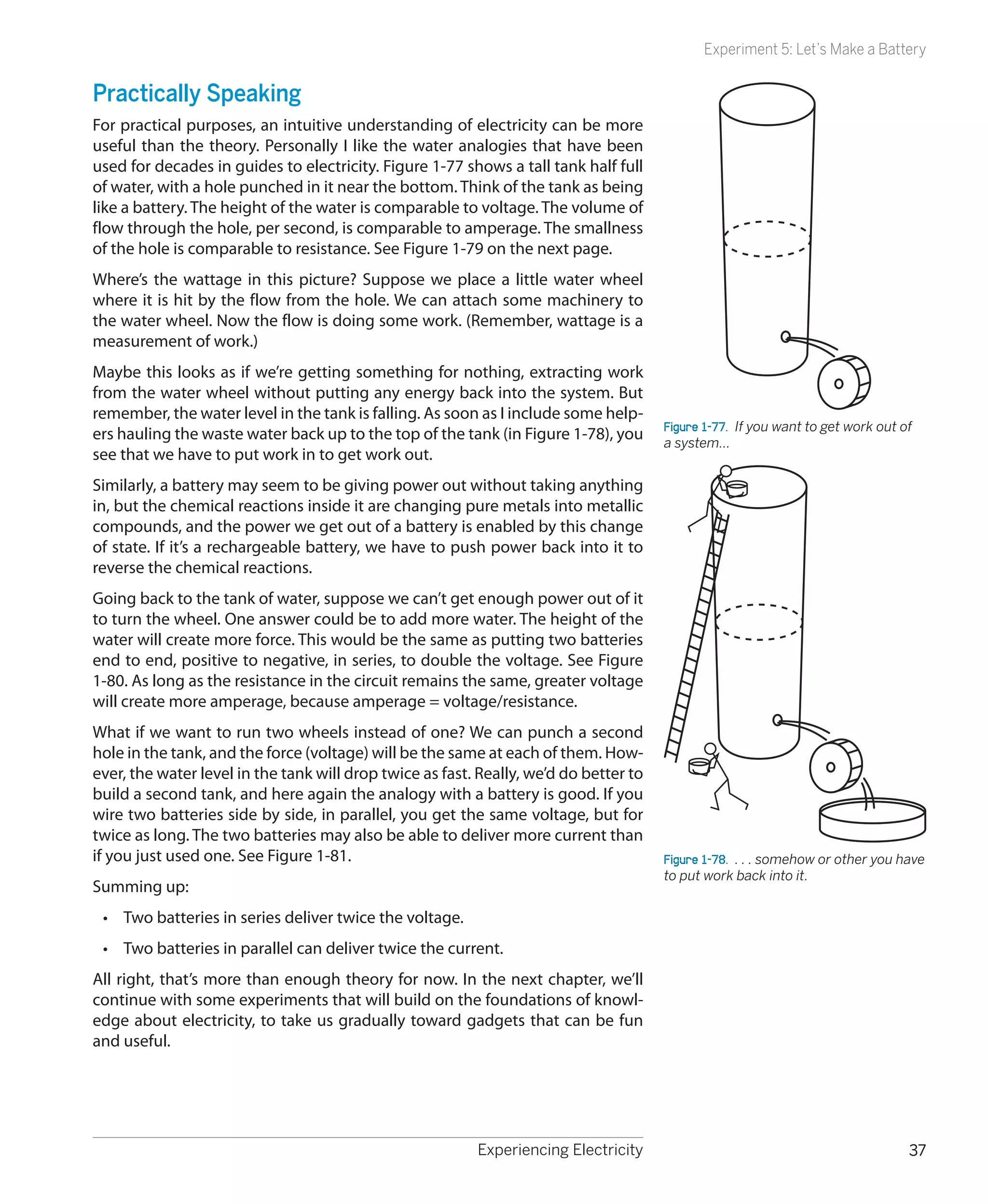
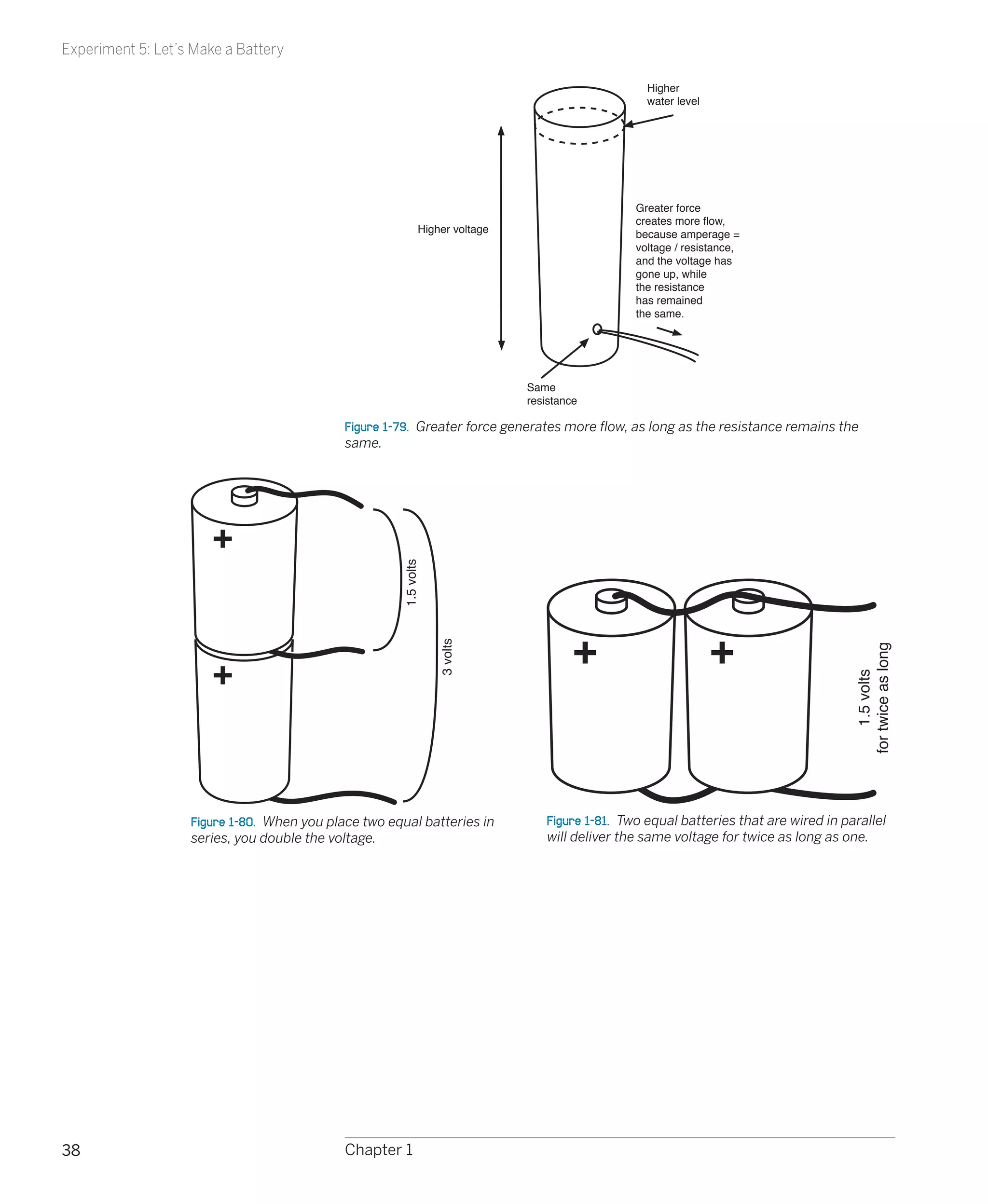
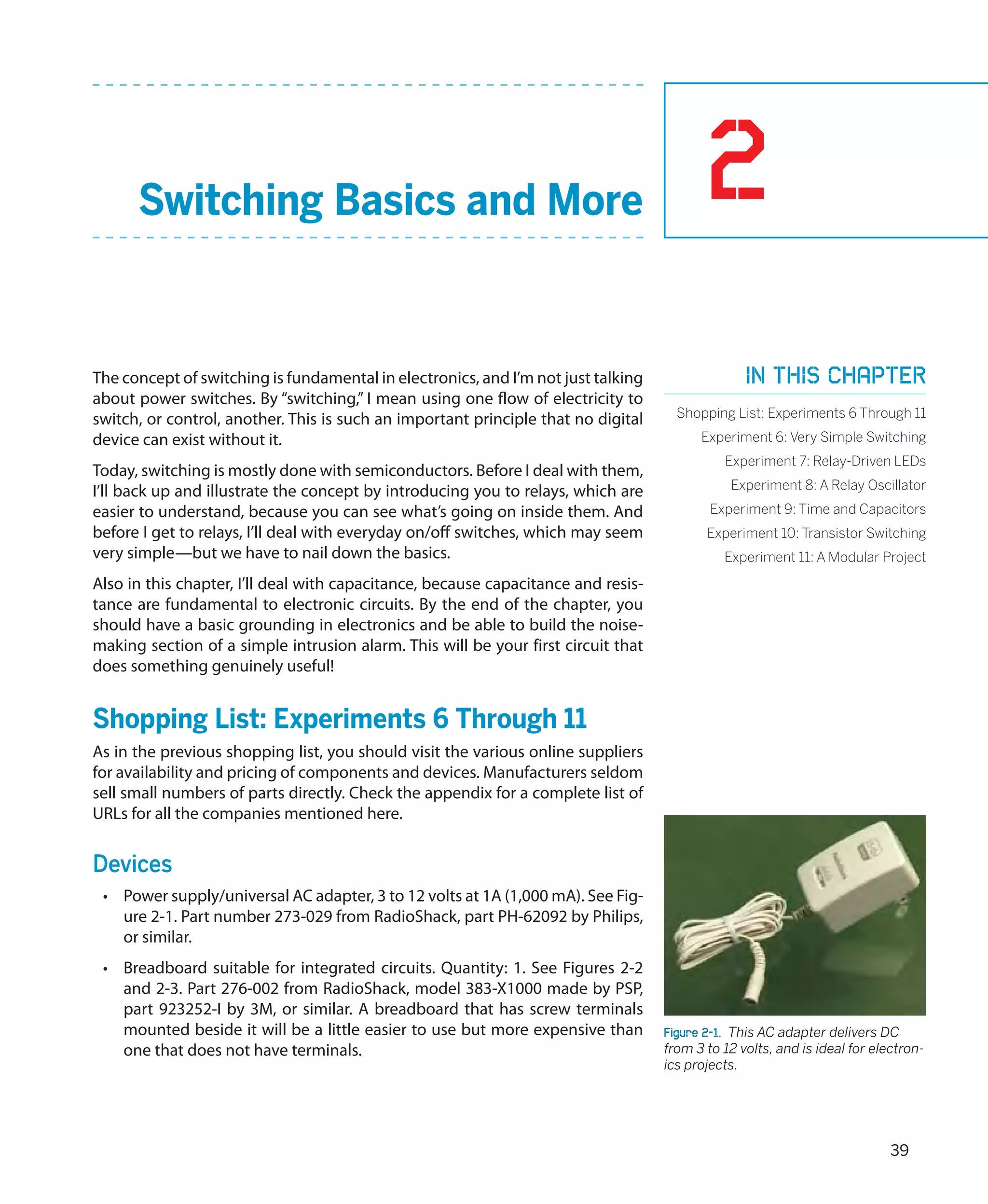
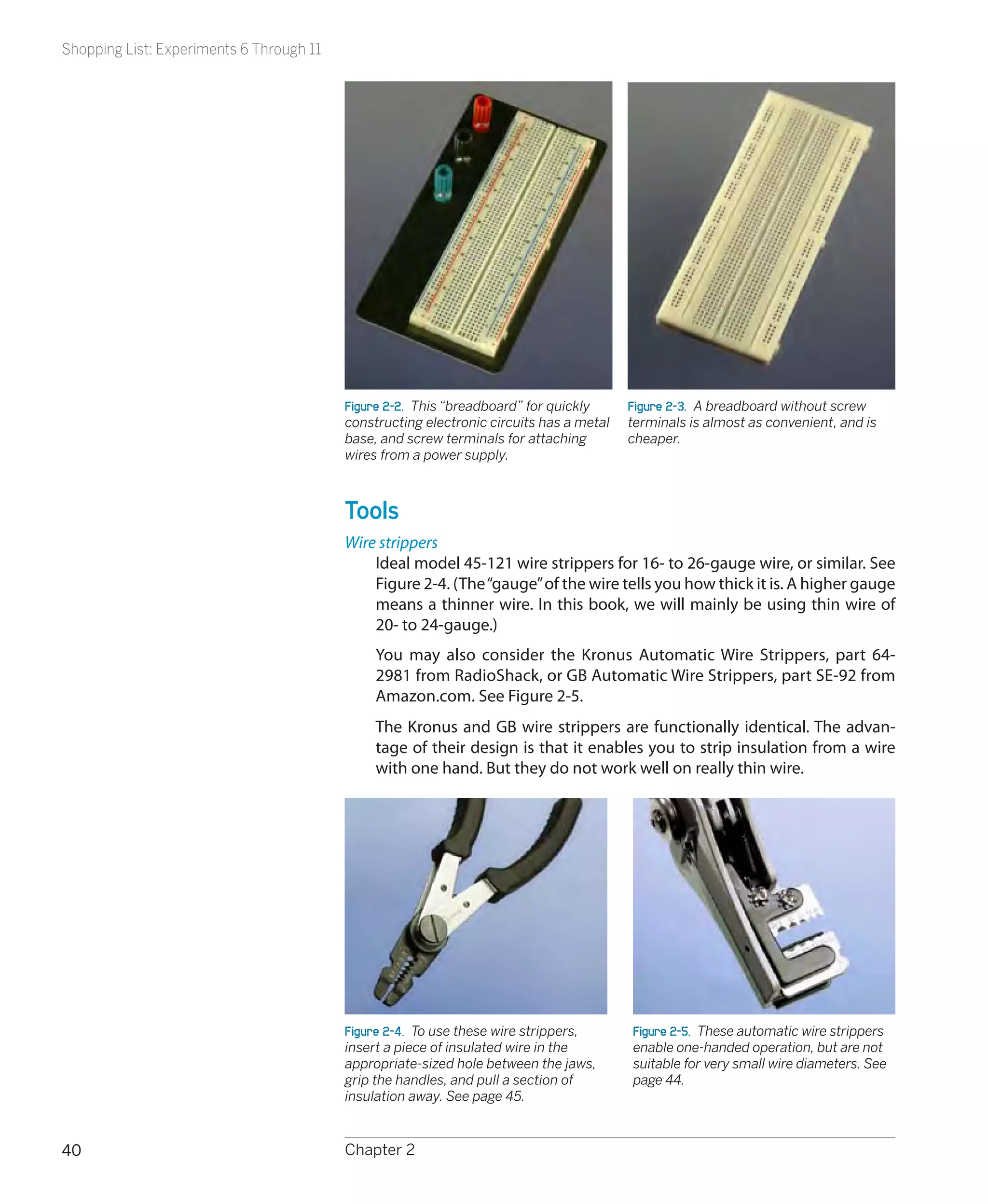
Make: Electronics
                 Learning by Discovery


                    Charles Platt
         with photographs and illustrations by the author


Beijing • Cambridge • Farnham • Köln • Sebastopol • Taipei • Tokyo
Make: Electronics
by Charles Platt

Copyright © Helpful Corporation. All rights reserved.
Printed in Canada.
Published by O’Reilly Media, Inc., 1005 Gravenstein Highway North, Sebastopol, CA 95472.
O’Reilly Media books may be purchased for educational, business, or sales promotional use. Online editions are also avail-
able for most titles (my.safaribooksonline.com). For more information, contact our corporate/institutional sales department:
800-998-9938 or corporate@oreilly.com.


Editors:  Dale Dougherty and Brian Jepson
Development Editor:  Gareth Branwyn
Production Editor:  Rachel Monaghan
Technical Editor: Andrew “Bunnie” Huang
Copyeditor:  Nancy Kotary
Proofreader:  Nancy Reinhardt
Indexer:  Julie Hawks
Cover Designer:  Mark Paglietti
Interior Designer:  Ron Bilodeau
Illustrator/Photographer:  Charles Platt
Cover Photographer: Marc de Vinck


Print History:
December 2009:	         First Edition.


The O’Reilly logo is a registered trademark of O’Reilly Media, Inc. Many of the designations used by manufacturers and
sellers to distinguish their products are claimed as trademarks. Where those designations appear in this book, and O’Reilly
Media, Inc., was aware of a trademark claim, the designations have been printed in caps or initial caps.


While every precaution has been taken in the preparation of this book, the publisher and author assume no responsibility
for errors or omissions, or for damages resulting from the use of the information contained herein.


ISBN: 978-0-596-15374-8
[TI]
For my dearest Erico
Contents


	 Preface.. . . . . . . . . . . . . . . . . . . . . . . . . . . . . . . . . . . . . . . . . ix

1.	 Experiencing Electricity.. . . . . . . . . . . . . . . . . . . . .                                                          1
     Shopping List: Experiments 1 Through 5 . . . . . . . . . . . . . . . . . . . . . . . . . . . . . . . . . . . . 1
     Experiment 1: Taste the Power!.. . . . . . . . . . . . . . . . . . . . . . . . . . . . . . . . . . . . . . . . . . . . . . 5
     Experiment 2: Let’s Abuse a Battery!.. . . . . . . . . . . . . . . . . . . . . . . . . . . . . . . . . . . . . . . . . 9
     Experiment 3: Your First Circuit. . . . . . . . . . . . . . . . . . . . . . . . . . . . . . . . . . . . . . . . . . . . . . 13
     Experiment 4: Varying the Voltage.. . . . . . . . . . . . . . . . . . . . . . . . . . . . . . . . . . . . . . . . . . 18
     Experiment 5: Let’s Make a Battery. . . . . . . . . . . . . . . . . . . . . . . . . . . . . . . . . . . . . . . . . . 32
                                             .


2.	 Switching Basics and More.. . . . . . . . . . . . . . . . 39
     Shopping List: Experiments 6 Through 11.. . . . . . . . . . . . . . . . . . . . . . . . . . . . . . . . . . 39
     Experiment 6: Very Simple Switching.. . . . . . . . . . . . . . . . . . . . . . . . . . . . . . . . . . . . . . . 43
     Experiment 7: Relay-Driven LEDs.. . . . . . . . . . . . . . . . . . . . . . . . . . . . . . . . . . . . . . . . . . . 55
     Experiment 8: A Relay Oscillator.. . . . . . . . . . . . . . . . . . . . . . . . . . . . . . . . . . . . . . . . . . . . 60
     Experiment 9: Time and Capacitors.. . . . . . . . . . . . . . . . . . . . . . . . . . . . . . . . . . . . . . . . . 68
     Experiment 10: Transistor Switching.. . . . . . . . . . . . . . . . . . . . . . . . . . . . . . . . . . . . . . . . 73
     Experiment 11: A Modular Project.. . . . . . . . . . . . . . . . . . . . . . . . . . . . . . . . . . . . . . . . . . 82


3.	 Getting Somewhat More Serious.. . . . . . . . . 95
     Shopping List: Experiments 12 Through 15.. . . . . . . . . . . . . . . . . . . . . . . . . . . . . . . . . 95
     Experiment 12: Joining Two Wires Together.. . . . . . . . . . . . . . . . . . . . . . . . . . . . . . 104
     Experiment 13: Broil an LED. . . . . . . . . . . . . . . . . . . . . . . . . . . . . . . . . . . . . . . . . . . . . . . 114
                                .
     Experiment 14: A Pulsing Glow.. . . . . . . . . . . . . . . . . . . . . . . . . . . . . . . . . . . . . . . . . . . 117
     Experiment 15: Intrusion Alarm Revisited.. . . . . . . . . . . . . . . . . . . . . . . . . . . . . . . . . 127


                                                                                                                                      vii


       4.	 Chips, Ahoy!.. . . . . . . . . . . . . . . . . . . . . . . . . . . . . . . . .                                                                  147
            Shopping List: Experiments 16 Through 24.. . . . . . . . . . . . . . . . . . . . . . . . . . . . . . .                                         147
            Experiment 16: Emitting a Pulse.. . . . . . . . . . . . . . . . . . . . . . . . . . . . . . . . . . . . . . . . . .                            153
            Experiment 17: Set Your Tone.. . . . . . . . . . . . . . . . . . . . . . . . . . . . . . . . . . . . . . . . . . . . .                         162
            Experiment 18: Reaction Timer.. . . . . . . . . . . . . . . . . . . . . . . . . . . . . . . . . . . . . . . . . . .                            170
            Experiment 19: Learning Logic. . . . . . . . . . . . . . . . . . . . . . . . . . . . . . . . . . . . . . . . . . . .                           181
            Experiment 20: A Powerful Combination.. . . . . . . . . . . . . . . . . . . . . . . . . . . . . . . . .                                        197
            Experiment 21: Race to Place.. . . . . . . . . . . . . . . . . . . . . . . . . . . . . . . . . . . . . . . . . . . . .                         205
            Experiment 22: Flipping and Bouncing.. . . . . . . . . . . . . . . . . . . . . . . . . . . . . . . . . . .                                     211
            Experiment 23: Nice Dice.. . . . . . . . . . . . . . . . . . . . . . . . . . . . . . . . . . . . . . . . . . . . . . . . .                     214
            Experiment 24: Intrusion Alarm Completed.. . . . . . . . . . . . . . . . . . . . . . . . . . . . . .                                           223


       5.	 What Next?.. . . . . . . . . . . . . . . . . . . . . . . . . . . . . . . . . . 227
            Shopping List: Experiments 25 Through 36.. . . . . . . . . . . . . . . . . . . . . . . . . . . . . . .                                         228
            Customizing Your Work Area.. . . . . . . . . . . . . . . . . . . . . . . . . . . . . . . . . . . . . . . . . . . . . .                         228
            Reference Sources.. . . . . . . . . . . . . . . . . . . . . . . . . . . . . . . . . . . . . . . . . . . . . . . . . . . . . . . .              233
            Experiment 25: Magnetism.. . . . . . . . . . . . . . . . . . . . . . . . . . . . . . . . . . . . . . . . . . . . . . .                         236
            Experiment 26: Tabletop Power Generation.. . . . . . . . . . . . . . . . . . . . . . . . . . . . . .                                           239
            Experiment 27: Loudspeaker Destruction. . . . . . . . . . . . . . . . . . . . . . . . . . . . . . . . .                                        242
            Experiment 28: Making a Coil React.. . . . . . . . . . . . . . . . . . . . . . . . . . . . . . . . . . . . . .                                 246
            Experiment 29: Filtering Frequencies . . . . . . . . . . . . . . . . . . . . . . . . . . . . . . . . . . . . .                                 249
            Experiment 30: Fuzz. . . . . . . . . . . . . . . . . . . . . . . . . . . . . . . . . . . . . . . . . . . . . . . . . . . . . . .               257
            Experiment 31: One Radio, No Solder,
            No Power.. . . . . . . . . . . . . . . . . . . . . . . . . . . . . . . . . . . . . . . . . . . . . . . . . . . . . . . . . . . . . . . . .     262
            Experiment 32: A Little Robot Cart.. . . . . . . . . . . . . . . . . . . . . . . . . . . . . . . . . . . . . . . .                             268
            Experiment 33: Moving in Steps.. . . . . . . . . . . . . . . . . . . . . . . . . . . . . . . . . . . . . . . . . .                             284
            Experiment 34: Hardware Meets Software.. . . . . . . . . . . . . . . . . . . . . . . . . . . . . . . .                                         293
            Experiment 35: Checking the Real World.. . . . . . . . . . . . . . . . . . . . . . . . . . . . . . . . .                                       306
            Experiment 36: The Lock, Revisited.. . . . . . . . . . . . . . . . . . . . . . . . . . . . . . . . . . . . . . .                               311
            In Closing.. . . . . . . . . . . . . . . . . . . . . . . . . . . . . . . . . . . . . . . . . . . . . . . . . . . . . . . . . . . . . . . . .   317


       Appendix. Online Retail Sources and Manufac-
            turers.. . . . . . . . . . . . . . . . . . . . . . . . . . . . . . . . . . . . . . . . . 319

       	 Index. . . . . . . . . . . . . . . . . . . . . . . . . . . . . . . . . . . . . . . . . 325


viii   Contents
Preface


    How to Have Fun with This Book
    Everyone uses electronic devices, but most of us don’t really know what goes
    on inside them.
    Of course, you may feel that you don’t need to know. If you can drive a car
    without understanding the workings of an internal combustion engine, pre-
    sumably you can use an iPod without knowing anything about integrated cir-
    cuits. However, understanding some basics about electricity and electronics
    can be worthwhile for three reasons:
     •	 By learning how technology works, you become better able to control
        your world instead of being controlled by it. When you run into problems,
        you can solve them instead of feeling frustrated by them.
     •	 Learning about electronics can be fun—so long as you approach the pro-
        cess in the right way. The tools are relatively cheap, you can do all the work
        on a tabletop, and it doesn’t consume a lot of time (unless you want it to).
     •	 Knowledge of electronics can enhance your value as an employee or per-
        haps even lead to a whole new career.


    Learning by Discovery
    Most introductory guides begin with definitions and facts, and gradually get
    to the point where you can follow instructions to build a simple circuit.
    This book works the other way around. I want you to start putting components
    together right away. After you see what happens, you’ll figure out what’s go-
    ing on. I believe this process of learning by discovery creates a more powerful
    and lasting experience.


                                                                                         ix
How Hard Will It Be?

                                              Learning by discovery occurs in serious research, when scientists notice an un-
                                              usual phenomenon that cannot be explained by current theory, and they start
                                              to investigate it in an effort to explain it. This may ultimately lead to a better
    Stay Within the Limits!                   understanding of the world.
    Although I believe that everything        We’re going to be doing the same thing, although obviously on a much less
    suggested in this book is safe, I’m as-
                                              ambitious level.
    suming that you will stay within the
    limits that I suggest. Please always      Along the way, you will make some mistakes. This is good. Mistakes are the
    follow the instructions and pay           best of all learning processes. I want you to burn things out and mess things
    attention to the warnings, denoted
                                              up, because this is how you learn the limits of components and materials.
    by the icon you see here. If you go
    beyond the limits, you will expose        Since we’ll be using low voltages, there’ll be no chance of electrocution, and
    yourself to unnecessary risks.            so long as you limit the flow of current in the ways I’ll describe, there will be no
                                              risk of burning your fingers or starting fires.


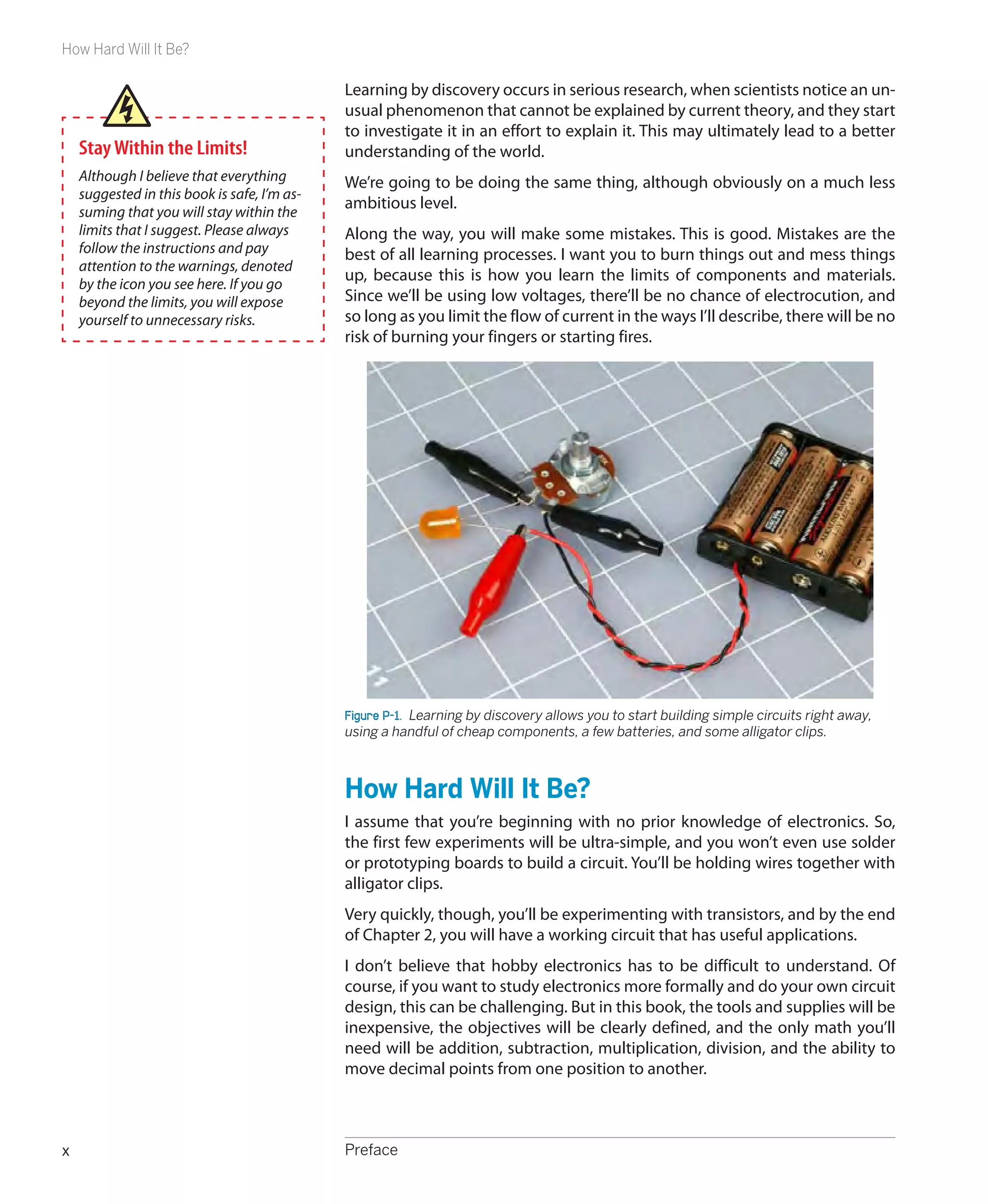
                                              Figure P-1.  Learning by discovery allows you to start building simple circuits right away,
                                              using a handful of cheap components, a few batteries, and some alligator clips.


                                              How Hard Will It Be?
                                              I assume that you’re beginning with no prior knowledge of electronics. So,
                                              the first few experiments will be ultra-simple, and you won’t even use solder
                                              or prototyping boards to build a circuit. You’ll be holding wires together with
                                              alligator clips.
                                              Very quickly, though, you’ll be experimenting with transistors, and by the end
                                              of Chapter 2, you will have a working circuit that has useful applications.
                                              I don’t believe that hobby electronics has to be difficult to understand. Of
                                              course, if you want to study electronics more formally and do your own circuit
                                              design, this can be challenging. But in this book, the tools and supplies will be
                                              inexpensive, the objectives will be clearly defined, and the only math you’ll
                                              need will be addition, subtraction, multiplication, division, and the ability to
                                              move decimal points from one position to another.


x                                             Preface
Fundamentals


Moving Through This Book
Basically there are two ways to present information in a book of this kind: in
tutorials and in reference sections. I’m going to use both of these methods.
You’ll find the tutorials in sections headed as follows:
    •	 Shopping Lists
    •	 Using Tools
    •	 Experiments
You’ll find reference sections under the following headings:
    •	 Fundamentals
    •	 Theory
    •	 Background
How you use the sections is up to you. You can skip many of the reference
sections and come back to them later. But if you skip many of the tutorials,
this book won’t be of much use to you. Learning by discovery means that you
absolutely, positively have to do some hands-on work, and this in turn means
that you have to buy some basic components and play with them. You will
gain very little by merely imagining that you are doing this.
It’s easy and inexpensive to buy what you need. In almost any urban or sub-
urban area in the United States, chances are you live near a store that sells
electronic components and some basic tools to work with them. I am referring,
of course, to RadioShack franchises. Some Shacks have more components than
others, but almost all of them have the basics that you’ll need.
You can also visit auto supply stores such as AutoZone and Pep Boys for basics
such as hookup wire, fuses, and switches, while stores such as Ace Hardware,
Home Depot, and Lowe’s will sell you tools.
If you prefer to buy via mail order, you can easily find everything you need by
searching online. In each section of the book, I’ll include the URLs of the most
popular supply sources, and you’ll find a complete list of URLs in the appendix.


Fundamentals
Mail-ordering components and tools
Here are the primary mail-order sources that I use myself online:
http://www.radioshack.com
     RadioShack, a.k.a. The Shack. For tools and components. Not always the
     cheapest, but the site is easy and convenient, and some of the tools are
     exactly what you need.
http://www.mouser.com
     Mouser Electronics.
http://www.digikey.com
     Digi-Key Corporation.


	                                                                       Preface              xi
Fundamentals

               http://www.newark.com
                    Newark.
               Mouser, Digi-Key, and Newark are all good sources for components, usually
               requiring no minimum quantities.
               http://www.allelectronics.com
                    All Electronics Corporation. A narrower range of components, but specifi-
                    cally aimed at the hobbyist, with kits available.
               http://www.ebay.com
                    You can find surplus parts and bargains here, but you may have to try
                    several eBay Stores to get what you want. Those based in Hong Kong are
                    often very cheap, and I’ve found that they are reliable.
               http://www.mcmaster.com
                    McMaster-Carr. Especially useful for high-quality tools.
               Lowe’s and Home Depot also allow you to shop online.


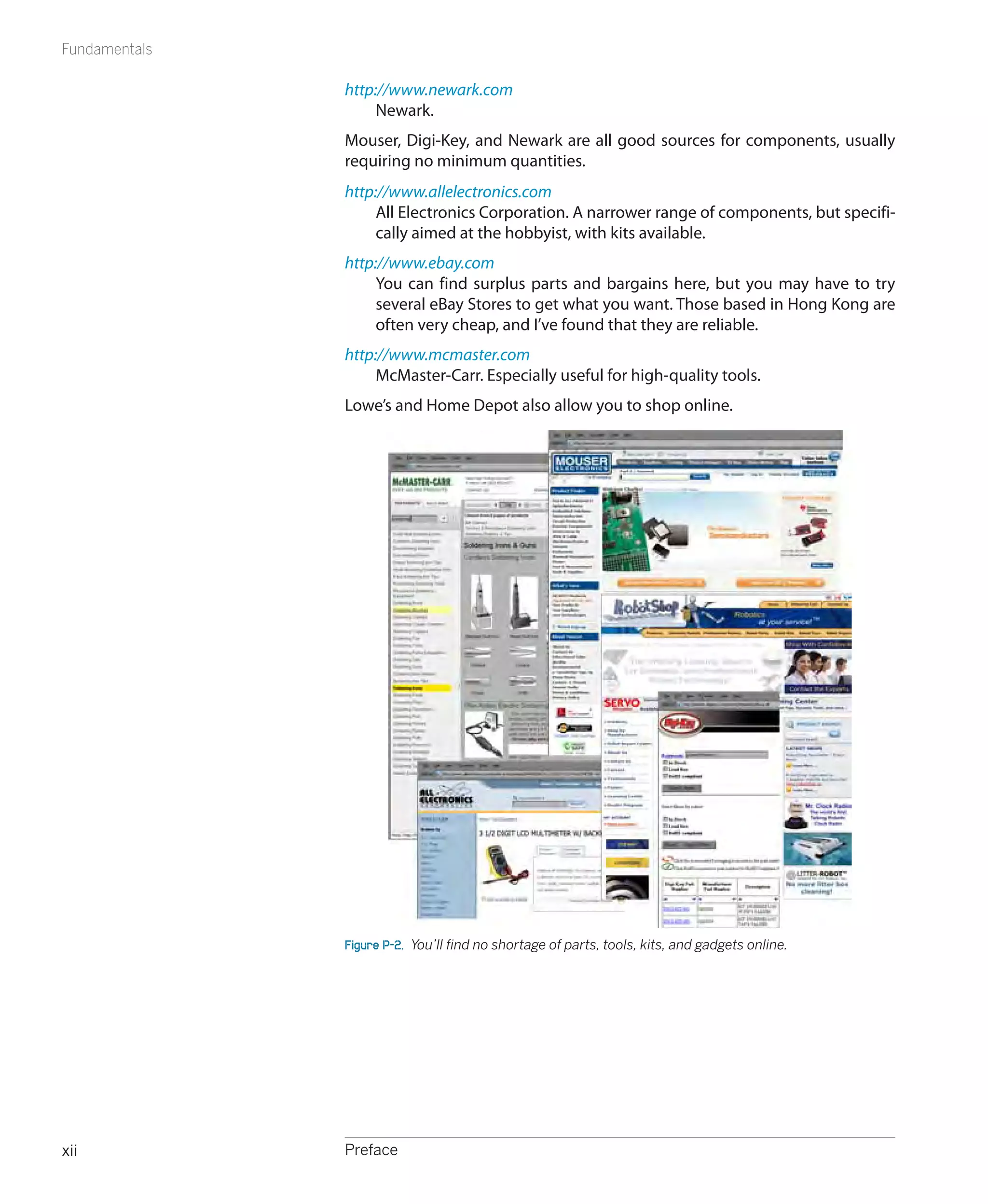
               Figure P-2.  You’ll find no shortage of parts, tools, kits, and gadgets online.


xii            Preface
Safari® Books Online


Companion Kits
                                Maker Shed (www.makershed.com) offers a
                                number of Make: Electronics companion kits,
                                both toolkits and bundles of the various
                                components used in the book’s experi-
ments. This is a simple, convenient, and cost-­ ffective way of getting all the
                                              e
tools and materials you need to do the projects in this book.


Comments and Questions
Please address comments and questions concerning this book to the publisher:
    O’Reilly Media, Inc.
    1005 Gravenstein Highway North
    Sebastopol, CA 95472
    800-998-9938 (in the United States or Canada)
    707-829-0515 (international or local)
    707-829-0104 (fax)
We have a web page for this book, where we list errata, examples, larger ver-
sions of the book’s figures, and any additional information. You can access this
page at:
    http://oreilly.com/catalog/9780596153748
To comment or ask technical questions about this book, send email to:
    bookquestions@oreilly.com
For more information about our books, conferences, Resource Centers, and
the O’Reilly Network, see our website at:
    http://oreilly.com


Safari® Books Online
                      Safari Books Online is an on-demand digital library that
                      lets you easily search over 7,500 technology and creative
                      reference books and videos to find the answers you
                      need quickly.
With a subscription, you can read any page and watch any video from our
library online. Read books on your cell phone and mobile devices. Access new
titles before they are available for print, and get exclusive access to manu-
scripts in development and post feedback for the authors. Copy and paste
code samples, organize your favorites, download chapters, bookmark key sec-
tions, create notes, print out pages, and benefit from tons of other time-saving
features.
O’Reilly Media has uploaded this book to the Safari Books Online service. To
have full digital access to this book and others on similar topics from O’Reilly
and other publishers, sign up for free at http://my.safaribooksonline.com.


	                                                                       Preface                     xiii
Experiencing Electricity                                                  1
I want you to get a taste for electricity—literally!—in the first experiment. This             In this chapter
first chapter of the book will show you:
                                                                                     Shopping List: Experiments 1 Through 5
 •	 How to understand and measure electricity and resistance                                  Experiment 1: Taste the Power!
 •	 How to handle and connect components without overloading, damaging,                 Experiment 2: Let’s Abuse a Battery!
    or destroying them                                                                        Experiment 3: Your First Circuit
Even if you have some prior knowledge of electronics, you should try these                 Experiment 4: Varying the Voltage
experiments before you venture on to the rest of the book.                                Experiment 5: Let’s Make a Battery


Shopping List: Experiments 1 Through 5
                                                                                     Maker Shed (www.makershed.com)
If you want to limit your number of shopping trips or online purchases, look         has put together a series of Make:
ahead in the book for additional shopping lists, and combine them to make            Electronics companion kits. These in-
one bulk purchase.                                                                   clude all of the tools and components
                                                                                     used in book’s experiments. This is a
In this first chapter, I will give you part numbers and sources for every tool and   quick, simple, and cost-effective way
component that we’ll be using. Subsequently, I won’t expect you to need such         of getting everything you need to
specific information, because you will have gained experience searching for          complete the projects in this book.
items on your own.


Tools
Small pliers
   RadioShack Kronus 4.5-inch, part number 64-2953 or Xcelite 4-inch mini
   long-nose pliers, model L4G.
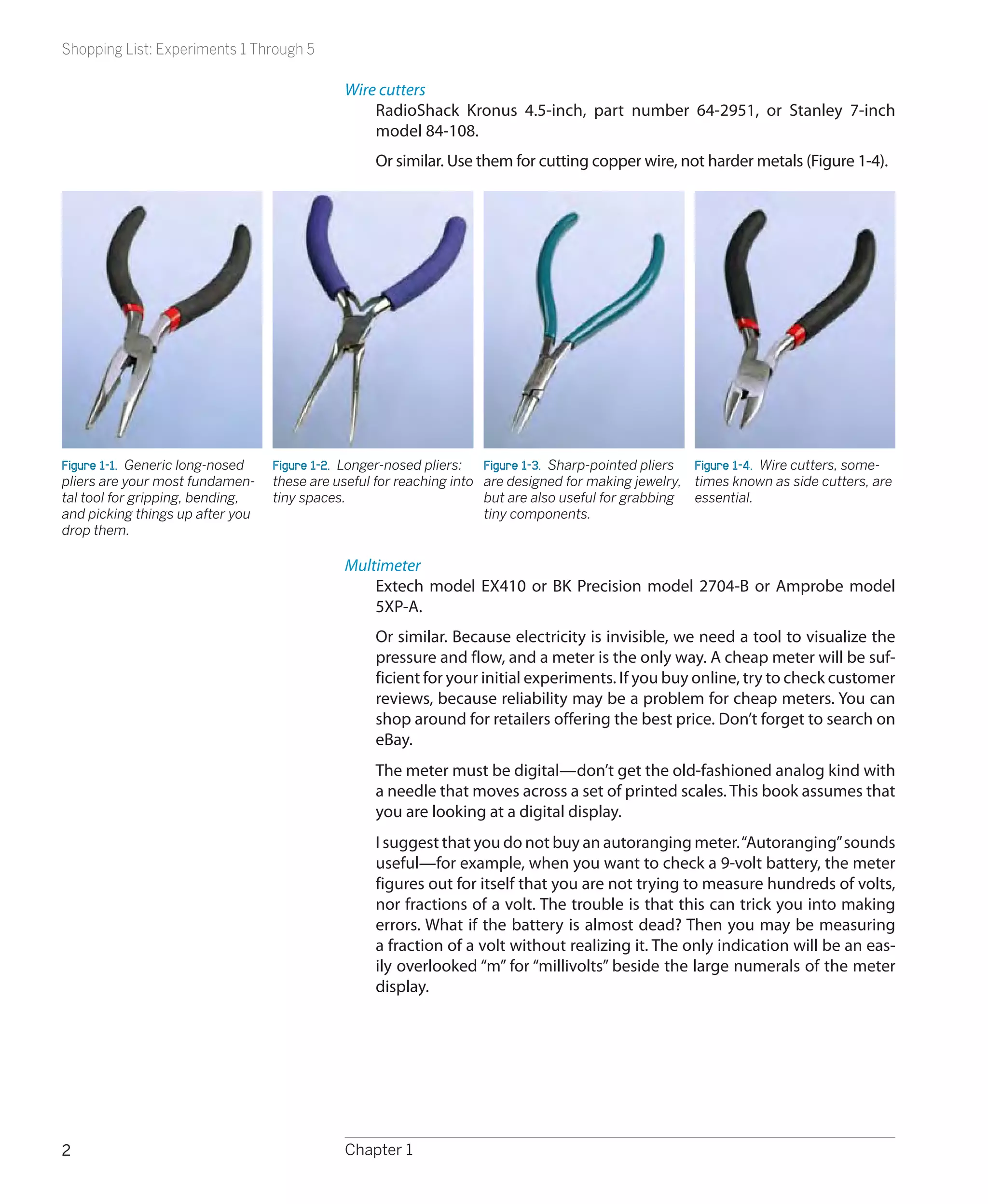
    Or similar. See Figures 1-1 through 1-3. Look for these tools in hardware
    stores and the sources listed in the preface. The brand is unimportant.
    After you use them for a while, you’ll develop your own preferences. In
    particular, you have to decide whether you like spring-loaded handles. If
    you decide you don’t, you’ll need a second pair of pliers to pull the springs
    out of the first.


                                                                                                                         1
Shopping List: Experiments 1 Through 5

                                             Wire cutters
                                                 RadioShack Kronus 4.5-inch, part number 64-2951, or Stanley 7-inch
                                                 model 84-108.
                                                  Or similar. Use them for cutting copper wire, not harder metals (Figure 1-4).


Figure 1-1.  Generic long-nosed   Figure 1-2.  Longer-nosed pliers:  Figure 1-3.  Sharp-pointed pliers Figure 1-4.  Wire cutters, some-
pliers are your most fundamen-    these are useful for reaching into are designed for making jewelry, times known as side cutters, are
tal tool for gripping, bending,   tiny spaces.                       but are also useful for grabbing essential.
and picking things up after you                                      tiny components.
drop them.

                                             Multimeter
                                                 Extech model EX410 or BK Precision model 2704-B or Amprobe model
                                                 5XP-A.
                                                  Or similar. Because electricity is invisible, we need a tool to visualize the
                                                  pressure and flow, and a meter is the only way. A cheap meter will be suf-
                                                  ficient for your initial experiments. If you buy online, try to check customer
                                                  reviews, because reliability may be a problem for cheap meters. You can
                                                  shop around for retailers offering the best price. Don’t forget to search on
                                                  eBay.
                                                  The meter must be digital—don’t get the old-fashioned analog kind with
                                                  a needle that moves across a set of printed scales. This book assumes that
                                                  you are looking at a digital display.
                                                  I suggest that you do not buy an autoranging meter. “Autoranging” sounds
                                                  useful—for example, when you want to check a 9-volt battery, the meter
                                                  figures out for itself that you are not trying to measure hundreds of volts,
                                                  nor fractions of a volt. The trouble is that this can trick you into making
                                                  errors. What if the battery is almost dead? Then you may be measuring
                                                  a fraction of a volt without realizing it. The only indication will be an eas-
                                                  ily overlooked “m” for “millivolts” beside the large numerals of the meter
                                                  display.


2                                            Chapter 1
Shopping List: Experiments 1 Through 5

     On a manual-ranging meter, you select the range, and if the source that
     you are measuring is outside of that range, the meter tells you that you
     made an error. I prefer this. I also get impatient with the time it takes for
     the autoranging feature to figure out the appropriate range each time I
     make a measurement. But it’s a matter of personal preference. See Figures
     1-5 through 1-7 for some examples of multimeters.


Figure 1-5.  You can see by the wear and     Figure 1-6.  Mid-priced RadioShack meter,   Figure 1-7.  An autoranging meter from
tear that this is my own favorite meter.     which has the basic features; however,      Extech offers basic functions, plus a tem-
It has all the necessary basic features      the dual purpose for each dial position,    perature probe, which may be useful to
and can also measure capacitance (the        selected with the SELECT button, may be     check whether components such as power
F section, for Farads). It can also check    confusing. This is an autoranging meter.    supplies are running unduly hot.
transistors. You have to choose the ranges
manually.


Supplies
Batteries
    9-volt battery. Quantity: 1.
     AA batteries, 1.5 volts each. Quantity: 6.
     The batteries should be disposable alkaline, the cheapest available, be-
     cause we may destroy some of them. You should absolutely not use re-
     chargeable batteries in Experiments 1 and 2.
                                                                                         Figure 1-8.  Snap connector for a 9-volt
Battery holders and connectors                                                           battery.
    Snap connector for 9-volt battery, with wires attached (Figure 1-8).
    Quantity: 1. RadioShack part number 270-325 or similar. Any snap con-
    nector that has wires attached will do.
     Battery holder for single AA cell, with wires attached (Figure 1-9). Quan-
     tity: 1. RadioShack part number 270-401 or Mouser.com catalog number
     12BH410-GR, or similar; any single-battery holder that has thin wires at-
     tached will do.
                                                                                         Figure 1-9.  Single AA-sized battery carrier
                                                                                         with wires.


                                                             Experiencing Electricity                                                   3
Shopping List: Experiments 1 Through 5

                                                     Battery holder for four AA cells, with wires attached (Figure 1-10). Quan-
                                                     tity: 1. All Electronics catalog number BH-342 or RadioShack part 270-391
                                                     or similar.
                                                 Alligator clips
                                                      Vinyl-insulated. Quantity: at least 6. All Electronics catalog number ALG-28
                                                      or RadioShack part number 270-1545 or similar (Figure 1-11).


                                                 Components
Figure 1-10.  Battery carrier for four AA
                                                 You may not know what some of these items are, or what they do. Just look
cells, to be installed in series, delivering 6   for the part numbers and descriptions, and match them with the photographs
volts.                                           shown here. Very quickly, in the learning by discovery process, all will be revealed.
                                                 Fuses
                                                     Automotive-style, mini-blade type, 3 amps. Quantity: 3. RadioShack part
                                                     number 270-1089, or Bussmann part ATM-3, available from automotive
                                                     parts suppliers such as AutoZone (Figure 1-12).
                                                     Or similar. A blade-type fuse is easier to grip with alligator clips than a
                                                     round cartridge fuse.

Figure 1-11.  Alligator clips inside vinyl       Potentiometers
sheaths, which reduce the chance of ac-              Panel-mount, single-turn, 2K linear, 0.1 watt minimum. Quantity: 2. Alpha
cidental short circuits.                             part RV170F-10-15R1-B23 or BI Technologies part P160KNPD-2QC25B2K,
                                                     from Mouser.com or other component suppliers (Figure 1-13).
                                                     Or similar. The “watt” rating tells you how much power this component
                                                     can handle. You don’t need more than 0.5 watts.
                                                 Resistors
                                                      Assortment 1/4-watt minimum, various values but must include 470 ohms,
                                                      1K, and 2K or 2.2K. Quantity: at least 100. RadioShack part number 271-312.
                                                     Or search eBay for “resistor assorted.”

Figure 1-12.  A 3-amp fuse intended primar-      Light-emitting diodes (LEDs)
ily for automotive use, shown here larger            Any size or color (Figures 1-14 and 1-15). Quantity: 10. RadioShack part num-
than actual size.                                    ber 276-1622 or All Spectrum Electronics part K/LED1 from Mouser.com.
                                                     Or similar. Just about any LEDs will do for these first experiments.


Figure 1-13.  Potentiometers come in many             Figure 1-14.  Typical 5-mm diameter light-   Figure 1-15.  Jumbo-sized LED (1 cm
shapes and sizes, with different lengths of           emitting diode (LED).                        diameter) is not necessarily brighter or
shafts intended for different types of knobs.                                                      more expensive. For most of the experi-
For our purposes, any style will do, but the                                                       ments in this book, buy whatever LEDs
larger-sized ones are easier to play with.                                                         you like the look of.


4                                                Chapter 1
Experiment 1: Taste the Power!


Experiment 1: Taste the Power!
Can you taste electricity? Maybe not, but it feels as if you can.
                                                                                       No More Than 9 Volts
You will need:
                                                                                       A 9-volt battery won’t hurt you. But
 •	 9-volt battery                                                                     do not try this experiment with a
                                                                                       higher-voltage battery or a larger
 •	 Snap connector for battery terminals                                               battery that can deliver more cur-
 •	 Multimeter                                                                         rent. Also, if you have metal braces
                                                                                       on your teeth, be very careful not to
                                                                                       touch them with the battery.
Procedure
Moisten your tongue and touch the tip of it to the metal terminals of a 9-volt
battery. The sudden sharp tingle that you feel is caused by electricity flowing
from one terminal of the battery (Figure 1-16), through the moisture on and
in your tongue, to the other terminal. Because the skin of your tongue is very
thin (it’s actually a mucus membrane) and the nerves are close to the surface,
you can feel the electricity very easily.
Now stick out your tongue, dry the tip of it very thoroughly with a tissue, and
repeat the experiment without allowing your tongue to become moist again.
You should feel less of a tingle.
What’s happening here? We’re going to need a meter to find out.


Tools
Setting up your meter
Check the instructions that came with the meter to find out whether you have
to install a battery in it, or whether a battery is preinstalled.                   Figure 1-16.  Step 1 in the process of learn-
                                                                                    ing by discovery: the 9-volt tongue test.
Most meters have removable wires, known as leads (pronounced “leeds”).
Most meters also have three sockets on the front, the leftmost one usually be-
ing reserved to measure high electrical currents (flows of electricity). We can
ignore that one for now.
The leads will probably be black and red. The black wire plugs into a socket
labeled “COM” or “Common.” Plug the red one into the socket labeled “V” or
“volts.” See Figures 1-17 through 1-20.
The other ends of the leads terminate in metal spikes known as probes, which
you will be touching to components when you want to make electrical mea-
surements. The probes detect electricity; they don’t emit it in significant quan-
tities. Therefore, they cannot hurt you unless you poke yourself with their
sharp ends.
If your meter doesn’t do autoranging, each position on the dial will have a
number beside it. This number means “no higher than.” For instance if you
want to check a 6-volt battery, and one position on the voltage section of the      Figure 1-17.  The black lead plugs into
dial is numbered 2 and the next position is numbered 20, position 2 means           the Common (COM) socket, and the
“no higher than 2 volts.” You have to go to the next position, which means “no      red lead plugs into the red socket that’s
higher than 20 volts.”                                                              almost always on the righthand side of a
                                                                                    multimeter.


                                                         Experiencing Electricity                                                   5
Experiment 1: Taste the Power!

                                               If you make a mistake and try to measure something inappropriate, the meter
                                               will show you an error message such as “E” or “L.” Turn the dial and try again.


Figure 1-18                                    Figure 1-19                                    Figure 1-20.  To measure resistance and
                                                                                              voltage, plug the black lead into the Com-
                                                                                              mon socket and the red lead into the Volts
                                                                                              socket. Almost all meters have a separate
                                                                                              socket where you must plug the red lead
                                                                                              when you measure large currents in amps,
                                                                                              but we’ll be dealing with this later.


                                                           Fundamentals
    Ohms
    We measure distance in miles or kilometers, weight in pounds       A material that has very high resistance to electricity is
    or kilograms, temperature in Fahrenheit or Centigrade—and          known as an insulator. Most plastics, including the colored
    electrical resistance in ohms. The ohm is an international unit.   sheaths around wires, are insulators.
    The Greek omega symbol (Ω) is used to indicate ohms, as            A material with very low resistance is a conductor. Metals
    shown in Figures 1-21 and 1-22. Letter K (or alternatively,        such as copper, aluminum, silver, and gold are excellent
    KΩ) means a kilohm, which is 1,000 ohms. Letter M (or MΩ)          conductors.
    means a megohm, which is 1,000,000 ohms.


              Number of Usually                Abbreviated as
                 ohms expressed as
                  1,000 ohms 1 kilohm          1KΩ or 1K
                 10,000 ohms 10 kilohms        10KΩ or 10K
                100,000 ohms 100 kilohms       100KΩ or 100K
              1,000,000 ohms 1 megohm          1MΩ or 1M
                                                                           Figure 1-21.  The omega
              10,000,000 ohms 10 megohms       10MΩ or 10M                 symbol is used inter-      Figure 1-22.  You’ll find it printed
                                                                           nationally to indicate     or written in a wide variety of
                                                                           resistance on ohms.        styles.


6                                              Chapter 1
Experiment 1: Taste the Power!


Procedure
We’re going to use the meter to discover the electrical resistance of your
tongue. First, set your meter to measure resistance. If it has autoranging, look
to see whether it is displaying a K, meaning kilohms, or M, meaning megohms.
If you have to set the range manually, begin with no less than 100,000 ohms
(100K). See Figures 1-23 through 1-25.
Touch the probes to your tongue, about an inch apart. Note the reading,
which should be around 50K. Now put aside the probes, stick out your tongue,
and use a tissue to dry it very carefully and thoroughly. Without allowing your
tongue to become moist again, repeat the test, and the reading should be
higher. Finally, press the probes against the skin of your hand or arm: you may                     Figure 1-23
get no reading at all, until you moisten your skin.


   When your skin is moist (for instance, if you perspire), its electrical resistance de-
   creases. This principle is used in lie detectors, because someone who knowingly tells
   a lie, under conditions of stress, tends to perspire.


A 9-volt battery contains chemicals that liberate electrons (particles of electric-
ity), which want to flow from one terminal to the other as a result of a chemical
reaction inside it. Think of the cells inside a battery as being like two water
tanks—one of them full, the other empty. If they are connected with a pipe,
water flows between them until their levels are equal. Figure 1-26 may help
you visualize this. Similarly, when you open up an electrical pathway between
the two sides of a battery, electrons flow between them, even if the pathway                        Figure 1-24
consists only of the moisture on your tongue.
Electrons flow more easily through some substances (such as a moist tongue)
than others (such as a dry tongue).


                                                                                                    Figure 1-25.  To measure ohms, turn the
                                                                                                    dial to the ohm (omega) symbol. On an
                                                                                                    autoranging meter, you can then press
                                                                                                    the Range button repeatedly to display
                                                                                                    different ranges of resistance, or simply
                                                                                                    touch the probes to a resistance and wait
                                                                                                    for the meter to choose a range auto-
                                                                                                    matically. A manual meter requires you to
                                                                                                    select the range with the dial (you should
                                                                                                    set it to 100K or higher, to measure skin
Figure 1-26.  Think of the cells in a battery as being like two cylinders: one full of water, the   resistance). If you don’t get a meaningful
other empty. Open a connection between the cylinders, and the water will flow until the             reading, try a different range.
levels are equal on both sides. The less resistance in the connection, the faster the flow
will be.


                                                                     Experiencing Electricity                                                 7
Experiment 1: Taste the Power!


                                                                                 Background
                                                  The man who discovered resistance
                                                  Georg Simon Ohm, pictured in Figure
                                                  1-27, was born in Bavaria in 1787 and
                                                  worked in obscurity for much of his
                                                  life, studying the nature of electricity
                                                  using metal wire that he had to make
                                                  for himself (you couldn’t truck on
                                                  down to Home Depot for a spool of
                                                  hookup wire back in the early 1800s).
                                                  Despite his limited resources and in-
                                                  adequate mathematical abilities, Ohm
                                                  was able to demonstrate in 1827 that
                                                  the electrical resistance of a conduc-
                                                  tor such as copper varied in propor-
                                                  tion with its area of cross-section,
                                                  and the current flowing through it is
                                                  proportional to the voltage applied to
                                                  it, as long as temperature is held con-
                                                  stant. Fourteen years later, the Royal     Figure 1-27.  Georg Simon Ohm, after
                                                  Society in London finally recognized       being honored for his pioneering work,
                                                  the significance of his contribution       most of which he pursued in relative
                                                  and awarded him the Copley Medal.          obscurity.
Figure 1-28.  Modifying the tongue test to
show that a shorter distance, with lower          Today, his discovery is known as
resistance, allows greater flow of electric-      Ohm’s Law.
ity, and a bigger zap.


                                                Further Investigation
                                                Attach the snap-on terminal cap (shown earlier in Figure 1-8) to the 9-volt bat-
                                                tery. Take the two wires that are attached to the cap and hold them so that the
                                                bare ends are just a few millimeters apart. Touch them to your tongue. Now
                                                separate the ends of the wires by a couple of inches, and touch them to your
                                                tongue again. (See Figure 1-28.) Notice any difference?
                                                Use your meter to measure the electrical resistance of your tongue, this time
                                                varying the distance between the two probes. When electricity travels through
                                                a shorter distance, it encounters less total resistance. As a result, the current
                                                (the flow of electricity per second) increases. You can try a similar experiment
                                                on your arm, as shown in Figure 1-29.
                                                Use your meter to test the electrical resistance of water. Dissolve some salt in
Figure 1-29.  Moisten your skin before trying   the water, and test it again. Now try measuring the resistance of distilled water
to measure its resistance. You should find      (in a clean glass).
that the resistance goes up as you move
the meter probes farther apart. The resis-      The world around you is full of materials that conduct electricity with varying
tance is proportional to the distance.          amounts of resistance.


8                                               Chapter 1
Experiment 2: Let’s Abuse a Battery!


Cleanup and Recycling
Your battery should not have been damaged or significantly discharged by
this experiment. You’ll be able to use it again.
Remember to switch off your meter before putting it away.


Experiment 2: Let’s Abuse a Battery!
To get a better feeling for electrical power, you’re going to do what most books
tell you not to do. You’re going to short out a battery. A short circuit is a direct
connection between the two sides of a power source.


  Short Circuits
  Short circuits can be dangerous. Do not short out a power outlet in your home:
  there’ll be a loud bang, a bright flash, and the wire or tool that you use will be par-    Figure 1-30.  Anyone who has dropped an
  tially melted, while flying particles of melted metal can burn you or blind you.           adjustable wrench across the bare termi-
                                                                                             nals of a car battery will tell you that short
  If you short out a car battery, the flow of current is so huge that the battery might      circuits can be dramatic at a “mere” 12
  even explode, drenching you in acid (Figure 1-30).                                         volts, if the battery is big enough.
  Lithium batteries are also dangerous. Never short-circuit a lithium battery: it can
  catch fire and burn you (Figure 1-31).
  Use only an alkaline battery in this experiment, and only a single AA cell (Figure
  1-32). You should also wear safety glasses in case you happen to have a defective
  battery.


You will need:
 •	 1.5-volt AA battery
                                                                                             Figure 1-31.  The low internal resistance of
 •	 Single-battery carrier
                                                                                             lithium batteries (which are often used in
 •	 3-amp fuse                                                                               laptop computers) allows high currents to
                                                                                             flow, with unexpected results. Never fool
 •	 Safety glasses (regular eyeglasses or sunglasses will do)                                around with lithium batteries!


Procedure
Use an alkaline battery. Do not use any kind of rechargeable battery.
Put the battery into a battery holder that’s designed for a single battery and
has two thin insulated wires emerging from it, as shown in Figure 1-32. Do not
use any other kind of battery holder.
Use an alligator clip to connect the bare ends of the wires, as shown in Figure
1-32. There will be no spark, because you are using only 1.5 volts. Wait one
minute, and you’ll find that the wires are getting hot. Wait another minute, and             Figure 1-32.  Shorting out an alkaline bat-
the battery, too, will be hot.                                                               tery can be safe if you follow the directions
                                                                                             precisely. Even so, the battery is liable to
                                                                                             become too hot to touch comfortably.
                                                                                             Don’t try this with any type of recharge-
                                                                                             able battery.


                                                                  Experiencing Electricity                                                9
Experiment 2: Let’s Abuse a Battery!

                                                 The heat is caused by electricity flowing through the wires and through the
                                                 electrolyte (the conductive fluid) inside the battery. If you’ve ever used a hand
                                                 pump to force air into a bicycle tire, you know that the pump gets warm. Elec-
                                                 tricity behaves in much the same way. You can imagine the electricity being
                                                 composed of particles (electrons) that make the wire hot as they push through
                                                 it. This isn’t a perfect analogy, but it’s close enough for our purposes.
                                   Water level   Chemical reactions inside the battery create electrical pressure. The correct
                                                 name for this pressure is voltage, which is measured in volts and is named after
                                                 Alessandro Volta, an electrical pioneer.
   Voltage                                       Going back to the water analogy: the height of the water in a tank is propor-
(pressure)                        Amperage
                                  (flow)
                                                 tionate to the pressure of the water, and comparable to voltage. Figure 1-33
                                                 may help you to visualize this.
                                                 But volts are only half of the story. When electrons flow through a wire, the
             Resistance
                                                 flow is known as amperage, named after yet another electrical pioneer, André-
                                                 Marie Ampère. The flow is also generally known as current. It’s the current—
Figure 1-33.  Think of voltage as pressure,
                                                 the amperage—that generates the heat.
and amperes as flow.


                                                                                   Background
                                                   Why didn’t your tongue get hot?
                                                   When you touched the 9-volt battery to your tongue, you felt a tingle, but no
                                                   perceptible heat. When you shorted out a battery, you generated a noticeable
                                                   amount of heat, even though you used a lower voltage. How can we explain
                                                   this?
                                                   The electrical resistance of your tongue is very high, which reduces the flow of
                                                   electrons. The resistance of a wire is very low, so if there’s only a wire connect-
                                                   ing the two terminals of the battery, more current will pass through it, creating
                                                   more heat. If all other factors remain constant:
                                                     •	 Lower resistance allows more current to flow (Figure 1-34).
                                                     •	 The heat generated by electricity is proportional to the amount of electric-
                                                        ity (the current) that flows.
                                                   Here are some other basic concepts:
                                                     •	   The flow of electricity per second is measured in amperes, or amps.
                                                     •	   The pressure of electricity causes the flow, measured in volts.
                                                     •	   The resistance to the flow is measured in ohms.
Figure 1-34.  Larger resistance results in           •	   A higher resistance restricts the current.
smaller flow—but if you increase the pres-           •	   A higher voltage overcomes resistance and increases the current.
sure, it may overcome the resistance and
increase the flow.

                                                 If you’re wondering exactly how much current flows between the terminals
                                                 of a battery when you short it out, that’s a difficult question to answer. If you
                                                 try to use your multimeter to measure it, you’re liable to blow the fuse inside
                                                 the meter. Still, you can use your very own 3-amp fuse, which we can sacrifice
                                                 because it didn’t cost very much.


10                                               Chapter 1
Experiment 2: Let’s Abuse a Battery!

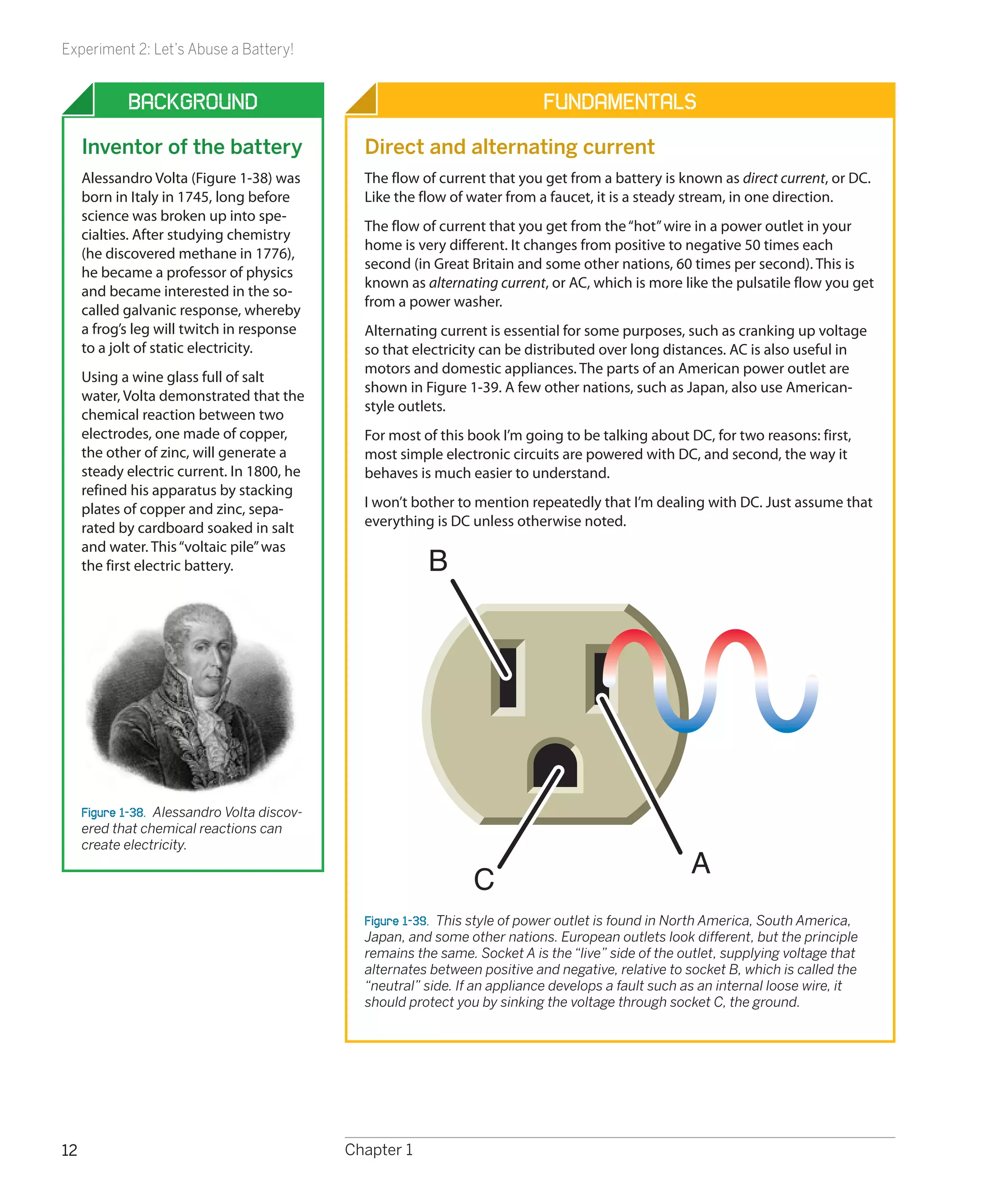
First inspect the fuse very carefully, using a magnifying glass if you have one.
You should see a tiny S-shape in the transparent window at the center of the
fuse. That S is a thin section of metal that melts easily.
Remove the battery that you short-circuited. It is no longer useful for anything,
and should be recycled if possible. Put a fresh battery into the battery carrier,
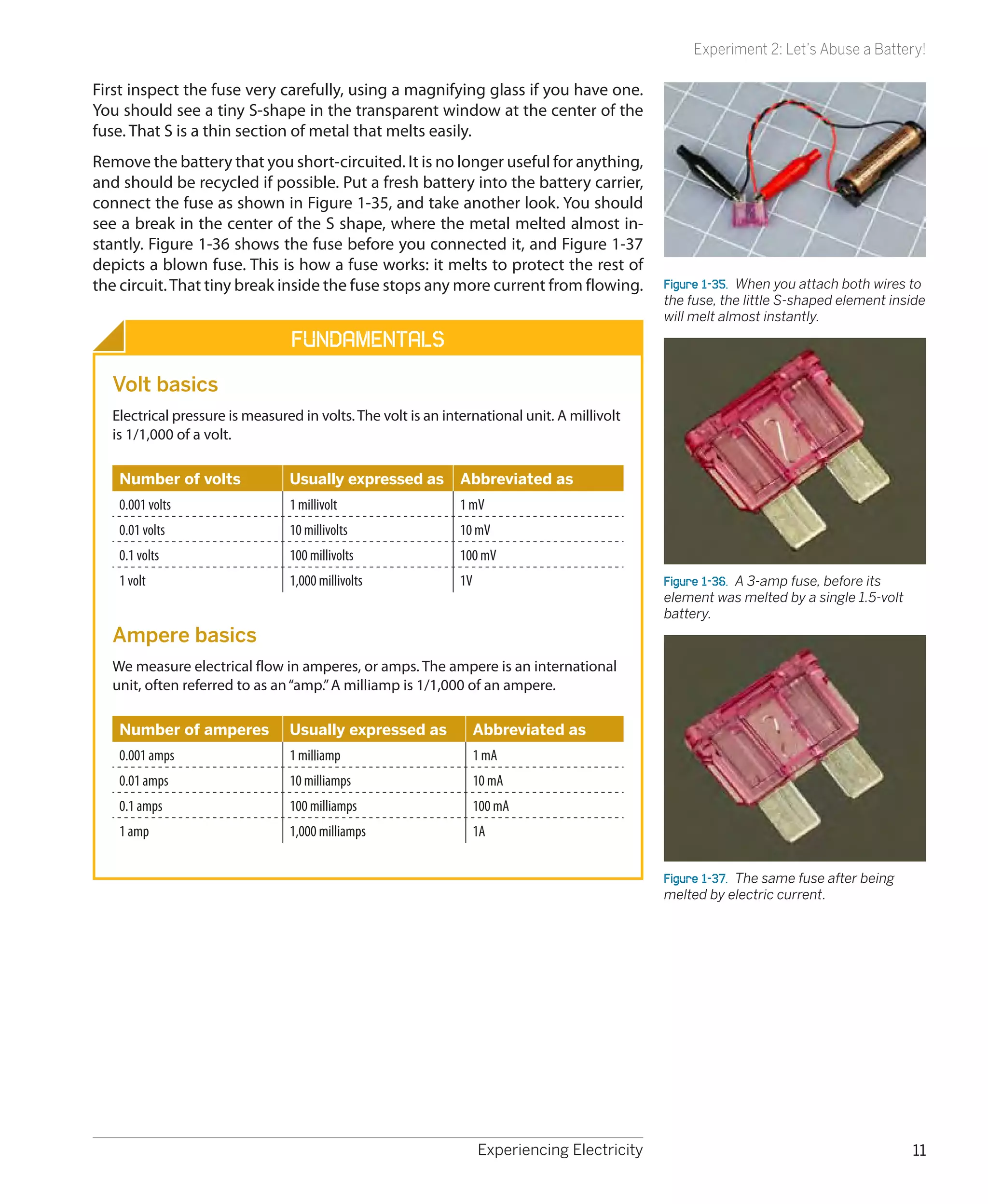
connect the fuse as shown in Figure 1-35, and take another look. You should
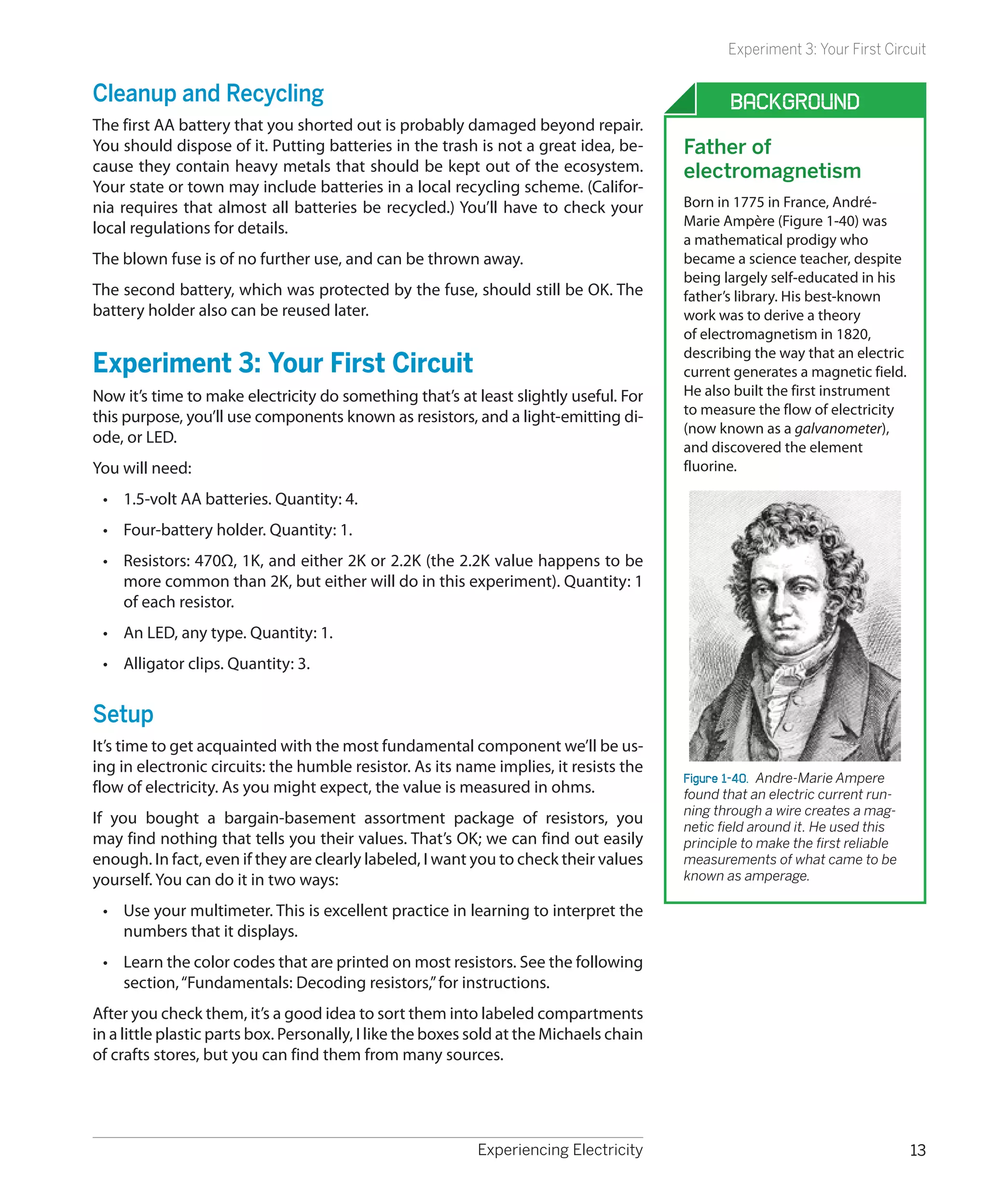
see a break in the center of the S shape, where the metal melted almost in-
stantly. Figure 1-36 shows the fuse before you connected it, and Figure 1-37
depicts a blown fuse. This is how a fuse works: it melts to protect the rest of
the circuit. That tiny break inside the fuse stops any more current from flowing.             Figure 1-35.  When you attach both wires to
                                                                                              the fuse, the little S-shaped element inside
                                                                                              will melt almost instantly.
                                Fundamentals
  Volt basics
  Electrical pressure is measured in volts. The volt is an international unit. A millivolt
  is 1/1,000 of a volt.

   Number of volts              Usually expressed as          Abbreviated as
   0.001 volts                  1 millivolt                   1 mV
   0.01 volts                   10 millivolts                 10 mV
   0.1 volts                    100 millivolts                100 mV
   1 volt                       1,000 millivolts              1V                              Figure 1-36.  A 3-amp fuse, before its
                                                                                              element was melted by a single 1.5-volt
                                                                                              battery.
  Ampere basics
  We measure electrical flow in amperes, or amps. The ampere is an international
  unit, often referred to as an “amp.” A milliamp is 1/1,000 of an ampere.

   Number of amperes            Usually expressed as               Abbreviated as
   0.001 amps                   1 milliamp                         1 mA
   0.01 amps                    10 milliamps                       10 mA
   0.1 amps                     100 milliamps                      100 mA
   1 amp                        1,000 milliamps                    1A


                                                                                              Figure 1-37.  The same fuse after being
                                                                                              melted by electric current.


                                                                   Experiencing Electricity                                             11
Experiment 2: Let’s Abuse a Battery!


             Background                                                       Fundamentals
     Inventor of the battery                    Direct and alternating current
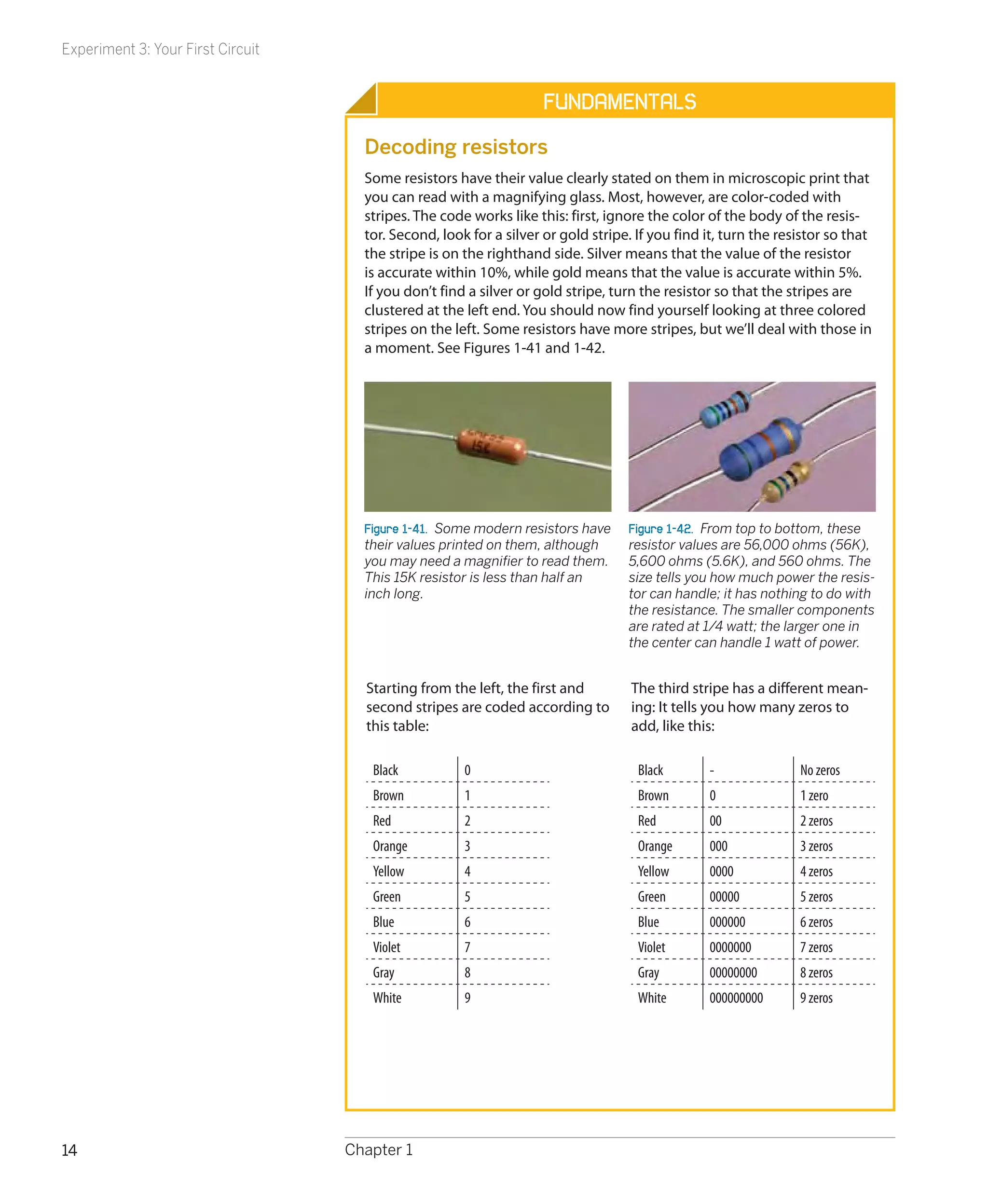
     Alessandro Volta (Figure 1-38) was         The flow of current that you get from a battery is known as direct current, or DC.
     born in Italy in 1745, long before         Like the flow of water from a faucet, it is a steady stream, in one direction.
     science was broken up into spe-
                                                The flow of current that you get from the “hot” wire in a power outlet in your
     cialties. After studying chemistry
                                                home is very different. It changes from positive to negative 50 times each
     (he discovered methane in 1776),
                                                second (in Great Britain and some other nations, 60 times per second). This is
     he became a professor of physics
                                                known as alternating current, or AC, which is more like the pulsatile flow you get
     and became interested in the so-
                                                from a power washer.
     called galvanic response, whereby
     a frog’s leg will twitch in response       Alternating current is essential for some purposes, such as cranking up voltage
     to a jolt of static electricity.           so that electricity can be distributed over long distances. AC is also useful in
                                                motors and domestic appliances. The parts of an American power outlet are
     Using a wine glass full of salt
                                                shown in Figure 1-39. A few other nations, such as Japan, also use American-
     water, Volta demonstrated that the
                                                style outlets.
     chemical reaction between two
     electrodes, one made of copper,            For most of this book I’m going to be talking about DC, for two reasons: first,
     the other of zinc, will generate a         most simple electronic circuits are powered with DC, and second, the way it
     steady electric current. In 1800, he       behaves is much easier to understand.
     refined his apparatus by stacking
     plates of copper and zinc, sepa-           I won’t bother to mention repeatedly that I’m dealing with DC. Just assume that
     rated by cardboard soaked in salt          everything is DC unless otherwise noted.
     and water. This “voltaic pile” was
     the first electric battery.                          B


     Figure 1-38.  Alessandro Volta discov-
     ered that chemical reactions can
     create electricity.
                                                                                                      A
                                                                  C
                                                Figure 1-39.  This style of power outlet is found in North America, South America,
                                                Japan, and some other nations. European outlets look different, but the principle
                                                remains the same. Socket A is the “live” side of the outlet, supplying voltage that
                                                alternates between positive and negative, relative to socket B, which is called the
                                                “neutral” side. If an appliance develops a fault such as an internal loose wire, it
                                                should protect you by sinking the voltage through socket C, the ground.


12                                            Chapter 1
Experiment 3: Your First Circuit


Cleanup and Recycling                                                                           Background
The first AA battery that you shorted out is probably damaged beyond repair.
You should dispose of it. Putting batteries in the trash is not a great idea, be-        Father of
cause they contain heavy metals that should be kept out of the ecosystem.                electromagnetism
Your state or town may include batteries in a local recycling scheme. (Califor-
nia requires that almost all batteries be recycled.) You’ll have to check your           Born in 1775 in France, André-
local regulations for details.                                                           Marie Ampère (Figure 1-40) was
                                                                                         a mathematical prodigy who
The blown fuse is of no further use, and can be thrown away.                             became a science teacher, despite
                                                                                         being largely self-educated in his
The second battery, which was protected by the fuse, should still be OK. The             father’s library. His best-known
battery holder also can be reused later.                                                 work was to derive a theory
                                                                                         of electromagnetism in 1820,
                                                                                         describing the way that an electric
Experiment 3: Your First Circuit                                                         current generates a magnetic field.
Now it’s time to make electricity do something that’s at least slightly useful. For      He also built the first instrument
this purpose, you’ll use components known as resistors, and a light-emitting di-         to measure the flow of electricity
                                                                                         (now known as a galvanometer),
ode, or LED.
                                                                                         and discovered the element
You will need:                                                                           fluorine.

 •	 1.5-volt AA batteries. Quantity: 4.
 •	 Four-battery holder. Quantity: 1.
 •	 Resistors: 470Ω, 1K, and either 2K or 2.2K (the 2.2K value happens to be
    more common than 2K, but either will do in this experiment). Quantity: 1
    of each resistor.
 •	 An LED, any type. Quantity: 1.
 •	 Alligator clips. Quantity: 3.


Setup
It’s time to get acquainted with the most fundamental component we’ll be us-
ing in electronic circuits: the humble resistor. As its name implies, it resists the
                                                                                         Figure 1-40.  Andre-Marie Ampere
flow of electricity. As you might expect, the value is measured in ohms.                 found that an electric current run-
                                                                                         ning through a wire creates a mag-
If you bought a bargain-basement assortment package of resistors, you                    netic field around it. He used this
may find nothing that tells you their values. That’s OK; we can find out easily          principle to make the first reliable
enough. In fact, even if they are clearly labeled, I want you to check their values      measurements of what came to be
yourself. You can do it in two ways:                                                     known as amperage.

 •	 Use your multimeter. This is excellent practice in learning to interpret the
    numbers that it displays.
 •	 Learn the color codes that are printed on most resistors. See the following
    section, “Fundamentals: Decoding resistors,” for instructions.
After you check them, it’s a good idea to sort them into labeled compartments
in a little plastic parts box. Personally, I like the boxes sold at the Michaels chain
of crafts stores, but you can find them from many sources.


                                                            Experiencing Electricity                                            13
Experiment 3: Your First Circuit


                                                                    Fundamentals
                                     Decoding resistors
                                     Some resistors have their value clearly stated on them in microscopic print that
                                     you can read with a magnifying glass. Most, however, are color-coded with
                                     stripes. The code works like this: first, ignore the color of the body of the resis-
                                     tor. Second, look for a silver or gold stripe. If you find it, turn the resistor so that
                                     the stripe is on the righthand side. Silver means that the value of the resistor
                                     is accurate within 10%, while gold means that the value is accurate within 5%.
                                     If you don’t find a silver or gold stripe, turn the resistor so that the stripes are
                                     clustered at the left end. You should now find yourself looking at three colored
                                     stripes on the left. Some resistors have more stripes, but we’ll deal with those in
                                     a moment. See Figures 1-41 and 1-42.


                                     Figure 1-41.  Some modern resistors have     Figure 1-42.  From top to bottom, these
                                     their values printed on them, although       resistor values are 56,000 ohms (56K),
                                     you may need a magnifier to read them.       5,600 ohms (5.6K), and 560 ohms. The
                                     This 15K resistor is less than half an       size tells you how much power the resis-
                                     inch long.                                   tor can handle; it has nothing to do with
                                                                                  the resistance. The smaller components
                                                                                  are rated at 1/4 watt; the larger one in
                                                                                  the center can handle 1 watt of power.


                                     Starting from the left, the first and         The third stripe has a different mean-
                                     second stripes are coded according to         ing: It tells you how many zeros to
                                     this table:                                   add, like this:

                                      Black           0                             Black       -               No zeros
                                      Brown           1                             Brown       0               1 zero
                                      Red             2                             Red         00              2 zeros
                                      Orange          3                             Orange      000             3 zeros
                                      Yellow          4                             Yellow      0000            4 zeros
                                      Green           5                             Green       00000           5 zeros
                                      Blue            6                             Blue        000000          6 zeros
                                      Violet          7                             Violet      0000000         7 zeros
                                      Gray            8                             Gray        00000000        8 zeros
                                      White           9                             White       000000000       9 zeros


14                                 Chapter 1
Experiment 3: Your First Circuit


                                 Fundamentals
Decoding resistors (continued)
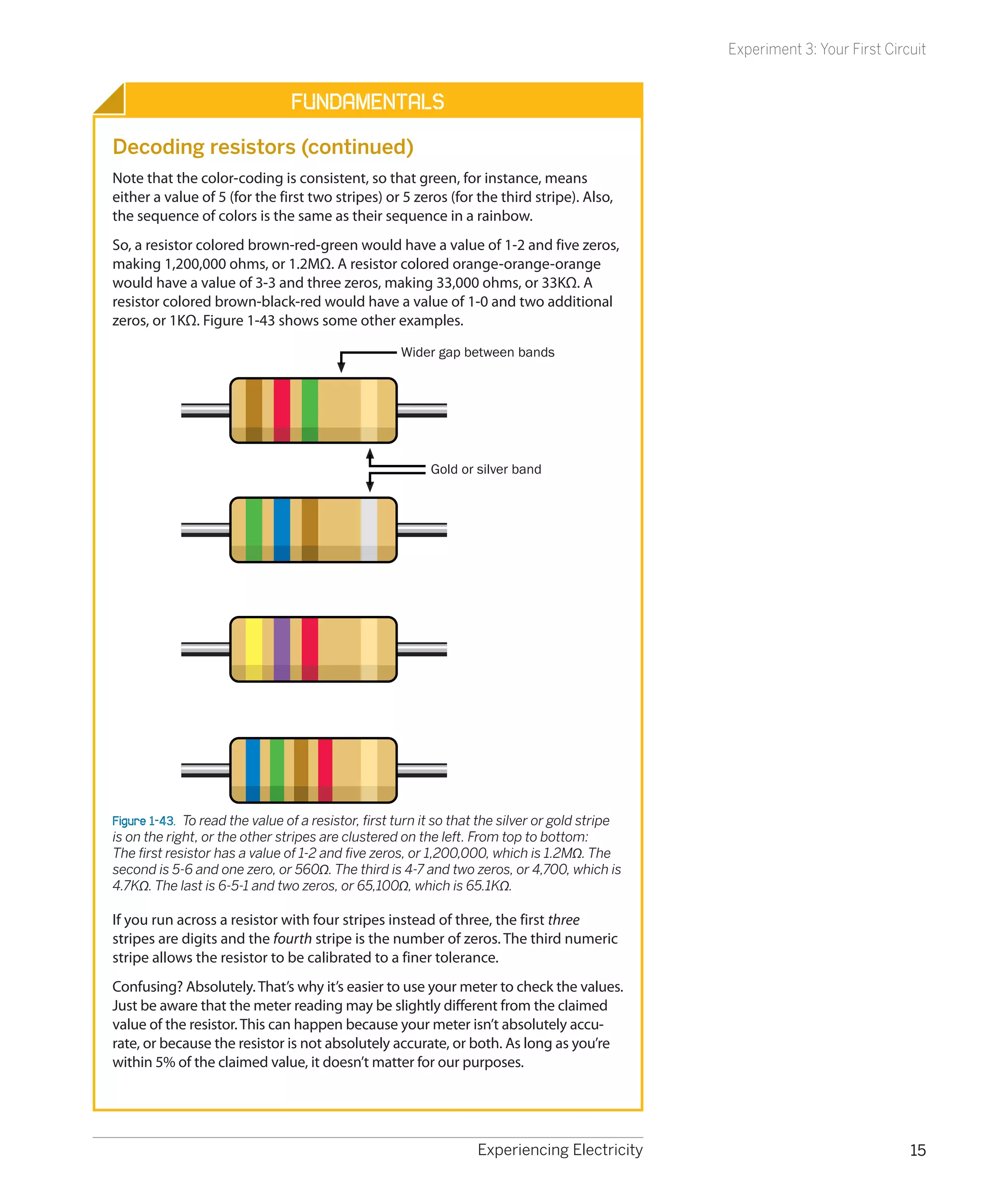
Note that the color-coding is consistent, so that green, for instance, means
either a value of 5 (for the first two stripes) or 5 zeros (for the third stripe). Also,
the sequence of colors is the same as their sequence in a rainbow.
So, a resistor colored brown-red-green would have a value of 1-2 and five zeros,
making 1,200,000 ohms, or 1.2MΩ. A resistor colored orange-orange-orange
would have a value of 3-3 and three zeros, making 33,000 ohms, or 33KΩ. A
resistor colored brown-black-red would have a value of 1-0 and two additional
zeros, or 1KΩ. Figure 1-43 shows some other examples.

                                                     Wider gap between bands


                                                          Gold or silver band


Figure 1-43.  To read the value of a resistor, first turn it so that the silver or gold stripe
is on the right, or the other stripes are clustered on the left. From top to bottom:
The first resistor has a value of 1-2 and five zeros, or 1,200,000, which is 1.2MΩ. The
second is 5-6 and one zero, or 560Ω. The third is 4-7 and two zeros, or 4,700, which is
4.7KΩ. The last is 6-5-1 and two zeros, or 65,100Ω, which is 65.1KΩ.

If you run across a resistor with four stripes instead of three, the first three
stripes are digits and the fourth stripe is the number of zeros. The third numeric
stripe allows the resistor to be calibrated to a finer tolerance.
Confusing? Absolutely. That’s why it’s easier to use your meter to check the values.
Just be aware that the meter reading may be slightly different from the claimed
value of the resistor. This can happen because your meter isn’t absolutely accu-
rate, or because the resistor is not absolutely accurate, or both. As long as you’re
within 5% of the claimed value, it doesn’t matter for our purposes.


                                                                   Experiencing Electricity                                   15
Experiment 3: Your First Circuit


                                   Lighting an LED
                                   Now take a look at one of your LEDs. An old-fashioned lightbulb wastes a lot
                                   of power by converting it into heat. LEDs are much smarter: they convert al-
                                   most all their power into light, and they last almost indefinitely—as long as
                                   you treat them right!
                                   An LED is quite fussy about the amount of power it gets, and the way it gets it.
                                   Always follow these rules:
                                    •	 The longer wire protruding from the LED must receive a more positive volt-
                                       age than the shorter wire.
                                    •	 The voltage difference between the long wire and the short wire must not
                                       exceed the limit stated by the manufacturer.
                                    •	 The current passing through the LED must not exceed the limit stated by
                                       the manufacturer.
                                   What happens if you break these rules? Well, we’re going to find out!
                                   Make sure you are using fresh batteries. You can check by setting your multi-
                                   meter to measure volts DC, and touching the probes to the terminals of each
                                   battery. You should find that each of them generates a pressure of at least
                                   1.5 volts. If they read slightly higher than this, it’s normal. A battery starts out
                                   above its rated voltage, and delivers progressively less as you use it. Batteries
                                   also lose some voltage while they are sitting on the shelf doing nothing.
                                   Load your battery holder (taking care that the batteries are the right way
                                   around, with the negative ends pressing against the springs in the carrier).
                                   Use your meter to check the voltage on the wires coming out of the battery
                                   carrier. You should have at least 6 volts.
                                   Now select a 2KΩ resistor. Remember, “2KΩ” means “2,000 ohms.” If it has col-
                                   ored stripes, they should be red-black-red, meaning 2-0 and two more zeros.
                                   Because 2.2K resistors are more common than 2K resistors, you can substitute
                                   one of them if necessary. It will be colored red-red-red.
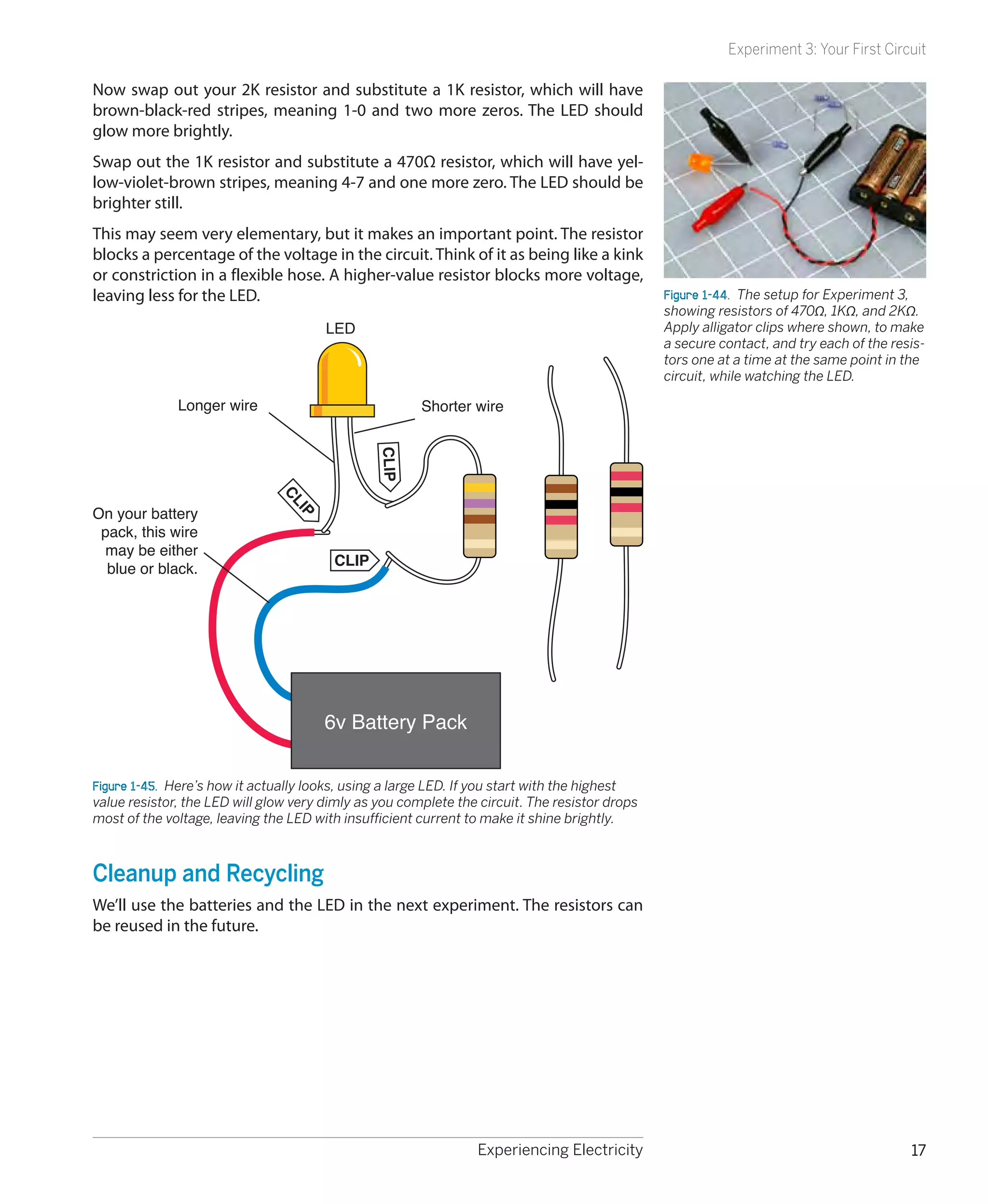
                                   Wire it into the circuit as shown in Figures 1-44 and 1-45, making the connec-
                                   tions with alligator clips. You should see the LED glow very dimly.


16                                 Chapter 1
Experiment 3: Your First Circuit

Now swap out your 2K resistor and substitute a 1K resistor, which will have
brown-black-red stripes, meaning 1-0 and two more zeros. The LED should
glow more brightly.
Swap out the 1K resistor and substitute a 470Ω resistor, which will have yel-
low-violet-brown stripes, meaning 4-7 and one more zero. The LED should be
brighter still.
This may seem very elementary, but it makes an important point. The resistor
blocks a percentage of the voltage in the circuit. Think of it as being like a kink
or constriction in a flexible hose. A higher-value resistor blocks more voltage,
leaving less for the LED.                                                                      Figure 1-44.  The setup for Experiment 3,
                                                                                               showing resistors of 470Ω, 1KΩ, and 2KΩ.
                                       LED                                                     Apply alligator clips where shown, to make
                                                                                               a secure contact, and try each of the resis-
                                                                                               tors one at a time at the same point in the
                                                                                               circuit, while watching the LED.

              Longer wire                              Shorter wire
                                               CLIP
                               CL


On your battery
                                 IP


 pack, this wire
 may be either
                                        CLIP
  blue or black.


                                       6v Battery Pack


Figure 1-45.  Here’s how it actually looks, using a large LED. If you start with the highest
value resistor, the LED will glow very dimly as you complete the circuit. The resistor drops
most of the voltage, leaving the LED with insufficient current to make it shine brightly.


Cleanup and Recycling
We’ll use the batteries and the LED in the next experiment. The resistors can
be reused in the future.


                                                                Experiencing Electricity                                                17
Experiment 4: Varying the Voltage


                                    Experiment 4: Varying the Voltage
                                    Potentiometers come in various shapes and sizes, but they all do the same
                                    thing: they allow you to vary voltage and current by varying resistance. This
                                    experiment will enable you to learn more about voltage, amperage, and the
                                    relationship between them. You’ll also learn how to read a manufacturer’s data
                                    sheet.
                                    You will need the same batteries, battery carrier, alligator clips, and LED from
                                    the last experiment, plus:
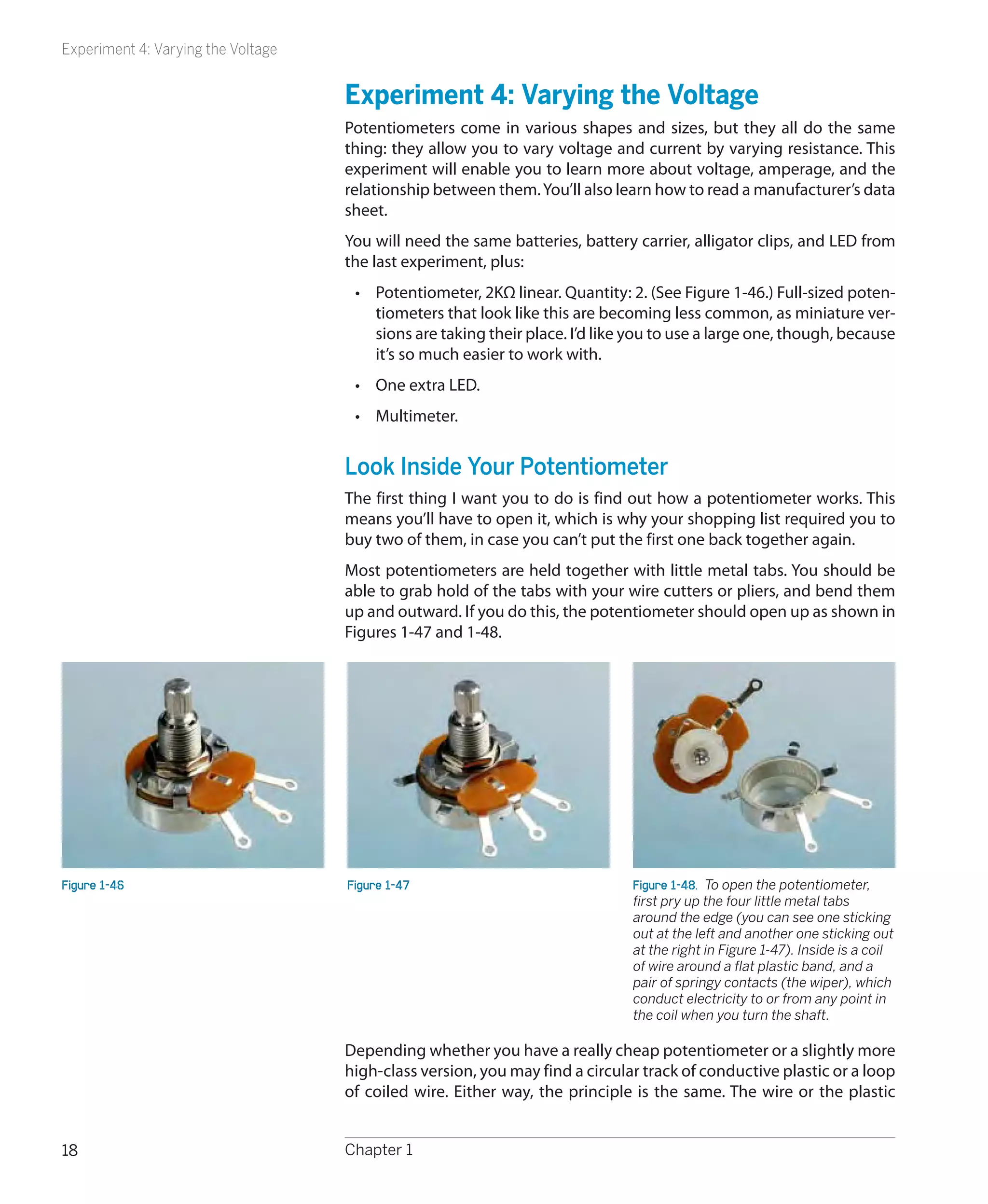
                                     •	 Potentiometer, 2KΩ linear. Quantity: 2. (See Figure 1-46.) Full-sized poten-
                                        tiometers that look like this are becoming less common, as miniature ver-
                                        sions are taking their place. I’d like you to use a large one, though, because
                                        it’s so much easier to work with.
                                     •	 One extra LED.
                                     •	 Multimeter.


                                    Look Inside Your Potentiometer
                                    The first thing I want you to do is find out how a potentiometer works. This
                                    means you’ll have to open it, which is why your shopping list required you to
                                    buy two of them, in case you can’t put the first one back together again.
                                    Most potentiometers are held together with little metal tabs. You should be
                                    able to grab hold of the tabs with your wire cutters or pliers, and bend them
                                    up and outward. If you do this, the potentiometer should open up as shown in
                                    Figures 1-47 and 1-48.


Figure 1-46                         Figure 1-47                               Figure 1-48.  To open the potentiometer,
                                                                              first pry up the four little metal tabs
                                                                              around the edge (you can see one sticking
                                                                              out at the left and another one sticking out
                                                                              at the right in Figure 1-47). Inside is a coil
                                                                              of wire around a flat plastic band, and a
                                                                              pair of springy contacts (the wiper), which
                                                                              conduct electricity to or from any point in
                                                                              the coil when you turn the shaft.

                                    Depending whether you have a really cheap potentiometer or a slightly more
                                    high-class version, you may find a circular track of conductive plastic or a loop
                                    of coiled wire. Either way, the principle is the same. The wire or the plastic


18                                  Chapter 1
Experiment 4: Varying the Voltage

possesses some resistance (a total of 2K in this instance), and as you turn the
shaft of the potentiometer, a wiper rubs against the resistance, giving you a
shortcut to any point from the center terminal.                                                    Ohms
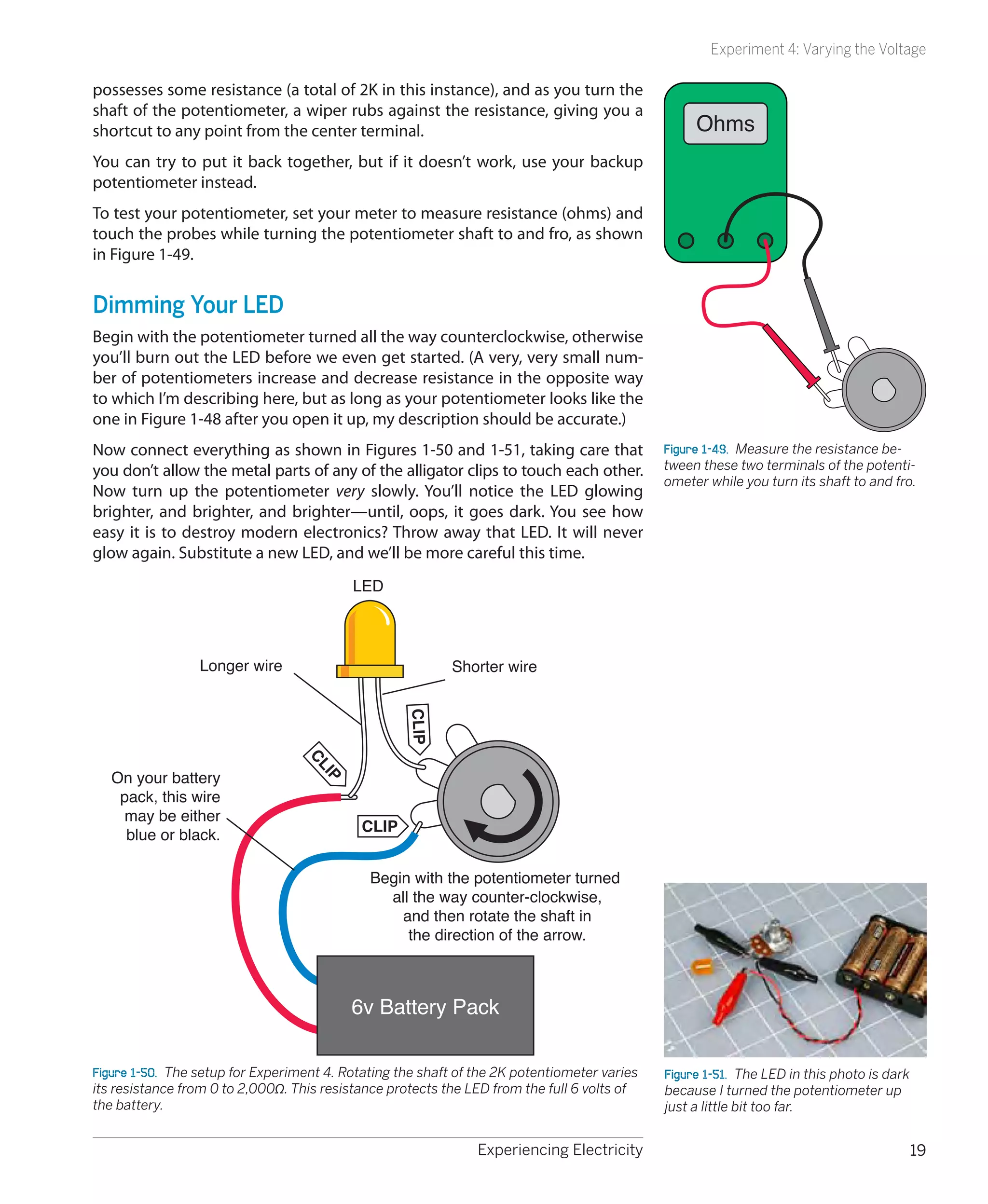
You can try to put it back together, but if it doesn’t work, use your backup
potentiometer instead.
To test your potentiometer, set your meter to measure resistance (ohms) and
touch the probes while turning the potentiometer shaft to and fro, as shown
in Figure 1-49.


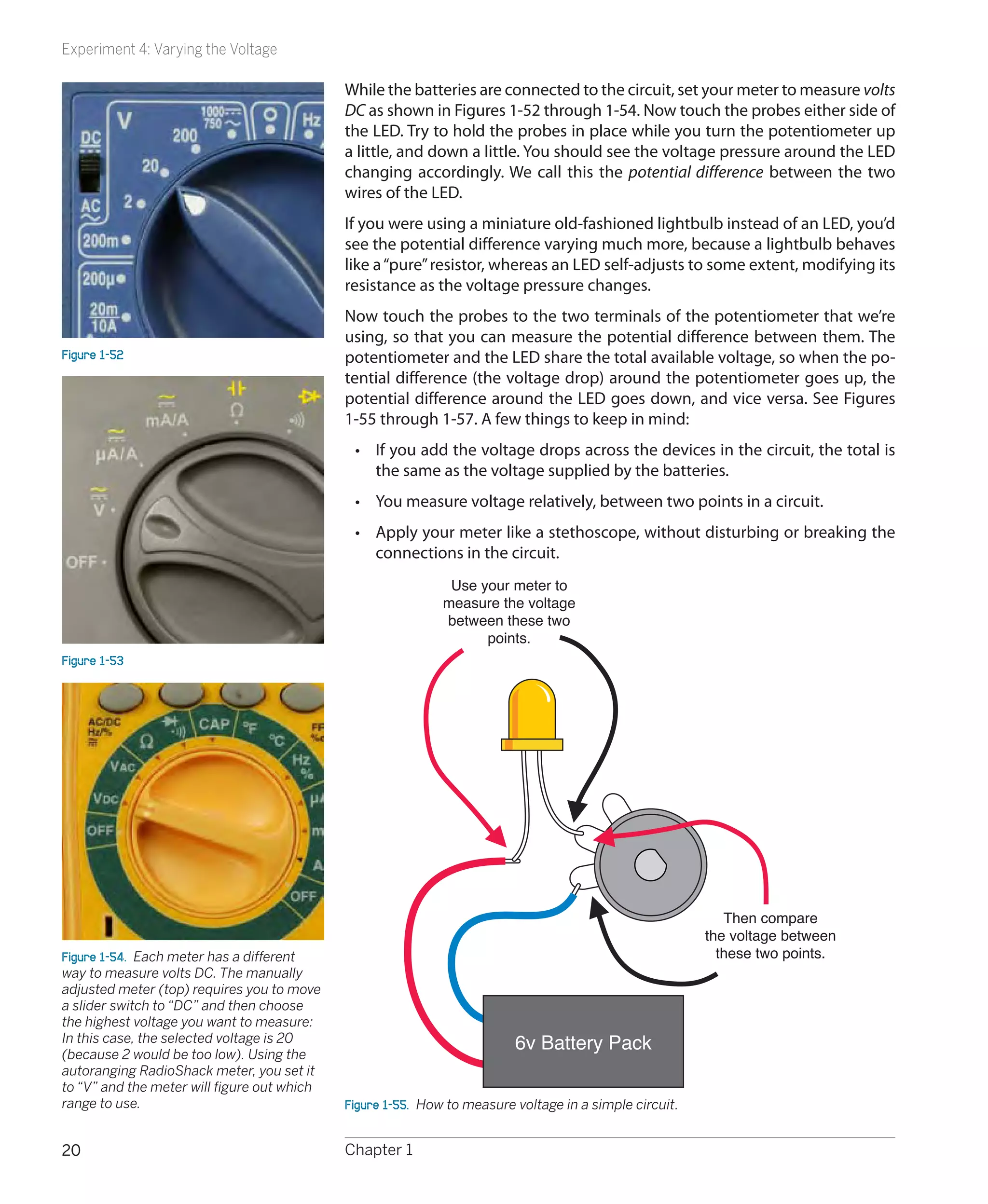
Dimming Your LED
Begin with the potentiometer turned all the way counterclockwise, otherwise
you’ll burn out the LED before we even get started. (A very, very small num-
ber of potentiometers increase and decrease resistance in the opposite way
to which I’m describing here, but as long as your potentiometer looks like the
one in Figure 1-48 after you open it up, my description should be accurate.)
Now connect everything as shown in Figures 1-50 and 1-51, taking care that                    Figure 1-49.  Measure the resistance be-
you don’t allow the metal parts of any of the alligator clips to touch each other.            tween these two terminals of the potenti-
                                                                                              ometer while you turn its shaft to and fro.
Now turn up the potentiometer very slowly. You’ll notice the LED glowing
brighter, and brighter, and brighter—until, oops, it goes dark. You see how
easy it is to destroy modern electronics? Throw away that LED. It will never
glow again. Substitute a new LED, and we’ll be more careful this time.
                                           LED


                 Longer wire                               Shorter wire
                                                    CLIP
                                  CL


   On your battery
                                     IP


    pack, this wire
    may be either
                                            CLIP
     blue or black.

                                              Begin with the potentiometer turned
                                                all the way counter-clockwise,
                                                  and then rotate the shaft in
                                                   the direction of the arrow.


                                           6v Battery Pack

Figure 1-50.  The setup for Experiment 4. Rotating the shaft of the 2K potentiometer varies   Figure 1-51.  The LED in this photo is dark
its resistance from 0 to 2,000Ω. This resistance protects the LED from the full 6 volts of    because I turned the potentiometer up
the battery.                                                                                  just a little bit too far.


                                                                Experiencing Electricity                                                    19
Experiment 4: Varying the Voltage

                                             While the batteries are connected to the circuit, set your meter to measure volts
                                             DC as shown in Figures 1-52 through 1-54. Now touch the probes either side of
                                             the LED. Try to hold the probes in place while you turn the potentiometer up
                                             a little, and down a little. You should see the voltage pressure around the LED
                                             changing accordingly. We call this the potential difference between the two
                                             wires of the LED.
                                             If you were using a miniature old-fashioned lightbulb instead of an LED, you’d
                                             see the potential difference varying much more, because a lightbulb behaves
                                             like a “pure” resistor, whereas an LED self-adjusts to some extent, modifying its
                                             resistance as the voltage pressure changes.
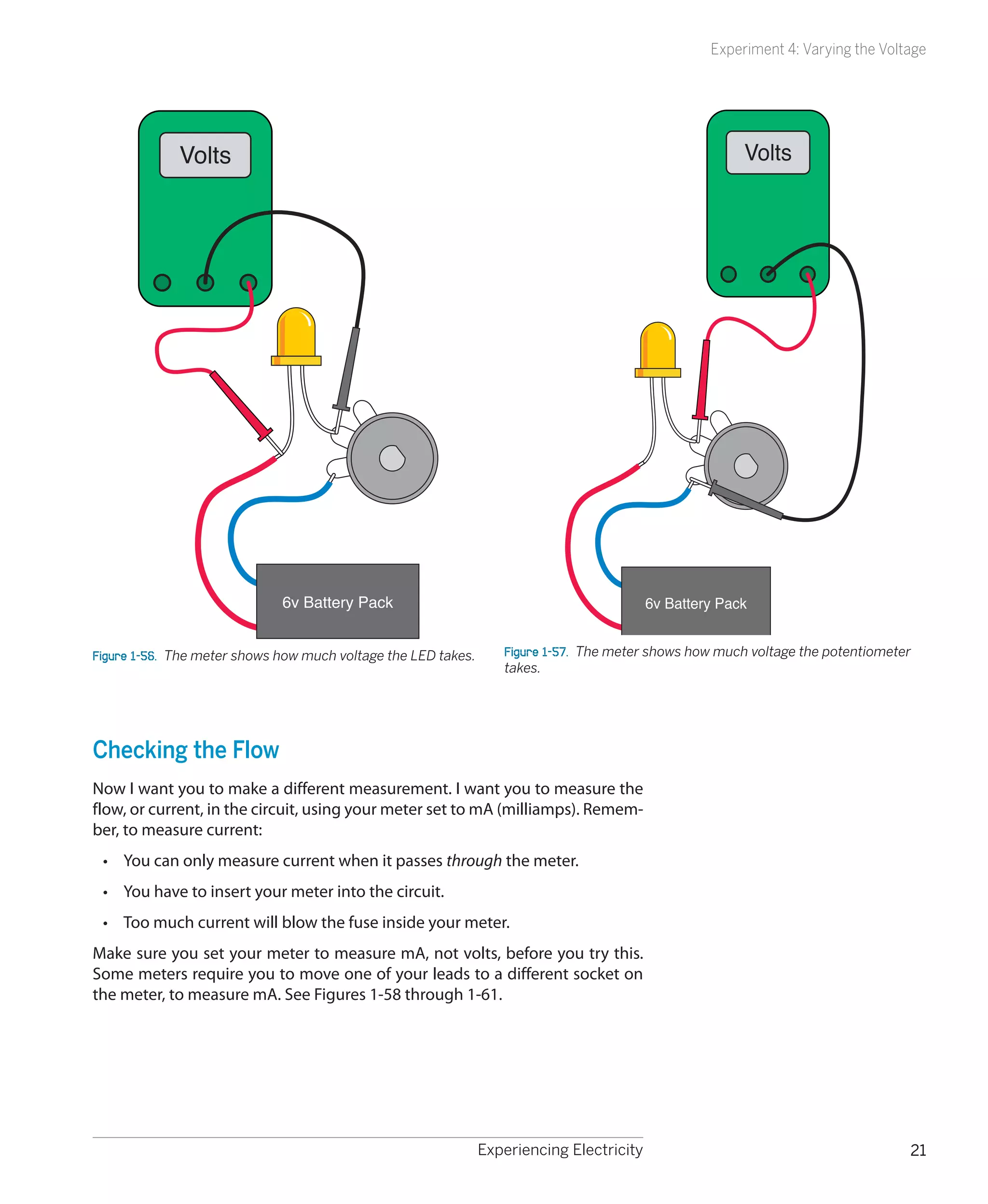
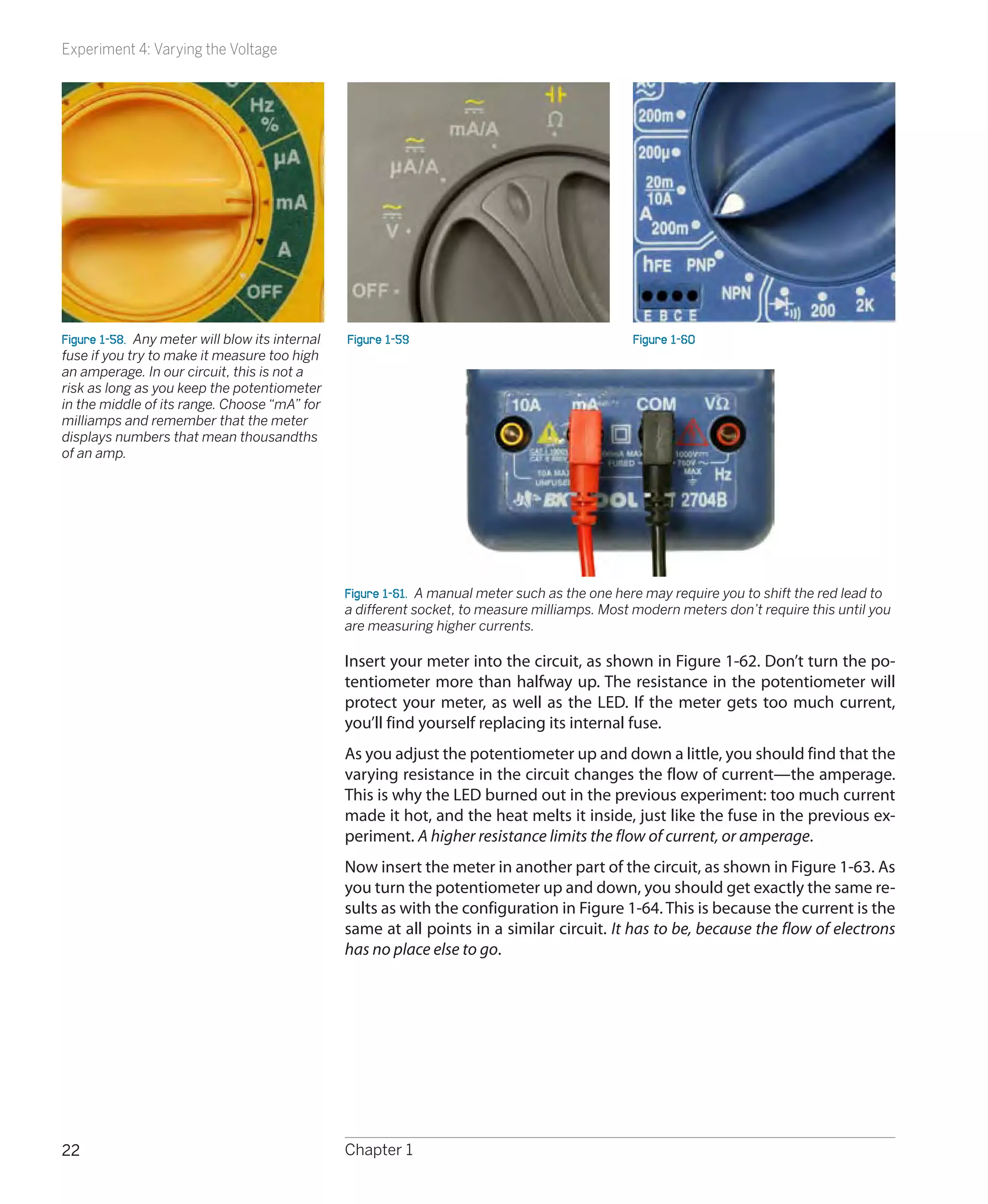
                                             Now touch the probes to the two terminals of the potentiometer that we’re
                                             using, so that you can measure the potential difference between them. The
Figure 1-52                                  potentiometer and the LED share the total available voltage, so when the po-
                                             tential difference (the voltage drop) around the potentiometer goes up, the
                                             potential difference around the LED goes down, and vice versa. See Figures
                                             1-55 through 1-57. A few things to keep in mind:
                                              •	 If you add the voltage drops across the devices in the circuit, the total is
                                                 the same as the voltage supplied by the batteries.
                                              •	 You measure voltage relatively, between two points in a circuit.
                                              •	 Apply your meter like a stethoscope, without disturbing or breaking the
                                                 connections in the circuit.
                                                              Use your meter to
                                                             measure the voltage
                                                             between these two
                                                                   points.
Figure 1-53


                                                                                                            Then compare
                                                                                                         the voltage between
Figure 1-54.  Each meter has a different                                                                   these two points.
way to measure volts DC. The manually
adjusted meter (top) requires you to move
a slider switch to “DC” and then choose
the highest voltage you want to measure:
In this case, the selected voltage is 20
(because 2 would be too low). Using the
                                                                          6v Battery Pack
autoranging RadioShack meter, you set it
to “V” and the meter will figure out which
range to use.                                Figure 1-55.  How to measure voltage in a simple circuit.


20                                           Chapter 1
Experiment 4: Varying the Voltage


             Volts                                                                                       Volts


                              6v Battery Pack                                              6v Battery Pack


Figure 1-56.  The meter shows how much voltage the LED takes.      Figure 1-57.  The meter shows how much voltage the potentiometer
                                                                   takes.


Checking the Flow
Now I want you to make a different measurement. I want you to measure the
flow, or current, in the circuit, using your meter set to mA (milliamps). Remem-
ber, to measure current:
 •	 You can only measure current when it passes through the meter.
 •	 You have to insert your meter into the circuit.
 •	 Too much current will blow the fuse inside your meter.
Make sure you set your meter to measure mA, not volts, before you try this.
Some meters require you to move one of your leads to a different socket on
the meter, to measure mA. See Figures 1-58 through 1-61.


                                                                Experiencing Electricity                                          21
Experiment 4: Varying the Voltage


Figure 1-58.  Any meter will blow its internal   Figure 1-59                                    Figure 1-60
fuse if you try to make it measure too high
an amperage. In our circuit, this is not a
risk as long as you keep the potentiometer
in the middle of its range. Choose “mA” for
milliamps and remember that the meter
displays numbers that mean thousandths
of an amp.


                                                 Figure 1-61.  A manual meter such as the one here may require you to shift the red lead to
                                                 a different socket, to measure milliamps. Most modern meters don’t require this until you
                                                 are measuring higher currents.

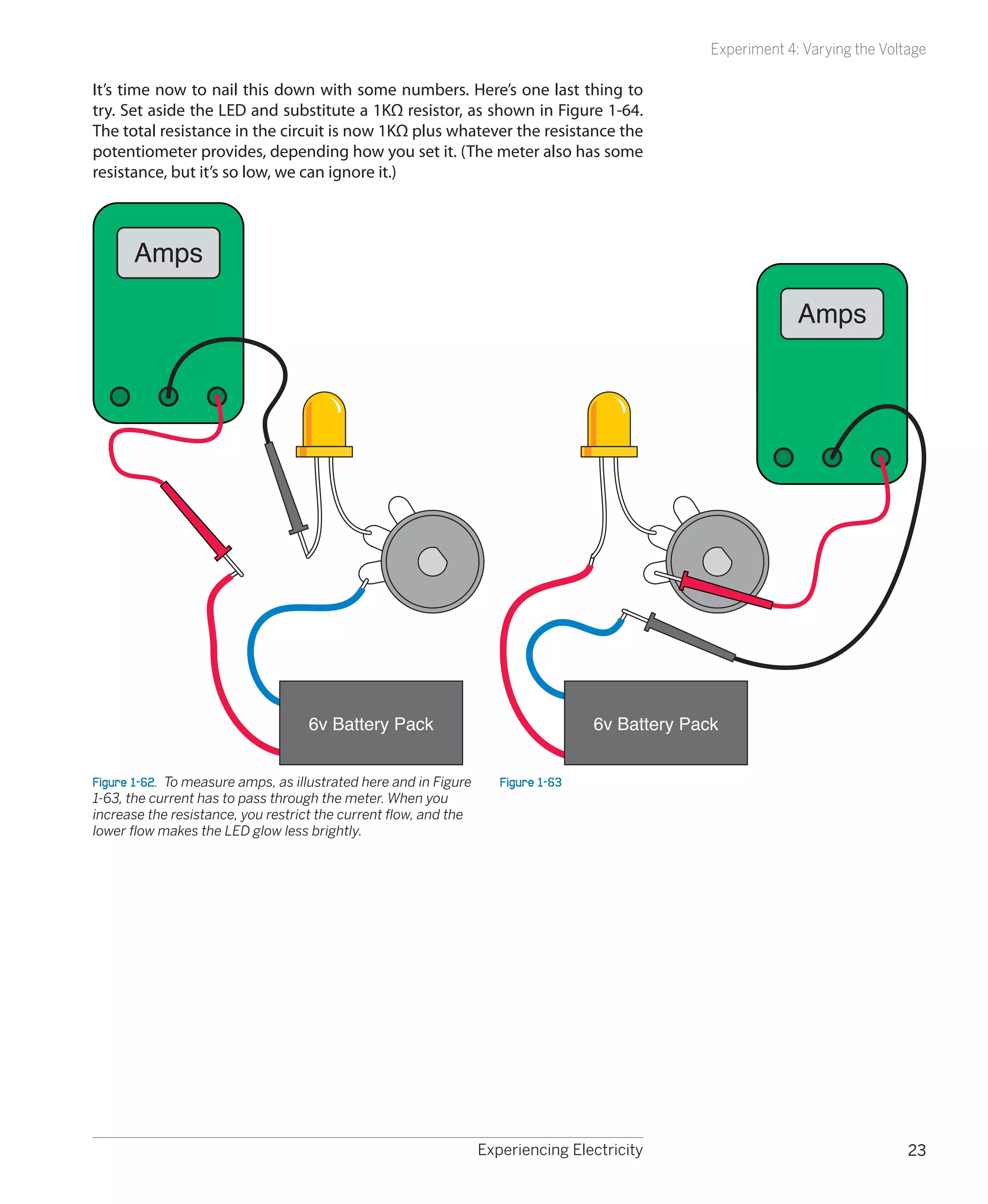
                                                 Insert your meter into the circuit, as shown in Figure 1-62. Don’t turn the po-
                                                 tentiometer more than halfway up. The resistance in the potentiometer will
                                                 protect your meter, as well as the LED. If the meter gets too much current,
                                                 you’ll find yourself replacing its internal fuse.
                                                 As you adjust the potentiometer up and down a little, you should find that the
                                                 varying resistance in the circuit changes the flow of current—the amperage.
                                                 This is why the LED burned out in the previous experiment: too much current
                                                 made it hot, and the heat melts it inside, just like the fuse in the previous ex-
                                                 periment. A higher resistance limits the flow of current, or amperage.
                                                 Now insert the meter in another part of the circuit, as shown in Figure 1-63. As
                                                 you turn the potentiometer up and down, you should get exactly the same re-
                                                 sults as with the configuration in Figure 1-64. This is because the current is the
                                                 same at all points in a similar circuit. It has to be, because the flow of electrons
                                                 has no place else to go.


22                                               Chapter 1
Experiment 4: Varying the Voltage

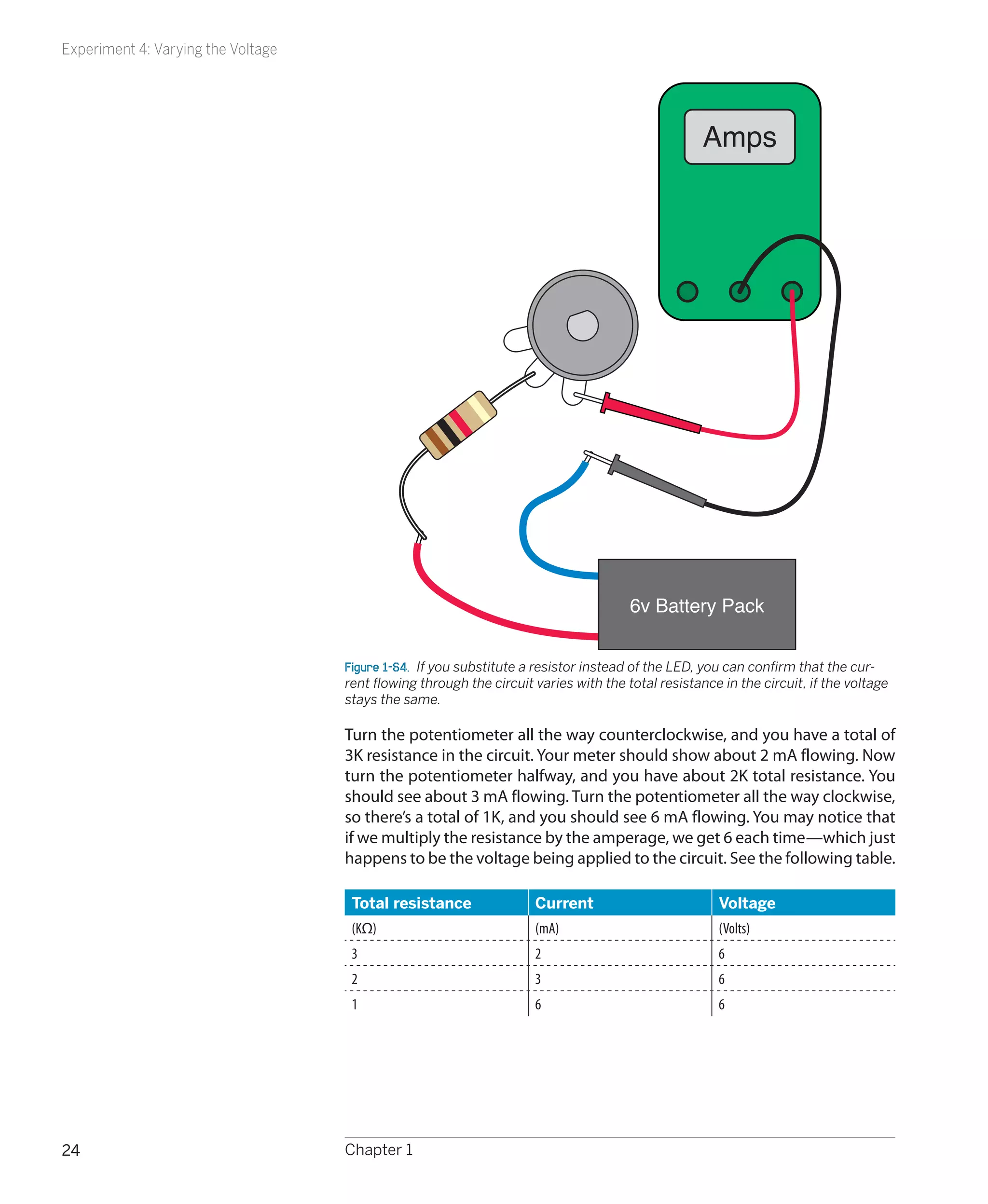
It’s time now to nail this down with some numbers. Here’s one last thing to
try. Set aside the LED and substitute a 1KΩ resistor, as shown in Figure 1-64.
The total resistance in the circuit is now 1KΩ plus whatever the resistance the
potentiometer provides, depending how you set it. (The meter also has some
resistance, but it’s so low, we can ignore it.)


      Amps

                                                                                                               Amps


                                    6v Battery Pack                                 6v Battery Pack


Figure 1-62.  To measure amps, as illustrated here and in Figure      Figure 1-63
1-63, the current has to pass through the meter. When you
increase the resistance, you restrict the current flow, and the
lower flow makes the LED glow less brightly.


                                                                   Experiencing Electricity                                     23
Experiment 4: Varying the Voltage


                                                                                                   Amps


                                                                                      6v Battery Pack


                                    Figure 1-64.  If you substitute a resistor instead of the LED, you can confirm that the cur-
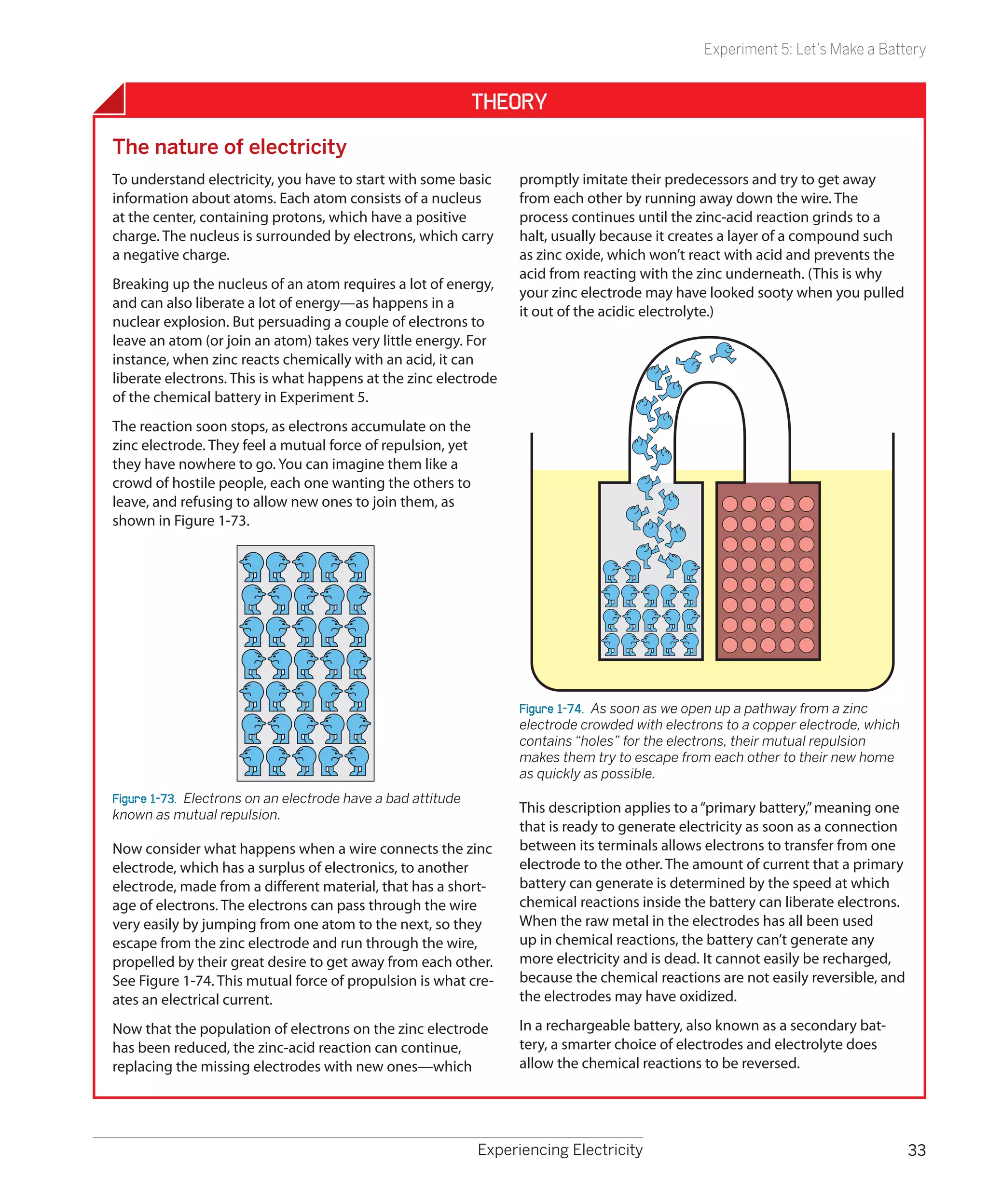
                                    rent flowing through the circuit varies with the total resistance in the circuit, if the voltage
                                    stays the same.

                                    Turn the potentiometer all the way counterclockwise, and you have a total of
                                    3K resistance in the circuit. Your meter should show about 2 mA flowing. Now
                                    turn the potentiometer halfway, and you have about 2K total resistance. You
                                    should see about 3 mA flowing. Turn the potentiometer all the way clockwise,
                                    so there’s a total of 1K, and you should see 6 mA flowing. You may notice that
                                    if we multiply the resistance by the amperage, we get 6 each time—which just
                                    happens to be the voltage being applied to the circuit. See the following table.

                                     Total resistance                Current                          Voltage
                                     (KΩ)                            (mA)                             (Volts)
                                     3                               2                                6
                                     2                               3                                6
                                     1                               6                                6


24                                  Chapter 1
Experiment 4: Varying the Voltage

In fact, we could say:
     voltage = kilohms × milliamps
But wait a minute: 1K is 1,000 ohms, and 1mA is 1/1,000 of an amp. Therefore,
our formula should really look like this:
     voltage = (ohms × 1,000) × (amps/1,000)
The two factors of 1,000 cancel out, so we get this:
     volts = ohms × amps
This is known as Ohm’s Law. See the section, “Fundamentals: Ohm’s Law,” on
the following page.


                                                        Fundamentals
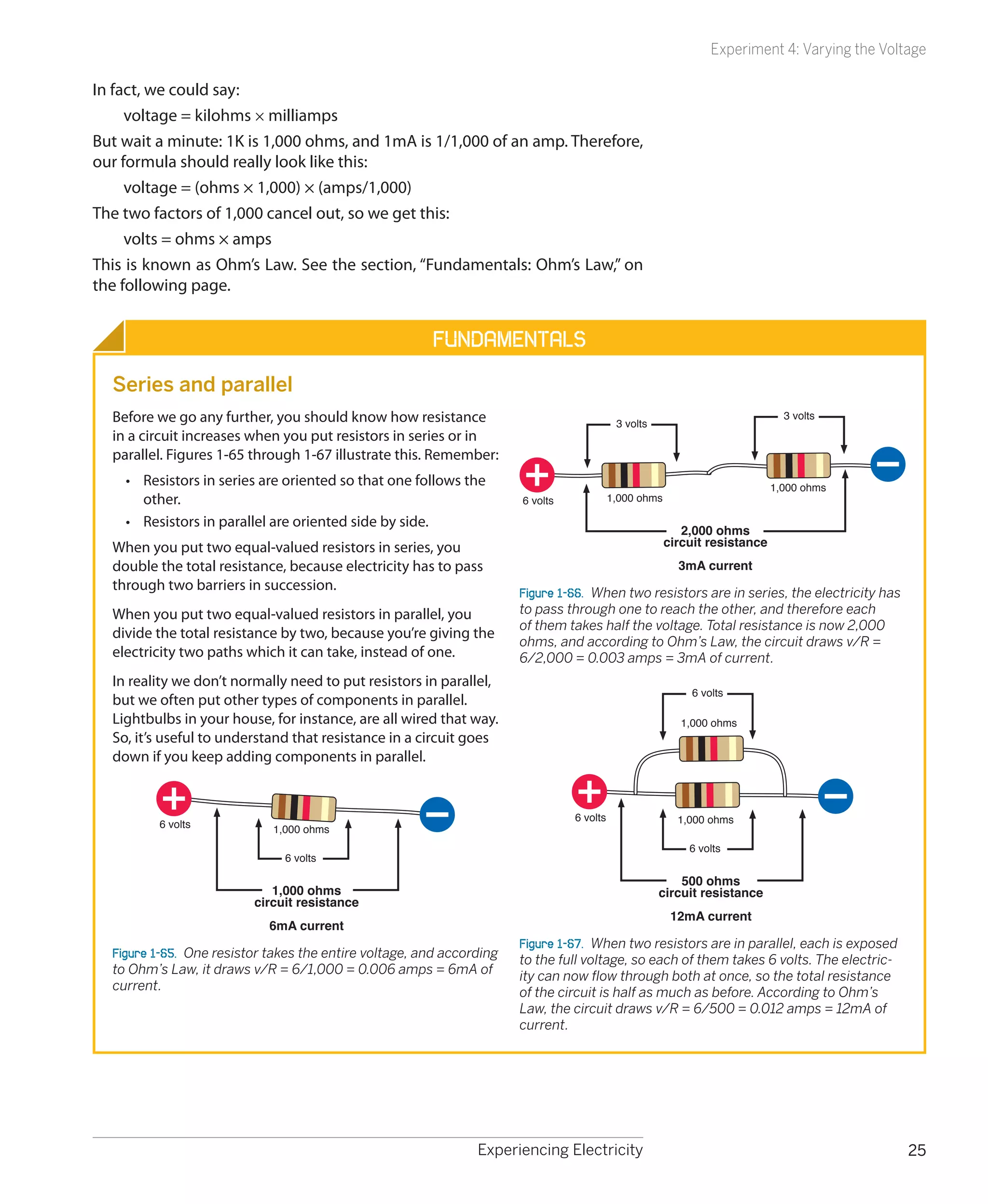
  Series and parallel
  Before we go any further, you should know how resistance                                  3 volts
                                                                                                                               3 volts
  in a circuit increases when you put resistors in series or in
  parallel. Figures 1-65 through 1-67 illustrate this. Remember:
    •	 Resistors in series are oriented so that one follows the                                                              1,000 ohms
       other.                                                          6 volts             1,000 ohms

    •	 Resistors in parallel are oriented side by side.
                                                                                                           2,000 ohms
  When you put two equal-valued resistors in series, you                                                circuit resistance
  double the total resistance, because electricity has to pass                                            3mA current
  through two barriers in succession.                                  Figure 1-66.  When two resistors are in series, the electricity has
  When you put two equal-valued resistors in parallel, you             to pass through one to reach the other, and therefore each
                                                                       of them takes half the voltage. Total resistance is now 2,000
  divide the total resistance by two, because you’re giving the
                                                                       ohms, and according to Ohm’s Law, the circuit draws v/R =
  electricity two paths which it can take, instead of one.             6/2,000 = 0.003 amps = 3mA of current.
  In reality we don’t normally need to put resistors in parallel,
                                                                                                             6 volts
  but we often put other types of components in parallel.
  Lightbulbs in your house, for instance, are all wired that way.                                          1,000 ohms
  So, it’s useful to understand that resistance in a circuit goes
  down if you keep adding components in parallel.


                                                                                 6 volts                  1,000 ohms
          6 volts            1,000 ohms
                                                                                                            6 volts
                               6 volts

                                                                                                          500 ohms
                             1,000 ohms                                                               circuit resistance
                          circuit resistance
                                                                                                         12mA current
                            6mA current
                                                                       Figure 1-67.  When two resistors are in parallel, each is exposed
  Figure 1-65.  One resistor takes the entire voltage, and according   to the full voltage, so each of them takes 6 volts. The electric-
  to Ohm’s Law, it draws v/R = 6/1,000 = 0.006 amps = 6mA of           ity can now flow through both at once, so the total resistance
  current.                                                             of the circuit is half as much as before. According to Ohm’s
                                                                       Law, the circuit draws v/R = 6/500 = 0.012 amps = 12mA of
                                                                       current.


                                                                Experiencing Electricity                                                       25
Experiment 4: Varying the Voltage


          Fundamentals                      Using Ohm’s Law
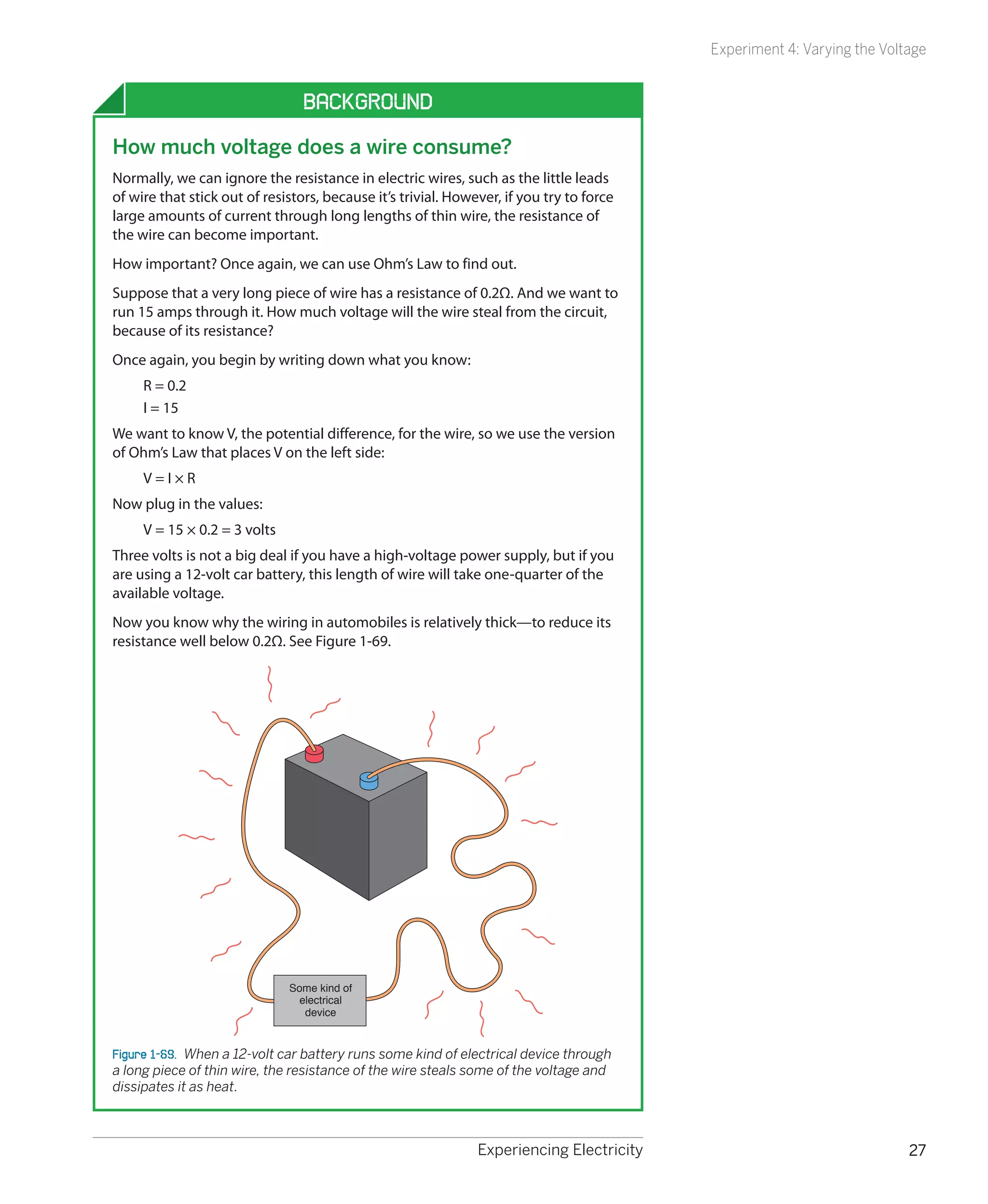
                                            Ohm’s Law is extremely useful. For example, it helps us to figure out whether a
     Ohm’s Law                              component can be used safely in a circuit. Instead of stressing the component
                                            until we burn it out, we can predict whether it will work.
     For reasons I’ll explain in a mo-
     ment, amps are normally abbrevi-       For instance, the first time you turned the potentiometer, you didn’t really
     ated with the letter I. V stands for   know how far you could go until the LED burned out. Wouldn’t it be useful
     volts and R stands for resistance      to know precisely what resistance to put in series with an LED, to protect it
     in ohms (because the omega             adequately while providing as much light as possible?
     symbol, Ω, is not easily generated
     from most keyboards). Using these
     symbols, you can write Ohm’s Law       How to Read a Data Sheet
     in three different ways:
                                            Like most information, the answer to this question is available online.
          V=I×R
          I = V/R                           Here’s how you find a manufacturer’s data sheet (Figure 1-68). First, find the
          R = V/I                           component that you’re interested in from a mail-order source. Next, Google
     Remember, V is a difference in         the part number and manufacturer’s name. Usually the data sheet will pop up
     voltage between two points in a        as the first hit. A source such as Mouser.com makes it even easier by giving you
     simple circuit, R is the resistance    a direct link to manufacturers’ data sheets for many products.
     in ohms between the same two
     points, and I is the current in
     amps flowing through the circuit            VISHAY
                                                                                                                            TLHG / R / Y540.
     between the two points.                                                                                                       Vishay Semiconductors

     Letter I is used because origi-             High Efficiency LED in                       5 mm Tinted Diffused Package
     nally current was measured by its
     inductance, meaning the ability to
     induce magnetic effects. It would           Description
                                                 The TLH.54.. series was developed for standard
     be much less confusing to use A             applications like general indicating and lighting pur-
     for amps, but unfortunately it’s too        poses.
                                                 It is housed in a 5 mm tinted diffused plastic package.
     late for that to happen.                    The wide viewing angle of these devices provides a

                                                                                                                                              Pb
                                                 high on-off contrast.
                                                 Several selection types with different luminous inten-
                                                 sities are offered. All LEDs are categorized in lumi-
                                                                                                                           19223
                                                                                                                                      e2      Pb-free
                                                 nous intensity groups. The green and yellow LEDs
                                                 are categorized additionally in wavelength groups.


                                                 That allows users to assemble LEDs with uniform           Applications
                                                 appearance.                                               Status lights
                                                                                                           OFF / ON indicator
                                                 Features                                                  Background illumination
                                                 • Choice of three bright colors                           Readout lights
                                                   Standard T-1� package                                   Maintenance lights
                                                   Small mechanical tolerances                             Legend light
                                                   Suitable for DC and high peak current
                                                   Wide viewing angle
                                                   Luminous intensity categorized
                                                   Yellow and green color categorized
                                                   TLH.54.. with stand-offs
                                                   Lead-free device


                                            Figure 1-68.  The beginning of a typical data sheet, which includes all relevant specifica-
                                            tions for the product, freely available online.


26                                          Chapter 1
Experiment 4: Varying the Voltage


                                 Background
How much voltage does a wire consume?
Normally, we can ignore the resistance in electric wires, such as the little leads
of wire that stick out of resistors, because it’s trivial. However, if you try to force
large amounts of current through long lengths of thin wire, the resistance of
the wire can become important.
How important? Once again, we can use Ohm’s Law to find out.
Suppose that a very long piece of wire has a resistance of 0.2Ω. And we want to
run 15 amps through it. How much voltage will the wire steal from the circuit,
because of its resistance?
Once again, you begin by writing down what you know:
     R = 0.2
     I = 15
We want to know V, the potential difference, for the wire, so we use the version
of Ohm’s Law that places V on the left side:
     V=I×R
Now plug in the values:
     V = 15 × 0.2 = 3 volts
Three volts is not a big deal if you have a high-voltage power supply, but if you
are using a 12-volt car battery, this length of wire will take one-quarter of the
available voltage.
Now you know why the wiring in automobiles is relatively thick—to reduce its
resistance well below 0.2Ω. See Figure 1-69.


                              Some kind of
                                electrical
                                 device


Figure 1-69.  When a 12-volt car battery runs some kind of electrical device through
a long piece of thin wire, the resistance of the wire steals some of the voltage and
dissipates it as heat.


                                                               Experiencing Electricity                                 27
Experiment 4: Varying the Voltage

                                               Here’s an example. Suppose I want a red LED, such as the Vishay part TLHR5400,
             Background                        which has become such a common item that I can buy them individually for 9
                                               cents apiece. I click the link to the data sheet maintained by the manufacturer,
     The origins of wattage                    Vishay Semiconductor. Almost immediately I have a PDF page on my screen.
     James Watt (Figure 1-70) is known         This data sheet is for TLHR, TLHG, and TLHY types of LED, which are red, green,
     as the inventor of the steam              and yellow respectively, as suggested by the R, G, and Y in the product codes.
     engine. Born in 1736 in Scotland,         I scroll down and look at the “Optical and Electrical Characteristics” section.
     he set up a small workshop in the         It tells me that under conditions of drawing a current of 20 mA, the LED will
     University of Glasgow, where he           enjoy a “Typ,” meaning, typical, “forward voltage” of 2 volts. The “Max,” meaning
     struggled to perfect an efficient         maximum, is 3 volts.
     design for using steam to move a
     piston in a cylinder. Financial prob-     Let’s look at one other data sheet, as not all of them are written the same way.
     lems and the primitive state of           I’ll choose a different LED, the Kingbright part WP7113SGC. Click on the link
     the art of metal working delayed          to the manufacturer’s site, and I find on the second page of the data sheet a
     practical applications until 1776.        typical forward voltage of 2.2, maximum 2.5, and a maximum forward current
     Despite difficulties in obtaining         of 25 mA. I also find some additional information: a maximum reverse voltage
     patents (which could only be              of 5 and maximum reverse current of 10 uA (that’s microamps, which are 1,000
     granted by an act of parliament           times smaller than milliamps). This tells us that you should avoid applying ex-
     in those times), Watt and his             cessive voltage to the LED the wrong way around. If you exceed the reverse
     business partner eventually made          voltage, you risk burning out the LED. Always observe polarity!
     a lot of money from his innova-
     tions. Although he predated the           Kingbright also warns us how much heat the LED can stand: 260° C (500° F) for
     pioneers in electricity, in 1889 (70      a few seconds. This is useful information, as we’ll be putting aside our alligator
     years after his death), his name          clips and using hot molten solder to connect electrical parts in the near future.
     was assigned to the basic unit of         Because we have already destroyed a battery, a fuse, and an LED in just four ex-
     electric power that can be defined        periments, maybe you won’t be surprised when I tell you that we will destroy
     by multiplying amperes by volts.          at least a couple more components as we test their limits with a soldering iron.
     See the Fundamentals section,
     “Watt Basics,” on page 31.                Anyway, now we know what an LED wants, we can figure out how to supply
                                               it. If you have any difficulties dealing with decimals, check the Fundamentals
                                               section “Decimals,” on the next page, before continuing.


                                               How Big a Resistor Does an LED Need?
                                               Suppose that we’re use the Vishay LED. Remember its requirements from the
                                               data sheet? Maximum of 3 volts, and a safe current of 20mA.
                                               I’m going to limit it to 2.5 volts, to be on the safe side. We have 6 volts of bat-
                                               tery power. Subtract 2.5 from 6 and we get 3.5. So we need a resistor that will
                                               take 3.5 volts from the circuit, leaving 2.5 for the LED.
                                               The current flow is the same at all places in a simple circuit. If we want a maxi-
                                               mum of 20mA to flow through the LED, the same amount of current will be
                                               flowing through the resistor.
                                               Now we can write down what we know about the resistor in the circuit. Note
     Figure 1-70.  James Watt’s develop-       that we have to convert all units to volts, amps, and ohms, so that 20mA should
     ment of steam power enabled the
                                               be written as 0.02 amps:
     industrial revolution. After his death,
     he was honored by having his name              V = 3.5 (the potential drop across the resistor)
     applied to the basic unit of power in          I = 0.02 (the current flowing through the resistor)
     electricity.


28                                             Chapter 1
Experiment 4: Varying the Voltage

We want to know R, the resistance. So, we use the version of Ohm’s Law that
puts R on the left side:
     R= V/I
Now plug in the values:
     R = 3.5/0.02
Run this through your pocket calculator if you find decimals confusing. The
answer is:
     R = 175Ω
It so happens that 175Ω isn’t a standard value. You may have to settle for 180
or 220Ω, but that’s close enough.
Evidently the 470Ω resistor that you used in Experiment 3 was a very conserva-
tive choice. I suggested it because I said originally that you could use any LED
at all. I figured that no matter which one you picked, it should be safe with
470Ω to protect it.


Cleanup and Recycling
The dead LED can be thrown away. Everything else is reusable.


                               Fundamentals
  Decimals
  Legendary British politician Sir Winston Churchill is famous for complain-
  ing about “those damned dots.” He was referring to decimal points. Because
  Churchill was Chancellor of the Exchequer at the time, and thus in charge of all
  government expenditures, his difficulty with decimals was a bit of a problem.
  Still, he muddled through in time-honored British fashion, and so can you.
  You can also use a pocket calculator—or follow two basic rules.

  Doing multiplication: combine the zeros
  Suppose you need to multiply 0.04 by 0.005:
    1.	 Count the total number of zeros following both of the decimal points. In
        this case, three zeros.
    2.	 Multiply the numbers which follow the zeros. In this case, 4 × 5 = 20.
    3.	 Write down the result as 0 followed by a decimal point, followed by the
        number of zeros, followed by the multiplication result. Like this: 0.00020,
        which is the same as 0.0002.

  Doing division: cancel the zeros
  Suppose you need to divide 0.006 by 0.0002:
    1.	 Shift the decimal points to the right, in both the numbers, by the same
        number of steps, until both the numbers are greater than 1. In this case,
        shift the point four steps in each number, so you get 60 divided by 2.
    2.	 Do the division. The result in this case is 30.


                                                              Experiencing Electricity                                 29
Experiment 4: Varying the Voltage


                                                                  Theory
     Doing the math on your tongue
     I’m going to go back to the question I asked in the previous        That’s 100,000 times the current that may have passed
     experiment: why didn’t your tongue get hot?                         through your tongue, which would have generated much
                                                                         more heat, even though the voltage was lower.
     Now that you know Ohm’s Law, you can figure out the
     answer in numbers. Let’s suppose the battery delivered              Could that tiny little battery really pump out 15 amps?
     its rated 9 volts, and your tongue had a resistance of 50K,         Remember that the battery got hot, as well as the wire. This
     which is 50,000 ohms. Write down what you know:                     tells us that the electrons may have met some resistance
          V=9                                                            inside the battery, as well as in the wire. (Otherwise, where
                                                                         else did the heat come from?) Normally we can forget about
          R = 50,000
                                                                         the internal resistance of a battery, because it’s so low. But at
     We want to know the current, I, so we use the version of            high currents, it becomes a factor.
     Ohm’s Law that puts this on the left:
                                                                         I was reluctant to short-circuit the battery through a meter,
          I = V/R                                                        to try to measure the current. My meter will fry if the current
     Plug in the numbers:                                                is greater than 10A. However I did try putting other fuses
                                                                         into the circuit, to see whether they would blow. When I
          I = 9/50,000 = 0.00018 amps
                                                                         tried a 10A fuse, it did not melt. Therefore, for the brand of
     Move the decimal point three places to convert to milliamps:        battery I used, I’m fairly sure that the current in the short
          I = 0.18 mA                                                    circuit was under 10A, but I know it was over 3A, because
                                                                         the 3A fuse blew right away.
     That’s a tiny current that will not produce much heat at 9
     volts.                                                              The internal resistance of the 1.5-volt battery prevented
                                                                         the current in the short circuit from getting too high. This
     What about when you shorted out the battery? How much
                                                                         is why I cautioned against using a larger battery (especially
     current made the wires get hot? Well, suppose the wires had
                                                                         a car battery). Larger batteries have a much lower internal
     a resistance of 0.1 ohms (probably it’s less, but I’ll start with
                                                                         resistance, allowing dangerously high currents which gener-
     0.1 as a guess). Write down what we know:
                                                                         ate explosive amounts of heat. A car battery is designed to
          V = 1.5                                                        deliver literally hundreds of amps when it turns a starter
          R = 0.1                                                        motor. That’s quite enough current to melt wires and cause
                                                                         nasty burns. In fact, you can weld metal using a car battery.
     Once again we’re trying to find I, the current, so we use:
          I = V/R                                                        Lithium batteries also have low internal resistance, making
                                                                         them very dangerous when they’re shorted out. High cur-
     Plug in the numbers:                                                rent can be just as dangerous as high voltage.
          I = 1.5/0.1 = 15 amps


30                                               Chapter 1
Experiment 4: Varying the Voltage


                               Fundamentals                                                            Theory
Watt basics                                                                                Power assessments
So far I haven’t mentioned a unit that everyone is familiar with: watts.                   I mentioned earlier than resistors
                                                                                           are commonly rated as being
A watt is a unit of work. Engineers have their own definition of work—they say
                                                                                           capable of dealing with 1/4 watt,
that work is done when a person, an animal, or a machine pushes something to
                                                                                           1/2 watt, 1 watt, and so on. I sug-
overcome mechanical resistance. Examples would be a steam engine pulling a
                                                                                           gested that you should buy resis-
train on a level track (overcoming friction and air resistance) or a person walk-
                                                                                           tors of 1/4 watt or higher. How did
ing upstairs (overcoming the force of gravity).
                                                                                           I know this?
When electrons push their way through a circuit, they are overcoming a kind
                                                                                           Go back to the LED circuit. Re-
of resistance, and so they are doing work, which can be measured in watts. The
                                                                                           member we wanted the resistor to
definition is easy:
                                                                                           drop the voltage by 3.5 volts, at a
     watts = volts × amps                                                                  current of 20 mA. How many watts
Or, using the symbols customarily assigned, these three formulas all mean the              of power would this impose on
same thing:                                                                                the resistor?

     W=V×I                                                                                 Write down what you know:
     V = W/I                                                                                    V = 3.5 (the voltage drop
     I = W/V                                                                                    imposed by the resistor)
Watts can be preceded with an “m,” for “milli,” just like volts:                                I = 20mA = 0.02 amps
                                                                                                (the current flowing through
                                                                                                the resistor)
 Number of watts            Usually expressed as           Abbreviated as
                                                                                           We want to know W, so we use this
 0.001 watts                1 milliwatt                    1mW                             version of the formula:
 0.01 watts                 10 milliwatts                  10 mW                                W=V×I
 0.1 watts                  100 milliwatts                 100 mW                          Plug in the values:
 1 watt                     1,000 milliwatts               1W                                   W = 3.5 × 0.02 = 0.07 watts
                                                                                                (the power being dissipated
Because power stations, solar installations, and wind farms deal with much                      by the resistor)
larger numbers, you may also see references to kilowatts (using letter K) and              Because 1/4 watt is 0.25 watts, ob-
megawatts (with a capital M, not to be confused with the lowercase m used to               viously a 1/4 watt resistor will have
define milliwatts):                                                                        about four times the necessary
                                                                                           capacity. In fact you could have
 Number of watts            Usually expressed as           Abbreviated as                  used a 1/8 watt resistor, but in
                                                                                           future experiments we may need
 1,000 watts                1 kilowatt                     1 KW                            resistors that can handle 1/4 watt,
 1,000,000 watts            1 megawatt                     1 MW                            and there’s no penalty for using a
                                                                                           resistor that is rated for more watts
                                                                                           than will actually pass through it.
Lightbulbs are calibrated in watts. So are stereo systems. The watt is named
after James Watt, inventor of the steam engine. Incidentally, watts can be con-
verted to horsepower, and vice versa.


                                                                Experiencing Electricity                                           31
Experiment 5: Let’s Make a Battery


                                                Experiment 5: Let’s Make a Battery
                                                Long ago, before web surfing, file sharing, or cell phones, kids were so horribly
                                                deprived that they tried to amuse themselves with kitchen-table experiments
                                                such as making a primitive battery by pushing a nail and a penny into a lemon.
                                                Hard to believe, perhaps, but true!
                                                This is seriously old-school—but I want you to try it anyway, because anyone
                                                who wants to get a feel for electricity should see how easy it is to extract it
                                                from everyday objects around us. Plus, if you use enough lemons, you just
                                                might generate enough voltage to power an LED.
                                                The basic components of a battery are two metal electrodes immersed in an
                                                electrolyte. I won’t define these terms here (they’re explained in the following
                                                section “Theory: The nature of electricity”). Right now all you need to know is
                                                that lemon juice will be your electrolyte, and copper and zinc will be your elec-
                                                trodes. A penny provides the necessary copper, as long as it is fairly new and
                                                shiny. Pennies aren’t solid copper anymore, but they are still copper-plated,
                                                which is good enough.
                                                To find some metallic zinc, you will have to make a trip to a hardware store,
                                                where you should ask for roofing nails. The nails are zinc-plated to prevent
                                                them from rusting. Small metal brackets or mending plates also are usually
                                                zinc-plated. They should have a slightly dull, silvery look. If they have a mirror-
                                                bright finish, they’re more likely to be nickel-plated.
                                                Cut a lemon in half, set your multimeter so that it can measure up to 2 volts DC,
                                                and hold one probe against a penny while you hold the other probe against
Figure 1-71.  A three-lemon battery. Don’t      a roofing nail (or other zinc-plated object). Now force the penny and the nail
be too disappointed if the LED fails to         into the exposed juicy interior of the lemon, as close to each other as possible,
light up. The lemons have a high electri-       but not actually touching. You should find that your meter detects between
cal resistance, so they can’t deliver much
current, especially through the relatively      0.8 volts and 1 volt.
small surface area of the nails and the
pennies. However, the lemon battery does
                                                You can experiment with different items and liquids to see which works best.
generate voltage that you can measure           Immersing your nail and penny in lemon juice that you have squeezed into a
with your meter.                                shot glass or egg cup may enhance the efficiency of your battery, although
                                                you’ll have a harder time holding everything in place. Grapefruit juice and vin-
                                                egar will work as substitutes for lemon juice.
                                                To drive a typical LED, you need more than 1 volt. How to generate the extra
                                                electrical pressure? By putting batteries in series, of course. In other words,
                                                more lemons! (Or more shot glasses or egg cups.) You’ll also need lengths of
                                                wire to connect multiple electrodes, and this may entail skipping ahead to
                                                Chapter 2, where I describe how to strip insulation from hookup wire. Figures
                                                1-71 and 1-72 show the configuration.
                                                If you set things up carefully, making sure than none of the electrodes are
                                                touching, you may be able to illuminate your LED with two or three lemon-
Figure 1-72.  Bottled lemon juice seems to
work just as well as fresh lemon juice. I cut   juice batteries in series. (Some LEDs are more sensitive to very low currents
the bottoms off three paper cups, inserted      than others. Later in the book I’ll be talking about very-low-current LEDs. If you
a galvanized bracket into each, and used        want your lemon-juice battery to have the best chance of working, you can
heavyweight stranded copper wire to
make the positive electrodes
                                                search online for low-current LEDs and buy a couple.)


32                                              Chapter 1
Experiment 5: Let’s Make a Battery


                                                              Theory
The nature of electricity
To understand electricity, you have to start with some basic        promptly imitate their predecessors and try to get away
information about atoms. Each atom consists of a nucleus            from each other by running away down the wire. The
at the center, containing protons, which have a positive            process continues until the zinc-acid reaction grinds to a
charge. The nucleus is surrounded by electrons, which carry         halt, usually because it creates a layer of a compound such
a negative charge.                                                  as zinc oxide, which won’t react with acid and prevents the
                                                                    acid from reacting with the zinc underneath. (This is why
Breaking up the nucleus of an atom requires a lot of energy,
                                                                    your zinc electrode may have looked sooty when you pulled
and can also liberate a lot of energy—as happens in a
                                                                    it out of the acidic electrolyte.)
nuclear explosion. But persuading a couple of electrons to
leave an atom (or join an atom) takes very little energy. For
instance, when zinc reacts chemically with an acid, it can
liberate electrons. This is what happens at the zinc electrode
of the chemical battery in Experiment 5.
The reaction soon stops, as electrons accumulate on the
zinc electrode. They feel a mutual force of repulsion, yet
they have nowhere to go. You can imagine them like a
crowd of hostile people, each one wanting the others to
leave, and refusing to allow new ones to join them, as
shown in Figure 1-73.


                                                                    Figure 1-74.  As soon as we open up a pathway from a zinc
                                                                    electrode crowded with electrons to a copper electrode, which
                                                                    contains “holes” for the electrons, their mutual repulsion
                                                                    makes them try to escape from each other to their new home
                                                                    as quickly as possible.
Figure 1-73.  Electrons on an electrode have a bad attitude
known as mutual repulsion.                                          This description applies to a “primary battery,” meaning one
                                                                    that is ready to generate electricity as soon as a connection
Now consider what happens when a wire connects the zinc             between its terminals allows electrons to transfer from one
electrode, which has a surplus of electronics, to another           electrode to the other. The amount of current that a primary
electrode, made from a different material, that has a short-        battery can generate is determined by the speed at which
age of electrons. The electrons can pass through the wire           chemical reactions inside the battery can liberate electrons.
very easily by jumping from one atom to the next, so they           When the raw metal in the electrodes has all been used
escape from the zinc electrode and run through the wire,            up in chemical reactions, the battery can’t generate any
propelled by their great desire to get away from each other.        more electricity and is dead. It cannot easily be recharged,
See Figure 1-74. This mutual force of propulsion is what cre-       because the chemical reactions are not easily reversible, and
ates an electrical current.                                         the electrodes may have oxidized.

Now that the population of electrons on the zinc electrode          In a rechargeable battery, also known as a secondary bat-
has been reduced, the zinc-acid reaction can continue,              tery, a smarter choice of electrodes and electrolyte does
replacing the missing electrodes with new ones—which                allow the chemical reactions to be reversed.


                                                              Experiencing Electricity                                              33
Experiment 5: Let’s Make a Battery

                                     How much current is being generated in your lemon battery? Set your meter
                                     to measure milliamps, and connect it between the nail and the penny. I mea-
                                     sured about 2mA, but got 10mA when I used some #10 stranded copper wire
                                     instead of a penny and a large mending plate instead of a roofing nail, im-
                                     mersed in a cup of grapefruit juice. When a larger surface area of metal makes
                                     better contact with the electrolyte, you get a greater flow of current. (Don’t
                                     ever connect your meter to measure amps directly between the terminals of
                                     a real battery. The current will be too high, and can blow the fuse inside your
                                     meter.)
                                     What’s the internal resistance of your lemon? Put aside the copper and zinc
                                     electrodes and insert your nickel-plated meter probes into the juice. I got a
                                     reading of around 30K when both probes were in the same segment of the
                                     lemon, but 40K or higher if the probes were in different segments. Is the resis-
                                     tance lower when you test liquid in a cup?
                                     Here are a couple more questions that you may wish to investigate. For how
                                     long will your lemon battery generate electricity? And why do you think your
                                     zinc-plated electrode becomes discolored after it has been used for a while?
                                     Electricity is generated in a battery by an exchange of ions, or free electrons, be-
                                     tween metals. If you want to know more about this, check the section “Theory:
                                     The nature of electricity” on the previous page.


                                     Cleanup and Recycling
                                     The hardware that you immersed in lemons or lemon juice may be discolored,
                                     but it is reusable. Whether you eat the lemons is up to you.


34                                   Chapter 1
Experiment 5: Let’s Make a Battery


                                                      Background
Positive and negative
If electricity is a flow of electrons, which have a negative         these components should be placed—and the arrows all
charge, why do people talk as if electricity flows from the          point from positive to negative, even though that’s not the
positive terminal to the negative terminal of a battery?             way things really work at all! Ben Franklin would have been
                                                                     surprised to learn that although most lightning strikes occur
The answer lies in a fundamental embarrassment in the
                                                                     when a negative charge in clouds discharges to neutralize
history of research into electricity. For various reasons, when
                                                                     a positive charge on the ground, some forms of lightning
Benjamin Franklin was trying to understand the nature of
                                                                     are actually a flow of electrons from the negatively charged
electric current by studying phenomena such as lightning
                                                                     surface of the earth, up to a positive charge in the clouds.
during thunderstorms, he believed he observed a flow of
                                                                     That’s right: someone who is “struck by lightning” may be
“electrical fluid” from positive to negative. He proposed this
                                                                     hurt by emitting electrons rather than by receiving them, as
concept in 1747.
                                                                     shown in Figure 1-75.
In fact, Franklin had made an unfortunate error that
remained uncorrected until after physicist J. J. Thomson
announced his discovery of the electron in 1897, 150 years
later. Electricity actually flows from an area of greater nega-
tive charge, to some other location that is “less negative”—
that is, “more positive.” In other words, electricity is a flow
of negatively charged particles. In a battery, they originate
from the negative terminal and flow to the positive terminal.
You might think that when this fact was established, every-
one should have discarded Franklin’s idea of a flow from
positive to negative. But when an electron moves through a
wire, you can still think of an equal positive charge flowing
in the opposite direction. When the electron leaves home,
it takes a small negative charge with it; therefore, its home
becomes a bit more positive. When the electron arrives at
its destination, its negative charge makes the destination a
bit less positive. This is pretty much what would happen if
an imaginary positive particle traveled in the opposite direc-
tion. Moreover, all of the mathematics describing electrical
behavior are still valid if you apply them to the imaginary
flow of positive charges.
As a matter of tradition and convenience we still retain Ben
Franklin’s erroneous concept of flow from positive to nega-          Figure 1-75.  In some weather conditions, the flow of electrons
tive, because it really makes no difference. In the symbols          during a lightning strike can be from the ground, through your
that represent components such as diodes and transistors,            feet, out of the top of your head, and up to the clouds. Benjamin
                                                                     Franklin would have been surprised.
you will actually find arrows reminding you which way


                                                               Experiencing Electricity                                                  35
Experiment 5: Let’s Make a Battery


                                                                    Theory
     Basic measurements
     Electrical potential is measured by adding up the charges             If electrons are just moving freely, they aren’t doing any
     on individual electrons. The basic unit is the coulomb, equal         work. If you had a loop of wire of zero resistance, and you
     to the total charge on about 6,250,000,000,000,000,000                kick-started a flow of electrons somehow, they could just
     electrons.                                                            go buzzing around forever. (This is what happens inside a
                                                                           superconductor—almost.)
     If you know how many electrons pass through a piece of
     wire each second, this establishes the flow of electricity,           Under everyday conditions, even a copper wire has some re-
     which can be expressed in amperes. In fact 1 ampere can be            sistance. The force that we need to push electrons through
     defined as 1 coulomb per second. Thus:                                it is known as “voltage,” and creates a flow that can create
          1 ampere = 1 coulomb/second                                      heat, as you saw when you shorted out a battery. (If the wire
                                                                           that you used had zero resistance, the electricity running
          = about 6.25 quintillion electrons/second
                                                                           through it would not have created any heat.) We can use the
     There’s no way to “see” the number of electrons running               heat directly, as in an electric stove, or we can use the elec-
     through a conductor (Figure 1-76), but there are indirect             trical energy in other ways—to run a motor, for instance.
     ways of getting at this information. For instance, when an            Either way, we are taking energy out of the electrons, to do
     electron goes running through a wire, it creates a wave of            some work.
     electromagnetic force around it. This force can be measured,
     and we can calculate the amperage from that. The electric             One volt can be defined as the amount of pressure that you
     meter installed at your home by the utility company func-             need to create a flow of 1 ampere, which does 1 watt of
     tions on this principle.                                              work. As previously defined, 1 watt = 1 volt × 1 ampere, but
                                                                           the definition actually originated the other way around:
                                                                                1 volt = 1 watt/1 ampere
                                                                           It’s more meaningful this way, because a watt can be de-
                                                                           fined in nonelectrical terms. Just in case you’re interested,
                                                                           we can work backward through the units of the metric
                                                                           system like this:
                                                                                1 watt = 1 joule/second
                                                                                1 joule = a force of 1 newton acting through 1 meter
                                                                                1 newton = the force required to accelerate 1 kilogram
                                                                                by 1 meter per second, each second
                                                                           On this basis, the electrical units can all be anchored with
                                                                           observations of mass, time, and the charge on electrons.


     Figure 1-76.  If you could look inside an electric wire with a suf-
     ficiently powerful magnifying device, and the wire happened
     to be carrying 1 ampere of electron flow at the time, you might
     hope to see about 6.25 quintillion electrons speeding past
     each second.


36                                                 Chapter 1
Experiment 5: Let’s Make a Battery


Practically Speaking
For practical purposes, an intuitive understanding of electricity can be more
useful than the theory. Personally I like the water analogies that have been
used for decades in guides to electricity. Figure 1-77 shows a tall tank half full
of water, with a hole punched in it near the bottom. Think of the tank as being
like a battery. The height of the water is comparable to voltage. The volume of
flow through the hole, per second, is comparable to amperage. The smallness
of the hole is comparable to resistance. See Figure 1-79 on the next page.
Where’s the wattage in this picture? Suppose we place a little water wheel
where it is hit by the flow from the hole. We can attach some machinery to
the water wheel. Now the flow is doing some work. (Remember, wattage is a
measurement of work.)
Maybe this looks as if we’re getting something for nothing, extracting work
from the water wheel without putting any energy back into the system. But
remember, the water level in the tank is falling. As soon as I include some help-
                                                                                       Figure 1-77.  If you want to get work out of
ers hauling the waste water back up to the top of the tank (in Figure 1-78), you       a system…
see that we have to put work in to get work out.
Similarly, a battery may seem to be giving power out without taking anything
in, but the chemical reactions inside it are changing pure metals into metallic
compounds, and the power we get out of a battery is enabled by this change
of state. If it’s a rechargeable battery, we have to push power back into it to
reverse the chemical reactions.
Going back to the tank of water, suppose we can’t get enough power out of it
to turn the wheel. One answer could be to add more water. The height of the
water will create more force. This would be the same as putting two batteries
end to end, positive to negative, in series, to double the voltage. See Figure
1-80. As long as the resistance in the circuit remains the same, greater voltage
will create more amperage, because amperage = voltage/resistance.
What if we want to run two wheels instead of one? We can punch a second
hole in the tank, and the force (voltage) will be the same at each of them. How-
ever, the water level in the tank will drop twice as fast. Really, we’d do better to
build a second tank, and here again the analogy with a battery is good. If you
wire two batteries side by side, in parallel, you get the same voltage, but for
twice as long. The two batteries may also be able to deliver more current than
if you just used one. See Figure 1-81.                                                 Figure 1-78.  . . . somehow or other you have
                                                                                       to put work back into it.
Summing up:
 •	 Two batteries in series deliver twice the voltage.
 •	 Two batteries in parallel can deliver twice the current.
All right, that’s more than enough theory for now. In the next chapter, we’ll
continue with some experiments that will build on the foundations of knowl-
edge about electricity, to take us gradually toward gadgets that can be fun
and useful.


                                                          Experiencing Electricity                                                37
Experiment 5: Let’s Make a Battery

                                                                                                  Higher
                                                                                                  water level


                                                                                                Greater force
                                                                                                creates more flow,
                                                             Higher voltage                     because amperage =
                                                                                                voltage / resistance,
                                                                                                and the voltage has
                                                                                                gone up, while
                                                                                                the resistance
                                                                                                has remained
                                                                                                the same.


                                                                              Same
                                                                              resistance

                                            Figure 1-79.  Greater force generates more flow, as long as the resistance remains the
                                            same.
                                                      1.5 volts

                                                                  3 volts


                                                                                                                                       for twice as long
                                                                                                                                            1.5 volts
                   Figure 1-80.  When you place two equal batteries in           Figure 1-81.  Two equal batteries that are wired in parallel
                   series, you double the voltage.                               will deliver the same voltage for twice as long as one.


38                                          Chapter 1
Switching Basics and More                                                           2
The concept of switching is fundamental in electronics, and I’m not just talking                 In this chapter
about power switches. By “switching,” I mean using one flow of electricity to
switch, or control, another. This is such an important principle that no digital     Shopping List: Experiments 6 Through 11
device can exist without it.                                                             Experiment 6: Very Simple Switching
                                                                                             Experiment 7: Relay-Driven LEDs
Today, switching is mostly done with semiconductors. Before I deal with them,
I’ll back up and illustrate the concept by introducing you to relays, which are               Experiment 8: A Relay Oscillator
easier to understand, because you can see what’s going on inside them. And                 Experiment 9: Time and Capacitors
before I get to relays, I’ll deal with everyday on/off switches, which may seem           Experiment 10: Transistor Switching
very simple—but we have to nail down the basics.                                             Experiment 11: A Modular Project
Also in this chapter, I’ll deal with capacitance, because capacitance and resis-
tance are fundamental to electronic circuits. By the end of the chapter, you
should have a basic grounding in electronics and be able to build the noise-
making section of a simple intrusion alarm. This will be your first circuit that
does something genuinely useful!


Shopping List: Experiments 6 Through 11
As in the previous shopping list, you should visit the various online suppliers
for availability and pricing of components and devices. Manufacturers seldom
sell small numbers of parts directly. Check the appendix for a complete list of
URLs for all the companies mentioned here.


Devices
 •	 Power supply/universal AC adapter, 3 to 12 volts at 1A (1,000 mA). See Fig-
    ure 2-1. Part number 273-029 from RadioShack, part PH-62092 by Philips,
    or similar.
 •	 Breadboard suitable for integrated circuits. Quantity: 1. See Figures 2-2
    and 2-3. Part 276-002 from RadioShack, model 383-X1000 made by PSP,
    part 923252-I by 3M, or similar. A breadboard that has screw terminals
    mounted beside it will be a little easier to use but more expensive than       Figure 2-1.  This AC adapter delivers DC
    one that does not have terminals.                                              from 3 to 12 volts, and is ideal for electron-
                                                                                   ics projects.


                                                                                                                           39
Shopping List: Experiments 6 Through 11


                                          Figure 2-2.  This “breadboard” for quickly     Figure 2-3.  A breadboard without screw
                                          constructing electronic circuits has a metal   terminals is almost as convenient, and is
                                          base, and screw terminals for attaching        cheaper.
                                          wires from a power supply.


                                          Tools
                                          Wire strippers
                                              Ideal model 45-121 wire strippers for 16- to 26-gauge wire, or similar. See
                                              Figure 2-4. (The “gauge” of the wire tells you how thick it is. A higher gauge
                                              means a thinner wire. In this book, we will mainly be using thin wire of
                                              20- to 24-gauge.)
                                               You may also consider the Kronus Automatic Wire Strippers, part 64-
                                               2981 from RadioShack, or GB Automatic Wire Strippers, part SE-92 from
                                               Amazon.com. See Figure 2-5.
                                               The Kronus and GB wire strippers are functionally identical. The advan-
                                               tage of their design is that it enables you to strip insulation from a wire
                                               with one hand. But they do not work well on really thin wire.


                                          Figure 2-4.  To use these wire strippers,      Figure 2-5.  These automatic wire strippers
                                          insert a piece of insulated wire in the        enable one-handed operation, but are not
                                          appropriate-sized hole between the jaws,       suitable for very small wire diameters. See
                                          grip the handles, and pull a section of        page 44.
                                          insulation away. See page 45.


40                                        Chapter 2
Shopping List: Experiments 6 Through 11


Supplies
Hookup wire
   Solid-conductor, 22-gauge, minimum 25 feet of each color. See Figure 2-6.
   Part 278-1222 from RadioShack, catalog item 9948T17 from McMaster-
   Carr, or check eBay for deals.
     It’s easy to buy the wrong kind of wire. You need solid-core wire, which has
     a single conductor inside the plastic insulation, not stranded, which has
     multiple, thinner conductors. See Figures 2-7 and 2-8. You’re going to be
     pushing wires into little holes in a “breadboard,” and stranded wire won’t
     let you do this. You will also have problems if you buy wire thicker than
     22-gauge. Remember: the lower the gauge number, the thicker the wire.
     For a little extra money, you can buy an assortment of precut sections of
     wire, with ends stripped and ready for use. Try catalog item JW-140 (jump-
     er wire assortment) from All Electronics or search eBay for “breadboard
     wire.” See Figure 2-9.                                                                      Figure 2-6.  Using hookup wire with differ-
                                                                                                 ent colors of plastic insulation will help you
Patch cords                                                                                      to distinguish one wire from another in
    Patch cords are not strictly necessary but very convenient. You don’t want                   your circuits.
    audio or video patch cords, which have a plug on each end; you want
    wires with alligator clips on each end, also sometimes referred to as “test
    leads.” Try catalog item 461-1176-ND from Digi-Key or catalog item MTL-
    10 from All Electronics. See Figure 2-10.


Figure 2-7.  Solid-conductor wire of 22 or 24   Figure 2-8.  Stranded is more flexible, but
gauge is suitable for most of the experi-       cannot be used easily with breadboards.
ments in this chapter.


Figure 2-9.  Precut wires with stripped ends    Figure 2-10.  Patch cords, sometimes known
can save a lot of time and trouble—if you       as test leads, consist of wires preattached
don’t mind paying a little extra.               to alligator clips. This is another of those
                                                little luxuries that reduces the hassle factor
                                                in hobby electronics.


                                                             Switching Basics and More                                                      41
Shopping List: Experiments 6 Through 11


                                              Components
                                              Pushbutton
                                                  Momentary-on, SPST, sometimes referred to as OFF-(ON) or (ON)-OFF
                                                  type. Must be PCB- or PC-mount, meaning is extremely small with thin
                                                  spiky contacts on the bottom. Quantity: 1. See Figure 2-11.
                                                  Examples are part number AB11AP by NKK, part MPA103B04 by Alco-
                                                  switch, or part EP11SD1CBE by C&K. If you have a choice, buy the cheap-
Figure 2-11.  The terminals protruding from
this tiny pushbutton are spaced 0.2 inches        est, as we’re going to switch very low current.
apart, making it ideal for the “breadboard”
that you’ll be using.
                                              Switches
                                                  Toggle switch, single-pole, double-throw (SPDT), sometimes referred to
                                                  as ON-ON type. Quantity: 2. See Figure 2-12.
                                                  Model S302T-RO by NKK is ideal; it has screw terminals that will eliminate
                                                  the need for alligator clips. Other options are catalog item MTS-4PC from
                                                  All Electronics or part 275-603 from RadioShack.
                                                  We won’t be switching large currents or high voltages, so the exact type of
                                                  switch is unimportant. However, the terminals on larger-size switches are
                                                  spaced wider apart, which makes them easier to deal with.
Figure 2-12.  This relatively large toggle    Relays
switch made by NKK has screw terminals,           DPDT, nonlatching, 12v DC. Quantity: 2.
which will reduce the inconvenience of
attaching it to hookup wire.                      It’s important to get the right kind of relay—one whose configuration
                                                  matches the pictures I’ll be using. Look for parts FTR-F1CA012V or FTR-
                                                  F1CD012V by Fujitsu, G2RL-24-DC12 by Omron, or OMI-SH-212D by Tyco.
                                                  Avoid substitutions.
                                              Potentiometer
                                                  1 megohm linear potentiometer, Part number 271-211 from RadioShack,
                                                  part number 24N-1M-15R-R from Jameco, or similar.
                                              Transistors
                                                  NPN transistor, general-purpose, such as 2N2222 by STMicroelectronics,
Figure 2-13.  Transistors are commonly sold       part PN2222 by Fairchild, or part 2N2222 from RadioShack. Quantity: 4.
either in little metal cans or sealed into
little lumps of plastic. For our purposes,        See Figure 2-13.
the packaging makes no difference.
                                                  2N6027 programmable unijunction transistor manufactured by On Semi-
                                                  conductor or Motorola. Quantity: 4.
                                              Capacitors
                                                 Electrolytic capacitors, assorted. Must be rated for a minimum of 25 volts
                                                 and include at least one capacitor of 1,000 μF (microfarads). If you search
                                                 on eBay, make sure you find electrolytic capacitors. If they’re rated for
                                                 higher voltages, that’s OK, although they will be physically larger than you
                                                 need. See Figure 2-14.


Figure 2-14.  An assortment of electrolytic
capacitors.


42                                            Chapter 2
Experiment 6: Very Simple Switching

    Ceramic capacitors, assorted. Make sure you get at least one rated at
    0.0047 μF (which can also be written as 47 nF). See Figure 2-15.
Resistors
     If you bought only a minimal selection for experiments 1 through 5, now’s
     the time to buy a larger assortment, so that you won’t be stuck needing
     the one value that you don’t have. 1/4-watt minimum.
Loudspeaker                                                                          Figure 2-15.  Ceramic capacitors mostly
    Any 8Ω, 1-inch miniature loudspeaker such as part 273-092 from RadioShack.       look like this, although many of them are
                                                                                     round or bead-shaped instead of square.
    See Figure 2-16.                                                                 The packaging shape is unimportant to us.


Experiment 6: Very Simple Switching
You will need:
 •	 AA batteries. Quantity: 4.
 •	 Battery carrier for 4 AA batteries. Quantity: 1.
 •	 LED. Quantity: 1.
 •	 Toggle switches, SPDT. Quantity: 2. See Figure 2-12.
 •	 220Ω or similar value resistor, 1/4-watt minimum. Quantity: 1.
 •	 Alligator clips. Quantity: 8.
 •	 Wire or patch cords. See Figure 2-10, shown previously.                          Figure 2-16.  This miniature loudspeaker,
                                                                                     just over 1 inch in diameter, is useful for
 •	 Wire cutters and wire strippers if you don’t use patch cords. See Figure 2-4,    verifying audio output direct from transis-
                                                                                     tor circuits.
    shown previously.
In Experiment 3, you illuminated an LED by attaching a battery, and switched
it off by removing the battery. For greater convenience our circuits should
have proper switches to control power, and while I’m dealing with the general
topic of switches, I’m going to explore all the varieties, using a circuit to sug-
gest some possibilities.
Assemble the parts as shown in Figures 2-17 and 2-18. The long lead on the
LED must connect with the resistor, because that is the more positive side of
the circuit.
You’ll notice that you have to include a couple lengths of wire. I suggest green
wire to remind you that these sections are not connected directly to positive
or to negative power. But you can use any color you like. You can also substi-
tute patch cords, if you have them. However, learning to strip insulation from
pieces of wire is a necessary skill, so let’s deal with that now.


                                                       Switching Basics and More                                             43
Experiment 6: Very Simple Switching


                Long
                                Short
             LED lead
                                LED lead


                                                              6v Battery Pack


Figure 2-17.  If the LED is on, flipping either of the switches will turn it off. If the LED is off,   Figure 2-18.  Full-size toggle switches with
either of the switches will turn it on. Use alligator clips to attach the wires to each other,         screw terminals make it easy to hook up
and to the switches if your switches don't have screw terminals. Be careful that the clips             this simple circuit.
don't touch each other.


                                                    Tools
                                                    If automatic wire strippers (Figure 2-19) don’t grip skinny 22-gauge wire very
                                                    effectively, try the Ideal brand of wire strippers shown back in Figure 2-4, or
                                                    use plain and simple wire cutters as shown in Figure 2-20. When using wire
                                                    cutters, you hold the wire in one hand and apply the tool in your other hand,
                                                    squeezing the handles with moderate pressure—just enough to bite into the
                                                    insulation, but not so much that you chop the wire. Pull the wire down while
                                                    you pull the cutters up, and with a little practice you can rip the insulation off
                                                    to expose the end of the wire.
                                                    Macho hardware nerds may use their teeth to strip insulation from wires. When
                                                    I was younger, I used to do this. I have two slightly chipped teeth to prove it.
                                                    Really, it’s better to use the right tool for the job.
Figure 2-19.  Using automatic wire strip-
pers, when you squeeze the handles the
jaw on the left clamps the wire, the sharp
grooves on the right bite into the insula-
tion. Squeeze harder and the jaws pull
away from each other, stripping the insula-
tion from the wire.


44                                                  Chapter 2
Experiment 6: Very Simple Switching


Figure 2-20.  To remove insulation from      Figure 2-21.  Those who tend to misplace
the end of a thin piece of wire, you can     tools, and feel too impatient to search for
also use wire cutters. This takes a little   them, may feel tempted to use their teeth
practice.                                    to strip insulation from wire. This may not
                                             be such a good idea.


Connection Problems
Depending on the size of toggle switches that you are using, you may have
trouble fitting in all the alligator clips to hold the wires together. Miniature
toggle switches, which are more common than the full-sized ones these days,
can be especially troublesome (see Figure 2-22). Be patient: fairly soon we’ll
be using a breadboard, which will eliminate alligator clips almost completely.


Testing
Make sure that you connect the LED with its long wire toward the positive
source of power (the resistor, in this case). Now flip either of the toggle switch-
es. If the LED was on, it will go off, and if it was off, it will go on. Flip the other
toggle switch, and it will have the same effect. If the LED does not go on at all,
you’ve probably connected it the wrong way around. Another possibility is
that two of your alligator clips may have shorted out the battery.
                                                                                           Figure 2-22.  Miniature toggle switches can
Assuming your two switches do work as I described them, what’s going on                    be used—ideally, with miniature alligator
here? It’s time to nail down some basic facts.                                             clips—but watch out for short circuits.


                                                         Switching Basics and More                                                  45
Experiment 6: Very Simple Switching


                                                            Fundamentals

     All about switches
     When you flip the type of toggle switch that you used in
     Experiment 6, it connects the center terminal with one of
     the outer terminals. Flip the switch back, and it connects the
     center terminal with the other outer terminal, as shown in
     Figure 2-23.
     The center terminal is called the pole of the switch. Because
     you can flip, or throw, this switch to make two possible con-
     nections, it is called a double-throw switch. As mentioned ear-
     lier, a single-pole, double-throw switch is abbreviated SPDT.
     Some switches are on/off, meaning that if you throw them in
     one direction they make a contact, but in the other direction,
     they make no contact at all. Most of the light switches in your
     house are like this. They are known as single-throw switches. A
     single-pole, single-throw switch is abbreviated SPST.
     Some switches have two entirely separate poles, so you
     can make two separate connections simultaneously when
     you flip the switch. These are called double-pole switches.
     Check the photographs in Figures 2-24 through 2-26 of
     old-fashioned “knife” switches (which are still used to teach
     electronics to kids in school) and you’ll see the simplest
     representation of single and double poles, and single and
                                                                             Connected                                      Connected
     double throws. Various toggle switches that have contacts              Figure 2-23.  The center terminal is the pole of the switch.
     sealed inside them are shown in Figure 2-27.                           When you flip the toggle, the pole changes its connection.


     Figure 2-24.  This primitive-looking single-   Figure 2-25.  A single-pole, single-throw    Figure 2-26.  A double-pole, single-throw
     pole, double-throw switch does exactly         switch makes only one connection with        switch makes two separate on/off
     the same thing as the toggle switches in       one pole. Its two states are simply open     connections.
     Figures 2-23 and 2-27.                         and closed, on and off.


46                                                  Chapter 2
Experiment 6: Very Simple Switching


                                                       Fundamentals

All about switches (continued)
                                                                     its original position is known as a momentary switch. We
                                                                     indicate this by putting its momentary state in parentheses.
                                                                     Here are some examples:
                                                                       •	 OFF-(ON): Because the ON state is in parentheses, it’s
                                                                          the momentary state. Therefore, this is a single-pole
                                                                          switch that makes contact only when you push it, and
                                                                          flips back to make no contact when you let it go. It is
                                                                          also known as a “normally open” momentary switch,
                                                                          abbreviated “NO.”
                                                                       •	 ON-(OFF): The opposite kind of momentary single-pole
                                                                          switch. It’s normally ON, but when you push it, you
                                                                          break the connection. So, the OFF state is momentary.
                                                                          It is known as a “normally closed” momentary switch,
Figure 2-27.  These are all toggle switches. Generally, the larger        abbreviated “NC.”
the switch, the more current it can handle.                            •	 (ON)-OFF-(ON): This switch has a center-off position.
                                                                          When you push it either way, it makes a momentary
To make things more interesting, you can also buy switches                contact, and returns to the center when you let it go.
that have three or four poles. (Some rotary switches have
even more, but we won't be using them.) Also, some double-           Other variations are possible, such as ON-OFF-(ON) or ON-
throw switches have an additional “center off” position.             (ON). As long as you remember that parentheses indicate
                                                                     the momentary state, you should be able to figure out what
Putting all this together, I made a table of possible types of       these switches are.
switches (Figure 2-28). When you’re reading a parts catalog,
you can check this table to remind yourself what the ab-
breviations mean.
                Single       Double       3-Pole        4-Pole
                 Pole         Pole


   Single       SPST         DPST          3PST         4PST
   Throw       ON-OFF       ON-OFF        ON-OFF       ON-OFF


   Double       SPDT         DPDT          3PDT         4PDT
   Throw        ON-ON        ON-ON        ON-ON        ON-ON


  Double
 Throw with     SPDT      DPDT      3PDT      4PDT
 Center Off   ON-OFF-ON ON-OFF-ON ON-OFF-ON ON-OFF-ON


Figure 2-28.  This table summarizes all the various options for
toggle switches and pushbuttons.

Now, what about pushbuttons? When you press a door                   Figure 2-29.  This evil mad scientist is ready to apply power to
bell, you’re making an electrical contact, so this is a type of      his experiment. For this purpose, he is using a single-pole,
switch—and indeed the correct term for it is a momentary             double-throw knife switch, conveniently mounted on the wall of
switch, because it makes only a momentary contact. Any               his basement laboratory.
spring-loaded switch or button that wants to jump back to


                                                           Switching Basics and More                                                    47
Experiment 6: Very Simple Switching


                                                         Fundamentals

     All about switches (continued)
                                                                        that is normally open (you press it to make a connection) or
     Sparking
                                                                        normally closed (you press it to break the connection). Set
     When you make and break an electrical connection, it tends         your meter to measure ohms, and touch the probes to the
     to create a spark. Sparking is bad for switch contacts. It eats    switch terminals while you work the switch.
     them until the switch doesn’t make a reliable connection
     anymore. For this reason, you must use a switch that is ap-        This is a hassle, though, because you have to wait while
     propriate for the voltage and amperage that you are dealing        the meter makes an accurate measurement. When you just
     with. Electronic circuits generally are low-current, and           want to know whether there is a connection, your meter
     low-voltage, so you can use almost any switch, but if you are      has a “continuity tester” setting. It beeps if it finds a connec-
     switching a motor, it will tend to suck an initial surge of cur-   tion, and stays silent if it doesn’t. See Figures 2-30 through
     rent that is at least double the rating of the motor when it is    2-32 for examples of meters set to test continuity. Figure
     running constantly. You should probably use a 4-amp switch         2-33 offers an example of a toggle switch being tested for
     to turn a 2-amp motor on and off.                                  continuity.

     Checking a switch
                                                                          Use the continuity-testing feature on your meter only on
     You can use your meter to check a switch. Doing this helps           circuits or components that have no power in them at the
     you find out which contacts are connected when you turn              time.
     a switch one way or the other. It’s also useful if you have a
     pushbutton and you can’t remember whether it’s the type


     Figure 2-30                                 Figure 2-31                                  Figure 2-32.  To check a circuit for conti-
                                                                                              nuity, turn the dial of your meter to the
                                                                                              symbol shown. Only use this feature
                                                                                              when there is no power in the compo-
                                                                                              nent or the circuit that you are testing.


     Figure 2-33.  When the switch connects two of its terminals, the meter shows zero
     resistance between them and will beep if you have set it to verify continuity.


48                                              Chapter 2
Experiment 6: Very Simple Switching


                                   Background

Early switching systems
Switches seem to be such a fundamental feature of our world, and their concept
is so simple that it’s easy to forget that they went through a gradual process of
development and refinement. Primitive knife switches were quite adequate for
pioneers of electricity who simply wanted to connect and disconnect electric-
ity to some apparatus in a laboratory, but a more sophisticated approach was
needed when telephone systems began to proliferate. Typically, an operator at
a “switchboard” needed a way to connect any pair of 10,000 lines on the board.
How could it be done?
In 1878, Charles E. Scribner (Figure 2-34) developed the “jack-knife switch,” so
called because the part of it that the operator held looked like the handle of a
jackknife. Protruding from it was a plug, and when the plug was pushed into a
socket, it made contact inside the socket. The socket, in fact, was the switch.


Figure 2-34.  Charles E. Scribner invented the “jack-knife switch” to satisfy the
switching needs of telephone systems in the late 1800s. Today’s audio jacks still
work on the same basis.*

Audio connectors on guitars and amplifiers still work on the same principle, and
when we speak of them as being “jacks,” the term dates back to Scribner’s inven-
tion. Switch contacts still exist inside a jack socket.
Today, of course, telephone switchboards have become as rare as telephone
operators. First they were replaced with relays—electrically operated switches,
which I’ll talk about later in this chapter. And then the relays were superceded
by transistors, which made everything happen without any moving parts. Be-
fore the end of this chapter, you’ll be switching current using transistors.


*	 The photo on which this drawing is based first appeared in The History of the Telephone by
   Herbert Newton Casson in 1910 (Chicago: A. C. McClurg & Co.).


                                                              Switching Basics and More                                         49
Experiment 6: Very Simple Switching


                                           Introducing Schematics
                                           In Figure 2-35, I’ve redrawn the circuit from Experiment 6 in a simplified style
                                           known as a “schematic.” From this point onward, I will be illustrating circuits
                                           with schematics, because they make circuits easier to understand. You just
                                           need to know a few symbols to interpret them.
                                           Compare the schematic here with the drawing of the circuit in Figure 2-17.
  Larger versions of all schematics and    They both show exactly the same thing: Components, and connections be-
  breadboard photos are available
                                           tween them. The gray rectangles are the switches, the zigzag thing is the resis-
  online at this book's website: http://
  oreilly.com/catalog/9780596153748.       tor, and the symbol with two diagonal arrows is the LED.
                                           The schematic LED symbol includes two arrows indicating that it emits light,
                                           because there are some kinds of diodes, which we’ll get to later, that don’t.
                                           The triangle inside the diode symbol always points from positive to negative.
                                           Trace the path that electricity can take through the circuit and imagine the
                                           switches turning one way or the other. You should see clearly now why either
                                           switch will reverse the state of the LED from on to off or off to on.
                                           This same circuit is used in houses where you have a switch at the bottom of
                                           a flight of stairs, and another one at the top, both controlling the same light-
                                           bulb. The wires in a house are much longer, and they snake around behind the
                                           walls, but because their connections are still the same, they could be repre-
                                           sented with the same basic schematic. See Figure 2-36.
                                           A schematic doesn’t tell you exactly where to put the components. It just tells
                                           you how to join them together. One problem: Different people use slightly
                                           different schematic symbols to mean the same thing. Check the upcoming
                                           section, “Fundamentals: Basic schematic symbols,” for the details.


                                                       220
                                           Figure 2-35.  This schematic shows the
                                                                                         Figure 2-36.  The two-switch circuit shown
                                           same circuit as in Figure 2-17 and makes it
                                                                                         in Figures 2-17 and 2-35 is often found in
                                           easier to see how the switches function.
                                                                                         house wiring, especially where switches
                                                                                         are located at the top and bottom of a
                                                                                         flight of stairs. This sketch shows what
                                                                                         you might find inside the walls. Wires are
                                                                                         joined with “wire nuts” inside boxes that
                                                                                         are hidden from everyday view.


50                                         Chapter 2
Experiment 6: Very Simple Switching


                                                      Fundamentals

Basic schematic symbols
Schematic symbols are like words in a language: they have                                                     S1A
mutated over the years into a confusing range of variations.
A simple on/off (single-pole, single-throw, or SPST) switch,
for instance, can be represented by any of the symbols
shown in Figure 2-37. They all mean exactly the same thing.

                                                                                                              S1B


                                                                  Figure 2-38.  More variations: some different styles for depicting
                                                                  a double-pole, double-throw switch. The style at bottom-right
                                                                  is used in this book.

                                                                  Once in a while, you may find a schematic in which switches
                                                                  seem to be scattered around, but the way they are identi-
                                                                  fied (such as S1A, S1B, S1C, and so on) tells you that this is
                                                                  really all one switch with multiple poles.
                                                                  In the schematics in this book, I’ll place a gray rectangle
                                                                  behind each switch. This gray rectangle is not a standard
                                                                  symbol; you won’t find it in other books. I’m just including it
                                                                  to remind you that the parts inside are all contained in one
                                                                  package.
                                                                  A very important stylistic variation in schematics is the way
                                                                  they show whether wires make a connection with each
             Contact                         Pole                 other. Old schematics used to show a little semicircular
Figure 2-37.  Variations on a theme: Just some of the differ-     bump in a wire if it crossed another wire without making
ent styles used to depict a single-pole, single-throw switch in   a connection. Because modern circuit-drawing software
schematic diagrams. The bottom version is the style used in       doesn’t create this style of schematic, it is no longer often
this book.                                                        used. The modern style, which you are likely to find if you
                                                                  browse through schematics online, can be summarized like
Figure 2-38 shows double-pole, double-throw switches. A           this:
dotted line indicates a mechanical connection inside the
switch, so that when you flip it, you affect both the poles si-     •	 A dot joining two wires indicates an electrical
multaneously. Remember, the poles are electrically isolated            c
                                                                       ­ onnection.
from each other.                                                    •	 No dot indicates no connection.


                                                         Switching Basics and More                                                     51
Experiment 6: Very Simple Switching


                                                          Fundamentals

     Basic schematic symbols (continued)
     The problem is that this is not very intuitive, especially when
     you’re just beginning to use schematics. When you see two
     wires crossing, you can easily imagine that they are making
     a connection, even though there’s no dot at the intersec-
     tion. Therefore, in the interests of clarity, I’ve chosen to use
                                                                         Figure 2-40.  All of these symbols are used to mean the same
     the old “semicircular bump” style of schematic in this book         thing: connect the wire to “ground” or “chassis” or the negative
     (see Figure 2-39). It can be summarized like this:                  side of the power source. The far-right symbol is used in this
       •	 A dot joining two wires indicates an electrical                book.
          c
          ­ onnection.
                                                                         In this book, we have color throughout, so I’ll show a red
       •	 A bump in a wire that crosses another wire indicates no        positive and blue negative to clarify where the power is
          connection.                                                    connected, and I won’t use ground symbols. Once again,
     In this book, you won’t find wires crossing each other with-        my purpose is to minimize the risk of misunderstandings,
     out either a dot or a bump.                                         because I know how frustrating it is to build a circuit that
                                                                         doesn’t work.
                                                                         A big inconsistency in schematics is the way in which they
                                                                         show resistors. The traditional zigzag symbol has been
                                                                         abandoned in Europe. Instead they use a rectangle with a
                                                                         number inside indicating the number of ohms. See Figure
                                                                         2-41. The Europeans also changed the way in which decimal
                                                                         points are represented: they omit them as much as possible,
                                                                         because in badly printed schematics, the little dots tend to
     Figure 2-39.  In wiring schematics, a dot always indicates an       get lost (or can be confused with dust and dirt). So, a 4.7KΩ
     electrical connection. However, the cross-shaped intersection       resistor will be listed as 4K7, and a 1.2MΩ resistor will be
     of wires at top-right is considered bad style because if the dot    1M2. I like this notation, so I’m going to be using it myself,
     is accidentally omitted or poorly printed, the intersection can
                                                                         but I’ll be keeping the zigzag resistor symbol, which remains
     be mistaken for the type shown at bottom left, in which the
     wires do not make a connection. All three of the configurations     widely used in the United States.
     in the bottom row indicate no connection, the first example
     being the most common style, the center example being least
     common, and the third being the most old-fashioned—although
     for reasons of clarity, it is used in this book.                                                 220
     In a battery-powered circuit, you may find a battery symbol,
     but more often you will find a little note indicating where posi-                                220
     tive voltage enters the system, while negative is indicated by a
     “ground” symbol. In fact there may be ground symbols all over       Figure 2-41.  Two styles for depicting a 220Ω resistor. The upper
     the place. You have to remember that when you build a circuit,      version is traditional, and still used in the United States. The
     all the wires leading to grounds must actually be connected         lower version is European.
     together, to the negative side of the voltage supply.
     The idea of the ground symbol dates back to the time when
     electronic gadgets were mounted on a metal chassis, which
     was connected to the negative side of the power supply. The
     ground symbol really meant “connect to the chassis.” Some
     variants in the ground symbol are shown in Figure 2-40.


52                                               Chapter 2
Experiment 6: Very Simple Switching


                                                      Fundamentals

Basic schematic symbols (continued)
Potentiometers suffer from the same inconsistent style be-
tween the United States and Europe, but either way, you’ll
find an arrow showing where the wiper (usually, the center
terminal) touches the resistance. See Figure 2-42. And some-
times LEDs are shown inside circles, and sometimes not. I
prefer circles, myself. See Figure 2-46.

                                                                    Figure 2-44.  The battery symbol is usually shown without + and
                                                                    – symbols. I’ve added them for clarity.


Figure 2-42.  Potentiometer symbols: the left is traditional and
used in the United States, the right is European. In both cases
the arrow indicates the wiper (usually the center terminal).


                                                                    Figure 2-45.  Symbol for an incandescent lightbulb.

                                                                    I’ll explore other symbol variants later in the book. Mean-
                                                                    while, the most important things to remember are:
                                                                      •	 The positions of components in a schematic are not
                                                                         important.
                                                                      •	 The styles of symbols used in a schematic are not
                                                                         important.
                                                                      •	 The connections between the components are ex-
                                                                         tremely important.


Figure 2-43.  Three ways of indicating a pushbutton switch.


Figure 2-46.  Sometimes an LED is shown with a circle around it; sometimes not. In this book, I will include the circle. The arrows
indicate emitted light.


                                                         Switching Basics and More                                                    53
Experiment 6: Very Simple Switching


                                                             Fundamentals

     Basic schematic symbols (continued)
     For example, the three LED circuits that I have included in          flows from top to bottom while a signal tends to pass from
     Figure 2-47 show components in different positions, using dif-       left to right.
     ferent symbols, but all three circuits function exactly the same
                                                                          When I was planning this book, initially I drew the sche-
     way, because their connections are the same. In fact, they
                                                                          matics to conform with this top-to-bottom, left-to-right
     all depict the circuit that you built in Experiment 4, shown in
                                                                          convention, but as I started building and testing the circuits,
     Figure 1-50.
                                                                          I changed my mind. We use a device known as a “bread-
     Often the symbols in a schematic are placed so that the              board” to create circuits, and its internal connections require
     circuit is most intuitively easy to understand, regardless of        us to lay out components very differently from a typical
     how you may build it with actual components. Compare the             schematic. When you’re starting to learn electronics, it’s very
     example in Figure 2-48, showing the two DPDT switches,               confusing to try to rearrange components from a schematic
     with the version shown back in Figure 2-35. The previous             in the configuration that you need for a breadboard.
     one looked more like your bench-top version of it, but Fig-
                                                                          Therefore, throughout this book, you’ll find that I have
     ure 2-48 shows the flow of electricity more clearly.
                                                                          drawn the schematics to imitate the way you’ll wire them on
                                                                          a breadboard. I believe the advantages of doing things this
                                                                          way outweigh the disadvantages of being a little different
                                                                          from the schematic styles that are used elsewhere.

                                                2K


                                                                                                              220
                                               2K


     Figure 2-47.  These three schematics all depict the same basic
     circuit. It’s the circuit that you built with the potentiometer in
     Experiment 4.

     In many schematics, the positive side of the power supply is
     shown at the top of the diagram, and negative or ground at
     the bottom. Many people also tend to draw a schematic with
     an input (such as an audio input, in an amplifier circuit) at the    Figure 2-48.  This schematic is just another, clearer, simpler way
                                                                          of showing the circuit that appeared in Figure 2-35.
     left side, and the output at the right. So, “positive ­ oltage”
                                                           v


54                                                 Chapter 2
Experiment 7: Relay-Driven LEDs


Experiment 7: Relay-Driven LEDs
You will need:
 •	 AC adapter, wire cutters and strippers.
 •	 DPDT relay. Quantity: 2.
 •	 LEDs. Quantity: 2.
 •	 Resistor, 680Ω approx. Quantity: 1.
 •	 Pushbutton, SPST. Quantity: 1.
 •	 Hookup wire, 22 gauge, or patch cords.
 •	 Alligator clips. Quantity: 8.
 •	 Utility knife.
The next step in our exploration of switching is to use a remote-controlled
switch. By “remote-controlled,” I mean one to which you can send a signal to
turn it on or off. This kind of switch is known as a relay, because it relays an
instruction from one part of a circuit to another. Often a relay is controlled by
a low voltage or small current, and switches a larger voltage or higher current.
This setup can be cost-effective. When you start your car, for instance, a rela-
tively small, cheap switch sends a small signal down a relatively long, thin,
inexpensive piece of wire, to a relay that is near the starter motor. The relay
activates the motor through a shorter, thicker, more expensive piece of wire,
capable of carrying as much as 100 amps.
Similarly, when you raise the lid on an a top-loading washing machine during
its spin cycle, you close a lightweight switch that sends a small signal down a
thin wire to a relay. The relay handles the bigger task of switching off the large
motor spinning the drum full of wet clothes.
Before you begin this experiment, you need to upgrade your power supply.
We’re not going to use batteries anymore, because most relays require more
than 6 volts, and in any case you should have a power supply that can give you
a variety of voltages on demand. The simplest way to achieve this is by using
an AC adapter.
First you’ll set up the AC adapter. After you have it running, you’ll use it to
power the relay. Initially the relay will just switch between two LEDs, but then
you’ll modify the circuit to make the LEDs flash automatically. Finally you’ll re-
build the circuit on a breadboard, and say goodbye to alligator clips, for most
of the time at least.


Preparing Your AC Adapter
An AC adapter plugs into the wall and converts the high-voltage AC supply in
your home into a safe, low DC voltage for electronic devices. Any charger that
you use with your cell phone, or iPod, or laptop computer is a special-purpose
AC adapter that delivers only one voltage via a specific type of plug. I’ve asked
you to buy a general-purpose adapter that delivers many different voltages,
and we’re going to begin by getting rid of its plug.

                                                     Switching Basics and More                                   55
Experiment 7: Relay-Driven LEDs

                                                 1.	 It’s important to make sure that your AC adapter is not plugged into the
                                                     wall!
                                                 2.	 Chop off the little plug at the end of its wire. See Figure 2-49.
                                                 3.	 Use a box cutter or utility knife or scissors to make a half-inch cut between
                                                     the two conductors, and then pull the conductors apart a couple of inches.
                                                 4.	 Use wire cutters to trim one of the conductors shorter than the other,
                                                     so that after you strip away a little of the insulation, the exposed copper
                                                     wires cannot easily touch each other. This is a precaution against short-
                                                     circuiting your AC adapter and burning it out.
                                                 5.	 Strip the two conductors using your wire strippers. Twist the copper
                                                     strands between finger and thumb so that there are no loose strands
                                                     sticking out. See Figure 2-50.
                                                 6.	 Make sure that the two wires are not touching each other, and plug your
                                                     AC adapter into a wall outlet. Set your meter to DC volts and apply the me-
                                                     ter probes to the wires from the adapter. If the voltage is preceded with
                                                     a minus sign, you have the probes the wrong way around. Reverse them
                                                     and the minus sign should go away. This tells you which wire is positive.
Figure 2-49.  Preparing an AC adapter. First,
cut off the little low-voltage plug and throw
                                                 7.	 Mark the positive wire from the adapter. If the wire has white insulation,
it away.                                             you can mark it with a red marker. If it has black insulation, you can tag it
                                                     with a label. The positive wire will remain positive regardless of which way
                                                     up you plug the AC adapter into a wall outlet.


                                                The Relay
                                                The type of relay that I want you to use has little spiky legs on the bottom, in
                                                a standardized layout. If you buy some other kind of relay, you will have to
                                                figure out for yourself which pins are connected to the coil inside, which pins
                                                go to the poles of the switch inside it, and which go to the normally closed
                                                and normally open contacts. You can check the manufacturer’s data sheet for
                                                this purpose, but I strongly suggest you use one of the relays mentioned in the
                                                shopping list, so that you can follow the instructions here more easily.
                                                I asked you to buy two relays so that you can use one for investigational pur-
                                                poses—meaning that you can break it open and take a look inside. If you do
                                                this very, very carefully, the relay should still be usable afterward. If not, well,
                                                you still have a spare.
                                                The easiest way to open the relay is with a box cutter or utility knife. Figures
                                                2-52, 2-53, and 2-54 show the technique. Shave the edges of the plastic shell
                                                containing the relay, beveling them until you see just a hair-thin opening.
Figure 2-50.  Second, strip the wires, mak-     Don’t go any farther; the parts inside are very, very close to its housing. Now
ing one shorter than the other to reduce        pop the top off. You can use needle-nosed pliers to nibble the rest of the shell
the risk of them touching. Color one of the     away. Read the following section, “Fundamentals: Inside a relay,” and then ap-
adapter wires red with a marker, to identify
                                                ply power to the relay to see how it works.
it as the positive one.


56                                              Chapter 2
Experiment 7: Relay-Driven LEDs


           D
                                                   B


                               D

                                                                    A

                                    C
                                                                                                      Figure 2-55


Figure 2-51.  This is one way that the parts inside a relay can be arranged. The coil, A, gener-
ates a magnetic attraction pulling lever B downward. A plastic extension, C, pushes outward
against flexible metal strips and moves the poles of the relay, D, between the contacts.


                                                                                                      Figure 2-56.  Patience is essential when
                                                                                                      carving the edges of a relay package in
                                                                                                      order to open it. Faster methods such as a
                                                                                                      tomahawk or a flamethrower will satisfy the
                                                                                                      emotional needs of those with a short atten-
                                                                                                      tion span, but results may be unpredictable.


Figure 2-52.  To look inside a sealed relay,           Figure 2-53.  Insert the blade of your knife
shave the top edges of the plastic package             to pry open the top, then repeat the proce-
with a utility knife til you open a thin crack.        dure for the sides.


                                                                                                      Figure 2-57.  Four assorted 12-volt relays,
                                                                                                      shown with and without their packages.
                                                                                                      The automotive relay (far left) is the sim-
                                                                                                      plest and easiest to understand, because
                                                                                                      it is designed without much concern for
                                                                                                      the size of the package. Smaller relays are
                                                                                                      more ingeniously designed, more complex,
Figure 2-54.  If you are really, really careful,                                                      and more difficult to figure out. Usually,
the relay should still work after you open it.                                                        but not always, a smaller relay is designed
                                                                                                      to switch less current than a larger one.


                                                                   Switching Basics and More                                                   57
Experiment 7: Relay-Driven LEDs


                                                          Fundamentals

     Inside a relay
     A relay contains a coil of wire wrapped around an iron core.      The contacts are shown as little triangles. When there are
     When electricity runs through the coil, the iron core exerts      two poles instead of one, the coil activates both switches
     a magnetic force, which pulls a lever, which pushes or pulls      simultaneously.
     a springy strip of metal, closing two contacts. So as long as
                                                                       Most relays are nonpolarized, meaning that you can run
     electricity runs through the coil, the relay is “energized” and
                                                                       electricity through the coil in either direction, and the relay
     its contacts remain closed.
                                                                       doesn’t care. You should check the data sheet to make sure,
     When the power stops passing through the coil, the relay          though. Some relay coils work on AC voltage, but almost
     lets go and the springy strip of metal snaps back into its        all low-voltage relays use direct current—a steady flow of
     original position, opening the contacts. (The exception to        electricity, such as you would get from a battery. We’ll be
     this rule is a latching relay, which requires a second pulse      using DC relays in this book.
     through a separate coil to flip it back to its original posi-
                                                                       Relays suffer from the same limitations as switches: their
     tion; but we won’t be using latching relays until later in the
                                                                       contacts will be eroded by sparking if you try to switch too
     book.)
                                                                       much voltage. It’s not worth saving a few dollars by using
     Relays are categorized like switches. Thus, you have SPST         a relay that is rated for less current or voltage than your
     relays, DPST, SPDT, and so on.                                    application requires. The relay will fail you when you need it
                                                                       most, and may be inconvenient to replace.
     Compare the schematics in Figure 2-58 with the schematics
     of switches in Figure 2-38. The main difference is that the       Because there are so many different types of relays, read the
     relay has a coil that activates the switch. The switch is shown   specifications carefully before you buy one. Look for these
     in its “relaxed” mode, when no power flows through the coil.      basics:
                                                                       Coil voltage
                                                                             The voltage that the relay is supposed to receive when
                                                                             you energize it.
                                                                       Set voltage
                                                                             The minimum voltage that the relay needs to close its
                                                                             switch. This will be a bit less than the ideal coil voltage.
                                                                       Operating current
                                                                           The power consumption of the coil, usually in milliamps,
                                                                           when the relay is energized. Sometimes the power is
                                                                           expressed in milliwatts.
                                                                       Switching capacity
                                                                            The maximum amount of current that you can switch
                                                                            with contacts inside the relay. Usually this is for a “resis-
                                                                            tive load,” meaning a passive device such as light bulb.
                                                                            When you use a relay to switch on a motor, the motor
                                                                            takes a big initial surge of current before it gets up to
                                                                            speed. In this case, you should choose a relay rated
                                                                            for double the current that the motor draws when it is
                                                                            running.


     Figure 2-58.  Various ways to show a relay in a schematic. Top
     left: SPST. Top right and bottom left: SPDT. Bottom right:
     DPDT. The styles at bottom-left and bottom-right will be used
     in this book.


58                                              Chapter 2
Experiment 7: Relay-Driven LEDs


Procedure
Turn the relay with its legs in the air and attach wires and LEDs as shown in
Figure 2-59, with a 680Ω resistor (a 1K resistor will be OK if you don’t have the
correct value). Also attach a pushbutton switch. (Your pushbutton switch may
look different from the one shown, but as long as it is a SPST pushbutton with
two contacts at the bottom, it will work the same way.) When you press the
pushbutton, the relay will make the first LED go out and the second LED light
up. When you release the pushbutton, the first LED lights up and the second
one goes out.


How It Works
Check the schematic in Figure 2-60 and compare it with Figure 2-59. Also see
Figure 2-62, which shows how the pins outside the relay make connections
inside the relay when its coil is energized, and when it is not energized.
This is a DPDT relay, but we are only using one pole and ignoring the other.                                            12v DC from
                                                                                                                         AC adapter
Why not buy a SPDT relay? Because I want the pins to be spaced the way they
are when you will upgrade this circuit by transferring it onto a breadboard,                           Figure 2-59.  As before, you can use patch
which will happen very shortly.                                                                        cords, if you have them, instead of some of
                                                                                                       the wired connections shown here.
On the schematic, I have shown the switch inside the relay in its relaxed
state. When the coil is energized, the switch flips upward, which seems                                                           680
counterintuitive, but just happens to be the way that this particular relay is
made.
When you’re sure you understand how the circuit works, it’s time to move on
to the next step: making a small modification to get the relay to switch itself
on and off, as we’ll do in Experiment 8.
                                                                                                       12v
                                                                                                       DC
                                                                       Connected


                                                                                           Connected
                                     Connected


                                                          Connected


                                                                                                       Figure 2-60.  Same circuit, shown in sche-
                                                                                                       matic form.


Figure 2-61.  The layout of the      Figure 2-62.  How the relay connects the pins, when it is
pins of the relay, superimposed      not energized (left) and when it is energized (right).
on a grid of 1/10-inch squares.                                                                          Larger versions of all schematics and
This is the type of relay that you                                                                       breadboard photos are available
will need in Experiment 8.                                                                               online at this book's website: http://
                                                                                                         oreilly.com/catalog/9780596153748.


                                                                  Switching Basics and More                                                     59
Experiment 8: A Relay Oscillator


                                               Experiment 8: A Relay Oscillator
                                               You will need:
                                                •	 AC adapter, breadboard, wire, wire cutters and strippers.
                                                •	 DPDT relay. Quantity: 1.
                                                •	 LEDs. Quantity: 2.
                                                •	 Pushbutton, SPST. Quantity: 1.
                                                •	 Alligator clips. Quantity: 8.
                                                •	 Resistor, approximately 680Ω. Quantity: 1.
                                                •	 Capacitor, electrolytic, 1,000 μF. Quantity: 1.
                                               Look at the revised drawing in Figure 2-63 and the revised schematic in Figure
                                               2-64 and compare them with the previous ones. Originally, there was a direct
                                               connection from the pushbutton to the coil. In the new version, the power
                                               gets to the coil by going, first, through the contacts of the relay.

                                                                                                         680


                   12v DC from
                    AC adapter
                                                             12v
Figure 2-63.  A small revision to the previ-                 DC
ous circuit causes the relay to start oscil-
lating when power is applied.


                                               Figure 2-64.  The oscillator circuit shown in schematic form.

                                               Now, when you press the button, the contacts in their relaxed state feed power
                                               to the coil as well as to the lefthand LED. But as soon as the coil is energized, it
                                               opens the contacts. This interrupts the power to the coil—so the relay relaxes,
                                               and the contacts close again. They feed another pulse of power to the coil,
                                               which opens the contacts again, and the cycle repeats endlessly.
                                               Because we’re using a very small relay, it switches on and off extremely fast.
                                               In fact, it oscillates perhaps 50 times per second (too fast for the LEDs to show
                                               what’s really happening). Make sure your circuit looks like the one in the dia-
                                               gram, and then press the pushbutton very briefly. You should hear the relay
                                               make a buzzing sound. If you have impaired hearing, touch the relay lightly
                                               with your finger, and you should feel the relay vibrating.
                                               When you force a relay to oscillate like this, it’s liable to burn itself out or de-
                                               stroy its contacts. That’s why I asked you to press the pushbutton briefly. To
                                               make the circuit more practical, we need something to slow the relay down
                                               and prevent it from self-destructing. That necessary item is a capacitor.

60                                             Chapter 2
Experiment 8: A Relay Oscillator


Adding Capacitance
Add a 1,000 μF electrolytic capacitor in parallel with the coil of the relay as
shown in the diagram in Figure 2-65 and the schematic in Figure 2-66. Check
Figure 2-14 if you’re not sure what a capacitor looks like. The 1,000 μF value will
be printed on the side of it, and I’ll explain what this means a little later.
Make sure the capacitor’s short wire is connected to the negative side of the
circuit; otherwise, it won’t work. In addition to the short wire, you should find
a minus sign on the body of the capacitor, which is there to remind you which
side is negative. Electrolytic capacitors are fussy about this.
When you press the button now, the relay should click slowly instead of buzz-
ing. What’s happening here?
A capacitor is like a tiny rechargeable battery. It’s so small that it charges in a
fraction of a second, before the relay has time to open its lower pair of con-
tacts. Then, when the contacts are open, the capacitor acts like a battery, pro-                            12v DC from
                                                                                                             AC adapter
viding power to the relay. It keeps the coil of the relay energized for about one
second. After the capacitor exhausts its power reserve, the relay relaxes and              Figure 2-65.  Adding a capacitor makes the
the process repeats.                                                                       relay oscillate more slowly.

                                                                                                                          680
                               Fundamentals

  Farad basics
                                                                                           12v
  The Farad is an international unit to measure capacitance. Modern circuits               DC
  usually require small capacitors. Consequently it is common to find capacitors
  measured in microfarads (one-millionth of a farad) and even picofarads (one-
  trillionth of a farad). Nanofarads are also used, more often in Europe than in the
  United States. See the following conversion table.

    0.001 nanofarad                              1 picofarad                       1 pF
    0.01 nanofarad                             10 picofarads                      10 pF
    0.1 nanofarad                             100 picofarads                     100 pF    Figure 2-66.  The capacitor appears at the
                                                                                           bottom of this schematic diagram.
    1 nanofarad                             1,000 picofarads                   1,000 pF


    0.001 microfarad                            1 nanofarad                        1 nF
    0.01 microfarad                           10 nanofarads                       10 nF
    0.1 microfarad                           100 nanofarads                      100 nF
    1 microfarad                            1,000 nanofarads                   1,000 nF


    0.000001 Farad                              1 microfarad                      1 mF
    0.00001 Farad                             10 microfarads                     10 mF
    0.0001 Farad                             100 microfarads                    100 mF
    0.001 Farad                            1,000 microfarads                   1,000 mF


  (You may encounter capacitances greater than 1,000 microfarads, but they are
  uncommon.)


                                                               Switching Basics and More                                            61
Experiment 8: A Relay Oscillator


                                                                            Fundamentals

                                              Capacitor basics
                                              DC current does not flow through a capacitor, but voltage can accumulate very
                                              quickly inside it, and remains after the power supply is disconnected. Figures
                                              2-67 and 2-68 may help to give you an idea of what happens inside a capacitor
                                              when it is fully charged.


                                              Figure 2-67.  When DC voltage reaches a capacitor, no current flows, but the capaci-
                                              tor charges itself like a little battery. The positive and negative charges are equal
  Getting Zapped by Capacitors                and opposite.

  If a large capacitor is charged with
  a high voltage, it can retain that
  voltage for a long time. Because the
  circuits in this book use low voltages,
  you don’t have to be concerned
  about that danger here, but if you
  are reckless enough to open an old
  TV set and start digging around
  inside (which I do not recommend),
  you may have a nasty surprise. An
  undischarged capacitor can kill you
  as easily as if you stick your finger
  into an electrical outlet. Never touch      Figure 2-68.  You can imagine positive “charge particles” accumulating on one side
  a large capacitor unless you really         of the capacitor and attracting negative “charge particles” to the opposite side.
  know what you’re doing.
                                              In most modern electrolytic capacitors, the plates have been reduced to two
                                              strips of very thin, flexible, metallic film, often wrapped around each other,
                                              separated by an equally thin insulator. Disc ceramic capacitors typically consist
                                              of just a single disc of nonconductive material with metal painted on both sides
                                              and leads soldered on.
                                              The two most common varieties of capacitors are ceramic (capable of storing a
                                              relatively small charge) and electrolytic (which can be much larger). Ceramics
                                              are often disc-shaped and yellow in color; electrolytics are often shaped like
                                              miniature tin cans and may be just about any color. Refer back to Figures 2-13
                                              and 2-14 for some examples.


62                                          Chapter 2
Experiment 8: A Relay Oscillator


                              Fundamentals

Capacitor basics (continued)
Ceramic capacitors have no polarity, meaning that you can apply negative volt-
age to either side of them. Electrolytics do have polarity, and won’t work unless
you connect them the right way around.
The schematic symbol for a capacitor has two significant variants: with two
straight lines (symbolizing the plates inside a capacitor), or with one straight
line and one curved line, as shown in Figure 2-69. When you see a curved line,
that side of the capacitor should be more negative than the other. The schemat-
ic symbol may also include a + sign. Unfortunately, some people don’t bother
to draw a curved plate on a polarized capacitor, yet others draw a curved plate
even on a nonpolarized capacitor.


Figure 2-69.  The generic schematic for a capacitor is on the left. The version on the
right indicates a polarized capacitor which requires its left plate to be “more posi-
tive” than its right plate. The plus sign is often omitted.
                                                                                         Capacitor Polarity
                                                                                         You must connect an electrolytic
                                                                                         capacitor so that its longer wire is
                                                                                         more positive than its shorter wire.
                                                                                         The shell of the capacitor is usually
                                                                                         marked with a negative sign near the
                                                                                         shorter wire.
                                                                                         Some capacitors may behave badly
                                                                                         if you don’t observe their polarity.
                                                                                         One time I connected a tantalum
                                                                                         capacitor to a circuit, using a power
                                                                                         supply able to deliver a lot of current,
                                                                                         and was staring at the circuit and
                                                                                         wondering why it wasn’t working
                                                                                         when the capacitor burst open and
                                                                                         scattered little flaming fragments of
                                                                                         itself in a 3-inch radius. I had forgot-
                                                                                         ten that tantalum capacitors can be
                                                                                         fussy about positive and negative
                                                                                         connections. Figure 2-70 shows the
                                                                                         aftermath.


Figure 2-70.  A tantalum capacitor was plugged into this breadboard, accidentally
connected the wrong way around to a power source capable of delivering a lot of
current. After a minute or so of this abuse, the capacitor rebelled by popping open
and scattering small flaming pieces, which burned their way into the plastic of the
breadboard. Lesson learned: observe polarity!


                                                          Switching Basics and More                                                 63
Experiment 8: A Relay Oscillator


                                                                     Background

                                     Michael Faraday and capacitors
                                     The earliest capacitors consisted of two metal plates with a very small gap
                                     between them. The principle of the thing was simple:
                                       •	 If one plate was connected to a positive source, the positive charges at-
                                          tracted negative charges onto the other plate.
                                       •	 If one plate was connected to a negative source, the negative charges
                                          attracted positive charges onto the other plate.
                                     Figures 2-67 and 2-68, shown previously, convey the basic idea.
                                     The electrical storage capacity of a capacitor is known as its capacitance, and is
                                     measured in farads, named after Michael Faraday (Figure 2-71), another of the
                                     pantheon of electrical pioneers. He was an English chemist and physicist who
                                     lived from 1791 to 1867.
                                     Although Faraday was relatively uneducated and had little knowledge of math-
                                     ematics, he had an opportunity to read a wide variety of books while working
                                     for seven years as a bookbinder’s apprentice, and thus was able to educate
                                     himself. Also, he lived at a time when relatively simple experiments could reveal
                                     fundamental properties of electricity. Thus he made major discoveries including
                                     electromagnetic induction, which led to the development of electric motors. He
                                     also discovered that magnetism could affect rays of light.
                                     His work earned him numerous honors, and his picture was printed on English
                                     20-pound bank notes from 1991 through 2001.


                                     Figure 2-71.  Michael Faraday


64                                 Chapter 2
Experiment 8: A Relay Oscillator


Breadboarding the Circuit
I promised to free you in time from the frustrations of alligator clips, and that
time has come. Please turn your attention to the block of plastic with lots of
little holes in it that I asked you to buy. For reasons that I do not know, this is
called a breadboard. When you plug components into the holes, hidden metal
strips inside the breadboard connect the components for you, allowing you
to set up a circuit, test it, and modify it very easily. Afterward you can pull the
components off the breadboard and put them away for future experiments.
Without a doubt, breadboarding is the most convenient way to test some-
thing before you decide whether you want to keep it.
Almost all breadboards are designed to be compatible with integrated circuit
chips (which we will be using in Chapter 4 of this book). The chip straddles
an empty channel in the center of the breadboard with rows of little holes ei-
ther side—usually five holes per row. You insert other components into these
holes.
In addition, the breadboard should have columns of holes running down each
side. These are used to distribute positive and negative power.
Take a look at Figures 2-72 and 2-73, which show the upper part of a typical
breadboard seen from above, and the same breadboard seen as if with X-ray
vision, showing the metal strips that are embedded behind the holes.


Figure 2-72.  A typical breadboard. You can plug components    Figure 2-73.  This X-ray-vision view of the breadboard reveals
into the holes to test a circuit very quickly.                 the copper strips that are embedded in it. The strips conduct
                                                               electricity from one component to another.


                                                          Switching Basics and More                                              65
Experiment 8: A Relay Oscillator

                                                 Important note: some breadboards divide each vertical column of holes, on
                                                 the left and the right, into two separate upper and lower sections. Use your
                                                 meter’s continuity testing feature to find out if your breadboard conducts
                                                 power along its full length, and add jumper wires to link the upper and lower
                                                 half of the breadboard if necessary.
                                                 Figure 2-74 shows how you can use the breadboard to replicate your oscillat-
                                                 ing relay circuit. To make this work, you need to apply the positive and nega-
                                                 tive power from your AC adapter. Because the wire from your AC adapter is
                                                 almost certainly stranded, you’ll have difficulty pushing it into the little holes.
                                                 A way around this is to set up a couple of pieces of bare 22-gauge wire, and
                                                 use them as terminals to which you clip the wire from the adapter, as in Figure
                                                 2-75. (Yes, you still need just a couple of alligator clips for this purpose.) Alter-
                                                 natively, you can use a breadboard with power terminals built into it, which is
                                                 more convenient.

     12v
     DC


                                                   R1
                     D2

              D1


                                      S1


                      S2


                                            C1

Figure 2-74.  If you place the components on your breadboard in the posi-             Figure 2-75.  If your breadboard doesn’t have screw
tions shown, they will create the same circuit that you built from wire and           terminals, insert two short pieces of solid-core
alligator clips in Experiment 8. Component values:                                    wire with stripped ends and then attach the
                                                                                      stranded wires from the adapter using alligator
	    D1, D2: Light-emitting diodes                                                    clips.
	    S1: DPDT relay
	    S2: SPST momentary switch
	    C1: Electrolytic capacitor, 1,000 µF
	    R1: Resistor, 680Ω minimum


66                                               Chapter 2
Experiment 8: A Relay Oscillator

You’ll need some more 22-gauge wire, or some precut hookup wire, to supply
the power to your components, which are plugged into the breadboard as
shown in Figures 2-76 and 2-77. If you get all the connections right, the circuit
should function the same way as before.
The geometry of the metal connecting strips in the breadboard often forces
you to connect components in a roundabout way. The pushbutton, for in-
stance, supplies power to the pole of the relay but cannot be connected di-
rectly opposite, because there isn’t room for it.
Remember that the strips inside the breadboard that don’t have any wires or
components plugged into them are irrelevant; they don’t do anything.
I’ll include some suggested breadboard layouts for circuits as you continue
through this book, but eventually you’ll have to start figuring out breadboard             Larger versions of all schematics and
layouts for yourself, as this is an essential part of hobby electronics.                   breadboard photos are available
                                                                                           online at this book's website: http://
                                                                                           oreilly.com/catalog/9780596153748.


Figure 2-76.  Two oversized LEDs, one resistor, and the necessary jumper wires have been
added to the breadboard.


Figure 2-77.  Now the pushbutton, relay, and capacitor have been added to complete the
circuit shown in the diagram and the schematic. When the pushbutton is pressed, the
relay oscillates and the LEDs flash.


                                                          Switching Basics and More                                             67
Experiment 9: Time and Capacitors


                                           Experiment 9: Time and Capacitors
                                           You will need:
                                             •	 AC adapter, breadboard, wire, wire cutters, and strippers.
                                             •	 Multimeter.
                                             •	 Pushbutton, SPST. Quantity: 1.
                                             •	 Resistors and electrolytic capacitors, assorted.
                                           In Experiment 8, when you put a capacitor in parallel with the coil of the relay,
                                           the capacitor charged almost instantly before discharging itself through the
                                           relay coil. If you add a resistor in series with a capacitor, the capacitor will take
                                           longer to charge. By making a capacitor take longer to charge, you can mea-
                                           sure time, which is a very important concept.
                                           Clean the components off your breadboard and use it to set up the very simple
                                           circuit shown in Figure 2-78, where C1 is a 1,000 µF capacitor, R1 is a 100K resis-
                                           tor, R2 is a 100Ω resistor, and S1 is the pushbutton that you used previously.
                                           Set your meter to measure volts DC, place the probes around the capacitor,
                                           and hold down the pushbutton. You should see the meter counting upward
                                           as the voltage accumulates on the capacitor. (This is easier with a meter that
                                           doesn’t have autoranging, because you won’t have to wait while the meter
                                           figures out which range to apply.) Resistor R1 slows the charging time for the
                                           capacitor.

                                                                                  12v
                                                                                  DC


                                                                                              S1
                                                                                        R1


                                                                                                            C1


                                    Figure 2-78.  Watch the voltage building up                             Volts
                                                                                             R2
                                    on the capacitor while you hold down the
                                    pushbutton. Substitute other values for
                                    R1, discharge the capacitor by touching R2
                                    across it, and then repeat your measure-
                                    ment process.

                                    	   S1: Momentary pushbutton, OFF (ON)
                                    	   R1: 100K initially
                                    	   R2: 100Ω
                                    	   C1: 1,000 µF


68                                         Chapter 2
Experiment 9: Time and Capacitors

Release the pushbutton, set aside your meter, and discharge the capacitor by
touching R2 across it for a second or two. Now substitute a 50K resistor for R1,
and repeat the measurement. The meter should count upward almost twice
as fast as before.


Voltage, Resistance, and Capacitance
Think of the resistor as a faucet, and the capacitor as a balloon that you are
trying to fill with water. When you screw down the faucet until only a trickle
comes through, the balloon will take longer to fill. But a slow flow of water will
still fill the balloon completely if you wait long enough, and (assuming the bal-
loon doesn’t burst) the process ends when the pressure inside the balloon is
equal to the water pressure in the pipe supplying the faucet. See Figure 2-79.
Similarly, in your circuit, if you wait long enough, eventually the voltage across
the capacitor should reach the same value as the voltage of the power supply.
In a 12-volt circuit, the capacitor should eventually acquire 12 volts (although
“eventually” may take longer than you think).                                           Figure 2-79.  When the faucet is closed
                                                                                        half-way, the balloon will take longer to fill,
This may seem confusing, because earlier you learned that when you apply                but will still contain as much water and as
voltage at one end of a resistor, you get less voltage coming out than you have         much pressure in the end.
going in. Why should a resistor deliver the full voltage when it is paired with a
capacitor?
Forget the capacitor for a moment, and remember how you tested just two
1K resistors. In that situation, each resistor contained half the total resistance
of the circuit, so each resistor dropped half the voltage. If you held the nega-
tive probe of your meter against the negative side of your power supply and
touched the positive probe to the center point between the two resistors, you
would measure 6 volts. Figure 2-80 illustrates this.
Now, suppose you remove one of the 1K resistors and substitute a 9K resis-
tor. The total resistance in the circuit is now 10K, and therefore the 9K resistor
drops 90% of the 12 volts. That’s 10.8 volts. You should try this and check it
with your meter. (You are unlikely to find a 9K resistor, because this is not a
standard value. Substitute the nearest value you can find.)
Now suppose you remove the 9K resistor and substitute a 99K resistor. Its volt-
age drop will be 99% of the available voltage, or 11.88 volts. You can see where
this is heading: the larger the resistor, the larger its contribution to voltage
drop.
However, I noted previously that a capacitor blocks DC voltage completely. It
can accumulate an electrical charge, but no current passes through it. Therefore,
a capacitor behaves like a resistor that has infinite resistance to DC current.
(Actually the insulation inside the capacitor allows a little bit of “leakage,” but a
perfect capacitor would have infinite resistance.)
The value of any resistor that you put in series with the capacitor is trivial by
comparison. No matter how high the value of the resistor is, the capacitor
still provides much more resistance in the circuit. This means that the capaci-
tor steals almost the complete voltage drop in the circuit, and the voltage


                                                       Switching Basics and More                                                    69
Experiment 9: Time and Capacitors

                                    difference between one end of the resistor and the other will be zero (assum-
                                    ing that we ignore little imperfections in the components). Figure 2-80 may
                                    help to clarify this concept.
                                                                           1K               1K
                                                       12v
                                                       DC

                                                                           6                 6
                                                                          volts             volts


                                                                           1K               9K
                                                       12v
                                                       DC

                                                                           1.2              10.8
                                                                          volts             volts


                                                                           1K               99K
                                                       12v
                                                       DC

                                                                          0.12             11.88
                                                                          volts            volts


                                                                                          infinite
                                                                           1K           resistance
                                                       12v
                                                       DC

                                                                           0                 12
                                                                          volts             volts

                                    Figure 2-80.  When two resistances are in series, the larger one drops the voltage more
                                    than the smaller one. If the larger resistance becomes infinite (as in the case of a capaci-
                                    tor), the smaller one no longer has any measurable contribution to the voltage drop, and
                                    the voltage is almost exactly the same at both ends.

                                    You should try this using real resistors and capacitors—although if you do, you
                                    will run into a little problem. When you use your meter in its “DC volts” mode, it
                                    diverts a little of the current in the circuit—just a tiny taste—in the process of
                                    measuring it. The meter steals such a small amount, it doesn’t affect the read-
                                    ing significantly when you are checking voltage across a resistor. The internal
                                    resistance of the meter is higher than the values of most resistors. However,
                                    remember that the internal resistance of a capacitor is almost infinite. Now the
                                    internal resistance of the meter becomes significant. Because you can never
                                    have an ideal meter, any more than you can have an ideal capacitor or resistor,
                                    your meter will always interfere with the circuit slightly, and you will get only
                                    an approximate indication.
                                    If you try to measure the voltage on a capacitor that has been charged but is
                                    now not connected to anything else, you’ll see the number slowly falling, as
                                    the capacitor discharges itself through the meter.


70                                  Chapter 2
Experiment 9: Time and Capacitors


                                                            Theory

The time constant
You may be wondering if there’s a way to predict exactly            Does this mean that the capacitor will be fully charged in 1
how much time it takes for various capacitors to charge,            second? No, it’s not that simple. TC, the time constant, is the
when they are paired with various resistors. Is there a for-        time it takes for a capacitor to acquire 63% of the voltage
mula to calculate this?                                             being supplied to it, if it starts with zero volts.
Of course, the answer is yes, but the way we measure it is a        (Why 63%? The answer to that question is too complicated
bit tricky, because a capacitor doesn’t charge at a constant        for this book, and you’ll have to read about time constants
rate. It accumulates the first volt very quickly, the second        elsewhere if you want to know more. Be prepared for dif-
volt not quite as quickly, the third volt even less quickly—        ferential equations.) Here’s a formal definition for future
and so on. You can imagine the electrons accumulating on            reference:
the plate of a capacitor like people walking into an audito-             TC, the time constant, is the time it takes for a capacitor
rium and looking for a place to sit. The fewer seats that are            to acquire 63% of the difference between its current
left, the longer people take to find them.                               charge and the voltage being applied to it. When TC=1,
The way we describe this is with something called a “time                the capacitor acquires 63% of its full charge in 1 sec-
constant.” The definition is very simple:                                ond. When TC=2, the capacitor acquires 63% of its full
                                                                         charge in 2 seconds. And so on.
     TC = R × C
                                                                    What happens if you continue to apply the voltage? History
where TC is the time constant, and a capacitor of C farads is
                                                                    repeats itself. The capacitor accumulates another 63% of the
being charged through a resistor of R ohms.
                                                                    remaining difference between its current charge, and the
Going back to the circuit you just tested, try using it again,      voltage being applied to it.
this time with a 1K resistor and the 1,000 µF capacitor. We
                                                                    Imagine someone eating a cake. In his first bite he’s raven-
have to change those numbers to farads and ohms before
                                                                    ously hungry, and eats 63% of the cake in one second. In his
we can put them in the formula. Well, 1,000 µF is 0.001 far-
                                                                    second bite, not wanting to seem too greedy, he takes just
ads, and 1K is 1,000 ohms, so the formula looks like this:
                                                                    another 63% of the cake that is left—and because he’s not
     TC = 1,000 × 0.001                                             feeling so hungry anymore, he requires the same time to
In other words, TC = 1—a lesson that could not be much              eat it as he took to eat the first bite. In his third bite, he takes
easier to remember:                                                 63% of what still remains, and still takes the same amount
                                                                    of time. And so on. He is behaving like a capacitor eating
     A 1K resistor in series with a 1,000 µF capacitor has a        electricity (Figure 2-81).
     time constant of 1.


Figure 2-81.  If our gourmet always eats just 63% of the cake still on the plate, he “charges up” his stomach in the same way that a
capacitor charges itself. No matter how long he keeps at it, his stomach is never completely filled.


                                                         Switching Basics and More                                                         71
Experiment 9: Time and Capacitors


                                                               Theory

     The time constant (continued)
     The cake eater will always have a few crumbs to eat, be-           If you try to verify these numbers by measuring the voltage
     cause he never takes 100% of the remainder. Likewise, the          across the capacitor as it charges, remember that because
     capacitor will never acquire a full charge. In a perfect world     your meter steals a little current, there will be a small
     of perfect components, this process would continue for an          discrepancy that will increase as time passes. For practical
     infinite time.                                                     purposes, the system works well enough.
     In the real world, we say rather arbitrarily:                          0                     1
                                                                                                                     2
          After 5 × TC the capacitor will be so nearly fully
                                                                                                                                           3
          charged, we won’t care about the difference.                     TC                TC                TC                 TC
     In the table is a calculation (rounded to two decimal places)
     showing the charge accumulating on a capacitor in a 12-
     volt circuit where the time constant is 1 second.                                                                   +63%
                                                                                                      +63%
     Here’s how to understand the table. V1 is the current charge
     on the capacitor. Subtract this from the supply voltage (12                    +63%

     volts) to find the difference. Call the result V2. Now take 63%
     of V2, and add this to the current charge (V1) and call the
     result V4. This is the new charge that the capacitor will have
     after 1 second, so we copy it down to the next line in the
     table, and it becomes the new value for V1.
     Now we repeat the same process all over again. Figure 2-82
     shows this in graphical form. Note that after 5 seconds,           Figure 2-82.  A capacitor starts with 0 volts. After 1 time con-
     the capacitor has acquired 11.92 volts, which is 99% of            stant it adds 63% of the available voltage. After another time
     the power supply voltage. This should be close enough to           constant, it adds another 63% of the remaining voltage differ-
     satisfy anyone’s real-world requirements.                          ence, and so on.


             Time                          V1:                             V2:                      V3:                             V4:
           in secs         Charge on capacitor                         12 – V1                63% of V2                         V1 + V3
                   0                             0.00                     12.00                         7.56                        7.56
                   1                             7.56                      4.44                         2.80                       10.36
                   2                            10.36                      1.64                         1.03                       11.39
                   3                            11.39                      0.61                         0.38                       11.77
                   4                            11.77                      0.23                         0.15                       11.92
                   5                            11.92


72                                               Chapter 2
Experiment 10: Transistor Switching


Experiment 10: Transistor Switching
You will need:
 •	 AC adapter, breadboard, wire, and meter.
 •	 LED. Quantity: 1.
 •	 Resistors, various.
 •	 Pushbutton, SPST. Quantity: 1.
 •	 Transistor, 2N2222 or similar. Quantity: 1.
                                                                                         Figure 2-83.  A typical transistor is pack-
A transistor can switch a flow of electricity, just like a relay. But it’s much more     aged either in a little metal can or a molded
sensitive and versatile, as this first ultra-simple experiment will show.                piece of black plastic. The manufacturer’s
                                                                                         data sheet tells you the identities of the
We’ll start with the 2N2222 transistor, which is the most widely used semi-              three wire leads, relative to the flat side of
conductor of all time (it was introduced by Motorola in 1962 and has been in             a black plastic transistor or the tab that
                                                                                         sticks out of a metal-can transistor.
production ever since).
First, you should get acquainted with the transistor. Because Motorola’s pat-
ents on the 2N2222 ran out long ago, any company can manufacture their
own version of it. Some versions are packaged in a little piece of black plastic;
others are enclosed in a little metal “can.” (See Figure 2-83.) Either way, it con-
                                                                                                     Collector                Collector
tains a piece of silicon divided into three sections known as the collector, the
base, and the emitter. I’ll describe their function in more detail in a moment,                     Base                     Base
but initially you just need to know that in this type of transistor, the collector               Emitter
                                                                                                                       Emitter
receives current, the base controls it, and the emitter sends it out.
                                                                                         Figure 2-84.  The 2N2222 transistor may be
Use your breadboard to set up the circuit shown in Figure 2-85. Be careful to            packaged in either of these formats. Left:
get the transistor the right way around! (See Figure 2-84.) For the three brands         RadioShack or Fairchild. Right: STMicro-
I have mentioned in the shopping list, the flat side should face right, if the           electronics (note the little tab sticking out
                                                                                         at the lower-left side). If you use a different
transistor is packaged in black plastic, or the little tab should face toward the        brand, you’ll have to check the manufac-
lower left, if the transistor is packaged in metal.                                      turer’s data sheet. Insert the transistor in
                                                                                         your breadboard with the flat side facing
   12v                                                                                   right, as seen from above, or the tab point-
                                                                                         ing down and to the left, seen from above.
   DC


                      R1

                      R2              Q1


                                                              Figure 2-85.  The transistor blocks voltage that reaches it through R1.
                 S1                      R3                   But when pushbutton S1 is pressed, this tells the transistor to allow
                                                              current to pass through it. Note that transistors are always identified
                                                              with letter Q in wiring diagrams and schematics.
                                              D1
                                                              	   S1: Pushbutton, momentary, OFF (ON)
                                                              	   R1: 180Ω
                                                              	   R2: 10K
                                                              	   R3: 680Ω
                                                              	   Q1: 2N2222 or similar
                                                              	   D1: LED


                                                       Switching Basics and More                                                     73
Experiment 10: Transistor Switching

                                               Initially, the LED should be dark. Now press the pushbutton and the LED should
                                               glow brightly. Electricity is following two paths here. Look at the schematic in
                                               Figure 2-86, which shows the same circuit more clearly. I’ve shown positive at
                                               the top and negative at the bottom (the way most schematics do it) because it
                                               helps to clarify the function of this particular circuit. If you view the schematic
                  S1                           from the side, the similarity with the breadboard layout is easier to see.
                                               Through R1, voltage reaches the top pin (the collector) of the transistor. The
R2                                    R1       transistor only lets a tiny trickle of it pass through, so the LED stays dark. When
                                               you press the button, voltage is also applied along a separate path, through R2
                                               to the middle pin (the base) of the transistor. This tells the transistor to open
                                               its solid-state switch and allow current to flow out through its third pin (the
                                               emitter), and through R3, to the LED.

                                      Q1       You can use your meter in volts DC mode to check the voltage at points in the
                                               circuit. Keep the negative probe from the meter touching the negative voltage
                                               source while you touch the positive probe to the top pin of the transistor, the
                                               middle pin, and the bottom pin. When you press the button, you should see
                                               the voltage change.

                                      R3 Fingertip Switching
                                               Now here’s something more remarkable. Remove R2 and the pushbutton, and
                                               insert two short pieces of of wire as shown in Figure 2-87. The upper piece of
                                               wire connects with the positive voltage supply; the lower piece connects with
                                               the middle pin of the transistor (its base). Now touch the tip of your finger to
                                               the two wires. Once again, the LED should glow, although not as brightly as
                                               before. Lick the tip of your finger, try again, and the LED should glow more
                                               brightly.


Figure 2-86.  This shows the same circuit as     Never Use Two Hands
the breadboard diagram in Figure 2-85.           The fingertip switching demo is safe if the electricity passes just through your finger.
                                                 You won’t even feel it, because it’s 12 volts DC from a power supply of 1 amp or less.
                                                 But it’s not a good idea to put the finger of one hand on one wire, and the finger of
                                                 your other hand on the other wire. This would allow the electricity to pass through
                                                 your body. Although the chance of hurting yourself this way is extremely small, you
                                                 should never allow electricity to run through you from one hand to the other. Also,
                                                 when touching the wires, don’t allow them to penetrate your skin.


74                                             Chapter 2
Experiment 10: Transistor Switching

Your finger is conducting positive voltage to the base of the transistor. Even
though your skin has a high resistance, the transistor still responds. It isn’t just
switching the LED on and off; it is amplifying the current applied to its base.
This is an essential concept: a transistor amplifies any changes in current that
you apply to its base.
Check Figure 2-88 to see more clearly what’s happening.
If you studied the section “Background: Positive and negative” in Chapter 1,
you learned that there is really no such thing as positive voltage. All we re-
ally have is negative voltage (created by the pressure of free electrons) and
an absence of negative voltage (where there are fewer free electrons). But be-
cause the idea of a flow of electricity from positive to negative was so widely
believed before the electron was discovered, and because the inner workings
of a transistor involve “holes” which are an absence of electrons and can be
                                                                                              Finger                         R1
thought of as positive, we can still pretend that electricity flows from positive
to negative. See the following section, “Essentials: All about NPN and PNP tran-              tip
sistors,” for more details.
                                   12v                                                                                       Q1
                                   DC


                                                                                                                             R3
                                                 R1

                                                               Q1

              Finger
              tip                                                R3


                                                                      D1


                                                                                       Figure 2-88.  These two diagrams show
                                                                                       the same components as before, with a
                                                                                       fingertip substituted for R2. Although only
Figure 2-87                                                                            a trickle of voltage now reaches the base
                                                                                       of the transistor, it’s enough to make the
                                                                                       transistor respond.


                                                       Switching Basics and More                                                75
Experiment 10: Transistor Switching


                                                                 Essentials

     All about NPN and PNP transistors
     A transistor is a semiconductor, meaning that sometimes it              You can think of a bipolar transistor as if it contains a little
     conducts electricity, and sometimes it doesn’t. Its internal            button inside, as shown in Figures 2-89 and 2-90. When the
     resistance varies, depending on the power that you apply to             button is pressed, it allows a large current to flow. To press
     its base.                                                               the button, you inject a much smaller current into the base
                                                                             by applying a small voltage to the base. In an NPN transis-
     NPN and PNP transistors are bipolar semiconductors. They
                                                                             tor, the control voltage is positive. In a PNP transistor, the
     contain two slightly different variants of silicon, and con-
                                                                             control voltage is negative.
     duct using both polarities of carriers—holes and electrons.
     The NPN type is a sandwich with P-type silicon in the mid-              NPN transistor basics
     dle, and the PNP type is a sandwich with N-type silicon in
                                                                               •	 To start the flow of current from collector to emitter,
     the middle. If you want to know more about this terminol-
                                                                                  apply a relatively positive voltage to the base.
     ogy, and the behavior of electrons when they try to cross an
     NP junction or a PN junction, you’ll have to read a separate              •	 In the schematic symbol, the arrow points from base to
     source on this subject. It’s too technical for this book. All you            emitter and shows the direction of positive current.
     need to remember is:                                                      •	 The base must be at least 0.6 volts “more positive” than
                                                                                  the emitter, to start the flow.
       •	 All bipolar transistors have three connections: Collec-
          tor, Base, and Emitter, abbreviated as C, B, and E on the            •	 The collector must be “more positive” than the emitter.
          manufacturer’s data sheet, which will identify the pins
          for you.                                                           PNP transistor basics
       •	 NPN transistors are activated by positive voltage on the             •	 To start the flow of current from emitter to collector,
          base relative to the emitter.                                           apply a relatively negative voltage to the base.
       •	 PNP transistors are activated by negative voltage on the             •	 In the schematic symbol, the arrow points from emitter
          base relative to the emitter.                                           to base and shows the direction of positive current.
     In their passive state, both types block the flow of electricity          •	 The base must be at least 0.6 volts “more negative” than
     between the collector and emitter, just like an SPST relay in                the emitter, to start the flow.
     which the contacts are normally open. (Actually a transistor              •	 The emitter must be “more positive” than the collector.
     allows a tiny bit of current known as “leakage.”)

                                                      C                                                                     E


                     B                                                                        B


                                                                                                                           C
                                                      E
                                                                             Figure 2-90.  In a PNP transistor, a small negative potential has
     Figure 2-89.  You can think of a bipolar transistor as if it contains   the same effect. The arrows point in the direction of “positive
     a button that can connect the collector and the emitter. In an          current flow.”
     NPN transistor, a small positive potential presses the button.


76                                                  Chapter 2
Experiment 10: Transistor Switching


                                                         Essentials

All about NPN and PNP transistors (continued)
All-transistor basics                                                 •	 Schematics sometimes show transistors with circles
  •	 Never apply a power supply directly across a transistor.            around them, and sometimes don’t. In this book, I’ll use
     You can burn it out with too much current.                          circles to draw attention to them. See Figures 2-91 and
                                                                         2-92.
  •	 Protect a transistor with a resistor, in the same way you
     would protect an LED.                                            •	 Schematics may show the emitter at the top and the
                                                                         collector at the bottom, or vice versa. The base may be
  •	 Avoid reversing the connection of a transistor between
                                                                         on the left, or on the right, depending on what was most
     positive and negative voltages.
                                                                         convenient for the person drawing the schematic. Be
  •	 Sometimes an NPN transistor is more convenient in a                 careful to look carefully at the arrow in the transistor to
     circuit; sometimes a PNP happens to fit more easily.                see which way up it is, and whether it is NPN or PNP. You
     They both function as switches and amplifiers, the only             can damage a transistor by connecting it incorrectly.
     difference being that you apply a relatively positive
                                                                      •	 Transistors come in various different sizes and con-
     voltage to the base of an NPN transistor, and a rela-
                                                                         figurations. In many of them, there is no way to tell
     tively negative voltage to the base of a PNP transistor.
                                                                         which wires connect to the emitter, the collector, or the
  •	 PNP transistors are used relatively seldom, mainly                  base, and some transistors have no part numbers on
     because they were more difficult to manufacture in the              them. Before you throw away the packaging that came
     early days of semiconductors. People got into the habit             with a transistor, check to see whether it identifies the
     of designing circuits around NPN transistors.                       terminals.
  •	 Remember that bipolar transistors amplify current, not           •	 If you forget which wire is which, some multimeters
     voltage. A small fluctuation of current through the base            have a function that will identify emitter, collector, and
     enables a large change in current between emitter and               base for you. Check your multimeter instruction book-
     collector.                                                          let for more details.


                        C                                                                   E

      B                                                                    B


                        E                                                                   C


Figure 2-91.  The symbol for an NPN transistor always has an ar-    Figure 2-92.  The symbol for a PNP transistor always has an ar-
row pointing from its base to its emitter. Some people include      row pointing from its emitter to its base. Some people include
a circle around the transistor; others don’t bother. The style of   a circle around the transistor; others don’t bother. The style of
the arrow may vary. But the meaning is always the same. The         the arrow may vary. But the meaning is always the same. The
top-left version is the one I use in this book.                     top-left version is the one I use in this book.


                                                         Switching Basics and More                                                      77
Experiment 10: Transistor Switching


                                                                       Background

                                        Transistor origins
                                        Though some historians trace the origins of the transistor back to the inven-
                                        tion of diodes (which allow electricity to flow in one direction while preventing
                                        reversal of the flow), there’s no dispute that the first working transistor was
                                        developed at Bell Laboratories in 1948 by John Bardeen, William Shockley, and
                                        Walter Brattain (Figure 2-93).
                                        Shockley was the leader of the team, who had the foresight to see how
                                        potentially important a solid-state switch could be. Bardeen was the theorist,
                                        and Brattain actually made it work. This was a hugely productive collabora-
                                        tion—until it succeeded. At that point, Shockley started maneuvering to have
                                        the transistor patented exclusively under his own name. When he notified his
                                        collaborators, they were—naturally—unhappy about this idea.
                                        A widely circulated publicity photograph didn’t help, in that it showed Shockley
                                        sitting at the center in front of a microscope, as if he had done the hands-on
                                        work, while the other two stood behind him, implying that they had played a
                                        lesser role. In fact Shockley, as the supervisor, was seldom present in the labora-
                                        tory where the real work was done.
                                        The productive collaboration quickly disintegrated. Brattain asked to be trans-
                                        ferred to a different lab at AT&T. Bardeen moved to the University of Illinois
                                        to pursue theoretical physics. Shockley eventually left Bell Labs and founded
                                        Shockley Semiconductor in what was later to become Silicon Valley, but his am-
                                        bitions outstripped the capabilities of the technology of his time. His company
                                        never manufactured a profitable product.
                                        Eight of Shockley’s coworkers in his company eventually betrayed him by
                                        quitting and establishing their own business, Fairchild Semiconductor, which
                                        became hugely successful as a manufacturer of transistors and, later, integrated
                                        circuit chips.


                                        Figure 2-93.  Photographs provided by the Nobel Foundation show, left to right, John
                                        Bardeen, William Shockley, and Walter Brattain. For their collaboration in develop-
                                        ment of the world’s first working transistor in 1948, they shared a Nobel prize in
                                        1956.


78                                    Chapter 2
Experiment 10: Transistor Switching


                                           Essentials

Transistors and relays
One limitation of NPN and PNP transistors is that they are naturally “off” until
you turn them “on.” They behave like a normally open pushbutton, which
conducts electricity only for as long as you hold it down. They don’t normally
behave like a normal on switch, which stays on until you apply a signal to turn
it off.
A relay offers more switching options. It can be normally open, normally closed,
or it can contain a double-throw switch, which gives you a choice of two “on”
positions. It can also contain a double-pole switch, which makes (or breaks) two
entirely separate connections when you energize it. Single-transistor devices
cannot provide the double-throw or double-pole features, although you can
design more complex circuits that emulate this behavior.
Here’s a list of transistor and relay characteristics.

                                                 Transistor          Relay
 Long-term reliability                           Excellent           Limited
 Configurable for DP and DT switching            No                  Yes
 Ability to switch large currents                Limited             Good
 Able to switch alternating current (AC)         Usually not         Yes
 Can be triggered by alternating current (AC)    Usually not         Optional
 Suitability for miniaturization                 Excellent           Very limited
 Sensitive to heat                               High                Moderate
 Ability to switch at high speed                 Excellent           Limited
 Price advantage for low-voltage low-current     Yes                 No
 Price advantage for high-voltage high-current   No                  Yes
 Current leakage when “off”                      Yes                 No


The choice between relays or transistors will depend on each particular
­ pplication.
a


                                                               Switching Basics and More                                   79
Experiment 10: Transistor Switching


                                                                 Theory

     See the current
     If you want to get a more precise understanding of how a          Remember that to measure milliamps, you have to pass
     transistor works, you should try this little test. It shows the   electricity through the meter. This means that the meter
     precise behavior and limits of the 2N2222 transistor that         must be inserted into the circuit, and whenever you remove
     you used in the previous experiment.                              the meter, you have to remake the connection where the
                                                                       meter was. The breadboard diagram shows how you can do
     I’ve said that in an NPN transistor, the collector should
                                                                       this. Fortunately, it’s very easy to remove and replace wires
     always be more positive than the emitter and that the base
                                                                       in a breadboard. Where wires are connected to the potenti-
     should have a potential somewhere between those two
                                                                       ometer, you may need to revert to using alligator clips.
     voltages. Figure 2-94 shows this rather vague relationship.
     Now I want to substitute some numbers for these general           Begin with the potentiometer turned about halfway
     statements.                                                       through its range. Measure at A1 and A2. Turn the potenti-
                                                                       ometer up a bit, and measure current at the two locations
                                                More                   again. Following is a table showing some actual readings I
                                                positive               obtained at those two locations, using two digital meters
                                                                       simultaneously.

                                                                               Milliamps passing                 Milliamps passing
                                                   C
              Somewhere                  B                                   through location A1               through location A2
               in between                                                                           0.01                                1.9
                                                   E                                                0.02                                4.9
                                                                                                    0.03                                7.1
                                                                                                    0.04                                9.9
                                                More                                                0.05                               12.9
                                                negative
                                                                                                    0.06                               15.5
     Figure 2-94.  The proper functioning of an NPN transistor re-
                                                                                                    0.07                               17.9
     quires you to maintain these voltage relationships.
                                                                                                    0.08                               19.8
     Take a look at the schematic in Figure 2-95, and check the                                     0.09                               22.1
     component values. Notice that the total resistance above
     the transistor, from R1 + R2, is the same as the total resis-                                  0.10                               24.9
     tance below it, from R3 + R4. Therefore the potential on the                                   0.11                               26.0
     base of the transistor should be halfway between the two
                                                                                                    0.12                               28.3
     extremes—until you use potentiometer P1 to adjust the
     voltage of the base of the transistor up and down.
     The two 180Ω resistors, R1 and R3, protect the transistor         There’s a very obvious relationship. The current emerging
     from passing excessive current. The two 10K resistors, R2         from the emitter of the transistor, through location A2, is
     and R4, protect the base when the potentiometer is turned         about 24 times the current passing through location A1,
     all the way up or all the way down.                               into the base. The ratio of current coming out from the
                                                                       emitter of an NPN transistor to current going into the base
     I would like you to see what the transistor is doing by mea-      is known as the beta value for a transistor. The beta value
     suring the amperage flowing into the base at the position         expresses the transistor’s amplifying power.
     marked A1, and the total amperage flowing out through the
     emitter at the position marked A2. To do this, it would be re-    It’s a very constant ratio, until you push it a little too far. Above
     ally helpful if you had two meters. As that may be impracti-      0.12 mA, this particular transistor becomes “saturated,” mean-
     cal, the breadboard diagrams in Figures 2-96 and 2-97 show        ing that its internal resistance cannot go any lower.
     how you can swap one meter between the two locations.


80                                               Chapter 2
Experiment 10: Transistor Switching


                                                             Theory

See the current (continued)
In my little experiment, I found that the maximum cur-                                    12V
rent at A2 was 33mA. A simple calculation using Ohm’s                                     DC
Law showed me that this meant the transistor’s internal
resistance was near zero. This is why you should protect a
transistor with some additional resistance in the circuit. If
you don’t, its low internal resistance would allow a huge cur-
rent flow that would immediately burn it out.                       R2                         R1

What about the other end of its range? When it passes only
1.9 mA, the transistor has an internal resistance of around                                          Figure 2-95.  This is basically the
6,000Ω. The conclusion is that depending how much cur-              P1         A1              Q1    same as the previous circuit,
                                                                                                     with a potentiometer added and
rent you apply to this transistor, its internal resistance varies
                                                                                                     the LED removed. Component
between zero and 6,000Ω, approximately.                                                   A2         values:
So much for the theory. Now what can we do with a transis-
                                                                                                     	        R1: 180Ω
tor that’s fun, or useful, or both? We can do Experiment 11!        R4                         R3    	        R2: 10K
                                                                                                     	        R3: 180Ω
                                                                                                     	        R4: 10K
                                                                                                     	        P1: 1M linear potentiometer
                                                                                                     	        Q1: 2N2222 transistor


                      Amps
                                                                                                                Amps


           12v                                                           12v
           DC                                                            DC


                         R1                                                          R1

                                           Q1                                                            Q1

                                 A1                                                                                    A2
                  R2


                                                                               R2


                                                                                                                         R3
                                                R3


                                      R4                                                            R4


Figure 2-96.  The meter is measuring current flowing from the       Figure 2-97.  One end of resistor R3 has been unplugged from
potentiometer into the base of the transistor at position A1        the breadboard so that the meter now measures current
(see Figure 2-95).                                                  flowing out through the emitter of the transistor, into R3, at
                                                                    position A2.


                                                          Switching Basics and More                                                         81
Experiment 11: A Modular Project


                                           Experiment 11: A Modular Project
                                           You will need:
                                            •	 AC adapter, breadboard, wire, and meter.
                                            •	 LED. Quantity: 1.
                                            •	 Resistors, various.
                                            •	 Capacitors, various.
                                            •	 Transistor, 2N2222 or similar. Quantity: 2.
                                            •	 2N6027 programmable unijunction transistor (PUT). Quantity: 2.
                                            •	 Miniature 8Ω loudspeaker. Quantity: 1.
                                           So far, I’ve described small circuits that perform very simple functions. Now
                                           it’s time to show how modules can be combined to create a device that does
                                           a bit more.
                                           The end product of this experiment will be a circuit that makes a noise like a
                                           small siren, which could be used in an intrusion alarm. You may or may not
                                           be interested in owning an alarm, but the four-step process of developing it
                                           is important, because it shows how individual clusters of components can be
                                           persuaded to communicate with each other.
                                           I’ll begin by showing how to use a transistor to make a solid-state version of
                                           the oscillating circuit that you built with a relay in Experiment 8. The relay, you
                                           may remember, was wired in such a way that the coil received power through
                                           the contacts of the relay. As soon as the coil was energized, it opened the con-
                                           tacts, thus cutting off its own power. As soon as the contacts relaxed they re-
                                           stored the power, and the process repeated itself.
6V
DC                                         There’s no way to do this with a single bipolar transistor. You actually need two
                                           of them, switching each other on and off, and the way that this works is quite
                                           hard to understand. An easier option is to use a different thing known as a
            R1
                                           programmable unijunction transistor, or PUT.
           R2                         C1
                           Q1
                                           Unijunction transistors were developed during the 1950s, but fell into disuse
                                           when simple silicon chips acquired the ability to perform the same kinds of
                                     R3


                                D1
                                           functions, more accurately and more cheaply. However, the so-called pro-
                                           grammable unijunction transistor is still widely available, often used in appli-
                                           cations such as lamp dimmers and motor controllers. Because its primary use
Figure 2-98.  Assemble these components,   is in generating a stream of pulses, it’s ideal for our purposes.
apply power, and the LED should start
flashing.
                                           If you put together the components shown in Figure 2-98, the LED should start
                                           flashing as soon as you apply power.
R1: 470K
R2: 15K                                    Note that this circuit will work on 6 volts. You won’t damage anything if you
R3: 27K                                    run it with 12 volts, but as we continue adding pieces to it, you’ll find that
C1: 2.2 μF electrolytic capacitor          it actually performs better at 6 volts than at 12. If you read the next section,
D1: LED
Q1: 2N6027 programmable unijunction
                                           “Essentials: All about programmable unijunction transistors,” you’ll find out
transistor                                 how the circuit works.


82                                         Chapter 2
Experiment 11: A Modular Project


                                  Essentials

All about programmable unijunction transistors
The schematic symbol for a programmable unijunction transistor, or PUT, looks
very different from the symbol for a bipolar transistor, and its parts are named
differently, too. Nevertheless, it does have a similar function as a solid-state
switch. The symbol and the names of the three connections are shown in Figure
2-99.
Note that this is a rare case (maybe the only one in the whole of electronics!) in
which you won’t run into confusing variations of the basic schematic symbol. A
PUT always seems to look the way I’ve drawn it here. Personally I think it would be
clearer if we added a circle around it, but no one seems to do that, so I won’t, either.
The 2N6027 is probably the most common PUT, and seems to be standardized
in its packaging and pin-outs. I’ve only seen it in a plastic module rather than
a little tin can. Figure 2-100 shows the functions of the leads if your 2N6027 is
manufactured by Motorola or On Semiconductor. If you have one from another
source, you should check the data sheet.
Note that the flat side of the plastic module faces the opposite way around
compared with the 2N2222 bipolar transistor, when the two devices are func-
tioning similarly.
The PUT blocks current until its internal resistance drops to allow flow from the
“anode” to the “cathode.” In this way, it seems very similar to an NPN transistor, but
there’s a big difference in the circumstances that cause the PUT to lower its resis-
tance. The voltage at the anode determines when the PUT allows current to flow.
Suppose you start with, say, 1 volt at the anode. Slowly, you increase this volt-
age. The transistor blocks it until the anode gets close to 6 volts. Suddenly this
pressure breaks down the resistance and current surges from the anode to the
cathode. If the voltage goes back down again, the transistor reverts to its origi-
nal state and blocks the flow.
I’ve included another version of the “finger on the button” drawing to convey
this concept. The voltage on the anode is itself responsible for pushing the but-
ton that opens the pathway to the cathode. See Figure 2-101.

                      Anode

    Gate

                                                     Anode

                                                        Gate
                    Cathode                           Cathode
Figure 2-99.  The schematic symbol for        Figure 2-100.  In PUTs manufactured by
a PUT.                                        On Semiconductor and Motorola, the
                                              leads have these functions.


                                                           Switching Basics and More                                    83
Experiment 11: A Modular Project


                                                                     Essentials

                                     All about programmable unijunction transistors
                                     (continued)
                                     This may cause you to wonder what the function of the gate is. You can think of
                                     it as “assisting” the finger on the button. In fact, the gate is the “programmable”
                                     part of a PUT. By choosing a voltage for the gate, you establish the threshold
                                     point when current starts to flow.
                                     Here’s a simple take-home summary:
                                       •	 The anode has to be more positive than the cathode, and the gate should
                                          be between those two extremes.
                                       •	 If anode voltage increases above a threshold point, current bursts through
                                          and flows from the anode to the cathode.
                                       •	 If anode voltage drops back down below the threshold, the transistor stops
                                          the flow.
                                       •	 The voltage you apply to the gate determines how high the threshold is.
                                       •	 The gate voltage is adjusted with two resistors, shown as R1 and R2 in the
                                          simple schematic in Figure 2-102. Typically, each resistor is around 20K. The
                                          PUT is protected from full positive voltage by R3, which can have a high
                                          value, 100K or greater, because very little current is needed to bias the
                                          transistor.
                                       •	 You add your input signal in the form of positive voltage at the anode.
                                          When it exceeds the threshold, it flows out of the cathode and can work
                                          some kind of output device.
                                     The only remaining question is how we make a PUT oscillate, to create a stream
                                     of on/off pulses. The answer is the capacitor that you included in the circuit that
                                     you breadboarded at the beginning of Experiment 11.


                                                             ANODE


                                                                                        R1          R3

                                                                                                              Input
                                          GATE                                                                signal

                                                                                        R2
                                                                                                     Output
                                                                                                     device


                                                             CATHODE
                                     Figure 2-101.  When voltage at the anode    Figure 2-102.  This simple schematic
                                     of a PUT crosses a threshold (deter-        shows how a PUT is used. R1 and R2
                                     mined by a preset voltage at the gate),     determine the voltage at the gate, which
                                     current breaks through and surges from      sets the threshold point for the input at
                                     the anode to the cathode. In this sense,    the anode. Above the threshold, current
                                     the anode voltage acts as if it presses a   flows from anode to cathode.
                                     button itself to open a connection inside
                                     the PUT, with some assistance from
                                     control voltage at the gate.


84                                 Chapter 2
Experiment 11: A Modular Project


Step 1: Slow-Speed Oscillation
Figure 2-103 is a schematic version of the previous PUT breadboard circuit
shown in Figure 2-98, drawn so that the layout looks as much like the bread-
board as possible.

                  6V
                  DC


                              470K                     2.2uF


                            15K                          27K
                              2N6027


Figure 2-103.  This makes it easier to see what’s happening in the breadboard version.

The 15K resistor and 27K resistor establish the voltage at the gate. The 470K
resistor supplies the anode of the PUT, but the PUT begins in its “off” condition,
blocking the voltage. So the voltage starts to charge the 2.2 μF capacitor.
You may remember that a resistor slows the rate at which a capacitor accu-
mulates voltage. The bigger the resistor and/or the larger the capacitor, the
longer the capacitor takes to reach a full charge. In this circuit, the capacitor
takes about half a second to get close to 6 volts.
But notice that the PUT is connected directly with the capacitor. Therefore,
whatever voltage accumulates on the capacitor is also experienced by the
PUT. As the voltage gradually increases, finally it reaches the threshold, which
flips the PUT into its “on” state. The capacitor immediately discharges itself
through the PUT, through the LED (which flashes), and from there to the nega-
tive side of the power supply.
The surge depletes the capacitor. The voltage drops back down, and the PUT
returns to its original state. Now the capacitor has to recharge itself all over
again, until the whole process repeats itself.
If you substitute a 22 μF capacitor, the charge/discharge cycle should take
about 10 times as long, which will give you time to measure it. Set your me-
ter to measure volts DC and place its probes on either side of the capacitor.
You can actually watch the charge increasing until it reaches the threshold, at
which point the capacitor discharges and the voltage drops back down again.
So now we have an oscillator. What’s next?


                                                            Switching Basics and More                                 85
Experiment 11: A Modular Project


                                              Step 2: Beyond the Persistence of Vision
                                              If you substitute a much smaller capacitor, it will charge much more quickly,
                                              and the LED will flash faster. Suppose you use a capacitor of 0.0047 μF (which
                                              can also be expressed as 47 nanofarads, or 47 nF). This seems like an odd num-
                                              ber, but it’s a standard value for a capacitor. This will reduce the capacitance by
                                              a factor of more than 500, and therefore the LED should flash about 500 times
                                              as fast, which should be about 1,000 times per second. The human eye cannot
                                              detect such rapid pulses. The human ear, however, can hear frequencies up to
                                              10,000 per second and beyond. If we substitute a miniature loudspeaker for
                                              the LED, we should be able to hear the oscillations.
                                              Figure 2-104 shows how I’d like you to make this happen. Please leave your
                                              original, slow-flashing circuit untouched, and make a duplicate of it farther
                                              down the breadboard, changing a couple of component values as indicated.
                                              In the schematic in Figure 2-105, the new part of the circuit is in solid black,
                                              while the previous section is in gray.

             6V                                                                               6V
                                                                                              DC
             DC

                                                                                                       470K              2.2uF
                                 R1

                                 R2                                 C1
                                                       Q1
                                                                                                      15K                 27K
                                                                  R3


                                                                                                       2N6027
                                                             D1


                                                                                                     470K             .0047uF
                                 R4

                                 R5                                 C2
                                                       Q2                                             33K                 27K
                                                                  R6


                                         R7
                                                                                                       2N6027

                                                        L1                                               100


Figure 2-104.  The extra components which have been added at the lower half of the bread-   Figure 2-105.  The previous section that you
board have the same functions as the components at the top, but some values are slightly    built is shown in gray. Just add the new
different:                                                                                  section in black.
	    R4: 470K
	    R5: 33K
	    R6: 27K
	    R7: 100Ω
	    C2: 0.0047 μF
	    Q2: 2N6027
	    L1: 8Ω 1-inch loudspeaker


86                                            Chapter 2
Experiment 11: A Modular Project

I want you to keep the slow-flashing circuit separately, untouched, because I
have an idea to make use of it a little later. You can leave the LED blinking.                Background
The loudspeaker should be wired in series with a 100Ω resistor to limit the cur-
rent that flows out of the PUT. The loudspeaker doesn’t have any polarity, even       Mounting a
though it is fitted with a red wire and a black wire. You can connect it either       loudspeaker
way around.                                                                           The diaphragm or cone of a
Initially, you may be disappointed, because the circuit will not seem to be do-       loudspeaker is designed to radi-
ing anything. However, if you place your ear very, very close to the loudspeak-       ate sound, but as it oscillates to
                                                                                      and fro, it emits sound from its
er, and if you wired the circuit correctly, you should hear a faint buzz, like a
                                                                                      back side as well as its front side.
mosquito. Obviously, this isn’t loud enough to serve any practical purpose. We
                                                                                      Because the sounds are opposite
need to make it louder. In other words, we need to amplify it.                        in phase, they tend to cancel each
Maybe you remember that the 2N2222, which you played with previously, can             other out.
function as an amplifier. So let’s try using that.                                    The perceived output from a
                                                                                      loudspeaker can increase dramati-
                                                                                      cally if you add a horn around it in
Step 3: Amplification                                                                 the form of a tube to separate the
Disconnect the loudspeaker and its 100Ω series resistor. Then add the 2N2222,         output from the front and back
which is linked with the output from the PUT via a 1K resistor to protect it from     of the speaker. For a miniature
excessive current. See Figure 2-107.                                                  1-inch loudspeaker, you can bend
                                                                                      and tape a file card around it. See
The emitter of the 2N2222 is connected to ground, and the collector is sup-           Figure 2-106.
plied through the loudspeaker and its 100Ω series resistor. This way, small fluc-
                                                                                      Better still, mount it in a box so
tuations in the output from the PUT are sensed by the base of the 2N2222              that the box absorbs the sound
which converts them into bigger fluctuations between the collector and the            from the rear of the loudspeaker.
emitter, which draw current through the loudspeaker. Check the schematic in           For purposes of these simple
Figure 2-108.                                                                         experiments, I won’t bother to go
                                                                                      into the details of vented enclo-
Now the sound should be louder than an insect buzz, but still not really loud
                                                                                      sures and bass-reflex designs.
enough to be useful. What to do?
Well—how about if we add another 2N2222? Bipolar transistors can be placed
in series, so that the output from the first one goes to the base of the second
one. The 24:1 amplification of the first one is multiplied by another 24:1, giving
a total amplification of more than 500:1.
There are limits to this technique. The 2N2222 can only conduct so much cur-
rent before getting overloaded, and excess amplification can cause distortion.
But when I built this circuit, I used a meter to verify that we’re still within the
design limits of a 2N2222, and for this project, I don’t care whether the sound
is slightly distorted.


                                                                                      Figure 2-106.  A loudspeaker emits
                                                                                      sound from its bottom surface as
                                                                                      well as its top surface. To increase
                                                                                      the perceived audio volume, use
                                                                                      a cardboard tube to separate the
                                                                                      two sound sources, or mount the
                                                                                      speaker in a small box.


                                                      Switching Basics and More                                              87
Experiment 11: A Modular Project

              6V                                                                              6V
                                                                                              DC
              DC

                                                                                                         470K       2.2uF

                                 R1

                                R2                                    C1
                                                          Q1
                                                                                                     15K            27K
                                                                                                         2N6027


                                                                    R3
                                                               D1


                                                                                                    470K          .0047uF

                                 R4
                                                                      C2                             33K            27K
                                R5                        Q2


                                                                                                         2N6027
                                                                    R6
                                                          R8

                         R7                                                                        100
                                                     Q3
                                                                                                                       1K

                                      L1

                                                                                                                  2N2222

Figure 2-107.  By adding a 2N2222 general-purpose transistor, we amplify the signal       Figure 2-108
from Q2:
	    R8: 1K
	    Q3: 2N2222

Other components are the same as in the previous step in constructing this circuit.

                                               Add the second 2N2222 as shown in Figure 2-109. In Figure 2-110, once again
                                               the previously wired section is in gray.
                                               If the accumulation of electrical components is beginning to seem confusing,
                                               remember that each cluster of parts has a separate defined function. We can
                                               draw a block diagram to illustrate this, as in Figure 2-112.
                                               Using the second 2N2222, you should find that the output is more clearly
                                               audible, at least within the limits of your tiny 1-inch loudspeaker. Cup your
                                               hands around it to direct the sound, and you’ll find that the volume seems
                                               to increase. You can also try using a 3-inch loudspeaker, which will create a
                                               generally better audio output while still remaining within the limits of the little
                                               2N2222 transistor. See Figure 2-106, shown previously, and Figure 2-111.


88                                             Chapter 2
Experiment 11: A Modular Project

                  6V                                                                                 6V
                  DC                                                                                 DC

                                                                                                             470K          2.2uF
                                   R1

                                  R2                                  C1
                                                           Q1
                                                                                                            15K             27K


                                                                     R3
                                                                D1
                                                                                                             2N6027


                                                                                                           470K          .0047uF
                                   R4

                                  R5                                  C2                                    33K             27K
                                                           Q2


                                                                     R6
                                                           R8                                                2N6027
                                   R9

                                                      Q3                                                    2K2
                                                                                                                              1K
                           R7                                                                               100
                                                      Q4


                                        L1                                                                               2N2222
                                                                                                                  2N2222

Figure 2-109.  Q4 is another 2N2222 transistor that further amplifies the signal. It receives   Figure 2-110.  This schematic is comparable
power through R9: 2.2K.                                                                         with the component layout in Figure 2-109.


Figure 2-111.  The 2N2222 transistor is quite capable of driving a 3-inch loudspeaker, which
will create much better sound than a 1-inch speaker.


                                                                Switching Basics and More                                               89
Experiment 11: A Modular Project


                                             Step 4: Pulsed Output
                Power                        If you wanted to use this audio signal as some kind of an alarm, a steady dron-
                                             ing noise is not very satisfactory. A pulsing output would be a much better
                                             attention-getter.

        Fast Oscillator                      Well, the first section of the circuit that you assembled created a pulsing signal
                                             about twice per second. You used it to flash an LED. Maybe we can get rid of
                                             the LED and feed the output from the first section to the second section. The
                                             lower block diagram in Figure 2-112 explains this concept.

              Amplifier                      Can it really be that simple? Well, yes and no. The trick is to make the output
                                             from the first section compatible with the input to the second section. If you
                                             simply connect a wire from the cathode of the first PUT to the anode of the
                                             second PUT, that’s not going to work, because the second PUT is already oscil-
                                             lating nicely between low and high voltage, about 1,000 times each second.
          Loudspeaker                        Add more voltage, and you will disrupt the balance that enables oscillation.
                                             However, remember that the voltage on the gate of a PUT affects its threshold
                                             for conducting electricity. Maybe if we connect the output from Q1 to the gate
                                             of Q2, we’ll be able to adjust that threshold automatically. The voltage still has
                                             to be in a range that the PUT finds acceptable, though. We can try various re-
                Power                        sistors to see which one works well.
                                             This sounds like trial and error—and that’s exactly what it is. Doing the math
                                             to predict the behavior of a circuit like this is far too complicated—for me, any-
                                             way. I just looked at the manufacturer’s data sheet, saw the range of resistor
        Slow Oscillator                      values that the PUT would tolerate, and chose one that seemed as if it should
                                             work.
                                             If you remove the LED and substitute R10 as shown in the breadboard diagram
                                             in Figure 2-113, you’ll find that the fluctuating output from Q1 makes Q2 emit
        Fast Oscillator                      a two-tone signal. This is more interesting, but still not what I want. I’m think-
                                             ing that if I make the pulses out of Q1 less abrupt, the result could be better,
                                             and the way to smooth a pulsing output is to hook up another capacitor that
                                             will charge at the beginning of each pulse and then release its charge at the
                                             end of each pulse. This is the function of C3 in Figure 2-114, and it completes
              Amplifier                      the circuit so that it makes a whooping sound almost like a “real” alarm.
                                             If you don’t get any audio output, check your wiring very carefully. It’s easy to
                                             make a wrong connection on the breadboard, especially between the three
                                             legs of each transistor. Use your meter, set to DC volts, to check that each sec-
          Loudspeaker                        tion of the circuit has a positive voltage relative to the negative side of the
                                             power supply.
Figure 2-112.  Top: The basic functions of
the noisemaking oscillator circuit shown     Figure 2-115 shows how your circuit should actually look on the breadboard.
as a block diagram. Bottom: The same
functions with a slow oscillator added to
control the fast oscillator.


90                                           Chapter 2
Experiment 11: A Modular Project

                 6V                                                                                6V
                                                                                                   DC
                 DC

                                                                                                          470K           2.2uF

                                  R1

                                 R2                                  C1
                                                          Q1
                                                                                                         15K              27K
                                                                                                          2N6027          2.2uF


                                                                    R3
                                                               C3
                                                                                                            10K


                                                       R1
                                                                                                                      .0047uF


                                                          0
                                  R4
                                                                                                        470K
                                 R5                                  C2                                                   27K
                                                          Q2
                                                                                                         33K


                                                                    R6
                                                          R8                                              2N6027
                                  R9

                                                     Q3                                                  2K2
                                                                                                                            1K

                           R7                                                                            100
                                                     Q4


                                       L1                                                                              2N2222
                                                                                                               2N2222

Figure 2-113.  R10 connects the slow-running oscillator at the top of the breadboard to the   Figure 2-114.  This schematic shows the
gate of Q2, the PUT in the middle of the breadboard. This modulates the audio oscillator,     same circuit as in Figure 2-113:
with addition of a smoothing capacitor.
                                                                                              	   R10: 10K
                                                                                              	   C3: 2.2 μF


Figure 2-115.  This photograph shows the complete alarm-audio circuit on a breadboard.


                                                               Switching Basics and More                                                91
Experiment 11: A Modular Project

                                   Tweaking it
                                   There’s still a lot of room for creativity here:
                                    •	 Adjust the frequency of the sound: Use a smaller or larger capacitor in-
                                       stead of C2 (half or twice the current value). Use a smaller or larger value
                                       for R5.
                                    •	 Adjust the pulsing feature: Use a smaller or larger capacitor instead of C1
                                       (half or twice the current value). Use a smaller or larger value for R2.
                                    •	 General performance adjustments: try a larger value for R1. Try smaller or
                                       larger values for C3.
                                    •	 Try running the circuit at 7.5 volts, 10 volts, and 12 volts.
                                   The circuits in this book are suggested as only a starting point. You should
                                   always try to tweak them to make them your own. As long as you follow the
                                   general rule of protecting transistors and LEDs with resistors, and respecting
                                   their requirements for positive and negative voltage, you’re unlikely to burn
                                   them out. Of course, accidents will happen—I myself tend to be careless, and
                                   fried a couple of LEDs while working on this circuit, just because I connected
                                   them the wrong way around.


                                   Step 5: Enhancements
                                   A noisemaking circuit is just the output of an alarm. You would need several
                                   enhancements to make it useful:
                                    1.	 Some kind of an intrusion sensor. Maybe magnetic switches for windows
                                        and doors?
                                    2.	 A way to start the sound if any one of the sensors is triggered. The way
                                        this is usually done is to run a very small but constant current through
                                        all of the switches in series. If any one switch opens, or if the wire itself is
                                        broken, this interrupts the current, which starts the alarm. You could make
                                        this happen with a double-throw relay, keeping the relay energized all the
                                        time until the circuit is broken, at which point, the relay relaxes, opening
                                        one pair of contacts and closing the other pair, which can send power to
                                        the noisemaker.
                                       The trouble is that a relay draws significant power while it’s energized, and
                                       it also tends to get hot. I want my alarm system to draw very little current
                                       while it’s in “ready” mode, so that it can be powered by a battery. Alarm
                                       systems should never depend entirely on AC house current.
                                       If we don’t use a relay, can we use a transistor to switch on the rest of the
                                       circuit when the power is interrupted? Absolutely; in fact, one transistor
                                       will do it.
                                    3.	 But how do we arm the alarm in the first place? Really, we need a three-
                                        step procedure. First, check a little light that comes on when all the doors
                                        and windows are closed. Second, press a button that starts a 30-second
                                        countdown, giving you time to leave, if that’s what you want to do. And
                                        third, after 30 seconds, the alarm arms itself.


92                                 Chapter 2
Experiment 11: A Modular Project

 4.	 If the alarm is triggered, what then? If someone forces open a window,
     should the alarm stop sounding as soon as the window is closed again?
     No, the alarm should lock itself on, until you turn it off.
 5.	 How do you turn it off? Some kind of secret-code keypad would be good.
 6.	 But to avoid driving everyone crazy if the alarm is triggered when you’re
     not there, it should eventually stop itself, perhaps after about 10 minutes.
     At that point it should remain quiet but should light an LED to tell you
     what happened. You can then press a reset button to switch off the LED.


Implementing the Wish List
I’ve compiled a wish list that seems likely to make the project at least five times
as complicated as it is already. Well, that’s what tends to happen when you go
beyond little demo circuits and try to design something that will be useful in
everyday life. Suddenly you find yourself having to accommodate all kinds of
circumstances and situations.
Actually, I can and will show you how to take care of all the enhancements on
the wish list, but I’m thinking that they will require us to get a little more seri-
ous about electronics projects in general first. If you’re going to build some-
thing ambitious, you’ll want to make it more permanent, and probably more
compact, than a breadboard with components pushed into it.
You will need to know how to connect everything permanently with solder, on
a piece of perforated board that you can install in a neat little project box with
switches and lights on the outside.
I’m going to deal with soldering and packaging in the next chapter. After that,
we’ll get back to the alarm project.


                                                       Switching Basics and More                                    93
Getting Somewhat
                                   More Serious                                          3
I don’t know how far you’ll want to delve into electronics, but I do know that                 In this chapter
I’ve shown you about as much as I can with just a handful of components,
some wires, a breadboard, and a few tools. To continue, you’ll need:               Shopping List: Experiments 12 Through 15
                                                                                   Experiment 12: Joining Two Wires Together
 •	 Some more tools and supplies
                                                                                                 Experiment 13: Broil an LED
 •	 Basic soldering skills                                                                    Experiment 14: A Pulsing Glow
 •	 Additional knowledge about:                                                     Experiment 15: Intrusion Alarm Revisited

     -- Integrated circuits
     -- Digital electronics
     -- Microcontrollers
     -- Motors
The tools are not particularly exotic or expensive, and the soldering skills are
easily acquired. Learning to join wires with solder is far easier than mastering
high-level crafts such as jewelry making or welding.
As for additional areas of knowledge about electronics, they are no more chal-
lenging than those that I have covered already.
By the end of this section, you should be able to transplant components from
a breadboard onto perforated board, where you will solder everything togeth-
er, and then mount the board in a little box with switches and warning lights
on the front, for everyday use.


Shopping List: Experiments 12 Through 15
Tools
Each of the following tools is rated Essential, Recommended, or Optional. The
Essential tools will take you through this chapter of the book. If you supple-
ment them with the Recommended tools, they should be sufficient to get you
to the end of the book. The Optional tools will make your work easier, but
whether they’re worth the money is for you to decide. Remember that URLs
for manufacturers and sources of supply are all listed in the appendix.


                                                                                                                      95
Shopping List: Experiments 12 Through 15

                                                I am assuming that you already have some commonly used workshop basics,
                                                such as an electric drill.
                                                Essential: Pencil-type 15-watt soldering iron
                                                    Examples are RadioShack part 64-2051, McMaster-Carr catalog item
                                                    7016A34, or Xytronic model 252. See Figure 3-1. Soldering irons rated at
                                                    15 watts are less common than those that deliver 25 watts or more. Still,
                                                    the 15-watt size is desirable for the small-scale work you’ll be doing, and
                                                    greatly reduces the risk of damaging components by inflicting excess
                                                    heat.
Figure 3-1.  The low wattage of this pencil-        When comparing prices, remember that a plated tip, which costs a little
style soldering iron enables you to use it          more, will last longer, will be easier to keep clean, and will conduct heat
safely on sensitive components, and the
sharp tip helps to apply heat selectively.          more reliably than a plain copper tip. If the manufacturer’s specification
                                                    doesn’t mention a plated tip, the soldering iron probably doesn’t have
                                                    one.
                                                Essential: General-duty soldering iron, 30 to 40 watts
                                                    Although most of the projects in this book entail small, heat-sensitive
                                                    components and thin wire, at some point you’re likely to want to make a
                                                    solder joint with larger components and/or thicker wire. A 15-watt solder-
                                                    ing iron will be unable to deliver enough heat. You should consider having
                                                    a larger soldering iron in reserve, especially because they are relatively
                                                    inexpensive.
                                                    Personally, I like the Weller Therma-Boost, shown in Figure 3-2, because
Figure 3-2.  This higher-wattage soldering          it has an extra button that delivers more heat on demand. This is useful
iron delivers the additional heat necessary         when you want the iron to get hot quickly, or if you are trying to solder
for thicker wire or larger components. The
discoloration quickly occurs as a result            very thick wire, which absorbs a lot of heat.
of everyday use and has no effect on the
capability of the iron, as long as the tip of
                                                    If you can’t find or don’t like the Weller, almost any 30-watt or 40-watt sol-
it is clean.                                        dering iron will do. Check eBay or your local hardware store.
                                                Essential: Helping hand
                                                    The so-called “helping hand” (or “third hand”) has two alligator clips that
                                                    hold components or pieces of wire precisely in position while you join
                                                    them with solder. Some versions of the “helping hand” also feature a mag-
                                                    nifying lens, a wire spiral in which you can rest your soldering iron, and a
                                                    little sponge that you use to clean the tip of your iron when it becomes
                                                    dirty. These additional features are desirable. Helping hands are available
                                                    from all electronics hobby sources. Examples are the catalog item HH55
                                                    from Elenco or model 64-2991 from RadioShack. See Figure 3-3.
                                                Essential: Magnifying lens
                                                    No matter how good your eyes are, a small, handheld, powerful magnify-
Figure 3-3.  The helping hand is fitted with        ing lens is essential when you are checking solder joints on perforated
two alligator clips to hold your work. The          board. The three-lens set in Figure 3-4 is designed to be held close to your
metal spiral is a safe place to holster a hot
soldering iron, and you use the sponge to
                                                    eye, and is more powerful than the large lens on a “helping hand.” The
wipe its tip.                                       folding lens in Figure 3-5 stands on your workbench for hands-free opera-
                                                    tion. Both are available from RadioShack and similar items are stocked by
                                                    art supply stores and hobby shops. Plastic lenses are quite acceptable if
                                                    you treat them carefully.


96                                              Chapter 3
Shopping List: Experiments 12 Through 15


Figure 3-4.  As long as you treat it carefully,     Figure 3-5.  This kind of folding magni-
a cheap set of plastic magnifying lenses is         fier can stand on your desktop and is
perfectly acceptable. Handheld magnifica-           useful for checking part numbers on tiny
tion is essential for inspecting the solder         components.
joints that you make on perforated board.

Essential: Clip-on meter test leads
    The probes that came with your multimeter require you to hold them in
    contact while you make a reading. This requires both hands, preventing
    you from doing anything else at the same time.
     When you use a pair of “minigrabber” probes with little spring-loaded
     clips at the end, you can attach the Common (negative) lead from your
     meter to the negative side of your circuit and leave it there, while you
     touch or attach the positive probe elsewhere.
     The Pomona model 6244-48-0 (shown in Figure 3-6) from Meter Superstore
     and some other suppliers is what you need. If you have trouble finding it
     or you object to the cost, you may consider making your own by buying a
     couple of “banana plugs” (such as RadioShack part 274-721) that will fit the
     sockets on your meter, and then use 16-gauge or thicker stranded wire to
     connect the plugs with IC test clips, such as Kobiconn 13IC331 or RadioShack
     “mini hook clips,” part number 270-372C. See Figures 3-7 and 3-8.


Figure 3-6.  These “minigrabber” add-ons for      Figure 3-7.  To make your own minigrabber     Figure 3-8.  Then screw a collar over the
meter leads make it much easier to measure        meter leads, first attach a banana plug to    protruding piece of wire, and screw on the
voltage or current. Push the spring-loaded        a wire by sliding the wire through the cap,   cap. The other end of the wire is soldered to
button, and a little copper hook slides out.      into the plug, and out through a hole in      a probe.
Attach it to a wire, release the button, and      the side.
you have your hands free for other tasks. It’s
a mystery that meters are not supplied with
these grabbers as standard equipment.


                                                         Getting Somewhat More Serious                                                      97
Shopping List: Experiments 12 Through 15

                                               Essential: Heat gun
                                                   After you join two wires with solder, you often need to insulate them.
                                                   Electrical tape, sometimes called insulating tape, is messy and tends to
                                                   come unstuck. You’ll be using heat-shrink tube, which forms a safe, per-
                                                   manent sheath around a bare-metal joint. To make the tube shrink, use a
                                                   heat gun, which is like a very powerful hair dryer. They’re available from
                                                   any hardware supply source, and I suggest you buy the cheapest one you
                                                   can find. See Figure 3-9.
                                               Essential: Solder pump
Figure 3-9.  Like an overpowered hair dryer,
the heat gun is used with heat-shrink
                                                   This little gadget sucks up hot, melted solder when you are trying to re-
tubing to create a snug, insulated sheath          move a solder joint that you made in the wrong place. Available from All
around bare wire.                                  Electronics (catalog item SSR-1) or RadioShack 64-2086. See Figure 3-10.
                                               Essential: Desoldering wick
                                                   Also known as desoldering braid. See Figure 3-11. You use this to soak up
                                                   solder, in conjunction with the Solder Pump. Available from All Electronics
                                                   (catalog item SWK) or RadioShack (part 64-2090).
                                               Essential: Miniature screwdriver set
                                                   Dinky little electronic parts often have dinky little screws in them, and if
                                                   you try to use the wrong size of screwdriver, you’ll tend to mash the heads
                                                   of the screws. I like the Stanley precision set, part number 66-052, shown
                                                   in Figure 3-12. But any set will do as long as it has both small Phillips and
                                                   straight-blade screwdrivers.
                                               Recommended: Soldering stand
                                                   Like a holster for a gun, you rest your soldering iron in this stand when
                                                   the iron is hot but not on use. Examples are catalog item 50B-205 from All
                                                   Electronics, RadioShack model 64-2078, or check eBay. See Figure 3-13.
                                                   This item may be built into the helping hand, but you need an extra one
                                                   for your second soldering iron.


Figure 3-10.  To remove a           Figure 3-11.  An additional op-   Figure 3-12.  A set of small   Figure 3-13.  A safe and simple
solder joint, you can heat the      tion for removing liquid solder   screwdrivers is essential.     additional stand for a hot
solder until it’s liquid, then      is to soak it up in this copper                                  soldering iron.
suck it up into this squeezable     braid.
rubber bulb.


98                                             Chapter 3
Shopping List: Experiments 12 Through 15

Recommended: Miniature hand saw
    I assume that you will want to mount a finished electronics project in a de-
    cent-looking enclosure. Consequently, you are likely to need tools to cut,
    shape, and trim thin plastic. For example, you may want to cut a square
    hole so that you can mount a square power switch in it.
    Power tools are not suitable for this kind of delicate work. A miniature
    handsaw (a.k.a. a “hobby saw”) is ideal for trimming things to fit. X-Acto
    makes a range of tiny saw blades. I suggest the #15 blade, plus the handle
    that it fits in, shown in Figure 3-14. Available online from Tower Hobbies,
    Hobbylinc, ArtCity, and many other arts/crafts sources. Also look for the
    larger X-Acto saw blade, #234 or #239, which you can use for cutting per-
    forated board.                                                                        Figure 3-14.  X-Acto makes a range of
                                                                                          small saw blades that are ideal for cutting
Recommended: Miniature vise                                                               square holes to mount components in
    A miniature vise can do things that the helping hand cannot. I use mine               plastic panels.
    when I’m sawing small pieces of plastic and as a dead weight to anchor a
    piece of perforated board while I’m working on it. See Figure 3-15.
    Look for a cast-iron vise that is listed as being 1 inch or slightly larger, avail-
    able from Megahobby, eBay, and other arts/crafts sources. Also consider
    the PanaVise, which has a tilting head to allow you to turn your work to
    any angle.
Recommended: Deburring tool
    A deburring tool instantly smoothes and bevels any rough edge (when you
    have sawn or drilled a piece of plastic, for instance) and also can enlarge
    holes slightly. This may be necessary because some components are manu-
    factured to metric sizes, which don’t fit in the holes that you drill with Ameri-
    can bits. Your small local hardware store may not stock deburring tools, but          Figure 3-15.  This one-inch vise is available
    they are very inexpensively available from Sears, McMaster-Carr, KVM Tools,           from the McMaster-Carr catalog.
    or Amazon. See Figure 3-16.
Optional: Hand-cranked countersink
    You need a countersink to bevel the edges of screw holes to accept flat-
    headed screws. If you use a countersink bit in an electric drill, it won’t give
    you precise control when you’re working with thin, soft plastic.
    Handheld countersinks that you grasp and turn like a screwdriver are easy
    to find, but McMaster-Carr (catalog item 28775A61) is the only source I’ve
    found for a hand-cranked tool that is much quicker to use. It comes with a
    set of bits, as shown in Figure 3-17.
Optional: Pick and hook set
    Made by Stanley, part number 82-115, available from Amazon and hard-
    ware stores. You can find imported imitations for a few dollars less. See
    Figure 3-18.
                                                                                          Figure 3-16.  This cunning little blade,
Optional: Calipers                                                                        safety-tipped with a round bump on the
    These may seem like a luxury, but are useful for measuring the external               end, removes rough edges from saw cuts
    diameter of a round object (such as the screw thread on a switch or a po-             with a single stroke, and can enlarge holes
    tentiometer) or the internal diameter of a hole (into which you may want              that are almost big enough—but not quite.
    a switch or potentiometer to fit).


                                                  Getting Somewhat More Serious                                                      99
Shopping List: Experiments 12 Through 15

                                                   I like Mitutoyo calipers, and the low-end model 505-611 (shown in Figure
                                                   3-19) does everything I need. You can find cheaper brands, but economiz-
                                                   ing on precision measuring tools may not be a wise policy in the long
                                                   term. The manufacturer’s site will show you all their available models, af-
                                                   ter which you can Google “Mitutoyo” to find retail sources.


Figure 3-17.  You spin this countersink tool   Figure 3-18.  This pick-and-hook set is use-   Figure 3-19.  Calipers can be digital (which
like a hand crank to add just the right        ful in many unexpected ways.                   automatically convert from millimeters to
amount of bevel to a hole, so that it will                                                    1/64 inch to 1/1,000 inch), or analog like
accommodate a flat-head screw.                                                                these (so you never need to worry about a
                                                                                              dead battery).


                                               Supplies
                                               Solder
                                                   This is the stuff that you will melt to join components together on a per-
                                                   manent (we hope) basis. You need some very thin solder, size 0.022 inches,
                                                   for very small components, and thicker solder, 0.05 inches, for heavier items.
                                                   Avoid buying solder that is intended for plumbers, or for craft purposes such
                                                   as creating jewelry. A range of solder thicknesses is shown in Figure 3-20. You
                                                   want to make sure to get lead-free solder.
                                                   Electronics solder has a nonacidic rosin core that is appropriate for elec-
                                                   tronic components. Rolls of solder are available from all hobby-electronics
                                                   sources including All Electronics, RadioShack, and Jameco, or search for
                                                   “electronic solder” on Amazon.
                                               Wire
                                                   You’ll need some stranded wire to make flexible external connections
Figure 3-20.  Spools of solder in various
thicknesses.
                                                   with the circuit that you’ll be building. Look for 22-gauge stranded hook-
                                                   up wire, in red, black, and green, 10 feet (minimum) of each.
                                                   If you want to install the intrusion alarm after completing that project in
                                                   Experiment 15, you’ll need white-insulated two-conductor wire of the
                                                   type sold for doorbells or furnace controls. This is available by the foot


100                                            Chapter 3
Shopping List: Experiments 12 Through 15

     from Lowe’s, Home Depot, Ace Hardware, and similar stores. You’ll decide
     how much to buy after you measure the distances between the magnetic
     sensor switches that you decide to install.
Heat-shrink tube
    For use in conjunction with your heat gun, described previously. You’ll
    need a range of sizes in any colors of your choice. See Figure 3-21. Check
    RadioShack part 278-1627, other electronics suppliers, or your local hard-
    ware store. Prices will vary widely. You can buy the cheapest.
Copper alligator clips
   These absorb heat when you are soldering delicate components. The
   Mueller BU-30C is a full-size solid copper alligator clip for maximum heat
   absorption. RadioShack sells smaller clips (part number 270-373, shown
   in Figure 3-22) that are suitable for tiny components.


Figure 3-21.  Slide heat-shrink tubing over a   Figure 3-22.  These small clips absorb
bare joint and apply heat from a heat gun       heat to protect components when you’re
to make a tight insulating seal around the      soldering them.
joint.

Perforated board
    When you’re ready to move your circuit from a breadboard to a more per-
    manent location, you’ll want to solder it to a piece of perforated board,
    often known as “prototyping board” but also called “perfboard.”
    You need the type that has copper strips etched onto the back, in ex-
    actly the same “breadboard layout” as the conductors hidden inside a
    breadboard, so that you can retain the same layout of your components
    when you solder them into place. Examples are RadioShack part 276-150
    (shown in Figure 3-23) for small projects and part 276-170 (in Figure 3-24)
    for larger projects, such as Experiment 15.
    For very small projects in which you will connect components using their
    wires alone, you need perfboard that isn’t etched with copper strips con-
    necting the holes. I like the Twin Industries 7100 range (available from
    Mouser.com) or Vectorboard from Newark Electronics, shown in Figure                  Figure 3-23.  This perforated board has a
    3-25. You use a saw to cut out as small a piece as you need. Cheaper op-             pattern of copper traces similar to the
    tions are RadioShack part 276-147 (shown in Figure 3-26), or PC-1 from All           pattern inside a breadboard, so that you
                                                                                         can lay out the components with minimal
    Electronics. These have little copper circles around each hole that are not          risk of wiring errors, when you’re ready to
    necessary for our purposes, but not a problem, either.                               create a permanently soldered version of
                                                                                         your project.


                                                    Getting Somewhat More Serious                                                101
Shopping List: Experiments 12 Through 15


Figure 3-24.  A larger example of perforated   Figure 3-25.  Plain perforated board (with   Figure 3-26.  A small piece of perforated
board with breadboard geometry.                no copper traces) can be used for mount-     board with individual copper solder pads
                                               ing components when you want to do           to assist you in mounting components.
                                               point-to-point wiring.

                                               Plywood
                                                   When you use a soldering iron, hot drops of solder tend to fall onto your
                                                   table or workbench. The solder solidifies almost instantly, can be difficult
                                                   to remove, and will leave a scar. Consider using a 2-foot square of half-inch
                                                   plywood to provide disposable protection. You can buy it precut at Home
                                                   Depot or Lowe’s.
                                               Machine screws
                                                  To mount components behind a panel, you need small machine screws
                                                  (or “bolts”). They look nice if they have flat heads that fit flush against the
                                                  panel. I suggest stainless-steel machine screws, #4 size, in 1/2-, 5/8-, 3/4-,
                                                  and 1-inch lengths, 100 of each, plus 400 washers and 400 #4 locknuts
                                                  of the type that have nylon inserts, so that they won’t work loose. Check
                                                  McMaster-Carr for a large and reasonably priced selection.
                                               Project boxes
                                                    A project box is just a small box (usually plastic) with a removable lid. You
                                                    mount your switches, potentiometers, and LEDs in holes that you drill
                                                    through the box, and you attach your circuit on a perforated board that
                                                    goes inside the box. Search All Electronics for “project box” or RadioShack
                                                    for “project enclosure.”
                                                    You need a box measuring approximately 6 inches long, 3 inches wide,
                                                    and 2 inches high, such as RadioShack part 270-1805. Anything similar
                                                    will do. I suggest you buy a couple other sizes as well, as they will be use-
                                                    ful in the future.


102                                            Chapter 3
Shopping List: Experiments 12 Through 15

Components
Power plugs, sockets, and binding posts
   After you finish a project and put it in a box, you’ll need a convenient way
   to supply it with power. Buy yourself a pair of insulated binding posts, such
   as RadioShack part 274-661, shown in Figure 3-27. Also obtain a panel-
   mounted power jack, size N, such as RadioShack part 274-1583, and DC
   power plug, size N, such as RadioShack 274-1573. The plug-and-socket
   pair is pictured in Figure 3-28.                                                Figure 3-27.  These terminals, also known
                                                                                   as binding posts, enable a solderless con-
   Finally, you will need interconnects that are sized to fit a perforated board   nection with wires that have stripped ends.
   that is drilled at intervals of 1/10 inch. Sometimes known as “single inline    Also available in black.
   sockets and headers,” but also known as “boardmount sockets and pin-
   strip headers,” they come in strips of 36 or more, and you can snip off as
   many as you need. Examples are Mill-Max part numbers 800-10-064-10-
   001000 and 801-93-050-10-001000, or 3M part numbers 929974-01-36-
   RK and 929834-01-36-RK. You can buy them from the usual electronics
   suppliers. Figure 3-29 shows headers before and after being snapped into
   small sections. Make sure that the interconnects have a terminal spacing
   of 0.1 inch.
Battery                                                                            Figure 3-28.  The socket on the right can be
    After you complete Experiment 15 at the end of this section of the book,       mounted in a project box to receive power
    if you want to use the project on a practical basis, you’ll need a 12-volt     from the plug on the left.
    battery. Search online for “12v battery” and you’ll find many sealed, re-
    chargeable lead-acid batteries that are designed for alarm systems, some
    measuring as small as 1×2×3-inch and costing under $10. You need a
    charger with it, which will probably cost you about $10.
Switches and relays
    You will need the same DPDT relay and the same SPDT toggle switch that
    were mentioned in Chapter 2 shopping list.
    For Experiment 15, you’ll need magnetic switches that you can apply to
    doors or windows, such as the Directed model 8601, available from doz-         Figure 3-29.  Single inline sockets (top) and
    ens of sources online.                                                         headers (middle) allow you to make very
                                                                                   compact plug-and-socket connections
    Also you will need a DPDT pushbutton switch, ON-(ON) type, with                to a PC board. They can be sawn, cut, or
    solder terminals. Examples are model MPG206R04 by Tyco or model                snapped into smaller sections (bottom).
    MB2061SS1W01-RO by NKK (with optional cap). Or search eBay for “DPDT           The terminals are 0.1 inch apart.
    pushbutton.”
Diodes
    Buy at least half-a-dozen red 5 mm LEDs rated for approximately 2 volts,
    such as the Optek part number OVLFR3C7, Lumex part number SSL-LX-
    5093IT, or Avago part HLMP-D155. Buy half-a-dozen similar green LEDs at
    the same time.
    In addition, you’ll need a signal diode, type 1N4001 (any brand will do).
    Figure 3-30 shows an example, highly magnified. They’re cheap, and likely
    to be useful in the future, so buy 10 of them.


                                                                                   Figure 3-30.  This 1N4001 diode is about
                                                                                   1/4 inch long and can handle up to 50
                                                                                   volts.


                                              Getting Somewhat More Serious                                                 103
Experiment 12: Joining Two Wires Together

                                             Loudspeaker
                                                 To complete the project in Experiment 15, you’ll need a loudspeaker small
                                                 enough to fit inside your project box but louder than the 1-inch speaker
  Soldering Irons Get Hot!                       that you used previously. It should be 2 inches or 2.5 inches (50 to 60 mm)
  Please take these basic precautions:           in diameter. If you can find a 100Ω speaker, it will give you more output,
                                                 but an 8Ω speaker will be acceptable.
  Use a proper stand (such as the one
  incorporated in your helping hands)
  to hold your soldering iron. Don’t
  leave it lying on a workbench.
                                             Experiment 12: Joining Two Wires Together
  If you have infants or pets, remember      Your adventure into soldering begins with the prosaic task of joining one wire
  that they may play with, grab, or          to another, but will lead quickly to creating a full electronic circuit on perfo-
  snag the wire to your soldering iron.      rated board. So let’s get started!
  They could injure themselves (or you).
                                             You will need:
  Be careful never to rest the hot tip
  of the iron on the power cord that          •	 30-watt or 40-watt soldering iron
  supplies electricity to the iron. It can
                                              •	 15-watt pencil-type soldering iron
  melt the plastic in seconds and cause
  a dramatic short circuit.                   •	 Thin solder (0.022 inches or similar)
  If you drop a soldering iron, don’t be      •	 Medium solder (0.05 inches or similar)
  a hero and try to catch it. Most likely
  you will grab the hot part, which           •	 Wire strippers and cutters
  hurts. (I speak from experience.)
  When you burn your hand, you will           •	 “Helping hand” gadget to hold your work
  instinctively let go of the iron, so you
                                              •	 Shrink-wrap tubing, assorted
  may as well let it drop freely without
  the intermediate step of burning            •	 Heat gun
  yourself while it’s on its way to the
  floor. Naturally, you should pick it        •	 Something to protect your work area from drops of solder
  up quickly after it does hit the floor,
  but by then you will have gained the
  necessary time in which to make a          Your First Solder Joint
  sensible decision to grab it by the
                                             We’ll start with your general-duty soldering iron—the one rated for 30 or 40
  cool end.
                                             watts. Plug it in, leave it safely in its holder, and find something else to do for
  Always bear in mind that others in         five minutes. If you try to use a soldering iron without giving it time to get fully
  your home are more at risk of hurting      hot, you will not make good joints.
  themselves on a soldering iron than
  you are, because they won’t know           Strip the insulation from the ends of two pieces of 22-gauge solid wire and
  that it’s hot. Most soldering irons        clamp them in your helping hand so that they cross each other and touch each
  have no warning lights to tell you         other, as shown in Figure 3-31.
  that they’re plugged in. As a general
  rule, always assume that a soldering       To make sure that the iron is ready, try to melt the end of a thin piece of solder
  iron is hot, even if it’s unplugged. It    on the tip of the iron. The solder should melt instantly. If it melts slowly, the
  may retain sufficient heat to burn         iron isn’t hot enough yet.
  you for longer than you expect.


104                                          Chapter 3
Experiment 12: Joining Two Wires Together

Now follow these steps (shown in Figures 3-32 through 3-36):
 1.	 Make sure the tip of the soldering iron is clean (wipe it on the moist-
     ened sponge in the base of your helping hand if necessary), then touch
     it against the intersection of the wires steadily for three seconds to heat
     them. If you have hard tap water, use distilled water to wet the sponge to
     avoid a buildup of mineral deposits on the tip of your soldering iron.
 2.	 While maintaining the iron in this position, feed a little solder onto the in-
     tersection of the wires, also touching the tip of the soldering iron. Thus, the
     two wires, the solder, and the tip of the iron should all come together at one
     point. The solder should spread over the wires within another two seconds.            Figure 3-31.  A helping hand work aid is
                                                                                           shown here holding two wires with their
 3.	 Remove the iron and the solder. Blow on the joint to cool it. Within 10               stripped ends touching. The magnifying
     seconds, it should be cool enough to touch.                                           glass has been hinged out of the way.

 4.	 Unclamp the wires and try to tug them apart. Tug hard! If they defeat
     your best attempts to separate them, the wires are electrically joined and
     should stay joined. If you didn’t make a good joint, you will be able to
     separate the wires relatively easily, probably because you didn’t apply
     enough heat or enough solder to connect them.
The reason I asked you to begin by using the higher-powered soldering iron is
that it delivers more heat, which makes it easier to use.


Figure 3-32                                  Figure 3-33                                   Figure 3-34


                     Figure 3-35.  This and the preceding three     Figure 3-36.  The completed joint should be
                     figures illustrate four steps to making a      shiny, uniform, and rounded in shape.
                     solder joint: apply heat to the wires, bring
                     in the solder while maintaining the heat,
                     wait for the solder to start to melt, and
                     wait a moment longer for it to form a com-
                     pletely molten bead. The whole process
                     should take between 4 and 6 seconds.


                                                   Getting Somewhat More Serious                                                 105
Experiment 12: Joining Two Wires Together


                                                          Background

  Soldering myths
   Myth #1: Soldering is very difficult.                              Myth #3: Soldering is hazardous.
        Millions of people have learned how to do it, and statis-          A soldering iron is less hazardous than the kind of iron
        tically, you are unlikely to be less coordinated than all          that you might use to iron a shirt, because it delivers
        of them. I have a lifelong problem with a tremor in my             less heat. In fact, in my experience, soldering is safer
        hands that makes it difficult for me to hold small things          than most activities in a typical home or basement
        steadily. I also get impatient with repetitive detail work.        workshop. That doesn’t mean you can be careless!
        If I can solder components, almost anyone should be
        able to.
   Myth #2: Soldering involves poisonous chemicals.
        Modern solder contains no lead. You should avoid
        inhaling the fumes for prolonged periods, but that also
        applies to everyday products such as bleach and paint.
        If soldering was a significant health hazard, we should
        have seen a high death rate among electronics hobby-
        ists decades ago.


  Soldering alternatives
   As recently as the 1950s, connections inside electronic ap-        preheated circuit board where chips have been inserted. A
   pliances such as radio sets were still being hand-soldered by      masking technique prevents the solder from sticking where
   workers on production lines. But the growth of telephone           it isn’t wanted.
   exchanges created a need for a faster way to make large
                                                                      Today, surface-mount components (which are significantly
   numbers of rapid, reliable point-to-point wiring connec-
                                                                      smaller than their through-hole counterparts) are glued to
   tions, and “wire wrap” became a viable alternative.
                                                                      a circuit board with a solder paste, and the entire assembly
   In a wire-wrapped electronics project, components are              is then heated, melting the paste to create a permanent
   mounted on a circuit board that has long, gold-plated,             connection.
   sharp-cornered square pins sticking out of the rear. Special
   silver-plated wire is used, with an inch of insulation stripped
   from its ends. A manual or power-driven wire-wrap tool
   twirls the end of a wire around one of the pins, applying
   sufficient tension to “cold-weld” the soft silver plating of
   the wire to the pin. The wrapping process exerts sufficient
   pressure to make a very reliable joint, especially as 7 to 9
   turns of wire are applied, each turn touching all four corners
   of the pin.
   During the 1970s and 1980s, this system was adopted by
   hobbyists who built their own home computers. A wire-
   wrapped circuit board from a hand-built computer is shown
   in Figure 3-37. The technique was used by NASA to wire the
   computer in the Apollo spacecraft that went to the moon,
   but today, wire-wrapping has few commercial applications.          Figure 3-37.  This picture shows some of the wire-wrapping in
                                                                      Steve Chamberlin’s custom-built, retro 8-bit CPU and com-
   The widespread industrial use of “through-hole” compo-             puter. “Back in the day,” connecting such a network of wires
   nents, such as the chips on early desktop computers, en-           with solder joints would have been unduly time-consuming and
   couraged development of wave soldering, in which a wave            prone to faults. Photo credit: Steve Chamberlin.
   or waterfall of molten solder is applied to the underside of a


106                                           Chapter 3
Experiment 12: Joining Two Wires Together


                                                           Tools

Eight most common soldering errors

1.	 Not enough heat.                                               5.	 Dirt or grease.
    The joint looks OK, but because you didn’t apply quite             Electrical solder contains rosin that cleans the metal
    enough heat, the solder didn’t melt sufficiently to                that you’re working with, but contaminants can still
    realign its internal molecular structure. It remained              prevent solder from sticking. If any component looks
    granular instead of becoming a solid, uniform blob,                dirty, clean it with fine sandpaper before joining it.
    and you end up with a “dry joint,” also known as a “cold       6.	 Carbon on the tip of your soldering iron.
    joint,” which will come apart when you pull the wires              The iron gradually accumulates flecks of black car-
    away from each other. Reheat the joint thoroughly and              bon during use, and they can act as a barrier to heat
    apply new solder.                                                  transfer. Wipe the tip of the iron on the little sponge
    A leading cause of underheated solder is the tempta-               mounted in the base of your soldering iron stand or
    tion to use the soldering iron to carry solder to the              your helping hand.
    joint. This results in the cold wires reducing the tem-        7.	 Inappropriate materials.
    perature of the solder. What you should do is touch the
                                                                       Electronic solder is designed for electronic compo-
    soldering iron to heat the wires first, and then apply
                                                                       nents. It will not work with aluminum, stainless steel, or
    the solder. This way, the wires are hot and help to melt
                                                                       various other metals. You may be able to make it stick
    the solder, which wants to stick to them.
                                                                       to chrome-plated items, but only with difficulty.
    Because this is such a universal problem, I’ll repeat
                                                                   8.	 Failure to test the joint.
    myself: Never melt solder on the tip of the iron and then
    use it to carry the solder to the joint.                           Don’t just assume that it’s OK. Always test it, by apply-
                                                                       ing manual force if you can (see Figures 3-38 and 3-39
    You don’t want to put hot solder on cold wires. You
                                                                       for the ideal protocol) or, if you can’t get a grip on the
    want to put cold solder on hot wires.
                                                                       joint, slip a screwdriver blade under it and flex it just
2.	 Too much heat.                                                     a little, or use small pliers to try to pull it apart. Don’t
    This may not hurt the joint, but can damage everything             be concerned about ruining your work. If your joint
    around it. Vinyl insulation will melt, exposing the wire           doesn’t survive rough treatment, it wasn’t a good joint.
    and raising the risk of short circuits. You can easily dam-
                                                                  Of the eight errors, dry/cold joints are by far the worst,
    age semiconductors, and may even melt the internal
                                                                  because they are easy to make and can look OK.
    plastic components of switches and connectors.
    Damaged components must be desoldered and re-
    placed, which will take time and tends to be a big hassle
    (see “Tools: Desoldering” on page 109 for advice).
3.	 Not enough solder.
    A thin connection between two conductors may not be
    strong enough. When joining two wires, always check
    the underside of the joint to see whether the solder
    penetrated completely.
4.	 Moving the joint before the solder solidifies.
    You may create a fracture that you won’t necessarily
    see. It may not stop your circuit from working, but at
    some point in the future, as a result of vibration or
    thermal stresses, the fracture can separate just enough
    to break electrical contact. Tracking it down will then
    be a chore. If you clamp components before you join           Figure 3-38.  Test result of    Figure 3-39.  Test result of a good
    them, or use perforated board to hold the components          a bad solder joint.             solder joint.
    steady, you can avoid this problem.


                                                Getting Somewhat More Serious                                                           107
Experiment 12: Joining Two Wires Together


                                            Your Second Solder Joint
                                            Time now to try your pencil-style soldering iron. Once again, you must leave it
                                            plugged in for a good five minutes to make sure it’s hot enough. In the mean-
                                            time, don’t forget to unplug your other soldering iron, and put it somewhere
                                            safe while it cools.
                                            This time I’d like you to align the wires parallel with each other. Joining them
                                            this way is a little more difficult than joining them when they cross each other,
                                            but it’s a necessary skill. Otherwise, you won’t be able to slide heat-shrink tub-
                                            ing over the finished joint to insulate it.
                                            Figures 3-40 through 3-44 show a successful joint of this type. The two wires
                                            do not have to make perfect contact with each other; the solder will fill any
                                            small gaps. But the wires must be hot enough for the solder to flow, and this
                                            can take an extra few seconds when you use the low-wattage pencil-style iron.
                                            Be sure to feed the solder in as shown in the pictures. Remember: don’t try
                                            to carry the solder to the joint on the tip of the iron. Heat the wires first, and
                                            then touch the solder to the wires and the tip of the iron, while keeping it in
                                            contact with the wires. Wait until the solder liquifies, and you will see it run-
                                            ning eagerly into the joint. If this doesn’t happen, be more patient and apply
                                            the heat for a little longer.


Figure 3-40                                 Figure 3-41                                    Figure 3-42


                     Figure 3-43.  This and the preceding three     Figure 3-44.  The finished joint has enough
                     figures show how joining two wires that        solder for strength, but not so much solder
                     are parallel is more difficult, and the        that it will prevent heat-shrink tubing from
                     low-wattage, pencil-type soldering iron will   sliding over it.
                     require longer to heat them sufficiently for
                     a good joint. Thinner solder can be used.


108                                         Chapter 3
Experiment 12: Joining Two Wires Together


                                     Theory                                                              Tools

Soldering theory                                                                           Desoldering
The better you understand the process of soldering, the easier it should be for            Desoldering is much, much harder
you to make good solder joints.                                                            than soldering. Two simple tools
                                                                                           are available:
The tip of the soldering iron is hot, and you want to transfer that heat into the
joint that you are trying to make. In this situation, you can think of the heat as           •	 Suction pump. First, you apply
being like a fluid. The larger the connection is between the soldering iron and                 the soldering iron to make the
the joint, the greater the quantity of heat, per second, that can flow through it.              solder liquid. Then you use
                                                                                                this simple gadget to try to
For this reason, you should adjust the angle of the soldering iron so that it                   suck up as much of the liquid
makes the widest possible contact. If it touches the wires only at a tiny point,                as possible. Usually it won’t re-
you’ll limit the amount of heat flow. Figures 3-45 and 3-46 illustrate this con-                move enough metal to allow
cept. Once the solder starts to melt, it broadens the area of contact, which helps              you to pull the joint apart, and
to transfer more heat, so the process accelerates naturally. Initiating it is the               you will have to try the next
tricky part.                                                                                    tool. Refer back to Figure 3-10.
The other aspect of heat flow that you should consider is that it can suck heat              •	 Desoldering wick or braid.
away from the places where you want it, and deliver it to places where you                      Desoldering wick, also known
don’t want it. If you’re trying to solder a very heavy piece of copper wire, the                as braid, is designed to soak
joint may never get hot enough to melt the solder, because the heavy wire                       up the solder from a joint, but
conducts heat away from the joint. You may find that even a 40-watt iron isn’t                  again, it won’t clean the joint
powerful enough to overcome this problem, and if you are doing heavy work,                      entirely, and you will be in the
you may need a more powerful iron.                                                              awkward position of trying to
                                                                                                use both hands to pull com-
As a general rule, if you can’t complete a solder joint in 10 seconds, you aren’t               ponents apart while simulta-
applying enough heat.                                                                           neously applying heat to stop
                                                                                                the solder from solidifying.
                                                                                                Refer back to Figure 3-11.
                                                                                           I don’t have much advice about
                                                                                           desoldering. It’s a frustrating experi-
                                                                                           ence (at least, I think so) and can
                                                                                           damage components irrevocably.


Figure 3-45.  With only a small surface    Figure 3-46.  A larger area of contact
area of contact between the iron and       between the soldering iron and its target
the working surface, an insufficient       will greatly increase the heat transfer.
amount of heat is transferred.


                                                 Getting Somewhat More Serious                                                   109
Experiment 12: Joining Two Wires Together


                                               Adding Insulation
                                               After you’ve succeeded in making a good inline solder connection between
  Heat Guns Get Hot, Too!                      two wires, it’s time for the easy part. Choose some heat-shrink tubing that is
  Notice the chromed steel tube at the         just big enough to slide over the joint with a little bit of room to spare.
  business end of your heat gun. Steel
  costs more than plastic, so the manu-
  facturer must have put it there for a
  good reason—and the reason is that
  the air flowing through it becomes so
  hot that it would melt a plastic tube.
  The metal tube stays hot enough to
  burn you for several minutes after
  you’ve used it. And, as in the case of
  soldering irons, other people (and
  pets) are vulnerable, because they
  won’t necessarily know that the heat
  gun is hot. Most of all, make sure that
  no one in your home ever makes the
  mistake of using a heat gun as a hair
  dryer (Figure 3-47).
  This tool is just a little more hazard-
  ous than it appears.
                                               Figure 3-47.  Other members of your family should understand that although a heat gun
                                               looks like a hair dryer, appearances may be deceptive.

                                               Slide the tubing along until the joint is centered under it, hold it in front of
                                               your heat gun, and switch on the gun (keeping your fingers away from the
                                               blast of superheated air). Turn the wire so that you heat both sides. The tubing
                                               should shrink tight around the joint within half a minute. If you overheat the
                                               tubing, it may shrink so much that it splits, at which point you must remove
                                               it and start over. As soon as the tubing is tight around the wire, your job is
                                               done, and there’s no point in making it any hotter. Figures 3-48 through 3-50
                                               show the desired result. I used white tubing because it shows up well in photo-
                                               graphs. Different colors of heat-shrink tubing all perform the same way.


Figure 3-48.  Slip the tubing over your wire   Figure 3-49.  Apply heat to the tubing.       Figure 3-50.  Leave the heat on the tubing
joint.                                                                                       until it shrinks to firmly cover the joint.


110                                            Chapter 3
Experiment 12: Joining Two Wires Together

I suggest you next practice your soldering skills on a couple of practical proj-
ects. In the first one, you can add color-coded, solid-core wires to your AC
adapter, and in the second one, you can shorten the power cord for a laptop
power supply. You can use your larger soldering iron for both of these tasks,
because neither of them involves any heat-sensitive components.


Modifying an AC Adapter
In the previous chapter, I mentioned the irritation of being unable to push the
wires from your AC adapter into the holes of your breadboard. So, let’s fix this
right now:
 1.	 Cut two pieces of solid-conductor 22-gauge wire—one of them red, the
     other black or blue. Each should be about 2 inches long. Strip a quarter-
     inch of insulation from both ends of each piece of wire.
 2.	 Trim the wire from your AC adapter. You need to expose some fresh, clean
     copper to maximize your chance of getting the solder to stick.
     I suggest that you make one conductor longer than the other to minimize
     the chance of the bare ends touching and creating a short circuit. Use
     your meter, set to DC volts, if you have any doubt about which conductor
     is positive.
Solder the wires and add heat-shrink tubing as you did in the practice session.
The result should look like Figure 3-51.
                                                                                                   Choose the Right Tubing
                                                                                                   If you use heat-shrink tubing on 110v
                                                                                                   AC cord, as is being done in this ex-
                                                                                                   periment, make sure you use tubing
                                                                                                   that’s been rated for 110v use.


Figure 3-51.  Solid-core color-coded wires, soldered onto the wires from an AC adapter, pro-
vide a convenient way to feed power to a breadboard. Note that the wires are of differing
lengths to reduce the risk of them touching each other.


Shortening a Power Cord
When I travel, I like to minimize everything. It always annoys me that the pow-
er cord for the power supply of my laptop is 4 feet long. The thinner wire that
connects the power supply to the computer is also 4 feet long, and I just don’t
need that much wire.


                                                     Getting Somewhat More Serious                                                     111
Experiment 12: Joining Two Wires Together

                                              After searching exhaustively I couldn’t find any laptop power cables shorter
                                              than 3 feet, so I decided to shorten one myself. If you feel no need to do this,
                                              you should try the following procedure on an old extension cord, just as an
                                              exercise. You do need to go through these steps to acquire some practice in
                                              soldering heavier, stranded wire and using heat-shrink tubing:
                                               1.	 Use your wire cutters to chop the wire, and then a utility knife to split the
                                                   two conductors, with one shorter than the other. When splicing a pow-
                                                   er cord or similar cable containing two or more conductors, it’s good to
                                                   avoid having the joints opposite each other. They fit more snugly if they
                                                   are offset, and there’s less risk of a short circuit if a joint fails.


Figure 3-52                                   Figure 3-53                                Figure 3-54


Figure 3-55                                   Figure 3-56                                Figure 3-57

                                               2.	 Strip off a minimal amount of insulation. One-eighth of an inch (3 mm) is
                                                   sufficient. The automatic wire strippers that I mentioned in the shopping
                                                   list in Chapter 1 are especially convenient, but regular wire strippers will
                                                   do the job.
                                               3.	 Cut two pieces of heat-shrink tubing, each 1 inch long, big enough to slide
                                                   over the separate conductors in your cable. Cut a separate 2-inch piece of
                                                   larger tubing that will slide over the entire joint when it’s done. The steps
                                                   described so far are illustrated in Figures 3-52 through 3-58.
                                               4.	 Now for the most difficult part: activating your human memory. You have
Figure 3-58.  Figures 3-52 through 3-58
illustrate the sequence of steps to prepare        to remember to slide the tubing onto the wire before you make your sol-
for making a shortened power cord for a            der joint, because the plugs on the ends of the wires will prevent you from
laptop computer power supply.                      adding any heat-shrink tubing later. If you’re as impatient as I am, it’s very
                                                   difficult to remember to do this every time.


112                                           Chapter 3
Experiment 12: Joining Two Wires Together

 5.	 Use your helping hand to align the first joint. Push the two pieces of wire
     together so that the strands intermingle, and then squeeze them tight
     between finger and thumb, so that there are no little bits sticking out. A
     stray strand of wire can puncture heat-shrink tubing when the tubing is
     hot and soft and is shrinking around the joint.
 6.	 The wire that you’re joining is much heavier than the 22-gauge wire that
     you worked with previously, so it will suck up more heat, and you must
     touch the soldering iron to it for a longer time. Make sure that the solder
     flows all the way into the joint, and check the underside after the joint
     is cool. Most likely you’ll find some bare copper strands there. The joint
     should become a nice solid, rounded, shiny blob. Keep the heat-shrink
     tubing as far away from the joint as possible while you’re using the solder-
     ing iron, so that heat from the iron doesn’t shrink the tubing prematurely,
     preventing you from sliding it over the joint later.


Figure 3-59                                 Figure 3-60                                  Figure 3-61


Figure 3-62                                 Figure 3-63                                  Figure 3-64

 7.	 When the joint has cooled, slide the heat-shrink tubing over it, and apply
     the heat gun. Now repeat the process with the other conductor. Finally,
     slide the larger piece of tubing over the joint. You did remember to put
     the large tubing onto the wire at the beginning, didn’t you?
Figures 3-59 through 3-65 show the steps all the way through to the end.
If you have completed the soldering exercises so far, you now have sufficient
basic skills to solder your first electronic circuit. But first, I want you to verify
the vulnerability of components to heat.
                                                                                         Figure 3-65.  Completion of the shortened
                                                                                         power cord for a laptop power supply.


                                                  Getting Somewhat More Serious                                                 113
Experiment 13: Broil an LED


                                                Experiment 13: Broil an LED
                                                In Chapter 1, you saw how an LED can be damaged if too much current flows
                                                through it. The electricity caused heat, which melted the LED. Unsurprisingly,
                                                you can just as easily melt it by applying too much heat to one of its leads with
                                                a soldering iron. The question is: how much heat is too much? Let’s find out.
                                                You will need:
                                                 •	 30-watt or 40-watt soldering iron
                                                 •	 15-watt pencil-type soldering iron
                                                 •	 A couple of LEDs (that are expendable)
                                                 •	 680Ω resistor
                                                 •	 Wire cutters and sharp-nosed pliers
                                                 •	 “Helping hand” gadget to hold your work
       12V DC
        Power                                   I don’t want you to use alligator clips to join the LED to a power supply, be-
       Supply                                   cause the alligator clip will divert and absorb some of the heat from your sol-
                                                dering iron. Instead, please use some sharp-nosed pliers to bend each of the
Figure 3-66.  By literally hooking together     leads from an LED into little hooks, and do the same thing with the wires on a
the leads from a resistor and a white-light     680Ω load resistor. Finally bend the new wires on your AC adapter so that they,
LED, we minimize pathways for heat to
escape during the subsequent test.              too, are tiny hooks. Now you can put the hooks together like links in a chain,
                                                as shown in Figure 3-66.
                                                Grip the plastic body of the LED in your helping hand. Plastic is not a good
                                                thermal conductor, so the helping hand shouldn’t siphon too much heat away
                                                from our target. The resistor can dangle from one of the leads on the LED, and
                                                the wire from the AC adapter can hang from that, a little farther down. Gravity
                                                should be sufficient to make this work. Set your AC adapter to deliver 12 volts
                                                as before, plug it in, and your LED should be shining brightly. I used a white
                                                LED in this experiment, because it’s easier to photograph.
                                                Make sure your two soldering irons are really hot. They should have been
                                                plugged in for at least five minutes. Now take the pencil-style iron and hold its
                                                tip firmly against one of the leads on your glowing LED, while you check the
                                                time with a watch. Figure 3-67 shows the setup.
                                                I’m betting that you can sustain this contact for a full three minutes without
Figure 3-67.  Applying heat with a 15-watt      burning out the LED. This is why you use a 15-watt soldering iron for delicate
soldering iron. A typical LED should            electronics work—it doesn’t endanger the components.
withstand this treatment for two or three
minutes, but if you substitute a 30-watt        Allow your LED wire to cool, and then apply your more powerful soldering iron
soldering iron, the LED is likely to burn out   to the same piece of wire as before. Again, make sure it is completely hot, and
in under 15 seconds.                            I think you’ll find that the LED will go dark after as little as 10 seconds (note,
                                                some LEDs can survive higher temperatures than others). This is why you don’t
                                                use a 30-watt soldering iron for delicate electronics work.
                                                The large iron doesn’t necessarily reach a higher temperature than the small
                                                one. It just has a larger heat capacity. In other words, a greater quantity of heat
                                                can flow out of it, at a faster rate.


114                                             Chapter 3
Experiment 13: Broil an LED

Throw away your burned-out LED. Substitute a new one, connected as before,
but add a full-size copper alligator clip to one of the leads up near the body of
the LED, as shown in Figure 3-68. Press the tip of your 30-watt or 40-watt sol-
dering iron against the lead just below the alligator clip. This time, you should
be able to hold the powerful soldering iron in place for a full two minutes
without burning out the LED.
Imagine the heat flowing out through the tip of your soldering iron, into the
wire that leads to the LED—except that the heat meets the alligator clip along
the way, as shown in Figure 3-69. The clip is like an empty vessel waiting to
be filled. It offers much less resistance to heat than the remainder of the wire
leading to the LED, so the heat prefers to flow into the copper clip, leaving the
LED unharmed. At the end of your experiment, if you touch the clip, you’ll find
that it’s hot, while the LED remains relatively cooler.
                                                                                    Figure 3-68.  When a copper alligator clip is
The alligator clip is known as a heat sink, and it should be made of copper,        used as a heat sink, you should be able to
                                                                                    apply a 30-watt soldering iron (below the
because copper is one of the best conductors of heat.                               clip) without damaging the LED.
Because the 15-watt soldering iron failed to harm the LED, you may conclude
that the 15-watt iron is completely safe, eliminating all need for a heat sink.
Well, this may be true. The problem is, you don’t really know whether some
semiconductors may be more heat-sensitive than LEDs. Because the con-
sequences of burning out a component are so exasperating, I suggest you
should play it safe and use a heat sink in these circumstances:
 •	 If you apply 15-watt iron extremely close to a semiconductor for 20 sec-
    onds or more.                                                                                                  Heat Sink

 •	 If you apply a 30-watt iron near resistors or capacitors for 10 seconds or                         Heat Flow
    more. (Never use it near semiconductors.)
 •	 If you apply a 30-watt iron near anything meltable for 20 seconds or more.                                     Soldering Iron
    Meltable items include insulation on wires, plastic connectors, and plastic
    components inside switches.


Rules for Heat Sinking
 1.	 Full-size copper alligator clips do work better.
                                                                                    Figure 3-69.  The heat sink intercepts the
 2.	 Clamp the alligator clip as close as possible to the component and as far      heat, sucks it up, and protects the LED
                                                                                    from damage.
     as possible from the joint. (You don’t want to suck too much heat away
     from the joint.)
 3.	 Make sure there is a metal-to-metal connection between the alligator clip
     and the wire to promote good heat transfer.


                                                Getting Somewhat More Serious                                                       115
Experiment 13: Broil an LED


                                                             Fundamentals

   All about perforated board
   For the remainder of this book, you’ll be using perforated                2.	 Breadboard-style wiring. Use perforated board that is
   board whenever you want to create permanent, soldered                         printed with copper traces in exactly the same pattern
   circuits. There are three ways to do this:                                    as the conductors inside a breadboard. Once your
      1.	 Point-to-point wiring. You use perforated board that                   circuit works on the breadboard, you move the com-
          has no connections behind the holes. Either the board                  ponents over to the perfboard one by one, maintain-
          has no copper traces on it at all, as in Figure 3-70, or               ing their exact same positions relative to each other.
          you will find a little circular copper circle around each              You solder the “legs” of the components to the copper
          hole, as in Figure 3-71. These circles are not connected               traces, which complete the circuit. Then you trim off
          with each other and are used only to stabilize the com-                the surplus wire. The advantage of this procedure is
          ponents that you assemble.                                             that it’s quick, requires very little planning, and mini-
                                                                                 mizes the possibility for errors. The disadvantage is that
          Point-to-point wiring allows you to place the com-
                                                                                 it tends to waste space. A cheap example is shown in
          ponents in a convenient, compact layout that can be
                                                                                 Figure 3-72.
          very similar to a schematic. Under the board you bend
          the wires to link the components, and solder them                  3.	 You can etch your own circuit board with customized
          together, adding extra lengths of wire if necessary. The               copper traces that link your components in a point-
          advantage of this system is that it can be extremely                   to-point layout. This is the most professional way to
          compact. The disadvantage is that the layout can be                    complete a project, but it requires more time, trouble,
          confusing, leading to errors.                                          and equipment than is practical in this book.
                                                                                 Point-to-point wiring is like working with alligator clips,
                                                                                 on a much smaller scale. The first soldered project will
                                                                                 use this procedure.


   Figure 3-70


   Figure 3-71.  Either this type of perforated board or the type in Fig-   Figure 3-72.  Perforated board etched with copper in variants of
   ure 3-70 can be used for point-to-point wiring in Experiment 14.         a breadboard layout. This example is appropriate for Experi-
                                                                            ment 15.


116                                                Chapter 3
Experiment 14: A Pulsing Glow


Experiment 14: A Pulsing Glow
You will need:
 •	 Breadboard
 •	 15-watt pencil-type soldering iron
 •	 Thin solder (0.022 inches or similar)
 •	 Wire strippers and cutters
 •	 Plain perforated board (no copper etching necessary)
 •	 Small vise or clamp to hold your perforated board
 •	 Resistors, various
 •	 Capacitors, electrolytic, 100 µF and 220 µF, one of each
 •	 Red LED, 5 mm, rated for 2 volts approximately
 •	 2N6027 programmable unijunction transistor
Your first circuit using a PUT was a slow-speed oscillator that made an LED
flash about twice each second. The flashes looked very “electronic,” by which
I mean that the LED blinked on and off without a gradual transition between
each state. I’m wondering if we can modify this circuit to make the LED pulse
in a more gentle, interesting way, like the warning light on an Apple MacBook
when it’s in “sleep” mode. I’m thinking that something of this sort might be
wearable as an ornament, if it’s small enough and elegant enough.
I’m also thinking that this first soldering project will serve three purposes. It
will test and refine your skill at joining wires together, will teach you point-to-
point wiring with perfboard, and will give you some additional insight into the
way that capacitors can be used to adjust timing.
                                                                                       Brightness


Look back at the original schematic in Experiment 11, on page 82. Refresh your
memory about the way it worked. The capacitor charges through a resistor un-
til it has enough voltage to overcome the internal resistance in the PUT. Then                             Time

the capacitor discharges through the PUT and flashes the LED.                           Figure 3-73

If you drew a graph of the light coming out of the LED, it would be a thin, square-
shaped pulse, as shown in Figure 3-73. How can we fill it out to make it more like
the curve in Figure 3-74, so that the LED fades gently on and off, like a heartbeat?
One thing is obvious: the LED is going to be emitting a greater total amount of
                                                                                       Brightness


light in each cycle. Therefore, it’s going to need more power. This means that
C1, in Figure 3-75, must be a larger capacitor.
When we have a larger capacitor, it takes longer to charge. To keep the flashes                            Time
reasonably frequent, we’ll need a lower-value resistor for R1 to charge the ca-
pacitor quickly enough. In addition, reducing the values of R2 and R3 will pro-         Figure 3-74.  The original PUT oscillator
                                                                                        circuit in Experiment 11 made the LED
gram the PUT to allow a longer pulse.                                                   emit sharp, short flashes. The upper graph
                                                                                        shows what we might find if we measured
Most important, I want to discharge the capacitor through a resistor to make            light output over time. The second graph
the onset of the pulse gradual instead of sudden. Remember, when you have               shows a gentler onset to each flash, fol-
a resistor in series with a capacitor, the capacitor not only charges more slowly,      lowed by a slow fade-out. Capacitors can
but discharges more slowly.                                                             be used to create this effect.


                                                Getting Somewhat More Serious                                                  117
Experiment 14: A Pulsing Glow

                                                    Figure 3-75 shows these features. Compare it with Figure 2-103 on page 85. R1
                                     C1             is now 33K instead of 470K. R2 and R3 are reduced to 1K. R4 also is 1K, to so
                                                    that the capacitor takes longer to discharge through it. And C1 is now 100 µF
                                                    instead of 2.2 µF.
                                                    Assemble this circuit on a breadboard, and compare the results when you in-
                                R4                  clude R4 or bypass it with a plain piece of jumper wire. It softens the pulse a
             R1                                     bit, but we can work on it some more. On the output side of the PUT, we can
                                                    add another capacitor. This will charge itself when the pulse comes out of the
                                                    PUT, and then discharge itself gradually through another resistor, so that the
                                                    light from the LED dies away more slowly.

           R2                    R3                 Figure 3-76 shows the setup. C2 is large—220 µF—so it sucks up the pulse that
                                                    comes out of the PUT, and then gradually releases it through 330Ω resistor R5
                   Q1                               and the LED. You’ll see that the LED behaves differently now, fading out inside
                                                    of blinking off. But the resistances that I’ve added have dimmed the LED, and
                                                    to brighten it, you should increase the power supply from 6 volts to 9 volts.
Figure 3-75.  The first step toward creating        Remember that a capacitor imposes a smoothing effect only if one side of it
a gentler flashing effect is to use a larger        is grounded to the negative side of the power supply. The presence of the
capacitor for C1 and discharge it through
                                                    negative charge on that side of the capacitor attracts the positive pulse to the
a resistor, R4. Lower-value resistors are
necessary to charge the capacitor rapidly           other side.
enough.
                                                    I like the look of this heartbeat effect. I can imagine a piece of wearable elec-
	     R1: 33K                                       tronic jewelry that pulses in this sensual way, very different from the hard-
	     R2: 1K                                        edged, sharp-on-and-off of a simple oscillator circuit. The only question is
	     R3: 1K                                        whether we can squeeze the components into a package that is small enough
	     R4: 1K
	     C1: 100 µF electrolytic                       to wear.
	     Q1: 2N6027

                                                                     C1
                                     9V
                                     DC

                                                                R4
                                               R1


                                               R2                 R3
                                                      Q1
Figure 3-76.  The second step toward a                             C2
gentler flashing effect is to add another
capacitor, C2, which charges quickly with
each pulse and then discharges slowly
through R5 and the LED below it.
                                                      R5
	Same components as before, plus:
  R5: 330Ω                                                                             Figure 3-77.  On a dark night in a rural area, the
  C2: 220 µF electrolytic                                                              heartbeat flasher may be attractive in unexpected
  Power supply increased to 9 volts                                                    ways.


118                                                 Chapter 3
Experiment 14: A Pulsing Glow


Resizing the Circuit
The first step is to look at the physical components and imagine how to fit them
into a small space. Figure 3-78 shows a 3D view of a compact arrangement. Check
this carefully, tracing all the paths through the circuit, and you’ll see that it’s the
same as the schematic. The trouble is that if we solder the components together
like this, they won’t have much strength. All the little wires can bend easily, and
there’s no easy way to mount the circuit in something or on something.


                                                 C1


                                    R4
                                       R1                     C2
                                          R2
                                            R3                                                 L                                   R
                                               R5


Figure 3-78.  This layout of components replicates their connections in the schematic
diagram while squeezing them into a minimal amount of space.

The answer is to put it on a substrate, which is one of those terms that people in
the electronics field like to use, perhaps because it sounds more technical than               L                                   R
“perfboard.” But perforated board is what we need, and Figure 3-79 shows the
components transferred onto a piece of board measuring just 1 inch by 0.8 inch.
The center version of this diagram uses dotted lines to show how the compo-
nents will be connected with each other underneath the board. Mostly the
leads that stick out from underneath the components will be long enough to
make these connections.
Finally, the bottom version of the perfboard diagram shows the perfboard
flipped left-to-right (notice the L and the R have been transposed to remind
                                                                                               R                                   L
you, and I’ve used a darker color to indicate the underside of the board).
Orange circles indicate where solder joints will be needed.
The LED should be unpluggable, because we may want to run it at some dis-                 Figure 3-79.  Perforated board can be used
tance from the circuit. Likewise the power source should be unpluggable. For-             to support the layout of components. Their
                                                                                          leads are soldered together under the
tunately we can buy miniature connectors that fit right into the perforated               board to create the circuit. The middle dia-
board. You may have to go to large online retail suppliers such as Mouser.com             gram shows the wires under the board as
for these. Some manufacturers call them “single inline sockets and headers,”              dashed lines. The bottom diagram shows
while others call them “boardmount sockets and pinstrip headers.” Refer back              the board from underneath, flipped left to
                                                                                          right. Orange circles indicate where solder
to Figure 3-29 and check the shopping list for more details.                              joints will be necessary.
This is a very compact design that will require careful work with your pencil-
style soldering iron. Because a piece of perforated board as small as this will
tend to skitter around, I suggest that you apply your miniature vise to one end
to anchor it with some weight while still allowing you to turn it easily.

                                                      Getting Somewhat More Serious                                               119
Experiment 14: A Pulsing Glow

                                              When I’m working on this kind of project, I like to place it (with the vise at-
                                              tached) on a soft piece of polyurethane foam—the kind of slab that is nor-
                                              mally used to make a chair cushion. The foam protects the components from
                                              damage when the board is upside-down, and again helps to prevent the work
                                              from sliding around unpredictably.


                                              Step by Step
                                              Here’s the specific procedure for building this circuit:
                                               1.	 Cut the small piece of perfboard out of a sheet that has no copper traces
                                                   on it. You can cut the section using your miniature hobby saw, or you may
                                                   be able to snap the board along its lines of holes, if you’re careful. Alter-
                                                   natively, use a small ready-cut piece of perfboard with copper circles on it
                                                   that are not connected to one another. You’ll ignore the copper circles in
                                                   this project. (In the next experiment, you’ll deal with the additional chal-
                                                   lenge of making connections between components and copper traces on
                                                   perforated board.)
                                               2.	 Gather all the components and carefully insert them through holes in the
                                                   board, counting the holes to make sure everything is in the right place.
                                                   Flip the board over and bend the wires from the components to anchor
                                                   them to the board and create connections as shown. If any of the wires
                                                   isn’t long enough, you’ll have to supplement it with an extra piece of
                                                   22-gauge wire from your supply. You can remove all the insulation, as we’ll
                                                   be mounting the perfboard on a piece of insulating plastic.
                                               3.	 Trim the wires approximately with your wire cutters.
                                               4.	 Make the joints with your pencil soldering iron. Note that in this circuit,
Figure 3-80.  Components mounted on a              you are just joining wires to each other. The components are so close to-
piece of perforated board.
                                                   gether that they’ll prevent each other from wiggling around too much. If
                                                   you are using board with copper pads (as I did), and some solder connects
                                                   with them, that’s OK—as long as it doesn’t creep across to the neighbor-
                                                   ing component and create a short circuit.
                                               5.	 Check each joint using a close-up magnifying glass, and wiggle it with
                                                   pointed-nosed pliers. If there isn’t enough solder for a really secure joint,
                                                   reheat it and add more. If solder has created a connection that shouldn’t
                                                   be there, use a utility knife to make two parallel cuts in the solder, and
                                                   scrape away the little section between them.
                                              Generally, I insert three or four components, trim the wires approximately, sol-
                                              der them, trim their wires finally, then pause to check the joints and the place-
                                              ment. If I solder too many components in succession, there’s a greater risk of
                                              missing a bad joint, and if I make an error in placing a component, undoing
Figure 3-81.  The assembly seen from          it will be much more problematic if I have already added a whole lot more
below. The copper circles around the holes
are not necessary for this project. Some of   components around it.
them have picked up some solder, but this
is irrelevant as long as no unintentional
                                              Figures 3-80 and 3-81 show the version of this project that I constructed, be-
short circuits are created.                   fore I trimmed the board to the minimum size.


120                                           Chapter 3
Experiment 14: A Pulsing Glow


  Flying Wire Segments
  The jaws of your wire cutters exert a powerful force that peaks and then is suddenly
  released when they cut through wire. This force can be translated into sudden mo-
  tion of the snipped wire segment. Some wires are relatively soft, and don’t pose a
  risk, but harder wires can fly in unpredictable directions at high speed, and may hit
  you in the eye. The leads of transistors are especially hazardous in this respect.
  I think it’s a good idea to wear safety glasses when trimming wires.


Finishing the Job
I always use bright illumination. This is not a luxury; it is a necessity. Buy a
cheap desk lamp if you don’t already have one. I use a daylight-spectrum fluo-
rescent desk lamp, because it helps me identify the colored bands on resistors
more reliably. Note that this type of fluorescent lamp emits quite a lot of ultra-
violet light, which is not good for the lens in your eye. Avoid looking closely
and directly at the tube in the lamp, and if you wear glasses, they will provide
additional protection.
No matter how good your close-up vision is, you need to examine each joint
with that close-up magnifier. You’ll be surprised how imperfect some of them
are. Hold the magnifier as close as possible to your eye, then pick up the thing
that you want to examine and bring it closer until it comes into focus.
Finally, you should end up with a working circuit. You can insert the wires from
your power supply into two of the tiny power sockets, and plug a red LED into
the remaining two sockets. Remember that the two center sockets are nega-
tive, and the two outer sockets are positive, because it was easier to wire the
circuit this way. You should color-code them to avoid mistakes.
So now you have a tiny circuit that pulses like a heartbeat. Or does it? If you
have difficulty making it work, retrace every connection and compare it with the
schematic. If you don’t find an error, apply power to the circuit, attach the black
lead from your meter to the negative side, and then go around the circuit with
the red lead, checking the presence of voltage. Every part of this circuit should
show at least some voltage while it’s working. If you find a dead connection,
you may have made a bad solder joint, or missed one entirely.
When you’re done, now what? Well, now you can stop being an electronics
hobbyist and become a crafts hobbyist. You can try to figure out a way to make
this thing wearable.
First you have to consider the power supply. Because of the components that I
used, we really need 9 volts to make this work well. How are you going to make
this 9-volt circuit wearable, with a bulky 9-volt battery?
I can think of three answers:


                                                     Getting Somewhat More Serious                                 121
Experiment 14: A Pulsing Glow

                                 1.	 You can put the battery in a pocket, and mount the flasher on the outside
                                     of the pocket, with a thin wire penetrating the fabric. Note that the tiny
                                     power connector on the perforated board will accept two 22-gauge wires
                                     if they are solid core, or if they are stranded (like the wires from a 9-volt
                                     battery connector) but have been thinly coated with solder.
                                 2.	 You could mount the battery inside the crown of a baseball cap, with the
                                     flasher on the front.
                                 3.	 You can put together three 3-volt button batteries in a stack, held in some
                                     kind of plastic clip. If you try this option, it may not be a good idea to try
                                     to solder wire to a battery. You will heat the liquid stuff inside the battery,
                                     which may not be good for it, and may not be good for you if the liquid
                                     starts boiling and the battery bursts open. Also, solder doesn’t stick easily
                                     to the metallic finish on most battery terminals.
                                Most LEDs create a sharply defined beam of light, which you may want to dif-
                                fuse to make it look nicer. One way to do this is to use a piece of transparent
                                acrylic plastic, at least 1/4 inch thick, as shown in Figure 3-82. Sandpaper the
                                front of the acrylic, ideally using an orbital sander that won’t make an obvious
                                pattern. Sanding will make the acrylic translucent rather than transparent.
                                Drill a hole slightly larger than the LED in the back of the acrylic. Don’t drill all
                                the way through the plastic. Remove all fragments and dust from the hole by
                                blasting some compressed air into it, or by washing it if you don’t have an air
                                compressor. After the cavity is completely dry, get some transparent silicone
                                caulking or mix some clear five-minute epoxy and put a drop in the bottom of
                                the hole. Then insert the LED, pushing it in so that it forces the epoxy to ooze
                                around it, making a tight seal. See Figure 3-82.


                                Figure 3-82.  This cross-sectional view shows a sheet of transparent acrylic in which a hole
                                has been drilled part of the way from the back toward the front. Because a drill bit creates
                                a hole with a conical shape at the bottom, and because the LED has rounded contours,
                                transparent epoxy or silicone caulking can be injected into the hole before mounting the
                                LED.

                                Try illuminating the LED, and sand the acrylic some more if necessary. Finally,
                                you can decide whether to mount the circuit on the back of the acrylic, or
                                whether you want to run a wire to it elsewhere.


122                             Chapter 3
Experiment 14: A Pulsing Glow

Because the LED will flash at about the speed of a human heart while the per-
son is resting, it may look as if it’s measuring your pulse, especially if you mount
it on the center of your chest or in a strap around your wrist. If you enjoy hoax-
ing people, you can suggest that you’re in such amazingly good shape, your
pulse rate remains constant even when you’re taking strenuous exercises.
To make a good-looking enclosure for the circuit, I can think of options rang-
ing from embedding the whole thing in clear epoxy to finding a Victorian-style
locket. I’ll leave you to consider alternatives, because this is a book about elec-
tronics rather than handicrafts.
However, I will address one final issue: how long will this gadget continue
flashing?
If you check the following section “Essentials: Battery life,” you’ll find that a reg-
ular alkaline 9-volt battery should keep the LED flashing for about 50 hours.


                                   ESSENTIALS

   Battery life
   Any time you finish a circuit that you intend to run from a battery, you’ll want
   to calculate the likely battery life. This is easily done, because manufacturers
   rate their batteries according to the “ampere hours” they can deliver. Keep the
   following in mind:
     •	 The abbreviation for amp-hours is Ah, sometimes printed as AH. Milliampere-
        hours are abbreviated mAh.
     •	 The rating of a battery in amp-hours is equal to the current, in amps, multi-
        plied by the number of hours that the battery can deliver it.
   Thus, in theory 1 amp-hour can mean 1 amp for 1 hour, or 0.1 amp for 10 hours,
   or 0.01 amp for 100 hours—and so on. In reality, it’s not as simple as this, be-
   cause the chemicals inside a battery become depleted more quickly when you
   draw a heavy current, especially if the battery gets hot. You have to stay within
   limits that are appropriate to the size of the battery.
   For instance, if a small battery is rated for 0.5 amp-hours, you can’t expect to
   draw 30 amperes from it for 1 minute. But you should be able to get 0.005 amps
   (i.e., 5 milliamps) for 100 hours without any trouble. Remember, though, that
   the voltage delivered by a battery will be greater than its rated voltage when
   the battery is fresh, and will diminish below its rated voltage while the battery is
   delivering power.
   According to some test data that I trust (I think they are a little more realistic
   than the estimates supplied by battery manufacturers), here are some numbers
   for typical batteries:
     •	 Typical 9 volt alkaline battery: 0.3 amp-hours, while delivering 100 mA.
     •	 Typical AA size, 1.5-volt alkaline battery: 2.2 amp-hours, while delivering
        100 mA.
     •	 Rechargeable nickel-metal hydride battery: about twice the endurance of a
        comparably sized alkaline battery.
     •	 Lithium battery: maybe three times the endurance of an alkaline battery.


                                                    Getting Somewhat More Serious                                  123
Experiment 14: A Pulsing Glow


                                                                   Background

                                  Maddened by measurement
                                  Throughout most of this book, I’ve mostly used measurements in inches,
                                  although sometimes I’ve digressed into the metric system, as when referring to
                                  “5-mm LEDs.” This isn’t inconsistency on my part; it reflects the conflicted state
                                  of the electronics industry, where you’ll find inches and millimeters both in daily
                                  use, often in the very same data sheet.
                                  The United States is the only major nation still using the old system of units
                                  that originated in England. (The other two holdouts are Liberia and Myanmar,
                                  according to the CIA’s World Factbook.) Still, the United States has led many
                                  advances in electronics, especially the development of silicon chips, which have
                                  contacts spaced 1/10 inch apart. These standards became firmly established,
                                  and show no sign of disappearing.
                                  To complicate matters further, even in the United States, you can encounter two
                                  incompatible systems for expressing fractions of an inch. Drill bits, for instance,
                                  are measured in multiples of 1/64 inch, while metal thicknesses may be mea-
                                  sured in decimals such as 0.06 inch (which is approximately 1/16 inch).
                                  The metric system is not necessarily more rational than the U.S. system. Origi-
                                  nally, when the metric system was formally introduced in 1875, the meter was
                                  defined as being 1/10,000,000 of the distance between the North Pole and the
                                  equator, along a line passing through Paris—a quixotic, Francocentric conceit.
                                  Since then, the meter has been redefined three times, in a series of efforts to
                                  achieve greater accuracy in scientific applications.
                                  As for the usefulness of a 10-based system, moving a decimal point is certainly
                                  simpler than doing calculations in 64ths of an inch, but the only reason we
                                  count in tens is because we happen to have evolved with that number of digits
                                  on our hands. A 12-based system would really be more convenient, as numbers
                                  would be evenly divisible by 2 and 3.
                                  As we’re stuck with the whimsical aspects of length measurement, I’ve created
                                  the charts in Figures 3-83 and 3-84 to assist you in going from one system to
                                  another. From these you will see that when you need to drill a hole for a 5 mm
                                  LED, a 3/16-inch drill bit is about right. (In fact, it results in a better, tighter fit
                                  than if you drill an actual 5 mm hole.)


124                             Chapter 3
Experiment 14: A Pulsing Glow


Figure 3-83.  Because units of measurement are not standardized in electronics, conversion is often necessary. The chart on the right is a
5x magnification of the bottom section of the chart on the left.


                                                     Getting Somewhat More Serious                                                    125
Experiment 14: A Pulsing Glow


Figure 3-84.  This chart allows conversion between hundredths of an inch, conventional U. S. fractions of an inch, and fractions expressed
in thousandths of an inch.


126                                            Chapter 3
Experiment 15: Intrusion Alarm Revisited


Experiment 15: Intrusion Alarm Revisited
Time now to add some of the enhancements to the intrusion alarm that I dis-
cussed at the end of Experiment 11. I’m going to show you how the alarm
can be triggered if you install various detectors on windows and doors in your
home. I’ll also show how the alarm can be wired so that it locks itself on and
continues to make noise even after a door or window is reclosed.
This experiment will demonstrate the procedure for transferring a project from
a breadboard to a piece of perforated board that has copper connections laid
out identically to the ones inside the breadboard, as shown earlier in Figure
3-72. And you’ll mount the finished circuit in a project box with switches and
connectors on the front.
When all is said and done, you’ll be ready for wholesale circuit building. The
explanations in the rest of this book will get gradually briefer, and the pace
will increase.
You will need:
 •	 15-watt pencil-type soldering iron
 •	 Thin solder (0.022 inches or similar)
 •	 Wire strippers and cutters
 •	 Perforated board etched with copper in a breadboard layout
 •	 Small vise or clamp to hold your perforated board
 •	 The same components that you used in Experiment 11, plus:
     -- 2N2222 NPN transistor. Quantity: 1.
     -- DPDT relay. Quantity: 1.
     -- SPDT toggle switch. Quantity: 1.
     -- 1N4001 diode. Quantity: 1.
     -- Red and green 5mm LEDs. Quantity: 1 each.
     -- Project box, 6 × 3 × 2 inches.
     -- Power jack, type N, and matching power socket, type N.
     -- Binding posts.
     -- Stranded 22-gauge wire, three different colors.
     -- Magnetic sensor switches, sufficient for your home.
     -- Alarm network wiring, sufficient for your home.


                                              Getting Somewhat More Serious                                          127
Experiment 15: Intrusion Alarm Revisited


                                            Magnetic Sensor Switches
                                            A typical alarm sensor switch consists of two modules: the magnetic mod-
                                            ule and the switch module, as shown in Figures 3-85 and 3-86. The magnetic
                                            module contains a permanent magnet, and nothing else. The switch module
                                            contains a “reed switch,” which makes or breaks a connection (like a contact in-
                                            side a relay) under the influence of the magnet. When you bring the magnetic
                                            module close to the switch module, you may faintly hear the reed switch click
                                            as it flips from one state to the other.
                                            Like all switches, reed switches can be normally open or normally closed. For
                                            this project, you want the kind of switch that is normally open, and closes
Figure 3-85.  In this simple alarm sensor   when the magnetic module is close to it.
switch, the lower module contains a mag-
net, which opens and closes a reed switch   Attach the magnetic module to the moving part of a door or window, and at-
sealed into the upper module.               tach the switch module to the window frame or door frame. When the window
                                            or door is closed, the magnetic module is almost touching the switch module.
                                            The magnet keeps the switch closed until the door or window is opened, at
                                            which point the switch opens.
                                            The only question is: how do we use this component to trigger our alarm? As
                                            long as a small current flows through all our magnetic sensor switches, the
                                            alarm should be off, but if the flow of current stops, the alarm should switch on.
                                            We could use a relay that is “always on” while the alarm is armed. When the cir-
                                            cuit is interrupted, the relay relaxes and its other pair of contacts closes, which
                                            could power up the alarm noisemaker.
                                            But I don’t like this idea. Relays take significant power, and they can get hot.
                                            Most of them are not designed to be kept “always-on.” I’d prefer to handle the
                                            task using a transistor.


                                                                                        N

                                                                                        S


                                                             N
                                                                                             S
                                                                                  N
                                                                                                                S
                                            Figure 3-86.  This cutaway diagram shows a reed switch (bottom) and the magnet that
                                            activates it (top), inside an alarm sensor. The switch contains two flexible magnetized
                                            strips, the upper one with its south pole adjacent to an electrical contact, the lower one
                                            with its north pole adjacent to an electrical contact. When the south pole of the magnet
                                            approaches the switch, the magnetic force (shown as dashed lines) repels the south
                                            contact and attracts the north contact, causing them to snap together. Two screws on the
                                            outside of the casing are connected with the strips inside.


128                                         Chapter 3
Experiment 15: Intrusion Alarm Revisited


A Break-to-Make Transistor Circuit                                                                                           12V
First, recall how an NPN transistor works. When the base is not sufficiently posi-                                           DC
tive, the transistor blocks current between its collector and emitter, but when
the base is relatively positive, the transistor passes current.
Take a look at the schematic in Figure 3-87, which is built around our old friend
the 2N2222 NPN transistor. When the switch is closed, it connects the base of
the transistor to the negative side of the power supply through a 1K resistor.
                                                                                                    10K                            680
At the same time, the base is connected with the positive side of the power
supply through a 10K resistor. Because of the difference in resistances and the
relatively high turn-on voltage for the LED, the base is forced below its turn-on
threshold, and as a result, the transistor will not pass much current. The LED                                                     Q1
will glow dimly at best.
Now what happens when the switch is opened? The base of the transistor
loses its negative power supply and has only its positive power supply. It be-
comes much more positive, above the turn-on threshold for the transistor,
which tells the transistor to lower its resistance and pass more current. The LED                      1K
now glows brightly. Thus, when the switch is turned off and breaks the con-
nection, the LED is turned on.
This seems to be what we want. Imagine a whole series of switches instead
of just one switch, as shown in Figure 3-88. The circuit will still work the same
way, even if the switches are scattered all over your home, because the resis-                   Figure 3-87.  In this demonstration circuit,
tance in the wires connecting the switches will be trivial compared with the                     when the switch is opened, it interrupts
resistance of the 1K resistor.                                                                   negative voltage to the base of the transis-
                                                                                                 tor, causing the transistor to lower its
                                                                    12V                          resistance, allowing current to reach the
                                                                                                 LED. Thus, when the switch is turned off, it
                                                                    DC                           turns on the LED.


                                          10K                             680


                        Switches
                                                                          Q1
                        activated
                        by opened
                        doors or
                        windows

                                             1K


Figure 3-88.  A network of switches, wired in series, can be substituted for the single switch
in Figure 3-87. Now any one switch will break continuity and trigger the transistor.


                                                       Getting Somewhat More Serious                                                     129
Experiment 15: Intrusion Alarm Revisited

                                           I have shown the switches open, because that’s the way the schematic for a
                                           switch is drawn, but imagine them all closed. The base of the transistor will
                                           now be supplied through the long piece of wire connecting all the closed
                                           switches, and the LED will stay dark. Now if just one switch is opened, or if
                                           anyone tampers with the wire linking them, the base of the transistor loses its
                                           connection to negative power, at which point the transistor conducts power
                                           and the LED lights up.
                                           While all the switches remain closed, the circuit is drawing very little current—
                                           probably about 1.1 mA. So you could run it from a typical 12-volt alarm battery.
                                           Now suppose we swap out the LED and put a relay in there instead, as shown
                                           in Figure 3-89. I don’t mind using a relay in this location, because the relay will
                                           not be “always on.” It will normally be off, and will draw power only when the
                                           alarm is triggered.

                                                                                                     12V
                                                                                                     DC


                                                                              10K


                                                            Switches
                                                                                                           Q1
                                                            activated
                                                            by opened
                                                            doors or
                                                            windows

                                                                                1K
                                                                                                                    R1


                                           Figure 3-89.  If the LED and 680Ω resistor shown in are removed, and a relay takes their
                                           place, the relay will be activated when any switch in the sensor network is opened.

                                           Try one of the 12-volt relays that you used previously. You should find that
                                           when you open the switch, the relay is energized. When you close the switch,
                                           the relay goes back to sleep. Note that I eliminated the 680Ω resistor from the
                                           circuit, because the relay doesn’t need any protection from the 12-volt power
                                           supply.


130                                        Chapter 3
Experiment 15: Intrusion Alarm Revisited


Self-Locking Relay
There’s only one remaining problem: we want the alarm to continue making
noise even after someone who has opened a door or window closes it again
quickly. In other words, when the relay is activated, it must lock itself on.
One way to do this would be by using a latching relay. The only problem is that
we would then need another piece of circuitry to unlatch it. I prefer to show
you how you can make any relay keep itself switched on after it has received
just one jolt of power. This idea will be useful to you later in the book as well.
The secret is to supply power to the relay coil through the two contacts inside
the relay that are normally open. (Note that this is exactly opposite to the relay
oscillator, which supplied power to its coil through the contacts that were nor-
mally closed. That setup caused the relay to switch itself off almost as soon as
it switched itself on. This setup causes the relay to keep itself switched on, as
soon as it has been activated.)
In Figure 3-90, the four schematics illustrate this. You can imagine them as be-
ing like frames in a movie, photographed microseconds apart. In the first pic-
ture, the switch is open, the relay is not energized, and nothing is happening.
In the second, the switch has been closed to energize the coil. In the third, the
coil has pulled the contact inside the relay, so that power now reaches the coil
via two paths. In the fourth, the switch has been opened, but the relay is still
powering its own coil through its contacts. It will remain locked in this state
until the power is disconnected.
  12V                           12V                           12V                            12V
  DC                            DC                            DC                             DC


                                                                                                    A


Figure 3-90.  This sequence of schematics shows the events that occur when a relay is
energized. Initially, the switch is open. Then the switch is closed, activating the relay. The
relay then powers itself through its own internal contacts. The relay remains energized
even after the switch is opened again. Power switched by the relay can be taken from the
circuit at point A.

All we need to do, to make use of this idea, is to substitute the transistor for the
on/off switch, and tap into the circuit at point A, running a wire from there to
the noisemaking module.
Figure 3-91 shows how that would work. When the transistor is activated by
any of the network of sensor switches, as previously explained, the transistor
conducts power to the relay. The relay locks itself on, and the transistor be-
comes irrelevant.

                                                       Getting Somewhat More Serious                                                   131
Experiment 15: Intrusion Alarm Revisited

                                                                                                                       Power to
                                                                                                                         noise
                                                                                                                         maker
                Power                                                                                 12V
                                                                                                      DC


         Mag. Switches

                                                                                10K
         Locking Relay
                                                                                                            Q1

        Slow Oscillator                                       Switches
                                                              activated
                                                              by opened
                                                              doors or
                                                              windows
         Fast Oscillator
                                                                                  1K
                                                                                                                     R1
              Amplifier

                                              Figure 3-91.  The self-locking relay depicted in has been incorporated in the alarm circuit,
                                              so that if any switch in the network is opened, the relay will continue to power the noise
          Loudspeaker                         maker even if the switch is closed again.

                                              Because I’ve been adding pieces to the original alarm noisemaker circuit, I’ve
Figure 3-92.  This block diagram previously
shown in Figure 2-112 on page 90 has been     updated the block diagram from Figure 2-112 to show that we can still break
updated to include the magnetic-switch        this down into modules with simple functions. The revised diagram is shown
network and locking-relay control system.     in Figure 3-92.


                                              Blocking Bad Voltage
                                              One little problem remains: in the new version of the circuit, if the transistor
                                              goes off while the relay is still on, current from the relay can flow back up the
                                              wire to the emitter of the transistor, where it will try to flow backward through
                                              the transistor to the base, which is “more negative,” as it is linked through all
                                              the magnetic switches and the 1K resistor to the negative side of the power
                                              supply.
                                              Applying power backward through a transistor is not a nice thing to do. There-
                                              fore the final schematic in this series shows one more component, which you
                                              have not seen before: a diode, labeled D1. See Figure 3-93. The diode looks like
                                              the heart of an LED, and indeed, that’s pretty much what it is, although some
                                              diodes are much more robust. It allows electricity to flow in only one direction,


132                                           Chapter 3
Experiment 15: Intrusion Alarm Revisited

from positive to negative, as shown by its arrow symbol. If current tries to flow
in the opposite direction, the diode blocks it. The only price you pay for this
service is that the diode imposes a small voltage drop on electricity flowing in
the “OK” direction.
So now, positive flow can pass from the transistor, through the diode, to the
relay coil, to get things started. The relay then supplies itself with power, but
the diode prevents the positive voltage from getting back into the transistor
the wrong way.
Perhaps a more elegant solution to the problem is to connect the NO leg of
the relay via a 10k resistor to the base connection. When the relay is not ener-
gized, the NO leg is inert and simply behaves as a parasitic capacitance on the
node. When the relay becomes energized, the NO leg shunts +12V through
the common terminal via a 10k resistor into the base of the transistor. In this
circuit configuration, the transistor is never exposed to a potentially harmful
voltage and you are not depending on leakage currents of non-ideal elements
to protect devices.
However, I needed an opportunity to introduce you to the concept of diodes.
You can check the following section “Essentials: All about diodes” to learn
more.

                                                                       Power to
                                                                         noise
                                                                         maker
                                                       12V
                                                       DC


                                 10K


                                                            Q1

                Switches                                     D1
                activated
                by opened
                doors or
                windows

                                  1K
                                                                     R1


Figure 3-93.  Diode D1 has been added to protect the emitter of Q1 from positive voltage
when the relay is energized.


                                                     Getting Somewhat More Serious                                             133
Experiment 15: Intrusion Alarm Revisited


                                                                             Essentials

                                             All about diodes
                                             A diode is a very early type of semiconductor. It allows electricity to flow in one
                                             direction, but blocks it in the opposite direction. (A light-emitting diode is a
                                             much more recent invention.) Like an LED, a diode can be damaged by revers-
                                             ing the voltage and applying excessive power, but most diodes generally have
                                             a much greater tolerance for this than LEDs. The end of the diode that blocks
                                             positive voltage is always marked, usually with a circular band, while the other
                                             end remains unmarked. Diodes are especially useful in logic circuits, and can
                                             also convert alternating current (AC) into direct current (DC).
                                             A Zener diode is a special type that we won’t be using in this book. It blocks cur-
                                             rent completely in one direction, and also blocks it in the other direction until a
                                             threshold voltage is reached—much like a PUT.
                                             Signal diodes are available for various different voltages and wattages. The
                                             1N4001 diode that I recommend for the alarm activation circuit is capable of
                                             handling a much greater load at a much higher voltage, but I used it because it
                                             has a low internal resistance. I wanted the diode to impose a minimal voltage
                                             drop, so that the relay would receive as much voltage as possible.
                                             It’s good practice to use diodes at less than their rated capacity. Like any semi-
                                             conductor, they can overheat and burn out if they are subjected to mistreatment.
                                             The schematic symbol for a diode has only one significant variant: sometimes
                                             the triangle is outlined instead of filled solid black (see Figure 3-94).


                                             Figure 3-94.  Either of these schematic symbols may be used to represent a diode,
                                             but the one on the right is more common than the one on the left.


134                                        Chapter 3
Experiment 15: Intrusion Alarm Revisited


Completing the Breadboard Alarm Circuit
It’s time now to breadboard the control circuit for your alarm noisemaker. Fig-
ure 3-95 shows how this can be done. I am assuming that you still have the
noisemaker, which functions as before. I’m assuming that you still have its rel-
evant components mounted on the top half of the breadboard. To save space,
I’m just going to show the additional components mounted on the bottom
half of the same breadboard.
It’s important to remember that you are not supplying power directly to the
left and right “rails” on the breadboard anymore; you are supplying power to
the relay-transistor section, and when the relay closes its contacts, the relay
supplies power to the rails. These then feed the power up to the top half of the
breadboard. So disconnect your power supply from the breadboard rails and
reconnect it as shown in Figure 3-95.

                       Power to noisemaker circuit in upper part of breadboard
                                           R1


                              Q1
                                                            S1
                                      R2
                                            D1


      To
 sensor
switches
Figure 3-95.  The schematic that was developed in the previous pages can be emulated
with components on a breadboard, as shown here. S1 is a DPDT relay. Wires to the sensor
switch network and to the power supply must be added where shown.

Because it’s a double-pole relay, I am using it to switch negative as well as
positive. This means that when the relay contacts are open, the noisemaking
section of the circuit is completely isolated from the rest of the world.


                                                   Getting Somewhat More Serious                                              135
Experiment 15: Intrusion Alarm Revisited

                                           The breadboarded relay circuit is exactly the same as the schematic in Figure
                                           3-93. The components have just been rearranged and squeezed together so
                                           that they will fit alongside the relay. Two wires at the lower-left corner go to
                                           the network of magnetic sensor switches that will trip the alarm; for testing
                                           purposes, you can just hold the stripped ends of these two wires together to
                                           simulate all the switches being closed, and separate the wires to simulate a
                                           switch opening.
                                           Two more wires bring power to the breadboard on either side of the relay. This
                                           is where you should connect your power supply during testing. The output
                                           from the relay, through its top pair of contacts, is connected with the rails of
                                           the breadboard by a little jumper wire at top left, and another at top right.
                                           Don’t forget to include them! One more little wire at the lower-left corner (eas-
                                           ily overlooked) connects the lefthand side rail to the lefthand coil terminal of
                                           the relay, so that when the relay is powering the noisemaker circuit, it powers
                                           itself as well.
                                           When you mount the diode, remember that the end of it that is marked with a
                                           band around it is the end that blocks positive current. In this circuit, that’s the
                                           lower end of the diode.
                                           Try it to make sure that it works. Short the sensor wires together and then ap-
                                           ply power. The alarm should remain silent. You can use your meter to check
                                           that no voltage exists between the side rails. Now separate the sensor wires,
                                           and the relay should click, supplying power to the side rails, which activates
                                           the noisemaker. Even if you bring the sensor wires back together, the relay
                                           should remain locked on. The only way to unlock it is to disconnect the power
                                           supply.
                                           When the circuit is active, the transistor followed by the diode drops the volt-
                                           age slightly, but the 12-volt relay should still work.
                                           In my test circuit, trying three different relays, they drew between 27 and 40
                                           milliamps at 9.6 volts. Some current still leaked through the transistor when it
                                           was in its “off” mode, but only a couple of milliamps at 0.5 volts. This low volt-
                                           age was far below the threshold required to trip the relay.


                                           Ready for Perfboarding
                                           If the circuit works, the next step is to immortalize it on perforated board.
                                           Use the type of board that has a breadboard contact pattern etched on it
                                           in copper, as shown in Figure 3-72 on page 116. Check the following section,
                                           “Essentials: Perfboard procedure,” for guidance on the best way to make this
                                           particular kind of solder joint—and the subsequent section for the most com-
                                           mon problems.


136                                        Chapter 3
Experiment 15: Intrusion Alarm Revisited


                                                         Essentials

Perfboard soldering procedure
Carefully note the position of a component on your bread-           Allow enough solder to form a rounded bump sealing the
board, and then move it to the same relative position on the        wire and the copper, as shown in Figure 3-97. Wait for the
perfboard, poking its wires through the little holes.               solder to harden thoroughly, and then grab the wire with
                                                                    pointed-nosed pliers and wiggle it to make sure you have
Turn the perfboard upside down, make sure that it’s stable,
                                                                    a strong connection. If all is well, snip the protruding wire
and examine the hole where the wire is poking through, as
                                                                    with your cutters. See Figure 3-98.
shown in Figure 3-96. A copper trace surrounds this hole
and links it with others. Your task is to melt solder so that       Because solder joints are difficult to photograph, I’m using
it sticks to the copper and also to the wire, forming a solid,      drawings to show the wire before and after making a rea-
reliable connection between the two of them.                        sonably good joint, which is shown in pure white, outlined
                                                                    with a black line.
Take your pencil-style soldering iron in one hand and some
solder in your other hand. Hold the tip of the iron against         Actual soldered perfboard is shown in the photographs in
the wire and the copper, and feed some thin solder to their         Figures 3-99 and 3-100.
intersection. After two to four seconds, the solder should
start flowing.


                                                                    Figure 3-99.  This photograph was taken during the process
                                                                    of transferring components from breadboard to perforated
                                                                    board. Two or three components at a time are inserted from
Figure 3-96                       Figure 3-97                       the other side of the board, and their leads are bent over to
                                                                    prevent them from falling out.


Figure 3-98.  To establish a connection between a section of wire
and a copper trace on perforated board, the wire is pushed
through the hole, and solder (shown in pure white for illustra-     Figure 3-100.  After soldering, the leads are snipped short and
tive purposes) completes the connection. The wire can then be       the joints are inspected under a magnifying glass. Another two
snipped short.                                                      or three components can now be inserted, and the process can
                                                                    be repeated.


                                                  Getting Somewhat More Serious                                                     137
Experiment 15: Intrusion Alarm Revisited


                                                                   Tools

   Four most common perfboarding errors
   1. Too much solder
         Before you know it, solder creeps across the board,
         touches the next copper trace, and sticks to it, as de-
         picted in Figure 3-101. When this happens, you have to
         wait for it to cool, and then cut it with a utility knife. You
         can also try to remove it with a rubber bulb and solder
         wick, but some of it will tend to remain.
        Even a microscopic trace of solder is enough to create
        a short circuit. Check the wiring under a magnifying
        glass while turning the perfboard so that the light
        strikes it from different angles (or use your solder wick
        to suck it away).


                                                                          Figure 3-102.  Too little solder (or insufficient heat) can allow
                                                                          a soldered wire to remain separate from the soldered copper
                                                                          on the perforated board. Even a hair-thin gap is sufficient to
                                                                          prevent an electrical connection.

                                                                          3. Components incorrectly placed
                                                                               It’s very easy to put a component one hole away from
                                                                               the position where it should be. It’s also easy to forget
                                                                               to make a connection.
                                                                               I suggest that you print a copy of the schematic, and
                                                                               each time you make a connection on the perforated
                                                                               board, you eliminate that wire on your hardcopy, using
                                                                               a highlighter.
   Figure 3-101.  If too much solder is used, it makes a mess and         4. Debris
   can create an unwanted connection with another conductor.
                                                                               When you’re trimming wires, the little fragments that
                                                                               you cut don’t disappear. They start to clutter your work
   2. Not enough solder
                                                                               area, and one of them can easily get trapped under
        If the joint is thin, the wire can break free from the
                                                                               your perforated board, creating an electrical connec-
        solder as it cools. Even a microscopic crack is sufficient
                                                                               tion where you don’t want it.
        to stop the circuit from working. In extreme cases, the
        solder sticks to the wire, and sticks to the copper trace              This is another reason for working with something soft,
        around the wire, yet doesn’t make a solid bridge con-                  such as polyurethane foam, under your project. It tends
        necting the two, leaving the wire encircled by solder                  to absorb or hold little pieces of debris, reducing the
        yet untouched by it, as shown in Figure 3-102. You                     risk of you picking them up in your wiring.
        may find this undetectable unless you observe it with                  Clean the underside of your board with an old (dry)
        magnification.                                                         toothbrush before you apply power to it, and keep your
        You can add more solder to any joint that may have                     work area as neat as possible. The more meticulous you
        insufficient solder, but be sure to reheat the joint                   are, the fewer problems you’ll have later.
        thoroughly.                                                            Once again, be sure to check every joint with a magni-
                                                                               fying glass.


138                                              Chapter 3
Experiment 15: Intrusion Alarm Revisited

Transferring components from the breadboard to the perforated board should
be fairly simple, as long as you don’t try to move too many at once. Follow the
suggestions described in previous section “Essentials: Perfboard procedure,”
and pause frequently to check your connections. Impatience is almost always
the cause of errors in this kind of work.
Figure 3-103 shows the noisemaker section of the circuit on perfboard, with
the components positioned to minimize wasted space. Figure 3-104 shows
the perfboard with the relay and its associated components added. The two
black wires will go to the loudspeaker, the black-and-red pair of wires will
bring power to the board, and the green wires will go to the magnetic sensor
switches. Each wire penetrates the board, and its stripped end is soldered to
the copper beneath.
                                                                                          Figure 3-103.  The noisemaker circuit has
Test it now, in the same way that you tested the same circuit on the bread-               been transplanted from breadboard to
board. If it doesn’t work, check the following section, “Essentials: Real-world           perforated board, with no additions or
fault tracing.” If it does work, you’re ready to trim the board and mount it in a         changes.
project box.


                                   Essentials

  Real-world fault tracing
  Here’s a real-life description of the procedure for tracing a fault.
  After I assembled the perfboard version of the combined noisemaker and relay
  circuit, I checked my work, applied power—and although the relay clicked, no
  sound came out of the loudspeaker. Of course, everything had worked fine on
  the breadboard.
  First I looked at component placement, because this is the easiest thing to
  verify. I found no errors. Then I flexed the board gently while applying power—
  and the loudspeaker made a brief “beep.” Any time this happens, you can be
  virtually certain that a solder joint has a tiny crack in it.
  The next step was to anchor the black lead of my meter to the negative side
  of the power supply, and then switch on the power and go through the circuit
  point by point, from top to bottom, checking the voltage at each point with the
  red lead of the meter. In a simple circuit like this, every part should show at least
  some voltage.
  But when I got to the second 2N2222 transistor, which powers the loudspeaker,
  its output was completely dead. Either I had melted the transistor while solder-
  ing it (unlikely), or there was a bad joint. I checked the perfboard beneath the        Figure 3-104.  The relay-transistor control
  transistor with the magnifying glass, and found that solder had flowed around           circuit has been added. Wires to external
  one of the leads of the transistor without actually sticking to it. The gap must        devices have been stripped and poked
  have been less than one-thousandth of an inch, but still, that was enough.              into the perforated board, where they are
  Probably, the problem had been caused by dirt or grease.                                soldered in place. The green wires connect
                                                                                          with the sensor network, the black wires
  This is the kind of patient inquiry you need to follow when a circuit doesn’t           go to the loudspeaker, and the red-and-
  work. Check whether your components are placed correctly, check your power              black wires supply power.
  supply, check the power on the board, check the voltage at each stage, and if
  you are persistent, you’ll find the fault.


                                                    Getting Somewhat More Serious                                                139
Experiment 15: Intrusion Alarm Revisited


                                             Switches and Inputs for the Alarm
                                             Now you need to make the system easy to use. The block diagram in Figure
                                             3-105 shows one additional box near the top of the sequence: User Controls.
                                             These will consist of switches, LEDs, and connections to the outside world. To
                                             plan this part of the job, first I have to summarize the way in which our alarm
                                             system works at this point in its evolution.
                                             A full-featured home alarm system normally has two modes: in-home and
                                             away-from-home:
                                              •	 Using the in-home mode, you switch on the alarm while you are at home
                                                 so that it will alert you if an intruder opens a door or window.
                                              •	 Using the away-from-home mode, typically you enter a code number, af-
                                                 ter which you have 30 seconds to leave and close the door behind you.
                                                 When you return, you trigger the alarm by opening the door, but now you
                                                 have 30 seconds to go to the control panel and enter your code number
                                                 again to stop the alarm from sounding.
                                             So far, the alarm system that you’ve been building has only an in-home mode.
                                             Still, many people find this function useful and reassuring. Later in the book I’ll
                Power                        suggest a way in which you can modify it to incorporate an away-from-home
                                             mode, but for now, making it practical for in-home use is enough of a challenge.
                                             Consider how it should be used on an everyday basis. It should have an on/
          User Controls                      off switch, naturally. When it’s on, any of the magnetic sensor switches should
                                             trigger the alarm. But what if you switch it on without realizing that you’ve left
                                             a window open? At that time it won’t be appropriate for the alarm to sound.
                                             What you really need is a circuit-test feature, to tell you if all the doors and
          Mag. Switches                      windows are closed. Then you can switch on the alarm.
                                             I think a pushbutton would be useful to test the alarm circuit. When you press it,
                                             a green LED should light up to indicate that the circuit is good. After you see the
          Locking Relay                      green light, you let go of the pushbutton and turn on the power switch, which
                                             illuminates a red LED, to remind you that the alarm is now armed and ready.
                                             One additional feature would be useful: an alarm noisemaker test feature, so
                                             that you can be sure that the system is capable of sounding its alert when
          Slow Oscillator                    required to do so.
                                             The circuit shown in Figure 3-106 incorporates all of these features. S1 is a
                                             SPDT switch; S2 is a DPDT momentary pushbutton of ON-(ON) type. The sche-
          Fast Oscillator                    matic shows it in its “relaxed” mode, when the button is not being pressed.
                                             D1 is a red LED, D2 is a green LED, J1 is a power input jack (to be connected
                                             with an external 12-volt supply), and R1 is a 680Ω resistor to protect the LEDs.
              Amplifier                      Note that J1 follows the usual practice of supplying positive voltage in its cen-
                                             ter contact, and negative in the circular shell around the center.


           Loudspeaker
Figure 3-105.  The final block diagram for
this phase of the project shows where user
controls fit in the series of functions.


140                                          Chapter 3
Experiment 15: Intrusion Alarm Revisited

When S1 is in its Off position, it still supplies positive power through its up-
per contact to S2, the pushbutton. When the pushbutton is pressed, so that it
goes into its “Test” position, the pole of S2 connects with the power and sends
it out through the sensor switches on doors and windows. The wires to these
switches will be attached via a couple of binding posts, shown here as two
circles. If the sensor switches are all closed, power returns through the second
binding post, passes through the lower set of contacts in S2, and lights D2, the
green LED. Because S1 is not supplying power to the alarm circuit board, the
alarm does not sound at this time.
                                                                            S1
                                                                 Off
                                    S2
                         Ready
 To Circuit
  Board
   Relay                             To/From                     On
  Section                             Sensor
  (green                             Switches
   wires)                                               D1
                                                                       12V DC
                                                                        Power          J1
                                                                        Supply
                         Test
                                                                       R1

                        D2


                                                  Red                         Black
                                                  To Circuit Board Power Input
Figure 3-106.  This schematic suggests a convenient way to add an on/off switch, a conti-
nuity testing feature, and a noisemaker testing feature to the alarm.

Now if S1 is turned to its On position, it sends power to the components on
the perforated board. The transistor circuit sends power out along the green
wires to S2, and as long as the button is not being pressed, the power goes out
through the switch network and back through S2, to the transistor, keeping its
base relatively negative. So the alarm remains silent. But as soon as a sensor
switch is opened, the circuit is broken and the alarm sounds. The only way to
stop it will be by switching S1 into its Off position.
Finally, if you press S2, the pushbutton, while S1 is in its On mode, you inter-
rupt the network of switches and activate the noisemaker. In this way, S2 does
dual duty: when S1 is off, pushbutton S2 tests the sensor switches for continu-
ity. When S1 is on, S2 tests the noisemaker to make sure it creates a noise. I
think this is the simplest possible way to implement these features.


                                                     Getting Somewhat More Serious                                              141
Experiment 15: Intrusion Alarm Revisited


                                                 Installing the Switches
                                                 If you bought a project box from RadioShack, it may have come with two op-
                                                 tional top panels: one made of metal, the other made of plastic. I’ll assume that
                                                 you’ll use the plastic one, as you’ll have more trouble drilling holes in metal.
                                                 The type of plastic used by RadioShack is ABS, which is very easy to shape with
                                                 the tools that I have recommended.
                                                 You have to choose a layout for the switches and other components that will
                                                 share the top panel of the project box. I like a layout to be neat, so I take the
                                                 trouble to draw it using illustration software, but a full-size pencil sketch is
                                                 almost as good. Just make sure there’s room for the components to fit to-
                                                 gether, and try to place them similarly to the schematic, to minimize the risk
Figure 3-107.  A printed layout for the          of confusion.
switches, LEDs, and other components
has been taped to the underside of the           Tape your sketch to the inside of the top panel, as shown in Figure 3-107, and
lid of the project box. An awl is pressed        then use a sharp pointed tool, such as a pick, to press through and mark the
through the paper to mark the center of          plastic at the center of each hole. The indentations will help to center your bit
each hole to be drilled in the lid.
                                                 when you drill the holes. Remember that you’ll need to make multiple holes to
                                                 vent the sound from the loudspeaker, which will be beneath the top panel of
                                                 the box. The result is shown in Figure 3-108.
                                                 I placed all the components on the top panel, with the exception of the power
                                                 input jack, which I positioned at one end of the box. Naturally, each hole has to
                                                 be sized to fit its component, and if you have calipers, they’ll be very useful for
                                                 taking measurements and selecting the right drill bit. Otherwise, make your
                                                 best guess, too small being better than too large. A deburring tool is ideal for
                                                 slightly enlarging a hole so that a component fits snugly. This may be neces-
                                                 sary if you drill 3/16-inch holes for your 5-inch mm LEDs. Fractionally enlarge
                                                 each hole, and the LEDs should push in very snugly.
                                                 If your loudspeaker lacks mounting holes, you’ll have to glue it in place. I used
                                                 five-minute epoxy to do this. Be careful not to use too much. You don’t want
                                                 any of the glue to touch the speaker cone.
                                                 Drilling large holes in the thin, soft plastic of a project box can be a problem.
                                                 The drill bit tends to dig in and create a mess. You can approach this problem
                                                 in one of three ways:
                                                  1.	 Use a Forstner drill bit if you have one. It creates a very clean hole.
                                                  2.	 Drill a series of holes of increasing size.
                                                  3.	 Drill a smaller hole than you need, and enlarge it with a deburring tool.
                                                 Regardless of which approach you use, you’ll need to clamp or hold the top
                                                 panel of the project box with its outside surface face-down on a piece of scrap
                                                 wood. Then drill from the inside, so that your bit will pass through the plastic
Figure 3-108.  The exterior of the panel after   and into the wood.
drilling. A small handheld cordless drill
can create a neat result if the holes were
                                                 Finally, mount the components in the panel, as shown in Figure 3-109, and
marked carefully.                                turn your attention to the underneath part of the box.


142                                              Chapter 3
Experiment 15: Intrusion Alarm Revisited

The circuit board will sit on the bottom, held in place with four #4-size ma-
chine screws (bolts) with washers and nylon-insert locknuts. You need to use
locknuts to eliminate the risk of a nut working loose and falling among com-
ponents where it can cause a short circuit.
You’ll have to cut the perfboard to fit, taking care not to damage any of the
components on it. Also check the underside the board for loose fragments of
copper traces after you finish cutting.
Drill bolt holes in the board, if necessary, taking care again not to damage any
components. Then mark through the holes to the plastic bottom of the box,
and drill the box. Countersink the holes (i.e., bevel the edges of a hole so that
a flat-headed screw will fit into it flush with the surrounding surface), push
the little bolts up from underneath, and install the circuit board. Be extremely
careful not to attach the circuit board too tightly to the project box. This can
impose bending stresses, which may break a joint or a copper trace on the
board.
I like to include a soft piece of plastic under the board to absorb any stresses.
Because you’re using locknuts, which will not loosen, there’s no need to make
them especially tight.
Test the circuit again after mounting the circuit board, just in case.


Soldering the Switches                                                              Figure 3-109.  Components have been
Figure 3-110 shows how the physical switches should be wired together. Re-          added to the control panel of the project
member that S1 is a toggle switch and S2 is a DPDT pushbutton. Your first step      box (seen from the underside). The loud-
                                                                                    speaker has been glued in place. Spare
is to decide which way up they should be. Use your meter to find out which          glue was dabbed onto the LEDs, just in
terminals are connected when the switch is flipped, and when the button is          case. The SPDT on/off switch is at the top
pressed. You’ll probably want the switch to be on when the toggle is flipped        right, the DPDT pushbutton is at top left,
                                                                                    and the binding posts, which will con-
upward. Be especially careful with the orientation of the pushbutton, because
                                                                                    nect with the network of magnetic sensor
if you wire it upside-down, it will constantly have the alarm in “test” mode,       switches, are at the bottom.
which is not what you want.
Remember, the center terminal of any double-throw switch is almost always
the pole of the switch, connecting with the terminals immediately above it
and below it.
Stranded wire is appropriate to connect the circuit board with the compo-
nents in the top panel, because the strands flex easily and impose less stress
on solder joints. Twisting each pair of wires together helps to minimize the
mess.
Remember to install the LEDs with their short, negative wires connected with
the resistor. This will entail some wire-to-wire soldering. You may want to pro-
tect some of these bare leads and joints with thin heat-shrink tubing, to mini-
mize the risk of short circuits when you push all the parts into the box.
When you connect wires or components with the lugs on the switches, your
pencil-style soldering iron probably won’t deliver enough heat to make good
joints. You can use your higher-powered soldering iron in these locations, but
you absolutely must apply a good heat sink to protect the LEDs when you


                                               Getting Somewhat More Serious                                               143
Experiment 15: Intrusion Alarm Revisited

                                               attach them, and don’t allow the iron to remain in contact with anything for
                                               more than 10 seconds. It will quickly melt insulation, and may even damage
                                               the internal parts of the switches.
                                               In projects that are more complex than this one, it would be good practice
                                               to link the top panel with the circuit board more neatly. Multicolored ribbon
                                               cable is ideal for this purpose, with plug-and-socket connectors that attach to
                                               the board. For this introductory project, I didn’t bother. The wires just straggle
                                               around, as shown in Figure 3-111.

                                          680 ohms
               Normally Closed
                                              Off
To Circuit
   Board                                             S1


                                S2
                Normally Open                 On
                 (push to test)


                       Power to
                         Circuit
                         Board


                   To/From
                    Sensor               Power In
                   Switches              12V DC

Figure 3-110.  The components can be wired together like this to         Figure 3-111.  The circuit board has been installed in the
replicate the circuit shown in The red and green circles are LEDs.       base of the project box, and the power input jack has been
Small, solid black circles indicate wire-to-wire solder joints.          screwed into the end of the box. Twisted wire-pairs have
                                                                         been connected on a point-to-point basis, without much
                                                                         concern over neatness, as this is a relatively small project.
                                                                         The white insulation at the top-right corner of the front
                                                                         panel is heat-shrink tube that encloses a solder joint and the
                                                                         680Ω load resistor. Soldering wires to the pushbutton switch
                                                                         requires care and precision, as the contacts are closely
                                                                         spaced.


144                                            Chapter 3
Experiment 15: Intrusion Alarm Revisited


Final Test
When you’ve completed the circuit, test it! If you don’t have your network of
magnetic sensor switches set up yet, you can just use a piece of wire to con-
nect the two binding posts. Make sure that S1 is in its Off position, then solder
the appropriate plug to your 12-volt power source, and plug it into the power
jack. When you press the button, the green LED should light up to show con-
tinuity between the two binding posts. Now disconnect the wire between the
binding posts, press the button again, and the green LED should remain dark.
Reconnect the binding posts, flip S1 to its On position, and the red LED should
light up. Press the button, and the alarm should start. Reset it by turning S1
off and then on again; then disconnect the wire between the binding posts.
Again, the alarm should start, and it should continue even if you reconnect
the wire.
If everything works the way it should, it’s time to screw the top of the box in
place, pushing the wires inside. Because you’re using a large box, you should
have no risk of metal parts touching each other accidentally, but still, proceed
carefully.


Alarm Installation
Before you install your magnetic sensor switches, you should test each one by
moving the magnetic module near the switch module and then away from it,
                                                                                    Figure 3-112.  Dual-conductor, white
while you use your meter to test continuity between the switch terminals. The       insulated wire can be used to connect the
switch should close when it’s next to the magnet, and open when the magnet          terminals on the alarm control box with
is removed.                                                                         magnetic sensors (shown in dark red).
                                                                                    Because the sensors must be in series, the
Now draw a sketch of how you’ll wire your switches together. Always remem-          wire is cut and joined at positions marked
ber that they have to be in series, not in parallel! Figure 3-112 shows the con-    with orange dots.
cept in theory. The two terminals are the binding posts on top of your control
box (which is shown in green), and the dark red rectangles are the magnetic
sensor switches on windows and doors. Because the wire for this kind of instal-
lation usually has two conductors, you can lay it as I’ve indicated but cut and
solder it to create branches. The solder joints are shown as orange dots. Note
how current flows through all the switches in series before it gets back to the
control box.
Figure 3-113 shows the same network as you might actually install it in a situ-
ation where you have two windows and a door. The blue rectangles are the
magnetic modules that activate the switch modules.
You’ll need a large quantity of wire, obviously. The type of white, stranded
wire that is sold for doorbells or furnace thermostats is good. Typically, it is
20-gauge or larger.
After you install all the switches, clip your meter leads to the wires that would   Figure 3-113.  In an installation involving two
normally attach to the alarm box. Set your meter to test continuity, and open       windows and a door, the magnetic com-
each window or door, one at a time, to check whether you’re breaking the            ponents of the sensors (blue rectangles)
                                                                                    could be placed as shown, while the
continuity. If everything is OK, attach the alarm wires to the binding posts on     switches (dark red) are located alongside
your project box.                                                                   them.


                                               Getting Somewhat More Serious                                                  145
Experiment 15: Intrusion Alarm Revisited

                                           Now deal with the power supply. Use your AC adapter, set to 12 volts, hooked
                                           up to your type N power plug, or attach the power plug to a 12-volt alarm
                                           battery.
                                           If you use a battery, be especially careful that the wire leading to the center
                                           terminal of your power plug is positive! A 12-volt battery can deliver substan-
                                           tial current, which can fry your components if you connect it the wrong way
                                           around. It would be a shame to destroy your entire project at the very last step.
                                           The only remaining task is to label the switch, button, power socket, and bind-
                                           ing posts on the alarm box. You know that the switch turns the power on and
                                           off, and the button tests the circuit and the noisemaker, but no one else knows,
                                           and you might want to allow a guest to use your alarm while you’re away. For
                                           that matter, months or years from now, you may forget some details. Will you
                                           remember that the power source for this unit should be 12 volts?
                                           Labeling really is a good idea. But as you can see in Figure 3-114, I haven’t quite
                                           gotten around to it for the box that I built.


                                           Conclusion
Figure 3-114.  The intrusion alarm com-    The alarm project has taken you through the basic steps that you will usually
pleted and in its project box.             follow any time you develop something:
                                            1.	 Draw a schematic and make sure that you understand it.
                                            2.	 Modify it to fit the pattern of conductors on a breadboard.
                                            3.	 Install components on the breadboard and test the basic functions.
                                            4.	 Modify or enhance the circuit, and retest.
                                            5.	 Transfer to perforated board, test, and trace faults if necessary.
                                            6.	 Add switches, buttons, power jack, and plugs or sockets to connect the
                                                circuit with the outside world.
                                            7.	 Mount everything in a box (and add labeling).
                                           While going through this sequence, I hope you’ve learned the basics of elec-
                                           tricity, along with some simple electrical theory, and fundamentals about
                                           electronic components. This knowledge should enable you to move on to the
                                           much more powerful realm of integrated circuit—which I’ll cover in Chapter 4.


146                                        Chapter 3
Chips, Ahoy!                                  4
Before I get into the fascinating topic of integrated circuit (IC) chips, I have to                 In this chapter
make a confession: some of the things I asked you to do in Chapter 3 could
have been done a bit more simply. Does this mean you have been wasting                Shopping List: Experiments 16 Through 24
your time? No, I firmly believe that by building circuits with old-fashioned                      Experiment 16: Emitting a Pulse
components—capacitors, resistors, and transistors—you acquire the best                               Experiment 17: Set Your Tone
possible understanding of the principles of electronics. Still, you are going to                   Experiment 18: Reaction Timer
find that integrated circuit chips, containing dozens, hundreds, or even thou-                     Experiment 19: Learning Logic
sands of transistor junctions, will enable some shortcuts.
                                                                                         Experiment 20: A Powerful Combination
                                                                                                     Experiment 21: Race to Place
Shopping List: Experiments 16 Through 24                                                   Experiment 22: Flipping and Bouncing
                                                                                                         Experiment 23: Nice Dice
Tools                                                                                             Experiment 24: Intrusion Alarm
                                                                                                                      Completed
The only new tool that I recommend using in conjunction with chips is a logic
probe. This tells you whether a single pin on a chip has a high or low voltage,
which can be helpful in figuring out what your circuit is doing. The probe has
a memory function so that it will light its LED, and keep it lit, in response to a
pulse that may have been too quick for the eye to see.
Search online and buy the cheapest logic probe you can find. I don’t have any
specific brand recommendations. The one shown in Figure 4-1 is fairly typical.


Supplies
Integrated circuit chips
     If you buy everything on this shopping list, and you bought basic parts
     such as resistors and capacitors that were listed previously, you should
     have everything you need for all the projects in this chapter.
     As chips are quite cheap (currently around 50 cents apiece), I suggest you
     buy extras. This way, if you damage one, you’ll have some in reserve. You’ll
     also have a stock for future projects.
     Please read the next section, “Fundamentals: Choosing chips,” before you
     begin chip-shopping. Chips should be easily obtainable from all the major        Figure 4-1.  A logic probe detects the high or
                                                                                      low voltage on each pin of a chip, and re-
     electronics retail suppliers, and sometimes are found on eBay shops. Look        veals pulses that may occur too quickly for
     in the appendix for a complete list of URLs.                                     you to perceive them with the unaided eye.


                                                                                                                             147
Shopping List: Experiments 16 Through 24


                                                           Fundamentals

  Choosing chips
   Figure 4-2 shows what is often referred to as an integrated          Often they are now referred to as “74xx” chips, where “xx”
   circuit (IC). The circuit is actually etched onto a tiny wafer or    includes all the members of the family. I’ll be using this fam-
   “chip” of silicon, embedded in a black plastic body, which is        ily a lot, so you need to know how to buy them. I’ll give you
   properly referred to as the “package.” Tiny wires inside the         some advice on that without going into details yet about
   package link the circuit with the two rows of pins on either         what the chips actually do.
   side. Throughout this book, I will use the word “chip” to refer
   to the whole object, including its pins, as this is the most
   common usage.


                                                                        Figure 4-3.  The DIP chip, at the rear, has pins spaced 1/10
                                                                        inch apart, suitable for insertion in a breadboard or perfo-
   Figure 4-2.  An integrated circuit chip in Plastic Dual-Inline Pin
                                                                        rated board. It can be soldered without special tools. The
   package, abbreviated PDIP, or, more often, DIP.
                                                                        small-outline integrated circuit (SOIC) surface-mount chip
                                                                        (foreground) has solder tabs spaced at 1/20 inch. Other
   The pins are mounted at intervals of 1/10 inch in two rows           surface-mount chips have pins spaced at 1/40 inch or even
   spaced 3/10 inch apart. This format is known as a Plastic            less (these dimensions are often expressed in millimeters).
   Dual Inline Package, abbreviated PDIP, or, more often, just          Surface-mount chips are designed primarily for automated
   DIP. The chip in the photograph has four pins in each row;           assembly and are difficult to work with manually. In this photo,
   others may have many more. The first thing you need to               the yellow lines are 1 inch apart to give you an idea of the scale.
   know, when shopping for chips, is that you’ll only be using
   the DIP package. This book will not be featuring the more            Take a look at Figure 4-4, which shows how to interpret a
   modern type, known as “surface-mount,” because they’re               typical part number in a 74xx family member. The initial
   much smaller, more difficult to handle, and require special          letters identify the manufacturer (which you can ignore,
   tools that are relatively expensive. Figure 4-3 shows a size         as it really makes no difference for our purposes). Skip the
   comparison between a 14-pin DIP package and a 14-pin                 letters until you get to the “74.” After that, you find two more
   surface-mount package. Many surface-mount chips are                  letters, which are important. The 74xx family has evolved
   even smaller than the one shown.                                     through many generations, and the letter(s) inserted after
                                                                        the “74” tell you which generation you’re dealing with. Some
   Just about every chip has a part number printed on it. In            generations have included:
   Figure 4-2, the part number is KA555. In Figure 4-3, the DIP
                                                                          •	   74L
   chip’s part number is M74HC00B1, and the surface-mount
   chip is a 74LVC07AD. You can ignore the second line of                 •	   74LS
   numbers and/or letters on each chip, as they are not part of           •	   74C
   the part number.                                                       •	   74HC
   Notice in Figure 4-3 that even though the chips look quite             •	   74AHC
   different from each other, they both have “74” in their part         And there are more. Generally speaking, subsequent gen-
   numbers. This is because both of them are members of the             erations tend to be faster or more versatile than previous
   “7400” family of logic chips, which originally had part numbers      generations. In this book, for reasons I’ll explain later, we are
   from 7400 and upward (7400, 7401, 7402, 7403, and so on).            mostly using the HC generation.


148                                              Chapter 4
Shopping List: Experiments 16 Through 24


                              Fundamentals

Choosing chips (continued)
After the letters identifying the generation, you’ll find two (sometimes more)
numerals. These identify the specific function of the chip. You can ignore any
remaining letters and numerals. Looking back at Figure 4-3, the DIP chip part
number, M74HC00B1 tells you that it is a chip in the 74xx family, HC generation,
with its function identified by numerals 00. The surface-mount chip number,
74LVC07AD, tells you that it is in the 74xx family, LVC generation, with function
identified by numerals 07. For convenience we could refer to the first chip as a
“74HC00” and the second chip as a “74HC07” because, regardless of their differ-
ent manufacturers and package sizes, the fundamental behavior of the circuit
inside remains the same.
The purpose of this long explanation is to enable you to interpret catalog list-
ings when you go chip shopping. You can search for “74HC00” and the online
vendors are usually smart enough to show you appropriate chips from multiple
manufacturers, even though there are letters preceding and following the term
that you’re searched for.
Suppose a circuit requires a 74HC04 chip. If you search for “74HC04” on the
website of a parts supplier, you may find versions such as the CD74HC04M96 by
Texas Instruments, the 74HC04N by NXP Semiconductors, or MM74HC04N by
Fairchild Semiconductor. Because they all have “74HC04” in the middle, any of
them will work.
Just be careful that you buy the larger DIP-style package, not the surface-mount
package. If the part number has an “N” on the end, you can be sure that it’s a DIP
package. If there is no “N” on the end, it may or may not be a DIP package, and
you will have to check a photo or additional description to make sure. If the part
number begins with SS, SO, or TSS, it’s absolutely definitely surface-mount, and
you don’t want it. Many catalogs show photographs of the chips to assist you in
buying the right package style.

                                      Type of chip
                                    7400 NAND gate


     Manufacturer                 Generation of chip              Package format
 Texas Instruments                High Speed CMOS                 Dual in-line pin
Figure 4-4.  Look for the chip family (74xx, in this case) with the correct generation
(HC, in this case) embedded in the number. Make sure you buy the DIP version, not
the surface-mount version. The manufacturer is unimportant.


                                                                          Chips, Ahoy!                                       149
Shopping List: Experiments 16 Through 24

                                                 Here’s your chip list:
                                                  •	 555 Timer. STMicroelectronics SA555N, Fairchild NE555D, RadioShack
                                                     TLC555, or similar. Do not get the “CMOS” version of this chip, or any fancy
                                                     versions such as those of high precision. Buy the cheapest you can find.
                                                     Quantity: 10. The chip in Figure 4-2 is a 555 timer.
                                                  •	 Logic chips types 74HC00, 74HC02, 74HC04, 74HC08, 74HC32, and 74HC86.
                                                     Actual part numbers could be M74HC00B1, M74HC02B1, M74HC04B1, and
                                                     so on, by STMicroelectronics, or SN74HC00N, SN74HC02N, SN74HC04N,
                                                     and so on, by Texas Instruments. Any other manufacturers are acceptable.
                                                  •	 Remember, each part number should have “HC” in the middle of it, and
                                                     you want the DIP or PDIP package, not surface-mount. Quantity of each:
Figure 4-5.  When you’re soldering a circuit
onto perforated board, sockets eliminate             At least 4.
the risk of overheating integrated circuit
chips and reduce the risk of zapping them
                                                  •	 4026 Decade Counter (a chip that counts in tens). Texas Instruments CD-
with static electricity, and enable easy             4026BE or similar. Quantity: 4 (you’ll need 3, but because this is a CMOS
replacement.                                         chip sensitive to static electricity, you should have at least one in reserve).
                                                     Any chip with “4026” in its part number should be OK.
                                                  •	 74LS92 counter chip, 74LS06 open-collector inverter chip, and 74LS27
                                                     triple-input NOR chip. Quantity: 2 of each. Note the “LS” in these part
                                                     numbers! There will be one experiment in which I want you to use the LS
                                                     generation instead of the HC generation.
                                                 IC sockets
                                                      I suggest that you avoid soldering chips directly onto perforated board. If
                                                      you damage them, they’re difficult to remove. Buy some DIP sockets, solder
                                                      the sockets onto the board, and then plug the chips into the sockets. You
Figure 4-6.  An HC series logic chip is rated         can use the cheapest sockets you can find (you don’t need gold-plated con-
to deliver only 4mA at each pin. This is
inadequate to drive a typical 5 mm LED                tacts for our purposes). You will need 8-pin, 14-pin, and 16-pin DIP sockets,
(right), which is rated for 20mA forward              such as parts 276-1995, 276-1999, and 276-1998 from RadioShack. See Fig-
current. Miniature, low-current LEDs (left)           ure 4-5. Quantity of each: 5 minimum.
will use as little as 1mA in series with a
suitable resistor, and are ideal for test cir-   Low-power LEDs
cuits in which you want to see the output            The logic chips that you’ll be using are not designed to deliver significant
with a minimum of hassle.
                                                     power. You’ll need to add transistors to amplify their output if you want to
                                                     drive bright LEDs or relays. Because adding transistors is a hassle, I suggest
                                                     an alternative: Special low-power LEDs that will draw as little as 1mA, such
                                                     as the Everlight model T-100 Low Current Red, part number HLMPK150.
                                                     Figure 4-6 shows a size comparison with a regular 5mm LED. Quantity: 10
                                                     (at a minimum).
                                                 LED numeric displays
                                                     In at least one of our projects, you’ll want to illuminate some seven-segment
                                                     LED numerals. You’ll need either three individual numerals, or one package
                                                     containing three numerals, such as the Kingbright High Efficiency Red Dif-
                                                     fused, part number BC56-11EWA, which will be specifically referred to in
                                                     schematics in this book. If you buy a different seven-segment display, it must
Figure 4-7.  Seven-segment displays are the
simplest way to show a numeric output                be an LED with a “common cathode.” (Don’t buy liquid-crystal LCD numer-
and can be driven directly by some CMOS              als; they require different electronics to drive them.) If you have a choice of
chips. For finished projects, they are               power consumption, buy whichever product consumes the least current.
typically mounted behind transparent red
                                                     See Figure 4-7.
acrylic plastic panels.


150                                              Chapter 4
Shopping List: Experiments 16 Through 24

Latching relays
    You’re going to need a 5-volt latching relay that has two coils, instead of
    one. The first coil flips the relay one way; the second coil flips it back. The
    relay consumes no additional power while remaining passively in each
    state. I suggest the Panasonic DS2E-SL2-DC5V relay. If you buy a different
    relay, it must be dual-coil latching to run off 5 volts DC, switching at least
    1 amp, in a “2 form C” package, to fit your breadboard.
Potentiometers
    You’ll need 5K, 10K, and 100K linear potentiometers (one of each). Also, a
    10K trimmer potentiometer (which you may find described just as a “trim-
    mer”). The manufacturer is unimportant.
Voltage regulators
    Because many logic chips require precisely 5 volts DC, you need a voltage
    regulator to deliver this. The LM7805 does the job. Here again, the chip           Figure 4-8.  Many integrated circuit chips
    number will be preceded or followed with an abbreviation identifying the           require a controlled power supply of
                                                                                       5 volts, which can be delivered by this
    manufacturer and package style, as in the LM7805CT from Fairchild. Any             regulator when you apply 7.5 to 9 volts to
    manufacturer will do, but the package should look like the one in Figure           it. The lefthand pin is for positive input,
    4-8, and if you have a choice, buy a regulator that can deliver at least 1         the center pin is a common ground, and
    amp.                                                                               the righthand pin is the 5V output. For cur-
                                                                                       rents exceeding 250mA, you should bolt
Tactile switches                                                                       the regulator to a metal heat sink using
                                                                                       the hole at the top.
     These are SPST pushbuttons (momentary switches), usually with four legs.
     Look for the ALPS part number SKHHAKA010 or any similar item that has
     pins to fit your breadboard or perforated board. See Figure 4-9.
12-key numeric keypad
    Velleman “12 keys keyboard with common output” (no part number, but
    has been available through All Electronics under catalog code KP-12).
    Quantity: 1.
    This type of keypad has the same layout as an old-fashioned touchtone
    phone. It should have at least 13 pins or contacts, 12 of which connect
    with individual pushbuttons, the thirteenth connecting with the other
    side of all the pushbuttons. In other words, the last pin is “common” to all      Figure 4-9.  A tactile switch delivers tactile
    of them, and this type of keypad is often described as having a “common           feedback through your fingertip when you
    output.” The type of keypad that you don’t want is “matrix-encoded,” with         press it. They are almost always SPST
                                                                                      pushbuttons designed for mounting in
    fewer than 13 contacts, requiring additional external circuitry. See Figures      circuit boards with standard 1/10-inch
    4-10 and 4-11. If you can’t find the Velleman keypad that I suggest, look         hole spacing.
    carefully at keypad descriptions and photographs to make sure that the
    one you buy is not matrix-encoded and has a common terminal.
    Alternatively, you may substitute 12 cheap SPST NO pushbuttons and
    mount them in a small project box.


                                                                     Chips, Ahoy!                                                151
Shopping List: Experiments 16 Through 24


                                              Figure 4-10.  When shopping for a numeric       Figure 4-11.  This keypad has insufficient
                                              keypad, it should have 12 keys in “touch-       pins and will not work in the circuit in this
                                              tone phone” layout, and should have at          book.
                                              least 13 contacts for input/output. The
                                              contacts are visible here along the front
                                              edge.


                                                         Background

  How chips came to be
   The concept of integrating solid-state components into one        In the late 1960s, medium-scale integration chips emerged,
   little package originated with British radar scientist Geoffrey   each containing hundreds of transistors. Large-scale inte-
   W. A. Dummer, who talked about it for years before he at-         gration enabled tens of thousands of transistors on one chip
   tempted, unsuccessfully, to build one in 1956. The first true     by the mid-1970s, and today’s chips can contain as many as
   integrated circuit wasn’t fabricated until 1958 by Jack Kilby,    several billion transistors.
   working at Texas Instruments. Kilby’s version used germa-
                                                                     Robert Noyce eventually cofounded Intel with Gordon
   nium, as this element was already in use as a semiconduc-
                                                                     Moore, but died unexpectedly of a heart attack in 1990. You
   tor. (You’ll encounter a germanium diode when I deal with
                                                                     can learn more about the fascinating early history of chip de-
   crystal radios in the next chapter of this book.) But Robert
                                                                     sign and fabrication at http://www.siliconvalleyhistorical.org.
   Noyce, pictured in Figure 4-12, had a better idea.
   Born in 1927 in Iowa, in the 1950s Noyce moved to Cali-
   fornia, where he found a job working for William Shockley.
   This was shortly after Shockley had set up a business based
   around the transistor, which he had coinvented at Bell Labs.
   Noyce was one of eight employees who became frustrated
   with Shockley’s management and left to establish Fairchild
   Semiconductor. While he was the general manager of
   Fairchild, Noyce invented a silicon-based integrated circuit
   that avoided the manufacturing problems associated with
   germanium. He is generally credited as the man who made
   integrated circuits possible.
   Early applications were for military use, as Minuteman
   missiles required small, light components in their guidance
   systems. These applications consumed almost all chips pro-        Figure 4-12.  This picture of Robert Noyce, late in his career, is
   duced from 1960 through 1963, during which time the unit          from the Wikimedia Commons.
   price fell from around $1,000 to $25 each, in 1963 dollars.


152                                           Chapter 4
Experiment 16: Emitting a Pulse


Experiment 16: Emitting a Pulse
I’m going to introduce you to the most successful chip ever made: the 555
timer. As you can find numerous guides to it online, you might question the
need to discuss it here, but I have three reasons for doing so:
 1.	 It’s unavoidable. You simply have to know about this chip. Some sources
     estimate that more than 1 billion are still being manufactured annually.
     It will be used in one way or another in most of the remaining circuits in
     this book.
 2.	 It provides a perfect introduction to integrated circuits, because it’s ro-
     bust, versatile, and illustrates two functions that we’ll be dealing with
     later: comparators and a flip-flop.
 3.	 After reading all the guides to the 555 that I could find, beginning with the
     original Fairchild Semiconductor data sheet and making my way through
     various hobby texts, I concluded that its inner workings are seldom ex-
     plained very clearly. I want to give you a graphic understanding of what’s
     happening inside it, because if you don’t have this, you won’t be in a good
     position to use the chip creatively.
                                                                                                        Notch
You will need:                                                                            Dimple
 •	 9-volt power supply.
 •	 Breadboard, jumper wires, and multimeter.                                Negative
                                                                             (ground)         1                  8        Positive
 •	 5K linear potentiometer. Quantity: 1.
                                                                               Trigger        2                  7        Discharge
 •	 555 timer chip. Quantity: 1.                                                                    555
 •	 Assorted resistors and capacitors.                                                             Timer
                                                                               Output         3                  6        Threshold
 •	 SPST tactile switches. Quantity: 2.
 •	 LED (any type). Quantity: 1.                                                Reset         4                  5        Control


Procedure
                                                                                                      Pins
The 555 chip is very robust, but still, in theory, you can zap it with a jolt of static
electricity and kill it. Therefore, to be on the safe side, you should ground             Figure 4-13.  The 555 timer chip, seen from
yourself before handling it. See the “Grounding yourself” warning on page 172             above. Pins on chips are always numbered
                                                                                          counterclockwise, from the top-left corner,
for details. Although this warning primarily refers to the type of chips known            with a notch in the body of the chip upper-
as CMOS, which are especially vulnerable, grounding yourself is always a sen-             most, or a circular indentation at top-left,
sible precaution.                                                                         to remind you which end is up.

Look for a small circular indentation, called the dimple, molded into the body
of the chip, and turn the chip so that the indentation is at the top-left corner
with the pins pointing down. Alternatively, if your chip is of the type with a
notch at one end, turn the chip so that the notch is at the top.
The pins on chips are always numbered counterclockwise, starting from the
top-left pin (next to the dimple). See Figure 4-13, which also shows the names
of the pins on the 555 timer, although you don’t need to know most of them
just yet.


                                                                         Chips, Ahoy!                                             153
Experiment 16: Emitting a Pulse

                                  Insert the chip in your breadboard so that its pins straddle the channel down
                                  the center. Now you can easily feed voltages to the pins on either side, and
                                  read signals out of them. See Figure 4-14 for a precise guide to placement, in
                                  the first project. The timer is identified as “IC1,” because “IC” is the customary
                                  abbreviation for “Integrated Circuit.”

                                                                                                                              9V
                                                                                                C3                            DC


                                                                                       S1

                                                                                                      R5
                                                         R8

                                                                                                                 R4
                                                                                                IC1

                                                                                                                C4
                                                                                  D1                       C5


                                        Volts                                                         R6


                                                                          R7
                                                                                       S2


                                  Figure 4-14.  This circuit allows you to explore the behavior of the 555 timer chip. Use your
                                  meter to monitor the voltage on pin 2 as shown. There are no resistors labeled R1, R2,
                                  or R3 and no capacitors labeled C1 or C2, because they’ll be added in a later schematic.
                                  Component values in this schematic:
                                  	   R4: 100K
                                  	   R5: 2K2
                                  	   R6: 10K
                                  	   R7: 1K
                                  	   R8: 5K linear potentiometer
                                  	   C3: 100 µF electrolytic
                                  	   C4: 47 µF electrolytic
                                  	   C5: 0.1 µF ceramic
                                  	   IC1: 555 timer
                                  	   S1, S2: SPST tactile switches (pushbuttons)
                                  	   D1: Generic LED
                                  R5 holds the trigger (pin 2) positive until S1 is pressed, which lowers the voltage depend-
                                  ing on the setting of potentiometer R8. When the trigger voltage falls below 1/3 of the
                                  power supply, the chip’s output (pin 3) goes high for a period determined by the values
                                  of R4 and C4. S2 resets (zeros) the timer, by reducing the voltage to pin 4, the Reset. C3
                                  smoothes the power supply, and C5 isolates pin 5, the control, so that it won’t interfere
                                  with the functioning of this test circuit. (We’ll use the control pin in a future experiment.)

                                  All integrated circuit chips require a power supply. The 555 is powered with
                                  negative voltage applied to pin 1 and positive to pin 8. If you reverse the volt-
                                  age accidentally, this can permanently damage the chip, so place your jumper
                                  wires carefully.


154                               Chapter 4
Experiment 16: Emitting a Pulse

Set your power supply to deliver 9 volts. It will be convenient for this experiment
if you supply positive down the righthand side and negative down the lefthand
side of the breadboard, as suggested in Figure 4-14. C3 is a large capacitor, at
least 100 µF, which is placed across the power supply to smooth it out and pro-
vide a local store of charge to fuel fast-switching circuits, as well as to guard
against other transient dips in voltage. Although the 555 isn’t especially fast-
switching, other chips are, and you should get into the habit of protecting them.
Begin with the potentiometer turned all the way counterclockwise to maxi-
mize the resistance between the two terminals that we’re using, and when you
apply the probe from your meter to pin 2, you should measure about 6 volts
when you press S1.
Now rotate the potentiometer clockwise and press S1 again. If the LED doesn’t
                                                                                                                                          9V
light up, keep turning the potentiometer and pressing and releasing the but-                                                              DC

ton. When you’ve turned the potentiometer about two-thirds of the way, you                                            C3
should see the LED light up for just over 5 seconds when you press and release
the button. Here are some facts that you should check for yourself:                               R8                  R5


 •	 The LED will keep glowing after you release the button.                                                                          R4
                                                                                                                  1        8
 •	 You can press the button for any length of time (less than the timer’s cycle                                  2 IC1 7
    time) and the LED always emits the same length of pulse.                                 S1
                                                                                                                  3        6
                                                                                                                  4        5
 •	 The timer is triggered by a fall in voltage on pin 2. You can verify this with
                                                                                                       D1
    your meter.                                                                                                                      C4
                                                                                                                           C5
                                                                                                  R7
 •	 The LED is either fully on or fully off. You can’t see a faint glow when it’s off,
    and the transition from off to on and on to off is very clean and precise.                                                  R6

Check Figure 4-16 to see how the components should look on your bread-                       S2

board, and then look at the schematic in Figure 4-15 to understand what’s                Figure 4-15.  A schematic view of the circuit
happening. I will be adding more components later, which I will be labeling R1,          shown in Figure 4-14. Throughout this
R2, C1, and C2 to be consistent with data sheets that you may see for the 555            chapter, the schematics will be laid out
                                                                                         to emulate the most likely placement of
timer. Therefore, in this initial circuit the resistors are labeled R4 and up, and       components on a breadboard. This is not
capacitors C3 and up.                                                                    always the simplest layout, but will be
                                                                                         easiest for you to build. Refer to Figure
When S1 (the tactile switch) is open, pin 2 of the 555 timer receives positive           4-14 for the values of the components.
power through R5, which is 2K2. Because the input resistance of the timer is
very high, the voltage on pin 2 is almost the full 9 volts.
When you press the button, it connects negative voltage through R8, the 5K
potentiometer to pin 2. Thus, R8 and R5 form a voltage divider with pin 2 in
the middle. You may remember this concept from when you were testing tran-
sistors. The voltage between the resistances will change, depending on the
values of the resistances.
If R8 is turned up about halfway, it is approximately equal to R5, so the mid-
point, connected to pin 2, has about half the 9-volt power supply. But when
you turn the potentiometer so that its resistance falls farther, the negative volt-
age outweighs the positive voltage, so the voltage on pin 2 gradually drops.             Figure 4-16.  This is how the components
If you have clips on your meter leads, you can hook them onto the nearest                look when installed on the breadboard.
                                                                                         The alligator clips are attached to a patch
jumper wires and then watch the meter while you turn the potentiometer up                cord that links the 100 µF capacitor to the
and down and press the button.                                                           potentiometer. The power supply input is
                                                                                         not shown.


                                                                        Chips, Ahoy!                                                  155
Experiment 16: Emitting a Pulse

                                  The graphs in Figure 4-17 illustrate what is happening. The upper graph shows
                                  the voltage applied to pin 2 by random button-presses, with the potentiometer
                                  turned to various values. The lower graph shows that the 555 is triggered if,
                                  and only if, the voltage on pin 2 actively drops from above 3 volts to below 3
                                  volts. What’s so special about 3 volts? It’s one-third of our 9-volt power supply.
                                  Here’s the take-home message:
                                   •	 The output of the 555 (pin 3) emits a positive pulse when the trigger (pin
                                      2) drops below one-third of the supply voltage.
                                   •	 The 555 delivers the same duration of positive pulse every time (so long as
                                      you don’t supply a prolonged low voltage on pin 2).
                                   •	 A larger value for R4 or for C4 will lengthen the pulse.
                                   •	 When the output (pin 3) is high, the voltage is almost equal to the supply
                                      voltage. When the output goes low, it’s almost zero.
                                  The 555 converts the imperfect world around it into a precise and dependable
                                  output. It doesn’t switch on and off absolutely instantly, but is fast enough to
                                  appear instant.
                                  Now here’s another thing to try. Trigger the timer so that the LED lights up.
                                  While it is illuminated, press S2, the second button, which grounds pin 4, the
                                  reset. The LED should go out immediately.
                                  When the reset voltage is pulled low, the output goes low, regardless of what
                                  voltage you apply to the trigger.
                                  There’s one other thing I want you to notice before we start using the timer for
                                  more interesting purposes. I included R5 and R6 so that when you first switch
                                  on the timer, it is not emitting a pulse—but is ready to do so. These resistors
                                  apply a positive voltage to the trigger and the reset pin, to make sure that the
                                  555 timer is ready to run when you first apply power to it.
                                  As long as the trigger voltage is high, the timer will not emit a pulse. (It emits a
                                  pulse when the trigger voltage drops.)
                                  As long as the reset voltage is high, the timer is able to emit a pulse. (It shuts
                                  down when the reset voltage drops.)
                                  R5 and R6 are known as “pull-up resistors” because they pull the voltage up.
                                  You can easily overwhelm them by adding a direct connection to the negative
                                  side of the power supply. A typical pull-up resistor for the 555 timer is 10K.
                                  With a 9-volt power supply, it only passes 0.9mA (by Ohm’s Law).
                                  Finally, you may be wondering about the purpose of C5, attached to pin 5. This
                                  pin is known the “control” pin, which means that if you apply a voltage to it,
                                  you can control the sensitivity of the timer. I’ll get to this in more detail a little
                                  later. Because we are not using this function right now, it’s good practice to
                                  put a capacitor on pin 5 to protect it from voltage fluctuations and prevent it
                                  from interfering with normal functioning.
                                  Make sure you become familiar with the basic functioning of the 555 timer
                                  before you continue.


156                               Chapter 4
Experiment 16: Emitting a Pulse

                           Pressing and releasing the button for varying intervals
                             while adjusting the voltage with the potentiometer

            9v
Trigger 6v
Voltage
  Pin 2 3v

            0v


            9v
 Output 6v
Voltage
  Pin 3 3v

            0v


                                                         pulse width remains
                                                         fixed at 5.2 seconds

Figure 4-17.  The top graph shows voltage on the trigger (pin 2) when the pushbutton is
pressed, for different intervals, at different settings of the potentiometer. The lower graph
shows the output (pin 3), which rises until it is almost equal to the power supply, when the
voltage on pin 2 drops below 1/3 the full supply voltage.


                                                          Fundamentals

   The following table shows 555 pulse duration in monos-                     •	 The vertical scale shows common capacitor values
   table mode:                                                                   between pin 6 and negative supply voltage.
     •	 Duration is in seconds, rounded to two figures.                     To calculate a different pulse duration, multiply resistance ×
     •	 The horizontal scale shows common resistor values                   capacitance × 0.0011 where resistance is in kilohms, capaci-
        between pin 7 and positive supply voltage.                          tance is in microfarads, and duration is in seconds.


    47 µF          0.05        0.11         0.24        0.52         1.1          2.4         5.2        11            24         52
    22 µF          0.02        0.05         0.11        0.24         0.53         1.1         2.4         5.3          11         24
    10 µF          0.01        0.02         0.05        0.11         0.24         0.52        1.1         2.4           5.2       11
     4.7 µF                    0.01         0.02        0.05         0.11         0.24        0.52        1.1           2.4        5.2
     2.2 µF                                 0.01        0.02         0.05         0.11        0.24        0.53          1.1        2.4
     1.0 µF                                             0.01         0.02         0.05        0.11        0.24          0.52       1.1
     0.47 µF                                                         0.01         0.02        0.05        0.11          0.24       0.52
     0.22 µF                                                                      0.01        0.02        0.05          0.11       0.24
     0.1 µF                                                                                   0.01        0.02          0.05       0.11
     0.047 µF                                                                                             0.01          0.02       0.05
     0.022 µF                                                                                                           0.01       0.02
     0.01 µF                                                                                                                       0.01
                   1K           2K2         4K7          10K         22K             47K      100K        220K         470K       1M


                                                                                 Chips, Ahoy!                                                157
Experiment 16: Emitting a Pulse


                                                                         Theory

                                    Inside the 555 timer: monostable mode
                                    The plastic body of the 555 timer contains a wafer of silicon on which are
                                    etched dozens of transistor junctions in a pattern that is far too complex to be
                                    explained here. However, I can summarize their function by dividing them into
                                    groups, as shown in Figure 4-18. An external resistor and two external capaci-
                                    tors are also shown, labeled the same way as in Figure 4-15.
                                    The negative and positive symbols inside the chip are power sources which ac-
                                    tually come from pins 1 and 8, respectively. I omitted the internal connections
                                    to those pins for the sake of clarity.
                                    The two yellow triangles are “comparators.” Each comparator compares two
                                    inputs (at the base of the triangle) and delivers an output (from the apex of the
                                    triangle) depending on whether the inputs are similar or different. We’ll be us-
                                    ing comparators for other purposes later in this book.

                                                                            555
                                                                           TIMER


                                                  1                                                  8


                                                                                                               R4

                                                  2                                                  7


                                                               A
                                                                   DOWN

                                                                           FF
                                                  3                                                  6
                                                                                UP


                                                                                                                C4


                                                  4                                    B             5


                                                                                                                C5


                                    Figure 4-18.  Inside the 555 timer. White lines indicate connections inside the chip.
                                    A and B are comparators. FF is a flip-flop which can rest in one state or the other,
                                    like a double-throw switch. A drop in voltage on pin 2 is detected by comparator A,
                                    which triggers the flip-flop into its “down” position and sends a positive pulse out of
                                    pin 3. When C4 charges to 2/3 of supply voltage, this is detected by comparator B,
                                    which resets the flip-flop to its “up” position. This discharges C4 through pin 7.


158                               Chapter 4
Experiment 16: Emitting a Pulse


                                    Theory

Inside the 555 timer: monostable mode (continued)
The green rectangle, identified as “FF,” is a “flip-flop.” I have depicted it as a
DPDT switch, because that’s how it functions here, although of course it is
really solid-state.
Initially when you power up the chip, the flip-flop is in its “up” position which
delivers low voltage through the output, pin 3. If the flip-flop receives a signal
from comparator A, it flips to its “down” state, and flops there. When it receives a
signal from comparator B, it flips back to its “up” state, and flops there. The “UP”
and “DOWN” labels on the comparators will remind you what each one does
when it is activated.
Flip-flops are a fundamental concept in digital electronics. Computers couldn’t
function without them.
Notice the external wire that connects pin 7 with capacitor C4. As long as the
flip-flop is “up,” it sinks the positive voltage coming through R4 and prevents the
capacitor from charging positively.
If the voltage on pin 2 drops to 1/3 of the supply, comparator A notices this, and
flips the flip-flop. This sends a positive pulse out of pin 3, and also disconnects
the negative power through pin 7. So now C4 can start charging through R4.
While this is happening, the positive output from the timer continues.
As the voltage increases on the capacitor, comparator B monitors it through pin
6, known as the threshold. When the capacitor accumulates 2/3 of the supply
voltage, comparator B sends a pulse to the flip-flop, flipping it back into its
original state. This discharges the capacitor through pin 7, appropriately known
as the discharge pin. Also, the flip-flop ends the positive output through pin 3
and replaces it with a negative voltage. This way, the 555 returns to its original
state.
I’ll sum up this sequence of events very simply:
 1.	 Initially, the flip-flop grounds the capacitor and grounds the output (pin 3).
 2.	 A drop in voltage on pin 2 to 1/3 the supply voltage or less makes the out-
     put (pin 3) positive and allows capacitor C4 to start charging through R4.
 3.	 When the capacitor reaches 2/3 of supply voltage, the chip discharges the
     capacitor, and the output at pin 3 goes low again.
In this mode, the 555 timer is “monostable,” meaning that it just gives one pulse,
and you have to trigger it again to get another.
You adjust the length of each pulse by changing the values of R4 and C4. How
do you know which values to choose? Check the table on page 157, which gives an
approximate idea and also includes a formula so that you can calculate values
of your own.
I didn’t bother to include pulses shorter than 0.01 second in the table, because
a single pulse of this length is usually not very useful. Also I rounded the num-
bers in the table to 2 significant figures, because capacitor values are seldom
more accurate than that.


                                                                           Chips, Ahoy!                              159
Experiment 16: Emitting a Pulse


                                                                   Background

                                    How the timer was born
                                    Back in 1970, when barely a half-dozen corporate seedlings had taken root
                                    in the fertile ground of Silicon Valley, a company named Signetics bought an
                                    idea from an engineer named Hans Camenzind. It wasn’t a huge breakthrough
                                    concept—just 23 transistors and a bunch of resistors that would function as a
                                    programmable timer. The timer would be versatile, stable, and simple, but these
                                    virtues paled in comparison to its primary selling point. Using the emerging
                                    technology of integrated circuits, Signetics could reproduce the whole thing on
                                    a silicon chip.
                                    This entailed some trial and error. Camenzind worked alone, building the whole
                                    thing initially on a large scale, using off-the-shelf transistors, resistors, and di-
                                    odes on a breadboard. It worked, so then he started substituting slightly differ-
                                    ent values for the various components to see whether the circuit would tolerate
                                    variations during production and other factors such as changes in temperature
                                    when the chip was in use. He made at least 10 different versions of the circuit. It
                                    took months.
                                    Next came the crafts work. Camenzind sat at a drafting table and used a
                                    specially mounted X-Acto knife to scribe his circuit into a large sheet of plastic.
                                    Signetics then reduced this image photographically by a ratio of about 300:1.
                                    They etched it into tiny wafers, and embedded each of them in a half-inch
                                    rectangle of black plastic with the product number printed on top. Thus, the
                                    555 timer was born.
                                    It turned out to be the most
                                    successful chip in history, both
                                    in the number of units sold (tens
                                    of billions and counting) and the
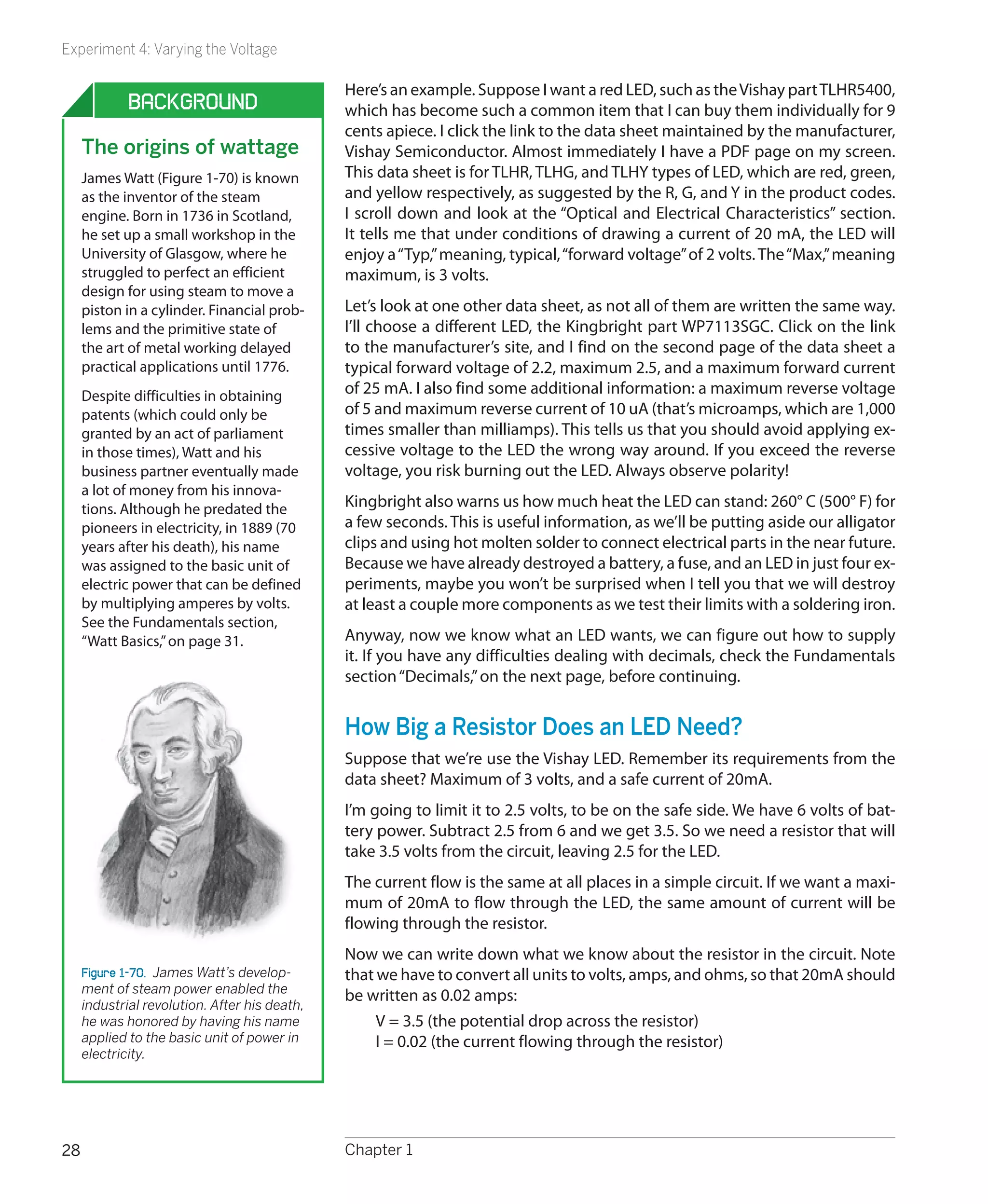
                                    longevity of its design (unchanged
                                    in almost 40 years). The 555 has
                                    been used in everything from toys
                                    to spacecraft. It can make lights
                                    flash, activate alarm systems, put
                                    spaces between beeps, and create
                                    the beeps themselves.
                                    Today, chips are designed by large
                                    teams and tested by simulating
                                    their behavior using computer soft-
                                    ware. Thus, chips inside a computer
                                    enable the design of more chips.
                                    The heyday of solo designers such
                                    as Hans Camenzind is long gone,
                                    but his genius lives inside every 555
                                    timer that emerges from a fabrica-       Figure 4-19.  Hans Camenzind, inventor
                                    tion facility. (If you’d like to know    and developer of the 555 timer chip for
                                    more about chip history, see http://     Signetics.
                                    www.semiconductormuseum.com/
                                    Museum_Index.htm.)


160                               Chapter 4
Experiment 16: Emitting a Pulse


                                                        Fundamentals

Why the 555 is useful
In its monostable mode (which is what you just saw), the               And what about the burglar alarm that was described at the
555 will emit a single pulse of fixed (but programmable)               end of Chapter 3? One of the features that I listed, which has
length. Can you imagine some applications? Think in terms              not been implemented yet, is that it should shut itself off
of the pulse from the 555 controlling some other compo-                after a fixed interval. We can use the change of output from
nent. A motion sensor on an outdoor light, perhaps. When               a 555 timer to do that.
an infra-red detector “sees” something moving, the light
                                                                       The experiment that you just performed seemed trivial, but
comes on for a specific period—which can be controlled by
                                                                       really it implies all kinds of possibilities.
a 555.
Another application could be a toaster. When someone low-              555 timer limits
ers a slice of bread, a switch will close that triggers the toast-       1.	 The timer can run from a stable voltage source ranging
ing cycle. To change the length of the cycle, you could use                  from 5 to 15 volts.
a potentiometer instead of R4 and attach it to the external              2.	 Most manufacturers recommend a range from 1K to
lever that determines how dark you want your toast. At the                   1M for the resistor attached to pin 7.
end of the toasting cycle, the output from the 555 would
                                                                         3.	 The capacitor value can go as high as you like, if you
pass through a power transistor, to activate a solenoid
                                                                             want to time really long intervals, but the accuracy of
(which is like a relay, except that it has no switch contacts)
                                                                             the timer will diminish.
to release the toast.
                                                                         4.	 The output can deliver as much as 100mA at 9 volts.
Intermittent windshield wipers could be controlled by a 555                  This is sufficient for a small relay or miniature loud-
timer—and on earlier models of cars, they actually were.                     speaker, as you’ll see in the next experiment.


  Beware of Pin-Shuffling!
  In all of the schematics in this book, I’ll show chips as you’d see them                                                              9V
                                                                                                                                        DC
  from above, with pin 1 at top left. Other schematics that you may
  see, on websites or in other books, may do things differently. For
  convenience in drawing circuits, people shuffle the pin numbers on                                     C2
  a chip so that pin 1 isn’t necessarily shown adjacent to pin 2.
                                                                                         R8             S1
  Look at the schematic in Figure 4-20 and compare it with the one
  in Figure 4-15. The connections are the same, but the one in Figure
  4-20 groups pins to reduce the apparent complexity of the wiring.                                                                R4
                                                                                                                      R5
  “Pin shuffling” is common because circuit-drawing software tends                                D1
                                                                                        R7
  to do it, and on larger chips, it is necessary for functional clarity of                                        2        8
                                                                                                              3                7
  the schematic (i.e., logical groupings of pin names versus physical
  groupings on memory chips, for example). When you’re first learn-                                               IC1                        R6
  ing to use chips, I think it’s easier to understand a schematic that                                        1                6
                                                                                                                  5    4
  shows the pins in their actual positions. So that’s the practice I will
                                                                                                   C3
  be using here.
                                                                                                                                   C1


                                                                                   S2

   Figure 4-20.  Many people draw schematics in which the pin numbers on a chip are shuffled around to make the schematic
   smaller or simpler. This is not helpful when you try to build the circuit. The schematic here is for the same circuit as in Figure
   4-15. This version would be harder to recreate on a breadboard.


                                                                             Chips, Ahoy!                                                         161
Experiment 17: Set Your Tone


                               Experiment 17: Set Your Tone
                               I’m going to show you two other ways in which the 555 timer can be used.
                               You will need the same items as in Experiment 16, plus:
                                •	 Additional 555 timer chip. Quantity: 1.
                                •	 Miniature loudspeaker. Quantity: 1.
                                •	 100K linear potentiometer. Quantity: 1.


                               Procedure
                               Leave the components from Experiment 16 where they are on the bread-
                               board, and add the next section below them, as shown in Figures 4-21 and
                               4-22. Resistor R2 is inserted between pins 6 and 7, instead of the jumper wire
                               that shorted the pins together in the previous circuit, and there’s no external
                               input to pin 2 anymore. Instead, pin 2 is connected via a jumper wire to pin
                               6. The easiest way to do this is by running the wire across the top of the chip.
                               I have omitted the smoothing capacitor from the schematic in Figure 4-22,
                               because I’m assuming that you’re running this circuit on the same breadboard
                               as the first, where the previous smoothing capacitor is still active.
                               A loudspeaker in series with a 100Ω resistor (R3) has been substituted for the
                               LED to show the output from the chip. Pin 4, the reset, is disabled by connect-
                               ing it to the positive voltage supply, as I’m not expecting to use the reset func-
                               tion in this circuit.
                               Now what happens when you apply power? Immediately, you should hear
                               noise through the loudspeaker. If you don’t hear anything, you almost cer-
                               tainly made a wiring error.
                               Notice that you don’t have to trigger the chip with a pushbutton anymore.
                               The reason is that when C1 charges and discharges, its fluctuating voltage is
                               connected via a jumper wire across the top of the chip to pin 2, the trigger. In
                               this way, the 555 timer now triggers itself. I’ll describe this in more detail in the
                               next section “Theory: Inside the 555 timer: astable mode,” if you want to see
                               exactly what is going on.
                               In this mode, the chip is “astable,” meaning that it is not stable, because it flips
                               to and fro endlessly, sending a stream of pulses for as long as the power is
                               connected. The pulses are so rapid that the loudspeaker reproduces them as
                               noise.
                               In fact, with the component values that I specified for R1, R2, and C1, the 555
                               chip is emitting about 1,500 pulses per second. In other words, it creates a 1.5
                               KHz tone.
                               Check the table on page 166 to see how different values for R2 and C1 can create
                               different pulse frequencies with the chip in this astable mode. Note that the
                               table assumes a fixed value of 1K for R1!


162                            Chapter 4
Experiment 17: Set Your Tone


                                                   9V
                   C3                              DC


                                   R1

                   IC2
                                        R2

                                  C1
                             C2                             Figure 4-21.  These components should be
                                                            added on the same breadboard below the
                                                            components shown in Figure 4-14. Use the
                                                            following values to test the 555 timer in its
                                                            astable mode:
R3


                                                            	   R1: 1K
                                                            	   R2: 10K
     Loudspeaker                                            	   R3: 100Ω
                                                            	   C1: 0.047 µF ceramic or electrolytic
                                                            	   C2: 0.1 µF ceramic
                                                            	   IC2: 555 timer


                                                 9V
                                                 DC


                                        R1
           1             8
           2 IC2 7
           3             6
                                        R2
           4             5

R3
                        C2              C1

                                                            Figure 4-22.  This is the schematic version
                                                            of the circuit shown in Figure 4-21. The
                                                            component values are the same.


                                             Chips, Ahoy!                                            163
Experiment 17: Set Your Tone


                                                                 Theory

  Inside the 555 timer: astable mode
   Here’s what is happening now, illustrated in Figure 4-23.             The capacitor takes longer to discharge than before,
   Initially, the flip-flop grounds C1 as before. But now the low        because R2 has been inserted between it and pin 7, the
   voltage on the capacitor is connected from pin 7 to pin 2             discharge pin. While the capacitor is discharging, its voltage
   through an external wire. The low voltage tells the chip to           diminishes, and is still linked to pin 2. When the voltage
   trigger itself. The flip-flop obediently flips to its “on” position   drops to 1/3 of full power or less, comparator A kicks in and
   and sends a positive pulse to the loudspeaker, while remov-           sends another pulse to the flip-flop, starting the process all
   ing the negative voltage from pin 7.                                  over again.
                                                                         Summing up:
                                                                          1.	 In astable mode, as soon as power is connected, the
                                                                              flip-flop pulls down the voltage on pin 2, triggering
          1                                            8                      comparator A, which flips the flip-flop to its “down”
                                                                              position.
                                                                          2.	 Pin 3, the output, goes high. The capacitor charges
                                                                R1
                                                                              through R1 and R2 in series.
          2                                            7
                                                                          3.	 When the capacitor reaches 2/3 of supply voltage, the
                                                                              flip-flop goes “up” and the output at pin 3 goes low. The
                                                                              capacitor starts to discharge through R2.
                                                                          4.	 When the charge on the capacitor diminishes to 1/3 of
                        A                                       R2            full voltage, the pull-down on pin 2 flips the flip-flop
                                                                              again and the cycle repeats.
                                FF
          3                                            6                 Unequal on/off cycles
                                                                         When the timer is running in astable mode, C1 charges
                                                                 C1
                                                                         through R1 and R2 in series. But when C1 discharges, it
                                                                         dumps its voltage through R2 only. This means that the
          4                                B           5                 capacitor charges more slowly than it discharges. While it is
                                                                         charging, the output on pin 3 is high; while it is discharging,
                                                                 C2      the output on pin 3 is low. Consequently the “on” cycle is
                                                                         always longer than the “off” cycle. Figure 4-24 shows this as
                                                                         a simple graph.
                                                                         If you want the on and off cycles to be equal, or if you want
                                                                         to adjust the on and off cycles independently (for example,
   Figure 4-23.  When the 555 timer is used in astable mode, resis-
   tor R2 is placed between pin 6 and pin 7, and pin 6 is connected
                                                                         because you want to send a very brief pulse to another chip,
   via an external wire to pin 2, so that the timer triggers itself.     followed by a longer gap until the next pulse), all you need
                                                                         to do is add a diode, as shown in Figure 4-25.
   Now C1 starts charging, as it did when the timer was in
                                                                         Now when C1 charges, the electricity flows through R1 as be-
   monostable mode, except that it is being charged through
                                                                         fore but takes a shortcut around R2, through diode D1. When
   R1 + R2 in series. Because the resistors have low values, and
                                                                         C1 discharges, the diode blocks the flow of electricity in that
   C1 is also small, C1 charges quickly. When it reaches 2/3 full
                                                                         direction, and so the discharge goes back through R2.
   voltage, comparator B takes action as before, discharging
   the capacitor and ending the output pulse from pin 3.


164                                              Chapter 4
Experiment 17: Set Your Tone


                                       Theory

Inside the 555 timer: astable mode (continued)
R1 now controls the charge time on its own, while R2 controls the discharge
time. The formula for calculating the frequency is now:
     Frequency = 1440 / ((R1 + R2) × C1)
If you set R1 = R2, you should get almost equal on/off cycles (“almost” because
the diode itself imposes a small internal voltage drop of about 0.6V). The exact
value depends primarily on the manufacturing process used to make the diode.
                          Duration of each
                            On cycle is
                          proportionate to
                              R1+R2

        9v
 Output 6v
Voltage
  Pin 3 3v

        0v


                                   Duration of each
                                     Off cycle is
                                   proportionate to
                                       R2 only

Figure 4-24.  In its usual astable configuration, the timer charges a capacitor through
R1+R2 and discharges the capacitor through R2 only. Therefore its output on cycles
are longer than its output off cycles.

                                                                        9V
                                                                        DC


                                                             R1
                                   1         8
                                   2 IC2 7
                                   3         6
                                                             R2
                                   4         5
                                                                      D2
                    R3
                                             C2             C1


Figure 4-25.  This is a modification of the schematic shown in Figure 4-22. By adding
a diode to a 555 timer running in astable mode, we eliminate R2 from the charging
cycle of capacitor C1. Now we can adjust the output on cycle with the value of R1,
and the output off cycle with the value of R2, so that the on and off durations are
independent of each other.


                                                                           Chips, Ahoy!                           165
Experiment 17: Set Your Tone


                                                      Fundamentals

   The following table shows 555 timer frequency in astable       To calculate a different frequency: double R2, add the prod-
   mode:                                                          uct to R1, multiply the sum by C1, and divide the result into
       •	 Frequency is in pulses per second, rounded to two       1440. Like this:
          figures.                                                        Frequency = 1440 / ( (R1 + 2R2) × C1) cycles per second
       •	 The horizontal scale shows common resistor values for   In this formula, R1 and R2 are in kilohms, C1 is in microfarads,
          R2.                                                     and the frequency is in hertz (cycles per second). Note that
       •	 The vertical scale shows common capacitor values for    the frequency is measured from the start of one pulse to
          C1. Resistor R1 is assumed to be 1K.                    the start of the next. The duration of each pulse is not the
       •	 Resistor R1 is assumed to be 1K.                        same as the length of time between each pulse. This issue is
                                                                  discussed in the previous section.


      47 µF             10          5.7         3.0         1.5       0.7           0.3       0.2        0.1
      22 µF             22         12           6.3         3.1       1.5           0.7       0.3        0.2       0.1
      10 µF             48         27          14           6.9       3.2           1.5       0.7        0.3       0.2         0.1
       4.7 µF          100         57          30          15         6.8           3.2       1.5        0.7       0.3         0.2
       2.2 µF          220        120          63          31        15             6.9       3.3        1.5       0.7         0.3
       1.0 µF          480        270         140          69        32            15         7.2        3.3       1.5         0.7
       0.47 µF       1,000        570         300         150        68            32        15          7         3.3         1.5
       0.22 µF       2,200       1,200        630         310       150            69        33         15         7           3.3
       0.1 µF        4,800       2,700       1,400        690       320           150        72         33        15           7.2
       0.047 µF     10,000       5,700       3,000       1,500      680           320       150         70        33          15
       0.022 µF     22,000      12,000       6,300       3,100    1,500           690       330        150        70          33
       0.01 µF      48,000      27,000      14,000       6,900    3,200         1,500       720        330       150          72


                        1K          2K2         4K7         10K      22K           47K       100K      220K       470K         1M


                                             Astable Modifications
                                             In the circuits shown in Figures 4-22 or 4-25, if you substitute a 100K potenti-
                                             ometer for R2, you can adjust the frequency up and down by turning the shaft.
                                             Another option is to “tune” the timer by using pin 5, the control, as shown in
                                             the Figure 4-26. Disconnect the capacitor that was attached to that pin and
                                             substitute the series of resistors shown. R9 and R11 are both 1K resistors, either
                                             side of R10, which is a 100K potentiometer. They ensure that pin 5 always has
                                             at least 1K between it and the positive and negative sides of the power supply.
                                             Connecting it directly to the power supply won’t damage the timer, but will
                                             prevent it from generating audible tones. As you turn the potentiometer to
                                             and fro, the frequency will vary over a wide range. If you want to generate a
                                             very specific frequency, a trimmer potentiometer can be used instead.


166                                          Chapter 4
Experiment 17: Set Your Tone

A primary advantage of using pin 5 to adjust frequency is that you can control                                                                     9V
                                                                                                                                                   DC
it remotely. Take the output from pin 3 of another 555 timer running slowly in
astable mode, and pipe it through a 2K2 resistor to pin 5. Now you get a two-
tone siren effect, as one timer controls the other. If, in addition, you add a 100
µF capacitor between pin 5 and ground, the charging and discharging of the                                                                  R1
                                                                                                                   1          8
capacitor will make the tone slide up and down instead of switching abruptly.
                                                                                                                    2 555 7
I’ll describe this in more detail shortly. This leads me to the whole topic of one                                    timer
                                                                                                                    3       6
chip controlling another chip, which will be our last variation on this experiment.                                                         R2
                                                                                                                    4         5


Chaining Chips                                                                                       R3                                    C1


Generally speaking, chips are designed so that they can talk to each other. The
555 couldn’t be easier in this respect:
                                                                                                                   R9             R10     R11
 •	 Pin 3, the output, from one 555 can be connected directly to pin 2, the
    trigger, of a second 555.
                                                                                               Figure 4-26.  The control (pin 5) is seldom
 •	 Alternatively, the output can be sufficient to provide power to pin 8 of a                 used but can be useful. Varying the voltage
    second 555.                                                                                on it will adjust the speed of the timer. This
                                                                                               circuit enables you to test the behavior of
 •	 The output is appropriate to control or power other types of chips too.                    it. Component values:

Figure 4-27 shows these options.                                                               	   R1: 1K
                                                                                               	   R2: 10K
When the output from the first 555 goes high, it is about 70 to 80% of its sup-                	   R3: 100 ohms
ply voltage. In other words, when you’re using a 9V supply, the high output                    	   R9, R11: 1K
                                                                                               	   R10: 100K linear potentiometer
voltage is at least 6 volts. This is still above the minimum of 5V that the second
                                                                                               	   C1: 0.047 µF
chip needs to trigger its comparator, so there’s no problem.

                          9V power                                          9V power                                                    9V power
             1       8                                          1       8                                               1         8
                            input                                             input                                                       input
             2       7                                          2       7                                               2         7
                 IC1 6                                              IC1 6
             3                                                  3                                                       3 IC1 6
             4       5                                          4       5                                               4         5
 More than                                         From 0.5V                                          Less than
 5V output                                       to 6V output                                          0.5 volts                          That's low
 when high                     That's still       low-to-high                                         when low                            enough to
             1       8      high enough to                      1       8         Now you                               1         8      trigger me!
                              power me!                                          can control
             2       7                                          2       7                                               2       7
                                                                                    me!
                 IC2 6                                              IC2 6                                                   IC2 6
             3                                                  3                                                       3

             4       5                                          4       5                                               4         5


Figure 4-27.  Three ways to chain 555 timers together. The output of IC1 can power a sec-
ond timer, or adjust its control voltage, or activate its trigger pin.

You can chain together the two 555 timers that you already have on your
breadboard. Figure 4-28 shows how to connect the two circuits that were
shown previously in Figures 4-15 and 4-22. Run a wire from pin 3 (the output)
of the first chip to pin 8 (the positive power supply) of the second chip, and
disconnect the existing wire connecting pin 8 to your power supply. The new
wire is shown in red. Now when you press the button to activate the first chip,
its output powers the second chip.


                                                                             Chips, Ahoy!                                                          167
Experiment 17: Set Your Tone

                                                            9V
                                                            DC
                                                                    You can also use the output from one chip to trigger another (i.e., you can con-
                                                                    nect pin 3 from the first chip to pin 2 of the second). When the output from the
                                 C3
                                                                    first chip is low, it’s less than half a volt. This is well below the threshold that
                  R8             R5                                 the second chip requires to be activated. Why would you want to do this? Well,
                                                                    you might want to have both timers running in monostable mode, so that the
                                                                    end of a high pulse from the first one triggers the start of a high pulse in the
                            1         8
                                             R4
                                                                    second one. In fact, you could chain together as many timers as you like in this
                             2     7
                                                                    way, with the last one feeding back and triggering the first one, and they could
        S1                   3 IC1 6
                                                                    flash a series of LEDs in sequence, like Christmas lights. Figure 4-29 shows how
                             4        5
             D1
                                                                    four timers could be linked this way, in a configuration that would occupy min-
                                      C5               C4           imal space (and would be wired point-to-point on perforated board, not on
         R4                                                         breadboard-format board). Each of the outputs numbered 1 through 4 would
                                           10K
                                                                    have about enough power to run maybe 10 LEDs, if you used relatively high
                                                                    load resistors to limit their current.
        S2
                                                                    Incidentally, you can reduce the chip count (the number of chips) by using two
                       1     8
                                                 R1                 556 timers instead of four 555 timers. The 556 contains a pair of 555 timers in
                       2 IC2 7                                      one package. But because you have to make the same number of external con-
                       3     6                                      nections (other than the power supply), I haven’t bothered to use this variant.
                                                 R2
                       4     5
                                                                    You can even get a 558 timer that contains four 555 circuits, all preset to func-
             R3
                            C2                   C1
                                                                    tion in astable mode. I decided not to use this chip, because its output behaves
                                                                    differently from a normal 555 timer. But you can buy a 558 timer and play with
                                                                    it if you wish. It is ideal for doing the “chain of four timers” that I suggested
Figure 4-28.  You can combine the two cir-                          previously. The data sheet even suggests this.
cuits shown in Figures 4-15 and 4-22 sim-
ply by disconnecting the wire that provides                         Lastly, going back to the idea of modifying the frequency of a 555 timer in
power to pin 8 of the second timer, and                             astable mode, you can chain two timers, as shown in Figure 4-30. The red wire
running a substitute wire (shown in red).                           shows the connection from the output of the first timer to the control pin of
                                                                    the second. The first timer has now been rewired in astable mode, so that it
2
    1                                                       4
                                                                3   creates an oscillating on/off output around four times per second. This out-
                                                                    put flashes the LED (to give you a visual check of what’s going on) and feeds
                                                 12V
                                                 DC
                                                                    through R7 to the control pin of the second timer.
                                                                    But C2 is a large capacitor, which takes time to charge through R7. While this
                                                                    happens, the voltage detected by pin 5 slowly rises, so that the tone gener-
                                                                    ated by IC2 gradually rises in pitch. Then IC1 reaches the end of its on cycle
                                                                    and switches itself off, at which point C2 discharges and the pitch of the sound
                                                                    generated by IC2 falls again.
                                                                    You can tweak this circuit to create all kinds of sounds, much more controllably
                                                                    then when you were using PUT transistors to do the same kind of thing. Here
                                                                    are some options to try:
                                                                     •	 Double or halve the value of C2.
                                                                     •	 Omit C2 completely, and experiment with the value of R7.

Figure 4-29.  Four 555 timers, chained to-                           •	 Substitute a 10K potentiometer for R7.
gether in a circle, can flash a series of four
sets of LEDs in sequence, like Christmas                             •	 Change C4 to increase or decrease the cycle time of IC1.
lights or a movie marquee.


168                                                                 Chapter 4
Experiment 17: Set Your Tone

    •	 Halve the value of R5 while doubling the value of C4, so that the cycle
       time of IC1 stays about the same, but the On time becomes significantly
       longer than the Off time.
    •	 Change the supply voltage in the circuit from 9 volts to 6 volts or 12 volts.
Remember, you can’t damage a 555 timer by making changes of this kind. Just
make sure that the negative side of your power supply goes to pin 1 and the
positive side to pin 8.
                                                                        9V
                                                                        DC

                                 C3


                                                                    R4
                                           1         8
                                            2 IC1 7
                                            3        6
                                                                    R5
                                            4        5

                                      D1
                                                     C5            C4
                           R6


                                                                    R1
                                           1         8
                                            2 IC2 7
                                            3        6
                                                                    R2
                                            4        5

                            R3
                                                R7        C2       C1


Figure 4-30.  When both timers are astable, but IC1 runs much more slowly than IC2, the
output from IC1 can be used to modulate the tone generated by IC2. Note that as this is
a substantial modification to the previous schematics, several components have been
relabeled. To avoid errors, you may need to remove the old circuit from your breadboard
and build this version from scratch. Try these values initially:

	     R1, R4, R6, R7: 1K
	     R2, R5: 10K
	     R3: 100 ohms
	     C1: 0.047 µF
	     C2, C3: 100 µF
	     C4: 68 µF
	     C5: 0.1 µF


                                                                             Chips, Ahoy!                           169
Experiment 18: Reaction Timer


                                              Experiment 18: Reaction Timer
                                              Because the 555 can easily run at thousands of cycles per second, we can use it
                                              to measure human reactions. You can compete with friends to see who has the
                                              fastest response—and note how your response changes depending on your
                                              mood, the time of day, or how much sleep you got last night.
                                              Before going any further, I have to warn you that this circuit will have more
                                              connections than others you’ve tackled so far. It’s not conceptually difficult,
                                              but requires a lot of wiring, and will only just fit on a breadboard that has 63
                                              rows of holes. Still, we can build it in a series of phases, which should help you
                                              to detect any wiring errors as you go.
                                              You will need:
                                               •	 4026 chip. Quantity: 4 (really you need only 3, but get another one in case
                                                  you damage the others).
Figure 4-31.  After putting a 1K resistor      •	 555 timers. Quantity: 3.
between the common cathode of the
display and the negative supply voltage,       •	 Tactile switches (SPST momentary switches). Quantity: 3.
you can use the positive supply voltage to
illuminate each segment in turn.               •	 Three numeric LEDs, or one 3-digit LED display (see the shopping list at
                                                  the beginning of this chapter). Quantity: 1.
                                               •	 Breadboard, resistors, capacitors, and meter, as usual.


                                              Step 1: Display
                                              You can use three separate LED numerals for this project, but I suggest that
                      a                       you buy the Kingbright BC56-11EWA on the shopping list at the beginning of
                                              this chapter. It contains three numerals in one big package.
                                              You should be able to plug it into your breadboard, straddling the center
          f                       b           channel. Put it all the way down at the bottom of the breadboard, as shown in
                                              Figure 4-31. Don’t put any other components on the breadboard yet.

                   g                          Now set your power supply to 9 volts, and apply the negative side of it to the
                                              row of holes running up the breadboard on the righthand side. Insert a 1K
                                              resistor between that negative supply and each of pins 18, 19, and 26 of the
      e                        c              Kingbright display, which are the “common cathode,” meaning the negative
                                              connection shared by each set of LED segments in the display. (The pin num-
                                              bers of the chip are shown in Figure 4-33. If you’re using another model of
                 d                  h         display, you’ll have to consult a data sheet to find which pin(s) are designed to
                                              receive negative voltage.)

Figure 4-32.  The most basic and common       Switch on the power supply and touch the free end of the positive wire to each
digital numeral consists of seven LED seg-    row of holes serving the display on its left and right sides. You should see each
ments identified by letters, as shown here,   segment light up, as shown in Figure 4-31.
plus an optional decimal point.
                                              Each numeral from 0 to 9 is represented by a group of these segments. The
                                              segments are always identified with lowercase letters a through g, as shown in
                                              Figure 4-32. In addition, there is often a decimal point, and although we won’t
                                              be using it, I’ve identified it with the letter h.


170                                           Chapter 4
Experiment 18: Reaction Timer

Check Figure 4-33 showing the Kingbright display, and you’ll see I have an-
                                                                                            1e   1                        28   1g
notated each pin with its function. You can step down the display with the


                                                                                                          e


                                                                                                                  f
positive wire from your power supply, making sure that each pin lights an ap-               1d   2                        27   1f


                                                                                                      d


                                                                                                              g
propriate segment.


                                                                                                                      a
                                                                                        1        3                        26        1


                                                                                                          c


                                                                                                                  b
Incidentally, this display has two pins, numbered 3 and 26, both labeled to                 1c   4
                                                                                                          Numeral 1
                                                                                                                          25   1a


                                                                                                      h
receive negative voltage for the first of the digits. Why two pins instead of one?          1h   5                        24   1b
I don’t know. You need to use only one, and as this is a passive chip, it doesn’t
                                                                                            2e   6                        23   2f
matter if you leave the unused one unconnected. Just take care not to apply


                                                                                                          e


                                                                                                                  f
positive voltage to it, which would create a short circuit.                                 2d   7                        22   2g


                                                                                                      d


                                                                                                              g


                                                                                                                      a
A numeric display has no power or intelligence of its own. It’s just a bunch of             2c   8                        21   2a


                                                                                                          c


                                                                                                                  b
light-emitting diodes. It’s not much use, really, until we can figure out a way to          2h   9                        20   2b


                                                                                                      h
                                                                                                          Numeral 2
illuminate the LEDs in appropriate groups—which will be the next step.
                                                                                            3e   10                       19        2
                                                                                            3d   11                       18        3
Step 2: Counting


                                                                                                          e


                                                                                                                  f
                                                                                            3g   12                       17   3f


                                                                                                      d


                                                                                                              g


                                                                                                                      a
Fortunately, we have a chip known as the 4026, which receives pulses, counts
                                                                                            3c   13                       16   3a


                                                                                                          c
them, and creates an output designed to work with a seven-segment display so


                                                                                                                  b
                                                                                            3h            Numeral 3            3b


                                                                                                      h
                                                                                                 14                       15
that it shows numbers 0–9. The only problem is that this is a rather old-fashioned
CMOS chip (meaning, Complementary Metal Oxide Semiconductor) and is thus
                                                                                     Figure 4-33.  This Kingbright unit incor-
sensitive to static electricity. Check the caution on page 172 before continuing.    porates three seven-segment numeric
                                                                                     displays in one package, and can be driven
Switch off your power supply and connect its wires to the top of the breadboard,     by three chained 4026 decade counters.
noting that for this experiment, we’re going to need positive and negative pow-      The pin numbers are shown close to the
er on both sides. See Figure 4-34 for details. If your breadboard does not already   chip. Segments a through g of numeral 1
have the columns of holes color-coded, I suggest you use Sharpie markers to          are identified as 1a through 1g. Segments
                                                                                     a through g of numeral 2 are identified as
identify them, to avoid polarity errors that can fry your components.                2a through 2g. Segments a through g of
                                                                                     numeral 3 are identified as 3a through 3g.
The 4026 counter chip is barely powerful enough to drive the LEDs in our dis-
play when powered by 9 volts. Make sure you have the chip the right way up,                                                    9v
and insert it into the breadboard immediately above your three-digit display,                                                  DC
leaving just one row of holes between them empty.
The schematic in Figure 4-35 shows how the pins of the 4026 chip should be con-
nected. The arrows tell you which pins on the display should be connected with                            100uF
pins on the counter.
Figure 4-36 shows the “pinouts” (i.e., the functions of each pin) of a 4026 coun-
ter chip. You should compare this with the schematic in Figure 4-35.
Include a tactile switch between the positive supply and pin 1 of the 4026
counter, with a 10K resistor to keep the input to the 4026 counter negative un-
til the button is pressed. Make sure all your positives and negatives are correct,
and turn on the power. You should find that when you tap the tactile switch
                                                                                     Figure 4-34.  When building circuits around
lightly, the counter advances the numeric display from 0 through 9 and then          chips, it’s convenient to have a positive
begins all over again from 0. You may also find that the chip sometimes misin-       and negative power supply down each
terprets your button-presses, and counts two or even three digits at a time. I’ll    side of your breadboard. For the reaction
                                                                                     timer circuit, a 9V supply with a 100 µF
deal with this problem a little further on.
                                                                                     smoothing capacitor can be set up like
The LED segments will not be glowing very brightly, because the 1K series            this. If your breadboard doesn’t color-code
                                                                                     the columns of holes on the left and right
resistors deprive of them of the power they would really like to receive. Those      sides, I suggest you do that yourself with a
resistors are necessary to avoid overloading the outputs from the counter.           permanent marker.


                                                                    Chips, Ahoy!                                                        171
Experiment 18: Reaction Timer


  Grounding Yourself
  To avoid the frustration that occurs when you power up a circuit and nothing happens, be sure to take these precautions when you
  use the older generation of CMOS chips (which often have part numbers from 4000 upward, such as 4002, 4020, and so on):
  Chips are often shipped with their legs embedded in black foam. This is electrically conductive foam, and you should keep the chips
  embedded in it until you are ready to use them.
  If the chips are supplied to you in plastic tubes, you can take them out and poke their legs into pieces of conductive foam or, if you
  don’t have any, use aluminum foil. The idea is to avoid one pin on a chip acquiring an electric potential that is much higher than
  another pin.
  While handling CMOS components, grounding yourself is important. I find that in dry weather, I accumulate a static charge merely
  by walking across a plastic floor-protecting mat in socks that contain some synthetic fibers. You can buy a wrist strap to keep your-
  self grounded, or simply touch a large metal object, such as a file cabinet, before you touch your circuit board. I am in the habit of
  working with my socked foot touching a file cabinet, which takes care of the problem.
  Never solder a CMOS chip while there is power applied to it.
  Grounding the tip of your soldering iron is a good idea.
  Better still, don’t solder CMOS chips at all. When you’re ready to immortalize a project by moving it from a breadboard into perfo-
  rated board, solder a socket into your perforated board, then push the chip into the socket. If there’s a problem in the future, you
  can unplug the chip and plug in another.
  Use a grounded, conductive surface on your workbench. The cheapest way to do this is to unroll some aluminum foil and ground
  it (with an alligator clip and a length of wire) to a radiator, a water pipe, or a large steel object. I like to use an area of conductive
  foam to cover my workbench—the same type of foam that is used for packaging chips. However, this foam is quite expensive.


                          10K
                                                                                 Clock input   1                          16

                                      1          16
                                                                               Disable clock   2                          15   Reset
                                      2          15
                                      3          14
                                      4          13     4                     Enable display   3                               Not-2 output
                                           IC3                                                                            14
                                      5          12     24
                                 27   6          11     1
                                 28   7          10     25                        Enable out   4                          13   To segment c
                                      8           9     2


                                      1          28
                                                                                Carry output   5                          12   To segment b
                                      2          27         R4
                                      3          26
                                                                                To segment f   6                          11   To segment e
                                      4          25
                                      5          24
                                      6          23                            To segment g    7                          10   To segment a
                                      7    IC4 22
                                      8        21                                                  4026
                                                                                               8                           9   To segment d
                                      9          20         R5                                     Counter
Figure 4-35.  IC3 is a 4026           10         19
counter. IC4 is a triple              11         18
                                                                        Figure 4-36.  The 4026 decade counter is a CMOS chip that accepts
seven-segment display chip.           12         17                     clock pulses on pin 1, maintains a running total from 0 to 9, and out-
The arrows tell you which             13         16          R6
                                                                        puts this total via pins designed to interface with a seven-segment
pins on the LED display               14         15                     LED numeric display.
should be connected to the
pins on the counter.


172                                                   Chapter 4
Experiment 18: Reaction Timer


                                                      Fundamentals

  Counters and seven-segment displays
  Most counters accept a stream of pulses and distribute            If you want your display to look bright and professional,
  them to a series of pins in sequence. The 4026 decade             you really need a transistor to drive each segment of each
  counter is unusual in that it applies power to its output pins    numeral. An alternative is to use a chip containing multiple
  in a pattern that is just right to illuminate the segments of a   “op amps” to amplify the current.
  7-segment numeric display.
                                                                    When a decade counter reaches 9 and rolls over to 0, it
  Some counters create positive outputs (they “source”              emits a pulse from its “carry” pin. This can drive another
  current) while others create negative outputs (they “sink”        counter that will keep track of tens. The carry pin on that
  current). Some seven-segment displays require positive            counter can be chained to a third counter that keeps track
  input to light up the numbers. These are known as “common         of hundreds, and so on. In addition to decade counters,
  cathode” displays. Others require negative input and are          there are hexadecimal counters (which count in 16s), octal
  known as “common anode” displays. The 4026 delivers posi-         counters (in 8s), and so on.
  tive outputs and requires a common cathode display.
                                                                    Why would you need to count in anything other than tens?
  Check the data sheet for any counter chip to find out how         Consider that the four numerals on a digital clock each count
  much power it requires, and how much it can deliver. CMOS         differently. The rightmost digit rolls over when it reaches
  chips are becoming dated, but they are very useful to hob-        10. The next digit to the left counts in sixes. The first hours
  byists, because they will tolerate a wide range of supply         digit counts to 10, gives a carry signal, counts to 2, and gives
  voltage—from 5 to 15 volts in the case of the 4026. Other         another carry signal. The leftmost hours digit is either blank
  types of chips are much more limited.                             or 1, when displaying time in 12-hour format. Naturally there
                                                                    are counters specifically designed to do all this.
  Most counters can source or sink only a few milliamps of
  output power. When the 4026 is running on a 9-volt power          Counters have control pins such as “clock disable,” which
  supply, it can source about 4mA of power from each pin.           tells the counter to ignore its input pulses and freeze the
  This is barely enough to drive a seven-segment display.           display, “enable display,” which enables the output from the
                                                                    chip, and “reset,” which resets the count to zero.
  You can insert a series resistor between each output pin of
  the counter and each input pin of the numeric display, but        The 4026 requires a positive input to activate each control pin.
  a simpler, quicker option is to use just one series resistor      When the pins are grounded, their features are suppressed.
  for each numeral, between the negative-power pin and
                                                                    To make the 4026 count and display its running total you
  ground. The experiment that I’m describing uses this short-
                                                                    must ground the “clock disable” and “reset” pins (to suppress
  cut. Its disadvantage is that digits that require only a couple
                                                                    their function) and apply positive voltage to the “enable
  of segments (such as numeral 1) will appear brighter than
                                                                    display” pin (to activate the output). See Figure 4-36 to see
  those that use many segments (such as numeral 8).
                                                                    these pins identified.


Assuming that you succeed in getting your counter to drive the numeric dis-
play, you’re ready to add two more counters, which will control the remaining
two numerals. The first counter will count in ones, the second in tens, and the
third in hundreds.
In Figure 4-37, I’ve continued to use arrows and numbers to tell you which pins
of the counters should be connected to which pins of the numeric display. Oth-
erwise, the schematic would be a confusing tangle of wires crossing each other.
At this point, you can give up in dismay at the number of connections—but
really, using a breadboard, it shouldn’t take you more than half an hour to
complete this phase of the project. I suggest you give it a try, because there’s


                                                                          Chips, Ahoy!                                                 173
Experiment 18: Reaction Timer

                                                         something magical about seeing a display count from 000 through 999 “all by
                                                         itself,” and I chose this project because it also has a lot of instructional value.
                S3
                                              S2         S1 is attached to the “clock disable” pin of IC1, so that when you hold down this
                                                    C1
          S1
                          R3                             button, it should stop that counter from counting. Because IC1 controls IC2,
          R1         1          16
                                                         and IC2 controls IC3, if you freeze IC1, the other two will have to wait for it to
                     2          15                       resume. Therefore you won’t need to make use of their “clock disable” features.
                     3          14
                     4
                     5
                          IC1
                                13
                                12
                                     13
                                     15
                                                         S2 is connected to the “reset” pins of all three counters, so that when you hold
                                                    R2
               17    6          11   10                  down this button, it should set them all to zero.
               12    7          10   16
                     8           9   11                  S3 sends positive pulses manually to the “clock input” pin of the first counter.
                     1
                     2
                                16
                                15
                                                         S1, S2, and S3 are all wired in parallel with 1K resistors connected to the nega-
                     3          14                       tive side of the power supply. The idea is that when the buttons are not being
                     4
                     5
                          IC2
                                13
                                12
                                     8
                                     20
                                                         pressed, the “pull-down” resistors keep the pins near ground (zero) voltage. When
               23    6          11   6                   you press one of the buttons, it connects positive voltage directly to the chip,
               22    7
                     8
                                10
                                 9
                                     21
                                     7
                                                         and easily overwhelms the negative voltage. This way, the pins remain either in
                                                         a definitely positive or definitely negative state. If you disconnect one of these
                     1
                     2
                                16
                                15
                                                         pull-down resistors you are likely to see the numeric display “flutter” erratically.
                     3          14                       (The numeric display chip has some unconnected pins, but this won’t cause any
                     4
                     5
                          IC3
                                13
                                12
                                     4
                                     24
                                                         problem, because it is a passive chip that is just a collection of LED segments.)
               27    6          11   1
               28    7          10   25
                     8           9   2
                                                           Always connect input pins of a CMOS chip so that they are either positive or nega-
                     1          28
                                                           tive. See the “No Floating Pins” warning on the next page.
                     2          27            R4
                     3          26
                     4          25
                     5          24
                                                         I suggest that you connect all the wires shown in the schematic first. Then cut
                     6          23                       lengths of 22-gauge wire to join the remaining pins of the sockets from IC1,
                     7    IC4 22
                     8        21
                                                         IC2, and IC3 to IC4.
                     9          20       R5
                     10         19                       Switch on the power and press S2. You’ll see three zeros in your numeric display.
                     11         18
                     12         17                 R6    Each time you press S3, the count should advance by 1. If you press S2, the
                     13         16
                     14         15
                                                         count should reset to three zeros. If you hold down S1 while you press S3 re-
                                                         peatedly, the counters should remain frozen, ignoring the pulses from S3.
Figure 4-37.  This test circuit, laid out as you
would be likely to place it on a breadboard,
allows you to trigger a counter manually
to verify that the display increments from                                                Fundamentals
000 upward to 999.
Component values:                                           Switch bounce
A
 ll resistors are 1K.                                      When you hit S3, I think you’ll find that the count sometimes increases by more
S1, S2, S3: SPST tactile switches, normally
open
                                                            than 1. This does not mean that there’s something wrong with your circuit or your
IC1, IC2, IC3: 4026 decade counter chips                    components; you are just observing a phenomenon known as “switch bounce.”
IC4: Kingbright 3-digit common-cathode
                                                            On a microscopic level, the contacts inside a pushbutton switch do not close
display
C1: 100 µF (minimum) smoothing capacitor                    smoothly, firmly, and decisively. They vibrate for a few microseconds before set-
                                                            tling; the counter chip detects this vibration as a series of pulses, not just one.
Wire the output pins on IC1, IC2, and IC3
to the pins on IC4, according to the num-                   Various circuits are available to “debounce” a switch. The simplest option is to
bers preceded by arrows. The actual wires                   put a small capacitor in parallel with the switch, to absorb the fluctuations; but
have been omitted for clarity. Check for
the pinouts of IC4.
                                                            this is less than ideal. I’ll come back to the topic of debouncing later in the book.
                                                            Switch bounce is not a concern in this circuit, because we’re about to get rid of
                                                            S3 and substitute a 555 timer that generates nice clean bounceless pulses.


174                                                      Chapter 4
Experiment 18: Reaction Timer


Pulse Generation
A 555 timer is ideal for driving a counter chip. You’ve already seen how to wire
a 555 to create a stream of pulses that made noise through a loudspeaker. I’m
reproducing the same circuit in Figure 4-38 in simplified form, using the posi-
tive and negative supply configuration in the current project. Also I’m show-
ing the connection between pins 2 and 6 in the way that you’re most likely to
make it, via a wire that loops over the top of the chip.
For the current experiment, I’m suggesting initial component values that will
generate only four pulses per second. Any faster than that, and you won’t be
able to verify that your counters are counting properly.
Install IC5 and its associated components on your breadboard immediately
above IC1. Don’t leave any gap between the chips. Disconnect S3 and R3 and
connect a wire directly between pin 3 (output) of IC5 and pin 1 (clock) of IC1,
the topmost counter. Power up again, and you should see the digits advancing                   No Floating Pins!
rapidly in a smooth, regular fashion. Press S1, and while you hold it, the count
should freeze. Release S1 and the count will resume. Press S2 and the counter                  A CMOS chip is hypersensitive. Any
                                                                                               pin that is not wired either to the
should reset, even if you are pressing S1 at the same time.
                                                                                               supply voltage or to ground is said
                                                                                               to be “floating” and may act like an
                                                                                               antenna, sensitive to the smallest
                                                                                               fluctuations in the world around it.
                                                                                               The 4026 counter chip has a pin
                                                                                               labeled “clock disable.” The manu-
                                                                                               facturer’s data sheet helpfully tells
                                                                                               you that if you give this pin a positive
                                                              R7                               voltage, the chip stops counting and
                                  1        8
                                                                                               freezes its display. As you don’t want
                                  2 IC5 7                                                      to do that, you may just ignore that
                                                                                               pin and leave it unconnected, at least
                                  3        6
                                                                                               while you test the chip. This is a very
                                                              R8                               bad idea!
                                  4        5
                                                                                               What the data sheet doesn’t bother
                                                                                               to tell you (presumably because
                                          C3                 C2                                “everyone knows” such things) is that
                             To Pin 1                                                          if you want the clock to run normally,
                             of 4026                                                           the clock-disable feature itself has to
                             Counter
                               IC1
                                                                                               be disabled, by wiring it to negative
                                                                                               (ground) voltage. If you leave the pin
Figure 4-38.  A basic astable circuit to drive the decade counter in the previous schematic.   floating (and I speak from experi-
Output is approximately 4 pulses per second.                                                   ence), the chip will behave erratically
                                                                                               and uselessly.
	   R7: 1K
	   R8: 2K2                                                                                    All input pins must be either
	   C2: 68 µF                                                                                  positively or negatively wired, unless
	   C3: 0.1 µF                                                                                 otherwise specified.
	   IC5: 555 timer


                                                                              Chips, Ahoy!                                            175
Experiment 18: Reaction Timer


                                               Refinements
                                               Now it’s time to remember that what we really want this circuit to do is test a
                                               person’s reflexes. When the user starts it, we want an initial delay, followed by a
                                               signal—probably an LED that comes on. The user responds to the signal by press-
                                               ing a button as quickly as possible. During the time it takes for the person to re-
                                               spond, the counter will count milliseconds. When the person presses the button,
                                               the counter will stop. The display then remains frozen indefinitely, displaying the
                                               number of pulses that were counted before the person was able to react.
                                               How to arrange this? I think we need a flip-flop. When the flip-flop gets a sig-
                                               nal, it starts the counter running—and keeps it running. When the flip-flop
                                               gets another signal (from the user pressing a button), it stops the counter run-
                                               ning, and keeps it stopped.
                                               How do we build this flip-flop? Believe it or not, we can use yet another 555
                                               timer, in a new manner known as bistable mode.


                                                         Fundamentals

  The bistable 555 timer
   Figure 4-39 shows the internal layout of a 555 timer, as
   before, but the external components on the righthand side
   have been eliminated. Instead, I’m applying a constant
   negative voltage to pin 6. Can you see the consequences?                           1                                           8
   Suppose you apply a negative pulse to the trigger (pin 2).
   Normally when you do this and the 555 starts running, it
   generates a positive output while charging a capacitor at-
   tached to pin 6. When the capacitor reaches 2/3 of the full                        2                                           7
   supply voltage, this tells the 555 to ends its positive output,
   and it flips back to negative.
   Well, if there’s no capacitor, there’s nothing to stop the timer.
   Its positive output will just continue indefinitely. However,                                   A
   pin 4 (the reset) can still override everything, so if you apply
   negative voltage to pin 4, it flips the output to negative.                                              FF
   After that, the output will stay negative indefinitely, as it                      3                                           6
   usually does, until you trigger the timer by dropping the
   voltage to pin 2 again. This will flip the timer back to gener-
   ating its positive output.
                                                                                      4                               B           5
   Here’s a quick summary of the bistable configuration:
      •	 A negative pulse to pin 2 turns the output positive.
      •	 A negative pulse to pin 4 turns the output negative.
                                                                       Figure 4-39.  In the bistable configuration, pin 6 of a 555 timer
      •	 The timer is stable in each of these states. Its run-time     is perpetually negative, so the timer cycle never ends, unless
         has become infinite.                                          you force it to do so by applying a negative pulse to pin 4 (the
                                                                       reset).
   It’s OK to leave pins 5 and 7 of the timer unconnected,
   because we’re pushing it into extreme states where any
   random signals from those pins will be ignored.


176                                            Chapter 4
Experiment 18: Reaction Timer

In bistable mode, the 555 has turned into one big flip-flop. To avoid any un-
certainty, we keep pins 2 and 4 normally positive via pull-up resistors, but
negative pulses on those pins can overwhelm them when we want to flip the
555 into its opposite state. The schematic for running a 555 timer in bistable
mode, controlled by two pushbuttons, is shown in Figure 4-40. You can add
this above your existing circuit. Because you’re going to attach the output
from IC6 to pin 2 of IC1, the topmost counter, you can disconnect S1 and R1
from that pin. See Figure 4-41.
Now, power up the circuit again. You should find that it counts in the same way
as before, but when you press S4, it freezes. This is because your bistable 555
timer is sending its positive output to the “clock disable” pin on the counter.
The counter is still receiving a stream of pulses from the astable 555 timer,
but as long as pin 2 is positive on the counter, the counter simply ignores the
pulses.
Now press S5, which flips your bistable 555 back to delivering a negative out-
put, at which point the count resumes.
We’re getting close to a final working circuit here. We can reset the count to
zero (with S3), start the count (with S5), and wait for the user to stop the count
(with S4). The only thing missing is a way to start the count unexpectedly.


                                                     1         8
                                                     2         7
                                                         IC6
                          R9                         3         6

                                                     4         5
                                      S4


                          R10
                                            To Pin 2
                                            of 4026
                                            Counter
                                    S5        IC1

Figure 4-40.  Adding a bistable 555 timer to the reflex tester will stop the counter with a
touch of a button, and keep it stopped.
	   R9, R10: 1K
	   IC6: 555 timer


                                                                                Chips, Ahoy!                            177
Experiment 18: Reaction Timer


                                                                           The Delay
                                                                           Suppose we set up yet another 555 in monostable mode. Trigger its pin 2 with
                   Start Delay
                                                                C1         a negative pulse, and the timer delivers a positive output that lasts for, say, 4
              S4
                       1           8
                                                                           seconds. At the end of that time, its output goes back to being negative. Maybe
                         2         7                                       we can hook that positive-to-negative transition to pin 4 of IC6. We can use this
                             IC7                          R11
       R10               3         6                                       instead of switch S5, which you were pressing previously to start the count.
                         4         5
                                                      C5
                                   C6
                                                                           Check the new schematic in Figure 4-41 which adds another 555 timer, IC7
                    C4                                                     above IC6. When the output from IC7 goes from positive to negative, it will
               R9
                                        1         8                        trigger the reset of IC6, flipping its output negative, which allows the count to
                                        2         7
                                            IC6                            begin. So IC7 has taken the place of the start switch, S4. You can get rid of S4,
    Stop Count                          3         6

                                        4         5
                                                                           but keep the pull-up resistor, R9, so that the reset of IC6 remains positive the
                S3
                                                                R12        rest of the time.
                                        Prompt
      R10
                                        LED                                This arrangement works because I have used a capacitor, C4, to connect the
                                                                           output of IC7 to the reset of IC6. The capacitor communicates the sudden
                                                          R7
                      1            8                                       change from positive to negative, but the rest of the time it blocks the steady
                      2 IC5 7
                                                                           voltage from IC7 so that it won’t interfere with IC6.
                      3            6
                                                          R8
                      4            5                                       The final schematic in Figure 4-41 shows the three 555 timers all linked together,
                                                                           as you should insert them above the topmost counter, IC1. I also added an LED to
                               C3                         C2
                                                                           signal the user. Figure 4-42 is a photograph of my working model of the circuit.
                                            Set to Zero               S2
              Clock
              Input
                       1               16
                     2                 15
             Disable 3                 14 Reset
               Clock         IC1


Figure 4-41.  The completed control section
of the circuit, to be added above these
timers.
	     R7, R9, R10, R12: 1K
	     R8: 2K2
	     R11: 330K
	     C1: 100 µF
	     C2: 68 µF                                                            Figure 4-42.  The complete reaction-timer circuit barely fits on a 63-row breadboard.
	     C3, C4, C6: 0.1 µF
	     C5: 10 µF                                                            Because this circuit is complicated, I’ll summarize the sequence of events
	     S1, S2, S3: tactile switches                                         when it’s working. Refer to Figure 4-41 while following these steps:
	     IC5, IC6, IC7: 555 timers
                                                                            1.	 User presses Start Delay button S4, which triggers IC7.
                                                                            2.	 IC7 output goes high for a few seconds while C5 charges.
                                                                            3.	 IC7 output drops back low.
                                                                            4.	 IC7 communicates a pulse of low voltage through C4 to IC6, pin 4.
                                                                            5.	 IC 6 output flips to low and flops there.
                                                                            6.	 Low output from IC6 sinks current through LED and lights it.
                                                                            7.	 Low output from IC6 also goes to pin 2 of IC1.


178                                                                        Chapter 4
Experiment 18: Reaction Timer

 8.	 Low voltage on pin 2 of IC1 allows IC1 to start counting.                                             555 in
                                                                                           Start
                                                                                          Switch           Delay
 9.	 User presses S3, the “stop” button.                                                                   Mode

10.	 S3 connects pin 2 of IC6 to ground.
11.	 IC6 output flips to high and flops there.                                                          End-of-Delay
                                                                                                        Start Signal
12.	 High output from IC6 turns off the LED.
13.	 High output from IC6 also goes to pin 2 of IC1.
14.	 High voltage on pin 2 of IC1 stops it from counting.                                  Stop            555 in          Prompt
                                                                                          Switch          Flip-Flop         LED
                                                                                                           Mode
15.	 After assessing the result, user presses S2.
16.	 S2 applies positive voltage to pin 15 of IC1, IC2, IC3.
17.	 Positive voltage resets counters to zero.                                                            Counter
                                                                                                          Enable
                                                                                                             or
18.	 The user can now try again.                                                                          Disable

19.	 Meanwhile, IC5 is running continuously throughout.
In case you find a block diagram easier to understand, I’ve included that, too,                           Numeric
in Figure 4-43.                                                                                           Display


Using the Reflex Tester                                                                   Reset            Pulse             555
                                                                                          Switch          Counter           pulse
At this point, you should be able to test the circuit fully. When you first switch                                        generator
it on, it will start counting, which is slightly annoying, but easily fixed. Press S3
                                                                                        Figure 4-43.  The functions of the reflex
to stop the count. Press S2 to reset to zero.                                           tester, summarized as a block diagram.
Now press S4. Nothing seems to happen—but that’s the whole idea. The delay
cycle has begun in stealth mode. After a few seconds, the delay cycle ends,
and the LED lights up. Simultaneously, the count begins. As quickly as pos-
sible, the user presses S3 to stop the count. The numerals freeze, showing how
much time elapsed.
There’s only one problem—the system has not yet been calibrated. It is still
running in slow-motion mode. You need to change the resistor and capacitor
attached to IC5 to make it generate 1,000 pulses per second instead of just
three or four.
Substitute a 10K trimmer potentiometer for R8 and a 1 µF capacitor for C2.
This combination will generate about 690 pulses per second when the trim-
mer is presenting maximum resistance. When you turn the trimmer down to
decrease its resistance, somewhere around its halfway mark the timer will be
running at 1,000 pulses per second.
How will you know exactly where this point is? Ideally, you would attach an
oscilloscope probe to the output from IC5. But, most likely, you don’t have an
oscilloscope, so here are a couple other suggestions.


                                                                       Chips, Ahoy!                                             179
Experiment 18: Reaction Timer

                                First remove the 1 µF capacitor at C2 and substitute a 10 µF capacitor. Because
                                you are multiplying the capacitance by 10, you will reduce the speed by 10.
                                The leftmost digit in your display should now count in seconds, reaching 9 and
                                rolling over to 0 every 10 seconds. You can adjust your trimmer potentiometer
                                while timing the display with a stopwatch. When you have it right, remove the
                                10 µF capacitor and replace the 1 µF capacitor at C2.
                                The only problem is, the values of capacitors may be off by as much as 10%. If
                                you want to fine-tune your reflex timer, you can proceed as follows.
                                Disconnect the wire from pin 5 of IC3, and substitute an LED with a 1K series
                                resistor between pin 5 and ground. Pin 5 is the “carry” pin, which will emit a
                                positive pulse whenever IC3 counts up to 9 and rolls over to start at 0 again.
                                Because IC3 is counting tenths of a second, you want its carry output to occur
                                once per second.
                                Now run the circuit for a full minute, using your stopwatch to see if the flashing
                                LED drifts gradually faster or slower than once per second. If you have a camcord-
                                er that has a time display in its viewfinder, you can use that to observe the LED.
                                If the LED flashes too briefly to be easily visible, you can run a wire from pin 5 to
                                another 555 timer that is set up in monostable mode to create an output lasting
                                for around 1/10 of a second. The output from that timer can drive an LED.


                                Enhancements
                                It goes without saying that anytime you finish a project, you see some oppor-
                                tunities to improve it. Here are some suggestions:
                                 1.	 No counting at power-up. It would be nice if the circuit begins in its
                                     “ready” state, rather than already counting. To achieve this you need to
                                     send a negative pulse to pin 2 of IC6, and maybe a positive pulse to pin 15
                                     of IC1. Maybe an extra 555 timer could do this. I’m going to leave you to
                                     experiment with it.
                                 2.	 Audible feedback when pressing the Start button. Currently, there’s no
                                     confirmation that the Start button has done anything. All you need to do
                                     is buy a piezoelectric beeper and wire it between the righthand side of
                                     the Start button and the positive side of the power supply.
                                 3.	 A random delay interval before the count begins. Making electronic com-
                                     ponents behave randomly is very difficult, but one way to do it would be
                                     to require the user to hold his finger on a couple of metal contacts. The
                                     skin resistance of the finger would substitute for R11. Because the finger
                                     pressure would not be exactly the same each time, the delay would vary.
                                     You’d have to adjust the value of C5.


180                             Chapter 4
Experiment 19: Learning Logic


Summing Up
This project demonstrated how a counter chip can be controlled, how counter
chips can be chained together, and three different functions for 555 timers. It
also showed you how chips can communicate with each other, and introduced
you to the business of calibrating a circuit after you’ve finished building it.
Naturally, if you want to get some practical use from the circuit, you should
build it into an enclosure with heavier-duty pushbuttons—especially the but-
ton that stops the count. You’ll find that when people’s reflexes are being test-
ed, they are liable to hit the stop button quite hard.
Because this was a major project, I’ll follow it up here with some quicker, easier
ones as we move into the fascinating world of another kind of integrated circuit:
logic chips.


Experiment 19: Learning Logic                                                                                        9v DC
You will need:                                                                                    0.33uF
 •	 Assorted resistors and capacitors.
 •	 74HC00 quad 2-input NAND chip, 74HC08 quad 2-input AND chip, and
    LM7805 voltage regulator. Quantity: 1 of each.                                                              LM7805
 •	 Signal diode, 1N4148 or similar. Quantity: 1.
 •	 Low-current LED. Quantity: 1.
 •	 SPST tactile switches. Quantity: 2.                                                            0.1uF

You’re going to be entering the realm of pure digital electronics, using “logic                                    5v DC
gates” that are fundamental in every electronic computing device. When you
deal with them individually, they’re extremely easy to understand. When you
start chaining them together, they can seem intimidatingly complex. So let’s
start with them one at a time.
                                                                                     Figure 4-44.  This simple circuit is essential
Logic gates are much fussier than the 555 timer or the 4026 counter that you         to provide a regulated 5V DC supply for
used previously. They demand an absolutely precise 5 volts DC, with no fluc-         logic chips.
tuations or “spikes” in the flow of current. Fortunately, this is easy to achieve:
just set up your breadboard with an LM7805 voltage regulator, as shown in
the schematic in Figure 4-44 and the photograph in Figure 4-45. The regula-
tor receives 9 volts from your usual voltage supply, and reduces it to 5 volts,
with the help of a couple of capacitors. You apply the 9 volts to the regulator,
and distribute the 5 volts down the sides of your breadboard instead of the
unregulated voltage that you used previously. Use your meter to verify the
voltage, and make sure you have the polarity clearly marked.
After installing your regulator, take a couple of tactile switches, two 10K resis-
tors, a low-current LED, and a 1K resistor, and set them around a 74HC00 logic       Figure 4-45.  The voltage regulator and its
                                                                                     two capacitors can fit snugly at the top of
chip as shown in Figure 4-46. You may notice that many of the pins of the chip       a breadboard. Remember to apply the 9V
are shorted together and connected to the negative side of the power supply.         input voltage at the left pin of the regula-
I’ll explain that in a moment.                                                       tor, and distribute the 5V output down the
                                                                                     sides of the breadboard.


                                                                    Chips, Ahoy!                                               181
Experiment 19: Learning Logic

                                                                                                  9v DC
         Fundamentals
                                                                                   0.33uF

   Voltage regulators
   The simplest versions of these
                                                                                              LM7805
   little semiconductors accept a
   higher DC voltage on one pin
   and deliver a lower DC voltage
   on another pin, with a third pin                                                 0.1uF
   (usually in the middle) serving as
   a common negative, or ground.
   You should also attach a couple of
   capacitors to smooth the current,
   as shown in Figure 4-46.
   Typically you can put a 7.5-volt or
   9-volt supply on the “input” side of                                10K
   a 5-volt regular, and draw a precise
   5 volts from the “output” side. If
   you’re wondering where the extra                                    10K
   voltage goes, the answer is, the                                                         74HC00
   regulator turns the electricity into                                                      NAND
                                                                                              gate
   heat. For this reason, small regula-                                1K
   tors (such as the one in Figure 4-8)
   often have a metal back with a
   hole in the top. Its purpose is to
   radiate heat, which it will do more
   effectively if you bolt it to a piece   Figure 4-46.  By observing the LED when you press either, both, or neither of the buttons,
                                           you can easily figure out the logical function of the NAND gate.
   of aluminum, since aluminum
   conducts heat very effectively. The
                                           When you connect power, the LED should light up. Press one of the tactile
   aluminum is known as a heat sink,
   and you can buy fancy ones that
                                           switches, and the LED remains illuminated. Press the other tactile switch, and
   have multiple cooling fins.             again the LED stays on. Now press both switches, and the light should go out.

   For our purposes, we won’t be           Pins 1 and 2 are logic inputs for the 74HC00 chip. Initially they were held at
   drawing enough current to require       negative voltage, being connected to the negative side of the power supply
   a heat sink.                            through 10K resistors. But each pushbutton overrides its pull-down resistor
                                           and forces the input pin to go positive.
                                           The logic output from the chip, as you saw, is normally positive—but not if
                                           the first input and the second input are positive. Because the chip does a “Not
                                           AND” operation, it’s known as a NAND logic gate. You can see the breadboard
                                           layout in Figure 4-47. Figure 4-48 is a simplified version of the circuit. The U-
                                           shaped thing with a circle at the bottom is the logic symbol for a NAND gate.
                                           No power supply is shown for it, but in fact all logic chips require a power sup-
                                           ply, which enables them to put out more current than they take in. Anytime
                                           you see a symbol for a logic chip, try to remember that it has to have power
                                           to function.


Figure 4-47.  This breadboard layout is
exactly equivalent to the schematic in
Figure 4-46.


182                                        Chapter 4
Experiment 19: Learning Logic

The 74HC00 actually contains four NAND gates, each with two logical inputs
and one output. They are arrayed as shown in Figure 4-49. Because only one
gate was needed for the simple test, the input pins of the unused gates were
shorted to the negative side of the power supply.
Pin 14 supplies positive power for the chip; pin 7 is its ground pin. Almost
all the 7400 family of logic chips use the same pins for positive and negative
power, so you can swap them easily.
In fact, let’s do that right now. First, disconnect the power. Carefully pull out
the 74HC00 and put it away with its legs embedded in conductive foam. Sub-
stitute a 74HC08 chip, which is an AND chip. Make sure you have it the right
way up, with its notch at the top. Reconnect the power and use the pushbut-
tons as you did before. This time, you should find that the LED comes on if
the first input AND the second input are both positive, but it remains dark
otherwise. Thus, the AND chip functions exactly opposite to the NAND chip.
Its pinouts are shown in Figure 4-50.
You may be wondering why these things are useful. Soon you’ll see that we               Figure 4-48.  The structure and function of
can put logic gates together to do things such as create an electronic com-             the NAND gate is easier to visualize with
                                                                                        this simplified schematic that omits the
bination lock, or a pair of electronic dice, or a computerized version of a TV          power supply for the chip and doesn’t
quiz show where users compete to answer a question. And if you were really              attempt to place the wires to fit a bread-
insanely ambitious, you could build an entire computer out of logic gates.              board layout.


             1                                 14                            1                                 14


             2                                 13                            2                                 13


             3                                 12                            3                                 12


             4                                 11                            4                                 11


             5                                 10                            5                                 10


             6                                 9                             6                                 9
                  7400                                                            7408
                  Quad                                                            Quad
             7    2-Input                      8                             7    2-Input                      8
                  NAND gate                                                       AND gate
Figure 4-49.  The pinouts of the logic gates in a 74HC00chip.   Figure 4-50.  The pinouts of the logic gates in a 74HC08chip.


                                                                      Chips, Ahoy!                                              183
Experiment 19: Learning Logic


                                                                   Background

                                  From Boole to Shannon
                                  George Boole was a British mathematician, born in 1815, who did something
                                  that few people are ever lucky enough or smart enough to do: he invented an
                                  entirely new branch of mathematics.
                                  Interestingly, it was not based on numbers. Boole had a relentlessly logical
                                  mind, and he wanted to reduce the world to a series of true-or-false statements
                                  which could overlap in interesting ways. For instance, suppose there is a couple
                                  named Ann and Bob who have so little money, they only own one hat. Clearly,
                                  if you happen to run into Ann and Bob walking down the street, there are four
                                  possibilities: neither of them may be wearing a hat, Ann may be wearing it, or
                                  Bob may be wearing it, but they cannot both be wearing it.
                                  The diagram in Figure 4-51 illustrates this. All the states are possible except the
                                  one where the circles overlap. (This is known as a Venn diagram. I leave it to you
                                  to search for this term if it interests you and you’d like to learn more.) Boole took
                                  this concept much further, and showed how to create and simplify extremely
                                  complex arrays of logic.


                                                                     ars
                                                                n we
                                                             An hat
                                                              the
                                                                         th
                                                                      Bo r the
                                                                         a
                                                                      we hat
                                                                                         ars
                                                                                    b we
                                                    No one                       Bo hat
                                                    wears                         the
                                                    the hat

                                  Figure 4-51.  This slightly frivolous Venn diagram illustrates the various possibilities
                                  for two people, Ann and Bob, who own only one hat.

                                  Another way to summarize the hat-wearing situation is to make the “truth table”
                                  shown in Figure 4-52. The rightmost column shows whether each combination
                                  of propositions can be true. Now check the table in Figure 4-53. It’s the same
                                  table but uses different labels, which describe the pattern you have seen while
                                  using the NAND gate.
                                  Boole published his treatise on logic in 1854, long before it could be applied
                                  to electrical or electronic devices. In fact, during his lifetime, his work seemed
                                  to have no practical applications at all. But a man named Claude Shannon
                                  encountered Boolean logic while studying at MIT in the 1930s, and in 1938 he
                                  published a paper describing how Boolean analysis could be applied to circuits
                                  using relays. This had immediate practical applications, as telephone networks
                                  were growing rapidly, creating complicated switching problems.


184                             Chapter 4
Experiment 19: Learning Logic


                                                        Background

From Boole to Shannon (continued)

          Ann is          Bob is        This                         A very simple telephone problem could be expressed like
         wearing         wearing                                     this. Suppose two customers in a rural area share one tele-
                                        combination
                                                                     phone line. If one of them wants to use the line, or the other
         the hat         the hat        can be                       wants to use it, or neither of them wants to use it, there’s
                                                                     no problem. But they cannot both use it at once. You may
             NO             NO           TRUE                        notice that this is exactly the same as the hat-wearing situa-
                                                                     tion for Ann and Bob.
             NO            YES           TRUE                        We can easily draw a circuit using two normally closed
                                                                     relays that creates the desired outcome (see Figure 4-54),
            YES             NO           TRUE                        but if you imagine a telephone exchange serving many
                                                                     thousands of customers, the situation becomes very compli-
            YES            YES           FALSE                       cated indeed. In fact, in Shannon’s time, no logical process
                                                                     existed to find the best solution and verify that it used fewer
Figure 4-52.  The hat-wearing possibilities can be expressed in a    components than some other solution.
“truth table.”
                                                                     Shannon saw that Boolean analysis could be used for this
            Input A        Input B                                   purpose. Also, if you used an “on” condition to represent
                                          Output                     numeral 1 and an “off” condition to represent numeral 0,
                                                                     you could build a system of relays that could count. And if it
             OFF             OFF           ON                        could count, it could do arithmetic.
                                                                     When vacuum tubes were substituted for relays, the first
             OFF              ON           ON                        practical digital computers were built. Transistors took the
                                                                     place of vacuum tubes, and integrated circuit chips replaced
              ON             OFF           ON                        transistors, leading to the desktop computers that we now
                                                                     take for granted today. But deep down, at the lowest levels
              ON              ON           OFF                       of these incredibly complex devices, they still use the laws
                                                                     of logic discovered by George Boole. Today, when you use
Figure 4-53.  The truth-table from can be relabeled to describe      a search engine online, if you use the words AND and OR to
the inputs and outputs of a NAND gate.                               refine your search, you’re actually using Boolean operators.


                    Input A                                                                           Input B


                                                             Output
Figure 4-54.  This relay circuit could illustrate the desired logic for two telephone customers wanting to share one line, and its
behavior is almost identical to that of the NAND schematic shown in Figure 4-48.


                                                                            Chips, Ahoy!                                              185
Experiment 19: Learning Logic


                                                                                Essentials

                                               Logic gate basics
                                               The NAND gate is the most fundamental building block of digital computers,
                                               because (for reasons which I don’t have space to explain here) it enables digital
                                               addition. If you want to explore more try searching online for topics such as
                                               “binary arithmetic” and “half-adder.”
                                               Generally, there are seven types of logic gates:

                                                 •	 AND                •	 OR                 •	 XOR                 •	 NOT
                                                 •	 NAND               •	 NOR                •	 XNOR
                                               Of the six two-input gates, the XNOR is hardly ever used. The NOT gate has a
                                               single input, and simply gives a negative output when the input is positive or a
                                               positive output when the input is negative. The NOT is more often referred to as
                                               an “Inverter.” The symbols for all seven gates are shown in Figure 4-56.
Figure 4-55.  Ann and Bob attempt to over-
                                                                                 Logical Inputs
come the limitations of Boolean logic.


                                                                                                                           NOT
                                                  AND        NAND          OR         NOR                     XNOR


                                                                                                                                 INVERTER
                                                                                                  XOR


                                                                                Logical Outputs
                                               Figure 4-56.  American symbols for the six types of two-input logic gates, and the
                                               single-input inverter.

                                               I’ve shown the American symbols.
                                               Other symbols have been adopted in
                                               Europe, but the traditional symbols
                                               shown here are the ones that you will
                                               usually find, even being used by Eu-
                                               ropeans. I also show the truth tables,
                                               in Figure 4-57, illustrating the logical
                                               output (high or low) for each pair of
                                               inputs of each type of gate.


                                               Figure 4-57.  Inputs and corresponding outputs for the six types of logic gates (note
                                               that the XNOR gate is seldom used). The minus signs indicate low voltage, close
                                               to ground potential. The plus signs indicate higher voltage, close to the positive
                                               potential of the power supply in the circuit. The exact voltages will vary depending
                                               on other components that may be actively connected.


186                                          Chapter 4
Experiment 19: Learning Logic


                                Essentials

Logic gate basics (continued)
If you have difficulty visualizing logic gates, a mechanical comparison may
help. You can think of them as being like sliding plates with holes in them, in a
bubblegum machine. Two people, A and B, can push the plates. These people
are the two inputs, which are considered positive when they are doing some-
thing. (Negative logic systems also exist, but are uncommon, so I’m only going
to talk about positive systems here.)
The flow of bubblegum represents a flow of positive current. The full set of pos-
sibilities is shown in Figures 4-58 through 4-63.


                                                                                        OUTPUT
                                                                INPUT B

                                                                             INPUT A
            AND


                                                                   NO NO                NO
                                                                   NO YES NO
                                                                YES NO                  NO
                                                                YES YES YES


                       A                      A

                       B                          B


                                                         A
                                A


                            B                            B


Figure 4-58
                                                                                        OUTPUT
                                                                   INPUT B

                                                                             INPUT A


            NAND

                                                                   NO NO YES
                                                                   NO YES YES
                                                                   YES NO YES
                                                                   YES YES NO


        B                           A    B                     A


              B                     A         B                    A


Figure 4-59


                                                                                       Chips, Ahoy!                            187
Experiment 19: Learning Logic


                                                                 Essentials

                                  Logic gate basics (continued)


                                                                                                                     OUTPUT
                                                                                                 INPUT B

                                                                                                           INPUT A
                                        OR


                                                                                                 NO NO               NO
                                                                                                 NO YES YES
                                                                                                 YES NO YES
                                                                                                 YES YES YES

                                                     A                           A

                                                     B                               B


                                                             A                               A

                                                         B
                                                                                         B


                                  Figure 4-60


                                                                                                                     OUTPUT
                                                                                                 INPUT B

                                                                                                           INPUT A
                                        NOR


                                                                                                  NO NO YES
                                                                                                  NO YES NO
                                                                                                 YES NO              NO
                                                                                                 YES YES NO


                                   A                                 A

                                    B
                                                                 B


                                             A                           A


                                                 B                           B


                                  Figure 4-61


188                             Chapter 4
Experiment 19: Learning Logic


                       Essentials

Logic gate basics (continued)


                                                                               OUTPUT
                                                           INPUT B

                                                                     INPUT A
                                         XOR

                                                           NO NO               NO
                                                           NO YES YES
 B                           A
                                                       YES NO YES
                                                       YES YES NO


                  B                            A


 B                       A


                                     B                                         A


Figure 4-62                                                                    OUTPUT
                                                           INPUT B

                                                                     INPUT A


      XNOR


                                                           NO NO YES
                                                           NO YES NO
                                                       YES NO                  NO
                                                       YES YES YES


  A                B             A                     B


 A                B              A                 B


Figure 4-63


                                                                Chips, Ahoy!                                     189
Experiment 19: Learning Logic


                                                           Background

  The confusing world of TTL and CMOS
   Back in the 1960s, the first logic gates were built with             identifies the chip manufacturer, while letters following the
   Transistor-Transistor Logic, abbreviated TTL, meaning that tiny      part number may identify the style of package, may indicate
   bipolar transistors were etched into a single wafer of silicon.      whether it contains heavy metals that are environmentally
   Soon, these were followed by Complementary Metal Oxide               toxic, and other details.
   Semiconductors, abbreviated CMOS. Each of these chips was
   a collection of metal-oxide field-effect transistors (known as                                           TTL           CMOS
   MOSFETs). The 4026 chip that you used earlier is an old CMOS.
                                                                                   Part
   You may remember that bipolar transistors amplify current.                   number       ????           7400          4000
   TTL circuits are similar: they are sensitive to current, rather               series
                                                                                                                     (Later adopted
   than voltage. Thus they require a significant flow of electricity,
                                                                                                                    7400 numbering)
   to function. But CMOS chips are like the programmable uni-
   junction transistor that I featured previously. They are voltage-       Vulnerable
   sensitive, enabling them to draw hardly any current while they             to static                     Less             More?
                                                                            electricity
   are waiting for a signal, or pausing after emitting a signal.
   The two families named TTL and CMOS still exist today. The
   table in Figure 4-64 summarizes their basic advantages and                    Speed                     Faster         Slower?
   disadvantages. The CMOS series, with part numbers from
   4000 upward, were easily damaged by static electricity but
   were valuable because of their meager power consumption.
                                                                              Power
   The TTL series, with part numbers from 7400 upward, used              Consumption                       Higher        Very Low
   much more power but were less sensitive and very fast. So,
   if you wanted to build a computer, you used the TTL family,
   but if you wanted to build a little gizmo that would run for                Power                       Narrow            Wider
   weeks on a small battery, you used the CMOS family.                  Supply Range                         5v              3v-6v
   From this point on everything became extremely confusing,
   because CMOS manufacturers wanted to grab market share                       Input
   by emulating the advantages of TTL chips. Newer genera-                 Impedance                         Low         Very High
   tions of CMOS chips even changed their part numbers to
                                                                        Figure 4-64.  The basic differences between the two families of
   begin with “74” to emphasize their compatibility, and the            logic chips. In successive generations, these differences have
   functions of pins on CMOS chips were swapped around to               gradually diminished.
   match the functions of pins on TTL chips. Consequently, the
   pinouts of CMOS and TTL chips are usually now identical,             TTL family:
   but the meaning of “high” and “low” states changed in each
   new generation, and the maximum supply voltages for CMOS             74xx	
   chips were revised downward. Note I have included question                   The old original generation, now obsolete.
   marks beside two categories in the CMOS column, as modern            74Sxx	
   CMOS chips have overcome those disadvantages—at least to                  Higher speed “Schottky” series, now obsolete.
   some extent.
                                                                        74LSxx	
   Here’s a quick summary, which will be useful to you if you                Lower power Schottky series, still used occasionally.
   look at a circuit that you find online, and you wonder about
   the chips that have been specified.                                  74ALSxx	
                                                                             Advanced low-power Schottky.
   Where you see a letter “x,” it means that various numbers
   may appear in that location. Thus “74xx” includes the 7400           74Fxx	
   NAND gate, the 7402 NOR gate, the 74150 16-bit data selec-                Faster than the ALS series.
   tor, and so on. A combination of letters preceding the “74”


190                                            Chapter 4
Experiment 19: Learning Logic


                                                     Background

The confusing world of TTL and CMOS (continued)
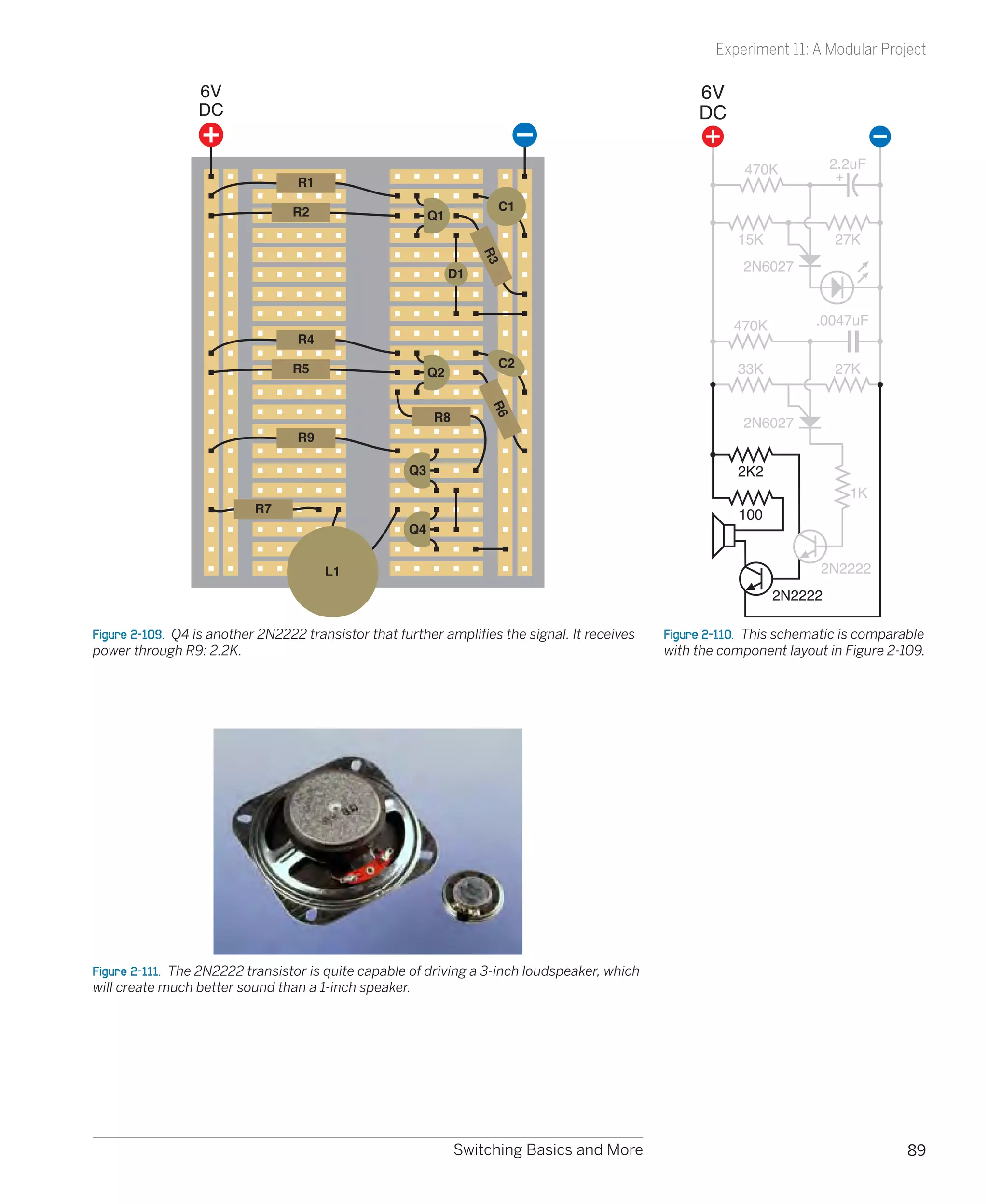
CMOS family:                                                     What you don’t need:
40xx		                                                            1.	 Speed differences are irrelevant from our point of view,
    The old original generation, now obsolete.                        as we’re not going to be building circuits running at
                                                                      millions of cycles per second.
40xxB	                                                            2.	 Price differences are so small as to be inconsequential.
     The 4000B series was improved but still susceptible to
                                                                  3.	 Lower-voltage (LV) CMOS chips are not very interesting
     damage from static electricity. Many hobby circuits still
                                                                      for our small experimental circuits.
     use these chips because they will run from relatively
     high voltages and can power LEDs and even small              4.	 Try to avoid mixing different families, and different
     relays directly.                                                 generations of the same family, in the same circuit.
                                                                      They may not be compatible.
74HCxx	                                                           5.	 Some modern chip varieties may be only available in
    Higher-speed CMOS, with part numbers matching the                 the surface-mount package format. Because they’re so
    TTL family, and pinouts matching the TTL family, but              much more difficult to deal with, and their only major
    input and output voltages not quite the same as the               advantage is miniaturization, I don’t recommend them.
    TTL family. I’ve used this generation extensively in this
                                                                  6.	 In the TTL family, the LS and ALS series cannot handle
    book, because it’s widely available, and the circuits
                                                                      as much output current as the S series and the F series.
    here have no need for greater speed or power.
                                                                      You don’t need them.
74HCTxx	                                                         What you should use:
    Like the HC series but matching the TTL voltages.
                                                                  1.	 The old 74LSxx series of TTL chips was so popular,
74ACxx	                                                               you’ll still find schematics that specify these chips. You
    Advanced version of HC series. Faster, with higher                should still be able to buy them from sources online,
    output capacity.                                                  but if not, you can substitute the 74HCTxx chips, which
74ACTxx	                                                              are designed to function identically.
    Like the AC series but with the same pin functions and        2.	 The old 4000B series of CMOS chips are still used by
    voltages as TTL.                                                  hobbyists because their willingness to tolerate high
                                                                      voltages is convenient. While TTL or TTL-compatible
74AHCxx	                                                              chips require a carefully regulated 5 volts, the 4000B
    Advanced higher-speed CMOS.                                       chips would handle 15 volts—and also delivered
74AHCTxx	                                                             enough power to energize LEDs or even very small re-
    Like the AHC series but with the same pin functions               lays. Some hobbyists also have a nostalgic affection for
    and voltages as TTL.                                              the 74Cxx series of chips, which had the same pin con-
                                                                      nections as the TTL chips but could still tolerate higher
74LVxx	                                                               voltages and higher output current. The trouble is,
     Lower voltage (3.3v) versions, including LV, LVC, LVT,           some of the 74Cxx chips are almost extinct, and while
     and ALVC series.                                                 the 4000B chips are still available, they are considered
As you can see, these days you have to interpret part num-            almost obsolete.
bers very carefully. But which family and generation of chips
should you use? Well, that depends! Following are some
guidelines.


                                                                      Chips, Ahoy!                                                 191
Experiment 19: Learning Logic


                                                                              Background

                                               The confusing world of TTL and CMOS (continued)
                                               Bottom line: I suggest you use the 4000B chips only if you want to replicate an
                                               old circuit, or if a modern equivalent is unavailable (which is why I specified the
                                               4026B chip for the reaction timer—I could not find a modern equivalent that
                                               will drive seven-segment numeric displays directly, and I didn’t want you to
                                               have to deal with more parts than necessary).
                                               If you check online suppliers such as Mouser.com you’ll find that the HC family is
                                               by far the most popular right now. They are all available in through-hole format
                                               (to fit your breadboard and perforated board). They have the high input imped-
                                               ance of CMOS (which is useful) and they have the same pin identities as the old
                                               74LSxx series.

                                               Abbreviations
                                               When looking at data sheets, you are likely to encounter some or all of these
                                               abbreviations:
                                                 •	   VOH min: Minimum output voltage in high state
                                                 •	   VOL max: Maximum output voltage in low state
                                                 •	   VIH min: Minimum input voltage to be recognized as high
                                                 •	   VIL max: Maximum input voltage recognized as low


                                                        Background

  Logic gate origins
   The 7400 family of integrated circuits was introduced by        shows just one of the handmade circuit boards that Bill as-
   Texas Instruments, beginning with the 7400 NAND gate in         sembled to run his computer.
   1962. Other companies had sold logic chips previously, but
   the 7400 series came to dominate the market. The Apollo
   lunar missions used a computer built with 7400 chips, and
   they were a mainstay of minicomputers during the 1970s.
   RCA introduced its 4000 series of logic chips in 1968, built
   around CMOS transistors; Texas Instruments had chosen
   TTL. The CMOS chips used less power, thus generating much
   less heat and enabling flexible circuit design, as each chip
   could power many others. CMOS was also tolerant of wide
   voltage ranges (from 3 to 15 volts) but prohibited switching
   speeds faster than around 1MHz. TTL was 10 times faster.
   Design tweaks gradually eradicated the speed penalty for
   CMOS, and TTL chips have become relatively rare. Still, some    Figure 4-65.  Hobbyist Bill Buzbee built himself a web server
   people retain a special nostalgic loyalty to “the logic gates   entirely from 7400 series logic chips, the oldest of which was
                                                                   fabricated back in 1969. The web server can be found online at
   that went to the moon.” A hardcore enthusiast named Bill
                                                                   http://magic-1.org, displaying pictures of itself and details of
   Buzbee has built an entire web server from TTL-type 7400        its construction. The picture here that Bill took shows just one
   chips, currently online at http://magic-1.org. Figure 4-65      of the circuit boards of this remarkable project.


192                                         Chapter 4
Experiment 19: Learning Logic


                                                                    Fundamentals

Common part numbers
Each 14-pin chip can contain four 2-input gates, three                              Figures 4-66 through 4-74
3-input gates, two 4-input gates, one 8-input gate, or six                          show the internal connec-              1                 14

single-input inverters, as shown in the following table.                            tions of the logic chips that
                                                                                    you are most likely to use.            2                 13

                     2 input           3 input         4 input      8 input         Note that the 7402 NOR
             AND     7408              7411            7421                         gate has its logical inputs            3                 12


            NAND     7400              7410            7420         7430
                                                                                    and outputs arranged dif-
                                                                                    ferently from all the other            4                 11
               OR    7432                                           744078*         chips.
             NOR     7402              7427                         744078*         Figure 4-66.  Figures 4-66             5                 10

             XOR     7486                                                           through 4-74 show pinouts
                                                                                    for some of the most widely            6                 9
            XNOR     747266                                                         used logic chips. Note that the            7402
                                                                                                                               Quad
          Inverter   (1 input) 7404                                                 inputs of the 7402 are reversed        7   2-Input       8
                                                                                    compared with the other chips.             NOR gate
 *The 744078 has an OR output and a NOR output on the same chip.


      1                               14           1                          14        1                   14             1                 14


      2                               13           2                          13        2                   13             2                 13


      3                               12           3                          12        3                   12             3                 12


      4                               11           4                          11        4                   11             4                 11


      5                               10           5                          10        5                   10             5                 10


      6                               9            6                          9         6                    9             6                 9
                                                        7410                                7411                               7420
            7404 Hex                                    Triple                              Triple                             Dual
      7     Inverter                  8            7    3-Input               8         7   3-Input          8             7   4-Input       8
                                                        NAND gate                           AND gate                           NAND gate

Figure 4-67                                   Figure 4-68                          Figure 4-69                        Figure 4-70


      1                               14           1                          14        1                   14             1                 14


      2                               13           2                          13        2                   13             2                 13


      3                               12           3                          12        3                   12             3                 12


      4                               11           4                          11        4                   11             4                 11


      5                               10           5                          10        5                   10             5                 10


      6                               9            6                          9         6                    9             6                 9
            7421                                        7427                                7432                               7486
            Dual                                        Triple                              Quad                               Quad
      7     4-Input                   8            7    3-Input               8         7   2-Input          8             7   2-Input       8
            AND gate                                    NOR gate                            OR gate                            XOR gate

Figure 4-71                                   Figure 4-72                          Figure 4-73                        Figure 4-74


                                                                                            Chips, Ahoy!                                          193
Experiment 19: Learning Logic


                                                                    Fundamentals

  Rules for connecting logic gates
   Permitted:                                                                    The output from the timer can then deliver 100mA,
      •	 You can connect the input of a gate directly to your                    easily enough for half-a-dozen LEDs or a small relay.
         regulated power supply, either positive side or nega-                •	 Low input doesn’t have to be zero. A 74HCxx logic gate
         tive side.                                                              will recognize any voltage up to 1 volt as “low.”
      •	 You can connect the output from one gate directly to                 •	 High input doesn’t have to be 5 volts. A 74HCxx logic
         the input of another gate.                                              gate will recognize any voltage above 3.5 volts as
      •	 The output from one gate can power the inputs of                        “high.”
         many other gates (this is known as “fanout”). The exact            See Figures 4-75 and 4-76 for a comparison of permit-
         ratio depends on the chip, but you can always power at             ted voltages on the input and output side of 74HCxx and
         least ten inputs with one logic output. The output from            74LSxx chips.
         a logic chip can drive the trigger (pin 3) of a 555 timer.


                  Acceptable input                                                      Acceptable input
                    signal range                                                          signal range
                Low              High                                                 Low              High
                                                             Max power                                                        Max power


                                                                                      Maximum 0.8V
                Maximum 1.0V


                                                                                                                              consumption
                                        3.5V
                                        Minimum


                                                             consumption


                                                                                                                2.0V
                                                                                                                Minimum
                                                             at each pin:                                                     at each pin:

                                                             1uA (sink)                                                       20uA (sink)
                                                             1uA (source)                                                     400uA (source)


                               74HCXX                             5V                                       74LSXX                  5V
                               Logic Gate                         DC                                      Logic Gate               DC


                                                             Max power                                                        Max power
                                                                                           At most 0.4V
                At most 0.1V


                                             At least 4.4V


                                                             output                                                           output
                                                                                                                  2.7V
                                                                                                                  At least


                                                             at each pin:                                                     at each pin:

                                                             4mA (source)                                                     0.4mA (source)
                                                             4mA (sink)                                                       4.0mA (sink)

                Low                         High                                      Low                              High
                     Guaranteed output                                                      Guaranteed output
                       signal range                                                           signal range
   Figure 4-75.  Each family of logic chips, and each generation            Figure 4-76.  Because the LS generation of the TTL family has
   in each family, has different standards for input and output             such different tolerances for input voltages and different
   minimum and maximum voltages. This diagram shows the                     standards for output voltages, the LS generation of TTL chips
   standards used by the HC generation of the CMOS family,                  should not be mixed in the same circuit as the HC generation
   which was chosen for most of the projects in this book. Note             of CMOS chips, unless pull-up resistors are used to bring the
   that the current required for input is minimal compared with             LS chips into conformance with standards expected by the HC
   the current available for output. The power supply to the chip           chips. See Experiment 21 for a case study in using LS chips.
   makes up the difference.


194                                                          Chapter 4
Experiment 19: Learning Logic


                                                    Fundamentals

Rules for connecting logic gates (continued)
Not permitted:
  •	 No floating-input pins! On CMOS chips such as the HC
     family, you must always connect all input pins with a
     known voltage, even if they supply a gate on the chip
     that you’re not using. When you use a SPST switch to
     control an input, remember that in its “off” position, it
     leaves the input unconnected. Use a pull-up or pull-
                                                                                      1                                   1
     down resistor to prevent this situation. See Figure 4-77.
  •	 Don’t use an unregulated power supply, or more than 5
     volts, to power 74HCxx or 74LSxx logic gates.                      Good                                Good
  •	 Be careful when using the output from a logic gate to
     power even a low-current LED. Check how many mil-
     liamps are being drawn. Also be careful when “sharing”
     the output from a logic gate with the input of another
     gate, at the same time that it is driving an LED. The LED                        1                                   1
     may pull down the output voltage, to a point where
     the other gate won’t recognize it. Always check cur-               Not                                 Not
     rents and voltages when modifying a circuit or design-             good                                good
     ing a new one.
  •	 Never apply a significant voltage or current to the
     output pin of a logic gate. In other words, don’t force      Figure 4-77.  Because a CMOS chip is so sensitive to input
     an input into an output.                                     fluctuations, a logical input should never be left “floating,” or
                                                                  unattached to a defined voltage source. This means that any
  •	 Never link the outputs from two or more logic gates. If      single-throw switch or pushbutton should be used with a pull-
     they must share a common output wire, use diodes to          up or pull-down resistor, so that when the contacts are open,
     protect them from each other. See Figure 4-78.               the input is still defined.


                               Not                                           Good                                             Good
                               Good


Figure 4-78.  The output from one logic gate must not be allowed to feed back into the output from another logic gate. Diodes can
be used to isolate them, or they can be linked via another gate.


                                                                        Chips, Ahoy!                                                  195
Experiment 19: Learning Logic

                 5VDC Regulated                 In the 74HCxx logic family, each input of a logic gate consumes just a micro-
                                                amp, while the output can source 4 milliamps. This seems paradoxical: how
                                                can the chip give out more than it takes in? The answer is that it also consumes
                                                power from the power supply attached to pins 7 and 14. That’s where the ad-
                                                ditional electricity comes from.
                                                Because the logical output from a chip can be greater than the logical input,
   10K
                                                we can put the chip in a state where it keeps itself “switched on” in a way which
                           74HC08
                            AND                 is similar to the way the relay in the alarm project was wired to lock itself on.
                            gate                The simplest way to do this in a logic chip is by feeding some of the output
      1K
                                                back to one of the inputs.
                                                Figure 4-79 shows an AND gate with one of its inputs wired to positive and its
                                                other input held low by a pull-down resistor, with a pushbutton that can make
Figure 4-79.  Using a diode, the logical        the input high. A signal diode connects the output of the chip back to the
output from a gate can be allowed to feed       pushbutton-controlled input. Remember that the diode has a mark on it indi-
back to one of its inputs, so that the gate     cating the end which should be connected to the negative side of the power
latches after receiving a brief logical input
pulse.                                          supply, which in this case will be the end of the 10K resistor.
                                                The schematic in Figure 4-79 shows how the circuit should look in breadboard
                                                format. Figure 4-80 shows it in a simpler format.


                                                  From this point on, I won’t bother to show the power regulator and the capacitors
                                                  associated with it. Just remember to include them every time you see the power sup-
                                                  ply labeled as “5V DC Regulated.”


                                                When you switch on the power, the LED is dark, as before. The AND gate needs
                                                a positive voltage on both of its logical inputs, to create a positive output, but
                                                it now has positive voltage only on one of its inputs, while the other input
                                                is pulled down by the 10K resistor. Now touch the pushbutton, and the LED
                                                comes on. Let go of the pushbutton, and the LED stays on, because the posi-
                                                tive output from the AND gate circulates back through the diode and is high
                                                enough to overcome the negative voltage coming through the pull-down
                                                resistor.
                                                The output from the AND gate is powering its own input, so the LED will stay
                                                on until we disconnect it. This arrangement is a simple kind of “latch,” and can
                                                be very useful when we want an output that continues after the user presses
                                                and releases a button.
                                                You can’t just connect the output from the gate to one of its inputs using an
                                                ordinary piece of wire, because this would allow positive voltage from the tac-
                                                tile switch to flow around and interfere with the output signal. Remember, you
                                                must never apply voltage to the output pin of a logic gate. The diode prevents
                                                this from happening.
Figure 4-80.  The breadboard-format sche-
matic in is simplified here to show more        If you’ve grasped the basics of logic gates, you’re ready now to continue to our
clearly the way in which a gate can latch       first real project, which will use all the information that I’ve set out so far.
itself after receiving an input pulse.


196                                             Chapter 4
Experiment 20: A Powerful Combination


Experiment 20: A Powerful Combination
Suppose you want to prevent other people from using your computer. I can                   The Warranty Issue
think of two ways to do this: using software, or using hardware. The software
                                                                                           If you follow this project all the way
would be some kind of startup program that intercepts the normal boot se-
                                                                                           to its conclusion, you’ll open your
quence and requests a password. You could certainly do it that way, but I think            desktop computer, cut a wire, and
it would be more fun (and more relevant to this book) to do it with hardware.              saw a hole in the cabinet. Without a
What I’m imagining is a numeric keypad requiring the user to enter a secret                doubt, this will void your warranty.
combination before the computer can be switched on.                                        If this makes you nervous, here are
                                                                                           three options:
You will need:
                                                                                           1. Breadboard the circuit for fun, and
 •	 Numeric keypad. As specified in the shopping list at the beginning of this             leave it at that.
    chapter, it must have a “common terminal” or “common output.” The sche-
                                                                                           2. Use the numeric keypad on some
    matic in Figure 4-82 shows what I mean. Inside the keypad, one conductor               other device.
    (which I have colored red to distinguish it from the others) connects with
    one side of every pushbutton. This conductor is “common” to all of them.               3. Use it on an old computer.
    It emerges from the keypad on an edge connector or set of pins at the
    bottom, which I’ve colored yellow.


                   1                          2                          3


                   4                          5                          6


                   7                          8                          9


                                                                         #
                   *                          0


                                                                                         Figure 4-81.  Caution: This just might void
                                                                                         your warranty.


Figure 4-82.  A keypad of the type required for Experiment 20 incorporates a common
terminal connected to one side of each of the 12 pushbuttons. The wire from the common
terminal is shown red, here, to make it more easily identifiable.

 •	 Keypads that use “matrix encoding” won’t work with the circuit that I’m
    going to describe. If the Velleman keypad, which I recommend, is unavail-
    able, and you can’t find another like it, you can use 12 separate SPST push-
    buttons. Of course, that will cost a little more.
 •	 74HC08 logic chip containing four AND gates. Quantity: 1.
 •	 74HC04 logic chip containing six inverters. Quantity: 1.
 •	 555 timer chip. Quantity: 1.


                                                                        Chips, Ahoy!                                                197
Experiment 20: A Powerful Combination

                                         •	 Latching relay, 5 volt, DPST or DPDT, “2 form C” package, Panasonic DS2E-
                                            SL2-DC5V or similar. Must have two separate coils (one to latch, one to
                                            unlatch) with separate inputs. Quantity: 1.
                                         •	 LEDs, 5mm generic, your choice of colors. Quantity: 3.
                                         •	 Ribbon cable, with six conductors minimum, if you want to do a really
                                            neat job. You can use a cable of the type sold for hard drives, and split off
                                            the six conductors that you need, or shop around on eBay.
                                         •	 Tools to open your computer, drill four holes, and make saw cuts between
                                            the holes, to create a rectangular opening for the keypad (if you want to
                                            take this project to its conclusion). Also, four small bolts to attach the key-
                                            pad to the computer cabinet after you create the opening for it.


                                        The Schematic
                                        This time I’d like you to study the schematic before building anything. Let’s
                                        start with the simplified version, shown in Figure 4-83.
                                                5VDC
                                                Regulated
                                                                                                        Logic gate
                                                                                                        power input pins
                                                              *
                                                              0

                                                              1

                                                                                                    1           8
                                                              2
                                                                                                         555
                                                              3                                         timer


                                                              4

                                                              5

                                                              6

                                                              7

                                                              8
                                                                                                                    Computer
                                                                                                                    on switch
                                                              9

                                                              #


                                        Figure 4-83.  A simplified schematic showing the basic structure of the combination lock
                                        circuit.


198                                     Chapter 4
Experiment 20: A Powerful Combination

I want this to be a battery-powered circuit, so that you don’t have to run a
separate power supply to it or (worse) try to tap into your computer’s 5-volt
bus. Battery power means that the circuit has to be “off” most of the time, to
prevent the battery from running down. Because the keypad has two spare
buttons (the asterisk and the pound sign), I’m going to use the asterisk as the
“power on” button. When you press it, the LED at the top of the schematic
lights up to confirm that everything’s working, and the button sends power to
the two logic chips and the 555 timer. You have to hold down the asterisk but-
ton while you punch in a three-digit code to unlock the computer.
Arbitrarily, I’ve chosen 1-4-7 as the three-digit code. Let’s track what happens
when you enter this sequence. (Naturally, if you build the circuit, you can wire
it to choose any three digits you prefer.)
Pressing the 1 button sends positive power to one logical input of the first
AND gate. The other logical input of this gate is also positive, because an in-
verter is supplying it, and the input of the inverter is being held negative by
a pull-down resistor. When an inverter has a negative input, it gives a positive
output, so pressing the 1 button activates the AND gate, and makes its output
positive. The AND gate locks itself on, as its output cycles back to its switched
input via a diode. So the gate output remains high even after you let go of the
1 button.
The output from the first AND gate also supplies one logical input of the sec-
ond AND gate. When you press the 4 button, you send positive voltage to the
other logical input of this AND gate, so its output goes high, and it locks itself
on, just as the first gate did.
The second AND gate feeds the third AND gate, so when you press the 7
button, the third AND gate changes its output from low to high. This passes
through an inverter, so the output from the inverter goes from high to low.
This in turn goes to the trigger of a 555 timer wired in monostable mode.
When the trigger of a 555 timer goes from high to low, the timer emits a posi-
tive pulse through its output, pin 3. This runs down to the upper coil of the
latching relay, and also flashes an LED to confirm that the code has been ac-
cepted and the relay has been activated.
Two of the contacts in the relay are wired into the power-up button of your
computer. A little later in this description I’ll explain why this should be safe
with any modern computer.
Because we’re using a latching relay, it flips into its “on” state and remains there,
even when the power pulse from the timer ends. So now you can let go of the
asterisk button to disconnect the battery power to your combination lock, and
press the power-up button that switches on your computer.
At the end of your work session, you shut down your computer as usual, then
press the pound button on your keypad, which flips the relay into its other
position, reactivating the combination lock.


                                                                       Chips, Ahoy!                                      199
Experiment 20: A Powerful Combination


                                        Incorrect Inputs
                                        What happens if you enter the wrong code? If you press any button other than
                                        1, 4, or 7, it sends positive voltage to the inverter near the top of the sche-
                                        matic. The positive voltage overwhelms the negative voltage being applied to
                                        the inverter through a pull-down resistor, and causes the inverter to output a
                                        negative voltage, which it applies to one of the logical inputs of the first AND
                                        gate. If the AND gate was locked on, the negative input will switch it off. If it
                                        was supplying the second AND gate, it’ll switch that one off too.
                                        Thus, any error when entering the first, second, or third digit of the secret code
                                        will reset the AND gates, forcing you to begin the sequence all over again.
                                        What if you enter 1, 4, and 7 out of their correct sequence? The circuit won’t
                                        respond. The third AND gate needs a high input supplied by the second AND
                                        gate, and the second AND gate needs a high input supplied by the first AND
                                        gate. So you have to activate the AND gates in the correct sequence.


                                        Questions
                                        Why did I use a 555 timer to deliver the pulse to the relay? Because the logical
                                        output from an AND gate cannot deliver sufficient power. I could have passed
                                        it through a transistor, but I liked the idea of a pulse of a fixed length to flip the
                                        relay and illuminate an LED for about 1 second, regardless of how briefly the user
                                        presses the 7 button.
                                        Why do I need three LEDs? Because when you’re punching buttons to un-
                                        lock your computer, you need to know what’s going on. The Power On LED
                                        reassures you that your battery isn’t dead. The Relay Active LED tells you that
                                        the system is now unlocked, in case you are unable to hear the relay click. The
                                        System Relocked LED reassures you that you have secured your computer.
                                        Because all the LEDs are driven either directly from the 5-volt supply or from
                                        the output of the 555 timer, they don’t have to be low-current LEDs and can be
                                        used with 330Ω series resistors, so they’ll be nice and bright.
                                        How do you connect the keypad with the circuit? That’s where your ribbon
                                        cable comes in. You carefully strip insulation from each of the conductors,
                                        and solder them to the contact strip or edge connector on your keypad. Push
                                        the conductors on the other end of the cable into your breadboard (when
                                        you’re test-building the circuit) or solder them into perforated board (when
                                        you’re building it permanently). Find a convenient spot inside your computer
                                        case where you can attach the perforated board, with double-sided adhesive
                                        or small bolts or whatever is convenient. Include a 9-volt battery carrier, and
                                        don’t forget your power regulator to step the voltage down to 5 volts.


                                        Breadboarding
                                        No doubt you have realized by now that breadboards are very convenient as a
                                        quick way to push in some components and create connections, but the layout
                                        of their conductors forces you to put components in unintuitive configurations.
                                        Still, if you carefully compare the breadboard schematic in Figure 4-83 with the
                                        simplified schematic in Figure 4-84, you’ll find that the connections are the same.

200                                     Chapter 4
Experiment 20: A Powerful Combination

To help it make sense, I’ve shown the logic gates that exist inside the chips. I’ve
also colored the power supply wires, as before, to reduce the risk of confusion.         If you build the circuit and you can’t
The positive side of the supply goes only to the common terminal on your                 understand why everything’s dead,
                                                                                         it’s most likely because you forgot to
keypad, and you have to press the asterisk key to send the power back down               hold down the asterisk button.
the ribbon cable, to supply the chips.
Note that the “wrong” numbers on the keypad are all shorted together. This
will create some inconvenience if you want to change the combination in the
future. I’ll suggest a different option in the “enhancements” section that fol-
lows. For now, ideally, you should run a wire from every contact on your key-
pad, down to your circuit on its breadboard, and short the “wrong” keypad
numbers together with jumper wires on the breadboard.
Also note that if you use a meter to test the inputs to the AND gates, and you
touch your finger against the meter probe while doing so, this can be suffi-
cient to trigger the sensitive CMOS inputs and give a false positive.
                  5VDC Regulated
                  (from 9V battery)

                                                            330
                        *
                        7
                                      10K
                        1
                                                   74HC08


                              10K
                        4


                        0

                        2
                                10K
                        3

                        5

                        6                       74HC04
                                                               100K


                        8

                        9      330                                10uF
                                                  555
                                                              0.1uF
                               330
                                                            Computer
                                                            power-up
                                                            switch
                        #


Figure 4-84.  The combination lock schematic redrawn to show how the components can
be laid out on a breadboard.


                                                                         Chips, Ahoy!                                         201
Experiment 20: A Powerful Combination


                                        One Little Detail: The Computer Interface
                                        Old computers used to have a big switch at the back, attached to the heavy
                                        metal box inside the computer, that transformed house current to regulated
                                        voltages that the computer needs. Most modern computers are not designed
                                        this way; you leave the computer plugged in, and you touch a little button on
                                        the box (if it’s a Windows machine) or the keyboard (if it’s a Mac), which sends
                                        a low-voltage pulse to the motherboard.
                                        This is ideal from our point of view, because we don’t have to mess with high
                                        voltages. Don’t even think of opening that metal box with the fan mounted in
                                        it, containing the computer power supply. Just look for the wire (usually con-
                                        taining two conductors, on a Windows machine) that runs from the “power up”
                                        button to the motherboard.
                                        To check that you found the right one, make sure that your computer is un-
                                        plugged, ground yourself (because computers contain CMOS chips that are
                                        sensitive to static electricity) and very carefully snip just one of the two con-
                                        ductors in the wire. Now plug in your computer and try to use the “power up”
                                        button. If nothing happens, you’ve probably cut the right wire. Even if you cut
                                        the wrong wire, it still prevented your computer from booting, which is what
                                        you want, so you can use it anyway. Remember, we are not going to introduce
                                        any voltage to this wire. We’re just going to use the relay as a switch to recon-
                                        nect the conductor that you cut. You should have no problem if you maintain
                                        a cool and calm demeanor, and look for that single wire that starts everything.
                                        Check online for the maintenance manual for your computer if you’re really
                                        concerned about making an error.
                                        After you find the wire and cut just one of its conductors, unplug your com-
                                        puter again, and keep it unplugged during the next steps.
                                        Find where the wire attaches to the motherboard. Usually there’s a small un-
                                        pluggable connector. First, mark it so that you know how to plug it back in the
                                        right way around, and then disconnect it while you follow the next couple of
                                        steps.
                                        Strip insulation from the two ends of the wire that you cut, and solder an ad-
                                        ditional piece of two-conductor wire, as shown in Figure 4-85, with heat-shrink
                                        tube to protect the solder joints. (This is very important!)
                                        Run your new piece of wire to the latching relay, making sure you attach it to
                                        the pair of contacts which close, inside the relay, when it is energized by the
                                        unlocking operation. You don’t want to make the mistake of unlocking your
                                        computer when you think you’re locking it, and vice versa.
                                        Reconnect the connector that you disconnected from your motherboard, plug
                                        in your computer, and try to power it up. If nothing happens, this is probably
                                        good! Now enter the secret combination on your keypad (while holding down
                                        the asterisk button to provide battery power) and listen for the click as the re-
                                        lay latches. Now try the “power up” button again, and everything should work.


202                                     Chapter 4
Experiment 20: A Powerful Combination


                                                                   Power Up
                                                                   button on
                                                                   computer


                         Heat-shrink tubing
                           (not yet shrunk)

         To your
        latching
           relay

                                    Solder
                                     joints
                                                               Connector


                      Computer motherboard


Figure 4-85.  The combination lock project can be interfaced with a typical desktop com-
puter by cutting one conductor in the wire from the “power up” pushbutton, soldering an
extension, and covering the joints with heat-shrink tube.


Enhancements
At the end of any project, there’s always more you can do.
To make this setup more secure, you could remove the usual screws that secure
the case of the computer, and replace them with tamper-proof screws. Check any
online source for “tamper-proof screws,” such as http://www.mcmaster.com. Natu-
rally, you will also need the special tool that fits the screws, so that you can install
them (or remove them, if your security system malfunctions for any reason).


                                                                           Chips, Ahoy!                                    203
Experiment 20: A Powerful Combination

                                              Another enhancement could be an additional 555 timer that is activated by
                                              the asterisk button, and delivers power to the other chips for, say, a limited
                                              period of 30 seconds, allowing you that much time to unlock the system. This
                                              would eliminate the need to hold down the asterisk button while you enter
                                              the unlocking code. A 555 timer can supply power to all the other chips, be-
                                              cause they don’t use very much. I omitted this feature for the sake of simplicity.
                                              Yet another enhancement, if you are security-crazed, is to go for a four-button
                                              code. After all, the 74HC08 chip still has one unused AND gate. You could in-
                                              sert that into the chain of the existing AND gates and wire it to another keypad
                                              button of your choice.
                                              Still another enhancement would be a way to change the code without unsol-
                                              dering and resoldering wires. You can use the miniature sockets that I suggest-
                                              ed in the heartbeat flasher project. These should enable you to swap around
                                              the ends of your wires from the keypad.
                                              And for those who are absolutely, positively, totally paranoid, you could fix
                                              things so that entering a wrong code flips a second high-amperage relay
                                              which supplies a massive power overload, melting your CPU and sending a
                                              big pulse through a magnetic coil clamped to your hard drive, instantly turn-
                                              ing the data to garbage (Figure 4-86). Really, if you want to protect informa-
                                              tion, messing up the hardware has major advantages compared with trying
                                              to erase data using software. It’s faster, difficult to stop, and tends to be per-
                                              manent. So, when the Record Industry Association of America comes to your
                                              home and asks to switch on your computer so that they can search for illegal
                                              file sharing, just accidentally give them an incorrect unlocking code, sit back,
                                              and wait for the pungent smell of melting insulation.
                                              If you pursue this option, I definitely take no responsibility for the consequences.
                                              On a more realistic level, no system is totally secure. The value of a hardware
                                              locking device is that if someone does defeat it (for instance, by figuring out
                                              how to unscrew your tamper-proof screws, or simply ripping your keypad out
                                              of the computer case with metal shears), at least you’ll know that something
                                              happened—especially if you put little dabs of paint over the screws to re-
Figure 4-86.  For those who are absolutely,   veal whether they’ve been messed with. By comparison, if you use password-
positively, totally paranoid: a meltdown/     protection software and someone defeats it, you may never know that your
self-destruct system controlled by a secret   system has been compromised.
key combination provides enhanced
protection against data theft or intrusions
by RIAA investigators asking annoying
questions about file sharing.


204                                           Chapter 4
Experiment 21: Race to Place


Experiment 21: Race to Place
The next project is going to get us deeper into the concept of feedback, where
the output is piped back to affect the input—in this case, blocking it. It’s a small
project, but quite subtle, and the concepts will be useful to you in the future.
You will need:
 •	 74HC32 chip containing four OR gates. Quantity: 1.
 •	 555 timers. Quantity: 2.
 •	 SPDT switch. Quantity: 1.
 •	 SPST tactile switches. Quantity: 2.
 •	 Various resistors.
 •	 5V supply using power regulator as before.


The Goal
On quiz shows such as Jeopardy, contestants race to answer each question.
The first person who hits his answer button automatically locks out the other
contestants, so that their buttons become inactive. How can we make a circuit
that will do the same thing?
If you search online, you’ll find several hobby sites where other people have
suggested circuits to work this way, but they lack some features that I think are
necessary. The approach I’m going to use here is both simpler and more elabo-
rate. It’s simpler because it has a very low chip count, but it’s more elaborate in
that it incorporates “quizmaster control” to make a more realistic game.
I’ll suggest some initial ideas for a two-player version. After I develop that idea,
I’ll show how it could be expanded to four or even more players.


A Conceptual Experiment
I want to show how this kind of project grows from an idea to the finished
version. By going through the steps of developing a circuit, I’m hoping I may
inspire you to develop ideas of your own in the future, which is much more
valuable than just replicating someone else’s work. So join me in a conceptual
experiment, thinking our way from a problem to a solution.                                    Button                    Button
                                                                                              Blocker                   Blocker
First consider the basic concept: two people have two buttons, and whoever
goes first locks out the other person. I always find it helps me to visualize this
kind of thing if I draw a sketch, so that’s where I’ll begin. In Figure 4-87, the
signal from each button passes through a component that I’ll call a “button
blocker,” activated by the other person’s button. I’m not exactly sure what the
button blocker will be or how it will work, yet.
Now that I’m looking at it, I see a problem here. If I want to expand this to three    Figure 4-87.  The basic concept of the quiz
players, it will get complicated, because each player must activate the “button        project is that the output from one button
                                                                                       should feed back to intercept the output
blockers” of two opponents. Figure 4-88 shows this. And if I have four players,
                                                                                       of another button. At this point, the way in
it’s going to get even more complicated.                                               which the “button blocker” circuit works
                                                                                       has not been figured out.
Anytime I see this kind of complexity, I think there has to be a better way.
                                                                      Chips, Ahoy!                                             205
Experiment 21: Race to Place

                               Also, there’s another problem. After a player lets his finger off the button, the
                               other players’ buttons will be unblocked again. I need a latch to hold the signal
                               from the first player’s button and continue to block the other players.


                                           Button                        Button                        Button
                                           Blocker                       Blocker                       Blocker


                               Figure 4-88.  The quiz concept becomes more complicated when an additional pushbutton
                               is added. Now each button must block two other buttons. If a fourth button is added, the
                               circuit will become unmanageably complex. There has to be a better way.

                               This now sounds even more complicated. But wait a minute, if I have a latch
                               which allows the winning player to take his finger off his button, I don’t care if
                               any of the buttons are being pressed anymore—including the button of the
                               winning player. As soon as his signal is latched, all the buttons can be blocked.
                               This makes things much simpler. I can summarize it as a sequence of events:
                                1.	 First player presses his button.
                                2.	 The signal is latched.
                                3.	 The latched signal feeds back and blocks all the buttons.
                               The new sketch in Figure 4-89 shows this. Now the configuration is modular,
                               and can be expanded to almost any number of players, just by adding more
                               modules.
                               There’s something important missing, though: a reset switch, to put the sys-
                               tem back to its starting mode after the players have had time to press their
                               buttons and see who won. Also, I need a way to prevent players from pressing
                               their buttons too soon, before the quizmaster has finished asking the ques-
                               tion. Maybe I can combine this function in just one switch, which will be under
                               the quizmaster’s control. In its Reset position, the switch can reset the system
                               and remove power to the buttons. In its Play position, the switch stops hold-
                               ing the system in reset mode, and provides power to the buttons. Figure 4-90
                               shows this. I’ve gone back to showing just two players, to minimize the clutter
                               of lines and boxes, but the concept is still easily expandable.


206                            Chapter 4
Experiment 21: Race to Place


                                                                                Play                  Button                Button
                                                                                                      Blocker               Blocker
        Button               Button               Button
        Blocker              Blocker              Blocker

                                                                                Reset
         Latch                Latch                Latch                                               Latch                 Latch


Figure 4-89.  If a latch is added below each button, it can                   Figure 4-90.  A quizmaster switch will be needed to
retain one input and then block all inputs from all buttons.                  activate the buttons initially and then reset the circuit
This simplifies the concept.                                                  after a winning input has been recorded.

Now I have to deal with a logic problem in the diagram. The way I’ve drawn
it, after the output from the lefthand latch goes up to the “button blockers,” it
can also run down the wire to the other half of the circuit (against the direc-
tion to the arrows), because everything is joined together. In other words, if
the lefthand LED lights up, the righthand LED will light up, too. How can I stop
this from happening?
Well, I could put diodes in the “up” wires to block current from running down
them. But I have a more elegant idea: I’ll add an OR gate, because the inputs to
an OR gate are separated from each other electrically. Figure 4-91 shows this.
                                                                                                                       OR
Usually an OR gate has only two logical inputs. Will this prevent me from adding
more players? No, because you can actually buy an OR that has eight inputs. If
any one of them is high, the output is high. For fewer than eight players, I can
short the unused inputs to ground, and ignore them.
                                                                                            Play             Button           Button
Looking again at Figure 4-91, I’m getting a clearer idea of what the thing I’ve                              Blocker          Blocker
called a “button blocker” should actually be. I think it should be another logic
gate. It should say, “If there’s only one input, from a button, I’ll let it through.
But if there is a second input from the OR gate, I won’t let it through.”                   Reset
                                                                                                              Latch            Latch
That sounds like a NAND gate, but before I start choosing chips, I have to de-
cide what the latch will be. I can buy an off-the-shelf flip-flop, which flips “on” if
it gets one signal and “off” if it gets another, but the trouble is, chips containing
flip-flops tend to have more features than I need for a simple circuit like this.
Therefore I’m going to use 555 timers again, in flip-flop mode. They require
                                                                                          Figure 4-91.  To prevent the output from one
very few connections, work very simply, and can deliver a good amount of cur-
                                                                                          latch feeding back around the circuit to the
rent. The only problem with them is that they require a negative input at the             output from another latch, the outputs can
trigger pin to create a positive output. But I think I can work with that.                be combined in an OR gate.


                                                                        Chips, Ahoy!                                               207
Experiment 21: Race to Place

                                                                         So now, finally, here’s a simplified schematic, in Figure 4-92. I like to show the
  R1
                              S2                    S3
                                                                         pins of the 555 timers in their correct positions, so I had to move the compo-
          S1                                                             nents around a little to minimize wire crossovers, but you can see that logi-
                                                                         cally, it’s the same basic idea.
               R2                    R3
                                                                         Before you try to build it, just run through the theory of it, because that’s the
                                                                         final step, to make sure there are no mistakes. The important thing to bear in
    OR1              OR2                  OR3                            mind is that because the 555 needs a negative input on its trigger pin to create
                                                                         its output, when any of the players presses a button, the button has to create a
                                                     R4                  negative “flow” through the circuit. This is a bit counterintuitive, so I’m includ-
                    1           8                                        ing a three-step visualization in Figure 4-93, showing how it will work.
                         555
                        timer                                            In Step 1, the quizmaster has asked a question and flipped his switch to the
                                                                         right, to supply (negative) power to the players’ buttons. So long as no one
                                                                         presses a button, the pull-up resistors supply positive voltage to OR2 and OR3.
                                                                         An OR gate has a positive output if it has any positive input, so OR2 and OR3
                    1           8                                        keep the trigger inputs of the 555 timers positive. Their outputs remain low,
                                                                         and nothing is happening yet.
                         555
                        timer
                                                                         In Step 2, the lefthand player has pressed his button. Now OR2 has two nega-
                                                                         tive inputs, so its output has gone low. But IC1 hasn’t reacted yet.

Figure 4-92.  Now that the basic concept                                 In Step 3, just a microsecond later, IC1 has sensed the low voltage on its trig-
of the quiz circuit has been roughed out,                                ger, so its output from pin 3 has gone high, lighting the LED. Remember, this
specific components can be inserted, with                                555 timer is in flip-flop mode, so it locks itself into this state immediately.
compatible inputs and outputs.
                                                                         Meanwhile its high output also feeds back to OR1. Because OR1 is an OR gate,
                                                                         just one high input is enough to make a high output, so it feeds this back to
                                                                         OR2 and OR3. And now that they have high inputs, their outputs also go high,
                                                                         and will stay high, regardless of any future button-presses.

                    R1                              S2              S3                R1                         S2              S3        R1                         S2              S3
                                S1                                                           S1                                                   S1


                                     R2                  R3                                       R2                  R3                               R2                  R3


                        OR1               OR2                 OR3                      OR1             OR2                 OR3              OR1             OR2                 OR3


                                                                          R4                                                          R4                                                   R4
                                          1         8                                                  1         8                                          1         8


                                              IC1                                                          IC1                                                  IC1


                                          1         8                                                  1         8                                          1         8


                                              IC2                                                          IC2                                                  IC2


                                                                         Figure 4-93.  These three schematics show the prevalence of higher and lower voltages
                                                                         (red and blue lines) through the quiz circuit when a pushbutton is pressed.

                                                                         Because OR2 and OR3 now have high inputs and outputs, IC1 and IC2 cannot be
                                                                         triggered. But IC1 is still locked into its “on” state, keeping the LED illuminated.


208                                                                      Chapter 4
Experiment 21: Race to Place

The only way to change IC1 is if the quizmaster flips his switch back to the left.
That applies negative power to the reset pins of both the timers. Consequently         R1
                                                                                                                  S2              S3         S4

their outputs go low, the LED goes out, and the circuit goes back into the same               S1

state as where it started. Having reset it, the quizmaster can ask another ques-
                                                                                                   R2                  R3
tion, but the players’ buttons are not activated until the quizmaster flips the
switch back to the right again.
                                                                                        OR1             OR2                 OR3        OR4
There’s only one situation that I haven’t addressed: what if both players press
their buttons absolutely simultaneously? In the world of digital electronics,                                                     R4
                                                                                                        1         8
this is highly unlikely. Even a difference of a microsecond should be enough
time for the circuit to react and block the second button. But if somehow both                              IC1

buttons are pressed at the same instant, both of the timers should react, and
both of the LEDs will light up, showing that there has been a tie.
In case you feel a little uncertain about the way in which a two-player circuit                         1         8

can be upgraded to handle extra players, I’ve included a simplified three-player
                                                                                                            IC2
schematic in Figure 4-94.


Breadboarding It                                                                                        1         8
Now it’s time to create a schematic that’s as close to the breadboard layout
                                                                                                            IC3
as possible, so that you can build this thing easily. The schematic is shown in
Figure 4-95 and the actual components on a breadboard are in Figure 4-96.
Because the only logic gates that I’ve used are OR gates, and there are only three
                                                                                     Figure 4-94.  The two-player schematic in
of them, I just need one logic chip: the 74HC32, which contains four 2-input OR      can be easily upgraded to a three-player
gates. (I’ve grounded the inputs to the fourth). The two OR gates on the left        version, as shown here, provided the first
side of the chip have the same functions as OR2 and OR3 in my simplified             OR gate can handle three inputs.
schematic, and the OR gate at the bottom-right side of the chip works as OR1,
receiving input from pin 3 of each 555 timer. If you have all the components,
you should be able to put this together and test it quite quickly.
You may notice that I’ve made one modification of the previous schematic. A
0.01 µF capacitor has been added between pin 2 of each 555 timer (the Input)
and negative ground. Why? Because when I tested the circuit without the ca-
pacitors, sometimes I found that one or both of the 555 timers would be trig-
gered simply by flipping S1, the quizmaster switch, without anyone pressing
a button.
At first this puzzled me. How were the timers getting triggered, without any-
one doing anything? Maybe they were responding to “bounce” in the quiz-
master switch. Sure enough, the small capacitors solved the problem. They
may also slow the response of the 555 timers fractionally, but not enough to
interfere with slow human reflexes.
As for the buttons, it doesn’t matter if they “bounce,” because each timer locks
itself on at the very first impulse and ignores any hesitations that follow.
You can experiment building the circuit, disconnecting the 0.01 µF capacitors,
and flipping S1 to and fro a dozen times. If you have a high-quality switch, you
may not experience any problem. If you have a lower-quality switch, you may
see a number of “false positives.” I’m going to explain more about “bounce,”
and how to get rid of it, in the next experiment.


                                                                    Chips, Ahoy!                                                        209
Experiment 21: Race to Place

                                                         5V DC regulated
                                 10K

                                   10K
                     S2


                       S3


                                                     74HC32
                                               OR2


                                               OR3

                     S1
                                                        OR1


                          0.01                   1            8

                                                     555


                    330


                          0.01                   1            8

                                                     555


                    330                  10K


Figure 4-95.  Applying the simplified schematic to a breadboard inevitably entails        Figure 4-96.  The quiz schematic applied to a
a wiring layout that is less intuitively obvious and appears more complex. The            breadboard, to test the concept prior to full-scale
connections are the same, though.                                                         implementation.


                                                      Enhancements
                                                      After you breadboard the circuit, if you proceed to build a permanent version,
                                                      I suggest that you expand it so that at least four players can participate. This
                                                      will require an OR gate capable of receiving four inputs. The 74HC4078 is the
                                                      obvious choice, as it allows up to eight. Just connect any unused inputs to
                                                      negative ground.
                                                      Alternatively, if you already have a couple of 74HC32 chips and you don’t want
                                                      to bother ordering a 74HC4078, you can gang together three of the gates in-
                                                      side a single 74HC32 so that they function like a four-input OR. Look at the
                                                      simple logic diagram in Figure 4-97 showing three ORs, and remember that
                                                      the output from each OR will go high if at least one input is high.
                                                      And while you’re thinking about this, see if you can figure out the inputs and
                                                      output of three ANDs in the same configuration.
                                                      For a four-player game, you’ll also need two additional 555 timers, of course,
Figure 4-97.  Although a four-input OR gate           and two more LEDs, and two more pushbuttons.
is not manufactured, its functionality can
be achieved easily by linking three 2-input           As for creating a schematic for the four-player game—I’m going to leave that
OR gates together.                                    to you. Begin by sketching a simplified version, just showing the logic symbols.
                                                      Then convert that to a breadboard layout. And here’s a suggestion: pencil, pa-
                                                      per, and an eraser can still be quicker, initially, than circuit-design software or
                                                      graphic-design software, in my opinion.

210                                                   Chapter 4
Experiment 22: Flipping and Bouncing


Experiment 22: Flipping and Bouncing
I mentioned in the previous experiment that “bounce” from the buttons in the
circuit wouldn’t be a problem, because the buttons were activating 555 tim-
ers that were wired in bistable, flip-flop mode. As soon as the timer receives
the very first pulse, it flips into its new state and flops there, ignoring any ad-
ditional noise in the circuit. So can we debounce a switch or a button using a
flip-flop? And as some 74HCxx chips are available containing flip-flops, can we
use them?
The answers are yes, and yes, although it’s not quite as simple as it sounds.
You will need:
 •	 74HC02 logic chip containing 4 NOR gates. 74HC00 logic chip containing
    4 NAND gates. Quantity: 1 of each.
 •	 SPDT switch. Quantity: 1.
 •	 LEDs, low-current. Quantity: 2.
 •	 10K resistors and 1K resistors. Quantity: 2 of each.
Assemble the components on your breadboard, following the schematic
shown in Figure 4-98. When you apply power (through your regulated 5-volt
supply), one of the LEDs should be lit.
                              5V DC Regulated


                                 1K


                        10K
                                1K


                        10K
                                                              74HC02


Figure 4-98.  A simple circuit to test the behavior of two NOR gates wired as a simple flip-
flop that retains its state after an input pulse ceases.

Now I want you to do something odd. Please disconnect the SPDT switch by
taking hold of the wire that connects the positive power supply to the pole of
the switch, and pulling the end of the wire out of the breadboard. When you
do this, you may be surprised to find that the LED remains lit.
Push the wire back into the breadboard, flip the switch, and the first LED
should go out, while the other LED should become lit. Once again, pull out the
wire, and once again, the LED should remain lit.
Here’s the take-home message:
 •	 A flip-flop requires only an initial pulse.
 •	 After that, it ignores its input.


                                                                               Chips, Ahoy!                                    211
Experiment 22: Flipping and Bouncing


                                       How It Works
                                       Two NOR gates or two NAND gates can function as a flip-flop:
                                        •	 Use NOR gates when you have a positive input from a double-throw switch.
                                        •	 Use NAND gates when you have a negative input from a double-throw
                                           switch.
                                       Either way, you have to use a double-throw switch.
                                       I’ve mentioned the double-throw switch three times (actually, four times if you
                                       count this sentence!) because for some strange reason, most introductory books
                                       fail to emphasize this point. When I first started learning electronics, I went crazy
                                       trying to understand how two NORs or two NANDs could debounce a simple
                                       SPST pushbutton—until finally I realized that they can’t. The reason is that
                                       when you power up the circuit, the NOR gates (or NAND gates) need to be
                                       told in which state they should begin. They need an initial orientation, which
                                       comes from the switch being in one state or the other. So it has to be a double-
                                       throw switch. (Now I’ve mentioned it five times.)
                                       I’m using another simplified multiple-step schematic, Figure 4-99, to show the
                                       changes that occur as the switch flips to and fro with two NOR gates. To refresh
                                       your memory, I’ve also included a truth table showing the logical outputs from
                                       NOR gates for each combination of inputs.


                                       Figure 4-99.  Using two NOR gates in conjunction with a positive input through a SPDT
                                       switch, this sequence of four diagrams shows how a flip-flop circuit responds.

                                       Suppose that the switch is turned to the left. It sends positive current to the
                                       lefthand side of the circuit, overwhelming the negative supply from the pull-
                                       down resistor, so we can be sure that the NOR gate on the left has one posi-
                                       tive logical input. Because any positive logical input will make the NOR give
                                       a negative output (as shown in the truth table), the negative output crosses
                                       over to the righthand NOR, so that it now has two negative inputs, which make
                                       it give a positive output. This crosses back to the lefthand NOR gate. So, in this
                                       configuration everything is stable.
                                       Now comes the clever part. Suppose that you move the switch so that it
                                       doesn’t touch either of its contacts. (Or suppose that the switch contacts are
                                       bouncing, and failing to make a good contact. Or suppose you disconnect the
                                       switch entirely.) Without a positive supply from the switch, the lefthand input


212                                    Chapter 4
Experiment 22: Flipping and Bouncing

of the left NOR gate goes from positive to negative, as a result of the pull-
down resistor. But the righthand input of this gate is still positive, and one
positive is all it takes to make the NOR maintain its negative output, so nothing
changes. In other words, the circuit has “flopped” in this state.
Now if the switch turns fully to the right and supplies positive power to the
righthand pin of the right NOR gate, quick as a flash, that NOR recognizes that
it now has a positive logical input, so it changes its logical output to negative.
That goes across to the other NOR gate, which now has two negative inputs,
so its output goes positive, and runs back to the right NOR.
In this way, the output states of the two NOR gates change places. They flip,
and then flop there, even if the switch breaks contact or is disconnected again.
The second set of drawings in Figure 4-100 shows exactly the same logic, using
a negatively powered switch and two NAND gates. You can use your 74HC00
chip, specified in the parts list for this experiment, to test this yourself.


Figure 4-100.  The schematic from Figure 4-99 can be rewired with NAND gates and a
negative switched input.

Both of these configurations are examples of a jam-type flip-flop, so called be-
cause the switch forces it to respond immediately, and jams it into that state.
You can use this circuit anytime you need to debounce a switch (as long as it’s
a double-throw switch).
A more sophisticated version is a clocked flip-flop, which requires you to set
the state of each input first and then supply a clock pulse to make the flip-flop
respond. The pulse has to be clean and precise, which means that if you supply
it from a switch, the switch must be debounced—probably by using another
jam-type flip-flop! Considerations of this type have made me reluctant to use
clocked flip-flops in this book. They add a layer of complexity, which I prefer to
avoid in an introductory text.
What if you want to debounce a single-throw button or switch? Well, you have
a problem! One solution is to buy a special-purpose chip such as the 4490
“bounce eliminator,” which contains digital delay circuitry. A specific part
number is the MC14490PG from On Semiconductor. This contains six circuits
for six separate inputs, each with an internal pull-up resistor. It’s relatively ex-
pensive, however—more than 10 times the price of a 74HC02 containing NOR
gates. Really, it may be simpler to use double-throw switches that are easily
debounced as described previously.


                                                                         Chips, Ahoy!                                   213
Experiment 23: Nice Dice


                           Experiment 23: Nice Dice
                           This is the one experiment where I want you to use the 74LSxx generation of
                           the TTL logic family, instead of the 74HCxx family of CMOS. Two reasons: first,
                           I need to use the 7492 counter, which is unavailable in the HC family. And sec-
                           ond, you should know the basic facts about the LS series of TTL chips, as they
                           still crop up in circuits that you’ll find in electronics books and online.
                           In addition, you’ll learn about “open collector” TTL chips such as the 74LS06
                           inverter, which can be a convenient substitute for transistors when you want
                           to deliver as much as 40mA of current.
                           The idea of this circuit is simple enough: run a 555 timer sending very fast
                           pulses to a counter that counts in sixes, driving LEDs that are placed to imitate
                           the spots on a die. (Note that the word “die” is the singular of “dice.”) The coun-
                           ter runs so fast, the die-spots become a blur. When the user presses a button,
                           the counter stops arbitrarily, displaying an unpredictable spot pattern.
                           Dice simulations have been around for many, many years, and you can even
                           buy kits online. But this one will do something more: it will also demonstrate
                           the principles of binary code.
                           So, if you’re ready for the triple threat of TTL chips, open collectors, and binary,
                           let’s begin.
                           You will need:
                            •	 74LS92 counter such as SN74LS92N by Texas Instruments. Quantity: 1 if
                               you want to create one die, 2 to make two dice.
                            •	 74LS27 three-input NOR gate such as SN74LS27N by Texas Instruments.
                               Quantity: 1.
                            •	 555 timers. Quantity: 1 if you want to make one die, 2 to make two dice.
                            •	 Signal diodes, 1N4148 or similar. Quantity: 4, or 8 to make two dice.


                           Seeing Binary
                           The counter that we dealt with before was unusual, in that its outputs were de-
                           signed to drive seven-segment numerals. A more common type has outputs
                           that count in binary code.
                           The 74LS92 pinouts are shown in Figure 4-101. Plug the chip into your bread-
                           board and make connections as shown in Figure 4-102. Initially, the 555 timer
                           will drive the counter in slow-motion, at around 1 step per second. Figure
                           4-103 shows the actual components on a breadboard.
                           Note that the counter has unusual power inputs, on pins 5 and 10 instead of
                           at the corners. Also four of its pins are completely unused, and do not connect
                           with anything inside the chip. Therefore, you don’t need to attach any wire to
                           them on the outside.


214                        Chapter 4
Experiment 23: Nice Dice


                    Clock                                     Clock
                  input B       1                          14 input A


         No connection          2                          13 No connection


         No connection                                        Binary
                                3                          12 output A

                                                              Binary
         No connection          4                          11 output B


                                5                          10

                 Negative                                         Binary
                to enable       6                             9   output C

                 Negative
                                          74LS92                  Binary
                to enable       7         Counter             8   output D

Figure 4-101.  The unusual pin assignments include four that have no connection of any
kind inside the chip, and can be left unattached.


              5V DC regulated power supply
         1K                                    1K

                            1         8
                                                    100K


                                555


                                0.1uF         10uF


                      74LS92


      Low-                                   4K7
      Current                       4K7
      LEDs         4K7

Figure 4-102.  This simple circuit uses a 555 timer running        Figure 4-103.  The breadboard version of the schematic
slowly to control the 74LS92 binary counter and display the        in Figure 4-102 to display the outputs from a 74LS92
succession of high states from its outputs.                        counter.


                                                                             Chips, Ahoy!                                          215
Experiment 23: Nice Dice

                           Now we come to the first new and difficult fact about the 74LSxx generation
                           of TTL chips that makes them less desirable, for our purposes, than the 74HCxx
                           generation of CMOS chips that I have recommended in previous projects. The
                           modern and civilized HC chips will source 4mA or sink 4mA at each logical
                           output, but the older LS generation is fussier. It will sink around 8mA into each
                           output pin from a positive source, but when its output is high, it hardly gives
                           you anything at all. This is a very basic principle:
                            •	 Outputs from TTL logic chips are designed to sink current.
                            •	 They are not designed to source significant current.
                           In fact, the 74LS92 is rated to deliver less than half a milliamp. This is quite
                           acceptable when you’re just connecting it with another logic chip, but if you
                           want to drive an external device, it doesn’t provide much to work with.
                           The proper solution is to say to the chip, “All right, we’ll do it your way,” and set
                           things up with a positive source that flows through a load resistor to the LED
                           that you want to use, and from there into the output from the chip. This is the
                           “better” option shown in Figure 4-104.

                                    1        14                                       1        14


                                     74LSxx                                            74LSxx
                                      series                                            series
                                       logic                                             logic
                                       chip                                               chip
                                                     Not
                                                     so good                                            Better


                           Figure 4-104.  Most TTL chips, including those in the LS generation, are unable to source
                           much current from their logical output pins (left) and should usually be wired to sink cur-
                           rent from a positive source (right).

                           The only problem is that now the LED lights up when the counter’s output is
                           low. But the counter is designed to display its output in high pulses. So your
                           LED is now off when it should be on, and on when it should be off.
                           You can fix this by passing the signal through an inverter, but already I’m get-
                           ting impatient with this inconvenience. My way around the problem, at least
                           for demo purposes, is to use the “Not so good” option in Figure 4-104 and
                           make it work by connecting a very-low-current LED with a large 4K7 load resis-
                           tor. This will enable us to “see” the output from the counter without asking it to
                           give more than its rated limit, and if you want to create a more visibly powerful


216                        Chapter 4
Experiment 23: Nice Dice

display for a finished version of the dice circuit, I’ll deal with that later. Accord-           0                   000
ing to my meter, the 4K7 resistor holds the current between 0.3mA and 0.4mA,
which is the counter’s rated maximum.
Set up your initial version of the circuit as shown in Figures 4-102 and 4-103. Be               1                    001
careful when you wire the positive and negative power supply to the counter
chip, with its nonstandard pin assignments.                                                      2                    010
The 555 will run in astable mode, at about 1 pulse per second. This becomes
the clock signal for the counter. The first three binary outputs from the counter
then drive the three LEDs.                                                                       3                    011
The counter advances when the input signal goes from high to low. So when
the LED beside the 555 timer goes out, that’s when the counter advances.                         4                    100
If you stare at the pattern generated by the outputs for long enough, you may
be able to see the logic to it, bearing in mind that its zero state is when they are             5                    101
all off, and it counts up through five more steps before it repeats. The diagram
in Figure 4-105 shows this sequence. If you want to know why the pattern                 Figure 4-105.  The three output pins of the
                                                                                         74LS92 counter have high states shown by
works this way, check the following section, “Theory: Binary arithmetic.”                the red circles as the counter steps from
                                                                                         000 to 101 in binary notation.

                                      Theory                                                      0
                                                                                                  1
   Binary arithmetic
   The rule for binary counting is just a variation of the rule that we normally use
                                                                                                  2
   for everyday counting, probably without thinking much about it. In a 10-based                  3
   system, we count from 0 to 9, then carry 1 over to the next position on the left,
   and go from 0 to 9 again in the right-most position. We repeat this procedure                  4
   until we get to 99, then carry a 1 over to a new position to make 100, and con-
   tinue counting.                                                                                5
   In binary we do the same thing, except that we restrict ourselves to digits 0 and              6
   1 only. So begin with 0 in the rightmost position, and count up to 1. As 1 is our
   limit, to continue counting we carry 1 over to the next place on the left, and
                                                                                                  7
   start again from 0 in the right-most position. Count up to 1, then add 1 to the                8
   next place on the left—but, it already has a 1 in it, so it can’t count any higher.
   So, carry 1 from there one space further, to the next place beside that—and so on.             9
   If a glowing LED represents a 1, and a dark LED represents a 0, the diagram in                10
   Figure 4-105 shows how the 74LS92 counts up from 0 to (decimal) 6 or (binary)
   101 in its inimitable fashion. I’ve also included a diagram in Figure 4-106 show-             11
   ing how a counter with four binary outputs would display decimal numbers
   from 0 through 15, again using the LEDs to represent 1s and 0s.
                                                                                                 12
   Here’s a question for you: how many LEDs would you need to represent the                      13
   decimal number 1024 in binary? And how many for 1023?
                                                                                                 14
   Obviously binary code is ideally suited to a machine full of logic components
   that either have a high or a low state. So it is that all digital computers use               15
   binary arithmetic (which they convert to decimal, just to please us).                 Figure 4-106.  A hexadecimal (16-based)
                                                                                         binary counter would generate this suc-
                                                                                         cession of high states from its four output
                                                                                         pins as it counts from 0 through 15 in
                                                                                         decimal notation.


                                                                          Chips, Ahoy!                                           217
Experiment 23: Nice Dice

                                                      Getting back to our project: I want to take the three binary outputs and make
                                                      them create patterns like the spots on a die. How can I do this? Quite easily, as
                                                      it turns out.
                                                      I’m assuming that I’ll use seven LEDs to simulate the patterns of spots on a
                                                      die. These patterns can be broken down into groups, which I have assigned to
                                                      the three outputs from the counter in Figure 4-108. The first output (farthest
                                                      to the right) can drive an LED representing the dot at the center of the die
                                                      face. The second (middle) output can drive two more diagonal LEDs. The third
                                                      output must switch on all four corner LEDs.
                                                      This will work for patterns 1 through 5, but won’t display the die pattern for a
                                                      6. Suppose I tap into all three outputs from the counter with a three-input NOR
                                                      gate. It has an output that goes high only when all three of its inputs are low,
                                                      so it will only give a high output when the counter is beginning with all-low
                                                      outputs. I can take advantage of this to make a 6 pattern.
                                                      Note that it’s bad practice to mix the LS generation of TTL chips with the HC
                                                      generation of CMOS chips, as their input and output ranges are different; so,
                                                      the NOR chip has to be a 74LS27, not a 74HC27.
                                                      We’re ready now for a simple schematic. In Figure 4-107 I’ve colored some of
                                                      the wires just to make it easier for you to distinguish them. The colors have no
                                                      other significance.

                                                                   555
                                                                  timer

                                            Clock input
                                                               74LS92 counter
                           Binary outputs       C                    B          A
                                                                                                 Each of the three
                                                                                                  counter outputs
                                                                                               lights these groups

                            NOR          D2               D3              D4                                                  Special
                                                                                                                              case to
                                    D1                                                                                        create
                                                                                                                              a six
                                                                                                  LO    LO    LO              pattern

                                                                                                  LO    LO    HI
                                                                                                                             to form these patterns
                                                                                                                              The groups combine


Figure 4-107.  A simpli-                                                                          LO    HI    LO
fied schematic shows
how outputs from the
74LS92 counter can                                                                                LO    HI    HI
be combined, with
signal diodes and a
single three-input                                                                                HI    LO    LO
NOR gate, to generate                                                               4K7 each
the spot patterns on                                                                              HI    LO    HI
a die. The wire colors
have no special mean-                                                                          Figure 4-108.  Binary outputs from the 74LS92
ing and are used just                                                                          counter can be used to power LEDs arrayed
to distinguish them                                                                            in groups to simulate the pattern of spots on
from each other.                                                                               a die.


218                                                   Chapter 4
Experiment 23: Nice Dice

Each of the LEDs is grounded through a separate 4K7 load resistor. Unfortu-
nately, this means that when they are displaying the pattern for a 6, all of them
are running in parallel from the output of the NOR gate, which overloads it.
As long as you don’t leave the display in this mode for very long periods, it
shouldn’t cause a problem. You could compensate by increasing the load re-
sistors, or by running pairs of the LEDs through one resistor, but this will make
them so dim that they’ll be difficult to see, as they’re so close to their lower
limit for current already.
Notice how I have added four signal diodes, D1 through D4. When Output C
goes high, it has to illuminate all four corner LEDs, and so its power goes into
the brown wire as well as the gray wire. But we must never allow one output
to feed back into another, so D4 is needed to protect Output B when Output
C is high.                                                                          5V DC regulated power supply

Because there is now a connection between B and C, we need D2 to protect                                 68uF       1K
                                                                                       1K
Output C when Output B is high. And because Output B must only feed two
of the corner LEDs, we also need D3 to stop it from illuminating the other two.                      1         8

And, we have to protect the output from the NOR gate when either Output C


                                                                                                                             1K
                                                                                                         555

or Output B is high. This requires D1.
Figure 4-109 shows everything that I’ve described so far assembled in bread-                             0.1uF           0.01uF

board format, while Figure 4-110 shows the test version that I built. Note that
the unused logical inputs on the 74LS27 chip are shorted together and con-
nected to the positive side of the power supply. Here’s the rule:
                                                                                                  74LS92

 •	 When using CMOS chips (such as the HC series), connect unused logical
    inputs to the negative side of the power supply.
 •	 When using TTL chips (such as the LS series), connect unused logical in-
    puts to the positive side of the power supply.
                                                                                                  74LS27
I assume that you have had enough fun watching the LEDs count slowly, so
I’ve changed the capacitor and resistor values for the 555 to increase its speed
from approximately 1 pulse per second to about 50,000 pulses per second.                                            D4
The counter could run much faster than this, but I just want it to cycle fast                                  D2

enough so that when the user presses and releases a button, the count will                                 D1
                                                                                                                    D3
stop at an unforeseeable number.
The button starts and stops the 555 timer by applying and releasing power
to the timing circuit only. This is the equivalent of shaking and then throwing
the die.
While the counter is running fast, the LEDs are flashing so fast that all of them
will seem to be on at once. At the same time, the circuit charges a new 68 µF
capacitor, which I have added between the pushbutton and ground. When
you release the button, this capacitor discharges itself through the 1K timing
resistor. As the charge dissipates, the timing capacitor will take longer and
longer to charge, and discharge, and the frequency of the 555 will gradually                                        All above are 4K7
diminish. Consequently the LED display will also flash slower, like the reel on a
                                                                                    Figure 4-109.  With some extra compo-
Las Vegas slot machine gradually coming to a stop. This increases the tension       nents, the schematics from Figures 4-102
as players can see the die display counting to the number that they’re hoping       and 4-107 can be combined to make the
for—and maybe going one step beyond it.                                             working dice simulation.


                                                                    Chips, Ahoy!                                                  219
Experiment 23: Nice Dice

                                               Note that to maximize this effect, the button has to be held down for a full
                                               second or more, so that the 68 µF capacitor becomes fully charged before the
                                               button is released.
                                               So, this circuit now fulfills the original goal. But can it be better? Of course
                                               it can.


                                               Enhancements
                                               The main thing I want to improve is the brightness of the LEDs. I could add a
                                               transistor to amplify the current to each one, but there’s a simpler alternative:
                                               a TTL “open collector” inverter.
                                               I want to use an inverter because in the world of TTL, as I mentioned earlier, we
                                               can sink much more power into the output pin of a chip than we can source
                                               from it. So, I’m going to turn each LED the other way around and connect their
                                               load resistors to the positive side of the power supply. This way, they’ll sink
                                               their power into the outputs of the inverter.
                                               And the great advantage of an “open collector” version of the inverter chip is
                                               that it is designed to sink much more current than a normal TTL logic chip. It is
                                               rated for 40mA per pin. The only disadvantage is that it cannot source any cur-
                                               rent at all; instead of its output going high, it just behaves like an open switch.
                                               But that’s OK for this circuit.
Figure 4-110.  The electronic dice schematic
applied to a breadboard, with a pushbut-       So the next and final schematic, in Figure 4-111, includes the 74LS06 invert-
ton at the top to start and stop the coun-     er, which has also been added to the breadboarded version shown in Figure
ter, and 7 LEDs at the bottom to display       4-112. I suggest that you put aside the little low-current LEDs and substitute
the output.
                                               some normal-size ones. Using Kingbright “standard” WP15031D 5mm LEDs, I
                                               find that each draws almost exactly 20mA with a voltage drop of about 2V
                                               with a 120 ohm series resistor. Because each output pin from the 74LS06 in-
                                               verter powers no more than two LEDs at a time, this is exactly within its speci-
                                               fication. I suggest that if you build this circuit, you check the consumption of
                                               your particular choice of LEDs and adjust the resistors if necessary.
                                               Remember: to measure the voltage drop across an LED, simply touch the
                                               probes of your meter across it while it is illuminated. To measure the current,
                                               disconnect one side of the LED and insert the meter, in milliamp mode, be-
                                               tween the leg of the LED and the contact that it normally makes in the circuit.
                                               For a really dramatic display, you can get some 1 cm diameter LEDs (Figure
                                               4-113). Check the specification, and you should find that many of these don’t
                                               use more power than the usual 5 mm type. But whatever kind you use, don’t
                                               forget to turn them around so that their negative sides face toward the in-
                                               verter, and their positive sides face the resistors, which are connected to the
                                               positive side of the power supply.
                                               One last detail: I had to add two 10K resistors to this version of the circuit. Can
                                               you see why? Diodes D1 through D4 are designed to transmit positive voltage
                                               through to the inverter when appropriate, but they prevent the inputs of the
                                               inverter from “seeing” the negative side of the power supply when the counter
                                               outputs are low. These inverter inputs require pull-down resistors to prevent
                                               them from “floating” and producing erroneous results.


220                                            Chapter 4
Experiment 23: Nice Dice

            5V DC regulated power supply

                                         68uF       1K
                1K

                                     1         8


                                                          1K
                                         555


                                     0.1uF           0.01uF


                            74LS92


                            74LS27


                                                    D4
                                               D2
                     10K                            D3
                                               D1


                                                    10K
                            74LS06


                                                     Each
                                                     resistor
                                                     below
                                                     is 120
                                                     ohms


Figure 4-111.  If open-collector inverters are added to the dice     Figure 4-112.  The completed circuit using an open-collector
schematic, it can drive full-size LEDs with up to 40mA, as long as   inverter to drive full-size LEDs.
the LEDs are turned around to sink current into the TTL output
stage instead of trying to source current from it.


                                                                     Chips, Ahoy!                                             221
Experiment 23: Nice Dice

                           The final enhancements are up to you. Most obviously, you can add a second
                           die, as many games require two dice. The 74LS27 chip still has a couple of
                           spare NOR gates in it, one of which you can make use of, but you will need
                           an additional 555 timer, running at a significantly different speed to ensure
                           randomness, and it will have to drive a second counter.
                           After you get your dice up and running, you may want to test them for ran-
                           domness. Because the pulses from a 555 timer are of equal length, every num-
                           ber has an equal chance of coming up; but the longer you hold down the Start
                           button, the better your odds are of interrupting the counting process at a truly
                           random moment. Anyone using your electronic dice should be told that “shak-
                           ing” them for a full second is mandatory.
                           Of course, I could have simulated dice more easily by writing a few lines of
                           software to generate random numbers on a screen, but even a fancy screen
                           image cannot have the same appeal as a well-made piece of hardware. Figure
                           4-113 shows white 1 cm LEDs mounted in a sanded polycarbonate enclosure
                           for dramatic effect.
                           Most of all, I derived satisfaction from using simple, dedicated chips that dem-
                           onstrate the binary arithmetic that is fundamental in every computer.


                           Figure 4-113.  The open-collector inverter chip in the dice circuit is sufficiently powerful to
                           drive 1-cm white LEDs that draw about 20mA each, using a potential of 2V. In this finished
                           version, the LEDs were embedded in cavities drilled from the underside of half-inch poly-
                           carbonate, which has been treated with an orbital sander to create a translucent finish.


222                        Chapter 4
Experiment 24: Intrusion Alarm Completed


Experiment 24: Intrusion Alarm Completed
Now let me suggest how you can apply the knowledge from this chapter of
the book to upgrade the burglar alarm project that was last modified in Ex-
periment 15. You’ll probably need to check Chapters 2 and 3 to refamiliarize
yourself with some features of the alarm.


Upgrade 1: Delayed Activation
The biggest flaw in the alarm was that as soon as it was activated, it would im-
mediately respond to any signal from the door and window sensors. It needed
a feature to delay activation to give you a chance to exit from the building
before the alarm armed itself. A 555 timer can provide this functionality, prob-
ably in conjunction with a relay. The power to the alarm should pass through
the contacts of the relay, which are normally closed. When you press a button
on the timer, it sends a positive pulse to the relay lasting for around 30 sec-
onds, holding the relay open for that period. You could mount the timer in its
own little box with a button on it, which you press when you’re ready to leave
the building. The 12-volt power supply to the burglar alarm passes through
the box containing the delay circuit. For 30 seconds, the 555 interrupts power
to the alarm, and then restores it, ready for action.


Upgrade 2: Keypad Deactivation
This is now really simple. You can substitute a latching relay instead of the
switch, S1, on the alarm box (shown in Figure 3-110), and use a keypad to set
and reset the relay in exactly the same way as in the combination lock in Ex-
periment 20. You’ll have to run an additional three wires from the relay, out
of the alarm box, to the keypad (one supplying power to the “on” relay coil,
another supplying power to the “off” coil, the third being a common ground).
You can either use a 9-volt battery to power the electronics in association with
the keypad, or run an additional fourth wire from the alarm box, to carry posi-
tive power to the logic chips, bearing in mind that you have to insert a voltage
regulator at some point, to drop the 12 volts that the alarm uses to the 5 volts
that the logic gates require. As the gates consume so little power, the 12-to-
5 drop should be OK for the voltage regulator; it won’t have to dissipate too
much heat.
With this additional feature, you can use the alarm like this:
 •	 Press the pound key on the keypad to flip the latching relay into its “on”
    mode, so that it passes power to the alarm box, which is now armed.
 •	 If you want to leave the house, push the button on the delay unit to give
    you 30 seconds in which to do so.
 •	 If the alarm is triggered, enter your secret code on the keypad to deacti-
    vate it by flipping the latching relay to its “off” position and cutting power
    to the alarm box.


                                                                    Chips, Ahoy!                                        223
Experiment 24: Intrusion Alarm Completed

                                           These modifications are so simple that I think the block diagram in Figure
                                           4-114 should be all you need. I don’t think I need to give you any schematics.
                                           The only change you have to make to the existing alarm is to substitute the
                                           latching relay for the on/off switch.
                                           But, there is still one obvious necessary enhancement needed: how can you
                                           get back into the house without instantly triggering the alarm?


                                                                Alarm Box


                                                                  Noise
                                                                  Maker


                                                               Test Button


                                                               1-Minute
                                                              Delay Circuit                       Door and Window
                                                                                                  Magnetic Switches

                                                           Transistor Sensor
                                                           and Self-Locking
                                                                 Relay


                                                                Latching
                       Keypad and                          Alarm on/off Relay
                      5V Logic Circuit


                                                              Pushbutton
                                                               1-Minute
                                                             Power Interrupt


                                                                 12V DC
                                                                 Power
                                                                 Supply

                                           Figure 4-114.  This block diagram shows the relative placement of the old and new compo-
                                           nents. The pushbutton power interrupt (which allows you to leave the house before the
                                           alarm switches itself back on) goes between the power supply and everything else.
                                           The latching relay substitutes for the DPDT switch on the previous version of the alarm.
                                           The transistor and self-locking relay, connected with the door and window magnetic
                                           switches, remain unchanged. The new delay circuit is inserted between the self-locking
                                           relay and the noisemaker. The test button is wired with the latching relay in the same way
                                           that it was wired previously with the DPDT switch.


224                                        Chapter 4
Experiment 24: Intrusion Alarm Completed


Upgrade 3: Delay Before Deactivation
Typically, alarms include another delay feature. When you open a door on your
way into the building and it triggers the alarm, you have 30 seconds to deacti-
vate it, before it starts making a noise.
How can we implement this delay feature? If I try to use another 555 timer
to generate a pulse to inhibit the noise, that won’t work, because the output
from either the transistor or the relay can continue indefinitely. The relay locks
itself on, and the transistor can continue passing voltage for as long as some-
one leaves a door open. If either of these signals activates a timer in mono-
stable mode, the pulse from the timer will never end, and it will suppress the
alarm indefinitely.
I think what I have to do is use a resistor and a capacitor to create a delay.
I’ll power them through the existing relay, so that I can be sure that they’ll
receive the full voltage of the power supply, after beginning from zero. Gradu-
ally the capacitor will acquire voltage—but I can’t connect this directly to the
noisemaker, because the noisemaker will gradually get louder as the voltage
increases.
I have to insert a device that will be triggered to give full voltage when the
input rises past a certain point. To do this, I’ll use a 555 timer that’s wired in
bistable mode. This kind of modification is generally known as a “kludge,” be-
cause it’s not elegant, uses too many components, and does not use them
appropriately. What I really need is a comparator, but I don’t have space to get
into that topic. So, using the knowledge that you have so far, the schematic in
Figure 4-115 shows how a delay can be added to the alarm—not elegantly,
but reliably.
The only problem is that if you power up a 555 timer in bistable mode, there’s
a 50-50 chance that the timer starts itself with its output high or low. So I need
to pull the voltage low on the reset pin (to start the timer with its output inhib-
ited) and gradually let it become positive (to permit the output). At the same
time, I want to start with the voltage high on the trigger pin and gradually
lower it, until it falls below 1/3 of the power supply and triggers the output.
So there are two timing circuits. The one for the reset pin works faster than the
one on the trigger pin, so that at the point when the timer is triggered, the
reset won’t stop it.
The schematic shows component values that will do this. The 10 µF capacitor
starts low but is charged through the 10K resistor in a couple of seconds. The
timer is now ready to be triggered. But the 68 µF capacitor starts high (being
connected with the positive side of the power supply) and takes a full minute
to be pulled down to 1/3 of supply voltage through the 1M resistor. At that
point, its voltage is low enough to trigger the 555. The timer output goes high
and supplies the noisemaker.
You should be able to insert this little delay module in your alarm box, be-
tween the output from the relay and the input to the noisemaker without too
much trouble. And if you want to adjust the delay, just use a higher or lower
value resistor than 1M.


                                                                     Chips, Ahoy!                                        225
Experiment 24: Intrusion Alarm Completed

                                           12V
                                           DC                                                                               Power to
                                                                                                                            noise
                                                                                                                            maker
                                                                                       1M
                                                                          68uF
                       10K                                                                            555

                                                                           10K
                                                 Q1

        Switches                                  D1                        10uF
        activated
        by opened
        doors or
        windows

                        1K
                                                          R1


                                           Figure 4-115.  This addition to the original alarm circuit imposes a one-minute delay before
                                           the alarm sounds. The 555 timer (wired in bistable mode) receives power through relay
                                           R1. The lower timing circuit initially applies negative voltage to the reset, ensuring that
                                           the 555 powers up with its output suppressed. This voltage quickly rises. Meanwhile the
                                           upper timing circuit applies a voltage to the trigger that gradually diminishes as the 68
                                           µF capacitor equalizes its charge through the 1M resistor. When the voltage diminishes to
                                           1/3 of the supply, the timer’s output goes high and starts the noisemaker. If the power to
                                           the circuit is interrupted at any time before this, the relay relaxes, the capacitors gradually
                                           discharge, and the alarm does not sound.


                                           The Wrap-Up
                                           If you add these three enhancements, your alarm will have all the features on
                                           my original wish list. Of course, if I were designing it from scratch, with all the
                                           information that has been added in this chapter of the book, it could be more
                                           elegant. But the modifications have not entailed making destructive changes
                                           to our original project, and all the design goals have been met.


226                                        Chapter 4
What Next?                                5
At this point, we can branch out in numerous directions. Here are some                           In this chapter
possibilities:
                                                                                     Shopping List: Experiments 25 Through 36
Audio electronics
    This is a field in itself, including hobby projects, such as simple amplifiers                Customizing Your Work Area
    and “stomp boxes,” to modify guitar sound.                                                              Reference Sources
                                                                                                   Experiment 25: Magnetism
Radio-frequency devices
    Anything that receives or transmits radio waves, from an ultra-simple AM         Experiment 26: Tabletop Power Generation
    radio to remote controllers.                                                      Experiment 27: Loudspeaker Destruction
                                                                                           Experiment 28: Making a Coil React
Motors
   The field of robotics has encouraged the growth of many online sites sell-             Experiment 29: Filtering Frequencies
   ing stepper motors, gear motors, synchronous motors, servo motors, and                                 Experiment 30: Fuzz
   more.                                                                                  Experiment 31: One Radio, No Solder,
                                                                                                                    No Power
Programmable microcontrollers
                                                                                             Experiment 32: A Little Robot Cart
    These are tiny computers on a single chip. You write a little program on
    your desktop computer, which will tell the chip to follow a series of pro-                 Experiment 33: Moving in Steps
    cedures, such as receiving input from a sensor, waiting for a fixed period,      Experiment 34: Hardware Meets Software
    and sending output to a motor. Then you download your program onto                 Experiment 35: Checking the Real World
    the chip, which stores it in nonvolatile memory. Popular controllers in-                Experiment 36: The Lock, Revisited
    clude the PICAXE, BASIC Stamp, Arduino, and many more. The cheapest                                              In Closing
    ones retail for a mere $5 each.
Obviously, I don’t have space to develop all of these topics fully, so what I’m
going to do is introduce you to them by describing just one or two projects in
each category. You can decide which interests you the most, and then proceed
beyond this book by reading other guides that specialize in that interest.
I’m also going to make some suggestions about setting up a productive work
area, reading relevant books, catalogs, and other printed sources, and gener-
ally proceeding further into hobby electronics.


                                                                                                                       227
Shopping List: Experiments 25 Through 36


                                           Shopping List: Experiments 25 Through 36
                                           Tools
                                           You won’t need any new tools for this section of the book.


                                           Supplies and Components
                                           As we have progressed to the point where you may want to pick and choose
                                           which projects you attempt, I will list the supplies and components at the be-
                                           ginning of each experiment.


                                           Customizing Your Work Area
                                           At this point, if you’re getting hooked on the fun of creating hardware but
                                           haven’t allocated a permanent corner to your new hobby, I have some sug-
                                           gestions. Having tried many different options over the years, my main piece of
                                           advice is this: don’t build a workbench!
                                           Many hobby electronics books want you to go shopping for 2×4s and ply-
                                           wood, as if a workbench has to be custom-fabricated to satisfy strict criteria
                                           about size and shape. I find this puzzling. To me, the exact size and shape of a
                                           bench is not very important. I think the most important issue is storage.
                                           I want tools and parts to be easily accessible, whether they’re tiny transistors
                                           or big spools of wire. I certainly don’t want to go digging around on shelves
                                           that require me to get up and walk across the room.


                                           Figure 5-1.  The ideal work area: surrounded by storage. Never again will you need to get
                                           out of your chair!


228                                        Chapter 5
Customizing Your Work Area

This leads me to two conclusions:
 1.	 You need storage above the workbench.
 2.	 You need storage below the workbench.
Many DIY workbench projects allow little or no storage underneath. Or, they
suggest open shelves, which will be vulnerable to dust. My minimum configu-
ration would be a pair of two-drawer file cabinets with a slab of 3/4-inch ply-
wood or a Formica-clad kitchen countertop placed across them. File cabinets
are ideal for storing all kinds of objects, not just files.
Of all the workbenches I’ve used, the one I liked best was an old-fashioned
steel office desk—the kind of monster that dates back to the 1950s. They’re
difficult to move (because of their weight) and don’t look beautiful, but you
can buy them cheaply from used office furniture dealers, they’re generous in
size, they withstand abuse, and they last forever. The drawers are deep and
usually slide in and out smoothly, like good file-cabinet drawers. Best of all,
the desk has so much steel in it that you can use it to ground yourself before
touching components that are sensitive to static electricity. If you use an anti-
static wrist strap, you can simply attach it to a sheet-metal screw that you drive
into one corner of the desk.
What will you put in the deep drawers of your desk or file cabinets? Some
paperwork may be useful, perhaps including the following documents:
 •	 Product data sheets
 •	 Parts catalogs
 •	 Sketches and plans that you draw yourself
The remaining capacity of each drawer can be filled with plastic storage box-
es. The boxes can contain tools that you don’t use so often (such as a heat
gun or a high-capacity soldering iron), and larger-sized components (such as          Figure 5-2.  Akro-Grid boxes contain
                                                                                      grooves allowing them to be partitioned
loudspeakers, AC adapters, project boxes, and circuit boards). You should look        into numerous compartments for conve-
for storage boxes that measure around 11 inches long, 8 inches wide, and 5            nient parts storage.
inches deep, with straight sides. Boxes that you can buy at Wal-Mart will be
cheaper, but they often have tapering sides (which are not space-efficient).
The boxes that I like best are Akro-Grids, made by Akro-Mils (see Figures 5-2 and
5-3). These are very rugged, straight-sided, with optional transparent snap-on
lids. You can download the full Akro-Mills catalog from http://www.akro-mils.com
and then search online for retail suppliers. You’ll find that Akro-Mils also sells
an incredible variety of parts bins, but I don’t like open bins because their con-
tents are vulnerable to dust and dirt.
For medium-size components, such as potentiometers, power connectors, con-
trol knobs, and toggle switches, I like storage containers measuring about 11
inches long, 8 inches wide, and 2 inches deep , divided into four to six sections.
You can buy these from Michaels (the craft store), but I prefer to shop online for    Figure 5-3.  Lids are sold separately for
the Plano brand, as they seem more durably constructed. The Plano products that       Akro-Grid boxes to keep the contents
are most suitable for medium-size electronic parts are classified as fishing-tackle   dust-free. The height of the box in Figure
                                                                                      5-2 allows three to be stacked in a typical
boxes, and you’ll see them at http://www.planomolding.com/tackle/products.asp.        file-cabinet drawer. The box shown here
                                                                                      allows two to be stacked.


                                                                      What Next?                                              229
Customizing Your Work Area

                                               For undivided, flat-format storage boxes, the Prolatch 23600-00 is ideally sized
                                               to fit a file-cabinet drawer, and the latches are sufficiently secure that you
                                               could stack a series of them on their long edges. See Figure 5-4.
                                               Plano also sells some really nicely designed toolboxes, one of which you can
                                               place on your desktop. It will have small drawers for easy access to screwdriv-
                                               ers, pliers, and other basics. Because you need a work area that’s only about
                                               three feet square for most electronics projects, surrendering some desk space
                                               to a toolbox is not a big sacrifice.
                                               If you have a steel desk with relatively shallow drawers, one of them can be al-
Figure 5-4.  This Plano brand box is           located for printed catalogs. Don’t underrate the usefulness of hard copy, just
undivided, making it useful for storing        because you can buy everything online. The Mouser catalog, for instance, has
spools of wire or medium-size tools. When      an index, which is better in some ways than their online search feature, and
stacked upright on its long edge, three will
fit precisely in a file-cabinet drawer.        the catalog is divided into helpful categories. Many times I’ve found useful
                                               parts that I never knew existed, just by browsing, which is much quicker than
                                               flipping through PDF pages online, even with a broadband connection. Cur-
                                               rently, Mouser is still quite generous about sending out their catalogs, which
                                               contain over 2,000 pages. McMaster-Carr will also send you a catalog, but only
                                               after you‘ve ordered from them, and only once a year.
                                               Now, the big question: how to store all those dinky little parts, such as resistors,
                                               capacitors, and chips? I’ve tried various solutions to this problem. The most ob-
                                               vious is to buy a case of small drawers, each of which is removable, so you can
                                               place it on your desk while you access its contents. But I don’t like this system,
                                               for two reasons. First, for very small components, you need to subdivide the
                                               drawers, and the dividers are never secure. And second, the removability of
                                               the drawers creates the risk of accidentally emptying the contents on the floor.
                                               Maybe you’re too careful to allow this to happen, but I’m not!
                                               My personal preference is to use Darice Mini-Storage boxes, shown in Figure
                                               5-5. You can find these at Michaels in small quantities, or buy them more eco-
                                               nomically in bulk online from suppliers such as http://www.craftamerica.com.
                                               The blue boxes are subdivided into five compartments that are exactly the
                                               right size and shape for resistors. The yellow boxes are subdivided into ten
                                               compartments, which are ideal for semiconductors. The purple boxes aren’t
                                               divided at all, and the red boxes have a mix of divisions.
                                               The dividers are molded into the boxes, so you don’t have the annoyance asso-
Figure 5-5.  Darice Mini-Storage boxes are     ciated with removable dividers that slip out of position, allowing components
ideal for components such as resistors, ca-
pacitors, and semiconductors. The boxes
                                               to mix together. The box lids fit tightly, so that even if you drop one of the
can be stacked stably or stored on shelves,    boxes, it probably won’t open. The lids have metal hinges, and a ridge around
with their ends labeled. The brand sticker     the edge that makes the boxes securely stackable.
is easily removed after being warmed with
a heat gun.                                    I keep my little storage boxes on a set of shelves above the desk, with a gap of
                                               3 inches between one shelf and the next, allowing two boxes to be stacked on
                                               each shelf. If I want to work with a particular subset of boxes, I shift them onto
                                               the desktop and stack them there.


230                                            Chapter 5
Customizing Your Work Area


Labeling
No matter which way you choose to store your parts, labeling them is essential.
Any ink-jet printer will produce neat-looking labels, and if you use peelable
(nonpermanent) labels, you’ll be able to reorganize your parts in the future, as
always seems to become necessary. I use color-coded labels for my collection
of resistors, so that I can compare the stripes on a resistor with the code on the
label, and see immediately if the resistor has been put in the wrong place. See
Figure 5-6.
Even more important: you need to place a second (non-adhesive) label inside
each compartment with the components. This label tells you the manufac-
turer’s part number and the source, so that reordering is easy. I buy a lot of
items from Mouser, and whenever I open their little plastic bags of parts, I snip       Figure 5-6.  To check that resistors are not
                                                                                        placed in the wrong compartments, print
out the section of the bag that has the identifying label on it, and slide it into      the color code on each label.
the compartment of my parts box before I put the parts on top of it. This saves
frustration later.
If I were really well organized, I would also keep a database on my computer
listing everything that I buy, including the date, the source, the type of com-
ponent, and the quantity. But I’m not that well organized.


On the Bench
Some items are so essential that they should sit on the bench or desktop on
a permanent basis. These include your soldering iron(s), helping hands with
magnifier, desk lamp, breadboard, power strip, and power supply. For a desk
lamp, I prefer the type that has a daylight-spectrum fluorescent bulb, because
it spreads a uniform light and helps me to distinguish colors of adjacent stripes
on resistors.
The power supply is a matter of personal preference. If you’re serious about
electronics, you can buy a unit that delivers properly smoothed current at a
variety of properly regulated and calibrated voltages. Your little wall-plug unit
from RadioShack cannot do any of these things, and its output may vary de-
pending on how heavily you load it. Still, as you’ve seen, it is sufficient for basic
experiments, and when you’re working with logic chips, you need to mount a
5-volt regulator on your breadboard anyway. Overall, I consider a good power
supply optional.
Another optional item is an oscilloscope. This will show you, graphically, the
electrical fluctuations inside your wires and components, and by applying
probes at different points, you can track down errors in your circuit. It’s a neat
gadget to own, but it will cost a few hundred dollars, and for our tasks so far, it
has not been necessary. If you plan to get seriously into audio circuits, an oscil-
loscope becomes far more important, because you’ll want to see the shapes of
the waveforms that you generate.
You can try to economize on an oscilloscope by buying a unit that plugs into
the USB port of your computer and uses your computer monitor to display the
signal. I have tried one of these, and was not entirely happy with the results. It
worked, but did not seem accurate or reliable for low-frequency signals. May-
be I was unlucky; I decided not to try any other brands.

                                                                        What Next?                                               231
Customizing Your Work Area

                                               The surface of your desk or workbench will undoubtedly become scarred by ran-
                                               dom scuffs, cut marks, and drops of molten solder. I use a piece of half-inch ply-
                                               wood, two feet square, to protect my primary work area, and I clamp a miniature
                                               vise to its edge. To reduce the risk of static electricity when working with sensitive
                                               components, I cover the plywood with a square of conductive foam. This is not
                                               cheap, but offers advantages in addition to protecting chips from being zapped.
                                               Instead of scattering stray components, I can stick them into the foam, like plants
                                               growing in a garden. And like a garden, I can divide it into sections, with resistors
                                               on one side, capacitors on the other, and chips straight ahead.
                                               Inevitably, during your work you’ll create a mess. Little pieces of bent wire, stray
                                               screws, fasteners, and fragments of stripped insulation tend to accumulate, and
                                               can be a liability. If metal parts or fragments get into a project that you’re build-
                                               ing, they can cause short circuits. So you need a trash container. But it has to be
                                               easy to use. I use a full-size garbage pail, because it’s so big that I can’t miss it
                                               when I throw something toward it, and I can never forget that it’s there.
                                               Last, but most essential: a computer. Now that all data sheets are available
                                               online, and all components can be ordered online, and many sample circuits
                                               are placed online by hobbyists and educators, I don’t think anyone can work
                                               efficiently without quick Internet access. To avoid wasting space, I suggest you
                                               use a small, cheap laptop that has a minimal footprint. A possible workbench
                                               configuration, using a steel desk, is shown in Figure 5-7.


                                                                                                                     Small
                                                                                                                     parts
                                                                                                                     boxes


                                                          Power                                                        Tool box
                                                           strip


                                                   Fluorescent
                                                    desk lamp                                                          Helping
                                                                                                                       hands


                                                                                                                              Soldering
                                                 Laptop                                                                       iron
                                               computer


Figure 5-7.  An old steel office desk can be                                                                                 Vise
                                                                                       Anti-static
as good as, if not better than, a conven-                                              foam
tional workbench when building small
electronics projects. It provides a large
                                                                                  Plywood
work area and ample storage, and has
sufficient mass for you to ground yourself
when dealing with components that are
sensitive to static electricity.


232                                            Chapter 5
Reference Sources


Reference Sources
Online
My favorite educational and reference site is Doctronics (http://www.doctronics.
co.uk). I like the way they draw their schematics, and I like the way they include
many illustrations of circuits on breadboards (which most sites don’t bother to
do). They also sell kits, if you’re willing to pay and wait for shipping from the UK.
Part of a page from the doctronics website is reproduced in Figure 5-8.


Figure 5-8.  A sample page from http://www.doctronics.co.uk shows their detailed instruc-
tional approach. This is a valuable free online resource.

My next favorite hobby site is also British-based: the Electronics Club (http://
www.kpsec.freeuk.com). It’s not as comprehensive as Doctronics, but very
friendly and easy to understand.
For a more theory-based approach, try http://www.electronics-tutorials.ws. This
will go a little farther than the theory sections I’ve included here.
For an idiosyncratic selection of electronics topics, try Don Lancaster’s Guru’s
Lair (http://www.tinaja.com). Lancaster wrote The TTL Cookbook more than 30
years ago, which opened up electronics to at least two generations of hob-
byists and experimenters. He knows what he’s talking about, and isn’t afraid
of getting into some fairly ambitious areas such as writing his own PostScript
drivers and creating his own serial-port connections. You’ll find a lot of ideas
there.


                                                                            What Next?                   233
Reference Sources


                    Books
                    Yes, you do need books. As you’re already reading this one, I won’t recommend
                    other beginners’ guides. Instead, in keeping with the orientation of this chap-
                    ter, I’ll suggest some titles that will take you farther in various directions, and
                    can be used for reference. I own all of these myself, and find them valuable:
                    Practical Electronics for Inventors, by Paul Scherz (McGraw-Hill, Second Edition,
                    2007)
                        This is a massive, comprehensive book, well worth the $40 cover price.
                        Despite its title, you won’t need to invent anything to find it useful. It’s my
                        primary reference source, covering a wide range of concepts, from the
                        basic properties of resistors and capacitors all the way to some fairly high-
                        end math. If you buy only one book (in addition to this one, of course!),
                        this would be my recommendation.
                    Getting Started with Arduino, by Massimo Banzi (Make: Books, 2009)
                        If you enjoy the simplicity and convenience of the PICAXE programmable
                        microcontroller that I describe later in this chapter, you’ll find that the
                        Arduino can do a lot more. Getting Started is the simplest introduction
                        around, and will help to familiarize you with the Processing language
                        used in Arduino (similar to the C language, not much like the version of
                        BASIC used by the PICAXE).
                    Making Things Talk, by Tom Igoe (Make: Books, 2007)
                       This ambitious and comprehensive volume shows how to make the most
                       of the Arduino’s ability to communicate with its environment, even get-
                       ting it to access sites on the Internet.
                    TTL Cookbook, by Don Lancaster (Howard W. Sams  Co, 1974)
                        The 1974 copyright date is not a misprint! You may be able to find some
                        later editions, but whichever one you buy, it will be secondhand and pos-
                        sibly expensive, as this title now has collectible value. Lancaster wrote his
                        guide before the 7400 series of chips was emulated on a pin-for-pin basis
                        by CMOS versions, but it’s still a good reference, because the concepts and
                        part numbers haven’t changed, and his writing is so accurate and concise.
                    CMOS Sourcebook, by Newton C. Braga (Sams Technical Publishing, 2001)
                       This book is entirely devoted to the 4000 series of CMOS chips, not the
                       74HC00 series that I’ve dealt with primarily here. The 4000 series is older
                       and must be handled more carefully, because it’s more vulnerable to stat-
                       ic electricity than the generations that came later. Still, the chips remain
                       widely available, and their great advantage is their willingness to tolerate
                       a wide voltage range, typically from 5 to 15 volts. This means you can set
                       up a 12-volt circuit that drives a 555 timer, and use output from the timer
                       to go straight into CMOS chips (for example). The book is well organized
                       in three sections: CMOS basics, functional diagrams (showing pinouts for
                       all the main chips), and simple circuits showing how to make the chips
                       perform basic functions.


234                 Chapter 5
Reference Sources

The Encyclopedia of Electronic Circuits, by Rudolf F. Graf (Tab Books, 1985)
    A totally miscellaneous collection of schematics, with minimal explana-
    tions. This is a useful book to have around if you have an idea and want
    to see how someone else approached the problem. Examples are often
    more valuable than general explanations, and this book is a massive com-
    pendium of examples. Many additional volumes in the series have been
    published, but start with this one, and you may find it has everything you
    need.
The Circuit Designer’s Companion, by Tim Williams (Newnes, Second Edition,
2005)
    Much useful information about making things work in practical applica-
    tions, but the style is dry and fairly technical. May be useful if you’re inter-
    ested in moving your electronics projects into the real world.
The Art of Electronics, by Paul Horowitz and Winfield Hill (Cambridge University
Press, Second Edition, 1989)
    The fact that this book has been through 20 printings tells you two things:
    (1) Many people regard it as a fundamental resource; (2) Secondhand cop-
    ies should be widely available, which is an important consideration, as the
    list price is over $100. It’s written by two academics, and has a more tech-
    nical approach than Practical Electronics for Inventors, but I find it useful
    when I’m looking for backup information.
Getting Started in Electronics, by Forrest M. Mims III (Master Publishing, Fourth
Edition, 2007)
     Although the original dates back to 1983, this is still a fun book to have. I
     think I have covered many of its topics here, but you may benefit by read-
     ing explanations and advice from a completely different source, and it
     goes a little farther than I have into some electrical theory, on an easy-to-
     understand basis, with cute drawings. Be warned that it’s a brief book with
     eclectic coverage. Don’t expect it to have all the answers.


Figure 5-9.  These books from MAKE provide           Figure 5-10.  A sun-damaged copy of the Don Lancaster’s
guidance if you want to go beyond basic micro-       classic TTL Cookbook, a 2,000-page catalog from the
controllers into the more exotic realms of the       Mouser Electronics supply company, and two com-
Arduino chip.                                        prehensive reference books that can provide years of
                                                     additional guidance in all areas of electronics.


                                                                        What Next?                                          235
Experiment 25: Magnetism


                                              Experiment 25: Magnetism
                                              This experiment should be a part of any school science class, but even if you
         Fundamentals                         remember doing it, I suggest that you do it again, because setting it up takes
                                              only a matter of moments, and it’s going to be our entry point to a whole new
   A two-way relationship                     topic: the relationship between electricity and magnetism. Quickly this will
                                              lead us into audio reproduction and radio, and I’ll describe the fundamentals
   Every electric motor that was ever
                                              of self-inductance, which is the third and final basic property of passive com-
   made uses some aspect of the
   relationship between electricity           ponents (resistance and capacitance being the other two). I left self-inductance
   and magnetism. It’s absolutely             until last because it’s not very relevant to the experiments that you’ve done
   fundamental in the world around            so far. But as soon as we start dealing with analog signals that fluctuate, it
   us. Remember that electricity can          becomes essential.
   create magnetism:
                                              You will need:
   When electricity flows through a
   wire, it creates a magnetic force           •	 Large screwdriver.
   around the wire.                            •	 22-gauge wire (or thinner). Quantity: 6 feet.
   The principle works in reverse: mag-        •	 AA battery.
   netism can create electricity.
   When a wire moves through a
   magnetic field, it creates a flow of       Procedure
   electricity in the wire.                   This couldn’t be simpler. Wind the wire around the shaft of the screwdriver,
   This second principle is used in           near its tip. The turns should be neat and tight and closely spaced, and you’ll
   power generation. A diesel engine,         need to make 100 of them, within a distance of no more than 2 inches. To fit
   or a water-powered turbine, or a           them into this space, you’ll have to make turns on top of previous turns. If the
   windmill, or some other source of          final turn tends to unwind itself (which will happen if you’re using stranded
   energy either turns coils of wire          wire), secure it with a piece of tape. See Figure 5-11.
   through a powerful magnetic
   field, or turns magnets amid some          Now apply a battery, as shown in Figure 5-12. At first sight, this looks like a
   massive coils of wire. Electricity is      very bad idea, because you’re going to short out your battery just as you did in
   induced in the coils. In the next          Experiment 2. But by passing the current through a wire that’s coiled instead
   experiment, you’ll see a dramatic          of straight, we’ll get some work out of it before the battery expires.
   mini-demo of this effect.
                                              Put a small paper clip near the screwdriver blade, on a soft, smooth surface
                                              that will not present much friction. A tissue works well. Because many screw-
                                              drivers are already magnetic, you may find that the paper clip is naturally
                                              attracted to the tip of the blade. If this happens, move the clip just outside
                                              the range of attraction. Now apply the 1.5 volts to the circuit, and the clip
                                              should jump to the tip of the screwdriver. Congratulations: you just made an
                                              electromagnet.


Figure 5-11.  Anyone who somehow missed
this most basic childhood demo of electro-
magnetism should try it just for the fun of
proving that a single AA battery can move
a paper clip.                                 Figure 5-12.  A schematic can’t get much simpler than this.


236                                           Chapter 5
Experiment 25: Magnetism


                                                             Theory

Inductance
When electricity flows through a wire, it creates a magnetic         Here’s an approximated formula showing the relationship
field around the wire. Because the electricity “induces” this        between the diameter of the coil, the width of the coil from
effect, it is known as inductance. The effect is illustrated in      end to end, the number of turns, and its inductance. The
Figure 5-13.                                                         letter L is the symbol for inductance, even though the unit
                                                                     is the Henry, named after an American electrical pioneer
                                                                     named Joseph Henry:
                                                                          L (in microHenrys) =
                                                                          [(D × D) × (N x N)] / [(18 × D) + (40 × W)]
                                                                          (Approximately)
                                                                     In this formula, D is the diameter of the coil, N is the number
                                                                     of turns, and W is the width of the coil from end to end. See
                                                                     Figure 5-15. Here are three simple conclusions from this
                                                                     formula:
                                                                       •	 Inductance increases with the diameter of the coil.
Figure 5-13.  When the flow of electricity is from left to right       •	 Inductance increases with the square of the number of
along this conductor, it induces a magnetic force shown by the            turns. (In other words, three times as many turns create
green arrows.                                                             nine times the inductance.)
                                                                       •	 If the number of turns remains the same, inductance is
The field around a straight wire is very weak, but if we bend             lower if you wind the coil so that it’s slender and long,
the wire into a circle, the magnetic force starts to accumu-              but is higher if you wind it so that it’s fat and short.
late, pointing through the center of the circle, as shown in
Figure 5-14. If we add more circles, to form a coil, the force                                            N=Number
accumulates even more. And if we put a magnetic object                                                    of turns of
(such as a screwdriver) in the center of the coil, the effective-                                         wire
ness increases further.


                                                                                                                     D=Diameter
                                                                                                                     of coil
                                                                              W
                                                                                =
                                                                              of Wi
                                                                                co dth
                                                                                  il

                                                                     Figure 5-15.  The inductance of a coil increases with its diameter
Figure 5-14.  When the conductor is bent to form a circle, the cu-
                                                                     and with the square of its number of turns. If all other param-
mulative magnetic force acts through the center of the circle,
                                                                     eters remain the same, reducing the width (the distance from
as shown by the large arrow.
                                                                     end to end) by packing the turns more tightly will increase the
                                                                     inductance.


                                                                            What Next?                                                237
Experiment 25: Magnetism


       Fundamentals                                                       Background

  Coil schematics and                       Joseph Henry
  basics                                    Born in 1797, Joseph Henry was the first to develop and demonstrate powerful
  Check the schematic symbols for           electromagnets. He also originated the concept of “self-inductance,” meaning
  coils in Figure 5-16. Note that if a      the “electrical inertia” that is a property of a coil of wire.
  coil has an iron core, this is shown      Henry started out as the son of a day laborer in Albany, New York. He worked in
  with an extra couple of lines             a general store before being apprenticed to a watchmaker, and was interested
  (sometimes only one line). If it has      in becoming an actor. Friends persuaded him to enroll at the Albany Academy,
  a ferrite core, the line is sometimes     where he turned out to have an aptitude for science. In 1826, he was appointed
  shown with dashes.                        Professor of Mathematics and Natural Philosophy at the Academy, even though
  An iron core will add to the              he was not a college graduate and described himself as being “principally self-
  inductance of a coil, because it          educated.” Michael Faraday was doing similar work in England, but Henry was
  increases the magnetic effect.            unaware of it.

  A coil in isolation does not gener-       Henry was appointed to Princeton in 1832, where he received $1,000 per year
  ally have any polarity. You can con-      and a free house. When Morse attempted to patent the telegraph, Henry testi-
  nect it either way around, but the        fied that he was already aware of its concept, and indeed had rigged a system
  magnetic force will be reversed ac-       on similar principles to signal his wife, at home, when he was working in his
  cordingly (coils that interact with       laboratory at the Philosophical Hall.
  stuff—such as in transformers and         Henry taught chemistry, astronomy, and architecture, in addition to physical
  solenoids—do have polarity).              science, and because science was not divided into strict specialties as it is now,
  Perhaps the most widespread               he investigated phenomena such as phosphorescence, sound, capillary action,
  application of coils is in transform-     and ballistics. In 1846, he headed the newly founded Smithsonian Institution as
  ers, where alternating current            its secretary.
  in one coil induces alternating
  current in another, often sharing
  the same iron core. If the primary
  (input) coil has half as many turns
  as the secondary (output) coil, the
  voltage will be doubled, at half
  the current—assuming hypotheti-
  cally that the transformer is 100%
  efficient.


  Figure 5-16.  Schematic diagrams
  represent coils. At far right is the
  older style. The third and fourth
  symbols indicate that the coil is
  wound around a solid or powdered
  magnetic core, respectively.
                                            Figure 5-17.  Joseph Henry was an American experimenter who pioneered the inves-
                                            tigation of electromagnetism. This photograph is archived in Wikimedia Commons.


238                                       Chapter 5
Experiment 26: Tabletop Power Generation


Experiment 26: Tabletop Power Generation
If you have just three components, you can see magnetism generating elec-
tricity right in front of you, right now.
You will need:
 •	 Cylindrical neodymium magnet, 3/4-inch diameter, axially magnetized.
    Quantity: 1. (Obtainable online at sites such as http://www.kjmagnetics.com.)
 •	 Spool of hookup wire, 26-gauge, 100 feet. Quantity: 1.
 •	 Spool of magnet wire, quarter-pound, 26-gauge, about 350 feet. Quan-
    tity: 1. (Search online for sources for “magnet wire.”)
 •	 Generic LED. Quantity: 1.
 •	 100 μF electrolytic capacitor. Quantity: 1.
 •	 Signal diode, 2N4001 or similar. Quantity: 1.
 •	 Jumper wires with alligator clips on the ends. Quantity: 2.


Procedure
You may be able to make this experiment work with the spool of hookup wire,
depending on the size of the spool relative to the size of your magnet, but as
the results are more likely to be better with the magnet wire, I’ll assume that
you’re using that—initially, at least. The advantage of the magnet wire is that
its very thin insulation allows the coils to be closely packed, increasing their
inductance.
First peek into the hollow center of the spool to see if the inner end of the
wire has been left accessible, as is visible in Figures 5-18 and 5-19. If it hasn’t,
you have to unwind the wire onto any large-diameter cylindrical object, then             Figure 5-18.  An everyday 100-foot spool of
rewind it back onto the spool, this time taking care to leave the inner end stick-       hookup wire is capable of demonstrating
ing out.                                                                                 the inductive power of a coil.

Scrape the transparent insulation off each end of the magnet wire with a utility
knife or sandpaper, until bare copper is revealed. To check, attach your meter,
set to measure ohms, to the free ends of the wire. If you make a good contact,
you should measure a resistance of 30 ohms or less.
Place the spool on a nonmagnetic, nonconductive surface such as a wooden,
plastic, or glass-topped table. Attach the LED between the ends of the wire
using jumper wires. The polarity is not important. Now take a cylindrical neo-
dymium magnet of the type shown in Figure 5-20 and push it quickly down
into the hollow core, then pull it quickly back out. See Figure 5-21. You should
see the LED blink, either on the down stroke or the up stroke.
The same thing may or may not happen if you use 100 feet of 26-gauge hook-
up wire. Ideally, your cylindrical magnet should fit fairly closely in the hollow
center of the spool. If there’s a big air gap, this will greatly reduce the effect of    Figure 5-19.  Magnet wire has thinner
the magnet. Note that if you use a weaker, old-fashioned iron magnet instead             insulation than hookup wire, allowing the
of a neodymium magnet, you may get no result at all.                                     turns to be more densely packed, inducing
                                                                                         a more powerful magnetic field.


                                                                        What Next?                                              239
Experiment 26: Tabletop Power Generation


  Blood Blisters and Dead Media
  Neodymium magnets can be
  hazardous. They’re brittle and can
  shatter if they slam against a piece of
  magnetic metal (or another magnet).
  For this reason, many manufacturers
  advise you to wear eye protection.
  Because a magnet pulls with increas-
  ing force as the distance between it
  and another object gets smaller, it
  closes the final gap very suddenly
  and powerfully. You can easily pinch
  your skin and get blood blisters.         Figure 5-20.  Three neodymium magnets,     Figure 5-21.  By moving a magnet vigor-
  If there’s an object made of iron or      1/4-, 1/2-, and 3/4-inch in diameter. I    ously up and down through the center of a
                                            would have preferred to photograph them    coil, you generate enough power to make
  steel anywhere near a neodymium
                                            standing half-an-inch apart, but they      the LED flash brightly.
  magnet, the magnet will find it and       refused to permit it.
  grab it, with results that may be
  unpleasant, especially if the object      Here’s another thing to try. Disconnect the LED and connect a 100 μF elec-
  has sharp edges and your hands are
                                            trolytic capacitor in series with signal diode, as shown in Figure 5-23. Attach
  in the vicinity. When using a magnet,
  create a clear area on a nonmagnetic      your meter, measuring volts, across the capacitor. If your meter has a manual
  surface, and watch out for magnetic       setting for its range, set it to 20V DC. Make sure the positive (unmarked) side
  objects underneath the surface. My        of the diode is attached to the negative (marked) side of the capacitor, so that
  magnet sensed a steel screw embed-        positive voltage will pass through the capacitor and then through the diode.
  ded in the underside of a kitchen
  countertop, and slammed itself            Now move the magnet vigorously up and down in the coil. The meter should
  into contact with the countertop          show that the capacitor is accumulating charge, up to about 10 volts. When
  unexpectedly.                             you stop moving the magnet, the voltage reading will gradually decline, most-
  Be aware that magnets create mag-         ly because the capacitor discharges itself through the internal resistance of
  nets. When a magnetic field passes        your meter.
  across an iron or steel object, the
                                            This experiment is more important than it looks. Bear in mind that when you
  object picks up some magnetism of
  its own. Be careful not to magnetize      push the magnet into the coil, it induces current in one direction, and when
  your watch!                               you pull it back out again, it induces current in the opposite direction. You are
                                            actually generating alternating current.
  Don’t use magnets anywhere near a
  computer, a disk drive, credit cards      The diode only allows current to flow one way through the circuit. It blocks
  with magnetic stripes, cassettes of       the opposite flow, which is how the capacitor accumulates its charge. If you
  any type, and other media. Also keep      jump to the conclusion that diodes can be used to change alternating current
  magnets well away from TV screens
                                            to direct current, you’re absolutely correct. We say that the diode is “rectifying”
  and video monitors (especially
  cathode-ray tubes). Last but not          the AC power.
  least, powerful magnets can interfere     Experiment 24 showed that voltage can create a magnet. Experiment 25 has
  with the normal operation of cardiac
                                            shown that a magnet can create voltage. We’re now ready to apply these con-
  pacemakers.
                                            cepts to the detection and reproduction of sound.


240                                         Chapter 5
Experiment 26: Tabletop Power Generation


Figure 5-22.  Because inductance increases with the diameter of a coil and with the square
of the number of turns, your power output from moving a magnet through the coil can
increase dramatically with scale. Those wishing to live “off the grid” may consider this
steam-powered configuration, suitable for powering a three-bedroom home.


                             Long Wire
                              (positive)                           Volts


Figure 5-23.  Using a diode in series with a capacitor, you can charge the capacitor with the
pulses of current that you generate by moving the magnet through the center of the coil.
This demo illustrates the principle of rectifying alternating current.


                                                                               What Next?                                           241
Experiment 27: Loudspeaker Destruction


                                               Experiment 27: Loudspeaker Destruction
                                               I’d like you to sacrifice a 2-inch loudspeaker, even though it means wasting the
                                               $5 or so that it probably costs. Actually, I don’t consider this a waste, because
                                               if you want to learn how a component works, there’s no substitute for actually
                                               seeing inside it. You might also have such a speaker already, part of a piece of
                                               cast-off personal electronics or toy you have in your basement.
                                               You will need:
                                                •	 Cheapest possible 2-inch loudspeaker. Quantity: 1. Figure 5-24 shows a
                                                   typical example.
Figure 5-24.  A 2-inch loudspeaker can be
instructively destroyed with a utility knife
or X-Acto blade.                               Procedure
                                               Turn the loudspeaker face-up (as shown in Figure 5-25) and cut around the
                                               edge of its cone with a sharp utility knife or X-Acto blade. Then cut around
                                               the circular center and remove the ring of black paper that you’ve created.
                                               The result should look like Figure 5-26: you should see the flexible neck of the
                                               loudspeaker, which is usually made from a yellow weave. If you cut around its
                                               edge, you should be able to pull up the hidden paper cylinder, which has the
                                               copper coil of the loudspeaker wound around it. In Figure 5-27, I’ve turned it
                                               over so that it is easily visible. The two ends of this copper coil normally re-
                                               ceive power through two terminals at the back of the speaker. When it sits in
                                               the groove visible between the inner magnet and the outer magnet, the coil
                                               reacts to voltage fluctuations by exerting an up-and-down force in reaction
                                               to the magnetic field. This vibrates the cone of the loudspeaker and creates
                                               sound waves.
                                               Large loudspeakers in your stereo system work exactly the same way. They just
                                               have bigger magnets and coils that can handle more power (typically, as much
                                               as 100 watts).
                                               Whenever I open up a small component like this, I’m impressed by the preci-
                                               sion and delicacy of its parts, and the way it can be mass-produced for such a
                                               low cost. I imagine how astonished the pioneers of electrical theory (such as
                                               Faraday and Henry) would be, if they could see the components that we take
                                               for granted today. Henry spent days and weeks winding coils by hand to create
                                               electromagnets that were far less efficient than this cheap little loudspeaker.


Figure 5-25.  Loudspeaker ready for creative   Figure 5-26.  The cone has been removed.   Figure 5-27.  The neck of the cone has been
destruction.                                                                              pulled out. Note the coil of copper wire,
                                                                                          which fits precisely in the groove between
                                                                                          two magnets in the base of the speaker.


242                                            Chapter 5
Experiment 27: Loudspeaker Destruction


                                Background

Origins of loudspeakers
Loudspeakers utilize the fact that if you run a varying electrical current through
a coil situated in a magnetic field, the coil will move in response to the current.
This idea was introduced in 1874 by Ernst Siemens, a prolific German inven-
tor. (He also built the world’s first electrically powered elevator in 1880.) Today,
Siemens AG is one of the largest electronics companies in the world.
When Alexander Graham Bell patented the telephone in 1876, he used Siemen’s
concept to create audible frequencies in the earpiece. From that point on,
sound-reproduction devices gradually increased in quality and power, until
Chester Rice and Edward Kellogg at General Electric published a paper in 1925
establishing basic principles that are still used in loudspeaker design today.
At http://www.radiolaguy.com/Showcase/Gallery-HornSpkr.htm you’ll find
photographs of very beautiful early loudspeakers, which used a horn design
to maximize efficiency. As sound amplifiers became more powerful, speaker
efficiency became less important compared with quality reproduction and low
manufacturing costs. Today’s loudspeakers convert only about 1% of electrical
energy into acoustical energy.


Figure 5-28.  This beautiful Amplion AR-114x illustrates the efforts of early design-
ers to maximize efficiency in an era when the power of audio amplifiers was very
limited. Photos by “Sonny, the RadiolaGuy.” Many early speakers are illustrated at
www.radiolaguy.com. Some are for sale.


                                                                            What Next?                                    243
Experiment 27: Loudspeaker Destruction


                                                                                Theory

                                           Sound, electricity, and sound
                                           Time now to establish a clear idea of how sound is transformed into electricity
                                           and back into sound again.
                                           Suppose someone bangs a gong with a stick. The flat metal face of the gong
                                           vibrates in and out, creating sound waves. A sound wave is a peak of higher air
                                           pressure, followed by a trough of lower air pressure.
                                           The wavelength of the sound is the distance (usually ranging from meters to
                                           millimeters) between one peak of pressure and the next peak.
                                           The frequency of the sound is the number of waves per second, usually ex-
                                           pressed as hertz.
                                           Suppose we put a very sensitive little membrane of thin plastic in the path of
                                           the pressure waves. The plastic will flutter in response to the waves, like a leaf
                                           fluttering in the wind. Suppose we attach a tiny coil of very thin wire to the
                                           back of the membrane so that it moves with the membrane, and let’s posi-
                                           tion a stationary magnet inside the coil of wire. This configuration is like a tiny,
                                           ultra-sensitive loudspeaker, except that instead of electricity producing sound,
                                           it is configured so that sound produces electricity. Sound pressure waves make
                                           the membrane move to and fro along the axis of the magnet, and the magnetic
                                           field creates a fluctuating voltage in the wire.
                                           This is known as a moving-coil microphone. There are other ways to build a
                                           microphone, but this is the configuration that is easiest to understand. Of
                                           course, the voltage that it generates is very small, but we can amplify it using
                                           a transistor, or a series of transistors. Then we can feed the output through the
                                           coil around the neck of a loudspeaker, and the loudspeaker will recreate the
                                           pressure waves in the air. Figures 5-29 through 5-32 illustrate this sequence.


                                                                                                                 Waves
                                                                                                                 of air
                                                                                                                 pressure
                                                                                                                 traveling
                                                                                                                 at the
                                                                                                                 speed of
                                                                                                                 sound
                                                        PRESSURE


                                                                   TIME

                                           Figure 5-29.  Step 1 in the process of converting sound to electricity, and back again.
                                           When the hammer hits the gong, the face of the gong vibrates, creating pressure
                                           waves that travel through the air.


244                                      Chapter 5
Experiment 27: Loudspeaker Destruction


                                     Theory

Sound, electricity, and sound (continued)
Somewhere along the way, we may want to record the sound and then replay
it. But the principle remains the same. The hard part is designing the micro-
phone, the amplifier, and the loudspeaker so that they reproduce the waveforms
accurately at each step. It’s a significant challenge, which is why accurate sound
reproduction can be elusive.
Time now to think about what happens inside the wire when it generates a
magnetic field. Obviously, some of the power in the wire is being transformed
into magnetic force. But just what exactly is going on?

                                        VOLTAGE


                                                  TIME

                     MOVING-COIL
                     MICROPHONE

Figure 5-30.  Step 2: the pressure waves penetrate the perforated shell of a micro-
phone and cause a diaphragm to vibrate in sympathy. The diaphragm has a coil
attached to it. When the coil vibrates to and fro, a magnet at its center induces
alternating current.
VOLTAGE


                                       AMPLIFIER

Figure 5-31.  Step 3: the tiny signals from the microphone pass through an amplifier,
which enlarges their amplitude while retaining their frequency and the shape of
their waveform.


                                                                               Waves
                                                                               of air
                                                                               pressure
 VOLTAGE


                                                                               traveling
                                                                               at the
                                                                               speed of
                                 LOUDSPEAKER                                   sound


Figure 5-32.  Step 4: the amplified electrical signal is passed through a coil around
the neck of a loudspeaker cone. The magnetic field induced by the current causes
the cone to vibrate, reproducing the original sound.


                                                                            What Next?                                       245
Experiment 28: Making a Coil React


                                               Experiment 28: Making a Coil React
                                               A capacitor will absorb some DC current until it is fully charged, at which point
                                               it blocks the flow. There’s another phenomenon that I haven’t mentioned so
                                               far, which is the exact opposite of capacitance. It’s known as self-inductance,
                                               and you find it in any coil of wire. Initially it blocks DC current (it reacts against
                                               it), but then its opposition gradually disappears. Here are a few definitions:
                                               Resistance
                                                    Constrains current flow and drops voltage.
                                               Capacitance
                                                  Allows current to flow initially and then blocks it. This behavior is properly
                                                  known as capacitive reactance.
                                               Self-Inductance
                                                    Blocks the flow of current initially and then allows it. This is also often re-
                    12V                             ferred to as inductive reactance. In fact, you may find the term “reactance”
                    DC                              used as if it means the same thing, but since self-inductance is the correct
                                                    term, I’ll be using it here.
                                               In this experiment, you’ll see self-inductance in action.
                                               You will need:
                                                •	 LEDs, low-current type. Quantity: 2.
                                                •	 Spool of hookup wire, 26-gauge, 100 feet. Quantity: 1.
                                                •	 Resistor, 220Ω, rated 1/4 watt or higher. Quantity: 1.
                                                •	 Capacitor, electrolytic, 2,000 μF or larger. Quantity: 1.
                            220                 •	 SPST tactile switch. Quantity: 1.


                                               Procedure
         D1                                    Take a look at the schematic in Figure 5-33. At first it may not make much
                                               sense. The curly symbol is a coil of wire—nothing more than that. So appar-
                                               ently the voltage will pass through the 220Ω resistor, and then through the
                                               coil, ignoring the two LEDs, because the coil obviously has a much lower resis-
                                               tance than either of them (and one of them is upside-down anyway).
                                               Is that what will happen? Let’s find out. The coil can be a spool of 100 feet of
                                 D2            26-gauge (or smaller) hookup wire, although the spool of magnet wire listed
                                               in Experiment 25 will work better, if you have that. Once again, you will need
                                               access to both ends of the wire, and if the inner end is inaccessible, you’ll need
                                               to rewind the coil, leaving the end sticking out.
                                               Now that you have a coil, you can hook it up on your breadboard as shown in
Figure 5-33.  In this demonstration of self-   Figure 5-34, where the green circle is a tactile switch and the two circular red
inductance, D1 and D2 are light-emitting       objects are LEDs. Make sure that you use low-current LEDs (otherwise, you
diodes. When the switch is closed, D1          may not see anything) and make sure that one of them is negative-side-up,
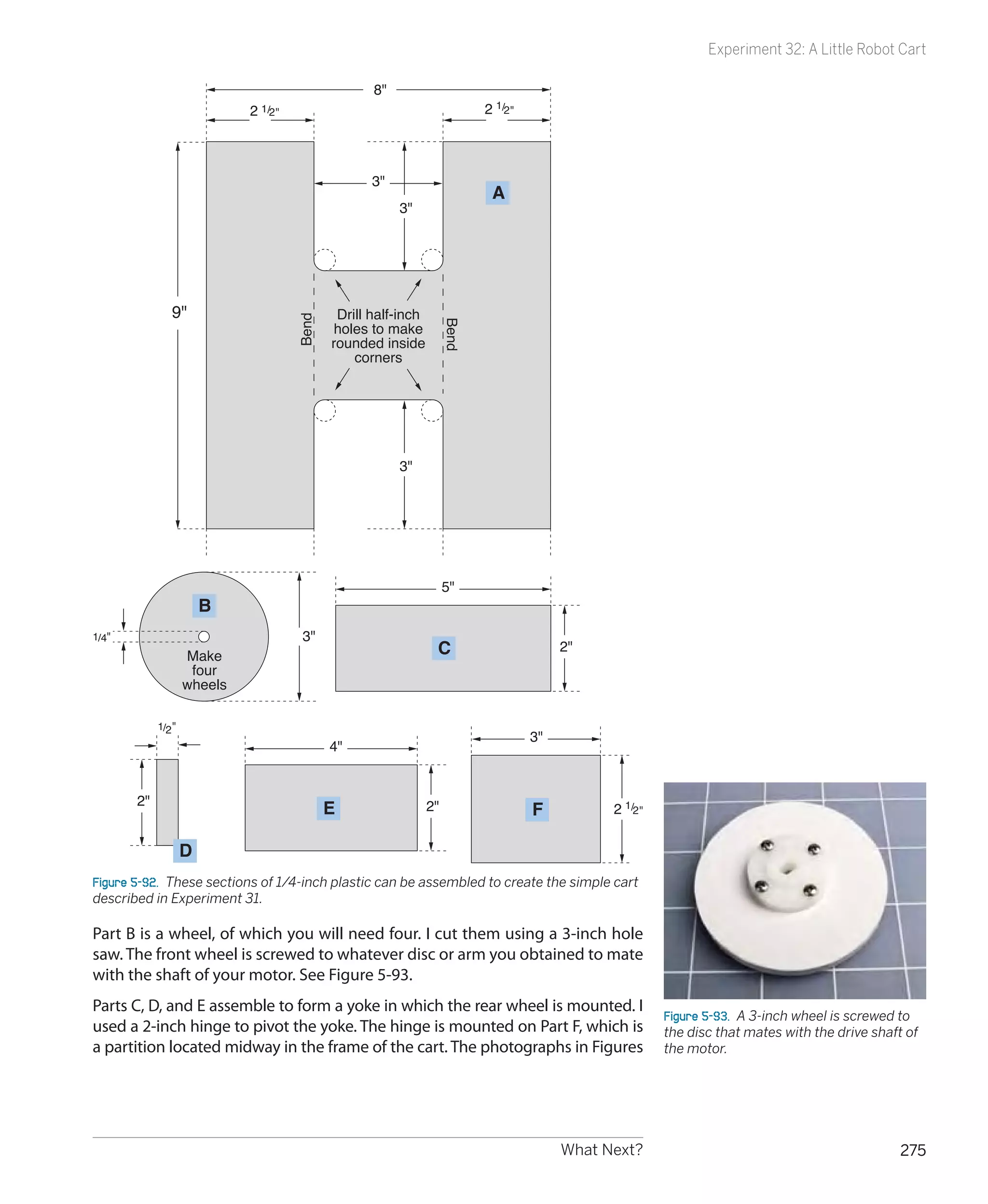
flashes briefly because the coil obstructs
the initial flow of electricity. When the      positive-side-down and the other is positive-side-up, negative-side-down.
switch is opened, D2 flashes as the col-       Also, the 220Ω resistor should be rated at 1/4 watt or higher, if possible (see
lapsing magnetic field induced by the coil     the following caution).
releases another short burst of current.


246                                            Chapter 5
Experiment 28: Making a Coil React


                                                                                            Hot Resistors
                                                                                            You’ll be passing about 50mA
                                                                                            through the 220Ω resistor, while
                                                                                            the current is flowing. At 12 volts,
                                                                                            this works out at 0.6 watts. If you
                                                                                            use a 1/8-watt resistor, you will be
                                                                                            overloading it, and it will get quite
                                                                                            hot and may burn out. If you use a
                                                                                            1/4-watt resistor, it will still get hot,
                                                                                            but is unlikely to burn out, as long as
                                                                                            you don’t press the button for more
                                                                                            than a second or two.
         12V                                                                                Don’t run the circuit without the coil
         DC                                                                                 of wire; you’ll be trying to pass more
                                                                                            than 50mA through the LEDs.


Figure 5-34.  The breadboarded version of the schematic in Figure 5-33 shows a simple
way to set it up for a quick demo. The green button is a tactile switch. The two red LEDs
should be placed so that the polarity of one is opposite to the polarity of the other.

When you press the button, one LED should flash briefly. When you release the
button, the other LED should flash.
What’s happening here? The coil possesses self-inductance, which means that
it reacts against any sudden change in the flow of electricity. First it fights it,
and during that brief moment, it blocks most of the current. Consequently, the
current looks for an alternative path and flows through D1, the lefthand LED
in the schematic. (D2 doesn’t respond, because it can pass current only in the
opposite direction.)
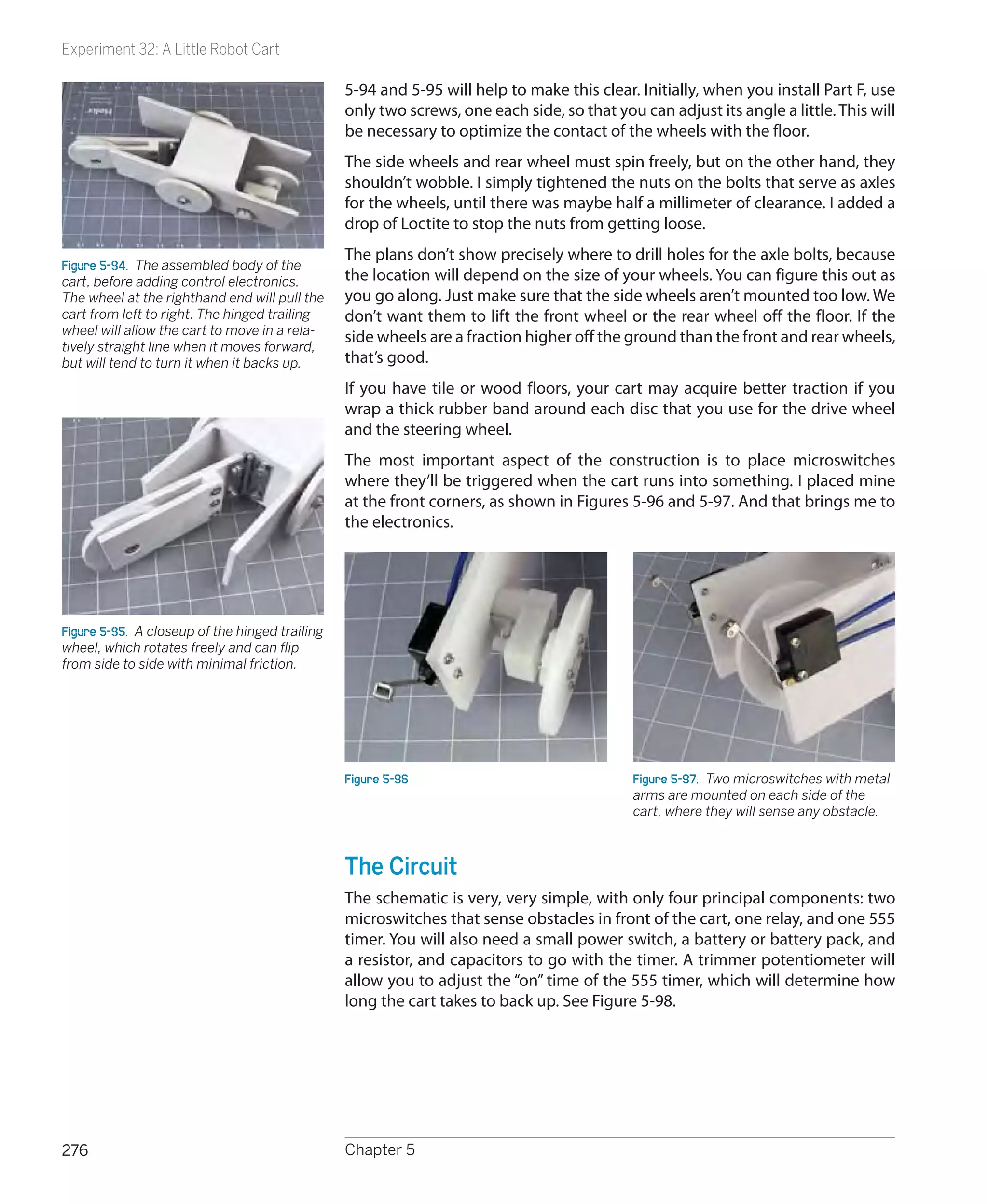
Meanwhile, the voltage pressure overcomes the coil’s self-inductance. When
the self-inductance disappears, the resistance of the coil is no more than 10
ohms—so now the electricity flows mostly through the coil, and because the
LED receives so little, it goes dark.
When you disconnect the power, the coil reacts again. It fights any sudden
changes. After the flow of electricity stops, the coil stubbornly sustains it for a
moment, because as the magnetic field collapses, it is turned back into elec-
tricity. This residual flow of current depletes itself through D2, the LED on the
right.
In other words, the coil stores some energy in its magnetic field. This is similar
to the way a capacitor stores energy between two metal plates, except that
the coil blocks the current initially and then lets it build up, whereas the ca-
pacitor sucks up current initially, and then blocks it.
The more turns of wire you have in your coil, the more self-inductance the coil
will have, causing your LEDs to flash more brightly.


                                                                              What Next?                                            247
Experiment 28: Making a Coil React

                                     Here’s one last variation on this experiment to test your understanding of elec-
                                     trical fundamentals. Remove the 220Ω resistor, and substitute a 1K resistor (to
                                     protect your LED from sustained current). Remove the coil, and substitute a
                                     very large capacitor—ideally, about 4,700 μF. (Be careful to get its polarity the
                                     right way around.) What will you see when you press the button? Note that
                                     you will have to hold it down for a couple of seconds to get a result. And what
                                     will you see when you release the button? Remember: the behavior of capaci-
                                     tance is opposite to the behavior of self-inductance.


                                                                          Theory

                                       Alternating current concepts
                                       Here’s a simple thought experiment. Suppose you set up a 555 timer to send a
                                       stream of pulses through a coil. This is a primitive form of alternating current.
                                       We might imagine that the self-inductance of the coil will interfere with the
                                       stream of pulses, depending how long each pulse is, and how much inductance
                                       the coil has. If the pulses are too short, the self-inductance of the coil will tend
                                       to block them. Maybe if we can time the pulses exactly right, they’ll synchronize
                                       with the time constant of the coil. In this way, we can “tune” a coil to allow a
                                       “frequency” to pass through it.
                                       What happens if we substitute a capacitor? If the pulses are too long, compared
                                       with the time constant of the capacitor, it will tend to block them, because it
                                       will have enough time to become fully charged. But if the pulses are shorter, the
                                       capacitor can charge and discharge in rhythm with the pulses, and will seem to
                                       allow them through.
                                       I don’t have space in this book to get deeply into alternating current. It’s a vast
                                       and complicated field where electricity behaves in strange and wonderful ways,
                                       and the mathematics that describe it can become quite challenging, involving
                                       differential equations and imaginary numbers. However, we can easily demon-
                                       strate the audio filtering effects of a loudspeaker and a coil.


248                                  Chapter 5
Experiment 29: Filtering Frequencies


Experiment 29: Filtering Frequencies
In this experiment, you’ll see how self-inductance and capacitance can be
used to filter audio frequencies. You’re going to build a crossover network: a
simple circuit that sends low frequencies to one place and high frequencies
to another.
You will need:
 •	 Loudspeaker, 8Ω, 5 inches in diameter. Quantity: 1. Figure 5-35 shows a
    typical example.
 •	 Audio amplifier, STMicroelectronics TEA2025B or similar. Quantity: 1. See
    Figure 5-36.


Figure 5-35.  To hear the effects of audio    Figure 5-36.  This single chip contains a   Figure 5-37.  A nonpolarized electrolytic
filters using coils and capacitors, you’ll    stereo amplifier capable of delivering a    capacitor, also known as a bipolar capaci-
need a loudspeaker capable of reproduc-       total of 5 watts into an 8Ω speaker when    tor, looks just like an electrolytic capaci-
ing lower frequencies. This 5-inch model is   the two channels are combined.              tor, except that it will have “NP” or “BP”
the minimum required.                                                                     printed on it.

 •	 Nonpolarized electrolytic capacitors (also known as bipolar). 47 μF. Quan-
    tity: 2. A sample is shown in Figure 5-37. They should have “NP” or “BP”
    printed on them to indicate “nonpolarized” or “bipolar.”
                                                                                               220uF               220uF
 •	 Nonpolarized electrolytic capacitors (also known as bipolar). 100 μF.
    Quantity: 5. (Because you’ll be working with audio signals that alternate
    between positive and negative, you can’t use the usual polarized electro-
    lytic capacitors. If you want to avoid the trouble and expense of ordering
    nonpolarized capacitors, you can substitute two regular electrolytics in
    series, facing in opposite directions, with their negative sides joined in the
    middle. Just remember that when you put capacitors in series, their to-
    tal capacitance is half that of each individual component. Therefore, you
    would need two 220 μF electrolytics in series to create 110 μF of capaci-                             100uF
    tance. See Figure 5-38.)
                                                                                          Figure 5-38.  You can make a nonpolar-
 •	 Potentiometer, with audio taper if possible. 100K. Quantity: 1.                       ized electrolytic capacitor by putting two
                                                                                          regular electrolytics in series. (In fact,
 •	 Coil, for crossover network. Quantity: 1. You can search a source such                that’s what you’d find if you opened a real
    as eBay for keywords “crossover” and “coil,” but if you can’t find one at a           nonpolarized capacitor.) The symbol at the
    reasonable price, you can make do with a spool of 100 feet of 20-gauge                bottom is roughly equivalent to the pair of
    hookup wire.                                                                          symbols at the top; bear in mind that two
                                                                                          capacitors in series have a total capaci-
 •	 Plastic shoebox. Quantity: 1.                                                         tance that is half that of each of them.


                                                                            What Next?                                            249
Experiment 29: Filtering Frequencies


                                               Procedure
                                               The purpose of the audio amplifier chip is to provide enough power to get
                                               a decent amount of sound out of your loudspeaker. The purpose of using a
                                               5-inch speaker is to enable you to hear lower-frequency sounds than the baby
                                               speakers that we have used previously. Bass notes have long wavelengths that
                                               small speakers are not able to generate effectively.
                                               Maybe you remember from building the intrusion alarm that a speaker makes
                                               much more noise if you prevent the sound waves from the back of the cone
                                               from cancelling the sound waves from the front of the cone. The obvious way
                                               to achieve this is by enclosing the speaker in a box. I suggest a plastic box,
                                               because they’re cheap, and we don’t care too much about sound quality as
Figure 5-39.  A resonant enclosure is neces-
sary if you want to hear some bass (lower      long as we can hear at least some of the low frequencies. Figure 5-39 shows
frequencies) from your speaker. A cheap        the speaker bolted into the bottom of a plastic box, and Figure 5-40 shows the
plastic shoebox is sufficient for demo         box turned upside-down after snapping its lid into place.
purposes.
                                               Normally, a speaker should be mounted in a cabinet of heavy, thick material
                                               that has a very low resonant frequency—below the limits of human hearing.
                                               To minimize the resonance of the shoebox, you can put some soft, heavy fab-
                                               ric inside it before you snap the lid on. A hand towel or some socks should be
                                               sufficient to absorb some of the vibration.


                                               Adding an Amplifier
                                               Back in the 1950s, you needed vacuum tubes, transformers, and other power-
                                               hungry heavyweight components to build an audio amplifier. Today, you can
                                               buy a chip for about $1 that will do the job, if you add a few capacitors around
Figure 5-40.  Drill some half-inch holes
                                               it, and a volume control. The TEA2025B that I’m recommending is intended for
in the bottom of the box, then bolt the        use in cheap portable cassette players and CD players, and can work in stereo
speaker in place, running a wire out           or mono mode, from a power supply ranging from 3 to 9 volts. With 9 volts
through a hole in one end. Snap on the lid,    and the two sides of the chip bridged together to drive one 8Ω speaker, it can
and you’re ready for not-quite-high-fidelity
audio.
                                               generate 5 watts of audio power. That doesn’t sound much compared with a
                                               typical home theater system rated at 100 watts per channel, but because loud-
                                               ness is a logarithmic scale, 5 watts will be quite enough to irritate any family
                                               members in the same room—and possibly even in other rooms.
                                               If you can’t find the TEA2025B chip, you can use any alternative listed as an
                                               audio amplifier. Try to find one that is designed to drive an 8Ω speaker with up
                                               to 5 watts in mono mode. Check the manufacturer’s data sheet to see where
                                               you attach capacitors around it. Note carefully whether some of the capacitors
                                               have no polarity marked, even though they have fairly high values, such as 100
                                               μF. These capacitors must function regardless of which way the alternating
                                               current is flowing, and I’ve marked them “NP” in my schematic in Figure 5-41,
                                               meaning “nonpolarized.” (You may find them identified as “bipolar” or “BP” in
                                               parts catalogs.) As noted in the shopping list, you can put two 220 μF capaci-
                                               tors in series, negative-to-negative, to get the same effect as a single 100 μF
                                               nonpolarized capacitor.
                                               For this project, it’s essential to include the regular 100 μF electrolytic smooth-
                                               ing capacitor across the power supply. Otherwise, the amplifier will pick up
                                               and—yes, amplify—small voltage spikes in the circuit.


250                                            Chapter 5
Experiment 29: Filtering Frequencies

      8 ohms


                                                                           9V
                                                                           DC

            100ft hookup                                                 100uF
                                           10uF NP
            wire on spool

                                       1                16
                  0.15uF                                           0.15uF
                                       2                15

                                       3                14
                100uF                                                100uF
                                             TEA2025B

                   NP                  4                13           NP
                                       5                12
               100uF                   6                11
                                                                         100uF

                                       7                10
               100uF                   8                 9

                                                                  0.22uF
                                            33K

                                                                         10K


                       Input from
                    headphone jack
                    on audio device
Figure 5-41.  The audio amplifier chip should be wired with capacitors around it as shown,
“NP” denoting the ones that are not polarized. The acronym“BP,” meaning bipolar, is also
often used to mean the same thing. The output from pins 2 and 15 of the chip can be
passed through a coil or a 10 μF capacitor to demonstrate audio filtering.
                                                                                             Figure 5-42.  To sample the output from the
The input shown in the schematic can receive a signal from a typical media                   headphone socket of a music player, you
                                                                                             can use this adapter and push the stripped
player, such as a portable MP3 player, CD player, or cassette player. To connect             end of a piece of hookup wire into one of
its headphone jack to the breadboard, you can use an adapter that converts                   the sockets. Then use alligator clips on a
it to a pair of RCA-type audio jacks, and then stick a wire into one of them as              jumper wire to connect the audio to your
shown in Figure 5-42. The wire will connect to the 33K resistor on the bread-                breadboarded circuit. Don’t forget to use
                                                                                             an additional jumper wire to connect the
board circuit. The chromed neck of the RCA jack (which is sometimes gold-                    outside of the socket to the negative side
plated, or at least gold-colored) must be connected with the negative side of                of the power supply on the breadboard.
your power supply on the breadboard; otherwise, you won’t hear anything.                     Because we’re only using one speaker, the
You can ignore the second output on the adapter, because we’re working in                    amplifier is connected to only one of the
                                                                                             stereo outputs from your player. The other
mono, here, not stereo.                                                                      is ignored.


                                                                             What Next?                                            251
Experiment 29: Filtering Frequencies

                                              The 33K resistor is necessary to protect the amplifier from being overdriven. If
                                              you don’t get enough volume using your music player, decrease the 33K value.
                                              If the music is too loud and distorted, increase the value. You can also try omit-
                                              ting or increasing the 10K resistor next to it, which is included in an effort to
                                              reduce background hum noise.
                                              I’ve shown two switches at the top of the schematic: one to bypass a coil, the
                                              other to bypass a capacitor. You can use alligator clips instead, as long as you
                                              can easily compare the sound when each of the components is inserted into
                                              the circuit.
                                              Figure 5-43 shows a coil consisting of a spool of hookup wire being used. The
                                              red and black alligator clips resting loose on top of the shoebox will go to the
                                              output from the chip (on pins 2 and 15). There is no polarity; it doesn’t matter
                                              which clip goes to which pin.
                                              Begin by turning the volume control on your music source all the way down
                                              before you apply power. Don’t be surprised if you hear humming or crackling
Figure 5-43.  The red and black alligator
clips, lying on top of the shoebox, should    noises when you activate the amplifier; it will pick up any stray voltages, be-
connect with the output from your ampli-      cause in this simple experiment, I haven’t suggested that you should shield
fier chip. The red jumper wire passes the     the input, and the amplifier circuit can pick up noise, as its wires can act like
signal through a coil of hookup wire on its   antennas.
way to the speaker. Note the change in
sound when you short out the coil.            Note that you may also get additional unwanted sound if you use the ampli-
                                              fier on a conductive desktop surface. Remove any aluminum foil or conductive
                                              foam for this project.
                                              Make sure that your player is playing music, and slowly turn up its volume
                                              control until you hear it. If you don’t hear anything, you’ll have to check for
                                              circuit errors.
                                              Now comes the interesting part. Insert the 100-foot spool of hookup wire be-
                                              tween one output from the amplifier, and one input of the speaker (it doesn’t
                                              matter which one), or if you used switches, open the switch that bypasses the
                                              coil. You should find that the music loses all its high-end response. By compari-
                                              son, if you disconnect the coil and substitute a 10 μF capacitor, you should find
                                              that the music sounds “tinny,” meaning that it loses all its low range, leaving
                                              only the high frequencies.
                                              You’ve just tested two very simple filters. Here’s what they are doing:
                                               •	 The coil is a low-pass filter. It passes low frequencies but blocks high fre-
                                                  quencies, because brief audio cycles don’t have time to overcome the coil’s
                                                  self-inductance. A bigger coil eliminates a wider range of frequencies.
                                               •	 The capacitor is a high-pass filter. It passes high frequencies and blocks
                                                  low frequencies because longer audio cycles can fill the capacitance, at
                                                  which point the capacitor stops passing current. A smaller capacitor elimi-
                                                  nates a wider ranger of frequencies.
                                              You can go a lot farther into filter design, using complex combinations of coils
                                              and capacitors to block frequencies at any point in the audible spectrum.
                                              Search online for audio filter schematics—you’ll find hundreds of them.


252                                           Chapter 5
Experiment 29: Filtering Frequencies


Crossover Networks
In a traditional audio system, each speaker cabinet contains two drivers—one
of them a small speaker called a tweeter, which reproduces high frequencies,
the other a large speaker known as a woofer, which reproduces low frequen-
cies. (Modern systems often remove the woofer and place it in a separate box
of its own that can be positioned almost anywhere, because the human ear
has difficulty sensing the direction of low-frequency sounds.)
The schematic that you just looked at and may have constructed is known as
a “crossover network,” and truly hardcore audiophiles have been known make
their own (especially for use in car systems) to go with speakers of their choice
in cabinets that they design and build themselves.
If you want to make a crossover network, you should use high-quality poly-
ester capacitors (which have no polarity, last longer than electrolytics, and are
better made) and a coil that has the right number of turns of wire and is the
right size to cut high frequencies at the appropriate point. Figure 5-44 shows
a polyester capacitor.
Figure 5-45 shows an audio crossover coil that I bought on eBay for $6. I was
curious to find out what was inside it, so I bought two of them, and took one
apart.
First I peeled away the black vinyl tape that enclosed the coil. Inside was some
typical magnet wire—copper wire thinly coated with shellac or semitransparent
plastic, as shown in Figure 5-46. I unwound the wire and counted the number
of turns. Then I measured the length of the wire, and finally used a micrometer
to measure the diameter of the wire, after which I checked online to find a con-
version from the diameter in mils (1/1,000 of an inch) to American wire gauge.
As for the spool, it was plain plastic with an air core—no iron or ferrite rod in
the center. Figure 5-47 shows the spool and the wire.


Figure 5-44.  Some nonelec-      Figure 5-45.  What exotic    Figure 5-46.  The black tape is   Figure 5-47.  The audio crossover coil
trolytic capacitors have         components may we find       removed, revealing a coil of      consists of a plastic spool and some
no polarity, such as this        inside this high-end audio   magnet wire.                      wire. Nothing more.
high-quality polyester film      component that’s used with
capacitor. However, they tend    a subwoofer to block high
to be much more expensive,       frequencies?
and are hard to find in values
higher than 10 μF.


                                                                          What Next?                                               253
Experiment 29: Filtering Frequencies

                                       So here’s the specification for this particular coil in an audio crossover network.
                                       Forty feet of 20-gauge copper magnet wire, wrapped in 200 turns around a
                                       spool of 1/16–inch-thick plastic with a hub measuring 7/8 inch in length be-
                                       tween the flanges and 1/2-inch external diameter. Total retail cost of materials
                                       if purchased separately: probably about $1, assuming you can find or make a
                                       spool of the appropriate size.
                                       Conclusion: there’s a lot of mystique attached to audio components. They are
                                       frequently overpriced, and you can make your own coil if you start with these
                                       parameters and adjust them to suit yourself.
                                       Suppose you want to put some thumping bass speakers into your car. Could
                                       you build your own filter so that they only reproduce the low frequencies?
                                       Absolutely—you just need to wind a coil, adding more turns until it cuts as
                                       much of the high frequencies as you choose. Just make sure the wire is heavy
                                       enough so that it won’t overheat when you push 100 or more audio watts
                                       through it.
                                       Here’s another project to think about: a color organ. You can tap into the out-
                                       put from your stereo and use filters to divide audio frequencies into three sec-
                                       tions, each of which drives a separate set of colored LEDs. The red LEDs will
                                       flash in response to bass tones, yellow LEDs in response to the mid-range, and
                                       green LEDs in response to high frequencies (or whatever colors you prefer).
                                       You can put signal diodes in series with the LEDs to rectify the alternating cur-
                                       rent, and series resistors to limit the voltage across the LEDs to, say, 2.5 volts
                                       (when the music volume is turned all the way up). You’ll use your meter to
                                       check the current passing through each resistor, and multiply that number
                                       by the voltage drop across the resistor, to find the wattage that it’s handling,
                                       to make sure the resistor is capable of dissipating that much power without
                                       burning out.
                                       Audio is a field offering all kinds of possibilities if you enjoy designing and
                                       building your own electronics.


254                                    Chapter 5
Experiment 29: Filtering Frequencies


                                                             Theory

Waveforms
If you blow across the top of a bottle, the mellow sound
that you hear is caused by the air vibrating inside the bottle,
and if you could see the pressure waves, they would have a
distinctive profile.                                                                                         b
                                                                                                                    a
If you could slow down time and draw a graph of the alter-                                        b
                                                                                             a
nating voltage in any power outlet in your house, it would                       Start
have the same profile.
                                                                     Figure 5-48.  If a weight on the end of a string (length b, in
If you could measure the speed of a pendulum swinging                the diagram) follows a circular path at a steady speed, the
slowly to and fro in a vacuum, and draw a graph of the speed         distance of the weight from a horizontal center line (length a,
relative to time, once again it would have the same profile.         in the diagram) can be plotted as a graph relative to time. The
                                                                     graph will be a sine wave, so called because in basic trigonom-
That profile is a sine wave, so called because you can derive        etry, the ratio of a/b is the sine of the angle between line b and
it from basic trigonometry. In a right-angled triangle, the          the horizontal baseline, measured at the center of rotation.
                                                                     Sinewaves occur naturally in the world around us, especially in
sine of an angle is found by dividing the length of the side
                                                                     audio reproduction and alternating current.
opposite the angle by the length of the hypoteneuse (the
sloping side of the triangle).
To make this simpler, imagine a ball on a string rotating
around a center point, as shown in Figure 5-48. Ignore the
force of gravity, the resistance of air, and other annoying
variables. Just measure the vertical height of the ball and di-             Ratio of a/b
vide it by the length of the string, at regular instants of time,
as the ball moves around the circular path at a constant                                   Time
speed. Plot the result as a graph, and there’s your sine wave,
shown in Figure 5-49. Note that when the ball circles below
its horizontal starting line, we consider its distance negative,
so the sine wave becomes negative, too.
Why should this particular curve turn up in so many places
                                                                     Figure 5-49.  This is what a “pure” sinewave looks like.
and so many ways in nature? There are reasons for this
rooted in physics, but I’ll leave you to dig into that topic if it
interests you. Getting back to the subject of audio reproduc-
tion, what matters is this:
  •	 Any sound can be broken down into a mixture of sine
     waves of varying frequency and amplitude.
Or, conversely:
  •	 If you put together the right mix of audio sine waves,
     you can create any sound at all.
Suppose that there are two sounds playing simultaneously.
Figure 5-50 shows one sound as a red curve, and the other
as pale blue. When the two sounds travel either as pressure
waves through air or as alternating electric currents through
a wire, the amplitudes of the waves are added together to            Figure 5-50.  When two sinewaves are generated at the same
                                                                     time (for instance, by two musicians, each playing a flute),
make the more complex curve, which is shown in black.
                                                                     the combined sound creates a compound curve. The blue
Now try to imagine dozens or even hundreds of different              sinewave is twice the frequency of the red sinewave. The
frequencies being added together, and you have an idea of            compound curve (black line) is the sum of the distances of the
the complex waveform of a piece of music.                            sinewaves from the baseline of the graph.


                                                                            What Next?                                                255
Experiment 29: Filtering Frequencies


                                                                  Theory

   Waveforms (continued)
   You can create your own waveform as an input for your au-           Now adjust the 100K potentiometer to create a low-pitched
   dio amplifier with the basic astable 555 timer circuit shown        note. You’ll find that it doesn’t have a “pure” sound. There
   in Figure 5-51. You have to be careful, though, not to over-        are some buzzing overtones. This is because the 555 timer
   load the amplifier input. Note the 680K series resistor on the      is generating square waves such as those shown in Figure
   output pin of the timer. Also note the 500Ω potentiometer.          5-52, not sine waves, and a square wave is actually a sum
                                                                       of many different sine waves, some of which have a high
                                                             9V        frequency. Your ear hears these harmonics, even though
                                                             DC
                                                                       they are not obvious when you look at a square-shaped
                                                                       waveform.
                                                                       Route one of the connections to your loudspeaker through
                                                        1K             your spool of hookup wire, and now you should hear a
                               1       8                               much purer tone, as the buzzing high frequencies are
                               2 555 7                                 blocked by the self-inductance of the coil. Remove the coil
                     680K        timer                  100K
                               3       6                               and substitute the 10 μF capacitor, and now you hear more
                                                                       buzzing and less bass.
                 500           4       5
                 ohms                                                  You’ve just taken a small step toward sound synthesis. If this
                                                                       subject interests you, you can go online and search for oscil-
                                   0.01uF                              lator circuits. For a thorough understanding of the relation-
                                                                       ship between waveforms and the sounds you hear, you’ll
                                                       0.1uF
                                                                       really need an oscilloscope, which will show you the shape
                                                                       of each waveform that you generate and modify.
     To input of
   audio amplifier

   Figure 5-51.  A 555 timer is wired in astable mode using the
   component values shown here to generate a wide range of
   audible frequencies when the 100K potentiometer is adjusted.
   After the output is reduced in power, it can feed into the ampli-
                                                                       Voltage


   fier chip that was used previously.

   Disconnect your music player and connect the output from
   the 555 circuit to the input point (the 33K resistor) in the                  Time
   amplifier circuit shown earlier in Figure 5-41. You don’t have
   to worry about a separate connection on the negative side
   as long as the 555 timer shares the same breadboard and
   the negative side of its power supply.
   Make sure that the 500Ω potentiometer is turned all the
   way to short the output from the timer to the negative side
   of the power supply. This functions as your volume control.         Figure 5-52.  The output from a 555 timer is either “on” or “off,”
                                                                       with a very fast transition between those two states. The result
   Also make sure the 100K potentiometer is in the middle of
                                                                       is an almost perfect square wave. Theoretically, this can be
   its range. Switch on the power and slowly turn up the 500Ω          disassembled into a complex set of sine waves that have many
   potentiometer until you hear a tone.                                different frequencies. The human ear hears the high frequen-
                                                                       cies as harsh overtones.


256                                            Chapter 5
Experiment 30: Fuzz


Experiment 30: Fuzz
Let’s try one more variation on the circuit in Experiment 28. This will demon-
strate another fundamental audio attribute: distortion.
You will need:
 •	 One more 100K potentiometer.
 •	 Generic NPN transistors: 2N2222 or similar. Quantity: 2.
 •	 Various resistors and capacitors.


                                                         Background

  Clipping
  In the early days of “hi-fi” sound, engineers labored mightily    The first gadget to offer this on a commercial basis was
  to perfect the process of sound reproduction. They wanted         known as a “fuzz box,” which deliberately clipped the input
  the waveform at the output end of the amplifier to look           signal. An early fuzz box is shown in Figure 5-53. The clip-
  identical with the waveform at the input end, the only dif-       ping of a sine wave is shown in Figure 5-54.
  ference being that it should be bigger, so that it would be
  powerful enough to drive loudspeakers. Even a very slight
  distortion of the waveform was unacceptable.
  Little did they realize that their beautifully designed tube
  amplifiers would be abused by a new generation of rock
  guitarists whose intention was to create as much distortion
  as possible.
  The most common form of waveform abuse is techni-
  cally known as “clipping.” If you push a vacuum tube or a
  transistor to amplify a sine wave beyond the component’s
  capabilities, it “clips” the top and bottom of the curve. This
  makes it look more like a square wave, and as I explained in
  the section on waveforms, a square wave has a harsh, buzz-
  ing quality. For rock guitarists trying to add an edge to their
  music, the harshness is actually a desirable feature.


                                                                    Figure 5-54.  When a sinewave (top) is passed through an
                                                                    amplifier which is turned up beyond the limit of its components
                                                                    (shown as dashed lines, center), the amplifier chops the wave
  Figure 5-53.  This Vox Wow-Fuzz pedal was one of the early        (bottom) in a process known as “clipping.” The result is close
  stomp boxes, which deliberately induced the kind of distortion    to a square wave and is the basic principle of a fuzz box com-
  that audio engineers had been trying to get rid of for decades.   monly used to create a harsh guitar sound.


                                                                          What Next?                                               257
Experiment 30: Fuzz


                      Schematic
                      The output from the 555 timer is a square wave, so it already sounds quite
                      “fuzzy,” but we can make it more intense to demonstrate the clipping princi-
                      ple. I’ve redrawn the whole circuit in Figure 5-55, as several components have
                      changed. The principal alteration is the addition of two NPN transistors.
                      If you assemble this circuit on your breadboard, note carefully that the 33K
                      and 10K resistors at the bottom of the amplifier chip have been removed, and
                      there’s now just an 820Ω resistor in that location. The bottom of the adjacent
                      0.22 μF capacitor is still the input point for the amplifier, and if you follow the
                      connection around to the middle of the schematic, you’ll find it leading to a
                      100K potentiometer. This is your “fuzz adjuster.”
                      The two NPN transistors are arranged so that the one on the left receives out-
                      put from the 555 timer. This signal controls the flow of electricity through the
                      transistor from a 33K resistor. This flow, in turn, controls the base of the right-
                      hand transistor, and the flow of current through that is what ultimately con-
                      trols the amplifier.
                      When you power up the circuit, use the 100K potentiometer attached to the
                      555 timer to adjust the frequency (as before) and crank the “fuzz adjuster” po-
                      tentiometer to hear how it adds increasing “bite” to the sound until ultimately
                      it becomes pure noise.
                      The two transistors act as amplifiers. Of course, we didn’t need them for that
                      purpose—the input level for the amplifier chip was already more than ade-
                      quate. The purpose of the lefthand transistor is simply to overload the right-
                      hand transistor, to create the “fuzz” effect. And when you turn up the output
                      from the transistors with the “fuzz adjuster,” eventually they overload the input
                      of the amplifier chip, creating even more distortion.
                      If you want to tweak the output, try substituting different values for the 1K
                      resistor and the 1 μF capacitor that are positioned between the emitter of the
                      righthand transistor and the negative side of the power supply. A larger resis-
                      tor should overload the transistor less. Different capacitor values should make
                      the sound more or less harsh.
                      You can find literally thousands of schematics online for gadgets to modify
                      guitar sound. The circuit I’ve included here is one of the most primitive. If you
                      want something more versatile, you should search for “stomp box schematics”
                      and see what you can find.


258                   Chapter 5
Experiment 30: Fuzz

                                                                                9V
                                                                                DC

                                                                              100uF


                                                                  1K
                               1        8

                               2
                                    555 7
                                   timer                          100K
                               3        6

                               4        5
                  0.1uF

                                     0.01uF                        0.1uF


                                                             33K


                                            8K2                    390
                                                             0.01uF

                  1K                              100K
                                                              8 ohms
                   1uF


                                            1                16
                            0.15uF                                         0.15uF
                                            2                15

                                            3                14
                           100uF                                            100uF
                                                  TEA2025B


                              NP            4                13             NP
                                            5                12
                          100uF                                               100uF
                                            6                11

                                            7                10
                          100uF             8                 9

                                                                         0.22uF


                                                                              820


                                                Audio Signal
                                                input point
Figure 5-55.  For a quick demo of clipping, insert a couple of transistors between the output
from the 555 timer and the input of the amplifier chip. One transistor overdrives the
other, so that when you adjust the potentiometer at the center of the circuit, you hear an
increasingly harsh, distorted sound.


                                                                                      What Next?                  259
Experiment 30: Fuzz


                                                          Background

  Stomp-box origins
  The Ventures recorded the first single to use a fuzz box,              Wireless World. In his fuzz circuit, he uses a very high-gain
  titled “The 2,000 Pound Bee,” in 1962. Truly one of the most           amplifier consisting of three field-effect transistors (FETs),
  awful instrumentals ever made, it used distortion merely               which closely imitate the rounded square-wave typical of an
  as a gimmick and must have discouraged other musicians                 overdriven tube amp.
  from taking the concept seriously.
                                                                         Dellepiane offers dozens more schematics on his site, devel-
  Ray Davies of the Kinks was the first to embody distortion             oped and tested with a dual-trace oscilloscope, low-distortion
  as an integral part of his music. Davies did it initially by plug-     sinewave oscillator (so that he can give audio devices a “clean”
  ging the output from one amp into the input of another,                input), distortion meter, and precision audio volt meter.
  supposedly during the recording of his hit “You Really Got             This last item, and the oscillator, were built from his own
  Me.” This overloaded the input and created clipping—the                designs, and he gives away their schematics, too. Thus his
  basic fuzz concept. From there it was a short step to Keith            site provides one-stop shopping for home-audio electronics
  Richards using a Gibson Maestro Fuzz-Tone when the Roll-               hobbyists in search of a self-administered education.
  ing Stones recorded “(I Can’t Get No) Satisfaction” in 1965.
                                                                         Before fuzz, there was tremolo. A lot of people confuse this
  Today, you can find thousands of advocates promoting                   with vibrato, so let’s clarify that distinction right now:
  as many different mythologies about “ideal” distortion. In                •	 Vibrato applied to a note makes the frequency waver
  Figure 5-56, I’ve included a schematic from Flavio Dellepi-                  up and down, as if a guitarist is bending the strings.
  ane, a circuit designer in Italy who gives away his work (with
                                                                            •	 Tremolo applied to a note makes its volume fluctuate,
  a little help from Google AdSense) at http://www.redcircuits.
                                                                               as if someone is turning the volume control of a guitar
  com. Dellepiane is self-taught, having gained much of his
                                                                               up and down very quickly.
  knowledge from electronics magazines such as the British


                                                             22uF
                                                                                     2N3819


                                               9V
                                               DC                                    3K3
                                                                                                      2N3819
                                                                 100pF


                                                                                     2N3819


                                                      0.1uF
                        Input                                                                  10K
                        Jack                                                                    log

                                                                                                               0.1uF

                                                                            2K2
                                                                                               22uF


                                                                       1M                             100K
                                                                                  5K trimmer


                        Output
                        Jack


  Figure 5-56.  This circuit designed by Flavio Dellepiane uses three transistors to simulate the kind of distortion that used to be cre-
  ated by overloading the input of a tube amplifier.


260                                            Chapter 5
Experiment 30: Fuzz


                                                      Background

Stomp-box origins (continued)
Harry DeArmond sold the first tremolo box, which he              device. You could even create never-before-heard tremolo
named the Trem-Trol. It looked like an antique portable          effects by swapping discs with different stripe patterns.
radio, with two dials on the front and a carrying handle on      Figures 5-57 and 5-58 show the kind of thing I have in mind.
top. Perhaps in an effort to cut costs, DeArmond didn’t use      For a real fabrication challenge, how about an automatic
any electronic components. His steam-punkish Trem-Trol           disc changer?
contained a motor fitted with a tapered shaft, with a rubber
                                                                 Today’s guitarists can choose from a smorgasbord of effects,
wheel pressing against it. The speed of the wheel varied
                                                                 all of which can be home-built using plans available online.
when you turned a knob to reposition the wheel up and
                                                                 For reference, try these special-interest books:
down the shaft. The wheel, in turn, cranked a little capsule
of “hydro-fluid,” in which two wires were immersed, carrying       •	 Analog Man’s Guide to Vintage Effects by Tom Hughes
the audio signal. As the capsule rocked to and fro, the fluid         (For Musicians Only Publishing, 2004). This is a guide to
sloshed from side to side, and the resistance between the             every vintage stomp box and pedal you can imagine.
electrodes fluctuated. This modulated the audio output.            •	 How to Modify Effect Pedals for Guitar and Bass by Brian
                                                                      Wampler (Custom Books Publishing, 2007). This is an
Today, Trem-Trols are an antique collectible. When industrial
                                                                      extremely detailed guide for beginners with little or
designer Dan Formosa acquired one, he put pictures online
                                                                      no prior knowledge. Currently it is available only by
at http://www.danformosa.com/dearmond.html. And Johann
                                                                      download, from sites such as http://www.openlibrary.
Burkard has posted an MP3 of his DeArmond Trem-Trol so
                                                                      org, but you may be able to find the previous printed
you can actually hear it: http://johannburkard.de/blog/music/
                                                                      edition from secondhand sellers, if you search for the
effects/DeArmond-Tremolo-Control-clip.html.
                                                                      title and the author.
The idea of a mechanical source for electronic sound mods        Of course, you can always take a shortcut by laying down a
didn’t end there. The original Hammond organs derived            couple hundred dollars for an off-the-shelf item such as a
their unique, rich sound from a set of toothed wheels            Boss ME-20, which uses digital processing to emulate distor-
turned by a motor. Each wheel created a fluctuating induc-       tion, metal, fuzz, chorus, phaser, flanger, tremolo, delay,
tance in a sensor like the record head from a cassette player.   reverb, and several more, all in one convenient multi-pedal
It’s easy to think of other possibilities for motor-driven       package. Purists, of course, will claim that it “doesn’t sound
stomp boxes. Going back to tremolo: imagine a transpar-          the same,” but maybe that’s not the point. Some of us simply
ent disc masked with black paint, except for a circular stripe   can’t get no satisfaction until we build our own stomp box
that tapers at each end. While the disc rotates, if you shine    and then tweak it, in search of a sound that doesn’t come
a bright LED through the transparent stripe toward a light-      off-the-shelf and is wholly our own.
dependent resistor, you would have the basis for a tremolo


Figure 5-57.  Although electromechanical audio devices are       Figure 5-58.  Different stripe patterns could be used in conjunc-
obsolete now, some unexplored possibilities still exist. This    tion with the imaginary electromechanical device in Figure
design could create various tremolo effects, if anyone had the   5-57 to create various tremolo effects.
patience to build it.


                                                                       What Next?                                                    261
Experiment 31: One Radio, No Solder, No Power


                                               Experiment 31: One Radio, No Solder,
                                               No Power
                                               Time now to go back one more time to inductance and capacitance, and dem-
                                               onstrate an application which also makes use of the way that waveforms can
                                               be added to each other. I want to show you how a simple circuit with no power
                                               supply at all can receive AM radio signals and make them audible. This is of-
                                               ten known as a crystal radio, because the circuit includes a germanium diode,
                                               which has a crystal inside it. The idea dates back to the dawn of radio, but if
                                               you’ve never tried it, you’ve missed an experience that is truly magical.
                                               You will need:
                                                •	 Rigid cylindrical object, such as a vitamin bottle. Quantity: 1.
                                                •	 22-gauge hookup wire, solid-core. Quantity: 60 feet.
                                                •	 16-gauge wire, stranded. Quantity: 100 feet.
                                                •	 Polypropylene rope (“poly rope”) or nylon rope. Quantity: 10 feet.
                                                •	 Germanium diode. Quantity: 1.

Figure 5-59.  Just add wire and a coil, and     •	 High-impedance headphone. Quantity: 1.
this is all you need to receive AM radio
signals. The black disc becomes the
                                               The diode and headphone can be ordered from http://www.scitoyscatalog.com.
tuning dial, after it is screwed onto the      You cannot use a modern headphone of the type you wear with an MP3 player.
variable capacitor (right). This is actually
an optional extra. A germanium diode           Some of these items are shown in Figure 5-59.
(center) rectifies the radio signal. The
high-impedance earphone (top) creates a        First, you need to make a coil. It should be about 3 inches in diameter, and you
barely audible sound.                          can wind it around any empty glass or plastic container of that size, so long
                                               as it’s rigid. A soda bottle or water bottle isn’t suitable, because the cumula-
                                               tive squeezing force of the turns of wire can deform the bottle so that it isn’t
                                               circular anymore.
                                               I chose a vitamin bottle that just happened to be exactly the right size. To re-
                                               move the label, I softened its adhesive with a heat gun (lightly, to avoid melt-
                                               ing the bottle) and then just peeled it off. The adhesive left a residue, which
                                               I removed with Xylol (also known as Xylene). This is a handy solvent to have
                                               around, as it can remove “permanent” marker stains as well as sticky residues,
                                               but you should always use latex or nitrile gloves to avoid getting it on your
                                               skin, and minimize your exposure the fumes. Because Xylol will dissolve some
                                               plastics, clearly it’s not good for your lungs.
                                               After you prepare a clean, rigid bottle, drill two pairs of holes in it, as shown in
                                               Figure 5-60. You’ll use them to anchor the ends of the coil.
                                               Now you need about 60 feet of 22-gauge solid-core wire. If you use magnet
                                               wire, its thin insulation will allow the turns of the coil to be more closely spaced,
                                               and the coil may be slightly more efficient. But everyday vinyl-insulated wire
                                               will do the job, and is much easier to work with.
                                               Begin by stripping the first 6 inches of insulation from the end of the wire.
Figure 5-60.  A large, 3-inch diameter empty
                                               Now measure 50 inches along the insulated remainder and apply your wire
vitamin bottle makes an ideal core for a
crystal radio coil. The drilled holes will     strippers at that point, just enough to cut the insulation without cutting the
anchor wire wrapped around the bottle.


262                                            Chapter 5
Experiment 31: One Radio, No Solder, No Power

wire. Use your two thumb nails to pull the insulation apart, revealing about a
half-inch of bare wire, as shown in Figure 5-61. Bend it at the center point and
twist it into a loop, as shown in Figure 5-62.
You just made a “tap,” meaning a point where you will be able to tap into the
coil after you wind it. You’ll need another 11 of these taps, all of them spaced
50 inches apart. (If the diameter of the bottle that you’ll be using as the core
of your coil is not 3 inches, multiply its diameter by 16 to get the approximate
desired spacing of taps.)
After you have made 12 taps, cut the wire and strip 6 inches off that end. Now
bend the end into a U shape about a half-inch in diameter, so that you can
hook it through the pair of holes that you drilled at one end of the bottle. Pull
the wire through, then loop it around again to make a secure anchor point.                 Figure 5-61.  Wire strippers expose the solid
                                                                                           conductor at intervals along a 22-gauge
Now wind the rest of the wire around the bottle, pulling it tightly so that                wire.
the coils stay close together. When you get to the end of the wire, thread it
through the remaining pair of holes to anchor it as shown in Figure 5-63. The
completed coil is shown in Figure 5-64.


Figure 5-62.  Each exposed section of wire   Figure 5-63.  The stripped end of the wire    Figure 5-64.  The completed coil, wrapped
is twisted into a loop using sharp-nosed     is secured through the holes drilled in the   tightly around the bottle.
pliers.                                      bottle.

Your next step is to set up an antenna. If you live in a house with a yard outside,
this is easy: just open a window, toss out a reel of 16-gauge wire while holding
the free end, then go outside and string up your antenna by using polypro-
pylene rope (“poly rope”) or nylon rope, available from any hardware store,                   High Voltage!
to hang the wire from any available trees, gutters, or poles. The total length                The world around us is full of electric-
of the wire should be about 100 feet. Where it comes in through the window,                   ity. Normally we’re unaware of it, but
suspend it on another length of poly rope. The idea is to keep your antenna                   a thunderstorm is a sudden reminder
wire as far away from the ground or from any grounded objects as possible.                    that there’s a huge electrical poten-
                                                                                              tial between the ground below and
If you live in an apartment where you don’t have access to a yard outside, you                the clouds above.
can try stringing your antenna around the room, hanging the wire from more                    If you put up an outdoor antenna,
pieces of poly rope. The antenna should still be about 100 feet long, but obvi-               never use it if there is any chance of a
ously it won’t be in a straight line.                                                         lightning strike. This can be extreme-
                                                                                              ly dangerous. Disconnect the indoor
Hook the free end of your antenna to one end of your coil. At this point, you also            end of your antenna, drag it outside,
need to add a germanium diode, which functions like a silicon-based diode but                 and push the end of the wire into the
is better suited to the tiny voltages and currents that we’ll be dealing with. The            ground to make it safe.
other end of the diode attaches to one of the wires leading to a high-impedance


                                                                            What Next?                                              263
Experiment 31: One Radio, No Solder, No Power

                                          earphone. A normal modern earphone or headphone will not work in this circuit.
                                          The return wire from the headphone is connected to a jumper wire, the other
                                          end of which can be clipped to any of the taps in your coil.
                                          One last modification, and you’ll be ready to tune in. You have to ground the
                                          jumper wire. By this I mean connect it to something that literally goes into
                                          the ground. A cold-water pipe is the most commonly mentioned option, but
                                          (duh!) this will work only if the pipe is made of metal. Because a lot of plumb-
                                          ing these days is plastic, check under the sink to see if you have copper pipes
                                          before you try using a faucet for your ground.
                                          Another option is to attach the wire to the screw in the cover plate of an elec-
                                          trical outlet, as the electrical system in your house is ultimately grounded. But
                                          the sure-fire way to get a good ground connection is to go outside and ham-
                                          mer a 4-foot copper-clad grounding stake into reasonably moist earth. Any
                                          wholesale electrical supply house should be able to sell you a stake. They’re
                                          commonly used to ground welding equipment.


                                          Figure 5-65.  The simple pleasure of picking up a radio signal with ultra-simple components
                                          and no additional power.


264                                       Chapter 5
Experiment 31: One Radio, No Solder, No Power

Figures 5-66 and 5-67 show the completed radio.                                      To Antenna


If you’ve managed to follow these instructions (one way or another), it’s time
to tune your radio to the nearest station. Move the alligator clip at the end of
your patch cord from one tap to another on your coil. Depending on where
you live, you may pick up just one station, or several, some of them playing
simultaneously.
It may seem that you’re getting something for nothing here, as the earphone
is making noise without any source of power. Really, though, there is a source
of power: the transmitter located at the radio station. A large amplifier pumps
power into the broadcasting tower, modulating a fixed frequency. When the
combination of your coil and antenna resonates with that frequency, you’re
sucking in just enough voltage and current to energize a high-impedance
headphone.
The reason you had to make a good ground connection is that the radio sta-              To                  To Ground
                                                                                     Earphone
tion broadcasts its signal at a voltage relative to ground. The earth completes
the circuit between you and the transmitter. For more information on this and        Figure 5-66.  A signal from the antenna
other concepts relating to radio, see the upcoming section “Theory: How radio        can pass through the coil to ground. If the
                                                                                     jumper wire is attached to an appropriate
works.”                                                                              tap on the coil, it resonates with the radio
                                                                                     signal, just powerfully enough to energize
                                                                                     the earphone which is wired in series with
Enhancements                                                                         a diode.

The higher your antenna is, the better it should work. In my location, this is a
major problem, as I live in a desert area without any trees. Still, just stringing
the wire out of my window and tethering it (with rope) to the front bumper of
my car enabled me to pick up a faint radio signal.
To improve the selectivity of your radio, you can add a variable capacitor, as
shown in the following section. This allows you to “tune” the resonance of your
circuit more precisely. Variable capacitors are uncommon today, but you can
find one at the same specialty source that I recommended for the earphone and
the germanium diode: the Scitoys Catalog (http://www.scitoyscatalog.com).
This source is affiliated with a smart man named Simon Quellan Field, whose
site suggests many fun projects that you can pursue at home. One of his clever
ideas is to remove the germanium diode from your radio circuit and substi-
tute a low-power LED in series with a 1.5-volt battery. This didn’t work for me,
because I live 40 miles from the nearest AM broadcaster. If you’re closer to a
transmitter, you may be able to see the LED varying in intensity as the broad-
cast power runs through it.


                                                                                     Figure 5-67.  The real-life version of Figure
                                                                                     5-66.


                                                                     What Next?                                                265
Experiment 31: One Radio, No Solder, No Power


                                                              Theory

  How radio works
   When electrical frequencies are very high, the radiation         Five years later, the first true audio signal was transmitted
   they create has enough energy to travel for miles. This is the   by imposing lower audio frequencies on the high-frequency
   principle of radio transmission: A high-frequency voltage is     carrier wave. In other words, the audio signal was “added” to
   applied to a broadcasting antenna, relative to the ground.       the carrier frequency, so that the power of the carrier varied
                                                                    with the peaks and valleys of the audio.
   When I say “ground” in this instance, I literally mean the
   planet beneath us. If you set up a receiving antenna, it         At the receiving end, a very simple combination of a capaci-
   can pick up a faint trace of the transmission relative to the    tor and a coil detected the carrier frequency out of all the
   ground—as if the earth is one huge conductor. Actually           other noise in the electromagnetic spectrum. The values of
   the earth is so large and contains so many electrons, it can     the capacitor and the coil were chosen so that their circuit
   function as a common sink, like a gigantic version of the file   would “resonate” at the same frequency as the carrier wave.
   cabinet that I suggested you should touch to get rid of static   Figures 5-69 and 5-70 illustrate these concepts.
   electricity in your body before touching a CMOS logic chip.
                                                                       Carrier frequency
   To make a radio transmitter, I could use a 555 timer chip run-
   ning at, say, 850 kHz (850,000 cycles per second), and pass              Audio signal

   this stream of pulses through an amplifier to a transmission
   tower; if you had some way to block out all the other elec-
   tromagnetic activity in the air, you could detect my signal
                                                                    Amplitude modulation
   and reamplify it.
   This was more or less what Marconi (shown in Figure 5-68)
   was doing in 1901, after he had purchased rights to Edison’s     Figure 5-69.  When an audio signal (middle) is combined elec-
   wireless telegraphy patent, although he had to use a primi-      tronically with a high carrer frequency (top), the result looks
   tive spark gap, rather than a 555 timer, to create the oscil-    something like the compound signal at the bottom. In actual-
                                                                    ity, the carrier frequency would be much higher compared with
   lations. His transmissions were of limited use, because they
                                                                    the audio frequency, by a radio of perhaps 1,000:1.
   had only two states: on or off. You could send Morse code
   messages, and that was all.
                                                                            Amplitude
                                                                           modulation


                                                                         Chopped by
                                                                              diode


                                                                    Audible earphone
                                                                            response


                                                                    Figure 5-70.  When the compound signal is passed through a
                                                                    diode, only the upper half remains. An earphone cannot react
                                                                    fast enough to reproduce the high carrier frequency, so it
                                                                    “rides” the peaks and thus reproduces the audio frequency.

                                                                    The schematic in Figure 5-71 shows the simple circuit that
                                                                    you built by wrapping a coil around an empty vitamin
                                                                    bottle. When a positive pulse was received by the antenna,
                                                                    it resonated with the antenna and the coil, provided that
                                                                    the antenna was long enough and the coil was tapped at
   Figure 5-68.  Marconi, the great pioneer of radio (photograph
   from Wikimedia Commons).                                         the appropriate number of turns.


266                                           Chapter 5
Experiment 31: One Radio, No Solder, No Power


                                                               Theory

How radio works (continued)
                                                                       leaving just the positive spikes of voltage. Although these
                                                                       are still very small and rapid, they are now all pushing the
                                                                       diaphragm of the earphone in the same direction, so that
                                                                       it averages them out, approximately reconstructing the
                                                                       original sound wave.
                                                                       Figure 5-72 shows how the circuit can be enhanced with a
                                                                       variable capacitor, to tune it without needing to tap the coil
                                                                       at intervals.


Figure 5-71.  An antenna at the top of the schematic picks up faint
electromagnetic radiation from a distant transmitter. The coil
at the left side is tapped at intervals so that its resonance can
be adjusted to match the carrier frequency of the radio signal.
Other frequencies are grounded (at the bottom of the sche-
matic). The diode passes the “top half” of the signal to the ear-
phone at the right, which is incapable of responding fast enough
to reproduce the carrier frequency, and thus filters it out, leaving
only the audio frequencies that were superimposed on it.

By adding a capacitor, you can tune the circuit. Now an
incoming pulse from the transmitter is initially blocked by            Figure 5-72.  By adding a capacitor to the circuit, its resonance
the self-inductance of the coil, while it charges the capacitor.       can be tuned more precisely. The diagonal arrow indicates that
                                                                       a variable capacitor is used.
If an equally negative pulse is received after an interval that
is properly synchronized with the values of the coil and the
                                                                       The radio can pull in the stations on the AM (amplitude-
capacitor, it coincides with the capacitor discharging and the
                                                                       modulated) waveband that happen to be most powerful in
coil conducting. In this way, the right frequency of carrier
                                                                       your area. The waveband ranges from 300 kHz to 3 MHz. If
wave makes the circuit resonate in sympathy. At the same
                                                                       you find yourself interested in radio, your next step could
time, audio-frequency fluctuations in the strength of the
                                                                       be to build a powered radio using a couple of transistors.
signal are translated into fluctuations in voltage in the circuit.
                                                                       Alternatively you could build your own (legal) low-power
What happens to other frequencies pulled in by the an-                 AM transmitter. There’s an ultra-simple kit available from
tenna? The lower ones pass through the coil to ground; the             http://www.scitoys.com consisting of just two principal
higher ones pass through the capacitor to ground. They are             components: a crystal oscillator, and a transformer, shown
just “thrown away.”                                                    in Figure 5-73. That’s all it takes.

The righthand half of the circuit samples the signal by pass-
ing it through a germanium diode and an earphone. The
power from the transmitter is just sufficient to vibrate the
diaphragm in the earphone, after the diode has subtracted
the negative half of the signal.
Look back at the diagram of the amplitude-modulated
signal. You’ll see that it fluctuates up and down so rapidly,
the earphone cannot possibly keep up with the positive-
negative variations—hence the need for the diode. It will
remain hesitating at the midpoint between the highs and
                                                                       Figure 5-73.  An AM radio transmitter can be made from just
lows, producing no sound at all. The diode solves this prob-           two components: a transformer (left) and a crystal oscillator
lem by subtracting the lower half of the “audio envelope,”             (right), available from http://www.scitoys.com.


                                                                             What Next?                                                267
Experiment 32: A Little Robot Cart


                                               Experiment 32: A Little Robot Cart
                                               Robotics is another application of electronics that deserves a book in itself—
                                               or several books. So, once again, I’m going to give you an introduction fol-
                                               lowed by some points that you can follow if you want to go further. As always,
                                               I will start with the simplest possible device, which in the world of robotics is a
                                               cart that finds its way around your living room.
                                               You will need:
                                                •	 SPST or SPDT microswitches requiring minimal pressure to activate them.
                                                   A force between 0.02 and 0.1 newtons would be ideal. Quantity: 2. See
                                                   Figure 5-74.
                                                •	 DC gear-motor, rated for any voltage between 5 and 12, drawing a maxi-
Figure 5-74.  A microswitch has a small            mum of 100mA in its free-running state, output shaft turning between 30
button (at the front, righthand side in this       and 60 RPM. Quantity: 1. A motor is shown in Figure 5-75.
picture) that is often actuated by a pivoted
metal lever. The switch can respond to a        •	 Disc or arm that fits securely onto your motor shaft. Quantity: 1.
very light pressure, but can handle rela-
tively high currents.                           •	 555 timer. Quantity: 1.
                                                •	 DPDT nonlatching relay rated for the same voltage as your motor.
                                                   Quantity: 1.
                                                •	 1/4-inch plywood or plastic, one piece about 2 feet square.
                                                •	 #4 sheet-metal screws, 5/8 inch or 3/4 inch long. Quantity: 2 dozen.
                                                •	 #6 bolts, 3/4 inch long, with nylon-insert lock nuts. Quantity: 2 dozen.
                                                •	 1/4-inch bolts, 1 inch long, with nuts, to mount the wheels. Quantity: 4.
                                               I’m not specifying one particular motor, because if I did, it might not be avail-
                                               able by the time you read this. Motors aren’t like logic chips, which have re-
                                               tained their basic function throughout various improvements over a period
Figure 5-75.  For the Little Robot Cart, I     of several decades. Motors come and go, and many that you may run across
found this 5-volt motor, which is supplied     will be surplus parts that will never been seen again. Search online for “gear-
with a disc that fits its output shaft. The
combination cost less than $10.
                                               motor” or “gearhead motor” and find one as close as possible to the specifica-
                                               tion that I have provided. The mechanical power output of the motor shouldn’t
                                               be important, because we won’t be requiring it to do much work.
                                               The important consideration when you buy your motor is that you should also
                                               obtain something that fits onto its output shaft. Typically, this will be a disk or
                                               arm that can be screwed into place. To this you can then add a larger wheel of
                                               your own, which you can cut with a hole saw or make from the screw-on lid of
                                               a jar, or anything else circular that you may find in the house.
                                               A larger wheel will make your cart move faster than a smaller wheel, but will
                                               reduce its torque, thus limiting its power to overcome obstacles.
                                               This brings me to my next topic: fabrication. Although this is an electronics
                                               book, motors are electromechanical devices, and you have to be able to install
                                               them in some kind of a machine to get any interesting results. You can use


268                                            Chapter 5
Experiment 32: A Little Robot Cart

plywood to complete the two little robotics projects here (ideally, the kind of
thin, high-quality plywood sold by hobby stores) but I recommend something
that looks better and is easier to work with: ABS plastic. Before you start on the
robotic cart, you may want to check the section “Fundamentals: All about ABS.”


                                 Fundamentals

  All about ABS
  Unless you think the steampunk movement isn’t going back far enough, you
  probably don’t want your autonomous robot cart to resemble a relic from
  before the 1800s. Therefore, wood may not be the best construction material.
  Metal can look nice, but is not easy to work with. For quick results that have a
  twentieth-century look (maybe even a 21st-century look), plastic is the obvious
  choice, and I feel that ABS is the best type of plastic to use, because it provides
  such quick, easy results. ABS stands for “acrylonitrile butadiene styrene.” Lego®
  blocks are made of ABS. Car-stereo installers and model-railroad buffs use it.
  You can use it, too. You can saw it, drill it, sand it, whittle it, and drive screws into
  it, and it won’t warp, split, or splinter. It’s washable, doesn’t need to be painted,
  and will last almost forever.
  Delrin is another type of plastic, but tends to cost more and is a little tougher
  to drill and cut. It’s a matter of personal preference. ABS machines fairly well,
  but when you drill it, for example, it can “catch” on the bit and the piece will
  spin with the bit due to the way that plastic chips off with the bit. Delrin is self-
  lubricating and has better melting properties under the heat of machining, so it
  drills and cuts much more cleanly and easily than ABS.

  Where to find ABS
  Pieces of ABS a couple of feet square are available from online sources such as
  http://hobbylinc.com or estreetplastics (an eBay store), but you’ll save money if
  you can truck on down to your nearest plastic supply house and buy it like ply-
  wood, in sheets measuring 4 by 8 feet. To discover whether you have a nearby
  plastic supply house, search for “plastic supply” in your yellow pages or Google
  Local.
  Piedmont Regal Plastics has many supply centers around the nation, but you’ll
  have to collect it yourself, and they may not be willing to cut small pieces. You
  can check online at http://www.piedmontplastics.com for their locations.
  Stock colors of ABS include black, white, and “natural,” which is beige. Sheets
  usually are textured on one side, which is the side that should face outward, as
  it is more scratch-resistant than the smooth side.
  Because you won’t be adding paint or other finishes, you’ll have to be careful
  not to scuff the plastic or scratch it while working. Clean your bench thoroughly
  before you begin, taking special care to remove any metal particles, which tend
  to become embedded in the plastic. Use wooden shims in the jaws of your vise,
  and avoid resting the plastic accidentally on any sharp tools or screws. Working
  with ABS requires a clean environment and a very gentle touch.


                                                                                What Next?                                 269
Experiment 32: A Little Robot Cart


                                       Cut with Care
                                       You can saw ABS, but if you use a table saw, the plastic will tend to melt and stick to
                                       the blade. These smears will get warm and sticky when you feed the next piece of
                                       plastic into the saw, and the result will be extremely unpleasant. The whirling blade
                                       will grab the plastic and hurl it at you powerfully enough to break bones. This is
                                       known as “kickback” and is a very serious risk when sawing plastic.
                                       If you have extensive experience using a table saw, you are actually more vulnerable,
                                       because the reflexes and cautions you have developed while dealing with wood will
                                       not be adequate for working with plastic. Please take this warning seriously!
                                       Your first and most obvious precaution is to use a plastic-cutting blade, which has
                                       a larger number of thicker teeth to absorb the heat. The blade I have used is a Freud
                                       80T, but there are others. If you use a blade that is not suitable, you will see it starting
                                       to accumulate sticky smears. This is the only warning you will get. Clean that blade
                                       with a solvent such as acetone, and never use it for ABS again.
                                       Regardless of other precautions, always wear gloves and eye protection when using
                                       a table saw, and stand to one side when feeding materials into it. Personally, after
                                       one episode of kickback that I thought had broken my arm, I prefer not to use a table
                                       saw on plastic at all.
                                       For long, straight cuts, the alternatives include:
                                        •	 Panel saw (big and expensive, but safe and accurate).
                                        •	 Miniature handheld circular saw with a blade around 4 inches in diameter,
                                           guided with a straight edge clamped to the sheet.
                                        •	 Hand saw. This is my old-school preference. My favorite is a Japanese pull-to-cut
                                           saw, which makes very clean cuts: the Vaughan Extra-Fine Cross-Cut Bear Saw,
                                           9-1/2 inches, 17 tpi (teeth per inch). If you use one of these, be careful to keep your
                                           free hand out of the way, as the saw can easily jump out of the cut. Because it is
                                           designed to cut hard materials such as wood, it has no difficulty cutting soft flesh.
                                           Gloves are strongly recommended.


                                       Figure 5-76.  The perils of kickback. Plastic easily sticks to the blade of a table saw,
                                       which will hurl it at you unexpectedly. Use other tools to cut plastic.


270                                  Chapter 5
Experiment 32: A Little Robot Cart


Curving Cuts
Curving cuts involve relatively little danger, although eye protection and
gloves are still advisable. My preferred tools:
 •	 Band saw with a 3/8- or 1/4-inch blade designed for thin wood or plywood.
 •	 Jigsaw. I have a special liking for the DeWalt XRP using Bosch blades that
    are designed for hardwood or plastic. This will cut complex curves in ABS
    as easily as scissors cutting paper.
No matter what type of saw you use, you’ll have to clean ragged bits of plas-
tic off the cut afterward, and the absolutely necessary item for this purpose
is a deburring tool, available from http://www.mcmaster.com and most other
online hardware sources. A belt sander or disc sander is ideal for rounding
corners, and a metal file can be used to remove bumps from edges that are
supposed to be straight.
Figures 5-77 through 5-80 show various cutting tools. Figure 5-81 shows a de-
burring tool, and Figure 5-82 shows a disc sander.


Figure 5-77.  A band saw is an ideal tool for
cutting complex shapes out of ABS plastic.                                                      Figure 5-79.  This Japanese-style saw cuts
You can often find them secondhand for                                                          when you pull it, rather than when you
under $200.                                                                                     push it. After some practice, you can use
                                                                                                it to make very accurate cuts. Because
                                                Figure 5-78.  A handheld circular saw, run-     ABS is so soft, minimal muscle-power is
                                                ning along a straight-edge, is much safer       required.
                                                than a table saw for cutting plastic, and
                                                can produce comparable results.


Figure 5-80.  This DeWalt jigsaw can run at     Figure 5-81.  A deburring tool will clean and   Figure 5-82.  A belt sander or disc sander
very slow speeds, enabling precise and          bevel the sawn edge of a piece of plastic in    is the ideal tool for rounding corners when
careful work with plastic.                      just a couple of quick strokes.                 working with ABS plastic.


                                                                               What Next?                                              271
Experiment 32: A Little Robot Cart


                                                  Making Plans
                                                  I like to use drawing software to create plans, and I try to print them at actual
                                                  scale. I tape them to the smooth side of a piece of white or natural-color ABS,
                                                  then use an awl to prick through the plan into the soft surface beneath. I re-
                                                  move the paper and connect the awl marks by drawing onto the plastic using
                                                  a pencil or a fine-point water-soluble pen. Its lines can be wiped away later
                                                  with a damp cloth. Don’t use a permanent marker, as the solvents that you will
                                                  need to clean it may dissolve the plastic.
                                                  Because ABS will tend to open a fissure when you bend it at any inside corner
                                                  where you don’t have a smooth radius, you need to drill holes at these loca-
                                                  tions, as shown in the cart plans in Figure 5-92 on page 275.
                                                  A regular half-inch drill bit is too aggressive; it will tend to jam itself into the
                                                  plastic within one turn of the drill. Use Forstner bits (shown in Figures 5-83 and
                                                  5-84) to cut nice smooth circles.
Figure 5-83.  A Forstner drill bit makes
clean, precise holes; a large regular drill bit   Note that the heat from bending will tend to make any marks on the plastic
will chew up ABS plastic and make a mess.         permanent.


                                                  Bending It
                                                  A big advantage of plastic over wood is that you can make complex shapes by
                                                  bending them, instead of cutting separate pieces and joining them with nails,
                                                  screws, or glue. Unfortunately, bending does require an appropriate bender: an
                                                  electric heating element mounted in a long, thin metal enclosure that you place
                                                  on your workbench. The bender I use is made by FTM, a company that offers all
                                                  kinds of neat gadgets for working with plastic. Their cheapest bender, shown in
                                                  Figure 5-85, is just over $200 with a 2-foot element. You can get a 4-foot model
                                                  for about $50 more. Check them out at http://thefabricatorssource.com.


Figure 5-84.  By drilling holes at any              Avoid Burns While Bending
location where two bends intersect, you
reduce the risk of the plastic fissuring.           A plastic bender will inflict serious burns if you happen to rest your hand on it ac-
                                                    cidentally, and because it has no warning light, you can easily forget that you have
                                                    left it plugged in. Use gloves!


                                                  To bend plastic, lay it over the hot element of a plastic bender for a brief time
                                                  (25 to 30 seconds for 1/8-inch ABS, 40 to 45 seconds for 3/16-inch, and up to a
                                                  minute for 1/4-inch). If you overheat the plastic, you’ll smell it, and when you
                                                  turn it over you’ll find it looks like brown melted cheese. Naturally you should
                                                  learn to intervene before the plastic reaches that point.
                                                  ABS is ready to bend when it yields to gentle pressure. Take it off the bender
Figure 5-85.  Making clean, precise bends         and bend it away from the side that you heated. If you bend it toward the hot
in ABS is simply a matter of resting the          side, the softened plastic will bunch up inside the bend, which doesn’t look
plastic over a bender that consists of an         nice.
electric heating element.


272                                               Chapter 5
Experiment 32: A Little Robot Cart

You can work with it for about half a minute, and when you have it the way
you want it, spray or sponge water onto it to make it set quickly. Alternatively,
if you need more time, you can reheat it. The amount of force necessary to
bend the sheet increases in proportion with the length of the bend, so a long
bend can be difficult, and I usually insert it into a loose vise, push it a bit, move
it along to the next spot, and push it again.
Because plastic bending is very similar to making shapes in origami, it’s a good
idea to model your projects in paper before you commit yourself to ABS.
If you decide that you don’t want to spend money on a bender, don’t aban-
don plastic just yet—you can use screws to assemble separate sections with
greater ease and convenience than if you were working with wood.


Making 90-Degree Joints
Driving screws into the edge of a piece of plywood will almost always separate
its layers, but ABS has no layers (or grain, either), and never splits or shatters.
This means that you can easily join two pieces at 90° using small screws (#4
size, 5/8-inch long).
Figures 5-86 through 5-90 show the procedure for joining 1/8-inch (or thicker)
ABS to 1/4-inch ABS, which I regard as the minimum thickness when you’re
inserting screws into its edge:
 1.	 Mark a guideline on the thinner piece of plastic, 1/8 inch from its edge.
     For #4 screws, drill holes using a 7/64-inch bit. If you’re using flat-headed
     screws, countersink the holes very gently.


                                     Figure 5-86

 2.	 Hold or clamp the pieces in place and poke a pen or pencil through the
     holes to mark the edge of the 1/4-inch plastic beneath.
 3.	 Remove the thin plastic, clamp the 1/4-inch plastic in a vise, and drill
     guide holes for the screws at each mark, centered within the thickness of
     the plastic. Because ABS does not compress like wood, the holes must be
     larger than you may expect; otherwise, the plastic will swell around the
     screw. A 3/32-inch bit is just right for a #4 screw.
 4.	 Assemble the parts. Be careful not to overtighten the screws; it’s easy to
     strip the threads that they cut in the soft plastic.                                       Figure 5-87


                                                                        What Next?                                   273
Experiment 32: A Little Robot Cart


                 Figure 5-88                   Figure 5-89.  Figures 5-86 through 5-89       Figure 5-90.  Three #4 screws driven into
                                               illustrate four steps to join two pieces of   the edge of ABS, using a 1/16-inch guide
                                               ABS using #4 sheet-metal screws. Cut          hole, a 5/64-inch guide hole, and a 3/32-
                                               7/64-inch holes on a line 1/8 inch from the   inch guide hole. respectively Because the
                                               edge of the first piece, then mark through    first two guides holes were too small, the
                                               the holes to the edge of the second piece.    plastic swelled around the screw (but did
                                               Drill 3/32-inch holes that are precisely      not break).
                                               centered in the edge, then screw the
                                               pieces together.


                                               Framing Your Cart
                                               For reasons that will soon be apparent, I’ve chosen an unusual diamond-
                                               shaped configuration of wheels. In the rendering shown in Figure 5-91, the
                                               front wheel (at the far end of the cart) applies power, the rear wheel (at the
                                               near end of the cart) steers the cart when backing up, and the side wheels
                                               prevent it from falling over.
                                               Depending on the type of motor that you buy, you’ll have to improvise a way
                                               to mount it in the front section of the cart. Don’t be afraid to use kludges such
                                               as cable ties, duct tape, or even rubber bands to attach the motor to the frame.
                                               We’re making a rough prototype, here, not a thing of beauty (although if you
                                               decide you like the cart, you can always rebuild it beautifully later).
Figure 5-91.  If you have 3D rendering
software, it can be a great way to test the
                                               The plan in Figure 5-92 shows the pieces that you will need. Part A is the body
feasibility of a construction project before   of the cart. If you’re going to bend it from ABS, you should drill half-inch holes,
you start cutting materials and trying to      with a forstner bit, at the four inside corners, so that these corners have round-
fit pieces together. This rendering was a      ed edges. If you simply saw the plastic to make sharp 90° corners, the plastic
proof-of-concept for the Little Robot Cart.
                                               may develop fissures at the corners when you bend it. If you don’t have a plas-
                                               tic bender and don’t feel inclined to buy one, you can make Part A from three
                                               separate rectangles and then screw them together.


274                                            Chapter 5
Experiment 32: A Little Robot Cart

                                                    8
                             2 1/2                                         2 1/2


                                                   3
                                                                             A
                                                         3


               9                     Bend
                                              Drill half-inch
                                              holes to make


                                                                     Bend
                                             rounded inside
                                                 corners


                                                         3


                                                                     5
                        B
1/4                                   3
                    Make                                         C                        2
                     four
                    wheels

            1/2 
                                                                                     3
                                             4


       2
                                             E                  2                   F          2 1/2

                    D
Figure 5-92.  These sections of 1/4-inch plastic can be assembled to create the simple cart
described in Experiment 31.

Part B is a wheel, of which you will need four. I cut them using a 3-inch hole
saw. The front wheel is screwed to whatever disc or arm you obtained to mate
with the shaft of your motor. See Figure 5-93.
Parts C, D, and E assemble to form a yoke in which the rear wheel is mounted. I
                                                                                                         Figure 5-93.  A 3-inch wheel is screwed to
used a 2-inch hinge to pivot the yoke. The hinge is mounted on Part F, which is                          the disc that mates with the drive shaft of
a partition located midway in the frame of the cart. The photographs in Figures                          the motor.


                                                                                          What Next?                                             275
Experiment 32: A Little Robot Cart

                                                 5-94 and 5-95 will help to make this clear. Initially, when you install Part F, use
                                                 only two screws, one each side, so that you can adjust its angle a little. This will
                                                 be necessary to optimize the contact of the wheels with the floor.
                                                 The side wheels and rear wheel must spin freely, but on the other hand, they
                                                 shouldn’t wobble. I simply tightened the nuts on the bolts that serve as axles
                                                 for the wheels, until there was maybe half a millimeter of clearance. I added a
                                                 drop of Loctite to stop the nuts from getting loose.
                                                 The plans don’t show precisely where to drill holes for the axle bolts, because
Figure 5-94.  The assembled body of the
cart, before adding control electronics.         the location will depend on the size of your wheels. You can figure this out as
The wheel at the righthand end will pull the     you go along. Just make sure that the side wheels aren’t mounted too low. We
cart from left to right. The hinged trailing     don’t want them to lift the front wheel or the rear wheel off the floor. If the
wheel will allow the cart to move in a rela-
                                                 side wheels are a fraction higher off the ground than the front and rear wheels,
tively straight line when it moves forward,
but will tend to turn it when it backs up.       that’s good.
                                                 If you have tile or wood floors, your cart may acquire better traction if you
                                                 wrap a thick rubber band around each disc that you use for the drive wheel
                                                 and the steering wheel.
                                                 The most important aspect of the construction is to place microswitches
                                                 where they’ll be triggered when the cart runs into something. I placed mine
                                                 at the front corners, as shown in Figures 5-96 and 5-97. And that brings me to
                                                 the electronics.


Figure 5-95.  A closeup of the hinged trailing
wheel, which rotates freely and can flip
from side to side with minimal friction.


                                                 Figure 5-96                                Figure 5-97.  Two microswitches with metal
                                                                                            arms are mounted on each side of the
                                                                                            cart, where they will sense any obstacle.


                                                 The Circuit
                                                 The schematic is very, very simple, with only four principal components: two
                                                 microswitches that sense obstacles in front of the cart, one relay, and one 555
                                                 timer. You will also need a small power switch, a battery or battery pack, and
                                                 a resistor, and capacitors to go with the timer. A trimmer potentiometer will
                                                 allow you to adjust the “on” time of the 555 timer, which will determine how
                                                 long the cart takes to back up. See Figure 5-98.


276                                              Chapter 5
Experiment 32: A Little Robot Cart


                                                                  50K


                                            1         8
                                                               100K
                                            2         7
                            10K             3         6
                                            4         5          47uF

                                                      0.01uF


                                                             Motor


Figure 5-98.  This ultrasimple schematic is all the cart needs to enable it to back up when it
hits an obstacle.

The motor I chose requires 5 volts, so I had to use a voltage regulator with a
9-volt battery. If your motor uses 6 volts, you can wire four AA batteries to it
directly. If you have a 12-volt motor, you can use two 9-volt batteries in series,
supplying power through a 12-volt voltage regulator.
Assemble the components, mount them on the cart, and switch it on, and it
should move forward slowly in a more-or-less straight line. If it moves back-
ward, reverse your connection to the terminals on the motor.
When the cart bumps into something, either of the microswitches will con-
nect negative voltage to the input pin of the 555 timer. This triggers the timer,
which runs in monostable mode, generating a single pulse lasting about 5
seconds, which closes the relay, which is wired so that it reverses the voltage
to the motor.
When the voltage is reversed to a simple DC motor, it runs backward. So the
cart backs up. Because the rear wheel is mounted in a yoke that pivots, the
yoke will tend to flip one way or the other, causing the cart to describe an
arc as it moves backward. At the end of the timer cycle, the relay relaxes and
the cart starts moving forward again. In forward mode, the rear wheel just
follows along without applying any steering force, so the cart tends to follow
a straight line—until it hits another obstacle, at which point it backs up, and
tries another path.


                                                                                What Next?                                    277
Experiment 32: A Little Robot Cart


                                                                    Fundamentals

                                       All about limit switches
                                       The most obvious enhancement for your cart would be a better steering
                                       mechanism. You could use another motor to take care of this, with a pair of limit
                                       switches. Because limit switches are a basic, important idea in conjunction with
                                       motors, I’ll explain them in detail.
                                       Figure 5-99 shows three successive views of a motor with an arm attached to it,
                                       which can press either a lower pushbutton or an upper pushbutton. Both of the
                                       pushbuttons are normally closed, but will open when pressed by the motor arm.
                                       These buttons are the limit switches. Typically you would use microswitches for
                                       this purpose, just like the ones that I suggested as barrier-sensors at the front of
                                       the cart.
                                       In addition, there’s a DPDT relay that is activated by a simple on/off switch at
                                       the righthand side. On the cart, the 555 timer takes the place of the on/off
                                       switch, by feeding power to the relay.
                                       Suppose that the motor begins with the arm pointing downward, as shown
                                       in the top view in Figure 5-99, and the motor is wired so that when it receives
                                       negative voltage at its lower terminal and positive at its upper terminal, it
                                       rotates counter-clockwise. This is what happens when the on/off switch closes
                                       and
Make   electronics
Make   electronics
Make   electronics
Make   electronics
Make   electronics
Make   electronics
Make   electronics
Make   electronics
Make   electronics
Make   electronics
Make   electronics
Make   electronics
Make   electronics
Make   electronics
Make   electronics
Make   electronics
Make   electronics
Make   electronics
Make   electronics
Make   electronics
Make   electronics
Make   electronics
Make   electronics
Make   electronics
Make   electronics
Make   electronics
Make   electronics
Make   electronics
Make   electronics
Make   electronics
Make   electronics
Make   electronics
Make   electronics
Make   electronics
Make   electronics
Make   electronics
Make   electronics
Make   electronics
Make   electronics
Make   electronics
Make   electronics
Make   electronics
Make   electronics
Make   electronics
Make   electronics
Make   electronics
Make   electronics
Make   electronics
Make   electronics
Make   electronics
Make   electronics
Make   electronics
Make   electronics
Make   electronics
Make   electronics
Make   electronics
Make   electronics
Make   electronics

Make electronics

  • 2.
  • 4.
    Make: Electronics Learning by Discovery Charles Platt with photographs and illustrations by the author Beijing • Cambridge • Farnham • Köln • Sebastopol • Taipei • Tokyo
  • 5.
    Make: Electronics by CharlesPlatt Copyright © Helpful Corporation. All rights reserved. Printed in Canada. Published by O’Reilly Media, Inc., 1005 Gravenstein Highway North, Sebastopol, CA 95472. O’Reilly Media books may be purchased for educational, business, or sales promotional use. Online editions are also avail- able for most titles (my.safaribooksonline.com). For more information, contact our corporate/institutional sales department: 800-998-9938 or corporate@oreilly.com. Editors:  Dale Dougherty and Brian Jepson Development Editor:  Gareth Branwyn Production Editor:  Rachel Monaghan Technical Editor: Andrew “Bunnie” Huang Copyeditor:  Nancy Kotary Proofreader:  Nancy Reinhardt Indexer:  Julie Hawks Cover Designer:  Mark Paglietti Interior Designer:  Ron Bilodeau Illustrator/Photographer:  Charles Platt Cover Photographer: Marc de Vinck Print History: December 2009: First Edition. The O’Reilly logo is a registered trademark of O’Reilly Media, Inc. Many of the designations used by manufacturers and sellers to distinguish their products are claimed as trademarks. Where those designations appear in this book, and O’Reilly Media, Inc., was aware of a trademark claim, the designations have been printed in caps or initial caps. While every precaution has been taken in the preparation of this book, the publisher and author assume no responsibility for errors or omissions, or for damages resulting from the use of the information contained herein. ISBN: 978-0-596-15374-8 [TI]
  • 6.
  • 8.
    Contents Preface.. .. . . . . . . . . . . . . . . . . . . . . . . . . . . . . . . . . . . . . . . ix 1. Experiencing Electricity.. . . . . . . . . . . . . . . . . . . . . 1 Shopping List: Experiments 1 Through 5 . . . . . . . . . . . . . . . . . . . . . . . . . . . . . . . . . . . . 1 Experiment 1: Taste the Power!.. . . . . . . . . . . . . . . . . . . . . . . . . . . . . . . . . . . . . . . . . . . . . . 5 Experiment 2: Let’s Abuse a Battery!.. . . . . . . . . . . . . . . . . . . . . . . . . . . . . . . . . . . . . . . . . 9 Experiment 3: Your First Circuit. . . . . . . . . . . . . . . . . . . . . . . . . . . . . . . . . . . . . . . . . . . . . . 13 Experiment 4: Varying the Voltage.. . . . . . . . . . . . . . . . . . . . . . . . . . . . . . . . . . . . . . . . . . 18 Experiment 5: Let’s Make a Battery. . . . . . . . . . . . . . . . . . . . . . . . . . . . . . . . . . . . . . . . . . 32 . 2. Switching Basics and More.. . . . . . . . . . . . . . . . 39 Shopping List: Experiments 6 Through 11.. . . . . . . . . . . . . . . . . . . . . . . . . . . . . . . . . . 39 Experiment 6: Very Simple Switching.. . . . . . . . . . . . . . . . . . . . . . . . . . . . . . . . . . . . . . . 43 Experiment 7: Relay-Driven LEDs.. . . . . . . . . . . . . . . . . . . . . . . . . . . . . . . . . . . . . . . . . . . 55 Experiment 8: A Relay Oscillator.. . . . . . . . . . . . . . . . . . . . . . . . . . . . . . . . . . . . . . . . . . . . 60 Experiment 9: Time and Capacitors.. . . . . . . . . . . . . . . . . . . . . . . . . . . . . . . . . . . . . . . . . 68 Experiment 10: Transistor Switching.. . . . . . . . . . . . . . . . . . . . . . . . . . . . . . . . . . . . . . . . 73 Experiment 11: A Modular Project.. . . . . . . . . . . . . . . . . . . . . . . . . . . . . . . . . . . . . . . . . . 82 3. Getting Somewhat More Serious.. . . . . . . . . 95 Shopping List: Experiments 12 Through 15.. . . . . . . . . . . . . . . . . . . . . . . . . . . . . . . . . 95 Experiment 12: Joining Two Wires Together.. . . . . . . . . . . . . . . . . . . . . . . . . . . . . . 104 Experiment 13: Broil an LED. . . . . . . . . . . . . . . . . . . . . . . . . . . . . . . . . . . . . . . . . . . . . . . 114 . Experiment 14: A Pulsing Glow.. . . . . . . . . . . . . . . . . . . . . . . . . . . . . . . . . . . . . . . . . . . 117 Experiment 15: Intrusion Alarm Revisited.. . . . . . . . . . . . . . . . . . . . . . . . . . . . . . . . . 127 vii
  • 9.
     4. Chips, Ahoy!.. . . . . . . . . . . . . . . . . . . . . . . . . . . . . . . . . 147 Shopping List: Experiments 16 Through 24.. . . . . . . . . . . . . . . . . . . . . . . . . . . . . . . 147 Experiment 16: Emitting a Pulse.. . . . . . . . . . . . . . . . . . . . . . . . . . . . . . . . . . . . . . . . . . 153 Experiment 17: Set Your Tone.. . . . . . . . . . . . . . . . . . . . . . . . . . . . . . . . . . . . . . . . . . . . . 162 Experiment 18: Reaction Timer.. . . . . . . . . . . . . . . . . . . . . . . . . . . . . . . . . . . . . . . . . . . 170 Experiment 19: Learning Logic. . . . . . . . . . . . . . . . . . . . . . . . . . . . . . . . . . . . . . . . . . . . 181 Experiment 20: A Powerful Combination.. . . . . . . . . . . . . . . . . . . . . . . . . . . . . . . . . 197 Experiment 21: Race to Place.. . . . . . . . . . . . . . . . . . . . . . . . . . . . . . . . . . . . . . . . . . . . . 205 Experiment 22: Flipping and Bouncing.. . . . . . . . . . . . . . . . . . . . . . . . . . . . . . . . . . . 211 Experiment 23: Nice Dice.. . . . . . . . . . . . . . . . . . . . . . . . . . . . . . . . . . . . . . . . . . . . . . . . . 214 Experiment 24: Intrusion Alarm Completed.. . . . . . . . . . . . . . . . . . . . . . . . . . . . . . 223 5. What Next?.. . . . . . . . . . . . . . . . . . . . . . . . . . . . . . . . . . 227 Shopping List: Experiments 25 Through 36.. . . . . . . . . . . . . . . . . . . . . . . . . . . . . . . 228 Customizing Your Work Area.. . . . . . . . . . . . . . . . . . . . . . . . . . . . . . . . . . . . . . . . . . . . . . 228 Reference Sources.. . . . . . . . . . . . . . . . . . . . . . . . . . . . . . . . . . . . . . . . . . . . . . . . . . . . . . . . 233 Experiment 25: Magnetism.. . . . . . . . . . . . . . . . . . . . . . . . . . . . . . . . . . . . . . . . . . . . . . . 236 Experiment 26: Tabletop Power Generation.. . . . . . . . . . . . . . . . . . . . . . . . . . . . . . 239 Experiment 27: Loudspeaker Destruction. . . . . . . . . . . . . . . . . . . . . . . . . . . . . . . . . 242 Experiment 28: Making a Coil React.. . . . . . . . . . . . . . . . . . . . . . . . . . . . . . . . . . . . . . 246 Experiment 29: Filtering Frequencies . . . . . . . . . . . . . . . . . . . . . . . . . . . . . . . . . . . . . 249 Experiment 30: Fuzz. . . . . . . . . . . . . . . . . . . . . . . . . . . . . . . . . . . . . . . . . . . . . . . . . . . . . . . 257 Experiment 31: One Radio, No Solder, No Power.. . . . . . . . . . . . . . . . . . . . . . . . . . . . . . . . . . . . . . . . . . . . . . . . . . . . . . . . . . . . . . . . . 262 Experiment 32: A Little Robot Cart.. . . . . . . . . . . . . . . . . . . . . . . . . . . . . . . . . . . . . . . . 268 Experiment 33: Moving in Steps.. . . . . . . . . . . . . . . . . . . . . . . . . . . . . . . . . . . . . . . . . . 284 Experiment 34: Hardware Meets Software.. . . . . . . . . . . . . . . . . . . . . . . . . . . . . . . . 293 Experiment 35: Checking the Real World.. . . . . . . . . . . . . . . . . . . . . . . . . . . . . . . . . 306 Experiment 36: The Lock, Revisited.. . . . . . . . . . . . . . . . . . . . . . . . . . . . . . . . . . . . . . . 311 In Closing.. . . . . . . . . . . . . . . . . . . . . . . . . . . . . . . . . . . . . . . . . . . . . . . . . . . . . . . . . . . . . . . . . 317 Appendix. Online Retail Sources and Manufac- turers.. . . . . . . . . . . . . . . . . . . . . . . . . . . . . . . . . . . . . . . . . 319 Index. . . . . . . . . . . . . . . . . . . . . . . . . . . . . . . . . . . . . . . . . 325 viii Contents
  • 10.
    Preface How to Have Fun with This Book Everyone uses electronic devices, but most of us don’t really know what goes on inside them. Of course, you may feel that you don’t need to know. If you can drive a car without understanding the workings of an internal combustion engine, pre- sumably you can use an iPod without knowing anything about integrated cir- cuits. However, understanding some basics about electricity and electronics can be worthwhile for three reasons: • By learning how technology works, you become better able to control your world instead of being controlled by it. When you run into problems, you can solve them instead of feeling frustrated by them. • Learning about electronics can be fun—so long as you approach the pro- cess in the right way. The tools are relatively cheap, you can do all the work on a tabletop, and it doesn’t consume a lot of time (unless you want it to). • Knowledge of electronics can enhance your value as an employee or per- haps even lead to a whole new career. Learning by Discovery Most introductory guides begin with definitions and facts, and gradually get to the point where you can follow instructions to build a simple circuit. This book works the other way around. I want you to start putting components together right away. After you see what happens, you’ll figure out what’s go- ing on. I believe this process of learning by discovery creates a more powerful and lasting experience. ix
  • 11.
    How Hard WillIt Be? Learning by discovery occurs in serious research, when scientists notice an un- usual phenomenon that cannot be explained by current theory, and they start to investigate it in an effort to explain it. This may ultimately lead to a better Stay Within the Limits! understanding of the world. Although I believe that everything We’re going to be doing the same thing, although obviously on a much less suggested in this book is safe, I’m as- ambitious level. suming that you will stay within the limits that I suggest. Please always Along the way, you will make some mistakes. This is good. Mistakes are the follow the instructions and pay best of all learning processes. I want you to burn things out and mess things attention to the warnings, denoted up, because this is how you learn the limits of components and materials. by the icon you see here. If you go beyond the limits, you will expose Since we’ll be using low voltages, there’ll be no chance of electrocution, and yourself to unnecessary risks. so long as you limit the flow of current in the ways I’ll describe, there will be no risk of burning your fingers or starting fires. Figure P-1.  Learning by discovery allows you to start building simple circuits right away, using a handful of cheap components, a few batteries, and some alligator clips. How Hard Will It Be? I assume that you’re beginning with no prior knowledge of electronics. So, the first few experiments will be ultra-simple, and you won’t even use solder or prototyping boards to build a circuit. You’ll be holding wires together with alligator clips. Very quickly, though, you’ll be experimenting with transistors, and by the end of Chapter 2, you will have a working circuit that has useful applications. I don’t believe that hobby electronics has to be difficult to understand. Of course, if you want to study electronics more formally and do your own circuit design, this can be challenging. But in this book, the tools and supplies will be inexpensive, the objectives will be clearly defined, and the only math you’ll need will be addition, subtraction, multiplication, division, and the ability to move decimal points from one position to another. x Preface
  • 12.
    Fundamentals Moving Through ThisBook Basically there are two ways to present information in a book of this kind: in tutorials and in reference sections. I’m going to use both of these methods. You’ll find the tutorials in sections headed as follows: • Shopping Lists • Using Tools • Experiments You’ll find reference sections under the following headings: • Fundamentals • Theory • Background How you use the sections is up to you. You can skip many of the reference sections and come back to them later. But if you skip many of the tutorials, this book won’t be of much use to you. Learning by discovery means that you absolutely, positively have to do some hands-on work, and this in turn means that you have to buy some basic components and play with them. You will gain very little by merely imagining that you are doing this. It’s easy and inexpensive to buy what you need. In almost any urban or sub- urban area in the United States, chances are you live near a store that sells electronic components and some basic tools to work with them. I am referring, of course, to RadioShack franchises. Some Shacks have more components than others, but almost all of them have the basics that you’ll need. You can also visit auto supply stores such as AutoZone and Pep Boys for basics such as hookup wire, fuses, and switches, while stores such as Ace Hardware, Home Depot, and Lowe’s will sell you tools. If you prefer to buy via mail order, you can easily find everything you need by searching online. In each section of the book, I’ll include the URLs of the most popular supply sources, and you’ll find a complete list of URLs in the appendix. Fundamentals Mail-ordering components and tools Here are the primary mail-order sources that I use myself online: http://www.radioshack.com RadioShack, a.k.a. The Shack. For tools and components. Not always the cheapest, but the site is easy and convenient, and some of the tools are exactly what you need. http://www.mouser.com Mouser Electronics. http://www.digikey.com Digi-Key Corporation. Preface xi
  • 13.
    Fundamentals http://www.newark.com Newark. Mouser, Digi-Key, and Newark are all good sources for components, usually requiring no minimum quantities. http://www.allelectronics.com All Electronics Corporation. A narrower range of components, but specifi- cally aimed at the hobbyist, with kits available. http://www.ebay.com You can find surplus parts and bargains here, but you may have to try several eBay Stores to get what you want. Those based in Hong Kong are often very cheap, and I’ve found that they are reliable. http://www.mcmaster.com McMaster-Carr. Especially useful for high-quality tools. Lowe’s and Home Depot also allow you to shop online. Figure P-2.  You’ll find no shortage of parts, tools, kits, and gadgets online. xii Preface
  • 14.
    Safari® Books Online CompanionKits Maker Shed (www.makershed.com) offers a number of Make: Electronics companion kits, both toolkits and bundles of the various components used in the book’s experi- ments. This is a simple, convenient, and cost-­ ffective way of getting all the e tools and materials you need to do the projects in this book. Comments and Questions Please address comments and questions concerning this book to the publisher: O’Reilly Media, Inc. 1005 Gravenstein Highway North Sebastopol, CA 95472 800-998-9938 (in the United States or Canada) 707-829-0515 (international or local) 707-829-0104 (fax) We have a web page for this book, where we list errata, examples, larger ver- sions of the book’s figures, and any additional information. You can access this page at: http://oreilly.com/catalog/9780596153748 To comment or ask technical questions about this book, send email to: bookquestions@oreilly.com For more information about our books, conferences, Resource Centers, and the O’Reilly Network, see our website at: http://oreilly.com Safari® Books Online Safari Books Online is an on-demand digital library that lets you easily search over 7,500 technology and creative reference books and videos to find the answers you need quickly. With a subscription, you can read any page and watch any video from our library online. Read books on your cell phone and mobile devices. Access new titles before they are available for print, and get exclusive access to manu- scripts in development and post feedback for the authors. Copy and paste code samples, organize your favorites, download chapters, bookmark key sec- tions, create notes, print out pages, and benefit from tons of other time-saving features. O’Reilly Media has uploaded this book to the Safari Books Online service. To have full digital access to this book and others on similar topics from O’Reilly and other publishers, sign up for free at http://my.safaribooksonline.com. Preface xiii
  • 16.
    Experiencing Electricity 1 I want you to get a taste for electricity—literally!—in the first experiment. This In this chapter first chapter of the book will show you: Shopping List: Experiments 1 Through 5 • How to understand and measure electricity and resistance Experiment 1: Taste the Power! • How to handle and connect components without overloading, damaging, Experiment 2: Let’s Abuse a Battery! or destroying them Experiment 3: Your First Circuit Even if you have some prior knowledge of electronics, you should try these Experiment 4: Varying the Voltage experiments before you venture on to the rest of the book. Experiment 5: Let’s Make a Battery Shopping List: Experiments 1 Through 5 Maker Shed (www.makershed.com) If you want to limit your number of shopping trips or online purchases, look has put together a series of Make: ahead in the book for additional shopping lists, and combine them to make Electronics companion kits. These in- one bulk purchase. clude all of the tools and components used in book’s experiments. This is a In this first chapter, I will give you part numbers and sources for every tool and quick, simple, and cost-effective way component that we’ll be using. Subsequently, I won’t expect you to need such of getting everything you need to specific information, because you will have gained experience searching for complete the projects in this book. items on your own. Tools Small pliers RadioShack Kronus 4.5-inch, part number 64-2953 or Xcelite 4-inch mini long-nose pliers, model L4G. Or similar. See Figures 1-1 through 1-3. Look for these tools in hardware stores and the sources listed in the preface. The brand is unimportant. After you use them for a while, you’ll develop your own preferences. In particular, you have to decide whether you like spring-loaded handles. If you decide you don’t, you’ll need a second pair of pliers to pull the springs out of the first. 1
  • 17.
    Shopping List: Experiments1 Through 5 Wire cutters RadioShack Kronus 4.5-inch, part number 64-2951, or Stanley 7-inch model 84-108. Or similar. Use them for cutting copper wire, not harder metals (Figure 1-4). Figure 1-1.  Generic long-nosed Figure 1-2.  Longer-nosed pliers: Figure 1-3.  Sharp-pointed pliers Figure 1-4.  Wire cutters, some- pliers are your most fundamen- these are useful for reaching into are designed for making jewelry, times known as side cutters, are tal tool for gripping, bending, tiny spaces. but are also useful for grabbing essential. and picking things up after you tiny components. drop them. Multimeter Extech model EX410 or BK Precision model 2704-B or Amprobe model 5XP-A. Or similar. Because electricity is invisible, we need a tool to visualize the pressure and flow, and a meter is the only way. A cheap meter will be suf- ficient for your initial experiments. If you buy online, try to check customer reviews, because reliability may be a problem for cheap meters. You can shop around for retailers offering the best price. Don’t forget to search on eBay. The meter must be digital—don’t get the old-fashioned analog kind with a needle that moves across a set of printed scales. This book assumes that you are looking at a digital display. I suggest that you do not buy an autoranging meter. “Autoranging” sounds useful—for example, when you want to check a 9-volt battery, the meter figures out for itself that you are not trying to measure hundreds of volts, nor fractions of a volt. The trouble is that this can trick you into making errors. What if the battery is almost dead? Then you may be measuring a fraction of a volt without realizing it. The only indication will be an eas- ily overlooked “m” for “millivolts” beside the large numerals of the meter display. 2 Chapter 1
  • 18.
    Shopping List: Experiments1 Through 5 On a manual-ranging meter, you select the range, and if the source that you are measuring is outside of that range, the meter tells you that you made an error. I prefer this. I also get impatient with the time it takes for the autoranging feature to figure out the appropriate range each time I make a measurement. But it’s a matter of personal preference. See Figures 1-5 through 1-7 for some examples of multimeters. Figure 1-5.  You can see by the wear and Figure 1-6.  Mid-priced RadioShack meter, Figure 1-7.  An autoranging meter from tear that this is my own favorite meter. which has the basic features; however, Extech offers basic functions, plus a tem- It has all the necessary basic features the dual purpose for each dial position, perature probe, which may be useful to and can also measure capacitance (the selected with the SELECT button, may be check whether components such as power F section, for Farads). It can also check confusing. This is an autoranging meter. supplies are running unduly hot. transistors. You have to choose the ranges manually. Supplies Batteries 9-volt battery. Quantity: 1. AA batteries, 1.5 volts each. Quantity: 6. The batteries should be disposable alkaline, the cheapest available, be- cause we may destroy some of them. You should absolutely not use re- chargeable batteries in Experiments 1 and 2. Figure 1-8.  Snap connector for a 9-volt Battery holders and connectors battery. Snap connector for 9-volt battery, with wires attached (Figure 1-8). Quantity: 1. RadioShack part number 270-325 or similar. Any snap con- nector that has wires attached will do. Battery holder for single AA cell, with wires attached (Figure 1-9). Quan- tity: 1. RadioShack part number 270-401 or Mouser.com catalog number 12BH410-GR, or similar; any single-battery holder that has thin wires at- tached will do. Figure 1-9.  Single AA-sized battery carrier with wires. Experiencing Electricity 3
  • 19.
    Shopping List: Experiments1 Through 5 Battery holder for four AA cells, with wires attached (Figure 1-10). Quan- tity: 1. All Electronics catalog number BH-342 or RadioShack part 270-391 or similar. Alligator clips Vinyl-insulated. Quantity: at least 6. All Electronics catalog number ALG-28 or RadioShack part number 270-1545 or similar (Figure 1-11). Components Figure 1-10.  Battery carrier for four AA You may not know what some of these items are, or what they do. Just look cells, to be installed in series, delivering 6 for the part numbers and descriptions, and match them with the photographs volts. shown here. Very quickly, in the learning by discovery process, all will be revealed. Fuses Automotive-style, mini-blade type, 3 amps. Quantity: 3. RadioShack part number 270-1089, or Bussmann part ATM-3, available from automotive parts suppliers such as AutoZone (Figure 1-12). Or similar. A blade-type fuse is easier to grip with alligator clips than a round cartridge fuse. Figure 1-11.  Alligator clips inside vinyl Potentiometers sheaths, which reduce the chance of ac- Panel-mount, single-turn, 2K linear, 0.1 watt minimum. Quantity: 2. Alpha cidental short circuits. part RV170F-10-15R1-B23 or BI Technologies part P160KNPD-2QC25B2K, from Mouser.com or other component suppliers (Figure 1-13). Or similar. The “watt” rating tells you how much power this component can handle. You don’t need more than 0.5 watts. Resistors Assortment 1/4-watt minimum, various values but must include 470 ohms, 1K, and 2K or 2.2K. Quantity: at least 100. RadioShack part number 271-312. Or search eBay for “resistor assorted.” Figure 1-12.  A 3-amp fuse intended primar- Light-emitting diodes (LEDs) ily for automotive use, shown here larger Any size or color (Figures 1-14 and 1-15). Quantity: 10. RadioShack part num- than actual size. ber 276-1622 or All Spectrum Electronics part K/LED1 from Mouser.com. Or similar. Just about any LEDs will do for these first experiments. Figure 1-13.  Potentiometers come in many Figure 1-14.  Typical 5-mm diameter light- Figure 1-15.  Jumbo-sized LED (1 cm shapes and sizes, with different lengths of emitting diode (LED). diameter) is not necessarily brighter or shafts intended for different types of knobs. more expensive. For most of the experi- For our purposes, any style will do, but the ments in this book, buy whatever LEDs larger-sized ones are easier to play with. you like the look of. 4 Chapter 1
  • 20.
    Experiment 1: Tastethe Power! Experiment 1: Taste the Power! Can you taste electricity? Maybe not, but it feels as if you can. No More Than 9 Volts You will need: A 9-volt battery won’t hurt you. But • 9-volt battery do not try this experiment with a higher-voltage battery or a larger • Snap connector for battery terminals battery that can deliver more cur- • Multimeter rent. Also, if you have metal braces on your teeth, be very careful not to touch them with the battery. Procedure Moisten your tongue and touch the tip of it to the metal terminals of a 9-volt battery. The sudden sharp tingle that you feel is caused by electricity flowing from one terminal of the battery (Figure 1-16), through the moisture on and in your tongue, to the other terminal. Because the skin of your tongue is very thin (it’s actually a mucus membrane) and the nerves are close to the surface, you can feel the electricity very easily. Now stick out your tongue, dry the tip of it very thoroughly with a tissue, and repeat the experiment without allowing your tongue to become moist again. You should feel less of a tingle. What’s happening here? We’re going to need a meter to find out. Tools Setting up your meter Check the instructions that came with the meter to find out whether you have to install a battery in it, or whether a battery is preinstalled. Figure 1-16.  Step 1 in the process of learn- ing by discovery: the 9-volt tongue test. Most meters have removable wires, known as leads (pronounced “leeds”). Most meters also have three sockets on the front, the leftmost one usually be- ing reserved to measure high electrical currents (flows of electricity). We can ignore that one for now. The leads will probably be black and red. The black wire plugs into a socket labeled “COM” or “Common.” Plug the red one into the socket labeled “V” or “volts.” See Figures 1-17 through 1-20. The other ends of the leads terminate in metal spikes known as probes, which you will be touching to components when you want to make electrical mea- surements. The probes detect electricity; they don’t emit it in significant quan- tities. Therefore, they cannot hurt you unless you poke yourself with their sharp ends. If your meter doesn’t do autoranging, each position on the dial will have a number beside it. This number means “no higher than.” For instance if you want to check a 6-volt battery, and one position on the voltage section of the Figure 1-17.  The black lead plugs into dial is numbered 2 and the next position is numbered 20, position 2 means the Common (COM) socket, and the “no higher than 2 volts.” You have to go to the next position, which means “no red lead plugs into the red socket that’s higher than 20 volts.” almost always on the righthand side of a multimeter. Experiencing Electricity 5
  • 21.
    Experiment 1: Tastethe Power! If you make a mistake and try to measure something inappropriate, the meter will show you an error message such as “E” or “L.” Turn the dial and try again. Figure 1-18 Figure 1-19 Figure 1-20.  To measure resistance and voltage, plug the black lead into the Com- mon socket and the red lead into the Volts socket. Almost all meters have a separate socket where you must plug the red lead when you measure large currents in amps, but we’ll be dealing with this later. Fundamentals Ohms We measure distance in miles or kilometers, weight in pounds A material that has very high resistance to electricity is or kilograms, temperature in Fahrenheit or Centigrade—and known as an insulator. Most plastics, including the colored electrical resistance in ohms. The ohm is an international unit. sheaths around wires, are insulators. The Greek omega symbol (Ω) is used to indicate ohms, as A material with very low resistance is a conductor. Metals shown in Figures 1-21 and 1-22. Letter K (or alternatively, such as copper, aluminum, silver, and gold are excellent KΩ) means a kilohm, which is 1,000 ohms. Letter M (or MΩ) conductors. means a megohm, which is 1,000,000 ohms. Number of Usually Abbreviated as ohms expressed as 1,000 ohms 1 kilohm 1KΩ or 1K 10,000 ohms 10 kilohms 10KΩ or 10K 100,000 ohms 100 kilohms 100KΩ or 100K 1,000,000 ohms 1 megohm 1MΩ or 1M Figure 1-21.  The omega 10,000,000 ohms 10 megohms 10MΩ or 10M symbol is used inter- Figure 1-22.  You’ll find it printed nationally to indicate or written in a wide variety of resistance on ohms. styles. 6 Chapter 1
  • 22.
    Experiment 1: Tastethe Power! Procedure We’re going to use the meter to discover the electrical resistance of your tongue. First, set your meter to measure resistance. If it has autoranging, look to see whether it is displaying a K, meaning kilohms, or M, meaning megohms. If you have to set the range manually, begin with no less than 100,000 ohms (100K). See Figures 1-23 through 1-25. Touch the probes to your tongue, about an inch apart. Note the reading, which should be around 50K. Now put aside the probes, stick out your tongue, and use a tissue to dry it very carefully and thoroughly. Without allowing your tongue to become moist again, repeat the test, and the reading should be higher. Finally, press the probes against the skin of your hand or arm: you may Figure 1-23 get no reading at all, until you moisten your skin. When your skin is moist (for instance, if you perspire), its electrical resistance de- creases. This principle is used in lie detectors, because someone who knowingly tells a lie, under conditions of stress, tends to perspire. A 9-volt battery contains chemicals that liberate electrons (particles of electric- ity), which want to flow from one terminal to the other as a result of a chemical reaction inside it. Think of the cells inside a battery as being like two water tanks—one of them full, the other empty. If they are connected with a pipe, water flows between them until their levels are equal. Figure 1-26 may help you visualize this. Similarly, when you open up an electrical pathway between the two sides of a battery, electrons flow between them, even if the pathway Figure 1-24 consists only of the moisture on your tongue. Electrons flow more easily through some substances (such as a moist tongue) than others (such as a dry tongue). Figure 1-25.  To measure ohms, turn the dial to the ohm (omega) symbol. On an autoranging meter, you can then press the Range button repeatedly to display different ranges of resistance, or simply touch the probes to a resistance and wait for the meter to choose a range auto- matically. A manual meter requires you to select the range with the dial (you should set it to 100K or higher, to measure skin Figure 1-26.  Think of the cells in a battery as being like two cylinders: one full of water, the resistance). If you don’t get a meaningful other empty. Open a connection between the cylinders, and the water will flow until the reading, try a different range. levels are equal on both sides. The less resistance in the connection, the faster the flow will be. Experiencing Electricity 7
  • 23.
    Experiment 1: Tastethe Power! Background The man who discovered resistance Georg Simon Ohm, pictured in Figure 1-27, was born in Bavaria in 1787 and worked in obscurity for much of his life, studying the nature of electricity using metal wire that he had to make for himself (you couldn’t truck on down to Home Depot for a spool of hookup wire back in the early 1800s). Despite his limited resources and in- adequate mathematical abilities, Ohm was able to demonstrate in 1827 that the electrical resistance of a conduc- tor such as copper varied in propor- tion with its area of cross-section, and the current flowing through it is proportional to the voltage applied to it, as long as temperature is held con- stant. Fourteen years later, the Royal Figure 1-27.  Georg Simon Ohm, after Society in London finally recognized being honored for his pioneering work, the significance of his contribution most of which he pursued in relative and awarded him the Copley Medal. obscurity. Figure 1-28.  Modifying the tongue test to show that a shorter distance, with lower Today, his discovery is known as resistance, allows greater flow of electric- Ohm’s Law. ity, and a bigger zap. Further Investigation Attach the snap-on terminal cap (shown earlier in Figure 1-8) to the 9-volt bat- tery. Take the two wires that are attached to the cap and hold them so that the bare ends are just a few millimeters apart. Touch them to your tongue. Now separate the ends of the wires by a couple of inches, and touch them to your tongue again. (See Figure 1-28.) Notice any difference? Use your meter to measure the electrical resistance of your tongue, this time varying the distance between the two probes. When electricity travels through a shorter distance, it encounters less total resistance. As a result, the current (the flow of electricity per second) increases. You can try a similar experiment on your arm, as shown in Figure 1-29. Use your meter to test the electrical resistance of water. Dissolve some salt in Figure 1-29.  Moisten your skin before trying the water, and test it again. Now try measuring the resistance of distilled water to measure its resistance. You should find (in a clean glass). that the resistance goes up as you move the meter probes farther apart. The resis- The world around you is full of materials that conduct electricity with varying tance is proportional to the distance. amounts of resistance. 8 Chapter 1
  • 24.
    Experiment 2: Let’sAbuse a Battery! Cleanup and Recycling Your battery should not have been damaged or significantly discharged by this experiment. You’ll be able to use it again. Remember to switch off your meter before putting it away. Experiment 2: Let’s Abuse a Battery! To get a better feeling for electrical power, you’re going to do what most books tell you not to do. You’re going to short out a battery. A short circuit is a direct connection between the two sides of a power source. Short Circuits Short circuits can be dangerous. Do not short out a power outlet in your home: there’ll be a loud bang, a bright flash, and the wire or tool that you use will be par- Figure 1-30.  Anyone who has dropped an tially melted, while flying particles of melted metal can burn you or blind you. adjustable wrench across the bare termi- nals of a car battery will tell you that short If you short out a car battery, the flow of current is so huge that the battery might circuits can be dramatic at a “mere” 12 even explode, drenching you in acid (Figure 1-30). volts, if the battery is big enough. Lithium batteries are also dangerous. Never short-circuit a lithium battery: it can catch fire and burn you (Figure 1-31). Use only an alkaline battery in this experiment, and only a single AA cell (Figure 1-32). You should also wear safety glasses in case you happen to have a defective battery. You will need: • 1.5-volt AA battery Figure 1-31.  The low internal resistance of • Single-battery carrier lithium batteries (which are often used in • 3-amp fuse laptop computers) allows high currents to flow, with unexpected results. Never fool • Safety glasses (regular eyeglasses or sunglasses will do) around with lithium batteries! Procedure Use an alkaline battery. Do not use any kind of rechargeable battery. Put the battery into a battery holder that’s designed for a single battery and has two thin insulated wires emerging from it, as shown in Figure 1-32. Do not use any other kind of battery holder. Use an alligator clip to connect the bare ends of the wires, as shown in Figure 1-32. There will be no spark, because you are using only 1.5 volts. Wait one minute, and you’ll find that the wires are getting hot. Wait another minute, and Figure 1-32.  Shorting out an alkaline bat- the battery, too, will be hot. tery can be safe if you follow the directions precisely. Even so, the battery is liable to become too hot to touch comfortably. Don’t try this with any type of recharge- able battery. Experiencing Electricity 9
  • 25.
    Experiment 2: Let’sAbuse a Battery! The heat is caused by electricity flowing through the wires and through the electrolyte (the conductive fluid) inside the battery. If you’ve ever used a hand pump to force air into a bicycle tire, you know that the pump gets warm. Elec- tricity behaves in much the same way. You can imagine the electricity being composed of particles (electrons) that make the wire hot as they push through it. This isn’t a perfect analogy, but it’s close enough for our purposes. Water level Chemical reactions inside the battery create electrical pressure. The correct name for this pressure is voltage, which is measured in volts and is named after Alessandro Volta, an electrical pioneer. Voltage Going back to the water analogy: the height of the water in a tank is propor- (pressure) Amperage (flow) tionate to the pressure of the water, and comparable to voltage. Figure 1-33 may help you to visualize this. But volts are only half of the story. When electrons flow through a wire, the Resistance flow is known as amperage, named after yet another electrical pioneer, André- Marie Ampère. The flow is also generally known as current. It’s the current— Figure 1-33.  Think of voltage as pressure, the amperage—that generates the heat. and amperes as flow. Background Why didn’t your tongue get hot? When you touched the 9-volt battery to your tongue, you felt a tingle, but no perceptible heat. When you shorted out a battery, you generated a noticeable amount of heat, even though you used a lower voltage. How can we explain this? The electrical resistance of your tongue is very high, which reduces the flow of electrons. The resistance of a wire is very low, so if there’s only a wire connect- ing the two terminals of the battery, more current will pass through it, creating more heat. If all other factors remain constant: • Lower resistance allows more current to flow (Figure 1-34). • The heat generated by electricity is proportional to the amount of electric- ity (the current) that flows. Here are some other basic concepts: • The flow of electricity per second is measured in amperes, or amps. • The pressure of electricity causes the flow, measured in volts. • The resistance to the flow is measured in ohms. Figure 1-34.  Larger resistance results in • A higher resistance restricts the current. smaller flow—but if you increase the pres- • A higher voltage overcomes resistance and increases the current. sure, it may overcome the resistance and increase the flow. If you’re wondering exactly how much current flows between the terminals of a battery when you short it out, that’s a difficult question to answer. If you try to use your multimeter to measure it, you’re liable to blow the fuse inside the meter. Still, you can use your very own 3-amp fuse, which we can sacrifice because it didn’t cost very much. 10 Chapter 1
  • 26.
    Experiment 2: Let’sAbuse a Battery! First inspect the fuse very carefully, using a magnifying glass if you have one. You should see a tiny S-shape in the transparent window at the center of the fuse. That S is a thin section of metal that melts easily. Remove the battery that you short-circuited. It is no longer useful for anything, and should be recycled if possible. Put a fresh battery into the battery carrier, connect the fuse as shown in Figure 1-35, and take another look. You should see a break in the center of the S shape, where the metal melted almost in- stantly. Figure 1-36 shows the fuse before you connected it, and Figure 1-37 depicts a blown fuse. This is how a fuse works: it melts to protect the rest of the circuit. That tiny break inside the fuse stops any more current from flowing. Figure 1-35.  When you attach both wires to the fuse, the little S-shaped element inside will melt almost instantly. Fundamentals Volt basics Electrical pressure is measured in volts. The volt is an international unit. A millivolt is 1/1,000 of a volt. Number of volts Usually expressed as Abbreviated as 0.001 volts 1 millivolt 1 mV 0.01 volts 10 millivolts 10 mV 0.1 volts 100 millivolts 100 mV 1 volt 1,000 millivolts 1V Figure 1-36.  A 3-amp fuse, before its element was melted by a single 1.5-volt battery. Ampere basics We measure electrical flow in amperes, or amps. The ampere is an international unit, often referred to as an “amp.” A milliamp is 1/1,000 of an ampere. Number of amperes Usually expressed as Abbreviated as 0.001 amps 1 milliamp 1 mA 0.01 amps 10 milliamps 10 mA 0.1 amps 100 milliamps 100 mA 1 amp 1,000 milliamps 1A Figure 1-37.  The same fuse after being melted by electric current. Experiencing Electricity 11
  • 27.
    Experiment 2: Let’sAbuse a Battery! Background Fundamentals Inventor of the battery Direct and alternating current Alessandro Volta (Figure 1-38) was The flow of current that you get from a battery is known as direct current, or DC. born in Italy in 1745, long before Like the flow of water from a faucet, it is a steady stream, in one direction. science was broken up into spe- The flow of current that you get from the “hot” wire in a power outlet in your cialties. After studying chemistry home is very different. It changes from positive to negative 50 times each (he discovered methane in 1776), second (in Great Britain and some other nations, 60 times per second). This is he became a professor of physics known as alternating current, or AC, which is more like the pulsatile flow you get and became interested in the so- from a power washer. called galvanic response, whereby a frog’s leg will twitch in response Alternating current is essential for some purposes, such as cranking up voltage to a jolt of static electricity. so that electricity can be distributed over long distances. AC is also useful in motors and domestic appliances. The parts of an American power outlet are Using a wine glass full of salt shown in Figure 1-39. A few other nations, such as Japan, also use American- water, Volta demonstrated that the style outlets. chemical reaction between two electrodes, one made of copper, For most of this book I’m going to be talking about DC, for two reasons: first, the other of zinc, will generate a most simple electronic circuits are powered with DC, and second, the way it steady electric current. In 1800, he behaves is much easier to understand. refined his apparatus by stacking plates of copper and zinc, sepa- I won’t bother to mention repeatedly that I’m dealing with DC. Just assume that rated by cardboard soaked in salt everything is DC unless otherwise noted. and water. This “voltaic pile” was the first electric battery. B Figure 1-38.  Alessandro Volta discov- ered that chemical reactions can create electricity. A C Figure 1-39.  This style of power outlet is found in North America, South America, Japan, and some other nations. European outlets look different, but the principle remains the same. Socket A is the “live” side of the outlet, supplying voltage that alternates between positive and negative, relative to socket B, which is called the “neutral” side. If an appliance develops a fault such as an internal loose wire, it should protect you by sinking the voltage through socket C, the ground. 12 Chapter 1
  • 28.
    Experiment 3: YourFirst Circuit Cleanup and Recycling Background The first AA battery that you shorted out is probably damaged beyond repair. You should dispose of it. Putting batteries in the trash is not a great idea, be- Father of cause they contain heavy metals that should be kept out of the ecosystem. electromagnetism Your state or town may include batteries in a local recycling scheme. (Califor- nia requires that almost all batteries be recycled.) You’ll have to check your Born in 1775 in France, André- local regulations for details. Marie Ampère (Figure 1-40) was a mathematical prodigy who The blown fuse is of no further use, and can be thrown away. became a science teacher, despite being largely self-educated in his The second battery, which was protected by the fuse, should still be OK. The father’s library. His best-known battery holder also can be reused later. work was to derive a theory of electromagnetism in 1820, describing the way that an electric Experiment 3: Your First Circuit current generates a magnetic field. Now it’s time to make electricity do something that’s at least slightly useful. For He also built the first instrument this purpose, you’ll use components known as resistors, and a light-emitting di- to measure the flow of electricity (now known as a galvanometer), ode, or LED. and discovered the element You will need: fluorine. • 1.5-volt AA batteries. Quantity: 4. • Four-battery holder. Quantity: 1. • Resistors: 470Ω, 1K, and either 2K or 2.2K (the 2.2K value happens to be more common than 2K, but either will do in this experiment). Quantity: 1 of each resistor. • An LED, any type. Quantity: 1. • Alligator clips. Quantity: 3. Setup It’s time to get acquainted with the most fundamental component we’ll be us- ing in electronic circuits: the humble resistor. As its name implies, it resists the Figure 1-40.  Andre-Marie Ampere flow of electricity. As you might expect, the value is measured in ohms. found that an electric current run- ning through a wire creates a mag- If you bought a bargain-basement assortment package of resistors, you netic field around it. He used this may find nothing that tells you their values. That’s OK; we can find out easily principle to make the first reliable enough. In fact, even if they are clearly labeled, I want you to check their values measurements of what came to be yourself. You can do it in two ways: known as amperage. • Use your multimeter. This is excellent practice in learning to interpret the numbers that it displays. • Learn the color codes that are printed on most resistors. See the following section, “Fundamentals: Decoding resistors,” for instructions. After you check them, it’s a good idea to sort them into labeled compartments in a little plastic parts box. Personally, I like the boxes sold at the Michaels chain of crafts stores, but you can find them from many sources. Experiencing Electricity 13
  • 29.
    Experiment 3: YourFirst Circuit Fundamentals Decoding resistors Some resistors have their value clearly stated on them in microscopic print that you can read with a magnifying glass. Most, however, are color-coded with stripes. The code works like this: first, ignore the color of the body of the resis- tor. Second, look for a silver or gold stripe. If you find it, turn the resistor so that the stripe is on the righthand side. Silver means that the value of the resistor is accurate within 10%, while gold means that the value is accurate within 5%. If you don’t find a silver or gold stripe, turn the resistor so that the stripes are clustered at the left end. You should now find yourself looking at three colored stripes on the left. Some resistors have more stripes, but we’ll deal with those in a moment. See Figures 1-41 and 1-42. Figure 1-41.  Some modern resistors have Figure 1-42.  From top to bottom, these their values printed on them, although resistor values are 56,000 ohms (56K), you may need a magnifier to read them. 5,600 ohms (5.6K), and 560 ohms. The This 15K resistor is less than half an size tells you how much power the resis- inch long. tor can handle; it has nothing to do with the resistance. The smaller components are rated at 1/4 watt; the larger one in the center can handle 1 watt of power. Starting from the left, the first and The third stripe has a different mean- second stripes are coded according to ing: It tells you how many zeros to this table: add, like this: Black 0 Black - No zeros Brown 1 Brown 0 1 zero Red 2 Red 00 2 zeros Orange 3 Orange 000 3 zeros Yellow 4 Yellow 0000 4 zeros Green 5 Green 00000 5 zeros Blue 6 Blue 000000 6 zeros Violet 7 Violet 0000000 7 zeros Gray 8 Gray 00000000 8 zeros White 9 White 000000000 9 zeros 14 Chapter 1
  • 30.
    Experiment 3: YourFirst Circuit Fundamentals Decoding resistors (continued) Note that the color-coding is consistent, so that green, for instance, means either a value of 5 (for the first two stripes) or 5 zeros (for the third stripe). Also, the sequence of colors is the same as their sequence in a rainbow. So, a resistor colored brown-red-green would have a value of 1-2 and five zeros, making 1,200,000 ohms, or 1.2MΩ. A resistor colored orange-orange-orange would have a value of 3-3 and three zeros, making 33,000 ohms, or 33KΩ. A resistor colored brown-black-red would have a value of 1-0 and two additional zeros, or 1KΩ. Figure 1-43 shows some other examples. Wider gap between bands Gold or silver band Figure 1-43.  To read the value of a resistor, first turn it so that the silver or gold stripe is on the right, or the other stripes are clustered on the left. From top to bottom: The first resistor has a value of 1-2 and five zeros, or 1,200,000, which is 1.2MΩ. The second is 5-6 and one zero, or 560Ω. The third is 4-7 and two zeros, or 4,700, which is 4.7KΩ. The last is 6-5-1 and two zeros, or 65,100Ω, which is 65.1KΩ. If you run across a resistor with four stripes instead of three, the first three stripes are digits and the fourth stripe is the number of zeros. The third numeric stripe allows the resistor to be calibrated to a finer tolerance. Confusing? Absolutely. That’s why it’s easier to use your meter to check the values. Just be aware that the meter reading may be slightly different from the claimed value of the resistor. This can happen because your meter isn’t absolutely accu- rate, or because the resistor is not absolutely accurate, or both. As long as you’re within 5% of the claimed value, it doesn’t matter for our purposes. Experiencing Electricity 15
  • 31.
    Experiment 3: YourFirst Circuit Lighting an LED Now take a look at one of your LEDs. An old-fashioned lightbulb wastes a lot of power by converting it into heat. LEDs are much smarter: they convert al- most all their power into light, and they last almost indefinitely—as long as you treat them right! An LED is quite fussy about the amount of power it gets, and the way it gets it. Always follow these rules: • The longer wire protruding from the LED must receive a more positive volt- age than the shorter wire. • The voltage difference between the long wire and the short wire must not exceed the limit stated by the manufacturer. • The current passing through the LED must not exceed the limit stated by the manufacturer. What happens if you break these rules? Well, we’re going to find out! Make sure you are using fresh batteries. You can check by setting your multi- meter to measure volts DC, and touching the probes to the terminals of each battery. You should find that each of them generates a pressure of at least 1.5 volts. If they read slightly higher than this, it’s normal. A battery starts out above its rated voltage, and delivers progressively less as you use it. Batteries also lose some voltage while they are sitting on the shelf doing nothing. Load your battery holder (taking care that the batteries are the right way around, with the negative ends pressing against the springs in the carrier). Use your meter to check the voltage on the wires coming out of the battery carrier. You should have at least 6 volts. Now select a 2KΩ resistor. Remember, “2KΩ” means “2,000 ohms.” If it has col- ored stripes, they should be red-black-red, meaning 2-0 and two more zeros. Because 2.2K resistors are more common than 2K resistors, you can substitute one of them if necessary. It will be colored red-red-red. Wire it into the circuit as shown in Figures 1-44 and 1-45, making the connec- tions with alligator clips. You should see the LED glow very dimly. 16 Chapter 1
  • 32.
    Experiment 3: YourFirst Circuit Now swap out your 2K resistor and substitute a 1K resistor, which will have brown-black-red stripes, meaning 1-0 and two more zeros. The LED should glow more brightly. Swap out the 1K resistor and substitute a 470Ω resistor, which will have yel- low-violet-brown stripes, meaning 4-7 and one more zero. The LED should be brighter still. This may seem very elementary, but it makes an important point. The resistor blocks a percentage of the voltage in the circuit. Think of it as being like a kink or constriction in a flexible hose. A higher-value resistor blocks more voltage, leaving less for the LED. Figure 1-44.  The setup for Experiment 3, showing resistors of 470Ω, 1KΩ, and 2KΩ. LED Apply alligator clips where shown, to make a secure contact, and try each of the resis- tors one at a time at the same point in the circuit, while watching the LED. Longer wire Shorter wire CLIP CL On your battery IP pack, this wire may be either CLIP blue or black. 6v Battery Pack Figure 1-45.  Here’s how it actually looks, using a large LED. If you start with the highest value resistor, the LED will glow very dimly as you complete the circuit. The resistor drops most of the voltage, leaving the LED with insufficient current to make it shine brightly. Cleanup and Recycling We’ll use the batteries and the LED in the next experiment. The resistors can be reused in the future. Experiencing Electricity 17
  • 33.
    Experiment 4: Varyingthe Voltage Experiment 4: Varying the Voltage Potentiometers come in various shapes and sizes, but they all do the same thing: they allow you to vary voltage and current by varying resistance. This experiment will enable you to learn more about voltage, amperage, and the relationship between them. You’ll also learn how to read a manufacturer’s data sheet. You will need the same batteries, battery carrier, alligator clips, and LED from the last experiment, plus: • Potentiometer, 2KΩ linear. Quantity: 2. (See Figure 1-46.) Full-sized poten- tiometers that look like this are becoming less common, as miniature ver- sions are taking their place. I’d like you to use a large one, though, because it’s so much easier to work with. • One extra LED. • Multimeter. Look Inside Your Potentiometer The first thing I want you to do is find out how a potentiometer works. This means you’ll have to open it, which is why your shopping list required you to buy two of them, in case you can’t put the first one back together again. Most potentiometers are held together with little metal tabs. You should be able to grab hold of the tabs with your wire cutters or pliers, and bend them up and outward. If you do this, the potentiometer should open up as shown in Figures 1-47 and 1-48. Figure 1-46 Figure 1-47 Figure 1-48.  To open the potentiometer, first pry up the four little metal tabs around the edge (you can see one sticking out at the left and another one sticking out at the right in Figure 1-47). Inside is a coil of wire around a flat plastic band, and a pair of springy contacts (the wiper), which conduct electricity to or from any point in the coil when you turn the shaft. Depending whether you have a really cheap potentiometer or a slightly more high-class version, you may find a circular track of conductive plastic or a loop of coiled wire. Either way, the principle is the same. The wire or the plastic 18 Chapter 1
  • 34.
    Experiment 4: Varyingthe Voltage possesses some resistance (a total of 2K in this instance), and as you turn the shaft of the potentiometer, a wiper rubs against the resistance, giving you a shortcut to any point from the center terminal. Ohms You can try to put it back together, but if it doesn’t work, use your backup potentiometer instead. To test your potentiometer, set your meter to measure resistance (ohms) and touch the probes while turning the potentiometer shaft to and fro, as shown in Figure 1-49. Dimming Your LED Begin with the potentiometer turned all the way counterclockwise, otherwise you’ll burn out the LED before we even get started. (A very, very small num- ber of potentiometers increase and decrease resistance in the opposite way to which I’m describing here, but as long as your potentiometer looks like the one in Figure 1-48 after you open it up, my description should be accurate.) Now connect everything as shown in Figures 1-50 and 1-51, taking care that Figure 1-49.  Measure the resistance be- you don’t allow the metal parts of any of the alligator clips to touch each other. tween these two terminals of the potenti- ometer while you turn its shaft to and fro. Now turn up the potentiometer very slowly. You’ll notice the LED glowing brighter, and brighter, and brighter—until, oops, it goes dark. You see how easy it is to destroy modern electronics? Throw away that LED. It will never glow again. Substitute a new LED, and we’ll be more careful this time. LED Longer wire Shorter wire CLIP CL On your battery IP pack, this wire may be either CLIP blue or black. Begin with the potentiometer turned all the way counter-clockwise, and then rotate the shaft in the direction of the arrow. 6v Battery Pack Figure 1-50.  The setup for Experiment 4. Rotating the shaft of the 2K potentiometer varies Figure 1-51.  The LED in this photo is dark its resistance from 0 to 2,000Ω. This resistance protects the LED from the full 6 volts of because I turned the potentiometer up the battery. just a little bit too far. Experiencing Electricity 19
  • 35.
    Experiment 4: Varyingthe Voltage While the batteries are connected to the circuit, set your meter to measure volts DC as shown in Figures 1-52 through 1-54. Now touch the probes either side of the LED. Try to hold the probes in place while you turn the potentiometer up a little, and down a little. You should see the voltage pressure around the LED changing accordingly. We call this the potential difference between the two wires of the LED. If you were using a miniature old-fashioned lightbulb instead of an LED, you’d see the potential difference varying much more, because a lightbulb behaves like a “pure” resistor, whereas an LED self-adjusts to some extent, modifying its resistance as the voltage pressure changes. Now touch the probes to the two terminals of the potentiometer that we’re using, so that you can measure the potential difference between them. The Figure 1-52 potentiometer and the LED share the total available voltage, so when the po- tential difference (the voltage drop) around the potentiometer goes up, the potential difference around the LED goes down, and vice versa. See Figures 1-55 through 1-57. A few things to keep in mind: • If you add the voltage drops across the devices in the circuit, the total is the same as the voltage supplied by the batteries. • You measure voltage relatively, between two points in a circuit. • Apply your meter like a stethoscope, without disturbing or breaking the connections in the circuit. Use your meter to measure the voltage between these two points. Figure 1-53 Then compare the voltage between Figure 1-54.  Each meter has a different these two points. way to measure volts DC. The manually adjusted meter (top) requires you to move a slider switch to “DC” and then choose the highest voltage you want to measure: In this case, the selected voltage is 20 (because 2 would be too low). Using the 6v Battery Pack autoranging RadioShack meter, you set it to “V” and the meter will figure out which range to use. Figure 1-55.  How to measure voltage in a simple circuit. 20 Chapter 1
  • 36.
    Experiment 4: Varyingthe Voltage Volts Volts 6v Battery Pack 6v Battery Pack Figure 1-56.  The meter shows how much voltage the LED takes. Figure 1-57.  The meter shows how much voltage the potentiometer takes. Checking the Flow Now I want you to make a different measurement. I want you to measure the flow, or current, in the circuit, using your meter set to mA (milliamps). Remem- ber, to measure current: • You can only measure current when it passes through the meter. • You have to insert your meter into the circuit. • Too much current will blow the fuse inside your meter. Make sure you set your meter to measure mA, not volts, before you try this. Some meters require you to move one of your leads to a different socket on the meter, to measure mA. See Figures 1-58 through 1-61. Experiencing Electricity 21
  • 37.
    Experiment 4: Varyingthe Voltage Figure 1-58.  Any meter will blow its internal Figure 1-59 Figure 1-60 fuse if you try to make it measure too high an amperage. In our circuit, this is not a risk as long as you keep the potentiometer in the middle of its range. Choose “mA” for milliamps and remember that the meter displays numbers that mean thousandths of an amp. Figure 1-61.  A manual meter such as the one here may require you to shift the red lead to a different socket, to measure milliamps. Most modern meters don’t require this until you are measuring higher currents. Insert your meter into the circuit, as shown in Figure 1-62. Don’t turn the po- tentiometer more than halfway up. The resistance in the potentiometer will protect your meter, as well as the LED. If the meter gets too much current, you’ll find yourself replacing its internal fuse. As you adjust the potentiometer up and down a little, you should find that the varying resistance in the circuit changes the flow of current—the amperage. This is why the LED burned out in the previous experiment: too much current made it hot, and the heat melts it inside, just like the fuse in the previous ex- periment. A higher resistance limits the flow of current, or amperage. Now insert the meter in another part of the circuit, as shown in Figure 1-63. As you turn the potentiometer up and down, you should get exactly the same re- sults as with the configuration in Figure 1-64. This is because the current is the same at all points in a similar circuit. It has to be, because the flow of electrons has no place else to go. 22 Chapter 1
  • 38.
    Experiment 4: Varyingthe Voltage It’s time now to nail this down with some numbers. Here’s one last thing to try. Set aside the LED and substitute a 1KΩ resistor, as shown in Figure 1-64. The total resistance in the circuit is now 1KΩ plus whatever the resistance the potentiometer provides, depending how you set it. (The meter also has some resistance, but it’s so low, we can ignore it.) Amps Amps 6v Battery Pack 6v Battery Pack Figure 1-62.  To measure amps, as illustrated here and in Figure Figure 1-63 1-63, the current has to pass through the meter. When you increase the resistance, you restrict the current flow, and the lower flow makes the LED glow less brightly. Experiencing Electricity 23
  • 39.
    Experiment 4: Varyingthe Voltage Amps 6v Battery Pack Figure 1-64.  If you substitute a resistor instead of the LED, you can confirm that the cur- rent flowing through the circuit varies with the total resistance in the circuit, if the voltage stays the same. Turn the potentiometer all the way counterclockwise, and you have a total of 3K resistance in the circuit. Your meter should show about 2 mA flowing. Now turn the potentiometer halfway, and you have about 2K total resistance. You should see about 3 mA flowing. Turn the potentiometer all the way clockwise, so there’s a total of 1K, and you should see 6 mA flowing. You may notice that if we multiply the resistance by the amperage, we get 6 each time—which just happens to be the voltage being applied to the circuit. See the following table. Total resistance Current Voltage (KΩ) (mA) (Volts) 3 2 6 2 3 6 1 6 6 24 Chapter 1
  • 40.
    Experiment 4: Varyingthe Voltage In fact, we could say: voltage = kilohms × milliamps But wait a minute: 1K is 1,000 ohms, and 1mA is 1/1,000 of an amp. Therefore, our formula should really look like this: voltage = (ohms × 1,000) × (amps/1,000) The two factors of 1,000 cancel out, so we get this: volts = ohms × amps This is known as Ohm’s Law. See the section, “Fundamentals: Ohm’s Law,” on the following page. Fundamentals Series and parallel Before we go any further, you should know how resistance 3 volts 3 volts in a circuit increases when you put resistors in series or in parallel. Figures 1-65 through 1-67 illustrate this. Remember: • Resistors in series are oriented so that one follows the 1,000 ohms other. 6 volts 1,000 ohms • Resistors in parallel are oriented side by side. 2,000 ohms When you put two equal-valued resistors in series, you circuit resistance double the total resistance, because electricity has to pass 3mA current through two barriers in succession. Figure 1-66.  When two resistors are in series, the electricity has When you put two equal-valued resistors in parallel, you to pass through one to reach the other, and therefore each of them takes half the voltage. Total resistance is now 2,000 divide the total resistance by two, because you’re giving the ohms, and according to Ohm’s Law, the circuit draws v/R = electricity two paths which it can take, instead of one. 6/2,000 = 0.003 amps = 3mA of current. In reality we don’t normally need to put resistors in parallel, 6 volts but we often put other types of components in parallel. Lightbulbs in your house, for instance, are all wired that way. 1,000 ohms So, it’s useful to understand that resistance in a circuit goes down if you keep adding components in parallel. 6 volts 1,000 ohms 6 volts 1,000 ohms 6 volts 6 volts 500 ohms 1,000 ohms circuit resistance circuit resistance 12mA current 6mA current Figure 1-67.  When two resistors are in parallel, each is exposed Figure 1-65.  One resistor takes the entire voltage, and according to the full voltage, so each of them takes 6 volts. The electric- to Ohm’s Law, it draws v/R = 6/1,000 = 0.006 amps = 6mA of ity can now flow through both at once, so the total resistance current. of the circuit is half as much as before. According to Ohm’s Law, the circuit draws v/R = 6/500 = 0.012 amps = 12mA of current. Experiencing Electricity 25
  • 41.
    Experiment 4: Varyingthe Voltage Fundamentals Using Ohm’s Law Ohm’s Law is extremely useful. For example, it helps us to figure out whether a Ohm’s Law component can be used safely in a circuit. Instead of stressing the component until we burn it out, we can predict whether it will work. For reasons I’ll explain in a mo- ment, amps are normally abbrevi- For instance, the first time you turned the potentiometer, you didn’t really ated with the letter I. V stands for know how far you could go until the LED burned out. Wouldn’t it be useful volts and R stands for resistance to know precisely what resistance to put in series with an LED, to protect it in ohms (because the omega adequately while providing as much light as possible? symbol, Ω, is not easily generated from most keyboards). Using these symbols, you can write Ohm’s Law How to Read a Data Sheet in three different ways: Like most information, the answer to this question is available online. V=I×R I = V/R Here’s how you find a manufacturer’s data sheet (Figure 1-68). First, find the R = V/I component that you’re interested in from a mail-order source. Next, Google Remember, V is a difference in the part number and manufacturer’s name. Usually the data sheet will pop up voltage between two points in a as the first hit. A source such as Mouser.com makes it even easier by giving you simple circuit, R is the resistance a direct link to manufacturers’ data sheets for many products. in ohms between the same two points, and I is the current in amps flowing through the circuit VISHAY TLHG / R / Y540. between the two points. Vishay Semiconductors Letter I is used because origi- High Efficiency LED in 5 mm Tinted Diffused Package nally current was measured by its inductance, meaning the ability to induce magnetic effects. It would Description The TLH.54.. series was developed for standard be much less confusing to use A applications like general indicating and lighting pur- for amps, but unfortunately it’s too poses. It is housed in a 5 mm tinted diffused plastic package. late for that to happen. The wide viewing angle of these devices provides a Pb high on-off contrast. Several selection types with different luminous inten- sities are offered. All LEDs are categorized in lumi- 19223 e2 Pb-free nous intensity groups. The green and yellow LEDs are categorized additionally in wavelength groups. That allows users to assemble LEDs with uniform Applications appearance. Status lights OFF / ON indicator Features Background illumination • Choice of three bright colors Readout lights Standard T-1� package Maintenance lights Small mechanical tolerances Legend light Suitable for DC and high peak current Wide viewing angle Luminous intensity categorized Yellow and green color categorized TLH.54.. with stand-offs Lead-free device Figure 1-68.  The beginning of a typical data sheet, which includes all relevant specifica- tions for the product, freely available online. 26 Chapter 1
  • 42.
    Experiment 4: Varyingthe Voltage Background How much voltage does a wire consume? Normally, we can ignore the resistance in electric wires, such as the little leads of wire that stick out of resistors, because it’s trivial. However, if you try to force large amounts of current through long lengths of thin wire, the resistance of the wire can become important. How important? Once again, we can use Ohm’s Law to find out. Suppose that a very long piece of wire has a resistance of 0.2Ω. And we want to run 15 amps through it. How much voltage will the wire steal from the circuit, because of its resistance? Once again, you begin by writing down what you know: R = 0.2 I = 15 We want to know V, the potential difference, for the wire, so we use the version of Ohm’s Law that places V on the left side: V=I×R Now plug in the values: V = 15 × 0.2 = 3 volts Three volts is not a big deal if you have a high-voltage power supply, but if you are using a 12-volt car battery, this length of wire will take one-quarter of the available voltage. Now you know why the wiring in automobiles is relatively thick—to reduce its resistance well below 0.2Ω. See Figure 1-69. Some kind of electrical device Figure 1-69.  When a 12-volt car battery runs some kind of electrical device through a long piece of thin wire, the resistance of the wire steals some of the voltage and dissipates it as heat. Experiencing Electricity 27
  • 43.
    Experiment 4: Varyingthe Voltage Here’s an example. Suppose I want a red LED, such as the Vishay part TLHR5400, Background which has become such a common item that I can buy them individually for 9 cents apiece. I click the link to the data sheet maintained by the manufacturer, The origins of wattage Vishay Semiconductor. Almost immediately I have a PDF page on my screen. James Watt (Figure 1-70) is known This data sheet is for TLHR, TLHG, and TLHY types of LED, which are red, green, as the inventor of the steam and yellow respectively, as suggested by the R, G, and Y in the product codes. engine. Born in 1736 in Scotland, I scroll down and look at the “Optical and Electrical Characteristics” section. he set up a small workshop in the It tells me that under conditions of drawing a current of 20 mA, the LED will University of Glasgow, where he enjoy a “Typ,” meaning, typical, “forward voltage” of 2 volts. The “Max,” meaning struggled to perfect an efficient maximum, is 3 volts. design for using steam to move a piston in a cylinder. Financial prob- Let’s look at one other data sheet, as not all of them are written the same way. lems and the primitive state of I’ll choose a different LED, the Kingbright part WP7113SGC. Click on the link the art of metal working delayed to the manufacturer’s site, and I find on the second page of the data sheet a practical applications until 1776. typical forward voltage of 2.2, maximum 2.5, and a maximum forward current Despite difficulties in obtaining of 25 mA. I also find some additional information: a maximum reverse voltage patents (which could only be of 5 and maximum reverse current of 10 uA (that’s microamps, which are 1,000 granted by an act of parliament times smaller than milliamps). This tells us that you should avoid applying ex- in those times), Watt and his cessive voltage to the LED the wrong way around. If you exceed the reverse business partner eventually made voltage, you risk burning out the LED. Always observe polarity! a lot of money from his innova- tions. Although he predated the Kingbright also warns us how much heat the LED can stand: 260° C (500° F) for pioneers in electricity, in 1889 (70 a few seconds. This is useful information, as we’ll be putting aside our alligator years after his death), his name clips and using hot molten solder to connect electrical parts in the near future. was assigned to the basic unit of Because we have already destroyed a battery, a fuse, and an LED in just four ex- electric power that can be defined periments, maybe you won’t be surprised when I tell you that we will destroy by multiplying amperes by volts. at least a couple more components as we test their limits with a soldering iron. See the Fundamentals section, “Watt Basics,” on page 31. Anyway, now we know what an LED wants, we can figure out how to supply it. If you have any difficulties dealing with decimals, check the Fundamentals section “Decimals,” on the next page, before continuing. How Big a Resistor Does an LED Need? Suppose that we’re use the Vishay LED. Remember its requirements from the data sheet? Maximum of 3 volts, and a safe current of 20mA. I’m going to limit it to 2.5 volts, to be on the safe side. We have 6 volts of bat- tery power. Subtract 2.5 from 6 and we get 3.5. So we need a resistor that will take 3.5 volts from the circuit, leaving 2.5 for the LED. The current flow is the same at all places in a simple circuit. If we want a maxi- mum of 20mA to flow through the LED, the same amount of current will be flowing through the resistor. Now we can write down what we know about the resistor in the circuit. Note Figure 1-70.  James Watt’s develop- that we have to convert all units to volts, amps, and ohms, so that 20mA should ment of steam power enabled the be written as 0.02 amps: industrial revolution. After his death, he was honored by having his name V = 3.5 (the potential drop across the resistor) applied to the basic unit of power in I = 0.02 (the current flowing through the resistor) electricity. 28 Chapter 1
  • 44.
    Experiment 4: Varyingthe Voltage We want to know R, the resistance. So, we use the version of Ohm’s Law that puts R on the left side: R= V/I Now plug in the values: R = 3.5/0.02 Run this through your pocket calculator if you find decimals confusing. The answer is: R = 175Ω It so happens that 175Ω isn’t a standard value. You may have to settle for 180 or 220Ω, but that’s close enough. Evidently the 470Ω resistor that you used in Experiment 3 was a very conserva- tive choice. I suggested it because I said originally that you could use any LED at all. I figured that no matter which one you picked, it should be safe with 470Ω to protect it. Cleanup and Recycling The dead LED can be thrown away. Everything else is reusable. Fundamentals Decimals Legendary British politician Sir Winston Churchill is famous for complain- ing about “those damned dots.” He was referring to decimal points. Because Churchill was Chancellor of the Exchequer at the time, and thus in charge of all government expenditures, his difficulty with decimals was a bit of a problem. Still, he muddled through in time-honored British fashion, and so can you. You can also use a pocket calculator—or follow two basic rules. Doing multiplication: combine the zeros Suppose you need to multiply 0.04 by 0.005: 1. Count the total number of zeros following both of the decimal points. In this case, three zeros. 2. Multiply the numbers which follow the zeros. In this case, 4 × 5 = 20. 3. Write down the result as 0 followed by a decimal point, followed by the number of zeros, followed by the multiplication result. Like this: 0.00020, which is the same as 0.0002. Doing division: cancel the zeros Suppose you need to divide 0.006 by 0.0002: 1. Shift the decimal points to the right, in both the numbers, by the same number of steps, until both the numbers are greater than 1. In this case, shift the point four steps in each number, so you get 60 divided by 2. 2. Do the division. The result in this case is 30. Experiencing Electricity 29
  • 45.
    Experiment 4: Varyingthe Voltage Theory Doing the math on your tongue I’m going to go back to the question I asked in the previous That’s 100,000 times the current that may have passed experiment: why didn’t your tongue get hot? through your tongue, which would have generated much more heat, even though the voltage was lower. Now that you know Ohm’s Law, you can figure out the answer in numbers. Let’s suppose the battery delivered Could that tiny little battery really pump out 15 amps? its rated 9 volts, and your tongue had a resistance of 50K, Remember that the battery got hot, as well as the wire. This which is 50,000 ohms. Write down what you know: tells us that the electrons may have met some resistance V=9 inside the battery, as well as in the wire. (Otherwise, where else did the heat come from?) Normally we can forget about R = 50,000 the internal resistance of a battery, because it’s so low. But at We want to know the current, I, so we use the version of high currents, it becomes a factor. Ohm’s Law that puts this on the left: I was reluctant to short-circuit the battery through a meter, I = V/R to try to measure the current. My meter will fry if the current Plug in the numbers: is greater than 10A. However I did try putting other fuses into the circuit, to see whether they would blow. When I I = 9/50,000 = 0.00018 amps tried a 10A fuse, it did not melt. Therefore, for the brand of Move the decimal point three places to convert to milliamps: battery I used, I’m fairly sure that the current in the short I = 0.18 mA circuit was under 10A, but I know it was over 3A, because the 3A fuse blew right away. That’s a tiny current that will not produce much heat at 9 volts. The internal resistance of the 1.5-volt battery prevented the current in the short circuit from getting too high. This What about when you shorted out the battery? How much is why I cautioned against using a larger battery (especially current made the wires get hot? Well, suppose the wires had a car battery). Larger batteries have a much lower internal a resistance of 0.1 ohms (probably it’s less, but I’ll start with resistance, allowing dangerously high currents which gener- 0.1 as a guess). Write down what we know: ate explosive amounts of heat. A car battery is designed to V = 1.5 deliver literally hundreds of amps when it turns a starter R = 0.1 motor. That’s quite enough current to melt wires and cause nasty burns. In fact, you can weld metal using a car battery. Once again we’re trying to find I, the current, so we use: I = V/R Lithium batteries also have low internal resistance, making them very dangerous when they’re shorted out. High cur- Plug in the numbers: rent can be just as dangerous as high voltage. I = 1.5/0.1 = 15 amps 30 Chapter 1
  • 46.
    Experiment 4: Varyingthe Voltage Fundamentals Theory Watt basics Power assessments So far I haven’t mentioned a unit that everyone is familiar with: watts. I mentioned earlier than resistors are commonly rated as being A watt is a unit of work. Engineers have their own definition of work—they say capable of dealing with 1/4 watt, that work is done when a person, an animal, or a machine pushes something to 1/2 watt, 1 watt, and so on. I sug- overcome mechanical resistance. Examples would be a steam engine pulling a gested that you should buy resis- train on a level track (overcoming friction and air resistance) or a person walk- tors of 1/4 watt or higher. How did ing upstairs (overcoming the force of gravity). I know this? When electrons push their way through a circuit, they are overcoming a kind Go back to the LED circuit. Re- of resistance, and so they are doing work, which can be measured in watts. The member we wanted the resistor to definition is easy: drop the voltage by 3.5 volts, at a watts = volts × amps current of 20 mA. How many watts Or, using the symbols customarily assigned, these three formulas all mean the of power would this impose on same thing: the resistor? W=V×I Write down what you know: V = W/I V = 3.5 (the voltage drop I = W/V imposed by the resistor) Watts can be preceded with an “m,” for “milli,” just like volts: I = 20mA = 0.02 amps (the current flowing through the resistor) Number of watts Usually expressed as Abbreviated as We want to know W, so we use this 0.001 watts 1 milliwatt 1mW version of the formula: 0.01 watts 10 milliwatts 10 mW W=V×I 0.1 watts 100 milliwatts 100 mW Plug in the values: 1 watt 1,000 milliwatts 1W W = 3.5 × 0.02 = 0.07 watts (the power being dissipated Because power stations, solar installations, and wind farms deal with much by the resistor) larger numbers, you may also see references to kilowatts (using letter K) and Because 1/4 watt is 0.25 watts, ob- megawatts (with a capital M, not to be confused with the lowercase m used to viously a 1/4 watt resistor will have define milliwatts): about four times the necessary capacity. In fact you could have Number of watts Usually expressed as Abbreviated as used a 1/8 watt resistor, but in future experiments we may need 1,000 watts 1 kilowatt 1 KW resistors that can handle 1/4 watt, 1,000,000 watts 1 megawatt 1 MW and there’s no penalty for using a resistor that is rated for more watts than will actually pass through it. Lightbulbs are calibrated in watts. So are stereo systems. The watt is named after James Watt, inventor of the steam engine. Incidentally, watts can be con- verted to horsepower, and vice versa. Experiencing Electricity 31
  • 47.
    Experiment 5: Let’sMake a Battery Experiment 5: Let’s Make a Battery Long ago, before web surfing, file sharing, or cell phones, kids were so horribly deprived that they tried to amuse themselves with kitchen-table experiments such as making a primitive battery by pushing a nail and a penny into a lemon. Hard to believe, perhaps, but true! This is seriously old-school—but I want you to try it anyway, because anyone who wants to get a feel for electricity should see how easy it is to extract it from everyday objects around us. Plus, if you use enough lemons, you just might generate enough voltage to power an LED. The basic components of a battery are two metal electrodes immersed in an electrolyte. I won’t define these terms here (they’re explained in the following section “Theory: The nature of electricity”). Right now all you need to know is that lemon juice will be your electrolyte, and copper and zinc will be your elec- trodes. A penny provides the necessary copper, as long as it is fairly new and shiny. Pennies aren’t solid copper anymore, but they are still copper-plated, which is good enough. To find some metallic zinc, you will have to make a trip to a hardware store, where you should ask for roofing nails. The nails are zinc-plated to prevent them from rusting. Small metal brackets or mending plates also are usually zinc-plated. They should have a slightly dull, silvery look. If they have a mirror- bright finish, they’re more likely to be nickel-plated. Cut a lemon in half, set your multimeter so that it can measure up to 2 volts DC, and hold one probe against a penny while you hold the other probe against Figure 1-71.  A three-lemon battery. Don’t a roofing nail (or other zinc-plated object). Now force the penny and the nail be too disappointed if the LED fails to into the exposed juicy interior of the lemon, as close to each other as possible, light up. The lemons have a high electri- but not actually touching. You should find that your meter detects between cal resistance, so they can’t deliver much current, especially through the relatively 0.8 volts and 1 volt. small surface area of the nails and the pennies. However, the lemon battery does You can experiment with different items and liquids to see which works best. generate voltage that you can measure Immersing your nail and penny in lemon juice that you have squeezed into a with your meter. shot glass or egg cup may enhance the efficiency of your battery, although you’ll have a harder time holding everything in place. Grapefruit juice and vin- egar will work as substitutes for lemon juice. To drive a typical LED, you need more than 1 volt. How to generate the extra electrical pressure? By putting batteries in series, of course. In other words, more lemons! (Or more shot glasses or egg cups.) You’ll also need lengths of wire to connect multiple electrodes, and this may entail skipping ahead to Chapter 2, where I describe how to strip insulation from hookup wire. Figures 1-71 and 1-72 show the configuration. If you set things up carefully, making sure than none of the electrodes are touching, you may be able to illuminate your LED with two or three lemon- Figure 1-72.  Bottled lemon juice seems to work just as well as fresh lemon juice. I cut juice batteries in series. (Some LEDs are more sensitive to very low currents the bottoms off three paper cups, inserted than others. Later in the book I’ll be talking about very-low-current LEDs. If you a galvanized bracket into each, and used want your lemon-juice battery to have the best chance of working, you can heavyweight stranded copper wire to make the positive electrodes search online for low-current LEDs and buy a couple.) 32 Chapter 1
  • 48.
    Experiment 5: Let’sMake a Battery Theory The nature of electricity To understand electricity, you have to start with some basic promptly imitate their predecessors and try to get away information about atoms. Each atom consists of a nucleus from each other by running away down the wire. The at the center, containing protons, which have a positive process continues until the zinc-acid reaction grinds to a charge. The nucleus is surrounded by electrons, which carry halt, usually because it creates a layer of a compound such a negative charge. as zinc oxide, which won’t react with acid and prevents the acid from reacting with the zinc underneath. (This is why Breaking up the nucleus of an atom requires a lot of energy, your zinc electrode may have looked sooty when you pulled and can also liberate a lot of energy—as happens in a it out of the acidic electrolyte.) nuclear explosion. But persuading a couple of electrons to leave an atom (or join an atom) takes very little energy. For instance, when zinc reacts chemically with an acid, it can liberate electrons. This is what happens at the zinc electrode of the chemical battery in Experiment 5. The reaction soon stops, as electrons accumulate on the zinc electrode. They feel a mutual force of repulsion, yet they have nowhere to go. You can imagine them like a crowd of hostile people, each one wanting the others to leave, and refusing to allow new ones to join them, as shown in Figure 1-73. Figure 1-74.  As soon as we open up a pathway from a zinc electrode crowded with electrons to a copper electrode, which contains “holes” for the electrons, their mutual repulsion makes them try to escape from each other to their new home as quickly as possible. Figure 1-73.  Electrons on an electrode have a bad attitude known as mutual repulsion. This description applies to a “primary battery,” meaning one that is ready to generate electricity as soon as a connection Now consider what happens when a wire connects the zinc between its terminals allows electrons to transfer from one electrode, which has a surplus of electronics, to another electrode to the other. The amount of current that a primary electrode, made from a different material, that has a short- battery can generate is determined by the speed at which age of electrons. The electrons can pass through the wire chemical reactions inside the battery can liberate electrons. very easily by jumping from one atom to the next, so they When the raw metal in the electrodes has all been used escape from the zinc electrode and run through the wire, up in chemical reactions, the battery can’t generate any propelled by their great desire to get away from each other. more electricity and is dead. It cannot easily be recharged, See Figure 1-74. This mutual force of propulsion is what cre- because the chemical reactions are not easily reversible, and ates an electrical current. the electrodes may have oxidized. Now that the population of electrons on the zinc electrode In a rechargeable battery, also known as a secondary bat- has been reduced, the zinc-acid reaction can continue, tery, a smarter choice of electrodes and electrolyte does replacing the missing electrodes with new ones—which allow the chemical reactions to be reversed. Experiencing Electricity 33
  • 49.
    Experiment 5: Let’sMake a Battery How much current is being generated in your lemon battery? Set your meter to measure milliamps, and connect it between the nail and the penny. I mea- sured about 2mA, but got 10mA when I used some #10 stranded copper wire instead of a penny and a large mending plate instead of a roofing nail, im- mersed in a cup of grapefruit juice. When a larger surface area of metal makes better contact with the electrolyte, you get a greater flow of current. (Don’t ever connect your meter to measure amps directly between the terminals of a real battery. The current will be too high, and can blow the fuse inside your meter.) What’s the internal resistance of your lemon? Put aside the copper and zinc electrodes and insert your nickel-plated meter probes into the juice. I got a reading of around 30K when both probes were in the same segment of the lemon, but 40K or higher if the probes were in different segments. Is the resis- tance lower when you test liquid in a cup? Here are a couple more questions that you may wish to investigate. For how long will your lemon battery generate electricity? And why do you think your zinc-plated electrode becomes discolored after it has been used for a while? Electricity is generated in a battery by an exchange of ions, or free electrons, be- tween metals. If you want to know more about this, check the section “Theory: The nature of electricity” on the previous page. Cleanup and Recycling The hardware that you immersed in lemons or lemon juice may be discolored, but it is reusable. Whether you eat the lemons is up to you. 34 Chapter 1
  • 50.
    Experiment 5: Let’sMake a Battery Background Positive and negative If electricity is a flow of electrons, which have a negative these components should be placed—and the arrows all charge, why do people talk as if electricity flows from the point from positive to negative, even though that’s not the positive terminal to the negative terminal of a battery? way things really work at all! Ben Franklin would have been surprised to learn that although most lightning strikes occur The answer lies in a fundamental embarrassment in the when a negative charge in clouds discharges to neutralize history of research into electricity. For various reasons, when a positive charge on the ground, some forms of lightning Benjamin Franklin was trying to understand the nature of are actually a flow of electrons from the negatively charged electric current by studying phenomena such as lightning surface of the earth, up to a positive charge in the clouds. during thunderstorms, he believed he observed a flow of That’s right: someone who is “struck by lightning” may be “electrical fluid” from positive to negative. He proposed this hurt by emitting electrons rather than by receiving them, as concept in 1747. shown in Figure 1-75. In fact, Franklin had made an unfortunate error that remained uncorrected until after physicist J. J. Thomson announced his discovery of the electron in 1897, 150 years later. Electricity actually flows from an area of greater nega- tive charge, to some other location that is “less negative”— that is, “more positive.” In other words, electricity is a flow of negatively charged particles. In a battery, they originate from the negative terminal and flow to the positive terminal. You might think that when this fact was established, every- one should have discarded Franklin’s idea of a flow from positive to negative. But when an electron moves through a wire, you can still think of an equal positive charge flowing in the opposite direction. When the electron leaves home, it takes a small negative charge with it; therefore, its home becomes a bit more positive. When the electron arrives at its destination, its negative charge makes the destination a bit less positive. This is pretty much what would happen if an imaginary positive particle traveled in the opposite direc- tion. Moreover, all of the mathematics describing electrical behavior are still valid if you apply them to the imaginary flow of positive charges. As a matter of tradition and convenience we still retain Ben Franklin’s erroneous concept of flow from positive to nega- Figure 1-75.  In some weather conditions, the flow of electrons tive, because it really makes no difference. In the symbols during a lightning strike can be from the ground, through your that represent components such as diodes and transistors, feet, out of the top of your head, and up to the clouds. Benjamin Franklin would have been surprised. you will actually find arrows reminding you which way Experiencing Electricity 35
  • 51.
    Experiment 5: Let’sMake a Battery Theory Basic measurements Electrical potential is measured by adding up the charges If electrons are just moving freely, they aren’t doing any on individual electrons. The basic unit is the coulomb, equal work. If you had a loop of wire of zero resistance, and you to the total charge on about 6,250,000,000,000,000,000 kick-started a flow of electrons somehow, they could just electrons. go buzzing around forever. (This is what happens inside a superconductor—almost.) If you know how many electrons pass through a piece of wire each second, this establishes the flow of electricity, Under everyday conditions, even a copper wire has some re- which can be expressed in amperes. In fact 1 ampere can be sistance. The force that we need to push electrons through defined as 1 coulomb per second. Thus: it is known as “voltage,” and creates a flow that can create 1 ampere = 1 coulomb/second heat, as you saw when you shorted out a battery. (If the wire that you used had zero resistance, the electricity running = about 6.25 quintillion electrons/second through it would not have created any heat.) We can use the There’s no way to “see” the number of electrons running heat directly, as in an electric stove, or we can use the elec- through a conductor (Figure 1-76), but there are indirect trical energy in other ways—to run a motor, for instance. ways of getting at this information. For instance, when an Either way, we are taking energy out of the electrons, to do electron goes running through a wire, it creates a wave of some work. electromagnetic force around it. This force can be measured, and we can calculate the amperage from that. The electric One volt can be defined as the amount of pressure that you meter installed at your home by the utility company func- need to create a flow of 1 ampere, which does 1 watt of tions on this principle. work. As previously defined, 1 watt = 1 volt × 1 ampere, but the definition actually originated the other way around: 1 volt = 1 watt/1 ampere It’s more meaningful this way, because a watt can be de- fined in nonelectrical terms. Just in case you’re interested, we can work backward through the units of the metric system like this: 1 watt = 1 joule/second 1 joule = a force of 1 newton acting through 1 meter 1 newton = the force required to accelerate 1 kilogram by 1 meter per second, each second On this basis, the electrical units can all be anchored with observations of mass, time, and the charge on electrons. Figure 1-76.  If you could look inside an electric wire with a suf- ficiently powerful magnifying device, and the wire happened to be carrying 1 ampere of electron flow at the time, you might hope to see about 6.25 quintillion electrons speeding past each second. 36 Chapter 1
  • 52.
    Experiment 5: Let’sMake a Battery Practically Speaking For practical purposes, an intuitive understanding of electricity can be more useful than the theory. Personally I like the water analogies that have been used for decades in guides to electricity. Figure 1-77 shows a tall tank half full of water, with a hole punched in it near the bottom. Think of the tank as being like a battery. The height of the water is comparable to voltage. The volume of flow through the hole, per second, is comparable to amperage. The smallness of the hole is comparable to resistance. See Figure 1-79 on the next page. Where’s the wattage in this picture? Suppose we place a little water wheel where it is hit by the flow from the hole. We can attach some machinery to the water wheel. Now the flow is doing some work. (Remember, wattage is a measurement of work.) Maybe this looks as if we’re getting something for nothing, extracting work from the water wheel without putting any energy back into the system. But remember, the water level in the tank is falling. As soon as I include some help- Figure 1-77.  If you want to get work out of ers hauling the waste water back up to the top of the tank (in Figure 1-78), you a system… see that we have to put work in to get work out. Similarly, a battery may seem to be giving power out without taking anything in, but the chemical reactions inside it are changing pure metals into metallic compounds, and the power we get out of a battery is enabled by this change of state. If it’s a rechargeable battery, we have to push power back into it to reverse the chemical reactions. Going back to the tank of water, suppose we can’t get enough power out of it to turn the wheel. One answer could be to add more water. The height of the water will create more force. This would be the same as putting two batteries end to end, positive to negative, in series, to double the voltage. See Figure 1-80. As long as the resistance in the circuit remains the same, greater voltage will create more amperage, because amperage = voltage/resistance. What if we want to run two wheels instead of one? We can punch a second hole in the tank, and the force (voltage) will be the same at each of them. How- ever, the water level in the tank will drop twice as fast. Really, we’d do better to build a second tank, and here again the analogy with a battery is good. If you wire two batteries side by side, in parallel, you get the same voltage, but for twice as long. The two batteries may also be able to deliver more current than if you just used one. See Figure 1-81. Figure 1-78.  . . . somehow or other you have to put work back into it. Summing up: • Two batteries in series deliver twice the voltage. • Two batteries in parallel can deliver twice the current. All right, that’s more than enough theory for now. In the next chapter, we’ll continue with some experiments that will build on the foundations of knowl- edge about electricity, to take us gradually toward gadgets that can be fun and useful. Experiencing Electricity 37
  • 53.
    Experiment 5: Let’sMake a Battery Higher water level Greater force creates more flow, Higher voltage because amperage = voltage / resistance, and the voltage has gone up, while the resistance has remained the same. Same resistance Figure 1-79.  Greater force generates more flow, as long as the resistance remains the same. 1.5 volts 3 volts for twice as long 1.5 volts Figure 1-80.  When you place two equal batteries in Figure 1-81.  Two equal batteries that are wired in parallel series, you double the voltage. will deliver the same voltage for twice as long as one. 38 Chapter 1
  • 54.
    Switching Basics andMore 2 The concept of switching is fundamental in electronics, and I’m not just talking In this chapter about power switches. By “switching,” I mean using one flow of electricity to switch, or control, another. This is such an important principle that no digital Shopping List: Experiments 6 Through 11 device can exist without it. Experiment 6: Very Simple Switching Experiment 7: Relay-Driven LEDs Today, switching is mostly done with semiconductors. Before I deal with them, I’ll back up and illustrate the concept by introducing you to relays, which are Experiment 8: A Relay Oscillator easier to understand, because you can see what’s going on inside them. And Experiment 9: Time and Capacitors before I get to relays, I’ll deal with everyday on/off switches, which may seem Experiment 10: Transistor Switching very simple—but we have to nail down the basics. Experiment 11: A Modular Project Also in this chapter, I’ll deal with capacitance, because capacitance and resis- tance are fundamental to electronic circuits. By the end of the chapter, you should have a basic grounding in electronics and be able to build the noise- making section of a simple intrusion alarm. This will be your first circuit that does something genuinely useful! Shopping List: Experiments 6 Through 11 As in the previous shopping list, you should visit the various online suppliers for availability and pricing of components and devices. Manufacturers seldom sell small numbers of parts directly. Check the appendix for a complete list of URLs for all the companies mentioned here. Devices • Power supply/universal AC adapter, 3 to 12 volts at 1A (1,000 mA). See Fig- ure 2-1. Part number 273-029 from RadioShack, part PH-62092 by Philips, or similar. • Breadboard suitable for integrated circuits. Quantity: 1. See Figures 2-2 and 2-3. Part 276-002 from RadioShack, model 383-X1000 made by PSP, part 923252-I by 3M, or similar. A breadboard that has screw terminals mounted beside it will be a little easier to use but more expensive than Figure 2-1.  This AC adapter delivers DC one that does not have terminals. from 3 to 12 volts, and is ideal for electron- ics projects. 39
  • 55.
    Shopping List: Experiments6 Through 11 Figure 2-2.  This “breadboard” for quickly Figure 2-3.  A breadboard without screw constructing electronic circuits has a metal terminals is almost as convenient, and is base, and screw terminals for attaching cheaper. wires from a power supply. Tools Wire strippers Ideal model 45-121 wire strippers for 16- to 26-gauge wire, or similar. See Figure 2-4. (The “gauge” of the wire tells you how thick it is. A higher gauge means a thinner wire. In this book, we will mainly be using thin wire of 20- to 24-gauge.) You may also consider the Kronus Automatic Wire Strippers, part 64- 2981 from RadioShack, or GB Automatic Wire Strippers, part SE-92 from Amazon.com. See Figure 2-5. The Kronus and GB wire strippers are functionally identical. The advan- tage of their design is that it enables you to strip insulation from a wire with one hand. But they do not work well on really thin wire. Figure 2-4.  To use these wire strippers, Figure 2-5.  These automatic wire strippers insert a piece of insulated wire in the enable one-handed operation, but are not appropriate-sized hole between the jaws, suitable for very small wire diameters. See grip the handles, and pull a section of page 44. insulation away. See page 45. 40 Chapter 2
  • 56.
    Shopping List: Experiments6 Through 11 Supplies Hookup wire Solid-conductor, 22-gauge, minimum 25 feet of each color. See Figure 2-6. Part 278-1222 from RadioShack, catalog item 9948T17 from McMaster- Carr, or check eBay for deals. It’s easy to buy the wrong kind of wire. You need solid-core wire, which has a single conductor inside the plastic insulation, not stranded, which has multiple, thinner conductors. See Figures 2-7 and 2-8. You’re going to be pushing wires into little holes in a “breadboard,” and stranded wire won’t let you do this. You will also have problems if you buy wire thicker than 22-gauge. Remember: the lower the gauge number, the thicker the wire. For a little extra money, you can buy an assortment of precut sections of wire, with ends stripped and ready for use. Try catalog item JW-140 (jump- er wire assortment) from All Electronics or search eBay for “breadboard wire.” See Figure 2-9. Figure 2-6.  Using hookup wire with differ- ent colors of plastic insulation will help you Patch cords to distinguish one wire from another in Patch cords are not strictly necessary but very convenient. You don’t want your circuits. audio or video patch cords, which have a plug on each end; you want wires with alligator clips on each end, also sometimes referred to as “test leads.” Try catalog item 461-1176-ND from Digi-Key or catalog item MTL- 10 from All Electronics. See Figure 2-10. Figure 2-7.  Solid-conductor wire of 22 or 24 Figure 2-8.  Stranded is more flexible, but gauge is suitable for most of the experi- cannot be used easily with breadboards. ments in this chapter. Figure 2-9.  Precut wires with stripped ends Figure 2-10.  Patch cords, sometimes known can save a lot of time and trouble—if you as test leads, consist of wires preattached don’t mind paying a little extra. to alligator clips. This is another of those little luxuries that reduces the hassle factor in hobby electronics. Switching Basics and More 41
  • 57.
    Shopping List: Experiments6 Through 11 Components Pushbutton Momentary-on, SPST, sometimes referred to as OFF-(ON) or (ON)-OFF type. Must be PCB- or PC-mount, meaning is extremely small with thin spiky contacts on the bottom. Quantity: 1. See Figure 2-11. Examples are part number AB11AP by NKK, part MPA103B04 by Alco- switch, or part EP11SD1CBE by C&K. If you have a choice, buy the cheap- Figure 2-11.  The terminals protruding from this tiny pushbutton are spaced 0.2 inches est, as we’re going to switch very low current. apart, making it ideal for the “breadboard” that you’ll be using. Switches Toggle switch, single-pole, double-throw (SPDT), sometimes referred to as ON-ON type. Quantity: 2. See Figure 2-12. Model S302T-RO by NKK is ideal; it has screw terminals that will eliminate the need for alligator clips. Other options are catalog item MTS-4PC from All Electronics or part 275-603 from RadioShack. We won’t be switching large currents or high voltages, so the exact type of switch is unimportant. However, the terminals on larger-size switches are spaced wider apart, which makes them easier to deal with. Figure 2-12.  This relatively large toggle Relays switch made by NKK has screw terminals, DPDT, nonlatching, 12v DC. Quantity: 2. which will reduce the inconvenience of attaching it to hookup wire. It’s important to get the right kind of relay—one whose configuration matches the pictures I’ll be using. Look for parts FTR-F1CA012V or FTR- F1CD012V by Fujitsu, G2RL-24-DC12 by Omron, or OMI-SH-212D by Tyco. Avoid substitutions. Potentiometer 1 megohm linear potentiometer, Part number 271-211 from RadioShack, part number 24N-1M-15R-R from Jameco, or similar. Transistors NPN transistor, general-purpose, such as 2N2222 by STMicroelectronics, Figure 2-13.  Transistors are commonly sold part PN2222 by Fairchild, or part 2N2222 from RadioShack. Quantity: 4. either in little metal cans or sealed into little lumps of plastic. For our purposes, See Figure 2-13. the packaging makes no difference. 2N6027 programmable unijunction transistor manufactured by On Semi- conductor or Motorola. Quantity: 4. Capacitors Electrolytic capacitors, assorted. Must be rated for a minimum of 25 volts and include at least one capacitor of 1,000 μF (microfarads). If you search on eBay, make sure you find electrolytic capacitors. If they’re rated for higher voltages, that’s OK, although they will be physically larger than you need. See Figure 2-14. Figure 2-14.  An assortment of electrolytic capacitors. 42 Chapter 2
  • 58.
    Experiment 6: VerySimple Switching Ceramic capacitors, assorted. Make sure you get at least one rated at 0.0047 μF (which can also be written as 47 nF). See Figure 2-15. Resistors If you bought only a minimal selection for experiments 1 through 5, now’s the time to buy a larger assortment, so that you won’t be stuck needing the one value that you don’t have. 1/4-watt minimum. Loudspeaker Figure 2-15.  Ceramic capacitors mostly Any 8Ω, 1-inch miniature loudspeaker such as part 273-092 from RadioShack. look like this, although many of them are round or bead-shaped instead of square. See Figure 2-16. The packaging shape is unimportant to us. Experiment 6: Very Simple Switching You will need: • AA batteries. Quantity: 4. • Battery carrier for 4 AA batteries. Quantity: 1. • LED. Quantity: 1. • Toggle switches, SPDT. Quantity: 2. See Figure 2-12. • 220Ω or similar value resistor, 1/4-watt minimum. Quantity: 1. • Alligator clips. Quantity: 8. • Wire or patch cords. See Figure 2-10, shown previously. Figure 2-16.  This miniature loudspeaker, just over 1 inch in diameter, is useful for • Wire cutters and wire strippers if you don’t use patch cords. See Figure 2-4, verifying audio output direct from transis- tor circuits. shown previously. In Experiment 3, you illuminated an LED by attaching a battery, and switched it off by removing the battery. For greater convenience our circuits should have proper switches to control power, and while I’m dealing with the general topic of switches, I’m going to explore all the varieties, using a circuit to sug- gest some possibilities. Assemble the parts as shown in Figures 2-17 and 2-18. The long lead on the LED must connect with the resistor, because that is the more positive side of the circuit. You’ll notice that you have to include a couple lengths of wire. I suggest green wire to remind you that these sections are not connected directly to positive or to negative power. But you can use any color you like. You can also substi- tute patch cords, if you have them. However, learning to strip insulation from pieces of wire is a necessary skill, so let’s deal with that now. Switching Basics and More 43
  • 59.
    Experiment 6: VerySimple Switching Long Short LED lead LED lead 6v Battery Pack Figure 2-17.  If the LED is on, flipping either of the switches will turn it off. If the LED is off, Figure 2-18.  Full-size toggle switches with either of the switches will turn it on. Use alligator clips to attach the wires to each other, screw terminals make it easy to hook up and to the switches if your switches don't have screw terminals. Be careful that the clips this simple circuit. don't touch each other. Tools If automatic wire strippers (Figure 2-19) don’t grip skinny 22-gauge wire very effectively, try the Ideal brand of wire strippers shown back in Figure 2-4, or use plain and simple wire cutters as shown in Figure 2-20. When using wire cutters, you hold the wire in one hand and apply the tool in your other hand, squeezing the handles with moderate pressure—just enough to bite into the insulation, but not so much that you chop the wire. Pull the wire down while you pull the cutters up, and with a little practice you can rip the insulation off to expose the end of the wire. Macho hardware nerds may use their teeth to strip insulation from wires. When I was younger, I used to do this. I have two slightly chipped teeth to prove it. Really, it’s better to use the right tool for the job. Figure 2-19.  Using automatic wire strip- pers, when you squeeze the handles the jaw on the left clamps the wire, the sharp grooves on the right bite into the insula- tion. Squeeze harder and the jaws pull away from each other, stripping the insula- tion from the wire. 44 Chapter 2
  • 60.
    Experiment 6: VerySimple Switching Figure 2-20.  To remove insulation from Figure 2-21.  Those who tend to misplace the end of a thin piece of wire, you can tools, and feel too impatient to search for also use wire cutters. This takes a little them, may feel tempted to use their teeth practice. to strip insulation from wire. This may not be such a good idea. Connection Problems Depending on the size of toggle switches that you are using, you may have trouble fitting in all the alligator clips to hold the wires together. Miniature toggle switches, which are more common than the full-sized ones these days, can be especially troublesome (see Figure 2-22). Be patient: fairly soon we’ll be using a breadboard, which will eliminate alligator clips almost completely. Testing Make sure that you connect the LED with its long wire toward the positive source of power (the resistor, in this case). Now flip either of the toggle switch- es. If the LED was on, it will go off, and if it was off, it will go on. Flip the other toggle switch, and it will have the same effect. If the LED does not go on at all, you’ve probably connected it the wrong way around. Another possibility is that two of your alligator clips may have shorted out the battery. Figure 2-22.  Miniature toggle switches can Assuming your two switches do work as I described them, what’s going on be used—ideally, with miniature alligator here? It’s time to nail down some basic facts. clips—but watch out for short circuits. Switching Basics and More 45
  • 61.
    Experiment 6: VerySimple Switching Fundamentals All about switches When you flip the type of toggle switch that you used in Experiment 6, it connects the center terminal with one of the outer terminals. Flip the switch back, and it connects the center terminal with the other outer terminal, as shown in Figure 2-23. The center terminal is called the pole of the switch. Because you can flip, or throw, this switch to make two possible con- nections, it is called a double-throw switch. As mentioned ear- lier, a single-pole, double-throw switch is abbreviated SPDT. Some switches are on/off, meaning that if you throw them in one direction they make a contact, but in the other direction, they make no contact at all. Most of the light switches in your house are like this. They are known as single-throw switches. A single-pole, single-throw switch is abbreviated SPST. Some switches have two entirely separate poles, so you can make two separate connections simultaneously when you flip the switch. These are called double-pole switches. Check the photographs in Figures 2-24 through 2-26 of old-fashioned “knife” switches (which are still used to teach electronics to kids in school) and you’ll see the simplest representation of single and double poles, and single and Connected Connected double throws. Various toggle switches that have contacts Figure 2-23.  The center terminal is the pole of the switch. sealed inside them are shown in Figure 2-27. When you flip the toggle, the pole changes its connection. Figure 2-24.  This primitive-looking single- Figure 2-25.  A single-pole, single-throw Figure 2-26.  A double-pole, single-throw pole, double-throw switch does exactly switch makes only one connection with switch makes two separate on/off the same thing as the toggle switches in one pole. Its two states are simply open connections. Figures 2-23 and 2-27. and closed, on and off. 46 Chapter 2
  • 62.
    Experiment 6: VerySimple Switching Fundamentals All about switches (continued) its original position is known as a momentary switch. We indicate this by putting its momentary state in parentheses. Here are some examples: • OFF-(ON): Because the ON state is in parentheses, it’s the momentary state. Therefore, this is a single-pole switch that makes contact only when you push it, and flips back to make no contact when you let it go. It is also known as a “normally open” momentary switch, abbreviated “NO.” • ON-(OFF): The opposite kind of momentary single-pole switch. It’s normally ON, but when you push it, you break the connection. So, the OFF state is momentary. It is known as a “normally closed” momentary switch, Figure 2-27.  These are all toggle switches. Generally, the larger abbreviated “NC.” the switch, the more current it can handle. • (ON)-OFF-(ON): This switch has a center-off position. When you push it either way, it makes a momentary To make things more interesting, you can also buy switches contact, and returns to the center when you let it go. that have three or four poles. (Some rotary switches have even more, but we won't be using them.) Also, some double- Other variations are possible, such as ON-OFF-(ON) or ON- throw switches have an additional “center off” position. (ON). As long as you remember that parentheses indicate the momentary state, you should be able to figure out what Putting all this together, I made a table of possible types of these switches are. switches (Figure 2-28). When you’re reading a parts catalog, you can check this table to remind yourself what the ab- breviations mean. Single Double 3-Pole 4-Pole Pole Pole Single SPST DPST 3PST 4PST Throw ON-OFF ON-OFF ON-OFF ON-OFF Double SPDT DPDT 3PDT 4PDT Throw ON-ON ON-ON ON-ON ON-ON Double Throw with SPDT DPDT 3PDT 4PDT Center Off ON-OFF-ON ON-OFF-ON ON-OFF-ON ON-OFF-ON Figure 2-28.  This table summarizes all the various options for toggle switches and pushbuttons. Now, what about pushbuttons? When you press a door Figure 2-29.  This evil mad scientist is ready to apply power to bell, you’re making an electrical contact, so this is a type of his experiment. For this purpose, he is using a single-pole, switch—and indeed the correct term for it is a momentary double-throw knife switch, conveniently mounted on the wall of switch, because it makes only a momentary contact. Any his basement laboratory. spring-loaded switch or button that wants to jump back to Switching Basics and More 47
  • 63.
    Experiment 6: VerySimple Switching Fundamentals All about switches (continued) that is normally open (you press it to make a connection) or Sparking normally closed (you press it to break the connection). Set When you make and break an electrical connection, it tends your meter to measure ohms, and touch the probes to the to create a spark. Sparking is bad for switch contacts. It eats switch terminals while you work the switch. them until the switch doesn’t make a reliable connection anymore. For this reason, you must use a switch that is ap- This is a hassle, though, because you have to wait while propriate for the voltage and amperage that you are dealing the meter makes an accurate measurement. When you just with. Electronic circuits generally are low-current, and want to know whether there is a connection, your meter low-voltage, so you can use almost any switch, but if you are has a “continuity tester” setting. It beeps if it finds a connec- switching a motor, it will tend to suck an initial surge of cur- tion, and stays silent if it doesn’t. See Figures 2-30 through rent that is at least double the rating of the motor when it is 2-32 for examples of meters set to test continuity. Figure running constantly. You should probably use a 4-amp switch 2-33 offers an example of a toggle switch being tested for to turn a 2-amp motor on and off. continuity. Checking a switch Use the continuity-testing feature on your meter only on You can use your meter to check a switch. Doing this helps circuits or components that have no power in them at the you find out which contacts are connected when you turn time. a switch one way or the other. It’s also useful if you have a pushbutton and you can’t remember whether it’s the type Figure 2-30 Figure 2-31 Figure 2-32.  To check a circuit for conti- nuity, turn the dial of your meter to the symbol shown. Only use this feature when there is no power in the compo- nent or the circuit that you are testing. Figure 2-33.  When the switch connects two of its terminals, the meter shows zero resistance between them and will beep if you have set it to verify continuity. 48 Chapter 2
  • 64.
    Experiment 6: VerySimple Switching Background Early switching systems Switches seem to be such a fundamental feature of our world, and their concept is so simple that it’s easy to forget that they went through a gradual process of development and refinement. Primitive knife switches were quite adequate for pioneers of electricity who simply wanted to connect and disconnect electric- ity to some apparatus in a laboratory, but a more sophisticated approach was needed when telephone systems began to proliferate. Typically, an operator at a “switchboard” needed a way to connect any pair of 10,000 lines on the board. How could it be done? In 1878, Charles E. Scribner (Figure 2-34) developed the “jack-knife switch,” so called because the part of it that the operator held looked like the handle of a jackknife. Protruding from it was a plug, and when the plug was pushed into a socket, it made contact inside the socket. The socket, in fact, was the switch. Figure 2-34.  Charles E. Scribner invented the “jack-knife switch” to satisfy the switching needs of telephone systems in the late 1800s. Today’s audio jacks still work on the same basis.* Audio connectors on guitars and amplifiers still work on the same principle, and when we speak of them as being “jacks,” the term dates back to Scribner’s inven- tion. Switch contacts still exist inside a jack socket. Today, of course, telephone switchboards have become as rare as telephone operators. First they were replaced with relays—electrically operated switches, which I’ll talk about later in this chapter. And then the relays were superceded by transistors, which made everything happen without any moving parts. Be- fore the end of this chapter, you’ll be switching current using transistors. * The photo on which this drawing is based first appeared in The History of the Telephone by Herbert Newton Casson in 1910 (Chicago: A. C. McClurg & Co.). Switching Basics and More 49
  • 65.
    Experiment 6: VerySimple Switching Introducing Schematics In Figure 2-35, I’ve redrawn the circuit from Experiment 6 in a simplified style known as a “schematic.” From this point onward, I will be illustrating circuits with schematics, because they make circuits easier to understand. You just need to know a few symbols to interpret them. Compare the schematic here with the drawing of the circuit in Figure 2-17. Larger versions of all schematics and They both show exactly the same thing: Components, and connections be- breadboard photos are available tween them. The gray rectangles are the switches, the zigzag thing is the resis- online at this book's website: http:// oreilly.com/catalog/9780596153748. tor, and the symbol with two diagonal arrows is the LED. The schematic LED symbol includes two arrows indicating that it emits light, because there are some kinds of diodes, which we’ll get to later, that don’t. The triangle inside the diode symbol always points from positive to negative. Trace the path that electricity can take through the circuit and imagine the switches turning one way or the other. You should see clearly now why either switch will reverse the state of the LED from on to off or off to on. This same circuit is used in houses where you have a switch at the bottom of a flight of stairs, and another one at the top, both controlling the same light- bulb. The wires in a house are much longer, and they snake around behind the walls, but because their connections are still the same, they could be repre- sented with the same basic schematic. See Figure 2-36. A schematic doesn’t tell you exactly where to put the components. It just tells you how to join them together. One problem: Different people use slightly different schematic symbols to mean the same thing. Check the upcoming section, “Fundamentals: Basic schematic symbols,” for the details. 220 Figure 2-35.  This schematic shows the Figure 2-36.  The two-switch circuit shown same circuit as in Figure 2-17 and makes it in Figures 2-17 and 2-35 is often found in easier to see how the switches function. house wiring, especially where switches are located at the top and bottom of a flight of stairs. This sketch shows what you might find inside the walls. Wires are joined with “wire nuts” inside boxes that are hidden from everyday view. 50 Chapter 2
  • 66.
    Experiment 6: VerySimple Switching Fundamentals Basic schematic symbols Schematic symbols are like words in a language: they have S1A mutated over the years into a confusing range of variations. A simple on/off (single-pole, single-throw, or SPST) switch, for instance, can be represented by any of the symbols shown in Figure 2-37. They all mean exactly the same thing. S1B Figure 2-38.  More variations: some different styles for depicting a double-pole, double-throw switch. The style at bottom-right is used in this book. Once in a while, you may find a schematic in which switches seem to be scattered around, but the way they are identi- fied (such as S1A, S1B, S1C, and so on) tells you that this is really all one switch with multiple poles. In the schematics in this book, I’ll place a gray rectangle behind each switch. This gray rectangle is not a standard symbol; you won’t find it in other books. I’m just including it to remind you that the parts inside are all contained in one package. A very important stylistic variation in schematics is the way they show whether wires make a connection with each Contact Pole other. Old schematics used to show a little semicircular Figure 2-37.  Variations on a theme: Just some of the differ- bump in a wire if it crossed another wire without making ent styles used to depict a single-pole, single-throw switch in a connection. Because modern circuit-drawing software schematic diagrams. The bottom version is the style used in doesn’t create this style of schematic, it is no longer often this book. used. The modern style, which you are likely to find if you browse through schematics online, can be summarized like Figure 2-38 shows double-pole, double-throw switches. A this: dotted line indicates a mechanical connection inside the switch, so that when you flip it, you affect both the poles si- • A dot joining two wires indicates an electrical multaneously. Remember, the poles are electrically isolated c ­ onnection. from each other. • No dot indicates no connection. Switching Basics and More 51
  • 67.
    Experiment 6: VerySimple Switching Fundamentals Basic schematic symbols (continued) The problem is that this is not very intuitive, especially when you’re just beginning to use schematics. When you see two wires crossing, you can easily imagine that they are making a connection, even though there’s no dot at the intersec- tion. Therefore, in the interests of clarity, I’ve chosen to use Figure 2-40.  All of these symbols are used to mean the same the old “semicircular bump” style of schematic in this book thing: connect the wire to “ground” or “chassis” or the negative (see Figure 2-39). It can be summarized like this: side of the power source. The far-right symbol is used in this • A dot joining two wires indicates an electrical book. c ­ onnection. In this book, we have color throughout, so I’ll show a red • A bump in a wire that crosses another wire indicates no positive and blue negative to clarify where the power is connection. connected, and I won’t use ground symbols. Once again, In this book, you won’t find wires crossing each other with- my purpose is to minimize the risk of misunderstandings, out either a dot or a bump. because I know how frustrating it is to build a circuit that doesn’t work. A big inconsistency in schematics is the way in which they show resistors. The traditional zigzag symbol has been abandoned in Europe. Instead they use a rectangle with a number inside indicating the number of ohms. See Figure 2-41. The Europeans also changed the way in which decimal points are represented: they omit them as much as possible, because in badly printed schematics, the little dots tend to Figure 2-39.  In wiring schematics, a dot always indicates an get lost (or can be confused with dust and dirt). So, a 4.7KΩ electrical connection. However, the cross-shaped intersection resistor will be listed as 4K7, and a 1.2MΩ resistor will be of wires at top-right is considered bad style because if the dot 1M2. I like this notation, so I’m going to be using it myself, is accidentally omitted or poorly printed, the intersection can but I’ll be keeping the zigzag resistor symbol, which remains be mistaken for the type shown at bottom left, in which the wires do not make a connection. All three of the configurations widely used in the United States. in the bottom row indicate no connection, the first example being the most common style, the center example being least common, and the third being the most old-fashioned—although for reasons of clarity, it is used in this book. 220 In a battery-powered circuit, you may find a battery symbol, but more often you will find a little note indicating where posi- 220 tive voltage enters the system, while negative is indicated by a “ground” symbol. In fact there may be ground symbols all over Figure 2-41.  Two styles for depicting a 220Ω resistor. The upper the place. You have to remember that when you build a circuit, version is traditional, and still used in the United States. The all the wires leading to grounds must actually be connected lower version is European. together, to the negative side of the voltage supply. The idea of the ground symbol dates back to the time when electronic gadgets were mounted on a metal chassis, which was connected to the negative side of the power supply. The ground symbol really meant “connect to the chassis.” Some variants in the ground symbol are shown in Figure 2-40. 52 Chapter 2
  • 68.
    Experiment 6: VerySimple Switching Fundamentals Basic schematic symbols (continued) Potentiometers suffer from the same inconsistent style be- tween the United States and Europe, but either way, you’ll find an arrow showing where the wiper (usually, the center terminal) touches the resistance. See Figure 2-42. And some- times LEDs are shown inside circles, and sometimes not. I prefer circles, myself. See Figure 2-46. Figure 2-44.  The battery symbol is usually shown without + and – symbols. I’ve added them for clarity. Figure 2-42.  Potentiometer symbols: the left is traditional and used in the United States, the right is European. In both cases the arrow indicates the wiper (usually the center terminal). Figure 2-45.  Symbol for an incandescent lightbulb. I’ll explore other symbol variants later in the book. Mean- while, the most important things to remember are: • The positions of components in a schematic are not important. • The styles of symbols used in a schematic are not important. • The connections between the components are ex- tremely important. Figure 2-43.  Three ways of indicating a pushbutton switch. Figure 2-46.  Sometimes an LED is shown with a circle around it; sometimes not. In this book, I will include the circle. The arrows indicate emitted light. Switching Basics and More 53
  • 69.
    Experiment 6: VerySimple Switching Fundamentals Basic schematic symbols (continued) For example, the three LED circuits that I have included in flows from top to bottom while a signal tends to pass from Figure 2-47 show components in different positions, using dif- left to right. ferent symbols, but all three circuits function exactly the same When I was planning this book, initially I drew the sche- way, because their connections are the same. In fact, they matics to conform with this top-to-bottom, left-to-right all depict the circuit that you built in Experiment 4, shown in convention, but as I started building and testing the circuits, Figure 1-50. I changed my mind. We use a device known as a “bread- Often the symbols in a schematic are placed so that the board” to create circuits, and its internal connections require circuit is most intuitively easy to understand, regardless of us to lay out components very differently from a typical how you may build it with actual components. Compare the schematic. When you’re starting to learn electronics, it’s very example in Figure 2-48, showing the two DPDT switches, confusing to try to rearrange components from a schematic with the version shown back in Figure 2-35. The previous in the configuration that you need for a breadboard. one looked more like your bench-top version of it, but Fig- Therefore, throughout this book, you’ll find that I have ure 2-48 shows the flow of electricity more clearly. drawn the schematics to imitate the way you’ll wire them on a breadboard. I believe the advantages of doing things this way outweigh the disadvantages of being a little different from the schematic styles that are used elsewhere. 2K 220 2K Figure 2-47.  These three schematics all depict the same basic circuit. It’s the circuit that you built with the potentiometer in Experiment 4. In many schematics, the positive side of the power supply is shown at the top of the diagram, and negative or ground at the bottom. Many people also tend to draw a schematic with an input (such as an audio input, in an amplifier circuit) at the Figure 2-48.  This schematic is just another, clearer, simpler way of showing the circuit that appeared in Figure 2-35. left side, and the output at the right. So, “positive ­ oltage” v 54 Chapter 2
  • 70.
    Experiment 7: Relay-DrivenLEDs Experiment 7: Relay-Driven LEDs You will need: • AC adapter, wire cutters and strippers. • DPDT relay. Quantity: 2. • LEDs. Quantity: 2. • Resistor, 680Ω approx. Quantity: 1. • Pushbutton, SPST. Quantity: 1. • Hookup wire, 22 gauge, or patch cords. • Alligator clips. Quantity: 8. • Utility knife. The next step in our exploration of switching is to use a remote-controlled switch. By “remote-controlled,” I mean one to which you can send a signal to turn it on or off. This kind of switch is known as a relay, because it relays an instruction from one part of a circuit to another. Often a relay is controlled by a low voltage or small current, and switches a larger voltage or higher current. This setup can be cost-effective. When you start your car, for instance, a rela- tively small, cheap switch sends a small signal down a relatively long, thin, inexpensive piece of wire, to a relay that is near the starter motor. The relay activates the motor through a shorter, thicker, more expensive piece of wire, capable of carrying as much as 100 amps. Similarly, when you raise the lid on an a top-loading washing machine during its spin cycle, you close a lightweight switch that sends a small signal down a thin wire to a relay. The relay handles the bigger task of switching off the large motor spinning the drum full of wet clothes. Before you begin this experiment, you need to upgrade your power supply. We’re not going to use batteries anymore, because most relays require more than 6 volts, and in any case you should have a power supply that can give you a variety of voltages on demand. The simplest way to achieve this is by using an AC adapter. First you’ll set up the AC adapter. After you have it running, you’ll use it to power the relay. Initially the relay will just switch between two LEDs, but then you’ll modify the circuit to make the LEDs flash automatically. Finally you’ll re- build the circuit on a breadboard, and say goodbye to alligator clips, for most of the time at least. Preparing Your AC Adapter An AC adapter plugs into the wall and converts the high-voltage AC supply in your home into a safe, low DC voltage for electronic devices. Any charger that you use with your cell phone, or iPod, or laptop computer is a special-purpose AC adapter that delivers only one voltage via a specific type of plug. I’ve asked you to buy a general-purpose adapter that delivers many different voltages, and we’re going to begin by getting rid of its plug. Switching Basics and More 55
  • 71.
    Experiment 7: Relay-DrivenLEDs 1. It’s important to make sure that your AC adapter is not plugged into the wall! 2. Chop off the little plug at the end of its wire. See Figure 2-49. 3. Use a box cutter or utility knife or scissors to make a half-inch cut between the two conductors, and then pull the conductors apart a couple of inches. 4. Use wire cutters to trim one of the conductors shorter than the other, so that after you strip away a little of the insulation, the exposed copper wires cannot easily touch each other. This is a precaution against short- circuiting your AC adapter and burning it out. 5. Strip the two conductors using your wire strippers. Twist the copper strands between finger and thumb so that there are no loose strands sticking out. See Figure 2-50. 6. Make sure that the two wires are not touching each other, and plug your AC adapter into a wall outlet. Set your meter to DC volts and apply the me- ter probes to the wires from the adapter. If the voltage is preceded with a minus sign, you have the probes the wrong way around. Reverse them and the minus sign should go away. This tells you which wire is positive. Figure 2-49.  Preparing an AC adapter. First, cut off the little low-voltage plug and throw 7. Mark the positive wire from the adapter. If the wire has white insulation, it away. you can mark it with a red marker. If it has black insulation, you can tag it with a label. The positive wire will remain positive regardless of which way up you plug the AC adapter into a wall outlet. The Relay The type of relay that I want you to use has little spiky legs on the bottom, in a standardized layout. If you buy some other kind of relay, you will have to figure out for yourself which pins are connected to the coil inside, which pins go to the poles of the switch inside it, and which go to the normally closed and normally open contacts. You can check the manufacturer’s data sheet for this purpose, but I strongly suggest you use one of the relays mentioned in the shopping list, so that you can follow the instructions here more easily. I asked you to buy two relays so that you can use one for investigational pur- poses—meaning that you can break it open and take a look inside. If you do this very, very carefully, the relay should still be usable afterward. If not, well, you still have a spare. The easiest way to open the relay is with a box cutter or utility knife. Figures 2-52, 2-53, and 2-54 show the technique. Shave the edges of the plastic shell containing the relay, beveling them until you see just a hair-thin opening. Figure 2-50.  Second, strip the wires, mak- Don’t go any farther; the parts inside are very, very close to its housing. Now ing one shorter than the other to reduce pop the top off. You can use needle-nosed pliers to nibble the rest of the shell the risk of them touching. Color one of the away. Read the following section, “Fundamentals: Inside a relay,” and then ap- adapter wires red with a marker, to identify ply power to the relay to see how it works. it as the positive one. 56 Chapter 2
  • 72.
    Experiment 7: Relay-DrivenLEDs D B D A C Figure 2-55 Figure 2-51.  This is one way that the parts inside a relay can be arranged. The coil, A, gener- ates a magnetic attraction pulling lever B downward. A plastic extension, C, pushes outward against flexible metal strips and moves the poles of the relay, D, between the contacts. Figure 2-56.  Patience is essential when carving the edges of a relay package in order to open it. Faster methods such as a tomahawk or a flamethrower will satisfy the emotional needs of those with a short atten- tion span, but results may be unpredictable. Figure 2-52.  To look inside a sealed relay, Figure 2-53.  Insert the blade of your knife shave the top edges of the plastic package to pry open the top, then repeat the proce- with a utility knife til you open a thin crack. dure for the sides. Figure 2-57.  Four assorted 12-volt relays, shown with and without their packages. The automotive relay (far left) is the sim- plest and easiest to understand, because it is designed without much concern for the size of the package. Smaller relays are more ingeniously designed, more complex, Figure 2-54.  If you are really, really careful, and more difficult to figure out. Usually, the relay should still work after you open it. but not always, a smaller relay is designed to switch less current than a larger one. Switching Basics and More 57
  • 73.
    Experiment 7: Relay-DrivenLEDs Fundamentals Inside a relay A relay contains a coil of wire wrapped around an iron core. The contacts are shown as little triangles. When there are When electricity runs through the coil, the iron core exerts two poles instead of one, the coil activates both switches a magnetic force, which pulls a lever, which pushes or pulls simultaneously. a springy strip of metal, closing two contacts. So as long as Most relays are nonpolarized, meaning that you can run electricity runs through the coil, the relay is “energized” and electricity through the coil in either direction, and the relay its contacts remain closed. doesn’t care. You should check the data sheet to make sure, When the power stops passing through the coil, the relay though. Some relay coils work on AC voltage, but almost lets go and the springy strip of metal snaps back into its all low-voltage relays use direct current—a steady flow of original position, opening the contacts. (The exception to electricity, such as you would get from a battery. We’ll be this rule is a latching relay, which requires a second pulse using DC relays in this book. through a separate coil to flip it back to its original posi- Relays suffer from the same limitations as switches: their tion; but we won’t be using latching relays until later in the contacts will be eroded by sparking if you try to switch too book.) much voltage. It’s not worth saving a few dollars by using Relays are categorized like switches. Thus, you have SPST a relay that is rated for less current or voltage than your relays, DPST, SPDT, and so on. application requires. The relay will fail you when you need it most, and may be inconvenient to replace. Compare the schematics in Figure 2-58 with the schematics of switches in Figure 2-38. The main difference is that the Because there are so many different types of relays, read the relay has a coil that activates the switch. The switch is shown specifications carefully before you buy one. Look for these in its “relaxed” mode, when no power flows through the coil. basics: Coil voltage The voltage that the relay is supposed to receive when you energize it. Set voltage The minimum voltage that the relay needs to close its switch. This will be a bit less than the ideal coil voltage. Operating current The power consumption of the coil, usually in milliamps, when the relay is energized. Sometimes the power is expressed in milliwatts. Switching capacity The maximum amount of current that you can switch with contacts inside the relay. Usually this is for a “resis- tive load,” meaning a passive device such as light bulb. When you use a relay to switch on a motor, the motor takes a big initial surge of current before it gets up to speed. In this case, you should choose a relay rated for double the current that the motor draws when it is running. Figure 2-58.  Various ways to show a relay in a schematic. Top left: SPST. Top right and bottom left: SPDT. Bottom right: DPDT. The styles at bottom-left and bottom-right will be used in this book. 58 Chapter 2
  • 74.
    Experiment 7: Relay-DrivenLEDs Procedure Turn the relay with its legs in the air and attach wires and LEDs as shown in Figure 2-59, with a 680Ω resistor (a 1K resistor will be OK if you don’t have the correct value). Also attach a pushbutton switch. (Your pushbutton switch may look different from the one shown, but as long as it is a SPST pushbutton with two contacts at the bottom, it will work the same way.) When you press the pushbutton, the relay will make the first LED go out and the second LED light up. When you release the pushbutton, the first LED lights up and the second one goes out. How It Works Check the schematic in Figure 2-60 and compare it with Figure 2-59. Also see Figure 2-62, which shows how the pins outside the relay make connections inside the relay when its coil is energized, and when it is not energized. This is a DPDT relay, but we are only using one pole and ignoring the other. 12v DC from AC adapter Why not buy a SPDT relay? Because I want the pins to be spaced the way they are when you will upgrade this circuit by transferring it onto a breadboard, Figure 2-59.  As before, you can use patch which will happen very shortly. cords, if you have them, instead of some of the wired connections shown here. On the schematic, I have shown the switch inside the relay in its relaxed state. When the coil is energized, the switch flips upward, which seems 680 counterintuitive, but just happens to be the way that this particular relay is made. When you’re sure you understand how the circuit works, it’s time to move on to the next step: making a small modification to get the relay to switch itself on and off, as we’ll do in Experiment 8. 12v DC Connected Connected Connected Connected Figure 2-60.  Same circuit, shown in sche- matic form. Figure 2-61.  The layout of the Figure 2-62.  How the relay connects the pins, when it is pins of the relay, superimposed not energized (left) and when it is energized (right). on a grid of 1/10-inch squares. Larger versions of all schematics and This is the type of relay that you breadboard photos are available will need in Experiment 8. online at this book's website: http:// oreilly.com/catalog/9780596153748. Switching Basics and More 59
  • 75.
    Experiment 8: ARelay Oscillator Experiment 8: A Relay Oscillator You will need: • AC adapter, breadboard, wire, wire cutters and strippers. • DPDT relay. Quantity: 1. • LEDs. Quantity: 2. • Pushbutton, SPST. Quantity: 1. • Alligator clips. Quantity: 8. • Resistor, approximately 680Ω. Quantity: 1. • Capacitor, electrolytic, 1,000 μF. Quantity: 1. Look at the revised drawing in Figure 2-63 and the revised schematic in Figure 2-64 and compare them with the previous ones. Originally, there was a direct connection from the pushbutton to the coil. In the new version, the power gets to the coil by going, first, through the contacts of the relay. 680 12v DC from AC adapter 12v Figure 2-63.  A small revision to the previ- DC ous circuit causes the relay to start oscil- lating when power is applied. Figure 2-64.  The oscillator circuit shown in schematic form. Now, when you press the button, the contacts in their relaxed state feed power to the coil as well as to the lefthand LED. But as soon as the coil is energized, it opens the contacts. This interrupts the power to the coil—so the relay relaxes, and the contacts close again. They feed another pulse of power to the coil, which opens the contacts again, and the cycle repeats endlessly. Because we’re using a very small relay, it switches on and off extremely fast. In fact, it oscillates perhaps 50 times per second (too fast for the LEDs to show what’s really happening). Make sure your circuit looks like the one in the dia- gram, and then press the pushbutton very briefly. You should hear the relay make a buzzing sound. If you have impaired hearing, touch the relay lightly with your finger, and you should feel the relay vibrating. When you force a relay to oscillate like this, it’s liable to burn itself out or de- stroy its contacts. That’s why I asked you to press the pushbutton briefly. To make the circuit more practical, we need something to slow the relay down and prevent it from self-destructing. That necessary item is a capacitor. 60 Chapter 2
  • 76.
    Experiment 8: ARelay Oscillator Adding Capacitance Add a 1,000 μF electrolytic capacitor in parallel with the coil of the relay as shown in the diagram in Figure 2-65 and the schematic in Figure 2-66. Check Figure 2-14 if you’re not sure what a capacitor looks like. The 1,000 μF value will be printed on the side of it, and I’ll explain what this means a little later. Make sure the capacitor’s short wire is connected to the negative side of the circuit; otherwise, it won’t work. In addition to the short wire, you should find a minus sign on the body of the capacitor, which is there to remind you which side is negative. Electrolytic capacitors are fussy about this. When you press the button now, the relay should click slowly instead of buzz- ing. What’s happening here? A capacitor is like a tiny rechargeable battery. It’s so small that it charges in a fraction of a second, before the relay has time to open its lower pair of con- tacts. Then, when the contacts are open, the capacitor acts like a battery, pro- 12v DC from AC adapter viding power to the relay. It keeps the coil of the relay energized for about one second. After the capacitor exhausts its power reserve, the relay relaxes and Figure 2-65.  Adding a capacitor makes the the process repeats. relay oscillate more slowly. 680 Fundamentals Farad basics 12v The Farad is an international unit to measure capacitance. Modern circuits DC usually require small capacitors. Consequently it is common to find capacitors measured in microfarads (one-millionth of a farad) and even picofarads (one- trillionth of a farad). Nanofarads are also used, more often in Europe than in the United States. See the following conversion table. 0.001 nanofarad 1 picofarad 1 pF 0.01 nanofarad 10 picofarads 10 pF 0.1 nanofarad 100 picofarads 100 pF Figure 2-66.  The capacitor appears at the bottom of this schematic diagram. 1 nanofarad 1,000 picofarads 1,000 pF 0.001 microfarad 1 nanofarad 1 nF 0.01 microfarad 10 nanofarads 10 nF 0.1 microfarad 100 nanofarads 100 nF 1 microfarad 1,000 nanofarads 1,000 nF 0.000001 Farad 1 microfarad 1 mF 0.00001 Farad 10 microfarads 10 mF 0.0001 Farad 100 microfarads 100 mF 0.001 Farad 1,000 microfarads 1,000 mF (You may encounter capacitances greater than 1,000 microfarads, but they are uncommon.) Switching Basics and More 61
  • 77.
    Experiment 8: ARelay Oscillator Fundamentals Capacitor basics DC current does not flow through a capacitor, but voltage can accumulate very quickly inside it, and remains after the power supply is disconnected. Figures 2-67 and 2-68 may help to give you an idea of what happens inside a capacitor when it is fully charged. Figure 2-67.  When DC voltage reaches a capacitor, no current flows, but the capaci- tor charges itself like a little battery. The positive and negative charges are equal Getting Zapped by Capacitors and opposite. If a large capacitor is charged with a high voltage, it can retain that voltage for a long time. Because the circuits in this book use low voltages, you don’t have to be concerned about that danger here, but if you are reckless enough to open an old TV set and start digging around inside (which I do not recommend), you may have a nasty surprise. An undischarged capacitor can kill you as easily as if you stick your finger into an electrical outlet. Never touch Figure 2-68.  You can imagine positive “charge particles” accumulating on one side a large capacitor unless you really of the capacitor and attracting negative “charge particles” to the opposite side. know what you’re doing. In most modern electrolytic capacitors, the plates have been reduced to two strips of very thin, flexible, metallic film, often wrapped around each other, separated by an equally thin insulator. Disc ceramic capacitors typically consist of just a single disc of nonconductive material with metal painted on both sides and leads soldered on. The two most common varieties of capacitors are ceramic (capable of storing a relatively small charge) and electrolytic (which can be much larger). Ceramics are often disc-shaped and yellow in color; electrolytics are often shaped like miniature tin cans and may be just about any color. Refer back to Figures 2-13 and 2-14 for some examples. 62 Chapter 2
  • 78.
    Experiment 8: ARelay Oscillator Fundamentals Capacitor basics (continued) Ceramic capacitors have no polarity, meaning that you can apply negative volt- age to either side of them. Electrolytics do have polarity, and won’t work unless you connect them the right way around. The schematic symbol for a capacitor has two significant variants: with two straight lines (symbolizing the plates inside a capacitor), or with one straight line and one curved line, as shown in Figure 2-69. When you see a curved line, that side of the capacitor should be more negative than the other. The schemat- ic symbol may also include a + sign. Unfortunately, some people don’t bother to draw a curved plate on a polarized capacitor, yet others draw a curved plate even on a nonpolarized capacitor. Figure 2-69.  The generic schematic for a capacitor is on the left. The version on the right indicates a polarized capacitor which requires its left plate to be “more posi- tive” than its right plate. The plus sign is often omitted. Capacitor Polarity You must connect an electrolytic capacitor so that its longer wire is more positive than its shorter wire. The shell of the capacitor is usually marked with a negative sign near the shorter wire. Some capacitors may behave badly if you don’t observe their polarity. One time I connected a tantalum capacitor to a circuit, using a power supply able to deliver a lot of current, and was staring at the circuit and wondering why it wasn’t working when the capacitor burst open and scattered little flaming fragments of itself in a 3-inch radius. I had forgot- ten that tantalum capacitors can be fussy about positive and negative connections. Figure 2-70 shows the aftermath. Figure 2-70.  A tantalum capacitor was plugged into this breadboard, accidentally connected the wrong way around to a power source capable of delivering a lot of current. After a minute or so of this abuse, the capacitor rebelled by popping open and scattering small flaming pieces, which burned their way into the plastic of the breadboard. Lesson learned: observe polarity! Switching Basics and More 63
  • 79.
    Experiment 8: ARelay Oscillator Background Michael Faraday and capacitors The earliest capacitors consisted of two metal plates with a very small gap between them. The principle of the thing was simple: • If one plate was connected to a positive source, the positive charges at- tracted negative charges onto the other plate. • If one plate was connected to a negative source, the negative charges attracted positive charges onto the other plate. Figures 2-67 and 2-68, shown previously, convey the basic idea. The electrical storage capacity of a capacitor is known as its capacitance, and is measured in farads, named after Michael Faraday (Figure 2-71), another of the pantheon of electrical pioneers. He was an English chemist and physicist who lived from 1791 to 1867. Although Faraday was relatively uneducated and had little knowledge of math- ematics, he had an opportunity to read a wide variety of books while working for seven years as a bookbinder’s apprentice, and thus was able to educate himself. Also, he lived at a time when relatively simple experiments could reveal fundamental properties of electricity. Thus he made major discoveries including electromagnetic induction, which led to the development of electric motors. He also discovered that magnetism could affect rays of light. His work earned him numerous honors, and his picture was printed on English 20-pound bank notes from 1991 through 2001. Figure 2-71.  Michael Faraday 64 Chapter 2
  • 80.
    Experiment 8: ARelay Oscillator Breadboarding the Circuit I promised to free you in time from the frustrations of alligator clips, and that time has come. Please turn your attention to the block of plastic with lots of little holes in it that I asked you to buy. For reasons that I do not know, this is called a breadboard. When you plug components into the holes, hidden metal strips inside the breadboard connect the components for you, allowing you to set up a circuit, test it, and modify it very easily. Afterward you can pull the components off the breadboard and put them away for future experiments. Without a doubt, breadboarding is the most convenient way to test some- thing before you decide whether you want to keep it. Almost all breadboards are designed to be compatible with integrated circuit chips (which we will be using in Chapter 4 of this book). The chip straddles an empty channel in the center of the breadboard with rows of little holes ei- ther side—usually five holes per row. You insert other components into these holes. In addition, the breadboard should have columns of holes running down each side. These are used to distribute positive and negative power. Take a look at Figures 2-72 and 2-73, which show the upper part of a typical breadboard seen from above, and the same breadboard seen as if with X-ray vision, showing the metal strips that are embedded behind the holes. Figure 2-72.  A typical breadboard. You can plug components Figure 2-73.  This X-ray-vision view of the breadboard reveals into the holes to test a circuit very quickly. the copper strips that are embedded in it. The strips conduct electricity from one component to another. Switching Basics and More 65
  • 81.
    Experiment 8: ARelay Oscillator Important note: some breadboards divide each vertical column of holes, on the left and the right, into two separate upper and lower sections. Use your meter’s continuity testing feature to find out if your breadboard conducts power along its full length, and add jumper wires to link the upper and lower half of the breadboard if necessary. Figure 2-74 shows how you can use the breadboard to replicate your oscillat- ing relay circuit. To make this work, you need to apply the positive and nega- tive power from your AC adapter. Because the wire from your AC adapter is almost certainly stranded, you’ll have difficulty pushing it into the little holes. A way around this is to set up a couple of pieces of bare 22-gauge wire, and use them as terminals to which you clip the wire from the adapter, as in Figure 2-75. (Yes, you still need just a couple of alligator clips for this purpose.) Alter- natively, you can use a breadboard with power terminals built into it, which is more convenient. 12v DC R1 D2 D1 S1 S2 C1 Figure 2-74.  If you place the components on your breadboard in the posi- Figure 2-75.  If your breadboard doesn’t have screw tions shown, they will create the same circuit that you built from wire and terminals, insert two short pieces of solid-core alligator clips in Experiment 8. Component values: wire with stripped ends and then attach the stranded wires from the adapter using alligator D1, D2: Light-emitting diodes clips. S1: DPDT relay S2: SPST momentary switch C1: Electrolytic capacitor, 1,000 µF R1: Resistor, 680Ω minimum 66 Chapter 2
  • 82.
    Experiment 8: ARelay Oscillator You’ll need some more 22-gauge wire, or some precut hookup wire, to supply the power to your components, which are plugged into the breadboard as shown in Figures 2-76 and 2-77. If you get all the connections right, the circuit should function the same way as before. The geometry of the metal connecting strips in the breadboard often forces you to connect components in a roundabout way. The pushbutton, for in- stance, supplies power to the pole of the relay but cannot be connected di- rectly opposite, because there isn’t room for it. Remember that the strips inside the breadboard that don’t have any wires or components plugged into them are irrelevant; they don’t do anything. I’ll include some suggested breadboard layouts for circuits as you continue through this book, but eventually you’ll have to start figuring out breadboard Larger versions of all schematics and layouts for yourself, as this is an essential part of hobby electronics. breadboard photos are available online at this book's website: http:// oreilly.com/catalog/9780596153748. Figure 2-76.  Two oversized LEDs, one resistor, and the necessary jumper wires have been added to the breadboard. Figure 2-77.  Now the pushbutton, relay, and capacitor have been added to complete the circuit shown in the diagram and the schematic. When the pushbutton is pressed, the relay oscillates and the LEDs flash. Switching Basics and More 67
  • 83.
    Experiment 9: Timeand Capacitors Experiment 9: Time and Capacitors You will need: • AC adapter, breadboard, wire, wire cutters, and strippers. • Multimeter. • Pushbutton, SPST. Quantity: 1. • Resistors and electrolytic capacitors, assorted. In Experiment 8, when you put a capacitor in parallel with the coil of the relay, the capacitor charged almost instantly before discharging itself through the relay coil. If you add a resistor in series with a capacitor, the capacitor will take longer to charge. By making a capacitor take longer to charge, you can mea- sure time, which is a very important concept. Clean the components off your breadboard and use it to set up the very simple circuit shown in Figure 2-78, where C1 is a 1,000 µF capacitor, R1 is a 100K resis- tor, R2 is a 100Ω resistor, and S1 is the pushbutton that you used previously. Set your meter to measure volts DC, place the probes around the capacitor, and hold down the pushbutton. You should see the meter counting upward as the voltage accumulates on the capacitor. (This is easier with a meter that doesn’t have autoranging, because you won’t have to wait while the meter figures out which range to apply.) Resistor R1 slows the charging time for the capacitor. 12v DC S1 R1 C1 Figure 2-78.  Watch the voltage building up Volts R2 on the capacitor while you hold down the pushbutton. Substitute other values for R1, discharge the capacitor by touching R2 across it, and then repeat your measure- ment process. S1: Momentary pushbutton, OFF (ON) R1: 100K initially R2: 100Ω C1: 1,000 µF 68 Chapter 2
  • 84.
    Experiment 9: Timeand Capacitors Release the pushbutton, set aside your meter, and discharge the capacitor by touching R2 across it for a second or two. Now substitute a 50K resistor for R1, and repeat the measurement. The meter should count upward almost twice as fast as before. Voltage, Resistance, and Capacitance Think of the resistor as a faucet, and the capacitor as a balloon that you are trying to fill with water. When you screw down the faucet until only a trickle comes through, the balloon will take longer to fill. But a slow flow of water will still fill the balloon completely if you wait long enough, and (assuming the bal- loon doesn’t burst) the process ends when the pressure inside the balloon is equal to the water pressure in the pipe supplying the faucet. See Figure 2-79. Similarly, in your circuit, if you wait long enough, eventually the voltage across the capacitor should reach the same value as the voltage of the power supply. In a 12-volt circuit, the capacitor should eventually acquire 12 volts (although “eventually” may take longer than you think). Figure 2-79.  When the faucet is closed half-way, the balloon will take longer to fill, This may seem confusing, because earlier you learned that when you apply but will still contain as much water and as voltage at one end of a resistor, you get less voltage coming out than you have much pressure in the end. going in. Why should a resistor deliver the full voltage when it is paired with a capacitor? Forget the capacitor for a moment, and remember how you tested just two 1K resistors. In that situation, each resistor contained half the total resistance of the circuit, so each resistor dropped half the voltage. If you held the nega- tive probe of your meter against the negative side of your power supply and touched the positive probe to the center point between the two resistors, you would measure 6 volts. Figure 2-80 illustrates this. Now, suppose you remove one of the 1K resistors and substitute a 9K resis- tor. The total resistance in the circuit is now 10K, and therefore the 9K resistor drops 90% of the 12 volts. That’s 10.8 volts. You should try this and check it with your meter. (You are unlikely to find a 9K resistor, because this is not a standard value. Substitute the nearest value you can find.) Now suppose you remove the 9K resistor and substitute a 99K resistor. Its volt- age drop will be 99% of the available voltage, or 11.88 volts. You can see where this is heading: the larger the resistor, the larger its contribution to voltage drop. However, I noted previously that a capacitor blocks DC voltage completely. It can accumulate an electrical charge, but no current passes through it. Therefore, a capacitor behaves like a resistor that has infinite resistance to DC current. (Actually the insulation inside the capacitor allows a little bit of “leakage,” but a perfect capacitor would have infinite resistance.) The value of any resistor that you put in series with the capacitor is trivial by comparison. No matter how high the value of the resistor is, the capacitor still provides much more resistance in the circuit. This means that the capaci- tor steals almost the complete voltage drop in the circuit, and the voltage Switching Basics and More 69
  • 85.
    Experiment 9: Timeand Capacitors difference between one end of the resistor and the other will be zero (assum- ing that we ignore little imperfections in the components). Figure 2-80 may help to clarify this concept. 1K 1K 12v DC 6 6 volts volts 1K 9K 12v DC 1.2 10.8 volts volts 1K 99K 12v DC 0.12 11.88 volts volts infinite 1K resistance 12v DC 0 12 volts volts Figure 2-80.  When two resistances are in series, the larger one drops the voltage more than the smaller one. If the larger resistance becomes infinite (as in the case of a capaci- tor), the smaller one no longer has any measurable contribution to the voltage drop, and the voltage is almost exactly the same at both ends. You should try this using real resistors and capacitors—although if you do, you will run into a little problem. When you use your meter in its “DC volts” mode, it diverts a little of the current in the circuit—just a tiny taste—in the process of measuring it. The meter steals such a small amount, it doesn’t affect the read- ing significantly when you are checking voltage across a resistor. The internal resistance of the meter is higher than the values of most resistors. However, remember that the internal resistance of a capacitor is almost infinite. Now the internal resistance of the meter becomes significant. Because you can never have an ideal meter, any more than you can have an ideal capacitor or resistor, your meter will always interfere with the circuit slightly, and you will get only an approximate indication. If you try to measure the voltage on a capacitor that has been charged but is now not connected to anything else, you’ll see the number slowly falling, as the capacitor discharges itself through the meter. 70 Chapter 2
  • 86.
    Experiment 9: Timeand Capacitors Theory The time constant You may be wondering if there’s a way to predict exactly Does this mean that the capacitor will be fully charged in 1 how much time it takes for various capacitors to charge, second? No, it’s not that simple. TC, the time constant, is the when they are paired with various resistors. Is there a for- time it takes for a capacitor to acquire 63% of the voltage mula to calculate this? being supplied to it, if it starts with zero volts. Of course, the answer is yes, but the way we measure it is a (Why 63%? The answer to that question is too complicated bit tricky, because a capacitor doesn’t charge at a constant for this book, and you’ll have to read about time constants rate. It accumulates the first volt very quickly, the second elsewhere if you want to know more. Be prepared for dif- volt not quite as quickly, the third volt even less quickly— ferential equations.) Here’s a formal definition for future and so on. You can imagine the electrons accumulating on reference: the plate of a capacitor like people walking into an audito- TC, the time constant, is the time it takes for a capacitor rium and looking for a place to sit. The fewer seats that are to acquire 63% of the difference between its current left, the longer people take to find them. charge and the voltage being applied to it. When TC=1, The way we describe this is with something called a “time the capacitor acquires 63% of its full charge in 1 sec- constant.” The definition is very simple: ond. When TC=2, the capacitor acquires 63% of its full charge in 2 seconds. And so on. TC = R × C What happens if you continue to apply the voltage? History where TC is the time constant, and a capacitor of C farads is repeats itself. The capacitor accumulates another 63% of the being charged through a resistor of R ohms. remaining difference between its current charge, and the Going back to the circuit you just tested, try using it again, voltage being applied to it. this time with a 1K resistor and the 1,000 µF capacitor. We Imagine someone eating a cake. In his first bite he’s raven- have to change those numbers to farads and ohms before ously hungry, and eats 63% of the cake in one second. In his we can put them in the formula. Well, 1,000 µF is 0.001 far- second bite, not wanting to seem too greedy, he takes just ads, and 1K is 1,000 ohms, so the formula looks like this: another 63% of the cake that is left—and because he’s not TC = 1,000 × 0.001 feeling so hungry anymore, he requires the same time to In other words, TC = 1—a lesson that could not be much eat it as he took to eat the first bite. In his third bite, he takes easier to remember: 63% of what still remains, and still takes the same amount of time. And so on. He is behaving like a capacitor eating A 1K resistor in series with a 1,000 µF capacitor has a electricity (Figure 2-81). time constant of 1. Figure 2-81.  If our gourmet always eats just 63% of the cake still on the plate, he “charges up” his stomach in the same way that a capacitor charges itself. No matter how long he keeps at it, his stomach is never completely filled. Switching Basics and More 71
  • 87.
    Experiment 9: Timeand Capacitors Theory The time constant (continued) The cake eater will always have a few crumbs to eat, be- If you try to verify these numbers by measuring the voltage cause he never takes 100% of the remainder. Likewise, the across the capacitor as it charges, remember that because capacitor will never acquire a full charge. In a perfect world your meter steals a little current, there will be a small of perfect components, this process would continue for an discrepancy that will increase as time passes. For practical infinite time. purposes, the system works well enough. In the real world, we say rather arbitrarily: 0 1 2 After 5 × TC the capacitor will be so nearly fully 3 charged, we won’t care about the difference. TC TC TC TC In the table is a calculation (rounded to two decimal places) showing the charge accumulating on a capacitor in a 12- volt circuit where the time constant is 1 second. +63% +63% Here’s how to understand the table. V1 is the current charge on the capacitor. Subtract this from the supply voltage (12 +63% volts) to find the difference. Call the result V2. Now take 63% of V2, and add this to the current charge (V1) and call the result V4. This is the new charge that the capacitor will have after 1 second, so we copy it down to the next line in the table, and it becomes the new value for V1. Now we repeat the same process all over again. Figure 2-82 shows this in graphical form. Note that after 5 seconds, Figure 2-82.  A capacitor starts with 0 volts. After 1 time con- the capacitor has acquired 11.92 volts, which is 99% of stant it adds 63% of the available voltage. After another time the power supply voltage. This should be close enough to constant, it adds another 63% of the remaining voltage differ- satisfy anyone’s real-world requirements. ence, and so on. Time V1: V2: V3: V4: in secs Charge on capacitor 12 – V1 63% of V2 V1 + V3 0 0.00 12.00 7.56 7.56 1 7.56 4.44 2.80 10.36 2 10.36 1.64 1.03 11.39 3 11.39 0.61 0.38 11.77 4 11.77 0.23 0.15 11.92 5 11.92 72 Chapter 2
  • 88.
    Experiment 10: TransistorSwitching Experiment 10: Transistor Switching You will need: • AC adapter, breadboard, wire, and meter. • LED. Quantity: 1. • Resistors, various. • Pushbutton, SPST. Quantity: 1. • Transistor, 2N2222 or similar. Quantity: 1. Figure 2-83.  A typical transistor is pack- A transistor can switch a flow of electricity, just like a relay. But it’s much more aged either in a little metal can or a molded sensitive and versatile, as this first ultra-simple experiment will show. piece of black plastic. The manufacturer’s data sheet tells you the identities of the We’ll start with the 2N2222 transistor, which is the most widely used semi- three wire leads, relative to the flat side of conductor of all time (it was introduced by Motorola in 1962 and has been in a black plastic transistor or the tab that sticks out of a metal-can transistor. production ever since). First, you should get acquainted with the transistor. Because Motorola’s pat- ents on the 2N2222 ran out long ago, any company can manufacture their own version of it. Some versions are packaged in a little piece of black plastic; others are enclosed in a little metal “can.” (See Figure 2-83.) Either way, it con- Collector Collector tains a piece of silicon divided into three sections known as the collector, the base, and the emitter. I’ll describe their function in more detail in a moment, Base Base but initially you just need to know that in this type of transistor, the collector Emitter Emitter receives current, the base controls it, and the emitter sends it out. Figure 2-84.  The 2N2222 transistor may be Use your breadboard to set up the circuit shown in Figure 2-85. Be careful to packaged in either of these formats. Left: get the transistor the right way around! (See Figure 2-84.) For the three brands RadioShack or Fairchild. Right: STMicro- I have mentioned in the shopping list, the flat side should face right, if the electronics (note the little tab sticking out at the lower-left side). If you use a different transistor is packaged in black plastic, or the little tab should face toward the brand, you’ll have to check the manufac- lower left, if the transistor is packaged in metal. turer’s data sheet. Insert the transistor in your breadboard with the flat side facing 12v right, as seen from above, or the tab point- ing down and to the left, seen from above. DC R1 R2 Q1 Figure 2-85.  The transistor blocks voltage that reaches it through R1. S1 R3 But when pushbutton S1 is pressed, this tells the transistor to allow current to pass through it. Note that transistors are always identified with letter Q in wiring diagrams and schematics. D1 S1: Pushbutton, momentary, OFF (ON) R1: 180Ω R2: 10K R3: 680Ω Q1: 2N2222 or similar D1: LED Switching Basics and More 73
  • 89.
    Experiment 10: TransistorSwitching Initially, the LED should be dark. Now press the pushbutton and the LED should glow brightly. Electricity is following two paths here. Look at the schematic in Figure 2-86, which shows the same circuit more clearly. I’ve shown positive at the top and negative at the bottom (the way most schematics do it) because it helps to clarify the function of this particular circuit. If you view the schematic S1 from the side, the similarity with the breadboard layout is easier to see. Through R1, voltage reaches the top pin (the collector) of the transistor. The R2 R1 transistor only lets a tiny trickle of it pass through, so the LED stays dark. When you press the button, voltage is also applied along a separate path, through R2 to the middle pin (the base) of the transistor. This tells the transistor to open its solid-state switch and allow current to flow out through its third pin (the emitter), and through R3, to the LED. Q1 You can use your meter in volts DC mode to check the voltage at points in the circuit. Keep the negative probe from the meter touching the negative voltage source while you touch the positive probe to the top pin of the transistor, the middle pin, and the bottom pin. When you press the button, you should see the voltage change. R3 Fingertip Switching Now here’s something more remarkable. Remove R2 and the pushbutton, and insert two short pieces of of wire as shown in Figure 2-87. The upper piece of wire connects with the positive voltage supply; the lower piece connects with the middle pin of the transistor (its base). Now touch the tip of your finger to the two wires. Once again, the LED should glow, although not as brightly as before. Lick the tip of your finger, try again, and the LED should glow more brightly. Figure 2-86.  This shows the same circuit as Never Use Two Hands the breadboard diagram in Figure 2-85. The fingertip switching demo is safe if the electricity passes just through your finger. You won’t even feel it, because it’s 12 volts DC from a power supply of 1 amp or less. But it’s not a good idea to put the finger of one hand on one wire, and the finger of your other hand on the other wire. This would allow the electricity to pass through your body. Although the chance of hurting yourself this way is extremely small, you should never allow electricity to run through you from one hand to the other. Also, when touching the wires, don’t allow them to penetrate your skin. 74 Chapter 2
  • 90.
    Experiment 10: TransistorSwitching Your finger is conducting positive voltage to the base of the transistor. Even though your skin has a high resistance, the transistor still responds. It isn’t just switching the LED on and off; it is amplifying the current applied to its base. This is an essential concept: a transistor amplifies any changes in current that you apply to its base. Check Figure 2-88 to see more clearly what’s happening. If you studied the section “Background: Positive and negative” in Chapter 1, you learned that there is really no such thing as positive voltage. All we re- ally have is negative voltage (created by the pressure of free electrons) and an absence of negative voltage (where there are fewer free electrons). But be- cause the idea of a flow of electricity from positive to negative was so widely believed before the electron was discovered, and because the inner workings of a transistor involve “holes” which are an absence of electrons and can be Finger R1 thought of as positive, we can still pretend that electricity flows from positive to negative. See the following section, “Essentials: All about NPN and PNP tran- tip sistors,” for more details. 12v Q1 DC R3 R1 Q1 Finger tip R3 D1 Figure 2-88.  These two diagrams show the same components as before, with a fingertip substituted for R2. Although only Figure 2-87 a trickle of voltage now reaches the base of the transistor, it’s enough to make the transistor respond. Switching Basics and More 75
  • 91.
    Experiment 10: TransistorSwitching Essentials All about NPN and PNP transistors A transistor is a semiconductor, meaning that sometimes it You can think of a bipolar transistor as if it contains a little conducts electricity, and sometimes it doesn’t. Its internal button inside, as shown in Figures 2-89 and 2-90. When the resistance varies, depending on the power that you apply to button is pressed, it allows a large current to flow. To press its base. the button, you inject a much smaller current into the base by applying a small voltage to the base. In an NPN transis- NPN and PNP transistors are bipolar semiconductors. They tor, the control voltage is positive. In a PNP transistor, the contain two slightly different variants of silicon, and con- control voltage is negative. duct using both polarities of carriers—holes and electrons. The NPN type is a sandwich with P-type silicon in the mid- NPN transistor basics dle, and the PNP type is a sandwich with N-type silicon in • To start the flow of current from collector to emitter, the middle. If you want to know more about this terminol- apply a relatively positive voltage to the base. ogy, and the behavior of electrons when they try to cross an NP junction or a PN junction, you’ll have to read a separate • In the schematic symbol, the arrow points from base to source on this subject. It’s too technical for this book. All you emitter and shows the direction of positive current. need to remember is: • The base must be at least 0.6 volts “more positive” than the emitter, to start the flow. • All bipolar transistors have three connections: Collec- tor, Base, and Emitter, abbreviated as C, B, and E on the • The collector must be “more positive” than the emitter. manufacturer’s data sheet, which will identify the pins for you. PNP transistor basics • NPN transistors are activated by positive voltage on the • To start the flow of current from emitter to collector, base relative to the emitter. apply a relatively negative voltage to the base. • PNP transistors are activated by negative voltage on the • In the schematic symbol, the arrow points from emitter base relative to the emitter. to base and shows the direction of positive current. In their passive state, both types block the flow of electricity • The base must be at least 0.6 volts “more negative” than between the collector and emitter, just like an SPST relay in the emitter, to start the flow. which the contacts are normally open. (Actually a transistor • The emitter must be “more positive” than the collector. allows a tiny bit of current known as “leakage.”) C E B B C E Figure 2-90.  In a PNP transistor, a small negative potential has Figure 2-89.  You can think of a bipolar transistor as if it contains the same effect. The arrows point in the direction of “positive a button that can connect the collector and the emitter. In an current flow.” NPN transistor, a small positive potential presses the button. 76 Chapter 2
  • 92.
    Experiment 10: TransistorSwitching Essentials All about NPN and PNP transistors (continued) All-transistor basics • Schematics sometimes show transistors with circles • Never apply a power supply directly across a transistor. around them, and sometimes don’t. In this book, I’ll use You can burn it out with too much current. circles to draw attention to them. See Figures 2-91 and 2-92. • Protect a transistor with a resistor, in the same way you would protect an LED. • Schematics may show the emitter at the top and the collector at the bottom, or vice versa. The base may be • Avoid reversing the connection of a transistor between on the left, or on the right, depending on what was most positive and negative voltages. convenient for the person drawing the schematic. Be • Sometimes an NPN transistor is more convenient in a careful to look carefully at the arrow in the transistor to circuit; sometimes a PNP happens to fit more easily. see which way up it is, and whether it is NPN or PNP. You They both function as switches and amplifiers, the only can damage a transistor by connecting it incorrectly. difference being that you apply a relatively positive • Transistors come in various different sizes and con- voltage to the base of an NPN transistor, and a rela- figurations. In many of them, there is no way to tell tively negative voltage to the base of a PNP transistor. which wires connect to the emitter, the collector, or the • PNP transistors are used relatively seldom, mainly base, and some transistors have no part numbers on because they were more difficult to manufacture in the them. Before you throw away the packaging that came early days of semiconductors. People got into the habit with a transistor, check to see whether it identifies the of designing circuits around NPN transistors. terminals. • Remember that bipolar transistors amplify current, not • If you forget which wire is which, some multimeters voltage. A small fluctuation of current through the base have a function that will identify emitter, collector, and enables a large change in current between emitter and base for you. Check your multimeter instruction book- collector. let for more details. C E B B E C Figure 2-91.  The symbol for an NPN transistor always has an ar- Figure 2-92.  The symbol for a PNP transistor always has an ar- row pointing from its base to its emitter. Some people include row pointing from its emitter to its base. Some people include a circle around the transistor; others don’t bother. The style of a circle around the transistor; others don’t bother. The style of the arrow may vary. But the meaning is always the same. The the arrow may vary. But the meaning is always the same. The top-left version is the one I use in this book. top-left version is the one I use in this book. Switching Basics and More 77
  • 93.
    Experiment 10: TransistorSwitching Background Transistor origins Though some historians trace the origins of the transistor back to the inven- tion of diodes (which allow electricity to flow in one direction while preventing reversal of the flow), there’s no dispute that the first working transistor was developed at Bell Laboratories in 1948 by John Bardeen, William Shockley, and Walter Brattain (Figure 2-93). Shockley was the leader of the team, who had the foresight to see how potentially important a solid-state switch could be. Bardeen was the theorist, and Brattain actually made it work. This was a hugely productive collabora- tion—until it succeeded. At that point, Shockley started maneuvering to have the transistor patented exclusively under his own name. When he notified his collaborators, they were—naturally—unhappy about this idea. A widely circulated publicity photograph didn’t help, in that it showed Shockley sitting at the center in front of a microscope, as if he had done the hands-on work, while the other two stood behind him, implying that they had played a lesser role. In fact Shockley, as the supervisor, was seldom present in the labora- tory where the real work was done. The productive collaboration quickly disintegrated. Brattain asked to be trans- ferred to a different lab at AT&T. Bardeen moved to the University of Illinois to pursue theoretical physics. Shockley eventually left Bell Labs and founded Shockley Semiconductor in what was later to become Silicon Valley, but his am- bitions outstripped the capabilities of the technology of his time. His company never manufactured a profitable product. Eight of Shockley’s coworkers in his company eventually betrayed him by quitting and establishing their own business, Fairchild Semiconductor, which became hugely successful as a manufacturer of transistors and, later, integrated circuit chips. Figure 2-93.  Photographs provided by the Nobel Foundation show, left to right, John Bardeen, William Shockley, and Walter Brattain. For their collaboration in develop- ment of the world’s first working transistor in 1948, they shared a Nobel prize in 1956. 78 Chapter 2
  • 94.
    Experiment 10: TransistorSwitching Essentials Transistors and relays One limitation of NPN and PNP transistors is that they are naturally “off” until you turn them “on.” They behave like a normally open pushbutton, which conducts electricity only for as long as you hold it down. They don’t normally behave like a normal on switch, which stays on until you apply a signal to turn it off. A relay offers more switching options. It can be normally open, normally closed, or it can contain a double-throw switch, which gives you a choice of two “on” positions. It can also contain a double-pole switch, which makes (or breaks) two entirely separate connections when you energize it. Single-transistor devices cannot provide the double-throw or double-pole features, although you can design more complex circuits that emulate this behavior. Here’s a list of transistor and relay characteristics. Transistor Relay Long-term reliability Excellent Limited Configurable for DP and DT switching No Yes Ability to switch large currents Limited Good Able to switch alternating current (AC) Usually not Yes Can be triggered by alternating current (AC) Usually not Optional Suitability for miniaturization Excellent Very limited Sensitive to heat High Moderate Ability to switch at high speed Excellent Limited Price advantage for low-voltage low-current Yes No Price advantage for high-voltage high-current No Yes Current leakage when “off” Yes No The choice between relays or transistors will depend on each particular ­ pplication. a Switching Basics and More 79
  • 95.
    Experiment 10: TransistorSwitching Theory See the current If you want to get a more precise understanding of how a Remember that to measure milliamps, you have to pass transistor works, you should try this little test. It shows the electricity through the meter. This means that the meter precise behavior and limits of the 2N2222 transistor that must be inserted into the circuit, and whenever you remove you used in the previous experiment. the meter, you have to remake the connection where the meter was. The breadboard diagram shows how you can do I’ve said that in an NPN transistor, the collector should this. Fortunately, it’s very easy to remove and replace wires always be more positive than the emitter and that the base in a breadboard. Where wires are connected to the potenti- should have a potential somewhere between those two ometer, you may need to revert to using alligator clips. voltages. Figure 2-94 shows this rather vague relationship. Now I want to substitute some numbers for these general Begin with the potentiometer turned about halfway statements. through its range. Measure at A1 and A2. Turn the potenti- ometer up a bit, and measure current at the two locations More again. Following is a table showing some actual readings I positive obtained at those two locations, using two digital meters simultaneously. Milliamps passing Milliamps passing C Somewhere B through location A1 through location A2 in between 0.01 1.9 E 0.02 4.9 0.03 7.1 0.04 9.9 More 0.05 12.9 negative 0.06 15.5 Figure 2-94.  The proper functioning of an NPN transistor re- 0.07 17.9 quires you to maintain these voltage relationships. 0.08 19.8 Take a look at the schematic in Figure 2-95, and check the 0.09 22.1 component values. Notice that the total resistance above the transistor, from R1 + R2, is the same as the total resis- 0.10 24.9 tance below it, from R3 + R4. Therefore the potential on the 0.11 26.0 base of the transistor should be halfway between the two 0.12 28.3 extremes—until you use potentiometer P1 to adjust the voltage of the base of the transistor up and down. The two 180Ω resistors, R1 and R3, protect the transistor There’s a very obvious relationship. The current emerging from passing excessive current. The two 10K resistors, R2 from the emitter of the transistor, through location A2, is and R4, protect the base when the potentiometer is turned about 24 times the current passing through location A1, all the way up or all the way down. into the base. The ratio of current coming out from the emitter of an NPN transistor to current going into the base I would like you to see what the transistor is doing by mea- is known as the beta value for a transistor. The beta value suring the amperage flowing into the base at the position expresses the transistor’s amplifying power. marked A1, and the total amperage flowing out through the emitter at the position marked A2. To do this, it would be re- It’s a very constant ratio, until you push it a little too far. Above ally helpful if you had two meters. As that may be impracti- 0.12 mA, this particular transistor becomes “saturated,” mean- cal, the breadboard diagrams in Figures 2-96 and 2-97 show ing that its internal resistance cannot go any lower. how you can swap one meter between the two locations. 80 Chapter 2
  • 96.
    Experiment 10: TransistorSwitching Theory See the current (continued) In my little experiment, I found that the maximum cur- 12V rent at A2 was 33mA. A simple calculation using Ohm’s DC Law showed me that this meant the transistor’s internal resistance was near zero. This is why you should protect a transistor with some additional resistance in the circuit. If you don’t, its low internal resistance would allow a huge cur- rent flow that would immediately burn it out. R2 R1 What about the other end of its range? When it passes only 1.9 mA, the transistor has an internal resistance of around Figure 2-95.  This is basically the 6,000Ω. The conclusion is that depending how much cur- P1 A1 Q1 same as the previous circuit, with a potentiometer added and rent you apply to this transistor, its internal resistance varies the LED removed. Component between zero and 6,000Ω, approximately. A2 values: So much for the theory. Now what can we do with a transis- R1: 180Ω tor that’s fun, or useful, or both? We can do Experiment 11! R4 R3 R2: 10K R3: 180Ω R4: 10K P1: 1M linear potentiometer Q1: 2N2222 transistor Amps Amps 12v 12v DC DC R1 R1 Q1 Q1 A1 A2 R2 R2 R3 R3 R4 R4 Figure 2-96.  The meter is measuring current flowing from the Figure 2-97.  One end of resistor R3 has been unplugged from potentiometer into the base of the transistor at position A1 the breadboard so that the meter now measures current (see Figure 2-95). flowing out through the emitter of the transistor, into R3, at position A2. Switching Basics and More 81
  • 97.
    Experiment 11: AModular Project Experiment 11: A Modular Project You will need: • AC adapter, breadboard, wire, and meter. • LED. Quantity: 1. • Resistors, various. • Capacitors, various. • Transistor, 2N2222 or similar. Quantity: 2. • 2N6027 programmable unijunction transistor (PUT). Quantity: 2. • Miniature 8Ω loudspeaker. Quantity: 1. So far, I’ve described small circuits that perform very simple functions. Now it’s time to show how modules can be combined to create a device that does a bit more. The end product of this experiment will be a circuit that makes a noise like a small siren, which could be used in an intrusion alarm. You may or may not be interested in owning an alarm, but the four-step process of developing it is important, because it shows how individual clusters of components can be persuaded to communicate with each other. I’ll begin by showing how to use a transistor to make a solid-state version of the oscillating circuit that you built with a relay in Experiment 8. The relay, you may remember, was wired in such a way that the coil received power through the contacts of the relay. As soon as the coil was energized, it opened the con- tacts, thus cutting off its own power. As soon as the contacts relaxed they re- stored the power, and the process repeated itself. 6V DC There’s no way to do this with a single bipolar transistor. You actually need two of them, switching each other on and off, and the way that this works is quite hard to understand. An easier option is to use a different thing known as a R1 programmable unijunction transistor, or PUT. R2 C1 Q1 Unijunction transistors were developed during the 1950s, but fell into disuse when simple silicon chips acquired the ability to perform the same kinds of R3 D1 functions, more accurately and more cheaply. However, the so-called pro- grammable unijunction transistor is still widely available, often used in appli- cations such as lamp dimmers and motor controllers. Because its primary use Figure 2-98.  Assemble these components, is in generating a stream of pulses, it’s ideal for our purposes. apply power, and the LED should start flashing. If you put together the components shown in Figure 2-98, the LED should start flashing as soon as you apply power. R1: 470K R2: 15K Note that this circuit will work on 6 volts. You won’t damage anything if you R3: 27K run it with 12 volts, but as we continue adding pieces to it, you’ll find that C1: 2.2 μF electrolytic capacitor it actually performs better at 6 volts than at 12. If you read the next section, D1: LED Q1: 2N6027 programmable unijunction “Essentials: All about programmable unijunction transistors,” you’ll find out transistor how the circuit works. 82 Chapter 2
  • 98.
    Experiment 11: AModular Project Essentials All about programmable unijunction transistors The schematic symbol for a programmable unijunction transistor, or PUT, looks very different from the symbol for a bipolar transistor, and its parts are named differently, too. Nevertheless, it does have a similar function as a solid-state switch. The symbol and the names of the three connections are shown in Figure 2-99. Note that this is a rare case (maybe the only one in the whole of electronics!) in which you won’t run into confusing variations of the basic schematic symbol. A PUT always seems to look the way I’ve drawn it here. Personally I think it would be clearer if we added a circle around it, but no one seems to do that, so I won’t, either. The 2N6027 is probably the most common PUT, and seems to be standardized in its packaging and pin-outs. I’ve only seen it in a plastic module rather than a little tin can. Figure 2-100 shows the functions of the leads if your 2N6027 is manufactured by Motorola or On Semiconductor. If you have one from another source, you should check the data sheet. Note that the flat side of the plastic module faces the opposite way around compared with the 2N2222 bipolar transistor, when the two devices are func- tioning similarly. The PUT blocks current until its internal resistance drops to allow flow from the “anode” to the “cathode.” In this way, it seems very similar to an NPN transistor, but there’s a big difference in the circumstances that cause the PUT to lower its resis- tance. The voltage at the anode determines when the PUT allows current to flow. Suppose you start with, say, 1 volt at the anode. Slowly, you increase this volt- age. The transistor blocks it until the anode gets close to 6 volts. Suddenly this pressure breaks down the resistance and current surges from the anode to the cathode. If the voltage goes back down again, the transistor reverts to its origi- nal state and blocks the flow. I’ve included another version of the “finger on the button” drawing to convey this concept. The voltage on the anode is itself responsible for pushing the but- ton that opens the pathway to the cathode. See Figure 2-101. Anode Gate Anode Gate Cathode Cathode Figure 2-99.  The schematic symbol for Figure 2-100.  In PUTs manufactured by a PUT. On Semiconductor and Motorola, the leads have these functions. Switching Basics and More 83
  • 99.
    Experiment 11: AModular Project Essentials All about programmable unijunction transistors (continued) This may cause you to wonder what the function of the gate is. You can think of it as “assisting” the finger on the button. In fact, the gate is the “programmable” part of a PUT. By choosing a voltage for the gate, you establish the threshold point when current starts to flow. Here’s a simple take-home summary: • The anode has to be more positive than the cathode, and the gate should be between those two extremes. • If anode voltage increases above a threshold point, current bursts through and flows from the anode to the cathode. • If anode voltage drops back down below the threshold, the transistor stops the flow. • The voltage you apply to the gate determines how high the threshold is. • The gate voltage is adjusted with two resistors, shown as R1 and R2 in the simple schematic in Figure 2-102. Typically, each resistor is around 20K. The PUT is protected from full positive voltage by R3, which can have a high value, 100K or greater, because very little current is needed to bias the transistor. • You add your input signal in the form of positive voltage at the anode. When it exceeds the threshold, it flows out of the cathode and can work some kind of output device. The only remaining question is how we make a PUT oscillate, to create a stream of on/off pulses. The answer is the capacitor that you included in the circuit that you breadboarded at the beginning of Experiment 11. ANODE R1 R3 Input GATE signal R2 Output device CATHODE Figure 2-101.  When voltage at the anode Figure 2-102.  This simple schematic of a PUT crosses a threshold (deter- shows how a PUT is used. R1 and R2 mined by a preset voltage at the gate), determine the voltage at the gate, which current breaks through and surges from sets the threshold point for the input at the anode to the cathode. In this sense, the anode. Above the threshold, current the anode voltage acts as if it presses a flows from anode to cathode. button itself to open a connection inside the PUT, with some assistance from control voltage at the gate. 84 Chapter 2
  • 100.
    Experiment 11: AModular Project Step 1: Slow-Speed Oscillation Figure 2-103 is a schematic version of the previous PUT breadboard circuit shown in Figure 2-98, drawn so that the layout looks as much like the bread- board as possible. 6V DC 470K 2.2uF 15K 27K 2N6027 Figure 2-103.  This makes it easier to see what’s happening in the breadboard version. The 15K resistor and 27K resistor establish the voltage at the gate. The 470K resistor supplies the anode of the PUT, but the PUT begins in its “off” condition, blocking the voltage. So the voltage starts to charge the 2.2 μF capacitor. You may remember that a resistor slows the rate at which a capacitor accu- mulates voltage. The bigger the resistor and/or the larger the capacitor, the longer the capacitor takes to reach a full charge. In this circuit, the capacitor takes about half a second to get close to 6 volts. But notice that the PUT is connected directly with the capacitor. Therefore, whatever voltage accumulates on the capacitor is also experienced by the PUT. As the voltage gradually increases, finally it reaches the threshold, which flips the PUT into its “on” state. The capacitor immediately discharges itself through the PUT, through the LED (which flashes), and from there to the nega- tive side of the power supply. The surge depletes the capacitor. The voltage drops back down, and the PUT returns to its original state. Now the capacitor has to recharge itself all over again, until the whole process repeats itself. If you substitute a 22 μF capacitor, the charge/discharge cycle should take about 10 times as long, which will give you time to measure it. Set your me- ter to measure volts DC and place its probes on either side of the capacitor. You can actually watch the charge increasing until it reaches the threshold, at which point the capacitor discharges and the voltage drops back down again. So now we have an oscillator. What’s next? Switching Basics and More 85
  • 101.
    Experiment 11: AModular Project Step 2: Beyond the Persistence of Vision If you substitute a much smaller capacitor, it will charge much more quickly, and the LED will flash faster. Suppose you use a capacitor of 0.0047 μF (which can also be expressed as 47 nanofarads, or 47 nF). This seems like an odd num- ber, but it’s a standard value for a capacitor. This will reduce the capacitance by a factor of more than 500, and therefore the LED should flash about 500 times as fast, which should be about 1,000 times per second. The human eye cannot detect such rapid pulses. The human ear, however, can hear frequencies up to 10,000 per second and beyond. If we substitute a miniature loudspeaker for the LED, we should be able to hear the oscillations. Figure 2-104 shows how I’d like you to make this happen. Please leave your original, slow-flashing circuit untouched, and make a duplicate of it farther down the breadboard, changing a couple of component values as indicated. In the schematic in Figure 2-105, the new part of the circuit is in solid black, while the previous section is in gray. 6V 6V DC DC 470K 2.2uF R1 R2 C1 Q1 15K 27K R3 2N6027 D1 470K .0047uF R4 R5 C2 Q2 33K 27K R6 R7 2N6027 L1 100 Figure 2-104.  The extra components which have been added at the lower half of the bread- Figure 2-105.  The previous section that you board have the same functions as the components at the top, but some values are slightly built is shown in gray. Just add the new different: section in black. R4: 470K R5: 33K R6: 27K R7: 100Ω C2: 0.0047 μF Q2: 2N6027 L1: 8Ω 1-inch loudspeaker 86 Chapter 2
  • 102.
    Experiment 11: AModular Project I want you to keep the slow-flashing circuit separately, untouched, because I have an idea to make use of it a little later. You can leave the LED blinking. Background The loudspeaker should be wired in series with a 100Ω resistor to limit the cur- rent that flows out of the PUT. The loudspeaker doesn’t have any polarity, even Mounting a though it is fitted with a red wire and a black wire. You can connect it either loudspeaker way around. The diaphragm or cone of a Initially, you may be disappointed, because the circuit will not seem to be do- loudspeaker is designed to radi- ing anything. However, if you place your ear very, very close to the loudspeak- ate sound, but as it oscillates to and fro, it emits sound from its er, and if you wired the circuit correctly, you should hear a faint buzz, like a back side as well as its front side. mosquito. Obviously, this isn’t loud enough to serve any practical purpose. We Because the sounds are opposite need to make it louder. In other words, we need to amplify it. in phase, they tend to cancel each Maybe you remember that the 2N2222, which you played with previously, can other out. function as an amplifier. So let’s try using that. The perceived output from a loudspeaker can increase dramati- cally if you add a horn around it in Step 3: Amplification the form of a tube to separate the Disconnect the loudspeaker and its 100Ω series resistor. Then add the 2N2222, output from the front and back which is linked with the output from the PUT via a 1K resistor to protect it from of the speaker. For a miniature excessive current. See Figure 2-107. 1-inch loudspeaker, you can bend and tape a file card around it. See The emitter of the 2N2222 is connected to ground, and the collector is sup- Figure 2-106. plied through the loudspeaker and its 100Ω series resistor. This way, small fluc- Better still, mount it in a box so tuations in the output from the PUT are sensed by the base of the 2N2222 that the box absorbs the sound which converts them into bigger fluctuations between the collector and the from the rear of the loudspeaker. emitter, which draw current through the loudspeaker. Check the schematic in For purposes of these simple Figure 2-108. experiments, I won’t bother to go into the details of vented enclo- Now the sound should be louder than an insect buzz, but still not really loud sures and bass-reflex designs. enough to be useful. What to do? Well—how about if we add another 2N2222? Bipolar transistors can be placed in series, so that the output from the first one goes to the base of the second one. The 24:1 amplification of the first one is multiplied by another 24:1, giving a total amplification of more than 500:1. There are limits to this technique. The 2N2222 can only conduct so much cur- rent before getting overloaded, and excess amplification can cause distortion. But when I built this circuit, I used a meter to verify that we’re still within the design limits of a 2N2222, and for this project, I don’t care whether the sound is slightly distorted. Figure 2-106.  A loudspeaker emits sound from its bottom surface as well as its top surface. To increase the perceived audio volume, use a cardboard tube to separate the two sound sources, or mount the speaker in a small box. Switching Basics and More 87
  • 103.
    Experiment 11: AModular Project 6V 6V DC DC 470K 2.2uF R1 R2 C1 Q1 15K 27K 2N6027 R3 D1 470K .0047uF R4 C2 33K 27K R5 Q2 2N6027 R6 R8 R7 100 Q3 1K L1 2N2222 Figure 2-107.  By adding a 2N2222 general-purpose transistor, we amplify the signal Figure 2-108 from Q2: R8: 1K Q3: 2N2222 Other components are the same as in the previous step in constructing this circuit. Add the second 2N2222 as shown in Figure 2-109. In Figure 2-110, once again the previously wired section is in gray. If the accumulation of electrical components is beginning to seem confusing, remember that each cluster of parts has a separate defined function. We can draw a block diagram to illustrate this, as in Figure 2-112. Using the second 2N2222, you should find that the output is more clearly audible, at least within the limits of your tiny 1-inch loudspeaker. Cup your hands around it to direct the sound, and you’ll find that the volume seems to increase. You can also try using a 3-inch loudspeaker, which will create a generally better audio output while still remaining within the limits of the little 2N2222 transistor. See Figure 2-106, shown previously, and Figure 2-111. 88 Chapter 2
  • 104.
    Experiment 11: AModular Project 6V 6V DC DC 470K 2.2uF R1 R2 C1 Q1 15K 27K R3 D1 2N6027 470K .0047uF R4 R5 C2 33K 27K Q2 R6 R8 2N6027 R9 Q3 2K2 1K R7 100 Q4 L1 2N2222 2N2222 Figure 2-109.  Q4 is another 2N2222 transistor that further amplifies the signal. It receives Figure 2-110.  This schematic is comparable power through R9: 2.2K. with the component layout in Figure 2-109. Figure 2-111.  The 2N2222 transistor is quite capable of driving a 3-inch loudspeaker, which will create much better sound than a 1-inch speaker. Switching Basics and More 89
  • 105.
    Experiment 11: AModular Project Step 4: Pulsed Output Power If you wanted to use this audio signal as some kind of an alarm, a steady dron- ing noise is not very satisfactory. A pulsing output would be a much better attention-getter. Fast Oscillator Well, the first section of the circuit that you assembled created a pulsing signal about twice per second. You used it to flash an LED. Maybe we can get rid of the LED and feed the output from the first section to the second section. The lower block diagram in Figure 2-112 explains this concept. Amplifier Can it really be that simple? Well, yes and no. The trick is to make the output from the first section compatible with the input to the second section. If you simply connect a wire from the cathode of the first PUT to the anode of the second PUT, that’s not going to work, because the second PUT is already oscil- lating nicely between low and high voltage, about 1,000 times each second. Loudspeaker Add more voltage, and you will disrupt the balance that enables oscillation. However, remember that the voltage on the gate of a PUT affects its threshold for conducting electricity. Maybe if we connect the output from Q1 to the gate of Q2, we’ll be able to adjust that threshold automatically. The voltage still has to be in a range that the PUT finds acceptable, though. We can try various re- Power sistors to see which one works well. This sounds like trial and error—and that’s exactly what it is. Doing the math to predict the behavior of a circuit like this is far too complicated—for me, any- way. I just looked at the manufacturer’s data sheet, saw the range of resistor Slow Oscillator values that the PUT would tolerate, and chose one that seemed as if it should work. If you remove the LED and substitute R10 as shown in the breadboard diagram in Figure 2-113, you’ll find that the fluctuating output from Q1 makes Q2 emit Fast Oscillator a two-tone signal. This is more interesting, but still not what I want. I’m think- ing that if I make the pulses out of Q1 less abrupt, the result could be better, and the way to smooth a pulsing output is to hook up another capacitor that will charge at the beginning of each pulse and then release its charge at the end of each pulse. This is the function of C3 in Figure 2-114, and it completes Amplifier the circuit so that it makes a whooping sound almost like a “real” alarm. If you don’t get any audio output, check your wiring very carefully. It’s easy to make a wrong connection on the breadboard, especially between the three legs of each transistor. Use your meter, set to DC volts, to check that each sec- Loudspeaker tion of the circuit has a positive voltage relative to the negative side of the power supply. Figure 2-112.  Top: The basic functions of the noisemaking oscillator circuit shown Figure 2-115 shows how your circuit should actually look on the breadboard. as a block diagram. Bottom: The same functions with a slow oscillator added to control the fast oscillator. 90 Chapter 2
  • 106.
    Experiment 11: AModular Project 6V 6V DC DC 470K 2.2uF R1 R2 C1 Q1 15K 27K 2N6027 2.2uF R3 C3 10K R1 .0047uF 0 R4 470K R5 C2 27K Q2 33K R6 R8 2N6027 R9 Q3 2K2 1K R7 100 Q4 L1 2N2222 2N2222 Figure 2-113.  R10 connects the slow-running oscillator at the top of the breadboard to the Figure 2-114.  This schematic shows the gate of Q2, the PUT in the middle of the breadboard. This modulates the audio oscillator, same circuit as in Figure 2-113: with addition of a smoothing capacitor. R10: 10K C3: 2.2 μF Figure 2-115.  This photograph shows the complete alarm-audio circuit on a breadboard. Switching Basics and More 91
  • 107.
    Experiment 11: AModular Project Tweaking it There’s still a lot of room for creativity here: • Adjust the frequency of the sound: Use a smaller or larger capacitor in- stead of C2 (half or twice the current value). Use a smaller or larger value for R5. • Adjust the pulsing feature: Use a smaller or larger capacitor instead of C1 (half or twice the current value). Use a smaller or larger value for R2. • General performance adjustments: try a larger value for R1. Try smaller or larger values for C3. • Try running the circuit at 7.5 volts, 10 volts, and 12 volts. The circuits in this book are suggested as only a starting point. You should always try to tweak them to make them your own. As long as you follow the general rule of protecting transistors and LEDs with resistors, and respecting their requirements for positive and negative voltage, you’re unlikely to burn them out. Of course, accidents will happen—I myself tend to be careless, and fried a couple of LEDs while working on this circuit, just because I connected them the wrong way around. Step 5: Enhancements A noisemaking circuit is just the output of an alarm. You would need several enhancements to make it useful: 1. Some kind of an intrusion sensor. Maybe magnetic switches for windows and doors? 2. A way to start the sound if any one of the sensors is triggered. The way this is usually done is to run a very small but constant current through all of the switches in series. If any one switch opens, or if the wire itself is broken, this interrupts the current, which starts the alarm. You could make this happen with a double-throw relay, keeping the relay energized all the time until the circuit is broken, at which point, the relay relaxes, opening one pair of contacts and closing the other pair, which can send power to the noisemaker. The trouble is that a relay draws significant power while it’s energized, and it also tends to get hot. I want my alarm system to draw very little current while it’s in “ready” mode, so that it can be powered by a battery. Alarm systems should never depend entirely on AC house current. If we don’t use a relay, can we use a transistor to switch on the rest of the circuit when the power is interrupted? Absolutely; in fact, one transistor will do it. 3. But how do we arm the alarm in the first place? Really, we need a three- step procedure. First, check a little light that comes on when all the doors and windows are closed. Second, press a button that starts a 30-second countdown, giving you time to leave, if that’s what you want to do. And third, after 30 seconds, the alarm arms itself. 92 Chapter 2
  • 108.
    Experiment 11: AModular Project 4. If the alarm is triggered, what then? If someone forces open a window, should the alarm stop sounding as soon as the window is closed again? No, the alarm should lock itself on, until you turn it off. 5. How do you turn it off? Some kind of secret-code keypad would be good. 6. But to avoid driving everyone crazy if the alarm is triggered when you’re not there, it should eventually stop itself, perhaps after about 10 minutes. At that point it should remain quiet but should light an LED to tell you what happened. You can then press a reset button to switch off the LED. Implementing the Wish List I’ve compiled a wish list that seems likely to make the project at least five times as complicated as it is already. Well, that’s what tends to happen when you go beyond little demo circuits and try to design something that will be useful in everyday life. Suddenly you find yourself having to accommodate all kinds of circumstances and situations. Actually, I can and will show you how to take care of all the enhancements on the wish list, but I’m thinking that they will require us to get a little more seri- ous about electronics projects in general first. If you’re going to build some- thing ambitious, you’ll want to make it more permanent, and probably more compact, than a breadboard with components pushed into it. You will need to know how to connect everything permanently with solder, on a piece of perforated board that you can install in a neat little project box with switches and lights on the outside. I’m going to deal with soldering and packaging in the next chapter. After that, we’ll get back to the alarm project. Switching Basics and More 93
  • 110.
    Getting Somewhat More Serious 3 I don’t know how far you’ll want to delve into electronics, but I do know that In this chapter I’ve shown you about as much as I can with just a handful of components, some wires, a breadboard, and a few tools. To continue, you’ll need: Shopping List: Experiments 12 Through 15 Experiment 12: Joining Two Wires Together • Some more tools and supplies Experiment 13: Broil an LED • Basic soldering skills Experiment 14: A Pulsing Glow • Additional knowledge about: Experiment 15: Intrusion Alarm Revisited -- Integrated circuits -- Digital electronics -- Microcontrollers -- Motors The tools are not particularly exotic or expensive, and the soldering skills are easily acquired. Learning to join wires with solder is far easier than mastering high-level crafts such as jewelry making or welding. As for additional areas of knowledge about electronics, they are no more chal- lenging than those that I have covered already. By the end of this section, you should be able to transplant components from a breadboard onto perforated board, where you will solder everything togeth- er, and then mount the board in a little box with switches and warning lights on the front, for everyday use. Shopping List: Experiments 12 Through 15 Tools Each of the following tools is rated Essential, Recommended, or Optional. The Essential tools will take you through this chapter of the book. If you supple- ment them with the Recommended tools, they should be sufficient to get you to the end of the book. The Optional tools will make your work easier, but whether they’re worth the money is for you to decide. Remember that URLs for manufacturers and sources of supply are all listed in the appendix. 95
  • 111.
    Shopping List: Experiments12 Through 15 I am assuming that you already have some commonly used workshop basics, such as an electric drill. Essential: Pencil-type 15-watt soldering iron Examples are RadioShack part 64-2051, McMaster-Carr catalog item 7016A34, or Xytronic model 252. See Figure 3-1. Soldering irons rated at 15 watts are less common than those that deliver 25 watts or more. Still, the 15-watt size is desirable for the small-scale work you’ll be doing, and greatly reduces the risk of damaging components by inflicting excess heat. Figure 3-1.  The low wattage of this pencil- When comparing prices, remember that a plated tip, which costs a little style soldering iron enables you to use it more, will last longer, will be easier to keep clean, and will conduct heat safely on sensitive components, and the sharp tip helps to apply heat selectively. more reliably than a plain copper tip. If the manufacturer’s specification doesn’t mention a plated tip, the soldering iron probably doesn’t have one. Essential: General-duty soldering iron, 30 to 40 watts Although most of the projects in this book entail small, heat-sensitive components and thin wire, at some point you’re likely to want to make a solder joint with larger components and/or thicker wire. A 15-watt solder- ing iron will be unable to deliver enough heat. You should consider having a larger soldering iron in reserve, especially because they are relatively inexpensive. Personally, I like the Weller Therma-Boost, shown in Figure 3-2, because Figure 3-2.  This higher-wattage soldering it has an extra button that delivers more heat on demand. This is useful iron delivers the additional heat necessary when you want the iron to get hot quickly, or if you are trying to solder for thicker wire or larger components. The discoloration quickly occurs as a result very thick wire, which absorbs a lot of heat. of everyday use and has no effect on the capability of the iron, as long as the tip of If you can’t find or don’t like the Weller, almost any 30-watt or 40-watt sol- it is clean. dering iron will do. Check eBay or your local hardware store. Essential: Helping hand The so-called “helping hand” (or “third hand”) has two alligator clips that hold components or pieces of wire precisely in position while you join them with solder. Some versions of the “helping hand” also feature a mag- nifying lens, a wire spiral in which you can rest your soldering iron, and a little sponge that you use to clean the tip of your iron when it becomes dirty. These additional features are desirable. Helping hands are available from all electronics hobby sources. Examples are the catalog item HH55 from Elenco or model 64-2991 from RadioShack. See Figure 3-3. Essential: Magnifying lens No matter how good your eyes are, a small, handheld, powerful magnify- Figure 3-3.  The helping hand is fitted with ing lens is essential when you are checking solder joints on perforated two alligator clips to hold your work. The board. The three-lens set in Figure 3-4 is designed to be held close to your metal spiral is a safe place to holster a hot soldering iron, and you use the sponge to eye, and is more powerful than the large lens on a “helping hand.” The wipe its tip. folding lens in Figure 3-5 stands on your workbench for hands-free opera- tion. Both are available from RadioShack and similar items are stocked by art supply stores and hobby shops. Plastic lenses are quite acceptable if you treat them carefully. 96 Chapter 3
  • 112.
    Shopping List: Experiments12 Through 15 Figure 3-4.  As long as you treat it carefully, Figure 3-5.  This kind of folding magni- a cheap set of plastic magnifying lenses is fier can stand on your desktop and is perfectly acceptable. Handheld magnifica- useful for checking part numbers on tiny tion is essential for inspecting the solder components. joints that you make on perforated board. Essential: Clip-on meter test leads The probes that came with your multimeter require you to hold them in contact while you make a reading. This requires both hands, preventing you from doing anything else at the same time. When you use a pair of “minigrabber” probes with little spring-loaded clips at the end, you can attach the Common (negative) lead from your meter to the negative side of your circuit and leave it there, while you touch or attach the positive probe elsewhere. The Pomona model 6244-48-0 (shown in Figure 3-6) from Meter Superstore and some other suppliers is what you need. If you have trouble finding it or you object to the cost, you may consider making your own by buying a couple of “banana plugs” (such as RadioShack part 274-721) that will fit the sockets on your meter, and then use 16-gauge or thicker stranded wire to connect the plugs with IC test clips, such as Kobiconn 13IC331 or RadioShack “mini hook clips,” part number 270-372C. See Figures 3-7 and 3-8. Figure 3-6.  These “minigrabber” add-ons for Figure 3-7.  To make your own minigrabber Figure 3-8.  Then screw a collar over the meter leads make it much easier to measure meter leads, first attach a banana plug to protruding piece of wire, and screw on the voltage or current. Push the spring-loaded a wire by sliding the wire through the cap, cap. The other end of the wire is soldered to button, and a little copper hook slides out. into the plug, and out through a hole in a probe. Attach it to a wire, release the button, and the side. you have your hands free for other tasks. It’s a mystery that meters are not supplied with these grabbers as standard equipment. Getting Somewhat More Serious 97
  • 113.
    Shopping List: Experiments12 Through 15 Essential: Heat gun After you join two wires with solder, you often need to insulate them. Electrical tape, sometimes called insulating tape, is messy and tends to come unstuck. You’ll be using heat-shrink tube, which forms a safe, per- manent sheath around a bare-metal joint. To make the tube shrink, use a heat gun, which is like a very powerful hair dryer. They’re available from any hardware supply source, and I suggest you buy the cheapest one you can find. See Figure 3-9. Essential: Solder pump Figure 3-9.  Like an overpowered hair dryer, the heat gun is used with heat-shrink This little gadget sucks up hot, melted solder when you are trying to re- tubing to create a snug, insulated sheath move a solder joint that you made in the wrong place. Available from All around bare wire. Electronics (catalog item SSR-1) or RadioShack 64-2086. See Figure 3-10. Essential: Desoldering wick Also known as desoldering braid. See Figure 3-11. You use this to soak up solder, in conjunction with the Solder Pump. Available from All Electronics (catalog item SWK) or RadioShack (part 64-2090). Essential: Miniature screwdriver set Dinky little electronic parts often have dinky little screws in them, and if you try to use the wrong size of screwdriver, you’ll tend to mash the heads of the screws. I like the Stanley precision set, part number 66-052, shown in Figure 3-12. But any set will do as long as it has both small Phillips and straight-blade screwdrivers. Recommended: Soldering stand Like a holster for a gun, you rest your soldering iron in this stand when the iron is hot but not on use. Examples are catalog item 50B-205 from All Electronics, RadioShack model 64-2078, or check eBay. See Figure 3-13. This item may be built into the helping hand, but you need an extra one for your second soldering iron. Figure 3-10.  To remove a Figure 3-11.  An additional op- Figure 3-12.  A set of small Figure 3-13.  A safe and simple solder joint, you can heat the tion for removing liquid solder screwdrivers is essential. additional stand for a hot solder until it’s liquid, then is to soak it up in this copper soldering iron. suck it up into this squeezable braid. rubber bulb. 98 Chapter 3
  • 114.
    Shopping List: Experiments12 Through 15 Recommended: Miniature hand saw I assume that you will want to mount a finished electronics project in a de- cent-looking enclosure. Consequently, you are likely to need tools to cut, shape, and trim thin plastic. For example, you may want to cut a square hole so that you can mount a square power switch in it. Power tools are not suitable for this kind of delicate work. A miniature handsaw (a.k.a. a “hobby saw”) is ideal for trimming things to fit. X-Acto makes a range of tiny saw blades. I suggest the #15 blade, plus the handle that it fits in, shown in Figure 3-14. Available online from Tower Hobbies, Hobbylinc, ArtCity, and many other arts/crafts sources. Also look for the larger X-Acto saw blade, #234 or #239, which you can use for cutting per- forated board. Figure 3-14.  X-Acto makes a range of small saw blades that are ideal for cutting Recommended: Miniature vise square holes to mount components in A miniature vise can do things that the helping hand cannot. I use mine plastic panels. when I’m sawing small pieces of plastic and as a dead weight to anchor a piece of perforated board while I’m working on it. See Figure 3-15. Look for a cast-iron vise that is listed as being 1 inch or slightly larger, avail- able from Megahobby, eBay, and other arts/crafts sources. Also consider the PanaVise, which has a tilting head to allow you to turn your work to any angle. Recommended: Deburring tool A deburring tool instantly smoothes and bevels any rough edge (when you have sawn or drilled a piece of plastic, for instance) and also can enlarge holes slightly. This may be necessary because some components are manu- factured to metric sizes, which don’t fit in the holes that you drill with Ameri- can bits. Your small local hardware store may not stock deburring tools, but Figure 3-15.  This one-inch vise is available they are very inexpensively available from Sears, McMaster-Carr, KVM Tools, from the McMaster-Carr catalog. or Amazon. See Figure 3-16. Optional: Hand-cranked countersink You need a countersink to bevel the edges of screw holes to accept flat- headed screws. If you use a countersink bit in an electric drill, it won’t give you precise control when you’re working with thin, soft plastic. Handheld countersinks that you grasp and turn like a screwdriver are easy to find, but McMaster-Carr (catalog item 28775A61) is the only source I’ve found for a hand-cranked tool that is much quicker to use. It comes with a set of bits, as shown in Figure 3-17. Optional: Pick and hook set Made by Stanley, part number 82-115, available from Amazon and hard- ware stores. You can find imported imitations for a few dollars less. See Figure 3-18. Figure 3-16.  This cunning little blade, Optional: Calipers safety-tipped with a round bump on the These may seem like a luxury, but are useful for measuring the external end, removes rough edges from saw cuts diameter of a round object (such as the screw thread on a switch or a po- with a single stroke, and can enlarge holes tentiometer) or the internal diameter of a hole (into which you may want that are almost big enough—but not quite. a switch or potentiometer to fit). Getting Somewhat More Serious 99
  • 115.
    Shopping List: Experiments12 Through 15 I like Mitutoyo calipers, and the low-end model 505-611 (shown in Figure 3-19) does everything I need. You can find cheaper brands, but economiz- ing on precision measuring tools may not be a wise policy in the long term. The manufacturer’s site will show you all their available models, af- ter which you can Google “Mitutoyo” to find retail sources. Figure 3-17.  You spin this countersink tool Figure 3-18.  This pick-and-hook set is use- Figure 3-19.  Calipers can be digital (which like a hand crank to add just the right ful in many unexpected ways. automatically convert from millimeters to amount of bevel to a hole, so that it will 1/64 inch to 1/1,000 inch), or analog like accommodate a flat-head screw. these (so you never need to worry about a dead battery). Supplies Solder This is the stuff that you will melt to join components together on a per- manent (we hope) basis. You need some very thin solder, size 0.022 inches, for very small components, and thicker solder, 0.05 inches, for heavier items. Avoid buying solder that is intended for plumbers, or for craft purposes such as creating jewelry. A range of solder thicknesses is shown in Figure 3-20. You want to make sure to get lead-free solder. Electronics solder has a nonacidic rosin core that is appropriate for elec- tronic components. Rolls of solder are available from all hobby-electronics sources including All Electronics, RadioShack, and Jameco, or search for “electronic solder” on Amazon. Wire You’ll need some stranded wire to make flexible external connections Figure 3-20.  Spools of solder in various thicknesses. with the circuit that you’ll be building. Look for 22-gauge stranded hook- up wire, in red, black, and green, 10 feet (minimum) of each. If you want to install the intrusion alarm after completing that project in Experiment 15, you’ll need white-insulated two-conductor wire of the type sold for doorbells or furnace controls. This is available by the foot 100 Chapter 3
  • 116.
    Shopping List: Experiments12 Through 15 from Lowe’s, Home Depot, Ace Hardware, and similar stores. You’ll decide how much to buy after you measure the distances between the magnetic sensor switches that you decide to install. Heat-shrink tube For use in conjunction with your heat gun, described previously. You’ll need a range of sizes in any colors of your choice. See Figure 3-21. Check RadioShack part 278-1627, other electronics suppliers, or your local hard- ware store. Prices will vary widely. You can buy the cheapest. Copper alligator clips These absorb heat when you are soldering delicate components. The Mueller BU-30C is a full-size solid copper alligator clip for maximum heat absorption. RadioShack sells smaller clips (part number 270-373, shown in Figure 3-22) that are suitable for tiny components. Figure 3-21.  Slide heat-shrink tubing over a Figure 3-22.  These small clips absorb bare joint and apply heat from a heat gun heat to protect components when you’re to make a tight insulating seal around the soldering them. joint. Perforated board When you’re ready to move your circuit from a breadboard to a more per- manent location, you’ll want to solder it to a piece of perforated board, often known as “prototyping board” but also called “perfboard.” You need the type that has copper strips etched onto the back, in ex- actly the same “breadboard layout” as the conductors hidden inside a breadboard, so that you can retain the same layout of your components when you solder them into place. Examples are RadioShack part 276-150 (shown in Figure 3-23) for small projects and part 276-170 (in Figure 3-24) for larger projects, such as Experiment 15. For very small projects in which you will connect components using their wires alone, you need perfboard that isn’t etched with copper strips con- necting the holes. I like the Twin Industries 7100 range (available from Mouser.com) or Vectorboard from Newark Electronics, shown in Figure Figure 3-23.  This perforated board has a 3-25. You use a saw to cut out as small a piece as you need. Cheaper op- pattern of copper traces similar to the tions are RadioShack part 276-147 (shown in Figure 3-26), or PC-1 from All pattern inside a breadboard, so that you can lay out the components with minimal Electronics. These have little copper circles around each hole that are not risk of wiring errors, when you’re ready to necessary for our purposes, but not a problem, either. create a permanently soldered version of your project. Getting Somewhat More Serious 101
  • 117.
    Shopping List: Experiments12 Through 15 Figure 3-24.  A larger example of perforated Figure 3-25.  Plain perforated board (with Figure 3-26.  A small piece of perforated board with breadboard geometry. no copper traces) can be used for mount- board with individual copper solder pads ing components when you want to do to assist you in mounting components. point-to-point wiring. Plywood When you use a soldering iron, hot drops of solder tend to fall onto your table or workbench. The solder solidifies almost instantly, can be difficult to remove, and will leave a scar. Consider using a 2-foot square of half-inch plywood to provide disposable protection. You can buy it precut at Home Depot or Lowe’s. Machine screws To mount components behind a panel, you need small machine screws (or “bolts”). They look nice if they have flat heads that fit flush against the panel. I suggest stainless-steel machine screws, #4 size, in 1/2-, 5/8-, 3/4-, and 1-inch lengths, 100 of each, plus 400 washers and 400 #4 locknuts of the type that have nylon inserts, so that they won’t work loose. Check McMaster-Carr for a large and reasonably priced selection. Project boxes A project box is just a small box (usually plastic) with a removable lid. You mount your switches, potentiometers, and LEDs in holes that you drill through the box, and you attach your circuit on a perforated board that goes inside the box. Search All Electronics for “project box” or RadioShack for “project enclosure.” You need a box measuring approximately 6 inches long, 3 inches wide, and 2 inches high, such as RadioShack part 270-1805. Anything similar will do. I suggest you buy a couple other sizes as well, as they will be use- ful in the future. 102 Chapter 3
  • 118.
    Shopping List: Experiments12 Through 15 Components Power plugs, sockets, and binding posts After you finish a project and put it in a box, you’ll need a convenient way to supply it with power. Buy yourself a pair of insulated binding posts, such as RadioShack part 274-661, shown in Figure 3-27. Also obtain a panel- mounted power jack, size N, such as RadioShack part 274-1583, and DC power plug, size N, such as RadioShack 274-1573. The plug-and-socket pair is pictured in Figure 3-28. Figure 3-27.  These terminals, also known as binding posts, enable a solderless con- Finally, you will need interconnects that are sized to fit a perforated board nection with wires that have stripped ends. that is drilled at intervals of 1/10 inch. Sometimes known as “single inline Also available in black. sockets and headers,” but also known as “boardmount sockets and pin- strip headers,” they come in strips of 36 or more, and you can snip off as many as you need. Examples are Mill-Max part numbers 800-10-064-10- 001000 and 801-93-050-10-001000, or 3M part numbers 929974-01-36- RK and 929834-01-36-RK. You can buy them from the usual electronics suppliers. Figure 3-29 shows headers before and after being snapped into small sections. Make sure that the interconnects have a terminal spacing of 0.1 inch. Battery Figure 3-28.  The socket on the right can be After you complete Experiment 15 at the end of this section of the book, mounted in a project box to receive power if you want to use the project on a practical basis, you’ll need a 12-volt from the plug on the left. battery. Search online for “12v battery” and you’ll find many sealed, re- chargeable lead-acid batteries that are designed for alarm systems, some measuring as small as 1×2×3-inch and costing under $10. You need a charger with it, which will probably cost you about $10. Switches and relays You will need the same DPDT relay and the same SPDT toggle switch that were mentioned in Chapter 2 shopping list. For Experiment 15, you’ll need magnetic switches that you can apply to doors or windows, such as the Directed model 8601, available from doz- Figure 3-29.  Single inline sockets (top) and ens of sources online. headers (middle) allow you to make very compact plug-and-socket connections Also you will need a DPDT pushbutton switch, ON-(ON) type, with to a PC board. They can be sawn, cut, or solder terminals. Examples are model MPG206R04 by Tyco or model snapped into smaller sections (bottom). MB2061SS1W01-RO by NKK (with optional cap). Or search eBay for “DPDT The terminals are 0.1 inch apart. pushbutton.” Diodes Buy at least half-a-dozen red 5 mm LEDs rated for approximately 2 volts, such as the Optek part number OVLFR3C7, Lumex part number SSL-LX- 5093IT, or Avago part HLMP-D155. Buy half-a-dozen similar green LEDs at the same time. In addition, you’ll need a signal diode, type 1N4001 (any brand will do). Figure 3-30 shows an example, highly magnified. They’re cheap, and likely to be useful in the future, so buy 10 of them. Figure 3-30.  This 1N4001 diode is about 1/4 inch long and can handle up to 50 volts. Getting Somewhat More Serious 103
  • 119.
    Experiment 12: JoiningTwo Wires Together Loudspeaker To complete the project in Experiment 15, you’ll need a loudspeaker small enough to fit inside your project box but louder than the 1-inch speaker Soldering Irons Get Hot! that you used previously. It should be 2 inches or 2.5 inches (50 to 60 mm) Please take these basic precautions: in diameter. If you can find a 100Ω speaker, it will give you more output, but an 8Ω speaker will be acceptable. Use a proper stand (such as the one incorporated in your helping hands) to hold your soldering iron. Don’t leave it lying on a workbench. Experiment 12: Joining Two Wires Together If you have infants or pets, remember Your adventure into soldering begins with the prosaic task of joining one wire that they may play with, grab, or to another, but will lead quickly to creating a full electronic circuit on perfo- snag the wire to your soldering iron. rated board. So let’s get started! They could injure themselves (or you). You will need: Be careful never to rest the hot tip of the iron on the power cord that • 30-watt or 40-watt soldering iron supplies electricity to the iron. It can • 15-watt pencil-type soldering iron melt the plastic in seconds and cause a dramatic short circuit. • Thin solder (0.022 inches or similar) If you drop a soldering iron, don’t be • Medium solder (0.05 inches or similar) a hero and try to catch it. Most likely you will grab the hot part, which • Wire strippers and cutters hurts. (I speak from experience.) When you burn your hand, you will • “Helping hand” gadget to hold your work instinctively let go of the iron, so you • Shrink-wrap tubing, assorted may as well let it drop freely without the intermediate step of burning • Heat gun yourself while it’s on its way to the floor. Naturally, you should pick it • Something to protect your work area from drops of solder up quickly after it does hit the floor, but by then you will have gained the necessary time in which to make a Your First Solder Joint sensible decision to grab it by the We’ll start with your general-duty soldering iron—the one rated for 30 or 40 cool end. watts. Plug it in, leave it safely in its holder, and find something else to do for Always bear in mind that others in five minutes. If you try to use a soldering iron without giving it time to get fully your home are more at risk of hurting hot, you will not make good joints. themselves on a soldering iron than you are, because they won’t know Strip the insulation from the ends of two pieces of 22-gauge solid wire and that it’s hot. Most soldering irons clamp them in your helping hand so that they cross each other and touch each have no warning lights to tell you other, as shown in Figure 3-31. that they’re plugged in. As a general rule, always assume that a soldering To make sure that the iron is ready, try to melt the end of a thin piece of solder iron is hot, even if it’s unplugged. It on the tip of the iron. The solder should melt instantly. If it melts slowly, the may retain sufficient heat to burn iron isn’t hot enough yet. you for longer than you expect. 104 Chapter 3
  • 120.
    Experiment 12: JoiningTwo Wires Together Now follow these steps (shown in Figures 3-32 through 3-36): 1. Make sure the tip of the soldering iron is clean (wipe it on the moist- ened sponge in the base of your helping hand if necessary), then touch it against the intersection of the wires steadily for three seconds to heat them. If you have hard tap water, use distilled water to wet the sponge to avoid a buildup of mineral deposits on the tip of your soldering iron. 2. While maintaining the iron in this position, feed a little solder onto the in- tersection of the wires, also touching the tip of the soldering iron. Thus, the two wires, the solder, and the tip of the iron should all come together at one point. The solder should spread over the wires within another two seconds. Figure 3-31.  A helping hand work aid is shown here holding two wires with their 3. Remove the iron and the solder. Blow on the joint to cool it. Within 10 stripped ends touching. The magnifying seconds, it should be cool enough to touch. glass has been hinged out of the way. 4. Unclamp the wires and try to tug them apart. Tug hard! If they defeat your best attempts to separate them, the wires are electrically joined and should stay joined. If you didn’t make a good joint, you will be able to separate the wires relatively easily, probably because you didn’t apply enough heat or enough solder to connect them. The reason I asked you to begin by using the higher-powered soldering iron is that it delivers more heat, which makes it easier to use. Figure 3-32 Figure 3-33 Figure 3-34 Figure 3-35.  This and the preceding three Figure 3-36.  The completed joint should be figures illustrate four steps to making a shiny, uniform, and rounded in shape. solder joint: apply heat to the wires, bring in the solder while maintaining the heat, wait for the solder to start to melt, and wait a moment longer for it to form a com- pletely molten bead. The whole process should take between 4 and 6 seconds. Getting Somewhat More Serious 105
  • 121.
    Experiment 12: JoiningTwo Wires Together Background Soldering myths Myth #1: Soldering is very difficult. Myth #3: Soldering is hazardous. Millions of people have learned how to do it, and statis- A soldering iron is less hazardous than the kind of iron tically, you are unlikely to be less coordinated than all that you might use to iron a shirt, because it delivers of them. I have a lifelong problem with a tremor in my less heat. In fact, in my experience, soldering is safer hands that makes it difficult for me to hold small things than most activities in a typical home or basement steadily. I also get impatient with repetitive detail work. workshop. That doesn’t mean you can be careless! If I can solder components, almost anyone should be able to. Myth #2: Soldering involves poisonous chemicals. Modern solder contains no lead. You should avoid inhaling the fumes for prolonged periods, but that also applies to everyday products such as bleach and paint. If soldering was a significant health hazard, we should have seen a high death rate among electronics hobby- ists decades ago. Soldering alternatives As recently as the 1950s, connections inside electronic ap- preheated circuit board where chips have been inserted. A pliances such as radio sets were still being hand-soldered by masking technique prevents the solder from sticking where workers on production lines. But the growth of telephone it isn’t wanted. exchanges created a need for a faster way to make large Today, surface-mount components (which are significantly numbers of rapid, reliable point-to-point wiring connec- smaller than their through-hole counterparts) are glued to tions, and “wire wrap” became a viable alternative. a circuit board with a solder paste, and the entire assembly In a wire-wrapped electronics project, components are is then heated, melting the paste to create a permanent mounted on a circuit board that has long, gold-plated, connection. sharp-cornered square pins sticking out of the rear. Special silver-plated wire is used, with an inch of insulation stripped from its ends. A manual or power-driven wire-wrap tool twirls the end of a wire around one of the pins, applying sufficient tension to “cold-weld” the soft silver plating of the wire to the pin. The wrapping process exerts sufficient pressure to make a very reliable joint, especially as 7 to 9 turns of wire are applied, each turn touching all four corners of the pin. During the 1970s and 1980s, this system was adopted by hobbyists who built their own home computers. A wire- wrapped circuit board from a hand-built computer is shown in Figure 3-37. The technique was used by NASA to wire the computer in the Apollo spacecraft that went to the moon, but today, wire-wrapping has few commercial applications. Figure 3-37.  This picture shows some of the wire-wrapping in Steve Chamberlin’s custom-built, retro 8-bit CPU and com- The widespread industrial use of “through-hole” compo- puter. “Back in the day,” connecting such a network of wires nents, such as the chips on early desktop computers, en- with solder joints would have been unduly time-consuming and couraged development of wave soldering, in which a wave prone to faults. Photo credit: Steve Chamberlin. or waterfall of molten solder is applied to the underside of a 106 Chapter 3
  • 122.
    Experiment 12: JoiningTwo Wires Together Tools Eight most common soldering errors 1. Not enough heat. 5. Dirt or grease. The joint looks OK, but because you didn’t apply quite Electrical solder contains rosin that cleans the metal enough heat, the solder didn’t melt sufficiently to that you’re working with, but contaminants can still realign its internal molecular structure. It remained prevent solder from sticking. If any component looks granular instead of becoming a solid, uniform blob, dirty, clean it with fine sandpaper before joining it. and you end up with a “dry joint,” also known as a “cold 6. Carbon on the tip of your soldering iron. joint,” which will come apart when you pull the wires The iron gradually accumulates flecks of black car- away from each other. Reheat the joint thoroughly and bon during use, and they can act as a barrier to heat apply new solder. transfer. Wipe the tip of the iron on the little sponge A leading cause of underheated solder is the tempta- mounted in the base of your soldering iron stand or tion to use the soldering iron to carry solder to the your helping hand. joint. This results in the cold wires reducing the tem- 7. Inappropriate materials. perature of the solder. What you should do is touch the Electronic solder is designed for electronic compo- soldering iron to heat the wires first, and then apply nents. It will not work with aluminum, stainless steel, or the solder. This way, the wires are hot and help to melt various other metals. You may be able to make it stick the solder, which wants to stick to them. to chrome-plated items, but only with difficulty. Because this is such a universal problem, I’ll repeat 8. Failure to test the joint. myself: Never melt solder on the tip of the iron and then use it to carry the solder to the joint. Don’t just assume that it’s OK. Always test it, by apply- ing manual force if you can (see Figures 3-38 and 3-39 You don’t want to put hot solder on cold wires. You for the ideal protocol) or, if you can’t get a grip on the want to put cold solder on hot wires. joint, slip a screwdriver blade under it and flex it just 2. Too much heat. a little, or use small pliers to try to pull it apart. Don’t This may not hurt the joint, but can damage everything be concerned about ruining your work. If your joint around it. Vinyl insulation will melt, exposing the wire doesn’t survive rough treatment, it wasn’t a good joint. and raising the risk of short circuits. You can easily dam- Of the eight errors, dry/cold joints are by far the worst, age semiconductors, and may even melt the internal because they are easy to make and can look OK. plastic components of switches and connectors. Damaged components must be desoldered and re- placed, which will take time and tends to be a big hassle (see “Tools: Desoldering” on page 109 for advice). 3. Not enough solder. A thin connection between two conductors may not be strong enough. When joining two wires, always check the underside of the joint to see whether the solder penetrated completely. 4. Moving the joint before the solder solidifies. You may create a fracture that you won’t necessarily see. It may not stop your circuit from working, but at some point in the future, as a result of vibration or thermal stresses, the fracture can separate just enough to break electrical contact. Tracking it down will then be a chore. If you clamp components before you join Figure 3-38.  Test result of Figure 3-39.  Test result of a good them, or use perforated board to hold the components a bad solder joint. solder joint. steady, you can avoid this problem. Getting Somewhat More Serious 107
  • 123.
    Experiment 12: JoiningTwo Wires Together Your Second Solder Joint Time now to try your pencil-style soldering iron. Once again, you must leave it plugged in for a good five minutes to make sure it’s hot enough. In the mean- time, don’t forget to unplug your other soldering iron, and put it somewhere safe while it cools. This time I’d like you to align the wires parallel with each other. Joining them this way is a little more difficult than joining them when they cross each other, but it’s a necessary skill. Otherwise, you won’t be able to slide heat-shrink tub- ing over the finished joint to insulate it. Figures 3-40 through 3-44 show a successful joint of this type. The two wires do not have to make perfect contact with each other; the solder will fill any small gaps. But the wires must be hot enough for the solder to flow, and this can take an extra few seconds when you use the low-wattage pencil-style iron. Be sure to feed the solder in as shown in the pictures. Remember: don’t try to carry the solder to the joint on the tip of the iron. Heat the wires first, and then touch the solder to the wires and the tip of the iron, while keeping it in contact with the wires. Wait until the solder liquifies, and you will see it run- ning eagerly into the joint. If this doesn’t happen, be more patient and apply the heat for a little longer. Figure 3-40 Figure 3-41 Figure 3-42 Figure 3-43.  This and the preceding three Figure 3-44.  The finished joint has enough figures show how joining two wires that solder for strength, but not so much solder are parallel is more difficult, and the that it will prevent heat-shrink tubing from low-wattage, pencil-type soldering iron will sliding over it. require longer to heat them sufficiently for a good joint. Thinner solder can be used. 108 Chapter 3
  • 124.
    Experiment 12: JoiningTwo Wires Together Theory Tools Soldering theory Desoldering The better you understand the process of soldering, the easier it should be for Desoldering is much, much harder you to make good solder joints. than soldering. Two simple tools are available: The tip of the soldering iron is hot, and you want to transfer that heat into the joint that you are trying to make. In this situation, you can think of the heat as • Suction pump. First, you apply being like a fluid. The larger the connection is between the soldering iron and the soldering iron to make the the joint, the greater the quantity of heat, per second, that can flow through it. solder liquid. Then you use this simple gadget to try to For this reason, you should adjust the angle of the soldering iron so that it suck up as much of the liquid makes the widest possible contact. If it touches the wires only at a tiny point, as possible. Usually it won’t re- you’ll limit the amount of heat flow. Figures 3-45 and 3-46 illustrate this con- move enough metal to allow cept. Once the solder starts to melt, it broadens the area of contact, which helps you to pull the joint apart, and to transfer more heat, so the process accelerates naturally. Initiating it is the you will have to try the next tricky part. tool. Refer back to Figure 3-10. The other aspect of heat flow that you should consider is that it can suck heat • Desoldering wick or braid. away from the places where you want it, and deliver it to places where you Desoldering wick, also known don’t want it. If you’re trying to solder a very heavy piece of copper wire, the as braid, is designed to soak joint may never get hot enough to melt the solder, because the heavy wire up the solder from a joint, but conducts heat away from the joint. You may find that even a 40-watt iron isn’t again, it won’t clean the joint powerful enough to overcome this problem, and if you are doing heavy work, entirely, and you will be in the you may need a more powerful iron. awkward position of trying to use both hands to pull com- As a general rule, if you can’t complete a solder joint in 10 seconds, you aren’t ponents apart while simulta- applying enough heat. neously applying heat to stop the solder from solidifying. Refer back to Figure 3-11. I don’t have much advice about desoldering. It’s a frustrating experi- ence (at least, I think so) and can damage components irrevocably. Figure 3-45.  With only a small surface Figure 3-46.  A larger area of contact area of contact between the iron and between the soldering iron and its target the working surface, an insufficient will greatly increase the heat transfer. amount of heat is transferred. Getting Somewhat More Serious 109
  • 125.
    Experiment 12: JoiningTwo Wires Together Adding Insulation After you’ve succeeded in making a good inline solder connection between Heat Guns Get Hot, Too! two wires, it’s time for the easy part. Choose some heat-shrink tubing that is Notice the chromed steel tube at the just big enough to slide over the joint with a little bit of room to spare. business end of your heat gun. Steel costs more than plastic, so the manu- facturer must have put it there for a good reason—and the reason is that the air flowing through it becomes so hot that it would melt a plastic tube. The metal tube stays hot enough to burn you for several minutes after you’ve used it. And, as in the case of soldering irons, other people (and pets) are vulnerable, because they won’t necessarily know that the heat gun is hot. Most of all, make sure that no one in your home ever makes the mistake of using a heat gun as a hair dryer (Figure 3-47). This tool is just a little more hazard- ous than it appears. Figure 3-47.  Other members of your family should understand that although a heat gun looks like a hair dryer, appearances may be deceptive. Slide the tubing along until the joint is centered under it, hold it in front of your heat gun, and switch on the gun (keeping your fingers away from the blast of superheated air). Turn the wire so that you heat both sides. The tubing should shrink tight around the joint within half a minute. If you overheat the tubing, it may shrink so much that it splits, at which point you must remove it and start over. As soon as the tubing is tight around the wire, your job is done, and there’s no point in making it any hotter. Figures 3-48 through 3-50 show the desired result. I used white tubing because it shows up well in photo- graphs. Different colors of heat-shrink tubing all perform the same way. Figure 3-48.  Slip the tubing over your wire Figure 3-49.  Apply heat to the tubing. Figure 3-50.  Leave the heat on the tubing joint. until it shrinks to firmly cover the joint. 110 Chapter 3
  • 126.
    Experiment 12: JoiningTwo Wires Together I suggest you next practice your soldering skills on a couple of practical proj- ects. In the first one, you can add color-coded, solid-core wires to your AC adapter, and in the second one, you can shorten the power cord for a laptop power supply. You can use your larger soldering iron for both of these tasks, because neither of them involves any heat-sensitive components. Modifying an AC Adapter In the previous chapter, I mentioned the irritation of being unable to push the wires from your AC adapter into the holes of your breadboard. So, let’s fix this right now: 1. Cut two pieces of solid-conductor 22-gauge wire—one of them red, the other black or blue. Each should be about 2 inches long. Strip a quarter- inch of insulation from both ends of each piece of wire. 2. Trim the wire from your AC adapter. You need to expose some fresh, clean copper to maximize your chance of getting the solder to stick. I suggest that you make one conductor longer than the other to minimize the chance of the bare ends touching and creating a short circuit. Use your meter, set to DC volts, if you have any doubt about which conductor is positive. Solder the wires and add heat-shrink tubing as you did in the practice session. The result should look like Figure 3-51. Choose the Right Tubing If you use heat-shrink tubing on 110v AC cord, as is being done in this ex- periment, make sure you use tubing that’s been rated for 110v use. Figure 3-51.  Solid-core color-coded wires, soldered onto the wires from an AC adapter, pro- vide a convenient way to feed power to a breadboard. Note that the wires are of differing lengths to reduce the risk of them touching each other. Shortening a Power Cord When I travel, I like to minimize everything. It always annoys me that the pow- er cord for the power supply of my laptop is 4 feet long. The thinner wire that connects the power supply to the computer is also 4 feet long, and I just don’t need that much wire. Getting Somewhat More Serious 111
  • 127.
    Experiment 12: JoiningTwo Wires Together After searching exhaustively I couldn’t find any laptop power cables shorter than 3 feet, so I decided to shorten one myself. If you feel no need to do this, you should try the following procedure on an old extension cord, just as an exercise. You do need to go through these steps to acquire some practice in soldering heavier, stranded wire and using heat-shrink tubing: 1. Use your wire cutters to chop the wire, and then a utility knife to split the two conductors, with one shorter than the other. When splicing a pow- er cord or similar cable containing two or more conductors, it’s good to avoid having the joints opposite each other. They fit more snugly if they are offset, and there’s less risk of a short circuit if a joint fails. Figure 3-52 Figure 3-53 Figure 3-54 Figure 3-55 Figure 3-56 Figure 3-57 2. Strip off a minimal amount of insulation. One-eighth of an inch (3 mm) is sufficient. The automatic wire strippers that I mentioned in the shopping list in Chapter 1 are especially convenient, but regular wire strippers will do the job. 3. Cut two pieces of heat-shrink tubing, each 1 inch long, big enough to slide over the separate conductors in your cable. Cut a separate 2-inch piece of larger tubing that will slide over the entire joint when it’s done. The steps described so far are illustrated in Figures 3-52 through 3-58. 4. Now for the most difficult part: activating your human memory. You have Figure 3-58.  Figures 3-52 through 3-58 illustrate the sequence of steps to prepare to remember to slide the tubing onto the wire before you make your sol- for making a shortened power cord for a der joint, because the plugs on the ends of the wires will prevent you from laptop computer power supply. adding any heat-shrink tubing later. If you’re as impatient as I am, it’s very difficult to remember to do this every time. 112 Chapter 3
  • 128.
    Experiment 12: JoiningTwo Wires Together 5. Use your helping hand to align the first joint. Push the two pieces of wire together so that the strands intermingle, and then squeeze them tight between finger and thumb, so that there are no little bits sticking out. A stray strand of wire can puncture heat-shrink tubing when the tubing is hot and soft and is shrinking around the joint. 6. The wire that you’re joining is much heavier than the 22-gauge wire that you worked with previously, so it will suck up more heat, and you must touch the soldering iron to it for a longer time. Make sure that the solder flows all the way into the joint, and check the underside after the joint is cool. Most likely you’ll find some bare copper strands there. The joint should become a nice solid, rounded, shiny blob. Keep the heat-shrink tubing as far away from the joint as possible while you’re using the solder- ing iron, so that heat from the iron doesn’t shrink the tubing prematurely, preventing you from sliding it over the joint later. Figure 3-59 Figure 3-60 Figure 3-61 Figure 3-62 Figure 3-63 Figure 3-64 7. When the joint has cooled, slide the heat-shrink tubing over it, and apply the heat gun. Now repeat the process with the other conductor. Finally, slide the larger piece of tubing over the joint. You did remember to put the large tubing onto the wire at the beginning, didn’t you? Figures 3-59 through 3-65 show the steps all the way through to the end. If you have completed the soldering exercises so far, you now have sufficient basic skills to solder your first electronic circuit. But first, I want you to verify the vulnerability of components to heat. Figure 3-65.  Completion of the shortened power cord for a laptop power supply. Getting Somewhat More Serious 113
  • 129.
    Experiment 13: Broilan LED Experiment 13: Broil an LED In Chapter 1, you saw how an LED can be damaged if too much current flows through it. The electricity caused heat, which melted the LED. Unsurprisingly, you can just as easily melt it by applying too much heat to one of its leads with a soldering iron. The question is: how much heat is too much? Let’s find out. You will need: • 30-watt or 40-watt soldering iron • 15-watt pencil-type soldering iron • A couple of LEDs (that are expendable) • 680Ω resistor • Wire cutters and sharp-nosed pliers • “Helping hand” gadget to hold your work 12V DC Power I don’t want you to use alligator clips to join the LED to a power supply, be- Supply cause the alligator clip will divert and absorb some of the heat from your sol- dering iron. Instead, please use some sharp-nosed pliers to bend each of the Figure 3-66.  By literally hooking together leads from an LED into little hooks, and do the same thing with the wires on a the leads from a resistor and a white-light 680Ω load resistor. Finally bend the new wires on your AC adapter so that they, LED, we minimize pathways for heat to escape during the subsequent test. too, are tiny hooks. Now you can put the hooks together like links in a chain, as shown in Figure 3-66. Grip the plastic body of the LED in your helping hand. Plastic is not a good thermal conductor, so the helping hand shouldn’t siphon too much heat away from our target. The resistor can dangle from one of the leads on the LED, and the wire from the AC adapter can hang from that, a little farther down. Gravity should be sufficient to make this work. Set your AC adapter to deliver 12 volts as before, plug it in, and your LED should be shining brightly. I used a white LED in this experiment, because it’s easier to photograph. Make sure your two soldering irons are really hot. They should have been plugged in for at least five minutes. Now take the pencil-style iron and hold its tip firmly against one of the leads on your glowing LED, while you check the time with a watch. Figure 3-67 shows the setup. I’m betting that you can sustain this contact for a full three minutes without Figure 3-67.  Applying heat with a 15-watt burning out the LED. This is why you use a 15-watt soldering iron for delicate soldering iron. A typical LED should electronics work—it doesn’t endanger the components. withstand this treatment for two or three minutes, but if you substitute a 30-watt Allow your LED wire to cool, and then apply your more powerful soldering iron soldering iron, the LED is likely to burn out to the same piece of wire as before. Again, make sure it is completely hot, and in under 15 seconds. I think you’ll find that the LED will go dark after as little as 10 seconds (note, some LEDs can survive higher temperatures than others). This is why you don’t use a 30-watt soldering iron for delicate electronics work. The large iron doesn’t necessarily reach a higher temperature than the small one. It just has a larger heat capacity. In other words, a greater quantity of heat can flow out of it, at a faster rate. 114 Chapter 3
  • 130.
    Experiment 13: Broilan LED Throw away your burned-out LED. Substitute a new one, connected as before, but add a full-size copper alligator clip to one of the leads up near the body of the LED, as shown in Figure 3-68. Press the tip of your 30-watt or 40-watt sol- dering iron against the lead just below the alligator clip. This time, you should be able to hold the powerful soldering iron in place for a full two minutes without burning out the LED. Imagine the heat flowing out through the tip of your soldering iron, into the wire that leads to the LED—except that the heat meets the alligator clip along the way, as shown in Figure 3-69. The clip is like an empty vessel waiting to be filled. It offers much less resistance to heat than the remainder of the wire leading to the LED, so the heat prefers to flow into the copper clip, leaving the LED unharmed. At the end of your experiment, if you touch the clip, you’ll find that it’s hot, while the LED remains relatively cooler. Figure 3-68.  When a copper alligator clip is The alligator clip is known as a heat sink, and it should be made of copper, used as a heat sink, you should be able to apply a 30-watt soldering iron (below the because copper is one of the best conductors of heat. clip) without damaging the LED. Because the 15-watt soldering iron failed to harm the LED, you may conclude that the 15-watt iron is completely safe, eliminating all need for a heat sink. Well, this may be true. The problem is, you don’t really know whether some semiconductors may be more heat-sensitive than LEDs. Because the con- sequences of burning out a component are so exasperating, I suggest you should play it safe and use a heat sink in these circumstances: • If you apply 15-watt iron extremely close to a semiconductor for 20 sec- onds or more. Heat Sink • If you apply a 30-watt iron near resistors or capacitors for 10 seconds or Heat Flow more. (Never use it near semiconductors.) • If you apply a 30-watt iron near anything meltable for 20 seconds or more. Soldering Iron Meltable items include insulation on wires, plastic connectors, and plastic components inside switches. Rules for Heat Sinking 1. Full-size copper alligator clips do work better. Figure 3-69.  The heat sink intercepts the 2. Clamp the alligator clip as close as possible to the component and as far heat, sucks it up, and protects the LED from damage. as possible from the joint. (You don’t want to suck too much heat away from the joint.) 3. Make sure there is a metal-to-metal connection between the alligator clip and the wire to promote good heat transfer. Getting Somewhat More Serious 115
  • 131.
    Experiment 13: Broilan LED Fundamentals All about perforated board For the remainder of this book, you’ll be using perforated 2. Breadboard-style wiring. Use perforated board that is board whenever you want to create permanent, soldered printed with copper traces in exactly the same pattern circuits. There are three ways to do this: as the conductors inside a breadboard. Once your 1. Point-to-point wiring. You use perforated board that circuit works on the breadboard, you move the com- has no connections behind the holes. Either the board ponents over to the perfboard one by one, maintain- has no copper traces on it at all, as in Figure 3-70, or ing their exact same positions relative to each other. you will find a little circular copper circle around each You solder the “legs” of the components to the copper hole, as in Figure 3-71. These circles are not connected traces, which complete the circuit. Then you trim off with each other and are used only to stabilize the com- the surplus wire. The advantage of this procedure is ponents that you assemble. that it’s quick, requires very little planning, and mini- mizes the possibility for errors. The disadvantage is that Point-to-point wiring allows you to place the com- it tends to waste space. A cheap example is shown in ponents in a convenient, compact layout that can be Figure 3-72. very similar to a schematic. Under the board you bend the wires to link the components, and solder them 3. You can etch your own circuit board with customized together, adding extra lengths of wire if necessary. The copper traces that link your components in a point- advantage of this system is that it can be extremely to-point layout. This is the most professional way to compact. The disadvantage is that the layout can be complete a project, but it requires more time, trouble, confusing, leading to errors. and equipment than is practical in this book. Point-to-point wiring is like working with alligator clips, on a much smaller scale. The first soldered project will use this procedure. Figure 3-70 Figure 3-71.  Either this type of perforated board or the type in Fig- Figure 3-72.  Perforated board etched with copper in variants of ure 3-70 can be used for point-to-point wiring in Experiment 14. a breadboard layout. This example is appropriate for Experi- ment 15. 116 Chapter 3
  • 132.
    Experiment 14: APulsing Glow Experiment 14: A Pulsing Glow You will need: • Breadboard • 15-watt pencil-type soldering iron • Thin solder (0.022 inches or similar) • Wire strippers and cutters • Plain perforated board (no copper etching necessary) • Small vise or clamp to hold your perforated board • Resistors, various • Capacitors, electrolytic, 100 µF and 220 µF, one of each • Red LED, 5 mm, rated for 2 volts approximately • 2N6027 programmable unijunction transistor Your first circuit using a PUT was a slow-speed oscillator that made an LED flash about twice each second. The flashes looked very “electronic,” by which I mean that the LED blinked on and off without a gradual transition between each state. I’m wondering if we can modify this circuit to make the LED pulse in a more gentle, interesting way, like the warning light on an Apple MacBook when it’s in “sleep” mode. I’m thinking that something of this sort might be wearable as an ornament, if it’s small enough and elegant enough. I’m also thinking that this first soldering project will serve three purposes. It will test and refine your skill at joining wires together, will teach you point-to- point wiring with perfboard, and will give you some additional insight into the way that capacitors can be used to adjust timing. Brightness Look back at the original schematic in Experiment 11, on page 82. Refresh your memory about the way it worked. The capacitor charges through a resistor un- til it has enough voltage to overcome the internal resistance in the PUT. Then Time the capacitor discharges through the PUT and flashes the LED. Figure 3-73 If you drew a graph of the light coming out of the LED, it would be a thin, square- shaped pulse, as shown in Figure 3-73. How can we fill it out to make it more like the curve in Figure 3-74, so that the LED fades gently on and off, like a heartbeat? One thing is obvious: the LED is going to be emitting a greater total amount of Brightness light in each cycle. Therefore, it’s going to need more power. This means that C1, in Figure 3-75, must be a larger capacitor. When we have a larger capacitor, it takes longer to charge. To keep the flashes Time reasonably frequent, we’ll need a lower-value resistor for R1 to charge the ca- pacitor quickly enough. In addition, reducing the values of R2 and R3 will pro- Figure 3-74.  The original PUT oscillator circuit in Experiment 11 made the LED gram the PUT to allow a longer pulse. emit sharp, short flashes. The upper graph shows what we might find if we measured Most important, I want to discharge the capacitor through a resistor to make light output over time. The second graph the onset of the pulse gradual instead of sudden. Remember, when you have shows a gentler onset to each flash, fol- a resistor in series with a capacitor, the capacitor not only charges more slowly, lowed by a slow fade-out. Capacitors can but discharges more slowly. be used to create this effect. Getting Somewhat More Serious 117
  • 133.
    Experiment 14: APulsing Glow Figure 3-75 shows these features. Compare it with Figure 2-103 on page 85. R1 C1 is now 33K instead of 470K. R2 and R3 are reduced to 1K. R4 also is 1K, to so that the capacitor takes longer to discharge through it. And C1 is now 100 µF instead of 2.2 µF. Assemble this circuit on a breadboard, and compare the results when you in- R4 clude R4 or bypass it with a plain piece of jumper wire. It softens the pulse a R1 bit, but we can work on it some more. On the output side of the PUT, we can add another capacitor. This will charge itself when the pulse comes out of the PUT, and then discharge itself gradually through another resistor, so that the light from the LED dies away more slowly. R2 R3 Figure 3-76 shows the setup. C2 is large—220 µF—so it sucks up the pulse that comes out of the PUT, and then gradually releases it through 330Ω resistor R5 Q1 and the LED. You’ll see that the LED behaves differently now, fading out inside of blinking off. But the resistances that I’ve added have dimmed the LED, and to brighten it, you should increase the power supply from 6 volts to 9 volts. Figure 3-75.  The first step toward creating Remember that a capacitor imposes a smoothing effect only if one side of it a gentler flashing effect is to use a larger is grounded to the negative side of the power supply. The presence of the capacitor for C1 and discharge it through negative charge on that side of the capacitor attracts the positive pulse to the a resistor, R4. Lower-value resistors are necessary to charge the capacitor rapidly other side. enough. I like the look of this heartbeat effect. I can imagine a piece of wearable elec- R1: 33K tronic jewelry that pulses in this sensual way, very different from the hard- R2: 1K edged, sharp-on-and-off of a simple oscillator circuit. The only question is R3: 1K whether we can squeeze the components into a package that is small enough R4: 1K C1: 100 µF electrolytic to wear. Q1: 2N6027 C1 9V DC R4 R1 R2 R3 Q1 Figure 3-76.  The second step toward a C2 gentler flashing effect is to add another capacitor, C2, which charges quickly with each pulse and then discharges slowly through R5 and the LED below it. R5 Same components as before, plus: R5: 330Ω Figure 3-77.  On a dark night in a rural area, the C2: 220 µF electrolytic heartbeat flasher may be attractive in unexpected Power supply increased to 9 volts ways. 118 Chapter 3
  • 134.
    Experiment 14: APulsing Glow Resizing the Circuit The first step is to look at the physical components and imagine how to fit them into a small space. Figure 3-78 shows a 3D view of a compact arrangement. Check this carefully, tracing all the paths through the circuit, and you’ll see that it’s the same as the schematic. The trouble is that if we solder the components together like this, they won’t have much strength. All the little wires can bend easily, and there’s no easy way to mount the circuit in something or on something. C1 R4 R1 C2 R2 R3 L R R5 Figure 3-78.  This layout of components replicates their connections in the schematic diagram while squeezing them into a minimal amount of space. The answer is to put it on a substrate, which is one of those terms that people in the electronics field like to use, perhaps because it sounds more technical than L R “perfboard.” But perforated board is what we need, and Figure 3-79 shows the components transferred onto a piece of board measuring just 1 inch by 0.8 inch. The center version of this diagram uses dotted lines to show how the compo- nents will be connected with each other underneath the board. Mostly the leads that stick out from underneath the components will be long enough to make these connections. Finally, the bottom version of the perfboard diagram shows the perfboard flipped left-to-right (notice the L and the R have been transposed to remind R L you, and I’ve used a darker color to indicate the underside of the board). Orange circles indicate where solder joints will be needed. The LED should be unpluggable, because we may want to run it at some dis- Figure 3-79.  Perforated board can be used tance from the circuit. Likewise the power source should be unpluggable. For- to support the layout of components. Their leads are soldered together under the tunately we can buy miniature connectors that fit right into the perforated board to create the circuit. The middle dia- board. You may have to go to large online retail suppliers such as Mouser.com gram shows the wires under the board as for these. Some manufacturers call them “single inline sockets and headers,” dashed lines. The bottom diagram shows while others call them “boardmount sockets and pinstrip headers.” Refer back the board from underneath, flipped left to right. Orange circles indicate where solder to Figure 3-29 and check the shopping list for more details. joints will be necessary. This is a very compact design that will require careful work with your pencil- style soldering iron. Because a piece of perforated board as small as this will tend to skitter around, I suggest that you apply your miniature vise to one end to anchor it with some weight while still allowing you to turn it easily. Getting Somewhat More Serious 119
  • 135.
    Experiment 14: APulsing Glow When I’m working on this kind of project, I like to place it (with the vise at- tached) on a soft piece of polyurethane foam—the kind of slab that is nor- mally used to make a chair cushion. The foam protects the components from damage when the board is upside-down, and again helps to prevent the work from sliding around unpredictably. Step by Step Here’s the specific procedure for building this circuit: 1. Cut the small piece of perfboard out of a sheet that has no copper traces on it. You can cut the section using your miniature hobby saw, or you may be able to snap the board along its lines of holes, if you’re careful. Alter- natively, use a small ready-cut piece of perfboard with copper circles on it that are not connected to one another. You’ll ignore the copper circles in this project. (In the next experiment, you’ll deal with the additional chal- lenge of making connections between components and copper traces on perforated board.) 2. Gather all the components and carefully insert them through holes in the board, counting the holes to make sure everything is in the right place. Flip the board over and bend the wires from the components to anchor them to the board and create connections as shown. If any of the wires isn’t long enough, you’ll have to supplement it with an extra piece of 22-gauge wire from your supply. You can remove all the insulation, as we’ll be mounting the perfboard on a piece of insulating plastic. 3. Trim the wires approximately with your wire cutters. 4. Make the joints with your pencil soldering iron. Note that in this circuit, Figure 3-80.  Components mounted on a you are just joining wires to each other. The components are so close to- piece of perforated board. gether that they’ll prevent each other from wiggling around too much. If you are using board with copper pads (as I did), and some solder connects with them, that’s OK—as long as it doesn’t creep across to the neighbor- ing component and create a short circuit. 5. Check each joint using a close-up magnifying glass, and wiggle it with pointed-nosed pliers. If there isn’t enough solder for a really secure joint, reheat it and add more. If solder has created a connection that shouldn’t be there, use a utility knife to make two parallel cuts in the solder, and scrape away the little section between them. Generally, I insert three or four components, trim the wires approximately, sol- der them, trim their wires finally, then pause to check the joints and the place- ment. If I solder too many components in succession, there’s a greater risk of missing a bad joint, and if I make an error in placing a component, undoing Figure 3-81.  The assembly seen from it will be much more problematic if I have already added a whole lot more below. The copper circles around the holes are not necessary for this project. Some of components around it. them have picked up some solder, but this is irrelevant as long as no unintentional Figures 3-80 and 3-81 show the version of this project that I constructed, be- short circuits are created. fore I trimmed the board to the minimum size. 120 Chapter 3
  • 136.
    Experiment 14: APulsing Glow Flying Wire Segments The jaws of your wire cutters exert a powerful force that peaks and then is suddenly released when they cut through wire. This force can be translated into sudden mo- tion of the snipped wire segment. Some wires are relatively soft, and don’t pose a risk, but harder wires can fly in unpredictable directions at high speed, and may hit you in the eye. The leads of transistors are especially hazardous in this respect. I think it’s a good idea to wear safety glasses when trimming wires. Finishing the Job I always use bright illumination. This is not a luxury; it is a necessity. Buy a cheap desk lamp if you don’t already have one. I use a daylight-spectrum fluo- rescent desk lamp, because it helps me identify the colored bands on resistors more reliably. Note that this type of fluorescent lamp emits quite a lot of ultra- violet light, which is not good for the lens in your eye. Avoid looking closely and directly at the tube in the lamp, and if you wear glasses, they will provide additional protection. No matter how good your close-up vision is, you need to examine each joint with that close-up magnifier. You’ll be surprised how imperfect some of them are. Hold the magnifier as close as possible to your eye, then pick up the thing that you want to examine and bring it closer until it comes into focus. Finally, you should end up with a working circuit. You can insert the wires from your power supply into two of the tiny power sockets, and plug a red LED into the remaining two sockets. Remember that the two center sockets are nega- tive, and the two outer sockets are positive, because it was easier to wire the circuit this way. You should color-code them to avoid mistakes. So now you have a tiny circuit that pulses like a heartbeat. Or does it? If you have difficulty making it work, retrace every connection and compare it with the schematic. If you don’t find an error, apply power to the circuit, attach the black lead from your meter to the negative side, and then go around the circuit with the red lead, checking the presence of voltage. Every part of this circuit should show at least some voltage while it’s working. If you find a dead connection, you may have made a bad solder joint, or missed one entirely. When you’re done, now what? Well, now you can stop being an electronics hobbyist and become a crafts hobbyist. You can try to figure out a way to make this thing wearable. First you have to consider the power supply. Because of the components that I used, we really need 9 volts to make this work well. How are you going to make this 9-volt circuit wearable, with a bulky 9-volt battery? I can think of three answers: Getting Somewhat More Serious 121
  • 137.
    Experiment 14: APulsing Glow 1. You can put the battery in a pocket, and mount the flasher on the outside of the pocket, with a thin wire penetrating the fabric. Note that the tiny power connector on the perforated board will accept two 22-gauge wires if they are solid core, or if they are stranded (like the wires from a 9-volt battery connector) but have been thinly coated with solder. 2. You could mount the battery inside the crown of a baseball cap, with the flasher on the front. 3. You can put together three 3-volt button batteries in a stack, held in some kind of plastic clip. If you try this option, it may not be a good idea to try to solder wire to a battery. You will heat the liquid stuff inside the battery, which may not be good for it, and may not be good for you if the liquid starts boiling and the battery bursts open. Also, solder doesn’t stick easily to the metallic finish on most battery terminals. Most LEDs create a sharply defined beam of light, which you may want to dif- fuse to make it look nicer. One way to do this is to use a piece of transparent acrylic plastic, at least 1/4 inch thick, as shown in Figure 3-82. Sandpaper the front of the acrylic, ideally using an orbital sander that won’t make an obvious pattern. Sanding will make the acrylic translucent rather than transparent. Drill a hole slightly larger than the LED in the back of the acrylic. Don’t drill all the way through the plastic. Remove all fragments and dust from the hole by blasting some compressed air into it, or by washing it if you don’t have an air compressor. After the cavity is completely dry, get some transparent silicone caulking or mix some clear five-minute epoxy and put a drop in the bottom of the hole. Then insert the LED, pushing it in so that it forces the epoxy to ooze around it, making a tight seal. See Figure 3-82. Figure 3-82.  This cross-sectional view shows a sheet of transparent acrylic in which a hole has been drilled part of the way from the back toward the front. Because a drill bit creates a hole with a conical shape at the bottom, and because the LED has rounded contours, transparent epoxy or silicone caulking can be injected into the hole before mounting the LED. Try illuminating the LED, and sand the acrylic some more if necessary. Finally, you can decide whether to mount the circuit on the back of the acrylic, or whether you want to run a wire to it elsewhere. 122 Chapter 3
  • 138.
    Experiment 14: APulsing Glow Because the LED will flash at about the speed of a human heart while the per- son is resting, it may look as if it’s measuring your pulse, especially if you mount it on the center of your chest or in a strap around your wrist. If you enjoy hoax- ing people, you can suggest that you’re in such amazingly good shape, your pulse rate remains constant even when you’re taking strenuous exercises. To make a good-looking enclosure for the circuit, I can think of options rang- ing from embedding the whole thing in clear epoxy to finding a Victorian-style locket. I’ll leave you to consider alternatives, because this is a book about elec- tronics rather than handicrafts. However, I will address one final issue: how long will this gadget continue flashing? If you check the following section “Essentials: Battery life,” you’ll find that a reg- ular alkaline 9-volt battery should keep the LED flashing for about 50 hours. ESSENTIALS Battery life Any time you finish a circuit that you intend to run from a battery, you’ll want to calculate the likely battery life. This is easily done, because manufacturers rate their batteries according to the “ampere hours” they can deliver. Keep the following in mind: • The abbreviation for amp-hours is Ah, sometimes printed as AH. Milliampere- hours are abbreviated mAh. • The rating of a battery in amp-hours is equal to the current, in amps, multi- plied by the number of hours that the battery can deliver it. Thus, in theory 1 amp-hour can mean 1 amp for 1 hour, or 0.1 amp for 10 hours, or 0.01 amp for 100 hours—and so on. In reality, it’s not as simple as this, be- cause the chemicals inside a battery become depleted more quickly when you draw a heavy current, especially if the battery gets hot. You have to stay within limits that are appropriate to the size of the battery. For instance, if a small battery is rated for 0.5 amp-hours, you can’t expect to draw 30 amperes from it for 1 minute. But you should be able to get 0.005 amps (i.e., 5 milliamps) for 100 hours without any trouble. Remember, though, that the voltage delivered by a battery will be greater than its rated voltage when the battery is fresh, and will diminish below its rated voltage while the battery is delivering power. According to some test data that I trust (I think they are a little more realistic than the estimates supplied by battery manufacturers), here are some numbers for typical batteries: • Typical 9 volt alkaline battery: 0.3 amp-hours, while delivering 100 mA. • Typical AA size, 1.5-volt alkaline battery: 2.2 amp-hours, while delivering 100 mA. • Rechargeable nickel-metal hydride battery: about twice the endurance of a comparably sized alkaline battery. • Lithium battery: maybe three times the endurance of an alkaline battery. Getting Somewhat More Serious 123
  • 139.
    Experiment 14: APulsing Glow Background Maddened by measurement Throughout most of this book, I’ve mostly used measurements in inches, although sometimes I’ve digressed into the metric system, as when referring to “5-mm LEDs.” This isn’t inconsistency on my part; it reflects the conflicted state of the electronics industry, where you’ll find inches and millimeters both in daily use, often in the very same data sheet. The United States is the only major nation still using the old system of units that originated in England. (The other two holdouts are Liberia and Myanmar, according to the CIA’s World Factbook.) Still, the United States has led many advances in electronics, especially the development of silicon chips, which have contacts spaced 1/10 inch apart. These standards became firmly established, and show no sign of disappearing. To complicate matters further, even in the United States, you can encounter two incompatible systems for expressing fractions of an inch. Drill bits, for instance, are measured in multiples of 1/64 inch, while metal thicknesses may be mea- sured in decimals such as 0.06 inch (which is approximately 1/16 inch). The metric system is not necessarily more rational than the U.S. system. Origi- nally, when the metric system was formally introduced in 1875, the meter was defined as being 1/10,000,000 of the distance between the North Pole and the equator, along a line passing through Paris—a quixotic, Francocentric conceit. Since then, the meter has been redefined three times, in a series of efforts to achieve greater accuracy in scientific applications. As for the usefulness of a 10-based system, moving a decimal point is certainly simpler than doing calculations in 64ths of an inch, but the only reason we count in tens is because we happen to have evolved with that number of digits on our hands. A 12-based system would really be more convenient, as numbers would be evenly divisible by 2 and 3. As we’re stuck with the whimsical aspects of length measurement, I’ve created the charts in Figures 3-83 and 3-84 to assist you in going from one system to another. From these you will see that when you need to drill a hole for a 5 mm LED, a 3/16-inch drill bit is about right. (In fact, it results in a better, tighter fit than if you drill an actual 5 mm hole.) 124 Chapter 3
  • 140.
    Experiment 14: APulsing Glow Figure 3-83.  Because units of measurement are not standardized in electronics, conversion is often necessary. The chart on the right is a 5x magnification of the bottom section of the chart on the left. Getting Somewhat More Serious 125
  • 141.
    Experiment 14: APulsing Glow Figure 3-84.  This chart allows conversion between hundredths of an inch, conventional U. S. fractions of an inch, and fractions expressed in thousandths of an inch. 126 Chapter 3
  • 142.
    Experiment 15: IntrusionAlarm Revisited Experiment 15: Intrusion Alarm Revisited Time now to add some of the enhancements to the intrusion alarm that I dis- cussed at the end of Experiment 11. I’m going to show you how the alarm can be triggered if you install various detectors on windows and doors in your home. I’ll also show how the alarm can be wired so that it locks itself on and continues to make noise even after a door or window is reclosed. This experiment will demonstrate the procedure for transferring a project from a breadboard to a piece of perforated board that has copper connections laid out identically to the ones inside the breadboard, as shown earlier in Figure 3-72. And you’ll mount the finished circuit in a project box with switches and connectors on the front. When all is said and done, you’ll be ready for wholesale circuit building. The explanations in the rest of this book will get gradually briefer, and the pace will increase. You will need: • 15-watt pencil-type soldering iron • Thin solder (0.022 inches or similar) • Wire strippers and cutters • Perforated board etched with copper in a breadboard layout • Small vise or clamp to hold your perforated board • The same components that you used in Experiment 11, plus: -- 2N2222 NPN transistor. Quantity: 1. -- DPDT relay. Quantity: 1. -- SPDT toggle switch. Quantity: 1. -- 1N4001 diode. Quantity: 1. -- Red and green 5mm LEDs. Quantity: 1 each. -- Project box, 6 × 3 × 2 inches. -- Power jack, type N, and matching power socket, type N. -- Binding posts. -- Stranded 22-gauge wire, three different colors. -- Magnetic sensor switches, sufficient for your home. -- Alarm network wiring, sufficient for your home. Getting Somewhat More Serious 127
  • 143.
    Experiment 15: IntrusionAlarm Revisited Magnetic Sensor Switches A typical alarm sensor switch consists of two modules: the magnetic mod- ule and the switch module, as shown in Figures 3-85 and 3-86. The magnetic module contains a permanent magnet, and nothing else. The switch module contains a “reed switch,” which makes or breaks a connection (like a contact in- side a relay) under the influence of the magnet. When you bring the magnetic module close to the switch module, you may faintly hear the reed switch click as it flips from one state to the other. Like all switches, reed switches can be normally open or normally closed. For this project, you want the kind of switch that is normally open, and closes Figure 3-85.  In this simple alarm sensor when the magnetic module is close to it. switch, the lower module contains a mag- net, which opens and closes a reed switch Attach the magnetic module to the moving part of a door or window, and at- sealed into the upper module. tach the switch module to the window frame or door frame. When the window or door is closed, the magnetic module is almost touching the switch module. The magnet keeps the switch closed until the door or window is opened, at which point the switch opens. The only question is: how do we use this component to trigger our alarm? As long as a small current flows through all our magnetic sensor switches, the alarm should be off, but if the flow of current stops, the alarm should switch on. We could use a relay that is “always on” while the alarm is armed. When the cir- cuit is interrupted, the relay relaxes and its other pair of contacts closes, which could power up the alarm noisemaker. But I don’t like this idea. Relays take significant power, and they can get hot. Most of them are not designed to be kept “always-on.” I’d prefer to handle the task using a transistor. N S N S N S Figure 3-86.  This cutaway diagram shows a reed switch (bottom) and the magnet that activates it (top), inside an alarm sensor. The switch contains two flexible magnetized strips, the upper one with its south pole adjacent to an electrical contact, the lower one with its north pole adjacent to an electrical contact. When the south pole of the magnet approaches the switch, the magnetic force (shown as dashed lines) repels the south contact and attracts the north contact, causing them to snap together. Two screws on the outside of the casing are connected with the strips inside. 128 Chapter 3
  • 144.
    Experiment 15: IntrusionAlarm Revisited A Break-to-Make Transistor Circuit 12V First, recall how an NPN transistor works. When the base is not sufficiently posi- DC tive, the transistor blocks current between its collector and emitter, but when the base is relatively positive, the transistor passes current. Take a look at the schematic in Figure 3-87, which is built around our old friend the 2N2222 NPN transistor. When the switch is closed, it connects the base of the transistor to the negative side of the power supply through a 1K resistor. 10K 680 At the same time, the base is connected with the positive side of the power supply through a 10K resistor. Because of the difference in resistances and the relatively high turn-on voltage for the LED, the base is forced below its turn-on threshold, and as a result, the transistor will not pass much current. The LED Q1 will glow dimly at best. Now what happens when the switch is opened? The base of the transistor loses its negative power supply and has only its positive power supply. It be- comes much more positive, above the turn-on threshold for the transistor, which tells the transistor to lower its resistance and pass more current. The LED 1K now glows brightly. Thus, when the switch is turned off and breaks the con- nection, the LED is turned on. This seems to be what we want. Imagine a whole series of switches instead of just one switch, as shown in Figure 3-88. The circuit will still work the same way, even if the switches are scattered all over your home, because the resis- Figure 3-87.  In this demonstration circuit, tance in the wires connecting the switches will be trivial compared with the when the switch is opened, it interrupts resistance of the 1K resistor. negative voltage to the base of the transis- tor, causing the transistor to lower its 12V resistance, allowing current to reach the LED. Thus, when the switch is turned off, it DC turns on the LED. 10K 680 Switches Q1 activated by opened doors or windows 1K Figure 3-88.  A network of switches, wired in series, can be substituted for the single switch in Figure 3-87. Now any one switch will break continuity and trigger the transistor. Getting Somewhat More Serious 129
  • 145.
    Experiment 15: IntrusionAlarm Revisited I have shown the switches open, because that’s the way the schematic for a switch is drawn, but imagine them all closed. The base of the transistor will now be supplied through the long piece of wire connecting all the closed switches, and the LED will stay dark. Now if just one switch is opened, or if anyone tampers with the wire linking them, the base of the transistor loses its connection to negative power, at which point the transistor conducts power and the LED lights up. While all the switches remain closed, the circuit is drawing very little current— probably about 1.1 mA. So you could run it from a typical 12-volt alarm battery. Now suppose we swap out the LED and put a relay in there instead, as shown in Figure 3-89. I don’t mind using a relay in this location, because the relay will not be “always on.” It will normally be off, and will draw power only when the alarm is triggered. 12V DC 10K Switches Q1 activated by opened doors or windows 1K R1 Figure 3-89.  If the LED and 680Ω resistor shown in are removed, and a relay takes their place, the relay will be activated when any switch in the sensor network is opened. Try one of the 12-volt relays that you used previously. You should find that when you open the switch, the relay is energized. When you close the switch, the relay goes back to sleep. Note that I eliminated the 680Ω resistor from the circuit, because the relay doesn’t need any protection from the 12-volt power supply. 130 Chapter 3
  • 146.
    Experiment 15: IntrusionAlarm Revisited Self-Locking Relay There’s only one remaining problem: we want the alarm to continue making noise even after someone who has opened a door or window closes it again quickly. In other words, when the relay is activated, it must lock itself on. One way to do this would be by using a latching relay. The only problem is that we would then need another piece of circuitry to unlatch it. I prefer to show you how you can make any relay keep itself switched on after it has received just one jolt of power. This idea will be useful to you later in the book as well. The secret is to supply power to the relay coil through the two contacts inside the relay that are normally open. (Note that this is exactly opposite to the relay oscillator, which supplied power to its coil through the contacts that were nor- mally closed. That setup caused the relay to switch itself off almost as soon as it switched itself on. This setup causes the relay to keep itself switched on, as soon as it has been activated.) In Figure 3-90, the four schematics illustrate this. You can imagine them as be- ing like frames in a movie, photographed microseconds apart. In the first pic- ture, the switch is open, the relay is not energized, and nothing is happening. In the second, the switch has been closed to energize the coil. In the third, the coil has pulled the contact inside the relay, so that power now reaches the coil via two paths. In the fourth, the switch has been opened, but the relay is still powering its own coil through its contacts. It will remain locked in this state until the power is disconnected. 12V 12V 12V 12V DC DC DC DC A Figure 3-90.  This sequence of schematics shows the events that occur when a relay is energized. Initially, the switch is open. Then the switch is closed, activating the relay. The relay then powers itself through its own internal contacts. The relay remains energized even after the switch is opened again. Power switched by the relay can be taken from the circuit at point A. All we need to do, to make use of this idea, is to substitute the transistor for the on/off switch, and tap into the circuit at point A, running a wire from there to the noisemaking module. Figure 3-91 shows how that would work. When the transistor is activated by any of the network of sensor switches, as previously explained, the transistor conducts power to the relay. The relay locks itself on, and the transistor be- comes irrelevant. Getting Somewhat More Serious 131
  • 147.
    Experiment 15: IntrusionAlarm Revisited Power to noise maker Power 12V DC Mag. Switches 10K Locking Relay Q1 Slow Oscillator Switches activated by opened doors or windows Fast Oscillator 1K R1 Amplifier Figure 3-91.  The self-locking relay depicted in has been incorporated in the alarm circuit, so that if any switch in the network is opened, the relay will continue to power the noise Loudspeaker maker even if the switch is closed again. Because I’ve been adding pieces to the original alarm noisemaker circuit, I’ve Figure 3-92.  This block diagram previously shown in Figure 2-112 on page 90 has been updated the block diagram from Figure 2-112 to show that we can still break updated to include the magnetic-switch this down into modules with simple functions. The revised diagram is shown network and locking-relay control system. in Figure 3-92. Blocking Bad Voltage One little problem remains: in the new version of the circuit, if the transistor goes off while the relay is still on, current from the relay can flow back up the wire to the emitter of the transistor, where it will try to flow backward through the transistor to the base, which is “more negative,” as it is linked through all the magnetic switches and the 1K resistor to the negative side of the power supply. Applying power backward through a transistor is not a nice thing to do. There- fore the final schematic in this series shows one more component, which you have not seen before: a diode, labeled D1. See Figure 3-93. The diode looks like the heart of an LED, and indeed, that’s pretty much what it is, although some diodes are much more robust. It allows electricity to flow in only one direction, 132 Chapter 3
  • 148.
    Experiment 15: IntrusionAlarm Revisited from positive to negative, as shown by its arrow symbol. If current tries to flow in the opposite direction, the diode blocks it. The only price you pay for this service is that the diode imposes a small voltage drop on electricity flowing in the “OK” direction. So now, positive flow can pass from the transistor, through the diode, to the relay coil, to get things started. The relay then supplies itself with power, but the diode prevents the positive voltage from getting back into the transistor the wrong way. Perhaps a more elegant solution to the problem is to connect the NO leg of the relay via a 10k resistor to the base connection. When the relay is not ener- gized, the NO leg is inert and simply behaves as a parasitic capacitance on the node. When the relay becomes energized, the NO leg shunts +12V through the common terminal via a 10k resistor into the base of the transistor. In this circuit configuration, the transistor is never exposed to a potentially harmful voltage and you are not depending on leakage currents of non-ideal elements to protect devices. However, I needed an opportunity to introduce you to the concept of diodes. You can check the following section “Essentials: All about diodes” to learn more. Power to noise maker 12V DC 10K Q1 Switches D1 activated by opened doors or windows 1K R1 Figure 3-93.  Diode D1 has been added to protect the emitter of Q1 from positive voltage when the relay is energized. Getting Somewhat More Serious 133
  • 149.
    Experiment 15: IntrusionAlarm Revisited Essentials All about diodes A diode is a very early type of semiconductor. It allows electricity to flow in one direction, but blocks it in the opposite direction. (A light-emitting diode is a much more recent invention.) Like an LED, a diode can be damaged by revers- ing the voltage and applying excessive power, but most diodes generally have a much greater tolerance for this than LEDs. The end of the diode that blocks positive voltage is always marked, usually with a circular band, while the other end remains unmarked. Diodes are especially useful in logic circuits, and can also convert alternating current (AC) into direct current (DC). A Zener diode is a special type that we won’t be using in this book. It blocks cur- rent completely in one direction, and also blocks it in the other direction until a threshold voltage is reached—much like a PUT. Signal diodes are available for various different voltages and wattages. The 1N4001 diode that I recommend for the alarm activation circuit is capable of handling a much greater load at a much higher voltage, but I used it because it has a low internal resistance. I wanted the diode to impose a minimal voltage drop, so that the relay would receive as much voltage as possible. It’s good practice to use diodes at less than their rated capacity. Like any semi- conductor, they can overheat and burn out if they are subjected to mistreatment. The schematic symbol for a diode has only one significant variant: sometimes the triangle is outlined instead of filled solid black (see Figure 3-94). Figure 3-94.  Either of these schematic symbols may be used to represent a diode, but the one on the right is more common than the one on the left. 134 Chapter 3
  • 150.
    Experiment 15: IntrusionAlarm Revisited Completing the Breadboard Alarm Circuit It’s time now to breadboard the control circuit for your alarm noisemaker. Fig- ure 3-95 shows how this can be done. I am assuming that you still have the noisemaker, which functions as before. I’m assuming that you still have its rel- evant components mounted on the top half of the breadboard. To save space, I’m just going to show the additional components mounted on the bottom half of the same breadboard. It’s important to remember that you are not supplying power directly to the left and right “rails” on the breadboard anymore; you are supplying power to the relay-transistor section, and when the relay closes its contacts, the relay supplies power to the rails. These then feed the power up to the top half of the breadboard. So disconnect your power supply from the breadboard rails and reconnect it as shown in Figure 3-95. Power to noisemaker circuit in upper part of breadboard R1 Q1 S1 R2 D1 To sensor switches Figure 3-95.  The schematic that was developed in the previous pages can be emulated with components on a breadboard, as shown here. S1 is a DPDT relay. Wires to the sensor switch network and to the power supply must be added where shown. Because it’s a double-pole relay, I am using it to switch negative as well as positive. This means that when the relay contacts are open, the noisemaking section of the circuit is completely isolated from the rest of the world. Getting Somewhat More Serious 135
  • 151.
    Experiment 15: IntrusionAlarm Revisited The breadboarded relay circuit is exactly the same as the schematic in Figure 3-93. The components have just been rearranged and squeezed together so that they will fit alongside the relay. Two wires at the lower-left corner go to the network of magnetic sensor switches that will trip the alarm; for testing purposes, you can just hold the stripped ends of these two wires together to simulate all the switches being closed, and separate the wires to simulate a switch opening. Two more wires bring power to the breadboard on either side of the relay. This is where you should connect your power supply during testing. The output from the relay, through its top pair of contacts, is connected with the rails of the breadboard by a little jumper wire at top left, and another at top right. Don’t forget to include them! One more little wire at the lower-left corner (eas- ily overlooked) connects the lefthand side rail to the lefthand coil terminal of the relay, so that when the relay is powering the noisemaker circuit, it powers itself as well. When you mount the diode, remember that the end of it that is marked with a band around it is the end that blocks positive current. In this circuit, that’s the lower end of the diode. Try it to make sure that it works. Short the sensor wires together and then ap- ply power. The alarm should remain silent. You can use your meter to check that no voltage exists between the side rails. Now separate the sensor wires, and the relay should click, supplying power to the side rails, which activates the noisemaker. Even if you bring the sensor wires back together, the relay should remain locked on. The only way to unlock it is to disconnect the power supply. When the circuit is active, the transistor followed by the diode drops the volt- age slightly, but the 12-volt relay should still work. In my test circuit, trying three different relays, they drew between 27 and 40 milliamps at 9.6 volts. Some current still leaked through the transistor when it was in its “off” mode, but only a couple of milliamps at 0.5 volts. This low volt- age was far below the threshold required to trip the relay. Ready for Perfboarding If the circuit works, the next step is to immortalize it on perforated board. Use the type of board that has a breadboard contact pattern etched on it in copper, as shown in Figure 3-72 on page 116. Check the following section, “Essentials: Perfboard procedure,” for guidance on the best way to make this particular kind of solder joint—and the subsequent section for the most com- mon problems. 136 Chapter 3
  • 152.
    Experiment 15: IntrusionAlarm Revisited Essentials Perfboard soldering procedure Carefully note the position of a component on your bread- Allow enough solder to form a rounded bump sealing the board, and then move it to the same relative position on the wire and the copper, as shown in Figure 3-97. Wait for the perfboard, poking its wires through the little holes. solder to harden thoroughly, and then grab the wire with pointed-nosed pliers and wiggle it to make sure you have Turn the perfboard upside down, make sure that it’s stable, a strong connection. If all is well, snip the protruding wire and examine the hole where the wire is poking through, as with your cutters. See Figure 3-98. shown in Figure 3-96. A copper trace surrounds this hole and links it with others. Your task is to melt solder so that Because solder joints are difficult to photograph, I’m using it sticks to the copper and also to the wire, forming a solid, drawings to show the wire before and after making a rea- reliable connection between the two of them. sonably good joint, which is shown in pure white, outlined with a black line. Take your pencil-style soldering iron in one hand and some solder in your other hand. Hold the tip of the iron against Actual soldered perfboard is shown in the photographs in the wire and the copper, and feed some thin solder to their Figures 3-99 and 3-100. intersection. After two to four seconds, the solder should start flowing. Figure 3-99.  This photograph was taken during the process of transferring components from breadboard to perforated board. Two or three components at a time are inserted from Figure 3-96 Figure 3-97 the other side of the board, and their leads are bent over to prevent them from falling out. Figure 3-98.  To establish a connection between a section of wire and a copper trace on perforated board, the wire is pushed through the hole, and solder (shown in pure white for illustra- Figure 3-100.  After soldering, the leads are snipped short and tive purposes) completes the connection. The wire can then be the joints are inspected under a magnifying glass. Another two snipped short. or three components can now be inserted, and the process can be repeated. Getting Somewhat More Serious 137
  • 153.
    Experiment 15: IntrusionAlarm Revisited Tools Four most common perfboarding errors 1. Too much solder Before you know it, solder creeps across the board, touches the next copper trace, and sticks to it, as de- picted in Figure 3-101. When this happens, you have to wait for it to cool, and then cut it with a utility knife. You can also try to remove it with a rubber bulb and solder wick, but some of it will tend to remain. Even a microscopic trace of solder is enough to create a short circuit. Check the wiring under a magnifying glass while turning the perfboard so that the light strikes it from different angles (or use your solder wick to suck it away). Figure 3-102.  Too little solder (or insufficient heat) can allow a soldered wire to remain separate from the soldered copper on the perforated board. Even a hair-thin gap is sufficient to prevent an electrical connection. 3. Components incorrectly placed It’s very easy to put a component one hole away from the position where it should be. It’s also easy to forget to make a connection. I suggest that you print a copy of the schematic, and each time you make a connection on the perforated board, you eliminate that wire on your hardcopy, using a highlighter. Figure 3-101.  If too much solder is used, it makes a mess and 4. Debris can create an unwanted connection with another conductor. When you’re trimming wires, the little fragments that you cut don’t disappear. They start to clutter your work 2. Not enough solder area, and one of them can easily get trapped under If the joint is thin, the wire can break free from the your perforated board, creating an electrical connec- solder as it cools. Even a microscopic crack is sufficient tion where you don’t want it. to stop the circuit from working. In extreme cases, the solder sticks to the wire, and sticks to the copper trace This is another reason for working with something soft, around the wire, yet doesn’t make a solid bridge con- such as polyurethane foam, under your project. It tends necting the two, leaving the wire encircled by solder to absorb or hold little pieces of debris, reducing the yet untouched by it, as shown in Figure 3-102. You risk of you picking them up in your wiring. may find this undetectable unless you observe it with Clean the underside of your board with an old (dry) magnification. toothbrush before you apply power to it, and keep your You can add more solder to any joint that may have work area as neat as possible. The more meticulous you insufficient solder, but be sure to reheat the joint are, the fewer problems you’ll have later. thoroughly. Once again, be sure to check every joint with a magni- fying glass. 138 Chapter 3
  • 154.
    Experiment 15: IntrusionAlarm Revisited Transferring components from the breadboard to the perforated board should be fairly simple, as long as you don’t try to move too many at once. Follow the suggestions described in previous section “Essentials: Perfboard procedure,” and pause frequently to check your connections. Impatience is almost always the cause of errors in this kind of work. Figure 3-103 shows the noisemaker section of the circuit on perfboard, with the components positioned to minimize wasted space. Figure 3-104 shows the perfboard with the relay and its associated components added. The two black wires will go to the loudspeaker, the black-and-red pair of wires will bring power to the board, and the green wires will go to the magnetic sensor switches. Each wire penetrates the board, and its stripped end is soldered to the copper beneath. Figure 3-103.  The noisemaker circuit has Test it now, in the same way that you tested the same circuit on the bread- been transplanted from breadboard to board. If it doesn’t work, check the following section, “Essentials: Real-world perforated board, with no additions or fault tracing.” If it does work, you’re ready to trim the board and mount it in a changes. project box. Essentials Real-world fault tracing Here’s a real-life description of the procedure for tracing a fault. After I assembled the perfboard version of the combined noisemaker and relay circuit, I checked my work, applied power—and although the relay clicked, no sound came out of the loudspeaker. Of course, everything had worked fine on the breadboard. First I looked at component placement, because this is the easiest thing to verify. I found no errors. Then I flexed the board gently while applying power— and the loudspeaker made a brief “beep.” Any time this happens, you can be virtually certain that a solder joint has a tiny crack in it. The next step was to anchor the black lead of my meter to the negative side of the power supply, and then switch on the power and go through the circuit point by point, from top to bottom, checking the voltage at each point with the red lead of the meter. In a simple circuit like this, every part should show at least some voltage. But when I got to the second 2N2222 transistor, which powers the loudspeaker, its output was completely dead. Either I had melted the transistor while solder- ing it (unlikely), or there was a bad joint. I checked the perfboard beneath the Figure 3-104.  The relay-transistor control transistor with the magnifying glass, and found that solder had flowed around circuit has been added. Wires to external one of the leads of the transistor without actually sticking to it. The gap must devices have been stripped and poked have been less than one-thousandth of an inch, but still, that was enough. into the perforated board, where they are Probably, the problem had been caused by dirt or grease. soldered in place. The green wires connect with the sensor network, the black wires This is the kind of patient inquiry you need to follow when a circuit doesn’t go to the loudspeaker, and the red-and- work. Check whether your components are placed correctly, check your power black wires supply power. supply, check the power on the board, check the voltage at each stage, and if you are persistent, you’ll find the fault. Getting Somewhat More Serious 139
  • 155.
    Experiment 15: IntrusionAlarm Revisited Switches and Inputs for the Alarm Now you need to make the system easy to use. The block diagram in Figure 3-105 shows one additional box near the top of the sequence: User Controls. These will consist of switches, LEDs, and connections to the outside world. To plan this part of the job, first I have to summarize the way in which our alarm system works at this point in its evolution. A full-featured home alarm system normally has two modes: in-home and away-from-home: • Using the in-home mode, you switch on the alarm while you are at home so that it will alert you if an intruder opens a door or window. • Using the away-from-home mode, typically you enter a code number, af- ter which you have 30 seconds to leave and close the door behind you. When you return, you trigger the alarm by opening the door, but now you have 30 seconds to go to the control panel and enter your code number again to stop the alarm from sounding. So far, the alarm system that you’ve been building has only an in-home mode. Still, many people find this function useful and reassuring. Later in the book I’ll Power suggest a way in which you can modify it to incorporate an away-from-home mode, but for now, making it practical for in-home use is enough of a challenge. Consider how it should be used on an everyday basis. It should have an on/ User Controls off switch, naturally. When it’s on, any of the magnetic sensor switches should trigger the alarm. But what if you switch it on without realizing that you’ve left a window open? At that time it won’t be appropriate for the alarm to sound. What you really need is a circuit-test feature, to tell you if all the doors and Mag. Switches windows are closed. Then you can switch on the alarm. I think a pushbutton would be useful to test the alarm circuit. When you press it, a green LED should light up to indicate that the circuit is good. After you see the Locking Relay green light, you let go of the pushbutton and turn on the power switch, which illuminates a red LED, to remind you that the alarm is now armed and ready. One additional feature would be useful: an alarm noisemaker test feature, so that you can be sure that the system is capable of sounding its alert when Slow Oscillator required to do so. The circuit shown in Figure 3-106 incorporates all of these features. S1 is a SPDT switch; S2 is a DPDT momentary pushbutton of ON-(ON) type. The sche- Fast Oscillator matic shows it in its “relaxed” mode, when the button is not being pressed. D1 is a red LED, D2 is a green LED, J1 is a power input jack (to be connected with an external 12-volt supply), and R1 is a 680Ω resistor to protect the LEDs. Amplifier Note that J1 follows the usual practice of supplying positive voltage in its cen- ter contact, and negative in the circular shell around the center. Loudspeaker Figure 3-105.  The final block diagram for this phase of the project shows where user controls fit in the series of functions. 140 Chapter 3
  • 156.
    Experiment 15: IntrusionAlarm Revisited When S1 is in its Off position, it still supplies positive power through its up- per contact to S2, the pushbutton. When the pushbutton is pressed, so that it goes into its “Test” position, the pole of S2 connects with the power and sends it out through the sensor switches on doors and windows. The wires to these switches will be attached via a couple of binding posts, shown here as two circles. If the sensor switches are all closed, power returns through the second binding post, passes through the lower set of contacts in S2, and lights D2, the green LED. Because S1 is not supplying power to the alarm circuit board, the alarm does not sound at this time. S1 Off S2 Ready To Circuit Board Relay To/From On Section Sensor (green Switches wires) D1 12V DC Power J1 Supply Test R1 D2 Red Black To Circuit Board Power Input Figure 3-106.  This schematic suggests a convenient way to add an on/off switch, a conti- nuity testing feature, and a noisemaker testing feature to the alarm. Now if S1 is turned to its On position, it sends power to the components on the perforated board. The transistor circuit sends power out along the green wires to S2, and as long as the button is not being pressed, the power goes out through the switch network and back through S2, to the transistor, keeping its base relatively negative. So the alarm remains silent. But as soon as a sensor switch is opened, the circuit is broken and the alarm sounds. The only way to stop it will be by switching S1 into its Off position. Finally, if you press S2, the pushbutton, while S1 is in its On mode, you inter- rupt the network of switches and activate the noisemaker. In this way, S2 does dual duty: when S1 is off, pushbutton S2 tests the sensor switches for continu- ity. When S1 is on, S2 tests the noisemaker to make sure it creates a noise. I think this is the simplest possible way to implement these features. Getting Somewhat More Serious 141
  • 157.
    Experiment 15: IntrusionAlarm Revisited Installing the Switches If you bought a project box from RadioShack, it may have come with two op- tional top panels: one made of metal, the other made of plastic. I’ll assume that you’ll use the plastic one, as you’ll have more trouble drilling holes in metal. The type of plastic used by RadioShack is ABS, which is very easy to shape with the tools that I have recommended. You have to choose a layout for the switches and other components that will share the top panel of the project box. I like a layout to be neat, so I take the trouble to draw it using illustration software, but a full-size pencil sketch is almost as good. Just make sure there’s room for the components to fit to- gether, and try to place them similarly to the schematic, to minimize the risk Figure 3-107.  A printed layout for the of confusion. switches, LEDs, and other components has been taped to the underside of the Tape your sketch to the inside of the top panel, as shown in Figure 3-107, and lid of the project box. An awl is pressed then use a sharp pointed tool, such as a pick, to press through and mark the through the paper to mark the center of plastic at the center of each hole. The indentations will help to center your bit each hole to be drilled in the lid. when you drill the holes. Remember that you’ll need to make multiple holes to vent the sound from the loudspeaker, which will be beneath the top panel of the box. The result is shown in Figure 3-108. I placed all the components on the top panel, with the exception of the power input jack, which I positioned at one end of the box. Naturally, each hole has to be sized to fit its component, and if you have calipers, they’ll be very useful for taking measurements and selecting the right drill bit. Otherwise, make your best guess, too small being better than too large. A deburring tool is ideal for slightly enlarging a hole so that a component fits snugly. This may be neces- sary if you drill 3/16-inch holes for your 5-inch mm LEDs. Fractionally enlarge each hole, and the LEDs should push in very snugly. If your loudspeaker lacks mounting holes, you’ll have to glue it in place. I used five-minute epoxy to do this. Be careful not to use too much. You don’t want any of the glue to touch the speaker cone. Drilling large holes in the thin, soft plastic of a project box can be a problem. The drill bit tends to dig in and create a mess. You can approach this problem in one of three ways: 1. Use a Forstner drill bit if you have one. It creates a very clean hole. 2. Drill a series of holes of increasing size. 3. Drill a smaller hole than you need, and enlarge it with a deburring tool. Regardless of which approach you use, you’ll need to clamp or hold the top panel of the project box with its outside surface face-down on a piece of scrap wood. Then drill from the inside, so that your bit will pass through the plastic Figure 3-108.  The exterior of the panel after and into the wood. drilling. A small handheld cordless drill can create a neat result if the holes were Finally, mount the components in the panel, as shown in Figure 3-109, and marked carefully. turn your attention to the underneath part of the box. 142 Chapter 3
  • 158.
    Experiment 15: IntrusionAlarm Revisited The circuit board will sit on the bottom, held in place with four #4-size ma- chine screws (bolts) with washers and nylon-insert locknuts. You need to use locknuts to eliminate the risk of a nut working loose and falling among com- ponents where it can cause a short circuit. You’ll have to cut the perfboard to fit, taking care not to damage any of the components on it. Also check the underside the board for loose fragments of copper traces after you finish cutting. Drill bolt holes in the board, if necessary, taking care again not to damage any components. Then mark through the holes to the plastic bottom of the box, and drill the box. Countersink the holes (i.e., bevel the edges of a hole so that a flat-headed screw will fit into it flush with the surrounding surface), push the little bolts up from underneath, and install the circuit board. Be extremely careful not to attach the circuit board too tightly to the project box. This can impose bending stresses, which may break a joint or a copper trace on the board. I like to include a soft piece of plastic under the board to absorb any stresses. Because you’re using locknuts, which will not loosen, there’s no need to make them especially tight. Test the circuit again after mounting the circuit board, just in case. Soldering the Switches Figure 3-109.  Components have been Figure 3-110 shows how the physical switches should be wired together. Re- added to the control panel of the project member that S1 is a toggle switch and S2 is a DPDT pushbutton. Your first step box (seen from the underside). The loud- speaker has been glued in place. Spare is to decide which way up they should be. Use your meter to find out which glue was dabbed onto the LEDs, just in terminals are connected when the switch is flipped, and when the button is case. The SPDT on/off switch is at the top pressed. You’ll probably want the switch to be on when the toggle is flipped right, the DPDT pushbutton is at top left, and the binding posts, which will con- upward. Be especially careful with the orientation of the pushbutton, because nect with the network of magnetic sensor if you wire it upside-down, it will constantly have the alarm in “test” mode, switches, are at the bottom. which is not what you want. Remember, the center terminal of any double-throw switch is almost always the pole of the switch, connecting with the terminals immediately above it and below it. Stranded wire is appropriate to connect the circuit board with the compo- nents in the top panel, because the strands flex easily and impose less stress on solder joints. Twisting each pair of wires together helps to minimize the mess. Remember to install the LEDs with their short, negative wires connected with the resistor. This will entail some wire-to-wire soldering. You may want to pro- tect some of these bare leads and joints with thin heat-shrink tubing, to mini- mize the risk of short circuits when you push all the parts into the box. When you connect wires or components with the lugs on the switches, your pencil-style soldering iron probably won’t deliver enough heat to make good joints. You can use your higher-powered soldering iron in these locations, but you absolutely must apply a good heat sink to protect the LEDs when you Getting Somewhat More Serious 143
  • 159.
    Experiment 15: IntrusionAlarm Revisited attach them, and don’t allow the iron to remain in contact with anything for more than 10 seconds. It will quickly melt insulation, and may even damage the internal parts of the switches. In projects that are more complex than this one, it would be good practice to link the top panel with the circuit board more neatly. Multicolored ribbon cable is ideal for this purpose, with plug-and-socket connectors that attach to the board. For this introductory project, I didn’t bother. The wires just straggle around, as shown in Figure 3-111. 680 ohms Normally Closed Off To Circuit Board S1 S2 Normally Open On (push to test) Power to Circuit Board To/From Sensor Power In Switches 12V DC Figure 3-110.  The components can be wired together like this to Figure 3-111.  The circuit board has been installed in the replicate the circuit shown in The red and green circles are LEDs. base of the project box, and the power input jack has been Small, solid black circles indicate wire-to-wire solder joints. screwed into the end of the box. Twisted wire-pairs have been connected on a point-to-point basis, without much concern over neatness, as this is a relatively small project. The white insulation at the top-right corner of the front panel is heat-shrink tube that encloses a solder joint and the 680Ω load resistor. Soldering wires to the pushbutton switch requires care and precision, as the contacts are closely spaced. 144 Chapter 3
  • 160.
    Experiment 15: IntrusionAlarm Revisited Final Test When you’ve completed the circuit, test it! If you don’t have your network of magnetic sensor switches set up yet, you can just use a piece of wire to con- nect the two binding posts. Make sure that S1 is in its Off position, then solder the appropriate plug to your 12-volt power source, and plug it into the power jack. When you press the button, the green LED should light up to show con- tinuity between the two binding posts. Now disconnect the wire between the binding posts, press the button again, and the green LED should remain dark. Reconnect the binding posts, flip S1 to its On position, and the red LED should light up. Press the button, and the alarm should start. Reset it by turning S1 off and then on again; then disconnect the wire between the binding posts. Again, the alarm should start, and it should continue even if you reconnect the wire. If everything works the way it should, it’s time to screw the top of the box in place, pushing the wires inside. Because you’re using a large box, you should have no risk of metal parts touching each other accidentally, but still, proceed carefully. Alarm Installation Before you install your magnetic sensor switches, you should test each one by moving the magnetic module near the switch module and then away from it, Figure 3-112.  Dual-conductor, white while you use your meter to test continuity between the switch terminals. The insulated wire can be used to connect the switch should close when it’s next to the magnet, and open when the magnet terminals on the alarm control box with is removed. magnetic sensors (shown in dark red). Because the sensors must be in series, the Now draw a sketch of how you’ll wire your switches together. Always remem- wire is cut and joined at positions marked ber that they have to be in series, not in parallel! Figure 3-112 shows the con- with orange dots. cept in theory. The two terminals are the binding posts on top of your control box (which is shown in green), and the dark red rectangles are the magnetic sensor switches on windows and doors. Because the wire for this kind of instal- lation usually has two conductors, you can lay it as I’ve indicated but cut and solder it to create branches. The solder joints are shown as orange dots. Note how current flows through all the switches in series before it gets back to the control box. Figure 3-113 shows the same network as you might actually install it in a situ- ation where you have two windows and a door. The blue rectangles are the magnetic modules that activate the switch modules. You’ll need a large quantity of wire, obviously. The type of white, stranded wire that is sold for doorbells or furnace thermostats is good. Typically, it is 20-gauge or larger. After you install all the switches, clip your meter leads to the wires that would Figure 3-113.  In an installation involving two normally attach to the alarm box. Set your meter to test continuity, and open windows and a door, the magnetic com- each window or door, one at a time, to check whether you’re breaking the ponents of the sensors (blue rectangles) could be placed as shown, while the continuity. If everything is OK, attach the alarm wires to the binding posts on switches (dark red) are located alongside your project box. them. Getting Somewhat More Serious 145
  • 161.
    Experiment 15: IntrusionAlarm Revisited Now deal with the power supply. Use your AC adapter, set to 12 volts, hooked up to your type N power plug, or attach the power plug to a 12-volt alarm battery. If you use a battery, be especially careful that the wire leading to the center terminal of your power plug is positive! A 12-volt battery can deliver substan- tial current, which can fry your components if you connect it the wrong way around. It would be a shame to destroy your entire project at the very last step. The only remaining task is to label the switch, button, power socket, and bind- ing posts on the alarm box. You know that the switch turns the power on and off, and the button tests the circuit and the noisemaker, but no one else knows, and you might want to allow a guest to use your alarm while you’re away. For that matter, months or years from now, you may forget some details. Will you remember that the power source for this unit should be 12 volts? Labeling really is a good idea. But as you can see in Figure 3-114, I haven’t quite gotten around to it for the box that I built. Conclusion Figure 3-114.  The intrusion alarm com- The alarm project has taken you through the basic steps that you will usually pleted and in its project box. follow any time you develop something: 1. Draw a schematic and make sure that you understand it. 2. Modify it to fit the pattern of conductors on a breadboard. 3. Install components on the breadboard and test the basic functions. 4. Modify or enhance the circuit, and retest. 5. Transfer to perforated board, test, and trace faults if necessary. 6. Add switches, buttons, power jack, and plugs or sockets to connect the circuit with the outside world. 7. Mount everything in a box (and add labeling). While going through this sequence, I hope you’ve learned the basics of elec- tricity, along with some simple electrical theory, and fundamentals about electronic components. This knowledge should enable you to move on to the much more powerful realm of integrated circuit—which I’ll cover in Chapter 4. 146 Chapter 3
  • 162.
    Chips, Ahoy! 4 Before I get into the fascinating topic of integrated circuit (IC) chips, I have to In this chapter make a confession: some of the things I asked you to do in Chapter 3 could have been done a bit more simply. Does this mean you have been wasting Shopping List: Experiments 16 Through 24 your time? No, I firmly believe that by building circuits with old-fashioned Experiment 16: Emitting a Pulse components—capacitors, resistors, and transistors—you acquire the best Experiment 17: Set Your Tone possible understanding of the principles of electronics. Still, you are going to Experiment 18: Reaction Timer find that integrated circuit chips, containing dozens, hundreds, or even thou- Experiment 19: Learning Logic sands of transistor junctions, will enable some shortcuts. Experiment 20: A Powerful Combination Experiment 21: Race to Place Shopping List: Experiments 16 Through 24 Experiment 22: Flipping and Bouncing Experiment 23: Nice Dice Tools Experiment 24: Intrusion Alarm Completed The only new tool that I recommend using in conjunction with chips is a logic probe. This tells you whether a single pin on a chip has a high or low voltage, which can be helpful in figuring out what your circuit is doing. The probe has a memory function so that it will light its LED, and keep it lit, in response to a pulse that may have been too quick for the eye to see. Search online and buy the cheapest logic probe you can find. I don’t have any specific brand recommendations. The one shown in Figure 4-1 is fairly typical. Supplies Integrated circuit chips If you buy everything on this shopping list, and you bought basic parts such as resistors and capacitors that were listed previously, you should have everything you need for all the projects in this chapter. As chips are quite cheap (currently around 50 cents apiece), I suggest you buy extras. This way, if you damage one, you’ll have some in reserve. You’ll also have a stock for future projects. Please read the next section, “Fundamentals: Choosing chips,” before you begin chip-shopping. Chips should be easily obtainable from all the major Figure 4-1.  A logic probe detects the high or low voltage on each pin of a chip, and re- electronics retail suppliers, and sometimes are found on eBay shops. Look veals pulses that may occur too quickly for in the appendix for a complete list of URLs. you to perceive them with the unaided eye. 147
  • 163.
    Shopping List: Experiments16 Through 24 Fundamentals Choosing chips Figure 4-2 shows what is often referred to as an integrated Often they are now referred to as “74xx” chips, where “xx” circuit (IC). The circuit is actually etched onto a tiny wafer or includes all the members of the family. I’ll be using this fam- “chip” of silicon, embedded in a black plastic body, which is ily a lot, so you need to know how to buy them. I’ll give you properly referred to as the “package.” Tiny wires inside the some advice on that without going into details yet about package link the circuit with the two rows of pins on either what the chips actually do. side. Throughout this book, I will use the word “chip” to refer to the whole object, including its pins, as this is the most common usage. Figure 4-3.  The DIP chip, at the rear, has pins spaced 1/10 inch apart, suitable for insertion in a breadboard or perfo- Figure 4-2.  An integrated circuit chip in Plastic Dual-Inline Pin rated board. It can be soldered without special tools. The package, abbreviated PDIP, or, more often, DIP. small-outline integrated circuit (SOIC) surface-mount chip (foreground) has solder tabs spaced at 1/20 inch. Other The pins are mounted at intervals of 1/10 inch in two rows surface-mount chips have pins spaced at 1/40 inch or even spaced 3/10 inch apart. This format is known as a Plastic less (these dimensions are often expressed in millimeters). Dual Inline Package, abbreviated PDIP, or, more often, just Surface-mount chips are designed primarily for automated DIP. The chip in the photograph has four pins in each row; assembly and are difficult to work with manually. In this photo, others may have many more. The first thing you need to the yellow lines are 1 inch apart to give you an idea of the scale. know, when shopping for chips, is that you’ll only be using the DIP package. This book will not be featuring the more Take a look at Figure 4-4, which shows how to interpret a modern type, known as “surface-mount,” because they’re typical part number in a 74xx family member. The initial much smaller, more difficult to handle, and require special letters identify the manufacturer (which you can ignore, tools that are relatively expensive. Figure 4-3 shows a size as it really makes no difference for our purposes). Skip the comparison between a 14-pin DIP package and a 14-pin letters until you get to the “74.” After that, you find two more surface-mount package. Many surface-mount chips are letters, which are important. The 74xx family has evolved even smaller than the one shown. through many generations, and the letter(s) inserted after the “74” tell you which generation you’re dealing with. Some Just about every chip has a part number printed on it. In generations have included: Figure 4-2, the part number is KA555. In Figure 4-3, the DIP • 74L chip’s part number is M74HC00B1, and the surface-mount chip is a 74LVC07AD. You can ignore the second line of • 74LS numbers and/or letters on each chip, as they are not part of • 74C the part number. • 74HC Notice in Figure 4-3 that even though the chips look quite • 74AHC different from each other, they both have “74” in their part And there are more. Generally speaking, subsequent gen- numbers. This is because both of them are members of the erations tend to be faster or more versatile than previous “7400” family of logic chips, which originally had part numbers generations. In this book, for reasons I’ll explain later, we are from 7400 and upward (7400, 7401, 7402, 7403, and so on). mostly using the HC generation. 148 Chapter 4
  • 164.
    Shopping List: Experiments16 Through 24 Fundamentals Choosing chips (continued) After the letters identifying the generation, you’ll find two (sometimes more) numerals. These identify the specific function of the chip. You can ignore any remaining letters and numerals. Looking back at Figure 4-3, the DIP chip part number, M74HC00B1 tells you that it is a chip in the 74xx family, HC generation, with its function identified by numerals 00. The surface-mount chip number, 74LVC07AD, tells you that it is in the 74xx family, LVC generation, with function identified by numerals 07. For convenience we could refer to the first chip as a “74HC00” and the second chip as a “74HC07” because, regardless of their differ- ent manufacturers and package sizes, the fundamental behavior of the circuit inside remains the same. The purpose of this long explanation is to enable you to interpret catalog list- ings when you go chip shopping. You can search for “74HC00” and the online vendors are usually smart enough to show you appropriate chips from multiple manufacturers, even though there are letters preceding and following the term that you’re searched for. Suppose a circuit requires a 74HC04 chip. If you search for “74HC04” on the website of a parts supplier, you may find versions such as the CD74HC04M96 by Texas Instruments, the 74HC04N by NXP Semiconductors, or MM74HC04N by Fairchild Semiconductor. Because they all have “74HC04” in the middle, any of them will work. Just be careful that you buy the larger DIP-style package, not the surface-mount package. If the part number has an “N” on the end, you can be sure that it’s a DIP package. If there is no “N” on the end, it may or may not be a DIP package, and you will have to check a photo or additional description to make sure. If the part number begins with SS, SO, or TSS, it’s absolutely definitely surface-mount, and you don’t want it. Many catalogs show photographs of the chips to assist you in buying the right package style. Type of chip 7400 NAND gate Manufacturer Generation of chip Package format Texas Instruments High Speed CMOS Dual in-line pin Figure 4-4.  Look for the chip family (74xx, in this case) with the correct generation (HC, in this case) embedded in the number. Make sure you buy the DIP version, not the surface-mount version. The manufacturer is unimportant. Chips, Ahoy! 149
  • 165.
    Shopping List: Experiments16 Through 24 Here’s your chip list: • 555 Timer. STMicroelectronics SA555N, Fairchild NE555D, RadioShack TLC555, or similar. Do not get the “CMOS” version of this chip, or any fancy versions such as those of high precision. Buy the cheapest you can find. Quantity: 10. The chip in Figure 4-2 is a 555 timer. • Logic chips types 74HC00, 74HC02, 74HC04, 74HC08, 74HC32, and 74HC86. Actual part numbers could be M74HC00B1, M74HC02B1, M74HC04B1, and so on, by STMicroelectronics, or SN74HC00N, SN74HC02N, SN74HC04N, and so on, by Texas Instruments. Any other manufacturers are acceptable. • Remember, each part number should have “HC” in the middle of it, and you want the DIP or PDIP package, not surface-mount. Quantity of each: Figure 4-5.  When you’re soldering a circuit onto perforated board, sockets eliminate At least 4. the risk of overheating integrated circuit chips and reduce the risk of zapping them • 4026 Decade Counter (a chip that counts in tens). Texas Instruments CD- with static electricity, and enable easy 4026BE or similar. Quantity: 4 (you’ll need 3, but because this is a CMOS replacement. chip sensitive to static electricity, you should have at least one in reserve). Any chip with “4026” in its part number should be OK. • 74LS92 counter chip, 74LS06 open-collector inverter chip, and 74LS27 triple-input NOR chip. Quantity: 2 of each. Note the “LS” in these part numbers! There will be one experiment in which I want you to use the LS generation instead of the HC generation. IC sockets I suggest that you avoid soldering chips directly onto perforated board. If you damage them, they’re difficult to remove. Buy some DIP sockets, solder the sockets onto the board, and then plug the chips into the sockets. You Figure 4-6.  An HC series logic chip is rated can use the cheapest sockets you can find (you don’t need gold-plated con- to deliver only 4mA at each pin. This is inadequate to drive a typical 5 mm LED tacts for our purposes). You will need 8-pin, 14-pin, and 16-pin DIP sockets, (right), which is rated for 20mA forward such as parts 276-1995, 276-1999, and 276-1998 from RadioShack. See Fig- current. Miniature, low-current LEDs (left) ure 4-5. Quantity of each: 5 minimum. will use as little as 1mA in series with a suitable resistor, and are ideal for test cir- Low-power LEDs cuits in which you want to see the output The logic chips that you’ll be using are not designed to deliver significant with a minimum of hassle. power. You’ll need to add transistors to amplify their output if you want to drive bright LEDs or relays. Because adding transistors is a hassle, I suggest an alternative: Special low-power LEDs that will draw as little as 1mA, such as the Everlight model T-100 Low Current Red, part number HLMPK150. Figure 4-6 shows a size comparison with a regular 5mm LED. Quantity: 10 (at a minimum). LED numeric displays In at least one of our projects, you’ll want to illuminate some seven-segment LED numerals. You’ll need either three individual numerals, or one package containing three numerals, such as the Kingbright High Efficiency Red Dif- fused, part number BC56-11EWA, which will be specifically referred to in schematics in this book. If you buy a different seven-segment display, it must Figure 4-7.  Seven-segment displays are the simplest way to show a numeric output be an LED with a “common cathode.” (Don’t buy liquid-crystal LCD numer- and can be driven directly by some CMOS als; they require different electronics to drive them.) If you have a choice of chips. For finished projects, they are power consumption, buy whichever product consumes the least current. typically mounted behind transparent red See Figure 4-7. acrylic plastic panels. 150 Chapter 4
  • 166.
    Shopping List: Experiments16 Through 24 Latching relays You’re going to need a 5-volt latching relay that has two coils, instead of one. The first coil flips the relay one way; the second coil flips it back. The relay consumes no additional power while remaining passively in each state. I suggest the Panasonic DS2E-SL2-DC5V relay. If you buy a different relay, it must be dual-coil latching to run off 5 volts DC, switching at least 1 amp, in a “2 form C” package, to fit your breadboard. Potentiometers You’ll need 5K, 10K, and 100K linear potentiometers (one of each). Also, a 10K trimmer potentiometer (which you may find described just as a “trim- mer”). The manufacturer is unimportant. Voltage regulators Because many logic chips require precisely 5 volts DC, you need a voltage regulator to deliver this. The LM7805 does the job. Here again, the chip Figure 4-8.  Many integrated circuit chips number will be preceded or followed with an abbreviation identifying the require a controlled power supply of 5 volts, which can be delivered by this manufacturer and package style, as in the LM7805CT from Fairchild. Any regulator when you apply 7.5 to 9 volts to manufacturer will do, but the package should look like the one in Figure it. The lefthand pin is for positive input, 4-8, and if you have a choice, buy a regulator that can deliver at least 1 the center pin is a common ground, and amp. the righthand pin is the 5V output. For cur- rents exceeding 250mA, you should bolt Tactile switches the regulator to a metal heat sink using the hole at the top. These are SPST pushbuttons (momentary switches), usually with four legs. Look for the ALPS part number SKHHAKA010 or any similar item that has pins to fit your breadboard or perforated board. See Figure 4-9. 12-key numeric keypad Velleman “12 keys keyboard with common output” (no part number, but has been available through All Electronics under catalog code KP-12). Quantity: 1. This type of keypad has the same layout as an old-fashioned touchtone phone. It should have at least 13 pins or contacts, 12 of which connect with individual pushbuttons, the thirteenth connecting with the other side of all the pushbuttons. In other words, the last pin is “common” to all Figure 4-9.  A tactile switch delivers tactile of them, and this type of keypad is often described as having a “common feedback through your fingertip when you output.” The type of keypad that you don’t want is “matrix-encoded,” with press it. They are almost always SPST pushbuttons designed for mounting in fewer than 13 contacts, requiring additional external circuitry. See Figures circuit boards with standard 1/10-inch 4-10 and 4-11. If you can’t find the Velleman keypad that I suggest, look hole spacing. carefully at keypad descriptions and photographs to make sure that the one you buy is not matrix-encoded and has a common terminal. Alternatively, you may substitute 12 cheap SPST NO pushbuttons and mount them in a small project box. Chips, Ahoy! 151
  • 167.
    Shopping List: Experiments16 Through 24 Figure 4-10.  When shopping for a numeric Figure 4-11.  This keypad has insufficient keypad, it should have 12 keys in “touch- pins and will not work in the circuit in this tone phone” layout, and should have at book. least 13 contacts for input/output. The contacts are visible here along the front edge. Background How chips came to be The concept of integrating solid-state components into one In the late 1960s, medium-scale integration chips emerged, little package originated with British radar scientist Geoffrey each containing hundreds of transistors. Large-scale inte- W. A. Dummer, who talked about it for years before he at- gration enabled tens of thousands of transistors on one chip tempted, unsuccessfully, to build one in 1956. The first true by the mid-1970s, and today’s chips can contain as many as integrated circuit wasn’t fabricated until 1958 by Jack Kilby, several billion transistors. working at Texas Instruments. Kilby’s version used germa- Robert Noyce eventually cofounded Intel with Gordon nium, as this element was already in use as a semiconduc- Moore, but died unexpectedly of a heart attack in 1990. You tor. (You’ll encounter a germanium diode when I deal with can learn more about the fascinating early history of chip de- crystal radios in the next chapter of this book.) But Robert sign and fabrication at http://www.siliconvalleyhistorical.org. Noyce, pictured in Figure 4-12, had a better idea. Born in 1927 in Iowa, in the 1950s Noyce moved to Cali- fornia, where he found a job working for William Shockley. This was shortly after Shockley had set up a business based around the transistor, which he had coinvented at Bell Labs. Noyce was one of eight employees who became frustrated with Shockley’s management and left to establish Fairchild Semiconductor. While he was the general manager of Fairchild, Noyce invented a silicon-based integrated circuit that avoided the manufacturing problems associated with germanium. He is generally credited as the man who made integrated circuits possible. Early applications were for military use, as Minuteman missiles required small, light components in their guidance systems. These applications consumed almost all chips pro- Figure 4-12.  This picture of Robert Noyce, late in his career, is duced from 1960 through 1963, during which time the unit from the Wikimedia Commons. price fell from around $1,000 to $25 each, in 1963 dollars. 152 Chapter 4
  • 168.
    Experiment 16: Emittinga Pulse Experiment 16: Emitting a Pulse I’m going to introduce you to the most successful chip ever made: the 555 timer. As you can find numerous guides to it online, you might question the need to discuss it here, but I have three reasons for doing so: 1. It’s unavoidable. You simply have to know about this chip. Some sources estimate that more than 1 billion are still being manufactured annually. It will be used in one way or another in most of the remaining circuits in this book. 2. It provides a perfect introduction to integrated circuits, because it’s ro- bust, versatile, and illustrates two functions that we’ll be dealing with later: comparators and a flip-flop. 3. After reading all the guides to the 555 that I could find, beginning with the original Fairchild Semiconductor data sheet and making my way through various hobby texts, I concluded that its inner workings are seldom ex- plained very clearly. I want to give you a graphic understanding of what’s happening inside it, because if you don’t have this, you won’t be in a good position to use the chip creatively. Notch You will need: Dimple • 9-volt power supply. • Breadboard, jumper wires, and multimeter. Negative (ground) 1 8 Positive • 5K linear potentiometer. Quantity: 1. Trigger 2 7 Discharge • 555 timer chip. Quantity: 1. 555 • Assorted resistors and capacitors. Timer Output 3 6 Threshold • SPST tactile switches. Quantity: 2. • LED (any type). Quantity: 1. Reset 4 5 Control Procedure Pins The 555 chip is very robust, but still, in theory, you can zap it with a jolt of static electricity and kill it. Therefore, to be on the safe side, you should ground Figure 4-13.  The 555 timer chip, seen from yourself before handling it. See the “Grounding yourself” warning on page 172 above. Pins on chips are always numbered counterclockwise, from the top-left corner, for details. Although this warning primarily refers to the type of chips known with a notch in the body of the chip upper- as CMOS, which are especially vulnerable, grounding yourself is always a sen- most, or a circular indentation at top-left, sible precaution. to remind you which end is up. Look for a small circular indentation, called the dimple, molded into the body of the chip, and turn the chip so that the indentation is at the top-left corner with the pins pointing down. Alternatively, if your chip is of the type with a notch at one end, turn the chip so that the notch is at the top. The pins on chips are always numbered counterclockwise, starting from the top-left pin (next to the dimple). See Figure 4-13, which also shows the names of the pins on the 555 timer, although you don’t need to know most of them just yet. Chips, Ahoy! 153
  • 169.
    Experiment 16: Emittinga Pulse Insert the chip in your breadboard so that its pins straddle the channel down the center. Now you can easily feed voltages to the pins on either side, and read signals out of them. See Figure 4-14 for a precise guide to placement, in the first project. The timer is identified as “IC1,” because “IC” is the customary abbreviation for “Integrated Circuit.” 9V C3 DC S1 R5 R8 R4 IC1 C4 D1 C5 Volts R6 R7 S2 Figure 4-14.  This circuit allows you to explore the behavior of the 555 timer chip. Use your meter to monitor the voltage on pin 2 as shown. There are no resistors labeled R1, R2, or R3 and no capacitors labeled C1 or C2, because they’ll be added in a later schematic. Component values in this schematic: R4: 100K R5: 2K2 R6: 10K R7: 1K R8: 5K linear potentiometer C3: 100 µF electrolytic C4: 47 µF electrolytic C5: 0.1 µF ceramic IC1: 555 timer S1, S2: SPST tactile switches (pushbuttons) D1: Generic LED R5 holds the trigger (pin 2) positive until S1 is pressed, which lowers the voltage depend- ing on the setting of potentiometer R8. When the trigger voltage falls below 1/3 of the power supply, the chip’s output (pin 3) goes high for a period determined by the values of R4 and C4. S2 resets (zeros) the timer, by reducing the voltage to pin 4, the Reset. C3 smoothes the power supply, and C5 isolates pin 5, the control, so that it won’t interfere with the functioning of this test circuit. (We’ll use the control pin in a future experiment.) All integrated circuit chips require a power supply. The 555 is powered with negative voltage applied to pin 1 and positive to pin 8. If you reverse the volt- age accidentally, this can permanently damage the chip, so place your jumper wires carefully. 154 Chapter 4
  • 170.
    Experiment 16: Emittinga Pulse Set your power supply to deliver 9 volts. It will be convenient for this experiment if you supply positive down the righthand side and negative down the lefthand side of the breadboard, as suggested in Figure 4-14. C3 is a large capacitor, at least 100 µF, which is placed across the power supply to smooth it out and pro- vide a local store of charge to fuel fast-switching circuits, as well as to guard against other transient dips in voltage. Although the 555 isn’t especially fast- switching, other chips are, and you should get into the habit of protecting them. Begin with the potentiometer turned all the way counterclockwise to maxi- mize the resistance between the two terminals that we’re using, and when you apply the probe from your meter to pin 2, you should measure about 6 volts when you press S1. Now rotate the potentiometer clockwise and press S1 again. If the LED doesn’t 9V light up, keep turning the potentiometer and pressing and releasing the but- DC ton. When you’ve turned the potentiometer about two-thirds of the way, you C3 should see the LED light up for just over 5 seconds when you press and release the button. Here are some facts that you should check for yourself: R8 R5 • The LED will keep glowing after you release the button. R4 1 8 • You can press the button for any length of time (less than the timer’s cycle 2 IC1 7 time) and the LED always emits the same length of pulse. S1 3 6 4 5 • The timer is triggered by a fall in voltage on pin 2. You can verify this with D1 your meter. C4 C5 R7 • The LED is either fully on or fully off. You can’t see a faint glow when it’s off, and the transition from off to on and on to off is very clean and precise. R6 Check Figure 4-16 to see how the components should look on your bread- S2 board, and then look at the schematic in Figure 4-15 to understand what’s Figure 4-15.  A schematic view of the circuit happening. I will be adding more components later, which I will be labeling R1, shown in Figure 4-14. Throughout this R2, C1, and C2 to be consistent with data sheets that you may see for the 555 chapter, the schematics will be laid out to emulate the most likely placement of timer. Therefore, in this initial circuit the resistors are labeled R4 and up, and components on a breadboard. This is not capacitors C3 and up. always the simplest layout, but will be easiest for you to build. Refer to Figure When S1 (the tactile switch) is open, pin 2 of the 555 timer receives positive 4-14 for the values of the components. power through R5, which is 2K2. Because the input resistance of the timer is very high, the voltage on pin 2 is almost the full 9 volts. When you press the button, it connects negative voltage through R8, the 5K potentiometer to pin 2. Thus, R8 and R5 form a voltage divider with pin 2 in the middle. You may remember this concept from when you were testing tran- sistors. The voltage between the resistances will change, depending on the values of the resistances. If R8 is turned up about halfway, it is approximately equal to R5, so the mid- point, connected to pin 2, has about half the 9-volt power supply. But when you turn the potentiometer so that its resistance falls farther, the negative volt- age outweighs the positive voltage, so the voltage on pin 2 gradually drops. Figure 4-16.  This is how the components If you have clips on your meter leads, you can hook them onto the nearest look when installed on the breadboard. The alligator clips are attached to a patch jumper wires and then watch the meter while you turn the potentiometer up cord that links the 100 µF capacitor to the and down and press the button. potentiometer. The power supply input is not shown. Chips, Ahoy! 155
  • 171.
    Experiment 16: Emittinga Pulse The graphs in Figure 4-17 illustrate what is happening. The upper graph shows the voltage applied to pin 2 by random button-presses, with the potentiometer turned to various values. The lower graph shows that the 555 is triggered if, and only if, the voltage on pin 2 actively drops from above 3 volts to below 3 volts. What’s so special about 3 volts? It’s one-third of our 9-volt power supply. Here’s the take-home message: • The output of the 555 (pin 3) emits a positive pulse when the trigger (pin 2) drops below one-third of the supply voltage. • The 555 delivers the same duration of positive pulse every time (so long as you don’t supply a prolonged low voltage on pin 2). • A larger value for R4 or for C4 will lengthen the pulse. • When the output (pin 3) is high, the voltage is almost equal to the supply voltage. When the output goes low, it’s almost zero. The 555 converts the imperfect world around it into a precise and dependable output. It doesn’t switch on and off absolutely instantly, but is fast enough to appear instant. Now here’s another thing to try. Trigger the timer so that the LED lights up. While it is illuminated, press S2, the second button, which grounds pin 4, the reset. The LED should go out immediately. When the reset voltage is pulled low, the output goes low, regardless of what voltage you apply to the trigger. There’s one other thing I want you to notice before we start using the timer for more interesting purposes. I included R5 and R6 so that when you first switch on the timer, it is not emitting a pulse—but is ready to do so. These resistors apply a positive voltage to the trigger and the reset pin, to make sure that the 555 timer is ready to run when you first apply power to it. As long as the trigger voltage is high, the timer will not emit a pulse. (It emits a pulse when the trigger voltage drops.) As long as the reset voltage is high, the timer is able to emit a pulse. (It shuts down when the reset voltage drops.) R5 and R6 are known as “pull-up resistors” because they pull the voltage up. You can easily overwhelm them by adding a direct connection to the negative side of the power supply. A typical pull-up resistor for the 555 timer is 10K. With a 9-volt power supply, it only passes 0.9mA (by Ohm’s Law). Finally, you may be wondering about the purpose of C5, attached to pin 5. This pin is known the “control” pin, which means that if you apply a voltage to it, you can control the sensitivity of the timer. I’ll get to this in more detail a little later. Because we are not using this function right now, it’s good practice to put a capacitor on pin 5 to protect it from voltage fluctuations and prevent it from interfering with normal functioning. Make sure you become familiar with the basic functioning of the 555 timer before you continue. 156 Chapter 4
  • 172.
    Experiment 16: Emittinga Pulse Pressing and releasing the button for varying intervals while adjusting the voltage with the potentiometer 9v Trigger 6v Voltage Pin 2 3v 0v 9v Output 6v Voltage Pin 3 3v 0v pulse width remains fixed at 5.2 seconds Figure 4-17.  The top graph shows voltage on the trigger (pin 2) when the pushbutton is pressed, for different intervals, at different settings of the potentiometer. The lower graph shows the output (pin 3), which rises until it is almost equal to the power supply, when the voltage on pin 2 drops below 1/3 the full supply voltage. Fundamentals The following table shows 555 pulse duration in monos- • The vertical scale shows common capacitor values table mode: between pin 6 and negative supply voltage. • Duration is in seconds, rounded to two figures. To calculate a different pulse duration, multiply resistance × • The horizontal scale shows common resistor values capacitance × 0.0011 where resistance is in kilohms, capaci- between pin 7 and positive supply voltage. tance is in microfarads, and duration is in seconds. 47 µF 0.05 0.11 0.24 0.52 1.1 2.4 5.2 11 24 52 22 µF 0.02 0.05 0.11 0.24 0.53 1.1 2.4 5.3 11 24 10 µF 0.01 0.02 0.05 0.11 0.24 0.52 1.1 2.4 5.2 11 4.7 µF 0.01 0.02 0.05 0.11 0.24 0.52 1.1 2.4 5.2 2.2 µF 0.01 0.02 0.05 0.11 0.24 0.53 1.1 2.4 1.0 µF 0.01 0.02 0.05 0.11 0.24 0.52 1.1 0.47 µF 0.01 0.02 0.05 0.11 0.24 0.52 0.22 µF 0.01 0.02 0.05 0.11 0.24 0.1 µF 0.01 0.02 0.05 0.11 0.047 µF 0.01 0.02 0.05 0.022 µF 0.01 0.02 0.01 µF 0.01 1K 2K2 4K7 10K 22K 47K 100K 220K 470K 1M Chips, Ahoy! 157
  • 173.
    Experiment 16: Emittinga Pulse Theory Inside the 555 timer: monostable mode The plastic body of the 555 timer contains a wafer of silicon on which are etched dozens of transistor junctions in a pattern that is far too complex to be explained here. However, I can summarize their function by dividing them into groups, as shown in Figure 4-18. An external resistor and two external capaci- tors are also shown, labeled the same way as in Figure 4-15. The negative and positive symbols inside the chip are power sources which ac- tually come from pins 1 and 8, respectively. I omitted the internal connections to those pins for the sake of clarity. The two yellow triangles are “comparators.” Each comparator compares two inputs (at the base of the triangle) and delivers an output (from the apex of the triangle) depending on whether the inputs are similar or different. We’ll be us- ing comparators for other purposes later in this book. 555 TIMER 1 8 R4 2 7 A DOWN FF 3 6 UP C4 4 B 5 C5 Figure 4-18.  Inside the 555 timer. White lines indicate connections inside the chip. A and B are comparators. FF is a flip-flop which can rest in one state or the other, like a double-throw switch. A drop in voltage on pin 2 is detected by comparator A, which triggers the flip-flop into its “down” position and sends a positive pulse out of pin 3. When C4 charges to 2/3 of supply voltage, this is detected by comparator B, which resets the flip-flop to its “up” position. This discharges C4 through pin 7. 158 Chapter 4
  • 174.
    Experiment 16: Emittinga Pulse Theory Inside the 555 timer: monostable mode (continued) The green rectangle, identified as “FF,” is a “flip-flop.” I have depicted it as a DPDT switch, because that’s how it functions here, although of course it is really solid-state. Initially when you power up the chip, the flip-flop is in its “up” position which delivers low voltage through the output, pin 3. If the flip-flop receives a signal from comparator A, it flips to its “down” state, and flops there. When it receives a signal from comparator B, it flips back to its “up” state, and flops there. The “UP” and “DOWN” labels on the comparators will remind you what each one does when it is activated. Flip-flops are a fundamental concept in digital electronics. Computers couldn’t function without them. Notice the external wire that connects pin 7 with capacitor C4. As long as the flip-flop is “up,” it sinks the positive voltage coming through R4 and prevents the capacitor from charging positively. If the voltage on pin 2 drops to 1/3 of the supply, comparator A notices this, and flips the flip-flop. This sends a positive pulse out of pin 3, and also disconnects the negative power through pin 7. So now C4 can start charging through R4. While this is happening, the positive output from the timer continues. As the voltage increases on the capacitor, comparator B monitors it through pin 6, known as the threshold. When the capacitor accumulates 2/3 of the supply voltage, comparator B sends a pulse to the flip-flop, flipping it back into its original state. This discharges the capacitor through pin 7, appropriately known as the discharge pin. Also, the flip-flop ends the positive output through pin 3 and replaces it with a negative voltage. This way, the 555 returns to its original state. I’ll sum up this sequence of events very simply: 1. Initially, the flip-flop grounds the capacitor and grounds the output (pin 3). 2. A drop in voltage on pin 2 to 1/3 the supply voltage or less makes the out- put (pin 3) positive and allows capacitor C4 to start charging through R4. 3. When the capacitor reaches 2/3 of supply voltage, the chip discharges the capacitor, and the output at pin 3 goes low again. In this mode, the 555 timer is “monostable,” meaning that it just gives one pulse, and you have to trigger it again to get another. You adjust the length of each pulse by changing the values of R4 and C4. How do you know which values to choose? Check the table on page 157, which gives an approximate idea and also includes a formula so that you can calculate values of your own. I didn’t bother to include pulses shorter than 0.01 second in the table, because a single pulse of this length is usually not very useful. Also I rounded the num- bers in the table to 2 significant figures, because capacitor values are seldom more accurate than that. Chips, Ahoy! 159
  • 175.
    Experiment 16: Emittinga Pulse Background How the timer was born Back in 1970, when barely a half-dozen corporate seedlings had taken root in the fertile ground of Silicon Valley, a company named Signetics bought an idea from an engineer named Hans Camenzind. It wasn’t a huge breakthrough concept—just 23 transistors and a bunch of resistors that would function as a programmable timer. The timer would be versatile, stable, and simple, but these virtues paled in comparison to its primary selling point. Using the emerging technology of integrated circuits, Signetics could reproduce the whole thing on a silicon chip. This entailed some trial and error. Camenzind worked alone, building the whole thing initially on a large scale, using off-the-shelf transistors, resistors, and di- odes on a breadboard. It worked, so then he started substituting slightly differ- ent values for the various components to see whether the circuit would tolerate variations during production and other factors such as changes in temperature when the chip was in use. He made at least 10 different versions of the circuit. It took months. Next came the crafts work. Camenzind sat at a drafting table and used a specially mounted X-Acto knife to scribe his circuit into a large sheet of plastic. Signetics then reduced this image photographically by a ratio of about 300:1. They etched it into tiny wafers, and embedded each of them in a half-inch rectangle of black plastic with the product number printed on top. Thus, the 555 timer was born. It turned out to be the most successful chip in history, both in the number of units sold (tens of billions and counting) and the longevity of its design (unchanged in almost 40 years). The 555 has been used in everything from toys to spacecraft. It can make lights flash, activate alarm systems, put spaces between beeps, and create the beeps themselves. Today, chips are designed by large teams and tested by simulating their behavior using computer soft- ware. Thus, chips inside a computer enable the design of more chips. The heyday of solo designers such as Hans Camenzind is long gone, but his genius lives inside every 555 timer that emerges from a fabrica- Figure 4-19.  Hans Camenzind, inventor tion facility. (If you’d like to know and developer of the 555 timer chip for more about chip history, see http:// Signetics. www.semiconductormuseum.com/ Museum_Index.htm.) 160 Chapter 4

  • 176.
    Experiment 16: Emittinga Pulse Fundamentals Why the 555 is useful In its monostable mode (which is what you just saw), the And what about the burglar alarm that was described at the 555 will emit a single pulse of fixed (but programmable) end of Chapter 3? One of the features that I listed, which has length. Can you imagine some applications? Think in terms not been implemented yet, is that it should shut itself off of the pulse from the 555 controlling some other compo- after a fixed interval. We can use the change of output from nent. A motion sensor on an outdoor light, perhaps. When a 555 timer to do that. an infra-red detector “sees” something moving, the light The experiment that you just performed seemed trivial, but comes on for a specific period—which can be controlled by really it implies all kinds of possibilities. a 555. Another application could be a toaster. When someone low- 555 timer limits ers a slice of bread, a switch will close that triggers the toast- 1. The timer can run from a stable voltage source ranging ing cycle. To change the length of the cycle, you could use from 5 to 15 volts. a potentiometer instead of R4 and attach it to the external 2. Most manufacturers recommend a range from 1K to lever that determines how dark you want your toast. At the 1M for the resistor attached to pin 7. end of the toasting cycle, the output from the 555 would 3. The capacitor value can go as high as you like, if you pass through a power transistor, to activate a solenoid want to time really long intervals, but the accuracy of (which is like a relay, except that it has no switch contacts) the timer will diminish. to release the toast. 4. The output can deliver as much as 100mA at 9 volts. Intermittent windshield wipers could be controlled by a 555 This is sufficient for a small relay or miniature loud- timer—and on earlier models of cars, they actually were. speaker, as you’ll see in the next experiment. Beware of Pin-Shuffling! In all of the schematics in this book, I’ll show chips as you’d see them 9V DC from above, with pin 1 at top left. Other schematics that you may see, on websites or in other books, may do things differently. For convenience in drawing circuits, people shuffle the pin numbers on C2 a chip so that pin 1 isn’t necessarily shown adjacent to pin 2. R8 S1 Look at the schematic in Figure 4-20 and compare it with the one in Figure 4-15. The connections are the same, but the one in Figure 4-20 groups pins to reduce the apparent complexity of the wiring. R4 R5 “Pin shuffling” is common because circuit-drawing software tends D1 R7 to do it, and on larger chips, it is necessary for functional clarity of 2 8 3 7 the schematic (i.e., logical groupings of pin names versus physical groupings on memory chips, for example). When you’re first learn- IC1 R6 ing to use chips, I think it’s easier to understand a schematic that 1 6 5 4 shows the pins in their actual positions. So that’s the practice I will C3 be using here. C1 S2 Figure 4-20.  Many people draw schematics in which the pin numbers on a chip are shuffled around to make the schematic smaller or simpler. This is not helpful when you try to build the circuit. The schematic here is for the same circuit as in Figure 4-15. This version would be harder to recreate on a breadboard. Chips, Ahoy! 161
  • 177.
    Experiment 17: SetYour Tone Experiment 17: Set Your Tone I’m going to show you two other ways in which the 555 timer can be used. You will need the same items as in Experiment 16, plus: • Additional 555 timer chip. Quantity: 1. • Miniature loudspeaker. Quantity: 1. • 100K linear potentiometer. Quantity: 1. Procedure Leave the components from Experiment 16 where they are on the bread- board, and add the next section below them, as shown in Figures 4-21 and 4-22. Resistor R2 is inserted between pins 6 and 7, instead of the jumper wire that shorted the pins together in the previous circuit, and there’s no external input to pin 2 anymore. Instead, pin 2 is connected via a jumper wire to pin 6. The easiest way to do this is by running the wire across the top of the chip. I have omitted the smoothing capacitor from the schematic in Figure 4-22, because I’m assuming that you’re running this circuit on the same breadboard as the first, where the previous smoothing capacitor is still active. A loudspeaker in series with a 100Ω resistor (R3) has been substituted for the LED to show the output from the chip. Pin 4, the reset, is disabled by connect- ing it to the positive voltage supply, as I’m not expecting to use the reset func- tion in this circuit. Now what happens when you apply power? Immediately, you should hear noise through the loudspeaker. If you don’t hear anything, you almost cer- tainly made a wiring error. Notice that you don’t have to trigger the chip with a pushbutton anymore. The reason is that when C1 charges and discharges, its fluctuating voltage is connected via a jumper wire across the top of the chip to pin 2, the trigger. In this way, the 555 timer now triggers itself. I’ll describe this in more detail in the next section “Theory: Inside the 555 timer: astable mode,” if you want to see exactly what is going on. In this mode, the chip is “astable,” meaning that it is not stable, because it flips to and fro endlessly, sending a stream of pulses for as long as the power is connected. The pulses are so rapid that the loudspeaker reproduces them as noise. In fact, with the component values that I specified for R1, R2, and C1, the 555 chip is emitting about 1,500 pulses per second. In other words, it creates a 1.5 KHz tone. Check the table on page 166 to see how different values for R2 and C1 can create different pulse frequencies with the chip in this astable mode. Note that the table assumes a fixed value of 1K for R1! 162 Chapter 4
  • 178.
    Experiment 17: SetYour Tone 9V C3 DC R1 IC2 R2 C1 C2 Figure 4-21.  These components should be added on the same breadboard below the components shown in Figure 4-14. Use the following values to test the 555 timer in its astable mode: R3 R1: 1K R2: 10K Loudspeaker R3: 100Ω C1: 0.047 µF ceramic or electrolytic C2: 0.1 µF ceramic IC2: 555 timer 9V DC R1 1 8 2 IC2 7 3 6 R2 4 5 R3 C2 C1 Figure 4-22.  This is the schematic version of the circuit shown in Figure 4-21. The component values are the same. Chips, Ahoy! 163
  • 179.
    Experiment 17: SetYour Tone Theory Inside the 555 timer: astable mode Here’s what is happening now, illustrated in Figure 4-23. The capacitor takes longer to discharge than before, Initially, the flip-flop grounds C1 as before. But now the low because R2 has been inserted between it and pin 7, the voltage on the capacitor is connected from pin 7 to pin 2 discharge pin. While the capacitor is discharging, its voltage through an external wire. The low voltage tells the chip to diminishes, and is still linked to pin 2. When the voltage trigger itself. The flip-flop obediently flips to its “on” position drops to 1/3 of full power or less, comparator A kicks in and and sends a positive pulse to the loudspeaker, while remov- sends another pulse to the flip-flop, starting the process all ing the negative voltage from pin 7. over again. Summing up: 1. In astable mode, as soon as power is connected, the flip-flop pulls down the voltage on pin 2, triggering 1 8 comparator A, which flips the flip-flop to its “down” position. 2. Pin 3, the output, goes high. The capacitor charges R1 through R1 and R2 in series. 2 7 3. When the capacitor reaches 2/3 of supply voltage, the flip-flop goes “up” and the output at pin 3 goes low. The capacitor starts to discharge through R2. 4. When the charge on the capacitor diminishes to 1/3 of A R2 full voltage, the pull-down on pin 2 flips the flip-flop again and the cycle repeats. FF 3 6 Unequal on/off cycles When the timer is running in astable mode, C1 charges C1 through R1 and R2 in series. But when C1 discharges, it dumps its voltage through R2 only. This means that the 4 B 5 capacitor charges more slowly than it discharges. While it is charging, the output on pin 3 is high; while it is discharging, C2 the output on pin 3 is low. Consequently the “on” cycle is always longer than the “off” cycle. Figure 4-24 shows this as a simple graph. If you want the on and off cycles to be equal, or if you want to adjust the on and off cycles independently (for example, Figure 4-23.  When the 555 timer is used in astable mode, resis- tor R2 is placed between pin 6 and pin 7, and pin 6 is connected because you want to send a very brief pulse to another chip, via an external wire to pin 2, so that the timer triggers itself. followed by a longer gap until the next pulse), all you need to do is add a diode, as shown in Figure 4-25. Now C1 starts charging, as it did when the timer was in Now when C1 charges, the electricity flows through R1 as be- monostable mode, except that it is being charged through fore but takes a shortcut around R2, through diode D1. When R1 + R2 in series. Because the resistors have low values, and C1 discharges, the diode blocks the flow of electricity in that C1 is also small, C1 charges quickly. When it reaches 2/3 full direction, and so the discharge goes back through R2. voltage, comparator B takes action as before, discharging the capacitor and ending the output pulse from pin 3. 164 Chapter 4
  • 180.
    Experiment 17: SetYour Tone Theory Inside the 555 timer: astable mode (continued) R1 now controls the charge time on its own, while R2 controls the discharge time. The formula for calculating the frequency is now: Frequency = 1440 / ((R1 + R2) × C1) If you set R1 = R2, you should get almost equal on/off cycles (“almost” because the diode itself imposes a small internal voltage drop of about 0.6V). The exact value depends primarily on the manufacturing process used to make the diode. Duration of each On cycle is proportionate to R1+R2 9v Output 6v Voltage Pin 3 3v 0v Duration of each Off cycle is proportionate to R2 only Figure 4-24.  In its usual astable configuration, the timer charges a capacitor through R1+R2 and discharges the capacitor through R2 only. Therefore its output on cycles are longer than its output off cycles. 9V DC R1 1 8 2 IC2 7 3 6 R2 4 5 D2 R3 C2 C1 Figure 4-25.  This is a modification of the schematic shown in Figure 4-22. By adding a diode to a 555 timer running in astable mode, we eliminate R2 from the charging cycle of capacitor C1. Now we can adjust the output on cycle with the value of R1, and the output off cycle with the value of R2, so that the on and off durations are independent of each other. Chips, Ahoy! 165
  • 181.
    Experiment 17: SetYour Tone Fundamentals The following table shows 555 timer frequency in astable To calculate a different frequency: double R2, add the prod- mode: uct to R1, multiply the sum by C1, and divide the result into • Frequency is in pulses per second, rounded to two 1440. Like this: figures. Frequency = 1440 / ( (R1 + 2R2) × C1) cycles per second • The horizontal scale shows common resistor values for In this formula, R1 and R2 are in kilohms, C1 is in microfarads, R2. and the frequency is in hertz (cycles per second). Note that • The vertical scale shows common capacitor values for the frequency is measured from the start of one pulse to C1. Resistor R1 is assumed to be 1K. the start of the next. The duration of each pulse is not the • Resistor R1 is assumed to be 1K. same as the length of time between each pulse. This issue is discussed in the previous section. 47 µF 10 5.7 3.0 1.5 0.7 0.3 0.2 0.1 22 µF 22 12 6.3 3.1 1.5 0.7 0.3 0.2 0.1 10 µF 48 27 14 6.9 3.2 1.5 0.7 0.3 0.2 0.1 4.7 µF 100 57 30 15 6.8 3.2 1.5 0.7 0.3 0.2 2.2 µF 220 120 63 31 15 6.9 3.3 1.5 0.7 0.3 1.0 µF 480 270 140 69 32 15 7.2 3.3 1.5 0.7 0.47 µF 1,000 570 300 150 68 32 15 7 3.3 1.5 0.22 µF 2,200 1,200 630 310 150 69 33 15 7 3.3 0.1 µF 4,800 2,700 1,400 690 320 150 72 33 15 7.2 0.047 µF 10,000 5,700 3,000 1,500 680 320 150 70 33 15 0.022 µF 22,000 12,000 6,300 3,100 1,500 690 330 150 70 33 0.01 µF 48,000 27,000 14,000 6,900 3,200 1,500 720 330 150 72 1K 2K2 4K7 10K 22K 47K 100K 220K 470K 1M Astable Modifications In the circuits shown in Figures 4-22 or 4-25, if you substitute a 100K potenti- ometer for R2, you can adjust the frequency up and down by turning the shaft. Another option is to “tune” the timer by using pin 5, the control, as shown in the Figure 4-26. Disconnect the capacitor that was attached to that pin and substitute the series of resistors shown. R9 and R11 are both 1K resistors, either side of R10, which is a 100K potentiometer. They ensure that pin 5 always has at least 1K between it and the positive and negative sides of the power supply. Connecting it directly to the power supply won’t damage the timer, but will prevent it from generating audible tones. As you turn the potentiometer to and fro, the frequency will vary over a wide range. If you want to generate a very specific frequency, a trimmer potentiometer can be used instead. 166 Chapter 4
  • 182.
    Experiment 17: SetYour Tone A primary advantage of using pin 5 to adjust frequency is that you can control 9V DC it remotely. Take the output from pin 3 of another 555 timer running slowly in astable mode, and pipe it through a 2K2 resistor to pin 5. Now you get a two- tone siren effect, as one timer controls the other. If, in addition, you add a 100 µF capacitor between pin 5 and ground, the charging and discharging of the R1 1 8 capacitor will make the tone slide up and down instead of switching abruptly. 2 555 7 I’ll describe this in more detail shortly. This leads me to the whole topic of one timer 3 6 chip controlling another chip, which will be our last variation on this experiment. R2 4 5 Chaining Chips R3 C1 Generally speaking, chips are designed so that they can talk to each other. The 555 couldn’t be easier in this respect: R9 R10 R11 • Pin 3, the output, from one 555 can be connected directly to pin 2, the trigger, of a second 555. Figure 4-26.  The control (pin 5) is seldom • Alternatively, the output can be sufficient to provide power to pin 8 of a used but can be useful. Varying the voltage second 555. on it will adjust the speed of the timer. This circuit enables you to test the behavior of • The output is appropriate to control or power other types of chips too. it. Component values: Figure 4-27 shows these options. R1: 1K R2: 10K When the output from the first 555 goes high, it is about 70 to 80% of its sup- R3: 100 ohms ply voltage. In other words, when you’re using a 9V supply, the high output R9, R11: 1K R10: 100K linear potentiometer voltage is at least 6 volts. This is still above the minimum of 5V that the second C1: 0.047 µF chip needs to trigger its comparator, so there’s no problem. 9V power 9V power 9V power 1 8 1 8 1 8 input input input 2 7 2 7 2 7 IC1 6 IC1 6 3 3 3 IC1 6 4 5 4 5 4 5 More than From 0.5V Less than 5V output to 6V output 0.5 volts That's low when high That's still low-to-high when low enough to 1 8 high enough to 1 8 Now you 1 8 trigger me! power me! can control 2 7 2 7 2 7 me! IC2 6 IC2 6 IC2 6 3 3 3 4 5 4 5 4 5 Figure 4-27.  Three ways to chain 555 timers together. The output of IC1 can power a sec- ond timer, or adjust its control voltage, or activate its trigger pin. You can chain together the two 555 timers that you already have on your breadboard. Figure 4-28 shows how to connect the two circuits that were shown previously in Figures 4-15 and 4-22. Run a wire from pin 3 (the output) of the first chip to pin 8 (the positive power supply) of the second chip, and disconnect the existing wire connecting pin 8 to your power supply. The new wire is shown in red. Now when you press the button to activate the first chip, its output powers the second chip. Chips, Ahoy! 167
  • 183.
    Experiment 17: SetYour Tone 9V DC You can also use the output from one chip to trigger another (i.e., you can con- nect pin 3 from the first chip to pin 2 of the second). When the output from the C3 first chip is low, it’s less than half a volt. This is well below the threshold that R8 R5 the second chip requires to be activated. Why would you want to do this? Well, you might want to have both timers running in monostable mode, so that the end of a high pulse from the first one triggers the start of a high pulse in the 1 8 R4 second one. In fact, you could chain together as many timers as you like in this 2 7 way, with the last one feeding back and triggering the first one, and they could S1 3 IC1 6 flash a series of LEDs in sequence, like Christmas lights. Figure 4-29 shows how 4 5 D1 four timers could be linked this way, in a configuration that would occupy min- C5 C4 imal space (and would be wired point-to-point on perforated board, not on R4 breadboard-format board). Each of the outputs numbered 1 through 4 would 10K have about enough power to run maybe 10 LEDs, if you used relatively high load resistors to limit their current. S2 Incidentally, you can reduce the chip count (the number of chips) by using two 1 8 R1 556 timers instead of four 555 timers. The 556 contains a pair of 555 timers in 2 IC2 7 one package. But because you have to make the same number of external con- 3 6 nections (other than the power supply), I haven’t bothered to use this variant. R2 4 5 You can even get a 558 timer that contains four 555 circuits, all preset to func- R3 C2 C1 tion in astable mode. I decided not to use this chip, because its output behaves differently from a normal 555 timer. But you can buy a 558 timer and play with it if you wish. It is ideal for doing the “chain of four timers” that I suggested Figure 4-28.  You can combine the two cir- previously. The data sheet even suggests this. cuits shown in Figures 4-15 and 4-22 sim- ply by disconnecting the wire that provides Lastly, going back to the idea of modifying the frequency of a 555 timer in power to pin 8 of the second timer, and astable mode, you can chain two timers, as shown in Figure 4-30. The red wire running a substitute wire (shown in red). shows the connection from the output of the first timer to the control pin of the second. The first timer has now been rewired in astable mode, so that it 2 1 4 3 creates an oscillating on/off output around four times per second. This out- put flashes the LED (to give you a visual check of what’s going on) and feeds 12V DC through R7 to the control pin of the second timer. But C2 is a large capacitor, which takes time to charge through R7. While this happens, the voltage detected by pin 5 slowly rises, so that the tone gener- ated by IC2 gradually rises in pitch. Then IC1 reaches the end of its on cycle and switches itself off, at which point C2 discharges and the pitch of the sound generated by IC2 falls again. You can tweak this circuit to create all kinds of sounds, much more controllably then when you were using PUT transistors to do the same kind of thing. Here are some options to try: • Double or halve the value of C2. • Omit C2 completely, and experiment with the value of R7. Figure 4-29.  Four 555 timers, chained to- • Substitute a 10K potentiometer for R7. gether in a circle, can flash a series of four sets of LEDs in sequence, like Christmas • Change C4 to increase or decrease the cycle time of IC1. lights or a movie marquee. 168 Chapter 4
  • 184.
    Experiment 17: SetYour Tone • Halve the value of R5 while doubling the value of C4, so that the cycle time of IC1 stays about the same, but the On time becomes significantly longer than the Off time. • Change the supply voltage in the circuit from 9 volts to 6 volts or 12 volts. Remember, you can’t damage a 555 timer by making changes of this kind. Just make sure that the negative side of your power supply goes to pin 1 and the positive side to pin 8. 9V DC C3 R4 1 8 2 IC1 7 3 6 R5 4 5 D1 C5 C4 R6 R1 1 8 2 IC2 7 3 6 R2 4 5 R3 R7 C2 C1 Figure 4-30.  When both timers are astable, but IC1 runs much more slowly than IC2, the output from IC1 can be used to modulate the tone generated by IC2. Note that as this is a substantial modification to the previous schematics, several components have been relabeled. To avoid errors, you may need to remove the old circuit from your breadboard and build this version from scratch. Try these values initially: R1, R4, R6, R7: 1K R2, R5: 10K R3: 100 ohms C1: 0.047 µF C2, C3: 100 µF C4: 68 µF C5: 0.1 µF Chips, Ahoy! 169
  • 185.
    Experiment 18: ReactionTimer Experiment 18: Reaction Timer Because the 555 can easily run at thousands of cycles per second, we can use it to measure human reactions. You can compete with friends to see who has the fastest response—and note how your response changes depending on your mood, the time of day, or how much sleep you got last night. Before going any further, I have to warn you that this circuit will have more connections than others you’ve tackled so far. It’s not conceptually difficult, but requires a lot of wiring, and will only just fit on a breadboard that has 63 rows of holes. Still, we can build it in a series of phases, which should help you to detect any wiring errors as you go. You will need: • 4026 chip. Quantity: 4 (really you need only 3, but get another one in case you damage the others). Figure 4-31.  After putting a 1K resistor • 555 timers. Quantity: 3. between the common cathode of the display and the negative supply voltage, • Tactile switches (SPST momentary switches). Quantity: 3. you can use the positive supply voltage to illuminate each segment in turn. • Three numeric LEDs, or one 3-digit LED display (see the shopping list at the beginning of this chapter). Quantity: 1. • Breadboard, resistors, capacitors, and meter, as usual. Step 1: Display You can use three separate LED numerals for this project, but I suggest that a you buy the Kingbright BC56-11EWA on the shopping list at the beginning of this chapter. It contains three numerals in one big package. You should be able to plug it into your breadboard, straddling the center f b channel. Put it all the way down at the bottom of the breadboard, as shown in Figure 4-31. Don’t put any other components on the breadboard yet. g Now set your power supply to 9 volts, and apply the negative side of it to the row of holes running up the breadboard on the righthand side. Insert a 1K resistor between that negative supply and each of pins 18, 19, and 26 of the e c Kingbright display, which are the “common cathode,” meaning the negative connection shared by each set of LED segments in the display. (The pin num- bers of the chip are shown in Figure 4-33. If you’re using another model of d h display, you’ll have to consult a data sheet to find which pin(s) are designed to receive negative voltage.) Figure 4-32.  The most basic and common Switch on the power supply and touch the free end of the positive wire to each digital numeral consists of seven LED seg- row of holes serving the display on its left and right sides. You should see each ments identified by letters, as shown here, segment light up, as shown in Figure 4-31. plus an optional decimal point. Each numeral from 0 to 9 is represented by a group of these segments. The segments are always identified with lowercase letters a through g, as shown in Figure 4-32. In addition, there is often a decimal point, and although we won’t be using it, I’ve identified it with the letter h. 170 Chapter 4
  • 186.
    Experiment 18: ReactionTimer Check Figure 4-33 showing the Kingbright display, and you’ll see I have an- 1e 1 28 1g notated each pin with its function. You can step down the display with the e f positive wire from your power supply, making sure that each pin lights an ap- 1d 2 27 1f d g propriate segment. a 1 3 26 1 c b Incidentally, this display has two pins, numbered 3 and 26, both labeled to 1c 4 Numeral 1 25 1a h receive negative voltage for the first of the digits. Why two pins instead of one? 1h 5 24 1b I don’t know. You need to use only one, and as this is a passive chip, it doesn’t 2e 6 23 2f matter if you leave the unused one unconnected. Just take care not to apply e f positive voltage to it, which would create a short circuit. 2d 7 22 2g d g a A numeric display has no power or intelligence of its own. It’s just a bunch of 2c 8 21 2a c b light-emitting diodes. It’s not much use, really, until we can figure out a way to 2h 9 20 2b h Numeral 2 illuminate the LEDs in appropriate groups—which will be the next step. 3e 10 19 2 3d 11 18 3 Step 2: Counting e f 3g 12 17 3f d g a Fortunately, we have a chip known as the 4026, which receives pulses, counts 3c 13 16 3a c them, and creates an output designed to work with a seven-segment display so b 3h Numeral 3 3b h 14 15 that it shows numbers 0–9. The only problem is that this is a rather old-fashioned CMOS chip (meaning, Complementary Metal Oxide Semiconductor) and is thus Figure 4-33.  This Kingbright unit incor- sensitive to static electricity. Check the caution on page 172 before continuing. porates three seven-segment numeric displays in one package, and can be driven Switch off your power supply and connect its wires to the top of the breadboard, by three chained 4026 decade counters. noting that for this experiment, we’re going to need positive and negative pow- The pin numbers are shown close to the er on both sides. See Figure 4-34 for details. If your breadboard does not already chip. Segments a through g of numeral 1 have the columns of holes color-coded, I suggest you use Sharpie markers to are identified as 1a through 1g. Segments a through g of numeral 2 are identified as identify them, to avoid polarity errors that can fry your components. 2a through 2g. Segments a through g of numeral 3 are identified as 3a through 3g. The 4026 counter chip is barely powerful enough to drive the LEDs in our dis- play when powered by 9 volts. Make sure you have the chip the right way up, 9v and insert it into the breadboard immediately above your three-digit display, DC leaving just one row of holes between them empty. The schematic in Figure 4-35 shows how the pins of the 4026 chip should be con- nected. The arrows tell you which pins on the display should be connected with 100uF pins on the counter. Figure 4-36 shows the “pinouts” (i.e., the functions of each pin) of a 4026 coun- ter chip. You should compare this with the schematic in Figure 4-35. Include a tactile switch between the positive supply and pin 1 of the 4026 counter, with a 10K resistor to keep the input to the 4026 counter negative un- til the button is pressed. Make sure all your positives and negatives are correct, and turn on the power. You should find that when you tap the tactile switch Figure 4-34.  When building circuits around lightly, the counter advances the numeric display from 0 through 9 and then chips, it’s convenient to have a positive begins all over again from 0. You may also find that the chip sometimes misin- and negative power supply down each terprets your button-presses, and counts two or even three digits at a time. I’ll side of your breadboard. For the reaction timer circuit, a 9V supply with a 100 µF deal with this problem a little further on. smoothing capacitor can be set up like The LED segments will not be glowing very brightly, because the 1K series this. If your breadboard doesn’t color-code the columns of holes on the left and right resistors deprive of them of the power they would really like to receive. Those sides, I suggest you do that yourself with a resistors are necessary to avoid overloading the outputs from the counter. permanent marker. Chips, Ahoy! 171
  • 187.
    Experiment 18: ReactionTimer Grounding Yourself To avoid the frustration that occurs when you power up a circuit and nothing happens, be sure to take these precautions when you use the older generation of CMOS chips (which often have part numbers from 4000 upward, such as 4002, 4020, and so on): Chips are often shipped with their legs embedded in black foam. This is electrically conductive foam, and you should keep the chips embedded in it until you are ready to use them. If the chips are supplied to you in plastic tubes, you can take them out and poke their legs into pieces of conductive foam or, if you don’t have any, use aluminum foil. The idea is to avoid one pin on a chip acquiring an electric potential that is much higher than another pin. While handling CMOS components, grounding yourself is important. I find that in dry weather, I accumulate a static charge merely by walking across a plastic floor-protecting mat in socks that contain some synthetic fibers. You can buy a wrist strap to keep your- self grounded, or simply touch a large metal object, such as a file cabinet, before you touch your circuit board. I am in the habit of working with my socked foot touching a file cabinet, which takes care of the problem. Never solder a CMOS chip while there is power applied to it. Grounding the tip of your soldering iron is a good idea. Better still, don’t solder CMOS chips at all. When you’re ready to immortalize a project by moving it from a breadboard into perfo- rated board, solder a socket into your perforated board, then push the chip into the socket. If there’s a problem in the future, you can unplug the chip and plug in another. Use a grounded, conductive surface on your workbench. The cheapest way to do this is to unroll some aluminum foil and ground it (with an alligator clip and a length of wire) to a radiator, a water pipe, or a large steel object. I like to use an area of conductive foam to cover my workbench—the same type of foam that is used for packaging chips. However, this foam is quite expensive. 10K Clock input 1 16 1 16 Disable clock 2 15 Reset 2 15 3 14 4 13 4 Enable display 3 Not-2 output IC3 14 5 12 24 27 6 11 1 28 7 10 25 Enable out 4 13 To segment c 8 9 2 1 28 Carry output 5 12 To segment b 2 27 R4 3 26 To segment f 6 11 To segment e 4 25 5 24 6 23 To segment g 7 10 To segment a 7 IC4 22 8 21 4026 8 9 To segment d 9 20 R5 Counter Figure 4-35.  IC3 is a 4026 10 19 counter. IC4 is a triple 11 18 Figure 4-36.  The 4026 decade counter is a CMOS chip that accepts seven-segment display chip. 12 17 clock pulses on pin 1, maintains a running total from 0 to 9, and out- The arrows tell you which 13 16 R6 puts this total via pins designed to interface with a seven-segment pins on the LED display 14 15 LED numeric display. should be connected to the pins on the counter. 172 Chapter 4
  • 188.
    Experiment 18: ReactionTimer Fundamentals Counters and seven-segment displays Most counters accept a stream of pulses and distribute If you want your display to look bright and professional, them to a series of pins in sequence. The 4026 decade you really need a transistor to drive each segment of each counter is unusual in that it applies power to its output pins numeral. An alternative is to use a chip containing multiple in a pattern that is just right to illuminate the segments of a “op amps” to amplify the current. 7-segment numeric display. When a decade counter reaches 9 and rolls over to 0, it Some counters create positive outputs (they “source” emits a pulse from its “carry” pin. This can drive another current) while others create negative outputs (they “sink” counter that will keep track of tens. The carry pin on that current). Some seven-segment displays require positive counter can be chained to a third counter that keeps track input to light up the numbers. These are known as “common of hundreds, and so on. In addition to decade counters, cathode” displays. Others require negative input and are there are hexadecimal counters (which count in 16s), octal known as “common anode” displays. The 4026 delivers posi- counters (in 8s), and so on. tive outputs and requires a common cathode display. Why would you need to count in anything other than tens? Check the data sheet for any counter chip to find out how Consider that the four numerals on a digital clock each count much power it requires, and how much it can deliver. CMOS differently. The rightmost digit rolls over when it reaches chips are becoming dated, but they are very useful to hob- 10. The next digit to the left counts in sixes. The first hours byists, because they will tolerate a wide range of supply digit counts to 10, gives a carry signal, counts to 2, and gives voltage—from 5 to 15 volts in the case of the 4026. Other another carry signal. The leftmost hours digit is either blank types of chips are much more limited. or 1, when displaying time in 12-hour format. Naturally there are counters specifically designed to do all this. Most counters can source or sink only a few milliamps of output power. When the 4026 is running on a 9-volt power Counters have control pins such as “clock disable,” which supply, it can source about 4mA of power from each pin. tells the counter to ignore its input pulses and freeze the This is barely enough to drive a seven-segment display. display, “enable display,” which enables the output from the chip, and “reset,” which resets the count to zero. You can insert a series resistor between each output pin of the counter and each input pin of the numeric display, but The 4026 requires a positive input to activate each control pin. a simpler, quicker option is to use just one series resistor When the pins are grounded, their features are suppressed. for each numeral, between the negative-power pin and To make the 4026 count and display its running total you ground. The experiment that I’m describing uses this short- must ground the “clock disable” and “reset” pins (to suppress cut. Its disadvantage is that digits that require only a couple their function) and apply positive voltage to the “enable of segments (such as numeral 1) will appear brighter than display” pin (to activate the output). See Figure 4-36 to see those that use many segments (such as numeral 8). these pins identified. Assuming that you succeed in getting your counter to drive the numeric dis- play, you’re ready to add two more counters, which will control the remaining two numerals. The first counter will count in ones, the second in tens, and the third in hundreds. In Figure 4-37, I’ve continued to use arrows and numbers to tell you which pins of the counters should be connected to which pins of the numeric display. Oth- erwise, the schematic would be a confusing tangle of wires crossing each other. At this point, you can give up in dismay at the number of connections—but really, using a breadboard, it shouldn’t take you more than half an hour to complete this phase of the project. I suggest you give it a try, because there’s Chips, Ahoy! 173
  • 189.
    Experiment 18: ReactionTimer something magical about seeing a display count from 000 through 999 “all by itself,” and I chose this project because it also has a lot of instructional value. S3 S2 S1 is attached to the “clock disable” pin of IC1, so that when you hold down this C1 S1 R3 button, it should stop that counter from counting. Because IC1 controls IC2, R1 1 16 and IC2 controls IC3, if you freeze IC1, the other two will have to wait for it to 2 15 resume. Therefore you won’t need to make use of their “clock disable” features. 3 14 4 5 IC1 13 12 13 15 S2 is connected to the “reset” pins of all three counters, so that when you hold R2 17 6 11 10 down this button, it should set them all to zero. 12 7 10 16 8 9 11 S3 sends positive pulses manually to the “clock input” pin of the first counter. 1 2 16 15 S1, S2, and S3 are all wired in parallel with 1K resistors connected to the nega- 3 14 tive side of the power supply. The idea is that when the buttons are not being 4 5 IC2 13 12 8 20 pressed, the “pull-down” resistors keep the pins near ground (zero) voltage. When 23 6 11 6 you press one of the buttons, it connects positive voltage directly to the chip, 22 7 8 10 9 21 7 and easily overwhelms the negative voltage. This way, the pins remain either in a definitely positive or definitely negative state. If you disconnect one of these 1 2 16 15 pull-down resistors you are likely to see the numeric display “flutter” erratically. 3 14 (The numeric display chip has some unconnected pins, but this won’t cause any 4 5 IC3 13 12 4 24 problem, because it is a passive chip that is just a collection of LED segments.) 27 6 11 1 28 7 10 25 8 9 2 Always connect input pins of a CMOS chip so that they are either positive or nega- 1 28 tive. See the “No Floating Pins” warning on the next page. 2 27 R4 3 26 4 25 5 24 I suggest that you connect all the wires shown in the schematic first. Then cut 6 23 lengths of 22-gauge wire to join the remaining pins of the sockets from IC1, 7 IC4 22 8 21 IC2, and IC3 to IC4. 9 20 R5 10 19 Switch on the power and press S2. You’ll see three zeros in your numeric display. 11 18 12 17 R6 Each time you press S3, the count should advance by 1. If you press S2, the 13 16 14 15 count should reset to three zeros. If you hold down S1 while you press S3 re- peatedly, the counters should remain frozen, ignoring the pulses from S3. Figure 4-37.  This test circuit, laid out as you would be likely to place it on a breadboard, allows you to trigger a counter manually to verify that the display increments from Fundamentals 000 upward to 999. Component values: Switch bounce A ll resistors are 1K. When you hit S3, I think you’ll find that the count sometimes increases by more S1, S2, S3: SPST tactile switches, normally open than 1. This does not mean that there’s something wrong with your circuit or your IC1, IC2, IC3: 4026 decade counter chips components; you are just observing a phenomenon known as “switch bounce.” IC4: Kingbright 3-digit common-cathode On a microscopic level, the contacts inside a pushbutton switch do not close display C1: 100 µF (minimum) smoothing capacitor smoothly, firmly, and decisively. They vibrate for a few microseconds before set- tling; the counter chip detects this vibration as a series of pulses, not just one. Wire the output pins on IC1, IC2, and IC3 to the pins on IC4, according to the num- Various circuits are available to “debounce” a switch. The simplest option is to bers preceded by arrows. The actual wires put a small capacitor in parallel with the switch, to absorb the fluctuations; but have been omitted for clarity. Check for the pinouts of IC4. this is less than ideal. I’ll come back to the topic of debouncing later in the book. Switch bounce is not a concern in this circuit, because we’re about to get rid of S3 and substitute a 555 timer that generates nice clean bounceless pulses. 174 Chapter 4
  • 190.
    Experiment 18: ReactionTimer Pulse Generation A 555 timer is ideal for driving a counter chip. You’ve already seen how to wire a 555 to create a stream of pulses that made noise through a loudspeaker. I’m reproducing the same circuit in Figure 4-38 in simplified form, using the posi- tive and negative supply configuration in the current project. Also I’m show- ing the connection between pins 2 and 6 in the way that you’re most likely to make it, via a wire that loops over the top of the chip. For the current experiment, I’m suggesting initial component values that will generate only four pulses per second. Any faster than that, and you won’t be able to verify that your counters are counting properly. Install IC5 and its associated components on your breadboard immediately above IC1. Don’t leave any gap between the chips. Disconnect S3 and R3 and connect a wire directly between pin 3 (output) of IC5 and pin 1 (clock) of IC1, the topmost counter. Power up again, and you should see the digits advancing No Floating Pins! rapidly in a smooth, regular fashion. Press S1, and while you hold it, the count should freeze. Release S1 and the count will resume. Press S2 and the counter A CMOS chip is hypersensitive. Any pin that is not wired either to the should reset, even if you are pressing S1 at the same time. supply voltage or to ground is said to be “floating” and may act like an antenna, sensitive to the smallest fluctuations in the world around it. The 4026 counter chip has a pin labeled “clock disable.” The manu- facturer’s data sheet helpfully tells you that if you give this pin a positive R7 voltage, the chip stops counting and 1 8 freezes its display. As you don’t want 2 IC5 7 to do that, you may just ignore that pin and leave it unconnected, at least 3 6 while you test the chip. This is a very R8 bad idea! 4 5 What the data sheet doesn’t bother to tell you (presumably because C3 C2 “everyone knows” such things) is that To Pin 1 if you want the clock to run normally, of 4026 the clock-disable feature itself has to Counter IC1 be disabled, by wiring it to negative (ground) voltage. If you leave the pin Figure 4-38.  A basic astable circuit to drive the decade counter in the previous schematic. floating (and I speak from experi- Output is approximately 4 pulses per second. ence), the chip will behave erratically and uselessly. R7: 1K R8: 2K2 All input pins must be either C2: 68 µF positively or negatively wired, unless C3: 0.1 µF otherwise specified. IC5: 555 timer Chips, Ahoy! 175
  • 191.
    Experiment 18: ReactionTimer Refinements Now it’s time to remember that what we really want this circuit to do is test a person’s reflexes. When the user starts it, we want an initial delay, followed by a signal—probably an LED that comes on. The user responds to the signal by press- ing a button as quickly as possible. During the time it takes for the person to re- spond, the counter will count milliseconds. When the person presses the button, the counter will stop. The display then remains frozen indefinitely, displaying the number of pulses that were counted before the person was able to react. How to arrange this? I think we need a flip-flop. When the flip-flop gets a sig- nal, it starts the counter running—and keeps it running. When the flip-flop gets another signal (from the user pressing a button), it stops the counter run- ning, and keeps it stopped. How do we build this flip-flop? Believe it or not, we can use yet another 555 timer, in a new manner known as bistable mode. Fundamentals The bistable 555 timer Figure 4-39 shows the internal layout of a 555 timer, as before, but the external components on the righthand side have been eliminated. Instead, I’m applying a constant negative voltage to pin 6. Can you see the consequences? 1 8 Suppose you apply a negative pulse to the trigger (pin 2). Normally when you do this and the 555 starts running, it generates a positive output while charging a capacitor at- tached to pin 6. When the capacitor reaches 2/3 of the full 2 7 supply voltage, this tells the 555 to ends its positive output, and it flips back to negative. Well, if there’s no capacitor, there’s nothing to stop the timer. Its positive output will just continue indefinitely. However, A pin 4 (the reset) can still override everything, so if you apply negative voltage to pin 4, it flips the output to negative. FF After that, the output will stay negative indefinitely, as it 3 6 usually does, until you trigger the timer by dropping the voltage to pin 2 again. This will flip the timer back to gener- ating its positive output. 4 B 5 Here’s a quick summary of the bistable configuration: • A negative pulse to pin 2 turns the output positive. • A negative pulse to pin 4 turns the output negative. Figure 4-39.  In the bistable configuration, pin 6 of a 555 timer • The timer is stable in each of these states. Its run-time is perpetually negative, so the timer cycle never ends, unless has become infinite. you force it to do so by applying a negative pulse to pin 4 (the reset). It’s OK to leave pins 5 and 7 of the timer unconnected, because we’re pushing it into extreme states where any random signals from those pins will be ignored. 176 Chapter 4
  • 192.
    Experiment 18: ReactionTimer In bistable mode, the 555 has turned into one big flip-flop. To avoid any un- certainty, we keep pins 2 and 4 normally positive via pull-up resistors, but negative pulses on those pins can overwhelm them when we want to flip the 555 into its opposite state. The schematic for running a 555 timer in bistable mode, controlled by two pushbuttons, is shown in Figure 4-40. You can add this above your existing circuit. Because you’re going to attach the output from IC6 to pin 2 of IC1, the topmost counter, you can disconnect S1 and R1 from that pin. See Figure 4-41. Now, power up the circuit again. You should find that it counts in the same way as before, but when you press S4, it freezes. This is because your bistable 555 timer is sending its positive output to the “clock disable” pin on the counter. The counter is still receiving a stream of pulses from the astable 555 timer, but as long as pin 2 is positive on the counter, the counter simply ignores the pulses. Now press S5, which flips your bistable 555 back to delivering a negative out- put, at which point the count resumes. We’re getting close to a final working circuit here. We can reset the count to zero (with S3), start the count (with S5), and wait for the user to stop the count (with S4). The only thing missing is a way to start the count unexpectedly. 1 8 2 7 IC6 R9 3 6 4 5 S4 R10 To Pin 2 of 4026 Counter S5 IC1 Figure 4-40.  Adding a bistable 555 timer to the reflex tester will stop the counter with a touch of a button, and keep it stopped. R9, R10: 1K IC6: 555 timer Chips, Ahoy! 177
  • 193.
    Experiment 18: ReactionTimer The Delay Suppose we set up yet another 555 in monostable mode. Trigger its pin 2 with Start Delay C1 a negative pulse, and the timer delivers a positive output that lasts for, say, 4 S4 1 8 seconds. At the end of that time, its output goes back to being negative. Maybe 2 7 we can hook that positive-to-negative transition to pin 4 of IC6. We can use this IC7 R11 R10 3 6 instead of switch S5, which you were pressing previously to start the count. 4 5 C5 C6 Check the new schematic in Figure 4-41 which adds another 555 timer, IC7 C4 above IC6. When the output from IC7 goes from positive to negative, it will R9 1 8 trigger the reset of IC6, flipping its output negative, which allows the count to 2 7 IC6 begin. So IC7 has taken the place of the start switch, S4. You can get rid of S4, Stop Count 3 6 4 5 but keep the pull-up resistor, R9, so that the reset of IC6 remains positive the S3 R12 rest of the time. Prompt R10 LED This arrangement works because I have used a capacitor, C4, to connect the output of IC7 to the reset of IC6. The capacitor communicates the sudden R7 1 8 change from positive to negative, but the rest of the time it blocks the steady 2 IC5 7 voltage from IC7 so that it won’t interfere with IC6. 3 6 R8 4 5 The final schematic in Figure 4-41 shows the three 555 timers all linked together, as you should insert them above the topmost counter, IC1. I also added an LED to C3 C2 signal the user. Figure 4-42 is a photograph of my working model of the circuit. Set to Zero S2 Clock Input 1 16 2 15 Disable 3 14 Reset Clock IC1 Figure 4-41.  The completed control section of the circuit, to be added above these timers. R7, R9, R10, R12: 1K R8: 2K2 R11: 330K C1: 100 µF C2: 68 µF Figure 4-42.  The complete reaction-timer circuit barely fits on a 63-row breadboard. C3, C4, C6: 0.1 µF C5: 10 µF Because this circuit is complicated, I’ll summarize the sequence of events S1, S2, S3: tactile switches when it’s working. Refer to Figure 4-41 while following these steps: IC5, IC6, IC7: 555 timers 1. User presses Start Delay button S4, which triggers IC7. 2. IC7 output goes high for a few seconds while C5 charges. 3. IC7 output drops back low. 4. IC7 communicates a pulse of low voltage through C4 to IC6, pin 4. 5. IC 6 output flips to low and flops there. 6. Low output from IC6 sinks current through LED and lights it. 7. Low output from IC6 also goes to pin 2 of IC1. 178 Chapter 4
  • 194.
    Experiment 18: ReactionTimer 8. Low voltage on pin 2 of IC1 allows IC1 to start counting. 555 in Start Switch Delay 9. User presses S3, the “stop” button. Mode 10. S3 connects pin 2 of IC6 to ground. 11. IC6 output flips to high and flops there. End-of-Delay Start Signal 12. High output from IC6 turns off the LED. 13. High output from IC6 also goes to pin 2 of IC1. 14. High voltage on pin 2 of IC1 stops it from counting. Stop 555 in Prompt Switch Flip-Flop LED Mode 15. After assessing the result, user presses S2. 16. S2 applies positive voltage to pin 15 of IC1, IC2, IC3. 17. Positive voltage resets counters to zero. Counter Enable or 18. The user can now try again. Disable 19. Meanwhile, IC5 is running continuously throughout. In case you find a block diagram easier to understand, I’ve included that, too, Numeric in Figure 4-43. Display Using the Reflex Tester Reset Pulse 555 Switch Counter pulse At this point, you should be able to test the circuit fully. When you first switch generator it on, it will start counting, which is slightly annoying, but easily fixed. Press S3 Figure 4-43.  The functions of the reflex to stop the count. Press S2 to reset to zero. tester, summarized as a block diagram. Now press S4. Nothing seems to happen—but that’s the whole idea. The delay cycle has begun in stealth mode. After a few seconds, the delay cycle ends, and the LED lights up. Simultaneously, the count begins. As quickly as pos- sible, the user presses S3 to stop the count. The numerals freeze, showing how much time elapsed. There’s only one problem—the system has not yet been calibrated. It is still running in slow-motion mode. You need to change the resistor and capacitor attached to IC5 to make it generate 1,000 pulses per second instead of just three or four. Substitute a 10K trimmer potentiometer for R8 and a 1 µF capacitor for C2. This combination will generate about 690 pulses per second when the trim- mer is presenting maximum resistance. When you turn the trimmer down to decrease its resistance, somewhere around its halfway mark the timer will be running at 1,000 pulses per second. How will you know exactly where this point is? Ideally, you would attach an oscilloscope probe to the output from IC5. But, most likely, you don’t have an oscilloscope, so here are a couple other suggestions. Chips, Ahoy! 179
  • 195.
    Experiment 18: ReactionTimer First remove the 1 µF capacitor at C2 and substitute a 10 µF capacitor. Because you are multiplying the capacitance by 10, you will reduce the speed by 10. The leftmost digit in your display should now count in seconds, reaching 9 and rolling over to 0 every 10 seconds. You can adjust your trimmer potentiometer while timing the display with a stopwatch. When you have it right, remove the 10 µF capacitor and replace the 1 µF capacitor at C2. The only problem is, the values of capacitors may be off by as much as 10%. If you want to fine-tune your reflex timer, you can proceed as follows. Disconnect the wire from pin 5 of IC3, and substitute an LED with a 1K series resistor between pin 5 and ground. Pin 5 is the “carry” pin, which will emit a positive pulse whenever IC3 counts up to 9 and rolls over to start at 0 again. Because IC3 is counting tenths of a second, you want its carry output to occur once per second. Now run the circuit for a full minute, using your stopwatch to see if the flashing LED drifts gradually faster or slower than once per second. If you have a camcord- er that has a time display in its viewfinder, you can use that to observe the LED. If the LED flashes too briefly to be easily visible, you can run a wire from pin 5 to another 555 timer that is set up in monostable mode to create an output lasting for around 1/10 of a second. The output from that timer can drive an LED. Enhancements It goes without saying that anytime you finish a project, you see some oppor- tunities to improve it. Here are some suggestions: 1. No counting at power-up. It would be nice if the circuit begins in its “ready” state, rather than already counting. To achieve this you need to send a negative pulse to pin 2 of IC6, and maybe a positive pulse to pin 15 of IC1. Maybe an extra 555 timer could do this. I’m going to leave you to experiment with it. 2. Audible feedback when pressing the Start button. Currently, there’s no confirmation that the Start button has done anything. All you need to do is buy a piezoelectric beeper and wire it between the righthand side of the Start button and the positive side of the power supply. 3. A random delay interval before the count begins. Making electronic com- ponents behave randomly is very difficult, but one way to do it would be to require the user to hold his finger on a couple of metal contacts. The skin resistance of the finger would substitute for R11. Because the finger pressure would not be exactly the same each time, the delay would vary. You’d have to adjust the value of C5. 180 Chapter 4
  • 196.
    Experiment 19: LearningLogic Summing Up This project demonstrated how a counter chip can be controlled, how counter chips can be chained together, and three different functions for 555 timers. It also showed you how chips can communicate with each other, and introduced you to the business of calibrating a circuit after you’ve finished building it. Naturally, if you want to get some practical use from the circuit, you should build it into an enclosure with heavier-duty pushbuttons—especially the but- ton that stops the count. You’ll find that when people’s reflexes are being test- ed, they are liable to hit the stop button quite hard. Because this was a major project, I’ll follow it up here with some quicker, easier ones as we move into the fascinating world of another kind of integrated circuit: logic chips. Experiment 19: Learning Logic 9v DC You will need: 0.33uF • Assorted resistors and capacitors. • 74HC00 quad 2-input NAND chip, 74HC08 quad 2-input AND chip, and LM7805 voltage regulator. Quantity: 1 of each. LM7805 • Signal diode, 1N4148 or similar. Quantity: 1. • Low-current LED. Quantity: 1. • SPST tactile switches. Quantity: 2. 0.1uF You’re going to be entering the realm of pure digital electronics, using “logic 5v DC gates” that are fundamental in every electronic computing device. When you deal with them individually, they’re extremely easy to understand. When you start chaining them together, they can seem intimidatingly complex. So let’s start with them one at a time. Figure 4-44.  This simple circuit is essential Logic gates are much fussier than the 555 timer or the 4026 counter that you to provide a regulated 5V DC supply for used previously. They demand an absolutely precise 5 volts DC, with no fluc- logic chips. tuations or “spikes” in the flow of current. Fortunately, this is easy to achieve: just set up your breadboard with an LM7805 voltage regulator, as shown in the schematic in Figure 4-44 and the photograph in Figure 4-45. The regula- tor receives 9 volts from your usual voltage supply, and reduces it to 5 volts, with the help of a couple of capacitors. You apply the 9 volts to the regulator, and distribute the 5 volts down the sides of your breadboard instead of the unregulated voltage that you used previously. Use your meter to verify the voltage, and make sure you have the polarity clearly marked. After installing your regulator, take a couple of tactile switches, two 10K resis- tors, a low-current LED, and a 1K resistor, and set them around a 74HC00 logic Figure 4-45.  The voltage regulator and its two capacitors can fit snugly at the top of chip as shown in Figure 4-46. You may notice that many of the pins of the chip a breadboard. Remember to apply the 9V are shorted together and connected to the negative side of the power supply. input voltage at the left pin of the regula- I’ll explain that in a moment. tor, and distribute the 5V output down the sides of the breadboard. Chips, Ahoy! 181
  • 197.
    Experiment 19: LearningLogic 9v DC Fundamentals 0.33uF Voltage regulators The simplest versions of these LM7805 little semiconductors accept a higher DC voltage on one pin and deliver a lower DC voltage on another pin, with a third pin 0.1uF (usually in the middle) serving as a common negative, or ground. You should also attach a couple of capacitors to smooth the current, as shown in Figure 4-46. Typically you can put a 7.5-volt or 9-volt supply on the “input” side of 10K a 5-volt regular, and draw a precise 5 volts from the “output” side. If you’re wondering where the extra 10K voltage goes, the answer is, the 74HC00 regulator turns the electricity into NAND gate heat. For this reason, small regula- 1K tors (such as the one in Figure 4-8) often have a metal back with a hole in the top. Its purpose is to radiate heat, which it will do more effectively if you bolt it to a piece Figure 4-46.  By observing the LED when you press either, both, or neither of the buttons, you can easily figure out the logical function of the NAND gate. of aluminum, since aluminum conducts heat very effectively. The When you connect power, the LED should light up. Press one of the tactile aluminum is known as a heat sink, and you can buy fancy ones that switches, and the LED remains illuminated. Press the other tactile switch, and have multiple cooling fins. again the LED stays on. Now press both switches, and the light should go out. For our purposes, we won’t be Pins 1 and 2 are logic inputs for the 74HC00 chip. Initially they were held at drawing enough current to require negative voltage, being connected to the negative side of the power supply a heat sink. through 10K resistors. But each pushbutton overrides its pull-down resistor and forces the input pin to go positive. The logic output from the chip, as you saw, is normally positive—but not if the first input and the second input are positive. Because the chip does a “Not AND” operation, it’s known as a NAND logic gate. You can see the breadboard layout in Figure 4-47. Figure 4-48 is a simplified version of the circuit. The U- shaped thing with a circle at the bottom is the logic symbol for a NAND gate. No power supply is shown for it, but in fact all logic chips require a power sup- ply, which enables them to put out more current than they take in. Anytime you see a symbol for a logic chip, try to remember that it has to have power to function. Figure 4-47.  This breadboard layout is exactly equivalent to the schematic in Figure 4-46. 182 Chapter 4
  • 198.
    Experiment 19: LearningLogic The 74HC00 actually contains four NAND gates, each with two logical inputs and one output. They are arrayed as shown in Figure 4-49. Because only one gate was needed for the simple test, the input pins of the unused gates were shorted to the negative side of the power supply. Pin 14 supplies positive power for the chip; pin 7 is its ground pin. Almost all the 7400 family of logic chips use the same pins for positive and negative power, so you can swap them easily. In fact, let’s do that right now. First, disconnect the power. Carefully pull out the 74HC00 and put it away with its legs embedded in conductive foam. Sub- stitute a 74HC08 chip, which is an AND chip. Make sure you have it the right way up, with its notch at the top. Reconnect the power and use the pushbut- tons as you did before. This time, you should find that the LED comes on if the first input AND the second input are both positive, but it remains dark otherwise. Thus, the AND chip functions exactly opposite to the NAND chip. Its pinouts are shown in Figure 4-50. You may be wondering why these things are useful. Soon you’ll see that we Figure 4-48.  The structure and function of can put logic gates together to do things such as create an electronic com- the NAND gate is easier to visualize with this simplified schematic that omits the bination lock, or a pair of electronic dice, or a computerized version of a TV power supply for the chip and doesn’t quiz show where users compete to answer a question. And if you were really attempt to place the wires to fit a bread- insanely ambitious, you could build an entire computer out of logic gates. board layout. 1 14 1 14 2 13 2 13 3 12 3 12 4 11 4 11 5 10 5 10 6 9 6 9 7400 7408 Quad Quad 7 2-Input 8 7 2-Input 8 NAND gate AND gate Figure 4-49.  The pinouts of the logic gates in a 74HC00chip. Figure 4-50.  The pinouts of the logic gates in a 74HC08chip. Chips, Ahoy! 183
  • 199.
    Experiment 19: LearningLogic Background From Boole to Shannon George Boole was a British mathematician, born in 1815, who did something that few people are ever lucky enough or smart enough to do: he invented an entirely new branch of mathematics. Interestingly, it was not based on numbers. Boole had a relentlessly logical mind, and he wanted to reduce the world to a series of true-or-false statements which could overlap in interesting ways. For instance, suppose there is a couple named Ann and Bob who have so little money, they only own one hat. Clearly, if you happen to run into Ann and Bob walking down the street, there are four possibilities: neither of them may be wearing a hat, Ann may be wearing it, or Bob may be wearing it, but they cannot both be wearing it. The diagram in Figure 4-51 illustrates this. All the states are possible except the one where the circles overlap. (This is known as a Venn diagram. I leave it to you to search for this term if it interests you and you’d like to learn more.) Boole took this concept much further, and showed how to create and simplify extremely complex arrays of logic. ars n we An hat the th Bo r the a we hat ars b we No one Bo hat wears the the hat Figure 4-51.  This slightly frivolous Venn diagram illustrates the various possibilities for two people, Ann and Bob, who own only one hat. Another way to summarize the hat-wearing situation is to make the “truth table” shown in Figure 4-52. The rightmost column shows whether each combination of propositions can be true. Now check the table in Figure 4-53. It’s the same table but uses different labels, which describe the pattern you have seen while using the NAND gate. Boole published his treatise on logic in 1854, long before it could be applied to electrical or electronic devices. In fact, during his lifetime, his work seemed to have no practical applications at all. But a man named Claude Shannon encountered Boolean logic while studying at MIT in the 1930s, and in 1938 he published a paper describing how Boolean analysis could be applied to circuits using relays. This had immediate practical applications, as telephone networks were growing rapidly, creating complicated switching problems. 184 Chapter 4
  • 200.
    Experiment 19: LearningLogic Background From Boole to Shannon (continued) Ann is Bob is This A very simple telephone problem could be expressed like wearing wearing this. Suppose two customers in a rural area share one tele- combination phone line. If one of them wants to use the line, or the other the hat the hat can be wants to use it, or neither of them wants to use it, there’s no problem. But they cannot both use it at once. You may NO NO TRUE notice that this is exactly the same as the hat-wearing situa- tion for Ann and Bob. NO YES TRUE We can easily draw a circuit using two normally closed relays that creates the desired outcome (see Figure 4-54), YES NO TRUE but if you imagine a telephone exchange serving many thousands of customers, the situation becomes very compli- YES YES FALSE cated indeed. In fact, in Shannon’s time, no logical process existed to find the best solution and verify that it used fewer Figure 4-52.  The hat-wearing possibilities can be expressed in a components than some other solution. “truth table.” Shannon saw that Boolean analysis could be used for this Input A Input B purpose. Also, if you used an “on” condition to represent Output numeral 1 and an “off” condition to represent numeral 0, you could build a system of relays that could count. And if it OFF OFF ON could count, it could do arithmetic. When vacuum tubes were substituted for relays, the first OFF ON ON practical digital computers were built. Transistors took the place of vacuum tubes, and integrated circuit chips replaced ON OFF ON transistors, leading to the desktop computers that we now take for granted today. But deep down, at the lowest levels ON ON OFF of these incredibly complex devices, they still use the laws of logic discovered by George Boole. Today, when you use Figure 4-53.  The truth-table from can be relabeled to describe a search engine online, if you use the words AND and OR to the inputs and outputs of a NAND gate. refine your search, you’re actually using Boolean operators. Input A Input B Output Figure 4-54.  This relay circuit could illustrate the desired logic for two telephone customers wanting to share one line, and its behavior is almost identical to that of the NAND schematic shown in Figure 4-48. Chips, Ahoy! 185
  • 201.
    Experiment 19: LearningLogic Essentials Logic gate basics The NAND gate is the most fundamental building block of digital computers, because (for reasons which I don’t have space to explain here) it enables digital addition. If you want to explore more try searching online for topics such as “binary arithmetic” and “half-adder.” Generally, there are seven types of logic gates: • AND • OR • XOR • NOT • NAND • NOR • XNOR Of the six two-input gates, the XNOR is hardly ever used. The NOT gate has a single input, and simply gives a negative output when the input is positive or a positive output when the input is negative. The NOT is more often referred to as an “Inverter.” The symbols for all seven gates are shown in Figure 4-56. Figure 4-55.  Ann and Bob attempt to over- Logical Inputs come the limitations of Boolean logic. NOT AND NAND OR NOR XNOR INVERTER XOR Logical Outputs Figure 4-56.  American symbols for the six types of two-input logic gates, and the single-input inverter. I’ve shown the American symbols. Other symbols have been adopted in Europe, but the traditional symbols shown here are the ones that you will usually find, even being used by Eu- ropeans. I also show the truth tables, in Figure 4-57, illustrating the logical output (high or low) for each pair of inputs of each type of gate. Figure 4-57.  Inputs and corresponding outputs for the six types of logic gates (note that the XNOR gate is seldom used). The minus signs indicate low voltage, close to ground potential. The plus signs indicate higher voltage, close to the positive potential of the power supply in the circuit. The exact voltages will vary depending on other components that may be actively connected. 186 Chapter 4
  • 202.
    Experiment 19: LearningLogic Essentials Logic gate basics (continued) If you have difficulty visualizing logic gates, a mechanical comparison may help. You can think of them as being like sliding plates with holes in them, in a bubblegum machine. Two people, A and B, can push the plates. These people are the two inputs, which are considered positive when they are doing some- thing. (Negative logic systems also exist, but are uncommon, so I’m only going to talk about positive systems here.) The flow of bubblegum represents a flow of positive current. The full set of pos- sibilities is shown in Figures 4-58 through 4-63. OUTPUT INPUT B INPUT A AND NO NO NO NO YES NO YES NO NO YES YES YES A A B B A A B B Figure 4-58 OUTPUT INPUT B INPUT A NAND NO NO YES NO YES YES YES NO YES YES YES NO B A B A B A B A Figure 4-59 Chips, Ahoy! 187
  • 203.
    Experiment 19: LearningLogic Essentials Logic gate basics (continued) OUTPUT INPUT B INPUT A OR NO NO NO NO YES YES YES NO YES YES YES YES A A B B A A B B Figure 4-60 OUTPUT INPUT B INPUT A NOR NO NO YES NO YES NO YES NO NO YES YES NO A A B B A A B B Figure 4-61 188 Chapter 4
  • 204.
    Experiment 19: LearningLogic Essentials Logic gate basics (continued) OUTPUT INPUT B INPUT A XOR NO NO NO NO YES YES B A YES NO YES YES YES NO B A B A B A Figure 4-62 OUTPUT INPUT B INPUT A XNOR NO NO YES NO YES NO YES NO NO YES YES YES A B A B A B A B Figure 4-63 Chips, Ahoy! 189
  • 205.
    Experiment 19: LearningLogic Background The confusing world of TTL and CMOS Back in the 1960s, the first logic gates were built with identifies the chip manufacturer, while letters following the Transistor-Transistor Logic, abbreviated TTL, meaning that tiny part number may identify the style of package, may indicate bipolar transistors were etched into a single wafer of silicon. whether it contains heavy metals that are environmentally Soon, these were followed by Complementary Metal Oxide toxic, and other details. Semiconductors, abbreviated CMOS. Each of these chips was a collection of metal-oxide field-effect transistors (known as TTL CMOS MOSFETs). The 4026 chip that you used earlier is an old CMOS. Part You may remember that bipolar transistors amplify current. number ???? 7400 4000 TTL circuits are similar: they are sensitive to current, rather series (Later adopted than voltage. Thus they require a significant flow of electricity, 7400 numbering) to function. But CMOS chips are like the programmable uni- junction transistor that I featured previously. They are voltage- Vulnerable sensitive, enabling them to draw hardly any current while they to static Less More? electricity are waiting for a signal, or pausing after emitting a signal. The two families named TTL and CMOS still exist today. The table in Figure 4-64 summarizes their basic advantages and Speed Faster Slower? disadvantages. The CMOS series, with part numbers from 4000 upward, were easily damaged by static electricity but were valuable because of their meager power consumption. Power The TTL series, with part numbers from 7400 upward, used Consumption Higher Very Low much more power but were less sensitive and very fast. So, if you wanted to build a computer, you used the TTL family, but if you wanted to build a little gizmo that would run for Power Narrow Wider weeks on a small battery, you used the CMOS family. Supply Range 5v 3v-6v From this point on everything became extremely confusing, because CMOS manufacturers wanted to grab market share Input by emulating the advantages of TTL chips. Newer genera- Impedance Low Very High tions of CMOS chips even changed their part numbers to Figure 4-64.  The basic differences between the two families of begin with “74” to emphasize their compatibility, and the logic chips. In successive generations, these differences have functions of pins on CMOS chips were swapped around to gradually diminished. match the functions of pins on TTL chips. Consequently, the pinouts of CMOS and TTL chips are usually now identical, TTL family: but the meaning of “high” and “low” states changed in each new generation, and the maximum supply voltages for CMOS 74xx chips were revised downward. Note I have included question The old original generation, now obsolete. marks beside two categories in the CMOS column, as modern 74Sxx CMOS chips have overcome those disadvantages—at least to Higher speed “Schottky” series, now obsolete. some extent. 74LSxx Here’s a quick summary, which will be useful to you if you Lower power Schottky series, still used occasionally. look at a circuit that you find online, and you wonder about the chips that have been specified. 74ALSxx Advanced low-power Schottky. Where you see a letter “x,” it means that various numbers may appear in that location. Thus “74xx” includes the 7400 74Fxx NAND gate, the 7402 NOR gate, the 74150 16-bit data selec- Faster than the ALS series. tor, and so on. A combination of letters preceding the “74” 190 Chapter 4
  • 206.
    Experiment 19: LearningLogic Background The confusing world of TTL and CMOS (continued) CMOS family: What you don’t need: 40xx 1. Speed differences are irrelevant from our point of view, The old original generation, now obsolete. as we’re not going to be building circuits running at millions of cycles per second. 40xxB 2. Price differences are so small as to be inconsequential. The 4000B series was improved but still susceptible to 3. Lower-voltage (LV) CMOS chips are not very interesting damage from static electricity. Many hobby circuits still for our small experimental circuits. use these chips because they will run from relatively high voltages and can power LEDs and even small 4. Try to avoid mixing different families, and different relays directly. generations of the same family, in the same circuit. They may not be compatible. 74HCxx 5. Some modern chip varieties may be only available in Higher-speed CMOS, with part numbers matching the the surface-mount package format. Because they’re so TTL family, and pinouts matching the TTL family, but much more difficult to deal with, and their only major input and output voltages not quite the same as the advantage is miniaturization, I don’t recommend them. TTL family. I’ve used this generation extensively in this 6. In the TTL family, the LS and ALS series cannot handle book, because it’s widely available, and the circuits as much output current as the S series and the F series. here have no need for greater speed or power. You don’t need them. 74HCTxx What you should use: Like the HC series but matching the TTL voltages. 1. The old 74LSxx series of TTL chips was so popular, 74ACxx you’ll still find schematics that specify these chips. You Advanced version of HC series. Faster, with higher should still be able to buy them from sources online, output capacity. but if not, you can substitute the 74HCTxx chips, which 74ACTxx are designed to function identically. Like the AC series but with the same pin functions and 2. The old 4000B series of CMOS chips are still used by voltages as TTL. hobbyists because their willingness to tolerate high voltages is convenient. While TTL or TTL-compatible 74AHCxx chips require a carefully regulated 5 volts, the 4000B Advanced higher-speed CMOS. chips would handle 15 volts—and also delivered 74AHCTxx enough power to energize LEDs or even very small re- Like the AHC series but with the same pin functions lays. Some hobbyists also have a nostalgic affection for and voltages as TTL. the 74Cxx series of chips, which had the same pin con- nections as the TTL chips but could still tolerate higher 74LVxx voltages and higher output current. The trouble is, Lower voltage (3.3v) versions, including LV, LVC, LVT, some of the 74Cxx chips are almost extinct, and while and ALVC series. the 4000B chips are still available, they are considered As you can see, these days you have to interpret part num- almost obsolete. bers very carefully. But which family and generation of chips should you use? Well, that depends! Following are some guidelines. Chips, Ahoy! 191
  • 207.
    Experiment 19: LearningLogic Background The confusing world of TTL and CMOS (continued) Bottom line: I suggest you use the 4000B chips only if you want to replicate an old circuit, or if a modern equivalent is unavailable (which is why I specified the 4026B chip for the reaction timer—I could not find a modern equivalent that will drive seven-segment numeric displays directly, and I didn’t want you to have to deal with more parts than necessary). If you check online suppliers such as Mouser.com you’ll find that the HC family is by far the most popular right now. They are all available in through-hole format (to fit your breadboard and perforated board). They have the high input imped- ance of CMOS (which is useful) and they have the same pin identities as the old 74LSxx series. Abbreviations When looking at data sheets, you are likely to encounter some or all of these abbreviations: • VOH min: Minimum output voltage in high state • VOL max: Maximum output voltage in low state • VIH min: Minimum input voltage to be recognized as high • VIL max: Maximum input voltage recognized as low Background Logic gate origins The 7400 family of integrated circuits was introduced by shows just one of the handmade circuit boards that Bill as- Texas Instruments, beginning with the 7400 NAND gate in sembled to run his computer. 1962. Other companies had sold logic chips previously, but the 7400 series came to dominate the market. The Apollo lunar missions used a computer built with 7400 chips, and they were a mainstay of minicomputers during the 1970s. RCA introduced its 4000 series of logic chips in 1968, built around CMOS transistors; Texas Instruments had chosen TTL. The CMOS chips used less power, thus generating much less heat and enabling flexible circuit design, as each chip could power many others. CMOS was also tolerant of wide voltage ranges (from 3 to 15 volts) but prohibited switching speeds faster than around 1MHz. TTL was 10 times faster. Design tweaks gradually eradicated the speed penalty for CMOS, and TTL chips have become relatively rare. Still, some Figure 4-65.  Hobbyist Bill Buzbee built himself a web server people retain a special nostalgic loyalty to “the logic gates entirely from 7400 series logic chips, the oldest of which was fabricated back in 1969. The web server can be found online at that went to the moon.” A hardcore enthusiast named Bill http://magic-1.org, displaying pictures of itself and details of Buzbee has built an entire web server from TTL-type 7400 its construction. The picture here that Bill took shows just one chips, currently online at http://magic-1.org. Figure 4-65 of the circuit boards of this remarkable project. 192 Chapter 4
  • 208.
    Experiment 19: LearningLogic Fundamentals Common part numbers Each 14-pin chip can contain four 2-input gates, three Figures 4-66 through 4-74 3-input gates, two 4-input gates, one 8-input gate, or six show the internal connec- 1 14 single-input inverters, as shown in the following table. tions of the logic chips that you are most likely to use. 2 13 2 input 3 input 4 input 8 input Note that the 7402 NOR AND 7408 7411 7421 gate has its logical inputs 3 12 NAND 7400 7410 7420 7430 and outputs arranged dif- ferently from all the other 4 11 OR 7432 744078* chips. NOR 7402 7427 744078* Figure 4-66.  Figures 4-66 5 10 XOR 7486 through 4-74 show pinouts for some of the most widely 6 9 XNOR 747266 used logic chips. Note that the 7402 Quad Inverter (1 input) 7404 inputs of the 7402 are reversed 7 2-Input 8 compared with the other chips. NOR gate *The 744078 has an OR output and a NOR output on the same chip. 1 14 1 14 1 14 1 14 2 13 2 13 2 13 2 13 3 12 3 12 3 12 3 12 4 11 4 11 4 11 4 11 5 10 5 10 5 10 5 10 6 9 6 9 6 9 6 9 7410 7411 7420 7404 Hex Triple Triple Dual 7 Inverter 8 7 3-Input 8 7 3-Input 8 7 4-Input 8 NAND gate AND gate NAND gate Figure 4-67 Figure 4-68 Figure 4-69 Figure 4-70 1 14 1 14 1 14 1 14 2 13 2 13 2 13 2 13 3 12 3 12 3 12 3 12 4 11 4 11 4 11 4 11 5 10 5 10 5 10 5 10 6 9 6 9 6 9 6 9 7421 7427 7432 7486 Dual Triple Quad Quad 7 4-Input 8 7 3-Input 8 7 2-Input 8 7 2-Input 8 AND gate NOR gate OR gate XOR gate Figure 4-71 Figure 4-72 Figure 4-73 Figure 4-74 Chips, Ahoy! 193
  • 209.
    Experiment 19: LearningLogic Fundamentals Rules for connecting logic gates Permitted: The output from the timer can then deliver 100mA, • You can connect the input of a gate directly to your easily enough for half-a-dozen LEDs or a small relay. regulated power supply, either positive side or nega- • Low input doesn’t have to be zero. A 74HCxx logic gate tive side. will recognize any voltage up to 1 volt as “low.” • You can connect the output from one gate directly to • High input doesn’t have to be 5 volts. A 74HCxx logic the input of another gate. gate will recognize any voltage above 3.5 volts as • The output from one gate can power the inputs of “high.” many other gates (this is known as “fanout”). The exact See Figures 4-75 and 4-76 for a comparison of permit- ratio depends on the chip, but you can always power at ted voltages on the input and output side of 74HCxx and least ten inputs with one logic output. The output from 74LSxx chips. a logic chip can drive the trigger (pin 3) of a 555 timer. Acceptable input Acceptable input signal range signal range Low High Low High Max power Max power Maximum 0.8V Maximum 1.0V consumption 3.5V Minimum consumption 2.0V Minimum at each pin: at each pin: 1uA (sink) 20uA (sink) 1uA (source) 400uA (source) 74HCXX 5V 74LSXX 5V Logic Gate DC Logic Gate DC Max power Max power At most 0.4V At most 0.1V At least 4.4V output output 2.7V At least at each pin: at each pin: 4mA (source) 0.4mA (source) 4mA (sink) 4.0mA (sink) Low High Low High Guaranteed output Guaranteed output signal range signal range Figure 4-75.  Each family of logic chips, and each generation Figure 4-76.  Because the LS generation of the TTL family has in each family, has different standards for input and output such different tolerances for input voltages and different minimum and maximum voltages. This diagram shows the standards for output voltages, the LS generation of TTL chips standards used by the HC generation of the CMOS family, should not be mixed in the same circuit as the HC generation which was chosen for most of the projects in this book. Note of CMOS chips, unless pull-up resistors are used to bring the that the current required for input is minimal compared with LS chips into conformance with standards expected by the HC the current available for output. The power supply to the chip chips. See Experiment 21 for a case study in using LS chips. makes up the difference. 194 Chapter 4
  • 210.
    Experiment 19: LearningLogic Fundamentals Rules for connecting logic gates (continued) Not permitted: • No floating-input pins! On CMOS chips such as the HC family, you must always connect all input pins with a known voltage, even if they supply a gate on the chip that you’re not using. When you use a SPST switch to control an input, remember that in its “off” position, it leaves the input unconnected. Use a pull-up or pull- 1 1 down resistor to prevent this situation. See Figure 4-77. • Don’t use an unregulated power supply, or more than 5 volts, to power 74HCxx or 74LSxx logic gates. Good Good • Be careful when using the output from a logic gate to power even a low-current LED. Check how many mil- liamps are being drawn. Also be careful when “sharing” the output from a logic gate with the input of another gate, at the same time that it is driving an LED. The LED 1 1 may pull down the output voltage, to a point where the other gate won’t recognize it. Always check cur- Not Not rents and voltages when modifying a circuit or design- good good ing a new one. • Never apply a significant voltage or current to the output pin of a logic gate. In other words, don’t force Figure 4-77.  Because a CMOS chip is so sensitive to input an input into an output. fluctuations, a logical input should never be left “floating,” or unattached to a defined voltage source. This means that any • Never link the outputs from two or more logic gates. If single-throw switch or pushbutton should be used with a pull- they must share a common output wire, use diodes to up or pull-down resistor, so that when the contacts are open, protect them from each other. See Figure 4-78. the input is still defined. Not Good Good Good Figure 4-78.  The output from one logic gate must not be allowed to feed back into the output from another logic gate. Diodes can be used to isolate them, or they can be linked via another gate. Chips, Ahoy! 195
  • 211.
    Experiment 19: LearningLogic 5VDC Regulated In the 74HCxx logic family, each input of a logic gate consumes just a micro- amp, while the output can source 4 milliamps. This seems paradoxical: how can the chip give out more than it takes in? The answer is that it also consumes power from the power supply attached to pins 7 and 14. That’s where the ad- ditional electricity comes from. Because the logical output from a chip can be greater than the logical input, 10K we can put the chip in a state where it keeps itself “switched on” in a way which 74HC08 AND is similar to the way the relay in the alarm project was wired to lock itself on. gate The simplest way to do this in a logic chip is by feeding some of the output 1K back to one of the inputs. Figure 4-79 shows an AND gate with one of its inputs wired to positive and its other input held low by a pull-down resistor, with a pushbutton that can make Figure 4-79.  Using a diode, the logical the input high. A signal diode connects the output of the chip back to the output from a gate can be allowed to feed pushbutton-controlled input. Remember that the diode has a mark on it indi- back to one of its inputs, so that the gate cating the end which should be connected to the negative side of the power latches after receiving a brief logical input pulse. supply, which in this case will be the end of the 10K resistor. The schematic in Figure 4-79 shows how the circuit should look in breadboard format. Figure 4-80 shows it in a simpler format. From this point on, I won’t bother to show the power regulator and the capacitors associated with it. Just remember to include them every time you see the power sup- ply labeled as “5V DC Regulated.” When you switch on the power, the LED is dark, as before. The AND gate needs a positive voltage on both of its logical inputs, to create a positive output, but it now has positive voltage only on one of its inputs, while the other input is pulled down by the 10K resistor. Now touch the pushbutton, and the LED comes on. Let go of the pushbutton, and the LED stays on, because the posi- tive output from the AND gate circulates back through the diode and is high enough to overcome the negative voltage coming through the pull-down resistor. The output from the AND gate is powering its own input, so the LED will stay on until we disconnect it. This arrangement is a simple kind of “latch,” and can be very useful when we want an output that continues after the user presses and releases a button. You can’t just connect the output from the gate to one of its inputs using an ordinary piece of wire, because this would allow positive voltage from the tac- tile switch to flow around and interfere with the output signal. Remember, you must never apply voltage to the output pin of a logic gate. The diode prevents this from happening. Figure 4-80.  The breadboard-format sche- matic in is simplified here to show more If you’ve grasped the basics of logic gates, you’re ready now to continue to our clearly the way in which a gate can latch first real project, which will use all the information that I’ve set out so far. itself after receiving an input pulse. 196 Chapter 4
  • 212.
    Experiment 20: APowerful Combination Experiment 20: A Powerful Combination Suppose you want to prevent other people from using your computer. I can The Warranty Issue think of two ways to do this: using software, or using hardware. The software If you follow this project all the way would be some kind of startup program that intercepts the normal boot se- to its conclusion, you’ll open your quence and requests a password. You could certainly do it that way, but I think desktop computer, cut a wire, and it would be more fun (and more relevant to this book) to do it with hardware. saw a hole in the cabinet. Without a What I’m imagining is a numeric keypad requiring the user to enter a secret doubt, this will void your warranty. combination before the computer can be switched on. If this makes you nervous, here are three options: You will need: 1. Breadboard the circuit for fun, and • Numeric keypad. As specified in the shopping list at the beginning of this leave it at that. chapter, it must have a “common terminal” or “common output.” The sche- 2. Use the numeric keypad on some matic in Figure 4-82 shows what I mean. Inside the keypad, one conductor other device. (which I have colored red to distinguish it from the others) connects with one side of every pushbutton. This conductor is “common” to all of them. 3. Use it on an old computer. It emerges from the keypad on an edge connector or set of pins at the bottom, which I’ve colored yellow. 1 2 3 4 5 6 7 8 9 # * 0 Figure 4-81.  Caution: This just might void your warranty. Figure 4-82.  A keypad of the type required for Experiment 20 incorporates a common terminal connected to one side of each of the 12 pushbuttons. The wire from the common terminal is shown red, here, to make it more easily identifiable. • Keypads that use “matrix encoding” won’t work with the circuit that I’m going to describe. If the Velleman keypad, which I recommend, is unavail- able, and you can’t find another like it, you can use 12 separate SPST push- buttons. Of course, that will cost a little more. • 74HC08 logic chip containing four AND gates. Quantity: 1. • 74HC04 logic chip containing six inverters. Quantity: 1. • 555 timer chip. Quantity: 1. Chips, Ahoy! 197
  • 213.
    Experiment 20: APowerful Combination • Latching relay, 5 volt, DPST or DPDT, “2 form C” package, Panasonic DS2E- SL2-DC5V or similar. Must have two separate coils (one to latch, one to unlatch) with separate inputs. Quantity: 1. • LEDs, 5mm generic, your choice of colors. Quantity: 3. • Ribbon cable, with six conductors minimum, if you want to do a really neat job. You can use a cable of the type sold for hard drives, and split off the six conductors that you need, or shop around on eBay. • Tools to open your computer, drill four holes, and make saw cuts between the holes, to create a rectangular opening for the keypad (if you want to take this project to its conclusion). Also, four small bolts to attach the key- pad to the computer cabinet after you create the opening for it. The Schematic This time I’d like you to study the schematic before building anything. Let’s start with the simplified version, shown in Figure 4-83. 5VDC Regulated Logic gate power input pins * 0 1 1 8 2 555 3 timer 4 5 6 7 8 Computer on switch 9 # Figure 4-83.  A simplified schematic showing the basic structure of the combination lock circuit. 198 Chapter 4
  • 214.
    Experiment 20: APowerful Combination I want this to be a battery-powered circuit, so that you don’t have to run a separate power supply to it or (worse) try to tap into your computer’s 5-volt bus. Battery power means that the circuit has to be “off” most of the time, to prevent the battery from running down. Because the keypad has two spare buttons (the asterisk and the pound sign), I’m going to use the asterisk as the “power on” button. When you press it, the LED at the top of the schematic lights up to confirm that everything’s working, and the button sends power to the two logic chips and the 555 timer. You have to hold down the asterisk but- ton while you punch in a three-digit code to unlock the computer. Arbitrarily, I’ve chosen 1-4-7 as the three-digit code. Let’s track what happens when you enter this sequence. (Naturally, if you build the circuit, you can wire it to choose any three digits you prefer.) Pressing the 1 button sends positive power to one logical input of the first AND gate. The other logical input of this gate is also positive, because an in- verter is supplying it, and the input of the inverter is being held negative by a pull-down resistor. When an inverter has a negative input, it gives a positive output, so pressing the 1 button activates the AND gate, and makes its output positive. The AND gate locks itself on, as its output cycles back to its switched input via a diode. So the gate output remains high even after you let go of the 1 button. The output from the first AND gate also supplies one logical input of the sec- ond AND gate. When you press the 4 button, you send positive voltage to the other logical input of this AND gate, so its output goes high, and it locks itself on, just as the first gate did. The second AND gate feeds the third AND gate, so when you press the 7 button, the third AND gate changes its output from low to high. This passes through an inverter, so the output from the inverter goes from high to low. This in turn goes to the trigger of a 555 timer wired in monostable mode. When the trigger of a 555 timer goes from high to low, the timer emits a posi- tive pulse through its output, pin 3. This runs down to the upper coil of the latching relay, and also flashes an LED to confirm that the code has been ac- cepted and the relay has been activated. Two of the contacts in the relay are wired into the power-up button of your computer. A little later in this description I’ll explain why this should be safe with any modern computer. Because we’re using a latching relay, it flips into its “on” state and remains there, even when the power pulse from the timer ends. So now you can let go of the asterisk button to disconnect the battery power to your combination lock, and press the power-up button that switches on your computer. At the end of your work session, you shut down your computer as usual, then press the pound button on your keypad, which flips the relay into its other position, reactivating the combination lock. Chips, Ahoy! 199
  • 215.
    Experiment 20: APowerful Combination Incorrect Inputs What happens if you enter the wrong code? If you press any button other than 1, 4, or 7, it sends positive voltage to the inverter near the top of the sche- matic. The positive voltage overwhelms the negative voltage being applied to the inverter through a pull-down resistor, and causes the inverter to output a negative voltage, which it applies to one of the logical inputs of the first AND gate. If the AND gate was locked on, the negative input will switch it off. If it was supplying the second AND gate, it’ll switch that one off too. Thus, any error when entering the first, second, or third digit of the secret code will reset the AND gates, forcing you to begin the sequence all over again. What if you enter 1, 4, and 7 out of their correct sequence? The circuit won’t respond. The third AND gate needs a high input supplied by the second AND gate, and the second AND gate needs a high input supplied by the first AND gate. So you have to activate the AND gates in the correct sequence. Questions Why did I use a 555 timer to deliver the pulse to the relay? Because the logical output from an AND gate cannot deliver sufficient power. I could have passed it through a transistor, but I liked the idea of a pulse of a fixed length to flip the relay and illuminate an LED for about 1 second, regardless of how briefly the user presses the 7 button. Why do I need three LEDs? Because when you’re punching buttons to un- lock your computer, you need to know what’s going on. The Power On LED reassures you that your battery isn’t dead. The Relay Active LED tells you that the system is now unlocked, in case you are unable to hear the relay click. The System Relocked LED reassures you that you have secured your computer. Because all the LEDs are driven either directly from the 5-volt supply or from the output of the 555 timer, they don’t have to be low-current LEDs and can be used with 330Ω series resistors, so they’ll be nice and bright. How do you connect the keypad with the circuit? That’s where your ribbon cable comes in. You carefully strip insulation from each of the conductors, and solder them to the contact strip or edge connector on your keypad. Push the conductors on the other end of the cable into your breadboard (when you’re test-building the circuit) or solder them into perforated board (when you’re building it permanently). Find a convenient spot inside your computer case where you can attach the perforated board, with double-sided adhesive or small bolts or whatever is convenient. Include a 9-volt battery carrier, and don’t forget your power regulator to step the voltage down to 5 volts. Breadboarding No doubt you have realized by now that breadboards are very convenient as a quick way to push in some components and create connections, but the layout of their conductors forces you to put components in unintuitive configurations. Still, if you carefully compare the breadboard schematic in Figure 4-83 with the simplified schematic in Figure 4-84, you’ll find that the connections are the same. 200 Chapter 4
  • 216.
    Experiment 20: APowerful Combination To help it make sense, I’ve shown the logic gates that exist inside the chips. I’ve also colored the power supply wires, as before, to reduce the risk of confusion. If you build the circuit and you can’t The positive side of the supply goes only to the common terminal on your understand why everything’s dead, it’s most likely because you forgot to keypad, and you have to press the asterisk key to send the power back down hold down the asterisk button. the ribbon cable, to supply the chips. Note that the “wrong” numbers on the keypad are all shorted together. This will create some inconvenience if you want to change the combination in the future. I’ll suggest a different option in the “enhancements” section that fol- lows. For now, ideally, you should run a wire from every contact on your key- pad, down to your circuit on its breadboard, and short the “wrong” keypad numbers together with jumper wires on the breadboard. Also note that if you use a meter to test the inputs to the AND gates, and you touch your finger against the meter probe while doing so, this can be suffi- cient to trigger the sensitive CMOS inputs and give a false positive. 5VDC Regulated (from 9V battery) 330 * 7 10K 1 74HC08 10K 4 0 2 10K 3 5 6 74HC04 100K 8 9 330 10uF 555 0.1uF 330 Computer power-up switch # Figure 4-84.  The combination lock schematic redrawn to show how the components can be laid out on a breadboard. Chips, Ahoy! 201
  • 217.
    Experiment 20: APowerful Combination One Little Detail: The Computer Interface Old computers used to have a big switch at the back, attached to the heavy metal box inside the computer, that transformed house current to regulated voltages that the computer needs. Most modern computers are not designed this way; you leave the computer plugged in, and you touch a little button on the box (if it’s a Windows machine) or the keyboard (if it’s a Mac), which sends a low-voltage pulse to the motherboard. This is ideal from our point of view, because we don’t have to mess with high voltages. Don’t even think of opening that metal box with the fan mounted in it, containing the computer power supply. Just look for the wire (usually con- taining two conductors, on a Windows machine) that runs from the “power up” button to the motherboard. To check that you found the right one, make sure that your computer is un- plugged, ground yourself (because computers contain CMOS chips that are sensitive to static electricity) and very carefully snip just one of the two con- ductors in the wire. Now plug in your computer and try to use the “power up” button. If nothing happens, you’ve probably cut the right wire. Even if you cut the wrong wire, it still prevented your computer from booting, which is what you want, so you can use it anyway. Remember, we are not going to introduce any voltage to this wire. We’re just going to use the relay as a switch to recon- nect the conductor that you cut. You should have no problem if you maintain a cool and calm demeanor, and look for that single wire that starts everything. Check online for the maintenance manual for your computer if you’re really concerned about making an error. After you find the wire and cut just one of its conductors, unplug your com- puter again, and keep it unplugged during the next steps. Find where the wire attaches to the motherboard. Usually there’s a small un- pluggable connector. First, mark it so that you know how to plug it back in the right way around, and then disconnect it while you follow the next couple of steps. Strip insulation from the two ends of the wire that you cut, and solder an ad- ditional piece of two-conductor wire, as shown in Figure 4-85, with heat-shrink tube to protect the solder joints. (This is very important!) Run your new piece of wire to the latching relay, making sure you attach it to the pair of contacts which close, inside the relay, when it is energized by the unlocking operation. You don’t want to make the mistake of unlocking your computer when you think you’re locking it, and vice versa. Reconnect the connector that you disconnected from your motherboard, plug in your computer, and try to power it up. If nothing happens, this is probably good! Now enter the secret combination on your keypad (while holding down the asterisk button to provide battery power) and listen for the click as the re- lay latches. Now try the “power up” button again, and everything should work. 202 Chapter 4
  • 218.
    Experiment 20: APowerful Combination Power Up button on computer Heat-shrink tubing (not yet shrunk) To your latching relay Solder joints Connector Computer motherboard Figure 4-85.  The combination lock project can be interfaced with a typical desktop com- puter by cutting one conductor in the wire from the “power up” pushbutton, soldering an extension, and covering the joints with heat-shrink tube. Enhancements At the end of any project, there’s always more you can do. To make this setup more secure, you could remove the usual screws that secure the case of the computer, and replace them with tamper-proof screws. Check any online source for “tamper-proof screws,” such as http://www.mcmaster.com. Natu- rally, you will also need the special tool that fits the screws, so that you can install them (or remove them, if your security system malfunctions for any reason). Chips, Ahoy! 203
  • 219.
    Experiment 20: APowerful Combination Another enhancement could be an additional 555 timer that is activated by the asterisk button, and delivers power to the other chips for, say, a limited period of 30 seconds, allowing you that much time to unlock the system. This would eliminate the need to hold down the asterisk button while you enter the unlocking code. A 555 timer can supply power to all the other chips, be- cause they don’t use very much. I omitted this feature for the sake of simplicity. Yet another enhancement, if you are security-crazed, is to go for a four-button code. After all, the 74HC08 chip still has one unused AND gate. You could in- sert that into the chain of the existing AND gates and wire it to another keypad button of your choice. Still another enhancement would be a way to change the code without unsol- dering and resoldering wires. You can use the miniature sockets that I suggest- ed in the heartbeat flasher project. These should enable you to swap around the ends of your wires from the keypad. And for those who are absolutely, positively, totally paranoid, you could fix things so that entering a wrong code flips a second high-amperage relay which supplies a massive power overload, melting your CPU and sending a big pulse through a magnetic coil clamped to your hard drive, instantly turn- ing the data to garbage (Figure 4-86). Really, if you want to protect informa- tion, messing up the hardware has major advantages compared with trying to erase data using software. It’s faster, difficult to stop, and tends to be per- manent. So, when the Record Industry Association of America comes to your home and asks to switch on your computer so that they can search for illegal file sharing, just accidentally give them an incorrect unlocking code, sit back, and wait for the pungent smell of melting insulation. If you pursue this option, I definitely take no responsibility for the consequences. On a more realistic level, no system is totally secure. The value of a hardware locking device is that if someone does defeat it (for instance, by figuring out how to unscrew your tamper-proof screws, or simply ripping your keypad out of the computer case with metal shears), at least you’ll know that something happened—especially if you put little dabs of paint over the screws to re- Figure 4-86.  For those who are absolutely, veal whether they’ve been messed with. By comparison, if you use password- positively, totally paranoid: a meltdown/ protection software and someone defeats it, you may never know that your self-destruct system controlled by a secret system has been compromised. key combination provides enhanced protection against data theft or intrusions by RIAA investigators asking annoying questions about file sharing. 204 Chapter 4
  • 220.
    Experiment 21: Raceto Place Experiment 21: Race to Place The next project is going to get us deeper into the concept of feedback, where the output is piped back to affect the input—in this case, blocking it. It’s a small project, but quite subtle, and the concepts will be useful to you in the future. You will need: • 74HC32 chip containing four OR gates. Quantity: 1. • 555 timers. Quantity: 2. • SPDT switch. Quantity: 1. • SPST tactile switches. Quantity: 2. • Various resistors. • 5V supply using power regulator as before. The Goal On quiz shows such as Jeopardy, contestants race to answer each question. The first person who hits his answer button automatically locks out the other contestants, so that their buttons become inactive. How can we make a circuit that will do the same thing? If you search online, you’ll find several hobby sites where other people have suggested circuits to work this way, but they lack some features that I think are necessary. The approach I’m going to use here is both simpler and more elabo- rate. It’s simpler because it has a very low chip count, but it’s more elaborate in that it incorporates “quizmaster control” to make a more realistic game. I’ll suggest some initial ideas for a two-player version. After I develop that idea, I’ll show how it could be expanded to four or even more players. A Conceptual Experiment I want to show how this kind of project grows from an idea to the finished version. By going through the steps of developing a circuit, I’m hoping I may inspire you to develop ideas of your own in the future, which is much more valuable than just replicating someone else’s work. So join me in a conceptual experiment, thinking our way from a problem to a solution. Button Button Blocker Blocker First consider the basic concept: two people have two buttons, and whoever goes first locks out the other person. I always find it helps me to visualize this kind of thing if I draw a sketch, so that’s where I’ll begin. In Figure 4-87, the signal from each button passes through a component that I’ll call a “button blocker,” activated by the other person’s button. I’m not exactly sure what the button blocker will be or how it will work, yet. Now that I’m looking at it, I see a problem here. If I want to expand this to three Figure 4-87.  The basic concept of the quiz players, it will get complicated, because each player must activate the “button project is that the output from one button should feed back to intercept the output blockers” of two opponents. Figure 4-88 shows this. And if I have four players, of another button. At this point, the way in it’s going to get even more complicated. which the “button blocker” circuit works has not been figured out. Anytime I see this kind of complexity, I think there has to be a better way. Chips, Ahoy! 205
  • 221.
    Experiment 21: Raceto Place Also, there’s another problem. After a player lets his finger off the button, the other players’ buttons will be unblocked again. I need a latch to hold the signal from the first player’s button and continue to block the other players. Button Button Button Blocker Blocker Blocker Figure 4-88.  The quiz concept becomes more complicated when an additional pushbutton is added. Now each button must block two other buttons. If a fourth button is added, the circuit will become unmanageably complex. There has to be a better way. This now sounds even more complicated. But wait a minute, if I have a latch which allows the winning player to take his finger off his button, I don’t care if any of the buttons are being pressed anymore—including the button of the winning player. As soon as his signal is latched, all the buttons can be blocked. This makes things much simpler. I can summarize it as a sequence of events: 1. First player presses his button. 2. The signal is latched. 3. The latched signal feeds back and blocks all the buttons. The new sketch in Figure 4-89 shows this. Now the configuration is modular, and can be expanded to almost any number of players, just by adding more modules. There’s something important missing, though: a reset switch, to put the sys- tem back to its starting mode after the players have had time to press their buttons and see who won. Also, I need a way to prevent players from pressing their buttons too soon, before the quizmaster has finished asking the ques- tion. Maybe I can combine this function in just one switch, which will be under the quizmaster’s control. In its Reset position, the switch can reset the system and remove power to the buttons. In its Play position, the switch stops hold- ing the system in reset mode, and provides power to the buttons. Figure 4-90 shows this. I’ve gone back to showing just two players, to minimize the clutter of lines and boxes, but the concept is still easily expandable. 206 Chapter 4
  • 222.
    Experiment 21: Raceto Place Play Button Button Blocker Blocker Button Button Button Blocker Blocker Blocker Reset Latch Latch Latch Latch Latch Figure 4-89.  If a latch is added below each button, it can Figure 4-90.  A quizmaster switch will be needed to retain one input and then block all inputs from all buttons. activate the buttons initially and then reset the circuit This simplifies the concept. after a winning input has been recorded. Now I have to deal with a logic problem in the diagram. The way I’ve drawn it, after the output from the lefthand latch goes up to the “button blockers,” it can also run down the wire to the other half of the circuit (against the direc- tion to the arrows), because everything is joined together. In other words, if the lefthand LED lights up, the righthand LED will light up, too. How can I stop this from happening? Well, I could put diodes in the “up” wires to block current from running down them. But I have a more elegant idea: I’ll add an OR gate, because the inputs to an OR gate are separated from each other electrically. Figure 4-91 shows this. OR Usually an OR gate has only two logical inputs. Will this prevent me from adding more players? No, because you can actually buy an OR that has eight inputs. If any one of them is high, the output is high. For fewer than eight players, I can short the unused inputs to ground, and ignore them. Play Button Button Looking again at Figure 4-91, I’m getting a clearer idea of what the thing I’ve Blocker Blocker called a “button blocker” should actually be. I think it should be another logic gate. It should say, “If there’s only one input, from a button, I’ll let it through. But if there is a second input from the OR gate, I won’t let it through.” Reset Latch Latch That sounds like a NAND gate, but before I start choosing chips, I have to de- cide what the latch will be. I can buy an off-the-shelf flip-flop, which flips “on” if it gets one signal and “off” if it gets another, but the trouble is, chips containing flip-flops tend to have more features than I need for a simple circuit like this. Therefore I’m going to use 555 timers again, in flip-flop mode. They require Figure 4-91.  To prevent the output from one very few connections, work very simply, and can deliver a good amount of cur- latch feeding back around the circuit to the rent. The only problem with them is that they require a negative input at the output from another latch, the outputs can trigger pin to create a positive output. But I think I can work with that. be combined in an OR gate. Chips, Ahoy! 207
  • 223.
    Experiment 21: Raceto Place So now, finally, here’s a simplified schematic, in Figure 4-92. I like to show the R1 S2 S3 pins of the 555 timers in their correct positions, so I had to move the compo- S1 nents around a little to minimize wire crossovers, but you can see that logi- cally, it’s the same basic idea. R2 R3 Before you try to build it, just run through the theory of it, because that’s the final step, to make sure there are no mistakes. The important thing to bear in OR1 OR2 OR3 mind is that because the 555 needs a negative input on its trigger pin to create its output, when any of the players presses a button, the button has to create a R4 negative “flow” through the circuit. This is a bit counterintuitive, so I’m includ- 1 8 ing a three-step visualization in Figure 4-93, showing how it will work. 555 timer In Step 1, the quizmaster has asked a question and flipped his switch to the right, to supply (negative) power to the players’ buttons. So long as no one presses a button, the pull-up resistors supply positive voltage to OR2 and OR3. An OR gate has a positive output if it has any positive input, so OR2 and OR3 1 8 keep the trigger inputs of the 555 timers positive. Their outputs remain low, and nothing is happening yet. 555 timer In Step 2, the lefthand player has pressed his button. Now OR2 has two nega- tive inputs, so its output has gone low. But IC1 hasn’t reacted yet. Figure 4-92.  Now that the basic concept In Step 3, just a microsecond later, IC1 has sensed the low voltage on its trig- of the quiz circuit has been roughed out, ger, so its output from pin 3 has gone high, lighting the LED. Remember, this specific components can be inserted, with 555 timer is in flip-flop mode, so it locks itself into this state immediately. compatible inputs and outputs. Meanwhile its high output also feeds back to OR1. Because OR1 is an OR gate, just one high input is enough to make a high output, so it feeds this back to OR2 and OR3. And now that they have high inputs, their outputs also go high, and will stay high, regardless of any future button-presses. R1 S2 S3 R1 S2 S3 R1 S2 S3 S1 S1 S1 R2 R3 R2 R3 R2 R3 OR1 OR2 OR3 OR1 OR2 OR3 OR1 OR2 OR3 R4 R4 R4 1 8 1 8 1 8 IC1 IC1 IC1 1 8 1 8 1 8 IC2 IC2 IC2 Figure 4-93.  These three schematics show the prevalence of higher and lower voltages (red and blue lines) through the quiz circuit when a pushbutton is pressed. Because OR2 and OR3 now have high inputs and outputs, IC1 and IC2 cannot be triggered. But IC1 is still locked into its “on” state, keeping the LED illuminated. 208 Chapter 4
  • 224.
    Experiment 21: Raceto Place The only way to change IC1 is if the quizmaster flips his switch back to the left. That applies negative power to the reset pins of both the timers. Consequently R1 S2 S3 S4 their outputs go low, the LED goes out, and the circuit goes back into the same S1 state as where it started. Having reset it, the quizmaster can ask another ques- R2 R3 tion, but the players’ buttons are not activated until the quizmaster flips the switch back to the right again. OR1 OR2 OR3 OR4 There’s only one situation that I haven’t addressed: what if both players press their buttons absolutely simultaneously? In the world of digital electronics, R4 1 8 this is highly unlikely. Even a difference of a microsecond should be enough time for the circuit to react and block the second button. But if somehow both IC1 buttons are pressed at the same instant, both of the timers should react, and both of the LEDs will light up, showing that there has been a tie. In case you feel a little uncertain about the way in which a two-player circuit 1 8 can be upgraded to handle extra players, I’ve included a simplified three-player IC2 schematic in Figure 4-94. Breadboarding It 1 8 Now it’s time to create a schematic that’s as close to the breadboard layout IC3 as possible, so that you can build this thing easily. The schematic is shown in Figure 4-95 and the actual components on a breadboard are in Figure 4-96. Because the only logic gates that I’ve used are OR gates, and there are only three Figure 4-94.  The two-player schematic in of them, I just need one logic chip: the 74HC32, which contains four 2-input OR can be easily upgraded to a three-player gates. (I’ve grounded the inputs to the fourth). The two OR gates on the left version, as shown here, provided the first side of the chip have the same functions as OR2 and OR3 in my simplified OR gate can handle three inputs. schematic, and the OR gate at the bottom-right side of the chip works as OR1, receiving input from pin 3 of each 555 timer. If you have all the components, you should be able to put this together and test it quite quickly. You may notice that I’ve made one modification of the previous schematic. A 0.01 µF capacitor has been added between pin 2 of each 555 timer (the Input) and negative ground. Why? Because when I tested the circuit without the ca- pacitors, sometimes I found that one or both of the 555 timers would be trig- gered simply by flipping S1, the quizmaster switch, without anyone pressing a button. At first this puzzled me. How were the timers getting triggered, without any- one doing anything? Maybe they were responding to “bounce” in the quiz- master switch. Sure enough, the small capacitors solved the problem. They may also slow the response of the 555 timers fractionally, but not enough to interfere with slow human reflexes. As for the buttons, it doesn’t matter if they “bounce,” because each timer locks itself on at the very first impulse and ignores any hesitations that follow. You can experiment building the circuit, disconnecting the 0.01 µF capacitors, and flipping S1 to and fro a dozen times. If you have a high-quality switch, you may not experience any problem. If you have a lower-quality switch, you may see a number of “false positives.” I’m going to explain more about “bounce,” and how to get rid of it, in the next experiment. Chips, Ahoy! 209
  • 225.
    Experiment 21: Raceto Place 5V DC regulated 10K 10K S2 S3 74HC32 OR2 OR3 S1 OR1 0.01 1 8 555 330 0.01 1 8 555 330 10K Figure 4-95.  Applying the simplified schematic to a breadboard inevitably entails Figure 4-96.  The quiz schematic applied to a a wiring layout that is less intuitively obvious and appears more complex. The breadboard, to test the concept prior to full-scale connections are the same, though. implementation. Enhancements After you breadboard the circuit, if you proceed to build a permanent version, I suggest that you expand it so that at least four players can participate. This will require an OR gate capable of receiving four inputs. The 74HC4078 is the obvious choice, as it allows up to eight. Just connect any unused inputs to negative ground. Alternatively, if you already have a couple of 74HC32 chips and you don’t want to bother ordering a 74HC4078, you can gang together three of the gates in- side a single 74HC32 so that they function like a four-input OR. Look at the simple logic diagram in Figure 4-97 showing three ORs, and remember that the output from each OR will go high if at least one input is high. And while you’re thinking about this, see if you can figure out the inputs and output of three ANDs in the same configuration. For a four-player game, you’ll also need two additional 555 timers, of course, Figure 4-97.  Although a four-input OR gate and two more LEDs, and two more pushbuttons. is not manufactured, its functionality can be achieved easily by linking three 2-input As for creating a schematic for the four-player game—I’m going to leave that OR gates together. to you. Begin by sketching a simplified version, just showing the logic symbols. Then convert that to a breadboard layout. And here’s a suggestion: pencil, pa- per, and an eraser can still be quicker, initially, than circuit-design software or graphic-design software, in my opinion. 210 Chapter 4
  • 226.
    Experiment 22: Flippingand Bouncing Experiment 22: Flipping and Bouncing I mentioned in the previous experiment that “bounce” from the buttons in the circuit wouldn’t be a problem, because the buttons were activating 555 tim- ers that were wired in bistable, flip-flop mode. As soon as the timer receives the very first pulse, it flips into its new state and flops there, ignoring any ad- ditional noise in the circuit. So can we debounce a switch or a button using a flip-flop? And as some 74HCxx chips are available containing flip-flops, can we use them? The answers are yes, and yes, although it’s not quite as simple as it sounds. You will need: • 74HC02 logic chip containing 4 NOR gates. 74HC00 logic chip containing 4 NAND gates. Quantity: 1 of each. • SPDT switch. Quantity: 1. • LEDs, low-current. Quantity: 2. • 10K resistors and 1K resistors. Quantity: 2 of each. Assemble the components on your breadboard, following the schematic shown in Figure 4-98. When you apply power (through your regulated 5-volt supply), one of the LEDs should be lit. 5V DC Regulated 1K 10K 1K 10K 74HC02 Figure 4-98.  A simple circuit to test the behavior of two NOR gates wired as a simple flip- flop that retains its state after an input pulse ceases. Now I want you to do something odd. Please disconnect the SPDT switch by taking hold of the wire that connects the positive power supply to the pole of the switch, and pulling the end of the wire out of the breadboard. When you do this, you may be surprised to find that the LED remains lit. Push the wire back into the breadboard, flip the switch, and the first LED should go out, while the other LED should become lit. Once again, pull out the wire, and once again, the LED should remain lit. Here’s the take-home message: • A flip-flop requires only an initial pulse. • After that, it ignores its input. Chips, Ahoy! 211
  • 227.
    Experiment 22: Flippingand Bouncing How It Works Two NOR gates or two NAND gates can function as a flip-flop: • Use NOR gates when you have a positive input from a double-throw switch. • Use NAND gates when you have a negative input from a double-throw switch. Either way, you have to use a double-throw switch. I’ve mentioned the double-throw switch three times (actually, four times if you count this sentence!) because for some strange reason, most introductory books fail to emphasize this point. When I first started learning electronics, I went crazy trying to understand how two NORs or two NANDs could debounce a simple SPST pushbutton—until finally I realized that they can’t. The reason is that when you power up the circuit, the NOR gates (or NAND gates) need to be told in which state they should begin. They need an initial orientation, which comes from the switch being in one state or the other. So it has to be a double- throw switch. (Now I’ve mentioned it five times.) I’m using another simplified multiple-step schematic, Figure 4-99, to show the changes that occur as the switch flips to and fro with two NOR gates. To refresh your memory, I’ve also included a truth table showing the logical outputs from NOR gates for each combination of inputs. Figure 4-99.  Using two NOR gates in conjunction with a positive input through a SPDT switch, this sequence of four diagrams shows how a flip-flop circuit responds. Suppose that the switch is turned to the left. It sends positive current to the lefthand side of the circuit, overwhelming the negative supply from the pull- down resistor, so we can be sure that the NOR gate on the left has one posi- tive logical input. Because any positive logical input will make the NOR give a negative output (as shown in the truth table), the negative output crosses over to the righthand NOR, so that it now has two negative inputs, which make it give a positive output. This crosses back to the lefthand NOR gate. So, in this configuration everything is stable. Now comes the clever part. Suppose that you move the switch so that it doesn’t touch either of its contacts. (Or suppose that the switch contacts are bouncing, and failing to make a good contact. Or suppose you disconnect the switch entirely.) Without a positive supply from the switch, the lefthand input 212 Chapter 4
  • 228.
    Experiment 22: Flippingand Bouncing of the left NOR gate goes from positive to negative, as a result of the pull- down resistor. But the righthand input of this gate is still positive, and one positive is all it takes to make the NOR maintain its negative output, so nothing changes. In other words, the circuit has “flopped” in this state. Now if the switch turns fully to the right and supplies positive power to the righthand pin of the right NOR gate, quick as a flash, that NOR recognizes that it now has a positive logical input, so it changes its logical output to negative. That goes across to the other NOR gate, which now has two negative inputs, so its output goes positive, and runs back to the right NOR. In this way, the output states of the two NOR gates change places. They flip, and then flop there, even if the switch breaks contact or is disconnected again. The second set of drawings in Figure 4-100 shows exactly the same logic, using a negatively powered switch and two NAND gates. You can use your 74HC00 chip, specified in the parts list for this experiment, to test this yourself. Figure 4-100.  The schematic from Figure 4-99 can be rewired with NAND gates and a negative switched input. Both of these configurations are examples of a jam-type flip-flop, so called be- cause the switch forces it to respond immediately, and jams it into that state. You can use this circuit anytime you need to debounce a switch (as long as it’s a double-throw switch). A more sophisticated version is a clocked flip-flop, which requires you to set the state of each input first and then supply a clock pulse to make the flip-flop respond. The pulse has to be clean and precise, which means that if you supply it from a switch, the switch must be debounced—probably by using another jam-type flip-flop! Considerations of this type have made me reluctant to use clocked flip-flops in this book. They add a layer of complexity, which I prefer to avoid in an introductory text. What if you want to debounce a single-throw button or switch? Well, you have a problem! One solution is to buy a special-purpose chip such as the 4490 “bounce eliminator,” which contains digital delay circuitry. A specific part number is the MC14490PG from On Semiconductor. This contains six circuits for six separate inputs, each with an internal pull-up resistor. It’s relatively ex- pensive, however—more than 10 times the price of a 74HC02 containing NOR gates. Really, it may be simpler to use double-throw switches that are easily debounced as described previously. Chips, Ahoy! 213
  • 229.
    Experiment 23: NiceDice Experiment 23: Nice Dice This is the one experiment where I want you to use the 74LSxx generation of the TTL logic family, instead of the 74HCxx family of CMOS. Two reasons: first, I need to use the 7492 counter, which is unavailable in the HC family. And sec- ond, you should know the basic facts about the LS series of TTL chips, as they still crop up in circuits that you’ll find in electronics books and online. In addition, you’ll learn about “open collector” TTL chips such as the 74LS06 inverter, which can be a convenient substitute for transistors when you want to deliver as much as 40mA of current. The idea of this circuit is simple enough: run a 555 timer sending very fast pulses to a counter that counts in sixes, driving LEDs that are placed to imitate the spots on a die. (Note that the word “die” is the singular of “dice.”) The coun- ter runs so fast, the die-spots become a blur. When the user presses a button, the counter stops arbitrarily, displaying an unpredictable spot pattern. Dice simulations have been around for many, many years, and you can even buy kits online. But this one will do something more: it will also demonstrate the principles of binary code. So, if you’re ready for the triple threat of TTL chips, open collectors, and binary, let’s begin. You will need: • 74LS92 counter such as SN74LS92N by Texas Instruments. Quantity: 1 if you want to create one die, 2 to make two dice. • 74LS27 three-input NOR gate such as SN74LS27N by Texas Instruments. Quantity: 1. • 555 timers. Quantity: 1 if you want to make one die, 2 to make two dice. • Signal diodes, 1N4148 or similar. Quantity: 4, or 8 to make two dice. Seeing Binary The counter that we dealt with before was unusual, in that its outputs were de- signed to drive seven-segment numerals. A more common type has outputs that count in binary code. The 74LS92 pinouts are shown in Figure 4-101. Plug the chip into your bread- board and make connections as shown in Figure 4-102. Initially, the 555 timer will drive the counter in slow-motion, at around 1 step per second. Figure 4-103 shows the actual components on a breadboard. Note that the counter has unusual power inputs, on pins 5 and 10 instead of at the corners. Also four of its pins are completely unused, and do not connect with anything inside the chip. Therefore, you don’t need to attach any wire to them on the outside. 214 Chapter 4
  • 230.
    Experiment 23: NiceDice Clock Clock input B 1 14 input A No connection 2 13 No connection No connection Binary 3 12 output A Binary No connection 4 11 output B 5 10 Negative Binary to enable 6 9 output C Negative 74LS92 Binary to enable 7 Counter 8 output D Figure 4-101.  The unusual pin assignments include four that have no connection of any kind inside the chip, and can be left unattached. 5V DC regulated power supply 1K 1K 1 8 100K 555 0.1uF 10uF 74LS92 Low- 4K7 Current 4K7 LEDs 4K7 Figure 4-102.  This simple circuit uses a 555 timer running Figure 4-103.  The breadboard version of the schematic slowly to control the 74LS92 binary counter and display the in Figure 4-102 to display the outputs from a 74LS92 succession of high states from its outputs. counter. Chips, Ahoy! 215
  • 231.
    Experiment 23: NiceDice Now we come to the first new and difficult fact about the 74LSxx generation of TTL chips that makes them less desirable, for our purposes, than the 74HCxx generation of CMOS chips that I have recommended in previous projects. The modern and civilized HC chips will source 4mA or sink 4mA at each logical output, but the older LS generation is fussier. It will sink around 8mA into each output pin from a positive source, but when its output is high, it hardly gives you anything at all. This is a very basic principle: • Outputs from TTL logic chips are designed to sink current. • They are not designed to source significant current. In fact, the 74LS92 is rated to deliver less than half a milliamp. This is quite acceptable when you’re just connecting it with another logic chip, but if you want to drive an external device, it doesn’t provide much to work with. The proper solution is to say to the chip, “All right, we’ll do it your way,” and set things up with a positive source that flows through a load resistor to the LED that you want to use, and from there into the output from the chip. This is the “better” option shown in Figure 4-104. 1 14 1 14 74LSxx 74LSxx series series logic logic chip chip Not so good Better Figure 4-104.  Most TTL chips, including those in the LS generation, are unable to source much current from their logical output pins (left) and should usually be wired to sink cur- rent from a positive source (right). The only problem is that now the LED lights up when the counter’s output is low. But the counter is designed to display its output in high pulses. So your LED is now off when it should be on, and on when it should be off. You can fix this by passing the signal through an inverter, but already I’m get- ting impatient with this inconvenience. My way around the problem, at least for demo purposes, is to use the “Not so good” option in Figure 4-104 and make it work by connecting a very-low-current LED with a large 4K7 load resis- tor. This will enable us to “see” the output from the counter without asking it to give more than its rated limit, and if you want to create a more visibly powerful 216 Chapter 4
  • 232.
    Experiment 23: NiceDice display for a finished version of the dice circuit, I’ll deal with that later. Accord- 0 000 ing to my meter, the 4K7 resistor holds the current between 0.3mA and 0.4mA, which is the counter’s rated maximum. Set up your initial version of the circuit as shown in Figures 4-102 and 4-103. Be 1 001 careful when you wire the positive and negative power supply to the counter chip, with its nonstandard pin assignments. 2 010 The 555 will run in astable mode, at about 1 pulse per second. This becomes the clock signal for the counter. The first three binary outputs from the counter then drive the three LEDs. 3 011 The counter advances when the input signal goes from high to low. So when the LED beside the 555 timer goes out, that’s when the counter advances. 4 100 If you stare at the pattern generated by the outputs for long enough, you may be able to see the logic to it, bearing in mind that its zero state is when they are 5 101 all off, and it counts up through five more steps before it repeats. The diagram in Figure 4-105 shows this sequence. If you want to know why the pattern Figure 4-105.  The three output pins of the 74LS92 counter have high states shown by works this way, check the following section, “Theory: Binary arithmetic.” the red circles as the counter steps from 000 to 101 in binary notation. Theory 0 1 Binary arithmetic The rule for binary counting is just a variation of the rule that we normally use 2 for everyday counting, probably without thinking much about it. In a 10-based 3 system, we count from 0 to 9, then carry 1 over to the next position on the left, and go from 0 to 9 again in the right-most position. We repeat this procedure 4 until we get to 99, then carry a 1 over to a new position to make 100, and con- tinue counting. 5 In binary we do the same thing, except that we restrict ourselves to digits 0 and 6 1 only. So begin with 0 in the rightmost position, and count up to 1. As 1 is our limit, to continue counting we carry 1 over to the next place on the left, and 7 start again from 0 in the right-most position. Count up to 1, then add 1 to the 8 next place on the left—but, it already has a 1 in it, so it can’t count any higher. So, carry 1 from there one space further, to the next place beside that—and so on. 9 If a glowing LED represents a 1, and a dark LED represents a 0, the diagram in 10 Figure 4-105 shows how the 74LS92 counts up from 0 to (decimal) 6 or (binary) 101 in its inimitable fashion. I’ve also included a diagram in Figure 4-106 show- 11 ing how a counter with four binary outputs would display decimal numbers from 0 through 15, again using the LEDs to represent 1s and 0s. 12 Here’s a question for you: how many LEDs would you need to represent the 13 decimal number 1024 in binary? And how many for 1023? 14 Obviously binary code is ideally suited to a machine full of logic components that either have a high or a low state. So it is that all digital computers use 15 binary arithmetic (which they convert to decimal, just to please us). Figure 4-106.  A hexadecimal (16-based) binary counter would generate this suc- cession of high states from its four output pins as it counts from 0 through 15 in decimal notation. Chips, Ahoy! 217
  • 233.
    Experiment 23: NiceDice Getting back to our project: I want to take the three binary outputs and make them create patterns like the spots on a die. How can I do this? Quite easily, as it turns out. I’m assuming that I’ll use seven LEDs to simulate the patterns of spots on a die. These patterns can be broken down into groups, which I have assigned to the three outputs from the counter in Figure 4-108. The first output (farthest to the right) can drive an LED representing the dot at the center of the die face. The second (middle) output can drive two more diagonal LEDs. The third output must switch on all four corner LEDs. This will work for patterns 1 through 5, but won’t display the die pattern for a 6. Suppose I tap into all three outputs from the counter with a three-input NOR gate. It has an output that goes high only when all three of its inputs are low, so it will only give a high output when the counter is beginning with all-low outputs. I can take advantage of this to make a 6 pattern. Note that it’s bad practice to mix the LS generation of TTL chips with the HC generation of CMOS chips, as their input and output ranges are different; so, the NOR chip has to be a 74LS27, not a 74HC27. We’re ready now for a simple schematic. In Figure 4-107 I’ve colored some of the wires just to make it easier for you to distinguish them. The colors have no other significance. 555 timer Clock input 74LS92 counter Binary outputs C B A Each of the three counter outputs lights these groups NOR D2 D3 D4 Special case to D1 create a six LO LO LO pattern LO LO HI to form these patterns The groups combine Figure 4-107.  A simpli- LO HI LO fied schematic shows how outputs from the 74LS92 counter can LO HI HI be combined, with signal diodes and a single three-input HI LO LO NOR gate, to generate 4K7 each the spot patterns on HI LO HI a die. The wire colors have no special mean- Figure 4-108.  Binary outputs from the 74LS92 ing and are used just counter can be used to power LEDs arrayed to distinguish them in groups to simulate the pattern of spots on from each other. a die. 218 Chapter 4
  • 234.
    Experiment 23: NiceDice Each of the LEDs is grounded through a separate 4K7 load resistor. Unfortu- nately, this means that when they are displaying the pattern for a 6, all of them are running in parallel from the output of the NOR gate, which overloads it. As long as you don’t leave the display in this mode for very long periods, it shouldn’t cause a problem. You could compensate by increasing the load re- sistors, or by running pairs of the LEDs through one resistor, but this will make them so dim that they’ll be difficult to see, as they’re so close to their lower limit for current already. Notice how I have added four signal diodes, D1 through D4. When Output C goes high, it has to illuminate all four corner LEDs, and so its power goes into the brown wire as well as the gray wire. But we must never allow one output to feed back into another, so D4 is needed to protect Output B when Output C is high. 5V DC regulated power supply Because there is now a connection between B and C, we need D2 to protect 68uF 1K 1K Output C when Output B is high. And because Output B must only feed two of the corner LEDs, we also need D3 to stop it from illuminating the other two. 1 8 And, we have to protect the output from the NOR gate when either Output C 1K 555 or Output B is high. This requires D1. Figure 4-109 shows everything that I’ve described so far assembled in bread- 0.1uF 0.01uF board format, while Figure 4-110 shows the test version that I built. Note that the unused logical inputs on the 74LS27 chip are shorted together and con- nected to the positive side of the power supply. Here’s the rule: 74LS92 • When using CMOS chips (such as the HC series), connect unused logical inputs to the negative side of the power supply. • When using TTL chips (such as the LS series), connect unused logical in- puts to the positive side of the power supply. 74LS27 I assume that you have had enough fun watching the LEDs count slowly, so I’ve changed the capacitor and resistor values for the 555 to increase its speed from approximately 1 pulse per second to about 50,000 pulses per second. D4 The counter could run much faster than this, but I just want it to cycle fast D2 enough so that when the user presses and releases a button, the count will D1 D3 stop at an unforeseeable number. The button starts and stops the 555 timer by applying and releasing power to the timing circuit only. This is the equivalent of shaking and then throwing the die. While the counter is running fast, the LEDs are flashing so fast that all of them will seem to be on at once. At the same time, the circuit charges a new 68 µF capacitor, which I have added between the pushbutton and ground. When you release the button, this capacitor discharges itself through the 1K timing resistor. As the charge dissipates, the timing capacitor will take longer and longer to charge, and discharge, and the frequency of the 555 will gradually All above are 4K7 diminish. Consequently the LED display will also flash slower, like the reel on a Figure 4-109.  With some extra compo- Las Vegas slot machine gradually coming to a stop. This increases the tension nents, the schematics from Figures 4-102 as players can see the die display counting to the number that they’re hoping and 4-107 can be combined to make the for—and maybe going one step beyond it. working dice simulation. Chips, Ahoy! 219
  • 235.
    Experiment 23: NiceDice Note that to maximize this effect, the button has to be held down for a full second or more, so that the 68 µF capacitor becomes fully charged before the button is released. So, this circuit now fulfills the original goal. But can it be better? Of course it can. Enhancements The main thing I want to improve is the brightness of the LEDs. I could add a transistor to amplify the current to each one, but there’s a simpler alternative: a TTL “open collector” inverter. I want to use an inverter because in the world of TTL, as I mentioned earlier, we can sink much more power into the output pin of a chip than we can source from it. So, I’m going to turn each LED the other way around and connect their load resistors to the positive side of the power supply. This way, they’ll sink their power into the outputs of the inverter. And the great advantage of an “open collector” version of the inverter chip is that it is designed to sink much more current than a normal TTL logic chip. It is rated for 40mA per pin. The only disadvantage is that it cannot source any cur- rent at all; instead of its output going high, it just behaves like an open switch. But that’s OK for this circuit. Figure 4-110.  The electronic dice schematic applied to a breadboard, with a pushbut- So the next and final schematic, in Figure 4-111, includes the 74LS06 invert- ton at the top to start and stop the coun- er, which has also been added to the breadboarded version shown in Figure ter, and 7 LEDs at the bottom to display 4-112. I suggest that you put aside the little low-current LEDs and substitute the output. some normal-size ones. Using Kingbright “standard” WP15031D 5mm LEDs, I find that each draws almost exactly 20mA with a voltage drop of about 2V with a 120 ohm series resistor. Because each output pin from the 74LS06 in- verter powers no more than two LEDs at a time, this is exactly within its speci- fication. I suggest that if you build this circuit, you check the consumption of your particular choice of LEDs and adjust the resistors if necessary. Remember: to measure the voltage drop across an LED, simply touch the probes of your meter across it while it is illuminated. To measure the current, disconnect one side of the LED and insert the meter, in milliamp mode, be- tween the leg of the LED and the contact that it normally makes in the circuit. For a really dramatic display, you can get some 1 cm diameter LEDs (Figure 4-113). Check the specification, and you should find that many of these don’t use more power than the usual 5 mm type. But whatever kind you use, don’t forget to turn them around so that their negative sides face toward the in- verter, and their positive sides face the resistors, which are connected to the positive side of the power supply. One last detail: I had to add two 10K resistors to this version of the circuit. Can you see why? Diodes D1 through D4 are designed to transmit positive voltage through to the inverter when appropriate, but they prevent the inputs of the inverter from “seeing” the negative side of the power supply when the counter outputs are low. These inverter inputs require pull-down resistors to prevent them from “floating” and producing erroneous results. 220 Chapter 4
  • 236.
    Experiment 23: NiceDice 5V DC regulated power supply 68uF 1K 1K 1 8 1K 555 0.1uF 0.01uF 74LS92 74LS27 D4 D2 10K D3 D1 10K 74LS06 Each resistor below is 120 ohms Figure 4-111.  If open-collector inverters are added to the dice Figure 4-112.  The completed circuit using an open-collector schematic, it can drive full-size LEDs with up to 40mA, as long as inverter to drive full-size LEDs. the LEDs are turned around to sink current into the TTL output stage instead of trying to source current from it. Chips, Ahoy! 221
  • 237.
    Experiment 23: NiceDice The final enhancements are up to you. Most obviously, you can add a second die, as many games require two dice. The 74LS27 chip still has a couple of spare NOR gates in it, one of which you can make use of, but you will need an additional 555 timer, running at a significantly different speed to ensure randomness, and it will have to drive a second counter. After you get your dice up and running, you may want to test them for ran- domness. Because the pulses from a 555 timer are of equal length, every num- ber has an equal chance of coming up; but the longer you hold down the Start button, the better your odds are of interrupting the counting process at a truly random moment. Anyone using your electronic dice should be told that “shak- ing” them for a full second is mandatory. Of course, I could have simulated dice more easily by writing a few lines of software to generate random numbers on a screen, but even a fancy screen image cannot have the same appeal as a well-made piece of hardware. Figure 4-113 shows white 1 cm LEDs mounted in a sanded polycarbonate enclosure for dramatic effect. Most of all, I derived satisfaction from using simple, dedicated chips that dem- onstrate the binary arithmetic that is fundamental in every computer. Figure 4-113.  The open-collector inverter chip in the dice circuit is sufficiently powerful to drive 1-cm white LEDs that draw about 20mA each, using a potential of 2V. In this finished version, the LEDs were embedded in cavities drilled from the underside of half-inch poly- carbonate, which has been treated with an orbital sander to create a translucent finish. 222 Chapter 4
  • 238.
    Experiment 24: IntrusionAlarm Completed Experiment 24: Intrusion Alarm Completed Now let me suggest how you can apply the knowledge from this chapter of the book to upgrade the burglar alarm project that was last modified in Ex- periment 15. You’ll probably need to check Chapters 2 and 3 to refamiliarize yourself with some features of the alarm. Upgrade 1: Delayed Activation The biggest flaw in the alarm was that as soon as it was activated, it would im- mediately respond to any signal from the door and window sensors. It needed a feature to delay activation to give you a chance to exit from the building before the alarm armed itself. A 555 timer can provide this functionality, prob- ably in conjunction with a relay. The power to the alarm should pass through the contacts of the relay, which are normally closed. When you press a button on the timer, it sends a positive pulse to the relay lasting for around 30 sec- onds, holding the relay open for that period. You could mount the timer in its own little box with a button on it, which you press when you’re ready to leave the building. The 12-volt power supply to the burglar alarm passes through the box containing the delay circuit. For 30 seconds, the 555 interrupts power to the alarm, and then restores it, ready for action. Upgrade 2: Keypad Deactivation This is now really simple. You can substitute a latching relay instead of the switch, S1, on the alarm box (shown in Figure 3-110), and use a keypad to set and reset the relay in exactly the same way as in the combination lock in Ex- periment 20. You’ll have to run an additional three wires from the relay, out of the alarm box, to the keypad (one supplying power to the “on” relay coil, another supplying power to the “off” coil, the third being a common ground). You can either use a 9-volt battery to power the electronics in association with the keypad, or run an additional fourth wire from the alarm box, to carry posi- tive power to the logic chips, bearing in mind that you have to insert a voltage regulator at some point, to drop the 12 volts that the alarm uses to the 5 volts that the logic gates require. As the gates consume so little power, the 12-to- 5 drop should be OK for the voltage regulator; it won’t have to dissipate too much heat. With this additional feature, you can use the alarm like this: • Press the pound key on the keypad to flip the latching relay into its “on” mode, so that it passes power to the alarm box, which is now armed. • If you want to leave the house, push the button on the delay unit to give you 30 seconds in which to do so. • If the alarm is triggered, enter your secret code on the keypad to deacti- vate it by flipping the latching relay to its “off” position and cutting power to the alarm box. Chips, Ahoy! 223
  • 239.
    Experiment 24: IntrusionAlarm Completed These modifications are so simple that I think the block diagram in Figure 4-114 should be all you need. I don’t think I need to give you any schematics. The only change you have to make to the existing alarm is to substitute the latching relay for the on/off switch. But, there is still one obvious necessary enhancement needed: how can you get back into the house without instantly triggering the alarm? Alarm Box Noise Maker Test Button 1-Minute Delay Circuit Door and Window Magnetic Switches Transistor Sensor and Self-Locking Relay Latching Keypad and Alarm on/off Relay 5V Logic Circuit Pushbutton 1-Minute Power Interrupt 12V DC Power Supply Figure 4-114.  This block diagram shows the relative placement of the old and new compo- nents. The pushbutton power interrupt (which allows you to leave the house before the alarm switches itself back on) goes between the power supply and everything else. The latching relay substitutes for the DPDT switch on the previous version of the alarm. The transistor and self-locking relay, connected with the door and window magnetic switches, remain unchanged. The new delay circuit is inserted between the self-locking relay and the noisemaker. The test button is wired with the latching relay in the same way that it was wired previously with the DPDT switch. 224 Chapter 4
  • 240.
    Experiment 24: IntrusionAlarm Completed Upgrade 3: Delay Before Deactivation Typically, alarms include another delay feature. When you open a door on your way into the building and it triggers the alarm, you have 30 seconds to deacti- vate it, before it starts making a noise. How can we implement this delay feature? If I try to use another 555 timer to generate a pulse to inhibit the noise, that won’t work, because the output from either the transistor or the relay can continue indefinitely. The relay locks itself on, and the transistor can continue passing voltage for as long as some- one leaves a door open. If either of these signals activates a timer in mono- stable mode, the pulse from the timer will never end, and it will suppress the alarm indefinitely. I think what I have to do is use a resistor and a capacitor to create a delay. I’ll power them through the existing relay, so that I can be sure that they’ll receive the full voltage of the power supply, after beginning from zero. Gradu- ally the capacitor will acquire voltage—but I can’t connect this directly to the noisemaker, because the noisemaker will gradually get louder as the voltage increases. I have to insert a device that will be triggered to give full voltage when the input rises past a certain point. To do this, I’ll use a 555 timer that’s wired in bistable mode. This kind of modification is generally known as a “kludge,” be- cause it’s not elegant, uses too many components, and does not use them appropriately. What I really need is a comparator, but I don’t have space to get into that topic. So, using the knowledge that you have so far, the schematic in Figure 4-115 shows how a delay can be added to the alarm—not elegantly, but reliably. The only problem is that if you power up a 555 timer in bistable mode, there’s a 50-50 chance that the timer starts itself with its output high or low. So I need to pull the voltage low on the reset pin (to start the timer with its output inhib- ited) and gradually let it become positive (to permit the output). At the same time, I want to start with the voltage high on the trigger pin and gradually lower it, until it falls below 1/3 of the power supply and triggers the output. So there are two timing circuits. The one for the reset pin works faster than the one on the trigger pin, so that at the point when the timer is triggered, the reset won’t stop it. The schematic shows component values that will do this. The 10 µF capacitor starts low but is charged through the 10K resistor in a couple of seconds. The timer is now ready to be triggered. But the 68 µF capacitor starts high (being connected with the positive side of the power supply) and takes a full minute to be pulled down to 1/3 of supply voltage through the 1M resistor. At that point, its voltage is low enough to trigger the 555. The timer output goes high and supplies the noisemaker. You should be able to insert this little delay module in your alarm box, be- tween the output from the relay and the input to the noisemaker without too much trouble. And if you want to adjust the delay, just use a higher or lower value resistor than 1M. Chips, Ahoy! 225
  • 241.
    Experiment 24: IntrusionAlarm Completed 12V DC Power to noise maker 1M 68uF 10K 555 10K Q1 Switches D1 10uF activated by opened doors or windows 1K R1 Figure 4-115.  This addition to the original alarm circuit imposes a one-minute delay before the alarm sounds. The 555 timer (wired in bistable mode) receives power through relay R1. The lower timing circuit initially applies negative voltage to the reset, ensuring that the 555 powers up with its output suppressed. This voltage quickly rises. Meanwhile the upper timing circuit applies a voltage to the trigger that gradually diminishes as the 68 µF capacitor equalizes its charge through the 1M resistor. When the voltage diminishes to 1/3 of the supply, the timer’s output goes high and starts the noisemaker. If the power to the circuit is interrupted at any time before this, the relay relaxes, the capacitors gradually discharge, and the alarm does not sound. The Wrap-Up If you add these three enhancements, your alarm will have all the features on my original wish list. Of course, if I were designing it from scratch, with all the information that has been added in this chapter of the book, it could be more elegant. But the modifications have not entailed making destructive changes to our original project, and all the design goals have been met. 226 Chapter 4
  • 242.
    What Next? 5 At this point, we can branch out in numerous directions. Here are some In this chapter possibilities: Shopping List: Experiments 25 Through 36 Audio electronics This is a field in itself, including hobby projects, such as simple amplifiers Customizing Your Work Area and “stomp boxes,” to modify guitar sound. Reference Sources Experiment 25: Magnetism Radio-frequency devices Anything that receives or transmits radio waves, from an ultra-simple AM Experiment 26: Tabletop Power Generation radio to remote controllers. Experiment 27: Loudspeaker Destruction Experiment 28: Making a Coil React Motors The field of robotics has encouraged the growth of many online sites sell- Experiment 29: Filtering Frequencies ing stepper motors, gear motors, synchronous motors, servo motors, and Experiment 30: Fuzz more. Experiment 31: One Radio, No Solder, No Power Programmable microcontrollers Experiment 32: A Little Robot Cart These are tiny computers on a single chip. You write a little program on your desktop computer, which will tell the chip to follow a series of pro- Experiment 33: Moving in Steps cedures, such as receiving input from a sensor, waiting for a fixed period, Experiment 34: Hardware Meets Software and sending output to a motor. Then you download your program onto Experiment 35: Checking the Real World the chip, which stores it in nonvolatile memory. Popular controllers in- Experiment 36: The Lock, Revisited clude the PICAXE, BASIC Stamp, Arduino, and many more. The cheapest In Closing ones retail for a mere $5 each. Obviously, I don’t have space to develop all of these topics fully, so what I’m going to do is introduce you to them by describing just one or two projects in each category. You can decide which interests you the most, and then proceed beyond this book by reading other guides that specialize in that interest. I’m also going to make some suggestions about setting up a productive work area, reading relevant books, catalogs, and other printed sources, and gener- ally proceeding further into hobby electronics. 227
  • 243.
    Shopping List: Experiments25 Through 36 Shopping List: Experiments 25 Through 36 Tools You won’t need any new tools for this section of the book. Supplies and Components As we have progressed to the point where you may want to pick and choose which projects you attempt, I will list the supplies and components at the be- ginning of each experiment. Customizing Your Work Area At this point, if you’re getting hooked on the fun of creating hardware but haven’t allocated a permanent corner to your new hobby, I have some sug- gestions. Having tried many different options over the years, my main piece of advice is this: don’t build a workbench! Many hobby electronics books want you to go shopping for 2×4s and ply- wood, as if a workbench has to be custom-fabricated to satisfy strict criteria about size and shape. I find this puzzling. To me, the exact size and shape of a bench is not very important. I think the most important issue is storage. I want tools and parts to be easily accessible, whether they’re tiny transistors or big spools of wire. I certainly don’t want to go digging around on shelves that require me to get up and walk across the room. Figure 5-1.  The ideal work area: surrounded by storage. Never again will you need to get out of your chair! 228 Chapter 5
  • 244.
    Customizing Your WorkArea This leads me to two conclusions: 1. You need storage above the workbench. 2. You need storage below the workbench. Many DIY workbench projects allow little or no storage underneath. Or, they suggest open shelves, which will be vulnerable to dust. My minimum configu- ration would be a pair of two-drawer file cabinets with a slab of 3/4-inch ply- wood or a Formica-clad kitchen countertop placed across them. File cabinets are ideal for storing all kinds of objects, not just files. Of all the workbenches I’ve used, the one I liked best was an old-fashioned steel office desk—the kind of monster that dates back to the 1950s. They’re difficult to move (because of their weight) and don’t look beautiful, but you can buy them cheaply from used office furniture dealers, they’re generous in size, they withstand abuse, and they last forever. The drawers are deep and usually slide in and out smoothly, like good file-cabinet drawers. Best of all, the desk has so much steel in it that you can use it to ground yourself before touching components that are sensitive to static electricity. If you use an anti- static wrist strap, you can simply attach it to a sheet-metal screw that you drive into one corner of the desk. What will you put in the deep drawers of your desk or file cabinets? Some paperwork may be useful, perhaps including the following documents: • Product data sheets • Parts catalogs • Sketches and plans that you draw yourself The remaining capacity of each drawer can be filled with plastic storage box- es. The boxes can contain tools that you don’t use so often (such as a heat gun or a high-capacity soldering iron), and larger-sized components (such as Figure 5-2.  Akro-Grid boxes contain grooves allowing them to be partitioned loudspeakers, AC adapters, project boxes, and circuit boards). You should look into numerous compartments for conve- for storage boxes that measure around 11 inches long, 8 inches wide, and 5 nient parts storage. inches deep, with straight sides. Boxes that you can buy at Wal-Mart will be cheaper, but they often have tapering sides (which are not space-efficient). The boxes that I like best are Akro-Grids, made by Akro-Mils (see Figures 5-2 and 5-3). These are very rugged, straight-sided, with optional transparent snap-on lids. You can download the full Akro-Mills catalog from http://www.akro-mils.com and then search online for retail suppliers. You’ll find that Akro-Mils also sells an incredible variety of parts bins, but I don’t like open bins because their con- tents are vulnerable to dust and dirt. For medium-size components, such as potentiometers, power connectors, con- trol knobs, and toggle switches, I like storage containers measuring about 11 inches long, 8 inches wide, and 2 inches deep , divided into four to six sections. You can buy these from Michaels (the craft store), but I prefer to shop online for Figure 5-3.  Lids are sold separately for the Plano brand, as they seem more durably constructed. The Plano products that Akro-Grid boxes to keep the contents are most suitable for medium-size electronic parts are classified as fishing-tackle dust-free. The height of the box in Figure 5-2 allows three to be stacked in a typical boxes, and you’ll see them at http://www.planomolding.com/tackle/products.asp. file-cabinet drawer. The box shown here allows two to be stacked. What Next? 229
  • 245.
    Customizing Your WorkArea For undivided, flat-format storage boxes, the Prolatch 23600-00 is ideally sized to fit a file-cabinet drawer, and the latches are sufficiently secure that you could stack a series of them on their long edges. See Figure 5-4. Plano also sells some really nicely designed toolboxes, one of which you can place on your desktop. It will have small drawers for easy access to screwdriv- ers, pliers, and other basics. Because you need a work area that’s only about three feet square for most electronics projects, surrendering some desk space to a toolbox is not a big sacrifice. If you have a steel desk with relatively shallow drawers, one of them can be al- Figure 5-4.  This Plano brand box is located for printed catalogs. Don’t underrate the usefulness of hard copy, just undivided, making it useful for storing because you can buy everything online. The Mouser catalog, for instance, has spools of wire or medium-size tools. When an index, which is better in some ways than their online search feature, and stacked upright on its long edge, three will fit precisely in a file-cabinet drawer. the catalog is divided into helpful categories. Many times I’ve found useful parts that I never knew existed, just by browsing, which is much quicker than flipping through PDF pages online, even with a broadband connection. Cur- rently, Mouser is still quite generous about sending out their catalogs, which contain over 2,000 pages. McMaster-Carr will also send you a catalog, but only after you‘ve ordered from them, and only once a year. Now, the big question: how to store all those dinky little parts, such as resistors, capacitors, and chips? I’ve tried various solutions to this problem. The most ob- vious is to buy a case of small drawers, each of which is removable, so you can place it on your desk while you access its contents. But I don’t like this system, for two reasons. First, for very small components, you need to subdivide the drawers, and the dividers are never secure. And second, the removability of the drawers creates the risk of accidentally emptying the contents on the floor. Maybe you’re too careful to allow this to happen, but I’m not! My personal preference is to use Darice Mini-Storage boxes, shown in Figure 5-5. You can find these at Michaels in small quantities, or buy them more eco- nomically in bulk online from suppliers such as http://www.craftamerica.com. The blue boxes are subdivided into five compartments that are exactly the right size and shape for resistors. The yellow boxes are subdivided into ten compartments, which are ideal for semiconductors. The purple boxes aren’t divided at all, and the red boxes have a mix of divisions. The dividers are molded into the boxes, so you don’t have the annoyance asso- Figure 5-5.  Darice Mini-Storage boxes are ciated with removable dividers that slip out of position, allowing components ideal for components such as resistors, ca- pacitors, and semiconductors. The boxes to mix together. The box lids fit tightly, so that even if you drop one of the can be stacked stably or stored on shelves, boxes, it probably won’t open. The lids have metal hinges, and a ridge around with their ends labeled. The brand sticker the edge that makes the boxes securely stackable. is easily removed after being warmed with a heat gun. I keep my little storage boxes on a set of shelves above the desk, with a gap of 3 inches between one shelf and the next, allowing two boxes to be stacked on each shelf. If I want to work with a particular subset of boxes, I shift them onto the desktop and stack them there. 230 Chapter 5
  • 246.
    Customizing Your WorkArea Labeling No matter which way you choose to store your parts, labeling them is essential. Any ink-jet printer will produce neat-looking labels, and if you use peelable (nonpermanent) labels, you’ll be able to reorganize your parts in the future, as always seems to become necessary. I use color-coded labels for my collection of resistors, so that I can compare the stripes on a resistor with the code on the label, and see immediately if the resistor has been put in the wrong place. See Figure 5-6. Even more important: you need to place a second (non-adhesive) label inside each compartment with the components. This label tells you the manufac- turer’s part number and the source, so that reordering is easy. I buy a lot of items from Mouser, and whenever I open their little plastic bags of parts, I snip Figure 5-6.  To check that resistors are not placed in the wrong compartments, print out the section of the bag that has the identifying label on it, and slide it into the color code on each label. the compartment of my parts box before I put the parts on top of it. This saves frustration later. If I were really well organized, I would also keep a database on my computer listing everything that I buy, including the date, the source, the type of com- ponent, and the quantity. But I’m not that well organized. On the Bench Some items are so essential that they should sit on the bench or desktop on a permanent basis. These include your soldering iron(s), helping hands with magnifier, desk lamp, breadboard, power strip, and power supply. For a desk lamp, I prefer the type that has a daylight-spectrum fluorescent bulb, because it spreads a uniform light and helps me to distinguish colors of adjacent stripes on resistors. The power supply is a matter of personal preference. If you’re serious about electronics, you can buy a unit that delivers properly smoothed current at a variety of properly regulated and calibrated voltages. Your little wall-plug unit from RadioShack cannot do any of these things, and its output may vary de- pending on how heavily you load it. Still, as you’ve seen, it is sufficient for basic experiments, and when you’re working with logic chips, you need to mount a 5-volt regulator on your breadboard anyway. Overall, I consider a good power supply optional. Another optional item is an oscilloscope. This will show you, graphically, the electrical fluctuations inside your wires and components, and by applying probes at different points, you can track down errors in your circuit. It’s a neat gadget to own, but it will cost a few hundred dollars, and for our tasks so far, it has not been necessary. If you plan to get seriously into audio circuits, an oscil- loscope becomes far more important, because you’ll want to see the shapes of the waveforms that you generate. You can try to economize on an oscilloscope by buying a unit that plugs into the USB port of your computer and uses your computer monitor to display the signal. I have tried one of these, and was not entirely happy with the results. It worked, but did not seem accurate or reliable for low-frequency signals. May- be I was unlucky; I decided not to try any other brands. What Next? 231
  • 247.
    Customizing Your WorkArea The surface of your desk or workbench will undoubtedly become scarred by ran- dom scuffs, cut marks, and drops of molten solder. I use a piece of half-inch ply- wood, two feet square, to protect my primary work area, and I clamp a miniature vise to its edge. To reduce the risk of static electricity when working with sensitive components, I cover the plywood with a square of conductive foam. This is not cheap, but offers advantages in addition to protecting chips from being zapped. Instead of scattering stray components, I can stick them into the foam, like plants growing in a garden. And like a garden, I can divide it into sections, with resistors on one side, capacitors on the other, and chips straight ahead. Inevitably, during your work you’ll create a mess. Little pieces of bent wire, stray screws, fasteners, and fragments of stripped insulation tend to accumulate, and can be a liability. If metal parts or fragments get into a project that you’re build- ing, they can cause short circuits. So you need a trash container. But it has to be easy to use. I use a full-size garbage pail, because it’s so big that I can’t miss it when I throw something toward it, and I can never forget that it’s there. Last, but most essential: a computer. Now that all data sheets are available online, and all components can be ordered online, and many sample circuits are placed online by hobbyists and educators, I don’t think anyone can work efficiently without quick Internet access. To avoid wasting space, I suggest you use a small, cheap laptop that has a minimal footprint. A possible workbench configuration, using a steel desk, is shown in Figure 5-7. Small parts boxes Power Tool box strip Fluorescent desk lamp Helping hands Soldering Laptop iron computer Figure 5-7.  An old steel office desk can be Vise Anti-static as good as, if not better than, a conven- foam tional workbench when building small electronics projects. It provides a large Plywood work area and ample storage, and has sufficient mass for you to ground yourself when dealing with components that are sensitive to static electricity. 232 Chapter 5
  • 248.
    Reference Sources Reference Sources Online Myfavorite educational and reference site is Doctronics (http://www.doctronics. co.uk). I like the way they draw their schematics, and I like the way they include many illustrations of circuits on breadboards (which most sites don’t bother to do). They also sell kits, if you’re willing to pay and wait for shipping from the UK. Part of a page from the doctronics website is reproduced in Figure 5-8. Figure 5-8.  A sample page from http://www.doctronics.co.uk shows their detailed instruc- tional approach. This is a valuable free online resource. My next favorite hobby site is also British-based: the Electronics Club (http:// www.kpsec.freeuk.com). It’s not as comprehensive as Doctronics, but very friendly and easy to understand. For a more theory-based approach, try http://www.electronics-tutorials.ws. This will go a little farther than the theory sections I’ve included here. For an idiosyncratic selection of electronics topics, try Don Lancaster’s Guru’s Lair (http://www.tinaja.com). Lancaster wrote The TTL Cookbook more than 30 years ago, which opened up electronics to at least two generations of hob- byists and experimenters. He knows what he’s talking about, and isn’t afraid of getting into some fairly ambitious areas such as writing his own PostScript drivers and creating his own serial-port connections. You’ll find a lot of ideas there. What Next? 233
  • 249.
    Reference Sources Books Yes, you do need books. As you’re already reading this one, I won’t recommend other beginners’ guides. Instead, in keeping with the orientation of this chap- ter, I’ll suggest some titles that will take you farther in various directions, and can be used for reference. I own all of these myself, and find them valuable: Practical Electronics for Inventors, by Paul Scherz (McGraw-Hill, Second Edition, 2007) This is a massive, comprehensive book, well worth the $40 cover price. Despite its title, you won’t need to invent anything to find it useful. It’s my primary reference source, covering a wide range of concepts, from the basic properties of resistors and capacitors all the way to some fairly high- end math. If you buy only one book (in addition to this one, of course!), this would be my recommendation. Getting Started with Arduino, by Massimo Banzi (Make: Books, 2009) If you enjoy the simplicity and convenience of the PICAXE programmable microcontroller that I describe later in this chapter, you’ll find that the Arduino can do a lot more. Getting Started is the simplest introduction around, and will help to familiarize you with the Processing language used in Arduino (similar to the C language, not much like the version of BASIC used by the PICAXE). Making Things Talk, by Tom Igoe (Make: Books, 2007) This ambitious and comprehensive volume shows how to make the most of the Arduino’s ability to communicate with its environment, even get- ting it to access sites on the Internet. TTL Cookbook, by Don Lancaster (Howard W. Sams Co, 1974) The 1974 copyright date is not a misprint! You may be able to find some later editions, but whichever one you buy, it will be secondhand and pos- sibly expensive, as this title now has collectible value. Lancaster wrote his guide before the 7400 series of chips was emulated on a pin-for-pin basis by CMOS versions, but it’s still a good reference, because the concepts and part numbers haven’t changed, and his writing is so accurate and concise. CMOS Sourcebook, by Newton C. Braga (Sams Technical Publishing, 2001) This book is entirely devoted to the 4000 series of CMOS chips, not the 74HC00 series that I’ve dealt with primarily here. The 4000 series is older and must be handled more carefully, because it’s more vulnerable to stat- ic electricity than the generations that came later. Still, the chips remain widely available, and their great advantage is their willingness to tolerate a wide voltage range, typically from 5 to 15 volts. This means you can set up a 12-volt circuit that drives a 555 timer, and use output from the timer to go straight into CMOS chips (for example). The book is well organized in three sections: CMOS basics, functional diagrams (showing pinouts for all the main chips), and simple circuits showing how to make the chips perform basic functions. 234 Chapter 5
  • 250.
    Reference Sources The Encyclopediaof Electronic Circuits, by Rudolf F. Graf (Tab Books, 1985) A totally miscellaneous collection of schematics, with minimal explana- tions. This is a useful book to have around if you have an idea and want to see how someone else approached the problem. Examples are often more valuable than general explanations, and this book is a massive com- pendium of examples. Many additional volumes in the series have been published, but start with this one, and you may find it has everything you need. The Circuit Designer’s Companion, by Tim Williams (Newnes, Second Edition, 2005) Much useful information about making things work in practical applica- tions, but the style is dry and fairly technical. May be useful if you’re inter- ested in moving your electronics projects into the real world. The Art of Electronics, by Paul Horowitz and Winfield Hill (Cambridge University Press, Second Edition, 1989) The fact that this book has been through 20 printings tells you two things: (1) Many people regard it as a fundamental resource; (2) Secondhand cop- ies should be widely available, which is an important consideration, as the list price is over $100. It’s written by two academics, and has a more tech- nical approach than Practical Electronics for Inventors, but I find it useful when I’m looking for backup information. Getting Started in Electronics, by Forrest M. Mims III (Master Publishing, Fourth Edition, 2007) Although the original dates back to 1983, this is still a fun book to have. I think I have covered many of its topics here, but you may benefit by read- ing explanations and advice from a completely different source, and it goes a little farther than I have into some electrical theory, on an easy-to- understand basis, with cute drawings. Be warned that it’s a brief book with eclectic coverage. Don’t expect it to have all the answers. Figure 5-9.  These books from MAKE provide Figure 5-10.  A sun-damaged copy of the Don Lancaster’s guidance if you want to go beyond basic micro- classic TTL Cookbook, a 2,000-page catalog from the controllers into the more exotic realms of the Mouser Electronics supply company, and two com- Arduino chip. prehensive reference books that can provide years of additional guidance in all areas of electronics. What Next? 235
  • 251.
    Experiment 25: Magnetism Experiment 25: Magnetism This experiment should be a part of any school science class, but even if you Fundamentals remember doing it, I suggest that you do it again, because setting it up takes only a matter of moments, and it’s going to be our entry point to a whole new A two-way relationship topic: the relationship between electricity and magnetism. Quickly this will lead us into audio reproduction and radio, and I’ll describe the fundamentals Every electric motor that was ever of self-inductance, which is the third and final basic property of passive com- made uses some aspect of the relationship between electricity ponents (resistance and capacitance being the other two). I left self-inductance and magnetism. It’s absolutely until last because it’s not very relevant to the experiments that you’ve done fundamental in the world around so far. But as soon as we start dealing with analog signals that fluctuate, it us. Remember that electricity can becomes essential. create magnetism: You will need: When electricity flows through a wire, it creates a magnetic force • Large screwdriver. around the wire. • 22-gauge wire (or thinner). Quantity: 6 feet. The principle works in reverse: mag- • AA battery. netism can create electricity. When a wire moves through a magnetic field, it creates a flow of Procedure electricity in the wire. This couldn’t be simpler. Wind the wire around the shaft of the screwdriver, This second principle is used in near its tip. The turns should be neat and tight and closely spaced, and you’ll power generation. A diesel engine, need to make 100 of them, within a distance of no more than 2 inches. To fit or a water-powered turbine, or a them into this space, you’ll have to make turns on top of previous turns. If the windmill, or some other source of final turn tends to unwind itself (which will happen if you’re using stranded energy either turns coils of wire wire), secure it with a piece of tape. See Figure 5-11. through a powerful magnetic field, or turns magnets amid some Now apply a battery, as shown in Figure 5-12. At first sight, this looks like a massive coils of wire. Electricity is very bad idea, because you’re going to short out your battery just as you did in induced in the coils. In the next Experiment 2. But by passing the current through a wire that’s coiled instead experiment, you’ll see a dramatic of straight, we’ll get some work out of it before the battery expires. mini-demo of this effect. Put a small paper clip near the screwdriver blade, on a soft, smooth surface that will not present much friction. A tissue works well. Because many screw- drivers are already magnetic, you may find that the paper clip is naturally attracted to the tip of the blade. If this happens, move the clip just outside the range of attraction. Now apply the 1.5 volts to the circuit, and the clip should jump to the tip of the screwdriver. Congratulations: you just made an electromagnet. Figure 5-11.  Anyone who somehow missed this most basic childhood demo of electro- magnetism should try it just for the fun of proving that a single AA battery can move a paper clip. Figure 5-12.  A schematic can’t get much simpler than this. 236 Chapter 5
  • 252.
    Experiment 25: Magnetism Theory Inductance When electricity flows through a wire, it creates a magnetic Here’s an approximated formula showing the relationship field around the wire. Because the electricity “induces” this between the diameter of the coil, the width of the coil from effect, it is known as inductance. The effect is illustrated in end to end, the number of turns, and its inductance. The Figure 5-13. letter L is the symbol for inductance, even though the unit is the Henry, named after an American electrical pioneer named Joseph Henry: L (in microHenrys) = [(D × D) × (N x N)] / [(18 × D) + (40 × W)] (Approximately) In this formula, D is the diameter of the coil, N is the number of turns, and W is the width of the coil from end to end. See Figure 5-15. Here are three simple conclusions from this formula: • Inductance increases with the diameter of the coil. Figure 5-13.  When the flow of electricity is from left to right • Inductance increases with the square of the number of along this conductor, it induces a magnetic force shown by the turns. (In other words, three times as many turns create green arrows. nine times the inductance.) • If the number of turns remains the same, inductance is The field around a straight wire is very weak, but if we bend lower if you wind the coil so that it’s slender and long, the wire into a circle, the magnetic force starts to accumu- but is higher if you wind it so that it’s fat and short. late, pointing through the center of the circle, as shown in Figure 5-14. If we add more circles, to form a coil, the force N=Number accumulates even more. And if we put a magnetic object of turns of (such as a screwdriver) in the center of the coil, the effective- wire ness increases further. D=Diameter of coil W = of Wi co dth il Figure 5-15.  The inductance of a coil increases with its diameter Figure 5-14.  When the conductor is bent to form a circle, the cu- and with the square of its number of turns. If all other param- mulative magnetic force acts through the center of the circle, eters remain the same, reducing the width (the distance from as shown by the large arrow. end to end) by packing the turns more tightly will increase the inductance. What Next? 237
  • 253.
    Experiment 25: Magnetism Fundamentals Background Coil schematics and Joseph Henry basics Born in 1797, Joseph Henry was the first to develop and demonstrate powerful Check the schematic symbols for electromagnets. He also originated the concept of “self-inductance,” meaning coils in Figure 5-16. Note that if a the “electrical inertia” that is a property of a coil of wire. coil has an iron core, this is shown Henry started out as the son of a day laborer in Albany, New York. He worked in with an extra couple of lines a general store before being apprenticed to a watchmaker, and was interested (sometimes only one line). If it has in becoming an actor. Friends persuaded him to enroll at the Albany Academy, a ferrite core, the line is sometimes where he turned out to have an aptitude for science. In 1826, he was appointed shown with dashes. Professor of Mathematics and Natural Philosophy at the Academy, even though An iron core will add to the he was not a college graduate and described himself as being “principally self- inductance of a coil, because it educated.” Michael Faraday was doing similar work in England, but Henry was increases the magnetic effect. unaware of it. A coil in isolation does not gener- Henry was appointed to Princeton in 1832, where he received $1,000 per year ally have any polarity. You can con- and a free house. When Morse attempted to patent the telegraph, Henry testi- nect it either way around, but the fied that he was already aware of its concept, and indeed had rigged a system magnetic force will be reversed ac- on similar principles to signal his wife, at home, when he was working in his cordingly (coils that interact with laboratory at the Philosophical Hall. stuff—such as in transformers and Henry taught chemistry, astronomy, and architecture, in addition to physical solenoids—do have polarity). science, and because science was not divided into strict specialties as it is now, Perhaps the most widespread he investigated phenomena such as phosphorescence, sound, capillary action, application of coils is in transform- and ballistics. In 1846, he headed the newly founded Smithsonian Institution as ers, where alternating current its secretary. in one coil induces alternating current in another, often sharing the same iron core. If the primary (input) coil has half as many turns as the secondary (output) coil, the voltage will be doubled, at half the current—assuming hypotheti- cally that the transformer is 100% efficient. Figure 5-16.  Schematic diagrams represent coils. At far right is the older style. The third and fourth symbols indicate that the coil is wound around a solid or powdered magnetic core, respectively. Figure 5-17.  Joseph Henry was an American experimenter who pioneered the inves- tigation of electromagnetism. This photograph is archived in Wikimedia Commons. 238 Chapter 5
  • 254.
    Experiment 26: TabletopPower Generation Experiment 26: Tabletop Power Generation If you have just three components, you can see magnetism generating elec- tricity right in front of you, right now. You will need: • Cylindrical neodymium magnet, 3/4-inch diameter, axially magnetized. Quantity: 1. (Obtainable online at sites such as http://www.kjmagnetics.com.) • Spool of hookup wire, 26-gauge, 100 feet. Quantity: 1. • Spool of magnet wire, quarter-pound, 26-gauge, about 350 feet. Quan- tity: 1. (Search online for sources for “magnet wire.”) • Generic LED. Quantity: 1. • 100 μF electrolytic capacitor. Quantity: 1. • Signal diode, 2N4001 or similar. Quantity: 1. • Jumper wires with alligator clips on the ends. Quantity: 2. Procedure You may be able to make this experiment work with the spool of hookup wire, depending on the size of the spool relative to the size of your magnet, but as the results are more likely to be better with the magnet wire, I’ll assume that you’re using that—initially, at least. The advantage of the magnet wire is that its very thin insulation allows the coils to be closely packed, increasing their inductance. First peek into the hollow center of the spool to see if the inner end of the wire has been left accessible, as is visible in Figures 5-18 and 5-19. If it hasn’t, you have to unwind the wire onto any large-diameter cylindrical object, then Figure 5-18.  An everyday 100-foot spool of rewind it back onto the spool, this time taking care to leave the inner end stick- hookup wire is capable of demonstrating ing out. the inductive power of a coil. Scrape the transparent insulation off each end of the magnet wire with a utility knife or sandpaper, until bare copper is revealed. To check, attach your meter, set to measure ohms, to the free ends of the wire. If you make a good contact, you should measure a resistance of 30 ohms or less. Place the spool on a nonmagnetic, nonconductive surface such as a wooden, plastic, or glass-topped table. Attach the LED between the ends of the wire using jumper wires. The polarity is not important. Now take a cylindrical neo- dymium magnet of the type shown in Figure 5-20 and push it quickly down into the hollow core, then pull it quickly back out. See Figure 5-21. You should see the LED blink, either on the down stroke or the up stroke. The same thing may or may not happen if you use 100 feet of 26-gauge hook- up wire. Ideally, your cylindrical magnet should fit fairly closely in the hollow center of the spool. If there’s a big air gap, this will greatly reduce the effect of Figure 5-19.  Magnet wire has thinner the magnet. Note that if you use a weaker, old-fashioned iron magnet instead insulation than hookup wire, allowing the of a neodymium magnet, you may get no result at all. turns to be more densely packed, inducing a more powerful magnetic field. What Next? 239
  • 255.
    Experiment 26: TabletopPower Generation Blood Blisters and Dead Media Neodymium magnets can be hazardous. They’re brittle and can shatter if they slam against a piece of magnetic metal (or another magnet). For this reason, many manufacturers advise you to wear eye protection. Because a magnet pulls with increas- ing force as the distance between it and another object gets smaller, it closes the final gap very suddenly and powerfully. You can easily pinch your skin and get blood blisters. Figure 5-20.  Three neodymium magnets, Figure 5-21.  By moving a magnet vigor- If there’s an object made of iron or 1/4-, 1/2-, and 3/4-inch in diameter. I ously up and down through the center of a would have preferred to photograph them coil, you generate enough power to make steel anywhere near a neodymium standing half-an-inch apart, but they the LED flash brightly. magnet, the magnet will find it and refused to permit it. grab it, with results that may be unpleasant, especially if the object Here’s another thing to try. Disconnect the LED and connect a 100 μF elec- has sharp edges and your hands are trolytic capacitor in series with signal diode, as shown in Figure 5-23. Attach in the vicinity. When using a magnet, create a clear area on a nonmagnetic your meter, measuring volts, across the capacitor. If your meter has a manual surface, and watch out for magnetic setting for its range, set it to 20V DC. Make sure the positive (unmarked) side objects underneath the surface. My of the diode is attached to the negative (marked) side of the capacitor, so that magnet sensed a steel screw embed- positive voltage will pass through the capacitor and then through the diode. ded in the underside of a kitchen countertop, and slammed itself Now move the magnet vigorously up and down in the coil. The meter should into contact with the countertop show that the capacitor is accumulating charge, up to about 10 volts. When unexpectedly. you stop moving the magnet, the voltage reading will gradually decline, most- Be aware that magnets create mag- ly because the capacitor discharges itself through the internal resistance of nets. When a magnetic field passes your meter. across an iron or steel object, the This experiment is more important than it looks. Bear in mind that when you object picks up some magnetism of its own. Be careful not to magnetize push the magnet into the coil, it induces current in one direction, and when your watch! you pull it back out again, it induces current in the opposite direction. You are actually generating alternating current. Don’t use magnets anywhere near a computer, a disk drive, credit cards The diode only allows current to flow one way through the circuit. It blocks with magnetic stripes, cassettes of the opposite flow, which is how the capacitor accumulates its charge. If you any type, and other media. Also keep jump to the conclusion that diodes can be used to change alternating current magnets well away from TV screens to direct current, you’re absolutely correct. We say that the diode is “rectifying” and video monitors (especially cathode-ray tubes). Last but not the AC power. least, powerful magnets can interfere Experiment 24 showed that voltage can create a magnet. Experiment 25 has with the normal operation of cardiac shown that a magnet can create voltage. We’re now ready to apply these con- pacemakers. cepts to the detection and reproduction of sound. 240 Chapter 5
  • 256.
    Experiment 26: TabletopPower Generation Figure 5-22.  Because inductance increases with the diameter of a coil and with the square of the number of turns, your power output from moving a magnet through the coil can increase dramatically with scale. Those wishing to live “off the grid” may consider this steam-powered configuration, suitable for powering a three-bedroom home. Long Wire (positive) Volts Figure 5-23.  Using a diode in series with a capacitor, you can charge the capacitor with the pulses of current that you generate by moving the magnet through the center of the coil. This demo illustrates the principle of rectifying alternating current. What Next? 241
  • 257.
    Experiment 27: LoudspeakerDestruction Experiment 27: Loudspeaker Destruction I’d like you to sacrifice a 2-inch loudspeaker, even though it means wasting the $5 or so that it probably costs. Actually, I don’t consider this a waste, because if you want to learn how a component works, there’s no substitute for actually seeing inside it. You might also have such a speaker already, part of a piece of cast-off personal electronics or toy you have in your basement. You will need: • Cheapest possible 2-inch loudspeaker. Quantity: 1. Figure 5-24 shows a typical example. Figure 5-24.  A 2-inch loudspeaker can be instructively destroyed with a utility knife or X-Acto blade. Procedure Turn the loudspeaker face-up (as shown in Figure 5-25) and cut around the edge of its cone with a sharp utility knife or X-Acto blade. Then cut around the circular center and remove the ring of black paper that you’ve created. The result should look like Figure 5-26: you should see the flexible neck of the loudspeaker, which is usually made from a yellow weave. If you cut around its edge, you should be able to pull up the hidden paper cylinder, which has the copper coil of the loudspeaker wound around it. In Figure 5-27, I’ve turned it over so that it is easily visible. The two ends of this copper coil normally re- ceive power through two terminals at the back of the speaker. When it sits in the groove visible between the inner magnet and the outer magnet, the coil reacts to voltage fluctuations by exerting an up-and-down force in reaction to the magnetic field. This vibrates the cone of the loudspeaker and creates sound waves. Large loudspeakers in your stereo system work exactly the same way. They just have bigger magnets and coils that can handle more power (typically, as much as 100 watts). Whenever I open up a small component like this, I’m impressed by the preci- sion and delicacy of its parts, and the way it can be mass-produced for such a low cost. I imagine how astonished the pioneers of electrical theory (such as Faraday and Henry) would be, if they could see the components that we take for granted today. Henry spent days and weeks winding coils by hand to create electromagnets that were far less efficient than this cheap little loudspeaker. Figure 5-25.  Loudspeaker ready for creative Figure 5-26.  The cone has been removed. Figure 5-27.  The neck of the cone has been destruction. pulled out. Note the coil of copper wire, which fits precisely in the groove between two magnets in the base of the speaker. 242 Chapter 5
  • 258.
    Experiment 27: LoudspeakerDestruction Background Origins of loudspeakers Loudspeakers utilize the fact that if you run a varying electrical current through a coil situated in a magnetic field, the coil will move in response to the current. This idea was introduced in 1874 by Ernst Siemens, a prolific German inven- tor. (He also built the world’s first electrically powered elevator in 1880.) Today, Siemens AG is one of the largest electronics companies in the world. When Alexander Graham Bell patented the telephone in 1876, he used Siemen’s concept to create audible frequencies in the earpiece. From that point on, sound-reproduction devices gradually increased in quality and power, until Chester Rice and Edward Kellogg at General Electric published a paper in 1925 establishing basic principles that are still used in loudspeaker design today. At http://www.radiolaguy.com/Showcase/Gallery-HornSpkr.htm you’ll find photographs of very beautiful early loudspeakers, which used a horn design to maximize efficiency. As sound amplifiers became more powerful, speaker efficiency became less important compared with quality reproduction and low manufacturing costs. Today’s loudspeakers convert only about 1% of electrical energy into acoustical energy. Figure 5-28.  This beautiful Amplion AR-114x illustrates the efforts of early design- ers to maximize efficiency in an era when the power of audio amplifiers was very limited. Photos by “Sonny, the RadiolaGuy.” Many early speakers are illustrated at www.radiolaguy.com. Some are for sale. What Next? 243
  • 259.
    Experiment 27: LoudspeakerDestruction Theory Sound, electricity, and sound Time now to establish a clear idea of how sound is transformed into electricity and back into sound again. Suppose someone bangs a gong with a stick. The flat metal face of the gong vibrates in and out, creating sound waves. A sound wave is a peak of higher air pressure, followed by a trough of lower air pressure. The wavelength of the sound is the distance (usually ranging from meters to millimeters) between one peak of pressure and the next peak. The frequency of the sound is the number of waves per second, usually ex- pressed as hertz. Suppose we put a very sensitive little membrane of thin plastic in the path of the pressure waves. The plastic will flutter in response to the waves, like a leaf fluttering in the wind. Suppose we attach a tiny coil of very thin wire to the back of the membrane so that it moves with the membrane, and let’s posi- tion a stationary magnet inside the coil of wire. This configuration is like a tiny, ultra-sensitive loudspeaker, except that instead of electricity producing sound, it is configured so that sound produces electricity. Sound pressure waves make the membrane move to and fro along the axis of the magnet, and the magnetic field creates a fluctuating voltage in the wire. This is known as a moving-coil microphone. There are other ways to build a microphone, but this is the configuration that is easiest to understand. Of course, the voltage that it generates is very small, but we can amplify it using a transistor, or a series of transistors. Then we can feed the output through the coil around the neck of a loudspeaker, and the loudspeaker will recreate the pressure waves in the air. Figures 5-29 through 5-32 illustrate this sequence. Waves of air pressure traveling at the speed of sound PRESSURE TIME Figure 5-29.  Step 1 in the process of converting sound to electricity, and back again. When the hammer hits the gong, the face of the gong vibrates, creating pressure waves that travel through the air. 244 Chapter 5
  • 260.
    Experiment 27: LoudspeakerDestruction Theory Sound, electricity, and sound (continued) Somewhere along the way, we may want to record the sound and then replay it. But the principle remains the same. The hard part is designing the micro- phone, the amplifier, and the loudspeaker so that they reproduce the waveforms accurately at each step. It’s a significant challenge, which is why accurate sound reproduction can be elusive. Time now to think about what happens inside the wire when it generates a magnetic field. Obviously, some of the power in the wire is being transformed into magnetic force. But just what exactly is going on? VOLTAGE TIME MOVING-COIL MICROPHONE Figure 5-30.  Step 2: the pressure waves penetrate the perforated shell of a micro- phone and cause a diaphragm to vibrate in sympathy. The diaphragm has a coil attached to it. When the coil vibrates to and fro, a magnet at its center induces alternating current. VOLTAGE AMPLIFIER Figure 5-31.  Step 3: the tiny signals from the microphone pass through an amplifier, which enlarges their amplitude while retaining their frequency and the shape of their waveform. Waves of air pressure VOLTAGE traveling at the speed of LOUDSPEAKER sound Figure 5-32.  Step 4: the amplified electrical signal is passed through a coil around the neck of a loudspeaker cone. The magnetic field induced by the current causes the cone to vibrate, reproducing the original sound. What Next? 245
  • 261.
    Experiment 28: Makinga Coil React Experiment 28: Making a Coil React A capacitor will absorb some DC current until it is fully charged, at which point it blocks the flow. There’s another phenomenon that I haven’t mentioned so far, which is the exact opposite of capacitance. It’s known as self-inductance, and you find it in any coil of wire. Initially it blocks DC current (it reacts against it), but then its opposition gradually disappears. Here are a few definitions: Resistance Constrains current flow and drops voltage. Capacitance Allows current to flow initially and then blocks it. This behavior is properly known as capacitive reactance. Self-Inductance Blocks the flow of current initially and then allows it. This is also often re- 12V ferred to as inductive reactance. In fact, you may find the term “reactance” DC used as if it means the same thing, but since self-inductance is the correct term, I’ll be using it here. In this experiment, you’ll see self-inductance in action. You will need: • LEDs, low-current type. Quantity: 2. • Spool of hookup wire, 26-gauge, 100 feet. Quantity: 1. • Resistor, 220Ω, rated 1/4 watt or higher. Quantity: 1. • Capacitor, electrolytic, 2,000 μF or larger. Quantity: 1. 220 • SPST tactile switch. Quantity: 1. Procedure D1 Take a look at the schematic in Figure 5-33. At first it may not make much sense. The curly symbol is a coil of wire—nothing more than that. So appar- ently the voltage will pass through the 220Ω resistor, and then through the coil, ignoring the two LEDs, because the coil obviously has a much lower resis- tance than either of them (and one of them is upside-down anyway). Is that what will happen? Let’s find out. The coil can be a spool of 100 feet of D2 26-gauge (or smaller) hookup wire, although the spool of magnet wire listed in Experiment 25 will work better, if you have that. Once again, you will need access to both ends of the wire, and if the inner end is inaccessible, you’ll need to rewind the coil, leaving the end sticking out. Now that you have a coil, you can hook it up on your breadboard as shown in Figure 5-33.  In this demonstration of self- Figure 5-34, where the green circle is a tactile switch and the two circular red inductance, D1 and D2 are light-emitting objects are LEDs. Make sure that you use low-current LEDs (otherwise, you diodes. When the switch is closed, D1 may not see anything) and make sure that one of them is negative-side-up, flashes briefly because the coil obstructs the initial flow of electricity. When the positive-side-down and the other is positive-side-up, negative-side-down. switch is opened, D2 flashes as the col- Also, the 220Ω resistor should be rated at 1/4 watt or higher, if possible (see lapsing magnetic field induced by the coil the following caution). releases another short burst of current. 246 Chapter 5
  • 262.
    Experiment 28: Makinga Coil React Hot Resistors You’ll be passing about 50mA through the 220Ω resistor, while the current is flowing. At 12 volts, this works out at 0.6 watts. If you use a 1/8-watt resistor, you will be overloading it, and it will get quite hot and may burn out. If you use a 1/4-watt resistor, it will still get hot, but is unlikely to burn out, as long as you don’t press the button for more than a second or two. 12V Don’t run the circuit without the coil DC of wire; you’ll be trying to pass more than 50mA through the LEDs. Figure 5-34.  The breadboarded version of the schematic in Figure 5-33 shows a simple way to set it up for a quick demo. The green button is a tactile switch. The two red LEDs should be placed so that the polarity of one is opposite to the polarity of the other. When you press the button, one LED should flash briefly. When you release the button, the other LED should flash. What’s happening here? The coil possesses self-inductance, which means that it reacts against any sudden change in the flow of electricity. First it fights it, and during that brief moment, it blocks most of the current. Consequently, the current looks for an alternative path and flows through D1, the lefthand LED in the schematic. (D2 doesn’t respond, because it can pass current only in the opposite direction.) Meanwhile, the voltage pressure overcomes the coil’s self-inductance. When the self-inductance disappears, the resistance of the coil is no more than 10 ohms—so now the electricity flows mostly through the coil, and because the LED receives so little, it goes dark. When you disconnect the power, the coil reacts again. It fights any sudden changes. After the flow of electricity stops, the coil stubbornly sustains it for a moment, because as the magnetic field collapses, it is turned back into elec- tricity. This residual flow of current depletes itself through D2, the LED on the right. In other words, the coil stores some energy in its magnetic field. This is similar to the way a capacitor stores energy between two metal plates, except that the coil blocks the current initially and then lets it build up, whereas the ca- pacitor sucks up current initially, and then blocks it. The more turns of wire you have in your coil, the more self-inductance the coil will have, causing your LEDs to flash more brightly. What Next? 247
  • 263.
    Experiment 28: Makinga Coil React Here’s one last variation on this experiment to test your understanding of elec- trical fundamentals. Remove the 220Ω resistor, and substitute a 1K resistor (to protect your LED from sustained current). Remove the coil, and substitute a very large capacitor—ideally, about 4,700 μF. (Be careful to get its polarity the right way around.) What will you see when you press the button? Note that you will have to hold it down for a couple of seconds to get a result. And what will you see when you release the button? Remember: the behavior of capaci- tance is opposite to the behavior of self-inductance. Theory Alternating current concepts Here’s a simple thought experiment. Suppose you set up a 555 timer to send a stream of pulses through a coil. This is a primitive form of alternating current. We might imagine that the self-inductance of the coil will interfere with the stream of pulses, depending how long each pulse is, and how much inductance the coil has. If the pulses are too short, the self-inductance of the coil will tend to block them. Maybe if we can time the pulses exactly right, they’ll synchronize with the time constant of the coil. In this way, we can “tune” a coil to allow a “frequency” to pass through it. What happens if we substitute a capacitor? If the pulses are too long, compared with the time constant of the capacitor, it will tend to block them, because it will have enough time to become fully charged. But if the pulses are shorter, the capacitor can charge and discharge in rhythm with the pulses, and will seem to allow them through. I don’t have space in this book to get deeply into alternating current. It’s a vast and complicated field where electricity behaves in strange and wonderful ways, and the mathematics that describe it can become quite challenging, involving differential equations and imaginary numbers. However, we can easily demon- strate the audio filtering effects of a loudspeaker and a coil. 248 Chapter 5
  • 264.
    Experiment 29: FilteringFrequencies Experiment 29: Filtering Frequencies In this experiment, you’ll see how self-inductance and capacitance can be used to filter audio frequencies. You’re going to build a crossover network: a simple circuit that sends low frequencies to one place and high frequencies to another. You will need: • Loudspeaker, 8Ω, 5 inches in diameter. Quantity: 1. Figure 5-35 shows a typical example. • Audio amplifier, STMicroelectronics TEA2025B or similar. Quantity: 1. See Figure 5-36. Figure 5-35.  To hear the effects of audio Figure 5-36.  This single chip contains a Figure 5-37.  A nonpolarized electrolytic filters using coils and capacitors, you’ll stereo amplifier capable of delivering a capacitor, also known as a bipolar capaci- need a loudspeaker capable of reproduc- total of 5 watts into an 8Ω speaker when tor, looks just like an electrolytic capaci- ing lower frequencies. This 5-inch model is the two channels are combined. tor, except that it will have “NP” or “BP” the minimum required. printed on it. • Nonpolarized electrolytic capacitors (also known as bipolar). 47 μF. Quan- tity: 2. A sample is shown in Figure 5-37. They should have “NP” or “BP” printed on them to indicate “nonpolarized” or “bipolar.” 220uF 220uF • Nonpolarized electrolytic capacitors (also known as bipolar). 100 μF. Quantity: 5. (Because you’ll be working with audio signals that alternate between positive and negative, you can’t use the usual polarized electro- lytic capacitors. If you want to avoid the trouble and expense of ordering nonpolarized capacitors, you can substitute two regular electrolytics in series, facing in opposite directions, with their negative sides joined in the middle. Just remember that when you put capacitors in series, their to- tal capacitance is half that of each individual component. Therefore, you would need two 220 μF electrolytics in series to create 110 μF of capaci- 100uF tance. See Figure 5-38.) Figure 5-38.  You can make a nonpolar- • Potentiometer, with audio taper if possible. 100K. Quantity: 1. ized electrolytic capacitor by putting two regular electrolytics in series. (In fact, • Coil, for crossover network. Quantity: 1. You can search a source such that’s what you’d find if you opened a real as eBay for keywords “crossover” and “coil,” but if you can’t find one at a nonpolarized capacitor.) The symbol at the reasonable price, you can make do with a spool of 100 feet of 20-gauge bottom is roughly equivalent to the pair of hookup wire. symbols at the top; bear in mind that two capacitors in series have a total capaci- • Plastic shoebox. Quantity: 1. tance that is half that of each of them. What Next? 249
  • 265.
    Experiment 29: FilteringFrequencies Procedure The purpose of the audio amplifier chip is to provide enough power to get a decent amount of sound out of your loudspeaker. The purpose of using a 5-inch speaker is to enable you to hear lower-frequency sounds than the baby speakers that we have used previously. Bass notes have long wavelengths that small speakers are not able to generate effectively. Maybe you remember from building the intrusion alarm that a speaker makes much more noise if you prevent the sound waves from the back of the cone from cancelling the sound waves from the front of the cone. The obvious way to achieve this is by enclosing the speaker in a box. I suggest a plastic box, because they’re cheap, and we don’t care too much about sound quality as Figure 5-39.  A resonant enclosure is neces- sary if you want to hear some bass (lower long as we can hear at least some of the low frequencies. Figure 5-39 shows frequencies) from your speaker. A cheap the speaker bolted into the bottom of a plastic box, and Figure 5-40 shows the plastic shoebox is sufficient for demo box turned upside-down after snapping its lid into place. purposes. Normally, a speaker should be mounted in a cabinet of heavy, thick material that has a very low resonant frequency—below the limits of human hearing. To minimize the resonance of the shoebox, you can put some soft, heavy fab- ric inside it before you snap the lid on. A hand towel or some socks should be sufficient to absorb some of the vibration. Adding an Amplifier Back in the 1950s, you needed vacuum tubes, transformers, and other power- hungry heavyweight components to build an audio amplifier. Today, you can buy a chip for about $1 that will do the job, if you add a few capacitors around Figure 5-40.  Drill some half-inch holes it, and a volume control. The TEA2025B that I’m recommending is intended for in the bottom of the box, then bolt the use in cheap portable cassette players and CD players, and can work in stereo speaker in place, running a wire out or mono mode, from a power supply ranging from 3 to 9 volts. With 9 volts through a hole in one end. Snap on the lid, and the two sides of the chip bridged together to drive one 8Ω speaker, it can and you’re ready for not-quite-high-fidelity audio. generate 5 watts of audio power. That doesn’t sound much compared with a typical home theater system rated at 100 watts per channel, but because loud- ness is a logarithmic scale, 5 watts will be quite enough to irritate any family members in the same room—and possibly even in other rooms. If you can’t find the TEA2025B chip, you can use any alternative listed as an audio amplifier. Try to find one that is designed to drive an 8Ω speaker with up to 5 watts in mono mode. Check the manufacturer’s data sheet to see where you attach capacitors around it. Note carefully whether some of the capacitors have no polarity marked, even though they have fairly high values, such as 100 μF. These capacitors must function regardless of which way the alternating current is flowing, and I’ve marked them “NP” in my schematic in Figure 5-41, meaning “nonpolarized.” (You may find them identified as “bipolar” or “BP” in parts catalogs.) As noted in the shopping list, you can put two 220 μF capaci- tors in series, negative-to-negative, to get the same effect as a single 100 μF nonpolarized capacitor. For this project, it’s essential to include the regular 100 μF electrolytic smooth- ing capacitor across the power supply. Otherwise, the amplifier will pick up and—yes, amplify—small voltage spikes in the circuit. 250 Chapter 5
  • 266.
    Experiment 29: FilteringFrequencies 8 ohms 9V DC 100ft hookup 100uF 10uF NP wire on spool 1 16 0.15uF 0.15uF 2 15 3 14 100uF 100uF TEA2025B NP 4 13 NP 5 12 100uF 6 11 100uF 7 10 100uF 8 9 0.22uF 33K 10K Input from headphone jack on audio device Figure 5-41.  The audio amplifier chip should be wired with capacitors around it as shown, “NP” denoting the ones that are not polarized. The acronym“BP,” meaning bipolar, is also often used to mean the same thing. The output from pins 2 and 15 of the chip can be passed through a coil or a 10 μF capacitor to demonstrate audio filtering. Figure 5-42.  To sample the output from the The input shown in the schematic can receive a signal from a typical media headphone socket of a music player, you can use this adapter and push the stripped player, such as a portable MP3 player, CD player, or cassette player. To connect end of a piece of hookup wire into one of its headphone jack to the breadboard, you can use an adapter that converts the sockets. Then use alligator clips on a it to a pair of RCA-type audio jacks, and then stick a wire into one of them as jumper wire to connect the audio to your shown in Figure 5-42. The wire will connect to the 33K resistor on the bread- breadboarded circuit. Don’t forget to use an additional jumper wire to connect the board circuit. The chromed neck of the RCA jack (which is sometimes gold- outside of the socket to the negative side plated, or at least gold-colored) must be connected with the negative side of of the power supply on the breadboard. your power supply on the breadboard; otherwise, you won’t hear anything. Because we’re only using one speaker, the You can ignore the second output on the adapter, because we’re working in amplifier is connected to only one of the stereo outputs from your player. The other mono, here, not stereo. is ignored. What Next? 251
  • 267.
    Experiment 29: FilteringFrequencies The 33K resistor is necessary to protect the amplifier from being overdriven. If you don’t get enough volume using your music player, decrease the 33K value. If the music is too loud and distorted, increase the value. You can also try omit- ting or increasing the 10K resistor next to it, which is included in an effort to reduce background hum noise. I’ve shown two switches at the top of the schematic: one to bypass a coil, the other to bypass a capacitor. You can use alligator clips instead, as long as you can easily compare the sound when each of the components is inserted into the circuit. Figure 5-43 shows a coil consisting of a spool of hookup wire being used. The red and black alligator clips resting loose on top of the shoebox will go to the output from the chip (on pins 2 and 15). There is no polarity; it doesn’t matter which clip goes to which pin. Begin by turning the volume control on your music source all the way down before you apply power. Don’t be surprised if you hear humming or crackling Figure 5-43.  The red and black alligator clips, lying on top of the shoebox, should noises when you activate the amplifier; it will pick up any stray voltages, be- connect with the output from your ampli- cause in this simple experiment, I haven’t suggested that you should shield fier chip. The red jumper wire passes the the input, and the amplifier circuit can pick up noise, as its wires can act like signal through a coil of hookup wire on its antennas. way to the speaker. Note the change in sound when you short out the coil. Note that you may also get additional unwanted sound if you use the ampli- fier on a conductive desktop surface. Remove any aluminum foil or conductive foam for this project. Make sure that your player is playing music, and slowly turn up its volume control until you hear it. If you don’t hear anything, you’ll have to check for circuit errors. Now comes the interesting part. Insert the 100-foot spool of hookup wire be- tween one output from the amplifier, and one input of the speaker (it doesn’t matter which one), or if you used switches, open the switch that bypasses the coil. You should find that the music loses all its high-end response. By compari- son, if you disconnect the coil and substitute a 10 μF capacitor, you should find that the music sounds “tinny,” meaning that it loses all its low range, leaving only the high frequencies. You’ve just tested two very simple filters. Here’s what they are doing: • The coil is a low-pass filter. It passes low frequencies but blocks high fre- quencies, because brief audio cycles don’t have time to overcome the coil’s self-inductance. A bigger coil eliminates a wider range of frequencies. • The capacitor is a high-pass filter. It passes high frequencies and blocks low frequencies because longer audio cycles can fill the capacitance, at which point the capacitor stops passing current. A smaller capacitor elimi- nates a wider ranger of frequencies. You can go a lot farther into filter design, using complex combinations of coils and capacitors to block frequencies at any point in the audible spectrum. Search online for audio filter schematics—you’ll find hundreds of them. 252 Chapter 5
  • 268.
    Experiment 29: FilteringFrequencies Crossover Networks In a traditional audio system, each speaker cabinet contains two drivers—one of them a small speaker called a tweeter, which reproduces high frequencies, the other a large speaker known as a woofer, which reproduces low frequen- cies. (Modern systems often remove the woofer and place it in a separate box of its own that can be positioned almost anywhere, because the human ear has difficulty sensing the direction of low-frequency sounds.) The schematic that you just looked at and may have constructed is known as a “crossover network,” and truly hardcore audiophiles have been known make their own (especially for use in car systems) to go with speakers of their choice in cabinets that they design and build themselves. If you want to make a crossover network, you should use high-quality poly- ester capacitors (which have no polarity, last longer than electrolytics, and are better made) and a coil that has the right number of turns of wire and is the right size to cut high frequencies at the appropriate point. Figure 5-44 shows a polyester capacitor. Figure 5-45 shows an audio crossover coil that I bought on eBay for $6. I was curious to find out what was inside it, so I bought two of them, and took one apart. First I peeled away the black vinyl tape that enclosed the coil. Inside was some typical magnet wire—copper wire thinly coated with shellac or semitransparent plastic, as shown in Figure 5-46. I unwound the wire and counted the number of turns. Then I measured the length of the wire, and finally used a micrometer to measure the diameter of the wire, after which I checked online to find a con- version from the diameter in mils (1/1,000 of an inch) to American wire gauge. As for the spool, it was plain plastic with an air core—no iron or ferrite rod in the center. Figure 5-47 shows the spool and the wire. Figure 5-44.  Some nonelec- Figure 5-45.  What exotic Figure 5-46.  The black tape is Figure 5-47.  The audio crossover coil trolytic capacitors have components may we find removed, revealing a coil of consists of a plastic spool and some no polarity, such as this inside this high-end audio magnet wire. wire. Nothing more. high-quality polyester film component that’s used with capacitor. However, they tend a subwoofer to block high to be much more expensive, frequencies? and are hard to find in values higher than 10 μF. What Next? 253
  • 269.
    Experiment 29: FilteringFrequencies So here’s the specification for this particular coil in an audio crossover network. Forty feet of 20-gauge copper magnet wire, wrapped in 200 turns around a spool of 1/16–inch-thick plastic with a hub measuring 7/8 inch in length be- tween the flanges and 1/2-inch external diameter. Total retail cost of materials if purchased separately: probably about $1, assuming you can find or make a spool of the appropriate size. Conclusion: there’s a lot of mystique attached to audio components. They are frequently overpriced, and you can make your own coil if you start with these parameters and adjust them to suit yourself. Suppose you want to put some thumping bass speakers into your car. Could you build your own filter so that they only reproduce the low frequencies? Absolutely—you just need to wind a coil, adding more turns until it cuts as much of the high frequencies as you choose. Just make sure the wire is heavy enough so that it won’t overheat when you push 100 or more audio watts through it. Here’s another project to think about: a color organ. You can tap into the out- put from your stereo and use filters to divide audio frequencies into three sec- tions, each of which drives a separate set of colored LEDs. The red LEDs will flash in response to bass tones, yellow LEDs in response to the mid-range, and green LEDs in response to high frequencies (or whatever colors you prefer). You can put signal diodes in series with the LEDs to rectify the alternating cur- rent, and series resistors to limit the voltage across the LEDs to, say, 2.5 volts (when the music volume is turned all the way up). You’ll use your meter to check the current passing through each resistor, and multiply that number by the voltage drop across the resistor, to find the wattage that it’s handling, to make sure the resistor is capable of dissipating that much power without burning out. Audio is a field offering all kinds of possibilities if you enjoy designing and building your own electronics. 254 Chapter 5
  • 270.
    Experiment 29: FilteringFrequencies Theory Waveforms If you blow across the top of a bottle, the mellow sound that you hear is caused by the air vibrating inside the bottle, and if you could see the pressure waves, they would have a distinctive profile. b a If you could slow down time and draw a graph of the alter- b a nating voltage in any power outlet in your house, it would Start have the same profile. Figure 5-48.  If a weight on the end of a string (length b, in If you could measure the speed of a pendulum swinging the diagram) follows a circular path at a steady speed, the slowly to and fro in a vacuum, and draw a graph of the speed distance of the weight from a horizontal center line (length a, relative to time, once again it would have the same profile. in the diagram) can be plotted as a graph relative to time. The graph will be a sine wave, so called because in basic trigonom- That profile is a sine wave, so called because you can derive etry, the ratio of a/b is the sine of the angle between line b and it from basic trigonometry. In a right-angled triangle, the the horizontal baseline, measured at the center of rotation. Sinewaves occur naturally in the world around us, especially in sine of an angle is found by dividing the length of the side audio reproduction and alternating current. opposite the angle by the length of the hypoteneuse (the sloping side of the triangle). To make this simpler, imagine a ball on a string rotating around a center point, as shown in Figure 5-48. Ignore the force of gravity, the resistance of air, and other annoying variables. Just measure the vertical height of the ball and di- Ratio of a/b vide it by the length of the string, at regular instants of time, as the ball moves around the circular path at a constant Time speed. Plot the result as a graph, and there’s your sine wave, shown in Figure 5-49. Note that when the ball circles below its horizontal starting line, we consider its distance negative, so the sine wave becomes negative, too. Why should this particular curve turn up in so many places Figure 5-49.  This is what a “pure” sinewave looks like. and so many ways in nature? There are reasons for this rooted in physics, but I’ll leave you to dig into that topic if it interests you. Getting back to the subject of audio reproduc- tion, what matters is this: • Any sound can be broken down into a mixture of sine waves of varying frequency and amplitude. Or, conversely: • If you put together the right mix of audio sine waves, you can create any sound at all. Suppose that there are two sounds playing simultaneously. Figure 5-50 shows one sound as a red curve, and the other as pale blue. When the two sounds travel either as pressure waves through air or as alternating electric currents through a wire, the amplitudes of the waves are added together to Figure 5-50.  When two sinewaves are generated at the same time (for instance, by two musicians, each playing a flute), make the more complex curve, which is shown in black. the combined sound creates a compound curve. The blue Now try to imagine dozens or even hundreds of different sinewave is twice the frequency of the red sinewave. The frequencies being added together, and you have an idea of compound curve (black line) is the sum of the distances of the the complex waveform of a piece of music. sinewaves from the baseline of the graph. What Next? 255
  • 271.
    Experiment 29: FilteringFrequencies Theory Waveforms (continued) You can create your own waveform as an input for your au- Now adjust the 100K potentiometer to create a low-pitched dio amplifier with the basic astable 555 timer circuit shown note. You’ll find that it doesn’t have a “pure” sound. There in Figure 5-51. You have to be careful, though, not to over- are some buzzing overtones. This is because the 555 timer load the amplifier input. Note the 680K series resistor on the is generating square waves such as those shown in Figure output pin of the timer. Also note the 500Ω potentiometer. 5-52, not sine waves, and a square wave is actually a sum of many different sine waves, some of which have a high 9V frequency. Your ear hears these harmonics, even though DC they are not obvious when you look at a square-shaped waveform. Route one of the connections to your loudspeaker through 1K your spool of hookup wire, and now you should hear a 1 8 much purer tone, as the buzzing high frequencies are 2 555 7 blocked by the self-inductance of the coil. Remove the coil 680K timer 100K 3 6 and substitute the 10 μF capacitor, and now you hear more buzzing and less bass. 500 4 5 ohms You’ve just taken a small step toward sound synthesis. If this subject interests you, you can go online and search for oscil- 0.01uF lator circuits. For a thorough understanding of the relation- ship between waveforms and the sounds you hear, you’ll 0.1uF really need an oscilloscope, which will show you the shape of each waveform that you generate and modify. To input of audio amplifier Figure 5-51.  A 555 timer is wired in astable mode using the component values shown here to generate a wide range of audible frequencies when the 100K potentiometer is adjusted. After the output is reduced in power, it can feed into the ampli- Voltage fier chip that was used previously. Disconnect your music player and connect the output from the 555 circuit to the input point (the 33K resistor) in the Time amplifier circuit shown earlier in Figure 5-41. You don’t have to worry about a separate connection on the negative side as long as the 555 timer shares the same breadboard and the negative side of its power supply. Make sure that the 500Ω potentiometer is turned all the way to short the output from the timer to the negative side of the power supply. This functions as your volume control. Figure 5-52.  The output from a 555 timer is either “on” or “off,” with a very fast transition between those two states. The result Also make sure the 100K potentiometer is in the middle of is an almost perfect square wave. Theoretically, this can be its range. Switch on the power and slowly turn up the 500Ω disassembled into a complex set of sine waves that have many potentiometer until you hear a tone. different frequencies. The human ear hears the high frequen- cies as harsh overtones. 256 Chapter 5
  • 272.
    Experiment 30: Fuzz Experiment30: Fuzz Let’s try one more variation on the circuit in Experiment 28. This will demon- strate another fundamental audio attribute: distortion. You will need: • One more 100K potentiometer. • Generic NPN transistors: 2N2222 or similar. Quantity: 2. • Various resistors and capacitors. Background Clipping In the early days of “hi-fi” sound, engineers labored mightily The first gadget to offer this on a commercial basis was to perfect the process of sound reproduction. They wanted known as a “fuzz box,” which deliberately clipped the input the waveform at the output end of the amplifier to look signal. An early fuzz box is shown in Figure 5-53. The clip- identical with the waveform at the input end, the only dif- ping of a sine wave is shown in Figure 5-54. ference being that it should be bigger, so that it would be powerful enough to drive loudspeakers. Even a very slight distortion of the waveform was unacceptable. Little did they realize that their beautifully designed tube amplifiers would be abused by a new generation of rock guitarists whose intention was to create as much distortion as possible. The most common form of waveform abuse is techni- cally known as “clipping.” If you push a vacuum tube or a transistor to amplify a sine wave beyond the component’s capabilities, it “clips” the top and bottom of the curve. This makes it look more like a square wave, and as I explained in the section on waveforms, a square wave has a harsh, buzz- ing quality. For rock guitarists trying to add an edge to their music, the harshness is actually a desirable feature. Figure 5-54.  When a sinewave (top) is passed through an amplifier which is turned up beyond the limit of its components (shown as dashed lines, center), the amplifier chops the wave Figure 5-53.  This Vox Wow-Fuzz pedal was one of the early (bottom) in a process known as “clipping.” The result is close stomp boxes, which deliberately induced the kind of distortion to a square wave and is the basic principle of a fuzz box com- that audio engineers had been trying to get rid of for decades. monly used to create a harsh guitar sound. What Next? 257
  • 273.
    Experiment 30: Fuzz Schematic The output from the 555 timer is a square wave, so it already sounds quite “fuzzy,” but we can make it more intense to demonstrate the clipping princi- ple. I’ve redrawn the whole circuit in Figure 5-55, as several components have changed. The principal alteration is the addition of two NPN transistors. If you assemble this circuit on your breadboard, note carefully that the 33K and 10K resistors at the bottom of the amplifier chip have been removed, and there’s now just an 820Ω resistor in that location. The bottom of the adjacent 0.22 μF capacitor is still the input point for the amplifier, and if you follow the connection around to the middle of the schematic, you’ll find it leading to a 100K potentiometer. This is your “fuzz adjuster.” The two NPN transistors are arranged so that the one on the left receives out- put from the 555 timer. This signal controls the flow of electricity through the transistor from a 33K resistor. This flow, in turn, controls the base of the right- hand transistor, and the flow of current through that is what ultimately con- trols the amplifier. When you power up the circuit, use the 100K potentiometer attached to the 555 timer to adjust the frequency (as before) and crank the “fuzz adjuster” po- tentiometer to hear how it adds increasing “bite” to the sound until ultimately it becomes pure noise. The two transistors act as amplifiers. Of course, we didn’t need them for that purpose—the input level for the amplifier chip was already more than ade- quate. The purpose of the lefthand transistor is simply to overload the right- hand transistor, to create the “fuzz” effect. And when you turn up the output from the transistors with the “fuzz adjuster,” eventually they overload the input of the amplifier chip, creating even more distortion. If you want to tweak the output, try substituting different values for the 1K resistor and the 1 μF capacitor that are positioned between the emitter of the righthand transistor and the negative side of the power supply. A larger resis- tor should overload the transistor less. Different capacitor values should make the sound more or less harsh. You can find literally thousands of schematics online for gadgets to modify guitar sound. The circuit I’ve included here is one of the most primitive. If you want something more versatile, you should search for “stomp box schematics” and see what you can find. 258 Chapter 5
  • 274.
    Experiment 30: Fuzz 9V DC 100uF 1K 1 8 2 555 7 timer 100K 3 6 4 5 0.1uF 0.01uF 0.1uF 33K 8K2 390 0.01uF 1K 100K 8 ohms 1uF 1 16 0.15uF 0.15uF 2 15 3 14 100uF 100uF TEA2025B NP 4 13 NP 5 12 100uF 100uF 6 11 7 10 100uF 8 9 0.22uF 820 Audio Signal input point Figure 5-55.  For a quick demo of clipping, insert a couple of transistors between the output from the 555 timer and the input of the amplifier chip. One transistor overdrives the other, so that when you adjust the potentiometer at the center of the circuit, you hear an increasingly harsh, distorted sound. What Next? 259
  • 275.
    Experiment 30: Fuzz Background Stomp-box origins The Ventures recorded the first single to use a fuzz box, Wireless World. In his fuzz circuit, he uses a very high-gain titled “The 2,000 Pound Bee,” in 1962. Truly one of the most amplifier consisting of three field-effect transistors (FETs), awful instrumentals ever made, it used distortion merely which closely imitate the rounded square-wave typical of an as a gimmick and must have discouraged other musicians overdriven tube amp. from taking the concept seriously. Dellepiane offers dozens more schematics on his site, devel- Ray Davies of the Kinks was the first to embody distortion oped and tested with a dual-trace oscilloscope, low-distortion as an integral part of his music. Davies did it initially by plug- sinewave oscillator (so that he can give audio devices a “clean” ging the output from one amp into the input of another, input), distortion meter, and precision audio volt meter. supposedly during the recording of his hit “You Really Got This last item, and the oscillator, were built from his own Me.” This overloaded the input and created clipping—the designs, and he gives away their schematics, too. Thus his basic fuzz concept. From there it was a short step to Keith site provides one-stop shopping for home-audio electronics Richards using a Gibson Maestro Fuzz-Tone when the Roll- hobbyists in search of a self-administered education. ing Stones recorded “(I Can’t Get No) Satisfaction” in 1965. Before fuzz, there was tremolo. A lot of people confuse this Today, you can find thousands of advocates promoting with vibrato, so let’s clarify that distinction right now: as many different mythologies about “ideal” distortion. In • Vibrato applied to a note makes the frequency waver Figure 5-56, I’ve included a schematic from Flavio Dellepi- up and down, as if a guitarist is bending the strings. ane, a circuit designer in Italy who gives away his work (with • Tremolo applied to a note makes its volume fluctuate, a little help from Google AdSense) at http://www.redcircuits. as if someone is turning the volume control of a guitar com. Dellepiane is self-taught, having gained much of his up and down very quickly. knowledge from electronics magazines such as the British 22uF 2N3819 9V DC 3K3 2N3819 100pF 2N3819 0.1uF Input 10K Jack log 0.1uF 2K2 22uF 1M 100K 5K trimmer Output Jack Figure 5-56.  This circuit designed by Flavio Dellepiane uses three transistors to simulate the kind of distortion that used to be cre- ated by overloading the input of a tube amplifier. 260 Chapter 5
  • 276.
    Experiment 30: Fuzz Background Stomp-box origins (continued) Harry DeArmond sold the first tremolo box, which he device. You could even create never-before-heard tremolo named the Trem-Trol. It looked like an antique portable effects by swapping discs with different stripe patterns. radio, with two dials on the front and a carrying handle on Figures 5-57 and 5-58 show the kind of thing I have in mind. top. Perhaps in an effort to cut costs, DeArmond didn’t use For a real fabrication challenge, how about an automatic any electronic components. His steam-punkish Trem-Trol disc changer? contained a motor fitted with a tapered shaft, with a rubber Today’s guitarists can choose from a smorgasbord of effects, wheel pressing against it. The speed of the wheel varied all of which can be home-built using plans available online. when you turned a knob to reposition the wheel up and For reference, try these special-interest books: down the shaft. The wheel, in turn, cranked a little capsule of “hydro-fluid,” in which two wires were immersed, carrying • Analog Man’s Guide to Vintage Effects by Tom Hughes the audio signal. As the capsule rocked to and fro, the fluid (For Musicians Only Publishing, 2004). This is a guide to sloshed from side to side, and the resistance between the every vintage stomp box and pedal you can imagine. electrodes fluctuated. This modulated the audio output. • How to Modify Effect Pedals for Guitar and Bass by Brian Wampler (Custom Books Publishing, 2007). This is an Today, Trem-Trols are an antique collectible. When industrial extremely detailed guide for beginners with little or designer Dan Formosa acquired one, he put pictures online no prior knowledge. Currently it is available only by at http://www.danformosa.com/dearmond.html. And Johann download, from sites such as http://www.openlibrary. Burkard has posted an MP3 of his DeArmond Trem-Trol so org, but you may be able to find the previous printed you can actually hear it: http://johannburkard.de/blog/music/ edition from secondhand sellers, if you search for the effects/DeArmond-Tremolo-Control-clip.html. title and the author. The idea of a mechanical source for electronic sound mods Of course, you can always take a shortcut by laying down a didn’t end there. The original Hammond organs derived couple hundred dollars for an off-the-shelf item such as a their unique, rich sound from a set of toothed wheels Boss ME-20, which uses digital processing to emulate distor- turned by a motor. Each wheel created a fluctuating induc- tion, metal, fuzz, chorus, phaser, flanger, tremolo, delay, tance in a sensor like the record head from a cassette player. reverb, and several more, all in one convenient multi-pedal It’s easy to think of other possibilities for motor-driven package. Purists, of course, will claim that it “doesn’t sound stomp boxes. Going back to tremolo: imagine a transpar- the same,” but maybe that’s not the point. Some of us simply ent disc masked with black paint, except for a circular stripe can’t get no satisfaction until we build our own stomp box that tapers at each end. While the disc rotates, if you shine and then tweak it, in search of a sound that doesn’t come a bright LED through the transparent stripe toward a light- off-the-shelf and is wholly our own. dependent resistor, you would have the basis for a tremolo Figure 5-57.  Although electromechanical audio devices are Figure 5-58.  Different stripe patterns could be used in conjunc- obsolete now, some unexplored possibilities still exist. This tion with the imaginary electromechanical device in Figure design could create various tremolo effects, if anyone had the 5-57 to create various tremolo effects. patience to build it. What Next? 261
  • 277.
    Experiment 31: OneRadio, No Solder, No Power Experiment 31: One Radio, No Solder, No Power Time now to go back one more time to inductance and capacitance, and dem- onstrate an application which also makes use of the way that waveforms can be added to each other. I want to show you how a simple circuit with no power supply at all can receive AM radio signals and make them audible. This is of- ten known as a crystal radio, because the circuit includes a germanium diode, which has a crystal inside it. The idea dates back to the dawn of radio, but if you’ve never tried it, you’ve missed an experience that is truly magical. You will need: • Rigid cylindrical object, such as a vitamin bottle. Quantity: 1. • 22-gauge hookup wire, solid-core. Quantity: 60 feet. • 16-gauge wire, stranded. Quantity: 100 feet. • Polypropylene rope (“poly rope”) or nylon rope. Quantity: 10 feet. • Germanium diode. Quantity: 1. Figure 5-59.  Just add wire and a coil, and • High-impedance headphone. Quantity: 1. this is all you need to receive AM radio signals. The black disc becomes the The diode and headphone can be ordered from http://www.scitoyscatalog.com. tuning dial, after it is screwed onto the You cannot use a modern headphone of the type you wear with an MP3 player. variable capacitor (right). This is actually an optional extra. A germanium diode Some of these items are shown in Figure 5-59. (center) rectifies the radio signal. The high-impedance earphone (top) creates a First, you need to make a coil. It should be about 3 inches in diameter, and you barely audible sound. can wind it around any empty glass or plastic container of that size, so long as it’s rigid. A soda bottle or water bottle isn’t suitable, because the cumula- tive squeezing force of the turns of wire can deform the bottle so that it isn’t circular anymore. I chose a vitamin bottle that just happened to be exactly the right size. To re- move the label, I softened its adhesive with a heat gun (lightly, to avoid melt- ing the bottle) and then just peeled it off. The adhesive left a residue, which I removed with Xylol (also known as Xylene). This is a handy solvent to have around, as it can remove “permanent” marker stains as well as sticky residues, but you should always use latex or nitrile gloves to avoid getting it on your skin, and minimize your exposure the fumes. Because Xylol will dissolve some plastics, clearly it’s not good for your lungs. After you prepare a clean, rigid bottle, drill two pairs of holes in it, as shown in Figure 5-60. You’ll use them to anchor the ends of the coil. Now you need about 60 feet of 22-gauge solid-core wire. If you use magnet wire, its thin insulation will allow the turns of the coil to be more closely spaced, and the coil may be slightly more efficient. But everyday vinyl-insulated wire will do the job, and is much easier to work with. Begin by stripping the first 6 inches of insulation from the end of the wire. Figure 5-60.  A large, 3-inch diameter empty Now measure 50 inches along the insulated remainder and apply your wire vitamin bottle makes an ideal core for a crystal radio coil. The drilled holes will strippers at that point, just enough to cut the insulation without cutting the anchor wire wrapped around the bottle. 262 Chapter 5
  • 278.
    Experiment 31: OneRadio, No Solder, No Power wire. Use your two thumb nails to pull the insulation apart, revealing about a half-inch of bare wire, as shown in Figure 5-61. Bend it at the center point and twist it into a loop, as shown in Figure 5-62. You just made a “tap,” meaning a point where you will be able to tap into the coil after you wind it. You’ll need another 11 of these taps, all of them spaced 50 inches apart. (If the diameter of the bottle that you’ll be using as the core of your coil is not 3 inches, multiply its diameter by 16 to get the approximate desired spacing of taps.) After you have made 12 taps, cut the wire and strip 6 inches off that end. Now bend the end into a U shape about a half-inch in diameter, so that you can hook it through the pair of holes that you drilled at one end of the bottle. Pull the wire through, then loop it around again to make a secure anchor point. Figure 5-61.  Wire strippers expose the solid conductor at intervals along a 22-gauge Now wind the rest of the wire around the bottle, pulling it tightly so that wire. the coils stay close together. When you get to the end of the wire, thread it through the remaining pair of holes to anchor it as shown in Figure 5-63. The completed coil is shown in Figure 5-64. Figure 5-62.  Each exposed section of wire Figure 5-63.  The stripped end of the wire Figure 5-64.  The completed coil, wrapped is twisted into a loop using sharp-nosed is secured through the holes drilled in the tightly around the bottle. pliers. bottle. Your next step is to set up an antenna. If you live in a house with a yard outside, this is easy: just open a window, toss out a reel of 16-gauge wire while holding the free end, then go outside and string up your antenna by using polypro- pylene rope (“poly rope”) or nylon rope, available from any hardware store, High Voltage! to hang the wire from any available trees, gutters, or poles. The total length The world around us is full of electric- of the wire should be about 100 feet. Where it comes in through the window, ity. Normally we’re unaware of it, but suspend it on another length of poly rope. The idea is to keep your antenna a thunderstorm is a sudden reminder wire as far away from the ground or from any grounded objects as possible. that there’s a huge electrical poten- tial between the ground below and If you live in an apartment where you don’t have access to a yard outside, you the clouds above. can try stringing your antenna around the room, hanging the wire from more If you put up an outdoor antenna, pieces of poly rope. The antenna should still be about 100 feet long, but obvi- never use it if there is any chance of a ously it won’t be in a straight line. lightning strike. This can be extreme- ly dangerous. Disconnect the indoor Hook the free end of your antenna to one end of your coil. At this point, you also end of your antenna, drag it outside, need to add a germanium diode, which functions like a silicon-based diode but and push the end of the wire into the is better suited to the tiny voltages and currents that we’ll be dealing with. The ground to make it safe. other end of the diode attaches to one of the wires leading to a high-impedance What Next? 263
  • 279.
    Experiment 31: OneRadio, No Solder, No Power earphone. A normal modern earphone or headphone will not work in this circuit. The return wire from the headphone is connected to a jumper wire, the other end of which can be clipped to any of the taps in your coil. One last modification, and you’ll be ready to tune in. You have to ground the jumper wire. By this I mean connect it to something that literally goes into the ground. A cold-water pipe is the most commonly mentioned option, but (duh!) this will work only if the pipe is made of metal. Because a lot of plumb- ing these days is plastic, check under the sink to see if you have copper pipes before you try using a faucet for your ground. Another option is to attach the wire to the screw in the cover plate of an elec- trical outlet, as the electrical system in your house is ultimately grounded. But the sure-fire way to get a good ground connection is to go outside and ham- mer a 4-foot copper-clad grounding stake into reasonably moist earth. Any wholesale electrical supply house should be able to sell you a stake. They’re commonly used to ground welding equipment. Figure 5-65.  The simple pleasure of picking up a radio signal with ultra-simple components and no additional power. 264 Chapter 5
  • 280.
    Experiment 31: OneRadio, No Solder, No Power Figures 5-66 and 5-67 show the completed radio. To Antenna If you’ve managed to follow these instructions (one way or another), it’s time to tune your radio to the nearest station. Move the alligator clip at the end of your patch cord from one tap to another on your coil. Depending on where you live, you may pick up just one station, or several, some of them playing simultaneously. It may seem that you’re getting something for nothing here, as the earphone is making noise without any source of power. Really, though, there is a source of power: the transmitter located at the radio station. A large amplifier pumps power into the broadcasting tower, modulating a fixed frequency. When the combination of your coil and antenna resonates with that frequency, you’re sucking in just enough voltage and current to energize a high-impedance headphone. The reason you had to make a good ground connection is that the radio sta- To To Ground Earphone tion broadcasts its signal at a voltage relative to ground. The earth completes the circuit between you and the transmitter. For more information on this and Figure 5-66.  A signal from the antenna other concepts relating to radio, see the upcoming section “Theory: How radio can pass through the coil to ground. If the jumper wire is attached to an appropriate works.” tap on the coil, it resonates with the radio signal, just powerfully enough to energize the earphone which is wired in series with Enhancements a diode. The higher your antenna is, the better it should work. In my location, this is a major problem, as I live in a desert area without any trees. Still, just stringing the wire out of my window and tethering it (with rope) to the front bumper of my car enabled me to pick up a faint radio signal. To improve the selectivity of your radio, you can add a variable capacitor, as shown in the following section. This allows you to “tune” the resonance of your circuit more precisely. Variable capacitors are uncommon today, but you can find one at the same specialty source that I recommended for the earphone and the germanium diode: the Scitoys Catalog (http://www.scitoyscatalog.com). This source is affiliated with a smart man named Simon Quellan Field, whose site suggests many fun projects that you can pursue at home. One of his clever ideas is to remove the germanium diode from your radio circuit and substi- tute a low-power LED in series with a 1.5-volt battery. This didn’t work for me, because I live 40 miles from the nearest AM broadcaster. If you’re closer to a transmitter, you may be able to see the LED varying in intensity as the broad- cast power runs through it. Figure 5-67.  The real-life version of Figure 5-66. What Next? 265
  • 281.
    Experiment 31: OneRadio, No Solder, No Power Theory How radio works When electrical frequencies are very high, the radiation Five years later, the first true audio signal was transmitted they create has enough energy to travel for miles. This is the by imposing lower audio frequencies on the high-frequency principle of radio transmission: A high-frequency voltage is carrier wave. In other words, the audio signal was “added” to applied to a broadcasting antenna, relative to the ground. the carrier frequency, so that the power of the carrier varied with the peaks and valleys of the audio. When I say “ground” in this instance, I literally mean the planet beneath us. If you set up a receiving antenna, it At the receiving end, a very simple combination of a capaci- can pick up a faint trace of the transmission relative to the tor and a coil detected the carrier frequency out of all the ground—as if the earth is one huge conductor. Actually other noise in the electromagnetic spectrum. The values of the earth is so large and contains so many electrons, it can the capacitor and the coil were chosen so that their circuit function as a common sink, like a gigantic version of the file would “resonate” at the same frequency as the carrier wave. cabinet that I suggested you should touch to get rid of static Figures 5-69 and 5-70 illustrate these concepts. electricity in your body before touching a CMOS logic chip. Carrier frequency To make a radio transmitter, I could use a 555 timer chip run- ning at, say, 850 kHz (850,000 cycles per second), and pass Audio signal this stream of pulses through an amplifier to a transmission tower; if you had some way to block out all the other elec- tromagnetic activity in the air, you could detect my signal Amplitude modulation and reamplify it. This was more or less what Marconi (shown in Figure 5-68) was doing in 1901, after he had purchased rights to Edison’s Figure 5-69.  When an audio signal (middle) is combined elec- wireless telegraphy patent, although he had to use a primi- tronically with a high carrer frequency (top), the result looks tive spark gap, rather than a 555 timer, to create the oscil- something like the compound signal at the bottom. In actual- ity, the carrier frequency would be much higher compared with lations. His transmissions were of limited use, because they the audio frequency, by a radio of perhaps 1,000:1. had only two states: on or off. You could send Morse code messages, and that was all. Amplitude modulation Chopped by diode Audible earphone response Figure 5-70.  When the compound signal is passed through a diode, only the upper half remains. An earphone cannot react fast enough to reproduce the high carrier frequency, so it “rides” the peaks and thus reproduces the audio frequency. The schematic in Figure 5-71 shows the simple circuit that you built by wrapping a coil around an empty vitamin bottle. When a positive pulse was received by the antenna, it resonated with the antenna and the coil, provided that the antenna was long enough and the coil was tapped at Figure 5-68.  Marconi, the great pioneer of radio (photograph from Wikimedia Commons). the appropriate number of turns. 266 Chapter 5
  • 282.
    Experiment 31: OneRadio, No Solder, No Power Theory How radio works (continued) leaving just the positive spikes of voltage. Although these are still very small and rapid, they are now all pushing the diaphragm of the earphone in the same direction, so that it averages them out, approximately reconstructing the original sound wave. Figure 5-72 shows how the circuit can be enhanced with a variable capacitor, to tune it without needing to tap the coil at intervals. Figure 5-71.  An antenna at the top of the schematic picks up faint electromagnetic radiation from a distant transmitter. The coil at the left side is tapped at intervals so that its resonance can be adjusted to match the carrier frequency of the radio signal. Other frequencies are grounded (at the bottom of the sche- matic). The diode passes the “top half” of the signal to the ear- phone at the right, which is incapable of responding fast enough to reproduce the carrier frequency, and thus filters it out, leaving only the audio frequencies that were superimposed on it. By adding a capacitor, you can tune the circuit. Now an incoming pulse from the transmitter is initially blocked by Figure 5-72.  By adding a capacitor to the circuit, its resonance the self-inductance of the coil, while it charges the capacitor. can be tuned more precisely. The diagonal arrow indicates that a variable capacitor is used. If an equally negative pulse is received after an interval that is properly synchronized with the values of the coil and the The radio can pull in the stations on the AM (amplitude- capacitor, it coincides with the capacitor discharging and the modulated) waveband that happen to be most powerful in coil conducting. In this way, the right frequency of carrier your area. The waveband ranges from 300 kHz to 3 MHz. If wave makes the circuit resonate in sympathy. At the same you find yourself interested in radio, your next step could time, audio-frequency fluctuations in the strength of the be to build a powered radio using a couple of transistors. signal are translated into fluctuations in voltage in the circuit. Alternatively you could build your own (legal) low-power What happens to other frequencies pulled in by the an- AM transmitter. There’s an ultra-simple kit available from tenna? The lower ones pass through the coil to ground; the http://www.scitoys.com consisting of just two principal higher ones pass through the capacitor to ground. They are components: a crystal oscillator, and a transformer, shown just “thrown away.” in Figure 5-73. That’s all it takes. The righthand half of the circuit samples the signal by pass- ing it through a germanium diode and an earphone. The power from the transmitter is just sufficient to vibrate the diaphragm in the earphone, after the diode has subtracted the negative half of the signal. Look back at the diagram of the amplitude-modulated signal. You’ll see that it fluctuates up and down so rapidly, the earphone cannot possibly keep up with the positive- negative variations—hence the need for the diode. It will remain hesitating at the midpoint between the highs and Figure 5-73.  An AM radio transmitter can be made from just lows, producing no sound at all. The diode solves this prob- two components: a transformer (left) and a crystal oscillator lem by subtracting the lower half of the “audio envelope,” (right), available from http://www.scitoys.com. What Next? 267
  • 283.
    Experiment 32: ALittle Robot Cart Experiment 32: A Little Robot Cart Robotics is another application of electronics that deserves a book in itself— or several books. So, once again, I’m going to give you an introduction fol- lowed by some points that you can follow if you want to go further. As always, I will start with the simplest possible device, which in the world of robotics is a cart that finds its way around your living room. You will need: • SPST or SPDT microswitches requiring minimal pressure to activate them. A force between 0.02 and 0.1 newtons would be ideal. Quantity: 2. See Figure 5-74. • DC gear-motor, rated for any voltage between 5 and 12, drawing a maxi- Figure 5-74.  A microswitch has a small mum of 100mA in its free-running state, output shaft turning between 30 button (at the front, righthand side in this and 60 RPM. Quantity: 1. A motor is shown in Figure 5-75. picture) that is often actuated by a pivoted metal lever. The switch can respond to a • Disc or arm that fits securely onto your motor shaft. Quantity: 1. very light pressure, but can handle rela- tively high currents. • 555 timer. Quantity: 1. • DPDT nonlatching relay rated for the same voltage as your motor. Quantity: 1. • 1/4-inch plywood or plastic, one piece about 2 feet square. • #4 sheet-metal screws, 5/8 inch or 3/4 inch long. Quantity: 2 dozen. • #6 bolts, 3/4 inch long, with nylon-insert lock nuts. Quantity: 2 dozen. • 1/4-inch bolts, 1 inch long, with nuts, to mount the wheels. Quantity: 4. I’m not specifying one particular motor, because if I did, it might not be avail- able by the time you read this. Motors aren’t like logic chips, which have re- tained their basic function throughout various improvements over a period Figure 5-75.  For the Little Robot Cart, I of several decades. Motors come and go, and many that you may run across found this 5-volt motor, which is supplied will be surplus parts that will never been seen again. Search online for “gear- with a disc that fits its output shaft. The combination cost less than $10. motor” or “gearhead motor” and find one as close as possible to the specifica- tion that I have provided. The mechanical power output of the motor shouldn’t be important, because we won’t be requiring it to do much work. The important consideration when you buy your motor is that you should also obtain something that fits onto its output shaft. Typically, this will be a disk or arm that can be screwed into place. To this you can then add a larger wheel of your own, which you can cut with a hole saw or make from the screw-on lid of a jar, or anything else circular that you may find in the house. A larger wheel will make your cart move faster than a smaller wheel, but will reduce its torque, thus limiting its power to overcome obstacles. This brings me to my next topic: fabrication. Although this is an electronics book, motors are electromechanical devices, and you have to be able to install them in some kind of a machine to get any interesting results. You can use 268 Chapter 5
  • 284.
    Experiment 32: ALittle Robot Cart plywood to complete the two little robotics projects here (ideally, the kind of thin, high-quality plywood sold by hobby stores) but I recommend something that looks better and is easier to work with: ABS plastic. Before you start on the robotic cart, you may want to check the section “Fundamentals: All about ABS.” Fundamentals All about ABS Unless you think the steampunk movement isn’t going back far enough, you probably don’t want your autonomous robot cart to resemble a relic from before the 1800s. Therefore, wood may not be the best construction material. Metal can look nice, but is not easy to work with. For quick results that have a twentieth-century look (maybe even a 21st-century look), plastic is the obvious choice, and I feel that ABS is the best type of plastic to use, because it provides such quick, easy results. ABS stands for “acrylonitrile butadiene styrene.” Lego® blocks are made of ABS. Car-stereo installers and model-railroad buffs use it. You can use it, too. You can saw it, drill it, sand it, whittle it, and drive screws into it, and it won’t warp, split, or splinter. It’s washable, doesn’t need to be painted, and will last almost forever. Delrin is another type of plastic, but tends to cost more and is a little tougher to drill and cut. It’s a matter of personal preference. ABS machines fairly well, but when you drill it, for example, it can “catch” on the bit and the piece will spin with the bit due to the way that plastic chips off with the bit. Delrin is self- lubricating and has better melting properties under the heat of machining, so it drills and cuts much more cleanly and easily than ABS. Where to find ABS Pieces of ABS a couple of feet square are available from online sources such as http://hobbylinc.com or estreetplastics (an eBay store), but you’ll save money if you can truck on down to your nearest plastic supply house and buy it like ply- wood, in sheets measuring 4 by 8 feet. To discover whether you have a nearby plastic supply house, search for “plastic supply” in your yellow pages or Google Local. Piedmont Regal Plastics has many supply centers around the nation, but you’ll have to collect it yourself, and they may not be willing to cut small pieces. You can check online at http://www.piedmontplastics.com for their locations. Stock colors of ABS include black, white, and “natural,” which is beige. Sheets usually are textured on one side, which is the side that should face outward, as it is more scratch-resistant than the smooth side. Because you won’t be adding paint or other finishes, you’ll have to be careful not to scuff the plastic or scratch it while working. Clean your bench thoroughly before you begin, taking special care to remove any metal particles, which tend to become embedded in the plastic. Use wooden shims in the jaws of your vise, and avoid resting the plastic accidentally on any sharp tools or screws. Working with ABS requires a clean environment and a very gentle touch. What Next? 269
  • 285.
    Experiment 32: ALittle Robot Cart Cut with Care You can saw ABS, but if you use a table saw, the plastic will tend to melt and stick to the blade. These smears will get warm and sticky when you feed the next piece of plastic into the saw, and the result will be extremely unpleasant. The whirling blade will grab the plastic and hurl it at you powerfully enough to break bones. This is known as “kickback” and is a very serious risk when sawing plastic. If you have extensive experience using a table saw, you are actually more vulnerable, because the reflexes and cautions you have developed while dealing with wood will not be adequate for working with plastic. Please take this warning seriously! Your first and most obvious precaution is to use a plastic-cutting blade, which has a larger number of thicker teeth to absorb the heat. The blade I have used is a Freud 80T, but there are others. If you use a blade that is not suitable, you will see it starting to accumulate sticky smears. This is the only warning you will get. Clean that blade with a solvent such as acetone, and never use it for ABS again. Regardless of other precautions, always wear gloves and eye protection when using a table saw, and stand to one side when feeding materials into it. Personally, after one episode of kickback that I thought had broken my arm, I prefer not to use a table saw on plastic at all. For long, straight cuts, the alternatives include: • Panel saw (big and expensive, but safe and accurate). • Miniature handheld circular saw with a blade around 4 inches in diameter, guided with a straight edge clamped to the sheet. • Hand saw. This is my old-school preference. My favorite is a Japanese pull-to-cut saw, which makes very clean cuts: the Vaughan Extra-Fine Cross-Cut Bear Saw, 9-1/2 inches, 17 tpi (teeth per inch). If you use one of these, be careful to keep your free hand out of the way, as the saw can easily jump out of the cut. Because it is designed to cut hard materials such as wood, it has no difficulty cutting soft flesh. Gloves are strongly recommended. Figure 5-76.  The perils of kickback. Plastic easily sticks to the blade of a table saw, which will hurl it at you unexpectedly. Use other tools to cut plastic. 270 Chapter 5
  • 286.
    Experiment 32: ALittle Robot Cart Curving Cuts Curving cuts involve relatively little danger, although eye protection and gloves are still advisable. My preferred tools: • Band saw with a 3/8- or 1/4-inch blade designed for thin wood or plywood. • Jigsaw. I have a special liking for the DeWalt XRP using Bosch blades that are designed for hardwood or plastic. This will cut complex curves in ABS as easily as scissors cutting paper. No matter what type of saw you use, you’ll have to clean ragged bits of plas- tic off the cut afterward, and the absolutely necessary item for this purpose is a deburring tool, available from http://www.mcmaster.com and most other online hardware sources. A belt sander or disc sander is ideal for rounding corners, and a metal file can be used to remove bumps from edges that are supposed to be straight. Figures 5-77 through 5-80 show various cutting tools. Figure 5-81 shows a de- burring tool, and Figure 5-82 shows a disc sander. Figure 5-77.  A band saw is an ideal tool for cutting complex shapes out of ABS plastic. Figure 5-79.  This Japanese-style saw cuts You can often find them secondhand for when you pull it, rather than when you under $200. push it. After some practice, you can use it to make very accurate cuts. Because Figure 5-78.  A handheld circular saw, run- ABS is so soft, minimal muscle-power is ning along a straight-edge, is much safer required. than a table saw for cutting plastic, and can produce comparable results. Figure 5-80.  This DeWalt jigsaw can run at Figure 5-81.  A deburring tool will clean and Figure 5-82.  A belt sander or disc sander very slow speeds, enabling precise and bevel the sawn edge of a piece of plastic in is the ideal tool for rounding corners when careful work with plastic. just a couple of quick strokes. working with ABS plastic. What Next? 271
  • 287.
    Experiment 32: ALittle Robot Cart Making Plans I like to use drawing software to create plans, and I try to print them at actual scale. I tape them to the smooth side of a piece of white or natural-color ABS, then use an awl to prick through the plan into the soft surface beneath. I re- move the paper and connect the awl marks by drawing onto the plastic using a pencil or a fine-point water-soluble pen. Its lines can be wiped away later with a damp cloth. Don’t use a permanent marker, as the solvents that you will need to clean it may dissolve the plastic. Because ABS will tend to open a fissure when you bend it at any inside corner where you don’t have a smooth radius, you need to drill holes at these loca- tions, as shown in the cart plans in Figure 5-92 on page 275. A regular half-inch drill bit is too aggressive; it will tend to jam itself into the plastic within one turn of the drill. Use Forstner bits (shown in Figures 5-83 and 5-84) to cut nice smooth circles. Figure 5-83.  A Forstner drill bit makes clean, precise holes; a large regular drill bit Note that the heat from bending will tend to make any marks on the plastic will chew up ABS plastic and make a mess. permanent. Bending It A big advantage of plastic over wood is that you can make complex shapes by bending them, instead of cutting separate pieces and joining them with nails, screws, or glue. Unfortunately, bending does require an appropriate bender: an electric heating element mounted in a long, thin metal enclosure that you place on your workbench. The bender I use is made by FTM, a company that offers all kinds of neat gadgets for working with plastic. Their cheapest bender, shown in Figure 5-85, is just over $200 with a 2-foot element. You can get a 4-foot model for about $50 more. Check them out at http://thefabricatorssource.com. Figure 5-84.  By drilling holes at any Avoid Burns While Bending location where two bends intersect, you reduce the risk of the plastic fissuring. A plastic bender will inflict serious burns if you happen to rest your hand on it ac- cidentally, and because it has no warning light, you can easily forget that you have left it plugged in. Use gloves! To bend plastic, lay it over the hot element of a plastic bender for a brief time (25 to 30 seconds for 1/8-inch ABS, 40 to 45 seconds for 3/16-inch, and up to a minute for 1/4-inch). If you overheat the plastic, you’ll smell it, and when you turn it over you’ll find it looks like brown melted cheese. Naturally you should learn to intervene before the plastic reaches that point. ABS is ready to bend when it yields to gentle pressure. Take it off the bender Figure 5-85.  Making clean, precise bends and bend it away from the side that you heated. If you bend it toward the hot in ABS is simply a matter of resting the side, the softened plastic will bunch up inside the bend, which doesn’t look plastic over a bender that consists of an nice. electric heating element. 272 Chapter 5
  • 288.
    Experiment 32: ALittle Robot Cart You can work with it for about half a minute, and when you have it the way you want it, spray or sponge water onto it to make it set quickly. Alternatively, if you need more time, you can reheat it. The amount of force necessary to bend the sheet increases in proportion with the length of the bend, so a long bend can be difficult, and I usually insert it into a loose vise, push it a bit, move it along to the next spot, and push it again. Because plastic bending is very similar to making shapes in origami, it’s a good idea to model your projects in paper before you commit yourself to ABS. If you decide that you don’t want to spend money on a bender, don’t aban- don plastic just yet—you can use screws to assemble separate sections with greater ease and convenience than if you were working with wood. Making 90-Degree Joints Driving screws into the edge of a piece of plywood will almost always separate its layers, but ABS has no layers (or grain, either), and never splits or shatters. This means that you can easily join two pieces at 90° using small screws (#4 size, 5/8-inch long). Figures 5-86 through 5-90 show the procedure for joining 1/8-inch (or thicker) ABS to 1/4-inch ABS, which I regard as the minimum thickness when you’re inserting screws into its edge: 1. Mark a guideline on the thinner piece of plastic, 1/8 inch from its edge. For #4 screws, drill holes using a 7/64-inch bit. If you’re using flat-headed screws, countersink the holes very gently. Figure 5-86 2. Hold or clamp the pieces in place and poke a pen or pencil through the holes to mark the edge of the 1/4-inch plastic beneath. 3. Remove the thin plastic, clamp the 1/4-inch plastic in a vise, and drill guide holes for the screws at each mark, centered within the thickness of the plastic. Because ABS does not compress like wood, the holes must be larger than you may expect; otherwise, the plastic will swell around the screw. A 3/32-inch bit is just right for a #4 screw. 4. Assemble the parts. Be careful not to overtighten the screws; it’s easy to strip the threads that they cut in the soft plastic. Figure 5-87 What Next? 273
  • 289.
    Experiment 32: ALittle Robot Cart Figure 5-88 Figure 5-89.  Figures 5-86 through 5-89 Figure 5-90.  Three #4 screws driven into illustrate four steps to join two pieces of the edge of ABS, using a 1/16-inch guide ABS using #4 sheet-metal screws. Cut hole, a 5/64-inch guide hole, and a 3/32- 7/64-inch holes on a line 1/8 inch from the inch guide hole. respectively Because the edge of the first piece, then mark through first two guides holes were too small, the the holes to the edge of the second piece. plastic swelled around the screw (but did Drill 3/32-inch holes that are precisely not break). centered in the edge, then screw the pieces together. Framing Your Cart For reasons that will soon be apparent, I’ve chosen an unusual diamond- shaped configuration of wheels. In the rendering shown in Figure 5-91, the front wheel (at the far end of the cart) applies power, the rear wheel (at the near end of the cart) steers the cart when backing up, and the side wheels prevent it from falling over. Depending on the type of motor that you buy, you’ll have to improvise a way to mount it in the front section of the cart. Don’t be afraid to use kludges such as cable ties, duct tape, or even rubber bands to attach the motor to the frame. We’re making a rough prototype, here, not a thing of beauty (although if you decide you like the cart, you can always rebuild it beautifully later). Figure 5-91.  If you have 3D rendering software, it can be a great way to test the The plan in Figure 5-92 shows the pieces that you will need. Part A is the body feasibility of a construction project before of the cart. If you’re going to bend it from ABS, you should drill half-inch holes, you start cutting materials and trying to with a forstner bit, at the four inside corners, so that these corners have round- fit pieces together. This rendering was a ed edges. If you simply saw the plastic to make sharp 90° corners, the plastic proof-of-concept for the Little Robot Cart. may develop fissures at the corners when you bend it. If you don’t have a plas- tic bender and don’t feel inclined to buy one, you can make Part A from three separate rectangles and then screw them together. 274 Chapter 5
  • 290.
    Experiment 32: ALittle Robot Cart 8 2 1/2 2 1/2 3 A 3 9 Bend Drill half-inch holes to make Bend rounded inside corners 3 5 B 1/4 3 Make C 2 four wheels 1/2 3 4 2 E 2 F 2 1/2 D Figure 5-92.  These sections of 1/4-inch plastic can be assembled to create the simple cart described in Experiment 31. Part B is a wheel, of which you will need four. I cut them using a 3-inch hole saw. The front wheel is screwed to whatever disc or arm you obtained to mate with the shaft of your motor. See Figure 5-93. Parts C, D, and E assemble to form a yoke in which the rear wheel is mounted. I Figure 5-93.  A 3-inch wheel is screwed to used a 2-inch hinge to pivot the yoke. The hinge is mounted on Part F, which is the disc that mates with the drive shaft of a partition located midway in the frame of the cart. The photographs in Figures the motor. What Next? 275
  • 291.
    Experiment 32: ALittle Robot Cart 5-94 and 5-95 will help to make this clear. Initially, when you install Part F, use only two screws, one each side, so that you can adjust its angle a little. This will be necessary to optimize the contact of the wheels with the floor. The side wheels and rear wheel must spin freely, but on the other hand, they shouldn’t wobble. I simply tightened the nuts on the bolts that serve as axles for the wheels, until there was maybe half a millimeter of clearance. I added a drop of Loctite to stop the nuts from getting loose. The plans don’t show precisely where to drill holes for the axle bolts, because Figure 5-94.  The assembled body of the cart, before adding control electronics. the location will depend on the size of your wheels. You can figure this out as The wheel at the righthand end will pull the you go along. Just make sure that the side wheels aren’t mounted too low. We cart from left to right. The hinged trailing don’t want them to lift the front wheel or the rear wheel off the floor. If the wheel will allow the cart to move in a rela- side wheels are a fraction higher off the ground than the front and rear wheels, tively straight line when it moves forward, but will tend to turn it when it backs up. that’s good. If you have tile or wood floors, your cart may acquire better traction if you wrap a thick rubber band around each disc that you use for the drive wheel and the steering wheel. The most important aspect of the construction is to place microswitches where they’ll be triggered when the cart runs into something. I placed mine at the front corners, as shown in Figures 5-96 and 5-97. And that brings me to the electronics. Figure 5-95.  A closeup of the hinged trailing wheel, which rotates freely and can flip from side to side with minimal friction. Figure 5-96 Figure 5-97.  Two microswitches with metal arms are mounted on each side of the cart, where they will sense any obstacle. The Circuit The schematic is very, very simple, with only four principal components: two microswitches that sense obstacles in front of the cart, one relay, and one 555 timer. You will also need a small power switch, a battery or battery pack, and a resistor, and capacitors to go with the timer. A trimmer potentiometer will allow you to adjust the “on” time of the 555 timer, which will determine how long the cart takes to back up. See Figure 5-98. 276 Chapter 5
  • 292.
    Experiment 32: ALittle Robot Cart 50K 1 8 100K 2 7 10K 3 6 4 5 47uF 0.01uF Motor Figure 5-98.  This ultrasimple schematic is all the cart needs to enable it to back up when it hits an obstacle. The motor I chose requires 5 volts, so I had to use a voltage regulator with a 9-volt battery. If your motor uses 6 volts, you can wire four AA batteries to it directly. If you have a 12-volt motor, you can use two 9-volt batteries in series, supplying power through a 12-volt voltage regulator. Assemble the components, mount them on the cart, and switch it on, and it should move forward slowly in a more-or-less straight line. If it moves back- ward, reverse your connection to the terminals on the motor. When the cart bumps into something, either of the microswitches will con- nect negative voltage to the input pin of the 555 timer. This triggers the timer, which runs in monostable mode, generating a single pulse lasting about 5 seconds, which closes the relay, which is wired so that it reverses the voltage to the motor. When the voltage is reversed to a simple DC motor, it runs backward. So the cart backs up. Because the rear wheel is mounted in a yoke that pivots, the yoke will tend to flip one way or the other, causing the cart to describe an arc as it moves backward. At the end of the timer cycle, the relay relaxes and the cart starts moving forward again. In forward mode, the rear wheel just follows along without applying any steering force, so the cart tends to follow a straight line—until it hits another obstacle, at which point it backs up, and tries another path. What Next? 277
  • 293.
    Experiment 32: ALittle Robot Cart Fundamentals All about limit switches The most obvious enhancement for your cart would be a better steering mechanism. You could use another motor to take care of this, with a pair of limit switches. Because limit switches are a basic, important idea in conjunction with motors, I’ll explain them in detail. Figure 5-99 shows three successive views of a motor with an arm attached to it, which can press either a lower pushbutton or an upper pushbutton. Both of the pushbuttons are normally closed, but will open when pressed by the motor arm. These buttons are the limit switches. Typically you would use microswitches for this purpose, just like the ones that I suggested as barrier-sensors at the front of the cart. In addition, there’s a DPDT relay that is activated by a simple on/off switch at the righthand side. On the cart, the 555 timer takes the place of the on/off switch, by feeding power to the relay. Suppose that the motor begins with the arm pointing downward, as shown in the top view in Figure 5-99, and the motor is wired so that when it receives negative voltage at its lower terminal and positive at its upper terminal, it rotates counter-clockwise. This is what happens when the on/off switch closes and