Replacing VAXen
   with VAX
   Emulation
 Stanley F. Quayle, P.E.
         President
   Quayle Consulting Inc.
Session goals
 Whether VAX emulation makes sense
 How to choose the best emulator and platform
 How to get started


07/09/09         HP World 2003 Solutions and Technology Conference & Expo   page 2
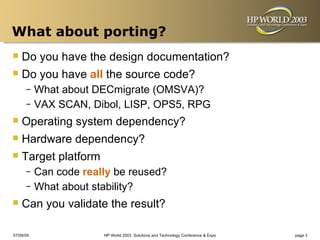
What about porting?
 Do you have the design documentation?
 Do you have all the source code?
      – What about DECmigrate (OMSVA)?
      – VAX SCAN, Dibol, LISP, OPS5, RPG

 Operating system dependency?
 Hardware dependency?
 Target platform
      – Can code really be reused?
      – What about stability?

 Can you validate the result?
07/09/09             HP World 2003 Solutions and Technology Conference & Expo   page 3
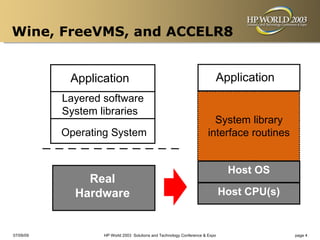
Wine, FreeVMS, and ACCELR8


            Application                                                   Application
           Layered software
           System libraries
                                                                        System library
           Operating System                                           interface routines


                                                                      CHARN-VAX
                                                                        Host OS
               Real
                                                                               Host OS
                                                                              Host CPU(s)
             Hardware


07/09/09           HP World 2003 Solutions and Technology Conference & Expo                 page 4
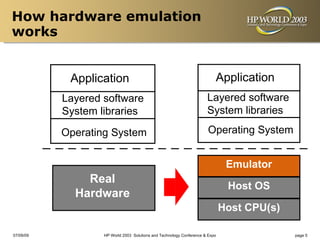
How hardware emulation
works


            Application                                                   Application
           Layered software                                           Layered software
           System libraries                                           System libraries

           Operating System                                           Operating System


                                                                        Emulator
                                                                      CHARN-VAX
               Real
                                                                               Host OS
                                                                               Host OS
             Hardware
                                                                              Host CPU(s)
                                                                                CPU(s)

07/09/09           HP World 2003 Solutions and Technology Conference & Expo                 page 5
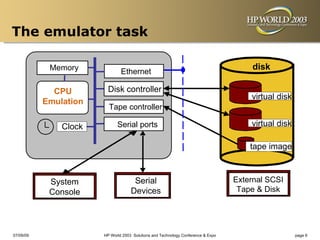
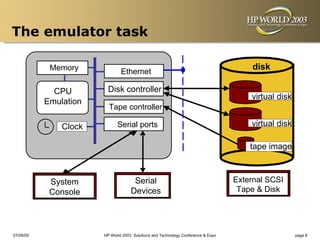
The emulator task

            Memory                                                                     disk
                               Ethernet

             CPU        Disk controller
                                                                                      virtual disk
           Emulation
                         Tape controller

               Clock         Serial ports                                             virtual disk

                                                                                      tape image


            System                   Serial                                       External SCSI
            Console                 Devices                                        Tape & Disk


07/09/09               HP World 2003 Solutions and Technology Conference & Expo                      page 6
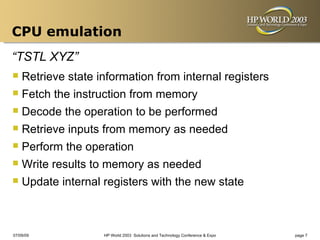
CPU emulation
“TSTL XYZ”
 Retrieve state information from internal registers
 Fetch the instruction from memory
 Decode the operation to be performed
 Retrieve inputs from memory as needed
 Perform the operation
 Write results to memory as needed
 Update internal registers with the new state


07/09/09          HP World 2003 Solutions and Technology Conference & Expo   page 7
The emulator task

            Memory                                                                     disk
                               Ethernet

             CPU        Disk controller
                                                                                      virtual disk
           Emulation
                         Tape controller

               Clock         Serial ports                                             virtual disk

                                                                                      tape image


            System                   Serial                                       External SCSI
            Console                 Devices                                        Tape & Disk


07/09/09               HP World 2003 Solutions and Technology Conference & Expo                      page 8
Cost versus benefit
 The high cost of downtime
      – Customer impact
      – “Above the Fold” on Wall Street Journal
      – Data Loss

 Saving money on maintenance
      – It’s cheap to replace a PC
      – Limited support vendor choices
      – Hardware support for some VAXen is unavailable

 Improved performance


07/09/09              HP World 2003 Solutions and Technology Conference & Expo   page 9
Available emulators
 Open-Source
      – SIMH
      – TS-10
      – Others

 Freeware
      –    PicoVAX
 Commercial Product
      –    CHARON-VAX


07/09/09             HP World 2003 Solutions and Technology Conference & Expo   page 10
Open source or commercial?
 Open Source
      – Free: Can be downloaded from the Internet, including
        source code
      – User-extensible

 CHARON-VAX
      – Certified by HP as being a true emulation of a VAX
      – Supports Q-bus hardware
      – Dynamic Instruction Translation
      – Training, installation, configuration, migration, and support
        are available


07/09/09               HP World 2003 Solutions and Technology Conference & Expo   page 11
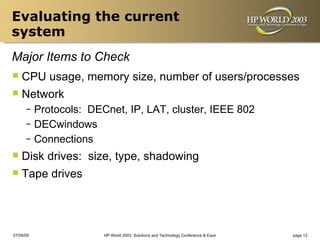
Evaluating the current
system
Major Items to Check
 CPU usage, memory size, number of users/processes
 Network
      – Protocols: DECnet, IP, LAT, cluster, IEEE 802
      – DECwindows
      – Connections

 Disk drives:    size, type, shadowing
 Tape drives


07/09/09              HP World 2003 Solutions and Technology Conference & Expo   page 12
Evaluating the current
system
Major Items to Check
 VMS version
 Layered product versions
 Application


07/09/09         HP World 2003 Solutions and Technology Conference & Expo   page 13
Evaluating the current
system
Risky areas
 Serial lines
      – Terminal servers
      – VAX serial lines
           • Console
           • Modem
      –    H3104, DHV-11, etc
 Licenses
      – Network MAC address as “key”
      – CPU characteristics as “key”
      – VMS license requirements vs. emulated system
      – “It works” vs. “Is it legal”

07/09/09                HP World 2003 Solutions and Technology Conference & Expo   page 14
Evaluating the current
system
There Be Dragons Here
 Operating systems
      – NetBSD
      – Digital Unix
      – AT&T System V
      – VAXELN

 Special hardware
      – Bus: CI, M-bus, SBI, Turbochannel, UNIBUS, VAXBI,
        XMI
      – Disk interface: MASSBUS, SDI, ST-506 (MFM)
      – Some hope for: DSSI, Q-bus

07/09/09             HP World 2003 Solutions and Technology Conference & Expo   page 15
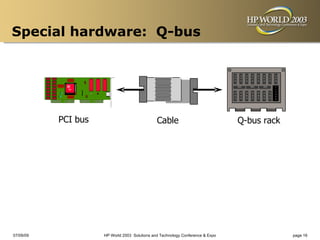
Special hardware: Q-bus


           PCI bus                             Cable                            Q-bus rack


07/09/09             HP World 2003 Solutions and Technology Conference & Expo                page 16
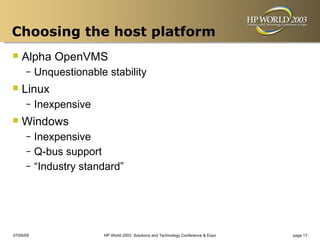
Choosing the host platform
 Alpha OpenVMS
      –    Unquestionable stability
 Linux
      –    Inexpensive
 Windows
      – Inexpensive
      – Q-bus support
      – “Industry standard”


07/09/09                 HP World 2003 Solutions and Technology Conference & Expo   page 17
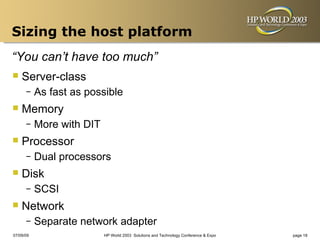
Sizing the host platform
“You can’t have too much”
 Server-class
      –    As fast as possible
 Memory
      –    More with DIT
 Processor
      –    Dual processors
 Disk
      –    SCSI
 Network
      –    Separate network adapter
07/09/09                   HP World 2003 Solutions and Technology Conference & Expo   page 18
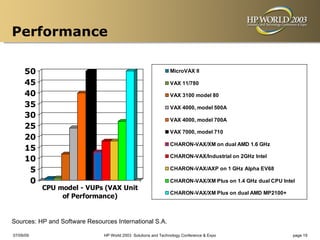
Performance

     50                                                         MicroVAX II

     45                                                         VAX 11/780

     40                                                         VAX 3100 model 80
     35                                                         VAX 4000, model 500A
     30                                                         VAX 4000, model 700A
     25
                                                                VAX 7000, model 710
     20
                                                                CHARON-VAX/XM on dual AMD 1.6 GHz
     15
                                                                CHARON-VAX/Industrial on 2GHz Intel
     10
      5                                                         CHARON-VAX/AXP on 1 GHz Alpha EV68

      0                                                         CHARON-VAX/XM Plus on 1.4 GHz dual CPU Intel
           CPU model - VUPs (VAX Unit
                                                                CHARON-VAX/XM Plus on dual AMD MP2100+
                of Performance)


Sources: HP and Software Resources International S.A.

07/09/09                       HP World 2003 Solutions and Technology Conference & Expo                    page 19
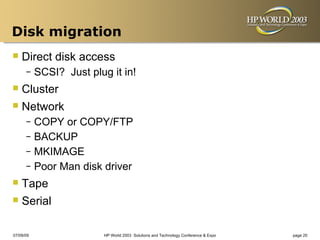
Disk migration
 Direct disk access
      –    SCSI? Just plug it in!
 Cluster
 Network
      – COPY or COPY/FTP
      – BACKUP
      – MKIMAGE
      – Poor Man disk driver

 Tape
 Serial
07/09/09                  HP World 2003 Solutions and Technology Conference & Expo   page 20
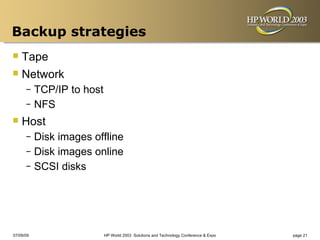
Backup strategies
 Tape
 Network
      – TCP/IP to host
      – NFS

 Host
      – Disk images offline
      – Disk images online
      – SCSI disks


07/09/09                 HP World 2003 Solutions and Technology Conference & Expo   page 21
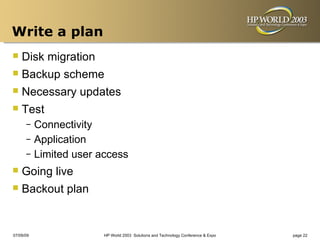
Write a plan
 Disk migration
 Backup scheme
 Necessary updates
 Test
      – Connectivity
      – Application
      – Limited user access

 Going live
 Backout plan

07/09/09              HP World 2003 Solutions and Technology Conference & Expo   page 22
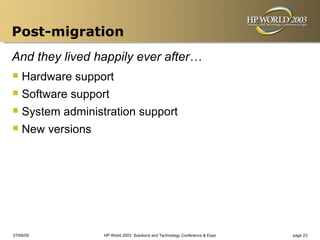
Post-migration
And they lived happily ever after…
 Hardware support
 Software support
 System administration support
 New versions


07/09/09         HP World 2003 Solutions and Technology Conference & Expo   page 23
Interex, Encompass and HP bring you a powerful new HP World.

2166 Quayle

  • 1.
    Replacing VAXen with VAX Emulation Stanley F. Quayle, P.E. President Quayle Consulting Inc.
  • 2.
    Session goals  WhetherVAX emulation makes sense  How to choose the best emulator and platform  How to get started 07/09/09 HP World 2003 Solutions and Technology Conference & Expo page 2
  • 3.
    What about porting? Do you have the design documentation?  Do you have all the source code? – What about DECmigrate (OMSVA)? – VAX SCAN, Dibol, LISP, OPS5, RPG  Operating system dependency?  Hardware dependency?  Target platform – Can code really be reused? – What about stability?  Can you validate the result? 07/09/09 HP World 2003 Solutions and Technology Conference & Expo page 3
  • 4.
    Wine, FreeVMS, andACCELR8 Application Application Layered software System libraries System library Operating System interface routines CHARN-VAX Host OS Real Host OS Host CPU(s) Hardware 07/09/09 HP World 2003 Solutions and Technology Conference & Expo page 4
  • 5.
    How hardware emulation works Application Application Layered software Layered software System libraries System libraries Operating System Operating System Emulator CHARN-VAX Real Host OS Host OS Hardware Host CPU(s) CPU(s) 07/09/09 HP World 2003 Solutions and Technology Conference & Expo page 5
  • 6.
    The emulator task Memory disk Ethernet CPU Disk controller virtual disk Emulation Tape controller Clock Serial ports virtual disk tape image System Serial External SCSI Console Devices Tape & Disk 07/09/09 HP World 2003 Solutions and Technology Conference & Expo page 6
  • 7.
    CPU emulation “TSTL XYZ” Retrieve state information from internal registers  Fetch the instruction from memory  Decode the operation to be performed  Retrieve inputs from memory as needed  Perform the operation  Write results to memory as needed  Update internal registers with the new state 07/09/09 HP World 2003 Solutions and Technology Conference & Expo page 7
  • 8.
    The emulator task Memory disk Ethernet CPU Disk controller virtual disk Emulation Tape controller Clock Serial ports virtual disk tape image System Serial External SCSI Console Devices Tape & Disk 07/09/09 HP World 2003 Solutions and Technology Conference & Expo page 8
  • 9.
    Cost versus benefit The high cost of downtime – Customer impact – “Above the Fold” on Wall Street Journal – Data Loss  Saving money on maintenance – It’s cheap to replace a PC – Limited support vendor choices – Hardware support for some VAXen is unavailable  Improved performance 07/09/09 HP World 2003 Solutions and Technology Conference & Expo page 9
  • 10.
    Available emulators  Open-Source – SIMH – TS-10 – Others  Freeware – PicoVAX  Commercial Product – CHARON-VAX 07/09/09 HP World 2003 Solutions and Technology Conference & Expo page 10
  • 11.
    Open source orcommercial?  Open Source – Free: Can be downloaded from the Internet, including source code – User-extensible  CHARON-VAX – Certified by HP as being a true emulation of a VAX – Supports Q-bus hardware – Dynamic Instruction Translation – Training, installation, configuration, migration, and support are available 07/09/09 HP World 2003 Solutions and Technology Conference & Expo page 11
  • 12.
    Evaluating the current system MajorItems to Check  CPU usage, memory size, number of users/processes  Network – Protocols: DECnet, IP, LAT, cluster, IEEE 802 – DECwindows – Connections  Disk drives: size, type, shadowing  Tape drives 07/09/09 HP World 2003 Solutions and Technology Conference & Expo page 12
  • 13.
    Evaluating the current system MajorItems to Check  VMS version  Layered product versions  Application 07/09/09 HP World 2003 Solutions and Technology Conference & Expo page 13
  • 14.
    Evaluating the current system Riskyareas  Serial lines – Terminal servers – VAX serial lines • Console • Modem – H3104, DHV-11, etc  Licenses – Network MAC address as “key” – CPU characteristics as “key” – VMS license requirements vs. emulated system – “It works” vs. “Is it legal” 07/09/09 HP World 2003 Solutions and Technology Conference & Expo page 14
  • 15.
    Evaluating the current system ThereBe Dragons Here  Operating systems – NetBSD – Digital Unix – AT&T System V – VAXELN  Special hardware – Bus: CI, M-bus, SBI, Turbochannel, UNIBUS, VAXBI, XMI – Disk interface: MASSBUS, SDI, ST-506 (MFM) – Some hope for: DSSI, Q-bus 07/09/09 HP World 2003 Solutions and Technology Conference & Expo page 15
  • 16.
    Special hardware: Q-bus PCI bus Cable Q-bus rack 07/09/09 HP World 2003 Solutions and Technology Conference & Expo page 16
  • 17.
    Choosing the hostplatform  Alpha OpenVMS – Unquestionable stability  Linux – Inexpensive  Windows – Inexpensive – Q-bus support – “Industry standard” 07/09/09 HP World 2003 Solutions and Technology Conference & Expo page 17
  • 18.
    Sizing the hostplatform “You can’t have too much”  Server-class – As fast as possible  Memory – More with DIT  Processor – Dual processors  Disk – SCSI  Network – Separate network adapter 07/09/09 HP World 2003 Solutions and Technology Conference & Expo page 18
  • 19.
    Performance 50 MicroVAX II 45 VAX 11/780 40 VAX 3100 model 80 35 VAX 4000, model 500A 30 VAX 4000, model 700A 25 VAX 7000, model 710 20 CHARON-VAX/XM on dual AMD 1.6 GHz 15 CHARON-VAX/Industrial on 2GHz Intel 10 5 CHARON-VAX/AXP on 1 GHz Alpha EV68 0 CHARON-VAX/XM Plus on 1.4 GHz dual CPU Intel CPU model - VUPs (VAX Unit CHARON-VAX/XM Plus on dual AMD MP2100+ of Performance) Sources: HP and Software Resources International S.A. 07/09/09 HP World 2003 Solutions and Technology Conference & Expo page 19
  • 20.
    Disk migration  Directdisk access – SCSI? Just plug it in!  Cluster  Network – COPY or COPY/FTP – BACKUP – MKIMAGE – Poor Man disk driver  Tape  Serial 07/09/09 HP World 2003 Solutions and Technology Conference & Expo page 20
  • 21.
    Backup strategies  Tape Network – TCP/IP to host – NFS  Host – Disk images offline – Disk images online – SCSI disks 07/09/09 HP World 2003 Solutions and Technology Conference & Expo page 21
  • 22.
    Write a plan Disk migration  Backup scheme  Necessary updates  Test – Connectivity – Application – Limited user access  Going live  Backout plan 07/09/09 HP World 2003 Solutions and Technology Conference & Expo page 22
  • 23.
    Post-migration And they livedhappily ever after…  Hardware support  Software support  System administration support  New versions 07/09/09 HP World 2003 Solutions and Technology Conference & Expo page 23
  • 24.
    Interex, Encompass andHP bring you a powerful new HP World.