2015
CI/CD Overview
Lakshmi Easuwaran
3-Dec-2015
#GHCI15
2015
2015
Agenda
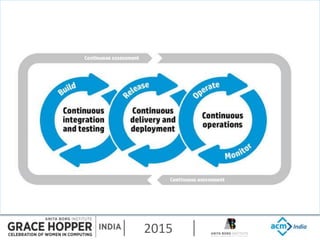
 What is DevOps, continuous delivery and
continuous deployment
 Key underlying Principles
 Various tools & technologies in various phases
 Case study
 Books to read
2015
2015
2015
2015
BUILD
IN
2015
2015
2015
2015
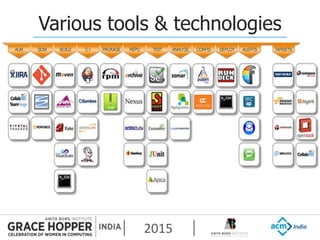
Various tools & technologies
2015
Case Study
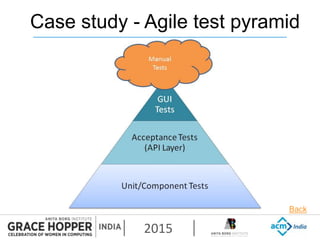
 Test strategy (Agile test pyramid)
 How long does compilation take?
 Dev productivity tools
 Automated Infrastructure
 SMS/text messaging notifications
2015
Case study - Agile test pyramid
Back
2015
Books to read
 Continuous delivery by Jezz Humble and David
Farley
 The phoenix project by Gene Kim, Kevin Behr,
George Spafford
2015
Open Source Solution
for
Continuous Delivery-
Git Gerrit and Jenkins
Mythri P K
3-Dec-2015
#GHCI15
2015
2015
GIT – Why Version Control?
 Allows developers to work simultaneously
 No overwriting
 History is maintained
2015
GIT - WHAT
 Developed by Linus Torvalds in 2005
 It is under GPL License.
 It is a revision control system focused on speed
and efficiency
 Core is written in C.
 Compress and stores data hence memory foot
print is low
 Distributed version control system - avoids single
point failure
2015
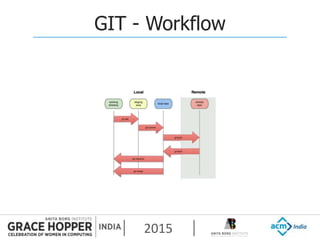
GIT - Workflow
2015
GERRIT – WHY CODE REVIEW ?
 Early error detection
 Conformation to the source code standards
 Helps to keep code readable and easier to
maintain
 Knowledge exchange
 Shared code ownership
2015
GERRIT- WHAT
 Gerrit is a web based code review system
 Gerrit is a Git server
 Gerrit fine grained access control system
through ssh
 Gerrit is licensed under the Apache 2.0
license.
 Gerrit is based on Google Web Toolkit
2015
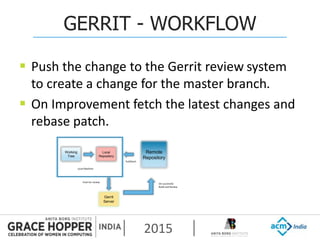
GERRIT - WORKFLOW
 Push the change to the Gerrit review system
to create a change for the master branch.
 On Improvement fetch the latest changes and
rebase patch.
Working
Tree
Local
Repository
Remote
Repository
Pull/fetch
Gerrit
Server
Push for review
Local Machine
On successful
Build and Review
2015
JENKINS – WHAT ?
 Jenkins is a cross-platform, continuous
integration and continuous
delivery application
 It is a server based system build and test tool.
 Released under the MIT License
2015
JENKINS – WHY ?
 Build problems are detected immediately by
automatic test builds.
 Checks for compile time errors and runs a test
suite.
2015
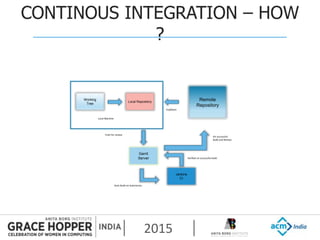
CONTINOUS INTEGRATION – HOW
?
Working
Tree
Local Repository
Remote
Repository
Pull/fetch
Gerrit
Server
Push for review
Local Machine
On successful
Build and Review
Jenkins
CI
Auto Build on Submission
Verified on successful build
2015
Git- Workflow
Mythri P K
3-Dec-2015
#GHCI15
2015
2015
Git- Glossary
 Tree: Directory with files (blobs) and
subdirectories (trees)
 Clone: Copy remote repository to local directory
 Head: Currently checked out commit
 Branch: Label given to commit for different line of
development
 Master: Main Branch
 Patch: Commit exported into text format
2015
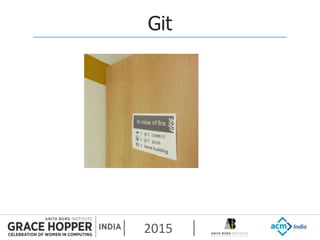
Git
2015
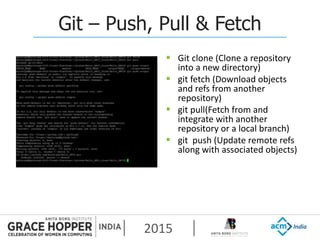
Git – Push, Pull & Fetch
 Git clone (Clone a repository
into a new directory)
 git fetch (Download objects
and refs from another
repository)
 git pull(Fetch from and
integrate with another
repository or a local branch)
 git push (Update remote refs
along with associated objects)
2015
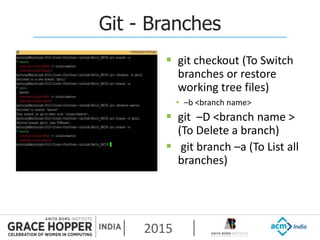
Git - Branches
 git checkout (To Switch
branches or restore
working tree files)
• –b <branch name>
 git –D <branch name >
(To Delete a branch)
 git branch –a (To List all
branches)
2015
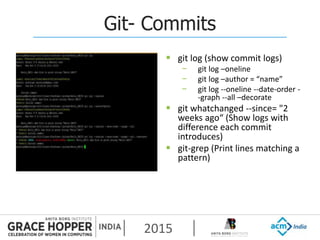
Git- Commits
 git log (show commit logs)
− git log –oneline
− git log –author = “name”
− git log --oneline --date-order -
-graph --all –decorate
 git whatchanged --since= "2
weeks ago“ (Show logs with
difference each commit
introduces)
 git-grep (Print lines matching a
pattern)
2015
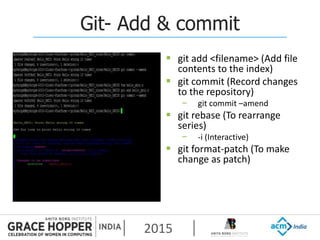
Git- Add & commit
 git add <filename> (Add file
contents to the index)
 git commit (Record changes
to the repository)
− git commit –amend
 git rebase (To rearrange
series)
− -i (Interactive)
 git format-patch (To make
change as patch)
2015
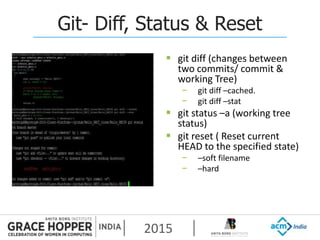
Git- Diff, Status & Reset
 git diff (changes between
two commits/ commit &
working Tree)
− git diff –cached.
− git diff –stat
 git status –a (working tree
status)
 git reset ( Reset current
HEAD to the specified state)
− –soft filename
− –hard
2015
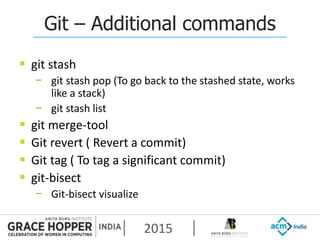
Git – Additional commands
 git stash
− git stash pop (To go back to the stashed state, works
like a stack)
− git stash list
 git merge-tool
 Git revert ( Revert a commit)
 Git tag ( To tag a significant commit)
 git-bisect
− Git-bisect visualize
2015
References
 http://gitref.org/
 https://git-scm.com/docs/git-checkout
2015
Open Source Solution
for
Continuous Delivery
Git Gerrit and Jenkins
DEMO
Vinaya
3 Dec 2015
#GHCI15
2015
2015
Github & Gerrithub setup
 Create Github account
https://github.com/
 Login to gerrithub.io using same github account
http://gerrithub.io/
 Open the git bash or Linux terminal
sudo su <username>
cd /home/<username>
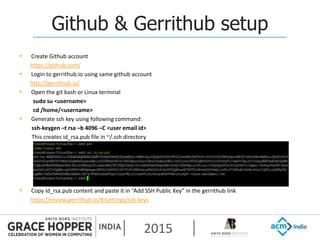
 Generate ssh key using following command:
ssh-keygen –t rsa –b 4096 –C <user email id>
This creates id_rsa.pub file in ~/.ssh directory
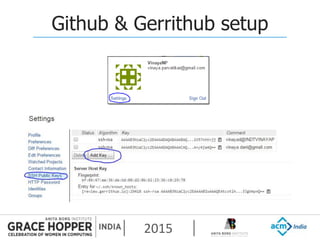
 Copy id_rsa.pub content and paste it in “Add SSH Public Key” in the gerrithub link
https://review.gerrithub.io/#/settings/ssh-keys
2015
Github & Gerrithub setup
2015
Github & Gerrithub setup
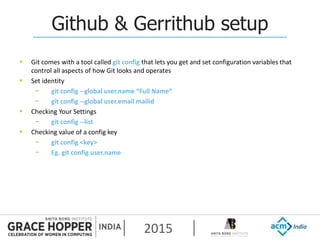
 Git comes with a tool called git config that lets you get and set configuration variables that
control all aspects of how Git looks and operates
 Set identity
− git config --global user.name “Full Name”
− git config --global user.email mailid
 Checking Your Settings
− git config --list
 Checking value of a config key
− git config <key>
− Eg. git config user.name
2015
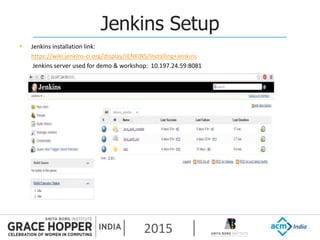
Jenkins Setup
 Jenkins installation link:
https://wiki.jenkins-ci.org/display/JENKINS/Installing+Jenkins
Jenkins server used for demo & workshop: 10.197.24.59:8081
2015
Jenkins plugins
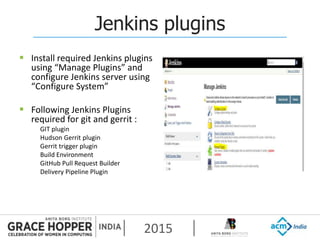
 Install required Jenkins plugins
using “Manage Plugins” and
configure Jenkins server using
“Configure System”
 Following Jenkins Plugins
required for git and gerrit :
GIT plugin
Hudson Gerrit plugin
Gerrit trigger plugin
Build Environment
GitHub Pull Request Builder
Delivery Pipeline Plugin
2015
Jenkins Configuration
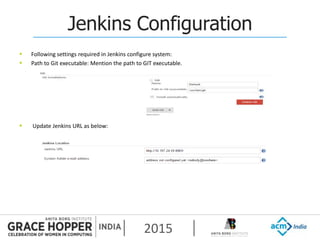
 Following settings required in Jenkins configure system:
 Path to Git executable: Mention the path to GIT executable.
 Update Jenkins URL as below:
2015
Jenkins Configuration
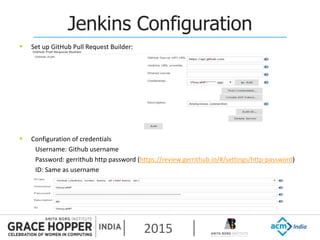
 Set up GitHub Pull Request Builder:
 Configuration of credentials
Username: Github username
Password: gerrithub http password (https://review.gerrithub.io/#/settings/http-password)
ID: Same as username
2015
Configuration of gerrit trigger
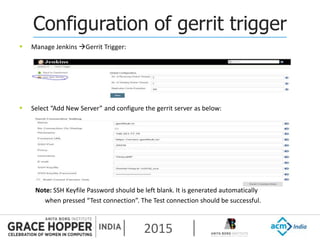
 Manage Jenkins Gerrit Trigger:
 Select “Add New Server” and configure the gerrit server as below:
Note: SSH Keyfile Password should be left blank. It is generated automatically
when pressed “Test connection”. The Test connection should be successful.
2015
Jenkins new job configuration
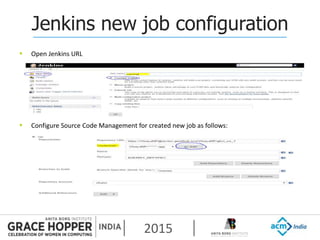
 Open Jenkins URL
 Configure Source Code Management for created new job as follows:
2015
Jenkins new job configuration
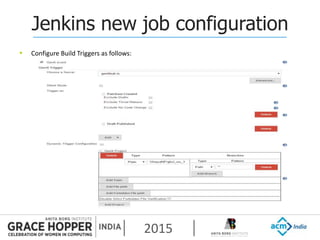
 Configure Build Triggers as follows:
2015
Jenkins new job configuration
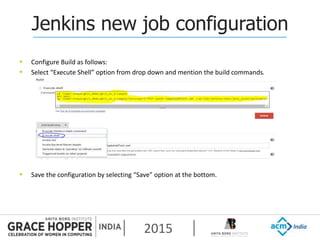
 Configure Build as follows:
 Select “Execute Shell” option from drop down and mention the build commands.
 Save the configuration by selecting “Save” option at the bottom.
2015
GIT, GERRIT, JENKINS flow
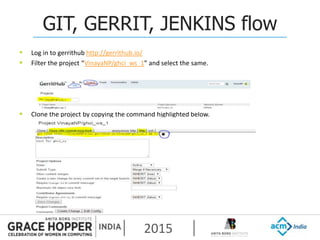
 Log in to gerrithub http://gerrithub.io/
 Filter the project “VinayaNP/ghci_ws_1” and select the same.
 Clone the project by copying the command highlighted below.
2015
GIT, GERRIT, JENKINS flow
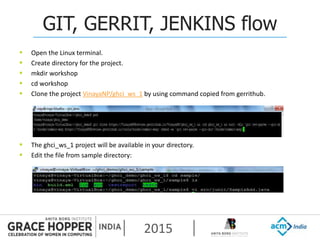
 Open the Linux terminal.
 Create directory for the project.
 mkdir workshop
 cd workshop
 Clone the project VinayaNP/ghci_ws_1 by using command copied from gerrithub.
 The ghci_ws_1 project will be available in your directory.
 Edit the file from sample directory:
2015
GIT, GERRIT, JENKINS flow
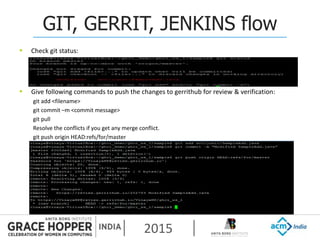
 Check git status:
 Give following commands to push the changes to gerrithub for review & verification:
git add <filename>
git commit –m <commit message>
git pull
Resolve the conflicts if you get any merge conflict.
git push origin HEAD:refs/for/master
2015
GIT, GERRIT, JENKINS flow
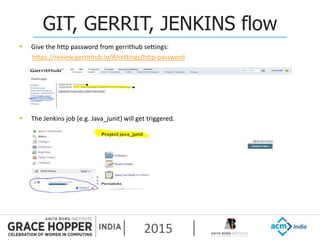
 Give the http password from gerrithub settings:
https://review.gerrithub.io/#/settings/http-password
 The Jenkins job (e.g. Java_junit) will get triggered.
2015
GIT, GERRIT, JENKINS flow
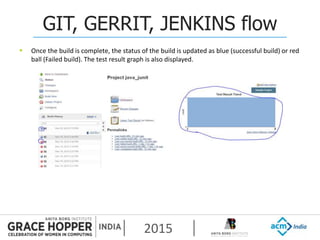
 Once the build is complete, the status of the build is updated as blue (successful build) or red
ball (Failed build). The test result graph is also displayed.
2015
GIT, GERRIT, JENKINS flow
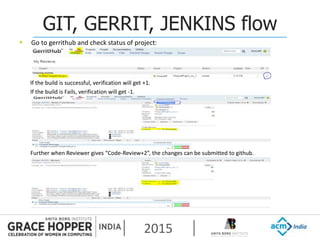
 Go to gerrithub and check status of project:
If the build is successful, verification will get +1.
If the build is Fails, verification will get -1.
Further when Reviewer gives “Code-Review+2”, the changes can be submitted to github.
2015
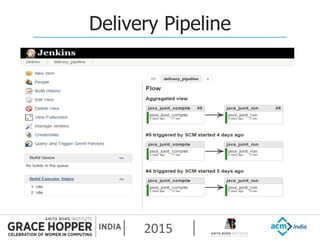
Delivery Pipeline
2015
Thank You!
2015
Got Feedback?
Rate and review the session on our mobile app – Convene
For all details visit: http://ghcindia.anitaborg.org

2015-ghci-presentation-git_gerritJenkins_final

  • 1.
  • 2.
    2015 Agenda  What isDevOps, continuous delivery and continuous deployment  Key underlying Principles  Various tools & technologies in various phases  Case study  Books to read
  • 3.
  • 4.
  • 5.
  • 6.
  • 7.
  • 8.
  • 9.
  • 10.
  • 11.
    2015 Case Study  Teststrategy (Agile test pyramid)  How long does compilation take?  Dev productivity tools  Automated Infrastructure  SMS/text messaging notifications
  • 12.
    2015 Case study -Agile test pyramid Back
  • 13.
    2015 Books to read Continuous delivery by Jezz Humble and David Farley  The phoenix project by Gene Kim, Kevin Behr, George Spafford
  • 14.
    2015 Open Source Solution for ContinuousDelivery- Git Gerrit and Jenkins Mythri P K 3-Dec-2015 #GHCI15 2015
  • 15.
    2015 GIT – WhyVersion Control?  Allows developers to work simultaneously  No overwriting  History is maintained
  • 16.
    2015 GIT - WHAT Developed by Linus Torvalds in 2005  It is under GPL License.  It is a revision control system focused on speed and efficiency  Core is written in C.  Compress and stores data hence memory foot print is low  Distributed version control system - avoids single point failure
  • 17.
  • 18.
    2015 GERRIT – WHYCODE REVIEW ?  Early error detection  Conformation to the source code standards  Helps to keep code readable and easier to maintain  Knowledge exchange  Shared code ownership
  • 19.
    2015 GERRIT- WHAT  Gerritis a web based code review system  Gerrit is a Git server  Gerrit fine grained access control system through ssh  Gerrit is licensed under the Apache 2.0 license.  Gerrit is based on Google Web Toolkit
  • 20.
    2015 GERRIT - WORKFLOW Push the change to the Gerrit review system to create a change for the master branch.  On Improvement fetch the latest changes and rebase patch. Working Tree Local Repository Remote Repository Pull/fetch Gerrit Server Push for review Local Machine On successful Build and Review
  • 21.
    2015 JENKINS – WHAT?  Jenkins is a cross-platform, continuous integration and continuous delivery application  It is a server based system build and test tool.  Released under the MIT License
  • 22.
    2015 JENKINS – WHY?  Build problems are detected immediately by automatic test builds.  Checks for compile time errors and runs a test suite.
  • 23.
    2015 CONTINOUS INTEGRATION –HOW ? Working Tree Local Repository Remote Repository Pull/fetch Gerrit Server Push for review Local Machine On successful Build and Review Jenkins CI Auto Build on Submission Verified on successful build
  • 24.
    2015 Git- Workflow Mythri PK 3-Dec-2015 #GHCI15 2015
  • 25.
    2015 Git- Glossary  Tree:Directory with files (blobs) and subdirectories (trees)  Clone: Copy remote repository to local directory  Head: Currently checked out commit  Branch: Label given to commit for different line of development  Master: Main Branch  Patch: Commit exported into text format
  • 26.
  • 27.
    2015 Git – Push,Pull & Fetch  Git clone (Clone a repository into a new directory)  git fetch (Download objects and refs from another repository)  git pull(Fetch from and integrate with another repository or a local branch)  git push (Update remote refs along with associated objects)
  • 28.
    2015 Git - Branches git checkout (To Switch branches or restore working tree files) • –b <branch name>  git –D <branch name > (To Delete a branch)  git branch –a (To List all branches)
  • 29.
    2015 Git- Commits  gitlog (show commit logs) − git log –oneline − git log –author = “name” − git log --oneline --date-order - -graph --all –decorate  git whatchanged --since= "2 weeks ago“ (Show logs with difference each commit introduces)  git-grep (Print lines matching a pattern)
  • 30.
    2015 Git- Add &commit  git add <filename> (Add file contents to the index)  git commit (Record changes to the repository) − git commit –amend  git rebase (To rearrange series) − -i (Interactive)  git format-patch (To make change as patch)
  • 31.
    2015 Git- Diff, Status& Reset  git diff (changes between two commits/ commit & working Tree) − git diff –cached. − git diff –stat  git status –a (working tree status)  git reset ( Reset current HEAD to the specified state) − –soft filename − –hard
  • 32.
    2015 Git – Additionalcommands  git stash − git stash pop (To go back to the stashed state, works like a stack) − git stash list  git merge-tool  Git revert ( Revert a commit)  Git tag ( To tag a significant commit)  git-bisect − Git-bisect visualize
  • 33.
  • 34.
    2015 Open Source Solution for ContinuousDelivery Git Gerrit and Jenkins DEMO Vinaya 3 Dec 2015 #GHCI15 2015
  • 35.
    2015 Github & Gerrithubsetup  Create Github account https://github.com/  Login to gerrithub.io using same github account http://gerrithub.io/  Open the git bash or Linux terminal sudo su <username> cd /home/<username>  Generate ssh key using following command: ssh-keygen –t rsa –b 4096 –C <user email id> This creates id_rsa.pub file in ~/.ssh directory  Copy id_rsa.pub content and paste it in “Add SSH Public Key” in the gerrithub link https://review.gerrithub.io/#/settings/ssh-keys
  • 36.
  • 37.
    2015 Github & Gerrithubsetup  Git comes with a tool called git config that lets you get and set configuration variables that control all aspects of how Git looks and operates  Set identity − git config --global user.name “Full Name” − git config --global user.email mailid  Checking Your Settings − git config --list  Checking value of a config key − git config <key> − Eg. git config user.name
  • 38.
    2015 Jenkins Setup  Jenkinsinstallation link: https://wiki.jenkins-ci.org/display/JENKINS/Installing+Jenkins Jenkins server used for demo & workshop: 10.197.24.59:8081
  • 39.
    2015 Jenkins plugins  Installrequired Jenkins plugins using “Manage Plugins” and configure Jenkins server using “Configure System”  Following Jenkins Plugins required for git and gerrit : GIT plugin Hudson Gerrit plugin Gerrit trigger plugin Build Environment GitHub Pull Request Builder Delivery Pipeline Plugin
  • 40.
    2015 Jenkins Configuration  Followingsettings required in Jenkins configure system:  Path to Git executable: Mention the path to GIT executable.  Update Jenkins URL as below:
  • 41.
    2015 Jenkins Configuration  Setup GitHub Pull Request Builder:  Configuration of credentials Username: Github username Password: gerrithub http password (https://review.gerrithub.io/#/settings/http-password) ID: Same as username
  • 42.
    2015 Configuration of gerrittrigger  Manage Jenkins Gerrit Trigger:  Select “Add New Server” and configure the gerrit server as below: Note: SSH Keyfile Password should be left blank. It is generated automatically when pressed “Test connection”. The Test connection should be successful.
  • 43.
    2015 Jenkins new jobconfiguration  Open Jenkins URL  Configure Source Code Management for created new job as follows:
  • 44.
    2015 Jenkins new jobconfiguration  Configure Build Triggers as follows:
  • 45.
    2015 Jenkins new jobconfiguration  Configure Build as follows:  Select “Execute Shell” option from drop down and mention the build commands.  Save the configuration by selecting “Save” option at the bottom.
  • 46.
    2015 GIT, GERRIT, JENKINSflow  Log in to gerrithub http://gerrithub.io/  Filter the project “VinayaNP/ghci_ws_1” and select the same.  Clone the project by copying the command highlighted below.
  • 47.
    2015 GIT, GERRIT, JENKINSflow  Open the Linux terminal.  Create directory for the project.  mkdir workshop  cd workshop  Clone the project VinayaNP/ghci_ws_1 by using command copied from gerrithub.  The ghci_ws_1 project will be available in your directory.  Edit the file from sample directory:
  • 48.
    2015 GIT, GERRIT, JENKINSflow  Check git status:  Give following commands to push the changes to gerrithub for review & verification: git add <filename> git commit –m <commit message> git pull Resolve the conflicts if you get any merge conflict. git push origin HEAD:refs/for/master
  • 49.
    2015 GIT, GERRIT, JENKINSflow  Give the http password from gerrithub settings: https://review.gerrithub.io/#/settings/http-password  The Jenkins job (e.g. Java_junit) will get triggered.
  • 50.
    2015 GIT, GERRIT, JENKINSflow  Once the build is complete, the status of the build is updated as blue (successful build) or red ball (Failed build). The test result graph is also displayed.
  • 51.
    2015 GIT, GERRIT, JENKINSflow  Go to gerrithub and check status of project: If the build is successful, verification will get +1. If the build is Fails, verification will get -1. Further when Reviewer gives “Code-Review+2”, the changes can be submitted to github.
  • 52.
  • 53.
  • 54.
    2015 Got Feedback? Rate andreview the session on our mobile app – Convene For all details visit: http://ghcindia.anitaborg.org

Editor's Notes

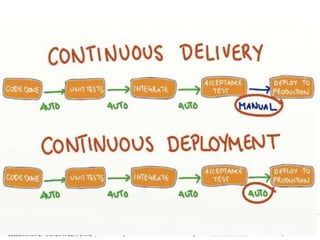
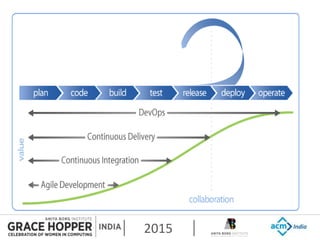
  • #4 DevOps - DevOps (a clipped compound of "development" and "operations") is a culture, movement or practice that emphasizes the collaboration and communication of both software developers and other information-technology (IT) professionals while automating the process of software delivery and infrastructure changes Continuous Delivery is a software development discipline where you build software in such a way that the software can be released to production at any time. Continuous deployment is the next step of continuous delivery: Every change that passes the automated tests is deployed to production automatically. Reliable, Repeatable, Predictable and Low cycle time
  • #9 CI/CD is a culture - You can’t directly change culture. But you can change behavior, and behavior becomes culture
  • #10 Theory of constraints - a chain is no stronger than its weakest link The Theory of Constraints is a methodology for identifying the most important limiting factor (i.e. constraint) that stands in the way of achieving a goal and then systematically improving that constraint until it is no longer the limiting factor. In manufacturing, the constraint is often referred to as a bottleneck.
  • #16 Question: What are the version control system you are aware of?
  • #17 it is a full mirror with complete working directory, Most operations happen locally quicker, Easier branching strategy
  • #18 git doesn't track each and every file. when you commit git looks for files in staging area only
  • #19 Q: How may of you can claim that you have written a bug free code all the time! Logical flaws can be spotted by the human reviewer before any code is merged
  • #21 If you push to Gerrit, you use a certain path (ref specification) which tells Gerrit that you want to create a change Gerrit uses the Change-Id information in the commit message to identify if the push is a new commit or an update of an existing change
  • #22 Builds can be started by various means, including being triggered by commit in a version control system Because it is open source there are lots of plugins for use similar to android apps
  • #31 Show git conflict Checkpatch.pl Git rm
  • #39 Install Jenkins using below command: sudo apt-get install Jenkins Jenkins will be launched as a daemon up on start. Jenkins stores all the settings, logs and build artifacts in its home directory. The default installation directory is /var/lib/jenkins under Ubuntu. Log file will be placed in /var/log/jenkins/jenkins.log. Check this file if you are troubleshooting Jenkins. /etc/default/jenkins will capture configuration parameters for the launch like e.g. JENKINS_HOME If  /etc/init.d/jenkins file fails to start jenkins, edit the /etc/default/jenkins to replace the line HTTP_PORT=8080 by HTTP_PORT=8081 Here, 8081 was chosen but you can put another port available. Launch Jenkins using <Jenkins_server_IP>:8080
  • #55 This is the last slide and must be included in the slide deck