Git+Jenkins+Rex


just another git+jenkins+rex presentation

        By: ruckuus@gmail.com
What is Git?
â—Ź   It's a history tracker
What is Github?
â—Ź   http://learn.github.com/p/intro.html
What Is Jenkins?
â—Ź   You can let Jenkins type for you the way you
    want it to be
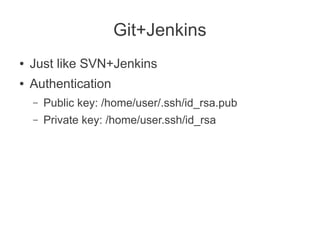
Git+Jenkins
â—Ź   Just like SVN+Jenkins
â—Ź   Authentication
    –   Public key: /home/user/.ssh/id_rsa.pub
    –   Private key: /home/user.ssh/id_rsa
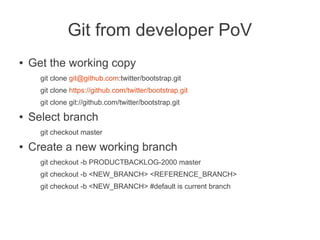
Git from developer PoV
â—Ź   Get the working copy
      git clone git@github.com:twitter/bootstrap.git
      git clone https://github.com/twitter/bootstrap.git
      git clone git://github.com/twitter/bootstrap.git
â—Ź   Select branch
      git checkout master
â—Ź   Create a new working branch
      git checkout -b PRODUCTBACKLOG-2000 master
      git checkout -b <NEW_BRANCH> <REFERENCE_BRANCH>
      git checkout -b <NEW_BRANCH> #default is current branch
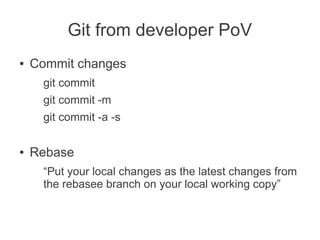
Git from developer PoV
â—Ź   Commit changes
     git commit
     git commit -m
     git commit -a -s

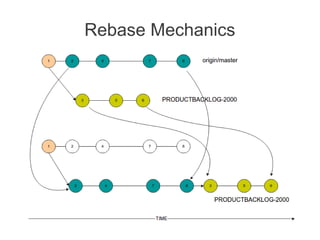
â—Ź   Rebase
     “Put your local changes as the latest changes from
     the rebasee branch on your local working copy”
Rebase
â—Ź   Put your local changes as the latest changes
    of the universe.
    –   You have the latest status of the collaboration
        branch.
    –   Your change is just an addition, won't conflict to
        others'.
    –   Safer than merge
    –   http://mislav.uniqpath.com/2013/02/merge-vs-
        rebase/
Rebase Mechanics
Git from Jenkins PoV
â—Ź   Our Jenkins deploys from feature branch, NOT
    from integration branch
â—Ź   Not from master
â—Ź   Not from origin/master
â—Ź   Why? We need it
â—Ź   We don't maintain build history since the
    branch is inconsistent in every build
Git from Jenkins PoV
â—Ź   Build is parameterized
     –   Branch's name
     –   Target server

â—Ź   Always checkout a new copy
â—Ź   git checkout -b b-XyZ-PRODUCTBACKLOG-2000 origin/PRODUCTBACKLOG-2000
â—Ź   Build
â—Ź   Deploy to target server
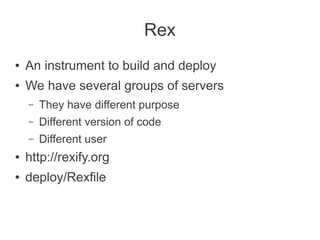
Rex
â—Ź   An instrument to build and deploy
â—Ź   We have several groups of servers
    –   They have different purpose
    –   Different version of code
    –   Different user
â—Ź   http://rexify.org
â—Ź   deploy/Rexfile
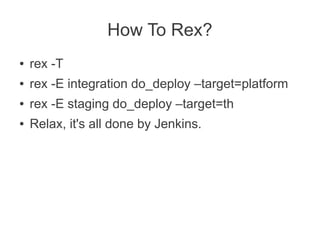
How To Rex?
â—Ź   rex -T
●   rex -E integration do_deploy –target=platform
●   rex -E staging do_deploy –target=th
â—Ź   Relax, it's all done by Jenkins.

Git+jenkins+rex presentation

  • 1.
    Git+Jenkins+Rex just another git+jenkins+rexpresentation By: ruckuus@gmail.com
  • 2.
    What is Git? â—Ź It's a history tracker
  • 3.
    What is Github? â—Ź http://learn.github.com/p/intro.html
  • 4.
    What Is Jenkins? â—Ź You can let Jenkins type for you the way you want it to be
  • 5.
    Git+Jenkins ● Just like SVN+Jenkins ● Authentication – Public key: /home/user/.ssh/id_rsa.pub – Private key: /home/user.ssh/id_rsa
  • 6.
    Git from developerPoV â—Ź Get the working copy git clone git@github.com:twitter/bootstrap.git git clone https://github.com/twitter/bootstrap.git git clone git://github.com/twitter/bootstrap.git â—Ź Select branch git checkout master â—Ź Create a new working branch git checkout -b PRODUCTBACKLOG-2000 master git checkout -b <NEW_BRANCH> <REFERENCE_BRANCH> git checkout -b <NEW_BRANCH> #default is current branch
  • 7.
    Git from developerPoV ● Commit changes git commit git commit -m git commit -a -s ● Rebase “Put your local changes as the latest changes from the rebasee branch on your local working copy”
  • 8.
    Rebase ● Put your local changes as the latest changes of the universe. – You have the latest status of the collaboration branch. – Your change is just an addition, won't conflict to others'. – Safer than merge – http://mislav.uniqpath.com/2013/02/merge-vs- rebase/
  • 9.
  • 10.
    Git from JenkinsPoV â—Ź Our Jenkins deploys from feature branch, NOT from integration branch â—Ź Not from master â—Ź Not from origin/master â—Ź Why? We need it â—Ź We don't maintain build history since the branch is inconsistent in every build
  • 11.
    Git from JenkinsPoV ● Build is parameterized – Branch's name – Target server ● Always checkout a new copy ● git checkout -b b-XyZ-PRODUCTBACKLOG-2000 origin/PRODUCTBACKLOG-2000 ● Build ● Deploy to target server
  • 12.
    Rex ● An instrument to build and deploy ● We have several groups of servers – They have different purpose – Different version of code – Different user ● http://rexify.org ● deploy/Rexfile
  • 13.
    How To Rex? ● rex -T ● rex -E integration do_deploy –target=platform ● rex -E staging do_deploy –target=th ● Relax, it's all done by Jenkins.