
1
Many thanks (content & inspiration) to:
Jim Manico
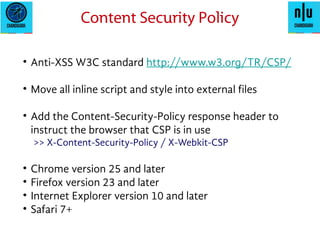
• Anti-XSS W3C standard http://www.w3.org/TR/CSP/
• Move all inline script and style into external files
• Add the Content-Security-Policy response header to
instruct the browser that CSP is in use
>> X-Content-Security-Policy / X-Webkit-CSP
• Chrome version 25 and later
• Firefox version 23 and later
• Internet Explorer version 10 and later
• Safari 7+
Content Security Policy
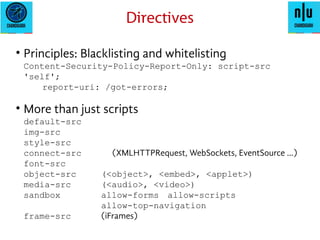
• Principles: Blacklisting and whitelisting
Content-Security-Policy: script-src 'self';
Content-Security-Policy-Report-Only: script-src
'self'; report-uri: /got-errors;
• More than just scripts
default-src
img-src
style-src
connect-src (XMLHTTPRequest, WebSockets, EventSource ...)
font-src
object-src (<object>, <embed>, <applet>)
media-src (<audio>, <video>)
sandbox allow-forms allow-scripts
allow-top-navigation
frame-src (iFrames)
Directives
• Yes, multiple values are allowed (conditions apply)
non-conflicting and non-overlapping directives!
* anything goes
'none' ban everything! (e.g., object-src 'none')
'self' same scheme, host and port
host.tld.com allow this host
https://host.tld.com same scheme, host and port
https: any domain okay, as long as it is https!
*.domain.com allow from any subdomain of this domain
'unsafe-inline' allow inline scripts, styles, attributes, etc.
'unsafe-eval' allow evals
Source lists
• Controversial: 'unsafe-inline'
• script-nonce (an ugly hack, IMO)
But handy for whitelisting unavoidable inline scripts
script hashes have the same use and issues
• Use meta tags?
<meta http-equiv="Content-Security-Policy"
content="default-src 'self'; child-src 'none';
object-src 'none'">
NOT for report-uri frame-ancestors sandbox
What else?
• Use 3rd
party code? (+1 / Like / Twitter)
No simple answers. Need to know your stuff!
Or use “report-uri” (the most common technique for CSP)
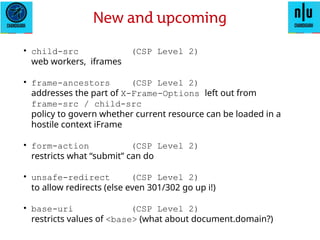
• child-src (CSP Level 2)
web workers, iframes
• frame-ancestors (CSP Level 2)
addresses the part of X-Frame-Options left out from
frame-src / child-src
policy to govern whether current resource can be loaded in a
hostile context iFrame
• form-action (CSP Level 2)
restricts what “submit” can do
• unsafe-redirect (CSP Level 2)
to allow redirects (else even 301/302 go up i!)
• base-uri (CSP Level 2)
restricts values of <base> (what about document.domain?)
New and upcoming
• plugin-type (CSP Level 2)
Specifies allowed MIME Types (application/pdf
application/x-shockwave-flash
application/x-java-applet )
• manifest-src (CSP Level 3)
Yes, location of manifests for applications
• reflected-xss (CSP Level 3)
to effectively replace X-XSS-Security
New and upcoming
• NOT EASY... set expectations correctly
Can break browser extensions
Cross-browser testing has always been a pain
Now add mobile browsers to the mix
Plus frameworks & 3rd
party libraries / code
• Deploy in all environments (dev/test/staging/prod)
• Begin with “report only”
Deal with reports until all issues are fixed
Write tools (Python FTW!) if needed
Practical Implementation
• Use “class=” for inline event handlers + bind on selector
e.g., <button onClick=”dofunction()”> YES </button>
=>
<button class=”yesbutton”> YES </button>
and later... 'button.yesbutton'.bind(“click”,
dofunction()...
• Avoid eval strings, switch to functions if possible
e.g., setTimeout(“....unsafe string...”); =>
setTimeout(function(){alert(“some string”), 0});
• CONSIDER – using report-uri as an application level IDS!
Practical Implementation
• Be wary when using JSONP.
Callback function name could be tampered with.
Validate it to be alphanumeric only?
• Other threat models & issues could exist too
e.g., HTTP Response header tampering
Incomplete Policy exploitation (img-src * or style-src *)
Break out of browser-specific implementations
• IE-10 exceptions (from Same Origin policy)!
Trusted zones, Ports
Practical Implementation
Thank you!

2015-04-25-content-security-policy

  • 1.
    1 Many thanks (content& inspiration) to: Jim Manico
  • 2.
    • Anti-XSS W3Cstandard http://www.w3.org/TR/CSP/ • Move all inline script and style into external files • Add the Content-Security-Policy response header to instruct the browser that CSP is in use >> X-Content-Security-Policy / X-Webkit-CSP • Chrome version 25 and later • Firefox version 23 and later • Internet Explorer version 10 and later • Safari 7+ Content Security Policy
  • 3.
    • Principles: Blacklistingand whitelisting Content-Security-Policy: script-src 'self'; Content-Security-Policy-Report-Only: script-src 'self'; report-uri: /got-errors; • More than just scripts default-src img-src style-src connect-src (XMLHTTPRequest, WebSockets, EventSource ...) font-src object-src (<object>, <embed>, <applet>) media-src (<audio>, <video>) sandbox allow-forms allow-scripts allow-top-navigation frame-src (iFrames) Directives
  • 4.
    • Yes, multiplevalues are allowed (conditions apply) non-conflicting and non-overlapping directives! * anything goes 'none' ban everything! (e.g., object-src 'none') 'self' same scheme, host and port host.tld.com allow this host https://host.tld.com same scheme, host and port https: any domain okay, as long as it is https! *.domain.com allow from any subdomain of this domain 'unsafe-inline' allow inline scripts, styles, attributes, etc. 'unsafe-eval' allow evals Source lists • Controversial: 'unsafe-inline'
  • 5.
    • script-nonce (anugly hack, IMO) But handy for whitelisting unavoidable inline scripts script hashes have the same use and issues • Use meta tags? <meta http-equiv="Content-Security-Policy" content="default-src 'self'; child-src 'none'; object-src 'none'"> NOT for report-uri frame-ancestors sandbox What else? • Use 3rd party code? (+1 / Like / Twitter) No simple answers. Need to know your stuff! Or use “report-uri” (the most common technique for CSP)
  • 6.
    • child-src (CSPLevel 2) web workers, iframes • frame-ancestors (CSP Level 2) addresses the part of X-Frame-Options left out from frame-src / child-src policy to govern whether current resource can be loaded in a hostile context iFrame • form-action (CSP Level 2) restricts what “submit” can do • unsafe-redirect (CSP Level 2) to allow redirects (else even 301/302 go up i!) • base-uri (CSP Level 2) restricts values of <base> (what about document.domain?) New and upcoming
  • 7.
    • plugin-type (CSPLevel 2) Specifies allowed MIME Types (application/pdf application/x-shockwave-flash application/x-java-applet ) • manifest-src (CSP Level 3) Yes, location of manifests for applications • reflected-xss (CSP Level 3) to effectively replace X-XSS-Security New and upcoming
  • 8.
    • NOT EASY...set expectations correctly Can break browser extensions Cross-browser testing has always been a pain Now add mobile browsers to the mix Plus frameworks & 3rd party libraries / code • Deploy in all environments (dev/test/staging/prod) • Begin with “report only” Deal with reports until all issues are fixed Write tools (Python FTW!) if needed Practical Implementation
  • 9.
    • Use “class=”for inline event handlers + bind on selector e.g., <button onClick=”dofunction()”> YES </button> => <button class=”yesbutton”> YES </button> and later... 'button.yesbutton'.bind(“click”, dofunction()... • Avoid eval strings, switch to functions if possible e.g., setTimeout(“....unsafe string...”); => setTimeout(function(){alert(“some string”), 0}); • CONSIDER – using report-uri as an application level IDS! Practical Implementation
  • 10.
    • Be warywhen using JSONP. Callback function name could be tampered with. Validate it to be alphanumeric only? • Other threat models & issues could exist too e.g., HTTP Response header tampering Incomplete Policy exploitation (img-src * or style-src *) Break out of browser-specific implementations • IE-10 exceptions (from Same Origin policy)! Trusted zones, Ports Practical Implementation
  • 11.