Lumina DE: 
A New Desktop 
Environment for PC-BSD 
Ken Moore 
PC-BSD/iXsystems 
Ohio LinuxFest 
October 24, 2014
Definitions: 
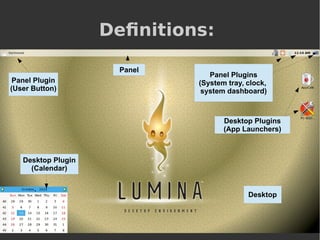
Panel Plugin 
(User Button) 
Desktop Plugins 
(App Launchers) 
Desktop Plugin 
(Calendar) 
Panel Plugins 
(System tray, clock, 
system dashboard) 
Panel 
Desktop
Definition: 
Desktop Environment 
â—Ź Common Definition (Wikipedia): 
“In computing, a desktop environment (DE) is 
an implementation of the desktop metaphor 
made of a bundle of programs running on top of 
a computer operating system, which share a 
common graphical user interface (GUI).” 
â—Ź Why does it have to be so complicated? 
– Does it need to include a bundle of 
applications? 
– Do all applications need to share a common 
interface?
Definition: 
Desktop Environment 
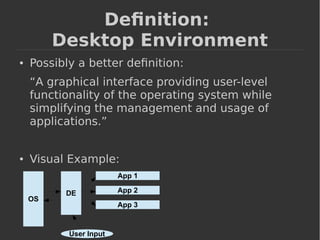
â—Ź Possibly a better definition: 
“A graphical interface providing user-level 
functionality of the operating system while 
simplifying the management and usage of 
applications.” 
â—Ź Visual Example: 
OS 
DE 
App 1 
App 2 
App 3 
User Input
Definition: 
Window Manager 
“A window manager is system software that controls 
the placement and appearance of windows within a 
windowing system in a graphical user interface. 
Most window managers are designed to help 
provide a desktop environment.” (Wikipedia) 
â—Ź Compliance with ICCCM/EWMH standards allows 
applications to work consistently between OS's 
â—Ź The level of integration between the DE and WM 
generally varies depending on the level of 
experience of the target user. 
● Most “full featured” DE's require/provide a specific 
WM for better user support and integration.
Define: Lumina-DE 
â—Ź Lumina is a lightweight, BSD-licensed 
desktop environment that focuses on 
streamlining the ability of the user to get 
work done (via 3rd-party applications) while 
minimizing system overhead. 
â—Ź Goals: 
– Minimize runtime dependencies. 
– Minimize the number of background daemons 
– Streamline launching/using applications 
– Simplify the usage of basic OS functionality 
– Strong focus on user-level customization
Define: Lumina-DE 
â—Ź What Lumina is NOT: 
– An application-development toolkit (uses Qt) 
– A graphical subsystem (uses X.org) 
– An application installation or runtime system 
(simply manages/uses applications that are 
registered with the system via the 
FreeDesktop standards) 
– An OS initialization/configuration system 
(uses pre-defined OS-specific interactions)
Dependencies 
â—Ź Runtime: 
– Fluxbox (WM) 
– X.org/Xlib with Qt 4.8+ (Graphical systems) 
– Xscreensaver, xterm, and numlockx 
– Oxygen Icon Theme 
– xbrightness or xbacklight (optional) 
â—Ź Does NOT use: 
– DBUS 
– HAL 
– Systemd 
Fresh PC-BSD 10.0.3 installation with Lumina 0.6.2 
Total System: ~0.5% CPU and ~120MB active memory use
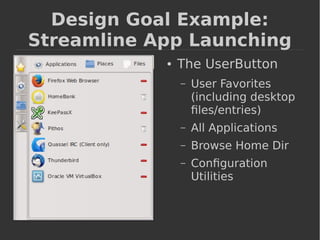
Design Goal Example: 
Streamline App Launching 
â—Ź The UserButton 
– User Favorites 
(including desktop 
files/entries) 
– All Applications 
– Browse Home Dir 
– Configuration 
Utilities
Design Goal Example: 
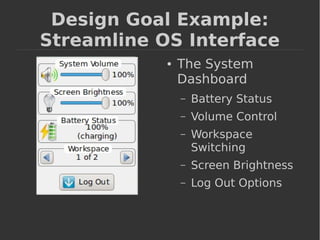
Streamline OS Interface 
â—Ź The System 
Dashboard 
– Battery Status 
– Volume Control 
– Workspace 
Switching 
– Screen Brightness 
– Log Out Options
Design Goal Example: 
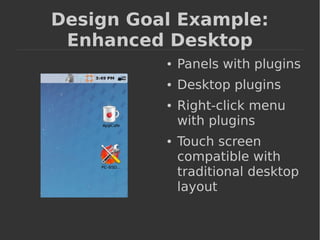
Enhanced Desktop 
â—Ź Panels with plugins 
â—Ź Desktop plugins 
â—Ź Right-click menu 
with plugins 
â—Ź Touch screen 
compatible with 
traditional desktop 
layout
Design Goal Example: 
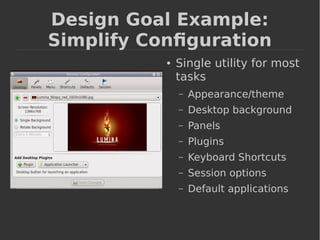
Simplify Configuration 
â—Ź Single utility for most 
tasks 
– Appearance/theme 
– Desktop background 
– Panels 
– Plugins 
– Keyboard Shortcuts 
– Session options 
– Default applications
Design Goal Example: 
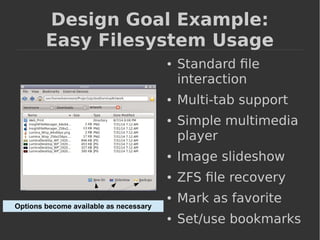
Easy Filesystem Usage 
â—Ź Standard file 
interaction 
â—Ź Multi-tab support 
â—Ź Simple multimedia 
player 
â—Ź Image slideshow 
â—Ź ZFS file recovery 
â—Ź Mark as favorite 
â—Ź Set/use bookmarks 
Options become available as necessary
Current Status 
â—Ź FreeDesktop (XDG) 
standards compliance 
– Application registration 
– Icon theme support 
– Environment variables 
– Mime-types 
– Localization 
– System tray 
â—Ź Multiple screen support 
â—Ź Multiple workspace support 
â—Ź OS-specific support 
– Control panel 
– Application “store” 
– QtConfig 
– External device detection 
– Screen Brightness 
– Audio Volume/Mixer 
– Battery status 
– Shutdown/Restart/Lock
Work In Progress 
â—Ź Theming 
– Simple to use 
– Color scheme 
independent 
– Custom Font size and 
appearance 
– Easily create new color 
schemes and apply to 
existing themes 
– Can extend to apply to 
all Qt applications 
system-wide 
â—Ź Search/Run Utility 
– Quick search 
â—Ź Run application 
â—Ź Open favorites 
– Full search 
â—Ź Home directory or 
system 
â—Ź Types of files 
â—Ź Search by partial 
name or file 
extension
Future Plans 
â—Ź Professional system modes 
– Kiosk mode 
– Whitelist-restricted access 
– Single-app 
– Daily/Weekly time restrictions 
● New “HUD” UI as an 
alternative to the panel 
system 
– Appears/disappears 
– Wraps around screen edges 
– Great for smaller screens or 
touchscreens 
– Retains “desktop” functionality 
w/ system tray, task manager, 
etc. 
â—Ź Qt-based window manager? 
â—Ź Distribution Configuration 
Standardization 
– Default theme 
– Default desktop layout and 
plugins 
– Default key bindings 
– Simple to setup for an 
administrator 
â—Ź Power savings 
– Suspend/resume plugins 
based on visibility 
– Internal Qt-based screensaver
Get Involved! 
â—Ź Full source repo available on GitHub 
https://github.com/pcbsd/lumina 
â—Ź Submit new plugins! (desktop/panel) 
â—Ź Porting to an OS? 
– Look in the “libLumina” subdirectory, and create 
a “LuminaOS-<OS-name>.cpp” file 
(Template available) 
– Already ported to: 
FreeBSD, OpenBSD, DragonFlyBSD, kFreeBSD, 
“Linux” (Debian, Ubuntu, Mint, Puppy, others?) 
â—Ź Test it out and submit bug reports! 
https://bugs.pcbsd.org/
Questions?

2014 - Lumina DE Overview

  • 1.
    Lumina DE: ANew Desktop Environment for PC-BSD Ken Moore PC-BSD/iXsystems Ohio LinuxFest October 24, 2014
  • 2.
    Definitions: Panel Plugin (User Button) Desktop Plugins (App Launchers) Desktop Plugin (Calendar) Panel Plugins (System tray, clock, system dashboard) Panel Desktop
  • 3.
    Definition: Desktop Environment ● Common Definition (Wikipedia): “In computing, a desktop environment (DE) is an implementation of the desktop metaphor made of a bundle of programs running on top of a computer operating system, which share a common graphical user interface (GUI).” ● Why does it have to be so complicated? – Does it need to include a bundle of applications? – Do all applications need to share a common interface?
  • 4.
    Definition: Desktop Environment ● Possibly a better definition: “A graphical interface providing user-level functionality of the operating system while simplifying the management and usage of applications.” ● Visual Example: OS DE App 1 App 2 App 3 User Input
  • 5.
    Definition: Window Manager “A window manager is system software that controls the placement and appearance of windows within a windowing system in a graphical user interface. Most window managers are designed to help provide a desktop environment.” (Wikipedia) ● Compliance with ICCCM/EWMH standards allows applications to work consistently between OS's ● The level of integration between the DE and WM generally varies depending on the level of experience of the target user. ● Most “full featured” DE's require/provide a specific WM for better user support and integration.
  • 6.
    Define: Lumina-DE ●Lumina is a lightweight, BSD-licensed desktop environment that focuses on streamlining the ability of the user to get work done (via 3rd-party applications) while minimizing system overhead. ● Goals: – Minimize runtime dependencies. – Minimize the number of background daemons – Streamline launching/using applications – Simplify the usage of basic OS functionality – Strong focus on user-level customization
  • 7.
    Define: Lumina-DE ●What Lumina is NOT: – An application-development toolkit (uses Qt) – A graphical subsystem (uses X.org) – An application installation or runtime system (simply manages/uses applications that are registered with the system via the FreeDesktop standards) – An OS initialization/configuration system (uses pre-defined OS-specific interactions)
  • 8.
    Dependencies ● Runtime: – Fluxbox (WM) – X.org/Xlib with Qt 4.8+ (Graphical systems) – Xscreensaver, xterm, and numlockx – Oxygen Icon Theme – xbrightness or xbacklight (optional) ● Does NOT use: – DBUS – HAL – Systemd Fresh PC-BSD 10.0.3 installation with Lumina 0.6.2 Total System: ~0.5% CPU and ~120MB active memory use
  • 9.
    Design Goal Example: Streamline App Launching ● The UserButton – User Favorites (including desktop files/entries) – All Applications – Browse Home Dir – Configuration Utilities
  • 10.
    Design Goal Example: Streamline OS Interface ● The System Dashboard – Battery Status – Volume Control – Workspace Switching – Screen Brightness – Log Out Options
  • 11.
    Design Goal Example: Enhanced Desktop â—Ź Panels with plugins â—Ź Desktop plugins â—Ź Right-click menu with plugins â—Ź Touch screen compatible with traditional desktop layout
  • 12.
    Design Goal Example: Simplify Configuration ● Single utility for most tasks – Appearance/theme – Desktop background – Panels – Plugins – Keyboard Shortcuts – Session options – Default applications
  • 13.
    Design Goal Example: Easy Filesystem Usage â—Ź Standard file interaction â—Ź Multi-tab support â—Ź Simple multimedia player â—Ź Image slideshow â—Ź ZFS file recovery â—Ź Mark as favorite â—Ź Set/use bookmarks Options become available as necessary
  • 14.
    Current Status ●FreeDesktop (XDG) standards compliance – Application registration – Icon theme support – Environment variables – Mime-types – Localization – System tray ● Multiple screen support ● Multiple workspace support ● OS-specific support – Control panel – Application “store” – QtConfig – External device detection – Screen Brightness – Audio Volume/Mixer – Battery status – Shutdown/Restart/Lock
  • 15.
    Work In Progress ● Theming – Simple to use – Color scheme independent – Custom Font size and appearance – Easily create new color schemes and apply to existing themes – Can extend to apply to all Qt applications system-wide ● Search/Run Utility – Quick search ● Run application ● Open favorites – Full search ● Home directory or system ● Types of files ● Search by partial name or file extension
  • 16.
    Future Plans ●Professional system modes – Kiosk mode – Whitelist-restricted access – Single-app – Daily/Weekly time restrictions ● New “HUD” UI as an alternative to the panel system – Appears/disappears – Wraps around screen edges – Great for smaller screens or touchscreens – Retains “desktop” functionality w/ system tray, task manager, etc. ● Qt-based window manager? ● Distribution Configuration Standardization – Default theme – Default desktop layout and plugins – Default key bindings – Simple to setup for an administrator ● Power savings – Suspend/resume plugins based on visibility – Internal Qt-based screensaver
  • 17.
    Get Involved! ●Full source repo available on GitHub https://github.com/pcbsd/lumina ● Submit new plugins! (desktop/panel) ● Porting to an OS? – Look in the “libLumina” subdirectory, and create a “LuminaOS-<OS-name>.cpp” file (Template available) – Already ported to: FreeBSD, OpenBSD, DragonFlyBSD, kFreeBSD, “Linux” (Debian, Ubuntu, Mint, Puppy, others?) ● Test it out and submit bug reports! https://bugs.pcbsd.org/
  • 18.