program
– What is research data
– Kaptur
– What is visual arts research
  data
– Importance of research data
– Principles for data curation
  and preservation
– Break
– Group exercise
– Data management planning
– DMPOnline


2
What is research data?
    ‘data in the form of facts,
    observations, images,
    computer program results,
    recordings, measurements
    or experiences on which an
    argument, theory, test or
    hypothesis, or another
    research output is based.
    Data may be numerical,
    descriptive, visual or
    tactile. It may be raw,
    cleaned or processed, and
    may be held in any format
    or media’ - Queensland University
    of Technology Management Policy


3
Kaptur
– Model of best practice
– Environmental assessment
– Evaluate management
  systems from user
  perspective
– Deliver RDM policy
– Sustainability and business
  plan
– DMPOnline
– Dissemination


4
Findings
    There appears to be little
    consensus in the visual
    arts on what research data
    is and what it consists of.
    Variously described by the
    interviewees as tangible,
    intangible, digital, and
    physical; this confirms the
    view of the project team
    that visual arts research
    data is heterogeneous and
    infinite, complex and
    complicated. – Kaptur
    Environmental Assessment Report


5
Findings
–   Difficult to define
–   Multiple roles
–   Awareness
–   Collaboration
–   Outside the institution
–   Need for assistance
–   Archiving
–   Storage
–   Re-use of material

6
Kaptur definition
    Evidence which is used or created to generate new
    knowledge and interpretations. ‘Evidence’ may be
    intersubjective or subjective; physical or emotional;
    persistent or ephemeral; personal or public; explicit or tacit;
    and is consciously or unconsciously referenced by the
    researcher at some point during the course of their research.
    As part of the research process, research data maybe
    collated in a structured way to create a dataset to
    substantiate a particular interpretation, analysis or
    argument. A dataset may or may not lead to a research
    output, which regardless of method of presentation, is a
    planned public statement of new knowledge or
    interpretation– Leigh Garrett, VADS


7
Definition
    “Within the creative arts
     research data is evidence
     of an identified research
      activity
 Research data
       includes preparatory,
           unfinished and
         supportive work in
      digital form in addition
          to data relating to
        completed works.” –
             Project CAiRO


8
Types of data
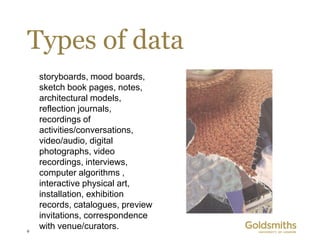
    storyboards, mood boards,
    sketch book pages, notes,
    architectural models,
    reflection journals,
    recordings of
    activities/conversations,
    video/audio, digital
    photographs, video
    recordings, interviews,
    computer algorithms ,
    interactive physical art,
    installation, exhibition
    records, catalogues, preview
    invitations, correspondence
9
    with venue/curators.
Why manage?
         ‘data drives a huge amount of what happens in our
             lives
because someone takes the data and does
                         something with it’ -Tim Berners-Lee

      ‘The management of research data is recognised as one
            of the most pressing challenges facing the higher
                       education and research sectors’ - JISC

     ‘It is a truth universally acknowledged that researchers
       are interested in data of all kinds, regardless of origin
                       or type’ – Australian National Data Service


10
Drivers
– Good practice
– Funder requirements
– Quantity of data in digital
  form being produced
– New technologies and
  practices
– Danger of obsolescence, loss
  of data, integrity of the data
– Follow up projects
– Data can be of value long
  after a research project
– Validation of research
– Full economic return
11
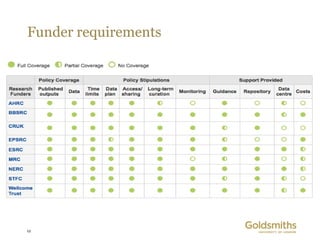
Funder requirements


12
Goldsmiths RDM Policy
                 http://www.gold.ac.uk/research-data/

–    Agreed standards
–    Throughout research data lifecycle
–    Funding body requirements
–    PI responsibility
–    Capture, management, integrity, confidentiality, retention, sharing,
     reuse, publication
–    College will preserve access (up to 10 years)
–    Deposit elsewhere should be registered
–    FOI needs to be considered
–    Data repository


13
Curation
– Focusing on what is needed
  for validation and re-use,
  rather than on the intrinsic
  attributes of research data,
  is useful because it raises
  important considerations
  that might otherwise be
  seen as external to the
  dataset itself but impact
  upon the value and future
  use of the dataset: for
  example, identifiers, file-
  naming protocols,
  metadata and
  documentation University of
     Melbourne draft policy on the Management of
     Research Data and Records
14
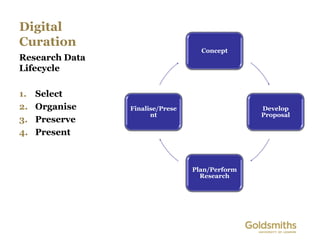
Digital
Curation
                                   Concept
Research Data
Lifecycle

1.   Select
2.   Organise   Finalise/Prese                  Develop
                      nt                        Proposal
3.   Preserve
4.   Present


                                 Plan/Perform
                                   Research
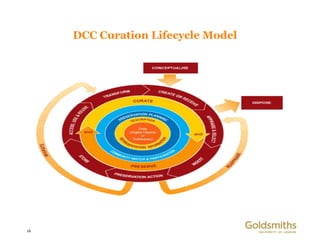
DCC Curation Lifecycle Model


16
Digital Preservation
– Longevity: the data will be available for the period of time
  their current and future users (the designated community)
  requires.

– Integrity: the data are authentic – they have not been
  manipulated, forged or substituted. Because digital
  preservation techniques such as migration inevitably alter the
  data, authenticity has to be demonstrated by paying attention
  to characteristics of the data such as provenance and context

– Accessibility: we can locate and use the data in the future in
  a way that is acceptable to its designated community.


17
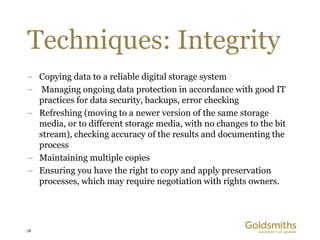
Techniques: Integrity
– Copying data to a reliable digital storage system
– Managing ongoing data protection in accordance with good IT
  practices for data security, backups, error checking
– Refreshing (moving to a newer version of the same storage
  media, or to different storage media, with no changes to the bit
  stream), checking accuracy of the results and documenting the
  process
– Maintaining multiple copies
– Ensuring you have the right to copy and apply preservation
  processes, which may require negotiation with rights owners.


18
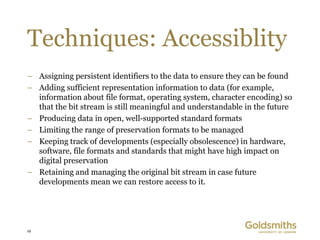
Techniques: Accessiblity
– Assigning persistent identifiers to the data to ensure they can be found
– Adding sufficient representation information to data (for example,
  information about file format, operating system, character encoding) so
  that the bit stream is still meaningful and understandable in the future
– Producing data in open, well-supported standard formats
– Limiting the range of preservation formats to be managed
– Keeping track of developments (especially obsolescence) in hardware,
  software, file formats and standards that might have high impact on
  digital preservation
– Retaining and managing the original bit stream in case future
  developments mean we can restore access to it.


19
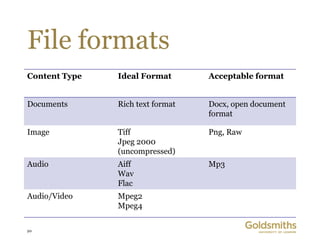
File formats
Content Type   Ideal Format       Acceptable format


Documents      Rich text format   Docx, open document
                                  format

Image          Tiff               Png, Raw
               Jpeg 2000
               (uncompressed)
Audio          Aiff               Mp3
               Wav
               Flac
Audio/Video    Mpeg2
               Mpeg4

20
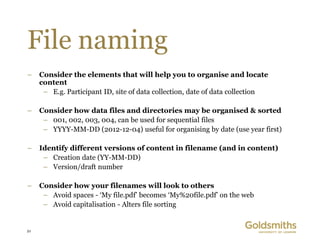
File naming
–    Consider the elements that will help you to organise and locate
     content
      – E.g. Participant ID, site of data collection, date of data collection

–    Consider how data files and directories may be organised & sorted
      – 001, 002, 003, 004, can be used for sequential files
      – YYYY-MM-DD (2012-12-04) useful for organising by date (use year first)

–    Identify different versions of content in filename (and in content)
      – Creation date (YY-MM-DD)
      – Version/draft number

–    Consider how your filenames will look to others
      – Avoid spaces - ‘My file.pdf’ becomes ‘My%20file.pdf’ on the web
      – Avoid capitalisation - Alters file sorting


21
break


22
Group exercise
                From the research output example

1. Identify the different possible types of research data
2. How would you ‘Kaptur’ this data? Hardware? Software?
   Formats? Documentation?
3. Are there any issues concerning IPR, copyright, data protection,
   ethics?
4. What would you need to do to ensure longevity, accessibility and
   integrity of the data?


23
links
–    https://dmponline.dcc.ac.uk/
–    http://kaptur.wordpress.com/
–    http://www.dcc.ac.uk/
–    http://www.jisc.ac.uk/whatwedo/programmes/mrd.aspx
–    http://datalib.edina.ac.uk/mantra/
–    http://www.dcc.ac.uk/resources/curation-lifecycle-model
–    http://kapturmrd01.eventbrite.co.uk/
–    http://www.projectcairo.org/
–    http://www.vads.ac.uk/kaptur/
–    http://vocab.bris.ac.uk/data/glossary


24
images
–    http://www.flickr.com/photos/articnomad/16153058/sizes/z/in/photostream/ - joshua Davis
     Photography
–    http://kirok-of-lstok.deviantart.com/art/Secrets-in-Unanswered-Questions-Title-Artwork-290260406
–    Back them up! http://vads.ac.uk/flarge.php?uid=33946&sos=0
–    Reckitt, Helena, Mullin, Diane and Scoates, Christopher. 0001.
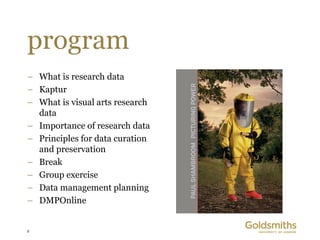
–    Paul Shambroom: Picturing Power.http://eprints.gold.ac.uk/7628/
–    Born out of pleasure – Harrell Fletcher http://eprints.gold.ac.uk/7655/
–    Other images Andrew Gra/Janice Ward


25
Thanks!


26

20130222 kaptur training_goldsmiths

  • 2.
    program – What isresearch data – Kaptur – What is visual arts research data – Importance of research data – Principles for data curation and preservation – Break – Group exercise – Data management planning – DMPOnline 2
  • 3.
    What is researchdata? ‘data in the form of facts, observations, images, computer program results, recordings, measurements or experiences on which an argument, theory, test or hypothesis, or another research output is based. Data may be numerical, descriptive, visual or tactile. It may be raw, cleaned or processed, and may be held in any format or media’ - Queensland University of Technology Management Policy 3
  • 4.
    Kaptur – Model ofbest practice – Environmental assessment – Evaluate management systems from user perspective – Deliver RDM policy – Sustainability and business plan – DMPOnline – Dissemination 4
  • 5.
    Findings There appears to be little consensus in the visual arts on what research data is and what it consists of. Variously described by the interviewees as tangible, intangible, digital, and physical; this confirms the view of the project team that visual arts research data is heterogeneous and infinite, complex and complicated. – Kaptur Environmental Assessment Report 5
  • 6.
    Findings – Difficult to define – Multiple roles – Awareness – Collaboration – Outside the institution – Need for assistance – Archiving – Storage – Re-use of material 6
  • 7.
    Kaptur definition Evidence which is used or created to generate new knowledge and interpretations. ‘Evidence’ may be intersubjective or subjective; physical or emotional; persistent or ephemeral; personal or public; explicit or tacit; and is consciously or unconsciously referenced by the researcher at some point during the course of their research. As part of the research process, research data maybe collated in a structured way to create a dataset to substantiate a particular interpretation, analysis or argument. A dataset may or may not lead to a research output, which regardless of method of presentation, is a planned public statement of new knowledge or interpretation– Leigh Garrett, VADS 7
  • 8.
    Definition “Within the creative arts research data is evidence of an identified research activity
 Research data includes preparatory, unfinished and supportive work in digital form in addition to data relating to completed works.” – Project CAiRO 8
  • 9.
    Types of data storyboards, mood boards, sketch book pages, notes, architectural models, reflection journals, recordings of activities/conversations, video/audio, digital photographs, video recordings, interviews, computer algorithms , interactive physical art, installation, exhibition records, catalogues, preview invitations, correspondence 9 with venue/curators.
  • 10.
    Why manage? ‘data drives a huge amount of what happens in our lives
because someone takes the data and does something with it’ -Tim Berners-Lee ‘The management of research data is recognised as one of the most pressing challenges facing the higher education and research sectors’ - JISC ‘It is a truth universally acknowledged that researchers are interested in data of all kinds, regardless of origin or type’ – Australian National Data Service 10
  • 11.
    Drivers – Good practice –Funder requirements – Quantity of data in digital form being produced – New technologies and practices – Danger of obsolescence, loss of data, integrity of the data – Follow up projects – Data can be of value long after a research project – Validation of research – Full economic return 11
  • 12.
  • 13.
    Goldsmiths RDM Policy http://www.gold.ac.uk/research-data/ – Agreed standards – Throughout research data lifecycle – Funding body requirements – PI responsibility – Capture, management, integrity, confidentiality, retention, sharing, reuse, publication – College will preserve access (up to 10 years) – Deposit elsewhere should be registered – FOI needs to be considered – Data repository 13
  • 14.
    Curation – Focusing onwhat is needed for validation and re-use, rather than on the intrinsic attributes of research data, is useful because it raises important considerations that might otherwise be seen as external to the dataset itself but impact upon the value and future use of the dataset: for example, identifiers, file- naming protocols, metadata and documentation University of Melbourne draft policy on the Management of Research Data and Records 14
  • 15.
    Digital Curation Concept Research Data Lifecycle 1. Select 2. Organise Finalise/Prese Develop nt Proposal 3. Preserve 4. Present Plan/Perform Research
  • 16.
  • 17.
    Digital Preservation – Longevity:the data will be available for the period of time their current and future users (the designated community) requires. – Integrity: the data are authentic – they have not been manipulated, forged or substituted. Because digital preservation techniques such as migration inevitably alter the data, authenticity has to be demonstrated by paying attention to characteristics of the data such as provenance and context – Accessibility: we can locate and use the data in the future in a way that is acceptable to its designated community. 17
  • 18.
    Techniques: Integrity – Copyingdata to a reliable digital storage system – Managing ongoing data protection in accordance with good IT practices for data security, backups, error checking – Refreshing (moving to a newer version of the same storage media, or to different storage media, with no changes to the bit stream), checking accuracy of the results and documenting the process – Maintaining multiple copies – Ensuring you have the right to copy and apply preservation processes, which may require negotiation with rights owners. 18
  • 19.
    Techniques: Accessiblity – Assigningpersistent identifiers to the data to ensure they can be found – Adding sufficient representation information to data (for example, information about file format, operating system, character encoding) so that the bit stream is still meaningful and understandable in the future – Producing data in open, well-supported standard formats – Limiting the range of preservation formats to be managed – Keeping track of developments (especially obsolescence) in hardware, software, file formats and standards that might have high impact on digital preservation – Retaining and managing the original bit stream in case future developments mean we can restore access to it. 19
  • 20.
    File formats Content Type Ideal Format Acceptable format Documents Rich text format Docx, open document format Image Tiff Png, Raw Jpeg 2000 (uncompressed) Audio Aiff Mp3 Wav Flac Audio/Video Mpeg2 Mpeg4 20
  • 21.
    File naming – Consider the elements that will help you to organise and locate content – E.g. Participant ID, site of data collection, date of data collection – Consider how data files and directories may be organised & sorted – 001, 002, 003, 004, can be used for sequential files – YYYY-MM-DD (2012-12-04) useful for organising by date (use year first) – Identify different versions of content in filename (and in content) – Creation date (YY-MM-DD) – Version/draft number – Consider how your filenames will look to others – Avoid spaces - ‘My file.pdf’ becomes ‘My%20file.pdf’ on the web – Avoid capitalisation - Alters file sorting 21
  • 22.
  • 23.
    Group exercise From the research output example 1. Identify the different possible types of research data 2. How would you ‘Kaptur’ this data? Hardware? Software? Formats? Documentation? 3. Are there any issues concerning IPR, copyright, data protection, ethics? 4. What would you need to do to ensure longevity, accessibility and integrity of the data? 23
  • 24.
    links – https://dmponline.dcc.ac.uk/ – http://kaptur.wordpress.com/ – http://www.dcc.ac.uk/ – http://www.jisc.ac.uk/whatwedo/programmes/mrd.aspx – http://datalib.edina.ac.uk/mantra/ – http://www.dcc.ac.uk/resources/curation-lifecycle-model – http://kapturmrd01.eventbrite.co.uk/ – http://www.projectcairo.org/ – http://www.vads.ac.uk/kaptur/ – http://vocab.bris.ac.uk/data/glossary 24
  • 25.
    images – http://www.flickr.com/photos/articnomad/16153058/sizes/z/in/photostream/ - joshua Davis Photography – http://kirok-of-lstok.deviantart.com/art/Secrets-in-Unanswered-Questions-Title-Artwork-290260406 – Back them up! http://vads.ac.uk/flarge.php?uid=33946&sos=0 – Reckitt, Helena, Mullin, Diane and Scoates, Christopher. 0001. – Paul Shambroom: Picturing Power.http://eprints.gold.ac.uk/7628/ – Born out of pleasure – Harrell Fletcher http://eprints.gold.ac.uk/7655/ – Other images Andrew Gra/Janice Ward 25
  • 26.