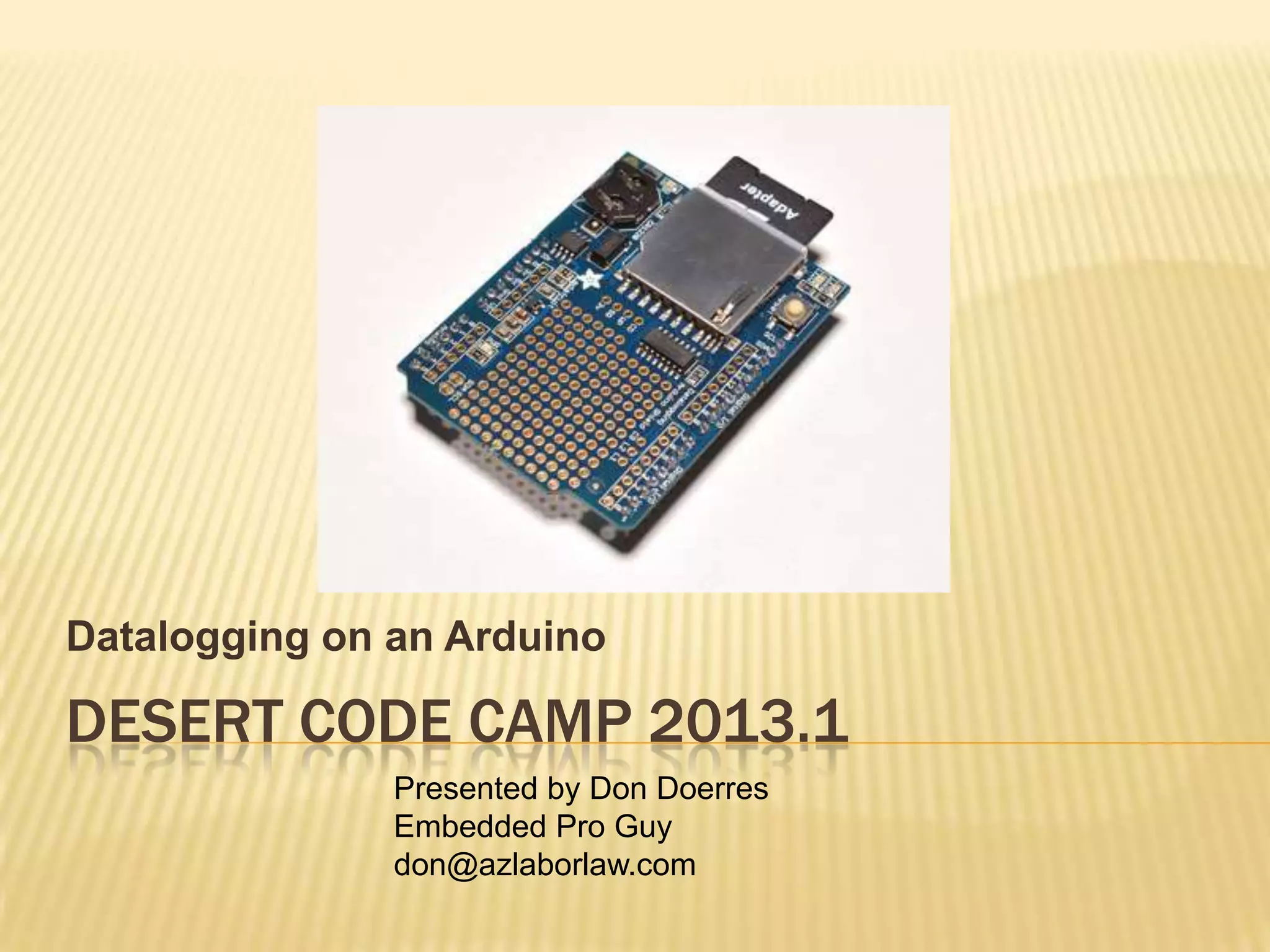
Datalogging on an Arduino

DESERT CODE CAMP 2013.1
               Presented by Don Doerres
               Embedded Pro Guy
               don@azlaborlaw.com
TODAY’S TAKEAWAYS

 The Arduino is a good starting point for a
  data logger, a device used to obtain and
  store data over a long period of time
 The Arduino with a few add-ins is capable of
     Storing data with time tags
     Displaying data in real time

     Doing these tasks without tying up a bigger
      computer
IDEA WAS TO LOG WEATHER

 I started with a barometer (BMP085) and a
  humidity sensor (DHT11)
 Both of these also provide temperature
  information
 Power came from a desktop computer
  through USB cable to Arduino, Arduino to
  breadboard
FIRST BREADBOARD
SERIOUS WEATHER…
WEATHER WATCHING…

 Observing an approaching dust storm, I
  realized that I didn’t want to leave the
  computer or sensors outside
 Barometric pressure turned out to be
  adequate for storm tracking
 Indoors, humidity did not change much

 So, I decided to record barometric pressure
  and temperature
ORIGINALLY USED PC

 Used Tera Term (Terminal Emulator) to log
  data
 Tera Term added time stamp from PC clock

 Once prototype was working, wanted to
  move time keeping function and data logging
  to Arduino and not tie up PC
ARDUINO TIMING SIX MINUTES,
WRITING TO SERIAL PORT
        Tera Term Screen


          Tera Term Log File—Adds Time Stamp
ORIGINAL PLAN: CHRONODOT & SD BREAKOUT

 Chronodot is a highly accurate clock with
  battery backup
 SD Breakout allows simple connection to SD
  card
 However, the combination would simply not
  fit on an Arduino breakout shield, let alone
  any sensors
DOT AND SD ON ARDUINO BREADBOARD

Dot


 SD
 breakout


         This picture shows the Dot and the SD card breakout
         This works as a breadboard, but is too big for a
          shield
ADAFRUIT INTRODUCED A DATA LOGGER SHIELD

 About the time I realized that my logger
  would not fit on a prototype shield, Adafruit
  introduced their new logger shield
 This had a slightly lower accuracy clock than
  the Dot, but it had everything else in surface
  mount parts
 All I had to do was add the pressure sensor
  and a connection to a 16X2 LCD display
ADAFRUIT LOGGER SHIELD
                     Battery Holder
                                         SD Holder
 DS1307 RTC


     Adafruit logger shield
     Surface mount parts left prototype area quite large
      enough for sensors
     Add an I2C 16X2 LCD display
SENSOR SELECTION

 This is the BMP085 pressure sensor
 This is a sensitive barometer/altimeter and
  temperature sensor
 It runs on 5V

 It has an I2C interface
I2C BUS

 This is a very simple serial Inter-Integrated
  Circuit connection bus, hence I2C
 The interface consists of Clock, Data, and
  ground
 Multiple devices can be hooked to the same
  bus as long as they have different addresses
 The devices I used, pressure sensor
  (address 0x77) and display (address 0), do
  have different addresses
BMP085 CONNECTION TO ARDUINO
16X2 LCD DISPLAY WITH I2C BACKPACK

   This is a back view showing the four wire
    connections—same connections as BMP085


                                          GND To GND
                  DAT to A4
                              CLK to A5
                                          5V To 5V
OTHER CONNECTIONS

 The SD breakout and the Clock are already
  wired up on the shield
 The pressure sensor I soldered to the I2C
  connection pads on the shield
 The LCD display I simply plugged in to the
  shield
 The BMP and the LCD display have different
  I2C addresses, so there is no conflict
TYPICAL DISPLAY

 Date (Year not shown), local time
 Temperature in F, Pressure in mmHG

 Display updates every 5 seconds

 Data is stored to SD card every 6 minutes
WHAT GOES ON THE SD CARD

 The log is Comma Separated Values (CSV)
  of Time, Temperature, Pressure
 Time is stored as a ‘C’ time stamp (more
  about this in two slides)
 Temperature is degrees F

 Pressure is in millimeters of Mercury (mmHg)
SAMPLE OF LOG FILE
 1363516494,79.0,691.0
 1363516868,79.0,691.0
 1363517243,79.0,691.0
 1363517617,79.1,691.1
 1363517991,79.1,691.1
 1363518365,79.1,691.1
 1363518740,79.1,691.1
 1363519114,79.2,691.2
 1363519488,79.2,691.2
 1363519862,79.2,691.2
 1363520237,79.2,691.2
 1363520611,79.1,691.1
 1363520985,79.2,691.2
 1363521359,79.1,691.1
 1363521734,79.1,691.1
 1363522108,79.2,691.2
 1363522482,79.2,691.2
 1363522857,79.2,691.2
 1363523231,79.2,691.2
 1363523605,79.2,691.2
 1363523979,79.2,691.2
 1363524354,79.2,691.2
 1363524728,79.1,691.1
 1363525102,79.1,691.1
 1363525476,79.1,691.1
THE CTIME STAMP

 The C language uses as a time stamp the
  number of seconds since January 1, 1970
 A 32 bit signed integer allows counting
  seconds until January 19, 2038 at 03:14:07
  GMT
 …by then, we will likely switch to 64 bit
  integers
 And, yes, the value is a signed integer so
  that comparisons can be readily made
DISPLAYING IN EXCEL OR OTHER SPREADSHEET

 It is simple to convert ctime to Excel time
 The macro is, using ‘A2’ as a sample cell:
                =DATE(1970,1,1)+(A2)/86400


   Display format is controlled with Excel
    formatting
              CTIME    Increase Delta    Day      Date         Time Deg F     mmHg
            1363504243         0     0   Sun   Mar 17, 2013   07:10:43 74.2    691.2
            1363506389      2146 2146    Sun   Mar 17, 2013   07:46:29 75.4    691.4
            1363506764      2521  375    Sun   Mar 17, 2013   07:52:44 76.7    691.7
            1363507138      2895  374    Sun   Mar 17, 2013   07:58:58 77.5    691.5
            1363507512      3269  374    Sun   Mar 17, 2013   08:05:12 77.4    691.4
            1363507886      3643  374    Sun   Mar 17, 2013   08:11:26 77.3    691.3
            1363508261      4018  375    Sun   Mar 17, 2013   08:17:41 77.3    691.3
LIBRARIES
UNITS

 The units of the BMP085 pressure sensor
  are Degrees C and pressure in Pascals
 Conversions are in order


        tempy = bmp.readTemperature();
        tempy = (tempy * 9.0 / 5.0) + 32.0;

        press = bmp.readPressure();
        fpress = (float)press* 0.007500616827042;
TIMESET.INO, 1 OF 2
// timeSet.ino

#include <Wire.h>
#include <RTClib.h>
#include <LiquidCrystal.h>

LiquidCrystal lcd(0);
RTC_DS1307 RTC;
DateTime now;

void setup()
{
Serial.begin(57600);
Wire.begin();
RTC.begin();
RTC.adjust(DateTime(__DATE__, __TIME__));
lcd.begin(16, 2);
lcd.setBacklight(HIGH); //HIGH is ON, LOW is OFF
}
TIMESET.INO, 2 OF 2
void loop()
{
   now = RTC.now();
   lcd.setCursor(0, 0);
   lcd.print(now.year(), DEC);
   lcd.print('/');
    if(now.month() < 10) lcd.print("0");
    lcd.print(now.month(), DEC);
    lcd.print('/');
    if(now.day() < 10) lcd.print("0");
    lcd.print(now.day(), DEC);
    lcd.setCursor(0, 1);
    if(now.hour() < 10) lcd.print("0");
    lcd.print(now.hour(), DEC);
    lcd.print(':');
    if(now.minute() < 10) lcd.print("0");
    lcd.print(now.minute(), DEC);
    lcd.print(':');
    if(now.second() < 10) lcd.print("0");
    lcd.print(now.second(), DEC);
   delay(2000);
}
AUGUST 11, 2012 STORM IN PHOENIX

   About 10 hours of plot


                                BMP_mmHg
             719.60

             719.40

             719.20

             719.00

             718.80

             718.60

             718.40

             718.20
                      0   100   200   300   400   500   600
39 HOTEL FLOORS AT
LAS VEGAS FOUR SEASONS
 Stepped up the logging rate to once per
  second
 Three round trips
                         706

                         704

                         702

                         700

                         698

                         696
                         694

                         692
                  -500         0   500   1000   1500   2000
FUTURE WORK

 Add time setting over serial while running
 Seems to be a small temperature rise of
  about 2 degrees F with the display running
 Add fancier display, perhaps a 1 hour plot of
  data on a dot matrix display
DCC_DATALOGGER_3.INO 1 OF 9
// DCC_DataLogger.ino
#include <Wire.h>
#include <RTClib.h>
#include <Adafruit_BMP085.h>
#include <LiquidCrystal.h>
#include <SD.h>

// On display, connect via i2c, default address #0 (A0-A2 not jumpered)
LiquidCrystal lcd(0);

RTC_DS1307 RTC;
Adafruit_BMP085 bmp;
const int chipSelect = 10;

File dataFile;

unsigned long int press; // press is a long
float tempy; // temperature is a float
float fpress;
int loopSec = 0;
int loopMin = 0;
int num;
// make a string for assembling the data to log:
String dataString = "";

DateTime now;
DCC_DATALOGGER_3.INO 2 OF 9
void setup()
{
Serial.begin(57600);
Wire.begin();
RTC.begin();
bmp.begin();

// set up the LCD's number of rows and columns:
lcd.begin(16, 2);
lcd.setBacklight(HIGH); //HIGH is ON, LOW is OFF

if (! RTC.isrunning())
    {
    Serial.println("RTC is NOT running!");
    // following line sets the RTC to the date & time this sketch was compiled
    RTC.adjust(DateTime(__DATE__, __TIME__));
    }
Serial.print("Initializing SD card...");
  // make sure that the default chip select pin is set to
  // output, even if you don't use it:
pinMode(SS, OUTPUT);
DCC_DATALOGGER_3.INO 3 OF 9
// see if the card is present and can be initialized:
if (!SD.begin(chipSelect))
    {
    Serial.println("Card failed, or not present");
    // don't do anything more:
    while (1) ;
    }
Serial.println("card initialized.");

  // Open up the file we're going to log to!
  // This is an APPEND open
dataFile = SD.open("datalog.txt", FILE_WRITE);
if (! dataFile)
    {
    Serial.println("error opening datalog.txt");
    // Wait forever since we can't write data
    while (1) ;
    }
}
DCC_DATALOGGER_3.INO 4 OF 9
void loop()
{
static int i;

if ( (loopSec % 5) == 0)
    {
    //Serial.println(__DATE__, __TIME__);
    tempy = bmp.readTemperature();
    tempy = (tempy * 9.0 / 5.0) + 32.0;
    press = bmp.readPressure();
    fpress = (float)press* 0.007500616827042;

   now = RTC.now();

   Serial.print(now.year(), DEC);
   Serial.print('/');
   if(now.month() < 10) Serial.print("0");
   Serial.print(now.month(), DEC);
   Serial.print('/');
   if(now.day() < 10) Serial.print("0");
   Serial.print(now.day(), DEC);
   Serial.print(' ');
DCC_DATALOGGER_3.INO 5 OF 9
if(now.hour() < 10) Serial.print("0");
    Serial.print(now.hour(), DEC);
    Serial.print(':');
    if(now.minute() < 10) Serial.print("0");
    Serial.print(now.minute(), DEC);
    Serial.print(':');
    if(now.second() < 10) Serial.print("0");
    Serial.print(now.second(), DEC);
    Serial.println();

   Serial.print("C time is = ");
   Serial.println(now.unixtime());

   lcd.setCursor(0, 0);
   // lcd.print(now.year(), DEC);
   // lcd.print('/');
   if(now.month() < 10) lcd.print("0");
   lcd.print(now.month(), DEC);
   lcd.print('/');
   if(now.day() < 10) lcd.print("0");
   lcd.print(now.day(), DEC);
   lcd.print("   ");
DCC_DATALOGGER_3.INO 6 OF 9
if(now.hour() < 10) lcd.print("0");
   lcd.print(now.hour(), DEC);
   lcd.print(':');
   if(now.minute() < 10) lcd.print("0");
   lcd.print(now.minute(), DEC);
   lcd.print(':');
   if(now.second() < 10) lcd.print("0");
   lcd.print(now.second(), DEC);

   lcd.setCursor(0, 1);
   lcd.print(tempy,1);
   lcd.print("F");

   lcd.print(" ");
   lcd.print(fpress,1);
   lcd.print("mmHg");

   Serial.print(tempy,1);
   Serial.print(" Deg F, ");
   Serial.print(fpress,1);
   Serial.println(" mmHgn");
   }
DCC_DATALOGGER_3.INO 7 OF 9
delay(1000);
loopSec+=1;

if(loopSec == 360) // 6 minutes
    {
    static bool lcdStatus = true; // LCD light on or off
    loopSec = 0;

    lcd.clear();
    lcd.setCursor(0, 0);
    lcd.print("Writing SD...");

    dataString = String(now.unixtime());
    dataString += ",";
    num = tempy;
    dataString += String(num);
    dataString += ".";
    tempy-=num;
    tempy+=0.05;
    tempy*=10.0;
    num=tempy;
    dataString+=String(num);
    dataString += ",";
    num = fpress;
    dataString += String(num);
DCC_DATALOGGER_3.INO 8 OF 9
dataString += ".";
    fpress-=num;
    fpress+=0.05;
    fpress*=10.0;
    num = tempy;
    dataString +=String(num);

    dataFile.println(dataString);


    // The following line will 'save' the file to the SD card after every
    // line of data - this will use more power and slow down how much data
    // you can read but it's safer!
    // If you want to speed up the system, remove the call to flush() and it
    // will save the file only every 512 bytes - every time a sector on the
    // SD card is filled with data.
    dataFile.flush();
    delay(1000);
    lcd.clear();

    // To check out if display LED was causing warming,
    // cycle it off/on every six minutes
    // #define LEDONOFF
    #ifdef LEDONOFF
    lcdStatus = !lcdStatus;
DCC_DATALOGGER_3.INO 9 OF 9
if(lcdStatus)
         {
       lcd.setBacklight(HIGH); //HIGH is ON, LOW is OFF
         }
    else
         {
         lcd.setBacklight(LOW); //HIGH is ON, LOW is OFF
         }
    #endif
    }
}
DOWNLOADS 1

 Grateful to Lady Ada!!!!
 Adafruit SD library:

https://github.com/adafruit/SD
 Adafruit RTC library:

https://github.com/adafruit/RTClib
 Adafruit logging shield tutorial:

http://learn.adafruit.com/adafruit-data-logger-
  shield
DOWNLOADS 2

 LCD i2c backpack tutorial
 http://learn.adafruit.com/i2c-spi-lcd-backpack

 Liquid Crystal control library

 https://github.com/adafruit/LiquidCrystal
QUESTIONS?

   Find more slides from Don at
    www.slideshare.net/dondoerres

2013 1 arduino_datalogger

  • 1.
    Datalogging on anArduino DESERT CODE CAMP 2013.1 Presented by Don Doerres Embedded Pro Guy don@azlaborlaw.com
  • 2.
    TODAY’S TAKEAWAYS  TheArduino is a good starting point for a data logger, a device used to obtain and store data over a long period of time  The Arduino with a few add-ins is capable of  Storing data with time tags  Displaying data in real time  Doing these tasks without tying up a bigger computer
  • 3.
    IDEA WAS TOLOG WEATHER  I started with a barometer (BMP085) and a humidity sensor (DHT11)  Both of these also provide temperature information  Power came from a desktop computer through USB cable to Arduino, Arduino to breadboard
  • 4.
  • 5.
  • 6.
    WEATHER WATCHING…  Observingan approaching dust storm, I realized that I didn’t want to leave the computer or sensors outside  Barometric pressure turned out to be adequate for storm tracking  Indoors, humidity did not change much  So, I decided to record barometric pressure and temperature
  • 7.
    ORIGINALLY USED PC Used Tera Term (Terminal Emulator) to log data  Tera Term added time stamp from PC clock  Once prototype was working, wanted to move time keeping function and data logging to Arduino and not tie up PC
  • 8.
    ARDUINO TIMING SIXMINUTES, WRITING TO SERIAL PORT Tera Term Screen Tera Term Log File—Adds Time Stamp
  • 9.
    ORIGINAL PLAN: CHRONODOT& SD BREAKOUT  Chronodot is a highly accurate clock with battery backup  SD Breakout allows simple connection to SD card  However, the combination would simply not fit on an Arduino breakout shield, let alone any sensors
  • 10.
    DOT AND SDON ARDUINO BREADBOARD Dot SD breakout  This picture shows the Dot and the SD card breakout  This works as a breadboard, but is too big for a shield
  • 11.
    ADAFRUIT INTRODUCED ADATA LOGGER SHIELD  About the time I realized that my logger would not fit on a prototype shield, Adafruit introduced their new logger shield  This had a slightly lower accuracy clock than the Dot, but it had everything else in surface mount parts  All I had to do was add the pressure sensor and a connection to a 16X2 LCD display
  • 12.
    ADAFRUIT LOGGER SHIELD Battery Holder SD Holder DS1307 RTC  Adafruit logger shield  Surface mount parts left prototype area quite large enough for sensors  Add an I2C 16X2 LCD display
  • 13.
    SENSOR SELECTION  Thisis the BMP085 pressure sensor  This is a sensitive barometer/altimeter and temperature sensor  It runs on 5V  It has an I2C interface
  • 14.
    I2C BUS  Thisis a very simple serial Inter-Integrated Circuit connection bus, hence I2C  The interface consists of Clock, Data, and ground  Multiple devices can be hooked to the same bus as long as they have different addresses  The devices I used, pressure sensor (address 0x77) and display (address 0), do have different addresses
  • 15.
  • 16.
    16X2 LCD DISPLAYWITH I2C BACKPACK  This is a back view showing the four wire connections—same connections as BMP085 GND To GND DAT to A4 CLK to A5 5V To 5V
  • 17.
    OTHER CONNECTIONS  TheSD breakout and the Clock are already wired up on the shield  The pressure sensor I soldered to the I2C connection pads on the shield  The LCD display I simply plugged in to the shield  The BMP and the LCD display have different I2C addresses, so there is no conflict
  • 18.
    TYPICAL DISPLAY  Date(Year not shown), local time  Temperature in F, Pressure in mmHG  Display updates every 5 seconds  Data is stored to SD card every 6 minutes
  • 19.
    WHAT GOES ONTHE SD CARD  The log is Comma Separated Values (CSV) of Time, Temperature, Pressure  Time is stored as a ‘C’ time stamp (more about this in two slides)  Temperature is degrees F  Pressure is in millimeters of Mercury (mmHg)
  • 20.
    SAMPLE OF LOGFILE 1363516494,79.0,691.0 1363516868,79.0,691.0 1363517243,79.0,691.0 1363517617,79.1,691.1 1363517991,79.1,691.1 1363518365,79.1,691.1 1363518740,79.1,691.1 1363519114,79.2,691.2 1363519488,79.2,691.2 1363519862,79.2,691.2 1363520237,79.2,691.2 1363520611,79.1,691.1 1363520985,79.2,691.2 1363521359,79.1,691.1 1363521734,79.1,691.1 1363522108,79.2,691.2 1363522482,79.2,691.2 1363522857,79.2,691.2 1363523231,79.2,691.2 1363523605,79.2,691.2 1363523979,79.2,691.2 1363524354,79.2,691.2 1363524728,79.1,691.1 1363525102,79.1,691.1 1363525476,79.1,691.1
  • 21.
    THE CTIME STAMP The C language uses as a time stamp the number of seconds since January 1, 1970  A 32 bit signed integer allows counting seconds until January 19, 2038 at 03:14:07 GMT  …by then, we will likely switch to 64 bit integers  And, yes, the value is a signed integer so that comparisons can be readily made
  • 22.
    DISPLAYING IN EXCELOR OTHER SPREADSHEET  It is simple to convert ctime to Excel time  The macro is, using ‘A2’ as a sample cell: =DATE(1970,1,1)+(A2)/86400  Display format is controlled with Excel formatting CTIME Increase Delta Day Date Time Deg F mmHg 1363504243 0 0 Sun Mar 17, 2013 07:10:43 74.2 691.2 1363506389 2146 2146 Sun Mar 17, 2013 07:46:29 75.4 691.4 1363506764 2521 375 Sun Mar 17, 2013 07:52:44 76.7 691.7 1363507138 2895 374 Sun Mar 17, 2013 07:58:58 77.5 691.5 1363507512 3269 374 Sun Mar 17, 2013 08:05:12 77.4 691.4 1363507886 3643 374 Sun Mar 17, 2013 08:11:26 77.3 691.3 1363508261 4018 375 Sun Mar 17, 2013 08:17:41 77.3 691.3
  • 23.
  • 24.
    UNITS  The unitsof the BMP085 pressure sensor are Degrees C and pressure in Pascals  Conversions are in order tempy = bmp.readTemperature(); tempy = (tempy * 9.0 / 5.0) + 32.0; press = bmp.readPressure(); fpress = (float)press* 0.007500616827042;
  • 25.
    TIMESET.INO, 1 OF2 // timeSet.ino #include <Wire.h> #include <RTClib.h> #include <LiquidCrystal.h> LiquidCrystal lcd(0); RTC_DS1307 RTC; DateTime now; void setup() { Serial.begin(57600); Wire.begin(); RTC.begin(); RTC.adjust(DateTime(__DATE__, __TIME__)); lcd.begin(16, 2); lcd.setBacklight(HIGH); //HIGH is ON, LOW is OFF }
  • 26.
    TIMESET.INO, 2 OF2 void loop() { now = RTC.now(); lcd.setCursor(0, 0); lcd.print(now.year(), DEC); lcd.print('/'); if(now.month() < 10) lcd.print("0"); lcd.print(now.month(), DEC); lcd.print('/'); if(now.day() < 10) lcd.print("0"); lcd.print(now.day(), DEC); lcd.setCursor(0, 1); if(now.hour() < 10) lcd.print("0"); lcd.print(now.hour(), DEC); lcd.print(':'); if(now.minute() < 10) lcd.print("0"); lcd.print(now.minute(), DEC); lcd.print(':'); if(now.second() < 10) lcd.print("0"); lcd.print(now.second(), DEC); delay(2000); }
  • 27.
    AUGUST 11, 2012STORM IN PHOENIX  About 10 hours of plot BMP_mmHg 719.60 719.40 719.20 719.00 718.80 718.60 718.40 718.20 0 100 200 300 400 500 600
  • 28.
    39 HOTEL FLOORSAT LAS VEGAS FOUR SEASONS  Stepped up the logging rate to once per second  Three round trips 706 704 702 700 698 696 694 692 -500 0 500 1000 1500 2000
  • 29.
    FUTURE WORK  Addtime setting over serial while running  Seems to be a small temperature rise of about 2 degrees F with the display running  Add fancier display, perhaps a 1 hour plot of data on a dot matrix display
  • 30.
    DCC_DATALOGGER_3.INO 1 OF9 // DCC_DataLogger.ino #include <Wire.h> #include <RTClib.h> #include <Adafruit_BMP085.h> #include <LiquidCrystal.h> #include <SD.h> // On display, connect via i2c, default address #0 (A0-A2 not jumpered) LiquidCrystal lcd(0); RTC_DS1307 RTC; Adafruit_BMP085 bmp; const int chipSelect = 10; File dataFile; unsigned long int press; // press is a long float tempy; // temperature is a float float fpress; int loopSec = 0; int loopMin = 0; int num; // make a string for assembling the data to log: String dataString = ""; DateTime now;
  • 31.
    DCC_DATALOGGER_3.INO 2 OF9 void setup() { Serial.begin(57600); Wire.begin(); RTC.begin(); bmp.begin(); // set up the LCD's number of rows and columns: lcd.begin(16, 2); lcd.setBacklight(HIGH); //HIGH is ON, LOW is OFF if (! RTC.isrunning()) { Serial.println("RTC is NOT running!"); // following line sets the RTC to the date & time this sketch was compiled RTC.adjust(DateTime(__DATE__, __TIME__)); } Serial.print("Initializing SD card..."); // make sure that the default chip select pin is set to // output, even if you don't use it: pinMode(SS, OUTPUT);
  • 32.
    DCC_DATALOGGER_3.INO 3 OF9 // see if the card is present and can be initialized: if (!SD.begin(chipSelect)) { Serial.println("Card failed, or not present"); // don't do anything more: while (1) ; } Serial.println("card initialized."); // Open up the file we're going to log to! // This is an APPEND open dataFile = SD.open("datalog.txt", FILE_WRITE); if (! dataFile) { Serial.println("error opening datalog.txt"); // Wait forever since we can't write data while (1) ; } }
  • 33.
    DCC_DATALOGGER_3.INO 4 OF9 void loop() { static int i; if ( (loopSec % 5) == 0) { //Serial.println(__DATE__, __TIME__); tempy = bmp.readTemperature(); tempy = (tempy * 9.0 / 5.0) + 32.0; press = bmp.readPressure(); fpress = (float)press* 0.007500616827042; now = RTC.now(); Serial.print(now.year(), DEC); Serial.print('/'); if(now.month() < 10) Serial.print("0"); Serial.print(now.month(), DEC); Serial.print('/'); if(now.day() < 10) Serial.print("0"); Serial.print(now.day(), DEC); Serial.print(' ');
  • 34.
    DCC_DATALOGGER_3.INO 5 OF9 if(now.hour() < 10) Serial.print("0"); Serial.print(now.hour(), DEC); Serial.print(':'); if(now.minute() < 10) Serial.print("0"); Serial.print(now.minute(), DEC); Serial.print(':'); if(now.second() < 10) Serial.print("0"); Serial.print(now.second(), DEC); Serial.println(); Serial.print("C time is = "); Serial.println(now.unixtime()); lcd.setCursor(0, 0); // lcd.print(now.year(), DEC); // lcd.print('/'); if(now.month() < 10) lcd.print("0"); lcd.print(now.month(), DEC); lcd.print('/'); if(now.day() < 10) lcd.print("0"); lcd.print(now.day(), DEC); lcd.print(" ");
  • 35.
    DCC_DATALOGGER_3.INO 6 OF9 if(now.hour() < 10) lcd.print("0"); lcd.print(now.hour(), DEC); lcd.print(':'); if(now.minute() < 10) lcd.print("0"); lcd.print(now.minute(), DEC); lcd.print(':'); if(now.second() < 10) lcd.print("0"); lcd.print(now.second(), DEC); lcd.setCursor(0, 1); lcd.print(tempy,1); lcd.print("F"); lcd.print(" "); lcd.print(fpress,1); lcd.print("mmHg"); Serial.print(tempy,1); Serial.print(" Deg F, "); Serial.print(fpress,1); Serial.println(" mmHgn"); }
  • 36.
    DCC_DATALOGGER_3.INO 7 OF9 delay(1000); loopSec+=1; if(loopSec == 360) // 6 minutes { static bool lcdStatus = true; // LCD light on or off loopSec = 0; lcd.clear(); lcd.setCursor(0, 0); lcd.print("Writing SD..."); dataString = String(now.unixtime()); dataString += ","; num = tempy; dataString += String(num); dataString += "."; tempy-=num; tempy+=0.05; tempy*=10.0; num=tempy; dataString+=String(num); dataString += ","; num = fpress; dataString += String(num);
  • 37.
    DCC_DATALOGGER_3.INO 8 OF9 dataString += "."; fpress-=num; fpress+=0.05; fpress*=10.0; num = tempy; dataString +=String(num); dataFile.println(dataString); // The following line will 'save' the file to the SD card after every // line of data - this will use more power and slow down how much data // you can read but it's safer! // If you want to speed up the system, remove the call to flush() and it // will save the file only every 512 bytes - every time a sector on the // SD card is filled with data. dataFile.flush(); delay(1000); lcd.clear(); // To check out if display LED was causing warming, // cycle it off/on every six minutes // #define LEDONOFF #ifdef LEDONOFF lcdStatus = !lcdStatus;
  • 38.
    DCC_DATALOGGER_3.INO 9 OF9 if(lcdStatus) { lcd.setBacklight(HIGH); //HIGH is ON, LOW is OFF } else { lcd.setBacklight(LOW); //HIGH is ON, LOW is OFF } #endif } }
  • 39.
    DOWNLOADS 1  Gratefulto Lady Ada!!!!  Adafruit SD library: https://github.com/adafruit/SD  Adafruit RTC library: https://github.com/adafruit/RTClib  Adafruit logging shield tutorial: http://learn.adafruit.com/adafruit-data-logger- shield
  • 40.
    DOWNLOADS 2  LCDi2c backpack tutorial  http://learn.adafruit.com/i2c-spi-lcd-backpack  Liquid Crystal control library  https://github.com/adafruit/LiquidCrystal
  • 41.
    QUESTIONS?  Find more slides from Don at www.slideshare.net/dondoerres