Architecting Applications in the AWS Cloud1
Help business apps move to the cloud
2
Problems facing Enterprise IT
¨  ever-growing datasets
¨  unpredictable traffic patterns
¨  demand for faster response times
¨  budget constraints
Business Benefits of Cloud
3
¨  With utility-style pricing - no fixed cost
¨  Just-in-Time Infrastructure
¨  More Efficient Resource Use
¨  Usage-Based Costing
¨  Reduced Time to Market
Technical Benefits of Cloud Computing
4
¨  Scriptable Infrastructure
¨  Auto-scaling
¨  Proactive Scaling
¨  More Efficient Development Life Cycle
¨  Improved Testability
¨  Disaster Recovery and Business Continuity
¨  "Overflow" the Traffic to the Cloud
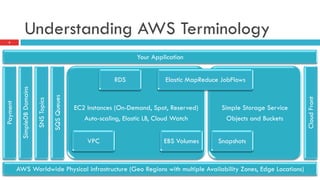
Understanding AWS Terminology
5
Your Application
Payment
AWS Worldwide Physical infrastructure (Geo Regions with multiple Availability Zones, Edge Locations)
SimpleDBDomains
SNSTopics
SQSQueues
CloudFront
Simple Storage Service
Objects and Buckets
EC2 Instances (On-Demand, Spot, Reserved)
Auto-scaling, Elastic LB, Cloud Watch
SnapshotsEBS VolumesVPC
RDS Elastic MapReduce JobFlows
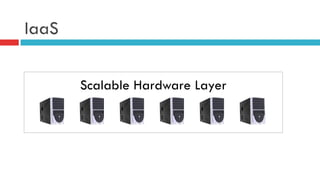
IaaS
Scalable Hardware Layer
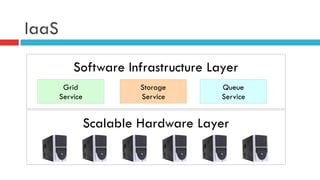
IaaS
Scalable Hardware Layer
Software Infrastructure Layer
Grid
Service
Storage
Service
Queue
Service
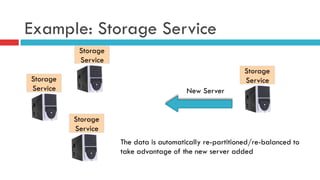
Example: Storage Service
Storage
Service
Storage
Service
Storage
Service
Storage
Service
New Server
The data is automatically re-partitioned/re-balanced to
take advantage of the new server added
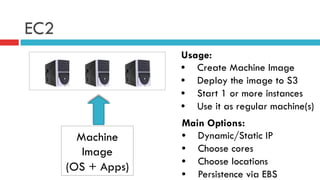
EC2
Machine
Image
(OS + Apps)
Usage:
•  Create Machine Image
•  Deploy the image to S3
•  Start 1 or more instances
•  Use it as regular machine(s)
Main Options:
•  Dynamic/Static IP
•  Choose cores
•  Choose locations
•  Persistence via EBS
Sample EC2 Use Cases
Batch Processing
§  All instances are configured with the same code
§  Each instance operates on a subset of data
§  Partitions are specified in a configuration file
Web Service
§  All instances are configured with the same code
§  One or more instances are configured as load balancers (HAProxy for
example)
§  DNS Server distributes requests between load balancers
EC2 vs. Web Hosting Company
Good
§  Instantly add new instances
§  Full-control over the machines and choice of the environment
§  Likely cheaper (but depends on your exact situation)
Bad
§  Need to put the images together and manage instances
§  No dedicated technical support (but there is premium support and
RightScale like solutions)
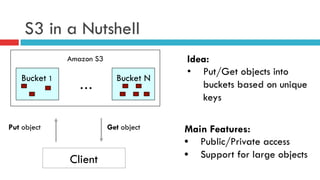
S3 in a Nutshell
Client
Idea:
•  Put/Get objects into
buckets based on unique
keys
Main Features:
•  Public/Private access
•  Support for large objects
Amazon S3
Bucket 1 Bucket N
…
Put object Get object
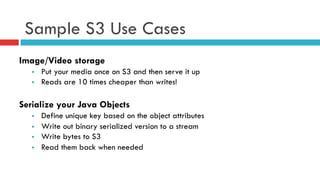
Sample S3 Use Cases
Image/Video storage
§  Put your media once on S3 and then serve it up
§  Reads are 10 times cheaper than writes!
Serialize your Java Objects
§  Define unique key based on the object attributes
§  Write out binary serialized version to a stream
§  Write bytes to S3
§  Read them back when needed
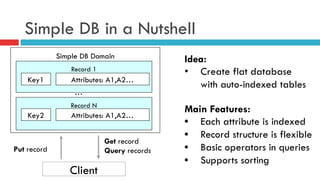
Simple DB in a Nutshell
Client
Idea:
•  Create flat database
with auto-indexed tables
Main Features:
•  Each attribute is indexed
•  Record structure is flexible
•  Basic operators in queries
•  Supports sorting
Simple DB Domain
Record 1
Put record
Get record
Query records
Key1 Attributes: A1,A2…
Record N
Key2 Attributes: A1,A2…
…
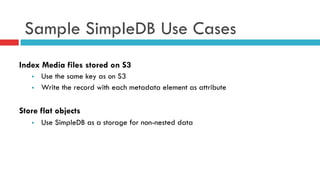
Sample SimpleDB Use Cases
Index Media files stored on S3
§  Use the same key as on S3
§  Write the record with each metadata element as attribute
Store flat objects
§  Use SimpleDB as a storage for non-nested data
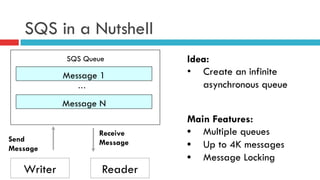
SQS in a Nutshell
Writer
Idea:
•  Create an infinite
asynchronous queue
Main Features:
•  Multiple queues
•  Up to 4K messages
•  Message Locking
SQS Queue
Message 1
Send
Message
Receive
Message
Message N
…
Reader
Sample SQS Use Cases
Twitter Friend Update
§  For each update generate a task to update friends
§  Process updates in order
Publish/Subscribe
§  Post messages to the queue to inform multiple subscribers
Process Pipeline
§  Use different queues to put, for example, and order through a pipeline
One liner Descriptions
¨  Elastic IP: Allocate a static IP and assign to an instance
¨  CloudWatch: Monitor CPU utilization, disk r/w, & network traffic
¨  Auto-scaling group: Auto-scale based on metric from CloudWatch
¨  Elastic Load Balancing: Distribute incoming traffic to web instances
¨  Elastic Block Storage: network-attached persistent storage for EC2
¨  Point-in-time EBS snapshots can be created and stored in S3
¨  S3: distributed data store: store and retrieve objects in buckets
¨  Cloud Front: objects distributed & cached at multiple edge locations worldwide
¨  SimpleDB: a database w/ real-time querying of structured data
¨  RDS: a full-featured relational database in the cloud
¨  SQS: a reliable, scalable, hosted distributed queue for storing/retrieving messages
¨  Elastic MapReduce: a hosted Hadoop framework on EC2+S3 enabling custom JobFlows
¨  SNS: a way to notify applications or people from the cloud by creating Topics and using a publish-subscribe protocol
¨  VPC: extend your corporate network into a IPSEC private cloud contained within AWS
¨  Payment services: payment and billing services using Amazon's payment infrastructure.
18
Building Scalable Architectures
¨  Cloud is infinitely scalable: Architect for scalability
¨  Identify the monolithic components and bottlenecks in your architecture
¨  Identify the areas where you cannot leverage the on-demand provisioning
capabilities in your architecture
¨  Refactor your application in order to leverage the scalable infrastructure and take
advantage of the cloud
¨  Characteristics of a truly scalable application
¤  Increasing resources results in a proportional increase in performance
¤  Cost per unit reduces as the number of units increases
¤  Handles heterogeneity
¤  Is operationally efficient and resilient
19
Fear No Constraints
¨  Cloud might not have the exact specification of the resource that you have on-premise
¤  e.g., "Cloud does not provide X amount of RAM in a server" or "My database needs to have more IOPS
than what I can get in a single instance”
¨  Even though you might not get an exact replica of your hardware in the cloud environment, you
have the ability to get more of those resources in the cloud to compensate that need
¤  e.g., if the cloud does not give N GB RAM in a server,
n  use a distributed cache like memcached or
n  partition your data across multiple servers
¤  e.g., if your database need more read-heavy IOPS than what cloud offers,
n  distribute the read load across a fleet of synchronized slaves or
n  use a sharding algorithm that routes the data where it needs to be or
n  use a database clustering solution
¨  Apparent constraints can be broken in ways that will improve the scalability and performance
20
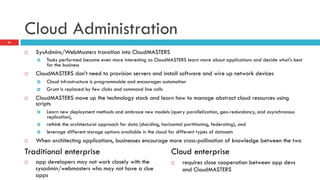
Cloud Administration
¨  SysAdmins/WebMasters transition into CloudMASTERS
¤  Tasks performed become even more interesting as CloudMASTERS learn more about applications and decide what's best
for the business
¨  CloudMASTERS don’t need to provision servers and install software and wire up network devices
¤  Cloud infrastructure is programmable and encourages automation
¤  Grunt is replaced by few clicks and command line calls
¨  CloudMASTERS move up the technology stack and learn how to manage abstract cloud resources using
scripts
¤  Learn new deployment methods and embrace new models (query parallelization, geo-redundancy, and asynchronous
replication),
¤  rethink the architectural approach for data (sharding, horizontal partitioning, federating), and
¤  leverage different storage options available in the cloud for different types of datasets
¨  When architecting applications, businesses encourage more cross-pollination of knowledge between the two
21
¨  app developers may not work closely with the
sysadmin/webmasters who may not have a clue
apps
¨  requires close cooperation between app devs
and CloudMASTERS
Traditional enterprise Cloud enterprise
Design for auto recovery from Failure
¨  Failure will happen (period)
¨  Automated recovery from failure
¤  always design, implement, & deploy for auto recovery
22
Be a pessimist
¨  Assume that
¤  hardware will fail
¤  outages will occur
¤  some disaster will strike
¤  your app will be slammed with more than expected load
some day
¤  with time your application software will fail too
¨  Plan auto-recovery during design time
23
Fault-tolerant Cloud Architecture
¨  What if a node in your system fails?
¤  How do you recognize failure?
¤  How do I replace that node?
¨  What are my app’s single points of failure?
¤  what if load balancer fails?
n  a load balancer sits in front of an array of application servers
¤  What if the master node fails in a master/slave system?
n  How does the failover occur?
n  How is a new slave instantiated
n  How does new slave sync with the master?
24
Fault-tolerant Cloud Architecture
¨  What happens to my app if the dependent services
changes its interface?
¨  What if downstream service times out or returns an
exception?
¨  What if the cache keys grow beyond memory limit
of an instance?
25
Mechanism to handle failure
¨  Have a coherent backup and restore strategy for your
data and automate it
¨  Build process threads that resume on reboot
¨  Allow the state of the system to re-sync by reloading
messages from queues
¨  Keep preconfigured and pre-optimized virtual images
to support strategies 2 and 3 on launch/boot
¨  Avoid in-memory sessions or user states; use data stores
26
Impervious to reboots/re-launches
¨  If a controller instance dies,
¤  its brought up, and
¤  resumed to previous state
¤  as if no evil had happened
27
28
Thank you.
Appendix29
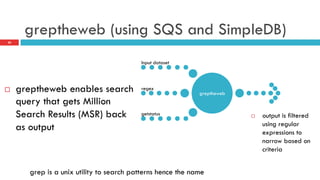
greptheweb (using SQS and SimpleDB)
¨  greptheweb enables search
query that gets Million
Search Results (MSR) back
as output
30
grep is a unix utility to search patterns hence the name
greptheweb
Input dataset
regex
getstatus ¨  output is filtered
using regular
expressions to
narrow based on
criteria

Architecting applications in the AWS cloud

  • 1.
  • 2.
    Help business appsmove to the cloud 2 Problems facing Enterprise IT ¨  ever-growing datasets ¨  unpredictable traffic patterns ¨  demand for faster response times ¨  budget constraints
  • 3.
    Business Benefits ofCloud 3 ¨  With utility-style pricing - no fixed cost ¨  Just-in-Time Infrastructure ¨  More Efficient Resource Use ¨  Usage-Based Costing ¨  Reduced Time to Market
  • 4.
    Technical Benefits ofCloud Computing 4 ¨  Scriptable Infrastructure ¨  Auto-scaling ¨  Proactive Scaling ¨  More Efficient Development Life Cycle ¨  Improved Testability ¨  Disaster Recovery and Business Continuity ¨  "Overflow" the Traffic to the Cloud
  • 5.
    Understanding AWS Terminology 5 YourApplication Payment AWS Worldwide Physical infrastructure (Geo Regions with multiple Availability Zones, Edge Locations) SimpleDBDomains SNSTopics SQSQueues CloudFront Simple Storage Service Objects and Buckets EC2 Instances (On-Demand, Spot, Reserved) Auto-scaling, Elastic LB, Cloud Watch SnapshotsEBS VolumesVPC RDS Elastic MapReduce JobFlows
  • 6.
  • 7.
    IaaS Scalable Hardware Layer SoftwareInfrastructure Layer Grid Service Storage Service Queue Service
  • 8.
    Example: Storage Service Storage Service Storage Service Storage Service Storage Service NewServer The data is automatically re-partitioned/re-balanced to take advantage of the new server added
  • 9.
    EC2 Machine Image (OS + Apps) Usage: • Create Machine Image •  Deploy the image to S3 •  Start 1 or more instances •  Use it as regular machine(s) Main Options: •  Dynamic/Static IP •  Choose cores •  Choose locations •  Persistence via EBS
  • 10.
    Sample EC2 UseCases Batch Processing §  All instances are configured with the same code §  Each instance operates on a subset of data §  Partitions are specified in a configuration file Web Service §  All instances are configured with the same code §  One or more instances are configured as load balancers (HAProxy for example) §  DNS Server distributes requests between load balancers
  • 11.
    EC2 vs. WebHosting Company Good §  Instantly add new instances §  Full-control over the machines and choice of the environment §  Likely cheaper (but depends on your exact situation) Bad §  Need to put the images together and manage instances §  No dedicated technical support (but there is premium support and RightScale like solutions)
  • 12.
    S3 in aNutshell Client Idea: •  Put/Get objects into buckets based on unique keys Main Features: •  Public/Private access •  Support for large objects Amazon S3 Bucket 1 Bucket N … Put object Get object
  • 13.
    Sample S3 UseCases Image/Video storage §  Put your media once on S3 and then serve it up §  Reads are 10 times cheaper than writes! Serialize your Java Objects §  Define unique key based on the object attributes §  Write out binary serialized version to a stream §  Write bytes to S3 §  Read them back when needed
  • 14.
    Simple DB ina Nutshell Client Idea: •  Create flat database with auto-indexed tables Main Features: •  Each attribute is indexed •  Record structure is flexible •  Basic operators in queries •  Supports sorting Simple DB Domain Record 1 Put record Get record Query records Key1 Attributes: A1,A2… Record N Key2 Attributes: A1,A2… …
  • 15.
    Sample SimpleDB UseCases Index Media files stored on S3 §  Use the same key as on S3 §  Write the record with each metadata element as attribute Store flat objects §  Use SimpleDB as a storage for non-nested data
  • 16.
    SQS in aNutshell Writer Idea: •  Create an infinite asynchronous queue Main Features: •  Multiple queues •  Up to 4K messages •  Message Locking SQS Queue Message 1 Send Message Receive Message Message N … Reader
  • 17.
    Sample SQS UseCases Twitter Friend Update §  For each update generate a task to update friends §  Process updates in order Publish/Subscribe §  Post messages to the queue to inform multiple subscribers Process Pipeline §  Use different queues to put, for example, and order through a pipeline
  • 18.
    One liner Descriptions ¨ Elastic IP: Allocate a static IP and assign to an instance ¨  CloudWatch: Monitor CPU utilization, disk r/w, & network traffic ¨  Auto-scaling group: Auto-scale based on metric from CloudWatch ¨  Elastic Load Balancing: Distribute incoming traffic to web instances ¨  Elastic Block Storage: network-attached persistent storage for EC2 ¨  Point-in-time EBS snapshots can be created and stored in S3 ¨  S3: distributed data store: store and retrieve objects in buckets ¨  Cloud Front: objects distributed & cached at multiple edge locations worldwide ¨  SimpleDB: a database w/ real-time querying of structured data ¨  RDS: a full-featured relational database in the cloud ¨  SQS: a reliable, scalable, hosted distributed queue for storing/retrieving messages ¨  Elastic MapReduce: a hosted Hadoop framework on EC2+S3 enabling custom JobFlows ¨  SNS: a way to notify applications or people from the cloud by creating Topics and using a publish-subscribe protocol ¨  VPC: extend your corporate network into a IPSEC private cloud contained within AWS ¨  Payment services: payment and billing services using Amazon's payment infrastructure. 18
  • 19.
    Building Scalable Architectures ¨ Cloud is infinitely scalable: Architect for scalability ¨  Identify the monolithic components and bottlenecks in your architecture ¨  Identify the areas where you cannot leverage the on-demand provisioning capabilities in your architecture ¨  Refactor your application in order to leverage the scalable infrastructure and take advantage of the cloud ¨  Characteristics of a truly scalable application ¤  Increasing resources results in a proportional increase in performance ¤  Cost per unit reduces as the number of units increases ¤  Handles heterogeneity ¤  Is operationally efficient and resilient 19
  • 20.
    Fear No Constraints ¨ Cloud might not have the exact specification of the resource that you have on-premise ¤  e.g., "Cloud does not provide X amount of RAM in a server" or "My database needs to have more IOPS than what I can get in a single instance” ¨  Even though you might not get an exact replica of your hardware in the cloud environment, you have the ability to get more of those resources in the cloud to compensate that need ¤  e.g., if the cloud does not give N GB RAM in a server, n  use a distributed cache like memcached or n  partition your data across multiple servers ¤  e.g., if your database need more read-heavy IOPS than what cloud offers, n  distribute the read load across a fleet of synchronized slaves or n  use a sharding algorithm that routes the data where it needs to be or n  use a database clustering solution ¨  Apparent constraints can be broken in ways that will improve the scalability and performance 20
  • 21.
    Cloud Administration ¨  SysAdmins/WebMasterstransition into CloudMASTERS ¤  Tasks performed become even more interesting as CloudMASTERS learn more about applications and decide what's best for the business ¨  CloudMASTERS don’t need to provision servers and install software and wire up network devices ¤  Cloud infrastructure is programmable and encourages automation ¤  Grunt is replaced by few clicks and command line calls ¨  CloudMASTERS move up the technology stack and learn how to manage abstract cloud resources using scripts ¤  Learn new deployment methods and embrace new models (query parallelization, geo-redundancy, and asynchronous replication), ¤  rethink the architectural approach for data (sharding, horizontal partitioning, federating), and ¤  leverage different storage options available in the cloud for different types of datasets ¨  When architecting applications, businesses encourage more cross-pollination of knowledge between the two 21 ¨  app developers may not work closely with the sysadmin/webmasters who may not have a clue apps ¨  requires close cooperation between app devs and CloudMASTERS Traditional enterprise Cloud enterprise
  • 22.
    Design for autorecovery from Failure ¨  Failure will happen (period) ¨  Automated recovery from failure ¤  always design, implement, & deploy for auto recovery 22
  • 23.
    Be a pessimist ¨ Assume that ¤  hardware will fail ¤  outages will occur ¤  some disaster will strike ¤  your app will be slammed with more than expected load some day ¤  with time your application software will fail too ¨  Plan auto-recovery during design time 23
  • 24.
    Fault-tolerant Cloud Architecture ¨ What if a node in your system fails? ¤  How do you recognize failure? ¤  How do I replace that node? ¨  What are my app’s single points of failure? ¤  what if load balancer fails? n  a load balancer sits in front of an array of application servers ¤  What if the master node fails in a master/slave system? n  How does the failover occur? n  How is a new slave instantiated n  How does new slave sync with the master? 24
  • 25.
    Fault-tolerant Cloud Architecture ¨ What happens to my app if the dependent services changes its interface? ¨  What if downstream service times out or returns an exception? ¨  What if the cache keys grow beyond memory limit of an instance? 25
  • 26.
    Mechanism to handlefailure ¨  Have a coherent backup and restore strategy for your data and automate it ¨  Build process threads that resume on reboot ¨  Allow the state of the system to re-sync by reloading messages from queues ¨  Keep preconfigured and pre-optimized virtual images to support strategies 2 and 3 on launch/boot ¨  Avoid in-memory sessions or user states; use data stores 26
  • 27.
    Impervious to reboots/re-launches ¨ If a controller instance dies, ¤  its brought up, and ¤  resumed to previous state ¤  as if no evil had happened 27
  • 28.
  • 29.
  • 30.
    greptheweb (using SQSand SimpleDB) ¨  greptheweb enables search query that gets Million Search Results (MSR) back as output 30 grep is a unix utility to search patterns hence the name greptheweb Input dataset regex getstatus ¨  output is filtered using regular expressions to narrow based on criteria