18CSS101J – Programming for Problem
Solving Unit I
SRM
INSTITUTEOFSCIENCEANDTECHNOLOGY,
CHENNAI.
P.GOWSIKRAJA, AP(SrG)/CSE,
DEPARTMENT OF CSE,
SRM IST.
SRM
INSTITUTEOFSCIENCEANDTECHNOLOGY,
CHENNAI.
COURSELEARNINGRATIONALE
(CLR)
Thepurposeoflearningthiscourseisto:
CLR-1:
Thinkandevolvealogicallyto construct analgorithm into aflowchart and
apseudocodethat canbe programmed
CLR-2:
Utilize the logical operators and expressions to solve problems in
engineering and real-time
CLR-3: Store andretrieve data in a singleandmultidimensional array
CLR-4:
Utilize custom designedfunctionsthat canbe usedto perform tasks and
canbe repeatedly used in any application
CLR-5:
Create storage constructs usingstructure andunions.Create andUtilize
filesto store andretrieve information
CLR-6:
Create alogicalmindset to solvevariousengineering applicationsusing
programming constructs in C
SRM
INSTITUTEOFSCIENCEANDTECHNOLOGY,
CHENNAI.
COURSELEARNING
OUTCOMES(CLO)
Attheendofthiscourse,learnerswillbeableto:
CLO-1:
Identify methods to solveaproblem through computer programming. List
the basicdata types andvariablesin C
CLO-2:
Apply the logic operators and expressions. Use loop constructs and
recursion. Usearray to store andretrieve data
CLO-3:
Analyzeprograms that need storage andform singleandmulti-dimensional
arrays. Usepreprocessor constructs in C
CLO-4:
Create user definedfunctionsfor mathematical andother logicaloperations.
Usepointer to addressmemory and data
CLO-5:
Create structures andunionsto represent dataconstructs. Usefilesto store
andretrieve data
CLO-6:
Apply programmingconcepts to solve problems. Learn about how
C programming canbe effectivelyused for solutions
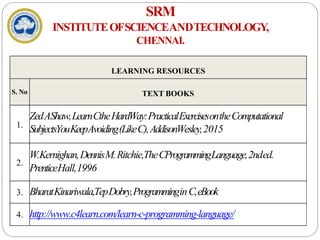
LEARNING RESOURCES
S. No TEXT BOOKS
1.
ZedAShaw,LearnCtheHardWay:PracticalExercisesontheComputational
SubjectsYouKeepAvoiding(LikeC),AddisonWesley,2015
2.
W.Kernighan,DennisM.Ritchie,TheCProgrammingLanguage,2nded.
PrenticeHall,1996
3. BharatKinariwala,TepDobry,ProgramminginC,eBook
4. http://www.c4learn.com/learn-c-programming-language/
SRM
INSTITUTEOFSCIENCEANDTECHNOLOGY,
CHENNAI.
SRM
INSTITUTEOFSCIENCEANDTECHNOLOGY,
CHENNAI.
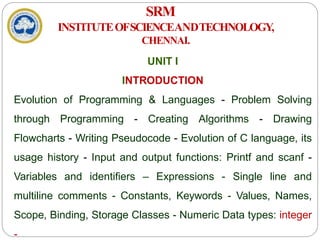
UNIT I
INTRODUCTION
Evolution of Programming & Languages - Problem Solving
through Programming - Creating Algorithms - Drawing
Flowcharts - Writing Pseudocode - Evolution of C language, its
usage history - Input and output functions: Printf and scanf -
Variables and identifiers – Expressions - Single line and
multiline comments - Constants, Keywords - Values, Names,
Scope, Binding, Storage Classes - Numeric Data types: integer
-
SRM
INSTITUTEOFSCIENCEANDTECHNOLOGY,
CHENNAI.
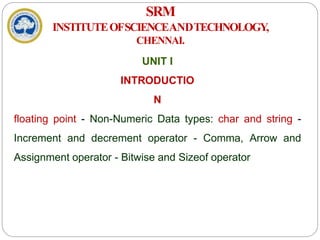
UNIT I
INTRODUCTIO
N
floating point - Non-Numeric Data types: char and string -
Increment and decrement operator - Comma, Arrow and
Assignment operator - Bitwise and Sizeof operator
SRM
INSTITUTEOFSCIENCEANDTECHNOLOGY,
CHENNAI.
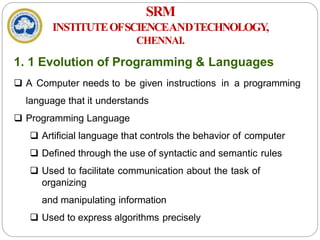
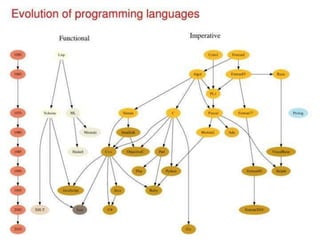
1. 1 Evolution of Programming & Languages
 A Computer needs to be given instructions in a programming
language that it understands
 Programming Language
 Artificial language that controls the behavior of computer
 Defined through the use of syntactic and semantic rules
 Used to facilitate communication about the task of
organizing
and manipulating information
 Used to express algorithms precisely
SRM
INSTITUTEOFSCIENCEANDTECHNOLOGY,
CHENNAI.
1. 1 Evolution of Programming & Languages
Contd…
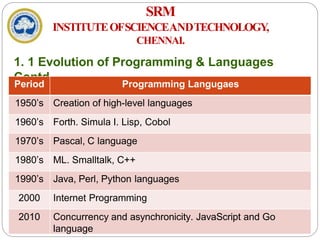
Period Programming Langugaes
1950’s Creation of high-level languages
1960’s Forth. Simula I. Lisp, Cobol
1970’s Pascal, C language
1980’s ML. Smalltalk, C++
1990’s Java, Perl, Python languages
2000 Internet Programming
2010 Concurrency and asynchronicity. JavaScript and Go
language
SRM
INSTITUTEOFSCIENCEANDTECHNOLOGY,
CHENNAI.
1. 2 Problem Solving through Programming
 Problem - Defined as any question, something involving doubt,
uncertainty, difficulty, situation whose solution is not immediately
obvious
 ComputerProblemSolving
 Understand and apply logic
 Success in solving any problem is only possible after we
have
made the effort to understand the problem at hand
 Extract from the problem statement a set of precisely
defined tasks
SRM
INSTITUTEOFSCIENCEANDTECHNOLOGY,
CHENNAI.
1. 2 Problem Solving through Programming
Contd…
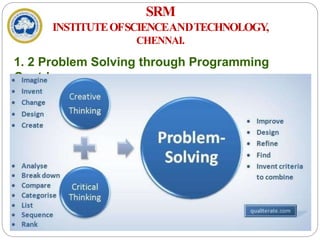
i. Creative Thinking
 Proven method for approaching a challenge or opportunity
in an imaginative way
 Process for innovation that helps explore and reframe the
problems faced, come up with new, innovative responses
and solutions and then take action
 It is generative, nonjudgmental and expansive
 Thinking creatively, a lists of new ideas are generated
SRM
INSTITUTEOFSCIENCEANDTECHNOLOGY,
CHENNAI.
1. 2 Problem Solving through Programming
Contd…
ii. CriticalThinking
 Engages a diverse range of intellectual skills and activities
that are concerned with evaluating information, our
assumptions and our thinking processes in a disciplined
way so that we can think and assess information more
comprehensively
 It is Analytical, Judgmental and Selective
 Thinking critically allows a programmer in making choices
SRM
INSTITUTEOFSCIENCEANDTECHNOLOGY,
CHENNAI.
1. 2 Problem Solving through Programming
Contd…
SRM
INSTITUTEOFSCIENCEANDTECHNOLOGY,
CHENNAI.
1. 2 Problem Solving through Programming
Contd…
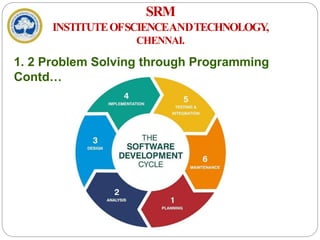
 Program - Set of instructions that instructs the computer to do
a task
 ProgrammingProcess
a) Defining the Problem
b) Planning the Solution
c) Coding the Program
d) Testing the Program
e) Documenting the Program
SRM
INSTITUTEOFSCIENCEANDTECHNOLOGY,
CHENNAI.
1. 2 Problem Solving through Programming
Contd…
SRM
INSTITUTEOFSCIENCEANDTECHNOLOGY,
CHENNAI.
1. 2 Problem Solving through Programming
Contd…
 A typical programming task can be divided into two phases:
i. Problemsolvingphase
 Produce an ordered sequence of steps that describe solution
of problem this sequence of steps is called an Algorithm
ii. Implementation phase
 Implement the program in some programming language
 StepsinProblemSolving
a) Produce a general algorithm (one can use pseudocode)
SRM
INSTITUTEOFSCIENCEANDTECHNOLOGY,
CHENNAI.
1. 2 Problem Solving through Programming
Contd…
b) Refine the algorithm successively to get step by step
detailed
algorithmthat is very close to a computer language
c) Pseudocode is an artificial and informal language that helps
programmers develop algorithms
 Pseudocode is very similar to everyday English
SRM
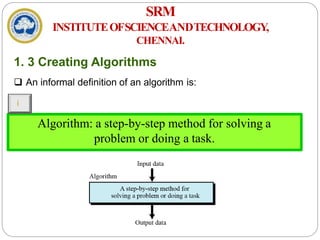
Algorithm: a step-by-step method for solving a
problem or doing a task.
INSTITUTEOFSCIENCEANDTECHNOLOGY,
CHENNAI.
1. 3 Creating Algorithms
 An informal definition of an algorithm is:
i
SRM
INSTITUTEOFSCIENCEANDTECHNOLOGY,
CHENNAI.
1. 3 Creating Algorithms Contd…
 What are Algorithms for?
 A way to communicate about your problem/solution with
others
 A possible way to solve a given problem
 A "formalization" of a method, that will be proved
 A mandatory first step before implementing a solution
 Algorithm Definition - “A finite sequence of unambiguous,
executable steps or instructions, which, if followed would
ultimately terminate and give the solution of the problem”
SRM
INSTITUTEOFSCIENCEANDTECHNOLOGY,
CHENNAI.
1. 3 Creating Algorithms
 Notations
 Starting point
 Step Numbers – Positions in Algorithm
Incoming Information - Input
 Control Flow – Order of evaluating Instructions
 Statements
 Outgoing Information - Output
 Ending Point
SRM
INSTITUTEOFSCIENCEANDTECHNOLOGY,
CHENNAI.
1. 3 Creating Algorithms Contd…
 Propertiesofanalgorithm
 Finite: The algorithm must eventually terminate
 Complete: Always give a solution when one exists
 Correct (sound): Always give a correct solution
 RulesofWritinganAlgorithm
 Be consistent
 Have well Defined input and output
 Do not use any syntax of any specific programming
language
SRM
INSTITUTEOFSCIENCEANDTECHNOLOGY,
CHENNAI.
1. 3 Creating Algorithms Contd…
 Algorithm development process consists of five major
steps
 Step 1: Obtain a description of the problem
 Step 2: Analyze the problem
 Step 3: Develop a high-level algorithm
 Step 4: Refine the algorithm by adding more detail
 Step 5: Review the algorithm
SRM
INSTITUTEOFSCIENCEANDTECHNOLOGY,
CHENNAI.
1. 3 Creating Algorithms Contd…
Example
 Problem
a) Develop an algorithm for finding the largest integer among
a list of positive integers
b) The algorithm should find the largest integer among a list of
any values
c) The algorithm should be general and not depend on the
number of integers
SRM
INSTITUTEOFSCIENCEANDTECHNOLOGY,
CHENNAI.
1. 3 Creating Algorithms Contd…
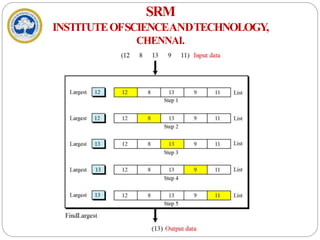
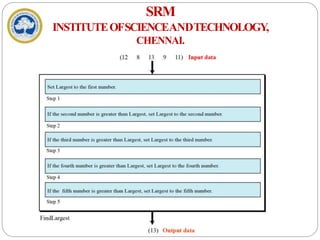
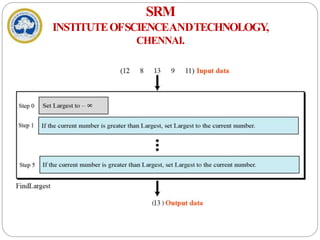
 Solution
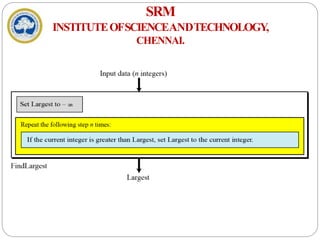
a) To solve this problem, we need an intuitive approach
b) First use a small number of integers (for example, five),
then extend the solution to any number of integers
c) The algorithm receives a list of five integers as input
and gives the largest integer as output
SRM
INSTITUTEOFSCIENCEANDTECHNOLOGY,
CHENNAI.
SRM
INSTITUTEOFSCIENCEANDTECHNOLOGY,
CHENNAI.
SRM
INSTITUTEOFSCIENCEANDTECHNOLOGY,
CHENNAI.
SRM
INSTITUTEOFSCIENCEANDTECHNOLOGY,
CHENNAI.
SRM
INSTITUTEOFSCIENCEANDTECHNOLOGY,
CHENNAI.
1. 3 Creating Algorithms Contd…
Example 2:Print 1 to 20
 Step 1: Start
 Step 2: Initialize X as 0, 0
 Step 3: Increment X by 1, 1+1,2+1,…,19+1
 Step 4: Print X,
 Step 5: If X is less than 20 then go back to step 3.
 Step 6: Stop1<20,2<20,3<20,…,19<20, 20<20 false
1,2,3,…19,20
SRM
INSTITUTEOFSCIENCEANDTECHNOLOGY,
CHENNAI.
1. 3 Creating Algorithms Contd…
Example3
Convert Temperature from Fahrenheit (℉) to Celsius
(℃)
 Step 1: Start
 Step 2: Read temperature in Fahrenheit
 Step 3: Calculate temperature with formula C=5/9*(F-32)
 Step 4: Print C
 Step 5: Stop
Sequence, selective, iterative
SRM
INSTITUTEOFSCIENCEANDTECHNOLOGY,
CHENNAI.
1. 3 Creating Algorithms Contd…
Example4
Algorithm to Add Two Numbers Entered by User
 Step 1: Start
 Step2: Declare variables num1, num2 and sum.
 Step 3: Read values num1 and num2.
 Step 4: Add num1 and num2 and assign the result to
sum. sum←num1+num2
 Step 5: Display sum Step 6: Stop
SRM
INSTITUTEOFSCIENCEANDTECHNOLOGY,
CHENNAI.
1. 3 Creating Algorithms Contd…
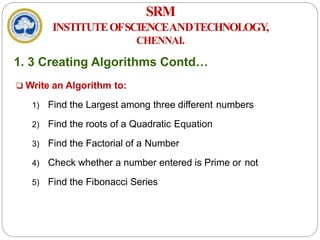
 Write an Algorithm to:
1) Find the Largest among three different numbers
2) Find the roots of a Quadratic Equation
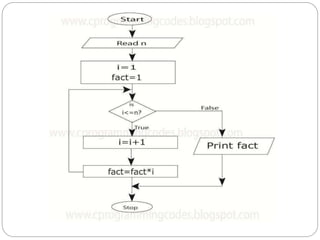
3) Find the Factorial of a Number
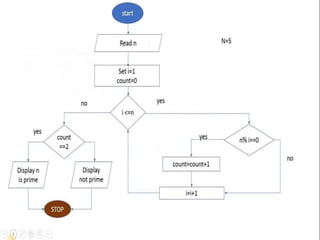
4) Check whether a number entered is Prime or not
5) Find the Fibonacci Series
SRM
INSTITUTEOFSCIENCEANDTECHNOLOGY,
CHENNAI.
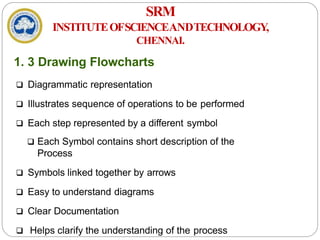
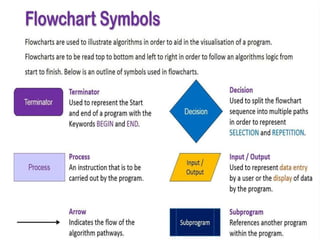
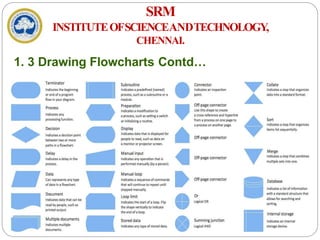
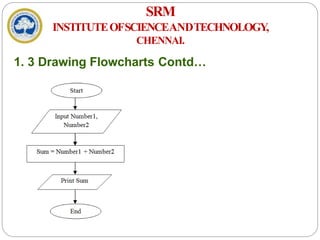
1. 3 Drawing Flowcharts
 Diagrammatic representation
 Illustrates sequence of operations to be performed
 Each step represented by a different symbol
 Each Symbol contains short description of the
Process
 Symbols linked together by arrows
 Easy to understand diagrams
 Clear Documentation
 Helps clarify the understanding of the process
SRM
INSTITUTEOFSCIENCEANDTECHNOLOGY,
CHENNAI.
1. 3 Drawing Flowcharts Contd…
SRM
INSTITUTEOFSCIENCEANDTECHNOLOGY,
CHENNAI.
1. 3 Drawing Flowcharts Contd…
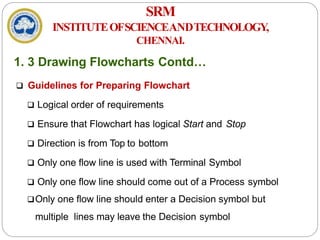
 Guidelines for Preparing Flowchart
 Logical order of requirements
 Ensure that Flowchart has logical Start and Stop
 Direction is from Top to bottom
 Only one flow line is used with Terminal Symbol
 Only one flow line should come out of a Process symbol
Only one flow line should enter a Decision symbol but
multiple lines may leave the Decision symbol
SRM
INSTITUTEOFSCIENCEANDTECHNOLOGY,
CHENNAI.
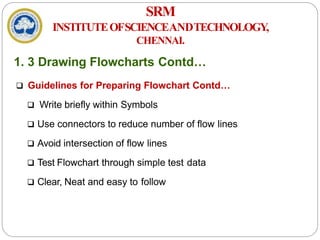
1. 3 Drawing Flowcharts Contd…
 Guidelines for Preparing Flowchart Contd…
 Write briefly within Symbols
 Use connectors to reduce number of flow lines
 Avoid intersection of flow lines
 Test Flowchart through simple test data
 Clear, Neat and easy to follow
SRM
INSTITUTEOFSCIENCEANDTECHNOLOGY,
CHENNAI.
1. 3 Drawing Flowcharts Contd…
SRM
INSTITUTEOFSCIENCEANDTECHNOLOGY,
CHENNAI.
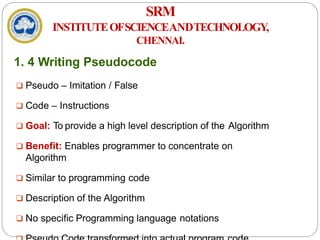
1. 4 Writing Pseudocode
 Pseudo – Imitation / False
 Code – Instructions
 Goal: To provide a high level description of the Algorithm
 Benefit: Enables programmer to concentrate on
Algorithm
 Similar to programming code
 Description of the Algorithm
 No specific Programming language notations
SRM
INSTITUTEOFSCIENCEANDTECHNOLOGY,
CHENNAI.
1. 4 Writing Pseudocode Contd…
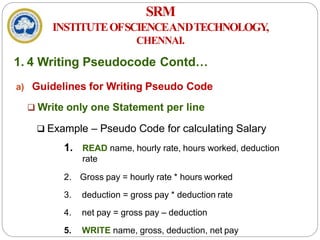
a) Guidelines for Writing Pseudo Code
 Write only one Statement per line
 Example – Pseudo Code for calculating Salary
1. READ name, hourly rate, hours worked, deduction
rate
2. Gross pay = hourly rate * hours worked
3. deduction = gross pay * deduction rate
4. net pay = gross pay – deduction
5. WRITE name, gross, deduction, net pay
SRM
INSTITUTEOFSCIENCEANDTECHNOLOGY,
CHENNAI.
1. 4 Writing Pseudocode Contd…
b) Capitalize Initial Keyword
 Keywords to be written in capital letters
 Examples: READ, WRITE, IF, ELSE, WHILE, REPEAT,
PRINT
c) Indent to show Hierarchy
 Indentation shows the structure boundaries
 Sequence
 Selection
 Looping
SRM
INSTITUTEOFSCIENCEANDTECHNOLOGY,
CHENNAI.
1. 4 Writing Pseudocode Contd…
d) End Multiline structures
 Each structure must end properly
 Example: IF statement must end with ENDIF
e) Keep Statements Language independent
 Resist the urge to write Pseudo Code in
any programming language
SRM
INSTITUTEOFSCIENCEANDTECHNOLOGY,
CHENNAI.
1. 4 Writing Pseudocode Contd…
 Advantages
 Easily typed in a Word document
 Easily modified
 Simple to Use and understand
 Implements Structured Concepts
 No special symbols are used
 No specific syntax is used
 Easy to translate into Program
SRM
INSTITUTEOFSCIENCEANDTECHNOLOGY,
CHENNAI.
1. 4 Writing Pseudocode Contd…
 Disadvantages
 No accepted Standard
 Cannot be compiled and executed
SRM
INSTITUTEOFSCIENCEANDTECHNOLOGY,
CHENNAI.
1. 4 Writing Pseudocode Contd…
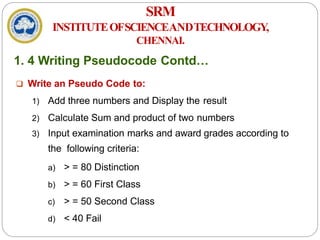
 Write an Pseudo Code to:
1) Add three numbers and Display the result
2) Calculate Sum and product of two numbers
3) Input examination marks and award grades according to
the following criteria:
a) > = 80 Distinction
b) > = 60 First Class
c) > = 50 Second Class
d) < 40 Fail
SRM
INSTITUTEOFSCIENCEANDTECHNOLOGY,
CHENNAI.
1. 4 Writing Pseudocode Contd…
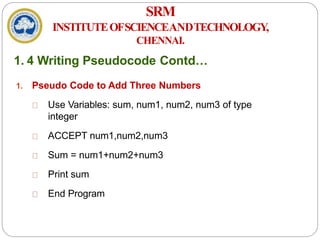
1. Pseudo Code to Add Three Numbers
Use Variables: sum, num1, num2, num3 of type
integer
ACCEPT num1,num2,num3
Sum = num1+num2+num3
Print sum
End Program
SRM
INSTITUTEOFSCIENCEANDTECHNOLOGY,
CHENNAI.
1. 4 Writing Pseudocode Contd…
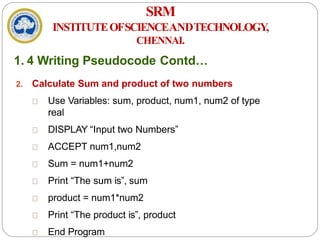
2. Calculate Sum and product of two numbers
Use Variables: sum, product, num1, num2 of type
real
DISPLAY “Input two Numbers”
ACCEPT num1,num2
Sum = num1+num2
Print “The sum is”, sum
product = num1*num2
Print “The product is”, product
End Program
SRM
INSTITUTEOFSCIENCEANDTECHNOLOGY,
CHENNAI.
1. 4 Writing Pseudocode Contd…
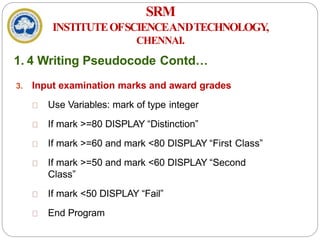
3. Input examination marks and award grades
Use Variables: mark of type integer
If mark >=80 DISPLAY “Distinction”
If mark >=60 and mark <80 DISPLAY “First Class”
If mark >=50 and mark <60 DISPLAY “Second
Class”
If mark <50 DISPLAY “Fail”
End Program
SRM
INSTITUTEOFSCIENCEANDTECHNOLOGY,
CHENNAI.
1. 5 History & Evolution of C
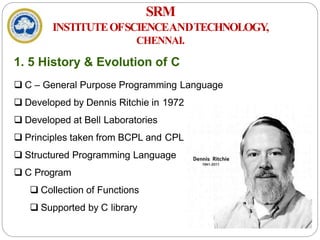
 C – General Purpose Programming Language
 Developed by Dennis Ritchie in 1972
 Developed at Bell Laboratories
 Principles taken from BCPL and CPL
 Structured Programming Language
 C Program
 Collection of Functions
 Supported by C library
SRM
INSTITUTEOFSCIENCEANDTECHNOLOGY,
CHENNAI.
1. 5 History & Evolution of C Cont…
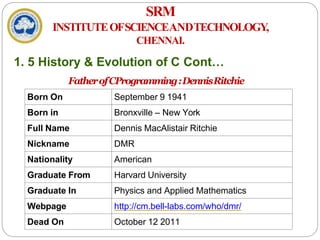
FatherofCProgramming:DennisRitchie
Born On September 9 1941
Born in Bronxville – New York
Full Name Dennis MacAlistair Ritchie
Nickname DMR
Nationality American
Graduate From Harvard University
Graduate In Physics and Applied Mathematics
Webpage http://cm.bell-labs.com/who/dmr/
Dead On October 12 2011
SRM
INSTITUTEOFSCIENCEANDTECHNOLOGY,
CHENNAI.
1. 5 History & Evolution of C Cont…
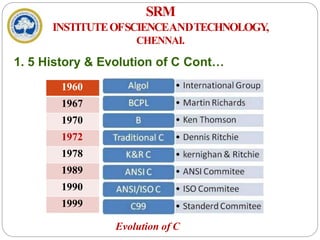
Evolution of C
1960
1967
1970
1972
1978
1989
1990
1999
SRM
INSTITUTEOFSCIENCEANDTECHNOLOGY,
CHENNAI.
1. 5 History & Evolution of C Cont…
 WhytheName“C”wasgiven?
Many of C’s principles and ideas were derived from the
earlier language B
 BCPL and CPL are the earlier ancestors of B Language
(CPL is
common Programming Language)
 In 1967, BCPL Language ( Basic CPL ) was created as a
scaled
down version of CPL
As many of the features were derived from “B” Language
SRM
INSTITUTEOFSCIENCEANDTECHNOLOGY,
CHENNAI.
1. 5 History & Evolution of C Cont…
 Characteristics of ‘C’
 Low Level Language Support
 Structured Programming
 Extensive use of Functions
 Efficient use of Pointers
 Compactness
 Program Portability
 Loose Typing
SRM
INSTITUTEOFSCIENCEANDTECHNOLOGY,
CHENNAI.
1. 5 History & Evolution of C Cont…
 Advantages of C
 Compiler based Language
 Programming – Easy & Fast
 Powerful and Efficient
 Portable
 Supports Graphics
 Supports large number of Operators
 Used to Implement Datastructures
SRM
INSTITUTEOFSCIENCEANDTECHNOLOGY,
CHENNAI.
1. 5 History & Evolution of C Cont…
 Disadvantages of C
 Not a strongly typed Language
 Use of Same operator for multiple purposes
 Not Object Oriented
SRM
INSTITUTEOFSCIENCEANDTECHNOLOGY,
CHENNAI.
1. 6 Structure of ‘C’ Program
 Structure based on Set of rules defined by the Compiler
 Sections
1) Documentation
2) Preprocessor
3) Global
Declaration
4) main( ) function
5) Local Declaration
6) Program
Statements
SRM
INSTITUTEOFSCIENCEANDTECHNOLOGY,
CHENNAI.
1. 6 Structure of ‘C’ Program Contd…
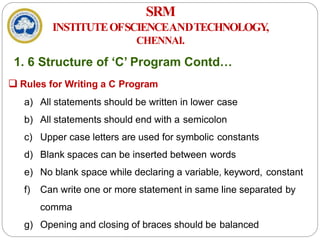
 Rules for Writing a C Program
a) All statements should be written in lower case
b) All statements should end with a semicolon
c) Upper case letters are used for symbolic constants
d) Blank spaces can be inserted between words
e) No blank space while declaring a variable, keyword, constant
f) Can write one or more statement in same line separated by
comma
g) Opening and closing of braces should be balanced
SRM
INSTITUTEOFSCIENCEANDTECHNOLOGY,
CHENNAI.
1. 6 Structure of ‘C’ Program Contd…
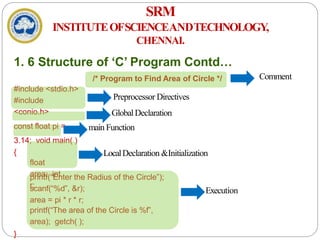
/* Program to Find Area of Circle */
#include <stdio.h>
#include
<conio.h>
const float pi =
3.14; void main( )
{
float
area; int
r;
printf(“Enter the Radius of the Circle”);
scanf(“%d”, &r);
area = pi * r * r;
printf(“The area of the Circle is %f”,
area); getch( );
}
Comment
LocalDeclaration &Initialization
Execution
Preprocessor Directives
GlobalDeclaration
main Function
SRM
INSTITUTEOFSCIENCEANDTECHNOLOGY,
CHENNAI.
1. 6 Structure of ‘C’ Program Contd…
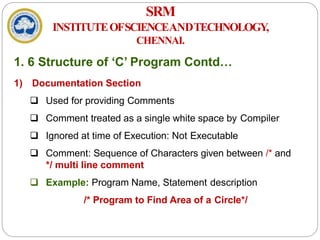
1) Documentation Section
 Used for providing Comments
 Comment treated as a single white space by Compiler
 Ignored at time of Execution: Not Executable
 Comment: Sequence of Characters given between /* and
*/ multi line comment
 Example: Program Name, Statement description
/* Program to Find Area of a Circle*/
SRM
INSTITUTEOFSCIENCEANDTECHNOLOGY,
CHENNAI.
1. 6 Structure of ‘C’ Program Contd…
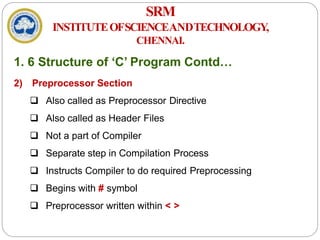
2) Preprocessor Section
 Also called as Preprocessor Directive
 Also called as Header Files
 Not a part of Compiler
 Separate step in Compilation Process
 Instructs Compiler to do required Preprocessing
 Begins with # symbol
 Preprocessor written within < >
SRM
INSTITUTEOFSCIENCEANDTECHNOLOGY,
CHENNAI.
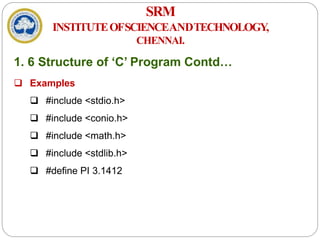
1. 6 Structure of ‘C’ Program Contd…
 Examples
 #include <stdio.h>
 #include <conio.h>
 #include <math.h>
 #include <stdlib.h>
 #define PI 3.1412
SRM
INSTITUTEOFSCIENCEANDTECHNOLOGY,
CHENNAI.
1. 6 Structure of ‘C’ Program Contd…
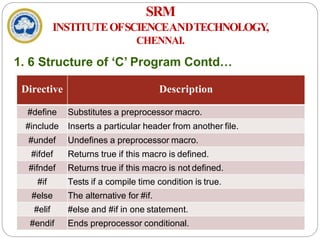
Directive Description
#define Substitutes a preprocessor macro.
#include Inserts a particular header from another file.
#undef Undefines a preprocessor macro.
#ifdef Returns true if this macro is defined.
#ifndef Returns true if this macro is not defined.
#if Tests if a compile time condition is true.
#else The alternative for #if.
#elif #else and #if in one statement.
#endif Ends preprocessor conditional.
SRM
INSTITUTEOFSCIENCEANDTECHNOLOGY,
CHENNAI.
1. 6 Structure of ‘C’ Program Contd…
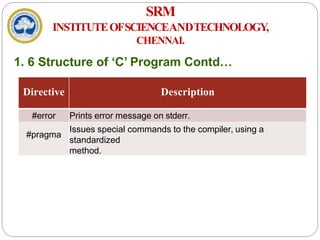
Directive Description
#error Prints error message on stderr.
#pragma
Issues special commands to the compiler, using a
standardized
method.
SRM
INSTITUTEOFSCIENCEANDTECHNOLOGY,
CHENNAI.
1. 6 Structure of ‘C’ Program Contd…
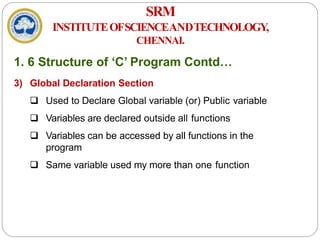
3) Global Declaration Section
 Used to Declare Global variable (or) Public variable
 Variables are declared outside all functions
 Variables can be accessed by all functions in the
program
 Same variable used my more than one function
SRM
INSTITUTEOFSCIENCEANDTECHNOLOGY,
CHENNAI.
1. 6 Structure of ‘C’ Program Contd…
4) main( ) Section
 main( ) written in all small letters (No Capital
Letters)
 Execution starts with a Opening Brace : {
 Divided into two sections: Declaration & Execution
 Declaration : Declare Variables
 Executable: Statements within the Braces
 Execution ends with a Closing Brace : }
 Note:main( ) does not end with a semicolon
SRM
INSTITUTEOFSCIENCEANDTECHNOLOGY,
CHENNAI.
1. 6 Structure of ‘C’ Program Contd…
5) Local Declaration Section
 Variables declared within the main( ) program
 These variables are called Local Variables
 Variables initialized with basic data types
SRM
INSTITUTEOFSCIENCEANDTECHNOLOGY,
CHENNAI.
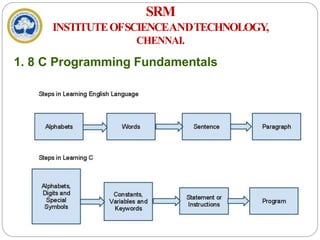
1. 8 C Programming Fundamentals
SRM
INSTITUTEOFSCIENCEANDTECHNOLOGY,
CHENNAI.
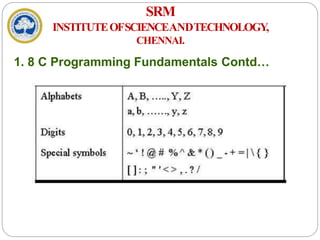
1. 8 C Programming Fundamentals Contd…
SRM
INSTITUTEOFSCIENCEANDTECHNOLOGY,
CHENNAI.
1. 8 C Programming Fundamentals Contd…
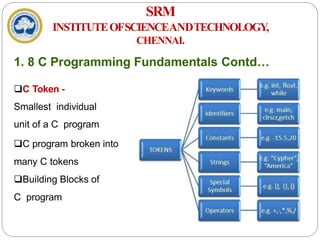
C Token -
Smallest individual
unit of a C program
C program broken into
many C tokens
Building Blocks of
C program
SRM
INSTITUTEOFSCIENCEANDTECHNOLOGY,
CHENNAI.
1. 9 Keywords
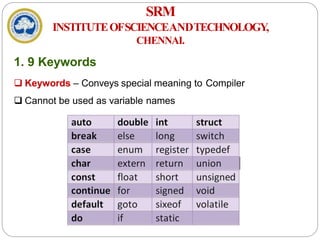
 Keywords – Conveys special meaning to Compiler
 Cannot be used as variable names
SRM
INSTITUTEOFSCIENCEANDTECHNOLOGY,
CHENNAI.
1. 10 Constants
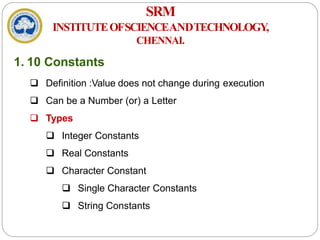
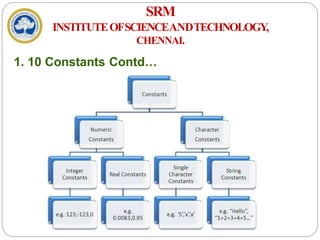
 Definition :Value does not change during execution
 Can be a Number (or) a Letter
 Types
 Integer Constants
 Real Constants
 Character Constant
 Single Character Constants
 String Constants
SRM
INSTITUTEOFSCIENCEANDTECHNOLOGY,
CHENNAI.
1. 10 Constants Contd…
SRM
INSTITUTEOFSCIENCEANDTECHNOLOGY,
CHENNAI.
1. 11 Variables & Identifiers
 Identifier
 A string of alphanumeric characters that begins with
an alphabetic character or an underscore character
 There are 63 alphanumeric characters, i.e., 53
alphabetic
characters and 10 digits (i.e., 0-9)
 Used to represent various programming elements such as
variables, functions, arrays, structures, unions
 The underscore character is considered as a letter in
identifiers (Usually used in the middle of an identifier)
SRM
INSTITUTEOFSCIENCEANDTECHNOLOGY,
CHENNAI.
1. 11 Variables & Identifiers Contd…
 Rules for Identifers
 Combination of alphabets, digits (or) underscore
 First character should be a Alphabet
 No special characters other than underscore can be
used
 No comma / spaces allowed within variable name
 A variable name cannot be a keyword
 Variable names are case sensitive
 VariableDefinition:Value changes during execution
 Identifier for a memory location where data is stored
SRM
INSTITUTEOFSCIENCEANDTECHNOLOGY,
CHENNAI.
1. 11 Variables & Identifiers Contd…
 Variable name length cannot be more than 31
characters
 Examples: AVERAGE, height, a, b, sum,
mark_1, gross_pay
 Variable Declaration
 A variable must be declared before it is used
 Declaration consists of a data type followed by one or
more variable names separated by commas.
 Synta
x datatype variablename;
SRM
INSTITUTEOFSCIENCEANDTECHNOLOGY,
CHENNAI.
1. 11 Variables & Identifiers Contd…
 Examples
int a, b, c,
sum; float
avg;
char name;
 Variable Initialization
 Assigning a value to the declared variable
 Values assigned during declaration / after
declaration
SRM
INSTITUTEOFSCIENCEANDTECHNOLOGY,
CHENNAI.
1. 11 Variables & Identifiers Contd…
 Examples
i. int a, b, c;
a=10, b=20, c=30;
ii. int a=10 ,b=10, c=10;
 Scope of Variables
 Local Variables
 Global Variables
SRM
INSTITUTEOFSCIENCEANDTECHNOLOGY,
CHENNAI.
1. 12 Scope of Variables
 Definition
 A scope in any programming is a region of the program
where a defined variable can have its existence and
beyond that variable it cannot be accessed
 Variable Scope is a region in a program where a variable is
declared and used
 The scope of a variable is the range of program statements
that
can access that variable
 A variable is visiblewithin its scope and invisibleoutside it
SRM
INSTITUTEOFSCIENCEANDTECHNOLOGY,
CHENNAI.
1. 12 Scope of Variables Contd…
 There are three places where variables can be
declared
a) Inside a function or a block which is called local
variables
b) Outside of all functions which is called global variables
c)
In the definition of function parameters which
are
called formal parameters
SRM
INSTITUTEOFSCIENCEANDTECHNOLOGY,
CHENNAI.
1. 12 Scope of Variables Contd…
a) LocalVariables
 Variables that are declared inside a function or block are
called local variables
 They can be used only by statements that are inside that
function or block of code
 Local variables are created when the control reaches the
block or function containing the local variables and then
they get destroyed after that
 Local variables are not known to functions outside their
own
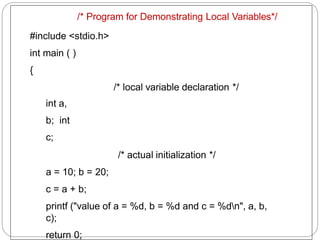
/* Program for Demonstrating Local Variables*/
#include <stdio.h>
int main ( )
{
/* local variable declaration */
int a,
b; int
c;
/* actual initialization */
a = 10; b = 20;
c = a + b;
printf ("value of a = %d, b = %d and c = %dn", a, b,
c);
return 0;
SRM
INSTITUTEOFSCIENCEANDTECHNOLOGY,
CHENNAI.
1. 12 Scope of Variables Contd…
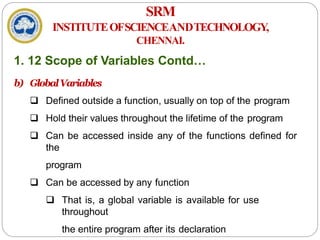
b) GlobalVariables
 Defined outside a function, usually on top of the program
 Hold their values throughout the lifetime of the program
 Can be accessed inside any of the functions defined for
the
program
 Can be accessed by any function
 That is, a global variable is available for use
throughout
the entire program after its declaration
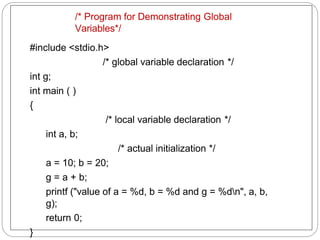
/* Program for Demonstrating Global
Variables*/
#include <stdio.h>
/* global variable declaration */
int g;
int main ( )
{
/* local variable declaration */
int a, b;
/* actual initialization */
a = 10; b = 20;
g = a + b;
printf ("value of a = %d, b = %d and g = %dn", a, b,
g);
return 0;
}
SRM
INSTITUTEOFSCIENCEANDTECHNOLOGY,
CHENNAI.
1. 12 Scope of Variables Contd…
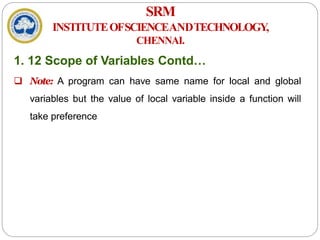
 Note: A program can have same name for local and global
variables but the value of local variable inside a function will
take preference
SRM
INSTITUTEOFSCIENCEANDTECHNOLOGY,
CHENNAI.
1. 12 Datatypes
 Defines a variable before use
 Specifies the type of data to be stored in variables
 Basic Data Types – 4 Classes
a) int – Signed or unsigned number
b) float – Signed or unsigned number having Decimal
Point
c) double – Double Precision Floating point number
d) char – A Character in the character Set
 Qualifiers
SRM
INSTITUTEOFSCIENCEANDTECHNOLOGY,
CHENNAI.
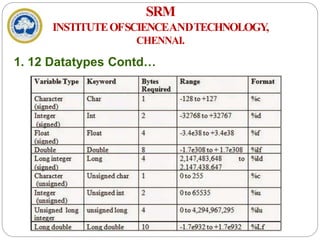
1. 12 Datatypes Contd…
SRM
INSTITUTEOFSCIENCEANDTECHNOLOGY,
CHENNAI.
1. 12 Datatypes Contd…
a) Integer Data Type
 Whole numbers with a range
 No fractional parts
 Integer variable holds integer values only
 Keyword: int
 Memory: 2 Bytes (16 bits) or 4 Bytes (32 bits)
 Qualifiers: Signed, unsigned, short, long
 Examples: 34012, 0, -2457
SRM
INSTITUTEOFSCIENCEANDTECHNOLOGY,
CHENNAI.
1. 12 Datatypes Contd…
b) Floating Point Data Type
 Numbers having Fractional part
 Float provides precision of 6 digits
 Integer variable holds integer values only
 Keyword: float
 Memory: 4 Bytes (32 bits)
 Examples: 5.6, 0.375, 3.14756
SRM
INSTITUTEOFSCIENCEANDTECHNOLOGY,
CHENNAI.
1. 12 Datatypes Contd…
c) Double Data Type
 Also handles floating point numbers
 Double provides precision of 14 digits
 Integer variable holds integer values only
 Keyword: float
 Memory: 8 Bytes (64 bits) or 10 Bytes (80 bits)
 Qualifiers: long, short
SRM
INSTITUTEOFSCIENCEANDTECHNOLOGY,
CHENNAI.
1. 12 Datatypes Contd…
d) Character Data Type
 handles one character at a time
 Keyword: char
 Memory: 1 Byte (8 bits)
SRM
INSTITUTEOFSCIENCEANDTECHNOLOGY,
CHENNAI.
1. 13 Expressions
 Expression : An Expression is a collection of operators
and
operands that represents a specific value
 Operator : A symbol which performs tasks like arithmetic
operations, logical operations and conditional operations
 Operands : The values on which the operators perform the
task
 Expression Types in C
a) Infix Expression
b) Postfix Expression
SRM
INSTITUTEOFSCIENCEANDTECHNOLOGY,
CHENNAI.
1. 13 Expressions Contd…
a) InfixExpression
 The operator is used between operands
 GeneralStructure:Operand1 Operator Operand2
 Example:a + b
b) PostfixExpression
 Operator is used after operands
 GeneralStructure:Operand1 Operand2 Operator
 Example:ab+
SRM
INSTITUTEOFSCIENCEANDTECHNOLOGY,
CHENNAI.
1. 13 Expressions Contd…
c) PrefixExpression
 Operator is used before operands
 GeneralStructure:Operator Operand1 Operand2
 Example:+ab
SRM
INSTITUTEOFSCIENCEANDTECHNOLOGY,
CHENNAI.
1. 14 Input and Output Functions
 Ability to Communicate with Users during execution
 Input Operation
 Feeding data into program
 Data Transfer from Input device to Memory
 Output Operation
 Getting result from Program
 Data Transfer from Memory to Output device
 Header File : #include<stdio.h>
SRM
INSTITUTEOFSCIENCEANDTECHNOLOGY,
CHENNAI.
1. 14 Input and Output Functions Contd…
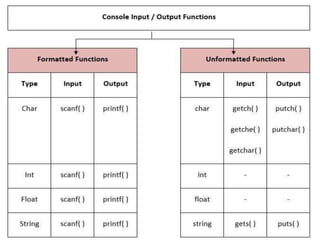
 Input / Output Function Types
a) Formatted Input / Output Statements
b) Unformatted Input / Output Statements
SRM
INSTITUTEOFSCIENCEANDTECHNOLOGY,
CHENNAI.
1. 14 Input and Output Functions Contd…
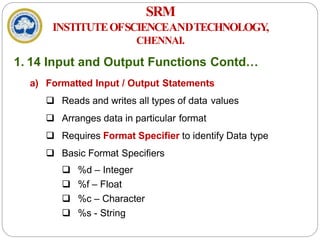
a) Formatted Input / Output Statements
 Reads and writes all types of data values
 Arranges data in particular format
 Requires Format Specifier to identify Data type
 Basic Format Specifiers
 %d – Integer
 %f – Float
 %c – Character
 %s - String
SRM
INSTITUTEOFSCIENCEANDTECHNOLOGY,
CHENNAI.
1. 14 Input and Output Functions Contd…
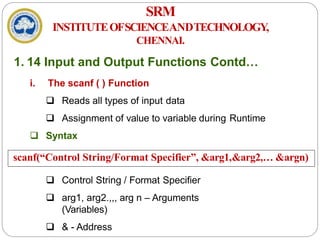
i. The scanf ( ) Function
 Reads all types of input data
 Assignment of value to variable during Runtime
 Syntax
 Control String / Format Specifier
 arg1, arg2.,,, arg n – Arguments
(Variables)
 & - Address
scanf(“Control String/Format Specifier”, &arg1,&arg2,… &argn)
SRM
INSTITUTEOFSCIENCEANDTECHNOLOGY,
CHENNAI.
1. 14 Input and Output Functions Contd…
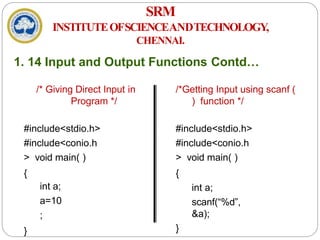
/* Giving Direct Input in
Program */
#include<stdio.h>
#include<conio.h
> void main( )
{
int a;
a=10
;
}
/*Getting Input using scanf (
) function */
#include<stdio.h>
#include<conio.h
> void main( )
{
int a;
scanf(“%d”,
&a);
}
SRM
INSTITUTEOFSCIENCEANDTECHNOLOGY,
CHENNAI.
1. 14 Input and Output Functions Contd…
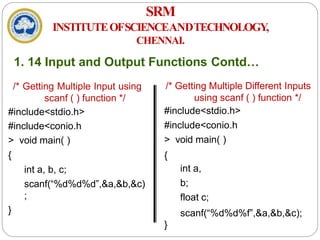
/* Getting Multiple Input using
scanf ( ) function */
#include<stdio.h>
#include<conio.h
> void main( )
{
int a, b, c;
scanf(“%d%d%d”,&a,&b,&c)
;
}
/* Getting Multiple Different Inputs
using scanf ( ) function */
#include<stdio.h>
#include<conio.h
> void main( )
{
int a,
b;
float c;
scanf(“%d%d%f”,&a,&b,&c);
}
SRM
INSTITUTEOFSCIENCEANDTECHNOLOGY,
CHENNAI.
1. 14 Input and Output Functions Contd…
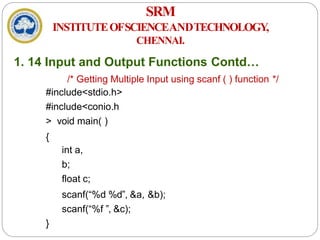
/* Getting Multiple Input using scanf ( ) function */
#include<stdio.h>
#include<conio.h
> void main( )
{
int a,
b;
float c;
scanf(“%d %d”, &a, &b);
scanf(“%f ”, &c);
}
SRM
INSTITUTEOFSCIENCEANDTECHNOLOGY,
CHENNAI.
1. 14 Input and Output Functions Contd…
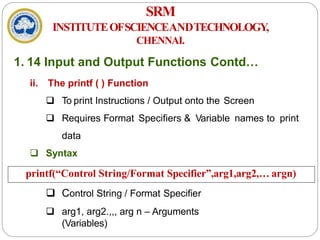
ii. The printf ( ) Function
 To print Instructions / Output onto the Screen
 Requires Format Specifiers & Variable names to print
data
 Syntax
 Control String / Format Specifier
 arg1, arg2.,,, arg n – Arguments
(Variables)
printf(“Control String/Format Specifier”,arg1,arg2,… argn)
SRM
INSTITUTEOFSCIENCEANDTECHNOLOGY,
CHENNAI.
1. 14 Input and Output Functions Contd…
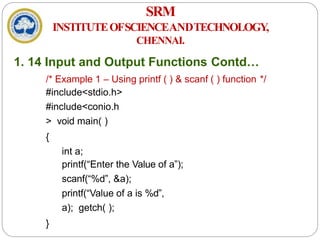
/* Example 1 – Using printf ( ) & scanf ( ) function */
#include<stdio.h>
#include<conio.h
> void main( )
{
int a;
printf(“Enter the Value of a”);
scanf(“%d”, &a);
printf(“Value of a is %d”,
a); getch( );
}
SRM
INSTITUTEOFSCIENCEANDTECHNOLOGY,
CHENNAI.
1. 14 Input and Output Functions Contd…
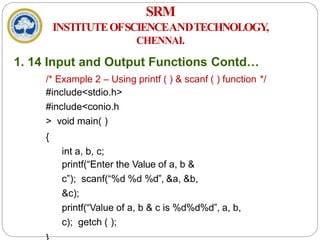
/* Example 2 – Using printf ( ) & scanf ( ) function */
#include<stdio.h>
#include<conio.h
> void main( )
{
int a, b, c;
printf(“Enter the Value of a, b &
c”); scanf(“%d %d %d”, &a, &b,
&c);
printf(“Value of a, b & c is %d%d%d”, a, b,
c); getch ( );
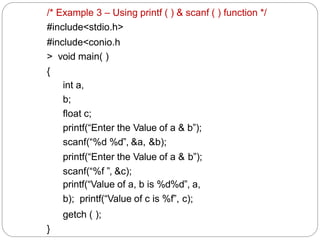
/* Example 3 – Using printf ( ) & scanf ( ) function */
#include<stdio.h>
#include<conio.h
> void main( )
{
int a,
b;
float c;
printf(“Enter the Value of a & b”);
scanf(“%d %d”, &a, &b);
printf(“Enter the Value of a & b”);
scanf(“%f ”, &c);
printf(“Value of a, b is %d%d”, a,
b); printf(“Value of c is %f”, c);
getch ( );
}
SRM
INSTITUTEOFSCIENCEANDTECHNOLOGY,
CHENNAI.
1. 14 Input and Output Functions Contd…
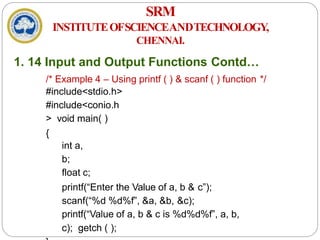
/* Example 4 – Using printf ( ) & scanf ( ) function */
#include<stdio.h>
#include<conio.h
> void main( )
{
int a,
b;
float c;
printf(“Enter the Value of a, b & c”);
scanf(“%d %d%f”, &a, &b, &c);
printf(“Value of a, b & c is %d%d%f”, a, b,
c); getch ( );
SRM
INSTITUTEOFSCIENCEANDTECHNOLOGY,
CHENNAI.
1. 14 Input and Output Functions Contd…
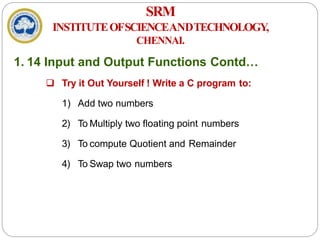
 Try it Out Yourself ! Write a C program to:
1) Add two numbers
2) To Multiply two floating point numbers
3) To compute Quotient and Remainder
4) To Swap two numbers
SRM
INSTITUTEOFSCIENCEANDTECHNOLOGY,
CHENNAI.
1. 14 Input and Output Functions Contd…
b) Unformatted Input / Output Statements
 Works only with Character Data type
 No need of Format Specifier
 Unformatted Input Statements
i. getch ( ) – Reads alphanumeric
characters
from
Keyboard
ii. getchar ( ) – Reads one character at a time till enter
key
is pressed
SRM
INSTITUTEOFSCIENCEANDTECHNOLOGY,
CHENNAI.
1. 14 Input and Output Functions Contd…
iii. gets ( ) – Accepts any string from Keyboard until Enter
Key
is pressed
 Unformatted Output Statements
i. putch ( ) – Writes alphanumeric characters to Monitor
(Output Device)
ii. putchar ( ) – Prints one character at a time
iii. puts ( ) – Prints a String to Monitor (Output Device)
SRM
INSTITUTEOFSCIENCEANDTECHNOLOGY,
CHENNAI.
1. 16 Single Line and Multiline Comments
 Comment – Definition
 Used to provide information about lines of code
 Provide clarity to the C source code
 Allows others to better understand what the code
was
intended to
 Helps in debugging the code
hundreds or Important in large projects containing
thousands of lines of source code
 Types – Single line and multiline comment
SRM
INSTITUTEOFSCIENCEANDTECHNOLOGY,
CHENNAI.
1. 16 Single Line and Multiline Comments
Contd…
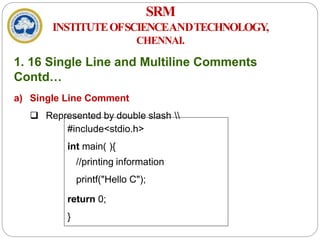
a) Single Line Comment
 Represented by double slash 
#include<stdio.h>
int main( ){
//printing information
printf("Hello C");
return 0;
}
SRM
INSTITUTEOFSCIENCEANDTECHNOLOGY,
CHENNAI.
1. 16 Single Line and Multiline Comments
Contd…
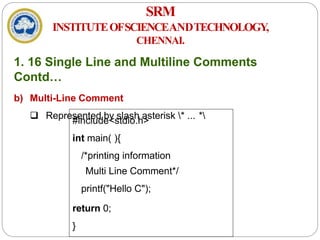
b) Multi-Line Comment
 Represented by slash asterisk * ... *
#include<stdio.h>
int main( ){
/*printing information
Multi Line Comment*/
printf("Hello C");
return 0;
}
SRM
INSTITUTEOFSCIENCEANDTECHNOLOGY,
CHENNAI.
1. 16 Single Line and Multiline Comments
Contd…
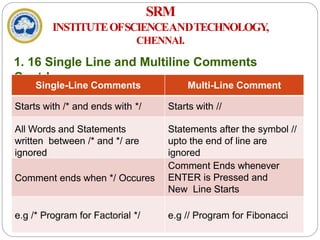
Single-Line Comments Multi-Line Comment
Starts with /* and ends with */ Starts with //
All Words and Statements
written between /* and */ are
ignored
Statements after the symbol //
upto the end of line are
ignored
Comment ends when */ Occures
Comment Ends whenever
ENTER is Pressed and
New Line Starts
e.g /* Program for Factorial */ e.g // Program for Fibonacci
SRM
INSTITUTEOFSCIENCEANDTECHNOLOGY,
CHENNAI.
1. 15 Operators in C
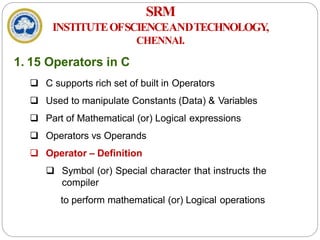
 C supports rich set of built in Operators
 Used to manipulate Constants (Data) & Variables
 Part of Mathematical (or) Logical expressions
 Operators vs Operands
 Operator – Definition
 Symbol (or) Special character that instructs the
compiler
to perform mathematical (or) Logical operations
SRM
INSTITUTEOFSCIENCEANDTECHNOLOGY,
CHENNAI.
1. 15 Operators in C Contd…
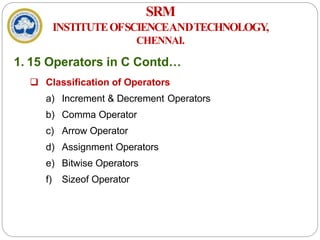
 Classification of Operators
a) Increment & Decrement Operators
b) Comma Operator
c) Arrow Operator
d) Assignment Operators
e) Bitwise Operators
f) Sizeof Operator
SRM
INSTITUTEOFSCIENCEANDTECHNOLOGY,
CHENNAI.
1. 15 Operators in C Contd…
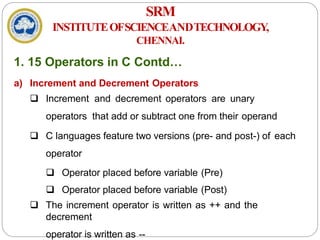
a) Increment and Decrement Operators
 Increment and decrement operators are unary
operators that add or subtract one from their operand
 C languages feature two versions (pre- and post-) of each
operator
 Operator placed before variable (Pre)
 Operator placed before variable (Post)
 The increment operator is written as ++ and the
decrement
operator is written as --
SRM
INSTITUTEOFSCIENCEANDTECHNOLOGY,
CHENNAI.
1. 15 Operators in C Contd…
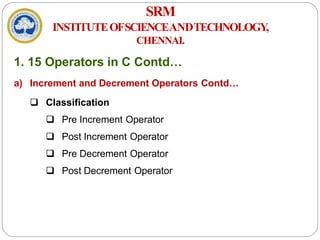
a) Increment and Decrement Operators Contd…
 Classification
 Pre Increment Operator
 Post Increment Operator
 Pre Decrement Operator
 Post Decrement Operator
SRM
INSTITUTEOFSCIENCEANDTECHNOLOGY,
CHENNAI.
1. 15 Operators in C Contd…
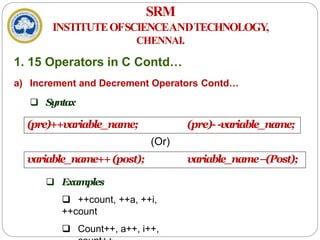
a) Increment and Decrement Operators Contd…
 Syntax
 Examples
 ++count, ++a, ++i,
++count
 Count++, a++, i++,
(pre)++variable_name; (pre)- -variable_name;
(Or)
variable_name++(post); variable_name–(Post);
SRM
INSTITUTEOFSCIENCEANDTECHNOLOGY,
CHENNAI.
1. 15 Operators in C Contd…
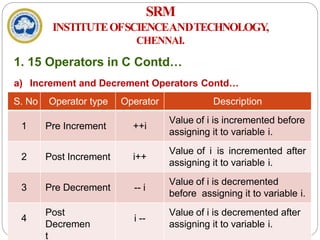
a) Increment and Decrement Operators Contd…
S. No Operator type Operator Description
1 Pre Increment ++i
Value of i is incremented before
assigning it to variable i.
2 Post Increment i++
Value of i is incremented after
assigning it to variable i.
3 Pre Decrement -- i
Value of i is decremented
before assigning it to variable i.
4
Post
Decremen
t
i --
Value of i is decremented after
assigning it to variable i.
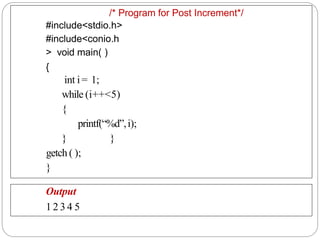
/* Program for Post Increment*/
#include<stdio.h>
#include<conio.h
> void main( )
{
int i= 1;
while (i++<5)
{
printf(“%d”,i);
}}
getch ( );
}
Output
1 2 3 4 5
SRM
INSTITUTEOFSCIENCEANDTECHNOLOGY,
CHENNAI.
1. 15 Operators in C Contd…
a) Increment and Decrement Operators Contd…
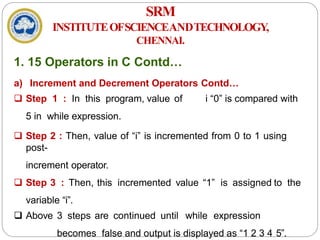
 Step 1 : In this program, value of i “0” is compared with
5 in while expression.
 Step 2 : Then, value of “i” is incremented from 0 to 1 using
post-
increment operator.
 Step 3 : Then, this incremented value “1” is assigned to the
variable “i”.
 Above 3 steps are continued until while expression
becomes false and output is displayed as “1 2 3 4 5”.
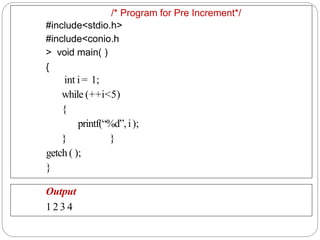
/* Program for Pre Increment*/
#include<stdio.h>
#include<conio.h
> void main( )
{
int i= 1;
while (++i<5)
{
printf(“%d”, i);
}}
getch ( );
}
Output
1 2 3 4
SRM
INSTITUTEOFSCIENCEANDTECHNOLOGY,
CHENNAI.
1. 15 Operators in C Contd…
a) Increment and Decrement Operators Contd…
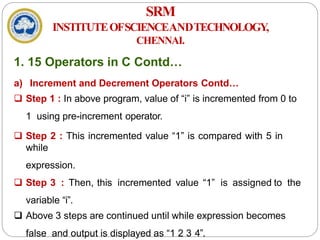
 Step 1 : In above program, value of “i” is incremented from 0 to
1 using pre-increment operator.
 Step 2 : This incremented value “1” is compared with 5 in
while
expression.
 Step 3 : Then, this incremented value “1” is assigned to the
variable “i”.
 Above 3 steps are continued until while expression becomes
false and output is displayed as “1 2 3 4”.
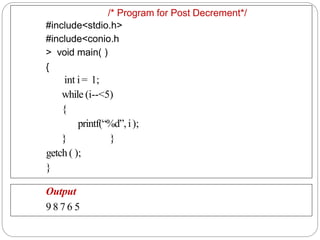
/* Program for Post Decrement*/
#include<stdio.h>
#include<conio.h
> void main( )
{
int i= 1;
while (i--<5)
{
printf(“%d”, i);
}}
getch ( );
}
Output
9 8 7 6 5
SRM
INSTITUTEOFSCIENCEANDTECHNOLOGY,
CHENNAI.
1. 15 Operators in C Contd…
a) Increment and Decrement Operators Contd…
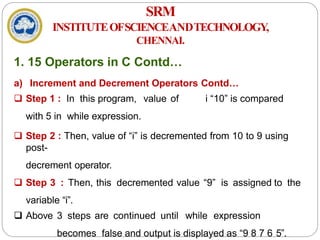
 Step 1 : In this program, value of i “10” is compared
with 5 in while expression.
 Step 2 : Then, value of “i” is decremented from 10 to 9 using
post-
decrement operator.
 Step 3 : Then, this decremented value “9” is assigned to the
variable “i”.
 Above 3 steps are continued until while expression
becomes false and output is displayed as “9 8 7 6 5”.
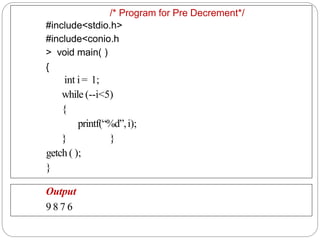
/* Program for Pre Decrement*/
#include<stdio.h>
#include<conio.h
> void main( )
{
int i= 1;
while (--i<5)
{
printf(“%d”,i);
}}
getch ( );
}
Output
9 8 7 6
SRM
INSTITUTEOFSCIENCEANDTECHNOLOGY,
CHENNAI.
1. 15 Operators in C Contd…
a) Increment and Decrement Operators Contd…
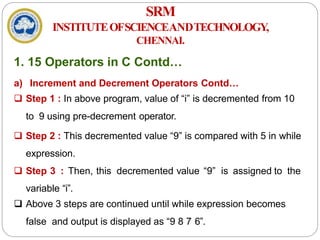
 Step 1 : In above program, value of “i” is decremented from 10
to 9 using pre-decrement operator.
 Step 2 : This decremented value “9” is compared with 5 in while
expression.
 Step 3 : Then, this decremented value “9” is assigned to the
variable “i”.
 Above 3 steps are continued until while expression becomes
false and output is displayed as “9 8 7 6”.
SRM
INSTITUTEOFSCIENCEANDTECHNOLOGY,
CHENNAI.
1. 15 Operators in C Contd…
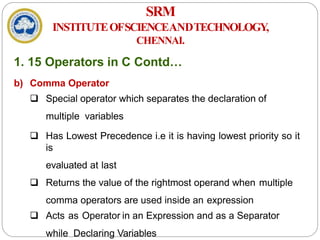
b) Comma Operator
 Special operator which separates the declaration of
multiple variables
 Has Lowest Precedence i.e it is having lowest priority so it
is
evaluated at last
 Returns the value of the rightmost operand when multiple
comma operators are used inside an expression
 Acts as Operator in an Expression and as a Separator
while Declaring Variables
SRM
INSTITUTEOFSCIENCEANDTECHNOLOGY,
CHENNAI.
1. 15 Operators in C Contd…
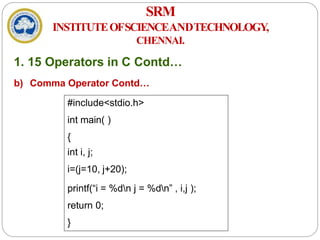
b) Comma Operator Contd…
#include<stdio.h>
int main( )
{
int i, j;
i=(j=10, j+20);
printf(“i = %dn j = %dn” , i,j );
return 0;
}
SRM
INSTITUTEOFSCIENCEANDTECHNOLOGY,
CHENNAI.
1. 15 Operators in C Contd…
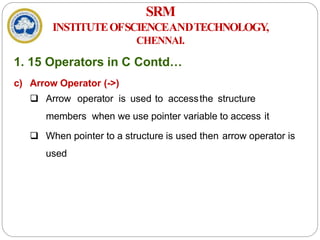
c) Arrow Operator (->)
 Arrow operator is used to accessthe structure
members when we use pointer variable to access it
 When pointer to a structure is used then arrow operator is
used
SRM
INSTITUTEOFSCIENCEANDTECHNOLOGY,
CHENNAI.
1. 15 Operators in C Contd…
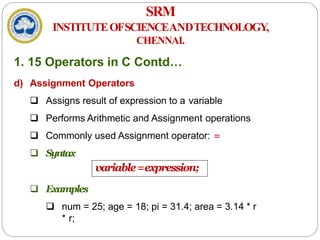
d) Assignment Operators
 Assigns result of expression to a variable
 Performs Arithmetic and Assignment operations
 Commonly used Assignment operator: =
 Syntax
 Examples
 num = 25; age = 18; pi = 31.4; area = 3.14 * r
* r;
variable=expression;
SRM
INSTITUTEOFSCIENCEANDTECHNOLOGY,
CHENNAI.
1. 15 Operators in C Contd…
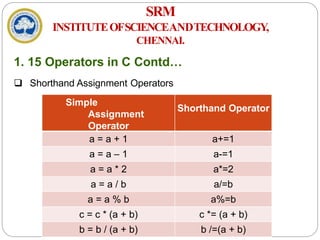
 Shorthand Assignment Operators
Simple
Assignment
Operator
Shorthand Operator
a = a + 1 a+=1
a = a – 1 a-=1
a = a * 2 a*=2
a = a / b a/=b
a = a % b a%=b
c = c * (a + b) c *= (a + b)
b = b / (a + b) b /=(a + b)
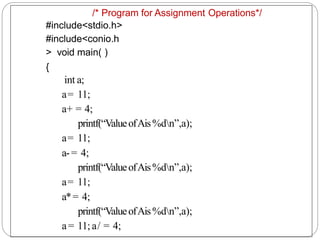
/* Program for Assignment Operations*/
#include<stdio.h>
#include<conio.h
> void main( )
{
int a;
a= 11;
a+ = 4;
printf(“ValueofAis%dn”,a);
a= 11;
a-= 4;
printf(“ValueofAis%dn”,a);
a= 11;
a*= 4;
printf(“ValueofAis%dn”,a);
a= 11; a/ = 4;
printf(“ValueofAis%dn”,a);
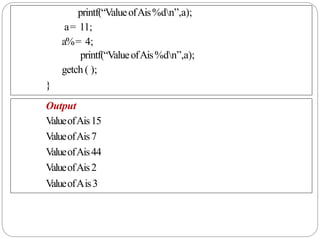
a= 11;
a%= 4;
printf(“ValueofAis%dn”,a);
getch ( );
}
Output
ValueofAis15
ValueofAis7
ValueofAis44
ValueofAis2
ValueofAis3
THANKYOU

18CSS101J PROGRAMMING FOR PROBLEM SOLVING

  • 1.
    18CSS101J – Programmingfor Problem Solving Unit I SRM INSTITUTEOFSCIENCEANDTECHNOLOGY, CHENNAI. P.GOWSIKRAJA, AP(SrG)/CSE, DEPARTMENT OF CSE, SRM IST.
  • 2.
    SRM INSTITUTEOFSCIENCEANDTECHNOLOGY, CHENNAI. COURSELEARNINGRATIONALE (CLR) Thepurposeoflearningthiscourseisto: CLR-1: Thinkandevolvealogicallyto construct analgorithminto aflowchart and apseudocodethat canbe programmed CLR-2: Utilize the logical operators and expressions to solve problems in engineering and real-time CLR-3: Store andretrieve data in a singleandmultidimensional array CLR-4: Utilize custom designedfunctionsthat canbe usedto perform tasks and canbe repeatedly used in any application CLR-5: Create storage constructs usingstructure andunions.Create andUtilize filesto store andretrieve information CLR-6: Create alogicalmindset to solvevariousengineering applicationsusing programming constructs in C
  • 3.
    SRM INSTITUTEOFSCIENCEANDTECHNOLOGY, CHENNAI. COURSELEARNING OUTCOMES(CLO) Attheendofthiscourse,learnerswillbeableto: CLO-1: Identify methods tosolveaproblem through computer programming. List the basicdata types andvariablesin C CLO-2: Apply the logic operators and expressions. Use loop constructs and recursion. Usearray to store andretrieve data CLO-3: Analyzeprograms that need storage andform singleandmulti-dimensional arrays. Usepreprocessor constructs in C CLO-4: Create user definedfunctionsfor mathematical andother logicaloperations. Usepointer to addressmemory and data CLO-5: Create structures andunionsto represent dataconstructs. Usefilesto store andretrieve data CLO-6: Apply programmingconcepts to solve problems. Learn about how C programming canbe effectivelyused for solutions
  • 4.
    LEARNING RESOURCES S. NoTEXT BOOKS 1. ZedAShaw,LearnCtheHardWay:PracticalExercisesontheComputational SubjectsYouKeepAvoiding(LikeC),AddisonWesley,2015 2. W.Kernighan,DennisM.Ritchie,TheCProgrammingLanguage,2nded. PrenticeHall,1996 3. BharatKinariwala,TepDobry,ProgramminginC,eBook 4. http://www.c4learn.com/learn-c-programming-language/ SRM INSTITUTEOFSCIENCEANDTECHNOLOGY, CHENNAI.
  • 5.
    SRM INSTITUTEOFSCIENCEANDTECHNOLOGY, CHENNAI. UNIT I INTRODUCTION Evolution ofProgramming & Languages - Problem Solving through Programming - Creating Algorithms - Drawing Flowcharts - Writing Pseudocode - Evolution of C language, its usage history - Input and output functions: Printf and scanf - Variables and identifiers – Expressions - Single line and multiline comments - Constants, Keywords - Values, Names, Scope, Binding, Storage Classes - Numeric Data types: integer -
  • 6.
    SRM INSTITUTEOFSCIENCEANDTECHNOLOGY, CHENNAI. UNIT I INTRODUCTIO N floating point- Non-Numeric Data types: char and string - Increment and decrement operator - Comma, Arrow and Assignment operator - Bitwise and Sizeof operator
  • 7.
    SRM INSTITUTEOFSCIENCEANDTECHNOLOGY, CHENNAI. 1. 1 Evolutionof Programming & Languages  A Computer needs to be given instructions in a programming language that it understands  Programming Language  Artificial language that controls the behavior of computer  Defined through the use of syntactic and semantic rules  Used to facilitate communication about the task of organizing and manipulating information  Used to express algorithms precisely
  • 9.
    SRM INSTITUTEOFSCIENCEANDTECHNOLOGY, CHENNAI. 1. 1 Evolutionof Programming & Languages Contd… Period Programming Langugaes 1950’s Creation of high-level languages 1960’s Forth. Simula I. Lisp, Cobol 1970’s Pascal, C language 1980’s ML. Smalltalk, C++ 1990’s Java, Perl, Python languages 2000 Internet Programming 2010 Concurrency and asynchronicity. JavaScript and Go language
  • 10.
    SRM INSTITUTEOFSCIENCEANDTECHNOLOGY, CHENNAI. 1. 2 ProblemSolving through Programming  Problem - Defined as any question, something involving doubt, uncertainty, difficulty, situation whose solution is not immediately obvious  ComputerProblemSolving  Understand and apply logic  Success in solving any problem is only possible after we have made the effort to understand the problem at hand  Extract from the problem statement a set of precisely defined tasks
  • 11.
    SRM INSTITUTEOFSCIENCEANDTECHNOLOGY, CHENNAI. 1. 2 ProblemSolving through Programming Contd… i. Creative Thinking  Proven method for approaching a challenge or opportunity in an imaginative way  Process for innovation that helps explore and reframe the problems faced, come up with new, innovative responses and solutions and then take action  It is generative, nonjudgmental and expansive  Thinking creatively, a lists of new ideas are generated
  • 12.
    SRM INSTITUTEOFSCIENCEANDTECHNOLOGY, CHENNAI. 1. 2 ProblemSolving through Programming Contd… ii. CriticalThinking  Engages a diverse range of intellectual skills and activities that are concerned with evaluating information, our assumptions and our thinking processes in a disciplined way so that we can think and assess information more comprehensively  It is Analytical, Judgmental and Selective  Thinking critically allows a programmer in making choices
  • 13.
  • 14.
    SRM INSTITUTEOFSCIENCEANDTECHNOLOGY, CHENNAI. 1. 2 ProblemSolving through Programming Contd…  Program - Set of instructions that instructs the computer to do a task  ProgrammingProcess a) Defining the Problem b) Planning the Solution c) Coding the Program d) Testing the Program e) Documenting the Program
  • 15.
  • 16.
    SRM INSTITUTEOFSCIENCEANDTECHNOLOGY, CHENNAI. 1. 2 ProblemSolving through Programming Contd…  A typical programming task can be divided into two phases: i. Problemsolvingphase  Produce an ordered sequence of steps that describe solution of problem this sequence of steps is called an Algorithm ii. Implementation phase  Implement the program in some programming language  StepsinProblemSolving a) Produce a general algorithm (one can use pseudocode)
  • 17.
    SRM INSTITUTEOFSCIENCEANDTECHNOLOGY, CHENNAI. 1. 2 ProblemSolving through Programming Contd… b) Refine the algorithm successively to get step by step detailed algorithmthat is very close to a computer language c) Pseudocode is an artificial and informal language that helps programmers develop algorithms  Pseudocode is very similar to everyday English
  • 18.
    SRM Algorithm: a step-by-stepmethod for solving a problem or doing a task. INSTITUTEOFSCIENCEANDTECHNOLOGY, CHENNAI. 1. 3 Creating Algorithms  An informal definition of an algorithm is: i
  • 19.
    SRM INSTITUTEOFSCIENCEANDTECHNOLOGY, CHENNAI. 1. 3 CreatingAlgorithms Contd…  What are Algorithms for?  A way to communicate about your problem/solution with others  A possible way to solve a given problem  A "formalization" of a method, that will be proved  A mandatory first step before implementing a solution  Algorithm Definition - “A finite sequence of unambiguous, executable steps or instructions, which, if followed would ultimately terminate and give the solution of the problem”
  • 20.
    SRM INSTITUTEOFSCIENCEANDTECHNOLOGY, CHENNAI. 1. 3 CreatingAlgorithms  Notations  Starting point  Step Numbers – Positions in Algorithm Incoming Information - Input  Control Flow – Order of evaluating Instructions  Statements  Outgoing Information - Output  Ending Point
  • 21.
    SRM INSTITUTEOFSCIENCEANDTECHNOLOGY, CHENNAI. 1. 3 CreatingAlgorithms Contd…  Propertiesofanalgorithm  Finite: The algorithm must eventually terminate  Complete: Always give a solution when one exists  Correct (sound): Always give a correct solution  RulesofWritinganAlgorithm  Be consistent  Have well Defined input and output  Do not use any syntax of any specific programming language
  • 22.
    SRM INSTITUTEOFSCIENCEANDTECHNOLOGY, CHENNAI. 1. 3 CreatingAlgorithms Contd…  Algorithm development process consists of five major steps  Step 1: Obtain a description of the problem  Step 2: Analyze the problem  Step 3: Develop a high-level algorithm  Step 4: Refine the algorithm by adding more detail  Step 5: Review the algorithm
  • 23.
    SRM INSTITUTEOFSCIENCEANDTECHNOLOGY, CHENNAI. 1. 3 CreatingAlgorithms Contd… Example  Problem a) Develop an algorithm for finding the largest integer among a list of positive integers b) The algorithm should find the largest integer among a list of any values c) The algorithm should be general and not depend on the number of integers
  • 24.
    SRM INSTITUTEOFSCIENCEANDTECHNOLOGY, CHENNAI. 1. 3 CreatingAlgorithms Contd…  Solution a) To solve this problem, we need an intuitive approach b) First use a small number of integers (for example, five), then extend the solution to any number of integers c) The algorithm receives a list of five integers as input and gives the largest integer as output
  • 25.
  • 26.
  • 27.
  • 28.
  • 29.
    SRM INSTITUTEOFSCIENCEANDTECHNOLOGY, CHENNAI. 1. 3 CreatingAlgorithms Contd… Example 2:Print 1 to 20  Step 1: Start  Step 2: Initialize X as 0, 0  Step 3: Increment X by 1, 1+1,2+1,…,19+1  Step 4: Print X,  Step 5: If X is less than 20 then go back to step 3.  Step 6: Stop1<20,2<20,3<20,…,19<20, 20<20 false 1,2,3,…19,20
  • 30.
    SRM INSTITUTEOFSCIENCEANDTECHNOLOGY, CHENNAI. 1. 3 CreatingAlgorithms Contd… Example3 Convert Temperature from Fahrenheit (℉) to Celsius (℃)  Step 1: Start  Step 2: Read temperature in Fahrenheit  Step 3: Calculate temperature with formula C=5/9*(F-32)  Step 4: Print C  Step 5: Stop Sequence, selective, iterative
  • 31.
    SRM INSTITUTEOFSCIENCEANDTECHNOLOGY, CHENNAI. 1. 3 CreatingAlgorithms Contd… Example4 Algorithm to Add Two Numbers Entered by User  Step 1: Start  Step2: Declare variables num1, num2 and sum.  Step 3: Read values num1 and num2.  Step 4: Add num1 and num2 and assign the result to sum. sum←num1+num2  Step 5: Display sum Step 6: Stop
  • 32.
    SRM INSTITUTEOFSCIENCEANDTECHNOLOGY, CHENNAI. 1. 3 CreatingAlgorithms Contd…  Write an Algorithm to: 1) Find the Largest among three different numbers 2) Find the roots of a Quadratic Equation 3) Find the Factorial of a Number 4) Check whether a number entered is Prime or not 5) Find the Fibonacci Series
  • 33.
    SRM INSTITUTEOFSCIENCEANDTECHNOLOGY, CHENNAI. 1. 3 DrawingFlowcharts  Diagrammatic representation  Illustrates sequence of operations to be performed  Each step represented by a different symbol  Each Symbol contains short description of the Process  Symbols linked together by arrows  Easy to understand diagrams  Clear Documentation  Helps clarify the understanding of the process
  • 35.
  • 36.
    SRM INSTITUTEOFSCIENCEANDTECHNOLOGY, CHENNAI. 1. 3 DrawingFlowcharts Contd…  Guidelines for Preparing Flowchart  Logical order of requirements  Ensure that Flowchart has logical Start and Stop  Direction is from Top to bottom  Only one flow line is used with Terminal Symbol  Only one flow line should come out of a Process symbol Only one flow line should enter a Decision symbol but multiple lines may leave the Decision symbol
  • 37.
    SRM INSTITUTEOFSCIENCEANDTECHNOLOGY, CHENNAI. 1. 3 DrawingFlowcharts Contd…  Guidelines for Preparing Flowchart Contd…  Write briefly within Symbols  Use connectors to reduce number of flow lines  Avoid intersection of flow lines  Test Flowchart through simple test data  Clear, Neat and easy to follow
  • 38.
  • 41.
    SRM INSTITUTEOFSCIENCEANDTECHNOLOGY, CHENNAI. 1. 4 WritingPseudocode  Pseudo – Imitation / False  Code – Instructions  Goal: To provide a high level description of the Algorithm  Benefit: Enables programmer to concentrate on Algorithm  Similar to programming code  Description of the Algorithm  No specific Programming language notations
  • 42.
    SRM INSTITUTEOFSCIENCEANDTECHNOLOGY, CHENNAI. 1. 4 WritingPseudocode Contd… a) Guidelines for Writing Pseudo Code  Write only one Statement per line  Example – Pseudo Code for calculating Salary 1. READ name, hourly rate, hours worked, deduction rate 2. Gross pay = hourly rate * hours worked 3. deduction = gross pay * deduction rate 4. net pay = gross pay – deduction 5. WRITE name, gross, deduction, net pay
  • 43.
    SRM INSTITUTEOFSCIENCEANDTECHNOLOGY, CHENNAI. 1. 4 WritingPseudocode Contd… b) Capitalize Initial Keyword  Keywords to be written in capital letters  Examples: READ, WRITE, IF, ELSE, WHILE, REPEAT, PRINT c) Indent to show Hierarchy  Indentation shows the structure boundaries  Sequence  Selection  Looping
  • 44.
    SRM INSTITUTEOFSCIENCEANDTECHNOLOGY, CHENNAI. 1. 4 WritingPseudocode Contd… d) End Multiline structures  Each structure must end properly  Example: IF statement must end with ENDIF e) Keep Statements Language independent  Resist the urge to write Pseudo Code in any programming language
  • 45.
    SRM INSTITUTEOFSCIENCEANDTECHNOLOGY, CHENNAI. 1. 4 WritingPseudocode Contd…  Advantages  Easily typed in a Word document  Easily modified  Simple to Use and understand  Implements Structured Concepts  No special symbols are used  No specific syntax is used  Easy to translate into Program
  • 46.
    SRM INSTITUTEOFSCIENCEANDTECHNOLOGY, CHENNAI. 1. 4 WritingPseudocode Contd…  Disadvantages  No accepted Standard  Cannot be compiled and executed
  • 47.
    SRM INSTITUTEOFSCIENCEANDTECHNOLOGY, CHENNAI. 1. 4 WritingPseudocode Contd…  Write an Pseudo Code to: 1) Add three numbers and Display the result 2) Calculate Sum and product of two numbers 3) Input examination marks and award grades according to the following criteria: a) > = 80 Distinction b) > = 60 First Class c) > = 50 Second Class d) < 40 Fail
  • 48.
    SRM INSTITUTEOFSCIENCEANDTECHNOLOGY, CHENNAI. 1. 4 WritingPseudocode Contd… 1. Pseudo Code to Add Three Numbers Use Variables: sum, num1, num2, num3 of type integer ACCEPT num1,num2,num3 Sum = num1+num2+num3 Print sum End Program
  • 49.
    SRM INSTITUTEOFSCIENCEANDTECHNOLOGY, CHENNAI. 1. 4 WritingPseudocode Contd… 2. Calculate Sum and product of two numbers Use Variables: sum, product, num1, num2 of type real DISPLAY “Input two Numbers” ACCEPT num1,num2 Sum = num1+num2 Print “The sum is”, sum product = num1*num2 Print “The product is”, product End Program
  • 50.
    SRM INSTITUTEOFSCIENCEANDTECHNOLOGY, CHENNAI. 1. 4 WritingPseudocode Contd… 3. Input examination marks and award grades Use Variables: mark of type integer If mark >=80 DISPLAY “Distinction” If mark >=60 and mark <80 DISPLAY “First Class” If mark >=50 and mark <60 DISPLAY “Second Class” If mark <50 DISPLAY “Fail” End Program
  • 51.
    SRM INSTITUTEOFSCIENCEANDTECHNOLOGY, CHENNAI. 1. 5 History& Evolution of C  C – General Purpose Programming Language  Developed by Dennis Ritchie in 1972  Developed at Bell Laboratories  Principles taken from BCPL and CPL  Structured Programming Language  C Program  Collection of Functions  Supported by C library
  • 52.
    SRM INSTITUTEOFSCIENCEANDTECHNOLOGY, CHENNAI. 1. 5 History& Evolution of C Cont… FatherofCProgramming:DennisRitchie Born On September 9 1941 Born in Bronxville – New York Full Name Dennis MacAlistair Ritchie Nickname DMR Nationality American Graduate From Harvard University Graduate In Physics and Applied Mathematics Webpage http://cm.bell-labs.com/who/dmr/ Dead On October 12 2011
  • 53.
    SRM INSTITUTEOFSCIENCEANDTECHNOLOGY, CHENNAI. 1. 5 History& Evolution of C Cont… Evolution of C 1960 1967 1970 1972 1978 1989 1990 1999
  • 54.
    SRM INSTITUTEOFSCIENCEANDTECHNOLOGY, CHENNAI. 1. 5 History& Evolution of C Cont…  WhytheName“C”wasgiven? Many of C’s principles and ideas were derived from the earlier language B  BCPL and CPL are the earlier ancestors of B Language (CPL is common Programming Language)  In 1967, BCPL Language ( Basic CPL ) was created as a scaled down version of CPL As many of the features were derived from “B” Language
  • 55.
    SRM INSTITUTEOFSCIENCEANDTECHNOLOGY, CHENNAI. 1. 5 History& Evolution of C Cont…  Characteristics of ‘C’  Low Level Language Support  Structured Programming  Extensive use of Functions  Efficient use of Pointers  Compactness  Program Portability  Loose Typing
  • 56.
    SRM INSTITUTEOFSCIENCEANDTECHNOLOGY, CHENNAI. 1. 5 History& Evolution of C Cont…  Advantages of C  Compiler based Language  Programming – Easy & Fast  Powerful and Efficient  Portable  Supports Graphics  Supports large number of Operators  Used to Implement Datastructures
  • 57.
    SRM INSTITUTEOFSCIENCEANDTECHNOLOGY, CHENNAI. 1. 5 History& Evolution of C Cont…  Disadvantages of C  Not a strongly typed Language  Use of Same operator for multiple purposes  Not Object Oriented
  • 58.
    SRM INSTITUTEOFSCIENCEANDTECHNOLOGY, CHENNAI. 1. 6 Structureof ‘C’ Program  Structure based on Set of rules defined by the Compiler  Sections 1) Documentation 2) Preprocessor 3) Global Declaration 4) main( ) function 5) Local Declaration 6) Program Statements
  • 59.
    SRM INSTITUTEOFSCIENCEANDTECHNOLOGY, CHENNAI. 1. 6 Structureof ‘C’ Program Contd…  Rules for Writing a C Program a) All statements should be written in lower case b) All statements should end with a semicolon c) Upper case letters are used for symbolic constants d) Blank spaces can be inserted between words e) No blank space while declaring a variable, keyword, constant f) Can write one or more statement in same line separated by comma g) Opening and closing of braces should be balanced
  • 60.
    SRM INSTITUTEOFSCIENCEANDTECHNOLOGY, CHENNAI. 1. 6 Structureof ‘C’ Program Contd… /* Program to Find Area of Circle */ #include <stdio.h> #include <conio.h> const float pi = 3.14; void main( ) { float area; int r; printf(“Enter the Radius of the Circle”); scanf(“%d”, &r); area = pi * r * r; printf(“The area of the Circle is %f”, area); getch( ); } Comment LocalDeclaration &Initialization Execution Preprocessor Directives GlobalDeclaration main Function
  • 61.
    SRM INSTITUTEOFSCIENCEANDTECHNOLOGY, CHENNAI. 1. 6 Structureof ‘C’ Program Contd… 1) Documentation Section  Used for providing Comments  Comment treated as a single white space by Compiler  Ignored at time of Execution: Not Executable  Comment: Sequence of Characters given between /* and */ multi line comment  Example: Program Name, Statement description /* Program to Find Area of a Circle*/
  • 62.
    SRM INSTITUTEOFSCIENCEANDTECHNOLOGY, CHENNAI. 1. 6 Structureof ‘C’ Program Contd… 2) Preprocessor Section  Also called as Preprocessor Directive  Also called as Header Files  Not a part of Compiler  Separate step in Compilation Process  Instructs Compiler to do required Preprocessing  Begins with # symbol  Preprocessor written within < >
  • 63.
    SRM INSTITUTEOFSCIENCEANDTECHNOLOGY, CHENNAI. 1. 6 Structureof ‘C’ Program Contd…  Examples  #include <stdio.h>  #include <conio.h>  #include <math.h>  #include <stdlib.h>  #define PI 3.1412
  • 64.
    SRM INSTITUTEOFSCIENCEANDTECHNOLOGY, CHENNAI. 1. 6 Structureof ‘C’ Program Contd… Directive Description #define Substitutes a preprocessor macro. #include Inserts a particular header from another file. #undef Undefines a preprocessor macro. #ifdef Returns true if this macro is defined. #ifndef Returns true if this macro is not defined. #if Tests if a compile time condition is true. #else The alternative for #if. #elif #else and #if in one statement. #endif Ends preprocessor conditional.
  • 65.
    SRM INSTITUTEOFSCIENCEANDTECHNOLOGY, CHENNAI. 1. 6 Structureof ‘C’ Program Contd… Directive Description #error Prints error message on stderr. #pragma Issues special commands to the compiler, using a standardized method.
  • 66.
    SRM INSTITUTEOFSCIENCEANDTECHNOLOGY, CHENNAI. 1. 6 Structureof ‘C’ Program Contd… 3) Global Declaration Section  Used to Declare Global variable (or) Public variable  Variables are declared outside all functions  Variables can be accessed by all functions in the program  Same variable used my more than one function
  • 67.
    SRM INSTITUTEOFSCIENCEANDTECHNOLOGY, CHENNAI. 1. 6 Structureof ‘C’ Program Contd… 4) main( ) Section  main( ) written in all small letters (No Capital Letters)  Execution starts with a Opening Brace : {  Divided into two sections: Declaration & Execution  Declaration : Declare Variables  Executable: Statements within the Braces  Execution ends with a Closing Brace : }  Note:main( ) does not end with a semicolon
  • 68.
    SRM INSTITUTEOFSCIENCEANDTECHNOLOGY, CHENNAI. 1. 6 Structureof ‘C’ Program Contd… 5) Local Declaration Section  Variables declared within the main( ) program  These variables are called Local Variables  Variables initialized with basic data types
  • 69.
  • 70.
  • 71.
    SRM INSTITUTEOFSCIENCEANDTECHNOLOGY, CHENNAI. 1. 8 CProgramming Fundamentals Contd… C Token - Smallest individual unit of a C program C program broken into many C tokens Building Blocks of C program
  • 72.
    SRM INSTITUTEOFSCIENCEANDTECHNOLOGY, CHENNAI. 1. 9 Keywords Keywords – Conveys special meaning to Compiler  Cannot be used as variable names
  • 73.
    SRM INSTITUTEOFSCIENCEANDTECHNOLOGY, CHENNAI. 1. 10 Constants Definition :Value does not change during execution  Can be a Number (or) a Letter  Types  Integer Constants  Real Constants  Character Constant  Single Character Constants  String Constants
  • 74.
  • 75.
    SRM INSTITUTEOFSCIENCEANDTECHNOLOGY, CHENNAI. 1. 11 Variables& Identifiers  Identifier  A string of alphanumeric characters that begins with an alphabetic character or an underscore character  There are 63 alphanumeric characters, i.e., 53 alphabetic characters and 10 digits (i.e., 0-9)  Used to represent various programming elements such as variables, functions, arrays, structures, unions  The underscore character is considered as a letter in identifiers (Usually used in the middle of an identifier)
  • 76.
    SRM INSTITUTEOFSCIENCEANDTECHNOLOGY, CHENNAI. 1. 11 Variables& Identifiers Contd…  Rules for Identifers  Combination of alphabets, digits (or) underscore  First character should be a Alphabet  No special characters other than underscore can be used  No comma / spaces allowed within variable name  A variable name cannot be a keyword  Variable names are case sensitive  VariableDefinition:Value changes during execution  Identifier for a memory location where data is stored
  • 77.
    SRM INSTITUTEOFSCIENCEANDTECHNOLOGY, CHENNAI. 1. 11 Variables& Identifiers Contd…  Variable name length cannot be more than 31 characters  Examples: AVERAGE, height, a, b, sum, mark_1, gross_pay  Variable Declaration  A variable must be declared before it is used  Declaration consists of a data type followed by one or more variable names separated by commas.  Synta x datatype variablename;
  • 78.
    SRM INSTITUTEOFSCIENCEANDTECHNOLOGY, CHENNAI. 1. 11 Variables& Identifiers Contd…  Examples int a, b, c, sum; float avg; char name;  Variable Initialization  Assigning a value to the declared variable  Values assigned during declaration / after declaration
  • 79.
    SRM INSTITUTEOFSCIENCEANDTECHNOLOGY, CHENNAI. 1. 11 Variables& Identifiers Contd…  Examples i. int a, b, c; a=10, b=20, c=30; ii. int a=10 ,b=10, c=10;  Scope of Variables  Local Variables  Global Variables
  • 80.
    SRM INSTITUTEOFSCIENCEANDTECHNOLOGY, CHENNAI. 1. 12 Scopeof Variables  Definition  A scope in any programming is a region of the program where a defined variable can have its existence and beyond that variable it cannot be accessed  Variable Scope is a region in a program where a variable is declared and used  The scope of a variable is the range of program statements that can access that variable  A variable is visiblewithin its scope and invisibleoutside it
  • 81.
    SRM INSTITUTEOFSCIENCEANDTECHNOLOGY, CHENNAI. 1. 12 Scopeof Variables Contd…  There are three places where variables can be declared a) Inside a function or a block which is called local variables b) Outside of all functions which is called global variables c) In the definition of function parameters which are called formal parameters
  • 82.
    SRM INSTITUTEOFSCIENCEANDTECHNOLOGY, CHENNAI. 1. 12 Scopeof Variables Contd… a) LocalVariables  Variables that are declared inside a function or block are called local variables  They can be used only by statements that are inside that function or block of code  Local variables are created when the control reaches the block or function containing the local variables and then they get destroyed after that  Local variables are not known to functions outside their own
  • 83.
    /* Program forDemonstrating Local Variables*/ #include <stdio.h> int main ( ) { /* local variable declaration */ int a, b; int c; /* actual initialization */ a = 10; b = 20; c = a + b; printf ("value of a = %d, b = %d and c = %dn", a, b, c); return 0;
  • 84.
    SRM INSTITUTEOFSCIENCEANDTECHNOLOGY, CHENNAI. 1. 12 Scopeof Variables Contd… b) GlobalVariables  Defined outside a function, usually on top of the program  Hold their values throughout the lifetime of the program  Can be accessed inside any of the functions defined for the program  Can be accessed by any function  That is, a global variable is available for use throughout the entire program after its declaration
  • 85.
    /* Program forDemonstrating Global Variables*/ #include <stdio.h> /* global variable declaration */ int g; int main ( ) { /* local variable declaration */ int a, b; /* actual initialization */ a = 10; b = 20; g = a + b; printf ("value of a = %d, b = %d and g = %dn", a, b, g); return 0; }
  • 86.
    SRM INSTITUTEOFSCIENCEANDTECHNOLOGY, CHENNAI. 1. 12 Scopeof Variables Contd…  Note: A program can have same name for local and global variables but the value of local variable inside a function will take preference
  • 87.
    SRM INSTITUTEOFSCIENCEANDTECHNOLOGY, CHENNAI. 1. 12 Datatypes Defines a variable before use  Specifies the type of data to be stored in variables  Basic Data Types – 4 Classes a) int – Signed or unsigned number b) float – Signed or unsigned number having Decimal Point c) double – Double Precision Floating point number d) char – A Character in the character Set  Qualifiers
  • 88.
  • 89.
    SRM INSTITUTEOFSCIENCEANDTECHNOLOGY, CHENNAI. 1. 12 DatatypesContd… a) Integer Data Type  Whole numbers with a range  No fractional parts  Integer variable holds integer values only  Keyword: int  Memory: 2 Bytes (16 bits) or 4 Bytes (32 bits)  Qualifiers: Signed, unsigned, short, long  Examples: 34012, 0, -2457
  • 90.
    SRM INSTITUTEOFSCIENCEANDTECHNOLOGY, CHENNAI. 1. 12 DatatypesContd… b) Floating Point Data Type  Numbers having Fractional part  Float provides precision of 6 digits  Integer variable holds integer values only  Keyword: float  Memory: 4 Bytes (32 bits)  Examples: 5.6, 0.375, 3.14756
  • 91.
    SRM INSTITUTEOFSCIENCEANDTECHNOLOGY, CHENNAI. 1. 12 DatatypesContd… c) Double Data Type  Also handles floating point numbers  Double provides precision of 14 digits  Integer variable holds integer values only  Keyword: float  Memory: 8 Bytes (64 bits) or 10 Bytes (80 bits)  Qualifiers: long, short
  • 92.
    SRM INSTITUTEOFSCIENCEANDTECHNOLOGY, CHENNAI. 1. 12 DatatypesContd… d) Character Data Type  handles one character at a time  Keyword: char  Memory: 1 Byte (8 bits)
  • 93.
    SRM INSTITUTEOFSCIENCEANDTECHNOLOGY, CHENNAI. 1. 13 Expressions Expression : An Expression is a collection of operators and operands that represents a specific value  Operator : A symbol which performs tasks like arithmetic operations, logical operations and conditional operations  Operands : The values on which the operators perform the task  Expression Types in C a) Infix Expression b) Postfix Expression
  • 94.
    SRM INSTITUTEOFSCIENCEANDTECHNOLOGY, CHENNAI. 1. 13 ExpressionsContd… a) InfixExpression  The operator is used between operands  GeneralStructure:Operand1 Operator Operand2  Example:a + b b) PostfixExpression  Operator is used after operands  GeneralStructure:Operand1 Operand2 Operator  Example:ab+
  • 95.
    SRM INSTITUTEOFSCIENCEANDTECHNOLOGY, CHENNAI. 1. 13 ExpressionsContd… c) PrefixExpression  Operator is used before operands  GeneralStructure:Operator Operand1 Operand2  Example:+ab
  • 96.
    SRM INSTITUTEOFSCIENCEANDTECHNOLOGY, CHENNAI. 1. 14 Inputand Output Functions  Ability to Communicate with Users during execution  Input Operation  Feeding data into program  Data Transfer from Input device to Memory  Output Operation  Getting result from Program  Data Transfer from Memory to Output device  Header File : #include<stdio.h>
  • 97.
    SRM INSTITUTEOFSCIENCEANDTECHNOLOGY, CHENNAI. 1. 14 Inputand Output Functions Contd…  Input / Output Function Types a) Formatted Input / Output Statements b) Unformatted Input / Output Statements
  • 99.
    SRM INSTITUTEOFSCIENCEANDTECHNOLOGY, CHENNAI. 1. 14 Inputand Output Functions Contd… a) Formatted Input / Output Statements  Reads and writes all types of data values  Arranges data in particular format  Requires Format Specifier to identify Data type  Basic Format Specifiers  %d – Integer  %f – Float  %c – Character  %s - String
  • 100.
    SRM INSTITUTEOFSCIENCEANDTECHNOLOGY, CHENNAI. 1. 14 Inputand Output Functions Contd… i. The scanf ( ) Function  Reads all types of input data  Assignment of value to variable during Runtime  Syntax  Control String / Format Specifier  arg1, arg2.,,, arg n – Arguments (Variables)  & - Address scanf(“Control String/Format Specifier”, &arg1,&arg2,… &argn)
  • 101.
    SRM INSTITUTEOFSCIENCEANDTECHNOLOGY, CHENNAI. 1. 14 Inputand Output Functions Contd… /* Giving Direct Input in Program */ #include<stdio.h> #include<conio.h > void main( ) { int a; a=10 ; } /*Getting Input using scanf ( ) function */ #include<stdio.h> #include<conio.h > void main( ) { int a; scanf(“%d”, &a); }
  • 102.
    SRM INSTITUTEOFSCIENCEANDTECHNOLOGY, CHENNAI. 1. 14 Inputand Output Functions Contd… /* Getting Multiple Input using scanf ( ) function */ #include<stdio.h> #include<conio.h > void main( ) { int a, b, c; scanf(“%d%d%d”,&a,&b,&c) ; } /* Getting Multiple Different Inputs using scanf ( ) function */ #include<stdio.h> #include<conio.h > void main( ) { int a, b; float c; scanf(“%d%d%f”,&a,&b,&c); }
  • 103.
    SRM INSTITUTEOFSCIENCEANDTECHNOLOGY, CHENNAI. 1. 14 Inputand Output Functions Contd… /* Getting Multiple Input using scanf ( ) function */ #include<stdio.h> #include<conio.h > void main( ) { int a, b; float c; scanf(“%d %d”, &a, &b); scanf(“%f ”, &c); }
  • 104.
    SRM INSTITUTEOFSCIENCEANDTECHNOLOGY, CHENNAI. 1. 14 Inputand Output Functions Contd… ii. The printf ( ) Function  To print Instructions / Output onto the Screen  Requires Format Specifiers & Variable names to print data  Syntax  Control String / Format Specifier  arg1, arg2.,,, arg n – Arguments (Variables) printf(“Control String/Format Specifier”,arg1,arg2,… argn)
  • 105.
    SRM INSTITUTEOFSCIENCEANDTECHNOLOGY, CHENNAI. 1. 14 Inputand Output Functions Contd… /* Example 1 – Using printf ( ) & scanf ( ) function */ #include<stdio.h> #include<conio.h > void main( ) { int a; printf(“Enter the Value of a”); scanf(“%d”, &a); printf(“Value of a is %d”, a); getch( ); }
  • 106.
    SRM INSTITUTEOFSCIENCEANDTECHNOLOGY, CHENNAI. 1. 14 Inputand Output Functions Contd… /* Example 2 – Using printf ( ) & scanf ( ) function */ #include<stdio.h> #include<conio.h > void main( ) { int a, b, c; printf(“Enter the Value of a, b & c”); scanf(“%d %d %d”, &a, &b, &c); printf(“Value of a, b & c is %d%d%d”, a, b, c); getch ( );
  • 107.
    /* Example 3– Using printf ( ) & scanf ( ) function */ #include<stdio.h> #include<conio.h > void main( ) { int a, b; float c; printf(“Enter the Value of a & b”); scanf(“%d %d”, &a, &b); printf(“Enter the Value of a & b”); scanf(“%f ”, &c); printf(“Value of a, b is %d%d”, a, b); printf(“Value of c is %f”, c); getch ( ); }
  • 108.
    SRM INSTITUTEOFSCIENCEANDTECHNOLOGY, CHENNAI. 1. 14 Inputand Output Functions Contd… /* Example 4 – Using printf ( ) & scanf ( ) function */ #include<stdio.h> #include<conio.h > void main( ) { int a, b; float c; printf(“Enter the Value of a, b & c”); scanf(“%d %d%f”, &a, &b, &c); printf(“Value of a, b & c is %d%d%f”, a, b, c); getch ( );
  • 109.
    SRM INSTITUTEOFSCIENCEANDTECHNOLOGY, CHENNAI. 1. 14 Inputand Output Functions Contd…  Try it Out Yourself ! Write a C program to: 1) Add two numbers 2) To Multiply two floating point numbers 3) To compute Quotient and Remainder 4) To Swap two numbers
  • 110.
    SRM INSTITUTEOFSCIENCEANDTECHNOLOGY, CHENNAI. 1. 14 Inputand Output Functions Contd… b) Unformatted Input / Output Statements  Works only with Character Data type  No need of Format Specifier  Unformatted Input Statements i. getch ( ) – Reads alphanumeric characters from Keyboard ii. getchar ( ) – Reads one character at a time till enter key is pressed
  • 111.
    SRM INSTITUTEOFSCIENCEANDTECHNOLOGY, CHENNAI. 1. 14 Inputand Output Functions Contd… iii. gets ( ) – Accepts any string from Keyboard until Enter Key is pressed  Unformatted Output Statements i. putch ( ) – Writes alphanumeric characters to Monitor (Output Device) ii. putchar ( ) – Prints one character at a time iii. puts ( ) – Prints a String to Monitor (Output Device)
  • 112.
    SRM INSTITUTEOFSCIENCEANDTECHNOLOGY, CHENNAI. 1. 16 SingleLine and Multiline Comments  Comment – Definition  Used to provide information about lines of code  Provide clarity to the C source code  Allows others to better understand what the code was intended to  Helps in debugging the code hundreds or Important in large projects containing thousands of lines of source code  Types – Single line and multiline comment
  • 113.
    SRM INSTITUTEOFSCIENCEANDTECHNOLOGY, CHENNAI. 1. 16 SingleLine and Multiline Comments Contd… a) Single Line Comment  Represented by double slash #include<stdio.h> int main( ){ //printing information printf("Hello C"); return 0; }
  • 114.
    SRM INSTITUTEOFSCIENCEANDTECHNOLOGY, CHENNAI. 1. 16 SingleLine and Multiline Comments Contd… b) Multi-Line Comment  Represented by slash asterisk * ... * #include<stdio.h> int main( ){ /*printing information Multi Line Comment*/ printf("Hello C"); return 0; }
  • 115.
    SRM INSTITUTEOFSCIENCEANDTECHNOLOGY, CHENNAI. 1. 16 SingleLine and Multiline Comments Contd… Single-Line Comments Multi-Line Comment Starts with /* and ends with */ Starts with // All Words and Statements written between /* and */ are ignored Statements after the symbol // upto the end of line are ignored Comment ends when */ Occures Comment Ends whenever ENTER is Pressed and New Line Starts e.g /* Program for Factorial */ e.g // Program for Fibonacci
  • 116.
    SRM INSTITUTEOFSCIENCEANDTECHNOLOGY, CHENNAI. 1. 15 Operatorsin C  C supports rich set of built in Operators  Used to manipulate Constants (Data) & Variables  Part of Mathematical (or) Logical expressions  Operators vs Operands  Operator – Definition  Symbol (or) Special character that instructs the compiler to perform mathematical (or) Logical operations
  • 117.
    SRM INSTITUTEOFSCIENCEANDTECHNOLOGY, CHENNAI. 1. 15 Operatorsin C Contd…  Classification of Operators a) Increment & Decrement Operators b) Comma Operator c) Arrow Operator d) Assignment Operators e) Bitwise Operators f) Sizeof Operator
  • 118.
    SRM INSTITUTEOFSCIENCEANDTECHNOLOGY, CHENNAI. 1. 15 Operatorsin C Contd… a) Increment and Decrement Operators  Increment and decrement operators are unary operators that add or subtract one from their operand  C languages feature two versions (pre- and post-) of each operator  Operator placed before variable (Pre)  Operator placed before variable (Post)  The increment operator is written as ++ and the decrement operator is written as --
  • 119.
    SRM INSTITUTEOFSCIENCEANDTECHNOLOGY, CHENNAI. 1. 15 Operatorsin C Contd… a) Increment and Decrement Operators Contd…  Classification  Pre Increment Operator  Post Increment Operator  Pre Decrement Operator  Post Decrement Operator
  • 120.
    SRM INSTITUTEOFSCIENCEANDTECHNOLOGY, CHENNAI. 1. 15 Operatorsin C Contd… a) Increment and Decrement Operators Contd…  Syntax  Examples  ++count, ++a, ++i, ++count  Count++, a++, i++, (pre)++variable_name; (pre)- -variable_name; (Or) variable_name++(post); variable_name–(Post);
  • 121.
    SRM INSTITUTEOFSCIENCEANDTECHNOLOGY, CHENNAI. 1. 15 Operatorsin C Contd… a) Increment and Decrement Operators Contd… S. No Operator type Operator Description 1 Pre Increment ++i Value of i is incremented before assigning it to variable i. 2 Post Increment i++ Value of i is incremented after assigning it to variable i. 3 Pre Decrement -- i Value of i is decremented before assigning it to variable i. 4 Post Decremen t i -- Value of i is decremented after assigning it to variable i.
  • 122.
    /* Program forPost Increment*/ #include<stdio.h> #include<conio.h > void main( ) { int i= 1; while (i++<5) { printf(“%d”,i); }} getch ( ); } Output 1 2 3 4 5
  • 123.
    SRM INSTITUTEOFSCIENCEANDTECHNOLOGY, CHENNAI. 1. 15 Operatorsin C Contd… a) Increment and Decrement Operators Contd…  Step 1 : In this program, value of i “0” is compared with 5 in while expression.  Step 2 : Then, value of “i” is incremented from 0 to 1 using post- increment operator.  Step 3 : Then, this incremented value “1” is assigned to the variable “i”.  Above 3 steps are continued until while expression becomes false and output is displayed as “1 2 3 4 5”.
  • 124.
    /* Program forPre Increment*/ #include<stdio.h> #include<conio.h > void main( ) { int i= 1; while (++i<5) { printf(“%d”, i); }} getch ( ); } Output 1 2 3 4
  • 125.
    SRM INSTITUTEOFSCIENCEANDTECHNOLOGY, CHENNAI. 1. 15 Operatorsin C Contd… a) Increment and Decrement Operators Contd…  Step 1 : In above program, value of “i” is incremented from 0 to 1 using pre-increment operator.  Step 2 : This incremented value “1” is compared with 5 in while expression.  Step 3 : Then, this incremented value “1” is assigned to the variable “i”.  Above 3 steps are continued until while expression becomes false and output is displayed as “1 2 3 4”.
  • 126.
    /* Program forPost Decrement*/ #include<stdio.h> #include<conio.h > void main( ) { int i= 1; while (i--<5) { printf(“%d”, i); }} getch ( ); } Output 9 8 7 6 5
  • 127.
    SRM INSTITUTEOFSCIENCEANDTECHNOLOGY, CHENNAI. 1. 15 Operatorsin C Contd… a) Increment and Decrement Operators Contd…  Step 1 : In this program, value of i “10” is compared with 5 in while expression.  Step 2 : Then, value of “i” is decremented from 10 to 9 using post- decrement operator.  Step 3 : Then, this decremented value “9” is assigned to the variable “i”.  Above 3 steps are continued until while expression becomes false and output is displayed as “9 8 7 6 5”.
  • 128.
    /* Program forPre Decrement*/ #include<stdio.h> #include<conio.h > void main( ) { int i= 1; while (--i<5) { printf(“%d”,i); }} getch ( ); } Output 9 8 7 6
  • 129.
    SRM INSTITUTEOFSCIENCEANDTECHNOLOGY, CHENNAI. 1. 15 Operatorsin C Contd… a) Increment and Decrement Operators Contd…  Step 1 : In above program, value of “i” is decremented from 10 to 9 using pre-decrement operator.  Step 2 : This decremented value “9” is compared with 5 in while expression.  Step 3 : Then, this decremented value “9” is assigned to the variable “i”.  Above 3 steps are continued until while expression becomes false and output is displayed as “9 8 7 6”.
  • 130.
    SRM INSTITUTEOFSCIENCEANDTECHNOLOGY, CHENNAI. 1. 15 Operatorsin C Contd… b) Comma Operator  Special operator which separates the declaration of multiple variables  Has Lowest Precedence i.e it is having lowest priority so it is evaluated at last  Returns the value of the rightmost operand when multiple comma operators are used inside an expression  Acts as Operator in an Expression and as a Separator while Declaring Variables
  • 131.
    SRM INSTITUTEOFSCIENCEANDTECHNOLOGY, CHENNAI. 1. 15 Operatorsin C Contd… b) Comma Operator Contd… #include<stdio.h> int main( ) { int i, j; i=(j=10, j+20); printf(“i = %dn j = %dn” , i,j ); return 0; }
  • 132.
    SRM INSTITUTEOFSCIENCEANDTECHNOLOGY, CHENNAI. 1. 15 Operatorsin C Contd… c) Arrow Operator (->)  Arrow operator is used to accessthe structure members when we use pointer variable to access it  When pointer to a structure is used then arrow operator is used
  • 133.
    SRM INSTITUTEOFSCIENCEANDTECHNOLOGY, CHENNAI. 1. 15 Operatorsin C Contd… d) Assignment Operators  Assigns result of expression to a variable  Performs Arithmetic and Assignment operations  Commonly used Assignment operator: =  Syntax  Examples  num = 25; age = 18; pi = 31.4; area = 3.14 * r * r; variable=expression;
  • 134.
    SRM INSTITUTEOFSCIENCEANDTECHNOLOGY, CHENNAI. 1. 15 Operatorsin C Contd…  Shorthand Assignment Operators Simple Assignment Operator Shorthand Operator a = a + 1 a+=1 a = a – 1 a-=1 a = a * 2 a*=2 a = a / b a/=b a = a % b a%=b c = c * (a + b) c *= (a + b) b = b / (a + b) b /=(a + b)
  • 135.
    /* Program forAssignment Operations*/ #include<stdio.h> #include<conio.h > void main( ) { int a; a= 11; a+ = 4; printf(“ValueofAis%dn”,a); a= 11; a-= 4; printf(“ValueofAis%dn”,a); a= 11; a*= 4; printf(“ValueofAis%dn”,a); a= 11; a/ = 4;
  • 136.
    printf(“ValueofAis%dn”,a); a= 11; a%= 4; printf(“ValueofAis%dn”,a); getch( ); } Output ValueofAis15 ValueofAis7 ValueofAis44 ValueofAis2 ValueofAis3
  • 137.