How to Make WordPress
Your Friend
Kerch McConlogue @kerchmcc
WeFixBrokenWebsites.com
WordCamp, Scranton 2015 #WCScranton
http://www.firstwitness.com/VCR.jpg
@kerchmcc
http://thesweetsetup.com/rene-ritchies-sweet-iphone-setup/
@kerchmcc
www.portlandmercury.com/binary/be63/1286915455-baby-on-computer.jpg
@kerchmcc
www.brit.co/show-your-humor-with-this-geeky-welcome-mat/
@kerchmcc
www.immoafrica.net/content/uploads/2015/02/foreign-property-ownership.jpg
@kerchmcc
Kerch McConlogue
Twitter @kerchmcc
kerch@wefixbrokenwebsites.com
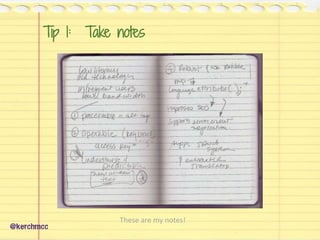
Tip 1: Take notes
@kerchmcc
These are my notes!
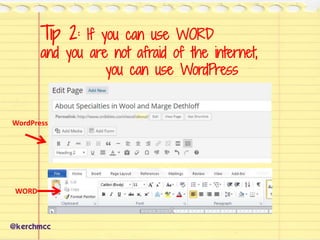
Tip 2: If you can use WORD
and you are not afraid of the internet,
you can use WordPress
@kerchmcc
WORD
WordPress
@kerchmcc
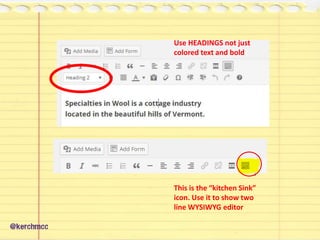
Use HEADINGS not just
colored text and bold
This is the “kitchen Sink”
icon. Use it to show two
line WYSIWYG editor
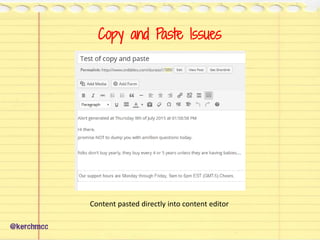
Copy and Paste Issues
@kerchmcc
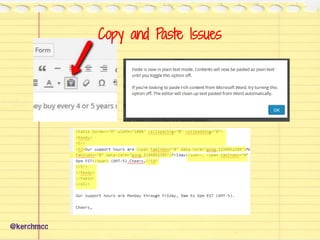
Content pasted directly into content editor
@kerchmcc
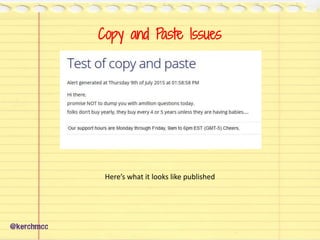
Copy and Paste Issues
Here’s what it looks like published
@kerchmcc
Copy and Paste Issues
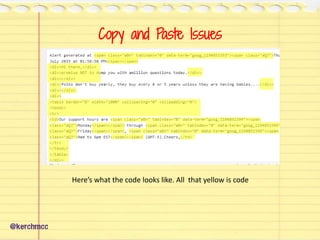
Here’s what the code looks like. All that yellow is code
@kerchmcc
Copy and Paste Issues
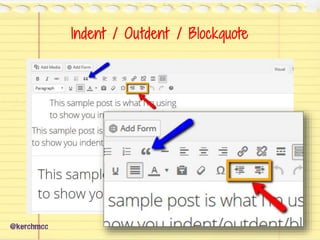
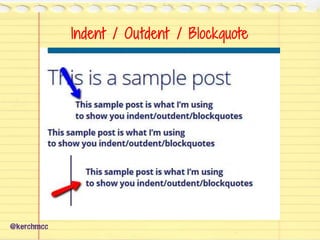
Indent / Outdent / Blockquote
@kerchmcc
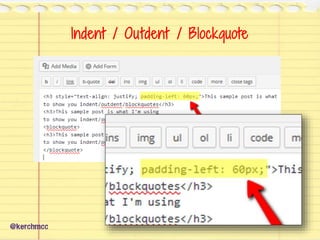
Indent / Outdent / Blockquote
@kerchmcc
Indent / Outdent / Blockquote
@kerchmcc
Indent / Outdent / Blockquote
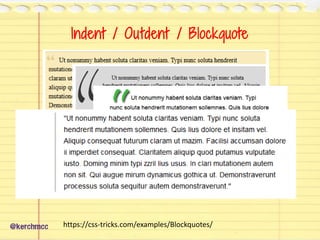
@kerchmcc https://css-tricks.com/examples/Blockquotes/
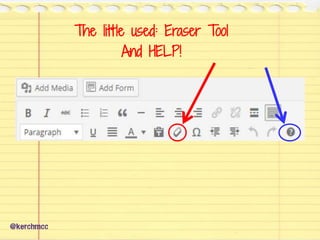
The little used: Eraser Tool
And HELP!
@kerchmcc
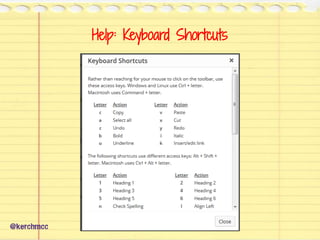
Help: Keyboard Shortcuts
@kerchmcc
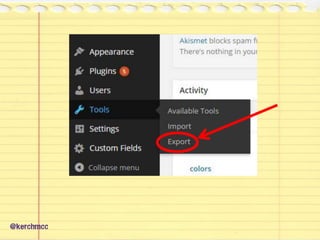
Tip 3: Backup and Update
img.wikinut.com/img/1nplwdse.t083vph/jpeg/0/woman-screaming.jpeg
@kerchmcc
@kerchmcc
@kerchmcc
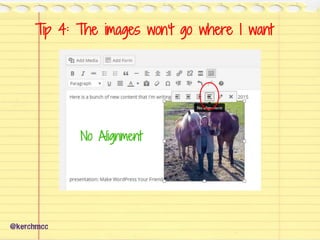
Tip 4: The images won’t go where I want
@kerchmcc
No Alignment
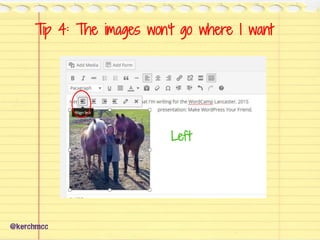
Tip 4: The images won’t go where I want
@kerchmcc
Left
Tip 4: The images won’t go where I want
@kerchmcc
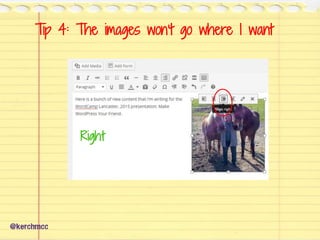
Right
Tip 4: The images won’t go where I want
@kerchmcc
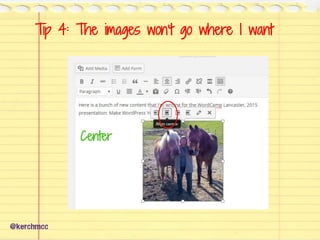
Center
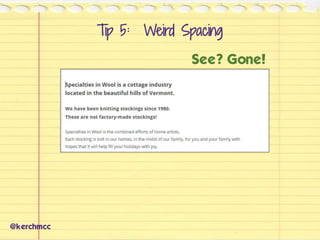
Tip 5: Weird Spacing
@kerchmcc
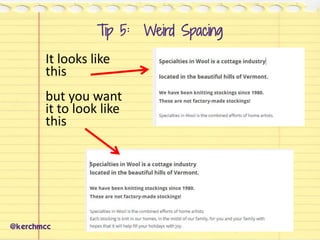
It looks like
this
but you want
it to look like
this
@kerchmcc
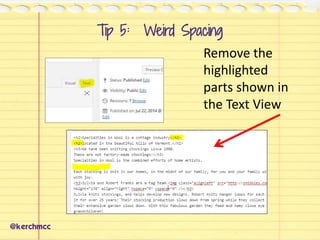
Remove the
highlighted
parts shown in
the Text View
Tip 5: Weird Spacing
@kerchmcc
See? Gone!
Tip 5: Weird Spacing
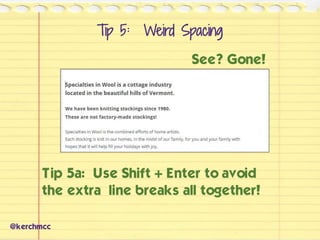
See? Gone!
@kerchmcc
Tip 5a: Use Shift + Enter to avoid
the extra line breaks all together!
Tip 5: Weird Spacing
Tip 6: Plugins
Just because you install
a plugin does not make it
do anything!
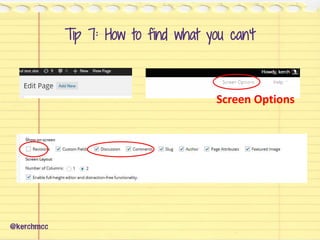
Screen Options
Tip 7: How to find what you can’t
@kerchmcc
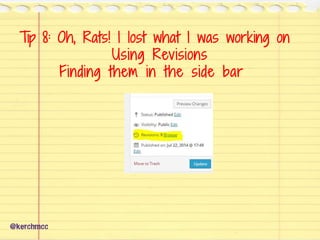
Tip 8: Oh, Rats! I lost what I was working on
Using Revisions
Finding them in the side bar
@kerchmcc
@kerchmcc
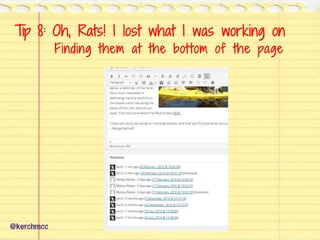
Tip 8: Oh, Rats! I lost what I was working on
Finding them at the bottom of the page
@kerchmcc
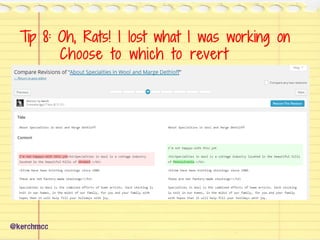
Tip 8: Oh, Rats! I lost what I was working on
Choose to which to revert
www.pinballrebel.com/fortune/zultan/zultan_6.jpg
Tip 9: When you’re lost and confused
@kerchmcc
www.pinballrebel.com/fortune/zultan/zultan_6.jpg
Tip 9: When you’re lost and confused
@kerchmcc
How to add a picture to a post
Search the codex.wordpress.org
@kerchmcc
@kerchmcc
Results Page
Search the codex.wordpress.org
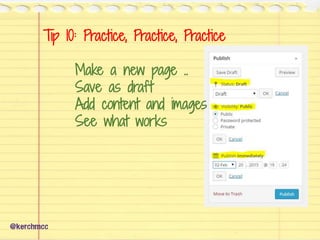
Tip 10: Practice, Practice, Practice
Make a new page ..
Save as draft
Add content and images
See what works
@kerchmcc
@kerchmcc
Go ahead:
Push the buttons.
You won’t break it!
About Kerch @kerchmcc
Phone: (443) 255-3401
Kerch@WeFixBrokenWebsites.com
WeFixBrokenWebsites.com (also: FixMyBylaws.com)
Twitter @kerchmcc
FaceBook.com/kerch
plus.google.com/+KerchMcConlogue/
Linkedin: kerch-mcconlogue
slideshare.net/kerch
Tweet if you liked it
Tweet if you hated it
Tweet if you have questions

10 Tips to Make WordPress Your Friend

Editor's Notes

  • #3 Grandparents bought them Put in the tape Push play But they were often afraid. Kids figured it out Just push the buttons. No PB&J sandwiches in the slot I want to convince you that you can do this Use word,.. Not afraid of the internet? I know you want to do this or you wouldn't be here. Look
  • #4 Apple’s whole deal is make it easy for people to figure out. It can be intimidating. Lou.. Story People are swayed by their beliefs Kids believe they don’t like veggies. They BELIEVE it.
  • #5  Adults don’t want to admit a fear. Heck Babies can do it I must be really stupid! Let me say it again. I want to convince you that you can do this.
  • #6 So here you are at the beginning of WordCamp How many is this the first? Welcome: to the community Part of the value of coming here is the opportunity to learn and share and grow The community needs you! You say, what me? I don’t know anything. Every new person who asks a question forces somebody else to think about something.. Maybe in a different way than they did before.
  • #7 I can’t really teach you much in 40 minutes … You won’t remember what you don’t own. You hear it.. You think you know it.. But until you use it .. You won’t own it. I want to set you on the right path
  • #8 62 years old. One computer class .. No commas Artist, produced big events, BCF, carson and barnes Adhd coach I started writing code by hand in 1999 and have been using WP Since 2005 WordPress version 1.5 I write a little code Been to several wordcamps Dirty little sec ret.. I don’t write fancy code like a lot of these guys. Somehow I think if I listen REALLY CAREFULLY.. Suddenly I’ll understand.. Like sitting a table in Mexico with a bunch of Mexican women chatting.. If I listen really carefully.. I’ll understand. Nope. How many of you already have WP for your NP? Are you still working with someone for support? Any ringers here? Feel free to ask questions as they come up. I’ll either answer it, or tell you it’s coming.. Or say.. See me later. Tommy 386 with parts from the junk pile in the computer lab in HS


  • #9 Tip 1 Write down the words .. Ask questions ask people Sometimes you find answers where you least expect it.. Maybe that person sitting next to you at lunch. Take notes.. Condesnse them soon
  • #42 How to: Make a page Save as a draft Or private And play
  • #43 Lou’s story Vcr