SOCIAL RECRUITING TOOLKIT
www.recruitem.net + www.relode.com
Built for sourcers and recruiters,
Recruit’em helps you find people on social media while
Relode lets you store and organise your candidate
pipeline.
...the best apps work together
What is Recruit’em?
Recruit’em is a unique social recruiting tool that helps recruiters search
for candidates on; LinkedIn, Google+, Stackoverflow, GitHub, XING &
Twitter for free.
Created by Clever Biscuit
– a small web development
collective based in Zürich,
Switzerland.
Check it out at:
http://recruitem.net
What is Relode?
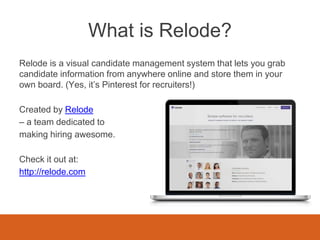
Relode is a visual candidate management system that lets you grab
candidate information from anywhere online and store them in your
own board. (Yes, it’s Pinterest for recruiters!)
Created by Relode
– a team dedicated to
making hiring awesome.
Check it out at:
http://relode.com
How to use Recruit’em & Relode
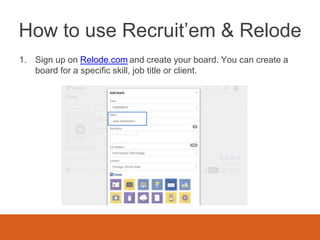
1. Sign up on Relode.com and create your board. You can create a
board for a specific skill, job title or client.
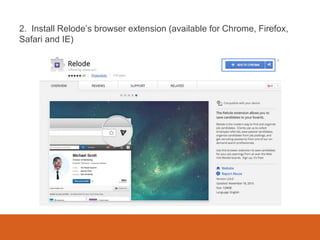
2. Install Relode’s browser extension (available for Chrome, Firefox,
Safari and IE)
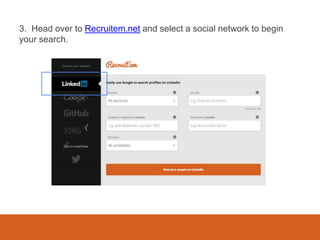
3. Head over to Recruitem.net and select a social network to begin
your search.
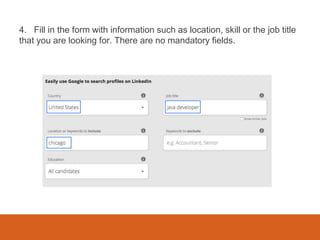
4. Fill in the form with information such as location, skill or the job title
that you are looking for. There are no mandatory fields.
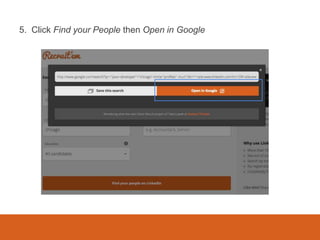
5. Click Find your People then Open in Google
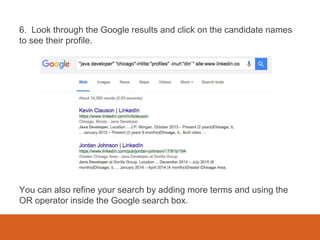
6. Look through the Google results and click on the candidate names
to see their profile.
You can also refine your search by adding more terms and using the
OR operator inside the Google search box.
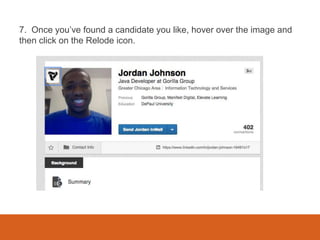
7. Once you’ve found a candidate you like, hover over the image and
then click on the Relode icon.
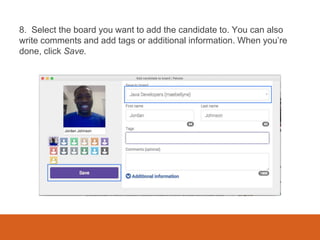
8. Select the board you want to add the candidate to. You can also
write comments and add tags or additional information. When you’re
done, click Save.
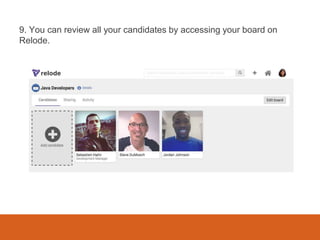
9. You can review all your candidates by accessing your board on
Relode.
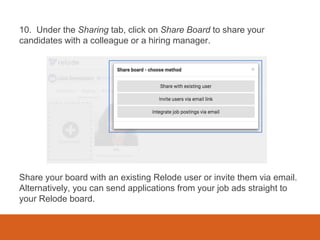
10. Under the Sharing tab, click on Share Board to share your
candidates with a colleague or a hiring manager.
Share your board with an existing Relode user or invite them via email.
Alternatively, you can send applications from your job ads straight to
your Relode board.

10 easy steps to building a candidate pipeline

  • 1.
  • 2.
    Built for sourcersand recruiters, Recruit’em helps you find people on social media while Relode lets you store and organise your candidate pipeline. ...the best apps work together
  • 3.
    What is Recruit’em? Recruit’emis a unique social recruiting tool that helps recruiters search for candidates on; LinkedIn, Google+, Stackoverflow, GitHub, XING & Twitter for free. Created by Clever Biscuit – a small web development collective based in Zürich, Switzerland. Check it out at: http://recruitem.net
  • 4.
    What is Relode? Relodeis a visual candidate management system that lets you grab candidate information from anywhere online and store them in your own board. (Yes, it’s Pinterest for recruiters!) Created by Relode – a team dedicated to making hiring awesome. Check it out at: http://relode.com
  • 5.
    How to useRecruit’em & Relode 1. Sign up on Relode.com and create your board. You can create a board for a specific skill, job title or client.
  • 6.
    2. Install Relode’sbrowser extension (available for Chrome, Firefox, Safari and IE)
  • 7.
    3. Head overto Recruitem.net and select a social network to begin your search.
  • 8.
    4. Fill inthe form with information such as location, skill or the job title that you are looking for. There are no mandatory fields.
  • 9.
    5. Click Findyour People then Open in Google
  • 10.
    6. Look throughthe Google results and click on the candidate names to see their profile. You can also refine your search by adding more terms and using the OR operator inside the Google search box.
  • 11.
    7. Once you’vefound a candidate you like, hover over the image and then click on the Relode icon.
  • 12.
    8. Select theboard you want to add the candidate to. You can also write comments and add tags or additional information. When you’re done, click Save.
  • 13.
    9. You canreview all your candidates by accessing your board on Relode.
  • 14.
    10. Under theSharing tab, click on Share Board to share your candidates with a colleague or a hiring manager. Share your board with an existing Relode user or invite them via email. Alternatively, you can send applications from your job ads straight to your Relode board.