LEARNING ACTIVITY SHEET
SPECIAL PROGRAM IN ICT 10
ADVANCED PROGRAMMING 10
First Quarter, Week 7
Name: ________________________________________ Date: _______________________________
Grade Level / Section: ___________________________
STATEMENTS: DECLARING AND EXECUTING
BACKGROUND INFORMATION FOR LEARNERS
A statement is a complete instruction in Visual Basic programs. It may contain keywords, operators, variables,
literal values, constants and expressions.
Statements could be categorized as −
• Declaration statements − these are the statements where you name a variable, constant, or procedure,
and can also specify a data type.
• Executable statements − these are the statements, which initiate actions. These statements can call a
method or function, loop or branch through blocks of code or assign values or expression to a variable or
constant. In the last case, it is called an Assignment statement.
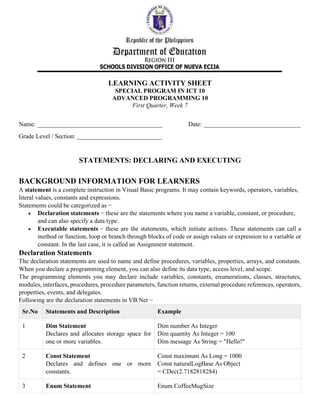
Declaration Statements
The declaration statements are used to name and define procedures, variables, properties, arrays, and constants.
When you declare a programming element, you can also define its data type, access level, and scope.
The programming elements you may declare include variables, constants, enumerations, classes, structures,
modules, interfaces, procedures, procedure parameters, function returns, external procedure references, operators,
properties, events, and delegates.
Following are the declaration statements in VB.Net −
Sr.No Statements and Description Example
1 Dim Statement
Declares and allocates storage space for
one or more variables.
Dim number As Integer
Dim quantity As Integer = 100
Dim message As String = "Hello!"
2 Const Statement
Declares and defines one or more
constants.
Const maximum As Long = 1000
Const naturalLogBase As Object
= CDec(2.7182818284)
3 Enum Statement Enum CoffeeMugSize
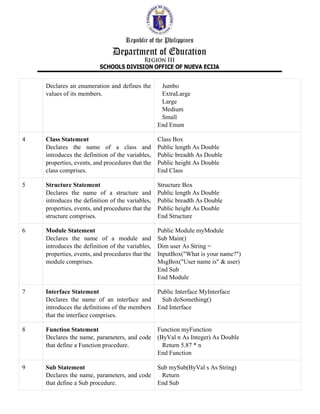
Declares an enumeration and defines the
values of its members.
Jumbo
ExtraLarge
Large
Medium
Small
End Enum
4 Class Statement
Declares the name of a class and
introduces the definition of the variables,
properties, events, and procedures that the
class comprises.
Class Box
Public length As Double
Public breadth As Double
Public height As Double
End Class
5 Structure Statement
Declares the name of a structure and
introduces the definition of the variables,
properties, events, and procedures that the
structure comprises.
Structure Box
Public length As Double
Public breadth As Double
Public height As Double
End Structure
6 Module Statement
Declares the name of a module and
introduces the definition of the variables,
properties, events, and procedures that the
module comprises.
Public Module myModule
Sub Main()
Dim user As String =
InputBox("What is your name?")
MsgBox("User name is" & user)
End Sub
End Module
7 Interface Statement
Declares the name of an interface and
introduces the definitions of the members
that the interface comprises.
Public Interface MyInterface
Sub doSomething()
End Interface
8 Function Statement
Declares the name, parameters, and code
that define a Function procedure.
Function myFunction
(ByVal n As Integer) As Double
Return 5.87 * n
End Function
9 Sub Statement
Declares the name, parameters, and code
that define a Sub procedure.
Sub mySub(ByVal s As String)
Return
End Sub
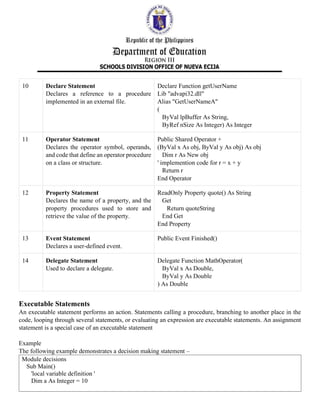
10 Declare Statement
Declares a reference to a procedure
implemented in an external file.
Declare Function getUserName
Lib "advapi32.dll"
Alias "GetUserNameA"
(
ByVal lpBuffer As String,
ByRef nSize As Integer) As Integer
11 Operator Statement
Declares the operator symbol, operands,
and code that define an operator procedure
on a class or structure.
Public Shared Operator +
(ByVal x As obj, ByVal y As obj) As obj
Dim r As New obj
' implemention code for r = x + y
Return r
End Operator
12 Property Statement
Declares the name of a property, and the
property procedures used to store and
retrieve the value of the property.
ReadOnly Property quote() As String
Get
Return quoteString
End Get
End Property
13 Event Statement
Declares a user-defined event.
Public Event Finished()
14 Delegate Statement
Used to declare a delegate.
Delegate Function MathOperator(
ByVal x As Double,
ByVal y As Double
) As Double
Executable Statements
An executable statement performs an action. Statements calling a procedure, branching to another place in the
code, looping through several statements, or evaluating an expression are executable statements. An assignment
statement is a special case of an executable statement
Example
The following example demonstrates a decision making statement –
Module decisions
Sub Main()
'local variable definition '
Dim a As Integer = 10
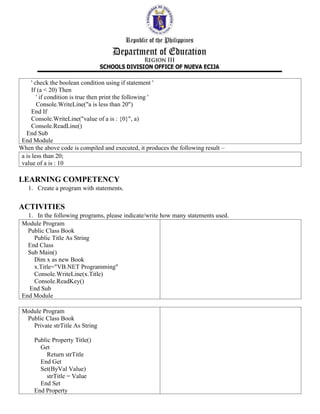
' check the boolean condition using if statement '
If (a < 20) Then
' if condition is true then print the following '
Console.WriteLine("a is less than 20")
End If
Console.WriteLine("value of a is : {0}", a)
Console.ReadLine()
End Sub
End Module
When the above code is compiled and executed, it produces the following result –
a is less than 20;
value of a is : 10
LEARNING COMPETENCY
1. Create a program with statements.
ACTIVITIES
1. In the following programs, please indicate/write how many statements used.
Module Program
Public Class Book
Public Title As String
End Class
Sub Main()
Dim x as new Book
x.Title="VB.NET Programming"
Console.WriteLine(x.Title)
Console.ReadKey()
End Sub
End Module
Module Program
Public Class Book
Private strTitle As String
Public Property Title()
Get
Return strTitle
End Get
Set(ByVal Value)
strTitle = Value
End Set
End Property
End Class
Sub Main()
Dim x As New Book
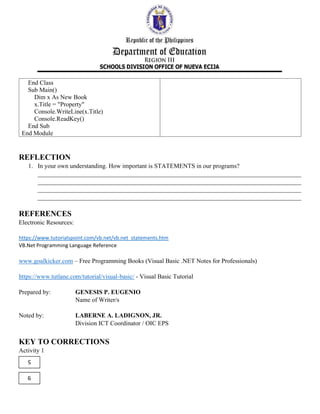
x.Title = "Property"
Console.WriteLine(x.Title)
Console.ReadKey()
End Sub
End Module
REFLECTION
1. In your own understanding. How important is STATEMENTS in our programs?
____________________________________________________________________________________
____________________________________________________________________________________
____________________________________________________________________________________
____________________________________________________________________________________
REFERENCES
Electronic Resources:
https://www.tutorialspoint.com/vb.net/vb.net_statements.htm
VB.Net Programming Language Reference
www.goalkicker.com – Free Programming Books (Visual Basic .NET Notes for Professionals)
https://www.tutlane.com/tutorial/visual-basic/ - Visual Basic Tutorial
Prepared by: GENESIS P. EUGENIO
Name of Writer/s
Noted by: LABERNE A. LADIGNON, JR.
Division ICT Coordinator / OIC EPS
KEY TO CORRECTIONS
Activity 1
5
9

10 ap week 7 vbnet statements-genesis eugenio

  • 1.
    LEARNING ACTIVITY SHEET SPECIALPROGRAM IN ICT 10 ADVANCED PROGRAMMING 10 First Quarter, Week 7 Name: ________________________________________ Date: _______________________________ Grade Level / Section: ___________________________ STATEMENTS: DECLARING AND EXECUTING BACKGROUND INFORMATION FOR LEARNERS A statement is a complete instruction in Visual Basic programs. It may contain keywords, operators, variables, literal values, constants and expressions. Statements could be categorized as − • Declaration statements − these are the statements where you name a variable, constant, or procedure, and can also specify a data type. • Executable statements − these are the statements, which initiate actions. These statements can call a method or function, loop or branch through blocks of code or assign values or expression to a variable or constant. In the last case, it is called an Assignment statement. Declaration Statements The declaration statements are used to name and define procedures, variables, properties, arrays, and constants. When you declare a programming element, you can also define its data type, access level, and scope. The programming elements you may declare include variables, constants, enumerations, classes, structures, modules, interfaces, procedures, procedure parameters, function returns, external procedure references, operators, properties, events, and delegates. Following are the declaration statements in VB.Net − Sr.No Statements and Description Example 1 Dim Statement Declares and allocates storage space for one or more variables. Dim number As Integer Dim quantity As Integer = 100 Dim message As String = "Hello!" 2 Const Statement Declares and defines one or more constants. Const maximum As Long = 1000 Const naturalLogBase As Object = CDec(2.7182818284) 3 Enum Statement Enum CoffeeMugSize
  • 2.
    Declares an enumerationand defines the values of its members. Jumbo ExtraLarge Large Medium Small End Enum 4 Class Statement Declares the name of a class and introduces the definition of the variables, properties, events, and procedures that the class comprises. Class Box Public length As Double Public breadth As Double Public height As Double End Class 5 Structure Statement Declares the name of a structure and introduces the definition of the variables, properties, events, and procedures that the structure comprises. Structure Box Public length As Double Public breadth As Double Public height As Double End Structure 6 Module Statement Declares the name of a module and introduces the definition of the variables, properties, events, and procedures that the module comprises. Public Module myModule Sub Main() Dim user As String = InputBox("What is your name?") MsgBox("User name is" & user) End Sub End Module 7 Interface Statement Declares the name of an interface and introduces the definitions of the members that the interface comprises. Public Interface MyInterface Sub doSomething() End Interface 8 Function Statement Declares the name, parameters, and code that define a Function procedure. Function myFunction (ByVal n As Integer) As Double Return 5.87 * n End Function 9 Sub Statement Declares the name, parameters, and code that define a Sub procedure. Sub mySub(ByVal s As String) Return End Sub
  • 3.
    10 Declare Statement Declaresa reference to a procedure implemented in an external file. Declare Function getUserName Lib "advapi32.dll" Alias "GetUserNameA" ( ByVal lpBuffer As String, ByRef nSize As Integer) As Integer 11 Operator Statement Declares the operator symbol, operands, and code that define an operator procedure on a class or structure. Public Shared Operator + (ByVal x As obj, ByVal y As obj) As obj Dim r As New obj ' implemention code for r = x + y Return r End Operator 12 Property Statement Declares the name of a property, and the property procedures used to store and retrieve the value of the property. ReadOnly Property quote() As String Get Return quoteString End Get End Property 13 Event Statement Declares a user-defined event. Public Event Finished() 14 Delegate Statement Used to declare a delegate. Delegate Function MathOperator( ByVal x As Double, ByVal y As Double ) As Double Executable Statements An executable statement performs an action. Statements calling a procedure, branching to another place in the code, looping through several statements, or evaluating an expression are executable statements. An assignment statement is a special case of an executable statement Example The following example demonstrates a decision making statement – Module decisions Sub Main() 'local variable definition ' Dim a As Integer = 10
  • 4.
    ' check theboolean condition using if statement ' If (a < 20) Then ' if condition is true then print the following ' Console.WriteLine("a is less than 20") End If Console.WriteLine("value of a is : {0}", a) Console.ReadLine() End Sub End Module When the above code is compiled and executed, it produces the following result – a is less than 20; value of a is : 10 LEARNING COMPETENCY 1. Create a program with statements. ACTIVITIES 1. In the following programs, please indicate/write how many statements used. Module Program Public Class Book Public Title As String End Class Sub Main() Dim x as new Book x.Title="VB.NET Programming" Console.WriteLine(x.Title) Console.ReadKey() End Sub End Module Module Program Public Class Book Private strTitle As String Public Property Title() Get Return strTitle End Get Set(ByVal Value) strTitle = Value End Set End Property
  • 5.
    End Class Sub Main() Dimx As New Book x.Title = "Property" Console.WriteLine(x.Title) Console.ReadKey() End Sub End Module REFLECTION 1. In your own understanding. How important is STATEMENTS in our programs? ____________________________________________________________________________________ ____________________________________________________________________________________ ____________________________________________________________________________________ ____________________________________________________________________________________ REFERENCES Electronic Resources: https://www.tutorialspoint.com/vb.net/vb.net_statements.htm VB.Net Programming Language Reference www.goalkicker.com – Free Programming Books (Visual Basic .NET Notes for Professionals) https://www.tutlane.com/tutorial/visual-basic/ - Visual Basic Tutorial Prepared by: GENESIS P. EUGENIO Name of Writer/s Noted by: LABERNE A. LADIGNON, JR. Division ICT Coordinator / OIC EPS KEY TO CORRECTIONS Activity 1 5 9