Introduction to SEO
Ready to optimise your website?
Here’s what you need to know.
WHAT IS SEO?
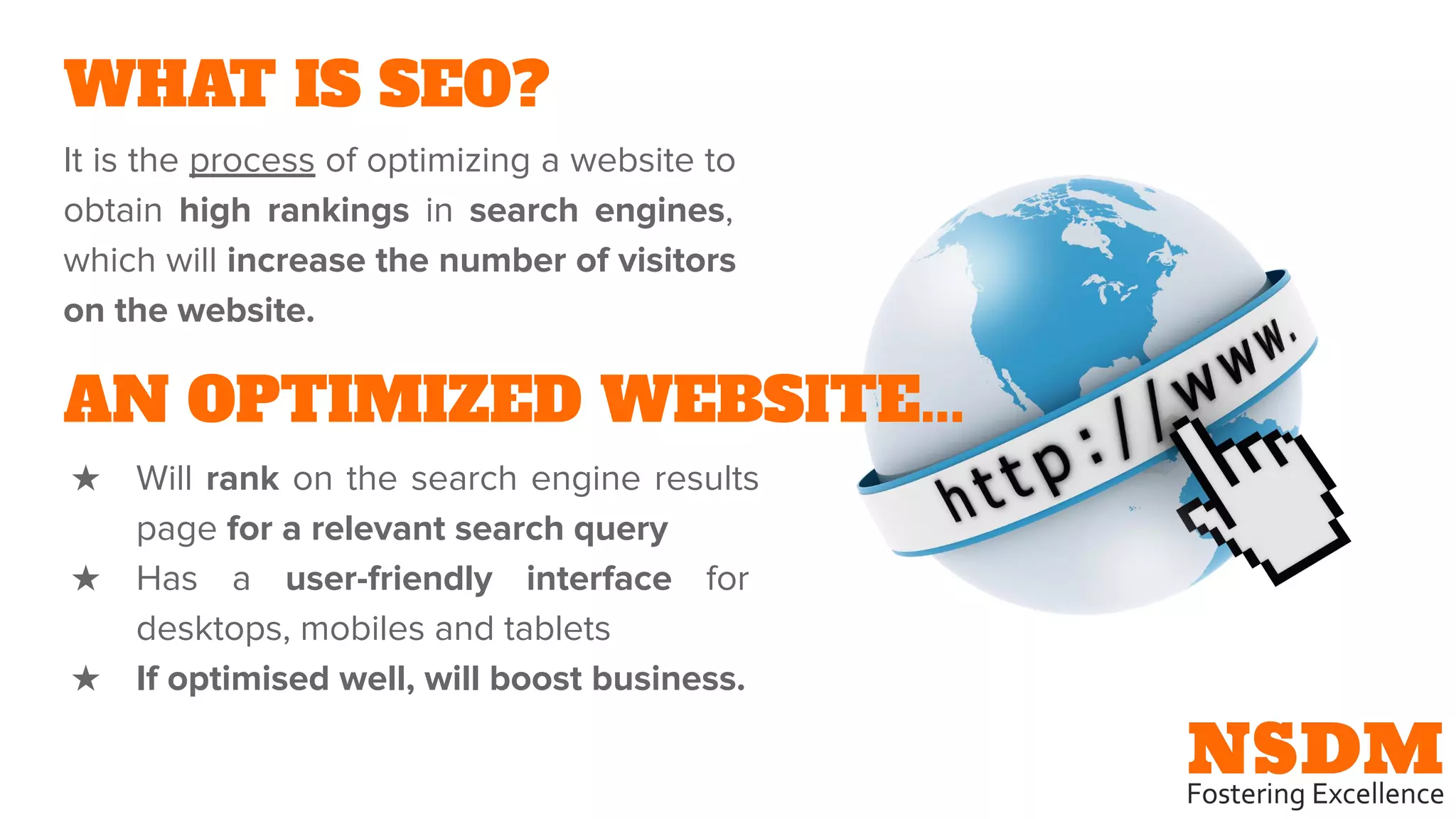
It is the process of optimizing a website to
obtain high rankings in search engines,
which will increase the number of visitors
on the website.
AN OPTIMIZED WEBSITE...
★ Will rank on the search engine results
page for a relevant search query
★ Has a user-friendly interface for
desktops, mobiles and tablets
★ If optimised well, will boost business.
HOW DOES A SEARCH ENGINE WORK?
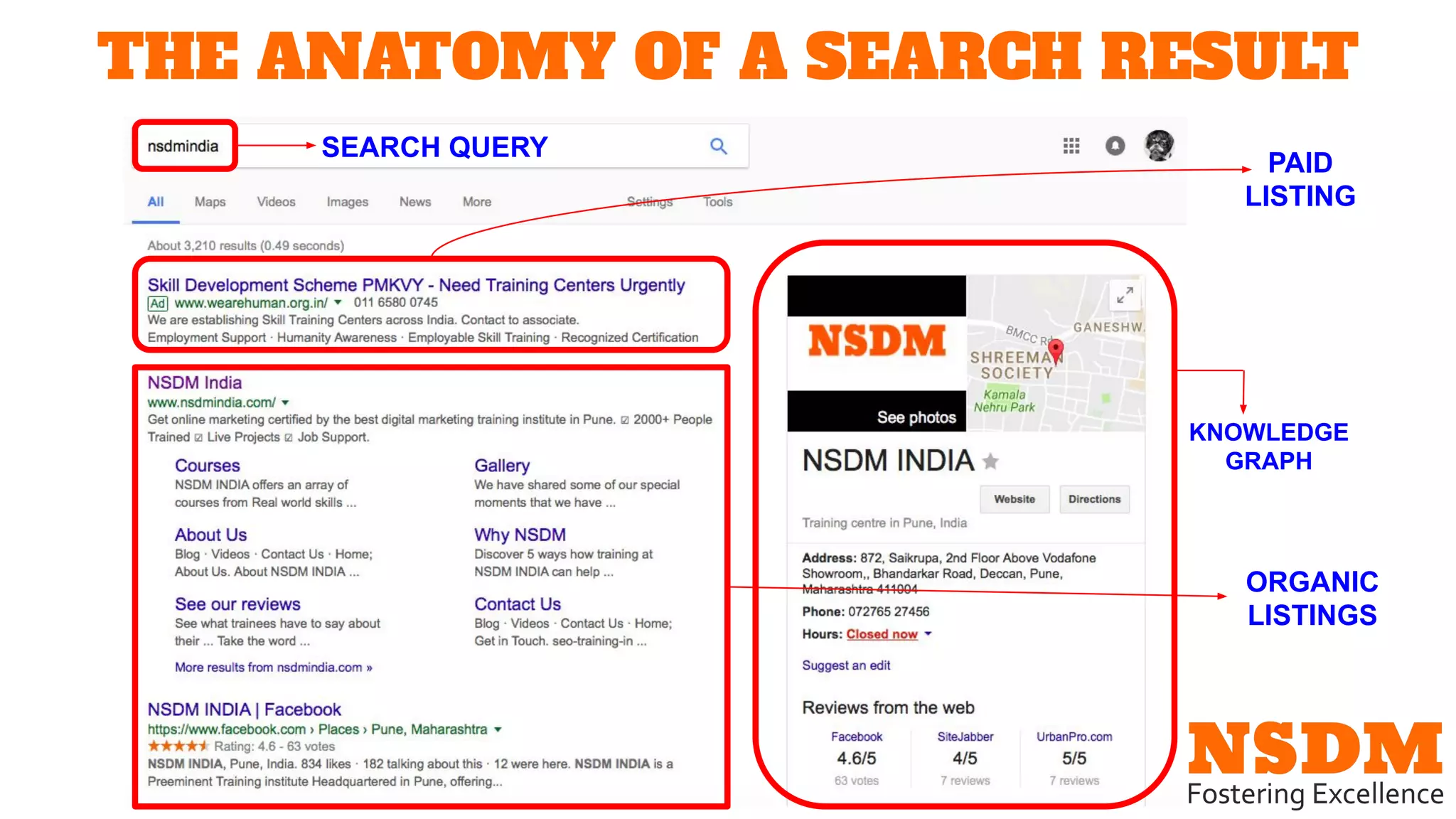
THE ANATOMY OF A SEARCH RESULT
SEARCH QUERY
PAID
LISTING
ORGANIC
LISTINGS
KNOWLEDGE
GRAPH
★ SEARCH QUERY: The word or phrase
that has been entered into the
searchbar. It contains keywords that
tell search engine crawlers use to
create results.
★ SERP: This stands for Search Engine
Results Page. It is the page of results
that is displayed following a search
query.
★ PAID LISTINGS: Created with Google
Adwords, these advertisements appear
at the top and bottom of the SERP.
Every time a paid listing is clicked on, a
certain amount of money is deducted
from the business owner’s Adwords
account.
★ ORGANIC LISTINGS: The search
results that are presented organically
by search engine crawlers. Various
ranking factors influence the
positioning of these organic results.
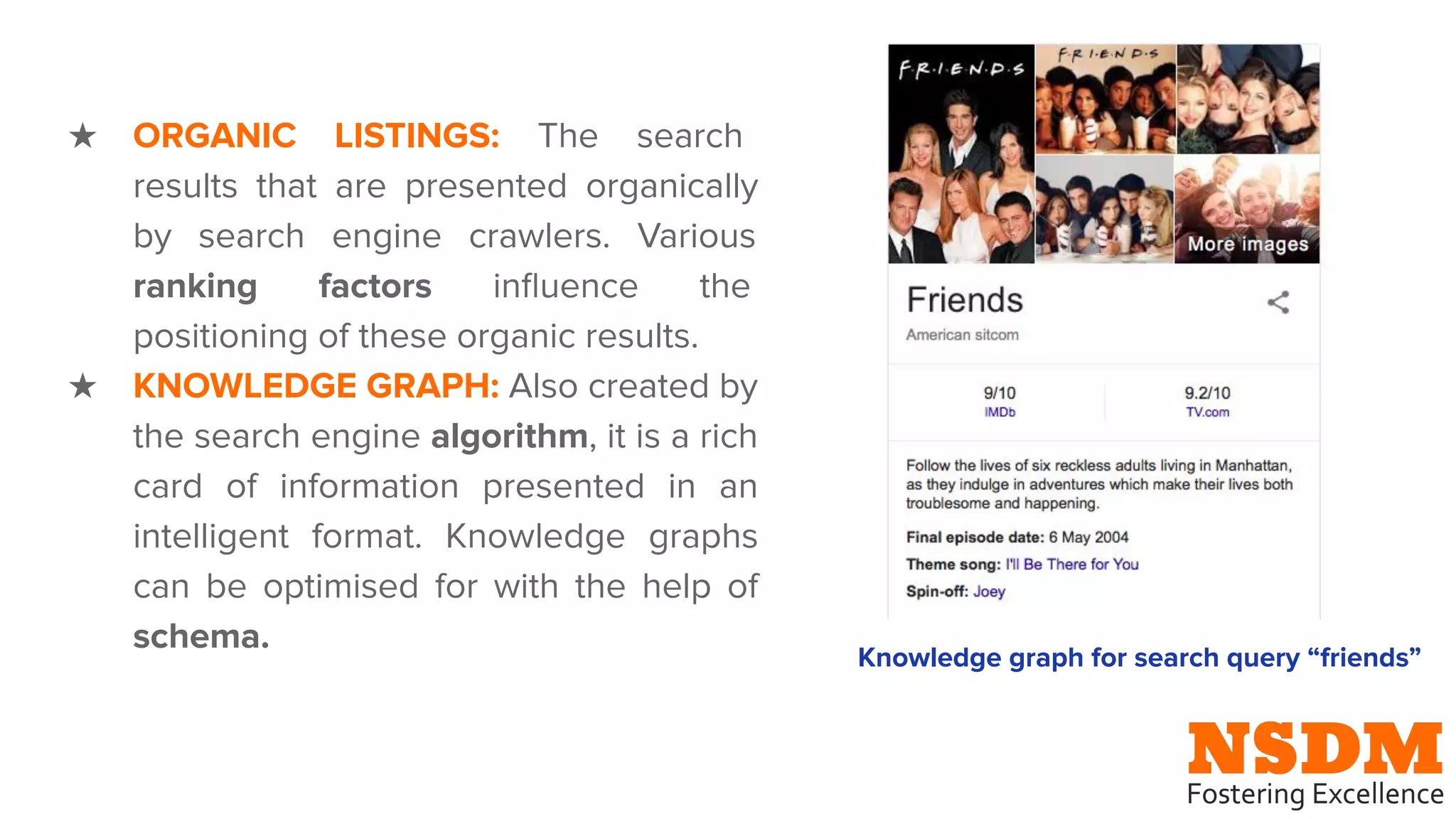
★ KNOWLEDGE GRAPH: Also created by
the search engine algorithm, it is a rich
card of information presented in an
intelligent format. Knowledge graphs
can be optimised for with the help of
schema.
Knowledge graph for search query “friends”
HISTORY OF GOOGLE
WHY OPTIMISE FOR GOOGLE?
★ GOOGLE’S GOAL: To provide relevant
information in the fastest time possible
★ World’s leading search engine with market
share of 80.5% (as of 2017)
★ Ranking on first page of Google = ranking
on first page of Bing, Yahoo, etc.
SOME GOOGLE TOOLS FOR SEO
1. Google Adwords
➔ An advertising service that allows business
owners to advertise on Google
➔ The user can set a budget for their
advertising campaign and money will only
be deducted when their Ad is clicked on.
➔ Adwords is based on keywords: if a search
query has relevant keywords to your Ad, it
will be shown on the SERP.
➔ WATCH: What is Google Adwords?
https://goo.gl/QEAWQm
SOME GOOGLE TOOLS FOR SEO
Why use Adwords?
★ Good method to gain exposure for new
businesses
★ You can reach the right people and at the
right time with advanced and
customizable ad settings
★ You are shown exactly how much you earn
from each ad, which helps you make
economical choices for your business
★ Keyword research is facilitated with the
keyword planner tool
SOME GOOGLE TOOLS FOR SEO
2. Google My Business
➔ Puts your business on the (Google) map
➔ Use this tool to provide Google with
relevant information about your business
➔ Boosts the accessibility of your business:
customers are more likely to visit your
business if they know your office hours,
your location, and can contact you easily
➔ WATCH: How to add or claim your
business on Google https://goo.gl/Fe6aDJ
SOME REVENUE MODELS
1. E-commerce: Selling goods and services
online is a primary source of revenue for
e-commerce businesses.
2. Leads: Generating traffic on your business
website is one of the main objectives of
SEO.
3. Advertising: Use Google Adwords and
Adsense to promote your business on the
internet.
SOME REVENUE MODELS
4. Affiliates: Revenue can also be generated
by directing your customers to another website
(usually an e-commerce website). If a sale is
made using your affiliate link, you will receive
a substantial commission.
5. Freelancing: Goods or services can be
provided on freelancing platforms such as
fiver, guru, and freelancer.
BEFORE YOU BEGIN SEO
Before you consider taking your business to
the web, YOU MUST…
1. Identify business objectives: Do you want
to expand your client base to an
international scale? Do you want to remain
local, but become more accessible? Or do
you simply want to pick your business off
the ground? Knowing your objectives will
help you make smart and effective choices
when marketing online.
2. Know your customers: How old are they?
What are they really interested in? And where
do they hang out on the internet? Answering
these questions will give you a comprehensive
customer profile to target while carrying out
digital marketing.
BEFORE YOU BEGIN SEO
3. Know your trends: It is crucial to
know what your target customers
feel about your business idea. Use
Google trends
(https://trends.google.com/trends/)
to understand growing and
declining trends before making
business decisions.
RECAP

www.nsdmindia.com

  • 1.
    Introduction to SEO Readyto optimise your website? Here’s what you need to know.
  • 2.
    WHAT IS SEO? Itis the process of optimizing a website to obtain high rankings in search engines, which will increase the number of visitors on the website. AN OPTIMIZED WEBSITE... ★ Will rank on the search engine results page for a relevant search query ★ Has a user-friendly interface for desktops, mobiles and tablets ★ If optimised well, will boost business.
  • 3.
    HOW DOES ASEARCH ENGINE WORK?
  • 4.
    THE ANATOMY OFA SEARCH RESULT SEARCH QUERY PAID LISTING ORGANIC LISTINGS KNOWLEDGE GRAPH
  • 5.
    ★ SEARCH QUERY:The word or phrase that has been entered into the searchbar. It contains keywords that tell search engine crawlers use to create results. ★ SERP: This stands for Search Engine Results Page. It is the page of results that is displayed following a search query. ★ PAID LISTINGS: Created with Google Adwords, these advertisements appear at the top and bottom of the SERP. Every time a paid listing is clicked on, a certain amount of money is deducted from the business owner’s Adwords account.
  • 6.
    ★ ORGANIC LISTINGS:The search results that are presented organically by search engine crawlers. Various ranking factors influence the positioning of these organic results. ★ KNOWLEDGE GRAPH: Also created by the search engine algorithm, it is a rich card of information presented in an intelligent format. Knowledge graphs can be optimised for with the help of schema. Knowledge graph for search query “friends”
  • 7.
  • 8.
    WHY OPTIMISE FORGOOGLE? ★ GOOGLE’S GOAL: To provide relevant information in the fastest time possible ★ World’s leading search engine with market share of 80.5% (as of 2017) ★ Ranking on first page of Google = ranking on first page of Bing, Yahoo, etc.
  • 9.
    SOME GOOGLE TOOLSFOR SEO 1. Google Adwords ➔ An advertising service that allows business owners to advertise on Google ➔ The user can set a budget for their advertising campaign and money will only be deducted when their Ad is clicked on. ➔ Adwords is based on keywords: if a search query has relevant keywords to your Ad, it will be shown on the SERP. ➔ WATCH: What is Google Adwords? https://goo.gl/QEAWQm
  • 10.
    SOME GOOGLE TOOLSFOR SEO Why use Adwords? ★ Good method to gain exposure for new businesses ★ You can reach the right people and at the right time with advanced and customizable ad settings ★ You are shown exactly how much you earn from each ad, which helps you make economical choices for your business ★ Keyword research is facilitated with the keyword planner tool
  • 11.
    SOME GOOGLE TOOLSFOR SEO 2. Google My Business ➔ Puts your business on the (Google) map ➔ Use this tool to provide Google with relevant information about your business ➔ Boosts the accessibility of your business: customers are more likely to visit your business if they know your office hours, your location, and can contact you easily ➔ WATCH: How to add or claim your business on Google https://goo.gl/Fe6aDJ
  • 12.
    SOME REVENUE MODELS 1.E-commerce: Selling goods and services online is a primary source of revenue for e-commerce businesses. 2. Leads: Generating traffic on your business website is one of the main objectives of SEO. 3. Advertising: Use Google Adwords and Adsense to promote your business on the internet.
  • 13.
    SOME REVENUE MODELS 4.Affiliates: Revenue can also be generated by directing your customers to another website (usually an e-commerce website). If a sale is made using your affiliate link, you will receive a substantial commission. 5. Freelancing: Goods or services can be provided on freelancing platforms such as fiver, guru, and freelancer.
  • 14.
    BEFORE YOU BEGINSEO Before you consider taking your business to the web, YOU MUST… 1. Identify business objectives: Do you want to expand your client base to an international scale? Do you want to remain local, but become more accessible? Or do you simply want to pick your business off the ground? Knowing your objectives will help you make smart and effective choices when marketing online.
  • 15.
    2. Know yourcustomers: How old are they? What are they really interested in? And where do they hang out on the internet? Answering these questions will give you a comprehensive customer profile to target while carrying out digital marketing. BEFORE YOU BEGIN SEO
  • 16.
    BEFORE YOU BEGINSEO 3. Know your trends: It is crucial to know what your target customers feel about your business idea. Use Google trends (https://trends.google.com/trends/) to understand growing and declining trends before making business decisions.
  • 17.