GROWEL SOFTECH PVT LTD 
PROJECT:SAP R/3 IMPLEMENTATION. 
CLIENT:GRAUER & WEIL INDIA LTD. 
FINANCE MODULE 
CONFIGURATION MANUAL 
CUSTOMER MASTER RECORDS 
Customer Account Groups 
In this step, you determine the account groups for customers. 
You use the account group to determine the interval for the account numbers, 
whether the number is assigned internally by the system or, externally by the user 
(type of number assignment), whether it is a one-time account, which fields are ready 
for input or must be filled when creating and changing master records (field status). 
With the account groups, you group accounts together according to the criteria 
mentioned above, for example, one-time accounts. You determine the account 
number interval and the type of number assignment using the number ranges. 
Implementation Guide for R/3 Customizing (IMG)  Enterprise Structure  
Assignment  Financial Accounting Accounts Receivables & Payables 
Customer Accounts Master Records  Preparation for Creating Customer 
Master Records  Define Account Groups with screen Layout (Customers). 
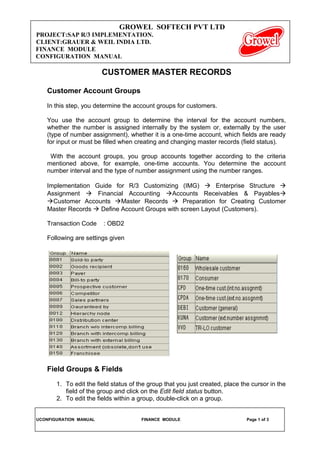
Transaction Code : OBD2 
Following are settings given 
Field Groups & Fields 
1. To edit the field status of the group that you just created, place the cursor in the 
field of the group and click on the Edit field status button. 
2. To edit the fields within a group, double-click on a group. 
UCONFIGURATION MANUAL FINANCE MODULE Page 1 of 3
GROWEL SOFTECH PVT LTD 
PROJECT:SAP R/3 IMPLEMENTATION. 
CLIENT:GRAUER & WEIL INDIA LTD. 
FINANCE MODULE 
CONFIGURATION MANUAL 
3. Enter the appropriate field status for each field displayed. Each field can only 
have one indicator selected: 
Suppress: select this indicator if the field is to be suppressed. 
Req. entry: select this indicator if you want this field to be required. 
Opt. entry: select this indicator if you want this field to be optional for input. 
4. Press the Next group icon to page forward to additional field categories. 
5. Once you have finished editing all the groups within the variant, save your data 
by pressing the Save icon. 
Number Ranges for Customer Master Records 
In this activity you create the number ranges for the customer accounts. To do this, 
specify the following under a two-character key: 
A number interval from which the account number for the customer accounts is to 
be selected 
The type of number assignment (internal or external number assignment) 
Allocate the number ranges to the account a group for customers. 
Implementation Guide for R/3 Customizing (IMG)  Enterprise Structure  
Assignment  Financial Accounting Accounts Receivables & Payables 
Customer Accounts Master Records  Preparation for Creating Customer 
Master Records  Number Range for Customer Master Records. 
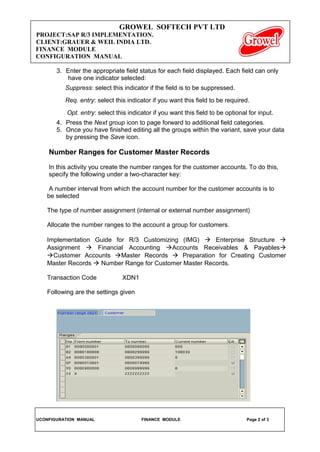
Transaction Code XDN1 
Following are the settings given 
UCONFIGURATION MANUAL FINANCE MODULE Page 2 of 3
GROWEL SOFTECH PVT LTD 
PROJECT:SAP R/3 IMPLEMENTATION. 
CLIENT:GRAUER & WEIL INDIA LTD. 
FINANCE MODULE 
CONFIGURATION MANUAL 
Assign Number Ranges to Customer Account Groups 
In this step you assign the number ranges you created in the preceding step to the 
account groups for customers. You can use one number range for several account 
groups. 
Implementation Guide for R/3 Customizing (IMG)  Enterprise Structure  
Assignment  Financial Accounting Accounts Receivables & Payables Customer 
Accounts Master Records  Preparation for Creating Customer Master Records  
Assign Number Ranges to Customer Account Groups. 
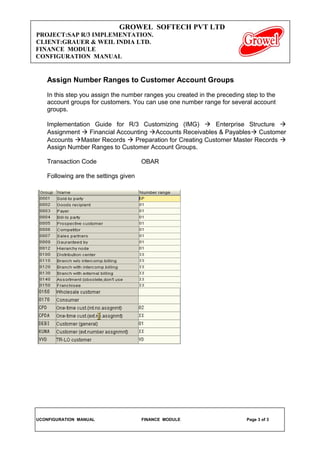
Transaction Code OBAR 
Following are the settings given 
UCONFIGURATION MANUAL FINANCE MODULE Page 3 of 3

1. customer master records

  • 1.
    GROWEL SOFTECH PVTLTD PROJECT:SAP R/3 IMPLEMENTATION. CLIENT:GRAUER & WEIL INDIA LTD. FINANCE MODULE CONFIGURATION MANUAL CUSTOMER MASTER RECORDS Customer Account Groups In this step, you determine the account groups for customers. You use the account group to determine the interval for the account numbers, whether the number is assigned internally by the system or, externally by the user (type of number assignment), whether it is a one-time account, which fields are ready for input or must be filled when creating and changing master records (field status). With the account groups, you group accounts together according to the criteria mentioned above, for example, one-time accounts. You determine the account number interval and the type of number assignment using the number ranges. Implementation Guide for R/3 Customizing (IMG)  Enterprise Structure  Assignment  Financial Accounting Accounts Receivables & Payables Customer Accounts Master Records  Preparation for Creating Customer Master Records  Define Account Groups with screen Layout (Customers). Transaction Code : OBD2 Following are settings given Field Groups & Fields 1. To edit the field status of the group that you just created, place the cursor in the field of the group and click on the Edit field status button. 2. To edit the fields within a group, double-click on a group. UCONFIGURATION MANUAL FINANCE MODULE Page 1 of 3
  • 2.
    GROWEL SOFTECH PVTLTD PROJECT:SAP R/3 IMPLEMENTATION. CLIENT:GRAUER & WEIL INDIA LTD. FINANCE MODULE CONFIGURATION MANUAL 3. Enter the appropriate field status for each field displayed. Each field can only have one indicator selected: Suppress: select this indicator if the field is to be suppressed. Req. entry: select this indicator if you want this field to be required. Opt. entry: select this indicator if you want this field to be optional for input. 4. Press the Next group icon to page forward to additional field categories. 5. Once you have finished editing all the groups within the variant, save your data by pressing the Save icon. Number Ranges for Customer Master Records In this activity you create the number ranges for the customer accounts. To do this, specify the following under a two-character key: A number interval from which the account number for the customer accounts is to be selected The type of number assignment (internal or external number assignment) Allocate the number ranges to the account a group for customers. Implementation Guide for R/3 Customizing (IMG)  Enterprise Structure  Assignment  Financial Accounting Accounts Receivables & Payables Customer Accounts Master Records  Preparation for Creating Customer Master Records  Number Range for Customer Master Records. Transaction Code XDN1 Following are the settings given UCONFIGURATION MANUAL FINANCE MODULE Page 2 of 3
  • 3.
    GROWEL SOFTECH PVTLTD PROJECT:SAP R/3 IMPLEMENTATION. CLIENT:GRAUER & WEIL INDIA LTD. FINANCE MODULE CONFIGURATION MANUAL Assign Number Ranges to Customer Account Groups In this step you assign the number ranges you created in the preceding step to the account groups for customers. You can use one number range for several account groups. Implementation Guide for R/3 Customizing (IMG)  Enterprise Structure  Assignment  Financial Accounting Accounts Receivables & Payables Customer Accounts Master Records  Preparation for Creating Customer Master Records  Assign Number Ranges to Customer Account Groups. Transaction Code OBAR Following are the settings given UCONFIGURATION MANUAL FINANCE MODULE Page 3 of 3