1
• Introduction
• Core Concepts
• Message Store
• Load Balance
• Core Features
Core Features of Apache RocketMQ

Jaskey Lam 2017 12
2
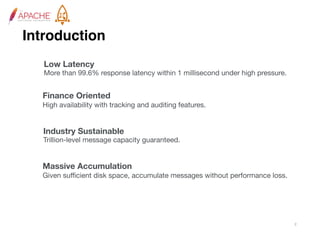
Introduction
Low Latency
More than 99.6% response latency within 1 millisecond under high pressure.
Finance Oriented
High availability with tracking and auditing features.
Industry Sustainable
Trillion-level message capacity guaranteed.
Massive Accumulation
Given sufficient disk space, accumulate messages without performance loss.
Features

• High availability
• Low Latency Messaging
• At least once
• Message Index
• Massive Accumulation
• Order Message
• Transactional Message
• Scheduled Message
• SQL Filter
• Batch Produce
• LogAppender Support
4
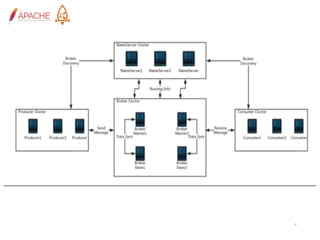
NameServer
• Name Server serves as the routing information provider. Producer/
Consumer clients look up topics to find the corresponding broker list.
• Name Server is stateless and designed as share-nothing.
• Name Server does not store datas, all states are registered from
brokers and stay in memory only
• A client will only connect to one instance in the Name Server clusters
randomly.
Broker
• Each group of brokers contains only one master and zero or some slaves.
• Slave synchronize data from master in Sync or Async way depending on the
configuration.
• Consumers can consume message from master or slave. By default, they
consume from master unless master is offline.
• Broker will connect to Name Server and register its topic route informations
Broker is a major component of the RocketMQ system. It receives
messages sent from producers, store them and prepare to handle pull
requests from consumers.
Consumer Group

• Identify a kind of consumers, which usually consume the same kind of
messages and have the same consume logic.
• Achieving goals of load-balance and fault-tolerance, in terms of message
consuming, is super easy.
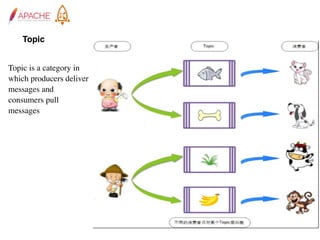
Topic


Topic is a category in
which producers deliver
messages and
consumers pull
messages
Message Queue

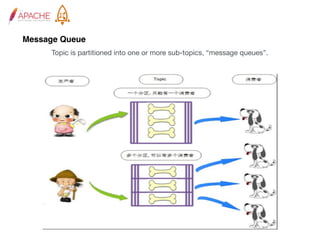
Topic is partitioned into one or more sub-topics, “message queues”.
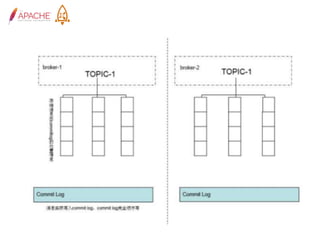
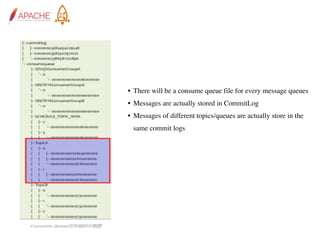
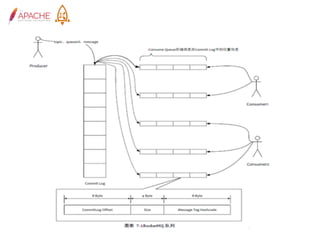
• There will be a consume queue file for every message queues
• Messages are actually stored in CommitLog
• Messages of different topics/queues are actually store in the
same commit logs
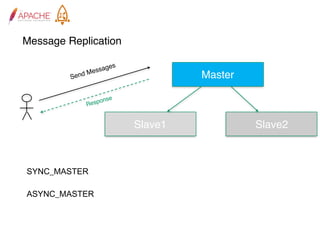
Message Replication
Master
Slave1 Slave2
Send Messages
Response
SYNC_MASTER
ASYNC_MASTER
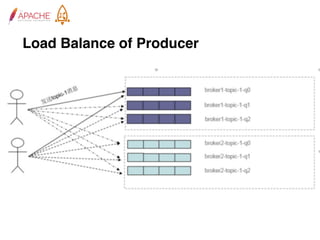
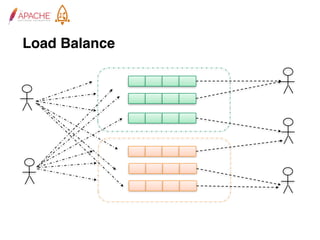
Load Balance of Producer
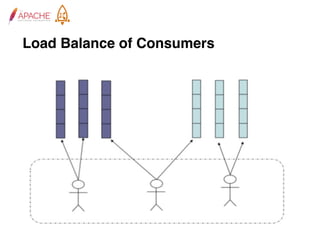
Load Balance of Consumers
Load Balance
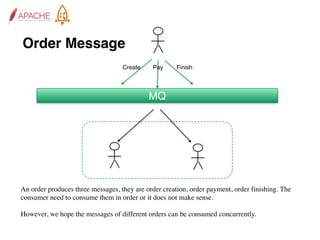
Order Message
MQ
Create Pay Finish
An order produces three messages, they are order creation, order payment, order finishing. The
consumer need to consume them in order or it does not make sense.
However, we hope the messages of different orders can be consumed concurrently.
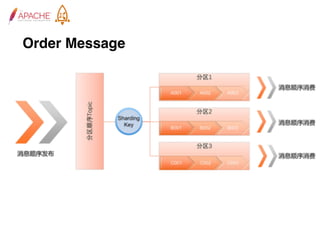
Order Message
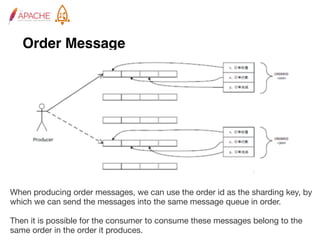
Order Message
When producing order messages, we can use the order id as the sharding key, by
which we can send the messages into the same message queue in order. 

Then it is possible for the consumer to consume these messages belong to the
same order in the order it produces.
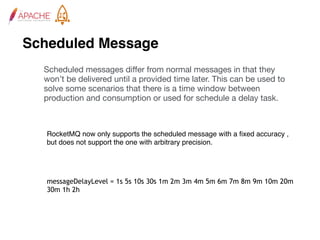
Scheduled Message
Scheduled messages differ from normal messages in that they
won’t be delivered until a provided time later. This can be used to
solve some scenarios that there is a time window between
production and consumption or used for schedule a delay task.
RocketMQ now only supports the scheduled message with a fixed accuracy ,
but does not support the one with arbitrary precision.
messageDelayLevel = 1s 5s 10s 30s 1m 2m 3m 4m 5m 6m 7m 8m 9m 10m 20m
30m 1h 2h
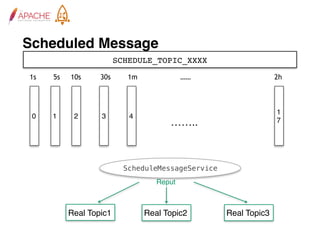
Scheduled Message
SCHEDULE_TOPIC_XXXX
0 1
1
7……..
2 3 4
1s 5s 10s 30s 1m …… 2h
Real Topic1 Real Topic2 Real Topic3
ScheduleMessageService
Reput
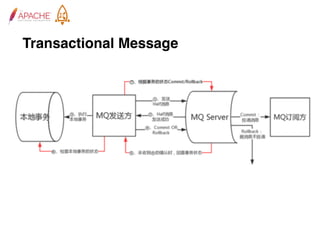
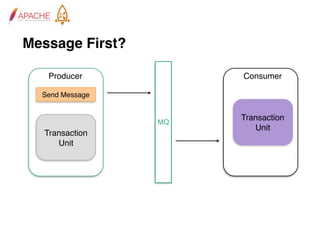
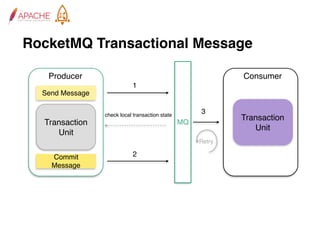
Transactional Message
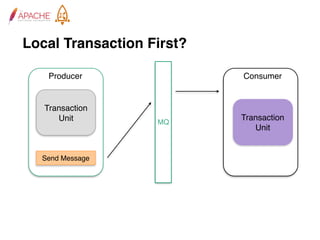
Local Transaction First?
Transaction
Unit
Send Message
Producer
Transaction
Unit
Consumer
MQ
Message First?
Transaction
Unit
Send Message
Producer
Transaction
Unit
Consumer
MQ
RocketMQ Transactional Message
Transaction
Unit
Send Message
Producer
Transaction
Unit
Consumer
MQ
Commit
Message
1
2
3check local transaction state
Retry
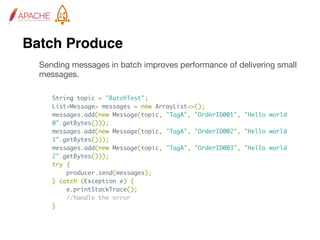
Batch Produce
Sending messages in batch improves performance of delivering small
messages.
String topic = "BatchTest";
List<Message> messages = new ArrayList<>();
messages.add(new Message(topic, "TagA", "OrderID001", "Hello world
0".getBytes()));
messages.add(new Message(topic, "TagA", "OrderID002", "Hello world
1".getBytes()));
messages.add(new Message(topic, "TagA", "OrderID003", "Hello world
2".getBytes()));
try {
producer.send(messages);
} catch (Exception e) {
e.printStackTrace();
//handle the error
}
Log Appender
log4j.appender.mq=org.apache.rocketmq.logappender.log4j.RocketmqLog4jAppender
log4j.appender.mq.Tag=yourTag
log4j.appender.mq.Topic=yourLogTopic
log4j.appender.mq.ProducerGroup=yourLogGroup
log4j.appender.mq.NameServerAddress=yourRocketmqNameserverAddress
log4j.appender.mq.layout=org.apache.log4j.PatternLayout
log4j.appender.mq.layout.ConversionPattern=%d{yyyy-MM-dd HH:mm:ss} %-4r [%t]
(%F:%L) %-5p - %m%n
RocketMQ logappender provides log4j appender, log4j2 appender and
logback appender for bussiness to use, below are config examples.
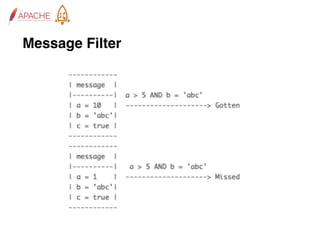
Message Filter
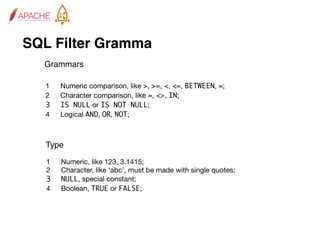
SQL Filter Gramma
	 1	 Numeric comparison, like >, >=, <, <=, BETWEEN, =;

	 2	 Character comparison, like =, <>, IN;

3 IS NULL or IS NOT NULL;

	 4	 Logical AND, OR, NOT;
	 1	 Numeric, like 123, 3.1415;

	 2	 Character, like ‘abc’, must be made with single quotes;

3 NULL, special constant;

	 4	 Boolean, TRUE or FALSE;
Type
Grammars
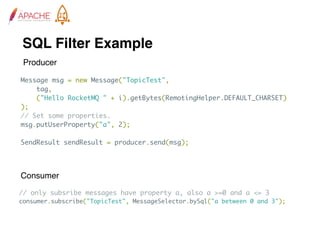
SQL Filter Example
// only subsribe messages have property a, also a >=0 and a <= 3
consumer.subscribe("TopicTest", MessageSelector.bySql("a between 0 and 3");
Message msg = new Message("TopicTest",
tag,
("Hello RocketMQ " + i).getBytes(RemotingHelper.DEFAULT_CHARSET)
);
// Set some properties.
msg.putUserProperty("a", 2);
SendResult sendResult = producer.send(msg);
Producer
Consumer
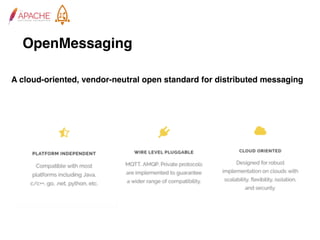
OpenMessaging
A cloud-oriented, vendor-neutral open standard for distributed messaging
The End
zhihu Jaskey Lam https://www.zhihu.com/people/linjunjie1103
RocketMQ https://zhuanlan.zhihu.com/rocketmq

1. Core Features of Apache RocketMQ