Basics of Computer Graphics
Dheeraj S. Sadawarte
1Dheeraj S Sadawarte https://dheerajsadawarte.blogspot.com
Introduction
• Field of science concerned with digitally
synthesizing and manipulating the visual content.
– creating,
– Storing
– Displaying
– manipulating images
• Focus on mathematical & computational
foundations of image generations .
• Manipulation of visual & geometric information
using computational techniques.
2Dheeraj S Sadawarte https://dheerajsadawarte.blogspot.com
Images and object
• Image is a representation of an object on a
computer
• Symbolic representation other than the text
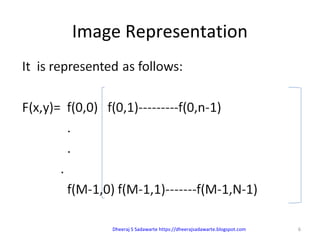
• 2D array of data with values at each element
of the array related to a color
• Objects are real entities defined in 3D world
co-ordinates.
3Dheeraj S Sadawarte https://dheerajsadawarte.blogspot.com
Image Representation
• Pictures are represented as a collection of
discrete picture element called PIXELS.
• It is the smallest addressable screen element.
• resolution is the number of pixels contained on
a display screen.
• It expressed in terms of the number of pixels on
the horizontal axis and the number on the
vertical axis.
• The process of determining the appropriate
pixels for representing pictures or objects is
called RASTERIZATION.
4Dheeraj S Sadawarte https://dheerajsadawarte.blogspot.com
Rasterization and Scan Conversion
• Rasterization is the task of taking an image
described in a vector graphics format (shapes)
and converting it into a raster image (pixels or
dots) for output on a video display or printer,
or for storage in a bitmap file format
• Scan conversion: The process of representing
continuous pictures as graphical object(as a
collection of discrete pixel) is called scan
conversion.
5Dheeraj S Sadawarte https://dheerajsadawarte.blogspot.com
Image Representation
6Dheeraj S Sadawarte https://dheerajsadawarte.blogspot.com
Basic graphic pipeline
• Object in a real world are expressed with respect
to a world co ordinate system
• The world is then projected into a view plan from
a view point
• Z axis determines the view direction
• Window specifies the area of interest
• View volume is the infinite volume swept by the
rays
• Near and far clipping plane
7
Dheeraj S Sadawarte
https://dheerajsadawarte.blogspot.com
Bitmap and vector based graphics
BITMAP (raster) VECTOR BASED
• Composed of pixels
• Created and edited in photo
or paint program
• Images are mapped to a grid
or an array of pixels
• Not easily scalable
• Used in photorealistic images
involves complex variation
• The larger we display a
bitmap, the jagged it appears
• Composed of paths
• Created and edited in
software like CoralDraw and
Adobe Illustrator
• Images have smooth edges
and create curves or shapes
• Good for precise illustrator
but not as good as bitmap
• Easily scalable due to the use
of mathematical formula
• A vector image remains
smooth in any size
8
Dheeraj S Sadawarte
https://dheerajsadawarte.blogspot.com
Application of computer graphics
• Special effects-illusions used in film, television industries
to simulate the imagined events in a story.
• Visual effects-involves integration of live-action footage
with computer generated elements in order to create
scenarios which look realistic.
• Digital art-an art created on a computer in a digital form
• Video games: gaming and animation industry
• Computer aided design-used by civil, mechanical &
electronic engineers to build the models of buildings,
bridges or circuit boards
• Medical imaging-used in molecular biology to study the
model of the genes
9
Dheeraj S Sadawarte
https://dheerajsadawarte.blogspot.com
Display device
• Display device is a device for presentation of
information such as images or a text for visual
display.
• Eg:CRT(Cathode ray tube)
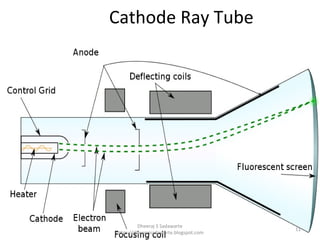
• It is a specialized vacuum tube in which
images are produced when an electron beam
strikes a phosphorescent surface.
• Heat is supplied to the cathode by passing
current through a heater element. The
cathode is a cylindrical metallic structure
10
Dheeraj S Sadawarte
https://dheerajsadawarte.blogspot.com
Cathode Ray Tube
• Cathode ray tube:
11
Dheeraj S Sadawarte
https://dheerajsadawarte.blogspot.com
You can
Download the complete PPT from the following link
https://dheerajsadawarte.blogspot.com
Dheeraj S Sadawarte
https://dheerajsadawarte.blogspot.com
12

1 basics of computer graphics

  • 1.
    Basics of ComputerGraphics Dheeraj S. Sadawarte 1Dheeraj S Sadawarte https://dheerajsadawarte.blogspot.com
  • 2.
    Introduction • Field ofscience concerned with digitally synthesizing and manipulating the visual content. – creating, – Storing – Displaying – manipulating images • Focus on mathematical & computational foundations of image generations . • Manipulation of visual & geometric information using computational techniques. 2Dheeraj S Sadawarte https://dheerajsadawarte.blogspot.com
  • 3.
    Images and object •Image is a representation of an object on a computer • Symbolic representation other than the text • 2D array of data with values at each element of the array related to a color • Objects are real entities defined in 3D world co-ordinates. 3Dheeraj S Sadawarte https://dheerajsadawarte.blogspot.com
  • 4.
    Image Representation • Picturesare represented as a collection of discrete picture element called PIXELS. • It is the smallest addressable screen element. • resolution is the number of pixels contained on a display screen. • It expressed in terms of the number of pixels on the horizontal axis and the number on the vertical axis. • The process of determining the appropriate pixels for representing pictures or objects is called RASTERIZATION. 4Dheeraj S Sadawarte https://dheerajsadawarte.blogspot.com
  • 5.
    Rasterization and ScanConversion • Rasterization is the task of taking an image described in a vector graphics format (shapes) and converting it into a raster image (pixels or dots) for output on a video display or printer, or for storage in a bitmap file format • Scan conversion: The process of representing continuous pictures as graphical object(as a collection of discrete pixel) is called scan conversion. 5Dheeraj S Sadawarte https://dheerajsadawarte.blogspot.com
  • 6.
    Image Representation 6Dheeraj SSadawarte https://dheerajsadawarte.blogspot.com
  • 7.
    Basic graphic pipeline •Object in a real world are expressed with respect to a world co ordinate system • The world is then projected into a view plan from a view point • Z axis determines the view direction • Window specifies the area of interest • View volume is the infinite volume swept by the rays • Near and far clipping plane 7 Dheeraj S Sadawarte https://dheerajsadawarte.blogspot.com
  • 8.
    Bitmap and vectorbased graphics BITMAP (raster) VECTOR BASED • Composed of pixels • Created and edited in photo or paint program • Images are mapped to a grid or an array of pixels • Not easily scalable • Used in photorealistic images involves complex variation • The larger we display a bitmap, the jagged it appears • Composed of paths • Created and edited in software like CoralDraw and Adobe Illustrator • Images have smooth edges and create curves or shapes • Good for precise illustrator but not as good as bitmap • Easily scalable due to the use of mathematical formula • A vector image remains smooth in any size 8 Dheeraj S Sadawarte https://dheerajsadawarte.blogspot.com
  • 9.
    Application of computergraphics • Special effects-illusions used in film, television industries to simulate the imagined events in a story. • Visual effects-involves integration of live-action footage with computer generated elements in order to create scenarios which look realistic. • Digital art-an art created on a computer in a digital form • Video games: gaming and animation industry • Computer aided design-used by civil, mechanical & electronic engineers to build the models of buildings, bridges or circuit boards • Medical imaging-used in molecular biology to study the model of the genes 9 Dheeraj S Sadawarte https://dheerajsadawarte.blogspot.com
  • 10.
    Display device • Displaydevice is a device for presentation of information such as images or a text for visual display. • Eg:CRT(Cathode ray tube) • It is a specialized vacuum tube in which images are produced when an electron beam strikes a phosphorescent surface. • Heat is supplied to the cathode by passing current through a heater element. The cathode is a cylindrical metallic structure 10 Dheeraj S Sadawarte https://dheerajsadawarte.blogspot.com
  • 11.
    Cathode Ray Tube •Cathode ray tube: 11 Dheeraj S Sadawarte https://dheerajsadawarte.blogspot.com
  • 12.
    You can Download thecomplete PPT from the following link https://dheerajsadawarte.blogspot.com Dheeraj S Sadawarte https://dheerajsadawarte.blogspot.com 12