Business APIs
Darwino high level APIs – User Service
Business APIs
• Darwino features a set of business APIs, providing an encapsulated access to
services
– User Service
– Mail Service
– Preference services
– API description
– Mobile validation
– Command and Profiler, Proxy….
• The set of encapsulated API will grow over time (File service…)
User Service and Data Providers
• The whole Darwino runtime uses a single User object encapsulation, along
with a service that acts on users
• The users can come from different sources
– LDAP, IBM Connections, MS Azure…
– Data from multiple sources can be aggregated and seen as one consistent user
object
• The user service can be user to authenticate a user, using a user/password
User Service Concepts
• There is one User Service per Darwino application (runtime)
– Main access point to the users
– Defines what is the unique ID of a user. Depends on the implementation
• LDAP dn/attribute, IBM Connections guid, …
• There might be one or multiple User Data Providers with a User Service
– A data provider extends users with extra data, coming from another source
• User attributes
• User binary pieces (pictures, …)
– A data provider uses an identity mapper to identify users between multiple
sources
Anatomy of a User
• A user is identified by a unique id, called a dn
– Note that the dn is internal to Darwino. It dows not have to be an LDAP dn
• A user has a series of attributes: common name, email…
– No constraint exist on the attributes, but a series of default names is provided as
constants. These names should used for the standard attributes
• A user can provide binary pieces (ex: photo, …)
• A user has groups and roles
– Groups are generally coming from the underlying directory
– Roles are generally provided by the application
Configuring the User Service
• A service can be provided by an API, or use a managed bean
• Darwino comes with some implementations:
– Static list of users (development or simple apps)
– LDAP
– IBM Connections Cloud
– MS Azure AD
Configuring a Data Provider
• Data providers can be added to any user service
• Available providers
– IBM Connections (data, picture…)
– Gravatar (for user pictures)
<property name="uc">com.darwino.config.user.UserDirStatic$User</property>
<bean type="darwino/userdir" name="base" class="com.darwino.config.user.UserDirStatic" alias="demo,default">
<list name="providers">
<bean class='com.darwino.ibm.connections.IbmConnectionsUserProvider' optional='true'>
<property name='emailFilter'>*@triloggroup.com</property>
<property name='identityMapper'>
<bean class='com.triloggroup.darwino.user.TGLC45IdentityMapper'></bean>
</property>
</bean>
</list>
<list name="users">
<bean class='${uc}'>
<property name='dn'>cn=Philippe Riand,o=TRILOG</property>
<property name='cn'>Philippe Riand</property>
<property name='uid'>phil</property>
<property name='email'>phil@triloggroup.com</property>
<property name='password'>darwino</property>
<list name='roles'>
<value>admin</value>
</list>
<list name='groups'>
<value>darwino</value>
</list>
</bean>
</list>
</bean>
Configuring a Simple User Service
Property reusable across the file
Map static identity to IBM Connections
Get extra data from IBM Connections
Definition of a static user
Adding Application Roles to Users
• Roles are added to users using a role provider
• Static roles can easily be assigned, but a custom role provider
implementation can be provided to resolve more dynamic cases
• Roles can also be assigned on a per instance basis
– The same physical user can have different roles in different tenant
<bean name="roleProvider" class="com.darwino.config.user.UserRoleStatic">
<list name="roles">
<bean class='com.darwino.config.user.UserRoleStatic$Role'>
<property name='name'>admin</property>
<list name='users'>
<value>20098922</value>
</list>
</bean>
</list>
</bean>
Configuring an LDAP Service
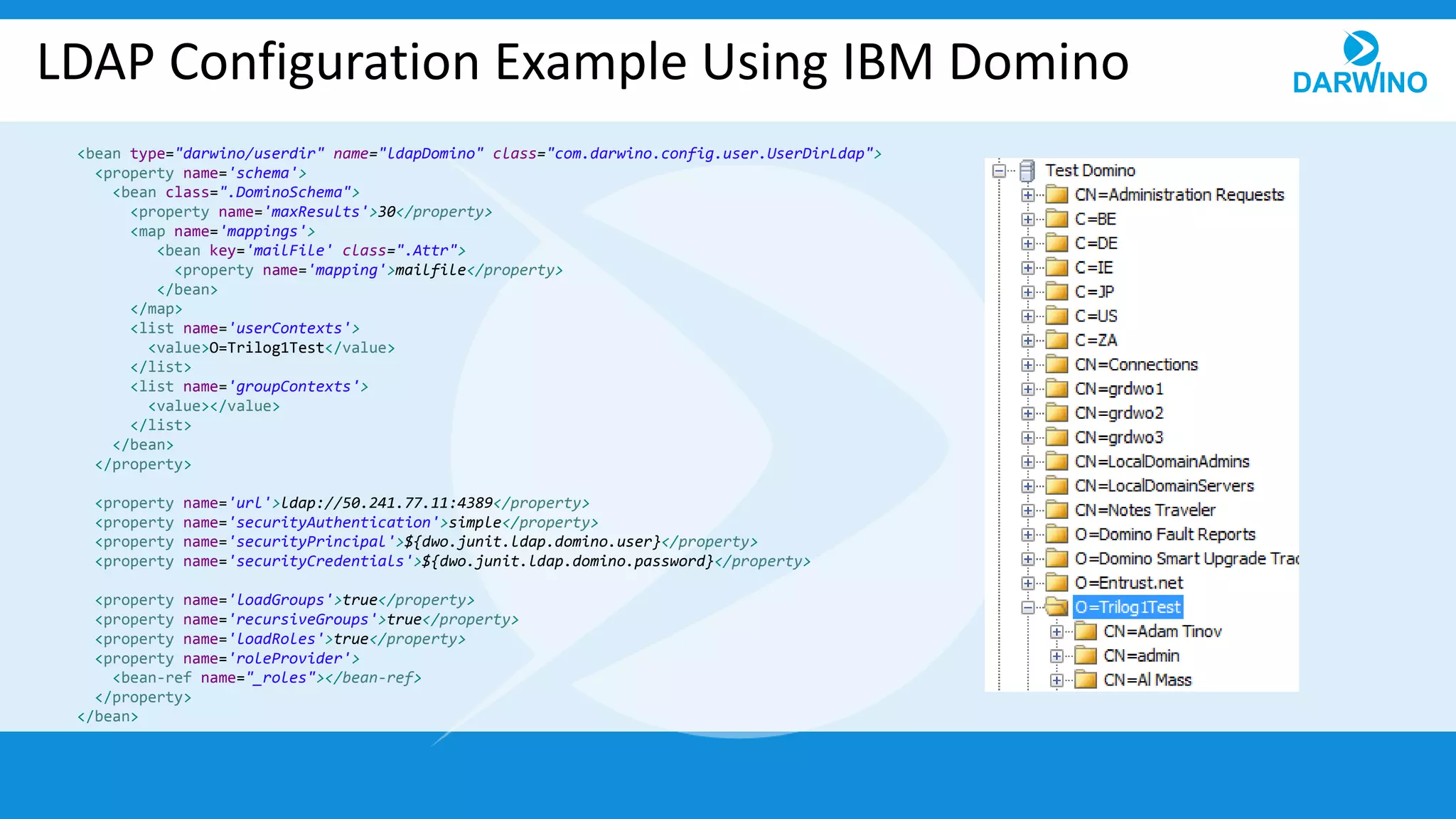
• Several LDAP servers are supported out of the box through JNDI
– MS AD, IBM Tivoli, IBM Domino, Oracle Directory…
• Custom LDAP server or schemas can be supported
– By configuring the attribute mapping of the service
– By providing a custom service implementation
LDAP Configuration Example Using IBM Domino
<bean type="darwino/userdir" name="ldapDomino" class="com.darwino.config.user.UserDirLdap">
<property name='schema'>
<bean class=".DominoSchema">
<property name='maxResults'>30</property>
<map name='mappings'>
<bean key='mailFile' class=".Attr">
<property name='mapping'>mailfile</property>
</bean>
</map>
<list name='userContexts'>
<value>O=Trilog1Test</value>
</list>
<list name='groupContexts'>
<value></value>
</list>
</bean>
</property>
<property name='url'>ldap://50.241.77.11:4389</property>
<property name='securityAuthentication'>simple</property>
<property name='securityPrincipal'>${dwo.junit.ldap.domino.user}</property>
<property name='securityCredentials'>${dwo.junit.ldap.domino.password}</property>
<property name='loadGroups'>true</property>
<property name='recursiveGroups'>true</property>
<property name='loadRoles'>true</property>
<property name='roleProvider'>
<bean-ref name="_roles"></bean-ref>
</property>
</bean>
Configuring IBM Connections
<bean type="darwino/ibmconnections" name="tglc5demo" class="com.darwino.ibm.connections.IbmConnections">
<property name="url">https://tglc5demo.triloggroup.com/</property>
<property name="trustAllSSLCertificates">true</property>
<bean name="basicCredentials">
<property name="user">${connections.tglc5demo.basic.user}</property>
<property name="password">${connections.tglc5demo.basic.password}</property>
</bean>
<bean name="oauthCredentials">
<property name="consumerKey">${connections.tglc5demo.oauth2.clientid}</property>
<property name="consumerSecret">${connections.tglc5demo.oauth2.clientSecret}</property>
</bean>
</bean>
<bean type="darwino/userdir" name="base" class="com.darwino.ibm.connections.IbmConnectionsUserDir" alias="discdb">
<property name='allowUnknownUsers'>true</property>
<list name="providers">
<bean class='com.darwino.social.gravatar.GravatarUserProvider' optional='true' enabled='true'></bean>
</list>
<bean name="roleProvider" class="com.darwino.config.user.UserRoleStatic">
<list name="roles">
<bean class='com.darwino.config.user.UserRoleStatic$Role'>
<property name='name'>admin</property>
<list name='users'>
<value>20098922</value>
</list>
</bean>
</list>
</bean>
</bean>
Cloud or on-premises URL
Configuring Microsoft Azure AD
<bean type="darwino/msazure" name="azure" class="com.darwino.microsoft.o365.AzureAD" alias="demo,default">
<property name="trustAllSSLCertificates">true</property>
<property name="appId">${azure.oauth2.appid}</property>
<property name="tenantId">${azure.oauth2.tenantid}</property>
<bean name="webCredentials">
<property name="clientId">${azure.oauth2.web.clientid}</property>
<property name="clientSecret">${azure.oauth2.web.clientsecret}</property>
</bean>
</bean>
<bean type="darwino/userdir" name="base" class="com.darwino.microsoft.o365.AzureADUserDir" alias="discdb">
<property name='allowUnknownUsers'>true</property>
<list name="providers">
<bean class='com.darwino.social.gravatar.GravatarUserProvider' optional='true' enabled='true'></bean>
</list>
<bean name="roleProvider" class="com.darwino.config.user.UserRoleStatic">
<list name="roles">
<bean class='com.darwino.config.user.UserRoleStatic$Role'>
<property name='name'>admin</property>
<list name='users'>
<value>d442c454-838c-4875-8b16-6612e9ccd4ca</value>
</list>
</bean>
</list>
</bean>
</bean>
User Service Java API
• The user service is a singleton within the Darwino runtime
Platform.getService(UserService.class)
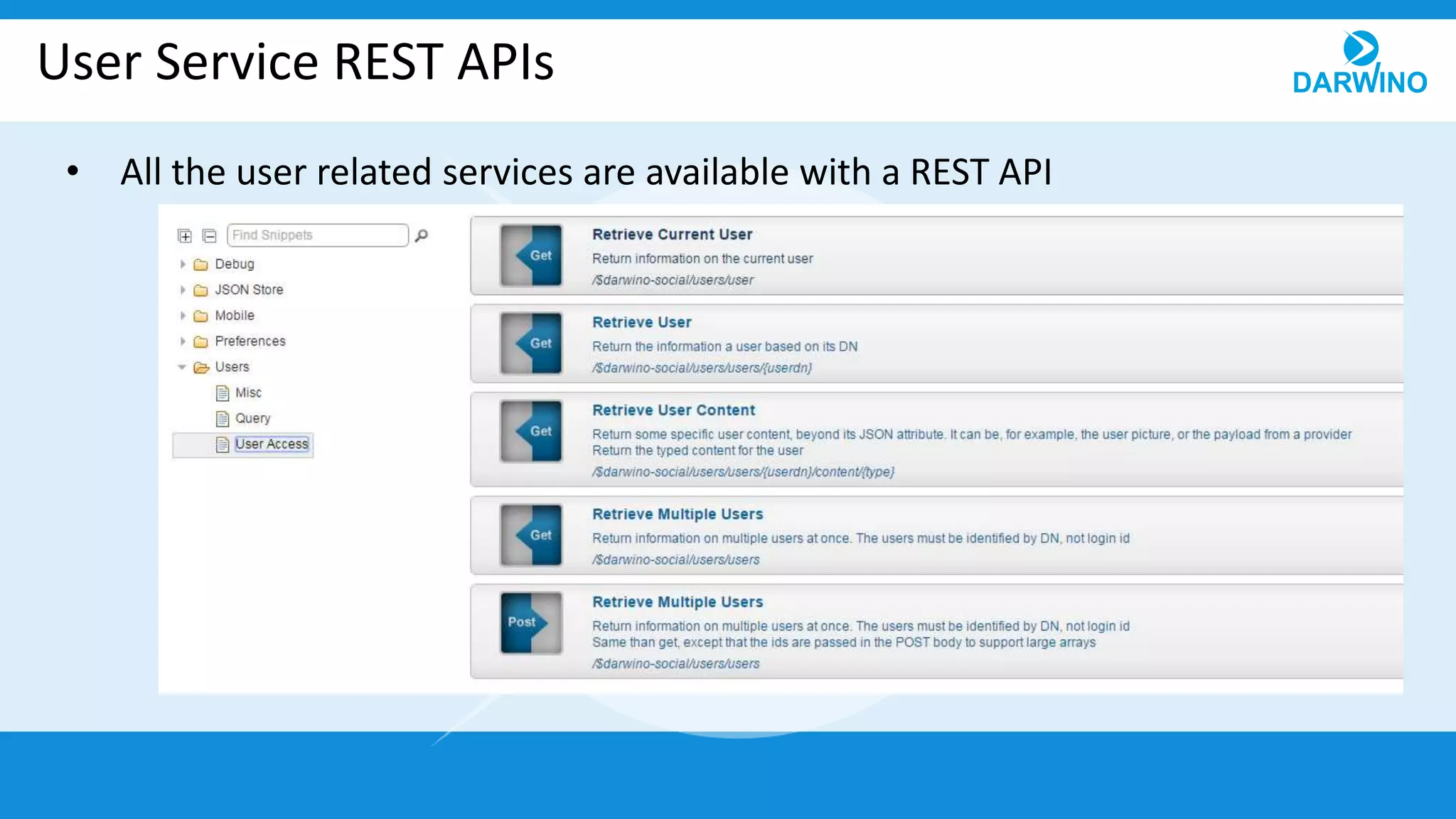
User Service REST APIs
• All the user related services are available with a REST API
User Service JavaScript API
• The JavaScript API runs within a browser and connects to the REST service
– The API is asynchronous
– When a user is not available, it returns a temporary object that will be updated
when the result comes back from the server
• It maintains an in memory cache to not duplicate the requests to the server
• It supports @me for the current user
• Can batches several user requests into a single one, to minimize the # of
requests
– Ex: result of a query with one use per row
User Service on Mobile Devices
• The mobile implementation uses the REST services to call the server
• A persistent cache, using Darwino DB, is activated
– Enables the offline mode
– Increases the performance even when connected as it decreases the # of
requests
– Has a discard local data strategy
• The service is activated by default
Creating your Own User Service
• Creating a custom user service requires
– A user service inheriting from UserServiceImpl
• Handles many details, like in memory caching…
– A user object class inheriting from UserImpl
• Creating a custom data provider
– A data provider inheriting from UserProviderImpl
• See WebGate self registration database
Quick E-Mail Service Overview
• Darwino provides an easy service to sent e-mail
– Delegates to the underlying implementation through drivers
• Java Mail, JNDI Java Mail…
– Supports Basic, TLS or SSL transport
– Defined as a Bean
• Simple but complete APIs
– Sends text and HTML content
– Support binary attachments
Quick Preferences Service Overview
• The preference service can read and store preferences on a user basis
• Preferences are accessed using extensions
– Extension example is using in memory storage
• Creating a custom storage is easy
• The service will provide more storage options in the future
– JSON database
– Java preferences API
Thank you for your attention!

09 business apis

  • 1.
    Business APIs Darwino highlevel APIs – User Service
  • 2.
    Business APIs • Darwinofeatures a set of business APIs, providing an encapsulated access to services – User Service – Mail Service – Preference services – API description – Mobile validation – Command and Profiler, Proxy…. • The set of encapsulated API will grow over time (File service…)
  • 3.
    User Service andData Providers • The whole Darwino runtime uses a single User object encapsulation, along with a service that acts on users • The users can come from different sources – LDAP, IBM Connections, MS Azure… – Data from multiple sources can be aggregated and seen as one consistent user object • The user service can be user to authenticate a user, using a user/password
  • 4.
    User Service Concepts •There is one User Service per Darwino application (runtime) – Main access point to the users – Defines what is the unique ID of a user. Depends on the implementation • LDAP dn/attribute, IBM Connections guid, … • There might be one or multiple User Data Providers with a User Service – A data provider extends users with extra data, coming from another source • User attributes • User binary pieces (pictures, …) – A data provider uses an identity mapper to identify users between multiple sources
  • 5.
    Anatomy of aUser • A user is identified by a unique id, called a dn – Note that the dn is internal to Darwino. It dows not have to be an LDAP dn • A user has a series of attributes: common name, email… – No constraint exist on the attributes, but a series of default names is provided as constants. These names should used for the standard attributes • A user can provide binary pieces (ex: photo, …) • A user has groups and roles – Groups are generally coming from the underlying directory – Roles are generally provided by the application
  • 6.
    Configuring the UserService • A service can be provided by an API, or use a managed bean • Darwino comes with some implementations: – Static list of users (development or simple apps) – LDAP – IBM Connections Cloud – MS Azure AD
  • 7.
    Configuring a DataProvider • Data providers can be added to any user service • Available providers – IBM Connections (data, picture…) – Gravatar (for user pictures)
  • 8.
    <property name="uc">com.darwino.config.user.UserDirStatic$User</property> <bean type="darwino/userdir"name="base" class="com.darwino.config.user.UserDirStatic" alias="demo,default"> <list name="providers"> <bean class='com.darwino.ibm.connections.IbmConnectionsUserProvider' optional='true'> <property name='emailFilter'>*@triloggroup.com</property> <property name='identityMapper'> <bean class='com.triloggroup.darwino.user.TGLC45IdentityMapper'></bean> </property> </bean> </list> <list name="users"> <bean class='${uc}'> <property name='dn'>cn=Philippe Riand,o=TRILOG</property> <property name='cn'>Philippe Riand</property> <property name='uid'>phil</property> <property name='email'>phil@triloggroup.com</property> <property name='password'>darwino</property> <list name='roles'> <value>admin</value> </list> <list name='groups'> <value>darwino</value> </list> </bean> </list> </bean> Configuring a Simple User Service Property reusable across the file Map static identity to IBM Connections Get extra data from IBM Connections Definition of a static user
  • 9.
    Adding Application Rolesto Users • Roles are added to users using a role provider • Static roles can easily be assigned, but a custom role provider implementation can be provided to resolve more dynamic cases • Roles can also be assigned on a per instance basis – The same physical user can have different roles in different tenant <bean name="roleProvider" class="com.darwino.config.user.UserRoleStatic"> <list name="roles"> <bean class='com.darwino.config.user.UserRoleStatic$Role'> <property name='name'>admin</property> <list name='users'> <value>20098922</value> </list> </bean> </list> </bean>
  • 10.
    Configuring an LDAPService • Several LDAP servers are supported out of the box through JNDI – MS AD, IBM Tivoli, IBM Domino, Oracle Directory… • Custom LDAP server or schemas can be supported – By configuring the attribute mapping of the service – By providing a custom service implementation
  • 11.
    LDAP Configuration ExampleUsing IBM Domino <bean type="darwino/userdir" name="ldapDomino" class="com.darwino.config.user.UserDirLdap"> <property name='schema'> <bean class=".DominoSchema"> <property name='maxResults'>30</property> <map name='mappings'> <bean key='mailFile' class=".Attr"> <property name='mapping'>mailfile</property> </bean> </map> <list name='userContexts'> <value>O=Trilog1Test</value> </list> <list name='groupContexts'> <value></value> </list> </bean> </property> <property name='url'>ldap://50.241.77.11:4389</property> <property name='securityAuthentication'>simple</property> <property name='securityPrincipal'>${dwo.junit.ldap.domino.user}</property> <property name='securityCredentials'>${dwo.junit.ldap.domino.password}</property> <property name='loadGroups'>true</property> <property name='recursiveGroups'>true</property> <property name='loadRoles'>true</property> <property name='roleProvider'> <bean-ref name="_roles"></bean-ref> </property> </bean>
  • 12.
    Configuring IBM Connections <beantype="darwino/ibmconnections" name="tglc5demo" class="com.darwino.ibm.connections.IbmConnections"> <property name="url">https://tglc5demo.triloggroup.com/</property> <property name="trustAllSSLCertificates">true</property> <bean name="basicCredentials"> <property name="user">${connections.tglc5demo.basic.user}</property> <property name="password">${connections.tglc5demo.basic.password}</property> </bean> <bean name="oauthCredentials"> <property name="consumerKey">${connections.tglc5demo.oauth2.clientid}</property> <property name="consumerSecret">${connections.tglc5demo.oauth2.clientSecret}</property> </bean> </bean> <bean type="darwino/userdir" name="base" class="com.darwino.ibm.connections.IbmConnectionsUserDir" alias="discdb"> <property name='allowUnknownUsers'>true</property> <list name="providers"> <bean class='com.darwino.social.gravatar.GravatarUserProvider' optional='true' enabled='true'></bean> </list> <bean name="roleProvider" class="com.darwino.config.user.UserRoleStatic"> <list name="roles"> <bean class='com.darwino.config.user.UserRoleStatic$Role'> <property name='name'>admin</property> <list name='users'> <value>20098922</value> </list> </bean> </list> </bean> </bean> Cloud or on-premises URL
  • 13.
    Configuring Microsoft AzureAD <bean type="darwino/msazure" name="azure" class="com.darwino.microsoft.o365.AzureAD" alias="demo,default"> <property name="trustAllSSLCertificates">true</property> <property name="appId">${azure.oauth2.appid}</property> <property name="tenantId">${azure.oauth2.tenantid}</property> <bean name="webCredentials"> <property name="clientId">${azure.oauth2.web.clientid}</property> <property name="clientSecret">${azure.oauth2.web.clientsecret}</property> </bean> </bean> <bean type="darwino/userdir" name="base" class="com.darwino.microsoft.o365.AzureADUserDir" alias="discdb"> <property name='allowUnknownUsers'>true</property> <list name="providers"> <bean class='com.darwino.social.gravatar.GravatarUserProvider' optional='true' enabled='true'></bean> </list> <bean name="roleProvider" class="com.darwino.config.user.UserRoleStatic"> <list name="roles"> <bean class='com.darwino.config.user.UserRoleStatic$Role'> <property name='name'>admin</property> <list name='users'> <value>d442c454-838c-4875-8b16-6612e9ccd4ca</value> </list> </bean> </list> </bean> </bean>
  • 14.
    User Service JavaAPI • The user service is a singleton within the Darwino runtime Platform.getService(UserService.class)
  • 15.
    User Service RESTAPIs • All the user related services are available with a REST API
  • 16.
    User Service JavaScriptAPI • The JavaScript API runs within a browser and connects to the REST service – The API is asynchronous – When a user is not available, it returns a temporary object that will be updated when the result comes back from the server • It maintains an in memory cache to not duplicate the requests to the server • It supports @me for the current user • Can batches several user requests into a single one, to minimize the # of requests – Ex: result of a query with one use per row
  • 17.
    User Service onMobile Devices • The mobile implementation uses the REST services to call the server • A persistent cache, using Darwino DB, is activated – Enables the offline mode – Increases the performance even when connected as it decreases the # of requests – Has a discard local data strategy • The service is activated by default
  • 18.
    Creating your OwnUser Service • Creating a custom user service requires – A user service inheriting from UserServiceImpl • Handles many details, like in memory caching… – A user object class inheriting from UserImpl • Creating a custom data provider – A data provider inheriting from UserProviderImpl • See WebGate self registration database
  • 19.
    Quick E-Mail ServiceOverview • Darwino provides an easy service to sent e-mail – Delegates to the underlying implementation through drivers • Java Mail, JNDI Java Mail… – Supports Basic, TLS or SSL transport – Defined as a Bean • Simple but complete APIs – Sends text and HTML content – Support binary attachments
  • 20.
    Quick Preferences ServiceOverview • The preference service can read and store preferences on a user basis • Preferences are accessed using extensions – Extension example is using in memory storage • Creating a custom storage is easy • The service will provide more storage options in the future – JSON database – Java preferences API
  • 21.
    Thank you foryour attention!