Avoiding Apocolypse Marcus Pennell, SCIP Mark Walker, SCIP and Regional ICT Champion for the South East
ICT Risk Assessment and Recovery Planning   Identifying Risk Evaluating Risk Analysing Risk Managing Risk Where to get help
About SCIP Not for profit social enterprise Training inc Net:Gain IT Support Web Design Databases Community Projects Where to get Help
Managing Risk Identify the Risk What can wrong? Evaluate the Risk How likely is it to occur? Analyse the Risk What would be the impact? Manage the Risk Policies and procedures
Identifying Risk Legal requirement Funders’ requirement Better planning Better use of resources
Types of Risk Technology that doesn’t work Loss, damage or theft of equipment or data Unauthorised access Legal compliance Loss of key personnel
Types of Risk Technology that doesn’t work Individual computers Networks Databases Websites Specialist equipment Completely broken Doesn’t do what it’s supposed to
Types of Risk Loss, damage or theft Stolen or damaged in use  Malicious attack eg virus Fire, Flood, ‘acts of god’
Types of Risk Unauthorised access Internal Confidentiality External Attack Passwords Storage of sensitive information
Types of Risk Legal Compliance Data Protection Act Charities Law/Companies Act Disability Discrimination Act Health and Safety Software licensing and copyright Employment Law
Types of Risk Loss of key personnel Staff members Volunteers Specialist knowledge ICT Systems Use of Database Specific Services eg Online Banking
Evaluating Risk How likely is it to occur? High, medium or low likelihood A range of risks Dependencies and knock on effects
Analysing Risk What will be the impact? Financial management Day to day operations Service Delivery Employment Issues Disaster recovery Cost Efficiency/effectiveness
Analysing Risk What will be the impact? Computers stop working therefore organisation stops working Passwords not available therefore services not available Server not working  Website not available  Client records or other important information lost Misuse of client information Threat of legal action
Managing Risk Routine reviews of relevant policies Routine maintenance of ICT resources Housekeeping Health checks Backup procedures Disaster recovery plans
Managing Risk Roles and Responsibilities Planning, evaluation and analysis Resourcing and Fundraising Technical solutions Day to day operations Testing Reporting Individual and collective responsibility Managers, Staff, Trustees, Volunteers, IT Service Providers
Managing Risk Backup strategies How and when to backup and who is doing it On-site vs off-site Online vs hard drive vs tape Data recovery - processes and timescale Security strategies Levels of access Password strength Training Who, what, when
Where to get help What help does your organisation need? Planning,  Project management Research/signposting Installation Implementation Review Fundraising
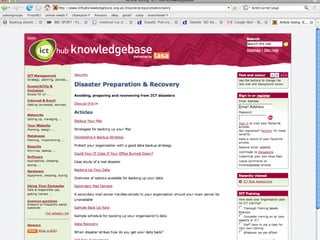
Types of help National ICT Hub Knowledgebase Regional ICT Champion Local/sub-regional Circuit Riders, IT Support Companies  Volunteer Centre, university net:gain Centres
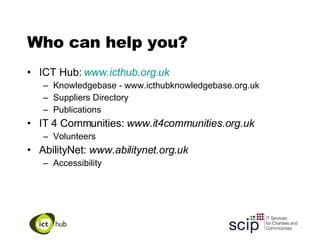
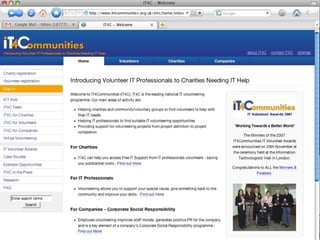
Who can help you? ICT Hub:  www.icthub.org.uk Knowledgebase - www.icthubknowledgebase.org.uk Suppliers Directory Publications IT 4 Communities:  www.it4communities.org.uk Volunteers AbilityNet:  www.abilitynet.org.uk Accessibility
 
 
Any other questions? Mark Walker SCIP 01273 234049 [email_address] www.scip.org.uk

080312 Ict Hub Risk Management

  • 1.
    Avoiding Apocolypse MarcusPennell, SCIP Mark Walker, SCIP and Regional ICT Champion for the South East
  • 2.
    ICT Risk Assessmentand Recovery Planning Identifying Risk Evaluating Risk Analysing Risk Managing Risk Where to get help
  • 3.
    About SCIP Notfor profit social enterprise Training inc Net:Gain IT Support Web Design Databases Community Projects Where to get Help
  • 4.
    Managing Risk Identifythe Risk What can wrong? Evaluate the Risk How likely is it to occur? Analyse the Risk What would be the impact? Manage the Risk Policies and procedures
  • 5.
    Identifying Risk Legalrequirement Funders’ requirement Better planning Better use of resources
  • 6.
    Types of RiskTechnology that doesn’t work Loss, damage or theft of equipment or data Unauthorised access Legal compliance Loss of key personnel
  • 7.
    Types of RiskTechnology that doesn’t work Individual computers Networks Databases Websites Specialist equipment Completely broken Doesn’t do what it’s supposed to
  • 8.
    Types of RiskLoss, damage or theft Stolen or damaged in use Malicious attack eg virus Fire, Flood, ‘acts of god’
  • 9.
    Types of RiskUnauthorised access Internal Confidentiality External Attack Passwords Storage of sensitive information
  • 10.
    Types of RiskLegal Compliance Data Protection Act Charities Law/Companies Act Disability Discrimination Act Health and Safety Software licensing and copyright Employment Law
  • 11.
    Types of RiskLoss of key personnel Staff members Volunteers Specialist knowledge ICT Systems Use of Database Specific Services eg Online Banking
  • 12.
    Evaluating Risk Howlikely is it to occur? High, medium or low likelihood A range of risks Dependencies and knock on effects
  • 13.
    Analysing Risk Whatwill be the impact? Financial management Day to day operations Service Delivery Employment Issues Disaster recovery Cost Efficiency/effectiveness
  • 14.
    Analysing Risk Whatwill be the impact? Computers stop working therefore organisation stops working Passwords not available therefore services not available Server not working Website not available Client records or other important information lost Misuse of client information Threat of legal action
  • 15.
    Managing Risk Routinereviews of relevant policies Routine maintenance of ICT resources Housekeeping Health checks Backup procedures Disaster recovery plans
  • 16.
    Managing Risk Rolesand Responsibilities Planning, evaluation and analysis Resourcing and Fundraising Technical solutions Day to day operations Testing Reporting Individual and collective responsibility Managers, Staff, Trustees, Volunteers, IT Service Providers
  • 17.
    Managing Risk Backupstrategies How and when to backup and who is doing it On-site vs off-site Online vs hard drive vs tape Data recovery - processes and timescale Security strategies Levels of access Password strength Training Who, what, when
  • 18.
    Where to gethelp What help does your organisation need? Planning, Project management Research/signposting Installation Implementation Review Fundraising
  • 19.
    Types of helpNational ICT Hub Knowledgebase Regional ICT Champion Local/sub-regional Circuit Riders, IT Support Companies Volunteer Centre, university net:gain Centres
  • 20.
    Who can helpyou? ICT Hub: www.icthub.org.uk Knowledgebase - www.icthubknowledgebase.org.uk Suppliers Directory Publications IT 4 Communities: www.it4communities.org.uk Volunteers AbilityNet: www.abilitynet.org.uk Accessibility
  • 21.
  • 22.
  • 23.
    Any other questions?Mark Walker SCIP 01273 234049 [email_address] www.scip.org.uk