FACULTY OF ELECTRICALAND ELECTRONICS ENGINEERING
Email: kienlc@hcmute.edu.vn
Tel: 098-767-3030
2.
What is Spreadsheet?
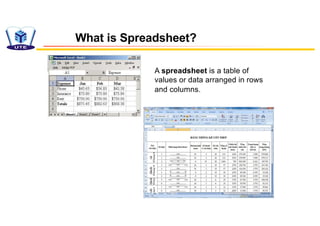
Aspreadsheet is a table of
values or data arranged in rows
and columns.
3.
Spreadsheet Design
A gooddesign for your spreadsheet makes it
easy for you:
• to read the data
• to understand the point of the sheet
• to use the sheet's information
• to update the sheet
• to spot the important parts quickly
4.
To analyze theeffectiveness of a spreadsheet's design use the
following questions about the spreadsheet.
With good design you can answer these easily. A poor or bad
design makes it hard or impossible.
Analyze a spreadsheet
1. Purpose: What is it for? What questions does it answer?
2. Data: What data is used and where did it come from?
3. Calculations: How did they do that? (What parts are
calculated and what formulas are used to do the calculations?)
4. Changes: Does this sheet allow you to add or change data
later? Is that important for this particular sheet? Will it be easy
to do?
5.
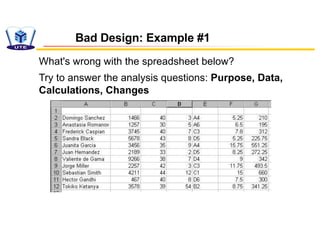
Bad Design: Example#1
What's wrong with the spreadsheet below?
Try to answer the analysis questions: Purpose, Data,
Calculations, Changes
6.
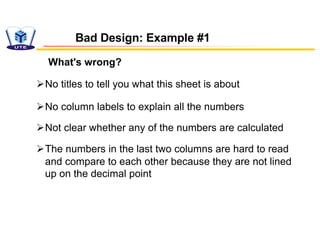
What's wrong?
Bad Design:Example #1
ØNo titles to tell you what this sheet is about
ØNo column labels to explain all the numbers
ØNot clear whether any of the numbers are calculated
ØThe numbers in the last two columns are hard to read
and compare to each other because they are not lined
up on the decimal point
7.
Bad Design: Example#1
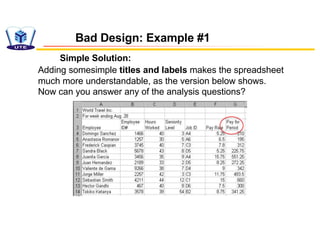
Simple Solution:
Adding somesimple titles and labels makes the spreadsheet
much more understandable, as the version below shows.
Now can you answer any of the analysis questions?
8.
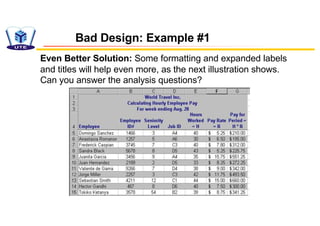
Even Better Solution:Some formatting and expanded labels
and titles will help even more, as the next illustration shows.
Can you answer the analysis questions?
Bad Design: Example #1
9.
Bad Design: Example#2
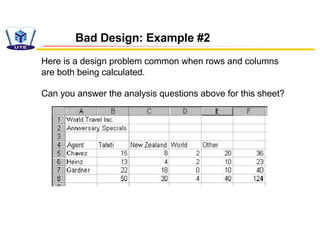
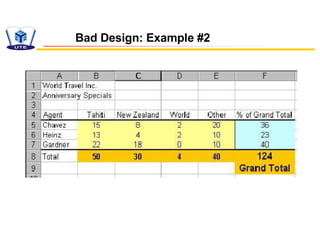
Here is a design problem common when rows and columns
are both being calculated.
Can you answer the analysis questions above for this sheet?
10.
Bad Design: Example#2
What's wrong?
ØWhat formulas? Row 8 and Column F look
like they could be calculations
ØIs cell F8 related to the row values, the column
values, or something else?
11.
Bad Design: Example#2
Solution
üUse formatting for F8 that matches the source
data
üAdd labels and other formatting to group related
cells. In the revised sheet you can see that F8 is
the SUM of Row 8
üThe right color coding and labels make all clear
Design Principles
vEasy toread: Choose fonts and backgrounds and colors for
good contrast and easy reading. Consider how the sheet will
look in print as well as on screen
vLogical positions: Position data is logically, both for
reading and for entering data
vDescribe: Create helpful labels and titles that make the
purpose and function of the sheet clear
vImportant parts: Position and format the key values, like
totals, to make them stand out from the crowd of data
14.
vChanges: Arrange thesheet so that adding new data will not
break formulas. Surround data groups that may have additions
later by blank cells and write formulas that include the blanks. Or
use absolute references to cells that will not be moved if data is
added
vOriginal data: Use copies or links to original data for actions that
may be hard to undo, such as sorting and subtotals. This preserves
the original data for other uses later
vFuture: Think ahead to the future uses of your sheet. Anticipate the
needs of other people who may use your sheet without knowing all
that you know about it
Design Principles
15.
Best-fit Line
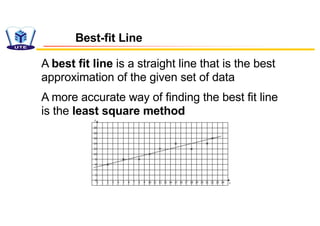
A bestfit line is a straight line that is the best
approximation of the given set of data
A more accurate way of finding the best fit line
is the least square method
16.
Equation of Best-fitLine
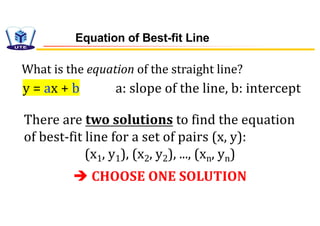
y = ax + b a: slope of the line, b: intercept
What is the equation of the straight line?
There are two solutions to find the equation
of best-fit line for a set of pairs (x, y):
(x1, y1), (x2, y2), ..., (xn, yn)
è CHOOSE ONE SOLUTION
17.
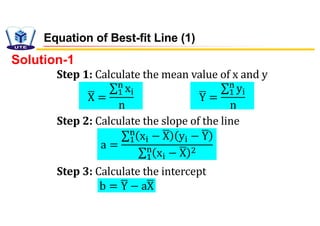
Step 1: Calculatethe mean value of x and y
Equation of Best-fit Line (1)
!
X =
∑%
&
x(
n
!
Y =
∑%
&
y(
n
Step 2: Calculate the slope of the line
Step 3: Calculate the intercept
a =
∑%
&
x( − !
X y( − !
Y
∑%
&
x( − !
X .
b = !
Y − a!
X
Solution-1
18.
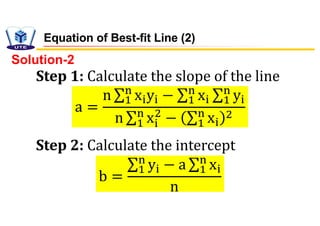
Step 1: Calculatethe slope of the line
Step 2: Calculate the intercept
a =
n ∑%
&
x(y( − ∑%
&
x( ∑%
&
y(
n ∑%
&
x(
+
− ∑%
&
x(
+
b =
∑%
&
y( − a ∑%
&
x(
n
Solution-2
Equation of Best-fit Line (2)
19.
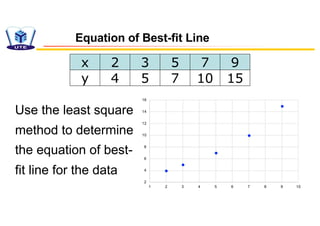
Use the leastsquare
method to determine
the equation of best-
fit line for the data
2
4
6
8
10
12
14
16
1 2 3 4 5 6 7 8 9 10
Equation of Best-fit Line
x 2 3 5 7 9
y 4 5 7 10 15
20.
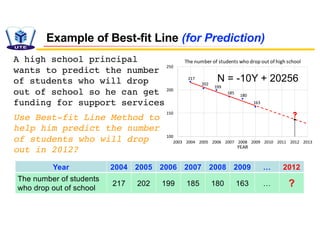
Year 2004 20052006 2007 2008 2009 … 2012
The number of students
who drop out of school
217 202 199 185 180 163 … ?
Example of Best-fit Line (for Prediction)
217
202
199
185
180
163
100
150
200
250
2003 2004 2005 2006 2007 2008 2009 2010 2011 2012 2013
YEAR
The number of students who drop out of high school
?
N = -10Y + 20256
A high school principal
wants to predict the number
of students who will drop
out of school so he can get
funding for support services
Use Best-fit Line Method to
help him predict the number
of students who will drop
out in 2012?
21.
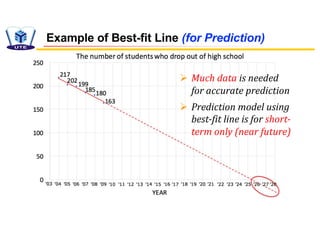
Example of Best-fitLine (for Prediction)
Ø Much data is needed
for accurate prediction
Ø Prediction model using
best-fit line is for short-
term only (near future)




![Spreadsheets[1]](https://cdn.slidesharecdn.com/ss_thumbnails/spreadsheets1-150131022908-conversion-gate01-thumbnail.jpg?width=640&height=640&fit=bounds)


