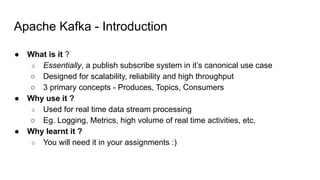
Apache Kafka -Introduction
● What is it ?
○ Essentially, a publish subscribe system in it’s canonical use case
○ Designed for scalability, reliability and high throughput
○ 3 primary concepts - Produces, Topics, Consumers
● Why use it ?
○ Used for real time data stream processing
○ Eg. Logging, Metrics, high volume of real time activities, etc.
● Why learnt it ?
○ You will need it in your assignments :)
4.
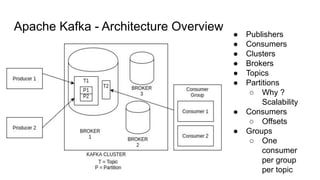
Apache Kafka -Architecture Overview
● Publishers
● Consumers
● Clusters
● Brokers
● Topics
● Partitions
○ Why ?
Scalability
● Consumers
○ Offsets
● Groups
○ One
consumer
per group
per topic
5.
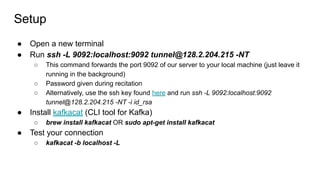
Setup
● Open anew terminal
● Run ssh -L 9092:localhost:9092 tunnel@128.2.204.215 -NT
○ This command forwards the port 9092 of our server to your local machine (just leave it
running in the background)
○ Password given during recitation
○ Alternatively, use the ssh key found here and run ssh -L 9092:localhost:9092
tunnel@128.2.204.215 -NT -i id_rsa
● Install kafkacat (CLI tool for Kafka)
○ brew install kafkacat OR sudo apt-get install kafkacat
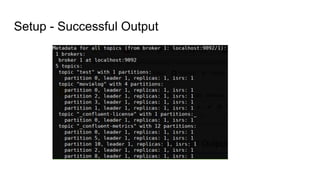
● Test your connection
○ kafkacat -b localhost -L
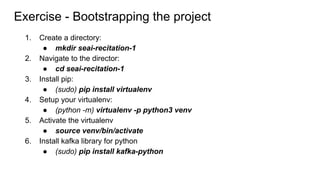
1. Create adirectory:
● mkdir seai-recitation-1
2. Navigate to the director:
● cd seai-recitation-1
3. Install pip:
● (sudo) pip install virtualenv
4. Setup your virtualenv:
● (python -m) virtualenv -p python3 venv
5. Activate the virtualenv
● source venv/bin/activate
6. Install kafka library for python
● (sudo) pip install kafka-python
Exercise - Bootstrapping the project
8.
Exercise - Writingto kafka (gist)
from time import sleep
from json import dumps
from kafka import KafkaProducer
# Create a producer to write data to kafka
producer = KafkaProducer(bootstrap_servers=['localhost:9092'],
value_serializer=lambda x: dumps(x).encode('utf-8'))
# Write data via the producer
for e in range(10):
data = {'number' : e}
producer.send(topic='numtest-<andrewid>', value=data)
sleep(1)
Create a python script - touch producer.py
Exercise - Readingfrom Kafka (gist)
from kafka import KafkaConsumer
from json import loads
# Create a consumer to read data from kafka
consumer = KafkaConsumer(
'numtest-<andrewid>',
bootstrap_servers=['localhost:9092'],
# Read from the start of the topic; Default is latest
auto_offset_reset='earliest'
)
# Prints all messages, again and again!
for message in consumer:
# Default message.value type is bytes!
print(loads(message.value))
11.
Exercise - Reading(smartly) from Kafka
consumer = KafkaConsumer(
'numtest-<andrewid>',
bootstrap_servers=['localhost:9092'],
auto_offset_reset='earliest',
# Consumer group id
group_id='numtest-group-<andrewid>',
# Commit that an offset has been read
enable_auto_commit=True,
# How often to tell Kafka, an offset has been read
auto_commit_interval_ms=1000
)
# Prints messages once, then only new ones. Run again and see!
for message in consumer:
print(loads(message.value))
How would you make reads more fault tolerant ?

![Exercise - Writing to kafka (gist)
from time import sleep
from json import dumps
from kafka import KafkaProducer
# Create a producer to write data to kafka
producer = KafkaProducer(bootstrap_servers=['localhost:9092'],
value_serializer=lambda x: dumps(x).encode('utf-8'))
# Write data via the producer
for e in range(10):
data = {'number' : e}
producer.send(topic='numtest-<andrewid>', value=data)
sleep(1)
Create a python script - touch producer.py](https://image.slidesharecdn.com/01kafka-250920144821-4210d8bb/85/01_kafka-ray-distributes-ray-cmputimng-ml-8-320.jpg)
![Exercise - Reading from Kafka (gist)
from kafka import KafkaConsumer
from json import loads
# Create a consumer to read data from kafka
consumer = KafkaConsumer(
'numtest-<andrewid>',
bootstrap_servers=['localhost:9092'],
# Read from the start of the topic; Default is latest
auto_offset_reset='earliest'
)
# Prints all messages, again and again!
for message in consumer:
# Default message.value type is bytes!
print(loads(message.value))](https://image.slidesharecdn.com/01kafka-250920144821-4210d8bb/85/01_kafka-ray-distributes-ray-cmputimng-ml-10-320.jpg)
![Exercise - Reading (smartly) from Kafka
consumer = KafkaConsumer(
'numtest-<andrewid>',
bootstrap_servers=['localhost:9092'],
auto_offset_reset='earliest',
# Consumer group id
group_id='numtest-group-<andrewid>',
# Commit that an offset has been read
enable_auto_commit=True,
# How often to tell Kafka, an offset has been read
auto_commit_interval_ms=1000
)
# Prints messages once, then only new ones. Run again and see!
for message in consumer:
print(loads(message.value))
How would you make reads more fault tolerant ?](https://image.slidesharecdn.com/01kafka-250920144821-4210d8bb/85/01_kafka-ray-distributes-ray-cmputimng-ml-11-320.jpg)


![[DSC Europe 25] Mikhail Rozhkov - AI Product Canvas: From Business Goals to T...](https://cdn.slidesharecdn.com/ss_thumbnails/d53doddtpgfqivmzqel6-mikhail-rozhkov-ai-product-canvas-v1-260121115910-9dd517a7-thumbnail.jpg?width=640&height=640&fit=bounds)

![[DSC Europe 25] Srdj Stanisic - Local and Private AI in UX.pdf](https://cdn.slidesharecdn.com/ss_thumbnails/vwmetykqmztgmokmmkfa-3-srdjan-stanisic-local-and-small-ai-in-ux-260120105855-55a31869-thumbnail.jpg?width=640&height=640&fit=bounds)


![[DSC Europe 25] Milos Belcevic - Product Professional's Journey to Full-Stack...](https://cdn.slidesharecdn.com/ss_thumbnails/1zovd6fgsycdg4wvgvls-milos-belcevic-product-professionals-journey-to-full-stack-product-developer-260123083019-d993120d-thumbnail.jpg?width=640&height=640&fit=bounds)
![[DSC Europe 25] Marcos Heidemann - Beyond the Hype: Making AI Coding Assistan...](https://cdn.slidesharecdn.com/ss_thumbnails/eexkhvldrjsopspdjbur-marcos-heidemann-beyond-the-hype-getting-real-value-out-of-ai-assisted-coding-260121115910-7e9d41ec-thumbnail.jpg?width=640&height=640&fit=bounds)
![[DSC Europe 25] Harshvardhan Jain - From Pre-Trained to Purpose-Built: Fine-T...](https://cdn.slidesharecdn.com/ss_thumbnails/zru4zmiseku5tgvu2dgw-harshvardhan-jain-from-pre-trained-to-purpose-built-fine-tuning-llms-for-high-i-260119101520-8335585f-thumbnail.jpg?width=640&height=640&fit=bounds)


![[DSC Europe 25] Laila Kakar - Leveraging AI for Strategic Excellence: Enhanci...](https://cdn.slidesharecdn.com/ss_thumbnails/eykmhrtsqmaaftwkexh7-dsc-lailakakar-1-260119101520-5f3b5616-thumbnail.jpg?width=640&height=640&fit=bounds)
![[DSC Europe 25] Milovan Jovicic - Beyond AI's Reach: The Enduring Value of Ev...](https://cdn.slidesharecdn.com/ss_thumbnails/pyeij0hurgwq5jugmtnv-2-milovan-jovicic-beyond-ais-reach-the-enduring-value-of-evergreen-design-v2-260120105856-d6ee57e5-thumbnail.jpg?width=640&height=640&fit=bounds)
![[DSC Europe 25] Tali Fulman - Guild Meetings, Then What? Building Data Commun...](https://cdn.slidesharecdn.com/ss_thumbnails/fgohhi33rwmhqdowdj5k-tali-fulman-guild-meetings-then-what-building-data-communities-that-actually-ch-260120105855-528492c3-thumbnail.jpg?width=640&height=640&fit=bounds)
![[DSC Europe 25] Josip Saban - Career building for data professionals.pptx](https://cdn.slidesharecdn.com/ss_thumbnails/zroflcttkm1vmli0txea-josip-saban-career-building-for-data-professionals-260123083019-587cdb8c-thumbnail.jpg?width=640&height=640&fit=bounds)
