A Lunchtime Introduction to Kafka
Wrote this….
Works with this amazing bunch.
The Rules Haven’t Changed……
You may heckle via Twitter…..
@jasonbelldata
It’s Friday, you might as well.
It’s in print, no one can argue…..
What is Kafka?
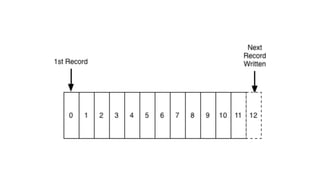
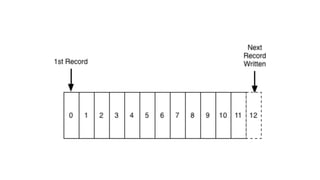
It’s an immutable log.
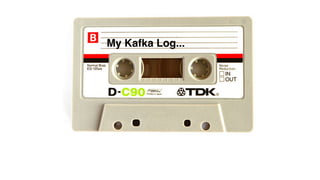
Think of it like this…..
My Kafka Log...
Opinionated thought
approaching.
#grumpy_yorkshireman
IT
IS
NOT
A
DATABASE
Kafka is an event processing platform which is based on a
distributed architecture.
Kafka is an event processing platform which is based on a
distributed architecture.
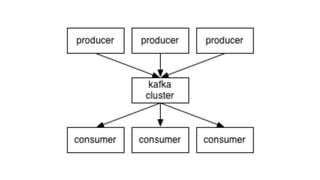
To producers and consumer subscribed to the system it
would appear as a standalone processing engine but
production systems are built on many machines.
Kafka is an event processing platform which is based on a
distributed architecture.
To producers and consumer subscribed to the system it
would appear as a standalone processing engine but


production systems are built on many machines.
It can handle millions of messages throughput, dependent on
physical disk and RAM on the machines, and is fault tolerant.
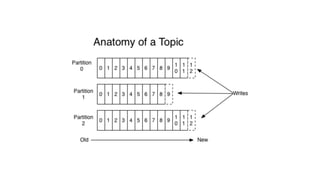
Messages are sent to topics which are written sequentially in
an immutable log. Kafka can support many topics and can be
replicated and partitioned.
Once the records are appended to the topic log
they can’t be deleted or amended.
(If the customer wants you to
“replay from the start”, well they can’t)
It’s a very simple data structure
where each message is byte encoded.
Each Message has:
A key
A value (payload)
A timestamp
A header (for meta data)
Producers and consumers can serialise and deserialise data
to various formats.
(I’ll talk about that later)
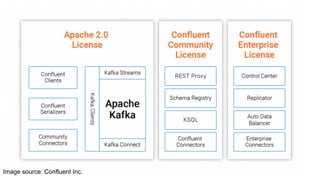
The Kafka Ecosystem
Image source: Confluent Inc.
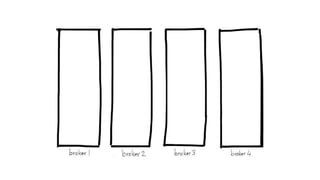
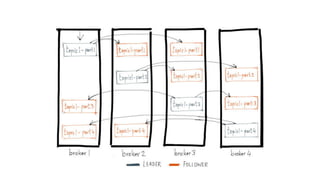
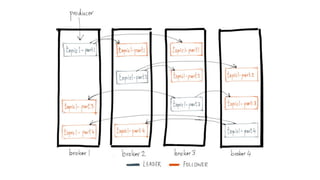
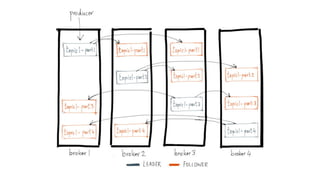
The Kafka Cluster
Brokers
Partitions
Topics
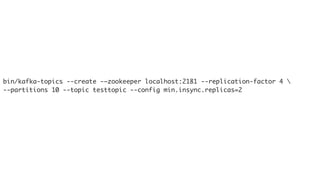
Creating a Topic
bin/kafka-topics --create -–zookeeper localhost:2181 --replication-factor 4 
--partitions 10 --topic testtopic --config min.insync.replicas=2
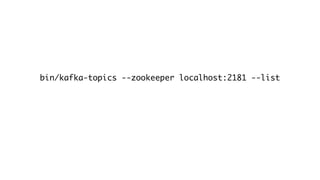
Listing Topics
bin/kafka-topics --zookeeper localhost:2181 --list
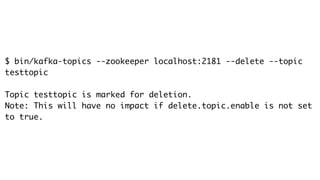
Deleting a Topic
$ bin/kafka-topics --zookeeper localhost:2181 --delete --topic
testtopic
Topic testtopic is marked for deletion.
Note: This will have no impact if delete.topic.enable is not set
to true.
Topic Rentention
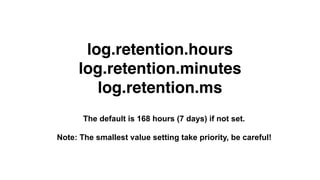
Rentention by Time
log.retention.hours
log.retention.minutes
log.retention.ms
The default is 168 hours (7 days) if not set.
Note: The smallest value setting take priority, be careful!
Rentention by Size
log.retention.bytes
Defines volume of log bytes retained. Applied per partition, so if set to 1GB
and you have 8 partitions, you are storing 8GB.
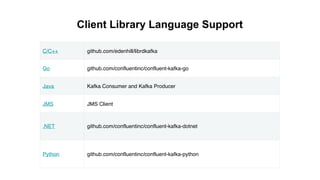
Client Libraries
C/C++ github.com/edenhill/librdkafka
Go github.com/confluentinc/confluent-kafka-go
Java Kafka Consumer and Kafka Producer
JMS JMS Client
.NET github.com/confluentinc/confluent-kafka-dotnet
Python github.com/confluentinc/confluent-kafka-python
Client Library Language Support
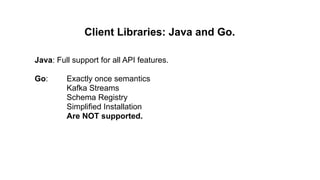
Client Libraries: Java and Go.
Java: Full support for all API features.
Go: Exactly once semantics
Kafka Streams
Schema Registry
Simplified Installation
Are NOT supported.
Producers
Producers
(Sends messages to the
Kafka Cluster)
import java.util.Properties;
import org.apache.kafka.clients.producer.Producer;
import org.apache.kafka.clients.producer.KafkaProducer;
import org.apache.kafka.clients.producer.ProducerRecord;
public class SimpleProducer {
public static void main(String[] args) throws Exception{
String topicName = “testtopic”;
Properties props = new Properties();
props.put("bootstrap.servers", “localhost:9092");
props.put("acks", “all");
props.put("retries", 0);
props.put("batch.size", 10);
props.put("linger.ms", 1);
props.put("buffer.memory", 33554432);
props.put("key.serializer",
"org.apache.kafka.common.serialization.StringSerializer");
props.put("value.serializer",
"org.apache.kafka.common.serialization.StringSerializer");
Producer<String, String> producer = new KafkaProducer
<String, String>(props);
for(int i = 0; i < 10; i++)
producer.send(new ProducerRecord<String, String>(topicName,
Integer.toString(i), “This is my message: “ + Integer.toString(i)));
System.out.println(“Message sent successfully”);
producer.close();
}
}
import java.util.Properties;
import org.apache.kafka.clients.producer.Producer;
import org.apache.kafka.clients.producer.KafkaProducer;
import org.apache.kafka.clients.producer.ProducerRecord;
public class SimpleProducer {
public static void main(String[] args) throws Exception{
String topicName = “testtopic”;
Properties props = new Properties();
props.put("bootstrap.servers", “localhost:9092");
props.put("acks", “all");
props.put("retries", 0);
props.put("batch.size", 10);
props.put("linger.ms", 1);
props.put("buffer.memory", 33554432);
props.put("key.serializer",
"org.apache.kafka.common.serialization.StringSerializer");
props.put("value.serializer",
"org.apache.kafka.common.serialization.StringSerializer");
Producer<String, String> producer = new KafkaProducer
<String, String>(props);
for(int i = 0; i < 10; i++)
producer.send(new ProducerRecord<String, String>(topicName,
Integer.toString(i), “This is my message: “ + Integer.toString(i)));
System.out.println(“Message sent successfully”);
producer.close();
}
}
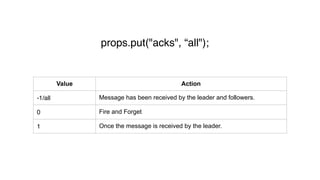
props.put("acks", “all");
Value Action
-1/all Message has been received by the leader and followers.
0 Fire and Forget
1 Once the message is received by the leader.
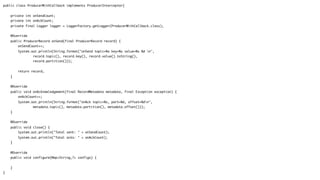
public class ProducerWithCallback implements ProducerInterceptor{
private int onSendCount;
private int onAckCount;
private final Logger logger = LoggerFactory.getLogger(ProducerWithCallback.class);
@Override
public ProducerRecord onSend(final ProducerRecord record) {
onSendCount++;
System.out.println(String.format("onSend topic=%s key=%s value=%s %d n",
record.topic(), record.key(), record.value().toString(),
record.partition()));
return record;
}
@Override
public void onAcknowledgement(final RecordMetadata metadata, final Exception exception) {
onAckCount++;
System.out.println(String.format("onAck topic=%s, part=%d, offset=%dn",
metadata.topic(), metadata.partition(), metadata.offset()));
}
@Override
public void close() {
System.out.println("Total sent: " + onSendCount);
System.out.println("Total acks: " + onAckCount);
}
@Override
public void configure(Map<String,?> configs) {
}
}
import java.util.Properties;
import org.apache.kafka.clients.producer.Producer;
import org.apache.kafka.clients.producer.KafkaProducer;
import org.apache.kafka.clients.producer.ProducerRecord;
public class SimpleProducer {
public static void main(String[] args) throws Exception{
String topicName = “testtopic”;
Properties props = new Properties();
props.put("bootstrap.servers", “localhost:9092");
props.put("acks", “all");
props.put("retries", 0);
props.put("batch.size", 10);
props.put("linger.ms", 1);
props.put("buffer.memory", 33554432);
props.put("key.serializer",
"org.apache.kafka.common.serialization.StringSerializer");
props.put("value.serializer",
"org.apache.kafka.common.serialization.StringSerializer");
Producer<String, String> producer = new KafkaProducer
<String, String>(props);
for(int i = 0; i < 10; i++)
producer.send(new ProducerRecord<String, String>(topicName,
Integer.toString(i), “This is my message: “ + Integer.toString(i)));
System.out.println(“Message sent successfully”);
producer.close();
}
}
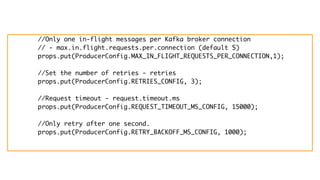
//Only one in-flight messages per Kafka broker connection
// - max.in.flight.requests.per.connection (default 5)
props.put(ProducerConfig.MAX_IN_FLIGHT_REQUESTS_PER_CONNECTION,1);
//Set the number of retries - retries
props.put(ProducerConfig.RETRIES_CONFIG, 3);
//Request timeout - request.timeout.ms
props.put(ProducerConfig.REQUEST_TIMEOUT_MS_CONFIG, 15000);
//Only retry after one second.
props.put(ProducerConfig.RETRY_BACKOFF_MS_CONFIG, 1000);
import java.util.Properties;
import org.apache.kafka.clients.producer.Producer;
import org.apache.kafka.clients.producer.KafkaProducer;
import org.apache.kafka.clients.producer.ProducerRecord;
public class SimpleProducer {
public static void main(String[] args) throws Exception{
String topicName = “testtopic”;
Properties props = new Properties();
props.put("bootstrap.servers", “localhost:9092");
props.put("acks", “all");
props.put("retries", 0);
props.put("batch.size", 16384);
props.put("linger.ms", 1);
props.put("buffer.memory", 33554432);
props.put("key.serializer",
"org.apache.kafka.common.serialization.StringSerializer");
props.put("value.serializer",
"org.apache.kafka.common.serialization.StringSerializer");
Producer<String, String> producer = new KafkaProducer
<String, String>(props);
for(int i = 0; i < 10; i++)
producer.send(new ProducerRecord<String, String>(topicName,
Integer.toString(i), “This is my message: “ + Integer.toString(i)));
System.out.println(“Message sent successfully”);
producer.close();
}
}
byte[] Serdes.ByteArray(), Serdes.Bytes()
ByteBuffer Serdes.ByteBuffer()
Double Serdes.Double()
Integer Serdes.Integer()
Long Serdes.Long()
String Serdes.String()
JSON JsonPOJOSerializer()/Deserializer()
Serialize/Deserialize Types
Consumers
public class SimpleConsumer {
public static void main(String[] args) throws Exception {
if(args.length == 0){
System.out.println("Enter topic name");
return;
}
//Kafka consumer configuration settings
String topicName = args[0].toString();
Properties props = new Properties();
props.put("bootstrap.servers", "localhost:9092");
props.put("group.id", "test");
props.put("enable.auto.commit", "true");
props.put("auto.commit.interval.ms", "1000");
props.put("session.timeout.ms", "30000");
props.put("key.deserializer",
"org.apache.kafka.common.serialization.StringDeserializer");
props.put("value.deserializer",
"org.apache.kafka.common.serialization.StringDeserializer");
KafkaConsumer<String, String> consumer = new KafkaConsumer
<String, String>(props);
//Kafka Consumer subscribes list of topics here.
consumer.subscribe(Arrays.asList(topicName))
//print the topic name
System.out.println("Subscribed to topic " + topicName);
int i = 0;
while (true) {
ConsumerRecords<String, String> records = consumer.poll(100);
for (ConsumerRecord<String, String> record : records)
// print the offset,key and value for the consumer records.
System.out.printf("offset = %d, key = %s, value = %sn",
record.offset(), record.key(), record.value());
}
}
}
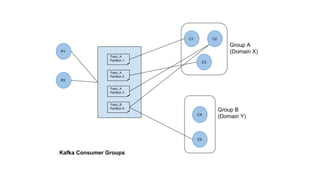
Consumer Groups
Consumer Group Offsets
The offset is a simple integer number that is used
by Kafka to maintain the current position of a
consumer.
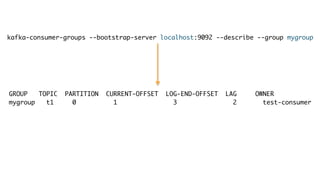
kafka-consumer-groups --bootstrap-server localhost:9092 --describe --group mygroup
GROUP TOPIC PARTITION CURRENT-OFFSET LOG-END-OFFSET LAG OWNER
mygroup t1 0 1 3 2 test-consumer
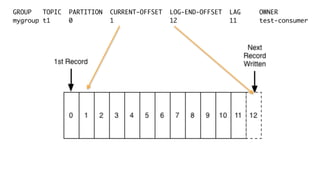
GROUP TOPIC PARTITION CURRENT-OFFSET LOG-END-OFFSET LAG OWNER
mygroup t1 0 1 12 11 test-consumer
Streaming API
public class WordCountLambdaExample {
static final String inputTopic = "streams-plaintext-input";
static final String outputTopic = "streams-wordcount-output";
/**
* The Streams application as a whole can be launched like any normal Java application that has a `main()` method.
*/
public static void main(final String[] args) {
final String bootstrapServers = args.length > 0 ? args[0] : "localhost:9092";
// Configure the Streams application.
final Properties streamsConfiguration = getStreamsConfiguration(bootstrapServers);
// Define the processing topology of the Streams application.
final StreamsBuilder builder = new StreamsBuilder();
createWordCountStream(builder);
final KafkaStreams streams = new KafkaStreams(builder.build(), streamsConfiguration);
streams.cleanUp();
streams.start();
Runtime.getRuntime().addShutdownHook(new Thread(streams::close));
}
static Properties getStreamsConfiguration(final String bootstrapServers) {
final Properties streamsConfiguration = new Properties();
streamsConfiguration.put(StreamsConfig.APPLICATION_ID_CONFIG, "wordcount-lambda-example");
streamsConfiguration.put(StreamsConfig.CLIENT_ID_CONFIG, "wordcount-lambda-example-client");
streamsConfiguration.put(StreamsConfig.BOOTSTRAP_SERVERS_CONFIG, bootstrapServers);
streamsConfiguration.put(StreamsConfig.DEFAULT_KEY_SERDE_CLASS_CONFIG, Serdes.String().getClass().getName());
streamsConfiguration.put(StreamsConfig.DEFAULT_VALUE_SERDE_CLASS_CONFIG, Serdes.String().getClass().getName());
streamsConfiguration.put(StreamsConfig.COMMIT_INTERVAL_MS_CONFIG, 10 * 1000);
streamsConfiguration.put(StreamsConfig.CACHE_MAX_BYTES_BUFFERING_CONFIG, 0);
streamsConfiguration.put(StreamsConfig.STATE_DIR_CONFIG, TestUtils.tempDirectory().getAbsolutePath());
return streamsConfiguration;
}
static void createWordCountStream(final StreamsBuilder builder) {
final KStream<String, String> textLines = builder.stream(inputTopic);
final Pattern pattern = Pattern.compile("W+", Pattern.UNICODE_CHARACTER_CLASS);
final KTable<String, Long> wordCounts = textLines
.flatMapValues(value -> Arrays.asList(pattern.split(value.toLowerCase())))
.groupBy((keyIgnored, word) -> word)
.count();
wordCounts.toStream().to(outputTopic, Produced.with(Serdes.String(), Serdes.Long()));
}
}
https://www.confluent.io/blog/introducing-kafka-streams-stream-processing-made-simple/
Supports exactly once transactions! Yay!
I know what you’re thinking…...
processing.guarantee=exactly_once
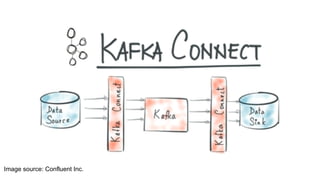
What is Kafka Connect?
Provides a mechanism for
data sources and data
sinks.
Image source: Confluent Inc.
Data Source
Data from a thing (Database,
Twitter stream, Logstash etc)
going to Kafka.
Data Sink
Data going from Kafka to a
thing (Database, file,
ElasticSearch)
There are many
community connector
plugins that will fit most
needs.
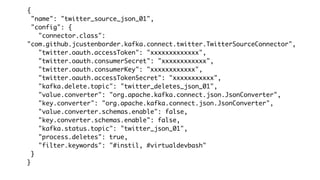
A Source Example
{
"name": "twitter_source_json_01",
"config": {
"connector.class":
"com.github.jcustenborder.kafka.connect.twitter.TwitterSourceConnector",
"twitter.oauth.accessToken": "xxxxxxxxxxxxx",
"twitter.oauth.consumerSecret": "xxxxxxxxxxxx",
"twitter.oauth.consumerKey": "xxxxxxxxxxxx",
"twitter.oauth.accessTokenSecret": "xxxxxxxxxxx",
"kafka.delete.topic": "twitter_deletes_json_01",
"value.converter": "org.apache.kafka.connect.json.JsonConverter",
"key.converter": "org.apache.kafka.connect.json.JsonConverter",
"value.converter.schemas.enable": false,
"key.converter.schemas.enable": false,
"kafka.status.topic": "twitter_json_01",
"process.deletes": true,
"filter.keywords": "#instil, #virtualdevbash"
}
}
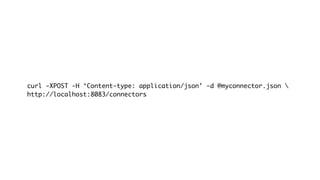
curl -XPOST -H ‘Content-type: application/json’ -d @myconnector.json 
http://localhost:8083/connectors
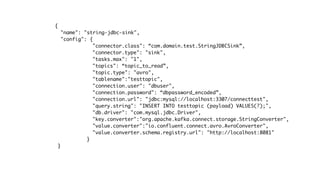
A Sink Example
{
"name": "string-jdbc-sink",
"config": {
"connector.class": “com.domain.test.StringJDBCSink”,
"connector.type": "sink",
"tasks.max": "1",
"topics": “topic_to_read”,
"topic.type": "avro",
"tablename":"testtopic",
"connection.user": "dbuser",
"connection.password": “dbpassword_encoded”,
"connection.url": "jdbc:mysql://localhost:3307/connecttest",
"query.string": "INSERT INTO testtopic (payload) VALUES(?);",
"db.driver": "com.mysql.jdbc.Driver",
"key.converter":"org.apache.kafka.connect.storage.StringConverter",
"value.converter":"io.confluent.connect.avro.AvroConverter",
"value.converter.schema.registry.url": "http://localhost:8081"
}
}
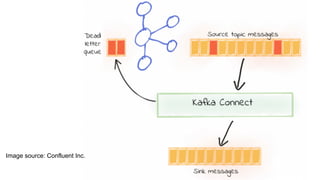
Dead Letter Queues
Sometimes stuff doesn’t
work……
Image source: Confluent Inc.
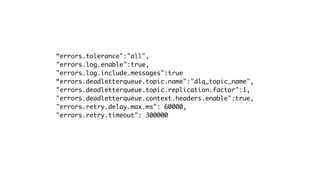
“errors.tolerance":"all",
"errors.log.enable":true,
"errors.log.include.messages":true
“errors.deadletterqueue.topic.name":"dlq_topic_name",
"errors.deadletterqueue.topic.replication.factor":1,
"errors.deadletterqueue.context.headers.enable":true,
"errors.retry.delay.max.ms": 60000,
"errors.retry.timeout": 300000
Monitoring
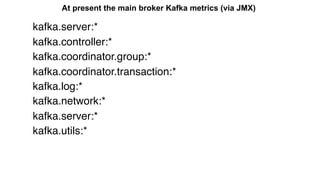
At present the main broker Kafka metrics (via JMX)
kafka.server:*
kafka.controller:*
kafka.coordinator.group:*
kafka.coordinator.transaction:*
kafka.log:*
kafka.network:*
kafka.server:*
kafka.utils:*
Topic Level Fetch Metrics
MBean: kafka.consumer:type=consumer-fetch-manager-metrics,client-id=([-.w]+),topic=([-.w]+)
Key Name Description
fetch-size-avg The average number of bytes fetched per
request for a specific topic.
fetch-size-max The maximum number of bytes fetched per
request for a specific topic.
bytes-consumed-rate The average number of bytes consumed
per second for a specific topic.
records-per-request-avg The average number of records in each
request for a specific topic.
records-consumed-rate The average number of records consumed
per second for a specific topic.
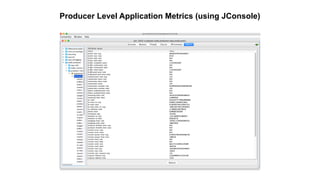
Producer Level Application Metrics (using JConsole)
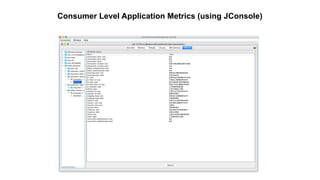
Consumer Level Application Metrics (using JConsole)
Thank you.
Twitter: @digitalis_io Web: https://digitalis.io

Virtual Bash! A Lunchtime Introduction to Kafka

  • 1.
  • 2.
    Wrote this…. Works withthis amazing bunch.
  • 3.
    The Rules Haven’tChanged…… You may heckle via Twitter….. @jasonbelldata It’s Friday, you might as well. It’s in print, no one can argue…..
  • 4.
  • 5.
  • 7.
    Think of itlike this…..
  • 8.
  • 9.
  • 10.
  • 11.
  • 12.
  • 13.
  • 14.
  • 15.
    Kafka is anevent processing platform which is based on a distributed architecture.
  • 16.
    Kafka is anevent processing platform which is based on a distributed architecture. To producers and consumer subscribed to the system it would appear as a standalone processing engine but production systems are built on many machines.
  • 17.
    Kafka is anevent processing platform which is based on a distributed architecture. To producers and consumer subscribed to the system it would appear as a standalone processing engine but production systems are built on many machines. It can handle millions of messages throughput, dependent on physical disk and RAM on the machines, and is fault tolerant.
  • 19.
    Messages are sentto topics which are written sequentially in an immutable log. Kafka can support many topics and can be replicated and partitioned.
  • 20.
    Once the recordsare appended to the topic log they can’t be deleted or amended.
  • 21.
    (If the customerwants you to “replay from the start”, well they can’t)
  • 22.
    It’s a verysimple data structure where each message is byte encoded.
  • 23.
    Each Message has: Akey A value (payload) A timestamp A header (for meta data)
  • 24.
    Producers and consumerscan serialise and deserialise data to various formats. (I’ll talk about that later)
  • 25.
  • 26.
  • 27.
  • 28.
  • 34.
  • 37.
  • 38.
  • 39.
    bin/kafka-topics --create -–zookeeperlocalhost:2181 --replication-factor 4 --partitions 10 --topic testtopic --config min.insync.replicas=2
  • 40.
  • 41.
  • 42.
  • 43.
    $ bin/kafka-topics --zookeeperlocalhost:2181 --delete --topic testtopic Topic testtopic is marked for deletion. Note: This will have no impact if delete.topic.enable is not set to true.
  • 44.
  • 45.
  • 46.
    log.retention.hours log.retention.minutes log.retention.ms The default is168 hours (7 days) if not set. Note: The smallest value setting take priority, be careful!
  • 47.
  • 48.
    log.retention.bytes Defines volume oflog bytes retained. Applied per partition, so if set to 1GB and you have 8 partitions, you are storing 8GB.
  • 49.
  • 50.
    C/C++ github.com/edenhill/librdkafka Go github.com/confluentinc/confluent-kafka-go JavaKafka Consumer and Kafka Producer JMS JMS Client .NET github.com/confluentinc/confluent-kafka-dotnet Python github.com/confluentinc/confluent-kafka-python Client Library Language Support
  • 51.
    Client Libraries: Javaand Go. Java: Full support for all API features. Go: Exactly once semantics Kafka Streams Schema Registry Simplified Installation Are NOT supported.
  • 52.
  • 53.
    Producers (Sends messages tothe Kafka Cluster)
  • 54.
    import java.util.Properties; import org.apache.kafka.clients.producer.Producer; importorg.apache.kafka.clients.producer.KafkaProducer; import org.apache.kafka.clients.producer.ProducerRecord; public class SimpleProducer { public static void main(String[] args) throws Exception{ String topicName = “testtopic”; Properties props = new Properties(); props.put("bootstrap.servers", “localhost:9092"); props.put("acks", “all"); props.put("retries", 0); props.put("batch.size", 10); props.put("linger.ms", 1); props.put("buffer.memory", 33554432); props.put("key.serializer", "org.apache.kafka.common.serialization.StringSerializer"); props.put("value.serializer", "org.apache.kafka.common.serialization.StringSerializer"); Producer<String, String> producer = new KafkaProducer <String, String>(props); for(int i = 0; i < 10; i++) producer.send(new ProducerRecord<String, String>(topicName, Integer.toString(i), “This is my message: “ + Integer.toString(i))); System.out.println(“Message sent successfully”); producer.close(); } }
  • 55.
    import java.util.Properties; import org.apache.kafka.clients.producer.Producer; importorg.apache.kafka.clients.producer.KafkaProducer; import org.apache.kafka.clients.producer.ProducerRecord; public class SimpleProducer { public static void main(String[] args) throws Exception{ String topicName = “testtopic”; Properties props = new Properties(); props.put("bootstrap.servers", “localhost:9092"); props.put("acks", “all"); props.put("retries", 0); props.put("batch.size", 10); props.put("linger.ms", 1); props.put("buffer.memory", 33554432); props.put("key.serializer", "org.apache.kafka.common.serialization.StringSerializer"); props.put("value.serializer", "org.apache.kafka.common.serialization.StringSerializer"); Producer<String, String> producer = new KafkaProducer <String, String>(props); for(int i = 0; i < 10; i++) producer.send(new ProducerRecord<String, String>(topicName, Integer.toString(i), “This is my message: “ + Integer.toString(i))); System.out.println(“Message sent successfully”); producer.close(); } }
  • 56.
    props.put("acks", “all"); Value Action -1/allMessage has been received by the leader and followers. 0 Fire and Forget 1 Once the message is received by the leader.
  • 58.
    public class ProducerWithCallbackimplements ProducerInterceptor{ private int onSendCount; private int onAckCount; private final Logger logger = LoggerFactory.getLogger(ProducerWithCallback.class); @Override public ProducerRecord onSend(final ProducerRecord record) { onSendCount++; System.out.println(String.format("onSend topic=%s key=%s value=%s %d n", record.topic(), record.key(), record.value().toString(), record.partition())); return record; } @Override public void onAcknowledgement(final RecordMetadata metadata, final Exception exception) { onAckCount++; System.out.println(String.format("onAck topic=%s, part=%d, offset=%dn", metadata.topic(), metadata.partition(), metadata.offset())); } @Override public void close() { System.out.println("Total sent: " + onSendCount); System.out.println("Total acks: " + onAckCount); } @Override public void configure(Map<String,?> configs) { } }
  • 59.
    import java.util.Properties; import org.apache.kafka.clients.producer.Producer; importorg.apache.kafka.clients.producer.KafkaProducer; import org.apache.kafka.clients.producer.ProducerRecord; public class SimpleProducer { public static void main(String[] args) throws Exception{ String topicName = “testtopic”; Properties props = new Properties(); props.put("bootstrap.servers", “localhost:9092"); props.put("acks", “all"); props.put("retries", 0); props.put("batch.size", 10); props.put("linger.ms", 1); props.put("buffer.memory", 33554432); props.put("key.serializer", "org.apache.kafka.common.serialization.StringSerializer"); props.put("value.serializer", "org.apache.kafka.common.serialization.StringSerializer"); Producer<String, String> producer = new KafkaProducer <String, String>(props); for(int i = 0; i < 10; i++) producer.send(new ProducerRecord<String, String>(topicName, Integer.toString(i), “This is my message: “ + Integer.toString(i))); System.out.println(“Message sent successfully”); producer.close(); } }
  • 60.
    //Only one in-flightmessages per Kafka broker connection // - max.in.flight.requests.per.connection (default 5) props.put(ProducerConfig.MAX_IN_FLIGHT_REQUESTS_PER_CONNECTION,1); //Set the number of retries - retries props.put(ProducerConfig.RETRIES_CONFIG, 3); //Request timeout - request.timeout.ms props.put(ProducerConfig.REQUEST_TIMEOUT_MS_CONFIG, 15000); //Only retry after one second. props.put(ProducerConfig.RETRY_BACKOFF_MS_CONFIG, 1000);
  • 61.
    import java.util.Properties; import org.apache.kafka.clients.producer.Producer; importorg.apache.kafka.clients.producer.KafkaProducer; import org.apache.kafka.clients.producer.ProducerRecord; public class SimpleProducer { public static void main(String[] args) throws Exception{ String topicName = “testtopic”; Properties props = new Properties(); props.put("bootstrap.servers", “localhost:9092"); props.put("acks", “all"); props.put("retries", 0); props.put("batch.size", 16384); props.put("linger.ms", 1); props.put("buffer.memory", 33554432); props.put("key.serializer", "org.apache.kafka.common.serialization.StringSerializer"); props.put("value.serializer", "org.apache.kafka.common.serialization.StringSerializer"); Producer<String, String> producer = new KafkaProducer <String, String>(props); for(int i = 0; i < 10; i++) producer.send(new ProducerRecord<String, String>(topicName, Integer.toString(i), “This is my message: “ + Integer.toString(i))); System.out.println(“Message sent successfully”); producer.close(); } }
  • 62.
    byte[] Serdes.ByteArray(), Serdes.Bytes() ByteBufferSerdes.ByteBuffer() Double Serdes.Double() Integer Serdes.Integer() Long Serdes.Long() String Serdes.String() JSON JsonPOJOSerializer()/Deserializer() Serialize/Deserialize Types
  • 63.
  • 64.
    public class SimpleConsumer{ public static void main(String[] args) throws Exception { if(args.length == 0){ System.out.println("Enter topic name"); return; } //Kafka consumer configuration settings String topicName = args[0].toString(); Properties props = new Properties(); props.put("bootstrap.servers", "localhost:9092"); props.put("group.id", "test"); props.put("enable.auto.commit", "true"); props.put("auto.commit.interval.ms", "1000"); props.put("session.timeout.ms", "30000"); props.put("key.deserializer", "org.apache.kafka.common.serialization.StringDeserializer"); props.put("value.deserializer", "org.apache.kafka.common.serialization.StringDeserializer"); KafkaConsumer<String, String> consumer = new KafkaConsumer <String, String>(props); //Kafka Consumer subscribes list of topics here. consumer.subscribe(Arrays.asList(topicName)) //print the topic name System.out.println("Subscribed to topic " + topicName); int i = 0; while (true) { ConsumerRecords<String, String> records = consumer.poll(100); for (ConsumerRecord<String, String> record : records) // print the offset,key and value for the consumer records. System.out.printf("offset = %d, key = %s, value = %sn", record.offset(), record.key(), record.value()); } } }
  • 65.
  • 67.
  • 68.
    The offset isa simple integer number that is used by Kafka to maintain the current position of a consumer.
  • 69.
    kafka-consumer-groups --bootstrap-server localhost:9092--describe --group mygroup GROUP TOPIC PARTITION CURRENT-OFFSET LOG-END-OFFSET LAG OWNER mygroup t1 0 1 3 2 test-consumer
  • 70.
    GROUP TOPIC PARTITIONCURRENT-OFFSET LOG-END-OFFSET LAG OWNER mygroup t1 0 1 12 11 test-consumer
  • 71.
  • 72.
    public class WordCountLambdaExample{ static final String inputTopic = "streams-plaintext-input"; static final String outputTopic = "streams-wordcount-output"; /** * The Streams application as a whole can be launched like any normal Java application that has a `main()` method. */ public static void main(final String[] args) { final String bootstrapServers = args.length > 0 ? args[0] : "localhost:9092"; // Configure the Streams application. final Properties streamsConfiguration = getStreamsConfiguration(bootstrapServers); // Define the processing topology of the Streams application. final StreamsBuilder builder = new StreamsBuilder(); createWordCountStream(builder); final KafkaStreams streams = new KafkaStreams(builder.build(), streamsConfiguration); streams.cleanUp(); streams.start(); Runtime.getRuntime().addShutdownHook(new Thread(streams::close)); } static Properties getStreamsConfiguration(final String bootstrapServers) { final Properties streamsConfiguration = new Properties(); streamsConfiguration.put(StreamsConfig.APPLICATION_ID_CONFIG, "wordcount-lambda-example"); streamsConfiguration.put(StreamsConfig.CLIENT_ID_CONFIG, "wordcount-lambda-example-client"); streamsConfiguration.put(StreamsConfig.BOOTSTRAP_SERVERS_CONFIG, bootstrapServers); streamsConfiguration.put(StreamsConfig.DEFAULT_KEY_SERDE_CLASS_CONFIG, Serdes.String().getClass().getName()); streamsConfiguration.put(StreamsConfig.DEFAULT_VALUE_SERDE_CLASS_CONFIG, Serdes.String().getClass().getName()); streamsConfiguration.put(StreamsConfig.COMMIT_INTERVAL_MS_CONFIG, 10 * 1000); streamsConfiguration.put(StreamsConfig.CACHE_MAX_BYTES_BUFFERING_CONFIG, 0); streamsConfiguration.put(StreamsConfig.STATE_DIR_CONFIG, TestUtils.tempDirectory().getAbsolutePath()); return streamsConfiguration; } static void createWordCountStream(final StreamsBuilder builder) { final KStream<String, String> textLines = builder.stream(inputTopic); final Pattern pattern = Pattern.compile("W+", Pattern.UNICODE_CHARACTER_CLASS); final KTable<String, Long> wordCounts = textLines .flatMapValues(value -> Arrays.asList(pattern.split(value.toLowerCase()))) .groupBy((keyIgnored, word) -> word) .count(); wordCounts.toStream().to(outputTopic, Produced.with(Serdes.String(), Serdes.Long())); } }
  • 73.
  • 74.
    Supports exactly oncetransactions! Yay!
  • 75.
    I know whatyou’re thinking…...
  • 77.
  • 78.
    What is KafkaConnect?
  • 79.
    Provides a mechanismfor data sources and data sinks.
  • 80.
  • 81.
    Data Source Data froma thing (Database, Twitter stream, Logstash etc) going to Kafka.
  • 82.
    Data Sink Data goingfrom Kafka to a thing (Database, file, ElasticSearch)
  • 83.
    There are many communityconnector plugins that will fit most needs.
  • 84.
  • 85.
    { "name": "twitter_source_json_01", "config": { "connector.class": "com.github.jcustenborder.kafka.connect.twitter.TwitterSourceConnector", "twitter.oauth.accessToken":"xxxxxxxxxxxxx", "twitter.oauth.consumerSecret": "xxxxxxxxxxxx", "twitter.oauth.consumerKey": "xxxxxxxxxxxx", "twitter.oauth.accessTokenSecret": "xxxxxxxxxxx", "kafka.delete.topic": "twitter_deletes_json_01", "value.converter": "org.apache.kafka.connect.json.JsonConverter", "key.converter": "org.apache.kafka.connect.json.JsonConverter", "value.converter.schemas.enable": false, "key.converter.schemas.enable": false, "kafka.status.topic": "twitter_json_01", "process.deletes": true, "filter.keywords": "#instil, #virtualdevbash" } }
  • 86.
    curl -XPOST -H‘Content-type: application/json’ -d @myconnector.json http://localhost:8083/connectors
  • 87.
  • 88.
    { "name": "string-jdbc-sink", "config": { "connector.class":“com.domain.test.StringJDBCSink”, "connector.type": "sink", "tasks.max": "1", "topics": “topic_to_read”, "topic.type": "avro", "tablename":"testtopic", "connection.user": "dbuser", "connection.password": “dbpassword_encoded”, "connection.url": "jdbc:mysql://localhost:3307/connecttest", "query.string": "INSERT INTO testtopic (payload) VALUES(?);", "db.driver": "com.mysql.jdbc.Driver", "key.converter":"org.apache.kafka.connect.storage.StringConverter", "value.converter":"io.confluent.connect.avro.AvroConverter", "value.converter.schema.registry.url": "http://localhost:8081" } }
  • 89.
  • 90.
  • 91.
  • 92.
  • 93.
  • 94.
    At present themain broker Kafka metrics (via JMX) kafka.server:* kafka.controller:* kafka.coordinator.group:* kafka.coordinator.transaction:* kafka.log:* kafka.network:* kafka.server:* kafka.utils:*
  • 95.
    Topic Level FetchMetrics MBean: kafka.consumer:type=consumer-fetch-manager-metrics,client-id=([-.w]+),topic=([-.w]+) Key Name Description fetch-size-avg The average number of bytes fetched per request for a specific topic. fetch-size-max The maximum number of bytes fetched per request for a specific topic. bytes-consumed-rate The average number of bytes consumed per second for a specific topic. records-per-request-avg The average number of records in each request for a specific topic. records-consumed-rate The average number of records consumed per second for a specific topic.
  • 96.
    Producer Level ApplicationMetrics (using JConsole)
  • 97.
    Consumer Level ApplicationMetrics (using JConsole)
  • 98.
    Thank you. Twitter: @digitalis_ioWeb: https://digitalis.io